V-AC906 - Battery charger Valore - Free user manual and instructions
Find the device manual for free V-AC906 Valore in PDF.


| Product Type | Battery Charger |
| Brand | Valore |
| Model | V-AC906 |
| Input Voltage | AC 100-240V, 50/60Hz |
| Output Voltage | DC 12V / 24V |
| Output Current | 1A (12V) / 0.5A (24V) |
| Compatible Battery Types | Lead-acid, AGM, Gel, SLA |
| Battery Capacity Range | 4Ah to 120Ah |
| Charging Stages | Bulk, Absorption, Float |
| Protection Features | Overcharge, Short Circuit, Reverse Polarity, Overheating |
| Indicators | Power LED, Charging Status LED |
| Dimensions (L x W x H) | 150 x 80 x 50 mm |
| Weight | 300 g |
| Cable Length | 1.5 m |
| Operating Temperature | 0°C to 40°C |
| Storage Temperature | -20°C to 60°C |
| Certifications | CE, RoHS |
| Maintenance | Keep dry, clean contacts, avoid dust |
| Safety Instructions | Use in ventilated area, do not cover charger |
| Spare Parts Availability | Contact Valore support for replacement cables or fuses |
| Repairability | User-replaceable fuse only; other repairs by qualified technician |
Frequently Asked Questions - V-AC906 Valore
User questions about V-AC906 Valore
0 question about this device. Answer the ones you know or ask your own.
Ask a new question about this device
Download the instructions for your Battery charger in PDF format for free! Find your manual V-AC906 - Valore and take your electronic device back in hand. On this page are published all the documents necessary for the use of your device. V-AC906 by Valore.
USER MANUAL V-AC906 Valore
Thank you for purchasing the Valore Wireless Charger.
A stylist companion to charge your Qi-compatible devices wirelessly without the need to plug your device into a wall charger or USB port.
Important: Please read the user manual thoroughly before using your wireless charger.
Specifications:
• Material: PC+PVC+Rubber
- Dimensions (Dia x H): 100 x 9.5mm
- Weight: 65g
- Charging distance: ≤ 8mm
- Working temperature : 0-45°C
Package
- Wireless charging pad
- Mirco USB charging cable
Contents
UNDERSTANDING THE PRODUCT


natural_image
Technical line drawing of a mechanical component with no visible text or symbols
① LED charging indicator
② LED power indicator
③ Non-slip pad
④ Non-slip pad
⑤ Micro USB charging port
START USING THE WIRELESS CHARGER
Plug the micro USB cable into the charging port located at the back of the wireless charger and connect it to a USB adapter to a wall plug or your laptop/PC. A red LED indicator will turn on when the charger is on power.
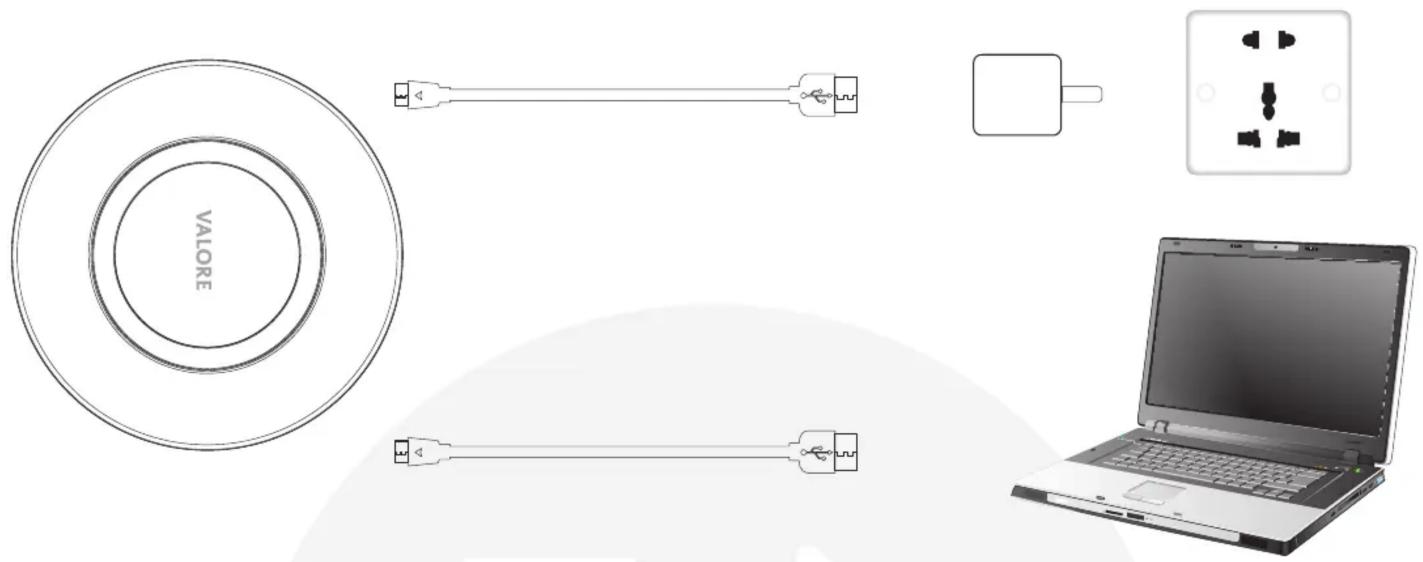
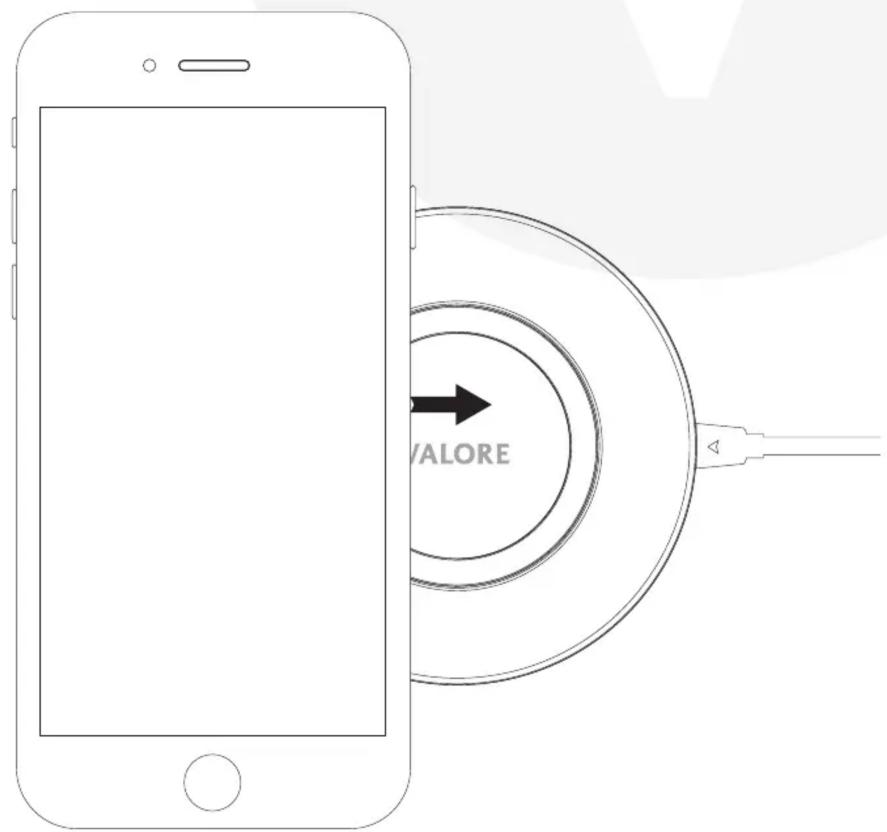
Place your phone on the wireless charger. Make sure that the phone is well located at the charging area of wireless charger. When the phone is being charged, the LED indicator will light up automatically to show charging status.
Note: This charger is for Qi enabled device only, device without built-in wireless charging receiver is required to purchase the receiver separately.
TECHNICAL SUPPORT & WARRANTY
- For Technical Support, email us at v.info@valore.sg.
- For Warranty Registration, visit www.valore.sg.
Cautions:
Read all the instructions and warnings carefully prior to using this product.
- Do not clean the wireless charger while it is being charged.
- Do not store the wireless charger in a high temperature environment.
- Do not place the wireless charger near a fire or other excessively hot environments.
- Do not expose the wireless charger to moisture or submerge it in liquid. Keep wireless charger dry at all times.
- Do not attempt to charge the wireless charger using any other method or connection other than the wireless charger's provided charging cable.
- Do not disassemble this wireless charger or attempt to repair or modify it in any manner.
- Be cautious of excessive drops, bumps, abrasions or other impacts to this wireless charger. If there is any damage to the wireless charger such as dents, punctures, tears, deformities or corrosion, stop using the wireless charger and contact us immediately via email at v.info@valore.sg, or return this product to the store where you have purchased it from.
- If the product produces an abnormal smell, high temperature (low temperature during normal use), discolours or changes shape abnormally, stop using the product and contact us immediately via email at v.info@valore.sg.
DISCLAIMER & TRADEMARKS
All information, trademarks, logos, graphics, and images (“Materials”) provided on this user manual are copyrighted or trademarked and are the property of Valore Lifestyle Pte Ltd. Any unauthorized use of any material contained on the instruction manual may violate copyright laws, trademark laws, laws of privacy and communications statutes.
The trademarks, service marks and logos used and displayed in the Materials are registered and unregistered trademarks and service marks of Valore and others. All other registered and unregistered company names, product names and marks mentioned herein the (“Materials”) are the property of their respective owners and may be trademarks or registered trademarks.
Brand : Valore
Model : V-AC906
Category : Battery charger