
DS-MH2211(B) - Action Camera Hikvision - Free user manual and instructions
Find the device manual for free DS-MH2211(B) Hikvision in PDF.


| Product Type | Action Camera |
| Brand | Hikvision |
| Model | DS-MH2211(B) |
| Dimensions | Approx. 60 x 40 x 25 mm |
| Weight | Approx. 80 g |
| Power Supply | Built-in rechargeable lithium-ion battery, USB-C charging |
| Video Resolution | Up to 4K @ 30fps |
| Photo Resolution | Up to 12 MP |
| Field of View | Wide-angle lens, up to 170° |
| Waterproof | With waterproof housing, up to 30m depth |
| Stabilization | Electronic image stabilization |
| Connectivity | Wi-Fi, Bluetooth |
| Memory | MicroSD card slot, up to 128 GB |
| Mounting | Standard tripod mount, adhesive mounts included |
| Display | 1.5-inch LCD screen |
| Battery Life | Approx. 1.5 hours at 4K recording |
| Maintenance | Wipe with dry cloth; avoid exposure to extreme temperatures |
| Safety | Do not disassemble; keep away from water when charging |
| Spare Parts | Battery, housing, adhesive mounts available |
| Repairability | Battery replaceable; other repairs by service center |
Frequently Asked Questions - DS-MH2211(B) Hikvision
User questions about DS-MH2211(B) Hikvision
0 question about this device. Answer the ones you know or ask your own.
Ask a new question about this device
Download the instructions for your Action Camera in PDF format for free! Find your manual DS-MH2211(B) - Hikvision and take your electronic device back in hand. On this page are published all the documents necessary for the use of your device. DS-MH2211(B) by Hikvision.
USER MANUAL DS-MH2211(B) Hikvision
DS-MH2211 Series Body Camera
natural_image
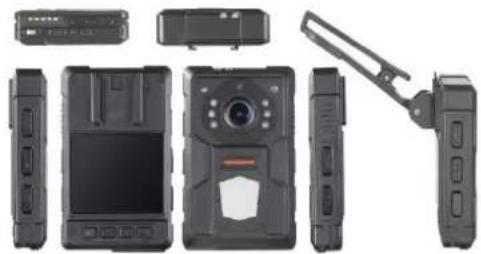
Exploded view of a black electronic device showing front, top, side, and rear views (no text or symbols visible)Introducon
DS-MH2211 Series body camera is a highly integrated device designed for security and law enforcement. It correctly records the image and audio of scene. Its small size, light weight, easy-to-carry, and easy-to-operate make it a good helper in law enforcement.
Main Features
• H.264/H.265 encoding technology.
- Recording resoluon is up to 1080p/30fps.
- 110^ wide-range lens.
- Dismountable baery design.
- A built-in small baery supplies power when replacing the main baery.
- Denoising technology helps to reduce noise and resist echo.
• Built-in GPS module.
• Light weight (127 g).
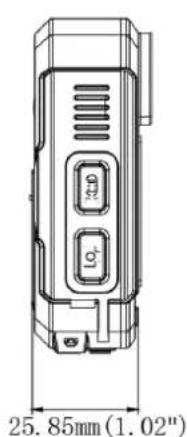
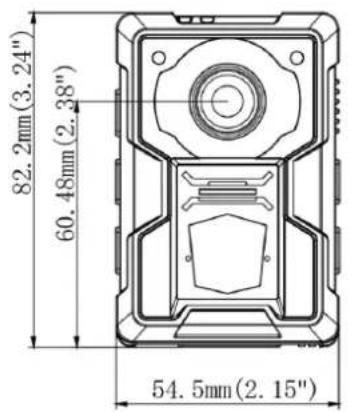
- Small size (81.5 × 54.5 × 26 mm)
IP65.
- 2.0" TFT LCD.
Available Models
DS-MH2211/32G, DS-MH2211/32G/GPS/WIFI
Specicaons
| Model | DS-MH2211/32G | DS-MH2211/32G/GPS/WIFI | |
| Sensor | Type | 1/3" CMOS | |
| FOV | Horizontal FOV: 110° | ||
| Display | Dimension | 2.0" TFT LCD | |
| Video Parameters | Video Input | 1080p | |
| Video Compression | H.264, H.265 | ||
| Video Resoluon | 1080p/30 fps, 720p/30 fps, 720 × 576/30 fps | ||
| Main stream | 1080p/30 fps | ||
| Sub-stream | 720p/30 fps | ||
| Video Format | MP4 | ||
| Picture Resoluon | Up to 30 MP | ||
| Picture Format | JPG | ||
| Shuer | Digital shuer | ||
| Day & Night | IR cut lter with auto switch | ||
| White Balance | Auto | ||
| Flashing Light | Supported | ||
| Laser Posioning | Supported | ||
| Storage | Capacity | A built-in storage chip of 32 GB | |
| Posioning | Satellite Posioning | Not supported | Built-in GPS module |
| Wireless Transmission | WI-FI | Not supported | Supported. 802.11b/g/n |
| General | Working Temperature | -20 °C to +55 °C (-4 °F to +131 °F) | |
| Working Humidity | ≤ 90% | ||
| Ingress Protecon Level | IP65 | ||
| Fall Protecon Height | 2 m | ||
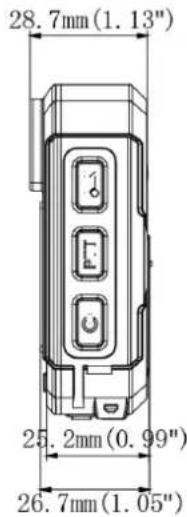
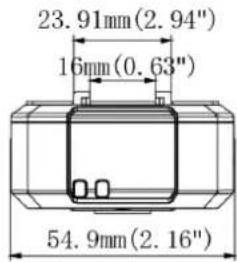
| Dimension (L × W × H) | 81.5 × 54.5 × 26 mm (3.2 × 2.1 × 1.0") | ||
| Weight | Body camera: 127 g (0.28 lb) | ||
| Others | Buons | Power switch, Recording buon, taping buon, capture buon, two-way audio buon, menu buon, up buon, down buon, OK buon. | |
| USB Interface | Mini USB 2.0 | ||
| Charging | Charging via USB interfaceMini USB interface, USB socket charger | ||
| Charging Duraon | 3 hours | ||
| Baery | A dismountable baery with 1,650 mAh capacity which can record videos for 4 hours. | ||
Typical Applicaon
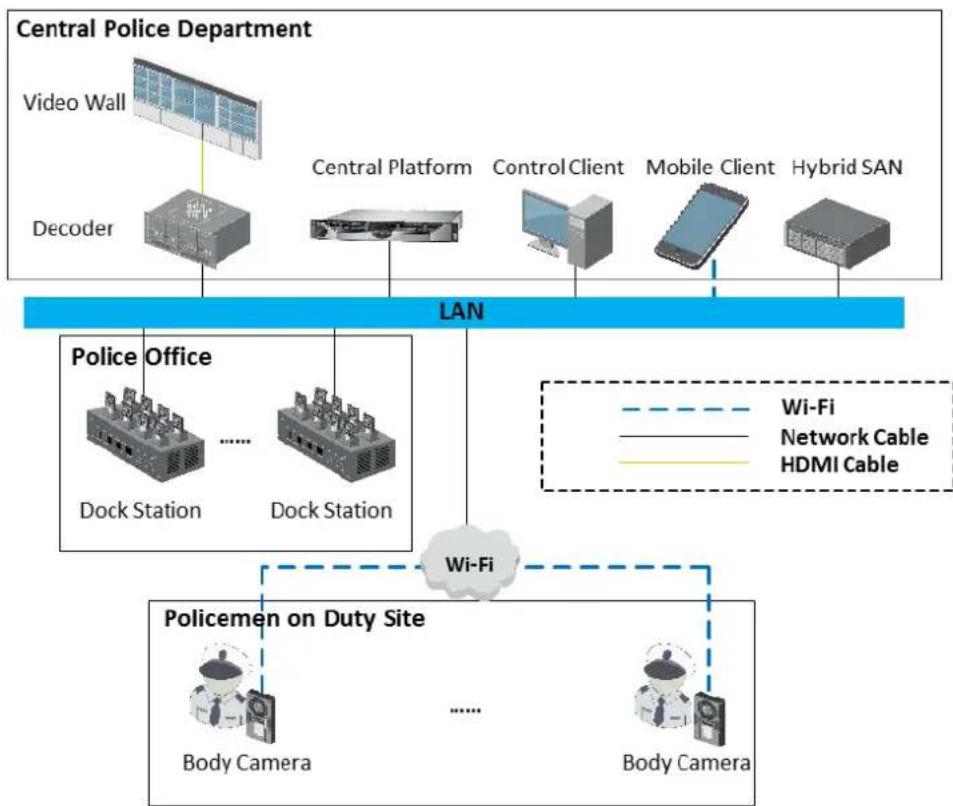
flowchart
graph TD
    A["Central Police Department"] --> B["Video Wall"]
    A --> C["Decoder"]
    B --> D["Central Platform"]
    C --> D
    D --> E["Control Client"]
    D --> F["Mobile Client"]
    D --> G["Hybrid SAN"]
    H["Police Office"] --> I["Dock Station"]
    H --> J["Dock Station"]
    K["Policemen on Duty Site"] --> L["Body Camera"]
    K --> M["Body Camera"]
    N["Wi-Fi"] --> K
    style A fill:#f9f,stroke:#333
    style H fill:#ccf,stroke:#333
    style K fill:#cfc,stroke:#333
Dimension
Distributed by


HIKVISION®
Headquarters
No.555 Qianmo Road, Binjiang District,
Hangzhou 310051, China
T+86-571-8807-5998
overseasbusiness@hikvision.com
Hikvision USA
T+1-809-895-0400
sales.usa@hlkvision.com
Hikvision Australia
T+61-2-8599-4233
salesau@hikvision.com
Hikvision India
T+91-22-28469900
sales@pramahikvision.com
Hikvision Canada
T+1-866-200-6690
sales.canada@hikvision.com
Hikvision Thailand
T+662-275-9949
sales.thailand@hikvision.com
Hikvision Europe
T+31-23-5542770
sales.eu@hikvision.com
Hikvision Italy
T+39-0438-6902
info.it@hikvision.com
Hikvision Brazil
T+55113318-0050
Latam.support@hikvision.com
Hikvision Turkey
T-90[216]5217070-7074
sales.tr@hikvision.com
Hikvision Malaysia
T+601-7652-2413
sales.my@hikvision.com
Hikvision UK & Ireland
T+01628-902140
sales.uk@hikvision.com
Hikvision South Africa
Tel: +27 (10) 0351172
sale.atrica@hikvision.com
Hikvision France
T+33[0]1-85-330-450
info.fr@hikvision.com
Hikvision Kazakhstan
T+7-727-9730667
nikia.panfilov@hikvision.ru
Hikvision Vietnam
T+84-974270888
sales.vt@hkvision.com
Hikvision UAE
T+971-4-4432090
salesme@hikvision.com
Hikvision Singapore
T+65-6684-4718
sg@hikvision.com
Hikvision Spain
T+34-91-737-16-55
info.es@hikvision.com
Hikvision Tashkent
1+99-87-1238-9438
uzb@hikvision.ru
Hikvision Hong Kong
T+852-2151-1761
info.hk@hikvision.com
Hikvision Russia
T+7-495-669-67-99
saleru@hikvision.com
Hikvision Korea
T +82-(0)31-731-8817
sales.korea@hikvision.com
Hikvision Poland
T+48-22-460-01-50
info.pl@hikvision.com
Hikvision Indonesia
T+62-21-2933759
Sales.Indonesia@hikvision.com
Hikvision Colombia
sales.colombia@hikvision.com
- DS-MH2211 Series Body Camera
- Introducon
- Main Features
- Available Models
- HIKVISION®
- Headquarters
- Hikvision USA
- Hikvision Australia
- Hikvision India
- Hikvision Canada
- Hikvision Thailand
- Hikvision Europe
- Hikvision Italy
- Hikvision Brazil
- Hikvision Turkey
- Hikvision Malaysia
- Hikvision UK & Ireland
- Hikvision South Africa
- Hikvision France
- Hikvision Kazakhstan
- Hikvision Vietnam
- Hikvision UAE
- Hikvision Singapore
- Hikvision Spain
- Hikvision Tashkent
- Hikvision Hong Kong
- Hikvision Russia
- Hikvision Korea
- Hikvision Poland
- Hikvision Indonesia
- Hikvision Colombia
Brand : Hikvision
Model : DS-MH2211(B)
Category : Action Camera