LASER 80 - Effects machine Karma - Free user manual and instructions
Find the device manual for free LASER 80 Karma in PDF.


| Product Type | Laser Effect Machine |
| Brand | Karma |
| Model | LASER 80 |
| Dimensions (L x W x H) | 12 x 8 x 5 inches |
| Weight | 3.5 lbs |
| Power Consumption | 30W |
| Power Supply | AC 100-240V, 50/60Hz |
| Laser Source | Class 3R laser diode |
| Laser Color | Red (650nm) |
| Output Power | 80mW |
| Number of Patterns | 15 built-in patterns |
| Control Modes | Auto, Sound-activated, DMX |
| DMX Channels | 3/7 channels selectable |
| Scanning System | Dual galvanometer scanners |
| Beam Specifications | Up to 100° scan angle |
| Cooling | Fan cooled |
| Housing Material | Aluminum and steel |
| Mounting Options | Floor stand or truss mount (bracket included) |
| Safety Features | Laser safety key, interlock, overheat protection |
| Cleaning Instructions | Wipe exterior with soft dry cloth; avoid solvents |
| Warranty | 1 year limited warranty |
Frequently Asked Questions - LASER 80 Karma
User questions about LASER 80 Karma
0 question about this device. Answer the ones you know or ask your own.
Ask a new question about this device
Download the instructions for your Effects machine in PDF format for free! Find your manual LASER 80 - Karma and take your electronic device back in hand. On this page are published all the documents necessary for the use of your device. LASER 80 by Karma.
USER MANUAL LASER 80 Karma
Thanks for your choice
The RIDEM product you have purchased is the result of careful planning by specialized engineers. High quality materials have been used for its construction, to ensure its functioning over time. The product is manufactured in compliance with strict regulations imposed by the European Union, a guarantee of reliability and safety. Please read this manual carefully before starting to use the fixture in order to exploit its full potential. We thank you again for your trust in our brand.
Safety Notes
- Keep this User Manual for future reference. If you sell the product to another user, be sure to give this manual to the next owner.
- This product is not suitable for outdoor use. To avoid the risk of fire or short-circuits never expose the fixture to rain or moisture.
- Do not operate the product in an ambient temperature higher than 35^ .
- In the event of a serious operating problem, stop using the product immediately. Never try to repair the product, but contact the authorized technical assistance center.
- Repairs carried out by untrained people can lead to damage both to the fixture and to persons.
- Make sure the power cord is not damaged.
- Lasers are subject to wear. Do not use them for extended periods of time. Low temperatures may be weaker.
Warranty Certificate
The product is covered by warranty, according to the current regulations. We suggest to keep the receipt or the invoice in order to use it, in case of necessity, as purchase proof.
- Damages caused by negligence or wrong use of the device are not covered by warranty.
- The warranty is no longer effective if the item is modified or disassembled by not authorized people.
- This warranty doesn't envisage the product's replacement.
- External components, batteries, knobs, switches and any removable or subject to wear and tear parts (such as laser's diods) are excluded from warranty.
- Shipment for the return of faulty items is at expense and risk of the owner.
- For all intents and porpuses the warranty is effective only upon exhibition of the invoice or of the purchase receipt
- For further informations pls contact our office or go to the website www.ridem.eu
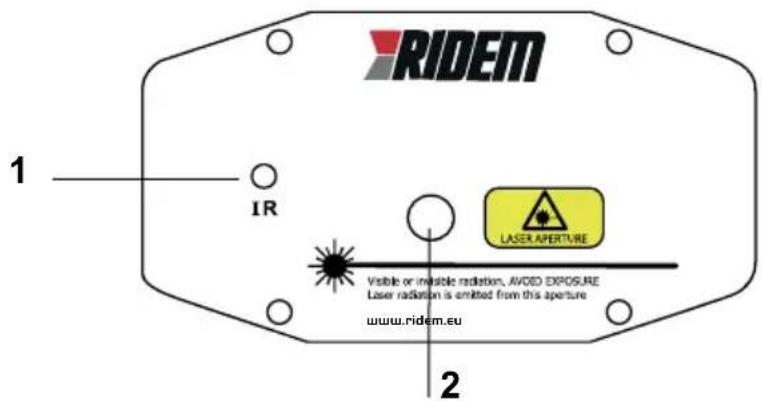
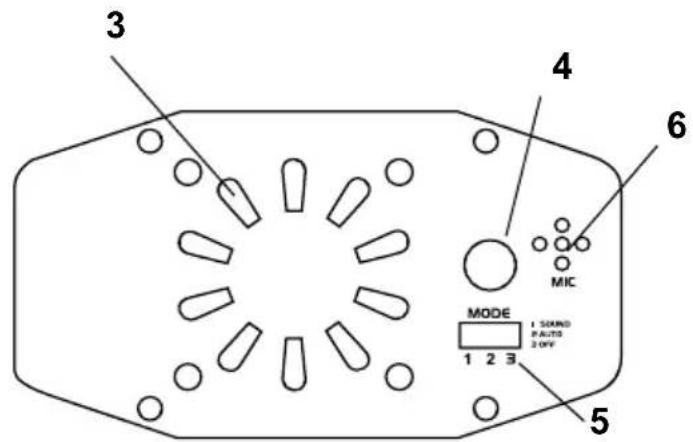
Once carried out these steps you are ready to use the device. The laser produces several effects that will light up the surrounding space. The laser can work in auto or sound activated mode. By acting on the selector (5) you can choose the desired function. In auto mode, the pictures created by the laser beams will change independently from music. In sound-activated mode, the laser will turn off if noise is absent and will start operating again as soon as sound is recognized by the microphone (6). Use the Mode (5) button to skip from one mode to another or to switch off the fixture. Be careful not to obstruct the cooling fan (3).
The laser rays are emitted from the aperture (2). Be careful to place the device in order to avoid the laser rays to hit directly people's eyes. Make sure that the laser is used by trained and skilled persons.
TELECOMANDO
Thanks to the included infrared remote control, you have the possibility to handle the main functions at a distance. The infrared sensor (1) is on the front part of the laser.
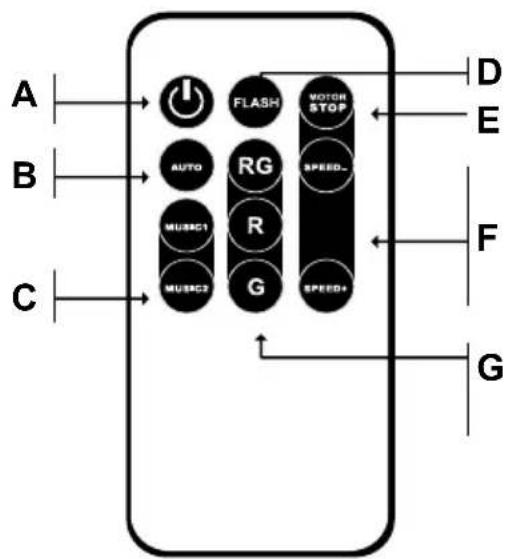
A) ON / OFF button
B) Auto mode (colour change)
C) Sound mode (Double option)
D) Flash mode
E) Motor stop
F) Speed adjustment buttons
G) Colour control in auto mode (red and green, red only, green only)
Potenza laser / Laser power:
80 mW : R 60mW(650nm) - G 20mW(532nm)
Assorbimento / Assorption: 30W
Telecomando / Remote control: incluso / Included
Classe / Class: 3 A
Colore / Color: Azzurro / Light blu
Dimensioni / Dimensions: 109 x 96 x 53 mm
Peso / Weight: 0,5 Kg
LASER LIGHT
AVOID DIRECT EYE EXPOSURE
CLASS 3A LASER PRODUCT
Conforme alle normative
EN 60825-1:2014
CAUTION
CLASS 3A LASER LIGHT WHEN OPEN
AVOID EXPOSURE TO THE BEAM
AVVERTENZE WARNINGS
Brand : Karma
Model : LASER 80
Category : Effects machine