TF38OSCT12RW - Ventilateur domestique ElectriQ - Free user manual and instructions
Find the device manual for free TF38OSCT12RW ElectriQ in PDF.


| Product Type | Domestic Fan |
| Model | TF38OSCT12RW |
| Brand | ElectriQ |
| Color | White |
| Fan Diameter | 12 inches (30 cm) |
| Power Supply | AC 220-240V, 50Hz |
| Power Consumption | 45W |
| Speed Settings | 3 speeds |
| Oscillation | Yes, wide-angle oscillation |
| Height Adjustment | Adjustable stand |
| Control Type | Remote control and manual buttons |
| Timer | 1-8 hours timer |
| Safety Features | Overheat protection, tip-over switch |
| Blade Material | ABS plastic |
| Grille Material | Steel wire |
| Noise Level | ≤ 55 dB |
| Dimensions (HxWxD) | 130 x 45 x 45 cm |
| Weight | 5.2 kg |
| Maintenance | Clean with soft damp cloth; do not immerse |
| Spare Parts | Available from ElectriQ service |
| Repairability | Modular design; user-replaceable parts |
| Warranty | 2 years |
Frequently Asked Questions - TF38OSCT12RW ElectriQ
User questions about TF38OSCT12RW ElectriQ
0 question about this device. Answer the ones you know or ask your own.
Ask a new question about this device
Download the instructions for your Ventilateur domestique in PDF format for free! Find your manual TF38OSCT12RW - ElectriQ and take your electronic device back in hand. On this page are published all the documents necessary for the use of your device. TF38OSCT12RW by ElectriQ.
USER MANUAL TF38OSCT12RW ElectriQ
natural_image
Line drawing of a tall vertical cylindrical device with a grid-patterned side panel, no text or symbols present.TF38OSCT12RW
36 INCH TOWER FAN
Thank you for choosing ElectriQ
Please read this user manual before using this air circulator and keep it safe for future reference.
Visit our page www.electrlQ.co.uk for our entire range of Intelligent Electricals
CONTENTS
SAFETY INSTRUCTIONS 3
FEATURES 4
DIAGRAM 4
INSTALLATION 5
OPERATION 5
CONTROL PANEL AND SETTINGS 5
LCD DISPLAY 6
REMOTE CONTROL 7
MAINTENANCE 7
TROUBLE SHOOTING 8
APPENDIX 8
SAFETY INSTRUCTIONS
Important!
- Carefully read the instructions before operating the unit
- This appliance is for indoor use only.
- Rating: This unit must be only connected to a 220-240 V / 50 Hz earthed outlet.
• Installation must be in accordance with regulations of the country where the unit is used.
- If you are in any doubt about the suitability of your electrical supply have it checked and, if necessary, modified by a qualified electrician.
- This fan has been tested and is safe to use. However, as with any electrical appliance - use it with care.
- Disconnect the power from the unit before dismantling, assembling or cleaning the unit
- Avoid touching any moving parts of the appliance.
- Never insert fingers, pencils or any other objects though the guard
- This appliance can be used by Children aged from 8 years and above and persons with reduced physical, sensory or mental capabilities or lack of experience and knowledge if they have been given supervision or instruction concerning use of the appliance in a safe way and understand the hazards involved. Children shall not play with the appliance. Cleaning and user maintenance shall not be made by children without supervision.
- Do not clean the unit by spraying it or immersing it in water.
- Never connect the unit to an electrical outlet using an extension cord. If an outlet is not available, one should be installed by a qualified electrician.
- Never operate this appliance if the cord or plug is damaged. Ensure the power cord is not stretched or exposed to sharp object/edges.
- A damaged supply cord should be replaced by the manufacturer or a qualified electrician in order to avoid a hazard.
- Any service other than regular cleaning should be performed by an authorized service representative. Failure to comply could result in a voided warranty.
- Do not use the appliance for any purpose other than for its intended use.
- Never use the mains plug as a switch to start and turn off the fan. Use the provided ON/OFF switch located on the control panel.
• Always place the unit on a dry and stable surface. Do not move or tilt the unit
- High Velocity fans are designed to create rapid air movement, therefore make sure the fan is not placed near curtains or any objects that may be drawn into the fan inlet.
- The appliance should not be installed in laundry or wet rooms
- Do not use this unit in environments with flammable and explosive gases.
- Avoid keeping the unit in direct sunlight for a long period of time
Energy Saving and Unit Safety Protection Tips
- Do not cover or restrict the airflow. Do not use in dusty environment.
- For maximum performance the minimum distance from a wall or objects should be 50cm.
Warning: To reduce the risk of fire or electrical shock, DO NOT USE THIS FAN with any SOLID STATE Speed Control Device or any variable speed controllers.
TF38OSCT12RW 38 Inch Tower Fan with 3 Speed Settings
FEATURES
- Slim design takes minimal space
● LED Display showing the current temperature.
● High Speed Motor with 3 Fan Speed Settings - Swing Function
● 12 hour standby timer. - Remote Control allowing all functions to be changed.
- Choice of modes allowing the operation of the unit to be adjusted to the environment.
DIAGRAM
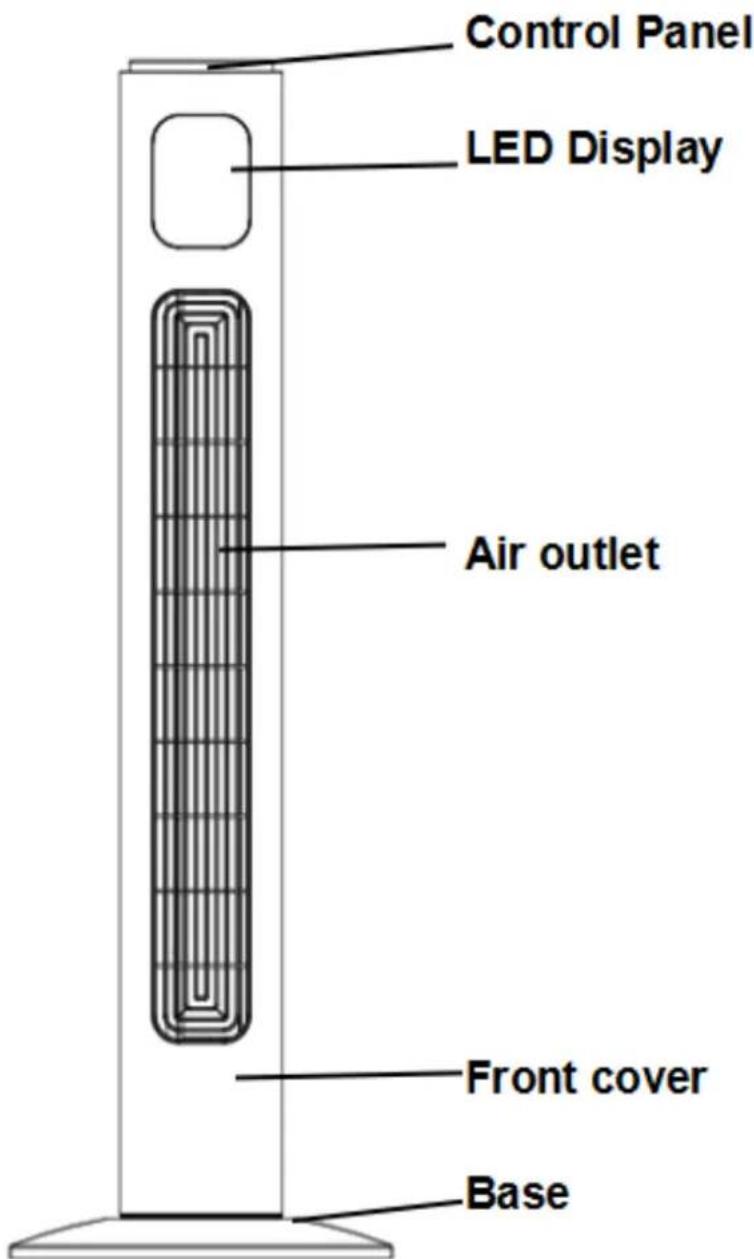
INSTALLATION
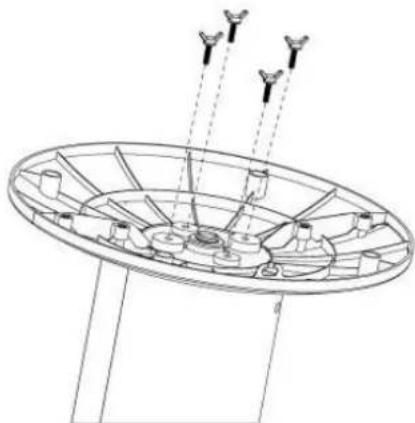
The base of the tower fan comes in two parts, which fit around the oscillation base. Both parts fit easily together. The back half is the one with cut-outs for the power supply cord.
- First attach the front half of the base, aligning the holes in base with the screw holes in the base of the fan, and lead the power cable through the center hole.
- Then attach the back half of the base to the front half and secure to the main body with the four supplied screws.
- Thread the power supply cord through the two clips in the underside of the base.
natural_image
Technical line drawing of a circular mechanical component with three protruding components and dashed lines indicating alignment (no text or symbols)OPERATION
Once assembled your fan may be operated by using either the manual controls located on the top of the fan or by your remote control.
CONTROL PANEL AND SETTINGS
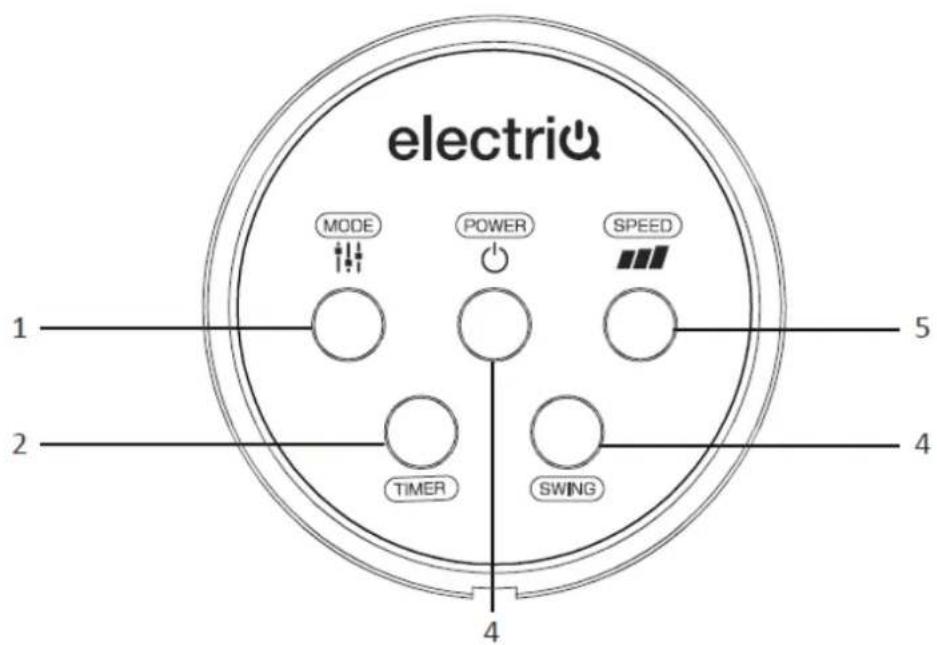
1. POWER BUTTON
Used to turn the tower fan ON and OFF.
2. SPEED BUTTON
Press to cycle through the three available fan speeds. Lo – Low Speed, M – Medium Speed and Hi – High Speed.
3. MODE /STYLE BUTTON
Press to cycle through the modes.
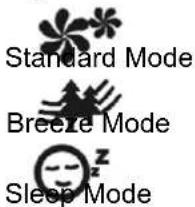
Standard Mode: The fan will operate normally
Natural Mode: The fan speed will vary to imitate a natural breeze.
Sleep Mode: The lights on the unit will switch off and the unit will operate gradually in lower mode
4. TIMER BUTTON
Press repeatedly to increase the running time in 30 minute intervals. The timer can be set between 30 minutes and 7.5 hours.
5. OSCILLATION (SWING) BUTTON
Press to turn the Swing function on and off. When it is operational the horizontal direction of the airflow is slowly moved from side to side.
LCD DISPLAY
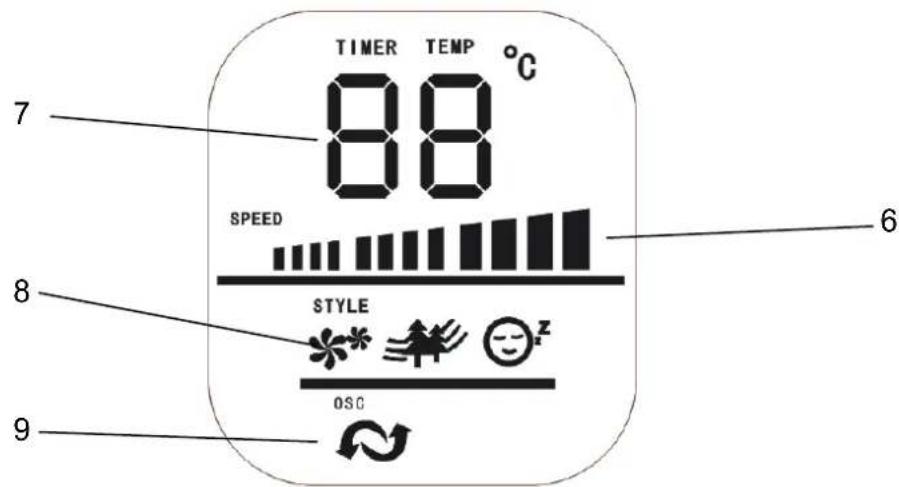
6. FAN SPEED DISPLAY
The length of the bars indicate which of the three fan speeds the unit is operating in:
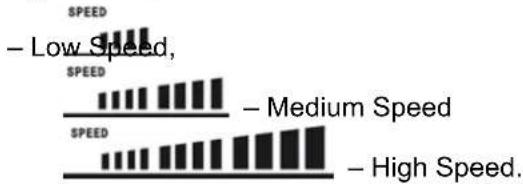
bar
| Category | Value | |---|---| | - Low Speed | 100 | | - Medium Speed | 80 | | - High Speed | 120 |7. TEMP / TIMER DISPLAY
The display shows the current room temperature. When the timer is operational, the display will change to show the timer's duration. The text above will show what figure is currently displayed.
8. MODE / STYLE INDICATOR
One symbol will be displayed to indicate the current mode (STYLE icon on the LCD)
9. Oscillation / Swing Indicator
The Oscillation symbol will be displayed when the oscillation/swing mode is active.
REMOTE CONTROL
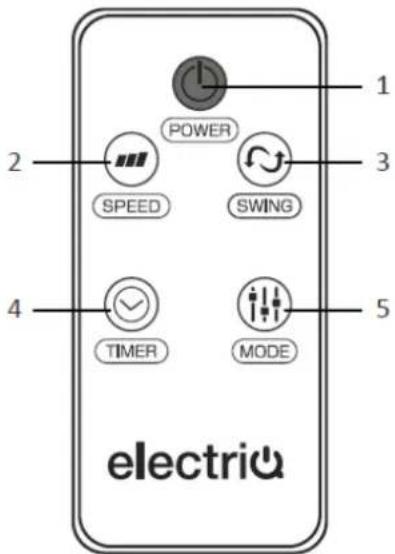
The Buttons on the remote have the same effect as the buttons on the main control panel.
| 1 | Power Button |
| 2 | Speed Button |
| 3 | Oscillation (Swing) Button |
| 4 | Timer Button |
| 5 | Mode Button |
The remote contains a button cell battery (CR2025)
MAINTENANCE
CLEANING AND STORAGE
ATTENTION: Please shut off the unit and unplug from the mains before cleaning or performing any maintenance.
Cleaning the surface
Clean the grills with a duster or a soft wet cloth.
Do not use chemical solvents (such as benzene, alcohol or gasoline) as they may cause irreversible damage. Make sure no water enters the control panel or fan motor
Do not run the unit until completely dry.
Place the fan in its original box or cover the fan to protect it from dust.
Store it in a cool dry place.
TROUBLESHOOTING
Do not repair or disassemble the unit by yourself, unauthorized repair attempts will invalidate the warranty and may cause bodily harm.
| Issue | Possible Reason | Solution |
| No power | Power cord is unconnectedThe There is no power from socketThe power switch is not on.The fuse has blown | Connect the power cordCheck socket is turned onTurn the unit onReplace the fuse in the plug |
| Odour emission from unit | New unit. When the unit is used for the first time the fan motor may produce and odour which will dissipate within a week of use | No action required |
| Strong vibrations and noise | Fan is not used on a flat surfaceFan may be damaged | Place on a flat surface. May put an anti-vibration matt underneathif fan is damaged discontinue use and contact service centre |
If the above solutions do not resolve the problem please contact the service centre.
APPENDIX
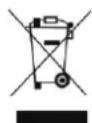
Disposal: Do not dispose this product as unsorted municipal waste. Collection of such waste must be handled separately as special treatment is necessary.
■ Recycling facilities are now available for all customers at which you can deposit your old electrical products. Customers will be able to take any old electrical equipment to participating civic amenity sites run by their local councils. Please remember that this equipment will be further handled during the recycling process, so please be considerate when depositing your equipment. Please contact the local council for details of your local household waste recycling centres.
TECHNICAL DATA
| Model | TF38OSCT12TRW |
| Fan Speeds | 3 |
| Cable length | 1.5 meters |
| Rated Input | 45 Watt |
| Running Current | 0.2 Amps |
| Air Flow | 21.54 m3/min |
| Noise | Max 58dB(A) |
| Power Supply | 220-240V~50/60Hz |
| Net Weight | 3.20 kg |
| Gross Weight | 4.05 kg |
| Net Size (assembled) | 315 x 315 x 960mm |
| Gross Size (packed) | 980 x 186 x 169mm |
ElectrIQ UK SUPPORT
www.ElectrIQ.co.uk/support
Please, for your own convenience, make these simple checks before calling the service line.
If the unit still fails to operate call: 0871 620 1057 or complete the online form
- Is the unit plugged into the mains?
- Is the fuse OK?
- Switch the unit off and wait three minutes to see if the issue is resolved. Restart the unit.
Office hours: 9AM - 5PM Monday to Friday
www.ElectrIQ.co.uk
Unit 2, The Nursery
Berristow Lane
South Normanton
Derbyshire, DE55 2FX
- TF38OSCT12RW
- INCH TOWER FAN
- CONTENTS
- SAFETY INSTRUCTIONS
- Important!
- Energy Saving and Unit Safety Protection Tips
- TF38OSCT12RW 38 Inch Tower Fan with 3 Speed Settings
- FEATURES
- DIAGRAM
- INSTALLATION
- OPERATION
- CONTROL PANEL AND SETTINGS
- POWER BUTTON
- SPEED BUTTON
- MODE /STYLE BUTTON
- TIMER BUTTON
- OSCILLATION (SWING) BUTTON
- LCD DISPLAY
- FAN SPEED DISPLAY
- TEMP / TIMER DISPLAY
- MODE / STYLE INDICATOR
- Oscillation / Swing Indicator
- REMOTE CONTROL
- MAINTENANCE
- CLEANING AND STORAGE
- Cleaning the surface
- TROUBLESHOOTING
- APPENDIX
- TECHNICAL DATA
- ElectrIQ UK SUPPORT
Brand : ElectriQ
Model : TF38OSCT12RW
Category : Ventilateur domestique