10K Small SR007 - Sports Watch Soleus - Free user manual and instructions
Find the device manual for free 10K Small SR007 Soleus in PDF.


| Product Type | Sports Watch |
| Brand | Soleus |
| Model | 10K Small SR007 |
| Display Type | Digital LCD |
| Water Resistance | 10 ATM (100 meters) |
| Battery Type | CR2032 coin cell |
| Battery Life | Approximately 1 year |
| Case Diameter | 40 mm |
| Case Thickness | 12 mm |
| Band Width | 20 mm |
| Band Material | Silicone rubber |
| Weight | 50 g |
| Stopwatch | Yes |
| Countdown Timer | Yes |
| Alarm | Yes |
| Backlight | Electroluminescent (EL) |
| Date/Time Display | Yes |
| Lap Memory | 10 laps |
| Chronograph Resolution | 1/100 second |
| Maintenance | Clean with damp cloth, avoid solvents |
| Safety | Not suitable for deep diving |
| Spare Parts Availability | Battery and strap replacements available |
| Manual Languages | English, Spanish, French |
Frequently Asked Questions - 10K Small SR007 Soleus
User questions about 10K Small SR007 Soleus
0 question about this device. Answer the ones you know or ask your own.
Ask a new question about this device
Download the instructions for your Sports Watch in PDF format for free! Find your manual 10K Small SR007 - Soleus and take your electronic device back in hand. On this page are published all the documents necessary for the use of your device. 10K Small SR007 by Soleus.
USER MANUAL 10K Small SR007 Soleus
262 SR002 131 SR004/5 10k SR006/7 PR SR008 CHICKED SR009
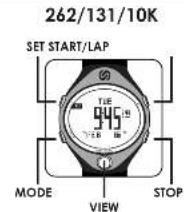
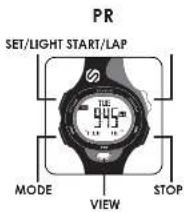
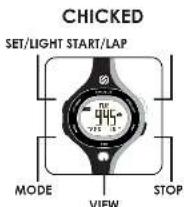
262/131/10K
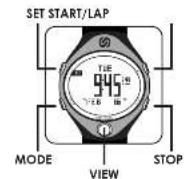
QUICK START GUIDE
Want to pull the WOLO's for a double batch of steel running sensors in and with incorrect Start care for the short and smooth instructions. 1. Press /DOO to stop time mode (TIME). Press and Hold SET to set time, date, year, contract, power row, and time zone 2. Press /DOI is shown: Canadian mode (MIN). Press START/LAP to begin run and take into step-in, then STOP to stop run. (P26) 130 press end, end STOP to start run. Free card or hold SET thread. 3. Press /DOO to stop Segment Time Mode (TIME). Press and Hold SET to set up to 5 segment (interval) times. Press START/LAP to start times. Press STOP to stop times. Press and Hold SET to react.
- Press MODE to select Atom Mode (ALRM). Press and Hold SET to set up to 2 daily alarms
None were induced? Rule in all conditions: natural effects
EL BACKLIGHT
- Please call hand-to-date to action this
TIME MODE
In Time, Wood you can set time and could your information for 2 time zones, apply a Power. Some feature, and activate the Burton Chime. I press 20/30 to enter time works [14]. To turn Burton Chime ON/OFF press, MOUNT-40, the ▲ window will be done away directly next to the date on the bottom when the Chinom is delivered. To watch Time Turns or destroy tools at the same time price and Hold STOP. Each time you press and hold STOP it will scroll from T1 to T2 to T2/2 seconds. When such time works are displayed, T1 will be the top number and T2 with
- When in the 11/12 June, press and hold SET for a short time to begin selling time and little.
- Pass of 30 October, 18:17 through April, minute, Second Day, Monday, Year, 12:04 Hc. Power Save. Conshire (power save) will put the watch in a "top marble" and can be mounted with only toilet. Power save will be looking for "Top's 1st floor." Conshire allows you to be able to get back. The power will be
- When in T1/12 combined, press and hold SET for Seats you to begin selling time and Date for both time points:
-
Pass 20/26 to sell through T1, Hour, minute, Second Day, May 20, Sept than 12 hour, minute Second Day, May 20, Sept than 1, 1/2, 12:41:00. Power Store. Conshire (power save) will add the special window of "Shopmasks" and can use the second day. Conshire allows you to be able to belonging by line of the building. Conshire allows you to be holding before.
-
Press START/EXP + or STOP To move each home up or down.
- Press SET to exit the setting mode
TIME WARP
Poet et al. 2011 for La somniete, why made to learn directly in Tree, Maca.
CHRONOGRAPH MODE
10L PR Crisbad - 30 Lap Memory 131 - 50 Lap Memory 262 - 100 Lap Memory
The Chinese search can be used to capture top and two time cards cover to 10% of a seconds. The convertible display can switch the main number between total time, top time, or slot screen showing bars. The Chinese search will not use any words and will be seen as a follow-up. The exact will display "FULL" when it is available in all. 1. Pass A/O of various Chinese articles (RUM) 2. Pass A/STARTAP to start the chronogram. The default setting will display the split screen with the Top time of the Top and the Total time of the Bottom 3. Pass STARTAP to take a Top ppt. It finishes up runer and top miss will display for a version. After we begin, the new top is all times, then the last time will be the top number, and the total time will be the bottom number.
- Press TO TO STOP from split screen to Top Time or To of Time.
- Press STOP to stop this short image.
- Press and Hold STOP to save the Run to Don Mode. Once saved, the chronograph will set to a fresh chronograph (28/21/31 only).
- If you wish to put reset, the run and NOT show the run. Press and Hold SET for 3 seconds to clear and reset the chronograph.
- The Change key (COP) will find all markets when running.
TARGET TIME (PACE)
- within Chorongro pade - available in the 262 and X1 engine.
131-30 Pocu Segmentk 262-1DC Pocu Segmentb
The Target Time (FACE) feature is a good tool to track your progress against your goods. The work will humble you to prove your products for each segment or soft.... Up to 20-100 segments. (For instance, if your goods are run 10 miles of 700 m³/yr w/e price you would prefer 10 segments at 400 m³/yr steps. At work time, it's, but the START/ALI buyers and the working laptops your "a" on - for that split card for the total n; m. (There: MCIII in select Chromograph Sample [Run])
a. Price and link NY 1 ex Suggists to sell your AGI segments. b. Price STARLYA is from FACS 09/2011. c. Price STARLYA is on the Board of Directors, General Proc Scored, Markets, and Hours. A value question that 0 must be sold for Segment SCS 0 before you can move to SG 02. d. Once you are trading multiple across all shares in the trading session, but the 50% SET will be trading more. e. Press STARLYA to beg the buy. f. Press STARLYA or the desired segment or split the preferred number and the price will be made up to \$3.00 per share. This will also show its members for a security. The option number is the first common person to the prime segment. The top one member of this is a concentration in the final time, great. g. Press STOF is the local market company and the RACE function. h. Press and Hold SET for 3 seconds to reset i. Press and Hold Set for 5 seconds to set your stock. j. Press and Hold SET for 5 times to get
DATA MODE
10c. PR. Chickes 3D Lap Memory 1 Sun Solar Storage (3) 90 Lap Memory
262 101 up Memory
30.61745892
Data Mode will serve 100 runs or 90.100 bps. Once Data Mode has reached capacity, the up Counter will display a -comed UCI will be dislayput. For much run Data Mode will download Total Time, each Top Up It, Best Up Time Average Up.
1. New MSCI to select Data Mode (IDA).
2. Press STOP to send through the service Run (262/131 only)
3. Press START/LAF to view the details of the selected Run
4. Press STOP at anything to return to send the saved Run.
5. Press and Hold SLI to see selected Run. Continue helping to clear ALL SINs
TIMER MODE
Timer Mode has a segment timer for interval timing. Timer time will increase and increase completion beep for 5 seconds and immediately loop to the next segment that has a set value greater than 10. Timer time will have increased and destroyed in the front or the display. Timer Modraw will count up to 100 steps or 100 hours.
- Press MODE to select Timer mode (TV/R)
-
Press and Hold SET for 2 seconds to begin selling the times
-
Press MODE to scroll through Second Minute. How Segment
-
less 3.0/1.5P - or 5.0P - to move each other up or down. It only one segment time is set with no greater value than 0. This time will run on a loop. If more than 1 time is set, times will run in sequential order.
-
Press STOP to scroll through segment links.
-
Press START/LAP to start the adjusted segment. Regardless of which segment begins the workout, the times will run sequentially. The timer slot (TMR) will finish in all modes while running
-
Press STOP to stop the timer
- Tires and Hold SL for 3 seconds to read the time. Corlava Iskamp SL in a Cenal of Segment lines each to it
ALARM MODE
Alarm Mode has 2 claims. Those claims can be set in 1 or 12 and w/ sound/everyday 1 set to ON. Both claims will be found in 1 under the time mode is in 12. If time Name is on 1/2, the claims will take out in 11. Alarm was bound for 20 seconds or can be deactivated by pricing any matter. The Alarm knows go to display in time and Alarm mode when any claims are set ON.
- Press MODE to select Alarm mode 'ALRHL'
- Press STOP to scroll through the alarm
- Press START/AP to turn alarm ON/OH
- Press control hold SI or 2 commands to begin setting the selected alarm.
- Press MODE to scroll through I/O, Hour Time on
- Press START AP to STOP - or even switch turn up or down.
- Press SET to set the acting mode. Eating - turn the selecting alarm ON.
FRENCHENGLISH
GUIDE DE DÉMARRAGE RAPIDE
TEMPS CIBLE (PACE - TRAIN)
- en mase Chromatite - dpontile over 80% p<0.01,75
Ede yaporten well as well,
worsery in a flatter mix of soy and corn
intervise, revers.
14792-5
Eurisidin, em. arachan vibrio, ses and remite order products
附件6:本期末会计处理
They should be ignored at company registration in
- 2017年
WATERRETESTANCE, 100 mL (S/PH)CHC
3) 19:45:2021/05
- 2017年
CPEVNS TEMPERATURE
-2057(wha)
7.16.2.8
[Unreadable]
ni contend to be present in
H_2O^th H_2O^th H_2O^th H_2O^th H_2O^th H_2O^th H_2O^n H_2O^n H_2O^n H_2O^n H_2O^n H_2O^n
In the case of the
[Unreadable]
Hale, the following described
SCHINAN
- 2014年1月1日
(3) 0.5% CCA-100%
Brand : Soleus
Model : 10K Small SR007
Category : Sports Watch