
MWH 251 B - Microwave HOTPOINT - Free user manual and instructions
Find the device manual for free MWH 251 B HOTPOINT in PDF.
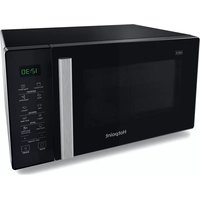


| Product Type | Microwave Oven |
| Brand | Hotpoint |
| Model | MWH 251 B |
| Capacity | 25 Liters |
| Microwave Power | 900 W |
| Grill Power | 1000 W |
| Control Type | Digital Touch |
| Door Type | Side-opening |
| Turntable Diameter | 25 cm |
| Display | LED |
| Timer | Up to 90 minutes |
| Auto Cooking Programs | 8 presets |
| Defrost Function | By weight or time |
| Child Lock | Yes |
| Interior Light | Yes |
| Cavity Material | Stainless Steel |
| Dimensions (W x D x H) | 450 x 350 x 250 mm |
| Weight | 11 kg |
| Power Supply | 230 V ~ 50 Hz |
| Power Consumption (Microwave) | 1300 W |
| Power Consumption (Grill) | 1100 W |
| Frequency | 2450 MHz |
| Color | Black |
| Accessories Included | Glass turntable, rack, user manual |
| Cleaning & Maintenance | Wipe interior with damp cloth; clean turntable with mild soap |
| Safety Features | Door interlock, overheat protection |
| Spare Parts Availability | Light bulb, turntable motor, fuse |
Frequently Asked Questions - MWH 251 B HOTPOINT
User questions about MWH 251 B HOTPOINT
0 question about this device. Answer the ones you know or ask your own.
Ask a new question about this device
Download the instructions for your Microwave in PDF format for free! Find your manual MWH 251 B - HOTPOINT and take your electronic device back in hand. On this page are published all the documents necessary for the use of your device. MWH 251 B by HOTPOINT.
USER MANUAL MWH 251 B HOTPOINT
EN Operating Instructions
INSTALLATION
Prior to connecting
Check that the voltage on the rating plate corresponds to the voltage in your home.
- Do not remove the microwave inlet protection plates located on the side of the oven cavity wall. They prevent grease and food particles from entering the microwave inlet channels.
- Place the oven on a stable, even surface that is strong enough to hold the oven and the food utensils you put in it. Use carefully when handling.
- Position the oven at a distance from other heating sources. For sufficient ventilation there must be a space of at least 30 cm above the oven. Ensure that the space underneath, above and around the oven is empty to allow for proper airflow. The microwave oven shall not be placed in a cabinet.
- Ensure that the appliance is not damaged. Check the oven door closes firmly against the door support. Empty the oven and clean the interior with a soft, damp cloth.
Do not operate this appliance if it has a damaged mains cord or plug, if it is not working properly, or if it has been damaged or dropped. Do not immerse the mains cord or plug in water. Keep the cord away from hot surfaces. Electrical shock, fire or other hazards may result.
Do not use an extension cord: If the power supply cord is too short, have a qualified electrician or serviceman install an outlet near the appliance.
This appliance MUST be earthed or this could result in the risk of electric shock. It MUST be connected to a properly installed earthed socket or fused earthed switched spur. Consult a qualified electrician or serviceman if the earthing instructions are not completely understood, or if doubt exists as to whether the microwave oven is properly earthed.
AFTER CONNECTING
- The oven can be operated only if the oven door is firmly closed.
- Poor television reception and radio interference may result if the oven is located close to a TV, radio or aerial.
- The earthing of this appliance is compulsory. The manufacturer will accept no responsibility for injury to persons, animals or damage
to objects arising from the non-observance of this requirement.
The manufacturers are not liable for any problems caused by the user's failure to observe these instructions.
IMPORTANT SAFETY INSTRUCTIONS READ CAREFULLY AND KEEP FOR FUTURE REFERENCE
- Do not heat, or use flammable materials in or near the oven. Fumes can create a fire hazard or explosion.
- Do not use your microwave oven for drying textiles, paper, spices, herbs, wood, flowers, fruit or other combustible materials. This could result in fire.
- If material inside / outside the oven should ignite or smoke is emitted, keep oven door closed and turn the oven off. Disconnect the power cord or shut off power at the fuse or circuit breaker panel.
- Do not over-cook food. This could result in fire.
- Do not leave the oven unattended, especially when using paper, plastic or other combustible materials in the cooking process. Paper can char or burn and some plastics can melt if used when heating foods. Do not leave the oven unattended if you are using a lot of fat or oil since they can overheat and cause a fire!
- Do not use corrosive chemicals or vapors in this appliance. This type of oven is specifically designed to heat or cook food. It is not designed for industrial or laboratory use.
- Do not hang or place heavy items on the door as this can damage the oven opening and hinges. The door handle should not be used for hanging things on.
- The Microwave oven is intended for heating food and beverages. Drying of food or clothing and heating of warming pads, slippers, sponges,
damp cloth and similar may lead to risk of injury, ignition or fire.
- This appliance can be used by children aged from 8 years and above and persons with reduced physical, sensory or mental capabilities or lack of experience and knowledge if they have been given supervision or instruction concerning use of the appliance in a safe way and understand the hazards involved. Children shall not play with the appliance. Cleaning and user maintenance shall not be made by children unless they are older than 8 and supervised. Keep the appliance and its cord out of reach of children less than 8 years.
- This appliance is not intended for use by persons (including children) with reduced physical, sensory or mental capabilities, or lack of experience and knowledge, unless they have been given supervision or instruction concerning use of the appliance by a person responsible for their safety. Children should be supervised to ensure that they do not play with the appliance.
- Do not use your microwave oven for heating anything in airtight sealed containers. The pressure increases and may cause damage when opening or may explode.
- The door seals and the door seal areas must be regularly inspected for damage. If these areas are da-
maged the appliance should not be operated until it has been repaired by a trained service technician.
- The appliances are not intended to be operated by means of an external timer or separate remote-control system.
- Do not use your microwave oven for cooking or reheating whole eggs with or without shell since they may explode even after microwave heating has ended.
GENERAL PRECAUTIONS
- This appliance is designed for domestic use only!
- The appliance should not be operated without food in the oven when using microwaves. Operation in this manner is likely to damage the appliance.
- The ventilation openings on the oven must not be covered. Blocking the air intake or exhaust vents may cause damage to the oven and poor cooking results.
- If you practice operating the oven, put a glass of water inside. The water will absorb the microwave energy and the oven will not be damaged.
- Do not store or use this appliance outdoors.
- Do not use this product near a kitchen sink, in a wet basement, or near a swimming pool, or similar.
- Do not use the cavity for any storage purposes.
- Remove wire twist-ties from paper or plastic bags before placing bag in the oven.
DEEP-FRYING
- Do not use your microwave oven for deep-frying, because the oil temperature cannot be controlled.
- Use hot pads or oven mitts to prevent burns when touching containers, oven parts, and pans after cooking. Accessible parts may become hot during use; keep young children away.
LIQUIDS
- For example, beverages or water. Overheating the liquid beyond boiling point can occur without visible bubbling. This could result in a sudden boil over of the hot liquid. To prevent this possibility, the following steps should be taken:
- Avoid using straight-sided containers with narrow necks.
- Stir the liquid before placing the container in the oven and leave the teaspoon in the container.
- After heating, allow it to stand for a short time, then stir again before carefully removing the container from the oven.
- After heating baby food or liquids in a baby bottle or baby food jar, always stir and check the temperature before serving. This ensures that the heat is evenly distributed and reduces the risk of scalding or burns.
- Ensure the lid and teat are removed before heating!
ACCESSORIES GENERAL
There are a number of accessories available on the market. Before you buy, ensure they are suitable for microwave use.
Ensure that the utensils you use are ovenproof and allow microwaves to pass through them before cooking.
When you put food and accessories in the microwave oven, ensure that they do not come in contact with the interior of the oven.
This is especially important with accessories made of metal or metal parts.
If accessories containing metal come in contact with the oven interior while the oven is in operation, sparking can occur and the oven could be damaged.
Always ensure that the turntable is able to turn freely before starting the oven. If the turntable isn't able to turn freely, you should use a smaller vessel.
TURNTABLE SUPPORT

Use the turntable support under the glass turntable. Never put any other utensils on the turntable support.
- Fit the turntable support in the oven.
GLASS TURNTABLE

Use the glass turntable with all cooking methods. It collects the dripping juices and food particles that otherwise would stain and soil the interior of the oven.
- Place the glass turntable on the turntable support.
MAINTENANCE & CLEANING
Cleaning is the only maintenance normally required. It must be carried out with the microwave oven disconnected.
Failure to maintain the oven in a clean condition could lead to deterioration of the surface that could adversely affect the life of the appliance and possibly result in a hazardous situation.
Do not use metal scouring pads, abrasive cleansers, steel-wool pads, gritty washcloths, etc., which can damage the control panel and the interior and exterior oven surfaces. Use a cloth with a mild detergent or a paper towel with spray glass cleaner. Apply spray glass cleaner to a paper towel.
Do not spray directly on the oven.
At regular intervals, especially if spill overs have occurred, remove the turntable, the turntable support and wipe the base of the oven clean.
This oven is designed to operate with the turntable in place.
Do not operate the microwave oven when the turntable has been removed for cleaning.
Use a soft and damp cloth with mild detergent to clean the interior surfaces, front and rear of the door and the door opening.
Do not allow grease or food particles to build up around the door.
For stubborn stains, boil a cup of water in the oven for 2 or 3 minutes. Steam will soften the marks.
Adding some lemon juice to a cup of water, placing this on the turntable and boiling for a few minutes can eliminate odors inside the oven.
Do not use steam cleaning appliances when cleaning your microwave oven.
The oven should be cleaned regularly and any food deposits removed.
The ceiling beneath it may need regular cleaning. This should be done with a soft and damp cloth with mild detergent.
DISHWASHER SAFE:
- Turntable Support
• Wire Rack
- Glass Turntable
TROUBLESHOOTING GUIDE
If the oven does not work, do not make a service call until you have made the following checks:
- The turntable and turntable support are in place.
- The plug is properly inserted in the wall socket. • The door is properly closed.
- Check your fuses and ensure that there is power available.
- Check that the oven has ample ventilation.
- Wait for 10 minutes, then try to operate the oven once more.
- Open and then close the door before you try again.
This is to avoid unnecessary calls for which you will be charged.
When calling for service, please give the serial number and type number of the oven (see service label). Consult your warranty booklet for further advice.
⚠️ If the mains cord needs replacing, it should be replaced by the original mains cord, which is available via our service organization. The mains cord may only be replaced by a trained service technician.
Service only to be carried out by a trained service technician. It is hazardous for anyone other than a trained person to carry out any service or repair operation that involves the removal of any cover, which gives protection against exposure to microwave energy. Do not remove any cover.
GUARANTEE
12 months standard guarantee, enhanced to 2 years upon product registration.
This certificate of guarantee represents the guarantee ("Guarantee" hereinafter) offered by Indesit Company UK Limited with registered office at Peterborough PE2 9JB in relation to products purchased in the United Kingdom, and Indesit Ireland Limited with registered office in Dublin 9, Ireland for products purchased in the Republic of Ireland. This Guarantee does not affect your statutory rights.
Your product has the benefit of our manufacturer's guarantee, which covers the product for twelve months from the date of purchase.
This gives you the reassurance that if, within that time, your product is proven to be defective because of either workmanship or materials, we will, at our discretion, either repair or replace the product at no cost to you.
This Guarantee is subject to the following conditions:
- Documentary proof of original purchase date is provided. • Cosmetic damage must be reported days from the date of purchase.
- The product has been installed and operated correctly and in accordance with our operating and maintenance instructions.
- The product is used only on the electricity supply printed on the rating plate.
- The product has been used for normal domestic purposes only.
- The product has not been altered, serviced, maintained, dismantled, or otherwise interfered with by any person not authorised by us.
- Any repair work must be undertaken by us or our appointed agent.
- Any parts removed during repair work or any product that is replaced become our property. • The product is used in the United Kingdom or Republic of Ireland.
The Guarantee does not cover:
- Damage resulting from transportation, improper use, neglect or interference or as a result of improper installation.
- Accidental damage, this includes but is not limited to, damage which occurs as a result of an external action.
- Replacement of any consumable item or accessory. These include but are not limited to:
- plugs, cables, light bulbs, hoses, brushes, covers and filters.
- Replacement of any removable parts made of glass or plastic.
After Sales Service
No one is better placed to care for your Hotpoint product during the course of its working life than us – the manufacturer.
Essential Contact Information Advice Line
We have a dedicated team who can provide free advice and assistance with your product if you experience any technical difficulties. Simply call our Hotpoint Service Hotline for telephone assistance.
UK: 03448 240 055
Republic of Ireland 0818 904 041
www.hotpointservice.co.uk
Please note:
Our advisors will require the following information:
Model number:
Serial number:


Consumables and Accessories
We supply a full range of consumables and accessories to keep your product functioning efficiently throughout its life.
UK: 03448 225 225
Republic of Ireland: 0818 313 413
parts.hotpoint.co.uk/shop
Recycling and Disposal Information
As part of Hotpoint's continued commitment to helping the environment, Hotpoint reserves the right to use quality, recycled components to keep down customer costs and minimise material wastage.
Please dispose of packaging and old products carefully.
Register your new product and receive 1 additional year FREE!
As an additional benefit of owning your Hotpoint product, we are offering 1 years additional free guarantee. To be eligible for this you will need to contact us to register your product within 28 days of purchase. If you do not register your appliance within the 28 days you will still be entitled to 1 years manufacturer's guarantee. To activate your 2 year guarantee register online at www.hotpoint.co.uk. Please note that the extended guarantee is only available in the UK and Ireland and is subject to the same terms and conditions as the 1 year guarantee. Please refer to the certificate of guarantee for more information.
DISPOSAL OF OLD ELECTRICAL APPLIANCES

The European Directive 2012/19/UE on Waste Electrical and Electronic Equipment (WEEE), requires that old household electrical appliances must not be disposed of in the normal unsorted municipal waste stream.

Old appliances must be collected separately in order to optimise the recovery and recycling of the materials they contain and reduce the impact on human health and the environment.
The crossed out “wheeled bin” symbol on the product reminds you of your obligation, that when you dispose of the appliance it must be separately collected. Consumers should contact their local authority or retailer for information concerning the correct disposal of their old appliance.

① Microwave
⑧ Soft/Melt.
②Keep Warm
9 Auto Clean
③ Defrost-Vegetables.
10 Auto Cook
④ Defrost-Meat.
⑪ +/-
⑤ Defrost-Fish.
⑫ JET START
⑥ Defrost-Poultry.
⑬ STOP
⑦ Yogurt

STAND-BY MODE
The oven is in Stand-by mode when the clock is displayed (or, if the clock has not been set, when the display shows "::").
ECO STANDBY: This function is set to save power. During Standby mode, you can press the "+" and "-" buttons simultaneously to enter ECO STANDBY mode. After cooking ends, the display will show the time or ":" for 10 seconds, then go to ECO STANDBY mode. Press the two buttons again to quit the mode.

① Auto cook Icon ② Defrost Icon ③ Yogurt Icon ④ Auto clean Icon ⑤ Microwave power (watt) Icon ⑥ Microwave Icon ⑦ Keep warm Icon ⑧ Clock/Insert time Icon ⑨ Soft/Melt Icon ⑩ Weight (grams) Icon

START PROTECTION / CHILD LOCK
This automatic safety function is activated one minute after the oven has returned to "Stand-by mode".
When the safety function is active, the door must be opened and closed in order to start cooking; otherwise, the display will show "door".


PAUSE OR STOP COOKING
To pause cooking:
Cooking can be paused to check, add, turn, or stir the food by opening the door.
The function will stop if the STOP button is pressed during cooking.
The setting will be maintained for 5 minutes.
To continue cooking:
Close the door and press the Jet Start button. Cooking resumes from where it was paused.
If you don't want to continue cooking, you
can: Remove the food, close the door, and press the Stop button.
When cooking is finished: The display will show the text "End". An acoustic beep will signal once a minute for 2 minutes.
Please note that reducing or stopping this programmed cooling cycle will not have a negative impact on the function of the product.

ADD / STIR / TURN FOOD
DEPENDING ON THE SELECTED FUNCTION, it could be needed to add, stir, or turn food during cooking. In these cases, the oven will pause cooking and ask you to perform the needed action.
When required, you should:
* Open the door. * Add, stir, or turn the food (depending on the required action). * Close the door and restart by pressing the Jet Start button.
Note: If the door is not opened within 2 minutes of the request to add, stir, or turn the food, the microwave oven will continue the cooking process (in this case, the final result may not be optimal).

KEEP WARM
This function allows you to keep your dishes warm automatically.
- Press the Keep Warm button. The display shows as on the left side.
- Press the +/- button to select the desired time, then press the JET START button.

The keep warm cycle lasts for a duration of 15 minutes. If you want it to last longer, please select a time longer than this.

AUTO CLEAN
This automatic cleaning cycle will help you clean the microwave oven cavity and remove unpleasant odors.
Before starting the cycle:
- Put 300 ml of water into a container (see our recommendations in the section "Tips and suggestions" below).
- Place the container directly in the middle of the cavity.
To start the cycle:
- Press the Auto Clean button; the cleaning cycle duration will be visible on the display.
- Press the Jet Start button to start the function.
When The Cycle Is Finished:
- Press the Stop button.
- Remove the container.
- Use a soft cloth or a paper towel with mild detergent to clean the interior surfaces.

Tips and suggestions:
- For a better cleaning result, it is recommended to use a container with a diameter of 17-20cm, and a height that is lower than 6.5cm.
- It is recommended to use a container of light plastic material that is suitable for the microwave.
- As the container will be hot after the cleaning cycle is completed, it is recommended to use a heat resistant glove when removing the container from the microwave.
- For a better cleaning effect and removal of unpleasant odors, add some lemon juice or vinegar to the water.

CLOCK
To set the Clock of your appliance:
- In standby, press the Auto Clean button for 3 seconds. The display shows the current clock.
- Press + / - to set the hour.
- Press Clock/JET START button to confirm.
- Press + / - to set the minute.
- Press Clock/JET START to confirm the setting.

MICROWAVE
To cook with microwave power individually, press the Micro button repeatedly to select a cooking power level, then press +/- button to set a desired cooking time. The longest cooking time is 90 minutes.
- Press the Microwave button. The default power level (750W) will be shown on the display and the watt icon starts blinking.
- Press the Micro button repeatedly or press +/- button to select suitable cooking power, then press JET START button
- Press + / - to set the cooking time., then press JET START button to start cooking.

If you need to change the power, press the Micro button again, the desired power level be selected as per below table.
| POWER | SUGGESTED USE: |
| 90 W | Softening ice cream, butter and cheeses. keep warming. |
| 160 W | Defrosting. |
| 350 W | Simmering stews, melting butter. |
| 500 W | More careful cooking e.g. high protein sauces, cheese and egg dishes and to finish cooking casseroles. |
| 650 W | Cooking dishes, not possible to stir. |
| 750 W | Cooking of fish,meat, vegetables,etc. |
| 900 W | Reheating of beverages, water, clear soups, coffee, tea or other food with a high water content. If the food contains egg or cream choose a lower power. |

JET START
THIS FEATURE allows you to start the oven quickly. Press JET START button once, the oven starts work at full power level automatically. During cooking, press JET START to add time. The longest cooking time is 90 minutes.
- Press the JET START Button.

It is possible to change the power level and the duration time even after the cooking process has been already started. To adjust the power level, simply press the Microwave button repeatedly. To change the duration time, please press +/- button. Or press the JET START button once to increase the duration time by 30 seconds.

DEFROST
USE THIS FUNCTION for defrosting Meat, Poultry, Fish, and vegetables.
- Press the Fish/Meat/Poultry/Vegetables button.
- Press the +/- button to set the weight.
- Press JET START button to start.
| FOOD TYPE | WEIGHT | SUGGESTED USE |
 Meat Meat | 100g - 2000g | Minced meat,cutlets,steaks or roasts.After cooking,allow food to rest for at least 5 minutes for better results. |
 Vegetables Vegetables | 100g - 1000g | Larger,medium and small cut vegetables.Before serving,allow food to rest for 3-5 minutes for better results. |
 Fish Fish | 100g - 2000g | Whole steaks or fish fillet.Allow food to rest for 5-10 minutes for better results. |
 Poultry Poultry | 100g - 2000g | Whole chicken,pieces or fillets.After cooking,allow food to rest for 5-10 minutes for better results. |

- For better results, we recommend defrosting directly on the cavity bottom.
- If the food is warmer than deep-freeze temperature (-18°C), choose a lower weight than the food.
- If the food is colder than deep-freeze temperature (-18°C), choose a higher weight than the food.
- Separate pieces as they begin to defrost.

YOGURT
THIS FUNCTION allows you to obtain healthy and natural yogurt.
- Press the Yogurt button, display shows as left side.
- Put 1000g milk and 1g yogurt starter (heating resistance) or 15g yogurt into container, then add 50g sugar, mix well. And put into the middle of cavity.
- Press the JET START button to start.

It needs 5 hours and 20 minutes for this recipe. Please do not open the door during the countdown.
A selection of automatic recipes with preset values to offer optimal cooking results.
- Press the Auto Cook button, the display shows as on the left side.
- Press the Auto Cook button repeatedly or press the +/- button to select the desired recipe (see the table below).
- Press the JET START button to confirm the recipe and press the +/- button to select the weight when there is a weight range in the table.
- Press the JET START button. The function will start.

According to the selected recipe, after a certain time, the display will ask you to add, turn, or stir the food. See the "Add/Stir/Turn" chapter on page 7.

The cooking recipe will be confirmed once you leave the function button for 3 seconds. Press the function key again to change the recipe type.
| RECIPE ITEM | INITIAL STATE | WEIGHT AMOUNT | DURATION | PREPARATION | |
 Dough Rising Dough Rising | 1 | Room temperature | 500-1000g 65min. | Put 200ml water into oven. Add the prepared dough when oven prompt.The volume of the container should be at least 3 times of the dough.Please do not open the door during the counting down. | |
 Cupcakes Cupcakes | 2 | Room temperature | 300g 5-11 min. | Put 125g eggs and 170g sugar into container then stir for 2-3mins,add 170g flour,10g baking powder ,100g water,50g butter, mix well,put food into the cups.Put the cups around the turntable to make sure uniform heat. | |
 Vegetable Vegetable | 3 | Room temperature | 250-500g /50g | 3-6 min. | Cut the vegetable into pieces,add 2 tablespoon water. |
 Soup Soup | 4 | Refrigerator temperature | 300-1200g /300g | 2-7 min. | Cover the dish, leave an air ventilation. |
 Green bean Green bean | 5 | Room temperature | 200-500g /50g | 4-7 min.. | Add 2 tablespoon water and cover the dish. |
 fish fillet fish fillet | 6 | Refrigerator temperature | 200-500g /50g | 6-11 min. | Cover the dish and leave a vent. |
 Scrambled eggs Scrambled eggs | 7 | Room temperature | 1-4eggs 2-4 min. | Well beat the egg and water together,cover the measuring cup with plastic wrap. | |
A selection of automatic recipes with preset values to offer optimal cooking results.
- Press the Soft/Melt button, the display shows as on the left side.
- Press the Soft/Melt button repeatedly or press the +/- button to select the desired recipe (see the table below).
- Press the JET START button to confirm the recipe and press the +/- button to select the weight when there is a weight range in the table.
- Press the JET START button. The function will start.
| FOOD TYPE WEIGHT HINT | |||||
| P 1 | Soften |  | Butter | 50g - 500g/50g | From refrigerator state, unwrap and place in microwave safe dish |
| P 2 | Soften | [73H0] | Ice Cream | 50g - 1000g/50g | From frozen state, place ice cream container on turntable. |
| P 3 | Soften |  | Cream Cheese | 50g - 500g/50g | From refrigerator state, unwrap and place in microwave safe dish |
| P 4 | Soften | [C500] | Frozen Juice | 250g - 1000g /250g | From frozen state, remove lid from container. |
| P 5 | Melting |  | Butter | 50g - 500g/50g | From refrigerator state, unwrap and place in microwave safe dish |
| P 6 | Melting | [6BW2] | Chocolate | 100g - 500g/50g | From room temperature, place in microwave safe dish. |
| P 7 | Melting |  | Cheese | 50g - 500g/50g | From refrigerator state,place in microwave safe dish. |
| P 8 | Melting | [254W] | Marsh mellows | 50g - 500g/50g | From room temperature, place in microwave safe dish.The dish should be at least double volume with the marshmellows since they are expanded during cooking. |

The cooking recipe will be confirmed once you leave the function button for 3 seconds. Press the function key again to change the recipe type.
Technical Specification
| Model MWH 251 | |
| Supply Voltage 230-240V~50 Hz | |
| Rated Input Power | 1400 W |
| Outer dimensions (HxWxD) | 281 x 483 x 414 |
| Inner dimensions (HxWxD) | 220 x 344 x 340 |
Hotpoint
Whirlpool EMEA S.p.A.
- INSTALLATION
- PRIOR TO CONNECTING
- AFTER CONNECTING
- IMPORTANT SAFETY INSTRUCTIONS READ CAREFULLY AND KEEP FOR FUTURE REFERENCE
- GENERAL PRECAUTIONS
- DEEP-FRYING
- LIQUIDS
- ACCESSORIES GENERAL
- TURNTABLE SUPPORT
- GLASS TURNTABLE
- MAINTENANCE & CLEANING
- THE OVEN SHOULD BE CLEANED REGULARLY AND ANY FOOD DEPOSITS REMOVED
- DISHWASHER SAFE
- TROUBLESHOOTING GUIDE
- GUARANTEE
- MONTHS STANDARD GUARANTEE, ENHANCED TO 2 YEARS UPON PRODUCT REGISTRATION
- AFTER SALES SERVICE
- ESSENTIAL CONTACT INFORMATION ADVICE LINE
- CONSUMABLES AND ACCESSORIES
- RECYCLING AND DISPOSAL INFORMATION
- REGISTER YOUR NEW PRODUCT AND RECEIVE 1 ADDITIONAL YEAR FREE
- DISPOSAL OF OLD ELECTRICAL APPLIANCES
- STAND-BY MODE
- START PROTECTION / CHILD LOCK
- PAUSE OR STOP COOKING
- TO PAUSE COOKING
- TO CONTINUE COOKING
- IF YOU DON'T WANT TO CONTINUE COOKING, YOU
- ADD / STIR / TURN FOOD
- KEEP WARM
- AUTO CLEAN
- BEFORE STARTING THE CYCLE
- TO START THE CYCLE
- WHEN THE CYCLE IS FINISHED
- TIPS AND SUGGESTIONS
- CLOCK
- TO SET THE CLOCK OF YOUR APPLIANCE
- MICROWAVE
- JET START
- DEFROST
- YOGURT
- HOTPOINT
Brand : HOTPOINT
Model : MWH 251 B
Category : Microwave