
GS305P - Switch NETGEAR - Free user manual and instructions
Find the device manual for free GS305P NETGEAR in PDF.


| Product Type | 5-Port Gigabit Ethernet Switch with PoE |
| Brand | Netgear |
| Model | GS305P |
| Ports | 5 x Gigabit Ethernet (10/100/1000 Mbps) |
| PoE Ports | 4 ports (PoE+), up to 30W each, total budget 55W |
| Switching Capacity | 10 Gbps |
| Forwarding Rate | 7.4 Mpps |
| MAC Address Table | 2K entries |
| Jumbo Frame Support | Up to 9K |
| Dimensions (W x D x H) | 100 x 100 x 28 mm (3.94 x 3.94 x 1.10 in) |
| Weight | 0.28 kg (0.62 lb) |
| Power Supply | External power adapter (12V 2.5A) |
| Fanless Design | Yes, silent operation |
| Mounting | Desktop or wall-mountable (kit included) |
| LED Indicators | Power, PoE, Link/Activity per port |
| Operating Temperature | 0°C to 40°C (32°F to 104°F) |
| Storage Temperature | -20°C to 70°C (-4°F to 158°F) |
| Humidity | 10% to 90% non-condensing |
| Certifications | CE, FCC, RoHS |
| Maintenance | Clean with dry cloth; avoid liquids and dust |
| Safety | Use only supplied power adapter; do not disassemble |
| Spare Parts / Repair | No user-serviceable parts; contact Netgear support |
Frequently Asked Questions - GS305P NETGEAR
User questions about GS305P NETGEAR
0 question about this device. Answer the ones you know or ask your own.
Ask a new question about this device
Download the instructions for your Switch in PDF format for free! Find your manual GS305P - NETGEAR and take your electronic device back in hand. On this page are published all the documents necessary for the use of your device. GS305P by NETGEAR.
USER MANUAL GS305P NETGEAR
FE and GE Unmanaged Switches
natural_image
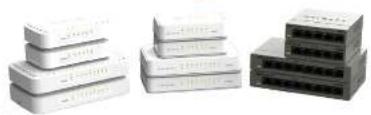
Three stacked electronic devices with visible internal components, no text or symbols present200 Series:
- 5-Port Fast Ethernet Switch F5205v2
8-Port Fast Ethernet Switch FS208v2
5-Port Gigabit Ethernet Switch GS205v2
• 8-Port Gigabit Ethernet Switch GS208v2
300 Series:
• 5-Port Fast Ethernet Switch FS305v2
8-Port Fast Ethernet Switch F5308v2
5-Port Gigabit Ethernet Switch GS305
8-Port Gigabit Ethernet Switch GS308v2
600 Series:
- 5-Port Fast Ethernet Switch F5605v4
8-Port Fast Ethernet Switch F5608v4
5-Port Gigabit Ethernet Switch GS605v5
8-Port Gigabit Ethernet Switch GS608v4
Note: Model availability varies by region. For more information, see the NETGEAR website.


Note: The 300 and 600 series can be wall-mounted.
Note: Product appearance varies by model.
Step 1. Connect the equipment.
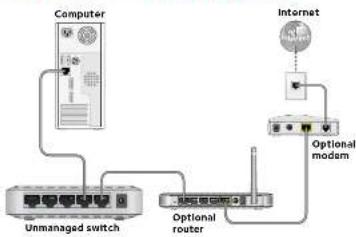
flowchart
graph TD
    A["Computer"] --> B["Unmanaged switch"]
    B --> C["Optional router"]
    C --> D["Optional modem"]
    D --> E["Internet"]
    style A fill:#f9f,stroke:#333
    style E fill:#ccf,stroke:#333
Step 2. Connect to power and power on.
Note: Power adapter varies by region.
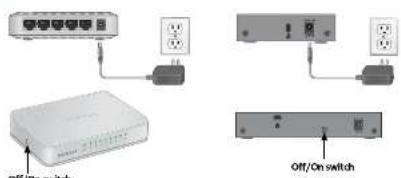
If your product has an Off/On switch, move the Off/On switch to the on position to provide power to the device.
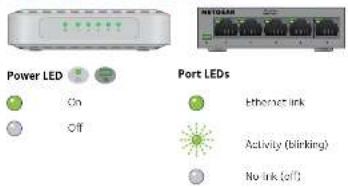
Step 3. Check the status.
Technical Specifications
| Specifications Description | |
| Operating temperature 0^ to 40^ | |
| Power adapter | |
| 5-Port Gigabit Ethernet Switch Input | 100~240 VAC, 50/60 Hz, 0.15AOutput: 5 VOC, 0.7A |
| 5-Port Real Ethernet Switch Input | 100~240 VAC, 50/60 Hz, 0.15AOutput: 5 VOC, 0.7A |
| 8-Port Gigabit Ethernet Switch Input | 100~240 VAC, 50/60 Hz, 0.15AOutput: 12 VOC, 0.5A |
| 8-Port Real Ethernet Switch Input | 100~240 VAC, 50/60 Hz, 0.15AOutput: 5 VOC, 0.7A |
Support
Thank you for purchasing this NETGEAR product.
After installing your device, locate the serial number on the label of your product and use it to register your product at https://my.netgear.com.
You must register your product before you can use NETGEAR telephone support. NETGEAR recommends registering your product through the NETGEAR website. For product updates and web support, visit http://support.netgear.com. NETGEAR recommends that you use only the official NETGEAR support resources.
You can get this installation guide in multiple languages at
http://downloadcenter.netgear.com. For product specifications, see the product page or download the data sheet at http://support.netgear.com.
For the current EU Declaration of Conformity, visit
http://support.netgear.com/app/answers/detail/a_id/11621/
For regulatory compliance information, visit
http://www.netgear.com/about/regulatory. See the regulatory compliance document before connecting the power supply.
WARNING: For safety reasons, it is important that you use only the power adapter that is sold with your product. If you are not sure what power adapter to use, contact NETGEAR technical support.
August 2014
201-18432-01
NETGEAR, Inc.
350 East Home Drive
36:1980(124) 58:124, 024
NLIGAR, the NLIGAR logo, and Connect with Innovation and/or registered Trademarks of NLIGAR, Inc. and/or its subsidiaries in the United States and/or other countries. Information is subject to change without notice. © NETGEAR, Inc. All rights reserved.
Brand : NETGEAR
Model : GS305P
Category : Switch