12.12 2010987 - Wristwatch Lacoste - Free user manual and instructions
Find the device manual for free 12.12 2010987 Lacoste in PDF.


| Product type | Wrist watch |
| Brand | Lacoste |
| Model | 12.12 2010987 |
| Movement | Analog quartz |
| Caliber | Battery SR626SW |
| Case | Stainless steel |
| Case diameter | 40 mm |
| Thickness | 9 mm |
| Weight | 60 g |
| Strap | Genuine leather with pin buckle |
| Strap width | 20 mm |
| Glass | Mineral |
| Water resistance | 30 meters (3 ATM) |
| Display | Hour, minute, second hands |
| Date | Window at 3 o'clock |
| Power supply | Button cell SR626SW (1.55 V) |
| Battery life | Approximately 2 years |
| Main functions | Time, minute, second, date |
| Adjustment | Pull-out crown with 3 positions |
| Care | Wipe with a soft dry cloth |
| Cleaning | Avoid contact with water and chemicals |
| Safety precautions | Keep battery away from children |
| Repairability | Battery replacement by a qualified watchmaker |
| Warranty | 2 years parts and labor |
| Additional instructions | Refer to the full manual for detailed use |
Frequently Asked Questions - 12.12 2010987 Lacoste
User questions about 12.12 2010987 Lacoste
0 question about this device. Answer the ones you know or ask your own.
Ask a new question about this device
Download the instructions for your Wristwatch in PDF format for free! Find your manual 12.12 2010987 - Lacoste and take your electronic device back in hand. On this page are published all the documents necessary for the use of your device. 12.12 2010987 by Lacoste.
USER MANUAL 12.12 2010987 Lacoste
Lacoste has a unique heritage in the sports fashion market. Developed with the meticulous attention to function and detail, the water-resistant Lacoste watch collection offers easy, elegant designs that reflect Lacoste's style codes and trademark crocodile logo – one of the most recognized brand symbols in the world.
Congratulations on your purchase.
CONTENTS
OPERATING INSTRUCTIONS
(1) 2- AND 3-HAND MODELS
(2) DATE/DAY - DATE MODELS
(3) DUAL TIME MODELS – With GMT 24-hour and minute hand
(4) MULTI-EYE MODELS TYPE A – With day/date with or without 24-hour hand without pushers
(5) MULTI-EYE MODELS TYPE B – With day/date with or without 24-hour hand with pushers
(6) ANALOG CHRONOGRAPHS TYPE A – Analog chronograph minutes/seconds counters/24-hour hand/date
(7) ANALOG CHRONOGRAPHS TYPE B – Analog Chronograph 1/10 Second
(8) ANALOG CHRONOGRAPHS TYPE C – Analog chronograph with 30-minute counter and date
(9) SPECIAL FEATURES
- Screw Down Crown
- Mesh Bracelet Sliding Clasp
CARE AND MAINTENANCE
WARRANTY
OBTAINING SERVICE
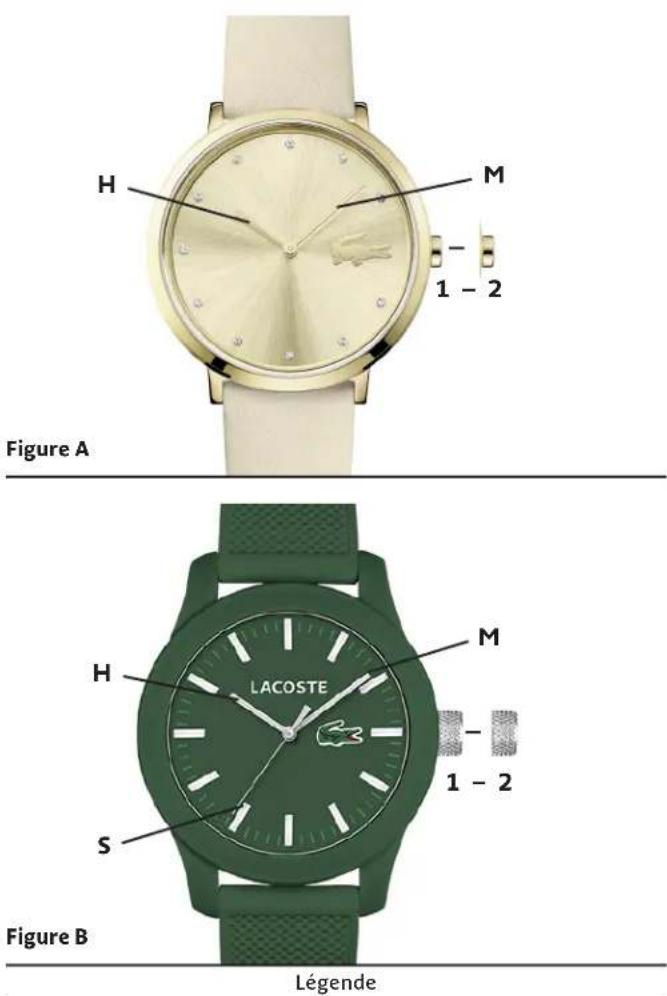
(1) 2- AND 3-HAND MODELS
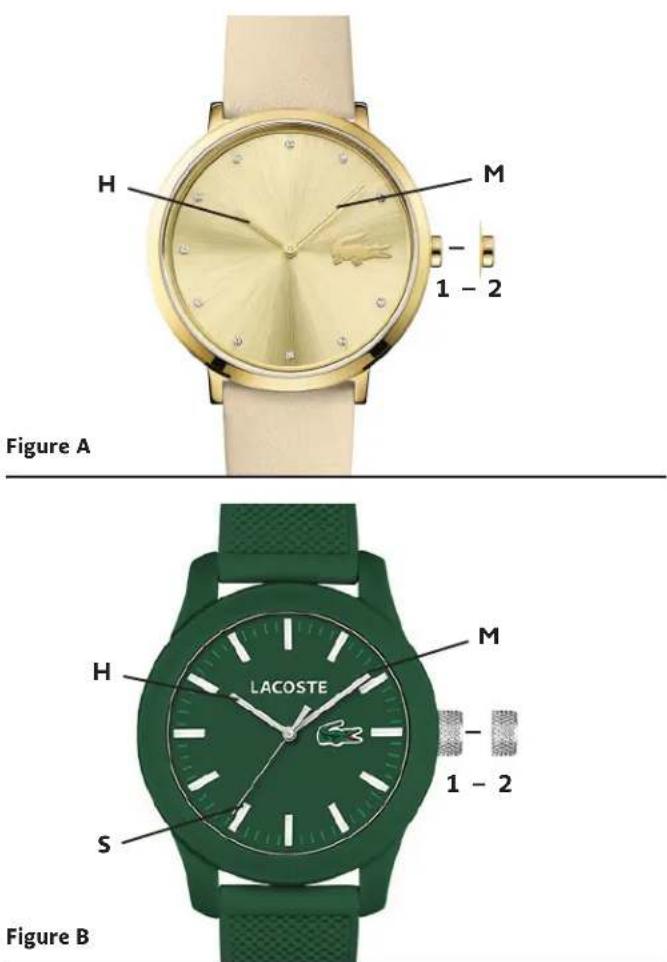
Legend
1, 2 - Crown positions
H - Hour hand
M - Minute hand
S - Second hand
Crown Positions:
Position 1 - Normal position. Crown pushed into case.
Position 2 - To set TIME: Rotate crown in either direction.
NOTE: When setting the minute hand, advance it 4 to 5 minutes ahead of the desired time and then turn it back to the exact time.
Power depletion warning function: When the battery nears its end, the second hand moves at two-second intervals instead of the normal one-second intervals. In that case, have the battery replaced with a new one as soon as possible. The watch remains accurate while the second hand is moving at two-second intervals.
(2) DATE/DAY-DATE MODELS
Power depletion warning function: When the battery nears its end, the second hand moves at two-second intervals instead of the normal one-second intervals. In that case, have the battery replaced with a new one as soon as possible. The watch remains accurate while the second hand is moving at two-second intervals.
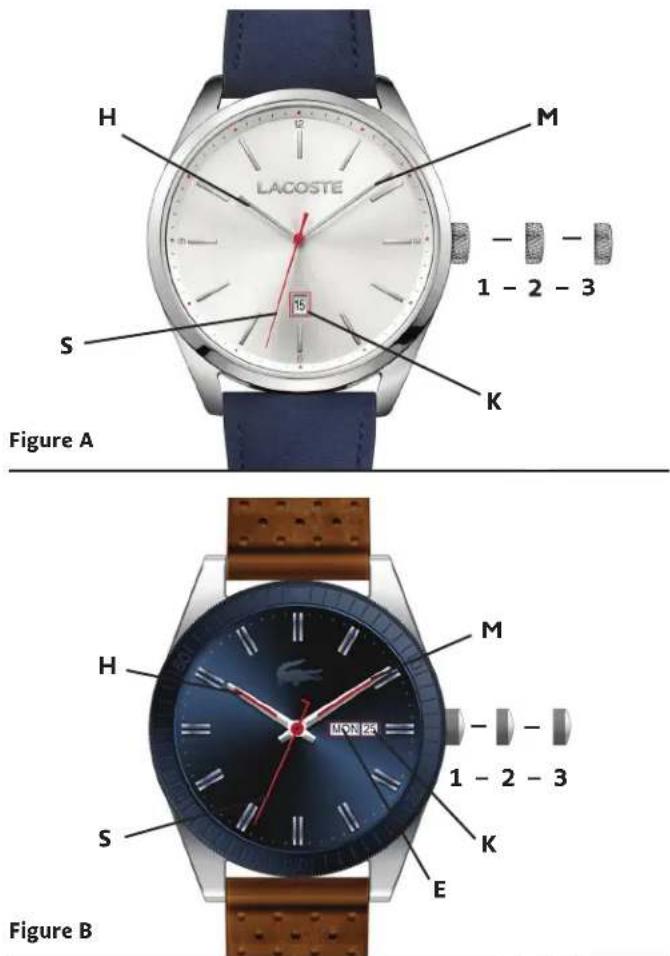
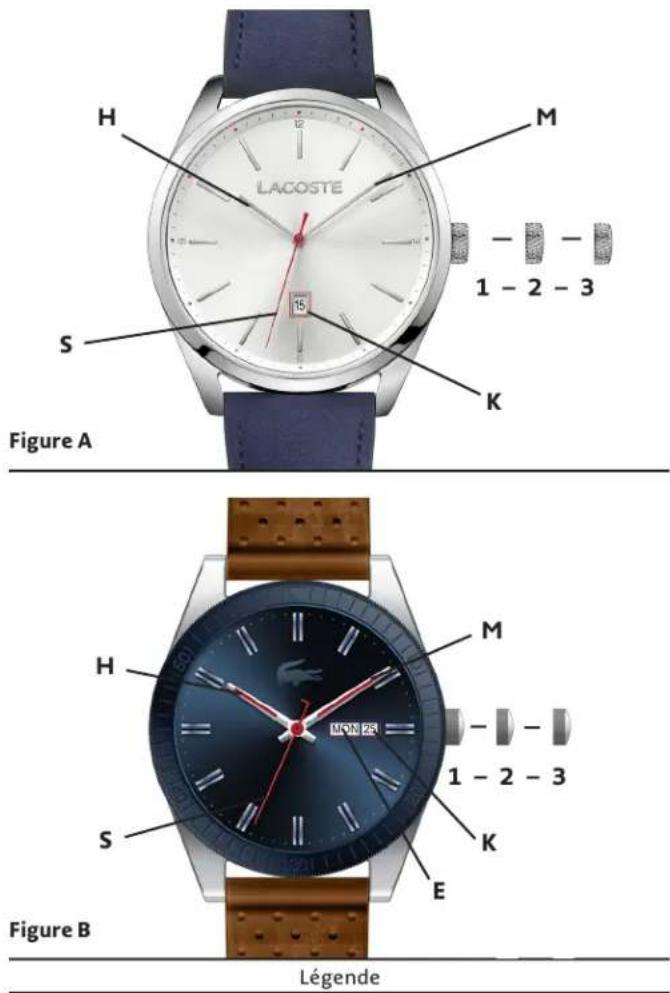
Legend
1, 2, 3 – Crown positions
H - Hour hand
M - Minute hand
S - Second hand
K - Date window
E - Day window
Crown Positions:
Position 1 - Normal position. Crown pushed into case.
Position 2 - To set DATE: Rotate crown clockwise.
NOTE: For models with DAY/DATE display(s):
Rotate crown clockwise to set DATE,
and counterclockwise to set DAY.
Position 3 - To set TIME: Rotate crown in either direction.
CAUTION: Never set the date when the hands are between 9:00
PM and 3:00 AM. Doing so could damage the calendar mechanism.
NOTE: The functioning of the watch is not affected during date setting. When the watch is running, the date will change gradually during the period from 9:00 PM to 3:00 AM.
(3) DUAL-TIME MODELS
With GMT 24-hour and minute hand
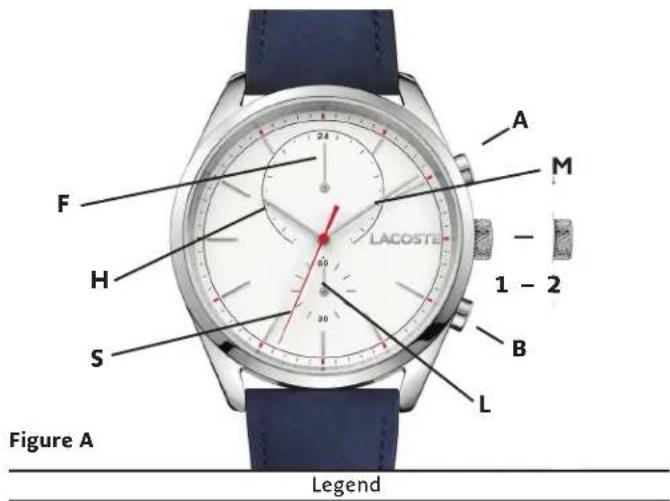
1, 2 - Crown positions
A - Push button to set dual time hour
B - Push button to set dual time minute
H - Hour hand
M - Minute hand
S - Second hand
F - Dual time hour hand (24 hrs)
L - Dual time minute hand
Crown Positions:
Position 1 – Normal running position; crown pushed into case. Position 2 – To set TIME: Time setting and rapid correction of dual time.
Local time is indicated by the hour H, minute M and second S hands, while center-mounted Dual time hands indicate dual time hours and minutes.
After changing the battery, before setting the time, check if the dual time hour hand and dual time minute hand are at «0» (12 o'clock position). If either the dual time hour hand or the dual time minute hand is not in the «0» position, reset it/them following the following procedure:
- Pull crown out to position 2.
- Keep the buttons A & B pressed at the same time for more than 2 seconds, then release the buttons (dual time hands move and return to where they were).
- Press button A or B to reset the dual time hands to «0» position.
Button A: dual time hour hand move clockwise. Button B: dual time minute hand move clockwise. The dual time hands move quickly if the respective buttons are kept pressed. - Push crown back in to position 1.
To set local time:
- Pull crown out to position 2, watch stops.
- Rotate crown in either direction to move hands to desired time.
- Push crown back in to position 1; watch restarts, now set to correct time.
To set dual time:
- Crown should be in position 1.
- Adjust the Dual time hour hand F by pushing button A to go back 1 hour per push or by pushing button B to advance 1 hour per push.
- Pull crown out to position 2 when second hand S is at 12 o'clock position.
- Adjust the Dual time minute hand L by pushing button A to go back 1 minute per push or by pushing button B to advance 1 minute per push.
- Push crown back into position 1; watch restarts, now set to correct time.
(4) MULTI-EYE MODELS - TYPE A
With day/date with or without 24-hour hand without pushers
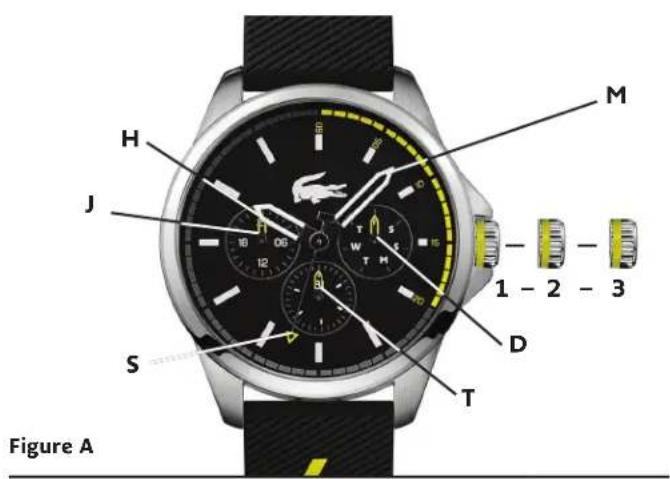
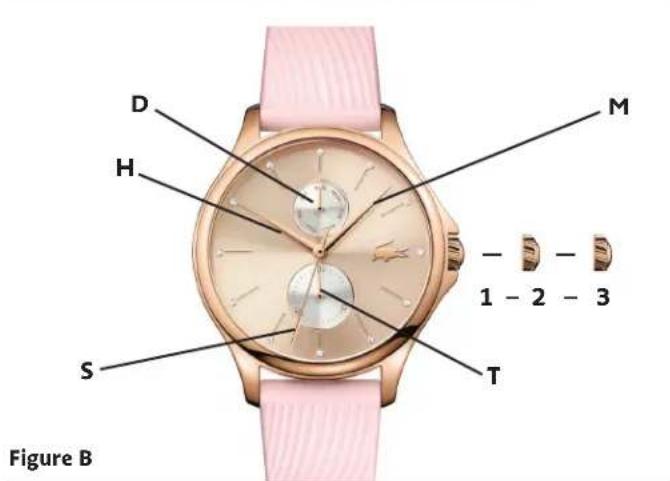
Legend
1, 2, 3 – Crown positions
H-Hour hand
M - Minute hand
S - Seconds hand
J - 24 Hour hand
T - Date hand
D - Day hand
Crown positions:
Position 1 – Normal running position; crown pushed into case.
Position 2 – To set DATE: Rotate crown clockwise.
Position 3 – To set TIME: Rotate crown in either direction.
To set the time:
- Pull crown out to position 3 when the second hand is at the 12 o'clock position, watch stops.
-
Turn crown clockwise to advance the hour and minute hands until the day hand is set to the desired day of the week, if applicable for your model. The day hand will not move back by turning the crown counterclockwise.
-
Turn crown in either direction to move hands to desired time. The 24 hour hand J is moving correspondingly with the hour hand. When setting the minute hand, advance it 4 to 5 minutes ahead of the desired time and then turn it back to the exact time.
- Push crown back in to position 1; watch restarts, now set to correct time.
To set the date:
- Pull crown out to position 2.
- Turn the crown counterclockwise to set the date hand. Do not set the date hand between 9.00pm and 2.00am. The date hand will not move back by turning the crown clockwise.
- Push crown back in to position 1; watch restarts, now set to correct date.
(5) MULTI-EYE MODELS - TYPE B
With day/date with or without 24-hours hand with pushers
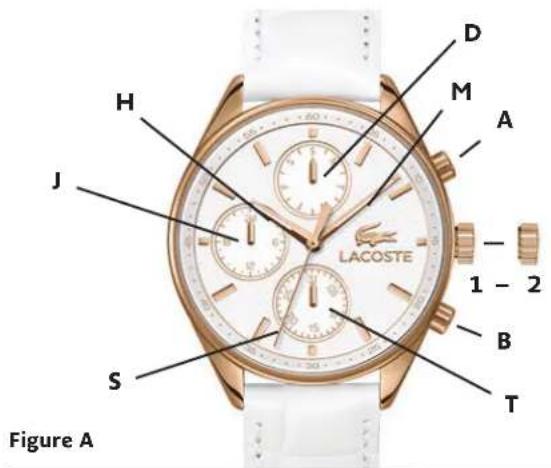
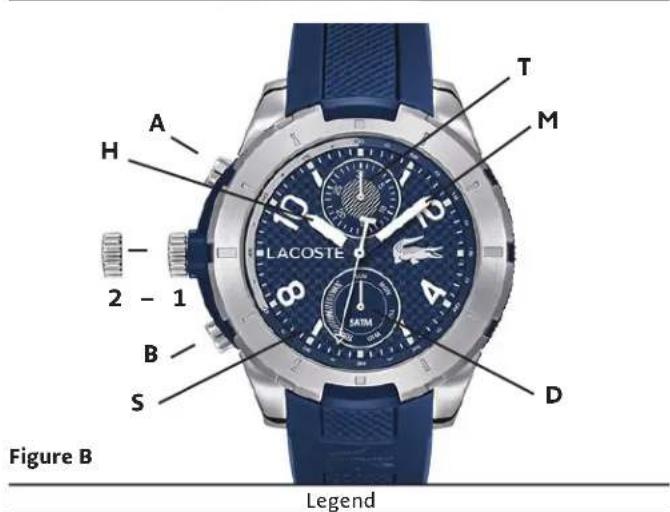
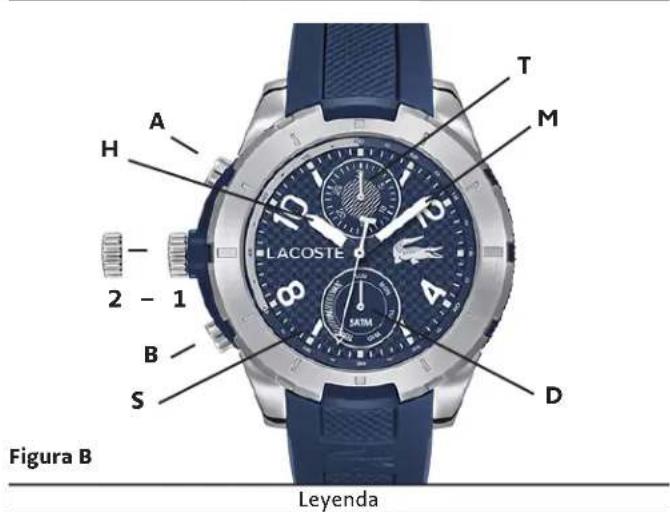
1, 2 - Crown positions
A - Push button to set the day
B - Push button to set the date
H - Hour hand
M - Minute hand
S - Second hand
T - Date hand
J - 24-hour hand
D - Day hand
Crown Positions:
Position 1 - Normal position. Crown pushed into case.
Position 2 - To set TIME: Rotate crown in either direction.
To set the time:
- As soon as the second hand reaches 12 o'clock, pull the crown out to position 2; watch will stop.
- Turn crown in either direction to move hands to correct time, taking AM/PM into consideration.
- Push crown back into position 1.
To set the day and the date:
- Press pushbutton A to set the day. Each press and release will advance the Day hand by one day.
- Press pushbutton B to set the date. Each press and release will advance Date hand by one number.
IMPORTANT: Never correct the Date when the time is between 9pm and 4am when automatic calendar changes are in progress; doing so could damage the mechanism.
- Following a month with fewer than 31 days, you will need to adjust the Date.
(6) ANALOG CHRONOGRAPHS - TYPE A
With day/date/24-hour hand
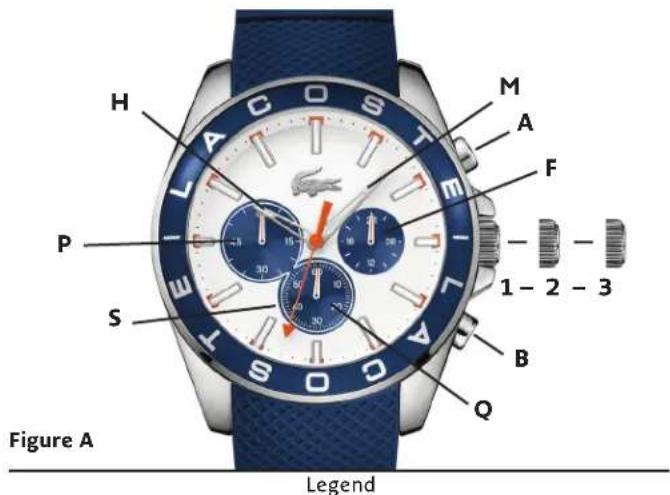
1, 2, 3 - Crown positions
Button A - Start/Stop
Button B - Reset
H - Hour hand
M - Minute hand
S - Second hand
P – Chronograph Minutes Counter
Q – Chronograph Seconds Counter
F - 24-Hour hand
Crown position 3 is only applicable with date function.
Crown Positions:
Position 1 - Normal running position; crown pushed into case.
Position 2 - To set TIME: if no date function.
To set DATE: applicable with date function.
Position 3 - To set TIME: applicable with date function.
The time measured indicated by the stopwatch hands is independent from the center hands.
The stopwatch can measure up to 60 minutes.
To set the time:
- Pull crown out to position 2 when the second hand is at the
12 o'clock position, watch stops.
- Turn crown in either direction to move hands to desired time.
*If applicable for your model, make sure to respect AM/PM
*Do not press any button, otherwise the chronograph hands will move.
- Push crown back in to position 1; watch restarts, now set to correct time.
To set the date (if applicable):
If your watch has a date window, your crown will have 3 positions.
Position 2 is used to set the date:
-
Pull crown out to position 2.
-
Turn crown clockwise until the correct date appears.
Crown Position 3 is used to set the time as per above explanation.
Simple Chronograph Functions:
To measure the duration of a single, non-stop event (up to 60 minutes):
-
Press pushbutton A to start chronograph.
-
Press pushbutton A a second time to stop chronograph.
-
Press pushbutton B to reset chronograph hands to zero.
Measuring Cumulative Times:
-
Press pushbutton A to start chronograph.
-
Press pushbutton A to stop chronograph timing.
-
Press pushbutton A to restart.
-
Repeat steps 2 and 3 as many times as desired.
-
When through timing, press button B to reset chronograph hands to zero.
Measuring Split Times:
-
Press pushbutton A to start chronograph.
-
Press pushbutton B to momentarily stop chronograph and read an intermediate or split time.
-
Press pushbutton B to restart; chronograph hands will advance rapidly to catch up with ongoing event.
-
Repeat steps 2 and 3 to take as many intermediate or split times as desired.
-
Press pushbutton A to stop chronograph timing.
-
Press pushbutton B to reset chronograph hands to zero.
(7) ANALOG CHRONOGRAPHS-TYPE B
Chronographs 1/10 Second
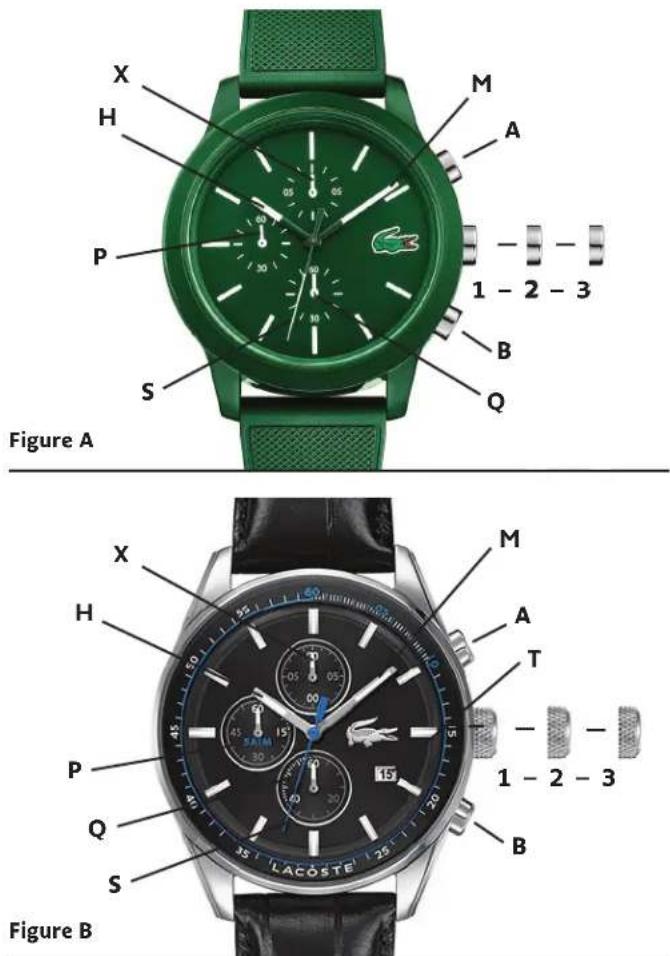
Legend
1, 2, 3 – Crown positions
Button A - Start/Stop
Button B - Reset
H - Hour hand
M - Minute hand
S - Second hand
P – Chronograph Minutes hand
Q – Chronograph Seconds hand
X – Chronograph 1/10-of-a-seconds Chronograph hand
Crown Positions:
Position 1 - Normal running position; crown pushed into case.
Position 2 - To set TIME: if no date function.
To set DATE: applicable with date function.
Position 3 - To set TIME: applicable with date function.
The time measured indicated by the stopwatch hands is independent from the center hands.
The stopwatch can measure up to 60 minutes.
The stopwatch measures in 1/10 second increments.
To set the time:
- Pull crown out to position 2 when the second hand is at the 12 o'clock position, watch stops.
- Turn crown in either direction to move hands to desired time. If applicable for your model, make sure to respect AM/PM Do not press any button, otherwise the chronograph hands will move.
- Push crown back in to position 1; watch restarts, now set to correct time.
To set the date (if applicable):
If your watch has a date window, your crown will have 3 positions. Position 2 is used to set the date:
- Pull crown out to position 2.
- Turn crown clockwise until the correct date appears.
Crown Position 3 is used to set the time as per above explanation.
Simple Chronograph Functions:
To measure the duration of a single, non-stop event (up to 60 minutes):
- Press pushbutton A to start chronograph.
- Press pushbutton A a second time to stop chronograph.
- Press pushbutton B to reset chronograph hands to zero.
Measuring Cumulative Times:
- Press pushbutton A to start chronograph.
- Press pushbutton A to stop chronograph timing.
- Press pushbutton A to restart.
- Repeat steps 2 and 3 as many times as desired.
- When through timing, press button B to reset chronograph hands to zero.
Measuring Split Times:
- Press pushbutton A to start chronograph.
- Press pushbutton B to momentarily stop chronograph and read an intermediate or split time.
- Press pushbutton B to restart; chronograph hands will advance rapidly to catch up with ongoing event.
- Repeat steps 2 and 3 to take as many intermediate or split times as desired.
- Press pushbutton A to stop chronograph timing.
- Press pushbutton B to reset chronograph hands to zero.
(8) ANALOG CHRONOGRAPHS - TYPE C
Chronograph with 30-minute counter and date
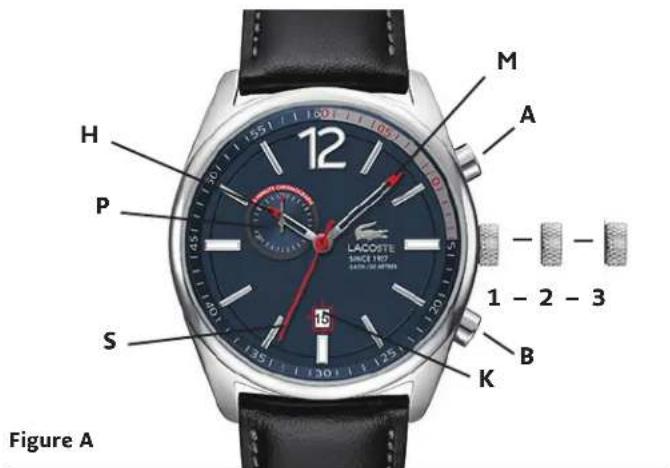
Legend
1, 2, 3 – Crown positions
Button A - Start/Stop
Button B - Reset
H-Hour hand
M - Minute hand
S - Second hand
P – Chronograph Minutes hand
K - Date Window
- Repeat steps 2 and 3 to add each interval of time.
NOTE: Each time you stop chronograph, chronograph hands will indicate total accumulated time. - After final reading, push button B to reset chronograph hands.
Measuring Split Times:
To take intermediate time readings as an event progresses:
- Push button A to start timing.
- Push button B to stop chronograph and read split time.
NOTE: Chronograph continues to run in background. - Push button B to restart; chronograph hands to catch up with ongoing event.
- Repeat steps 2 and 3 to take any additional split times.
- Push button A to stop chronograph.
- Push button B to reset chronograph hands.
Crown positions:
Position 1 - Normal running position; crown pushed into case.
Position 2 - To set DATE: Rotate crown clockwise.
Position 3 - To set TIME: Rotate crown in either direction.
Setting the time:
- Pull crown out to position 3. Watch will stop.
- Turn crown in either direction to move hands to correct time.
- Push crown back into position 1.
Setting the date:
- Pull crown out to position 2.
- Turn crown clockwise until the correct date.
IMPORTANT: Never correct date between 9pm and 3am when automatic calendar changes are in progress; doing so could damage the mechanism. - Push crown back into position 1.
Chronograph Functions:
NOTE: After 2 hours of continuous running, the chronograph stops and resets automatically to save battery.
Measuring Cumulative Times:
To measure the combined time of a series of shorter events:
1. Press pushbutton A to start chronograph.
2. Press pushbutton A to stop chronograph and read elapsed time.
3. Press pushbutton A to resume measurement.
(9) SPECIAL FEATURES
SCREW DOWN CROWN
natural_image
Diagram of a mechanical component with a curved arrow indicating rotation or movement (no text or symbols present)A
natural_image
Diagram of a mechanical component with an arrow indicating rotational motion (no text or symbols)B
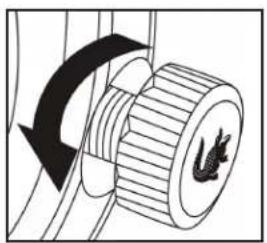
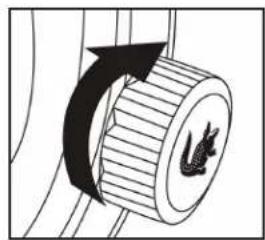
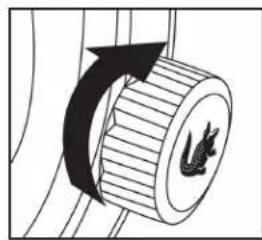
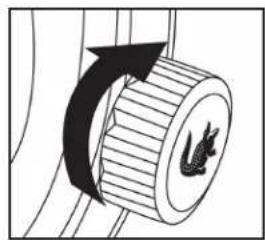
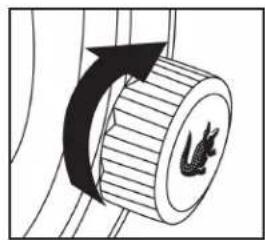
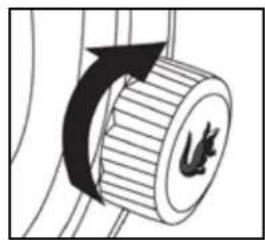
Some models are equipped with a special screw-down crown that helps seal the case against water and moisture. Before attempting to set the time or date, you must first unlock the screw-down crown by turning it counterclockwise until it loosens (approximately six rotations).
Unlocking is not required with standard crowns.
A. To unlock the crown:
Rotate the crown counterclockwise (left) until it releases from the case.
B. To re-lock the crown after time/date setting:
Rotate the crown clockwise (right) while pushing it in, and tighten firmly.
(9) SPECIAL FEATURES
MESH BRACELET SLIDING CLASP
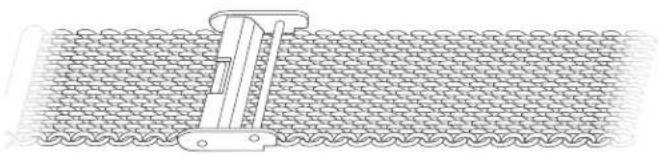
The mesh bracelets found on select models feature a hooking jewelry clasp that allows you to size the bracelet by sliding the pin-bar half of the clasp along the bracelet to achieve a customized fit.
natural_image
Technical line drawing of a mechanical clamp securing a meshed fabric (no text or symbols)Above: Open mesh bracelet side with pin-bar half of sliding clasp locked in position.
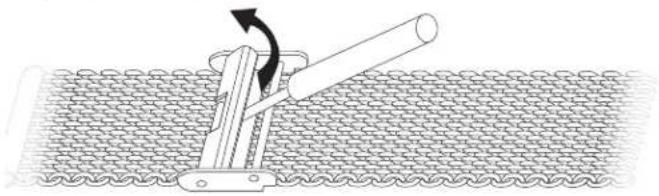
To size the bracelet:
natural_image
Diagram of a mechanical lever mechanism interacting with a chain (no text or symbols present)- Use tool such as a small flat-head screwdriver to pop open metal plate on pin-bar half of clasp, releasing the clasp position locking mechanism.
natural_image
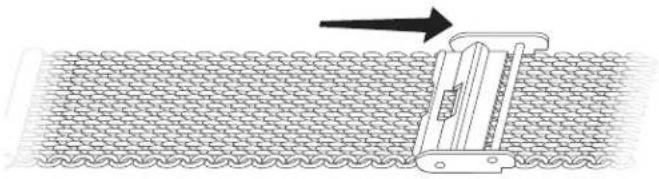
Diagram of a mechanical device interacting with a meshed fabric surface, showing an arrow indicating direction (no text or symbols present)- Slide pin-bar half of clasp along the mesh bracelet in either direction to desired position.
natural_image
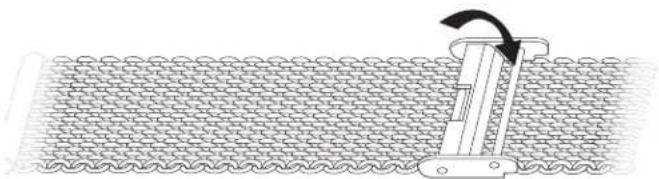
Diagram of a mechanical device interacting with a meshed fabric surface (no text or symbols)- Close metal plate, locking the pin-bar half of the clasp in new position on the bracelet.
CARE AND MAINTENANCE
Your LACOSTE WATCH has been developed with meticulous attention to quality, function and detail. Please read the following information and instructions carefully to learn about the features, proper care and operation of your new time-piece. For additional information on service and repairs, please see the Service and Warranty section.
Never open the watch yourself. If your watch needs repair or adjustment, take or mail it directly to an authorized Service Center. For a complete worldwide listing, visit us online at www.mgiservice.com
SHOCK
All of our watches have shock-resistant movements and are tested to meet international standards for shock resistance.
MAGNETISM
The exposure of a timepiece to a strong magnetic field will affect its time-keeping, and may cause it to stop. A quartz watch should resume working with its original accuracy when removed from the magnetic field; an automatic or hand-wound mechanical timepiece, however, may require demagnetization before it will operate again.
WATER RESISTANCE
All our watches meet international standards for water resistance to at least 3ATM / 30M/ 99 feet, so faucet spray or rain won't hurt them as long as the case, crown and crystal remain intact. Timepieces marked water resistant to 50M / 5ATM/ 165 feet may be worn while showering or swimming, but not scuba diving.
CAUTION: Do not operate your watch crown or the push-buttons on a chronograph or multi-function model when the watch is under water, or it will not remain water resistant.
Water resistance applies only to the watch case; some watch straps should not be worn under water or subjected to wet conditions. Please see STRAP CARE.
Avoid exposing your watch to sudden and excessive temperature variations.
Do not drop your watch or bang it against a hard surface. Water resistance must be rechecked after every violent shock.
Carefully wipe your watch using a soft cloth dampened with fresh water after exposure to chlorine or sea water.
OTHER PRECAUTIONS:
If your watch is equipped with a screw-down crown, be sure to screw it back down into the case after every operation.
STRAP CARE
While the life span of a watch strap depends on your care and wearing habits, as well as climate in which you live, proper care will extend its life.
Leather strap should be kept dry. Exposure to water may cause a leather watch strap to become brittle and eventually break. To preserve the finish of the leather, contact with perfumes should be avoided. Following exposure to chlorinated or salt water, gently damp wipe your leather strap with fresh water, and air dry.
To help preserve the natural elasticity and quality of a silicone or rubber strap, rinse it using a soft cloth soaked in fresh water following exposure to salt water, chemicals or abrasive substances.
Use warm water and a neutral pH soap applied to a soft cloth to gently clean a white silicone or rubber strap; then wipe with a second clean cloth dipped in warm water, or rinse carefully under warm running water. Contact with acetone and ethyl alcohol should be avoided.
NOTE: Watch straps are not covered by the watch warranty.
BATTERY INFORMATION
Your quartz analog watch or chronograph has a battery specially designed for watches. It will last approximately 18-36 months under normal use.
CARE AND MAINTENANCE
NOTE: Frequent use of special functions, like the stopwatch timer on chronograph models, may shorten battery life.
End-of-life feature: The second hand on many models will start to move haltingly in 2 or 4 second increments when the battery is almost exhausted, signaling the need to have it replaced.
Battery replacement: Take or send your watch to an Authorized Service Center to have battery changed – your old battery will be disposed of/recycled properly. Do not attempt to change the battery yourself.
Collection and treatment of end of life quartz watches\*

This product should not be discarded with household waste. To protect the environment and human health, it must be returned to a local authorized collection system for proper recycling.
*Valid in the EU member states and in any countries with corresponding legislation.
WARRANTY INFORMATION
WARRANTY INFORMATION
Not only is each Lacoste watch beautiful in design, it is crafted with quality materials and components to offer precise, reliable performance. We proudly stand behind every Lacoste watch we sell.
Lacoste Watches Limited Warranty
Lacoste Watches warrants to the original consumer that, for a period of two (2) years from the date of purchase, his/her watch will be free from defects in materials and workmanship that prevent the watch from functioning properly under normal use.
Our responsibility for defects covered by this warranty is limited to repairing or (at the sole discretion of Lacoste Watches) replacing the defective watch, free of charge.
This limited warranty does not cover batteries, straps, bracelets, crystals, gold- or ionic-plating or PVD finishing, cosmetic issues such as scratches or normal wear and tear, or any damage arising from accidents or misuse, or from any alteration, service or repair performed by any party other than an Lacoste Watches Authorized Service Center.
This warranty is void if the timepiece was not purchased from an Authorized Lacoste Watches Dealer, as evidenced by valid proof of purchase – a dated sales or gift receipt showing the name of the retailer and an identifying style number for the Lacoste watch.
Any other warranty provided by the retailer is entirely their responsibility. No person or company is authorized to change the terms of this warranty. This warranty gives the consumer specific legal rights. He/she may also have other statutory rights which may vary from state to state and country to country. However, to the extent not prohibited by law, this limited warranty is exclusive and in lieu of all other warranties, oral, written, statutory, express or implied (including without limitation the warranties of merchantability and fitness for a particular purpose), all of which are expressly disclaimed.
OBTAINING SERVICE
UNDER WARRANTY
Should warranty service be required, pack your watch properly (see below) and send it along with (1) the original sales receipt and (2) a completed copy of the Lacoste Watches Service Request Form(s) to the nearest Lacoste Watches Service Center. A list of authorized service centers can be found on this website – just return to the Lacoste Watches service website home page and click on the Warranty and Service Information link.
OUT OF WARRANTY
The Lacoste Watches Service Center can also perform repairs not covered by the Lacoste Watches warranty as well as service after the expiration of the warranty period. Should your watch require parts or service not covered under the terms of your warranty, a written estimate will be sent for your approval and payment before the work is undertaken. Please copy and use the form(s) from this file.
BATTERY REPLACEMENT
The Lacoste Watches Service Center can also change the battery on your Lacoste watch, for a fee.
PACKING YOUR WATCH
Pack your watch securely in padded wrapping materials for protection against shock. Be sure to include a completed copy of the Lacoste Watches Service Request Form.
INSURING YOUR WATCH
We recommend that you use registered mail and insure your watch for its full replacement value.
ADDITIONAL INSTRUCTIONS
Charges will be made for all repairs unless the original dated purchase or gift receipt showing the name of the retailer and an identifying watch style number is returned with the product, and repairs are covered under terms of warranty. Authorized Service Center locations can accessed from the link on the www.mgiservice.com/lacoste homepage.
OBTAINING SERVICE
LACOSTE WATCHES SERVICE REQUEST FORM A
Name
Address
City
State/Province
Country
ZIP/Postal Code
Phone (____).
Watch Model
What needs service, replacement or repair:
LACOSTE WATCHES US/CANADA SERVICE REQUEST FORM B
Include with all service requests sent to LACW Service Centers in the U.S. or Canada
ITEM
PRICE
TOTAL
Battery
\$35.00 USD/
\$35.00 CAD
\$
Shipping
\$15.00 USD/
\$15.00 USD or
& Handling
\$15.00 CAD
\$15.00 CAD
TOTAL:
\$
Payment method:
(No text)
Check or Money Order
(No text)
MasterCard
(No text)
Visa
Account number:
Expiration date:
Signature:
(Required for credit card purchases)
LACOSTE

LACOSTE WATCHES
(6) ANALOG-CHRONOGRAPHEN - TYP A
(8) ANALOG-CHRONOGRAPHEN - TYP C
natural_image
Diagram of a mechanical component with a curved arrow indicating rotation or direction (no text or symbols)A
natural_image
Diagram of a mechanical component with an arrow indicating rotational motion (no text or symbols)B
natural_image
Diagram of a mechanical device mounted on a textured surface, no text or symbols presentnatural_image
Diagram of a mechanical lever mechanism interacting with a chain (no text or symbols present)natural_image
Diagram of a mechanical device interacting with a meshed surface, showing motion direction (no text or symbols)natural_image
Diagram of a mechanical device interacting with a meshed fabric surface (no text or symbols)SO VERPACKEN SIE IHRE UHR
SO VERSICHERN SIE IHRE UHR
LACOSTE WATCHES SERVICEAUFTRAGSFORMULAR A
Name
Straße
Ort
Bundesland/Kanton
Land
PLZ
Tel. (____)
Uhrenmodell
INFORMATIONS SUR LA GARANTIE
INFORMATIONS SUR LE SERVICE APRÈS-VENTE
(1) MODÈLES À 2 ET 3 AIGUILLES
1, 2 – Positions de la couronne
(2) MODÈLES AVEC DATE / JOUR-DATE
1, 2, 3 – Positions de la couronne
Légende
1, 2 – Positions de la couronne
natural_image
Diagram of a mechanical component with a curved arrow indicating rotation or direction (no text or symbols)A
natural_image
Diagram of a mechanical component with an arrow indicating rotational motion (no text or symbols)B
natural_image
Diagram of a mechanical device mounted on a textured surface, no text or symbols presentnatural_image
Diagram of a mechanical lever mechanism interacting with a chain (no text or symbols present)natural_image
Diagram of a mechanical device interacting with a meshed surface, showing a directional arrow (no text or symbols present)natural_image
Diagram of a mechanical device interacting with a meshed fabric surface (no text or symbols)INFORMATIONS SUR LA GARANTIE
INFORMATIONS SUR LA GARANTIE
The Ground Truth image displays a single, solid horizontal line. According to Rule 2 (UNDERSCORE & LINE RULES), if the GT contains lines used for stylistic emphasis or as background (like ruled paper), the OCR result must ignore them. The line in the GT is clearly a stylistic or background line, not a placeholder for text. Therefore, the OCR should not have output any underscores. Outputting `____` constitutes an error under Rule 2, as it hallucinates placeholder symbols where none are semantically intended. Hence, the OCR result is inconsistent with the Ground Truth.
Visa
Numéro de compte:
Date d'expiration :
Signature :
natural_image
Diagram of a mechanical component with a curved arrow indicating rotation or direction (no text or symbols)A
natural_image
Diagram of a mechanical component with an arrow indicating rotational motion (no text or symbols)B
natural_image
Diagram of a mechanical device inserted into a mesh material (no text or symbols)natural_image
Diagram of a mechanical clamp securing a chain with a rotating lever (no text or symbols)natural_image
Diagram of a mechanical device pressing down on a textured surface, with an arrow indicating direction (no text or symbols present)natural_image
Diagram of a mechanical device interacting with a meshed fabric surface (no text or symbols)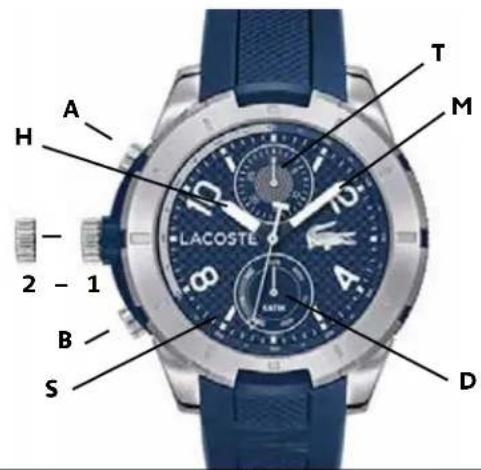
說明
1、2-リューズの位置
A - 曜日設定用ブッシュボタン
B - 日付設定用ブッシュボタン
H - 時針
M - 分针
S - 秒針
T - 日付表示針
J-24時間針
D - 曜日表示針
リューズの位置:
natural_image
Diagram of a mechanical component with a curved arrow indicating rotation or direction (no text or symbols)A
natural_image
Diagram of a mechanical component with a rotating arrow and a small symbol (no text or labels)B
natural_image
Diagram of a mechanical device mounted on a textured surface, no text or symbols presentnatural_image
Diagram of a mechanical lever mechanism interacting with a chain (no text or symbols present)natural_image
Diagram of a mechanical device interacting with a meshed surface, showing a directional arrow (no text or symbols present)natural_image
Diagram of a mechanical device interacting with a meshed fabric surface (no text or symbols)- CONTENTS
- OPERATING INSTRUCTIONS
- CARE AND MAINTENANCE
- 2- AND 3-HAND MODELS
- Crown Positions:
- DATE/DAY-DATE MODELS
- DUAL-TIME MODELS
- With GMT 24-hour and minute hand
- To set local time:
- To set dual time:
- MULTI-EYE MODELS - TYPE A
- To set the time:
- To set the date:
- MULTI-EYE MODELS - TYPE B
- With day/date with or without 24-hours hand with pushers
- To set the day and the date:
- ANALOG CHRONOGRAPHS - TYPE A
- To set the date (if applicable):
- Simple Chronograph Functions:
- Measuring Cumulative Times:
- Measuring Split Times:
- ANALOG CHRONOGRAPHS-TYPE B
- ANALOG CHRONOGRAPHS - TYPE C
- Setting the time:
- Setting the date:
- Chronograph Functions:
- SPECIAL FEATURES
- SCREW DOWN CROWN
- MESH BRACELET SLIDING CLASP
- SHOCK
- MAGNETISM
- WATER RESISTANCE
- OTHER PRECAUTIONS:
- STRAP CARE
- BATTERY INFORMATION
- Collection and treatment of end of life quartz watches\*
- WARRANTY INFORMATION
- Lacoste Watches Limited Warranty
- OBTAINING SERVICE
- UNDER WARRANTY
- OUT OF WARRANTY
- BATTERY REPLACEMENT
- PACKING YOUR WATCH
- INSURING YOUR WATCH
- ADDITIONAL INSTRUCTIONS
- LACOSTE WATCHES SERVICE REQUEST FORM A
- LACOSTE WATCHES US/CANADA SERVICE REQUEST FORM B
- Payment method:
- LACOSTE
- LACOSTE WATCHES
- ANALOG-CHRONOGRAPHEN - TYP A
- ANALOG-CHRONOGRAPHEN - TYP C
- SO VERPACKEN SIE IHRE UHR
- SO VERSICHERN SIE IHRE UHR
- LACOSTE WATCHES SERVICEAUFTRAGSFORMULAR A
- INFORMATIONS SUR LA GARANTIE
- INFORMATIONS SUR LE SERVICE APRÈS-VENTE
- MODÈLES À 2 ET 3 AIGUILLES
- MODÈLES AVEC DATE / JOUR-DATE
Brand : Lacoste
Model : 12.12 2010987
Category : Wristwatch