eiQMWCOM34 - Microwaves ElectriQ - Free user manual and instructions
Find the device manual for free eiQMWCOM34 ElectriQ in PDF.


| Product Type | Microwave Oven |
| Brand | ElectriQ |
| Model | eiQMWCOM34 |
| Capacity | 0.9 cu ft (approx. 25 L) |
| Power Output | 700 W |
| Power Consumption | 1050 W |
| Voltage | 120 V / 60 Hz |
| Dimensions (W x D x H) | 20.3 x 16.5 x 12.2 inches (approx.) |
| Weight | 26.5 lbs (approx. 12 kg) |
| Controls | Digital touchpad with LED display |
| Functions | Microwave cooking, defrost, timer, clock, child lock |
| Power Levels | 10 |
| Door Type | Push-button release |
| Interior Light | Yes |
| Turntable | Yes, removable glass |
| Cleaning | Wipe with damp cloth; avoid abrasive cleaners |
| Safety Features | Child lock, automatic shut-off, door interlock |
| Spare Parts | Glass turntable, roller ring, fuse (available from manufacturer) |
| Repairability | User-serviceable parts: fuse; for other issues contact support |
| Manual | Available for download at notice-facile.com |
Frequently Asked Questions - eiQMWCOM34 ElectriQ
User questions about eiQMWCOM34 ElectriQ
0 question about this device. Answer the ones you know or ask your own.
Ask a new question about this device
Download the instructions for your Microwaves in PDF format for free! Find your manual eiQMWCOM34 - ElectriQ and take your electronic device back in hand. On this page are published all the documents necessary for the use of your device. eiQMWCOM34 by ElectriQ.
USER MANUAL eiQMWCOM34 ElectriQ
natural_image
Line drawing of a microwave oven with handle and side panel (no text or symbols)MICROWAVE OVEN
34 EIQMWCOM
Thank you for choosing electriQ Please read this user manual before using this microwave and keep it safe for future reference Visit our page www.electriQ.co.uk for our entire range of Electricals
CONTENTS
SAFETY 3
SETTING UP THE MICROWAVE 8
PRODUCT OVERVIEW 9
CONTROL PANEL 9
CLEANING AND MAINTENANCE 10
USE OF SUITABLE UTENSILS 11
TROUBLESHOOTING 12
TECHNICAL SPECIFICATION 12
SUPPORT 13
PRECAUTIONS TO AVOID POSSIBLE EXPOSURE TO EXCESSIVE MICROWAVE ENERGY
- Do not attempt to operate this oven with the door open since this can result in harmful exposure to microwave energy. It is important not to break or tamper with the safety interlocks.
- Do not place any object between the oven front face and the door or allow dirt or cleaner residue to accumulate on sealing surfaces.
- WARNING: If the door or door seals are damaged, the oven must not be operated until it has been repaired by a competent person.
If the apparatus is not maintained in a good state of cleanliness, its surface could be degraded and affect the lifespan of the apparatus and lead to a dangerous situation.
IMPORTANT SAFETY INSTRUCTIONS
To reduce the risk of fire, electric shock, injury to persons or exposure to excessive microwave energy when using your appliance, follow basic precautions, including the following:
- Read and follow the specific: "PRECAUTIONS TO AVOID POSSIBLE EXPOSURE TO EXCESSIVE MICROWAVE ENERGY". - This appliance can be used by children aged from 8 years and above and persons with reduced physical, sensory or mental capabilities or lack of experience and knowledge if they have been given supervision or instruction concerning use of the appliance in a safe way and understand the hazards involved. Children shall not play with the appliance. Cleaning and user maintenance shall not be made by children unless they are older than 8 and supervised. Children less than 8 years of age shall be kept away unless continuously supervised
- Keep the appliance and its cord out of reach of children less than 8 years.
- If the supply cord is damaged, it must be replaced by the manufacturer, its service agent or similarly qualified persons in order to avoid a hazard.
-
WARNING: Ensure that the appliance is unplugged before replacing the lamp to avoid the possibility of electric shock.
-
WARNING: It is hazardous for anyone other than a competent person to carry out any service or repair operation that involves the removal of the cover which gives protection against exposure to microwave energy.
- WARNING: Liquids and other foods must not be heated in sealed containers since they are liable to explode.
- When heating food in plastic or paper containers, keep an eye on the oven due to the possibility of ignition.
- Only use utensils that are suitable for use in microwave ovens.
- If smoke is emitted, switch off the appliance and keep the door closed in order to stifle any flames.
- The contents of feeding bottles and baby food jars shall be stirred or shaken and the temperature checked before consumption, in order to avoid burns.
- The oven should be cleaned regularly and any food deposits removed.
- Failure to maintain the oven in a clean condition could lead to deterioration of the surface that could adversely affect the life of the appliance and possibly result in a hazardous situation.
- Do not use a temperature probe with this oven.
- Metallic containers for food and beverages must not be used during microwave cooking.
- The appliance must not be cleaned with a steam cleaner.
- CAUTION: This appliance is designed only for cooking food and must not be used for any other purpose such as heating a room.
- The microwave oven is intended for heating food and beverages. Drying of food or clothing and heating of warming pads, slippers, sponges, damp cloths and similar may lead to risk of injury, ignition or fire.
- The microwave is not intended to be operated by means of an external timer or separate remote-control system.
- If it is necessary to use an extension cord, its marked electrical rating must be at least as great as the electrical rating of the appliance, and must be 3 core including the earth.
- Incorrect repairs are dangerous. Repairs may only be carried out and damaged power cables replaced by a suitably qualified and competent electrician.
- If the appliance is defective, unplug the unit and contact the retailer or manufacturer for support.
- The cable insulation on electrical appliances may melt when touching hot parts of the appliance. Never bring electrical appliance cables into contact with the microwave.
-
During use the appliance will become hot
-
Accessories and ovenware may become very hot. Always use oven gloves to remove accessories or ovenware from the cooking compartment.
- Alcoholic vapours may catch fire in the hot cooking compartment. Never prepare food containing large quantities of drinks with a high alcohol content. Only use small quantities of drinks with a high alcohol content. Open the appliance door with care.
- Foods with peel or skin may burst or explode during, or even after, heating. Never cook eggs in their shells or reheat hard-boiled eggs. Never cook shellfish or crustaceans. Always prick the yoke when baking or poaching eggs. The skin of foods that have a peel or skin, such as apples, tomatoes, potatoes and sausages, may burst. Before heating, prick the peel or skin.
Risk of scalding!
- When you open the appliance door, hot steam may escape. Open the appliance door with care. Keep children at a safe distance.
- Microwave heating of beverages can result in delayed eruptive boiling; therefore, care must be taken when handling the container. This means that the liquid reaches boiling temperature without the usual steam bubbles rising to the surface. Even if the container only vibrates a little, the hot liquid may suddenly boil over and spatter.
- When heating, always place a spoon in the container. This will prevent delayed boiling.
- Scratched glass in the appliance door may develop into a crack. Do not use a glass scraper, sharp or abrasive cleaning aids or detergents.
- Unsuitable ovenware may crack. Porcelain or ceramic ovenware can have small perforations in the handles or lids. These perforations conceal a cavity below. Any moisture that penetrates this cavity could cause the ovenware to crack.
- Only use microwave-safe ovenware
- Creation of sparks: Metal e.g. a spoon in a glass must be kept at least 2 cm from the oven walls and the inside of the door. Sparks could irreparably damage the glass on the inside of the door.
- Water in the hot cooking compartment: Never pour water into the hot cooking compartment. This will cause steam. The temperature change can cause damage.
- Moist food: Do not store moist food in the closed cooking compartment for long periods.
- Do not use the appliance to store food. This can lead to corrosion.
- Heavily soiled seal: If the seal is very dirty, the appliance door will no longer close properly during operation. Always keep the seal clean.
- Operating the microwave without food: Operating the appliance without food in the cooking compartment may lead to overloading. Never switch on the appliance unless there is food in the cooking compartment. An exception to this rule is a short crockery test (see the section "Microwave, suitable crockery").
- Using the appliance door for standing on or placing objects on: Do not stand or place anything on the open appliance door. Do not place ovenware or accessories on the appliance door.
- Transporting the appliance: Do not carry or hold the appliance by the door handle. The door handle cannot support the weight of the appliance and could break.
- Microwave popcorn: Never set the microwave power too high. Use a power setting no higher than 600 watts. Always place the popcorn bag on a glass plate. The disc may jump if overloaded.
- The oven should be cleaned regularly and any food deposits removed since they may explode, even after microwave heating has ended.
- Failure to maintain the oven in a clean condition could lead to deterioration of the surface that could adversely affect the life of the appliance and possibly result in a hazardous situation.
READ CAREFULLY AND KEEP FOR FUTURE REFERENCE
TO REDUCE THE RISK OF INJURY TO PERSONS ENSURE THE UNIT IS CORRECTLY EARTHED.
DANGER: Electric Shock Hazard - Touching some of the internal components can cause serious personal injury or death. Do not disassemble this appliance.
WARNING: Electric Shock Hazard - Incorrectly earthed units can result in electric shock.
When it comes to connecting your appliance, please follow the instructions below carefully.
- This appliance is designed to be plugged into to the power supply.
- The plug contains an earth pin, and the microwave must be connected to a properly earthed socket.
- If there is not any appropriate earthed electrical outlet that conforms to regulations then one must be installed by a qualified electrician.
- The earthed electrical outlet must be near to the microwave.
- In case of any damage to the supply cable, you must call and arrange a certified and qualified electrician to replace the cable for you.
- You may damage the microwave if it is wired incorrectly. Any damage due to incorrect wiring will not be covered under the warranty.
- This appliance is only designed to connect to a standard 220-240V connection.
- The electrical cable must not touch hot parts of the appliance or the back of the appliance, otherwise the cable may get damaged and cause the appliance to short-circuit.
- The retailer and manufacturer have no responsibility against any kind of damage or loss that is caused from not following safety norms.
SETTING UP YOUR OVEN
• Ventilation slots and intakes must not be covered.
- Remove all packing material and accessories.
- Examine the oven for any damage such as dents or damage to the door. Do not attempt to use if the oven is damaged.
Select a level surface that provides enough open space for the intake and outlet vents.
A 10 cm space should be kept between the appliance and the wall behind, a 5cm space should be left to either side of the microwave and a 20cm clearance above.
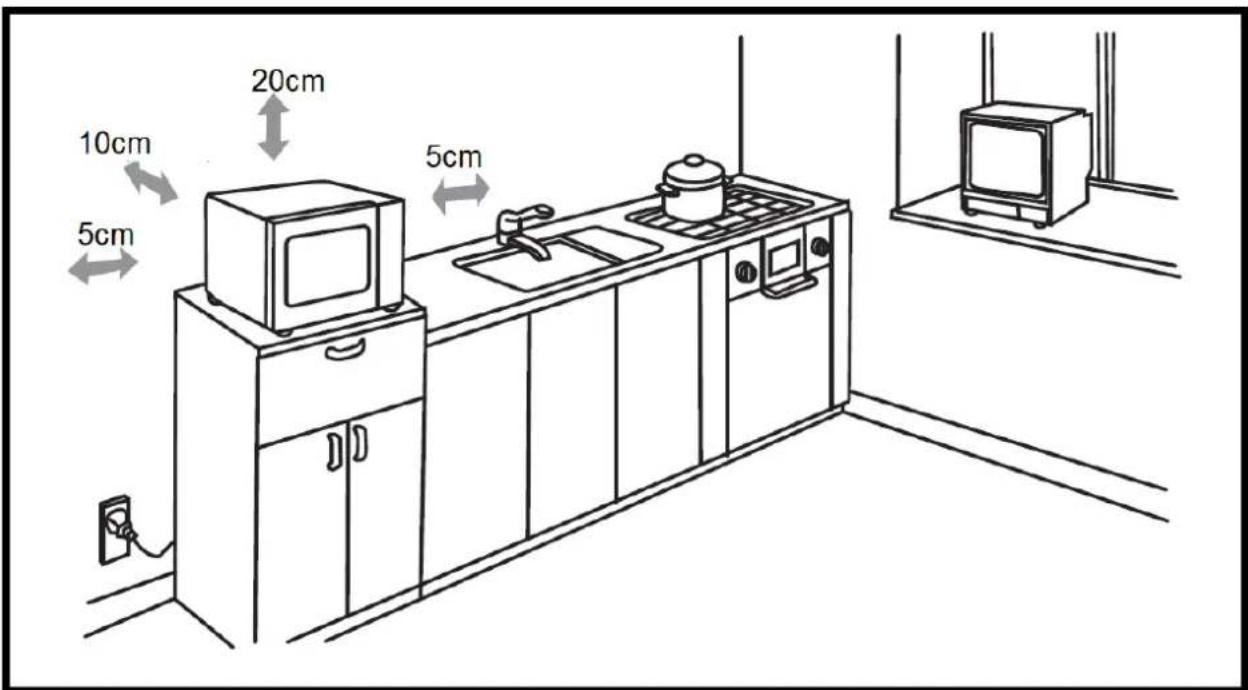
- Never remove the feet of the appliance, nor block the air intake and exhaust opening. The left side must be unobstructed.
- Blocking the intake and/or outlet openings can damage the oven.
- Place the oven far away as possible from radios and TVs. Operation of the microwave oven may cause interference to your radio or TV reception.
- Plug your oven into a standard household outlet. Be sure the voltage and the frequency are the same as the voltage and the frequency on the rating label
- Warning: The plug socket and appliances which are liable to be affected by heat and moisture should be kept away from any vents on the oven.
PRODUCT OVERVIEW
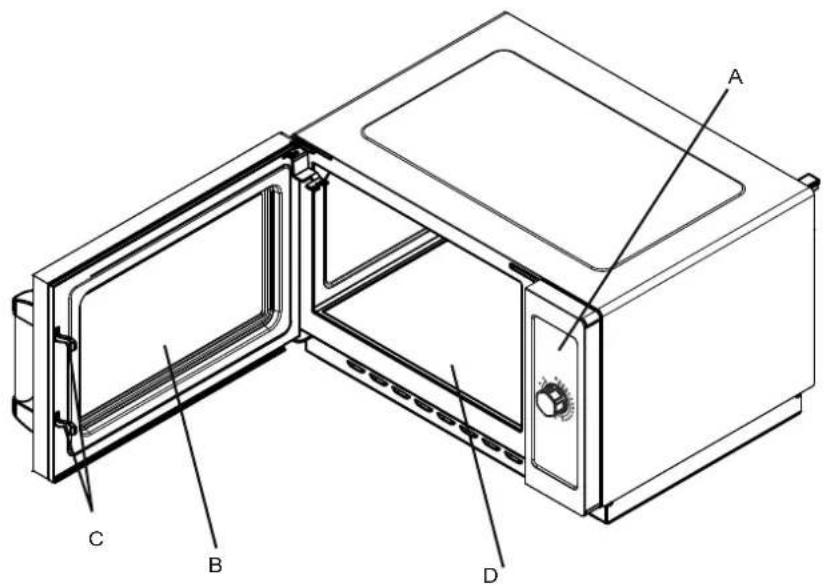
A. Control panel
B. Observation window
c. Safety interlock system
D. Ceramic board
CONTROL PANEL AND FEATURES
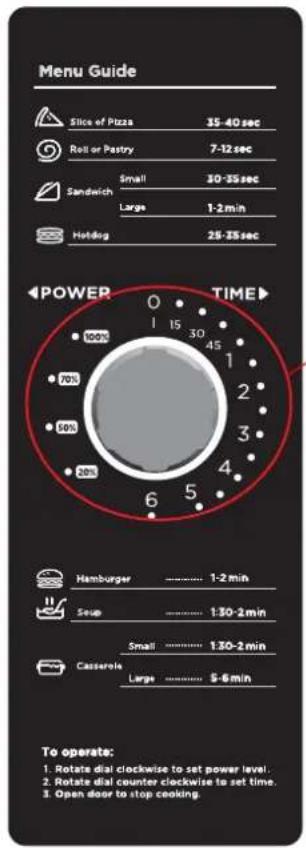
Use the dial to set the microwave timer.
CARE AND CLEANING
With careful care and cleaning your microwave oven will retain its looks and remain in good order. We will explain here how you should care for and clean your appliance correctly.
Risk of electric shock! Penetrating moisture may cause an electric shock. Do not use any high-pressure cleaners or steam cleaners.
Risk of burns! Never clean the appliance immediately after switching off. Let the appliance cool down.
Risk of serious damage to health! Microwave energy may escape if the cooking compartment door or the door seal is damaged. Never use the appliance if the cooking compartment door or the door seal is damaged. Contact the after-sales service.
NOTE:
Slight differences in colour on the front of the appliance are caused by the use of different materials, such as glass, plastic and metal.
Shadows on the door panel which look like streaks, are caused by reflections made by the oven light.
Unpleasant odours, e.g. after fish has been prepared, can be removed very easily. Add a few drops of lemon juice to a cup of water. Place a spoon into the container as well, to prevent delayed boiling (ensure the spoon is kept at least a few centimetres from the edge of the oven to prevent arcing). Heat the water for 1 to 2 minutes at maximum microwave power.
CLEANING AGENTS
To ensure that the different surfaces are not damaged by using the wrong cleaning agent, observe the information in the table. Do not use
- Sharp or abrasive cleaning agents.
- Metal or glass scrapers to clean the glass in the appliance door.
• Metal or glass scrapers to clean the door seal. - Hard scouring pads and sponges.
- Cleaning agents with high concentrations of alcohol.
Wash new sponge cloths thoroughly before use.
Allow all surfaces to dry thoroughly before using the appliance following cleaning
| Area | Cleaning agents |
| Appliance front | Hot soapy water: Clean with a dish cloth and dry with a soft cloth. Do not use glass cleaners, metal scrapers or glass scrapers for cleaning. |
| Appliance front with stainless steel | Hot soapy water: Clean with a dish cloth and dry with a soft cloth. Remove flecks of limescale, grease, starch and albumin (e.g. egg white) immediately. Corrosion can form under such residues. Special stainless-steel cleaning agents can be obtained from specialist shops. Do not use glass cleaners or metal or glass scrapers for cleaning. |
| Cooking compartment | Hot soapy water or a vinegar solution: Clean with a dish cloth and dry with a soft cloth. If the oven is very dirty: Do not use oven spray or other aggressive oven cleaners or abrasive materials. Scouring pads, rough sponges and pan cleaners are also unsuitable. These items scratch the surface. Ensured the interior is thoroughly dried before use. |
| Door panels | Glass cleaner: Clean with a dish cloth. Do not use a glass scraper. |
| Seal | Hot soapy water: Clean with a dish cloth, do not scour. Do not use a metal or glass scraper for cleaning. |
USE OF SUITABLE UTENSILS
See the table on "Materials you can use in microwave oven or to be avoided in microwave oven." There may be certain non-metallic utensils that are not safe to use for microwaving. If in doubt, you can test the utensil in question following the procedure below.
UTENSIL TEST:
- Fill a microwave-safe container with 1 cup of cold water (250ml) along with the utensil in question.
- Cook on maximum power for 1 minute.
- Carefully feel the utensil. If the empty utensil is warm, do not use it for microwave cooking.
- Do not exceed 1-minute cooking time.
| Materials you can use in microwave oven | |
| Utensils | Remarks |
| Browning dish | Follow manufacturer's instructions. The bottom of browning dishes must be at least 3/16 inch (5mm) above the turntable (Use a rack). Incorrect usage may cause the turntable to break. |
| Dinnerware | Microwave-safe only. Follow the manufacturer's instructions. Do not use cracked or chipped dishes. |
| Glass jars | Always remove lid. Use only to heat food until just warm. Most glass jars are not heat resistant and may break. |
| Glassware | Heat-resistant oven glassware only. Make sure there is no metallic trim. Do not use cracked or chipped glassware. |
| Oven cooking bags | Follow manufacturer's instructions. Do not close with a metal tie. Make slits to allow steam to escape. |
| Paper plates and cups | Use for short-term cooking/warming only. Do not leave oven unattended while cooking. |
| Paper towels | Use to cover food for reheating and absorbing fat. Use with supervision for a short-term cooking only. |
| Parchment paper | Use as a cover to prevent splattering or a wrap for steaming. |
| Plastic | Microwave-safe only. Follow the manufacturer's instructions. Should be labelled "Microwave Safe". Some plastic containers soften, as the food inside gets hot. "Boiling bags" and tightly closed plastic bags should be slit, pierced or vented as directed on the packaging. |
| Plastic wrap | Microwave-safe only. Use to cover food during cooking to retain moisture. Do not allow plastic wrap to touch food. |
| Thermometers | Microwave-safe only. |
| Wax paper | Use as a cover to prevent splattering and retain moisture. |
| Materials to be avoided in microwave oven | |
| Utensils | Remarks |
| Aluminium tray | May cause arcing. Transfer food into microwave-safe dish. |
| Food carton with metal handle | May cause arcing. Transfer food into microwave-safe dish. |
| Metal or metal trimmed utensils | Metal shields the food from microwave energy. Metal trim may cause arcing. |
| Metal twist ties | May cause arcing and could cause a fire in the oven. |
| Paper bags | May cause a fire in the oven. |
| Plastic foam | Plastic foam may melt or contaminate the liquid inside when exposed to high temperature. |
| Wood | Wood will dry out when used in the microwave oven and may split or crack. |
TROUBLESHOOTING
| Problem | Possible cause | Remedy/information |
| The appliance does not work. | Faulty circuit breaker. | Look in the fuse box and check that the circuit breaker for the appliance is in working order. |
| Power Switched off | Check that the wall switch is in the on position. | |
| Power cut | Check whether the kitchen light works. | |
| The microwave does not switch on. | Door not fully closed. | Check whether food residue or debris is trapped in the door. |
| It takes longer than before for the food to heat up in the microwave | The selected microwave power level is too low. | Select a higher power level. |
| A larger amount than usual has been placed in the appliance. | Double the amount = almost double the cooking time. | |
| The food was colder than usual. | Stir or turn the food during cooking. |
TECHNICAL SPECIFICATION
| Power Consumption: | 230V/50Hz, 1500W |
| Output: | 1 000W |
| Operation Frequency: | 2450MHz |
| Outside Dimensions: | 343mm(H) |
| Oven Cavity Dimensions: | 230mm(H) |
| Oven Capacity: | 34Litres |
| Net Weight: | Approx. kg 19.2 |
electriQ UK SUPPORT
www.electriQ.co.uk/support
Call: 0871 984 4416
Office hours: 9AM - 5PM Monday to Friday
www.electriQ.co.uk
Unit J6, Lowfields Business Park
Lowfields Way, Elland
West Yorkshire, HX5 9DA
natural_image
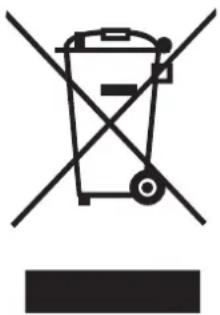
Symbol of a trash bin crossed with a diagonal line, no text or numbers presentRecycling facilities are now available for all customers at which you can deposit your old electrical products.
Customers will be able to take any old electrical equipment to participating sites run by their local councils. Please remember that this equipment will be further handled during the recycling process, so please be considerate when depositing your equipment.
Please contact the local council for details of your local household waste recycling centers.
- MICROWAVE OVEN
- EIQMWCOM
- CONTENTS
- PRECAUTIONS TO AVOID POSSIBLE EXPOSURE TO EXCESSIVE MICROWAVE ENERGY
- IMPORTANT SAFETY INSTRUCTIONS
- Risk of scalding!
- READ CAREFULLY AND KEEP FOR FUTURE REFERENCE
- TO REDUCE THE RISK OF INJURY TO PERSONS ENSURE THE UNIT IS CORRECTLY EARTHED.
- SETTING UP YOUR OVEN
- PRODUCT OVERVIEW
- CONTROL PANEL AND FEATURES
- CARE AND CLEANING
- NOTE:
- CLEANING AGENTS
- USE OF SUITABLE UTENSILS
- UTENSIL TEST:
- electriQ UK SUPPORT
Brand : ElectriQ
Model : eiQMWCOM34
Category : Microwaves