Z4 - Mobile Phone BLU - Free user manual and instructions
Find the device manual for free Z4 BLU in PDF.


| Product Type | Smartphone |
| Brand | BLU |
| Model | Z4 |
| Dimensions | 145 x 72 x 9 mm |
| Weight | 150 g |
| Display | 5.0 inches, IPS LCD, 480 x 854 pixels |
| Processor | Quad-core 1.3 GHz |
| RAM | 1 GB |
| Internal Storage | 8 GB (expandable via microSD) |
| Battery | 2000 mAh removable Li-Ion |
| Operating System | Android 6.0 Marshmallow |
| Rear Camera | 5 MP with LED flash |
| Front Camera | 2 MP |
| SIM | Dual SIM (Mini-SIM) |
| Connectivity | Wi-Fi 802.11 b/g/n, Bluetooth 4.0, GPS, microUSB 2.0 |
| Sensors | Accelerometer, Proximity |
| Colors | Black, White, Gold |
| Functions | Phone calls, SMS, Internet, Camera, Music, Video playback |
| Maintenance and Cleaning | Wipe with a soft, dry cloth. Do not use harsh chemicals or immerse in water. |
| Safety | Use only BLU-approved chargers and accessories. Do not disassemble the device. Avoid exposure to extreme temperatures. |
| Spare Parts and Repairability | Spare parts (battery, charger, USB cable) available through BLU service centers. Repairs should be done by qualified personnel. |
| General Information | User manual available in PDF format at notice-facile.com. For further support, visit BLU's official website. |
Frequently Asked Questions - Z4 BLU
User questions about Z4 BLU
0 question about this device. Answer the ones you know or ask your own.
Ask a new question about this device
Download the instructions for your Mobile Phone in PDF format for free! Find your manual Z4 - BLU and take your electronic device back in hand. On this page are published all the documents necessary for the use of your device. Z4 by BLU.
USER MANUAL Z4 BLU
Z4
QUICK START GUIDE
GUÍA RÁPIDA
- BEFORE POWERING ON, CHARGE FOR 24 HOURS/ANTES DE ENCENDER, CARGUE POR 24 HORAS

- INSERT SIM CARD/INSERTE LA TARJETA SIM
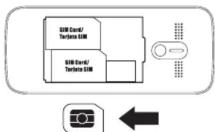
MENU>SETTINGS>CONNECTIONS> NETWORK ACCOUNT>OPTIONS>NEW ACCOUNT
RENAME>ACCESS POINT>USER NAME>PASSWORD>GATEWAY>PORT> AUTH TYPE>SET HOMEPAGE> ADVANCED SETTINGS
- ENJOY THE AUDIO PLAYER/ DISFRUTE DEL REPRODUCTOR DE AUDIO
P.4
BLÜ
BOLD LIKE US
z 19 0

Z4
GUIA RÁPIDO
GUIDE RAPIDE
- ANTES DE LIGAR, CARREGUE POR 24 HORAS/AVANT LA MISE SOUS TENSION, CHARGE PENDANT 24 HEURES

- APROVEITE O REPRODUTOR DE AUDIO/PROFITER DU LECTEUR DE AUDIO
P.4
Brand : BLU
Model : Z4
Category : Mobile Phone