Z3 M - Mobile Phone BLU - Free user manual and instructions
Find the device manual for free Z3 M BLU in PDF.


Pick your language and provide your email: we'll send you a specifically translated version.
| Product Type | Mobile Phone |
| Brand | BLU |
| Model | Z3 M |
| Dimensions (approx) | 115 x 50 x 12 mm |
| Weight (approx) | 80 g |
| Battery Type | Removable Li-Ion |
| Battery Capacity (approx) | 800 mAh |
| Display Type | TFT LCD |
| Display Size (approx) | 2.4 inches |
| Camera | VGA (rear) |
| Storage | microSD card slot (up to 32 GB) |
| Network | GSM/2G |
| Connectivity | USB 2.0, Bluetooth |
| Radio | FM radio with built-in antenna |
| Audio Player | MP3 player |
| Power Supply | 5V DC charger (Type C or micro USB) |
| Charging Time | First charge: 24 hours; regular: 2-3 hours |
| Maintenance & Cleaning | Wipe with dry cloth; avoid liquids |
| Safety | Use only approved chargers and accessories; keep away from water |
| Spare Parts & Repairability | Battery removable; other parts may not be user-serviceable |
| General Information | Simple feature phone for calls, messages, music, and radio |
Frequently Asked Questions - Z3 M BLU
How do I insert the SIM card?
Turn off the phone. Remove the back cover and battery. Insert the SIM card into the slot with the gold contacts facing down. Replace the battery and cover.
How long should I charge the battery for the first time?
Charge the phone for 24 hours before first use. For subsequent charges, charge until the battery indicator shows full (approximately 2-3 hours).
How can I transfer music to the phone?
Insert a microSD card into the phone. Connect the phone to a computer via USB cable. Copy music files to the microSD card. Disconnect safely and enjoy via the Audio Player.
How do I use the FM radio?
Attach the headset (acts as antenna). Go to Menu > Radio. The built-in antenna requires the headset to be connected. Press auto scan to find stations.
How do I set up the mobile network?
Go to Menu > Settings > Network Account. Create a new account: enter access point name, username, password, gateway, port, and authentication type provided by your carrier. Save and activate.
How do I play music?
Insert a microSD with music files. Go to Menu > Audio Player. Select a song to play. Use controls to pause, skip, or adjust volume.
How do I reset the phone to factory settings?
Go to Menu > Settings > Security > Factory Reset. Enter the phone password (default is 1234) if prompted. Confirm reset. This erases all user data.
How can I save battery life?
Reduce screen brightness, close unused apps, turn off Bluetooth and radio when not in use, and avoid frequent charging cycles.
Is the phone waterproof?
No, the Z3 M is not waterproof. Keep it away from water and moisture to avoid damage.
What is the warranty for this phone?
Warranty terms vary by region. Typically, BLU offers a 1-year limited warranty covering manufacturing defects. Contact your retailer or BLU support for details.
User questions about Z3 M BLU
0 question about this device. Answer the ones you know or ask your own.
Ask a new question about this device
No questions yet. Be the first to ask one.
Download the instructions for your Mobile Phone in PDF format for free! Find your manual Z3 M - BLU and take your electronic device back in hand. On this page are published all the documents necessary for the use of your device. Z3 M by BLU.
USER MANUAL Z3 M BLU
[X: 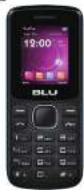 Z3 M QUICK START GUIDE GUIA RÁPIDA Z3 M QUICK START GUIDE GUIA RÁPIDA | ANATEL MODELO 23M Data produzi este ####legado para Anate de ##ato com su predestreras reglucerado sele revodado no. 042293 e andar es negatos #entos acuados, incluye os limbo de empezione de lava da Annione Caperta adionda a corsojo, artista, magrada o intermagistratos de calabricadora de asceriadas de Reapazas es 3130902 er 0335298www.anate.gov.br Data produzi este ####legado para Anate de ##ato com su predestreras reglucerado sele revodado no. 042293 e andar es negatos #entos acuados, incluye os limbo de empezione de lava da Annione Caperta adionda a corsojo, artista, magrada o intermagistratos de calabricadora de asceriadas de Reapazas es 3130902 er 0335298www.anate.gov.br | 1.BEPORS POWERING ON. CHARGE FOR 24 HOURS/ANTES DE ENCENDER. CARGUE POR 24 HORAS 2.INSET SIE CARD/INSERTE LA TARJETA 515 2.INSET SIE CARD/INSERTE LA TARJETA 515 R.1 R.1 | 3.GPAS SETTING/ CONFIGURACION GPASGPASRENDUSETTING(COMETIONS)NETWORK ACCOUNTOPTIONSNEW ACCOUNTRENAMEACCESS POINTUSER(NABOPASSWORD(OGATEWAY)(PORT)AUTH TYPESET HOMEPAGE)ADVANCED SETTINGSRENDUA JUSTES CONEXIÓN/CUENTA DE REDIOPIÓNES(CUENTA NUEVA RENDERAAR(PUNTO DE ACCESO)NOMBRE DE USUARIO(CONTRASENA)FURTO DE COMUNICACIÓN(PUERTO)TIPO DE AUTHDESTABLECER PAGINA DE INICIÓCOMUNICACIÓN ANAYZADA4.PB RADIO/RADIO FIR BUILCR-IN ANTERNA/ANTENA INTEGRADA______R.2 BUILCR-IN ANTERNA/ANTENA INTEGRADA______R.2 | 5 AUDIO PLAYER/ REPRODUCTOR DE AUDIO1.INSET THE MICRO SO CARD/ INSERTE LA TARJETA DE REMORIA 2 connects THE PHONE WITH THE COMPUTER VIA USB/CONNECTE EL TELEFONO CON LA COMPUTADORA VIA CABLE USB 2 connects THE PHONE WITH THE COMPUTER VIA USB/CONNECTE EL TELEFONO CON LA COMPUTADORA VIA CABLE USB ______R.3 ______R.3 | CONTINUE/CONTINUAR3.COPY AND TRANSFER MUSIC FILES/ COPIAR Y TRANSFERIA ARCHIVOS DE MUSICA 4.EUJOY THE AUDIO PLAYER/ DISPRUTE DEL REPRODUCTOR DE AUDIO 4.EUJOY THE AUDIO PLAYER/ DISPRUTE DEL REPRODUCTOR DE AUDIO |
 BOLO LIKE USZ110 BOLO LIKE USZ110 | O b Ofteles de portado para operação, artes no cargo a lima disfinha e imite de 7,5 cmAnte: (6)Córcio(1):Feste da Cotação Não incluídoCorregadores: 2013-014Saturia: IMOCETCabre USB: DCG1195DCartão de Marinha: Não incluídoAnte: (6)Bulha apensos batelças carrageadores e assessorias aprovadas, pois Bás Productos para uso com omeis nascão específico. O os de vitoras lógicas batelças carrageadores e assessorias pode levivalar apoglar apropriação ou garantia, atento da olivera pólus. Sustituições e um do asistadores ou. Batelças não aprovados pode otravenciradas de Léndro, exposito, vestamento ou acceiras partigos. | 1.ANTES DE LIGAR, CARREGUE POR 24 HORAS/AVANT LA MISE SOUS TENSION, CHARGE PENDANT 24 HEURES 2.INSIRA O CARTÃO SIM/ INTEGRADA A CASTE 8 2.INSIRA O CARTÃO SIM/ INTEGRADA A CASTE 8  R.1 R.1 | 3.CONFIGURAÇÃO GPAS/ CONFIGURATION GPASGPAS(MENU CONFIGURAÇÕES) CORNÉOÀ (CONTA DA REDE) OPCÕES) CONTA NOVARENDERSARPONTO DE ACESSIONOME DO USUÁRID/SEMA/PORTA DE COMUNICAÇÃO PORTATÍTPO DE AUTH ESTABELECER PÁGIA INICIAL CONFIGURAÇÕES AVANCEAS MENUPARAIRETES (CONNEXION) COMPTE RESEAU OPTIONS) NOUVEAU COMPTERENDERSARPONTO D'ACCESSOR D'UTILISATEURBOT DE PASSEPORT DE COMUNICIÓN/PORTATTYPE D'AUTHENTIFICATION/TESTABILIR PADIE D'ACCUEIL/COMMUNICATION AVANCEE4.RADIO PS ANTENA INTEGRADA/ ANTENNE INTEGRÉE R.2 ANTENA INTEGRADA/ ANTENNE INTEGRÉE R.2 | 5.REPRODUTOR DE AUDIO/ LECTEUR DE AUDIO1.INSIRA O CARTÃO BICRO SIM/ INSERER A LA CARTE BICRO SIM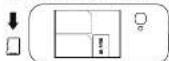 2.CONECTE O TELEFONE COB O COMPUTADOR VIA O CABO USB/ CONNECTER LE TELEPHONE A L'ORDINATEUR VIA UN CABLE USB 2.CONECTE O TELEFONE COB O COMPUTADOR VIA O CABO USB/ CONNECTER LE TELEPHONE A L'ORDINATEUR VIA UN CABLE USB [SD26]R.3 [SD26]R.3 | CONTINUAR /CONTINUER3.COPIAR E TRANSFERIA ARQUIVOS DE MUSICA/COPIER ET TRANSFERER DES FICHIERS MUSICAUX 4.APROVEITE O REPRODUTOR DE AUDIO/PROITER DA LECTEUR DE AUDIO 4.APROVEITE O REPRODUTOR DE AUDIO/PROITER DA LECTEUR DE AUDIO |
 Z3 MGUIA RÁPIDOGUIDE RAPIDE Z3 MGUIA RÁPIDOGUIDE RAPIDE |

BLU
BLU
BLU
BLU
BLU
BLU
BLU
BLU
BLU
BLU
BLU
BLU
BLU
BLU
BLU
BLU
BLU
BLU
BLU

ANATEL
Manual assistant
Powered by Anthropic
Waiting for your message
Product information
Brand : BLU
Model : Z3 M
Category : Mobile Phone