
CMP332DB - Mp3 player BUSH - Free user manual and instructions
Find the device manual for free CMP332DB BUSH in PDF.


| Product Type | MP3 Player |
| Brand | Bush |
| Model | CMP332DB |
| Dimensions | 4.0 x 2.0 x 0.5 inches (10.2 x 5.1 x 1.3 cm) |
| Weight | 1.1 oz (30 g) |
| Power Source | Built-in rechargeable lithium battery, USB charging (5V) |
| Battery Life | Up to 20 hours of music playback |
| Storage Capacity | 8 GB internal memory, expandable via microSD card (up to 32 GB) |
| Display | 1.8-inch LCD screen with backlight |
| Audio Formats | MP3, WMA, WAV, FLAC |
| FM Radio | Yes, with preset stations |
| Voice Recording | Built-in microphone, WAV format |
| Playback Modes | Normal, repeat one/all, shuffle, intro |
| Connectivity | USB 2.0, 3.5 mm headphone jack |
| Supported Languages | English, French, German, Spanish, Italian, etc. |
| Accessories Included | USB cable, stereo earphones, user manual |
| Maintenance & Cleaning | Use a soft, dry cloth; avoid liquids; keep away from heat |
| Safety | Do not expose to moisture, extreme temperatures, or drop |
| Spare Parts & Repairability | Contact manufacturer for battery replacement; not user-serviceable |
Frequently Asked Questions - CMP332DB BUSH
User questions about CMP332DB BUSH
0 question about this device. Answer the ones you know or ask your own.
Ask a new question about this device
Download the instructions for your Mp3 player in PDF format for free! Find your manual CMP332DB - BUSH and take your electronic device back in hand. On this page are published all the documents necessary for the use of your device. CMP332DB by BUSH.
USER MANUAL CMP332DB BUSH
natural_image
Black electronic device with digital display and control buttons, set against a geometric grid background (no readable text or symbols)Table of contents
Care & maintenance.... 2
Disposal information 2
Rechargeable battery disposal 2
Accessories included 3
Overview of controls 3
Getting started 3
Connecting to a PC.... 3
Button functions 4
Earphone connection 4
Music playback 4
Volume adjustment.... 4
Repeat mode.... 5
EQ modes 5
Replay mode 5
Voice recording.... 5
Voice recording (cont) 6
Voice recording playback.... 6
File management.... 6
Text reader 6
Auto play setting....6
Bookmark settings....7
Settings.... 7
Clock 7
Backlight....7
Language....7
Power Off 7
Contrast 7
Memory Info 7
Technical specifications.... 7
Troubleshooting.... 8

natural_image
Simple line drawing of a device panel with a rectangular cutout and circular dial (no text or symbols)Product Code
CMP332D
Disposal information

WEEE marking "Information for the consumer"
Disposal of your old product Your product is designed and manufactured with high quality materials and components, which can be
recycled and reused. When this crossed out wheeled bin symbol is attached to a product it means the product is covered by the European Directive 2002/96/EC. Please make yourself aware of the local collection system for electrical and electronic products. Please act according to your local rules and do not dispose of your old products with your normal household waste. The correct disposal of your old product will help prevent potential negative consequences for the environment and human health.

This product complies with European low voltage (2006/95/EC) and electromagnetic compatibility (2004/108/EC) directives.

Safety information
Important – Please read these instructions fully before using
CAUTION: TO REDUCE THE RISK OF ELECTRIC SHOCK, DO NOT REMOVE ANY COVER. NO USER-SERVICEABLE PARTS INSIDE, REFER ANY SERVICING TO QUALIFIED SERVICE PERSONNEL.
- Please read this owner's guide
- Please take the time to follow the instructions in this owner's guide carefully. It will help you set up and operate your system properly and enjoy all of its advanced features.
- Please save this owner's guide for future reference.
- The product label is located on the back of the product.
- Do not use this product near a bathtub, washbowl, kitchen sink, and laundry tub, in a wet basement, near a swimming pool, or anywhere else that water or moisture is present.
- Do not allow the product to be submerged in water. Do not expose headphone socket or battery compartment to water, as water entering the set may cause major damage.
- Only use attachments/accessories specified by the manufacturer.
- Unplug this apparatus during lightning storms or when unused for long periods of time - to prevent damage to this product.
• Refer all servicing to qualified service personnel
- Servicing is required when the apparatus has been damaged in any way: such as liquid has been spilled or objects have fallen into the apparatus; the apparatus has been exposed to rain or moisture, does not operate normally, or has been dropped.
- Do not attempt to service this product yourself.
- Opening or removing covers may expose you to dangerous voltages or other hazards.
• To prevent risk of fire or electric shock, avoid overloading wall outlets, extension cords, or integral convenience receptacles.
- Use suitable power sources - Plug the product into a suitable power source, as described in the operating instructions or as marked on the product. Before making any electrical connections, ensure the following:
- The supply voltage should be the same as that indicated in the technical specifications and the appliance rating plate.
- Batteries shall not be exposed to excessive heat such as sunshine, fire or the like.
Care & maintenance
Care and cleaning
- All care and cleaning operations should be carried out with the unit unplugged from the mains power.
- Occasionally wipe the cabinet with a lint free duster. Never clean the unit with liquids or solvents.
Rechargeable battery disposal
Your product contains a built-in rechargeable battery covered by the European Directive 2006/66/EC. To safeguard the functionality and safety of your product, always take your product to an official collection point or service centre where a professional can remove the battery.
Please inform yourself about the local rules on separate collection of batteries because the correct disposal will help prevent negative consequences for the environmental and human health. Please do not dispose of your batteries with your normal household waste. Always bring your product to a professional to remove the battery.
This product complies with Electromagnetic compatibility (2004/108/EC) directives.
Functions & controls
Please familiarize yourself with the parts and accessories listed below
Accessories included
- 1 x CMP332D • 1 x Instruction manual • 1 x earphones
Overview of controls

Getting started
Before use your player will require charging fully. Follow the below instructions to charge.

natural_image
Diagram showing a laptop connected to a device with an arrow pointing to it (no text or symbols present)1: Remove the 'USB cap' and insert the USB jack to a laptop/pc usb input & power on the pc/laptop.
2: During charging you will see the battery animation in the top right corner of the display. When the charge is at maximum the battery no longer animates and appears black.
Connecting to a PC
Once the unit is charged or during charging you can copy files to the player.
1: Follow steps 1-2 of "Getting started" to connect the player to a pc/laptop.
2: When the unit is connected a hardware driver is automatically installed and the device is then available in the list of devices (Named CMP332_4G). On some operating systems an auto play window will appear. Choose to take no action and click OK to close the window.
3: Double click 'My Computer' Or 'Computer' on some operating systems. Look for the 'Removable disks or storage' option and locate the device named 'CMP332_4G' and double click.
NOTE: Do not disconnect the player at any time when copying data to or from the device.
4: Drag & drop media files into the removable device. You can create additional folders using the operating system installed on your pc/laptop.
5: Close the removable device window and disconnect the player from your pc/laptop after data transfer has completed.
User instructions
Button functions
| To Press | ||
| General | Power On/ OffTurn On/ OffScroll through listsSelect optionReturn to previous menuVolume upVolume downQuit to main menu | Switch the On/ Off switchHold the Play/Pause button for 1 second◀◀/▶buttonsM buttonPress & hold the M button for 1 secondPress VOL then press the▶▶ buttonPress VOL then press the◀◀ buttonPress & hold the M button for 1 second |
| Music | Play/ Pause tracksSkip to the next trackFast forwardSkip back to previous trackFast rewind | Press the Play / Pause buttonPress the▶▶ buttonPress & hold the▶▶ buttonPress the◀◀ buttonPress & hold the◀◀ button |
| Text | Skip to next pageSkip back to previous pageText reader menu | Press the▶▶ buttonPress the◀◀ buttonPress the M button |
Earphone connection
Instructions for earphone usage.
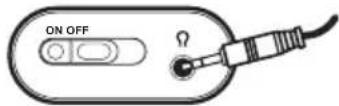
1: Connect the 3.5mm earphone plug into the EARNPHONE socket on the bottom of the unit.

To prevent possible hearing damage, do not listen at high volume levels for long periods.
In music mode, when the volume is adjusted to 85dB the above icon will appear on the display. Press the 'M' button to continue.
If you hear no sound during playback, do not turn the volume up as the music may suddenly begin at a high volume.
Excessive sound pressure from earphones and headphones can cause hearing loss. To avoid damaging your ears, adjust the volume to the lowest safe level before playing, and turn up to the desired level when playback has started.
Music playback
1: Select 'MSC' on the main menu and press 'M' to enter music mode.

2: To skip through the available tracks on the device using the 🖱️/ 🔍️tons.
3: Press the Play/Pause button to begin playback of a selected track. To pause playback press the Play/Pause button once more.
4: Press and hold either ◀◀/▶buttons to fast forward or rewind the current track during playback.
Volume adjustment
1: To adjust the volume levels press the 'VOL' button and then use the ◀◀/▶buttons to increase or decrease the level.
User instructions
Repeat mode
1: During playback press the 'M' button to enter the audio function menu.
2: Select the REPEAT menu by pressing 'M' once.
3: Use the ◀◀/▶buttons to select an option and press the 'M' to activate. The REPEAT functions are explained below.
Normal
All audio tracks will be played one by one until the last track is played.
Repeat One
The current track plays repeatedly until the function is disabled.
Folder
Plays all tracks in a selected folder once.
Repeat Folder
Plays all tracks in a selected folder repeatedly until the function is disabled.
Repeat All
Repeats every track on the player until the function is disabled.
Random
Plays every track on the player in a random order until the function is disabled.
Intro
Plays the first 10 seconds of every track on the player until the function is disabled.
EQ modes
You can apply various sound EQ's to audio following the below steps.
1: During playback press the 'M' button to enter the audio function menu.
2: Use the ◀◀/▶buttons to select 'Equalizer' and press the 'M' button to enter the EQ menu.
3: Use the /▶/▶▶▶▶▶▶▶▶▶▶▶▶▶▶▶▶▶▶▶▶▶▶▶▶▶▶▶▶▶▶▶▶▶▶▶▶▶▶▶▶▶▶▶▶▶▶▶▶▶▶▶▶▶▶▶▶▶▶▶▶▶▶▶▶▶▶▶▶▶▶▶▶▶▶▶▶▶▶▶▶▶▶▶▶▶▶▶▶▶▶▶▶▶▶▶▶▶▶▶▶>
4: Press the 'M' button to return back to the music interface.
Replay mode
Replay mode will allow you to repeat a designated section of an audio track.
1: During playback press the 'M' button to enter the audio function menu.
2: Use the ◀◀/▶▶buttons to select 'Replay' and press the 'M' button to begin the A-B replay settings.
3: Press the ▶▶ button to set the 'A' marker (beginning of the repeat section). Press the ▶▶ button once more to set the 'B' marker (end of the repeat section).
4: The selected audio will now repeat for the specified amount of times (see point 5).
5: From the audio function menu you can select 'Replay Times'. Use the ◀◀/▶buttons to set the number of times the replay is to repeat. Press the 'M' button to activate.
6: From the audio function menu you can choose 'Replay Gap' to specify the length of time in-between each 'replay'. Use the ▶/▶buttons to set the gap time. Press the 'M' button to activate.
Voice recording
To record using the internal microphone follow the below steps.
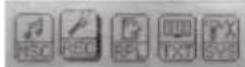
1: Use the ◀◀/▶buttons and select 'REC' on the main menu, press 'M' to enter voice record mode.
2: Press the Play/Pause button to begin recording. The display will show a time counter in the top right corner.
3: To pause recording press the Play/Pause button once more. The time counter will flash to indicate pause mode is active.
4: To save a recording press and hold the 'M' button for 1 second.
5: To change the recording quality press the 'M' button in stop mode and select 'Record Type' from the list, and press the 'M' button to enter the option menu.
6: Select from 32k, 64k or 128k bitrates using the <</▶▶▶ buttons and press 'M' to activate.
User instructions
Voice recording (cont)
NOTE: The higher the bitrate the bigger the file size will be and the less you will be able to record. You can see this effect in the 'remaining' section of the record display underneath the time counter.
7: To change the recording gain press the 'M' button in stop mode and select 'Record Gain Set' from the list,
8: Use the ◀◀/▶buttons to adjust the slider to the gain level you require and press the 'M' button to select and return back to the menu.
Voice recording playback
To play back recordings follow the below steps.
1: Use the ◀◀/▶buttons and select 'RPL' on the main menu, press 'M' to enter voice playback mode.

2: To skip through the available tracks on the device using the ◀◀/▶buttons.
3: Press the Play/ Pause button to begin playback of a selected track. To pause playback press the Play/ Pause button once more.
4: Press and hold either ◀◀◀ /▶buttons to fast forward or rewind the current track during playback.
5: To adjust the volume levels press the 'VOL' button and then use the ▶/▶buttons to increase or decrease the level.
6: To select from a simple list of just recordings press the 'M' button from the VOICE main menu. The press the 'M' button again to select 'Local Folder'.
7: Use the ◀◀/▶buttons to skip through the voice tracks and press the 'M' button to begin playback.
File management
1: In Stop/ Pause mode press the 'M' button to enter the file management menu.
2: Use the ◀◀/▶buttons to select an option and press the 'M' button to enter the option menu.
Delete File When activated allows you to select a file for deletion.
Delete All Delete all files
File management (cont)
NOTE: Use the ▶/▶buttons to select files and select 'Yes' or 'No'. Press the 'M' button to activate/select.
Text reader
1: Use the ◀◀/▶buttons and select 'TXT' on the main menu, press 'M' to enter text reader mode.

2: To skip through the available text documents on the device using the ▶/ ▶buttons.
3: Press the Play/ Pause button to begin playback of a selected ebook
4: To skip through the pages of the ebook use the◀◀/▶◀ buttons.
Auto play setting
Instead of manually pressing the skip buttons to skip the pages you can set a timer to skip pages after a certain amount of seconds. Follow the below steps to activate this function.
1: Select any ebook in your list and press the 'M' button to enter the file function menu.
2: Use the ◀◀/▶buttons to select 'Play Set' and press the 'M' button to activate.
3: Select 'Auto Play' and press the 'M' button.
4: Use the ◀/▶buttons to increase or de-crease the playback duration of each page. Press the 'M' button to return to the text document list.
5: Press the Play/Pause button to begin displaying the text document. The pages will skip after the duration set in step 4.
6: To reset the function back to manual viewing select 'Manual Play' in step 3 above.
User instructions
Bookmark settings
1: Press the 'M' button when viewing a text document to enter the bookmark option menu.
2: Use the ▶◀/▶buttons and select from the below options.
| Bookmark Select | Select from a list of bookmarks. NOTE: Bookmarks need to be added using 'bookmark add' first. |
| Bookmark Delete | Delete individual bookmarks from a list. |
| Bookmark Add | Scroll through a text document using the ◄◄◄/▲buttons and press the 'M' button to set a bookmark. |
Settings
1: Use the ◀◀ /▶buttons and select 'SYS' on the main menu, press 'M' to enter text reader mode.

Clock
1: Press the 'Vol' button to cycle between the Days, Months, Years, Hours, Minutes & Seconds.
2: Use the ◀◀/▶buttons to adjust the digits.
3: Press the 'M' button to return to the menu.
Backlight
1: Use the ▶◀/▶buttons to select the duration before the backlight dims.
2: Press the 'M' button to select & return to the menu.
Language
1: Use the ◀◀ /▶buttons to select a language.
2: Press the 'M' button to select & return to the menu.
Power Off
Use the ◀◀/▶buttons to select between Off time and Sleep time. Press the 'M' button to select.
Off Time
Sets the period of inactivity before the player enters standby mode.
Power Off (cont)
1: Use the ◀◀/▶buttons to adjust the slider to the time duration you wish to set between 10-200 seconds.
2: Press the 'M' button to select & return to the menu.
Sleep Time
When listening to audio you can allocate a timer to switch the unit into standby mode.
1: Use the ◀◀/▶buttons to adjust the slider to the time duration you wish to set between 10-120 mins.
2: Press the 'M' button to select & return to the menu.
NOTE: If you are not listening to audio the device will enter standby from the 'Off Time' setting long before the 'Sleep Time' setting is reached.
Contrast
1: Use the ◀◀/▶buttons to adjust the slider to the contrast setting you require.
2: Press the 'M' button to select & return to the menu.
Memory Info
When selected displays the amount of free memory available in Megabytes and a percentage.
Technical specifications
Power Supply .... 150 mAh, 3.7V Lithium battery
Dimensions....84 x 29 x 13mm
Weight 29g
Capacity....4GB internal flash memory
Supported OS ....Windows 2000, XP or above
Interface....USB 2.0
Supported music formats ..... M P 1, MP2, MP3, WMA
Voice record formats....WAV
User instructions
Troubleshooting
In the unlikely event of difficulties with your appliance please follow the trouble shooting guide below. If the problem persists, visit the technical support website: www.argos-support.co.uk
| Problem Reason(s) Solution(s) | ||
| No Power | The unit requires chargingConnect to a PC or laptop using the supplied cable to charge. Or purchase a compatible USB mains charger. | |
| No Sound | Volume is too lowPlayback is not initiatedNo audio files have been copied to the internal memoryThe earphones have not been connected correctly | Increase the volumePress the PLAY/PAUSE buttonFollow ‘Connecting to a PC’ instructions on page 3 of this manualInsert the 3.5mm earphone plug into the earphone socket on the MP3 player |
| Sound is distorted | Volume is too highReduce the volume | |
BUSH
PRODUCT GUARANTEE
This product is guaranteed against manufacturing defects for a period of

Year
This product is guaranteed for twelve months from the date of original purchase.
Any defect that arises due to faulty materials or workmanship will either be replaced, refunded or repaired free of charge where possible during this period by the dealer from whom you purchased the unit.
The guarantee is subject to the following provisions:
- The guarantee does not cover accidental damage, misuse, cabinet parts, knobs or consumable items.
- The product must be correctly installed and operated in accordance with the instructions contained in this manual.
- It must be used solely for domestic purpose.
- The guarantee will be rendered invalid if the product is re-sold or has been damaged by inexpert repair.
- Specifications are subject to change without notice.
- The manufacturer disclaims any liability for the incidental or consequential damages.
- The guarantee is in addition to, and does not diminish your statutory or legal rights.
Guarantor: Argos Limited 489 - 499 Avebury Boulevard Central Milton Keynes MK9 2NW
- Table of contents
- Disposal information
- Safety information
- Important – Please read these instructions fully before using
- Care & maintenance
- Care and cleaning
- Rechargeable battery disposal
- Functions & controls
- Please familiarize yourself with the parts and accessories listed below
- Getting started
- Connecting to a PC
- User instructions
- Earphone connection
- Music playback
- Volume adjustment
- Repeat mode
- Normal
- Repeat One
- Folder
- Repeat Folder
- Repeat All
- Random
- Intro
- EQ modes
- Replay mode
- Voice recording
- Voice recording (cont)
- Voice recording playback
- File management
- File management (cont)
- Text reader
- Auto play setting
- Bookmark settings
- Settings
- Clock
- Backlight
- Language
- Power Off
- Off Time
- Power Off (cont)
- Sleep Time
- Contrast
- Memory Info
- Technical specifications
- Troubleshooting
- BUSH
- PRODUCT GUARANTEE
Brand : BUSH
Model : CMP332DB
Category : Mp3 player