AirRam AR01 - Vacuum Cleaner G-TECHNOLOGY - Free user manual and instructions
Find the device manual for free AirRam AR01 G-TECHNOLOGY in PDF.


| Product Type | Cordless Stick Vacuum Cleaner |
| Brand | G-Technology |
| Model | AirRam AR01 |
| Dimensions (H x W x D) | 1100 x 250 x 200 mm |
| Weight | 2.5 kg (5.5 lbs) |
| Power Source | Rechargeable Lithium-Ion Battery, 22.2V |
| Runtime (Standard Mode) | Up to 40 minutes |
| Charging Time | 4-5 hours |
| Dustbin Capacity | 0.5 Liters |
| Filtration System | Washable HEPA Filter |
| Suction Power | 20 Air Watts (typical) |
| Noise Level | 78 dB |
| Included Accessories | Crevice Tool, Brush Tool, Wall Mount |
| Operation Modes | Standard, High |
| Handle Design | Ergonomic with trigger lock |
| Maintenance | Empty dustbin after each use; wash filter monthly |
| Warranty | 2 years limited warranty |
Frequently Asked Questions - AirRam AR01 G-TECHNOLOGY
User questions about AirRam AR01 G-TECHNOLOGY
0 question about this device. Answer the ones you know or ask your own.
Ask a new question about this device
Download the instructions for your Vacuum Cleaner in PDF format for free! Find your manual AirRam AR01 - G-TECHNOLOGY and take your electronic device back in hand. On this page are published all the documents necessary for the use of your device. AirRam AR01 by G-TECHNOLOGY.
USER MANUAL AirRam AR01 G-TECHNOLOGY
OPERATING MANUAL
IMPORTANT SAFEGUARDS:

IMPORTANT: Read all instRuctions befoRe use. Retain instRuctions foR futuRe RefeRence.

Do not use in rain or leave outdoors whilst raining.

WARNING: Basic safety precautions should always be observed when using an electrical appliance, including the following to reduce the risk of fire, electrical shock, or injury:
Personal Safety:
- Store indoors in a dry place out of the reach of children.
- Always use responsibly. This appliance can be used by children aged from 8 years and above and persons with reduced physical, sensory or mental capabilities or lack of experience and knowledge if they have been given supervision or instruction concerning use of the appliance in a safe way and understand the hazards involved.
- Don’t let children play with the appliance; supervise children using or maintaining the appliance.
- Use only manufacturer's recommended attachments as described in this manual; misuse or use of any accessory or attachment other than those recommended, may present a risk of personal injury.
• Take extra care when cleaning stairs. - Keep the appliance and accessories away from hot surfaces.
- Do not block the appliances openings or hinder air flow; keep openings free of any objects including dust, lint, clothing, fingers (and all parts of the body).
• Particularly keep hair away from openings and moving parts.
Electrical safety:
- Only use batteries and chargers supplied by Gtech.
- Never modify the charger in any way.
- The charger has been designed for a specific voltage. Always check that the mains voltage is the same as that stated on the rating plate.
A charger that is suitable for one type of battery pack may create a risk of fire when used with another battery pack; never use the charger with another appliance or attempt to charge this product with another charger.
- Before use, check the charger cord for signs of damage or ageing.
A damaged or entangled charger cord increases the risk of fire and electric shock. - Do not abuse the charger cord.
- Never carry the charger by the cord.
- Do not pull the cord to disconnect from a socket; grasp the plug and pull to disconnect.
- Don't wrap the cord around the charger when storing.
- Keep the charger cord away from hot surfaces and sharp edges.
- The supply cord cannot be replaced. If the cord is damaged the charger should be discarded and replaced.
-
Do not handle the charger or the appliance with wet hands.
-
Do not store or charge the appliance outdoors.
- The charger must be removed from the socket before removing the battery, cleaning or maintaining the appliance.
Battery safety:
- This appliance includes Li-Ion batteries; do not incinerate batteries or expose to high temperatures, as they may explode.
- Liquid ejected from the battery may cause irritation or burns.
- In an emergency situation contact professional help immediately!
- Leaks from the battery cells can occur under extreme conditions. Do not touch any liquid that leaks from the battery. If the liquid gets on the skin wash immediately with soap and water. If the liquid gets into the eyes, flush them immediately with clean water for a minimum of 10 minutes and seek medical attention. Wear gloves to handle the battery and dispose of immediately in accordance with local regulations.
- Shorting the battery terminals may cause burns or fire.
- When the battery pack is not in use, keep it away from paper clips, coins, keys, nails, screws or other small metal objects that could make a connection from one terminal to another.
- When you dispose of the appliance remove the battery and dispose of the battery safely in accordance with local regulations.
Service:
- Before using the appliance and after any impact, check for signs of wear or damage and repair as necessary.
- Do not use the appliance if any part is damaged or defective.
- Repairs should be carried out by a service agent or a suitably qualified person in accordance with relevant safety regulations. Repairs by unqualified persons could be dangerous.
- Never modify the appliance in any way as this may increase the risk of personal injury.
- Only use replacement parts or accessories provided or recommended by Gtech.
Intended use:
- This appliance has been designed for domestic dry vacuum cleaning only.
- Do not pick up liquids or use on wet surfaces.
- Do not pick up anything that is flammable, burning or smoking.
- Use only as described in this manual.
- Don't use on concrete, tarmacadam or other rough surfaces.
WARNING:
- Do not use water, solvents, or polishes to clean the outside of the appliance; wipe clean with a dry cloth.
- Never immerse the unit in water and do not clean in a dish washer.
- Never use the appliance without the filter fitted.
Thank you for choosing a Gtech AirRam
"I started Gtech to create sensible, easy to use products, which do a great job. Your opinion is important to us. Please take the time to write a review of the AirRam either on the website of the store you bought it from or by emailing us at support@greytechnology.co.uk. We will use your feedback to improve our products and services and let other people know what it's like to be part of the Gtech family." Nick Grey – Inventor, Owner of Gtech
Register your warranty now at:
www.gtechonline.co.uk/warrantyregistration or call 08000 518353
You will need your serial number, which is on the base of your Gtech AirRam.
Keep your receipt with this manual, you will need it if you ever have a warranty claim.
What's in the box

PRODUCT SERIAL NUMBER:
You can find this on the underside of your product
Assembly Operation

Slot the handle into place until it clicks. Pop the battery into the back.
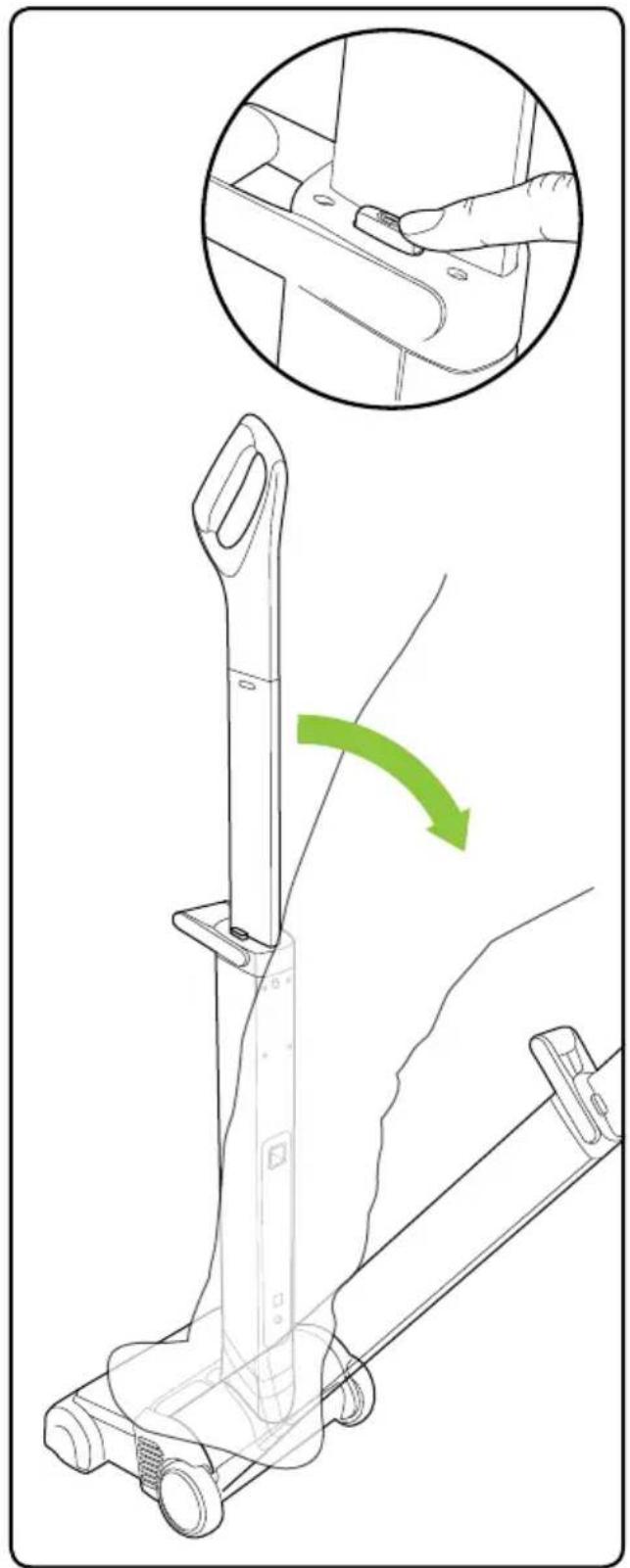
Place your foot on the AirRam and pull the handle back. Press the power button to turn on.
Battery charging

When the lights rapidly cycle red, recharge the battery.

Plug the charger in and connect it to the battery.

After 4 hours the LEDs turn green and charging is complete.

It is OK to charge for 1 hour for a burst of cleaning.
Emptying the bin

Using both hands, reach under the bin and lift it out of the AirRam.

Lift the filter assembly off the bin.

Tip the dirt bales straight into a wastebasket.
Cleaning the filters - do this once a month
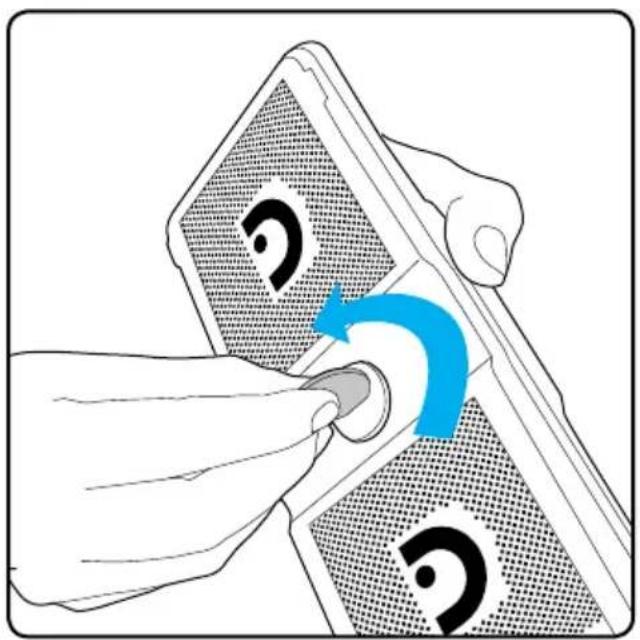
Use a coin to unlock the filter assembly.
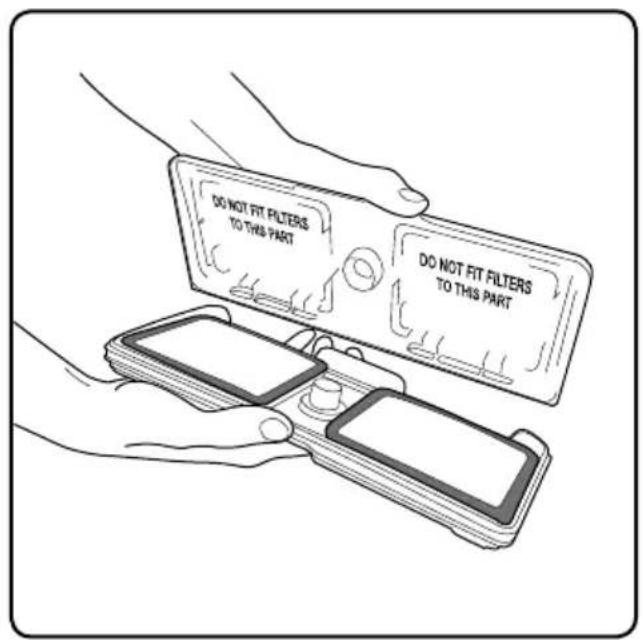
Lift off the lid. The filters sit in the filter assembly white side up.
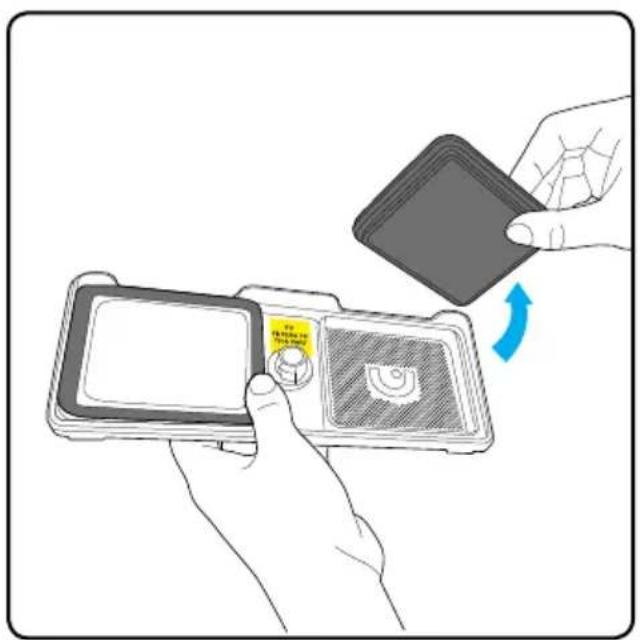
Remove the filters from the filter assembly.

Wash under a tap. Squeeze out any excess water and leave the filters to dry thoroughly in a warm, well-ventilated place.
Clearing a jam

If the brush bar jams during use, the AirRam will stop and the LEDs will appear red.

Before checking for a blockage, remove the battery.

Carefully pull any hair or fibre from the brush bar. If you need to, you can slide a pair of scissors along the ridge in the brush bar.
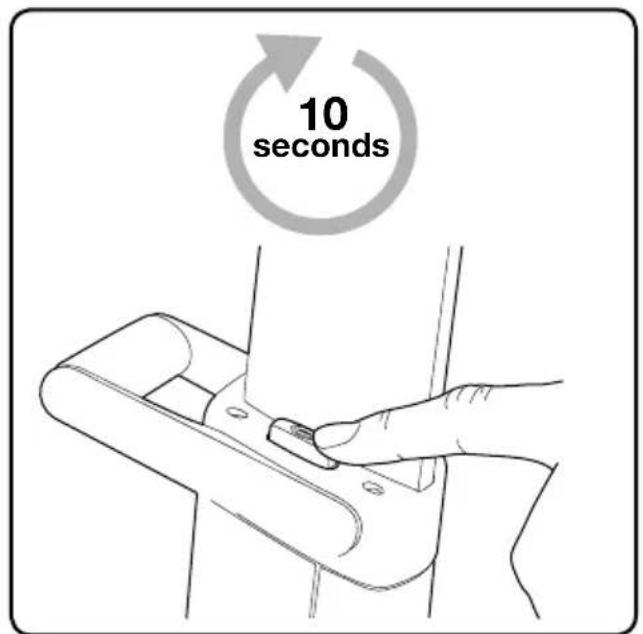
The AirRam will not re-start until the red lights go out. This may take a few seconds.
Product Care
Your Gtech AirRam doesn't need much maintenance: keep the filters clean, keep the brush bar tangle-free and charge the battery. Wipe it with a dry cloth if it gets dirty, including under the bin. Never wash it with liquid, run it under a tap or use it without the filter.
Troubleshooting
| AirRam is not cleaning well 1. Empty the bin2. Check bin is correctly fitted3. Check filter is correctly fitted4. Clean filter |
| AirRam has stopped or won’t work 1. Charge battery2. Clear debris from brush bar |
| Battery will not charge 1. Check connections2. Check wall socket |
| If this doesn’t solve your problem don’t worry, we will help.Go to www.gtechonline.co.uk or call 01905 345 891 |
AIRRAM TECHNICAL SPECIFICATION
| Battery model 101A0012 | |
| Battery 22V 2000mAh Li-Ion | |
| Charging period 4 hours | |
| Battery charger output 27V DC 500mA | |
| Weight 3.5kg | |
The symbol indicates that this product is covered by legislation for waste electrical and electronic products (EN2002/96/EC)
When the vacuum has reached the end of its life, it and the Li-Ion battery it contains should not be disposed of with general household waste. The battery should be removed from the vacuum and both should be disposed of properly at a recognised recycling facility.
Call your local council, via amenity site, or recycling centre for information on the disposal and recycling of electrical products. Alternatively visit www.recycle-more.co.uk for advice on recycling and to find your nearest recycling facilities.

If your Gtech AirRam breaks, don't worry, we're here to help. Go to www.gtechonline.co.uk or call 01905 345 891 for assistance.
To qualify for your 2-year warranty, register your AirRam within 3 months of purchase at:
www.gtechonline.co.uk/warrantyregistration or call 08000 518353
WHAT ISN'T COVERED SUMMARY
Gtech does not guarantee the repair or replacement of a product as a result of:
• Normal wear and tear (e.g. belt, brush bar)
- Accidental damage, faults caused by negligent use or care, misuse, neglect, careless operation or handling of the vacuum cleaner which is not in accordance with Gtech AirRam operating manual.
- Blockages - please refer to the Gtech AirRam operating manual for details of how to unblock your vacuum cleaner.
- Use of the vacuum cleaner for anything other than the normal domestic household purposes.
- Use of parts and accessories which are not Gtech genuine components.
• Faulty installation (except where installed by Gtech)
- Repairs or alterations carried out by parties other than Gtech or its authorised agents.
- If you are in doubt as to what is covered by your guarantee, please call the Gtech Customer Care Helpline on 01905 345 891.
- The guarantee becomes effective at the date of purchase (or the date of delivery if this is later).
- You must provide proof of delivery/purchase before any work can be carried out on the vacuum cleaner. Without this proof, any work carried out will be chargeable. Please keep your receipt or delivery note.
- All work will be carried out by Gtech or its authorised agents.
- Any parts which are replaced will become the property of Gtech.
- The repair or replacement of your vacuum cleaner is under guarantee and will not extend the period of guarantee.
- The guarantee provides benefits which are additional to and do not affect your statutory right as a consumer.
Gtech
Grey Technology Limited
Cupola Court, Spetchley, Worcestershire WR5 1RL
email: support@greytechnology.co.uk
telephone: 01905 345891
www.gtechonline.co.uk

- IMPORTANT SAFEGUARDS
- IMPORTANT: READ ALL INSTRUCTIONS BEFORE USE. RETAIN INSTRUCTIONS FOR FUTURE REFERENCE
- PERSONAL SAFETY
- ELECTRICAL SAFETY
- BATTERY SAFETY
- SERVICE
- INTENDED USE
- WARNING
- THANK YOU FOR CHOOSING A GTECH AIRRAM
- WHAT'S IN THE BOX
- PRODUCT SERIAL NUMBER
- ASSEMBLY OPERATION
- BATTERY CHARGING
- EMPTYING THE BIN
- CLEANING THE FILTERS - DO THIS ONCE A MONTH
- CLEARING A JAM
- PRODUCT CARE
- AIRRAM TECHNICAL SPECIFICATION
- WHAT ISN'T COVERED SUMMARY
- GTECH
Brand : G-TECHNOLOGY
Model : AirRam AR01
Category : Vacuum Cleaner