
EH222 - Headphones Lauson - Free user manual and instructions
Find the device manual for free EH222 Lauson in PDF.


| Product Type | Over-Ear Wireless Headphones |
| Brand | Lauson |
| Model | EH222 |
| Dimensions | Approx. 20 × 15 × 10 cm |
| Weight | Approx. 250 g |
| Power Source | Built-in rechargeable Li-Ion battery, 500 mAh |
| Battery Life | Up to 20 hours of playback |
| Charging Time | Approx. 2 hours via USB-C |
| Connectivity | Bluetooth 5.0, 3.5 mm wired input |
| Wireless Range | Up to 10 meters |
| Driver Unit | 40 mm dynamic |
| Frequency Response | 20 Hz - 20 kHz |
| Impedance | 32 ohms |
| Sensitivity | 95 dB ± 3 dB |
| Microphone | Built-in, with CVC noise reduction |
| Controls | Multi-function button, volume +/-, LED indicator |
| Compatibility | Smartphones, tablets, PC, MP3 players |
| Earcup Design | Over-ear, memory foam cushions, soft leatherette |
| Adjustability | Adjustable headband, rotating earcups |
| Cleaning | Wipe with soft dry cloth; avoid liquids |
| Storage | Store in a cool, dry place; use carrying pouch if provided |
| Safety | Keep away from moisture; do not disassemble; volume warning for hearing protection |
| Spare Parts & Repairability | Earpads and cables replaceable; contact Lauson support for service |
| Package Contents | Headphones, USB-C charging cable, 3.5 mm audio cable, user manual |
Frequently Asked Questions - EH222 Lauson
User questions about EH222 Lauson
0 question about this device. Answer the ones you know or ask your own.
Ask a new question about this device
Download the instructions for your Headphones in PDF format for free! Find your manual EH222 - Lauson and take your electronic device back in hand. On this page are published all the documents necessary for the use of your device. EH222 by Lauson.
USER MANUAL EH222 Lauson
The true wireless stereo Bluetooth sound (TWS), individual left and right channel with HIFI sound.
Pairing
- Before linking, delete any previous record of the EH222 on the device. - Turn off the Bluetooth function of your mobile phone, tablet or computer device.
· Pairing with one earbud:
- Press and hold the multifunction button for 15 seconds. - Activate the Bluetooth on your mobile phone, tablet or computer device.
- Find the model BH222
- Pairing with two earbud: - Press and hold both multifunction button for 15 seconds. - Activate the Bluetooth on your mobile phone, tablet or computer device. - Find the model FH222
* Note: place both headphones, closer to ease the connection process. There will be a voice message notifying that the connection has been successfully, you will be able to listen to music and also answer incoming calls.
** Note: Only one headset will function as the main controller to make / answer phone calls to turn off, pause / play / answer / hang up the phone, and press for approximately one second to play the next song, double-click to redial the last registered number.
*** Note: headphones will turn off automatically after a while if there is no connection. **** Note: after the first earbud connection, the devices (mobile phone, tablet or compvuter) will connect automatically when the whole set is switched on.
***** In the case that only one of the two is linked during the process, press the button "R" twice.
Usage
1) Making phone calls:
When making calls, there is only one side earphone working, if there is any incoming call, it broadcast calling numbers. To answer, press once the multifunction button and to refuse the call, hold for a short time the multifunction button. When the earbuds are in music mode, quickly press twice the multifunction button to redial the last number.
2) Listening to music. Shorty press the power button to stop (play the music
Shortly press the power button to stop /play the music. 3) Power off: Long press the multifunction button to enter to off mode. If there earbuds are not linked or away from your Bluetooth device connection, it will automatically shut off.
4) Charging:
There will be a reminding sound when battery is low. When the earbuds or charging case is taking charge, the led would be in blinking red color, and turn stand red when it is fully charged.
*Note: the charging case, will display green color LED when it is in charge mode.
Warning
1) Do not overuse these headphones or press them too hard, keep them away from moisture and heat.
2) Try to keep the headphones away from Wi-Fi networks, routers or other high frequency transmission equipment, as they could interrupt the signal reception.
3) Use this handset within a range of (10m) as the connection will be more effective. Try to avoid obstacles between the connected devices, the signal between the device and the headphones may be interfered due to the lack of battery of one or both devices.
4) Use this Bluetooth headset to connect any device with BT function
WARRANTY CONDITIONS
Thank you for purchasing this product. Lauson guarantees the proper functioning of its products for a period of 2 YEARS from the date of purchase, being responsible for any lack of conformity that manifests within this period, including the repair of the defects or the replacement of the product within the Union European
CLAIM PROCEDURE
The holder of the guarantee may contact the technical service by telephone at the number (00) 34 934 536 222 or visiting our Lauson website: www.lauson.es or by going directly to the purchasing center.
Before claiming your rights as a consumer, make sure that the product meets the following requirements.
-
The guarantee will be valid if it is presented duly completed with the reference of the model, serial number, date of purchase and establishment data. Being an essential requirement that is accompanied by the purchase ticket.
-
In case of sending to repair the equipment, it must be in the same conditions (packaging, accessories, manuals ...) in which it was purchased, except for natural deterioration due to use. The guarantee does not cover damages caused by transportation due to inadequate packaging.
-
Lauson reserves the right to refuse the guarantee in the event that some of the requested information is not specified, is not legible or is damaged.
-
Damages or malfunctions caused by catastrophic causes, falls and blows due to incorrect use by the user, as well as erroneous feeding by energy sources or parts subject to natural wear and tear due to improper use are not covered by this guarantee.
-
This product will lose its guarantee if it is handled by technicians or workshops outside our company.
-
This guarantee is valid only in scope of the European community. The warranty terms contained in this certificate do not exclude, restrict or modify the rights that legally correspond to the buyer by application to Royal Legislative Decree 1/2007 of November 16.
Lauson
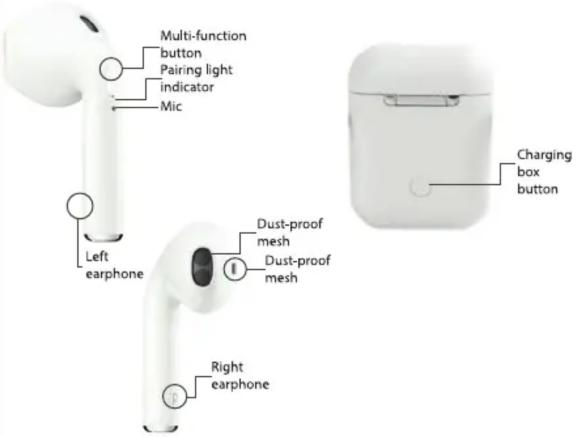
- BEFORE USING THIS PRODUCT READ THE INSINSTRUCTIONS CAREFULLY.
Especificaciones
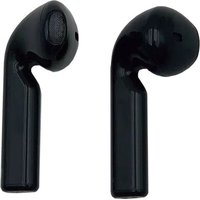


Brand : Lauson
Model : EH222
Category : Headphones