
MIG 2027 - Microwave Orbegozo - Free user manual and instructions
Find the device manual for free MIG 2027 Orbegozo in PDF.


| Product type | Microwave |
| Brand | Orbegozo |
| Model | MIG 2027 |
| Capacity | 20 liters |
| Microwave power | 700 W |
| Dimensions (W x H x D) | 45 x 26 x 35 cm |
| Net weight | 10.5 kg |
| Power supply | 230 V, 50 Hz |
| Power consumption | 1050 W |
| Main functions | Cooking, defrosting, reheating, timer, clock |
| Power levels | 5 levels |
| Control type | Mechanical (rotary knobs) |
| Turntable | Yes, glass |
| Safety | Child safety lock |
| Care and cleaning | Clean with a damp cloth and mild detergent |
| Spare parts and repairability | Contact Orbegozo after-sales service |
| General information | User manual available for free download |
Frequently Asked Questions - MIG 2027 Orbegozo
User questions about MIG 2027 Orbegozo
0 question about this device. Answer the ones you know or ask your own.
Ask a new question about this device
Download the instructions for your Microwave in PDF format for free! Find your manual MIG 2027 - Orbegozo and take your electronic device back in hand. On this page are published all the documents necessary for the use of your device. MIG 2027 by Orbegozo.
USER MANUAL MIG 2027 Orbegozo
natural_image
Line drawing of a microwave oven with control panel and door (no text or symbols)Sonifer,S.A.
- Do not attempt to operate this oven with the door open since open door operation can result in harmful exposure to microwave energy. It is important not to defeat or tamper with the safety interlocks.
- Do not place any object between the oven front face and the door or allow soil or cleaner residue to accumulate on sealing surfaces.
- Do not operate the oven if it is damaged. It is particularly important that the oven door close properly and that there is no damage to the
Door (bent),
Hinges and latches (broken or loosened),
Door seals and sealing surfaces. - The oven should not be adjusted or repaired by anyone except properly qualified service personnel.
IMPORTANT SAFETY INSTRUCTIONS
When using electrical appliance basic safety precautions should be followed, including the following:
WARNING: To reduce the risk of burns, electric shock, fire, injury to persons or exposure to excessive microwave energy:
- Read all instructions before using the appliance.
- Use this appliance only for its intended use as described in this manual. Do not use corrosive chemicals or vapors in this appliance. This type of oven is specifically designed to heat, cook or dry food. It is not designed for industrial or laboratory use.
- Do not operate the oven when empty.
- Do not operate this appliance if it has a damaged cord or plug, if it is not working properly or if it has been damaged or dropped. If the supply cord is damaged, it must be replaced by the manufacturer or its service agent or a similarly qualified person in order to avoid a hazard
- WARNING: Only allow children to use the oven without supervision when adequate instructions have been given so that the child is able to use
the oven in a safe way and understands the hazards of improper use.
-
Warning: When the appliance is operated in the combination mode, children should only use the oven under adult supervision due to the temperatures generated.
-
To reduce the risk of fire in the oven cavity:
a. When heating food in plastic or paper container, keep an eye on the oven due to the possibility of ignition;
b. Remove wire twist-ties from paper or plastic bags before placing bag in oven.
c. If smoke is observed, switch off or unplug the appliance and keep the door closed in order to stifle any flames.
d. Do not use the cavity for storage purposes. Do not leave paper products, cooking utensils or food in the cavity when not in use.
-
WARNING: Liquid or other food must not be heated in sealed containers since they are liable to explode.
-
Microwave heating of beverage can result in delayed eruptive boiling, therefore care has to be taken when handling the container.
-
Do not fry food in the oven. Hot oil can damage oven parts and utensils and even result in skin burns.
-
Eggs in their shell and whole hard-boiled eggs should not be heated in microwave ovens since they may explode even after microwave heating has ended.
- Pierce foods with heavy skins such as potatoes, whole squashes, apples and chestnuts before cooking.
- The contents of feeding bottles and baby jars should be stirred or shaken and the temperature should be checked before serving in order to avoid burns.
- Cooking utensils may become hot because of heat transferred from the heated food. Potholders may be needed to handle the utensil.
- Utensils should be checked to ensure that they are suitable for use in microwave oven.
-
WARNING: It is hazardous for anyone other than a trained person to carry out any service or repair operation which involves the removal of any cover which gives protection against exposure to microwave energy.
-
This product is a Group 2 Class B ISM equipment. The definition of Group 2 which contains all ISM (Industrial, Scientific and Medical) equipment in which radio-frequency energy is intentionally generated and/or used in the form of electromagnetic radiation for the treatment of material, and spark erosion equipment. For Class B equipment is equipment suitable for use in domestic establishments and in establishments directly connected to a low voltage power supply network which supplies buildings used for domestic purpose.
- This appliance is not intended for use by persons (including children) with reduced physical, sensory or mental capabilities, or lack of experience and knowledge, unless they have been given supervision or instruction concerning use of the appliance by a person responsible for their safety.
- Children should be supervised to ensure that they do not play with the appliance.
SPECIFICATIONS*
| Power Consumption: | 230V/ 50Hz, 1200W (Microwave) |
| 2200W (Convection) | |
| 1200W (Grill) | |
| Rated Microwave Power Output: | 800W |
| Operation Frequency: | 2450MHz |
| Outside Dimensions: | 300mm(H)×452mm(W)×358mm(D) |
| Oven Cavity Dimensions: | 198mm(H)×315mm(W)×325mm(D) |
| Oven Capacity: | 20Litres |
| Cooking Uniformity: | Turntable System |
| Net Weight: | Approx. 14.4kg |
INSTALLATION
- Make sure that all the packing materials are removed from the inside of the door.
- WARNING: Check the oven for any damage, such as misaligned or bent door, damaged door seals and sealing surface, broken or loose door hinges and latches and dents inside the cavity or on the door. If there is any damage, do not operate the oven and contact qualified service personnel.
- This microwave oven must be placed on a flat,
stable surface to hold its weight and the heaviest food likely to be cooked in the oven.
- Do not place the oven where heat, moisture, or high humidity are generated, or near combustible materials.
- For correct operation, the oven must have sufficient airflow. Allow 20cm of space above the oven, 10cm at back and 5cm at both sides. Do not cover or block any openings on the appliance. Do
not remove feet.
- The appliance shall be only used on a countertop over 3 feet above the floor.
- Do not operate the oven without glass tray, roller support, and shaft in their proper positions.
- Make sure that the power supply cord is
undamaged and does not run under the oven or over any hot or sharp surface.
- The socket must be readily accessible so that it can be easily unplugged in an emergency.
- Do not use the oven outdoors.
RADIO INTERFERENCE
Operation of the microwave oven can cause interference to your radio, TV, or similar equipment.
When there is interference, it may be reduced or eliminated by taking the following measures:
- Clean door and sealing surface of the oven.
- Reorient the receiving antenna of radio or
television.
- Relocate the microwave oven with respect to the receiver.
- Move the microwave oven away from the receiver.
- Plug the microwave oven into a different outlet so that microwave oven and receiver are on different branch circuits.
GROUNDING INSTRUCTIONS
This appliance must be grounded. This oven is equipped with a cord having a grounding wire with a grounding plug. It must be plugged into a wall receptacle that is properly installed and grounded. In the event of an electrical short circuit, grounding reduces risk of electric shock by providing an escape wire for the electric current. It is recommended that a separate circuit serving only the oven be provided. Using a high voltage is dangerous and may result in a fire or other accident causing oven damage.
WARNING Improper use of the grounding plug can result in a risk of electric shock.
Note:
- If you have any questions about the grounding or electrical instructions, consult a qualified electrician or service person.
- Neither the manufacturer nor the dealer can accept any liability for damage to the oven or personal injury resulting from failure to observe the electrical connection procedures.
The wires in this cable main are colored in accordance with the following code:
Green and Yellow = EARTH
Blue = NEUTRAL
Brown = LIVE
MICROWAVE COOKING PRINCIPLES
- Arrange food carefully. Place thickest areas towards outside of dish.
-
Watch cooking time. Cook for the shortest amount of time indicated and add more as needed. Food severely overcooked can smoke or ignite.
-
Cover foods while cooking. Covers prevent spattering and help foods to cook evenly.
- Turn foods over once during microwaving to speed cooking of such foods as chicken and hamburgers. Large items like roasts must be turned over at least once.
- Rearrange foods such as meatballs halfway
through cooking both from top to bottom and
from the center of the dish to the outside.
BEFORE YOU CALL FOR SERVICE
If the oven fails to operate:
-
Check to ensure that the oven is plugged in securely. If it is not, remove the plug from the outlet, wait 10 seconds, and plug it in again securely.
-
Check for a blown circuit fuse or a tripped main circuit breaker. If these seem to be operating
properly, test the outlet with another appliance.
-
Check to ensure that the control panel is programmed correctly and the timer is set.
-
Check to ensure that the door is securely closed engaging the door safety lock system. Otherwise, the microwave energy will not flow into the oven.
IF NONE OF THE ABOVE RECTIFIES THE SITUATION, THEN CONTACT A QUALIFIED TECHNICIAN. DO NOT TRY TO ADJUST OR REPAIR THE OVEN YOURSELF.
UTENSILS GUIDE
-
The ideal material for a microwave utensil is transparent to microwave, it allows energy to pass through the container and heat the food.
-
Microwave can not penetrate metal, so metal utensils or dishes with metallic trim should not be used.
-
Do not use recycled paper products when microwave cooking, as they may contain small
metal fragments which may cause sparks or fires.
-
Round or oval dishes rather than square or oblong ones are recommend, as food in corners tends to overcook.
-
Narrow strips of aluminum foil may be used to prevent overcooking of exposed areas. But be careful don't use too much and keep a distance of 1 inch (2.54cm) between foil and cavity.
The list below is a general guide to help you select the correct utensils.
| Cookware | Microwave | Grill | Convection | Combination * |
| Heat-Resistant Glass | Yes | Yes | Yes | Yes |
| Non Heat-Resistant Glass | No | No | No | No |
| Heat-Resistant Ceramics | Yes | Yes | Yes | Yes |
| Microwave-Safe Plastic Dish | Yes | No | No | No |
| Kitchen Paper | Yes | No | No | No |
| Metal Tray | No | Yes | Yes | No |
| Metal Rack | No | Yes | Yes | No |
| Aluminum Foil & Foil Container | No | Yes | Yes | No |
* Combination: applicable for both "microwave+grill", and "microwave+convection" cooking.
PART NAMES
- Oven Window
- Roller Ring
- Control Panel
- Microwave Vent
- Glass Tray
- Grill Heater
-
Baking Plate
-
Door Safety Lock System
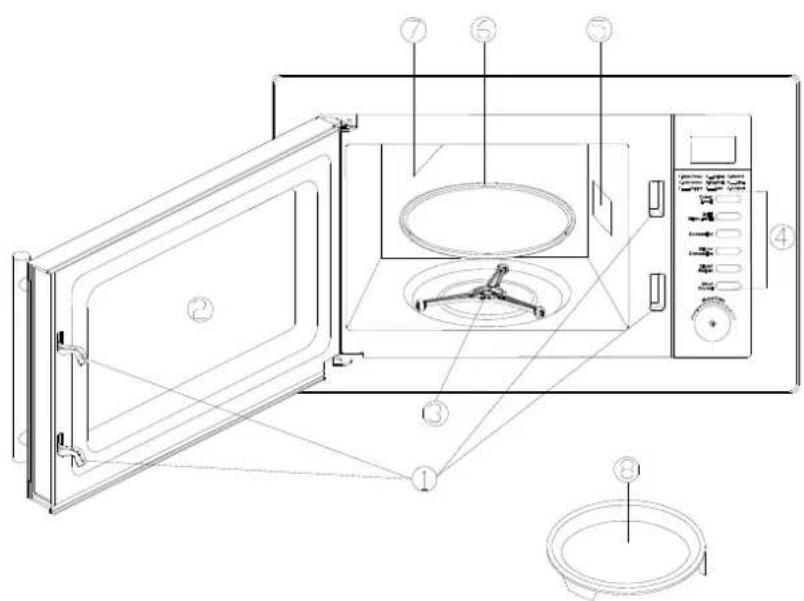
CONTROL PANEL
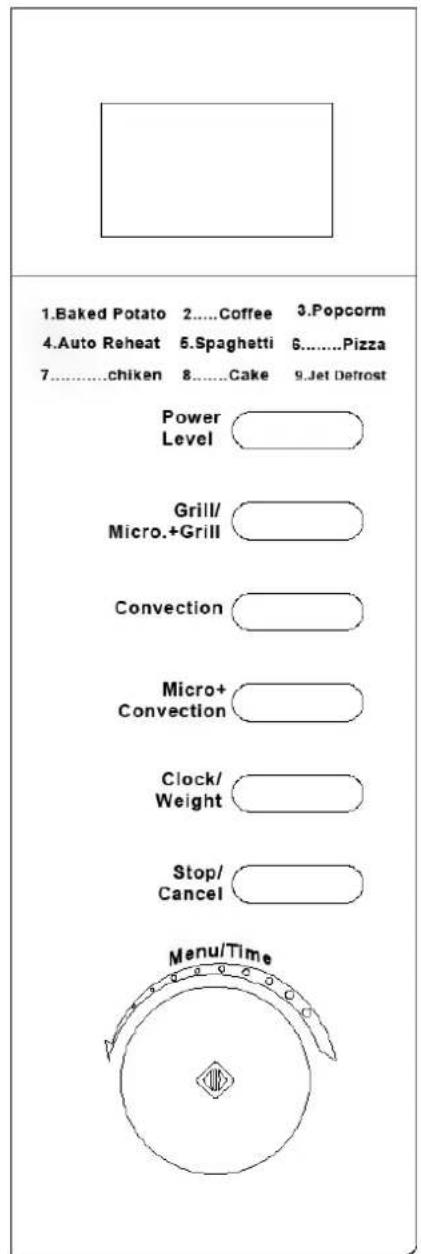
(Please also see the following pages for more detail)
DISPLAY SCREEN
Cooking time, power, indicators and present time are displayed.
POWER LEVEL
Press to select microwave power level.
GRILL/MICRO. +GRILL
Press to set a grill cooking program or to select one of two combination cooking settings.
CONVECTION
Press to program convection temperature.
MICRO +CONVECTION
Press to select one of four combination cooking settings.
CLOCK/WEIGHT
Press to select the amount of food; press and hold to set time.
STOP/CANCEL
Touch to stop cooking program or clear all previous settings before cooking starts.
MENU/TIME (DIAL)
Rotate to set cooking time or select auto-menu.
Touch to start the oven or press a number of times to set cooking time and start immediately.
HOW TO SET THE OVEN CONTROLS
SETTING THE CLOCK
- In standby mode, press CLOCK/WEIGHT button once.
- Rotate the MENU/TIME dial until the correct hour is displayed.
- Press CLOCK/WEIGHT button once.
- Rotate the MENU/TIME dial until the correct minute is displayed.
- Press CLOCK/WEIGHT button once to confirm.
QUICKSTART
Use this feature to program the oven to start at 100% power conveniently.
Press START/QUICK START button in quick succession to set the cooking time. (maximum 10min.) The oven will auto-start immediately.
MICROWAVE COOKING
Microwave cooking allows you to customize cooking power and time. First, select a power level by pressing the POWER LEVEL button a number of times (see the table below). Then set the cooking time (maximum 95min.) by rotating the MENU/TIME dial before pushing the START/QUICK START button.
| Press | Display | Power Level |
| Once | P100 | 100% of total |
| Twice | P-90 | 90% |
| Thrice | P-80 | 80% |
| 4 times | P-70 | 70% |
| 5 times | P-60 | 60% |
| 6 times | P-50 | 50% |
| 7 times | P-40 | 40% |
| 8 times | P-30 | 30% |
| 9 times | P-20 | 20% |
| 10 times | P-10 | 10% |
| 11 times | P-00 | 0% |
Suppose you want to cook for 5 minutes at 60% power level.
- In standby mode, press POWER LEVEL button till the screen show the intended power.
- Use the MENU/TIME dial to enter cooking time until the correct cooking time is displayed.
- Press START/QUICK START button to start.
□
GRILL
Grill cooking is particularly useful for thin slices of meat, steaks, chops, kebabs, sausages and pieces of chicken. It is also suitable for hot sandwiches and au gratin dishes.
Suppose you want to program grill cooking for 12 minutes.
- Press GRILL/MICRO.+GRILL button once.
- Turn the MENU/TIME to 12:00.
- Press START/QUICK START button to start.
NOTE: Maximum cooking time for grill is 95 minutes.
MICRO+GRILL
This feature allows you to combine grill with microwave cooking on two different settings.
NOTE:
- The maximum cooking time here is 95 minutes.
- During cooking, you can see the programmed setting by pressing this button.
COMBINATION 1
30% time for microwave cooking, 70% for grill cooking. Use for fish, au gratin.
Suppose you want to set combination 1 cooking for 25 minutes.
- Press STOP/CANCEL button.
- Press GRILL/MICRO+GRILL button twice.
- Turn MENU/TIME to 25:00.
- Press START/QUICK START to start.
COMBINATION 2
55% time for microwave cooking, 45% for grill cooking. Use for pudding, omelets, baked potatoes and poultry.
Suppose you want to set combination 2 cooking for 12 minutes.
- Press STOP/CANCEL button.
- Press GRILL/MICRO+GRILL button 3 times.
- Turn MENU/TIME to 12:00.
- Press START/QUICK START button to start.
CONVECTION
During convection cooking, hot air is circulated throughout the oven cavity to make crisp foods quickly and evenly. This oven can be programmed for ten different cooking temperatures. Maximum cooking time for convection is 9 hours and 30 minutes.
To Cook with Convection
To cook with convection, press CONVECTION button repeatedly to enter the desired convection temperature.(110°C\~200)
Suppose you want to cook at 180 for 40 minutes.
- Press CONVECTION button repeatedly to select cooking temperature as shown on screen.
- Use the MENU/TIME dial to enter cooking time.
- Press START/QUICK START button to start.
NOTE: You can check the convection temperature while cooking is in progress by pressing the CONVECTION button.
To Preheat and Cook with Convection
Your oven can be programmed to combine preheating and convection cooking operations.
Suppose you want to preheat to 170 and then cook 30 minutes.
- Press CONVECTION button repeatedly, to select cooking temperature as shown on screen.
-
Press START/QUICK START button to start. Beeps will sound when the designated temperature is reached.
-
Open the door and place container of food at the center of the turntable.
- Use the MENU/TIME dial to enter cooking time.
- Press START/QUICK START button to start.
MICROWAVE + CONVECTION
This oven has four pre-programmed settings that make it easy to cook with both convection heat and microwave automatically.
Press MICRO.+CONVECTION button repeatedly to program convection temperature:
| temperature(°C) | |
| COMB1 | 110 |
| COMB2 | 140 |
| COMB3 | 170 |
| COMB4 | 200 |
Suppose you want to bake a cake for 24 minutes on COMB3.
- Press MICRO+CONVECTION button repeatedly until display the desired temperature.
- Use the MENU/TIME dial to enter cooking time as desired.
- Press START/QUICK START button to start.
NOTE:
You can check the convection temperature while cooking is in progress by pressing the MICRO.+CONVECTION button.
MENU COOK
For food or the following cooking mode, it is not necessary to program the time and the cooking power. It is sufficient to indicate the type of food that you want to cook as well as the weight of this food.
- In standby mode, rotate the digital knob MENU/TIME anti-clockwise, rotate it clockwise to select food code, to specify the food to be cooked.
- Press CLOCK/WEIGHT to enter weight (also see note 2 in the following table for more information), check the screen for number of servings or preset weights, which should match weight of food you have placed in the oven.
- Press START/QUICK START to start.
Auto Cook Code/Menu
| Select Food Code | Notes |
| 01 Baked Potato (each 230g) | 1. The user is required to set weight for the system to determine the time needed to do the job, without entering cooking time by the user who might first at a loss as to how much time is needed for the cooking.2. For food coded 07, oven will stop during cooking to let you to turn food over and then close the door, press the START/QUICK START to resume cooking.3. Power fluctuation and other factors may cause the auto cooking not done exactly to your taste; the user may adjust cooking time accordingly. |
| 02 Coffee (each 200ml) | |
| 03 Popcorn (99g) | |
| 04 Auto Reheat (g) | |
| 05 Spaghetti (g) | |
| 06 Pizza (g) | |
| 07 Chicken (g) | |
| 08 Cake (475g) |
JET DEFROST
Suppose you want to defrost frozen food for 5 minutes.
-
In standby mode, rotate the MENU/TIME dial anti-clockwise to select corresponding code (09).
-
Press CLOCK/WEIGHT button once.
-
Rotate the MENU/TIME dial to enter defrost time (maximum of 95 minutes).
-
Press START/QUICK START to start.
Note: During defrosting program, the system will pause and sound beeps to remind user to turn over food, and then press START/QUICK START to resume the defrosting.
MULTI-STAGE COOKING
Your oven can be programmed for up to 3 automatic cooking sequences.
Suppose you want to set the following cooking program.
Microwave cooking
↓
Convection cooking
- Press POWER LEVEL button to set power level.
- Rotate the MENU/TIME dial to program cooking time.
- Press CONVECTION button to set convection temperature.
- Rotate the MENU/TIME dial to program cooking time.
- Press START/QUICK START button to start.
Note: If need to defrost the food before cooking, you can only set Jet defrost program in the first stage of multi-stage cooking program.
Quick start, Auto menu, Preheat program of convection can not be set in multi-stage cooking program.
CHILD PROOF LOCK
The childproof lock prevents unsupervised operation by little children.
To set the child proof lock: Press STOP/CANCEL button for 3 seconds, then a beep will sound and the indicator light will on. In the lock state, all buttons are disabled.
To cancel the child proof lock: Press STOP/CANCEL button for 3 seconds, then a beep will sound and the indicator light will off.
COOLING FEATURE
The electronically controlling system of the microwave oven has the feature of cooling. As for any cooking mode which cooking time above 2 minutes, after finishing cooking, the oven fan will work about 3 minutes automatically to cool the oven for prolonging the life of the oven.
AUTOMATIC PROTECTION MECHANISM
-
During all the cooking program, when the oven cavity temperature reaches a phenomenon of 300^ C, the screen displays error code E 01, and the oven automatically enters into self-protection mode with beeps until pressing the STOP/CANCEL button.
-
Error may also occur to the system sensor, short circuit will make the oven enter into protection mode while the screen displaying E 03 with beeps until pressing the STOP/CANCEL button.
CLEANING AND CARE
- Turn off the oven and remove the power plug from the wall socket before cleaning.
- Keep the inside of the oven clean. When food splatters or spilled liquids adhere to oven walls, wipe with a damp cloth. Mild detergent may be used if the oven gets very dirty. Avoid the use of spray and other harsh cleaners as they may stain, streak or dull the door surface.
- The outside surfaces should be cleaned with a damp cloth. To prevent damage to the operating parts inside the oven, water should not be allowed to seep into the ventilation openings.
- Wipe the door and window on both sides, the door seals and adjacent parts frequently with a damp cloth to remove any spills or spatters. Do not use abrasive cleaner.
- Do not allow the control panel to become wet. Clean with a soft, damp cloth. When cleaning the control panel, leave oven door open to prevent oven from accidentally turning on.
- If steam accumulates inside or around the outside of the oven door, wipe with a soft cloth. This may occur when the microwave oven is operated under high humidity condition. And it is normal.
- It is occasionally necessary to remove the glass tray for cleaning. Wash the tray in warm sudsy water or in a dishwasher.
- The roller ring and oven floor should be cleaned regularly to avoid excessive noise. Simply wipe the bottom surface of the oven with mild detergent. The roller ring may be washed in mild sudsy water or dishwasher. When removing the roller ring from cavity floor for cleaning, be sure to replace in the proper position.
-
Remove odors from your oven by combining a cup of water with the juice and skin of one lemon in a deep microwaveable bowl, microwave for 5 minutes. Wipe thoroughly and dry with a soft cloth.
-
When it becomes necessary to replace the oven light, please consult a dealer to have it replaced.
- The oven should be cleaned regularly and any food deposits removed. Failure to maintain the oven in a clean condition could lead to deterioration of the surface that could adversely affect the life of the appliance and possibly result in a hazardous situation.
- Please do not dispose this appliance into the domestic rubbish bin; it should be disposed to the particular disposal center provided by the municipalities.
DISPOSAL OF OLD ELECTRICAL APPLIANCES
The European directive 2002/96/EC on Waste Electrical and Electronic Equipment (WEEE), requires that old household electrical appliances must not be disposed of in the normal unsorted municipal waste stream. Old appliances must be collected separately in order to optimize the recovery and recycling of the materials they contain, and reduce the impact on human health and the environment.
The crossed out “wheeled bin” symbol on the product reminds you of your obligation, that when you dispose of the appliance, it must be separately collected.
Consumers should contact their local authority or retailer for information concerning the correct disposal of their old appliance.
NOTICE D'EMPLOI
MANUAL DE INSTRUÇÕES
PRECAUÇÕES PARA EVITAR A POSSÍVEL EXPOSIÇÃO A ENERGIA DE MICROONDAS EXCESSIVA
natural_image
Symbol of a trash bin with crossed lines indicating no waste or restriction, and a solid black rectangle below (no text or symbols)| Sequence | QuantityName | |
| 1 | Cabinet | 1 |
| 2 | Microwave oven | 1 |
| 3 | Shutter | 1 |
| 4 | Upper exhaust guide | 1 |
| 5 | Screw 4x8 | 4 |
| 6 | Screw 4x10 | 4 |
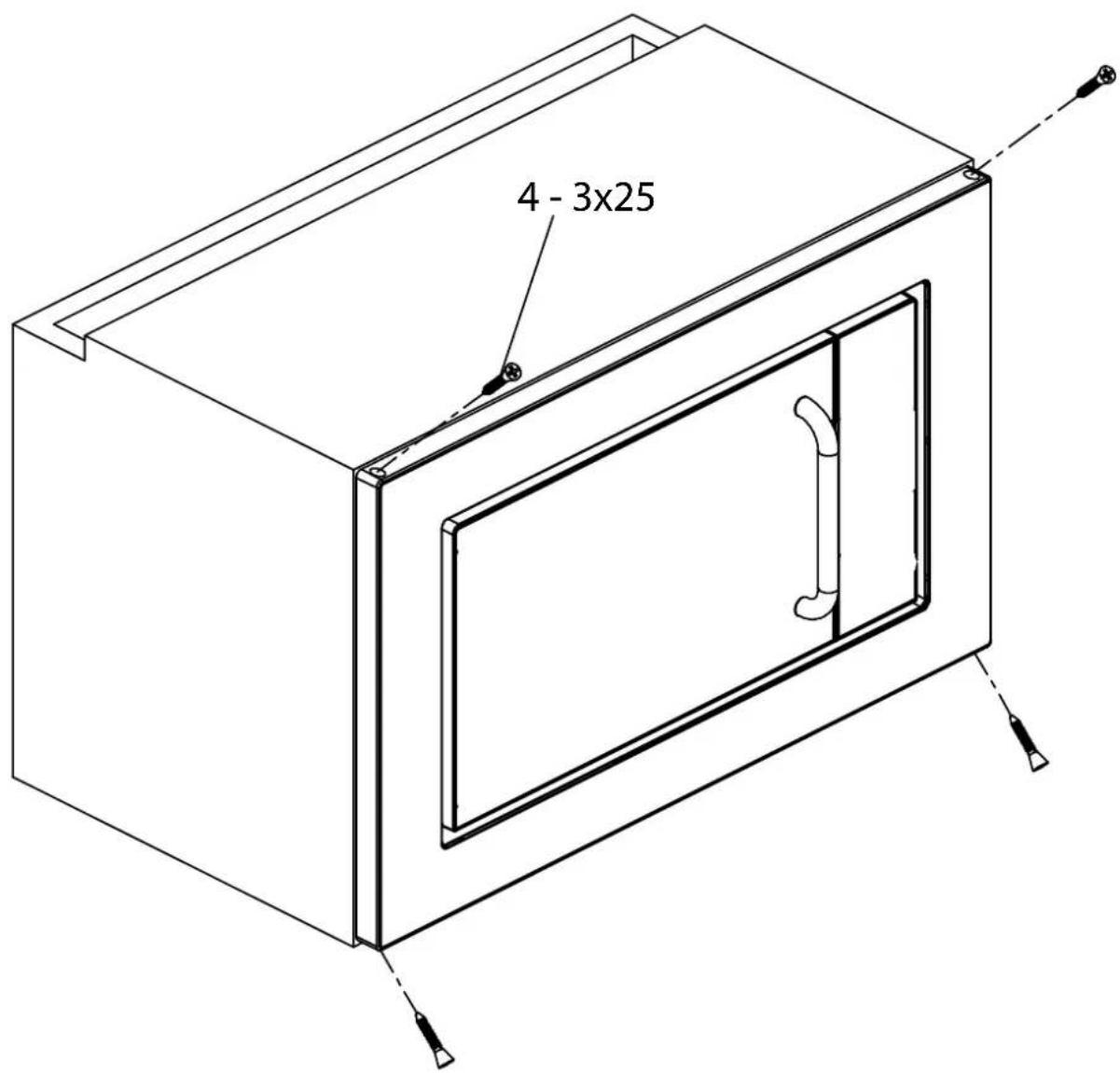
| 7 | Screw 3x25 | 4 |

⑤4x8mm

⑥ 4x10mm
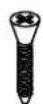
⑦3x25mm
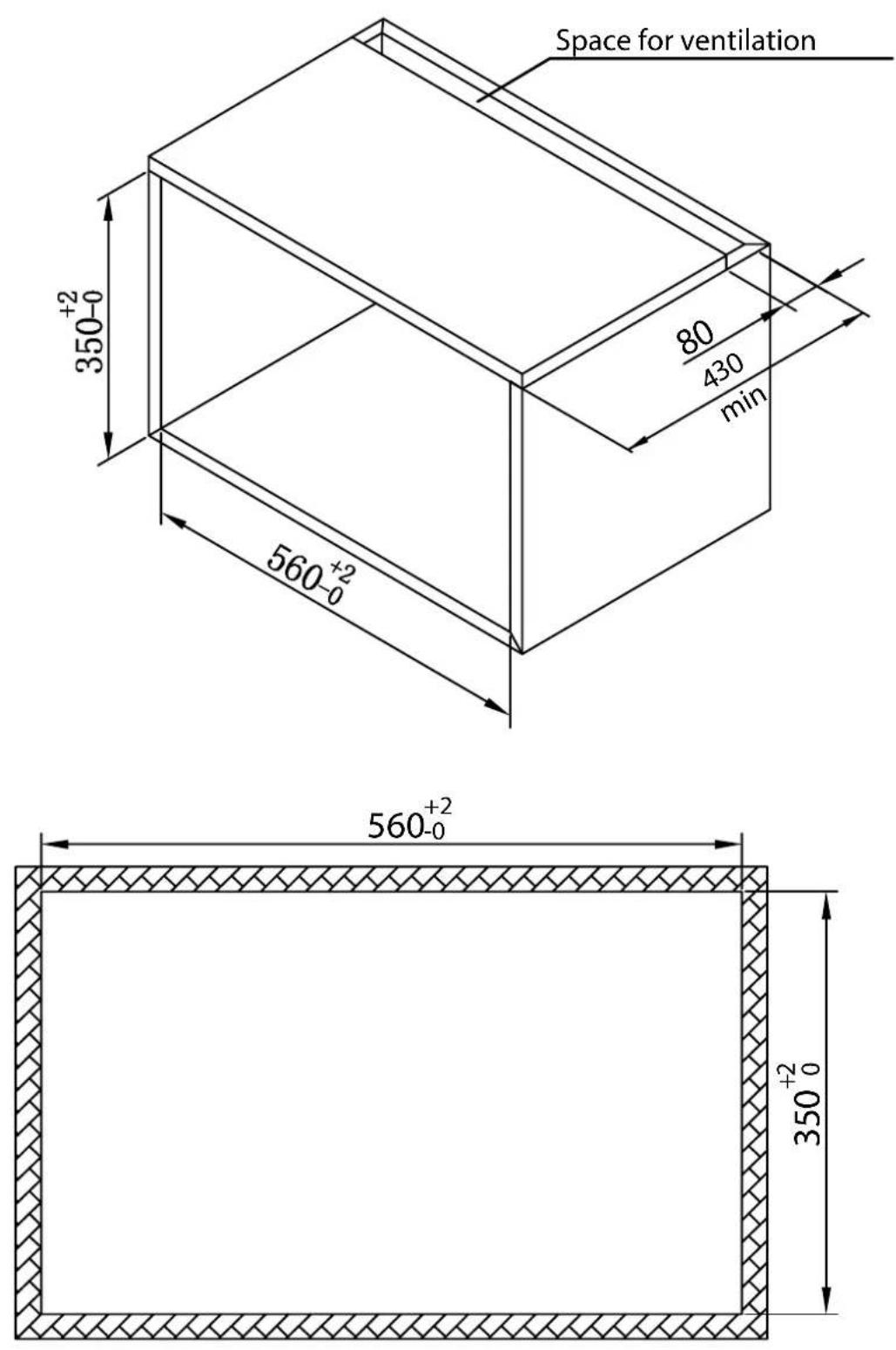
Make a cabinet to the dimension
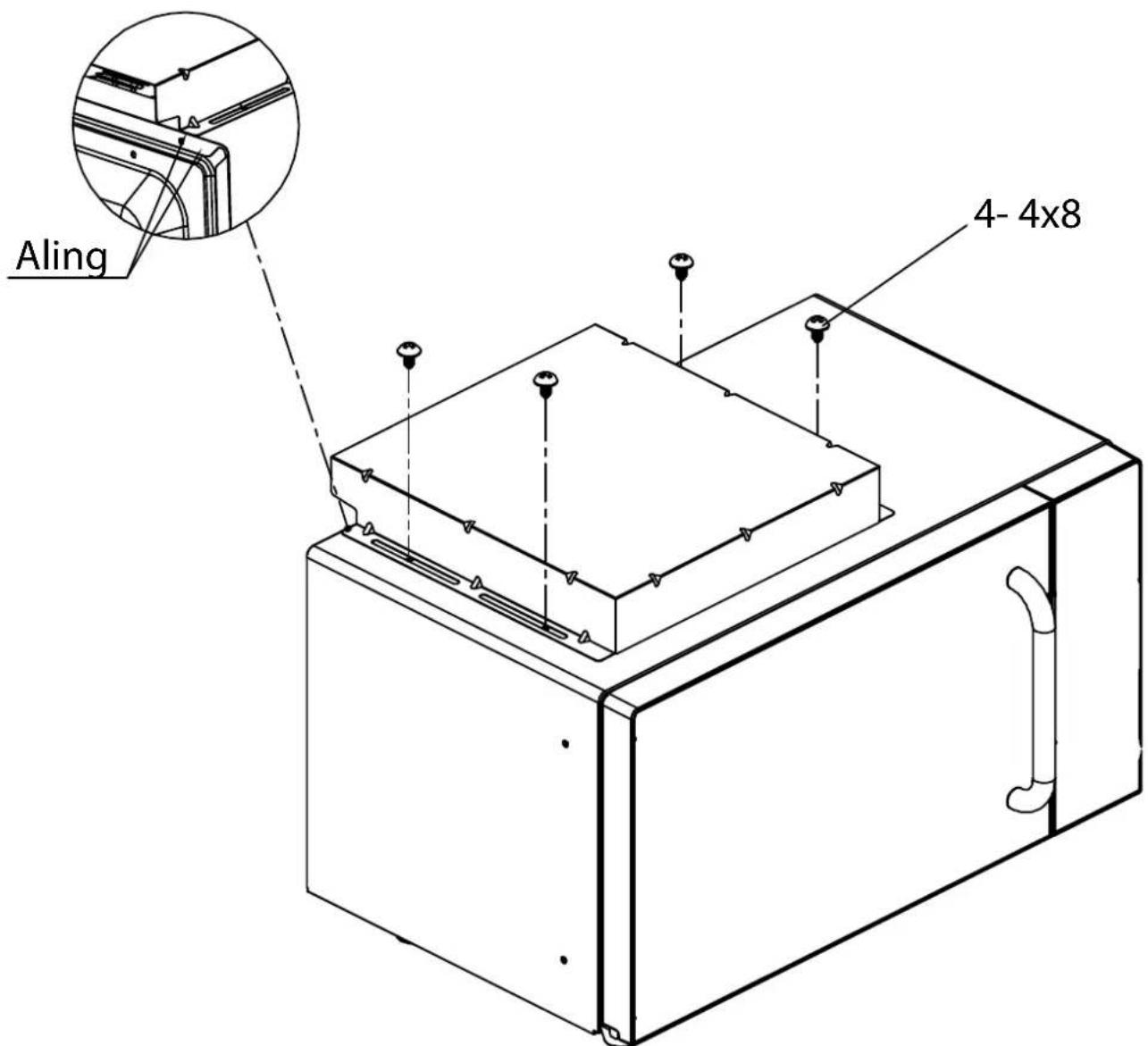
Fasten the upper exhaust guide with 4 screws. Note the opening to the back.
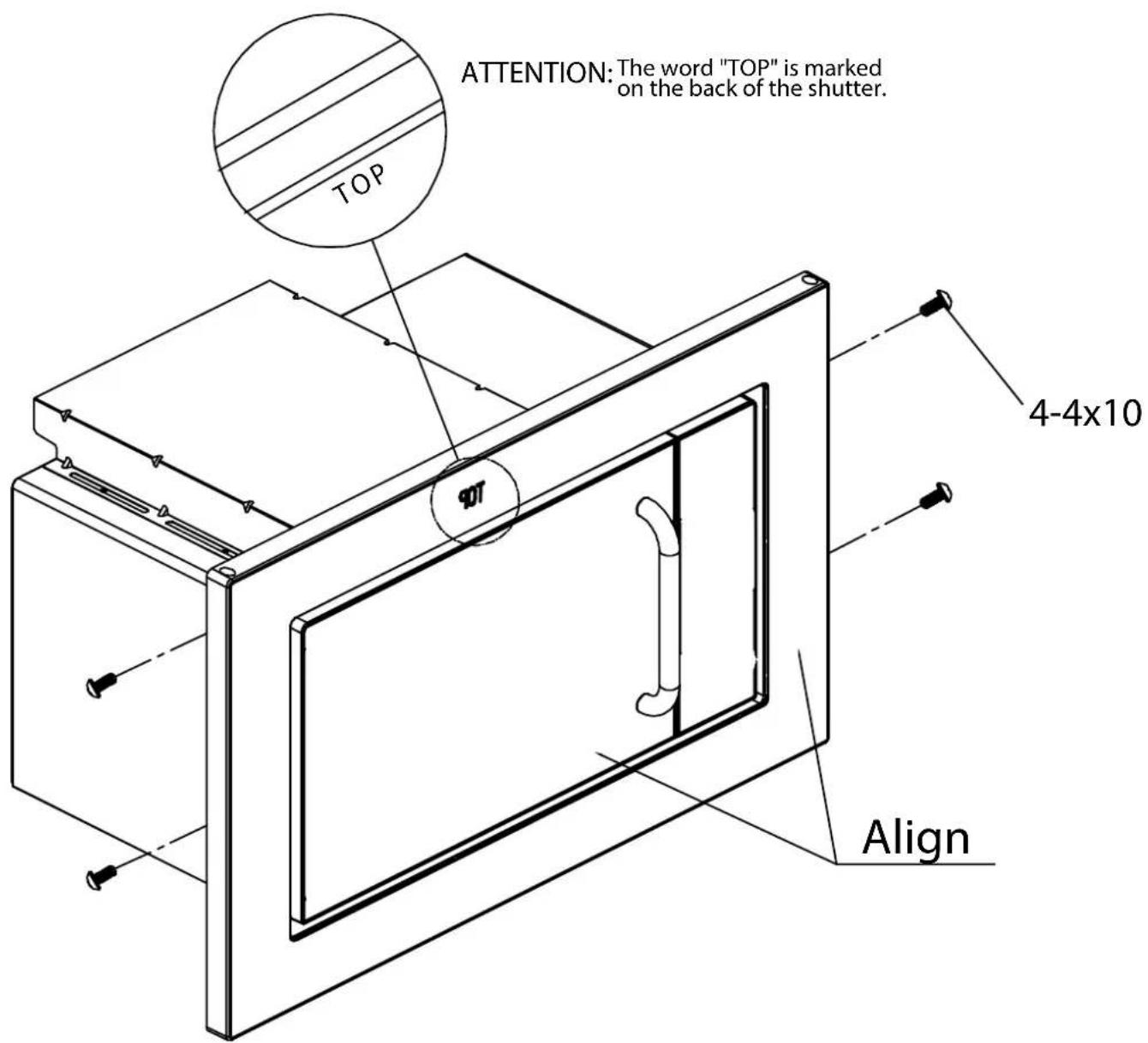
Fasten the shutter with 4 screws
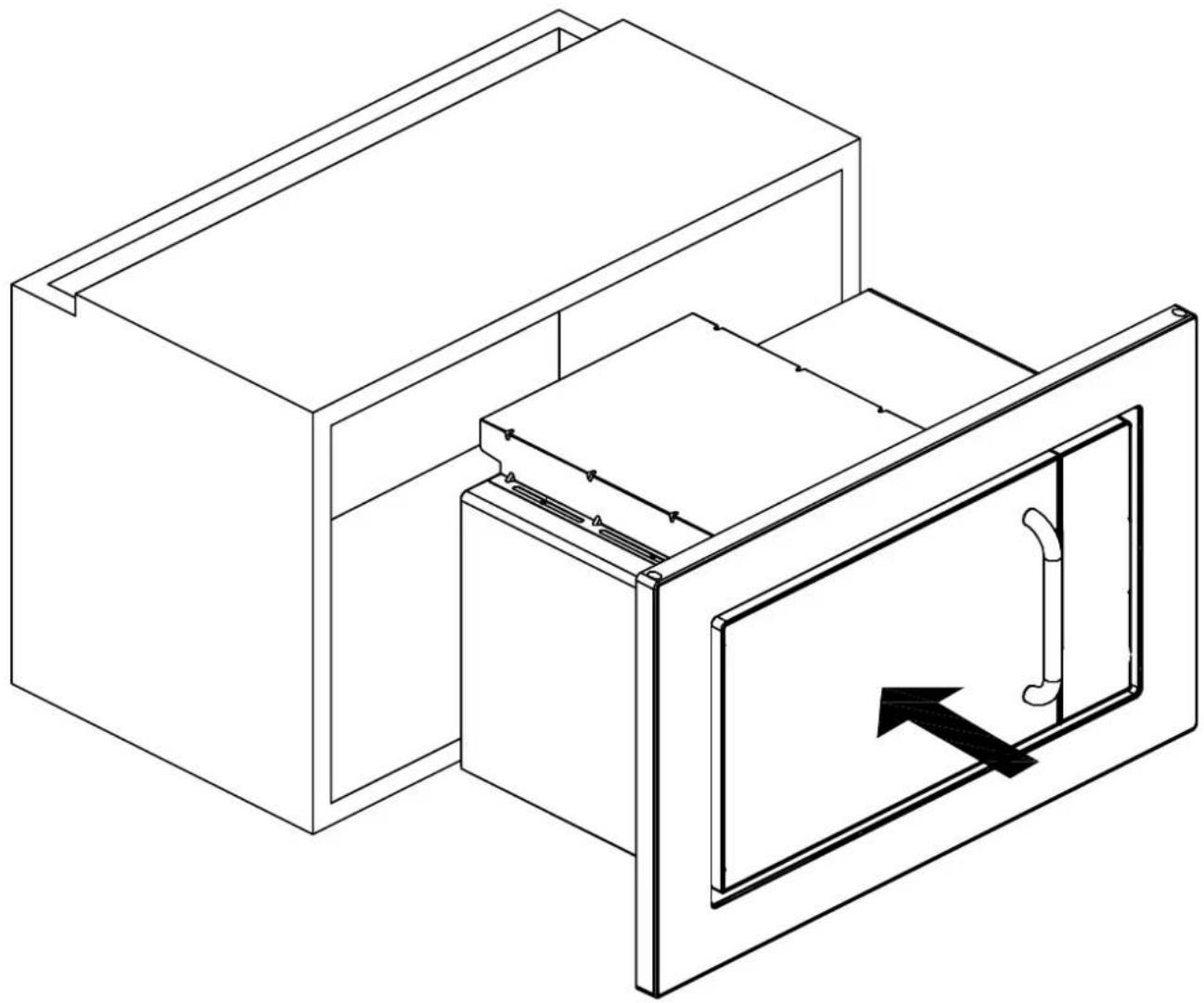
Place the oven into cabinet
natural_image
Isometric line drawing of a cabinet with an open door and directional arrow indicating flow or movement (no text or symbols)Place the oven in the middle of the cabinet
Fasten the oven into the cabinet with 4 screws.
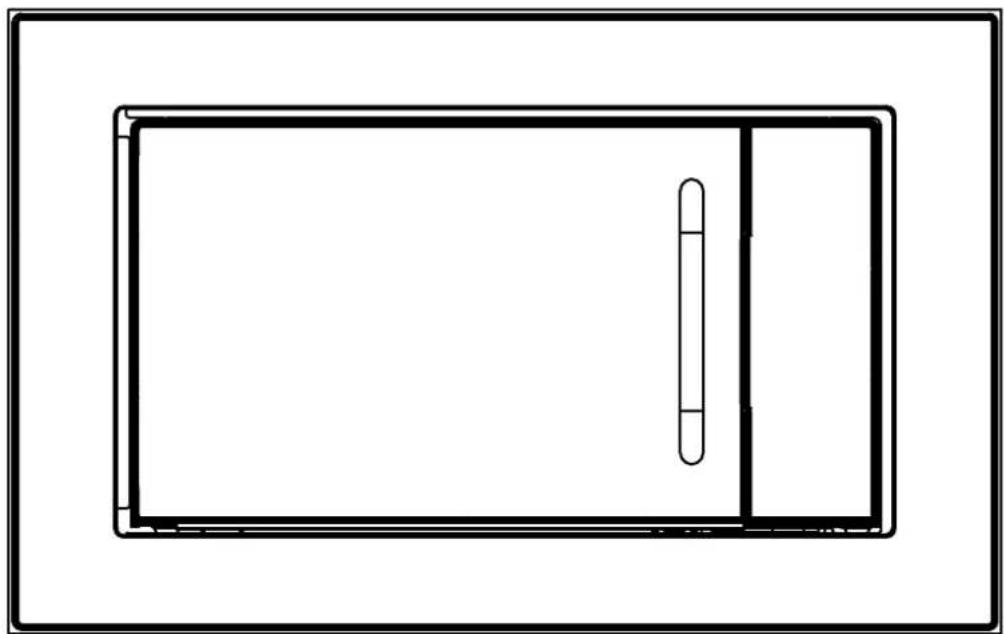
Installation complete.
natural_image
Simple line drawing of a rectangular frame with a vertical slot on the right side (no text or symbols)
natural_image
Line drawing of a microwave oven with open door and internal air vent (no text or symbols)- IMPORTANT SAFETY INSTRUCTIONS
- INSTALLATION
- RADIO INTERFERENCE
- GROUNDING INSTRUCTIONS
- Note:
- MICROWAVE COOKING PRINCIPLES
- BEFORE YOU CALL FOR SERVICE
- UTENSILS GUIDE
- PART NAMES
- CONTROL PANEL
- DISPLAY SCREEN
- POWER LEVEL
- GRILL/MICRO. +GRILL
- CONVECTION
- MICRO +CONVECTION
- CLOCK/WEIGHT
- STOP/CANCEL
- MENU/TIME (DIAL)
- HOW TO SET THE OVEN CONTROLS
- SETTING THE CLOCK
- QUICKSTART
- MICROWAVE COOKING
- GRILL
- MICRO+GRILL
- COMBINATION 1
- COMBINATION 2
- To Cook with Convection
- To Preheat and Cook with Convection
- MICROWAVE + CONVECTION
- MENU COOK
- JET DEFROST
- MULTI-STAGE COOKING
- CHILD PROOF LOCK
- COOLING FEATURE
- AUTOMATIC PROTECTION MECHANISM
- CLEANING AND CARE
- DISPOSAL OF OLD ELECTRICAL APPLIANCES
- NOTICE D'EMPLOI
- MANUAL DE INSTRUÇÕES
- PRECAUÇÕES PARA EVITAR A POSSÍVEL EXPOSIÇÃO A ENERGIA DE MICROONDAS EXCESSIVA
- Make a cabinet to the dimension
- Fasten the shutter with 4 screws
- Place the oven into cabinet
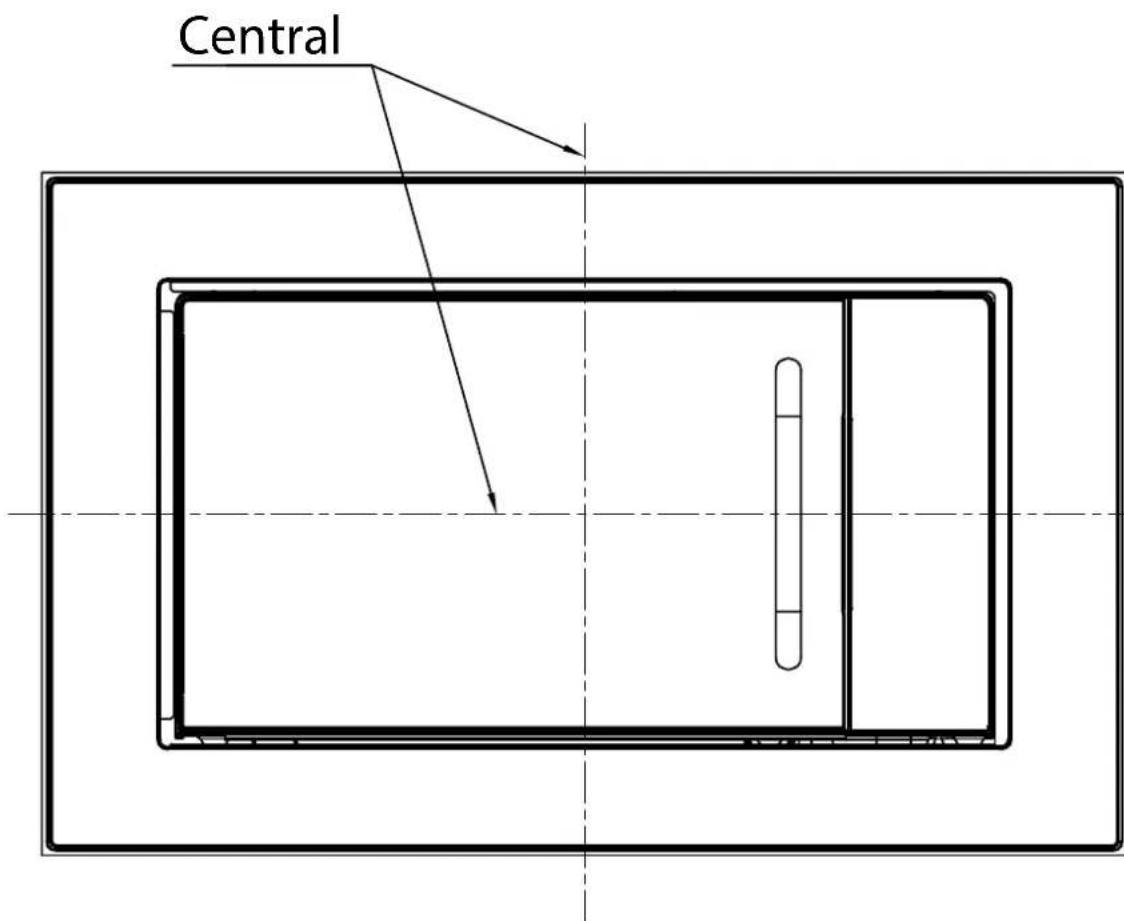
- Place the oven in the middle of the cabinet
Brand : Orbegozo
Model : MIG 2027
Category : Microwave