L200CFW17 - Freezer Logik - Free user manual and instructions
Find the device manual for free L200CFW17 Logik in PDF.


| Product Type | Chest Freezer |
| Brand | Logik |
| Model | L200CFW17 |
| Energy Efficiency Class | A+ |
| Annual Energy Consumption | 221 kWh |
| Freezer Storage Volume | 199 L |
| Freezing Capacity | 15 kg/24h |
| Temperature Rise Time | 30 hours |
| Climate Class | SN, N, ST, T (10°C – 43°C) |
| Noise Level | 42 dB(A) |
| Rated Voltage | 220-240V~, 50 Hz |
| Rated Current | 0.7 A |
| Power Consumption | 100 W |
| Overall Dimensions (H x W x D) | 845 x 905 x 565 mm |
| Door Handle Included | Yes |
| Defrost Type | Manual |
| Super Freeze Mode | Yes (52 hours) |
| Lock Mode | Yes (key lock) |
| Interior Light | LED (non-user replaceable) |
| Included Accessories | 2 freezer baskets, plastic scraper, 2 keys, door handle kit |
Frequently Asked Questions - L200CFW17 Logik
User questions about L200CFW17 Logik
0 question about this device. Answer the ones you know or ask your own.
Ask a new question about this device
Download the instructions for your Freezer in PDF format for free! Find your manual L200CFW17 - Logik and take your electronic device back in hand. On this page are published all the documents necessary for the use of your device. L200CFW17 by Logik.
USER MANUAL L200CFW17 Logik
Safety Warnings....4
Unpacking....6
Location....7
Free Space Requirements....7
Installing the Door Handle....7
Cleaning Before Use ....7
Before Using Your Unit....7
Product Overview......8
Operation 9
Switching On Your Unit 9
Super Freezing mode....9
Lock mode....9
High Temperature alarm....9
Temperature Sensor failure....9
Noises Inside the Unit! 9
Tips for Keeping Food in the Unit....10
Preparations for Freezing....10
Defrosting Frozen Food....10
Cleaning 11
Defrosting 11
Cleaning the Interior and the Exterior of the Unit....11
Maintenance 12
Replacing the Light....12
Care When Handling / Moving the Unit....12
Servicing 12
Switching Off for Long Periods of Time 12
Condensation Appears on the Outside of the Freezer 12
Disposal....12
Specifications....13
Product Fiche 13
For your continued safety and to reduce the risk of injury or electric shock, please follow all the safety precautions listed below.
- Read all instructions carefully before using the unit and keep them for future reference.
- Retain the manual. If you pass the unit onto a third party, make sure to include this manual.
- This appliance is intended for indoor household use and similar applications such as:
- staff kitchen areas in shops, offices and other working environments;
- farm houses and by clients in hotels, motels and other residential type environment;
- bed and breakfast type environment;
- catering and similar non-retail applications.
- Ensure that the plug is easily accessible to enable disconnection from the mains supply.
- If the mains cable is damaged, it must be replaced by the manufacturer, its service agent or a qualified technician in order to avoid a hazard.
- Choose a location for your unit away from heat sources such as radiators or fires as refrigerant and vesicant are burnable.
• The unit must be manoeuvred by a minimum of 2 persons.
- This appliance can be used by children aged from 8 years and above and persons with reduced physical, sensory or mental capabilities or lack of experience and knowledge if they have been given supervision or instruction concerning use of the appliance in a safe way and understand the hazards involved. Children shall not play with the appliance. Cleaning and user maintenance shall not be made by children without supervision.
- Children should be supervised to ensure that they do not play with the unit.
- If your unit is fitted with a lock to prevent children being trapped inside, keep the key out of reach and not in the vicinity of the unit.
- Do not store explosive substances such as aerosol cans with a flammable propellant in this appliance.
- Do not store bottles or glass containers in the freezer compartment. Contents can expand when frozen (fizzy drinks) which may break the bottle and damage your freezer compartment.
WARNING
- Keep ventilation openings in the unit enclosure or in the built-in structure clear of obstructions.
- Do not use mechanical devices or other means to accelerate the defrosting process, other than those recommended by the manufacturer.
- Do not use electrical appliances inside the food storage compartments of the unit, unless they are of the type recommended by the manufacturer.
- Do not damage the refrigerant circuit (The refrigerant is a very environmentally-friendly gas but is also combustible. Take care when transporting or moving the unit to ensure that the refrigeration circuit is not damaged. In the event of damage avoid naked flames or ignition sources and ventilate the room in which the unit is placed for a few minutes.)
- When positioning the appliance, ensure the supply cord is not trapped or damaged.
- Do not locate multiple portable socket-outlets or portable power supplies at the rear of the appliance.
WARNING
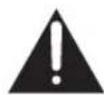
IT IS HAZARDOUS FOR ANYONE OTHER THAN AUTHORISED SERVICE PERSONNEL TO CARRY OUT SERVICING OF REPAIRS WHICH INVOLVE THE REMOVAL OF COVERS.
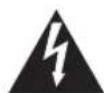
TO AVOID THE RISK OF AN ELECTRICAL SHOCK, DO NOT ATTEMPT REPAIRS YOURSELF.
Thank you for purchasing your new Chest Freezer.
We recommend that you spend some time reading this instruction manual in order to fully understand all the operational features it offers.
Read all the safety instructions carefully before use and keep this instruction manual for future reference.

Unpacking
Remove all items from the packaging. Retain the packaging. If you dispose of it, please do so according to local regulations.
The following items are included:
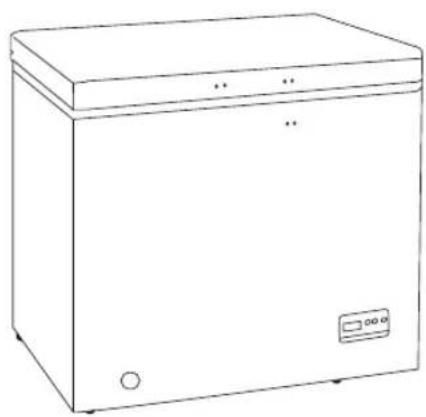
Main Unit
Door Handle x1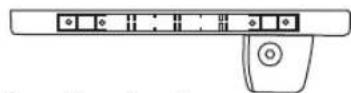
Screw x4
Handle Cover x1
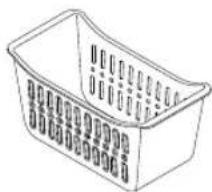
Freezer Basket x2
Plastic Scraper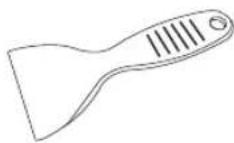
Key x2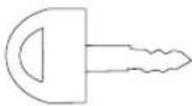
Instruction Manual
Door Lock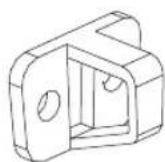

If items are missing or damaged, please contact Partmaster (UK only).
Tel: 0344 800 3456 for assistance.
Location
When selecting a position for your unit, you should make sure the floor is flat and firm and the room is well ventilated. This unit can be used in a garage or outbuilding. For optimum energy efficiency, the unit should be located within an average room temperature of between 10°C and 43°C. If the room temperature drops below or rises above these temperatures, the energy consumption and performance may be affected. Avoid locating your unit near a heat source, e.g., cooker, boiler, or radiator. Also avoid direct sunlight as it may increase the electrical consumption. Do not drape the unit with any covering.
Free Space Requirements
When installing the unit, ensure that 25 mm of free space is left at both sides and 50 mm at the rear of the unit. Please ensure there is adequate space for the door to fully open.
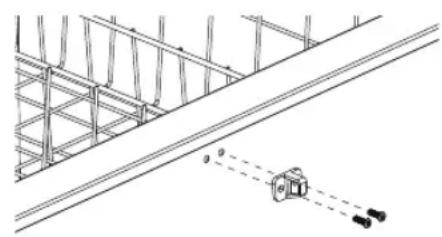
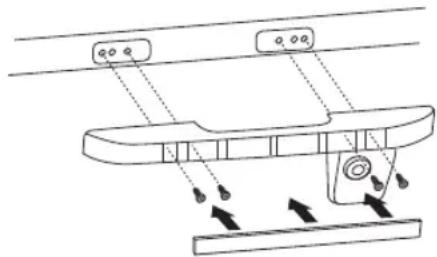
Installing the Door Handle
- Collect the door handle, door lock, screws, and handle cover from inside the unit.
- Place and screw the door lock.
- Place and screw the door handle.
- Place the handle cover to cover the screws, bending it slightly and fixing it flat onto the door handle.
![graph TD A["Input 1"] --> B["Process Block"] C["Input 2"] --> B D["Input 3"] --> B B --> E["Output"] style A fill:#ccc,stroke:#333 style C fill:#ccc,stroke:#333 style D fill:#ccc,stroke:#333](/content/2026/05/968480/images/d9b3a0244673aa27a6b6fb1e838b521e51ccf8e6f1ae6f33365bce9b10f76d2c.jpg)

- Make sure the door is always kept locked when not in use to prevent children from playing with the unit. • The door lock is specially designed to prevent the keys from being left inside the lock. • The door keys should be kept out of reach of children.
Cleaning Before Use
Wipe the inside of the unit with a weak solution of bicarbonate soda. Then rinse with warm water using a sponge or cloth. Wipe completely dry before. Clean the exterior of the unit with a damp cloth.
If you require more information refer to the Cleaning section.

• Before Plugging in YOU MUST Check that you have a socket which is compatible with the plug supplied with the unit. • Before Turning On! Do not turn on until two hours after moving the unit. The coolant fluid needs time to settle.
Before Using Your Unit
Before placing any food in your unit, turn it on and wait for 24 hours, to make sure it is working properly and to allow it time to fall to the correct temperature. Your unit should not be overfilled.
Switching On Your Unit
- Connect the mains cable to the mains socket.
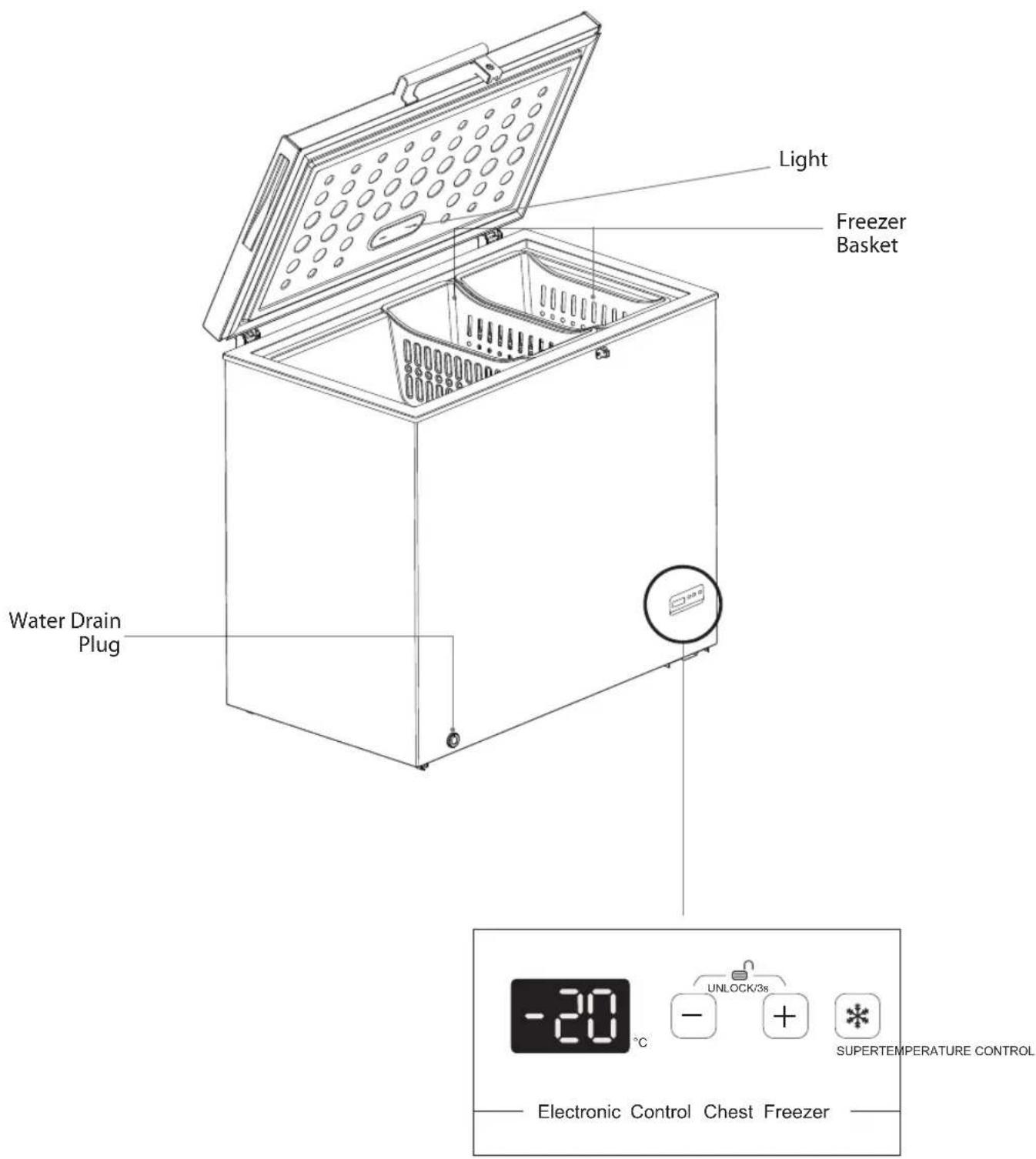
- Temperature range: -14°C to -22°C. Press "-" to decrease temperature and "+" to increase temperature. The appliance may not operate correctly if it is in a particularly hot or cold room or if the door is opened often or for prolonged periods.
- To ensure that the unit is cool enough to sufficiently freeze your food, wait 24 hours before filling it with food.
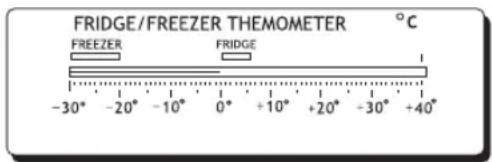
- If you are concerned that your unit is not being kept cold enough and wish to check the temperature, you will need a special fridge/freezer thermometer. These are available from most supermarkets and hardware shops. Place the thermometer in the freezer and leave overnight. The correct temperature for the freezer should be -18°C or lower.
Super Freezing mode
To use super freezing mode, press the button; the display will flash "SF" for 5 seconds and super freezing mode will start. To cancel, press again.
In super freezing mode, the chest freezer will run continuously for 52 hours (if no additional adjustment is made while the mode is in effect). After 52 hours, the unit will automatically return to its former temperature setting.
Lock mode
• To lock the buttons, press the "+" and "-" buttons at the same time for 3 seconds.
- To unlock the buttons from lock mode, press the "+" and "-" buttons for 3 seconds again.
High Temperature alarm
If there is a high temperature alarm (temperature is continuously higher than -8°C), "ht" and the current temperature will be displayed alternately. A beep will be heard.
Adjust the temperature until the high temperature alarm is cancelled.
Temperature Sensor failure
If the temperature sensor fails, the display will show "E0" and the current temperature alternately. The compressor will run in a cycle of 20 minutes on, then 20 minutes off.
Noises Inside the Unit!
You may notice that your unit makes some unusual noises. Most of these are perfectly normal, but you should be aware of them!
These noises are caused by the circulation of the refrigerant liquid in the cooling system. It has become more pronounced since the introduction of CFC-free gases. This is not a fault and will not affect the performance of your unit. This is the compressor motor working, as it pumps the refrigerant around the system.
Tips for Keeping Food in the Unit
- Cooked meats/fishes should always be stored above raw meats/fishes to avoid bacterial transfer. Keep raw meats/fishes in a container which is large enough to collect juices and cover it properly. Place the container at the bottom inside the unit.
- Leave space around your food, to allow air to circulate inside the unit. Ensure all parts of the unit are kept cool. • To prevent transfer of flavours and drying out, pack or cover the food separately. Fruit and vegetables do not need to be wrapped. • Always let pre-cooked food cool down before you put in the unit. This will help to maintain the internal temperature of the unit. • To prevent cold air escaping from the unit, try to limit the number of times you open the door. We recommend that you only open the door when you need to put food in or take food out.
Preparations for Freezing
- Use quality food and handle it as little as possible. Freeze food in small quantities as it freezes faster, takes less time to defrost and enables you to control the quantity you need better.
- Leave cooked food to cool completely. Chill food before freezing if possible.
- Consider how you will want to cook the food before freezing it.
- Don't freeze food in metal containers if you may want to microwave it straight from the freezer.
- Use special freezer bags, freezer film, polythene bags, plastic containers, and aluminium foil (heavy duty grade only). If in doubt, double wrap your food. Don't use aluminium foil for acidic foods, e.g. citrus fruits. Don't use thin cling film, glass, or used food containers without cleaning.
- Exclude as much air from the container as possible. You could buy a special vacuum pump which sucks excessive air out of the packaging.
- Leave a small amount of air space when freezing liquids to allow expansion.
- You can use the space in the freezer most efficiently if you freeze liquids (or solids with liquids, e.g. stew) in square blocks. This is known as "Preforming". Pour the liquid into a polythene bag which is inside a square sided container. Freeze it, and then remove it from the container and seal the bag.
- Label your frozen foods as they will look the same when in frozen state. Use special fridge freezer tapes, labels and pens with different colours. This allows you to easily organise and to effectively use the freezer. Write the contents and date; otherwise the frozen food might exceed the storage time and this could cause food poisoning. Please refer to your food packaging for the recommended storage time.
Defrosting Frozen Food
- Take the frozen food out and let it defrost at room temperature. Don't forget that defrosting in a warm area encourages the growth of bacteria and low temperature cooking may not destroy dangerous bacteria.
- Drain off and throw away any liquid lost during defrosting.
- Always make sure there are no ice crystals in the food before cooking, particularly with meat. These crystals indicate that the food has not fully defrosted.
- Cook food as soon as possible after defrosting.
- Many microwaves and ovens have a defrost setting. To avoid bacterial build-up, only use these if you intend to cook the food immediately afterwards.
Defrosting
Frost may build up in the freezer compartment after it has been used for a period of time. Scrape away the frost using a plastic scraper.
We recommend that defrosting should be carried out when the frost layer builds up to 10 mm. Choose a time when the stock of frozen food is low, and follow these procedures:
- Take out the food, turn the unit off at the mains supply and leave the door open. Ideally, the frozen food should be put into another freezer. If this is not possible, wrap the food in several sheets of newspaper or large towels and then a thick rug or blanket to keep it cool.

Never re-freeze anything that has been defrosted unless you cook it again, to kill off harmful bacteria. Never re-freeze defrosted shellfish. Re-seal packs properly after removing items. This prevents drying or freezer-burn and a build-up of frost on any remaining food.
- To remove melted frost from the drain hole, place a suitable container under it. Remove the drain cap on the front of the unit. Reach down into the freezer and unscrew the drain plug.
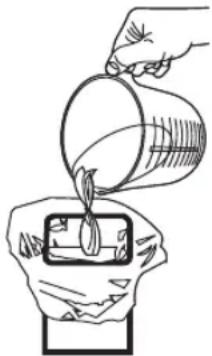
- Scrape away the frost using the plastic scraper. Defrosting the remaining frost can be sped up by placing a bowl of hot water inside the freezer compartment and closing the door. As the solid frost loosens, scrape it away with the plastic scraper and remove.
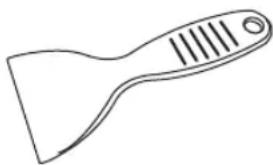

Do not use a metal or sharp instrument to scrape away the frost, nor should you use any electrical appliances to aid defrosting.
- After all the water has drained away, replace the drain plug and then the drain cap.
- When defrosting is complete, clean your unit's interior and exterior.
- When the compartment is completely clean and dry, close the door, and switch on the freezer again.
- Leave the unit to cool down for an hour, and then you can start placing frozen food inside the unit.
Cleaning the Interior and the Exterior of the Unit
- Wipe the inside of the unit with a weak solution of bicarbonate soda and then rinse with warm water using a sponge or cloth. Wipe completely dry.
- Use a damp cloth to clean the exterior, and then wipe with a standard furniture polish. Make sure that the door is closed to avoid the polish getting on the magnetic door seal or inside the unit.
Replacing the Light
The internal light is an LED light. It cannot be changed by the user; please contact your service agent.
Care When Handling / Moving the Unit
Hold the unit around its sides or base when moving it. Under no circumstances should it be lifted by holding the edges of the top surface.
Servicing
The unit should be serviced by an authorised engineer and only genuine spare parts should be used. Under no circumstances should you attempt to repair the unit yourself. Repairs carried out by inexperienced persons may cause injury or serious malfunction. Contact a qualified technician.
Switching Off for Long Periods of Time
When the unit is not in use for a long period of time, disconnect it from the mains supply, empty all food and clean the unit, leaving the door ajar to prevent unpleasant smells.
Condensation Appears on the Outside of the Freezer
Condensation may appear on the surface of the Chest Freezer, this is normal - wipe dry with a dry cloth.
This may be due to a change in the room temperature. Wipe off any residue of moisture. If the problem continues, contact the local store where you purchased your freezer.
When your appliance is working, the condenser at the back (exposed models) may become hot, or alternatively the sides may become hot (hidden condenser models).

Disposal
Old units still have some residual value. An environmentally friendly method of disposal will ensure that valuable raw materials can be recovered and used again. The refrigerant used in the unit and insulation materials require special disposal procedures. Ensure that none of the pipes on the back of the unit are damaged prior to disposal.
Up-to-date information concerning options for disposing of your old unit and packaging from the new one can be obtained from your local council office.

When disposing of an old unit, break off any old locks or latches and remove the doors as a safeguard.

Specifications
| Rated Voltage 220-240V~, 50 Hz | |
| Rated Current 0.7 A | |
| Rated Power 100 W | |
| Overall Dimension (H x W x D) 845 x 905 x 565 mm (545 mm without handle) | |
Features and specifications are subject to change without prior notice.

Product Fiche
| Brand Logik | |
| Model L200CFB17 / L200CFW17 | |
| Household Appliance Category 9 | |
| Energy Efficiency Class A+ | |
| Energy consumption 221 kWh per year, based on standard test results for 24 hours. Actual energy consumption will depend on how the appliance is used and where it is located. | |
| Fridge Storage Volume - | |
| Freezer Storage Volume | 199 L * *** |
| Manual Defrost for the compartment. | |
| Temperature Rise Time | 30 hours |
| Freezing Capacity | 15 kg/24 hrs |
| Climate Class | SN, N, ST, TThis appliance is intended to be used at an ambient temperature between 10°C and 43°C to achieve the claimed Energy Consumption and Grading.The minimum operation temperature of this refrigerator is -15°C. |
| Airborne Acoustical Noise 42 dB(A) re 1 pW | |
Team Knowhow
Help with all life's kit™
For general information about this appliance
and handy hints and tips, please visit:
www.TeamKnowhow.com/discover
or call 0344 561 1234
Partmaster
.co.uk
Visit Partmaster.co.uk today for the easiest way to buy electrical spares and accessories. With over 1 million spares and accessories available we can deliver direct
to your door the very next day. Visit www.partmaster.co.uk or call 0344 800 3456 (UK customers only) Calls charged at National Rate.
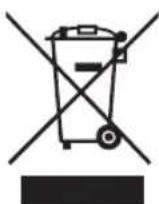
The symbol on the product or its packaging indicates that this product must not be disposed of with your other household waste. Instead, it is your responsibility to dispose of your waste equipment by handing it over to a designated collection point for the recycling of waste electrical and electronic equipment.
The separate collection and recycling of your waste equipment at the time of disposal will help conserve natural resources and ensure that it is recycled in a manner that protects human health and the environment.
For more information about where you can drop off your waste for recycling, please contact your local authority, or where you purchased your product.
DSG Retail Ltd. (co. no. 504877)
1 Portal Way, London, W3 6RS, UK
- SAFETY WARNINGS
- UNPACKING
- PRODUCT OVERVIEW
- OPERATION
- CLEANING
- MAINTENANCE
- DISPOSAL
- SPECIFICATIONS
- PRODUCT FICHE
- WARNING
- THANK YOU FOR PURCHASING YOUR NEW CHEST FREEZER
- LOCATION
- FREE SPACE REQUIREMENTS
- INSTALLING THE DOOR HANDLE
- CLEANING BEFORE USE
- BEFORE USING YOUR UNIT
- SWITCHING ON YOUR UNIT
- SUPER FREEZING MODE
- LOCK MODE
- HIGH TEMPERATURE ALARM
- TEMPERATURE SENSOR FAILURE
- NOISES INSIDE THE UNIT
- TIPS FOR KEEPING FOOD IN THE UNIT
- PREPARATIONS FOR FREEZING
- DEFROSTING FROZEN FOOD
- DEFROSTING
- CLEANING THE INTERIOR AND THE EXTERIOR OF THE UNIT
- REPLACING THE LIGHT
- CARE WHEN HANDLING / MOVING THE UNIT
- SERVICING
- SWITCHING OFF FOR LONG PERIODS OF TIME
- CONDENSATION APPEARS ON THE OUTSIDE OF THE FREEZER
- TEAM KNOWHOW
- PARTMASTER
Brand : Logik
Model : L200CFW17
Category : Freezer