
ZC-9EX - Remote control Libec - Free user manual and instructions
Find the device manual for free ZC-9EX Libec in PDF.


| Product Type | Remote Control for Camera/Lens |
| Brand | Libec |
| Model | ZC-9EX |
| Clamp Range (Pan Handle Diameter) | 10 mm - 30 mm (0.39 in - 1.18 in) |
| Main Connector Cable Type | 8-pin, Length 750 mm (29.5 in) |
| EX Connector Cable Type | Conversion from 8-pin to 8-pin Micro plug, Length 95 mm (3.7 in) |
| Zoom Control | Rotary lever with variable speed (T for telephoto, W for wide-angle) |
| Mode Selection Switch | F (Fujinon lens or Sony PMW-EX1) and C (Canon lens) |
| REC/RET Button | Toggle for start/stop recording (REC) or return (RET) – RET not available for Sony PMW-EX1 |
| Material | Plastic, metal components |
| Water Resistance | Not water resistant; avoid contact with water |
| Operating Temperature | Avoid high temperature environments; keep away from direct sunlight or heat sources |
| Storage | Disconnect cable after use; protect connector |
| Cleaning | Do not use organic solvents (e.g., paint thinner); keep plug clean |
| Safety Precautions | Do not dismantle or modify; use correct connectors; avoid excessive force; do not pull cable |
| Compatibility | Sony PMW-EX1 camera (uses EX connector); Fujinon and Canon lenses (8-pin or 12-pin with adapter) |
| Certifications | Not specified |
| Spare Parts Availability | EX connector not available as service part; contact repair services |
| Repairability | Do not attempt repair; contact store or LIBEC customer service |
| Manufacturer | HEIWA SEIKI KOGYO CO., LTD., No.878-1 Nakhibukuro, Yashio-Diy, Salama 340-0833 Japan |
Frequently Asked Questions - ZC-9EX Libec
User questions about ZC-9EX Libec
0 question about this device. Answer the ones you know or ask your own.
Ask a new question about this device
Download the instructions for your Remote control in PDF format for free! Find your manual ZC-9EX - Libec and take your electronic device back in hand. On this page are published all the documents necessary for the use of your device. ZC-9EX by Libec.
USER MANUAL ZC-9EX Libec
(No.: 0712-D84004-E)
WARNING
Before operating this equipment, please read this manual carefully and retain this for future reference.
This equipment may cause a person injury,
if not installed and used in accordance with this manual.
Attention to users
⚠ Warning Please follow this instruction for your safety reason.
■ Choose the mode appropriate for your lens or camera. Refer to the instruction manual for your lens or camera to determine the correct plug-in.
An inappropriate connection may cause a product failure ■Be sure to tighten the clamp.
If the clamp is loose, the product may slide or come off. This may cause a product failure.
■ Do not pull the cable.
Pulling the cable to disconnect the ZC-9EX or camera may damage the equipment.
■ Do not use excessive force when handling the ZC-9EX. Rough handling of the zoom lever, buttons and switches may cause the ZC-9EX to malfunction.
■ Use the right connector.
The wrong connection or plug-in may damage the ZC-9EX or other connected devices.
■Avoid contacting with water.
The ZC-9EX is not water resistant. Do not use it when there is a chance that it may get wet.
■ Avoid strong vibrations or high impact.
■Do not use organic solvents (such as paint thinner) on the ZC-9EX.
■The ZC-9EX should be used only for its intended purposes. ■Do not dismantle or modify the ZC-9EX.
Dismantling or modification may cause a person injury or a product failure. If there are problems, stop using the device and contact
If there are problems, stop using the device and contact the store or LIBEC customer service.
Caution for users
- Use the lens switch to choose the appropriate mode.
-
For Sony PMW-EX1 camera, use the EX connector.
-
For Fujinon or Canon lenses (other than the ones for Sony PMW-EX1 camera), for which the connector has a 8-pin terminal, remove the EX cable. For Fujinon and other lenses which have a 12-pin terminal, use the A-12P* (optional) adaptor.
-
The lock mechanism for the connector is off in order to avoid accidents due to negligence.
-
Do not leave the ZC-9EX in a high temperature environment. Keep it away from direct sunlight or any thermal appliance.
-
Keep the connection plug clean at all times.
-
Remove the unit after usage.
Set the corresponding mode
■ Switch to the mode appropriate for the lens you are using. Slide the switch as shown in the following diagram to choose the appropriate mode.
Warning
Inappropriate mode selection can cause a malfunction.

To use a Fujinon lens or Sony PMW-EX1 camera, slide the switch to F.

To Use a Canon lens, slide the switch to C.
To choose REC or RET
■Slide the switch to choose either REC (Record mode) or RET (Return mode) depending on the situation.

To use REC (Record) mode.

To use RET (Return) mode. Not available to use for the ZC-9EX. (It doesn't correspond to Sony PMW-EX1.)
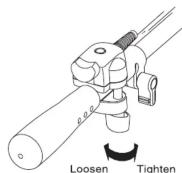
Attach to the pan handle
The clamp range is between 10mm and 30mm .
Do not use any pan handle smaller or larger than this diameter range.
-
Loosen the clamp knob till enough space is available attach to the pan handle.
-
Center of pipe is to be fit to clamp "V" shape.
Firmly tighten the clamp by using hands. Connect the cable.
Connect the cable
■ Double check to ensure the correct mode is selected.
①Refer to the instruction manual for your lens or camera. ②Locate the plug-in on your lens or camera to connect the ZC-9EX.
③Make sure your camera is turned off.
④Plug in the connector correctly.
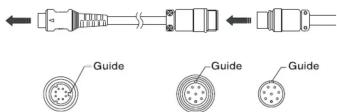
CAUTION You must plug in the connector at the correct angle. Follow the plug-in guide. Forcing it in may damage the ZC-9EX.
If you are using a Sony PMW-EX1 camera. Make sure you use the EX connector. The EX connector is connected to the ZC-9EX at the factory.
Operation
■REC/BET Button
This changes the mode of "start" and "stop" alternatively. The ZC-9EX will operate in either the REC or RET mode.
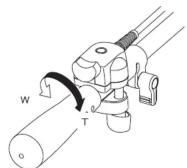
■ Using the zoom
To zoom in/out, turn the zoom lever.
You can change the zoom speed by changing the zoom lever angle.
In some cases, the zoom speed will not change.
■ To zoom in (telephoto)
"T" Indication: Turn toward "T" to zoom out to telephoto. ■ To zoom out (wide-angle)
"W" Indication : Turn toward "W" to zoom out to wide-angle.
To store the ZC-9EX
■ Disconnect the ZC-9EX and store securely. Make sure the connector is protected.
- The EX connector will not be provided as a service part. If your EX connector is damaged, please contact repair services.
Description of the ZC-9EX


Mount ZC-9EX on the pan lever

Specifications
- Clamp distance : 10mm (0.39inch) - 30mm (1.18inch) - Main connector cable : 8Pin
Cable length : 750mm (29.5inch) · EX connector cable : Conversion from 8Pin to 8Pin Micro plug Cable length : 95mm (3.7inch)
Connect the cable
■ To connect to a Sony PMW-EX1 camera.
Use the ZC-9EX cable with the EX connector. Adjust the connector angle to align with the guides.
※Sony PMW-EX1 camera end
※ZC-9EX end
■ To connect to a lens (8pin)
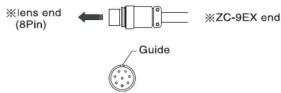
Use the ZC-9EX

DISCLAMER
- The manufacturers' names printed in this document are registered trade names. They are not part of the name of the ZC-9EX nor do they apply to any of the parts to this device. - The product specifications and design are constantly being improved and refined and thus subject to change without notice.
Manufacturer : http://www.libec.co.jp
HEIWA SEIKI KOGYO CO., LTD. No.978-1 Nishibukuro, Yashio-City, Saitama, 340-0833 Japan TEL: 048-995-1301 FAX: 048-997-0804
Brand : Libec
Model : ZC-9EX
Category : Remote control