GT-TBs-02uk - Toothbrush Visage - Free user manual and instructions
Find the device manual for free GT-TBs-02uk Visage in PDF.


| Product Type | Sonic toothbrush with charging station |
| Model | GT-TBs-02uk |
| Brand | Visage |
| Power Supply | Charging station: 100–240 V~, 50/60 Hz, 1.6 W; Hand piece: 2×1.2 V NiMH rechargeable battery, 600 mAh |
| Charging Time | First charge approx. 24 hours, subsequent charges approx. 16 hours |
| Operating Time (full charge) | Approx. 50 minutes |
| Vibration Modes | Normal (30,000 rpm), Soft (40,000 rpm), Massage (interval 30,000 rpm) |
| Timer | Auto-off after 2 minutes; 30-second interval pause |
| LED Operating Display | Green blinking (charging), green solid (full), red blinking (low battery) |
| Included Accessories | 3 toothbrush adapters, 1 single tuft brush, 1 dental floss adapter, 1 tongue cleaner, charging station, hand piece |
| Adapter Replacement Interval | Every 3 months |
| Ingress Protection (Charging Station) | IP67 |
| Protection Class | II |
| Cleaning | Wipe charging station with damp cloth; rinse adapters under running water |
| Storage | Dry, clean, frost-free location; keep away from children under 8 |
| Transport Lock | Press and hold On/Off switch for 5 seconds to deactivate; repeat to reactivate |
| Safety Certifications | CE, GS (German Product Safety Act) |
Frequently Asked Questions - GT-TBs-02uk Visage
User questions about GT-TBs-02uk Visage
0 question about this device. Answer the ones you know or ask your own.
Ask a new question about this device
Download the instructions for your Toothbrush in PDF format for free! Find your manual GT-TBs-02uk - Visage and take your electronic device back in hand. On this page are published all the documents necessary for the use of your device. GT-TBs-02uk by Visage.
USER MANUAL GT-TBs-02uk Visage
QR codes take you where you want to go quickly and easily
Whether you require product information, spare parts or accessories, details on warranties or aftersales services, or if you want to watch a product demonstration video, our QR codes will take you there in no time at all.
What is a QR code?
A QR code (QR = Quick Response) is a type of matrix that can be read with a smartphone camera and that contains a link to a website or contact details, for example.
Advantage: You do not need to manually enter a website address or contact details.
How it works
To scan the QR code, all you need is a smartphone with QR code reader software and an internet connection. This type of software can be downloaded for free from your app store.
Try it out now
Just scan the QR code with your smartphone and find out more about the ALDI product you have purchased.
Your ALDI Service Portal
All details mentioned above can also be found in the ALDI Service Portal at www.aldi.co.uk.
Contents
Overview ....4
Use....5
Product contents/device parts......6
General information....7
Reading and storing the user manual ....7
Explanation of symbols ......7
Safety 8
Proper use....8
Safety notes 8
Preparation 12
Checking the toothbrush and product contents......12
Cleaning the toothbrush and adapters 12
Setting up the charging station 12
Charging the rechargeable battery 12
Use....14
Using the toothbrush adapter....14
Using a single tuft brush....16
Using the dental floss adapter....16
Using the tongue cleaner....16
Cleaning....17
Storage 17
Transport 18
Replacement adapters....18
Troubleshooting....19
Technical data 20
Declaration of conformity....20
Disposal....21
Removing the rechargeable battery....21
Disposing of the packaging 22
Disposing of old devices 22
A
B


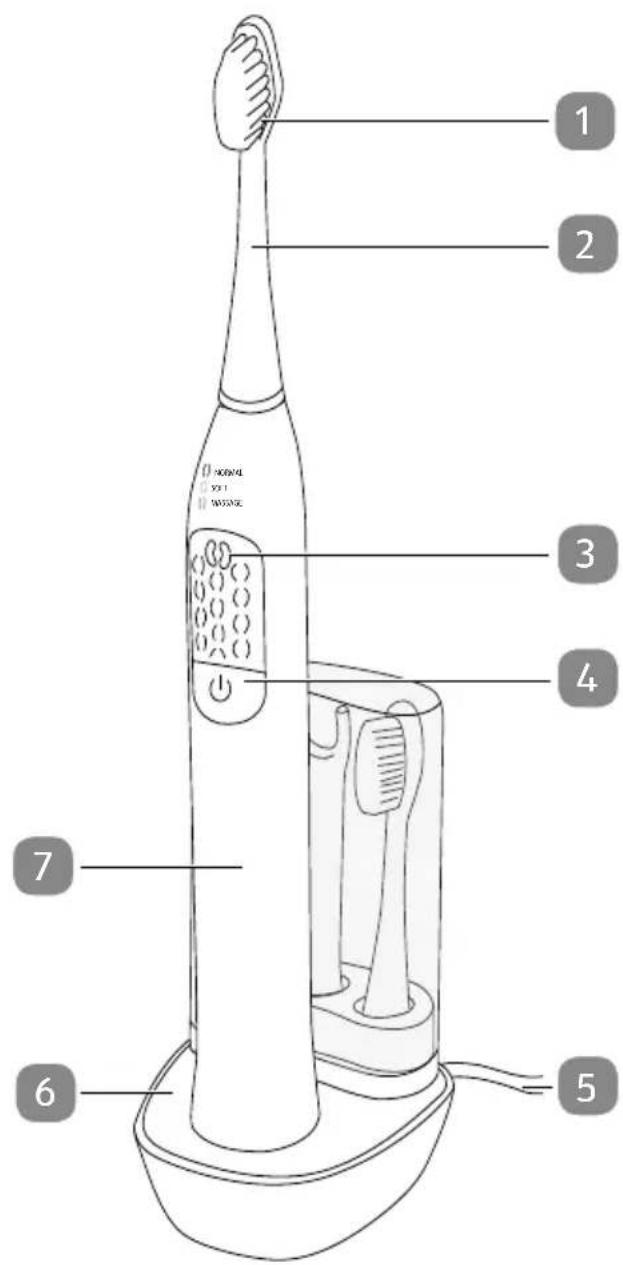
Product contents/device parts
1 Brush head
2 Toothbrush adapter
3 LED operating display
4 On/Off switch
5 Mains cord
6 Charging station
7 Hand piece
8 Single tuft brush
9 Tongue cleaner
10 Dental floss adapter
11 Drive shaft with fixture
General information
Reading and storing the user manual

This user manual accompanies this sonic toothbrush (hereafter referred to as the toothbrush). It contains important information on setup and handling.
Before using the toothbrush, please read through the user manual carefully. This particularly applies for the safety notes. Failure to heed this user manual may result in severe injury or damage to the toothbrush.
The user manual is based on the standards and rules in force in the European Union. When abroad, you must also observe country-specific guidelines and laws.
Store the user manual for future use. If you pass the toothbrush on to third parties, please be absolutely sure to include this user manual.
Explanation of symbols
The following symbols and signal words are used in this user manual, on the toothbrush or on the packaging.

WARNING!
This signal symbol/word designates a hazard with moderate degree of risk which may lead to death or severe injury if not avoided.

CAUTION!
This signal symbol/word designates a hazard with low risk that, if not avoided, may result in minor or moderate injury.
NOTICE!
This signal word warns against potential damages to property.


This symbol provides you with useful supplementary information on assembly or operation.
Declaration of conformity (see chapter “Declaration of conformity”): Products marked with this symbol meet all applicable Community regulations for the European Economic Area.


The certified safety seal confirms that the charging station of this toothbrush is safe if used as described in this user manual. The test seal confirms conformity with the German Product Safety Act.
Protection class: II
Safety
Proper use
The toothbrush is designed exclusively for cleaning teeth. It is only intended for private use and is not suitable for commercial purposes.
Only use the toothbrush as described in this user manual. Any other use is deemed improper and may result in damage to property or even personal injury. The toothbrush is not a children's toy.
The manufacturer or vendor accepts no liability for damage caused by improper or incorrect use.
Safety notes

WARNING!
Risk of electric shock!
A faulty electrical installation or excessive mains voltage may result in an electric shock.
- Only connect the charging station if the mains voltage of the socket corresponds to the specification on the rating plate.
- The mains cord of the charging station cannot be replaced. In the event of damage, the charging station must be disposed of.
- Only connect the charging station to an easily accessible socket so that you can quickly disconnect it from the mains in case of a failure.
- Only use the toothbrush in rooms located indoors.
-
Do not modify the toothbrush or mains cord in any way.
-
Do not operate the toothbrush and the charging station if they exhibit visible damages or the mains cord or mains plug is defective.
- Have qualified professionals perform all repairs. Contact a qualified workshop for this. Liability and warranty claims are waived in the event of repairs performed by the user, improper connection of the device or incorrect operation.
- Only parts that comply with the original list of components may be used for repairs. Electrical and mechanical parts, which are essential for providing protection against sources of danger, are located in this toothbrush.
- The charging station must not be operated with an external timer or with a separate remote control system.
- The highest level of concentration is required when handling liquids in connection with electrical devices.
- Do not immerse the charging station, the mains cord or the mains plug in water or other liquids. The charging station must not be exposed to dripping or splash water.
- Never touch the mains plug with damp hands.
- Never pull the mains plug out of the socket by the mains cord; instead, always do so by taking hold of the mains plug.
- Keep the charging station, toothbrush, mains plug and mains cord away from open flames and hot surfaces.
- Do not kink the mains cord and do not lay it over sharp edges.
- Never position the toothbrush and the charging station such that there is a risk of them falling into a bath tub or sink.
- Never attempt to grab an electrical device if it has fallen into water. Under these circumstances, immediately disconnect the mains plug.
- Never use the mains cord as a carrying strap.
- Make sure that children do not insert any objects into the charging station or the hand piece.
- Only charge the toothbrush with the enclosed charging station.
- Pull the charging station out of the socket: when you are not using the charging station, after the charging process, before you clean the toothbrush or put it away, in the event of a fault or during a lightning storm.

WARNING!
Danger for children and persons with impaired physical, sensory or mental capacities (e.g. partially disabled persons, older persons with reduced physical and mental capacities) or lack of experience and knowledge (e.g. older children).
- This toothbrush is not intended for use by persons (including children) with reduced physical, sensory or mental capabilities, or lack of experience and knowledge, unless they have been given supervision or instruction concerning use of the appliance by a person responsible for their safety and have understood the risks associated with operating the toothbrush. Children must not play with the toothbrush. Cleaning and user maintenance must not be performed by children unless they are supervised.
- Children must be supervised to make sure that they do not play with the toothbrush.
- Do not allow children to play with the packaging wrapper. Children may get caught in it when playing and suffocate.

WARNING!
Danger of explosion!
Rechargeable batteries may explode if they are excessively heated up.
- Don't heat up the rechargeable batteries and don't throw them in an open fire.

CAUTION!
Risk of injury!
Improper handling of the toothbrush may result in injury.
- Lay the mains cord so that it does not pose a tripping hazard.
- Immediately replace worn or damaged adapters to prevent injury to the mouth and tooth area.
- Observe the tips for brushing your teeth.
NOTICE!
Risk of damage!
Improper handling of the toothbrush may damage it.
- Do not drop the hand piece. If this does happen, do not use the toothbrush any more. Have it checked by an authorised service point.
- Switch the toothbrush off to change the adapter.
- Place the charging station on an easily accessible, level, dry, heat-resistant and sufficiently stable work surface.
- Prevent the accumulation of heat by setting up the toothbrush so that the heat from the housing is able to dissipate readily.
- Ensure that the mains cord, the charging station and the toothbrush do not come into contact with hot parts.
- Stop using the toothbrush if its plastic parts exhibit cracks or breaks or are deformed.
Preparation
Checking the toothbrush and product contents
NOTICE!
Risk of damage!
If you are not cautious when opening the packaging with a sharp knife or other pointy objects, you may quickly damage the toothbrush.
- Be very careful when opening.
- Take the toothbrush out of the packaging.
- Check to make sure that the delivery is complete (see fig. A and B).
- Check whether the toothbrush or individual parts exhibit damage. If this is the case, do not use the toothbrush. Contact the manufacturer at the service address specified on the warranty card.
Cleaning the toothbrush and adapters
- Clean the toothbrush with a damp cloth to remove any packaging and production residue.
- Rinse the adapters off under running water and wipe them dry.
Setting up the charging station
- Place the charging station 6 on a level, dry and clean surface.
- Make sure that a socket is in the direct vicinity of the designated location. Completely unwind the mains cord 5.
- You can place up to three toothbrush adapters in the charging station (see fig. D).
- Connect the mains plug with a properly installed socket.
Charging the rechargeable battery
After first use, the rechargeable battery will reach full power after it has been recharged and discharged several times. It is not possible to overcharge the rechargeable battery.
Once the rechargeable battery has charged, take the hand piece 7 off of the charging station 6 and pull the mains plug of the charging station out of the socket.
Allowing the rechargeable battery to discharge completely before recharging it will prolong its service life. Otherwise, the service life of the rechargeable battery will be reduced.

The rechargeable battery is charged by induction; this process could be impaired if metal objects are located near the charging station. Maintain a minimum distance of 10 cm between the charging station and metallic objects.
- Place the hand piece on the charging station (see fig. A).
The toothbrush will now be recharged. It is perfectly normal for the hand piece to heat up during the charging process.
- Before first use, charge the rechargeable battery for approx. 24 hours.
All subsequent charges will take approx. 16 hours.
The LED operating display 3 will provide you with information about the status of the charging process:
| LED operating display Meaning | |
| Blinks green The rechargeable | battery is being charged. |
| Continuously illuminated in green | The rechargeable battery is fully charged. |
| Blinks red The rechargeable battery | battery must be charged. |
- Pull the mains plug out of the socket after the charging process.
You have successfully charged the toothbrush and can switch it on approx. 2 seconds after taking it off of the charging station.
Use
The product contents include three toothbrush adapters 2, a single tuft brush 8, a dental floss adapter 10 and a tongue cleaner 9.
Using the toothbrush adapter
The toothbrush adapter 2 can be used for the daily cleaning of your teeth. You should do so at least twice a day for approx. 2 minutes.

CAUTION!
Risk of injury!
Improper handling of the toothbrush may result in injury.
- Do not apply too much pressure to the toothbrush and your teeth when brushing them.
-
Your gums may bleed the first few times you use the toothbrush. If your gums bleed for more than 14 days, please consult a dentist.
-
Make sure that the toothbrush is charged.
- Put the desired adapter on the hand piece 7 so that the drive shaft with fixture 11 engages into the adapter (see fig. C).
The adapter must audibly and noticeably lock into place. The brush head 1 must point towards the On/Off switch 4. - Hold the brush head in clean water for a moment to wet it.
- Apply a pea-sized amount of toothpaste to the brush head.
- Put the brush head on a tooth.
- Use the On/Off switch to switch on the toothbrush (see fig. F).

The toothbrush automatically switches off after approx. 2 minutes.

Tips for brushing your teeth:
- Brush your teeth as close to your gums as possible.
- Brush your teeth using small circular movements.
- Clean up to the spaces between your teeth.
-
Brush the upper and lower parts of your teeth as well as the exterior and interior of your teeth without applying pressure.
-
You can access the following functions by pushing the On/Off switch several times:
| Function | LED operating display | Meaning Description | |
| 1. illuminated in red | Normal30,000 vibrations per minute | The toothbrush will vibrate and stop briefly after approx. 30 seconds. If you divide your teeth in 4 areas for brushing and clean each area for approx. 30 seconds, you will reach the recommended, uniform brushing time of 2 minutes. The toothbrush will switch off after 2 minutes and can be restarted if necessary. | |
| 2. illuminated in yellow | Soft40,000 vibrations per minute | ||
| 3. illuminated in green | Massage30,000 interval vibrations per minute | The toothbrush vibrates at certain intervals and will stop briefly after approx. 30 seconds. It will also switch off after 2 minutes and can be restarted. | |
| 4. not | illuminated | OFF The toothbrush will be switched off. | |
- Push the On/Off switch to switch the toothbrush off while still in your mouth.
- Hold the brush head under clean, running water (see fig. E).
- Switch the toothbrush on.
- Once the brush head is clean, turn the toothbrush back off.
- Pull the adapter off.
- Use clean water to clean the inside of the adapter.
- Dry the adapter and the hand piece.
Using a single tuft brush
The single tuft brush 8 lets you clean the spaces between your teeth, chewing surfaces of your molars or dentures/braces. Ask your dentist before using the product on exposed tooth necks.
Using the dental floss adapter
You can effectively floss your teeth with the dental floss adapter 10.

CAUTION!
Risk of injury!
Handling the toothbrush improperly may result in injury.
- Be careful when flossing as you could easily injure your gums.
- Take an approx. 10 cm length of commercially-available dental floss and wrap one end around the wheel under the bracket 3 or 4 times.
- Run the dental floss over both brackets so that it is taut.
- Wind the other end around the wheel again 3 or 4 times.
- The dental floss must be drawn tight between the two brackets and must not come loose when cleaning the spaces between your teeth.
- Place the dental floss between two teeth with the toothbrush turned off.
- Switch the toothbrush on (function 1 (red) or 2 (yellow)) and clean all the spaces between your teeth with up and down movements.
Using the tongue cleaner
You can use the tongue cleaner 9 to clean your tongue.
- Apply mild toothpaste to the tongue cleaner.
- With the toothbrush turned off, run the tongue cleaner over the top side of your tongue.
- Then rinse your mouth out with water.
Cleaning
NOTICE!
Risk of short circuit!
Liquids that have penetrated the housing may cause a short circuit.
- Do not immerse the charging station in liquids and do not use a steam cleaner to clean it. Otherwise you could damage the charging station and the toothbrush.
- Do not clean the charging station and the toothbrush in the dishwasher. It would be destroyed as a result.
NOTICE!
Risk of damage!
Using an unsuitable cleaner could damage the toothbrush and the charging station.
- Do not use any aggressive cleaners, brushes with metal or nylon bristles, as well as sharp or metallic cleaning utensils such as knives, hard scrapers and similar items. They could damage the surfaces.
- Before cleaning, pull the mains plug out of the socket.
- Wipe the charging station 6 and the toothbrush off with a damp cloth.
- Clean the toothbrush regularly and remove all leftover tooth paste from the adapter and hand piece 7.
- Change the adapters every 3 months.
Storage
- Store the toothbrush in a dry, clean, frost-free location that provides protection against dust and sunlight.
- Store the toothbrush in an area that is not accessible for children under 8 years of age.
- Do not place any heavy objects on the toothbrush or the accessories.
- Never store the toothbrush and the accessories in liquids.
- You can store up to three toothbrush adapters in the removable storage box contained in the charging station.
Transport

Be absolutely sure to take note of the transport guard.
To prevent accidental activation, e.g. during transport in a suitcase, you can deactivate the On/Off switch 4.
- Push and hold the On/Off switch for at least 5 seconds while the toothbrush is deactivated (see fig. F).
- The toothbrush can now no longer be activated when the On/Off switch is briefly pushed.
- You can reactivate the 0n/Off switch by pushing and holding it again for at least 5 seconds.
- You can also reactivate the On/Off switch by placing the toothbrush on the charging station 6 which is connected to the mains. Placing the toothbrush on the charging station briefly is sufficient.
Please note the brief 2-second delay before activation.
Replacement adapters
We recommend that you replace the adapters after 3 months. Adapters are wearable parts and are not covered by the warranty provisions!
New adapters can be ordered from our service centre. Our service centre will advise you of the price including VAT and the shipping costs. Please refer to the warranty card for contact information.
Troubleshooting
Some problems may be caused by minor faults that you can fix yourself. To do so, follow the instructions in the following table.
If it is still not possible to resolve the problem with the toothbrush, contact customer service. Do not in any case repair the toothbrush yourself.
| Problem Possible | cause Solution | ||
| 1. The toothbrush cannot be switched on. | The rechargeable battery is not charged. | Recharge the rechargeable battery (see chapter “Charging the rechargeable battery”). | |
| Check the function of the socket by connecting another device. | |||
| The On/Off switch has been deactivated. | Activate the On/Off switch (see chapter “Transport”). | ||
| 2. The brushing power diminishes. | The adapter is dirty or defective. | Clean the adapter or replace it. | |
| The rechargeable battery does not have enough power. | Recharge the rechargeable battery (see chapter “Charging the rechargeable battery”). | ||
| 3. The toothbrush automatically switches off while brushing. | The rechargeable battery does not have enough power. | Recharge the rechargeable battery (see chapter “Charging the rechargeable battery”). | |
| The toothbrush automatically switches off after approx. 2 minutes. | This is not a defect. The toothbrush is programmed to do so. | ||
| 4. The LED operating display does not display the charging process. | The charging station is not connected. | Insert the mains plug properly in the socket. | |
| Check the function of the socket by connecting another device. | |||
| The toothbrush is not properly mounted on the charging station. | Place the toothbrush on the charging station properly. | ||
| 5. The adapter is worn out. | The adapter has been used up. | Replace the adapter. | |
Technical data
Model: GT-TBs-02uk
Article number 94250
Charging station
Mains voltage: 100–240 V\~, 50/60 Hz
Power consumption: 1.6 W
Protection class: II
Ingress protection rating: IP67
Hand piece
Rechargeable battery: 2×1,2 V, 600 mAh (NiMH)
Operating time (rechargeable
battery full): approx. 50 minutes
Vibration function 1: 30,000 rpm.
Vibration function 2: 40,000 rpm.
Vibration function 3: Interval vibration 30,000 rpm.
Timer: 0.5 second pause after approx. 30 seconds, Deactivation after 2 minutes
As our products undergo continual development and improvement, technical changes and changes to the product design are possible.
This instruction manual can also be downloaded as a PDF file from our homepage www.gt-support.de.
Declaration of conformity

The product is guaranteed to conform with legally prescribed standards. For the complete declaration of conformity, visit the website www.gt-support.de.
Disposal
Removing the rechargeable battery

WARNING!
Risk of electric shock!
A faulty electrical installation or excessive mains voltage may result in an electric shock.
- Disconnect the charging station from the mains before removing the rechargeable battery.
- Discharge the rechargeable battery of the hand piece completely! After removing the rechargeable battery, the hand piece has been destroyed and cannot be repaired.
- To prevent any risk associated with the defective device, disconnect the mains plug and cut through the connection lines before disposal.
-
Cut through each of the cables connecting to the rechargeable battery.
-
Make sure that the rechargeable battery is fully discharged.
- Firmly hold the charging station 6 in your hand.
- As during the charging process, place the hand piece 7 on the charging station and turn the hand piece on the charging station counter-clockwise to open it.
- Turn the hand piece over so that the drive shaft 11 is facing down.
- You will see a coloured plastic ring on the bottom of the hand piece.
- Take a flat-headed screwdriver and place its tip between the coloured plastic ring and the white ring underneath it.
- Carefully pry to break the coloured plastic ring out of the hand piece housing.
- Position the drive shaft on a hard and sufficiently stable work area.
- Place the tip of the flat-headed screwdriver under the white plastic ring; at the same time, push the drive shaft against the work surface then pull the white plastic ring and rechargeable battery out.
- Disconnect the individual cables leading to the battery one after another and remove the rechargeable battery.
- Properly dispose of the rechargeable battery.
Disposing of the packaging

Dispose of the packaging separated into single type materials. Dispose of cardboard and carton as waste paper and foils via your local recyclable material collection service.
Disposing of old devices
(Applicable in the European Union and other European states with systems for the separate collection of reusable waste materials)

Old devices must not be disposed of with household waste!
If at some point it is no longer possible to use the toothbrush, each consumer is required by law to dispose of old devices separately from their household waste, e. g. at a collection point in their community/borough. This ensures that old devices are recycled in a professional manner and also rules out negative consequences for the environment. For this reason, electrical devices are marked with the adjacent symbol.

Batteries and rechargeable batteries must not be disposed of with household waste!
As a consumer, you are required by law to turn in all batteries and rechargeable batteries, regardless whether they contain harmful substances* or not, at a collection point in your community/borough or in a retail outletso that they can be disposed of in an environmentally-friendly manner.
Bring the entire toothbrush (including the removed rechargeable battery) to your collection point and make sure that it is in an uncharged state!
* labelled with: Cd = cadmium, Hg = mercury, Pb = lead
Great care has gone into the manufacture of this product and it should therefore provide you with years of good service when used properly. In the event of product failure within its intended use over the course of the first 3 years after date of purchase, we will remedy the problem as quickly as possible once it has been brought to our attention. In the unlikely event of such an occurrence, or if you require any information about the product, please contact us via our helpline support services, details of which are to be found both in this manual and on the product itself.

PRODUCED IN CHINA FOR:
- QR CODES TAKE YOU WHERE YOU WANT TO GO QUICKLY AND EASILY
- WHAT IS A QR CODE
- HOW IT WORKS
- TRY IT OUT NOW
- YOUR ALDI SERVICE PORTAL
- CONTENTS
- OVERVIEW ....4
- USE....5
- PRODUCT CONTENTS/DEVICE PARTS......6
- GENERAL INFORMATION....7
- SAFETY 8
- PREPARATION 12
- USE....14
- CLEANING....17
- STORAGE 17
- TRANSPORT 18
- REPLACEMENT ADAPTERS....18
- TROUBLESHOOTING....19
- TECHNICAL DATA 20
- DECLARATION OF CONFORMITY....20
- DISPOSAL....21
- PRODUCT CONTENTS/DEVICE PARTS
- GENERAL INFORMATION
- READING AND STORING THE USER MANUAL
- EXPLANATION OF SYMBOLS
- SAFETY
- PROPER USE
- SAFETY NOTES
- WARNING
- RISK OF ELECTRIC SHOCK
- DANGER FOR CHILDREN AND PERSONS WITH IMPAIRED PHYSICAL, SENSORY OR MENTAL CAPACITIES (E.G. PARTIALLY DISABLED PERSONS, OLDER PERSONS WITH REDUCED PHYSICAL AND MENTAL CAPACITIES) OR LACK OF EXPERIENCE AND KNOWLEDGE (E.G. OLDER CHILDREN)
- DANGER OF EXPLOSION
- CAUTION
- RISK OF INJURY
- NOTICE
- RISK OF DAMAGE
- PREPARATION
- CHECKING THE TOOTHBRUSH AND PRODUCT CONTENTS
- CLEANING THE TOOTHBRUSH AND ADAPTERS
- SETTING UP THE CHARGING STATION
- CHARGING THE RECHARGEABLE BATTERY
- USE
- USING THE TOOTHBRUSH ADAPTER
- TIPS FOR BRUSHING YOUR TEETH
- USING A SINGLE TUFT BRUSH
- USING THE DENTAL FLOSS ADAPTER
- USING THE TONGUE CLEANER
- CLEANING
- RISK OF SHORT CIRCUIT
- STORAGE
- TRANSPORT
- REPLACEMENT ADAPTERS
- TROUBLESHOOTING
- TECHNICAL DATA
- CHARGING STATION
- HAND PIECE
- DECLARATION OF CONFORMITY
- DISPOSAL
- REMOVING THE RECHARGEABLE BATTERY
- DISPOSING OF THE PACKAGING
- DISPOSING OF OLD DEVICES
- OLD DEVICES MUST NOT BE DISPOSED OF WITH HOUSEHOLD WASTE
- BATTERIES AND RECHARGEABLE BATTERIES MUST NOT BE DISPOSED OF WITH HOUSEHOLD WASTE
- PRODUCED IN CHINA FOR
Brand : Visage
Model : GT-TBs-02uk
Category : Toothbrush