GT-TBS-05-UK - Toothbrush Visage - Free user manual and instructions
Find the device manual for free GT-TBS-05-UK Visage in PDF.


| Product Type | Electric Sonic Toothbrush |
| Model | GT-TBS-05-UK |
| Brand | Visage |
| Power Supply | 100-240 V~, 50-60 Hz |
| Charging Station Protection | IP67 (dust-proof, protected against temporary submersion) |
| Charging Station Protection Class | II (double insulation) |
| Battery | 1 x 800 mAh, 3.7 V Li-Ion |
| Operating Duration (full charge) | Approx. 80 minutes |
| Charging Time (initial) | At least 24 hours |
| Charging Time (subsequent) | Approx. 16 hours |
| Vibration Speed - Normal Mode | 30,000 movements/min |
| Vibration Speed - Soft Mode | 40,000 movements/min |
| Vibration Speed - Massage Mode | Interval vibration 30,000 movements/min |
| Timer | 30-second interval reminder; auto-off after 2 minutes |
| Attachments Included | 3 brush heads, 1 mono-cluster brush, 1 dental floss attachment |
| Storage Compartment | Holds up to 3 attachments on charging station |
| Transport Lock | Yes (deactivates on/off switch) |
| Warranty | 3 years from date of purchase |
| Country of Origin | China |
| Dimensions | Approx. 25 cm handle length |
| Weight | Approx. 120 g (handle only) |
Frequently Asked Questions - GT-TBS-05-UK Visage
User questions about GT-TBS-05-UK Visage
0 question about this device. Answer the ones you know or ask your own.
Ask a new question about this device
Download the instructions for your Toothbrush in PDF format for free! Find your manual GT-TBS-05-UK - Visage and take your electronic device back in hand. On this page are published all the documents necessary for the use of your device. GT-TBS-05-UK by Visage.
USER MANUAL GT-TBS-05-UK Visage
Great care has gone into the manufacture of this product and it should therefore provide you with years of good service when used properly. In the event of product failure within it's intended use over the course of the first 3 years after date of purchase are will recently the problem as quickly as possible once it has been brought to our attention. In the unlikely event of such an occurrence, or if you require any information about the product, please contact us via our helipic support services, details of which are to be found built in this manual and on the product itself.

PRODUCED IN CHINA FOR:
ALDI STORES LTD. PO BOX 26, ATHUSTONE
WARWICKSHIRE, EV92SH
Visit us at www.akli.com

ViSAGE
Contents
Scope of delivery 4
DEVICE PARTS
Scope of delivery / device parts....6
Pearl and been cranding instructors
Explanation of symbols 7
Safety
intended use....8
Society for the balance of the financial situation, and the other's direction
Check toothbrush and yance of sample 13
Clean the toothbrush and attachments....13
Set up charging station....13
1950
use brush attachment 15
Use mono-duster brush....18
In the present box of the 10
Banning
Figure 1. The following table provides the original text: "The image contains no actual text content."
Replacement attachments
Technical data 22
Charging station 22
inshand
TROODISHOOTING 22
Comorbidity declaration 24
Disposal of packaging 25
disposal of old appliance 25
Scope of delivery scope of delivery / device parts/surface parts
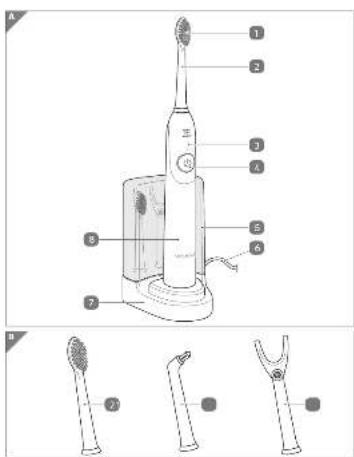
Device partsScope of delivery


Scope of delivery / Device parts
1 Brush head
2 3 x brush attachment
3 LED function display
On/off switch
9 Storage compartment
6 Power cable
7 Charging station
6 Brush handle
Dental loss attachment
10 Mono-cluster brush
11 Drive shaft
- Operating instructions/guarantee card
General
Read and keep operating instructions

These instructions for use belong to this rechargeable sonic toothbrush (hereinafter only referred to as “tooth-brush”).
They contain important information regarding initial use and handling.
Before using the toothbrush, read through the operating instructions carefully, particularly the safety instructions.
Failure to comply with these operating instructions can lead to serious injuries or damage to the toothbrush.
The operating instructions are based on the valid standards and rules in the European Union. Please also note the country-specific directives and laws abroad.
Keep the operating instructions for further use. If you pass the toothbrush on to third parties, please also ensure that you pass on these operating instructions.
Explanation of symbols
The following symbols and signal words are use in these operating instructions, on the product or on the packaging.

This signal symbol/word indicate a hazard with a medium degree of risk, which could lead to death or serious injury if it is not avoided.

This signal symbol/word indicates a hazard with a low degree of risk, which could lead to minor or y if it is not avoided.
moderate injury if it is not avoided.
NOTICE!
This signal symbol/word warns of possible material damage.

This symbol gives you useful additional information about assembly or operation.

Conformity declaration (see chapter “Conformity declaration”). Products that are marked with this symbol fulfi I all applicable Community regulations of the European Economic Area.
Protection rating IP67: Dust-proof and complete protection IP67 against contact with conductive parts. Protected against the effects of temporary submersion into water.
Protection class II /☐ (charging station): Equipment with reinforced or double insulation between the electric power circuit and output voltage.
Safety
Intended use
The toothbrush is exclusively designed for brushing teeth. It is exclusively intended for private use and is not suitable for the commercial sector.
Only use the toothbrush as described in these operating instructions.
Any other use is regarded as inappropriate and may lead to material damage or even to personal injury.
The toothbrush is not a toy.
The manufacturer or retailer shall not assume any liability for losses caused by intended or improper use.
Safety instructions

WARNING!
Electric shock hazard!
Faulty electrical installation or mains voltage that is too high may lead to electric shock.
- Only connect the charging station, if the socket corresponds to the specification on the rating plate.
- The power cable of the charging station cannot be replaced. If damaged, the charging station must be disposed of.
- Only connect the charging station to an easily accessible socket, so that you can disconnect it from the power supply quickly in case of a malfunction.
- Only use the toothbrush in interior spaces.
- Do not make any modifications to the toothbrush or the power cable.
- Do not operate the toothbrush, if it has visible damage or if the power cable/power plug is defective, in order to avoid danger.
- Leave any repairs to specialists. For this, please contact a specialist workshop. Liability and guarantee claims are excluded for repairs that are carried out independently, improper connection or incorrect operation.
- Parts may only be used for repairs, which correspond to the original device data. Electrical and mechanical parts are in this toothbrush, which are essential for protection against hazard sources.
- This appliance must not be operated with an external time switch or separate remote-control system.
- Handling liquids in relation to electrical devices requires utmost attention.
- Do not immerse the charging station or the power cable or the power plug in water or other liquids.
- Never touch the power plug with damp hands.
- Never pull the power plug out of the socket using the power cable, always hold the power plug.
- Keep the charging station, the toothbrush, the power plug and the power cable away from open flame and hot surfaces.
- Do not kink the power cable and do not lay it over sharp edges.
- Do not set up the toothbrush and the charging station, such that they can fall into a tub or sink.
- Never reach for electrical devices that have fallen into water. In such a case, immediately disconnect the power plug.
- Never use the power cable as a carrying handle.
- Ensure that children do not insert any items into the charging station or into the brush handle.
- Only charge the toothbrush with the supplied charging station.
- Remove the power plug from the socket: If you are not using the charging station, after the charging process, before you clean the toothbrush or put it away, if a fault occurs, in case of a thunderstorm.
WARNING!
Hazards for children and persons with impaired physical, sensory or mental capabilities (e.g. partially disabled, elderly persons with impairment to their physical and mental capabilities) or a lack of experience and knowledge (for example, older children).
- This product can be used by persons with impaired physical, sensory or mental abilities or a lack of experience and knowledge, if they are under supervision or after receiving instruction on safe use of the device and have understood the resulting hazards. Cleaning and servicing by the user may not be performed by children without supervision.
- Children must not play with the toothbrush.
- Do not let children play with the packaging fi Im. Children can become caught in it while playing and suffocate.
WARNING!
Explosion hazard!
Rechargeable batteries can explode if they are intensely heated.
- Do not heat up rechargeable batteries and do not throw them into open fire.
CAUTION!
Injury hazard!
Improper handling of the toothbrush may result in injuries.
- Install the power cable, such that it
- Replace worn or damaged brush attachments immediately in order to prevent injuries in the area of the mouth and teeth.
- Please note the tips about brushing t
NOTICE! Risk of damage!
Improper handling of the toothbrush may result in damage to the toothbrush.
- Do not drop the brush handle. If this does happen, stop using the toothbrush. Have it checked by an approved service centre.
- Switch the toothbrush off when replaci
- Place the charging station on an easily accessible, level, dry, heat-resistant and sufficiently stable work surface.
- Avoid a heat build-up by setting up the toothbrush where the heat of the housing can dissipate easily.
- Do not allow the power cable, the charge brush come into contact with hot parts.
- Do not use the toothbrush any longer, if the plastic components of the toothbrush have cracks or flaws or have deformed.
Preparation
Check toothbrush and scope of supply
NOTICE! Risk of damage!
If you open the packaging without due care and attention using a sharp knife or other pointed objects, the toothbrush may easily become damaged.
- Proceed very carefully when opening.
- Remove the toothbrush from its packaging.
- Check whether the delivery is complete (see Fig. A and B).
- Check whether the toothbrush or individual parts are damaged. If this is the case, do not use the toothbrush. Contact the manufacturer via the service address stated on the guarantee card.
Clean the toothbrush and attachments
- Clean the toothbrush with a slightly dampened cloth, in order to remove possible packaging and production residues.
- Rinse the attachments under flowing water and wipe them dry.
Set up charging station
-
Place the charging station 7 on a flat, dry and clean surface.
-
Make sure that a socket is situated in the immediate vicinity of the designated site. Unwind the power cable 6 completely.
-
You can place three of the attachments that are not required in the charging station (see Fig. D).
-
Insert the power plug into a properly installed socket.
Charge battery
After initial use, the full battery power will only be reached after charging and discharging the rechargeable battery several times. Overcharging of the battery is ruled out.
If the battery is charged, remove the brush handle 8 from the charging station 7 and remove the power plug of the charging station from the socket.
You will contribute to the care of the battery if you only recharge it when it is depleted. Otherwise, you will shorten the life of the battery.

The charging process takes place using induction and can be impaired by metallic items that are in the vicinity of the charging station. Keep a minimum distance of 10 cm between the charging station and metallic items.
- Place the brush handle onto the charging station (see Fig. A). The LED function display fl ashes green.
The toothbrush is now being charged. It is completely normal for the brush holder to heat up during charging.
- Leave the battery for at least 24 hours prior to initial use. All of the subsequent charging processes will be completed after approximately 16 hours.
The LED function display 3 provides you with information about the status of the charging process:
| LED function display Meaning | |
| fl ashes green Battery is charging. | |
| lights up green continuously Battery is fully charged. |
- Remove the power plug from the socket after the charging process.

You have successfully charged the toothbrush and you can switch it on after removing it from the charging station.
Use
In the scope of delivery, there are three brush attachments 2, on mono-cluster brush 10 and one dental f l oss attachment 9.
Use brush attachment
You can brush your teeth daily with brush attachment 2. You should do this a minimum of twice per day for 2 minutes each time.
CAUTION!
Injury hazard!
Improper handling of the toothbrush may result in injuries.
- Do not use too much pressure on the toothbrush and teeth when brushing your teeth.
-
The gums might bleed during the first uses. If the gums bleed for longer than 14 days, go to a dentist.
-
Charge the toothbrush if the LED function display 3 fl ashes green during use.
-
Attach the required attachment to the brush handle, such that the drive shaft 11 is inserted into the attachment (see Fig. C).
Press the attachment on as far as it will go. The brush head (and also the other attachments) must point in the direction of the on/off switch 4. - Hold the brush head into clean water briefly in order to moisten it, if necessary.
- Apply a pea-sized portion of toothpaste to a brush head.
- Place the brush head on a tooth.
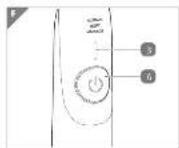
- Switch the toothbrush on using the on/off switch (see Fig. F).

Tips for brushing teeth:
- Keep as small a distance as possible away from the gum.
- Brush using sma ll circular movements.
- Brush them into the spaces in between the teeth.
- Brush the tops and bottoms of the teeth, as well as the outer and inner surfaces of the teeth, without using pressure.
The toothbrush has a time, which interrupts the vibration for a brief pause every 30 seconds. With a bit of practice, you can divide your teeth into 4 quadrants and then switch every 30 seconds.
- By repeatedly and briefly pressing the on/off switch 4 within 5 seconds after switching on, you can retrieve the following functions:
| LED function display | Meaning Description | The toothbrush vibrates and takes a short break after every approximately 30 seconds. If you divide your teeth into 4 brushing sections and brush each section for approximately 30 seconds, you will reach the recommended and even brushing duration of 2 minutes. | |
| press briefl y | lights up red | NormalVibration30,000 times per minute | |
| press briefl y | lights up orange | SoftVibration40,000 times per minute | |
| press briefl y | lights up green | MassageInterval vibration 30,000 times per minute | The toothbrush vibrates in intervals and takes a short break after every approx. 30 seconds. |
- If the toothbrush is switched on for longer than 5 seconds, it is sufficient to press on the on/off button once 4, in order to switch off the toothbrush.

By pressing again, the toothbrush will switch on with the last program used.
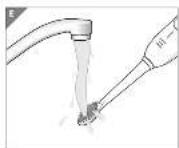
- Hold the brush head under clean, running water (see Fig. E).
-
Switch the toothbrush on.
-
If the brush head is cleaned, switch the toothbrush back off.
- Remove the attachment from the brush handle and rinse it thoroughly under running water. Then, knock it firmly with the attachment opening firmly against a towel and dry it off.
Use mono-cluster brush
With the mono-cluster brush 10, you can brush the spaces between teeth, the chewing surfaces of the molars or false teeth/braces. With exposed tooth necks, ask your dentist prior to use.
Use dental f l oss attachment
You can use the dental floss effectively with the dental floss attachment 9.

CAUTION!
Injury hazard!
Improper handling of the toothbrush may result in injuries.
- Be careful when using dental floss. You can eat gums.
- Take a piece of commercially available dental floss that is approx. 25 cm long and first wrap one end 3 times around the wheel below the clips.
- Tighten the dental floss over both clips.
- Wind the other end around the wheel again 3 times.
- The dental floss must be pulled tightly between both clips and must not loosen when brushing the spaces between the teeth.
-
With the toothbrush switched off, guide the dental floss in between the teeth.
-
Switch the toothbrush on (function 1 (red) or 2 (yellow)) and brush all of the spaces between the teeth with upward and downward movements.
Storage compartment
There is a storage compartment 5 on the charging station, which you can store up to 3 attachments.

Only store completely dry attachments in the storage compartment.
Cleaning
NOTICE! Short-circuit hazard!
Water, which has penetrated the housing, may cause a short-circuit.
- Do not immerse the charging station into liquids and do not use a steam cleaner. The charging station and the toothbrush could otherwise become damaged.
- Do not put the charging station and the toothbrush into the dishwasher. This would destroy it.
NOTICE! Risk of damage!
If you use unsuitable cleaning agents, you might damage the toothbrush and the charging station.
- Do not use any aggressive detergents, brushes with metal or nylon bristles or sharp or metallic cleaning implements, such as knives, hard spatulas and similar. These may damage the surfaces.
- Remove the power plug of the charging station from the socket before cleaning.
- Wipe off the charging station 7 and the toothbrush with a slightly dampened cloth.
- Clean the toothbrush on a regular basis and remove all tooth-paste residues from the attachment and the brush handle 8.
- Replace the attachments every 3 months.

Please clean the attachments daily, see under "Use".
Storage
- Store the toothbrush in a dry, dust-free and sun-protected, clean and frost-free place.
- Do not place any heavy items on the toothbrush or the accessories.
- Never place the toothbrush and the accessories in liquid for storage.
- Store up to three attachments in the removable storage compartment 5, which is contained in the charging station.
Transport

Please note the transport lock.
You can deactivate the on/off switch 4 to avoid unwanted switching on, e.g. during transport in a suitcase.
- Press the on/off switch and keep it in a switched-off stated until the LED function display fl ashes green.
- The toothbrush can now no longer be switched on by briefly pressing the on/off switch.
- You can reactivate the on/off switch by keeping it pressed down again until the toothbrush switches on.
- Alternatively, you can also reactivate the toothbrush by placing the toothbrush on the charging station 7 again, which is connected to the power supply. It is sufficient to place it on briefly.

Please note a short delay (2 seconds) prior to switching on.
Replacement attachments
We recommend replacing the attachments after 3 months. Attachments are wear-and-tear parts and are not subject to the guarantee provisions!
New attachments can be ordered through the Service Centre. You can obtain the price incl. VAT and shipping costs there. Please see the contact details for the guarantee card.
Technical data
Model: GT-TBS-05
Charging station
Mains voltage: 100-240 V\~, 50-60 Hz
Power consumption: 2 W
Protection class: II
Protection level: IP67
Brush handle
Battery: 1 x 800 mAh, 3.7 V Li-Ion
Operating duration
(battery full): approx. 80 minutes
Vibration function 1 (Normal): 30,000 movements/min.
Vibration function 2 (Soft): 40,000 movements/min.
Vibration function 3 (Massage): Interval vibration
30,000 movements/min.
Timer:
Brief interruption in 30-second intervals. After approx. 2 minutes have elapsed, two brief interruptions, then alternately every 30 seconds, one/two brief interruptions.
Because our products are constantly being further developed and improved, design modifications and technical changes are possible.
These operating instructions can also be downloaded as a PDF file from our website www.gt-support.de
Troubleshooting
Some faults can be rectified due to minor errors that you can remedy yourself. For this, follow the instructions in the table below.
If the fault with the toothbrush cannot be rectified this way, contact customer service. Never repair the toothbrush yourself.
| Problem Possible cause Problem rectifi cation | ||
| The toothbrush cannot be switched on. | The battery is not charged. | Charge the battery (see “Charge battery” chapter). |
| Check that the socket functions by plugging in another device. | ||
| The on/off switch is deactivated. | Activate the on/off switch (see “Transport” chapter). | |
| The brushing power is reducing. | The attachment is dirty or defective. | Clean the attachment or replace it. |
| The battery power is too weak. | Charge the battery (see “Charge battery” chapter). | |
| The toothbrush switches off automatically during brushing. | The battery power is too weak. | Charge the battery (see “Charge battery” chapter). |
| The LED function display does not indicate the charging process. | The charging station is not connected. | Insert the power plug into a socket correctly. |
| Check that the socket functions by plugging in another device. | ||
| The toothbrush is not placed correctly on the charging station. | Place the toothbrush on the charging station correctly. | |
| The attachment is worn. | The attachment is worn out. | Replace the attachment. |
Conformity declaration
The conformity of the product with the legally prescribed standards is guaranteed. You can find the full conformity declaration on the Internet at www.gt-support.de
Disposal
Disposal of packaging
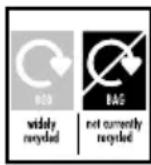
Dispose of the packaging such that it is correctly sorted. Submit cardboard and card to waste paper and foils to the recycling collection.
Disposal of old appliance
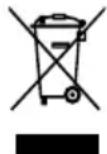
Do not dispose of old devices in household waste!
If the device should no longer be usable, every consumer is legally obligated to submit old devices separately from household waste, e.g. to a collection centre of his/her municipality/district. This ensures that old devices are recycled properly and negative effects on the environment are avoided. That is why electrical devices are identified with the symbol shown above.
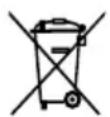
Batteries and rechargeable batteries are not permitted to be disposed of with household waste!
As a consumer, you are legally obligated to submit all batteries and rechargeable batteries to a collection centre for your local municipality/district or to retailers, regardless of whether they contain toxins or not, so that they can be disposed of in an environmentally friendly manner.
The collection centre can arrange for the battery to be removed from the brush handle.
- VISAGE
- CONTENTS
- SCOPE OF DELIVERY / DEVICE PARTS
- GENERAL
- READ AND KEEP OPERATING INSTRUCTIONS
- EXPLANATION OF SYMBOLS
- NOTICE
- SAFETY
- INTENDED USE
- SAFETY INSTRUCTIONS
- WARNING
- ELECTRIC SHOCK HAZARD
- EXPLOSION HAZARD
- CAUTION
- INJURY HAZARD
- NOTICE! RISK OF DAMAGE
- PREPARATION
- CHECK TOOTHBRUSH AND SCOPE OF SUPPLY
- CLEAN THE TOOTHBRUSH AND ATTACHMENTS
- SET UP CHARGING STATION
- CHARGE BATTERY
- USE
- USE BRUSH ATTACHMENT
- TIPS FOR BRUSHING TEETH
- USE MONO-CLUSTER BRUSH
- USE DENTAL F L OSS ATTACHMENT
- STORAGE COMPARTMENT
- CLEANING
- NOTICE! SHORT-CIRCUIT HAZARD
- STORAGE
- TRANSPORT
- REPLACEMENT ATTACHMENTS
- TECHNICAL DATA
- CHARGING STATION
- BRUSH HANDLE
- TROUBLESHOOTING
- CONFORMITY DECLARATION
- DISPOSAL
- DISPOSAL OF PACKAGING
- DISPOSAL OF OLD APPLIANCE
- DO NOT DISPOSE OF OLD DEVICES IN HOUSEHOLD WASTE
- BATTERIES AND RECHARGEABLE BATTERIES ARE NOT PERMITTED TO BE DISPOSED OF WITH HOUSEHOLD WASTE
Brand : Visage
Model : GT-TBS-05-UK
Category : Toothbrush