Reflecta Diamator AF2008IR - Video projector

Diamator AF2008IR - Video projector Reflecta - Free user manual and instructions

Find the device manual for free Diamator AF2008IR Reflecta in PDF.

📄 8 pages English EN Download 💬 AI Question 10 questions ⚙️ Specs
Notice Reflecta Diamator AF2008IR - page 1
Pick your language and provide your email: we'll send you a specifically translated version.
Product type Slide projector
Model Diamator AF2008IR
Brand Reflecta
Dimensions (approx.) 30 x 25 x 15 cm
Weight (approx.) 3.5 kg
Power supply 230V AC, 50Hz
Lamp type Halogen, 150W
Autofocus Yes
Remote control Infrared (IR)
Timer function Start/stop timer
Slide tray capacity 80 slides (standard)
Lens f=85mm, 1:2.8
Ventilation Fan-cooled
Maintenance Clean lens with soft cloth; replace lamp as needed
Safety instructions Do not block ventilation slots; unplug before cleaning
Spare parts Lamp (150W), remote control, slide tray
Repairability User-replaceable lamp; service for internal parts
General info Designed for 35mm slides; suitable for home and office use

Frequently Asked Questions - Diamator AF2008IR Reflecta

How do I replace the lamp in my Reflecta Diamator AF2008IR?
Unplug the projector. Let the lamp cool for 15 minutes. Open the lamp compartment (usually on the side or bottom). Remove the old lamp by unscrewing or pulling it out. Insert the new lamp (150W halogen) and secure it. Close the compartment and plug in.
My slide projector is not focusing automatically. What should I do?
Ensure the autofocus function is enabled. Check if the lens is clean. If the issue persists, the autofocus sensor may be blocked or defective. Try manual focus via the focus ring.
The remote control is not working. How can I fix it?
Replace the batteries in the remote (2x AAA). Ensure there is a clear line of sight to the IR receiver on the projector. If still not working, try resetting the projector by unplugging it for a minute.
How do I clean the lens of my Diamator AF2008IR?
Use a soft, lint-free cloth slightly dampened with lens cleaner. Gently wipe the lens in a circular motion. Avoid touching the lens with fingers. Never use abrasive cleaners.
What should I do if a slide gets stuck in the projector?
Turn off and unplug the projector. Gently try to remove the slide by pulling it straight out. If stuck, do not force it. Open the slide tray access panel to carefully free the slide. Check for any debris.
Can I use this projector with a timer?
Yes, the Diamator AF2008IR has a built-in timer function. Set the timer start/stop button on the control panel. You can adjust the interval (if adjustable) to your preference.
What type of slides are compatible?
Standard 35mm slides in a 50x50mm mount are compatible. Use only slides in good condition to avoid jams.
How do I adjust the projection size?
Move the projector closer to the screen for a smaller image, or farther away for a larger image. Use the zoom ring (if available) on the lens for fine adjustment.
Is it safe to leave the projector on for extended periods?
The projector is fan-cooled, but it is recommended to take breaks every hour to prevent overheating. Never cover the ventilation slots.
Where can I find spare parts like a remote or lamp?
Spare parts are available from Reflecta dealers or online. Use the lamp type 150W halogen. The remote is model-specific. Check the manual for part numbers.

User questions about Diamator AF2008IR Reflecta

0 question about this device. Answer the ones you know or ask your own.

Ask a new question about this device

The email remains private: it is only used to notify you if someone responds to your question.

No questions yet. Be the first to ask one.

Download the instructions for your Video projector in PDF format for free! Find your manual Diamator AF2008IR - Reflecta and take your electronic device back in hand. On this page are published all the documents necessary for the use of your device. Diamator AF2008IR by Reflecta.

USER MANUAL Diamator AF2008IR Reflecta

natural_image Three vintage hovercraft models with visible branding and circuitry, no readable text or symbols on the devices themselves.
Reflecta Diamator AF2008IR - 1

DIAMATOR

AF

2000

2002

2004

2006IR

2008IR

reflecta® GmbH

Berlicingenstraße 9

P.O.B. 1928

D-8540 Schwabach

Tel. 09122/1500-0

Tx. 624950

KONTROLL- UND BEDIENFELDER
DIAMATOR AF2000
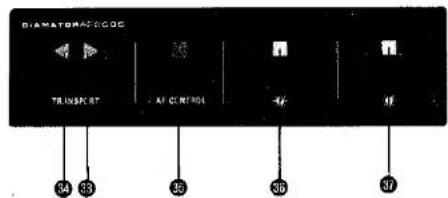
DIAMETERACOOC TRANSPORT AF CONTROL 44 33 35 36 37

DIAMATOR AF2002
DIMENSION OFFROOM OFF: 30 FLOR: 31 AF CONTROL OUT: 35 41 43 42 40 35

DIAMATOR AF2004
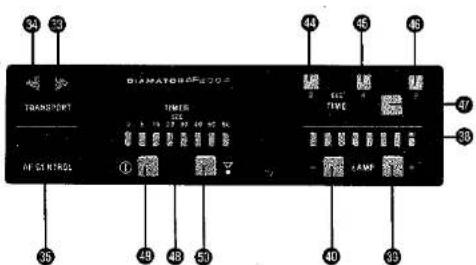
34 33 TRANSPORT DIAMATOR620C TIME ATG CONTROL ① - 15 20 25 30 35 - 49 48 50 - 44 45 46 - 37 - 36 - 40 33

Hobby Line 1 2 3 4 5 6 7 8 9 10 11 12 13 14 15 16 17 18 19 20

teneca TOMATO 12 57 13 9 1

INHOUDSOPGAVE

BESCHRIJVING DER ONDERDELEN 63

28 Knop timer start/stop

⑤1 Knop timer start/stop
Table of contents Click a title to access it
Manual assistant
Powered by Anthropic
Waiting for your message
Product information

Brand : Reflecta

Model : Diamator AF2008IR

Category : Video projector