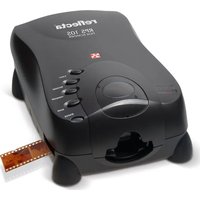
RPS 10S - Scanner Reflecta - Free user manual and instructions
Find the device manual for free RPS 10S Reflecta in PDF.


Pick your language and provide your email: we'll send you a specifically translated version.
| Product Type | Photo and Slide Scanner |
| Brand | Reflecta |
| Model | RPS 10S |
| Scanning Resolution | Up to 1800 dpi (interpolated) |
| Color Depth | 48-bit color, 16-bit grayscale |
| Film Formats Supported | 35mm slides and negatives |
| Scanning Speed | Approx. 15 seconds per frame |
| Connectivity | USB 2.0 |
| Power Supply | USB powered (5V, 1A) |
| Dimensions | Approx. 12.5 x 10.5 x 10.5 cm |
| Weight | Approx. 350 g |
| Operating System Compatibility | Windows, macOS |
| Software Included | Scan software for image capture and editing |
| Output File Formats | JPEG, TIFF, BMP |
| Cleaning | Use a soft, dry cloth; avoid liquids |
| Safety Features | CE, RoHS compliant |
| Spare Parts Availability | Replacement bulbs and rollers available |
| Repairability | Serviceable by authorized technicians |
| General Information | Designed for digitizing 35mm film |
Frequently Asked Questions - RPS 10S Reflecta
What types of film can I scan with the Reflecta RPS 10S?
The RPS 10S is designed for 35mm slides and negatives. It accepts both mounted slides and strips of film.
How do I connect the scanner to my computer?
Use the included USB 2.0 cable. Plug it into your computer's USB port; the scanner is bus-powered so no external adapter is needed.
What resolution should I choose for scanning?
For high-quality prints, use 1800 dpi. For web or sharing, 900 dpi is sufficient. Higher resolutions produce larger files.
Does the scanner work with Mac?
Yes, it is compatible with macOS (10.10 or later) and Windows (7/8/10).
How do I clean the scanner?
Use a soft, lint-free cloth to wipe the exterior. For the scanning area, use a blower brush to remove dust. Avoid liquids.
Why are my scanned images blurry?
Ensure the film is flat and properly inserted. Also, check that the scanner lens is clean. Use the autofocus feature if available.
Can I scan multiple slides at once?
Yes, the scanner can scan a strip of up to 6 negatives or individual slides. Use the included holder for batch scanning.
What software is included with the scanner?
It comes with CyberView or similar scanning software that allows you to adjust settings, crop, and save images.
Is the scanner compatible with Windows 10?
Yes, it works with Windows 10. Download the latest drivers from the Reflecta website if needed.
How can I improve color accuracy?
Use the color restoration or fade correction features in the software. Also, calibrate your monitor for best results.
User questions about RPS 10S Reflecta
0 question about this device. Answer the ones you know or ask your own.
Ask a new question about this device
No questions yet. Be the first to ask one.
Download the instructions for your Scanner in PDF format for free! Find your manual RPS 10S - Reflecta and take your electronic device back in hand. On this page are published all the documents necessary for the use of your device. RPS 10S by Reflecta.
USER MANUAL RPS 10S Reflecta


Manual assistant
Powered by Anthropic
Waiting for your message
Product information
Brand : Reflecta
Model : RPS 10S
Category : Scanner