
C380-FX - Pregnant MONITOR AUDIO - Free user manual and instructions
Find the device manual for free C380-FX MONITOR AUDIO in PDF.


| Product Type | Custom Install In-Ceiling/In-Wall Speaker for Atmos Systems |
| Driver Configuration | 2-Way with HF and Mid Frequency Adjustments |
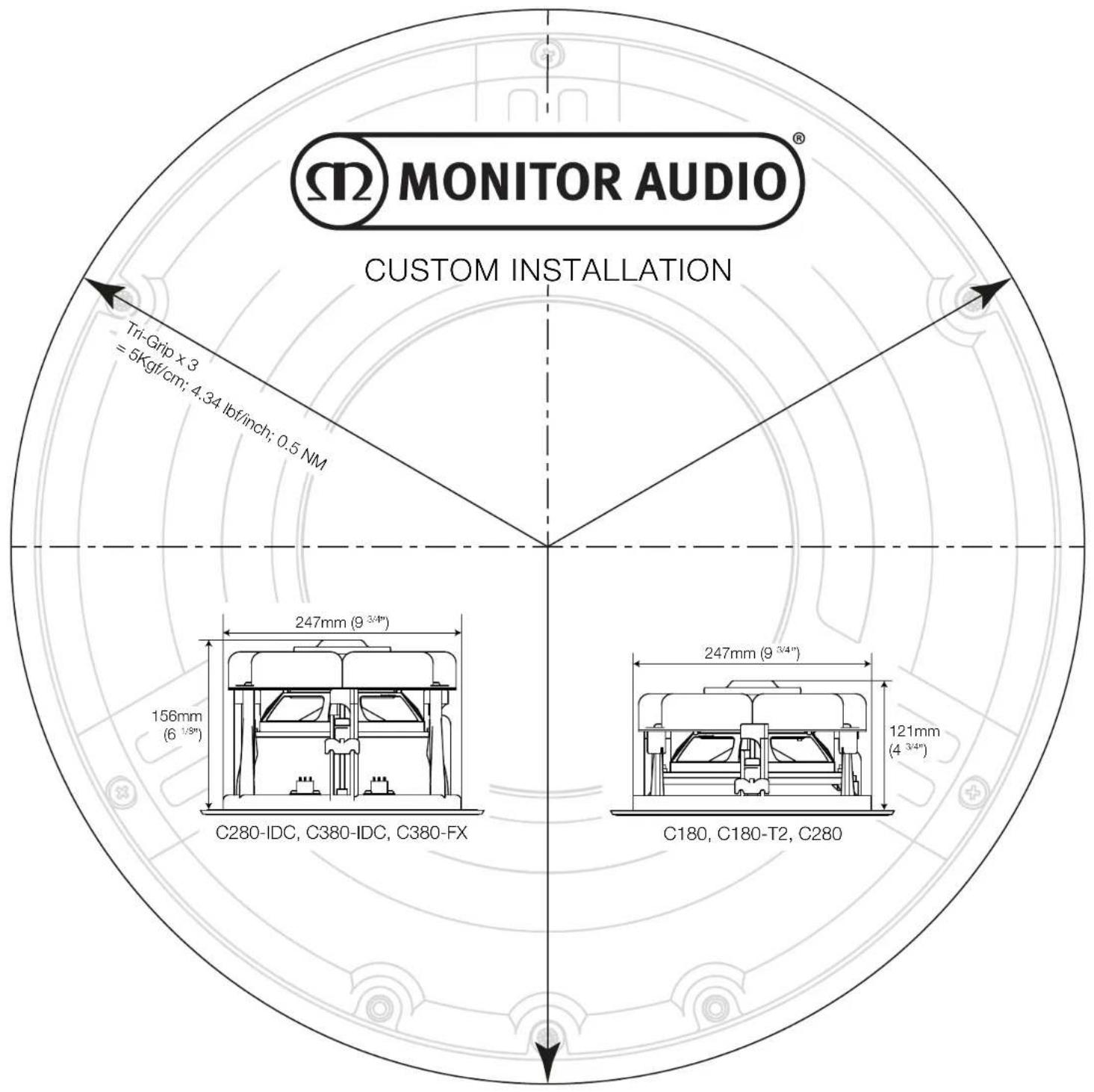
| Mounting System | Tri-Grip Dog Leg Clamps for plasterboard up to 45 mm thickness |
| Cut-Out Diameter | Approx. 240 mm |
| Overall Diameter | Approx. 280 mm |
| Mounting Depth | Approx. 120 mm |
| Weight | Approx. 2.5 kg |
| High Frequency Level Adjust | +/- dB switch for treble boost or cut |
| Mid Frequency Level Adjust | +/- dB switch for vocal presence adjustment |
| Boundary Compensation Switch | Dampens bass when speaker is placed near walls/corners |
| Grille | Paintable; includes removable membrane scrim |
| Installation Materials | For plasterboard or suspended ceilings/walls; solid wall requires framing |
| Recommended Amplifier Power | 20 – 100 W RMS |
| Impedance | 8 ohms (typical) |
| Frequency Response | 50 Hz – 25 kHz (estimated) |
| Warranty | 5 years for speakers; Lifetime warranty on select Custom Install models |
| Compliance | CE, RoHS, WEEE |
| Cleaning Instructions | Wipe with dry cloth; use approved lacquer polish for high-gloss finishes |
| Safety Warnings | Do not over-tighten clamps (max 0.5 Nm); avoid water and heat sources |
| Country of Origin | Designed in UK, Made in China |
Frequently Asked Questions - C380-FX MONITOR AUDIO
User questions about C380-FX MONITOR AUDIO
0 question about this device. Answer the ones you know or ask your own.
Ask a new question about this device
Download the instructions for your Pregnant in PDF format for free! Find your manual C380-FX - MONITOR AUDIO and take your electronic device back in hand. On this page are published all the documents necessary for the use of your device. C380-FX by MONITOR AUDIO.
USER MANUAL C380-FX MONITOR AUDIO
GUIDE PRODUIT & INSTALLATION
Optimum Speaker Positioning
5 or 7 Channel System Atmos
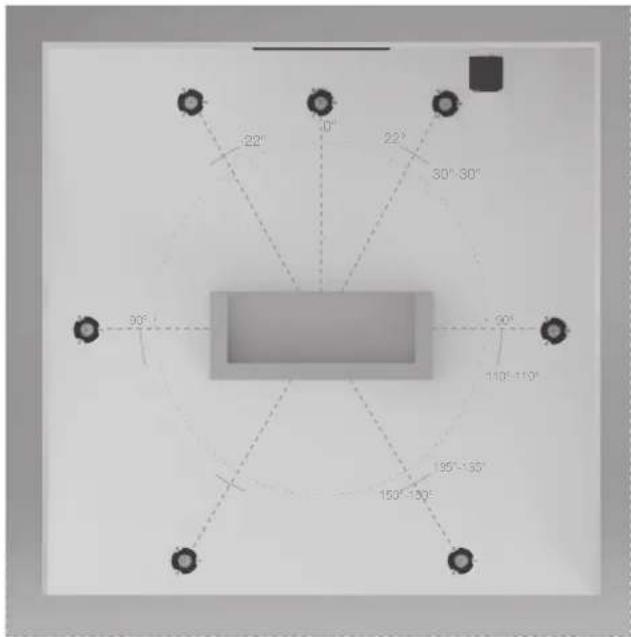
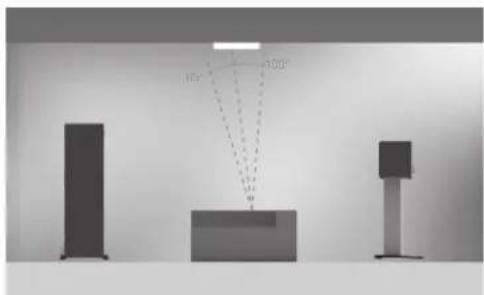
natural_image
Three vertical bars with dotted lines indicating angles (100°, 150°) and a central rectangular block, no text or symbols present.2 Atmos speakers (in line with front left and right)
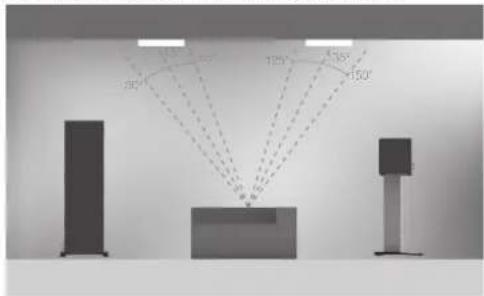
4 Atmos Speakers (in line with front left and right)
Prior to Fitting the Custom Instal Series Speakers

CAUTION: These Custom Install loudspeakers can only be fixed into plasterboard (dry-lined) or suspended ceilings/ walls with a thickness of up to 45mm (1 ^3-4 ). Solid wall installation will require channelling out and frame work constructed to provide a structure for the Tri Grip dog legs to clamp to. For safety reasons, if you are unsure of your ability to provide a secure and safe fixing, do not attempt to fix these speakers, please obtain the services of a competent and qualified trades person.

CAUTION: Ensure that there are no water pipes or electricity cables running within the wall structure before cutting the speaker apertures. Work from secure steps and avoid trailing wires.
Painting the Grillos

NOTE: If choosing to paint the grille, we recommend you follow these simple steps:
- Remove the membrane scrim from the inside of the grille.
- Paint all grilles required for the installation with the same batch of paint (if they are to be the same colour). Spray paint is easier to apply or use a stippling action when brushing to avoid blocking the holes of the grille.
- When dry, attach the spare membrane scrim (where supplied) into the inside of the grille.
- Fit the grille to the speaker (s).
Over Tightening Warning

ATTENTION INSTALLERS:
Do not over-tighten the Tri-Grip Dog Leg clamps. Over tightening the clamping mechanism on any in ceiling/ in wall speaker can result in damage to the speaker mounting hardware, ceiling/ wall or speaker frame, and/ or deflection in the speaker frame during installation.
If you notice any of the above during installation, you have overtightened the Tri Grip dog leg. Back off the mounting screw until deflection is reduced to allow the product to sit firmly against the ceiling / wall.

Do not exceed 5Kgf/cm (4.34 lbf/inch.) or 0.5 NM when tightening the Tri Grip dog leg screws.
When using a cordless screwdriver/ drill to install this product ensure the clutch is set to it's lowest setting to avoid over-tightening and damaging the mounting hardware.
Speaker Controls
High Frequency Level Ajust
With the HF setting on the '0' position, the speaker will give you a neutral sound with no additional adjustments made. Switching to the '+db' position will give the high frequencies a boost, giving you more clarity and presence in the treble while switching to the '-db' will do the opposite. This position can be useful if you want more prominence in the bass frequencies.
Mid Frequency Level Adjust
With the Mid setting on the '0' position, the speaker will give you a neutral sound with no additional adjustments made. Switching to the '+db' position will give the Mid frequencies a boost, giving you warmer sound with more presence in the vocal register while switching to the '-db' will do the opposite.
Boundary Compensation Switch
When a speaker is placed near a corner or wall it can sometimes make the bass too 'boomy' as low frequencies reflect off the nearby surfaces. If the bass is too 'boomy' for your liking then, like a port bung, the Boundary Compensation switch can be used to dampen the bass being produced by the speaker.
NOTE: As with all audio, the settings you chose to use are subject to your own personal tastes and the affect your room has on the acoustics. Experimentation is strongly advised to find the best setting for you.
Guarantee
Both the craftsmanship and the performance of this product is guaranteed against manufacturing defects for a period of five years for speakers from the date of purchase (see conditions in the Important Safety Instructions booklet), provided that the product was supplied by an authorised Monitor Audio retailer under the consumer sale agreement.
To help us find your warranty details within our customer database, should the need arise, please take a few minutes to register your product(s) online at: monitoraudio.com.
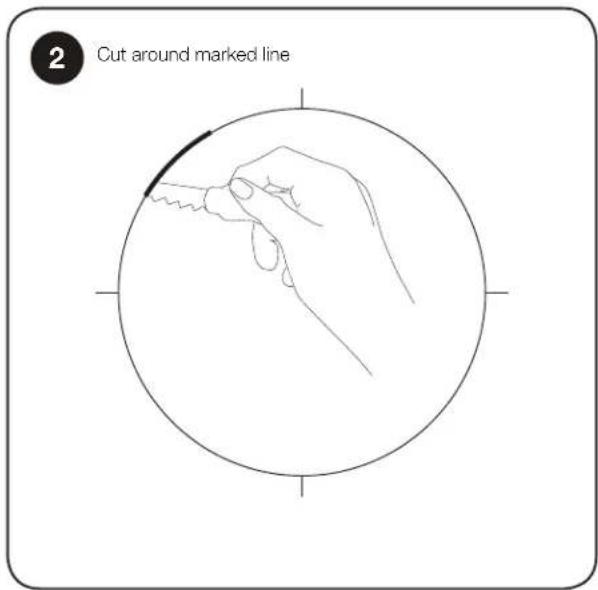
Fitting the Custom Install Loudspeakers
![1 Draw around template and mark centre lines if necessary (12) MONITOR AUDIO CS160 cut out template Template [Design: 17/18/19] Monitor Audio Monitor Audio Monitor Audio](/content/2026/05/967791/images/926b5885038a171782fae41a6270453f4cf0f71fe7ce6d56b09c7088575922f8.jpg)
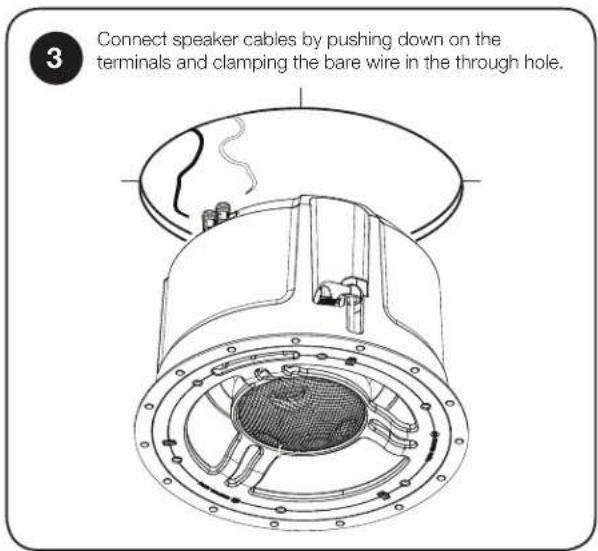
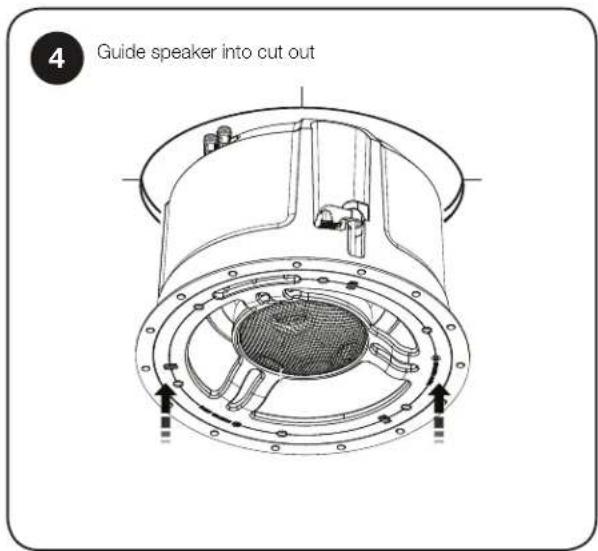
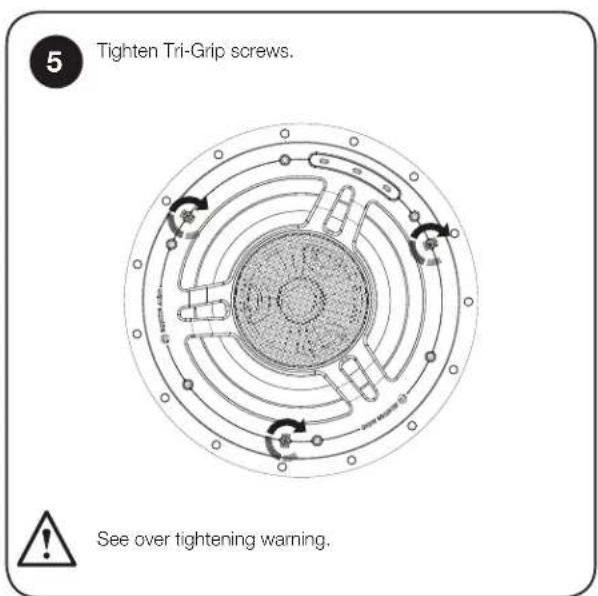
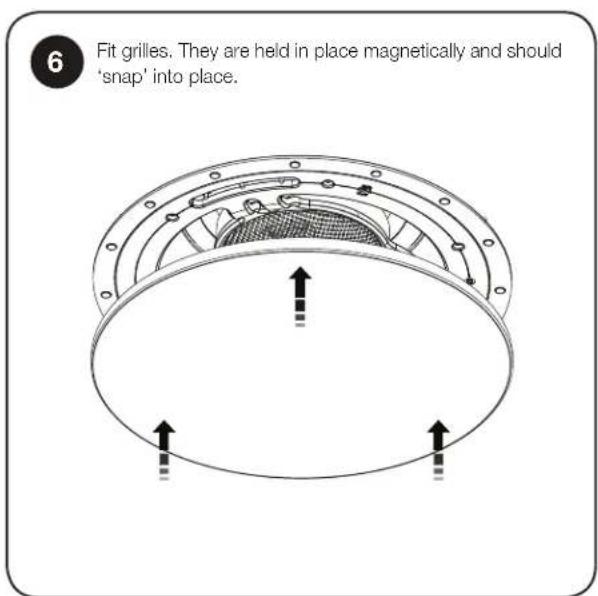

Monitor Audio Ltd.
24 Brook Road
Rayleigh, Essex
SS6 7XJ
England
Tel: +44 (0)1268 740580
Fax: +44 (0)1268 740589
Email: info@monitoraudio.co.uk
Designed and Engineered in the United Kingdom
Made in China
© Monitor Audio.
Important Safety Instructions
-
Please read these instructions.
-
Please keep these instructions.
-
Heed all warnings.
-
Follow all instructions.
-
Do not use this apparatus with water.
-
Clean only with a dry cloth. Great care and attention has gone into the materials chosen to produce your Monitor Audio loudspeakers. A gentle wipe with a dry, clean cloth is all that is required to remove any dust. Treat them as you would a fine piece of furniture because that is how they have been designed. To clean the high gloss finishes use our "Lacquer Polish" that has been developed alongside Auto Glym. It can only be purchased from the online shop at www.monitoraudio.com (UK customers only).
-
Do not install near any heat source, such as radiators, heat registers, stoves, or other apparatus (including amplifiers) that produce heat.
-
Only use attachments/ accessories specified by Monitor Audio.
-
Use only with the cart, stand, tripod, bracket, or table specified by monitor Audio or sold with the apparatus. When a cart is used, use caution when moving the cart/ apparatus combination to avoid injury from tip-over.
-
Refer all servicing to qualified service personnel. Servicing is required when the apparatus has been damaged in any way, such as power supply cord or plug is damaged, liquid has been spilled or objects have fallen onto the apparatus, the apparatus has been exposed to rain or moisture, does not operate normally or has been dropped.
-
This apparatus shall not be exposed to dripping or splashing water and that no object filled with liquids such as vases shall be placed on the apparatus.
-
This exclamation point within an equilateral triangle is intended to alert the user to the presence of important mainten instructions in the literature accompanying the appliance.
-
No naked flame sources, such as lighted candles, should be placed on the apparatus.


- Monitor Audio would discourage using its products in high humidity, extreme hot or cold or outdoor environments unless the product specifically advises suitability for such environments, for clarification of suitable products within range please contact a Monitor Audio representative
Re-cycling
Correct Disposal of Waste Electrical and Electronic Equipment (WEEE) by User in Private Households in the EU.
This symbol on the product or accessories indicates that they must not be disposed of with your household wastes throughout the EU. To prevent possible harm to the environment or human health from uncontrolled waste disposal, recycle it responsibly to promote the sustainable reuse of material resources. Instead responsibility to dispose of your waste equipment by handing it over to a designated WEEE collection point for recycling. The separate collection and recycling of your waste equipment will help conserve natural resources and ensure that it is recycled in a manner that protects human health and the environment.

For more specific information about where you can take your equipment for recycling please contact your local city/council office, your local waste disposal service or the outlet where you purchased your Monitor Audio product.
RoHS Declaration of Conformity
Directive 2011/65/EU of the European Parliament and of the Council on the reduction of the use of certain hazardous electrical and electronic equipment, June 2011.

(servicing) Background
The RoHS directive restricts the use of Lead (Pb), Cadmium (Cd), Mercury (Hg), hexavalent Chromium (CrVI), polybrominated biphenyl (PBB) compounds, and polybrominated diphenyl ether (PBDE) compounds in electrical and electronic equipment sold in the European Union.
EC Declaration of Conformity
We, Monitor Audio Ltd. (Manufacturer and Importer)
24 Brook Road
Rayleigh
Essex
SS6 7XJ
England

Declare in own responsibility, that the Monitor Audio products described in this manual is in compliance with Technical Standards/Council Directives:
(LVD) 2014/35/EU Low Voltage Directive (effective from 20 April, 2016)
EN60065: 2002+A1: 2006 Safety requirements for mains operated electronic and related apparatus for household and similar use.
(EMC) 2014/30/EU Electro Magnetic Compatibility (effective from 20 April, 2016)
EN55013: 08.90+A12:08.94+A13:12.96 Limits and methods of measurement of radio disturbance characteristics of broadcast receivers equipment.
EN55020: 12.94+A11:12.96 Electro magnetic immunity of broadcast receivers and associated equipment.
EN61000-3-2: 04.95+A1:1998+A2:1998 Electro magnetic compatibility (EMC)
- Part 3: Limits - Section 2: Limits for harmonic current emissions (equipment input current up to and including 16 Ampere per phase).
EN6100-3-3: 01.95 Electro magnetic compatibility (EMC) - Par
– Section 3: Limits of voltage fluctuations and flicker in low-voltage supply systems for equipment with rated current up and including phase.
Signed by:
Name: D.S. Hartley
Position: Technical Director
Company: Monitor Audio Ltd
and associated
Custom Install
Lifetime Warranty

Monitor Audio offers a Lifetime Warranty on selected products in the Custom Installation speaker range.
This applies to the first end-user purchaser, and only when purchased from an authorised Monitor Audio Dealer/Distributor. Monitor Audio will undertake to guarantee the product will be free from defective workmanship and materials for the life of such. Monitor Audio will at its discretion and expense, either repair the defect using new or refurbished parts, or replace the Product with a new or re-manufactured Product of a reasonable equivalent. In all instances Monitor Audio's liability will not exceed the Purchase Price.
The warranty stated above is the sole and exclusive remedy and Monitor Audio's performance shall constitute full and final satisfaction of all obligations, liabilities and claims with respect to the Product.
IN ANY EVENT, Monitor Audio SHALL NOT BE LIABLE FOR ANY CONSEQUENTIAL, INCIDENTAL, ECONOMIC, PROPERTY, BODILY INJURY, OR PERSONAL INJURY DAMAGES ARISING FROM THE PRODUCT, ANY BREACH OF THIS WARRANTY OR OTHERWISE.
Additional Limitations and Exclusions from Warranty Coverage: The warranty described above is non-transferable, applies only to the initial installation of the Product, does not include installation of any repaired or replaced Product, does not include damage to any allied or associated equipment which may result for any reason from use with this Product, and does not include labour or parts caused by accident, disaster, negligence, improper installation, misuse (e.g. overdriving the amplifier or speaker, excessive heat or cold or humidity), or from service or repair which has not been authorised by Monitor Audio. The end-user purchaser is liable for the cost of transportation and return of the Product. Any damages incurred during transport are the cost and responsibility of the end-user purchaser.
Obtaining Authorised Service:
To qualify for the Lifetime warranty, you must contact your authorised Monitor Audio Dealer/Installer, showing proof of purchase and the product. You will be given a return authorisation number (RAN), which is required to progress with your warranty claim.
Any decision made by Monitor Audio in regard to any Lifetime Warranty claim is full and final.
This warranty takes effect from the 2nd April 2018.
For a list of Monitor Audio Products included in the Lifetime Warranty* please visit -
www.monitoraudio.com/en/lifetime-warranty
Monitor Audio Ltd
24 Brook Road,
Rayleigh, Essex,
SS6 7XJ England
T. + 44 (0)1268 740580
F. + 44 (0)1268 740589
E. info@monitoraudio.com
*Product list subject to change as products are developed and discontinued / V1.0 February 2018
monitoraudio.com
- Optimum Speaker Positioning
- or 7 Channel System Atmos
- Prior to Fitting the Custom Instal Series Speakers
- Painting the Grillos
- Over Tightening Warning
- ATTENTION INSTALLERS:
- Do not exceed 5Kgf/cm (4.34 lbf/inch.) or 0.5 NM when tightening the Tri Grip dog leg screws.
- Speaker Controls
- High Frequency Level Ajust
- Mid Frequency Level Adjust
- Boundary Compensation Switch
- Guarantee
- Important Safety Instructions
- Re-cycling
- RoHS Declaration of Conformity
- (servicing) Background
- EC Declaration of Conformity
- Custom Install
- Lifetime Warranty
- Obtaining Authorised Service:
Brand : MONITOR AUDIO
Model : C380-FX
Category : Pregnant