
FU-P25S - Air purifier SHARP - Free user manual and instructions
Find the device manual for free FU-P25S SHARP in PDF.


| Product Type | Air Purifier |
| Brand | Sharp |
| Model | FU-P25S |
| Dimensions (W x H x D) | Approx. 360 x 510 x 200 mm |
| Weight | Approx. 5.0 kg |
| Power Supply | 220-240 V, 50/60 Hz |
| Power Consumption | 50 W (max) |
| Fan Speeds | 3 speeds + quiet mode |
| Filtration System | Pre-filter, HEPA filter, Plasma Cluster ion generator |
| Plasma Cluster Technology | Yes |
| Timer | 1, 2, 4, 8 hours |
| Airflow (max) | 150 m³/h |
| Recommended Room Size | Up to 25 m² |
| Filter Replacement Indicator | Yes |
| Filter Life | Approx. 2 years (HEPA), 5 years (Plasma Cluster unit) |
| Noise Level | 26 - 48 dB(A) |
| Safety Features | Auto shut-off if front panel opened, overheating protection |
| Maintenance | Clean pre-filter monthly, replace HEPA filter every 2 years |
| Replacement Parts | HEPA filter (FZ-F25S), Plasma Cluster unit (IZ-C25S) |
| Certifications | CE, RoHS |
Frequently Asked Questions - FU-P25S SHARP
User questions about FU-P25S SHARP
0 question about this device. Answer the ones you know or ask your own.
Ask a new question about this device
Download the instructions for your Air purifier in PDF format for free! Find your manual FU-P25S - SHARP and take your electronic device back in hand. On this page are published all the documents necessary for the use of your device. FU-P25S by SHARP.
USER MANUAL FU-P25S SHARP
natural_image
Illustration of a remote control device with a screen and antenna (no text or symbols)Free Standing
直立式
*Plasmacluster is a trademark of Sharp Corporation.
*Plasmacluster “離子簇”是聲寶公司的商標。
香港電器安全規格
(國際電工委員會規格適合)

AIR PURIFIER
OPERATION MANUAL
空氣清新機
使用說明書
FEATURES
Plasmacluster Ion Control
The unit controls the ratio of negative ions and positive ions depending on the condition of the room.
- Clean Mode
Approximately the same numbers of positive and negative ions are discharged. This mode is effective for reducing some airborne mold.
- Ion Control Mode
Plenty of negative ions exist in natural surroundings such as waterfalls or forests. In this mode, negative ions will be released in an increased rate, in order to bring the room air close to this natural environment.
• AUTO Plasmacluster Ion Mode
The unit will switch between Clean Mode and Ion Control Mode automatically depending on the amount of impurities in the air detected by the odor sensor.
- Filters
1) Active Carbon Filter
Absorb odor elements.
2) HEPA (High Efficiency Particulate Air) Filter with Microbial Control Filter
High-efficiency particle collection including pollen and dust.
CONTENTS
IMPORTANT SAFETY INSTRUCTIONS .... E-2
- W ARNING ......E-2
• CAUTIONS CONCERNING OPERATION ...E-2
• REMOTE CONTROL LIMITATIONS ..... E-2
• INSTALLATION GUIDELINES ...... E-3
• FILTER GUIDELINES ..... E-3
• HOW SHARP AIR PURIFIER WORKS .....E-3
PART NAMES..... E-4
- MAIN UNIT DISPLAY ....E-4
• INCLUDED.....E-4 - BACK E-4
PREPARATION...... E-5
- INSERTING BATTERIES IN THE REMOTE CONTROL ....E-5
- REMOTE CONTROL USE ......E-5
• FILTER INSTALLATION .....E-6
OPERATION E-8
Thank you for purchasing the SHARP Air Purifier. Please read this manual carefully for the correct usage information. Before using this product, be sure to read the section: "Important Safety Instructions."
After reading this manual, retain it in a convenient location for future reference.
IMPORTANT SAFETY INSTRUCTIONS
When using electrical appliances, basic safety precautions should be followed, including the following:
WARNING - To reduce the risk of electrical shock, fire or injury to persons:
- Read all instructions before using the air purifier.
- Use only a 220-240 volt outlet.
- Do not use the air purifier if the power cord or plug is damaged or the connection to the wall outlet is loose.
- Periodically remove dust from the power plug.
- Do not insert fingers or foreign objects into the intake or air outlet.
- When removing the power plug, always hold the plug and never pull the cord.
Electrical shock and/or fire from short circuit may occur as result.
- Do not use this air purifier near gas appliances or fireplaces.
- Remove the power plug from the wall outlet before cleaning the unit and when not using the unit.
Electrical shock from bad insulation and / or fire from short circuit may occur as a result.
- If the power cord is damaged, it must be replaced by the manufacturer, its service agent, Sharp authorized service or similarly qualified person in order to avoid a hazard.
- Do not operate when using aerosol insecticides or in rooms where there is oily residue, incense, sparks from lit cigarettes, chemical fumes in the air or a humidity condition.
- Use care when cleaning the air purifier. Strong corrosive cleansers may damage the exterior.
- Only Sharp Authorized Servicers should service this air purifier. Contact the nearest Servicer for any problems, adjustments, or repairs.
- The batteries must be removed from the remote control before disposal, and the batteries must be disposed of safely.
CAUTIONS CONCERNING OPERATION
- Do not block the intake and air outlet.
- Do not use the unit near or on hot objects, such as range or where it may come into contact with steam.
• Always hold the handle on the back of the main unit when moving it. - Holding the front panel when carrying may cause it to detach, thus dropping the unit and resulting in bodily injury.
- Do not operate the unit without the filter.
Not only it does not improve filter performance, it may cause electric shock or malfunction.
- Clean the exterior with a soft cloth only.
The unit surface may be damaged or cracked.
In addition, the sensor may malfunction as a result.
REMOTE CONTROL LIMITATIONS
DO NOT USE THE REMOTE CONTROL IN THE FOLLOWING LOCATIONS:
- Any location where there is inverter lighting equipment or electronic spontaneous lighting equipment
The remote control may become inoperative. In this case, move away from such lighting equipment or change direction.
- Location exposed to direct sunlight or fluorescent.
The unit may not receive signals from the remote control.
INSTALLATION GUIDELINES
- During the operation of the product, please place the unit at least 2m away from equipments which involve electric wave such as televisions, radios or wave clocks, in case electrical interference occurs to such equipments.
- Leave at least 60cm of space from the wall.
The motor may overheat, causing a malfunction.
- A void a location where the sensor is exposed to direct wind.
The unit may not operate properly.
- A void locations where curtains, etc., come into contact with the intake or air outlet.
Curtains, etc., may become dirty or a malfunction may occur.
- Avoid locations where the unit is exposed to condensation, due to drastic temperature changes.
- Place on a stable surface with sufficient air circulation.
- Do not install when there is generation of lampblack, such as in a kitchen, etc.
The unit surface may crack or the sensor may malfunction as a result.
- The wall behind the air outlet may become dirty as time passes. When using the unit for extensive period in the same location, use a vinyl sheet, etc., to prevent the wall from becoming dirty. In addition, periodically clean the wall, etc.
FILTER GUIDELINES
- Follow the instructions in this manual for correct care and maintenance of the filters.
HOW SHARP AIR PURIFIER WORKS
An air purifier draws in room air from its air intake, lets the air pass through an Active Carbon Filter (Deodorizing Filter) and a HEPA Filter (dust collection filter) inside of the unit, then discharges the air from its air outlet. The air purifier unit repeats this process by moving its internal fan.
As air passes through, the HEPA Filter can remove dust particles. The Active Carbon Filter gradually absorbs odor elements as they repeatedly pass through the filter.
(Odor elements are absorbed by HEPA Filter as well.)
Some odor ingredients absorbed by the filters may become separated and may be discharged through the air outlet and result in additional odor. Depending on the usage environment, this odor may become strong in a shorter period than expected.
In this case, purchase the optional replacement filter kit FZ-P25SF.
NOTE
- The air purifier is designed to remove air-suspended dust and odor, but not harmful gases (for example, carbon monoxide contained in cigarette smoke). If the odor sources still exist, it cannot completely remove the odor. (for example, odors from construction materials and pet odors).
- It is suggested to open the window a bit when you are smoking in order to facilitate ventilation.

E-3
PART NAMES
MAIN UNIT DISPLAY

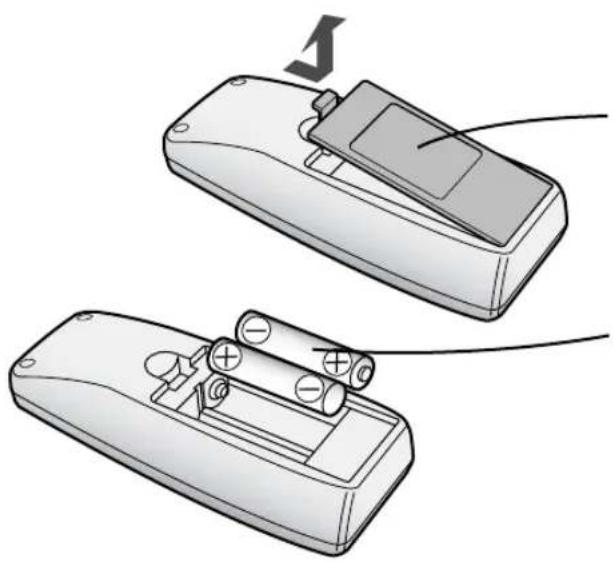
INSERTING BATTERIES IN THE REMOTE CONTROL
natural_image
Illustration of two open batteries with batteries and a switch, shown from different angles (no text or symbols)1 Remove the back cover
Press and slide the back cover to remove.
2 Insert batteries
Insert batteries with shown below.


3 Close the back cover
Battery Information
• The battery life is about 1 year.
- The batteries for this remote control are for initial use only. Change the batteries when necessary.
- Incorrect usage of the batteries may cause battery fluid leakage and/or damage. Take care of the following when handling:
- When replacing the batteries, replace both batteries with new ones of the same type. (Use 2 AA manganese batteries.)
- When not using the unit or remote control for an extended period, remove the batteries.
• The batteries are for initial use only and may be depleted within 1 year.
REMOTE CONTROL USE
- Operate with the remote control facing the main unit receiver.
•The signal range is about 7m. - Make sure there are no objects blocking the path of the signal.
- A beep sound will be heard from the main unit when a signal is received.
NOTE
- Avoid dropping or damaging the remote control, using in a high humidity condition, in direct sunlight or near a heat source.

FILTER INSTALLATION
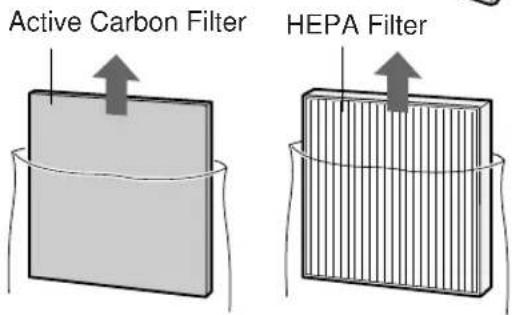
To maintain the quality of the filters, they are installed in the main unit within plastic bags. Be sure to remove the filters from the plastic bags before using the unit.
1 Remove the filters
1 Remove the Front Panel. Pull the bottom of the Front Panel.

2 Remove the Filter Support. Pinch the two tabs and lift to remove.

3 Remove the Active Carbon Filter and HEPA Filter.

4 Remove the Active Carbon Filter (black) and HEPA Filter (white) from the plastic bags.
2 Install the filters
1 Place the HEPA Filter within the main unit with the tabs facing up.
Do not install the filter backwards or the unit will not operate properly.
2 Place the Active Carbon Filter on top of the HEPA Filter.
Make sure that the tab of the HEPA Filter remains visible.
3 Insert the bottom side tabs of the Filter Support into the associated holes of the main unit.
Next push the up-side tabs into the main unit.
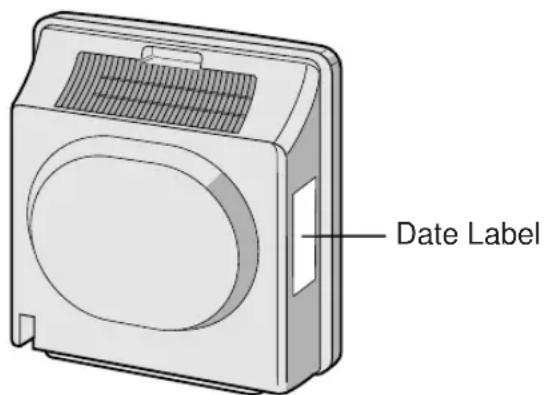
4 Fill in the usage start date on the Date Label.
Use the date as a guide for the Filter Replacement schedule.


Main Unit Controls
• AUTO
- 15 min. HIGH
• POLLEN
• SILENT
• NORMAL
• MAX
MAIN UNIT OPERATION

Power ON/OFF Button
• Used to start operation (short beep) and stop operation (long beep)
- Plasmacluster Indicator Light and Fan Speed Indicator Light turn on/off.
- Unless unplug the power cord, the operation starts in the previous mode the unit was operated in.
2 MODE Button
• The operation mode can be switched.
AUTO operation
The fan speed is automatically switched (HIGH*, NORMAL, SILENT) depending on the amount of pollution in the air. The sensor detects the pollution for efficient air purification.
15 min. HIGH\* operation

The unit will operate at HIGH* fan speed for 15 minutes, then will operate at Auto operation.
The operation mode is effective when quick removal of impurities in the air is desired.
POLLEN mode operation

The unit will operate at HIGH* fan speed for 10 minutes, then will alternate between NORMAL and HIGH for 20 minutes.
| 10 minutes: HIGH fan speed |
| 20 minutes: NORMAL fan speed |
| 20 minutes: HIGH fan speed |
MAX operation

The unit will operate at a fan speed of MAX.
NORMAL operation

The unit will operate at a fan speed of NORMAL.
SILENT operation

The unit will operate quietly using minimal air intake.
* HIGH fan speed is an intermediate speed between NORMAL and MAX.
DETERMINING THE BASE IMPURITY RATE
For the first 30 seconds after the power plug is inserted into the wall outlet, the unit will check the conditions of the air. If operation is set to ON during this time, the CLEAN-SIGN LIGHT will alternately flash in green, orange and red.
PLASMACLUSTER INDICATOR LIGHT
Plasmacluster ion operation is selected using the remote control.
Blue light
When the Plasmacluster ion operation is in Clean Mode, or in AUTO Plasmacluster Ion Mode and the air in the room is impure, the light will activate and the unit will operate in Clean Mode.
Green light
When the Plasmacluster ion operation is in the Ion Control Mode, or in AUTO Plasmacluster Ion Mode and the air in the room is clean, this light will activate and the unit will operate in Ion Control Mode.
Light off
There are no Plasmacluster ions being generated.
- The light can be turned off by using the 'Display ON/OFF Button' on the Remote Control. In this case, Plasmacluster ions are generated. (Please turn off the light when not required.)
CLEAN-SIGN LIGHT
The color changes according to the air condition.
Clean (Green) Slightly Impure (Orange) Very Impure (Red)

ABOUT THE CLEAN-SIGN
- The condition of the CLEAN-SIGN depends on the room air condition detected by the Odor Sensor when the plug is inserted into the wall outlet.
- It is possible to have a green CLEAN-SIGN with impurities in the air at the time that the air purifier was just introduced to the room environment. After a while, however, the base impurity rate will be adjusted to detect room air condition correctly.
- Use the Display ON/OFF Button on the remote control to turn off the Indicator light.
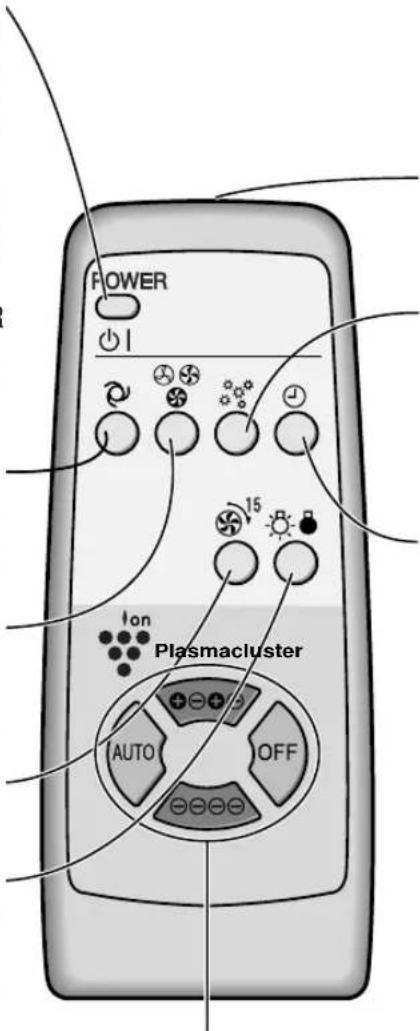
Operations available with the Remote Control
• AUTO
- MANUAL
• POLLEN
- OFF TIMER
- 15 min. HIGH
• DISPLAY ON/OFF
Plasmacluster lon mode selections
• AUTO
- CLEAN
- ION CONTROL
• OFF
POWER ON/OFF Button
- When you press the POWER ON/OFF Button, a short beep will sound and operation will start in AUTO Mode.
- Unless unplug the power cord, the operation starts in the previous mode the unit was operated in.
- To stop, press the POWER ON/OFF Button again. A long beep will sound and operation will stop.
Auto (Fan Speed) Button
The fan speed switches automatically depending on the amount of impurities in the air.
Manual (Fan Speed) Button
The fan speed can be switched among Silent, NORMAL and MAX settings.
15 min. HIGH Button
See page E-8
Display ON/OFF Button
Switches the Plasmacluster Indicator Light and CLEAN-SIGN Light either ON or OFF.
Transmitter
Pollen Mode Operation Button
See Page E-8
Off Timer Button
The set time switches every time the button is pressed as shown below.
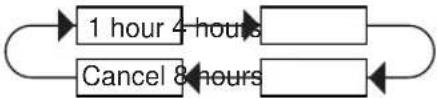
flowchart
graph LR
    A["1 hour 4 hours"] --> B[" "]
    B --> C[" "]
    C --> D[" "]
    D --> E["Cancel 8 hours"]
    E --> F[" "]
• The indicator light shows the remaining time.
• The unit will stop operation when the timer is up.
Plasmacluster Ion Mode Selections
AUTO
When pressed, the unit will switch between Clean Mode and the Ion Control Mode automatically depending on the amount of impurities in the air as detected by the odor sensor. Clean Mode will operate for 1 minute when the Auto function is selected.
⊖⊖⊖⊖ (ION CONTROL)
When pressed, the unit will constantly operate in Ion Control Mode.
The Plasmacluster Ion Indicator Light is green.
⊕⊖⊕⊖ (CLEAN)
When pressed, the unit will constantly operate in the Clean Mode, in which the same numbers of positive and negative ions are discharged. The Plasmacluster Indicator Light is blue.
OFF
The generation of ions will cease and the Plasmacluster Indicator Light will go out.
CARE AND MAINTENANCE
To maintain optimum performance of this air purifier, please clean the unit including the sensor and filters periodically.
When cleaning the unit, be sure to unplug the power cord, and never handle the plug with wet hands. Electrical shock and/or bodily injury may occur as a result.
MAIN UNIT
To prevent dirt or stains on the main unit, clean as often as necessary. If stains are allowed to remain, they may become hard to clean.
Wipe with a dry, soft cloth
For stubborn stains or dirt, use a soft cloth dampened with warm water.
Do not use volatile fluids
Benzene, paint thinner, polishing powder, etc., may damage the surface.
Do not use detergents
Detergent ingredients may damage the unit.
Keep the unit away from water
ODOR SENSOR
The sensitivity of the sensor will become unstable if the odor sensor is dirty or blocked. Remove dust from the surfaces of the sensor openings using a vacuum cleaner.
Hole of sensor

natural_image
Illustration of a hand using a tool to clean or adjust a grid-patterned plastic tray (no text or symbols)ACTIVE CARBON FILTER
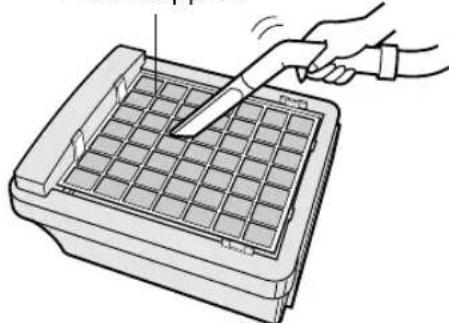
Remove the Front Panel, Clean the surface of the Filter Support lightly with a vacuum cleaner.
NOTE
- Never wash or clean the HEPA/Active Carbon Filter using the nozzle of a vaccum cleaner directly. This will greatly decrease the performance of the Filters.
Filter Support
natural_image
Illustration of a hand using a tool to clean or adjust a grid-patterned container (no text or symbols visible)FILTER REPLACEMENT GUIDELINES
Depending on the usage environment, air outlet odor may become strong after several months.
If dust or odors cannot be removed easily, replace the filters.
(Refer to HOW SHARP AIR PURIFIER WORKS E-3)
Guide for filter replacement timing
- The following filter life and replacement period is based on the condition of smoking 10 cigarettes per day and the dust collection/deodorization power is reduced by half compared with that of new filters.
We recommend to replace the filters more frequently if the product is used in a condition significantly severer than normal household use.
• HEPA Filter(with Microbial Control Filter)
About 2 years after opening
• Active Carbon Filter About 2 years after opening
REPLACING THE FILTERS
1 See page E-6,7 for directions on how to install the filters when replacing.
2 Fill in the usage start date of the filters on the Date Label.
Replacement Filters
Model: FZ-P25SF
• HEPA Filter (with Microbial Control Filter): 1 unit
• Active Carbon Filter: 1 unit
Please consult your dealer for purchase of replacement filters.
Disposal of Filters
Please dispose of replaced filters according to the local disposal laws and regulations.
HEPA Filter (with Microbial Control Filter) materials:
- Filter: Polypropylene
- Frame: Polyester
- M microbial Control Filter: Polypropylene, Polyethylene
Active Carbon Filter Materials:
- Deodorizer: Activated charcoal
• Net: Polypropylene 60%, Polyester 40%
TROUBLESHOOTING
Before calling for repair, please review the list below, since the problem may not be a unit malfunction.
| SYMPTOM | REMEDY (not a malfunction) |
| The Remote Control does not work | Have the batteries been depleted?Are the batteries inserted correctly?Is a fluorescent lighting in the room flickering due to service life? |
| Odors and smoke are not removed | Clean or Replace the filters if they appear to be heavily soiled.(Refer to E-12,E-13) |
| The CLEAN-SIGN Light lights green even when the air is impure | The air could be impure at the time the unit was plugged in.(Refer to E-9) |
| The CLEAN-SIGN Light lights orange or red even when the air is clean | The sensitivity of the sensor becomes unstable when the opening of the odor sensor is dirty or is clogged.Clean the dust around the sensor opening using a vacuum cleaner. (Refer to E-11) |
| The Plasmacluster Indicator Light remains green (or blue) and does not change | When in Clean Mode ( or Ion Control Mode), the Plasmacluster Indicator Light color will not change. |
| A clicking or ticking sound is heard from the unit | Clicking sound is emitted when the unit is in the Ion Control Mode, and ticking sound is emitted when the unit is generating ions.If the sound is irritating, set the unit away from you. |
| The discharged air has an aroma or odor. | Check to see if the filters are heavily soiled.Replace the filters.Plasmacluster Air Purifiers emit small traces of ozone which may produce an odor. The amount of ozone emitted by the ion generator is very little which is below the safety levels set by the IEC 60335-2-65, and it is harmless to the human body. |
| The unit does not operate when cigarette smoke is in the air. | Is the unit installed in a location that is difficult for the sensor to detect cigarette smoke?Are the odor sensor openings blocked or clogged?(In this case, clean the openings.) (Refer to E-11) |
| The Plasmacluster Indicator Light or the CLEAN-SIGN Light will not activate. | Check to see if the Display OFF Mode on the Remote Control is selected. If so, then press the Display ON/OFF Button on the Remote Control to activate the indicator light.(Refer to E-10) |
ERROR DISPLAY
| LAMP INDICATION | REMEDY |
| The “Silent” Fan Speed Indicator Light blinks. | Fan motor disconnected or abnormal.Operation stops.Pressing the ON/OFF button will reset the error display, but if error occurs again, contact the shop where you purchased the unit. |
SPECIFICATIONS
| Model | FU-P25S | |||
| Power supply | 220-240V 50/60Hz | |||
| Fan Speed Operation | Fan speed level | MAX | NORMAL | SILENT |
| Rated power | 24 W | 6.5 W | 3.8 W | |
| Air Flow Volume | 150 m3/hour | 60 m3/hour | 30 m3/hour | |
| Applicable floor surface | ~20m2* | |||
| Cord Length | 2.5m | |||
| Dimensions | 410mm(W)x157mm(D)x430mm(H) | |||
| Weight | 4.5kg | |||
* The applicable floor surface area is the surface area for operating the unit in MAX fan level.
- Applicable floor surface area indicates the space where a certain amount of dust particle can be removed in 30 minutes.
Standby Power
In order to operate the electrical circuits while the power plug is inserted in the wall outlet, this product consumes about 0.7W of standby power.
For energy conservation, unplug the power cord when the unit is not in use.

natural_image
Completely dark image with no visible content, text, or symbols.中文
特性
離子簇控制
natural_image
Illustration of two electronic devices with batteries and a switch, shown from different angles (no text or symbols)1 打開後蓋 按下並滑動,以打開後蓋。
natural_image
Simple diagram of a rectangular block with an upward arrow and a horizontal line, no text or symbols present.HEPA過濾網

natural_image
Diagram of a rectangular block with vertical lines and an upward arrow, enclosed in a circular frame (no text or symbols)② 安裝過濾網
natural_image
Illustration of a hand using a tool to press or inspect a grid-patterned tray (no text or symbols visible)過濾網更換指南

- Free Standing
- 直立式
- 香港電器安全規格
- (國際電工委員會規格適合)
- AIR PURIFIER
- OPERATION MANUAL
- FEATURES
- Plasmacluster Ion Control
- - Clean Mode
- - Ion Control Mode
- • AUTO Plasmacluster Ion Mode
- - Filters
- CONTENTS
- IMPORTANT SAFETY INSTRUCTIONS .... E-2
- PART NAMES..... E-4
- PREPARATION...... E-5
- OPERATION E-8
- IMPORTANT SAFETY INSTRUCTIONS
- CAUTIONS CONCERNING OPERATION
- REMOTE CONTROL LIMITATIONS
- DO NOT USE THE REMOTE CONTROL IN THE FOLLOWING LOCATIONS:
- INSTALLATION GUIDELINES
- FILTER GUIDELINES
- HOW SHARP AIR PURIFIER WORKS
- NOTE
- PART NAMES
- INSERTING BATTERIES IN THE REMOTE CONTROL
- Remove the back cover
- Insert batteries
- Close the back cover
- Battery Information
- REMOTE CONTROL USE
- FILTER INSTALLATION
- Remove the filters
- Install the filters
- Place the HEPA Filter within the main unit with the tabs facing up.
- Place the Active Carbon Filter on top of the HEPA Filter.
- Insert the bottom side tabs of the Filter Support into the associated holes of the main unit.
- Fill in the usage start date on the Date Label.
- Main Unit Controls
- MAIN UNIT OPERATION
- Power ON/OFF Button
- MODE Button
- AUTO operation
- min. HIGH\* operation
- POLLEN mode operation
- MAX operation
- NORMAL operation
- SILENT operation
- DETERMINING THE BASE IMPURITY RATE
- PLASMACLUSTER INDICATOR LIGHT
- Blue light
- Green light
- Light off
- CLEAN-SIGN LIGHT
- ABOUT THE CLEAN-SIGN
- Operations available with the Remote Control
- Plasmacluster lon mode selections
- Auto (Fan Speed) Button
- Manual (Fan Speed) Button
- min. HIGH Button
- Display ON/OFF Button
- Transmitter
- Pollen Mode Operation Button
- Off Timer Button
- Plasmacluster Ion Mode Selections
- AUTO
- ⊖⊖⊖⊖ (ION CONTROL)
- ⊕⊖⊕⊖ (CLEAN)
- OFF
- CARE AND MAINTENANCE
- MAIN UNIT
- Wipe with a dry, soft cloth
- Do not use volatile fluids
- Do not use detergents
- ODOR SENSOR
- ACTIVE CARBON FILTER
- FILTER REPLACEMENT GUIDELINES
- Guide for filter replacement timing
- REPLACING THE FILTERS
- Replacement Filters
- Disposal of Filters
- TROUBLESHOOTING
- SPECIFICATIONS
- Standby Power
- 中文
- 特性
- 離子簇控制
- ② 安裝過濾網
- 過濾網更換指南
Brand : SHARP
Model : FU-P25S
Category : Air purifier