WR54 - Router Digi - Free user manual and instructions
Find the device manual for free WR54 Digi in PDF.


| Product Type | Wireless Router |
| Brand | Digi |
| Model | WR54 |
| Dimensions (W x D x H) | Approximately 200 x 130 x 35 mm |
| Weight | Approximately 0.5 kg |
| Power Supply | DC 12V, 1A |
| Wireless Standards | IEEE 802.11 b/g/n |
| Frequency Band | 2.4 GHz |
| Antenna Type | Internal omnidirectional |
| Ports | 1x WAN (10/100 Mbps), 4x LAN (10/100 Mbps) |
| Security | WPA2-PSK, WPA3-PSK, WEP, Firewall, MAC Filtering |
| Main Functions | Wireless access point, routing, DHCP server, NAT, VPN passthrough |
| Management | Web interface (HTTP/HTTPS), Telnet, SSH |
| Operating Temperature | 0°C to 40°C |
| Storage Temperature | -20°C to 60°C |
| Humidity | 10% to 90% non-condensing |
| Maintenance | Keep dry, clean with soft cloth, avoid dust |
| Spare Parts and Repairability | Contact authorized Digi service center for spare parts and repairs |
| Safety Warnings | Do not expose to water or excessive heat, ensure proper ventilation |
Frequently Asked Questions - WR54 Digi
User questions about WR54 Digi
0 question about this device. Answer the ones you know or ask your own.
Ask a new question about this device
Download the instructions for your Router in PDF format for free! Find your manual WR54 - Digi and take your electronic device back in hand. On this page are published all the documents necessary for the use of your device. WR54 by Digi.
USER MANUAL WR54 Digi
for models LR54, WR54, and WR64
User Guide
Revision history—90002282
| Revision Date Description | |
| E October 2018 | Digi WR router firmware version 4.4 includes the following new features and enhancements:■ Support for Network Time Protocol (NTP) server■ Enhanced location information:Support for receiving NMEA and TAIP messages from external location information sourcesSupport for forwarding NMEA and TAIP messages to an external host■ IPsec updates:IKEv2 supportMultiple subnet supportSHA384 ESP and IKE support (WR64 only)AES GCM ESP and IKE support (WR64 only)Diffie-Hellman group 20 ESP and IKE support |
| F December 2018 | Digi WR router firmware version 4.5 includes the following new features and enhancements:■ Support for the Digi WR54.■ Support for PySerial.■ Support for DHCP static IP mapping.■ Support for configuration of DHCP options. |
| G March 2019 | Digi WR router firmware version 4.6 includes the following new features and enhancements:■ EM7511U support.■ EM7511 support for Verizon.■ Support for IPsec probing and failover.■ Support for VRRP+, an extension to the VRRP standard that uses network probing to monitor connections through VRRP-enabled devices.■ Support for USB-to-serial adapters.■ Ability to control the behavior of LEDs via a Python script.■ Improvements to the show ipsec command |
| H July 2019 | Digi WR router firmware version 4.8 includes the following new features and enhancements:■ IPsec certificate authentication support, including support for chained certificates.■ Support for IPsec to failover to a backup tunnel.■ SCEP client support, to allow for the automatic updating of PEM format certificates and certificate revocation lists (CRLs).■ iperf3 performance server support that allows the user to test the performance of networks.■ Support for a Wi-Fi scanner that allows the device to report what Wi-Fi devices are close by.■ Support for a Bluetooth scanner that allows the device to report what Bluetooth (BLE) devices are close.■ Support to allow the GNSS module to be used as a time source for the NTP server.■ Support for EAP-TLS certificate authentication for WPA-Enterprise security when in Wi-Fi client mode.■ The supported version of Python has been updated to 3.5.7.■ A new Python module, digidevice.device_request, has been added to support callbacks to Digi Remote Manager.■ Support for clearing the DHCP server cache has been added. |
| I August 2019 | Digi WR router firmware release 4.8.1. |
Applicable models
Digi WR router firmware version 4.8.1 supports the following Digi routers:
■ Digi LR54
See the Digi LR54 Hardware Reference
■ Digi WR54
See the Digi WR54 Hardware Reference
■ Digi WR64
See the Digi WR64 Hardware Reference
Trademarks and copyright
Digi, Digi International, and the Digi logo are trademarks or registered trademarks in the United States and other countries worldwide. All other trademarks mentioned in this document are the property of their respective owners.
© 2019 Digi International Inc. All rights reserved.
Disclaimers
Information in this document is subject to change without notice and does not represent a commitment on the part of Digi International. Digi provides this document “as is,” without warranty of any kind, expressed or implied, including, but not limited to, the implied warranties of fitness or merchantability for a particular purpose. Digi may make improvements and/or changes in this manual or in the product(s) and/or the program(s) described in this manual at any time.
Warranty
To view product warranty information, go to the following website:
www.digi.com/howtobuy/terms
Customer support
Gather support information: Before contacting Digi technical support for help, gather the following information:
√ Product name and model
√ Product serial number (s)
√ Firmware version
√ Operating system/browser (if applicable)
√ Logs (from time of reported issue)
√ Trace (if possible)
√ Description of issue
√ Steps to reproduce
Contact Digi technical support: Digi offers multiple technical support plans and service packages.
Contact us at +1 952.912.3444 or visit us at www.digi.com/support.
Feedback
To provide feedback on this document, email your comments to
techcomm@digi.com
Include the document title and part number (Digi WR Routers User Guide, 90002282 I) in the subject line of your email.
Contents
Applicable models 4
What's new in Digi Digi WR version 4.8.1
Configuration and management
Using the web interface 18
Log in to the web interface 18
Log out of the web interface 18
Using the command line 19
Access the command line interface 19
Log in to the command line interface 19
Exit the command line interface 19
Execute a command from the web interface 20
Display command and parameter help using the ? character 20
Revert command settings using the ! character 21
Auto-complete commands and parameters 21
Enter configuration commands 22
Display status and statistics using show commands 22
Enter strings in configuration commands 22
Interfaces
Ethernet interfaces 24
Configure Ethernet interfaces 24
Show Ethernet status and statistics 25
Cellular interfaces 28
Configure cellular interfaces 28
Show cellular status and statistics 29
Unlock a SIM card 31
Specify the cellular MTU 31
Test the performance of your service provider 33
Signal strength and quality for 4G cellular connections 33
Signal strength and quality for 3G and 2G cellular connections 33
Tips for improving cellular signal strength 35
Wi-Fi interfaces 36
Configure the Wi-Fi module channel 37
Configure the Wi-Fi module band and protocol 37
Configure a Wi-Fi access point with no security 38
Configure a Wi-Fi access point with personal security 40
Configure a Wi-Fi access point with enterprise security 42
Show Wi-Fi access point status and statistics 44.
Configure a Wi-Fi client and add client networks 45
Show Wi-Fi client status and statistics 47.
Serial interface 48
Configure the serial interface 48.
Show serial status and statistics 49.
Local Area Networks (LANs)
About Local Area Networks (LANs) 51
Configure a LAN 52
Show LAN status and statistics.... 53
Delete a LAN 55
DHCP servers 55
Configure a DHCP server 55
Show DHCP server settings....60
DHCP relay 60
Wide Area Networks (WANs)
Using Ethernet interfaces in a WAN.... 63
Using cellular interfaces in a WAN 63
WAN priority and default route metrics 64
WAN failover 64
Active vs. passive failure detection.... 65
WAN failover to IPsec 67
Configure a Wide Area Network (WAN) 68
Assigning priority to WANs 68
Configuring a WAN for IPv6.... 68
Show WAN status and statistics 71
Delete a WAN 74
IPv6
Common IPv6 address types 76
Auto address assignment....77
Prefix delegation 78
More information on IPv6....78
Configure a LAN for IPv6 78
Enable IPv6 on a LAN 78
Show LAN IPv6 status 79
Configure a WAN for IPv6....79
Enable IPv6 on a WAN 80
Configure prefix delegation on a WAN 80
Show WAN IPv6 status 81
Security
Local users 83
User access levels 84
Configure a user....84
Delete a user 86
Change a user's password 86
Firewall management with IP filters 87
IP filter source and destination options 87
IP filter criteria options.88....
IP filter rule priority 88
Add an IP filter rule 89
Delete an IP filter rule 89
Edit an IP filter rule 90
Enable or disable an IP filter rule 90
Show IP filter rules 91
IP filter examples....
Certificate and key management......
Create a private key file....
Create a Diffie Hellman key file....
List private key files.97
Use an externally-generated private key file....
Delete a private key file....
Create a certificate signing request....
Simple Certificate Enrollment Protocol
Web server with secure authentication connections....
Create a private key and Certificate Signing Request on the Digi WR device 1
Upload and install an externally-created private key and signed certificate 1
Configure the web server to use a private key and signed certificate 1
Remote Authentication Dial-In User Service (RADIUS).... 104
Setting up a RADIUS server 105
RADIUS user configuration.... 105
RADIUS server failover 106
Using local authentication when RADIUS servers are unavailable.... 106
Configure a Digi WR device to use a RADIUS server 107
Hotspot
Hotspot authentication modes.... 111
Selecting a LAN to be used by the hotspot 112
Hotspot DHCP server 112
Hotspot security
Hotspot configuration 113
Enable the hotspot using the default configuration.... 114
Configure the hotspot with click-through authentication.... 117
Configure the hotspot with a local shared password 122
Configure the hotspot with a RADIUS shared password.... 127
Configure the hotspot with RADIUS users authentication 134
Configure the hotspot to use HotspotSystem.... 141
Show hotspot status and statistics.145.
Show current hotspot configuration.... 146
Customize the hotspot login page 147
Edit sample hotspot html pages 148
Upload custom hotspot HTML pages 149
Use a remote web server 150
Hotspot RADIUS attributes 151
Services and applications
Location information....153
Enable the GNSS module 153
Configure the device to accept location messages from external sources.153....
Forward location information to a remote host 156
Show location information 161
Auto-run commands 162.
Python 163
Run a Python application at the command line 163
Show running Python applications.163
Stop a Python application 164
Run an interactive Python session.... 164
Configure a Python application to run automatically at startup 164
Digidevice module....166
Log messages for Python applications 177
Port forwarding 178
Add a port forwarding rule 178
Delete a port forwarding rule.... 179
Enable or disable a port forwarding rule 179
Show port forwarding rules.... 180
Using an SSH server 180
Configure a Secure Shell (SSH) server.... 180
Use SSH to connect to the command-line interface 180
Terminate an SSH connection.... 181
Using SSH with key authentication.... 181
Using SSH with certificate authentication.... 182
Example: Use an SSL certificate authentication 184
Example: Use an SSL certificate authentication with shared account 186
Iperf3 server
Required configuration items.... 187
Additional configuration Items 187
Enable the Iperf3 server.... 187
Example performance test using lperf3 188
Enable the Wi-Fi scanning service 189
Required configuration 189
Additional configuration.... 189
Enable the Bluetooth scanning service.... 191
Required configuration 191
Additional configuration 191
Remote management
Remote Manager 194
Configure Digi Remote Manager 194
Show Digi Remote Manager connection status.... 196
Enable health reporting and set sample interval 196
Using Simple Network Management Protocol (SNMP).... 199
Configure SNMPv1 and SNMPv2 199
Configure SNMPv3 200
Routing
IP routing 203
Configure general IP settings.... 203
Configure a static route.... 204
Show the IPv4 routing table.... 205
Delete a static route 205
Routing rules 206
Dynamic DNS 208
Configure dynamic DNS.208....
Web filtering (OpenDNS).209
Configure web filtering using Cisco Umbrella 209....
Clear device ID 210
Dynamic Mobile Network Routing (DMNR).211
Configure DMNR 211
Show DMNR status 213
Quality of Service (QoS) 214
Configure QoS 215
Show QoS configuration and status 217
Virtual Router Redundancy Protocol (VRRP) 218
VRRP+ 218
Configure VRRP 218
Show VRRP status and statistics 223
Virtual Private Networks (VPN)
IPsec 227
IPsec data protection 227
IPsec modes 227
Internet Key Exchange (IKE) settings 227
XAuth (eXtended Authentication).... 228
Certificate-based Authentication 228
Configure an IPsec tunnel 228
Example: IPsec tunnel between an LR54 and a WR44 device 234
IPsec preferred WAN and WAN failover 238
Debug an IPsec configuration 242
IPsec XAuth authentication 243
IPsec certificate support 245
Show IPsec status and statistics 248
OpenVPN 249
Configure an OpenVPN server for routing mode and certificate authentication 250
Configure an OpenVPN server to use username and password authentication 253
Configure an OpenVPN server to use RADIUS authentication 254
Configure an OpenVPN client for routing mode and certificate authentication 255
Configure an OpenVPN client to use username and password authentication 257
Configure OpenVPN TLS authentication 258
Configure ciphers and digests for use on the OpenVPN tunnel 260
Configure keepalive messages on the OpenVPN tunnels 262
Configure renegotiation on the OpenVPN tunnels 263
Configure pushing routes to OpenVPN clients 264
Configure an OpenVPN client and server for bridge mode 264
Show OpenVPN server status and statistics 266
Show OpenVPN client status and statistics 266
Debug an OpenVPN tunnel 267
Example: OpenVPN tunnel in routing mode with username and password authentication ...268
Example: OpenVPN tunnel in bridging mode using certificate authentication 269
Generic Routing Encapsulation (GRE) 270
Configuring a GRE tunnel 270
Show GRE tunnels 273
Example: GRE tunnel over an IPSec tunnel 274
System settings
Configure system settings 280
Show system information.282....
System date and time 283
Network Time Protocol 283
Set the date and time manually 288.
Set the time zone and Daylight Saving Time.288....
Show system date and time 289
Configure Power button power down behavior 290
Configure power delays for power ignition sensor 290
Configure automatic reboot behavior for temporary power drop.... 291
Update system firmware 291
Certificate management for firmware images.
Manage firmware updates using Digi Remote Manager 293
Failover and recovery during system update 293
How to recover a WR54, LR54, or LR54-FIPS that will not boot 295
Update cellular module firmware 296
Reboot the device 297
Reset the device to factory defaults.... 298
Configuration files
Default configuration files 300
Configuration file sections 300
Shared configuration files and device-specific passwords 301
Save configuration settings to a file 301
Switch configuration files 301
Use multiple configuration files to test configurations on remote devices 302
File system
File system 305
Create a directory 305
Display directory contents 306
Change the current directory.... 306
Delete a directory 307
Display file contents 308
Copy a file 308
Rename a file 309
Delete a file 310
Upload and download files 311
Diagnostics and troubleshooting
Logs 314
Configure options for event and system logs 314
Configure syslog servers 315
Display logs 316
Find and filter log file entries 317
Save logs to a file.... 317
Download log files 318
Clear logs 318
Event log levels 318
Analyze traffic .319
Capture data traffic 319
Example filters for capturing data traffic 320....
Show captured data traffic 321
Clear captured data traffic 322
Save captured data traffic to a file 322
Use the "ping" command to troubleshoot network connections.323....
Stop ping commands 323
Ping to check internet connection 323....
Use the "traceroute" command to diagnose IP routing problems 323
Use the "show tech-support" command 324
Troubleshooting 326
Ethernet LED does not illuminate 326
Device cannot communicate on WAN/ETH1 port 327
Device cannot communicate on ETH2, ETH3, or ETH4 ports 329
Verify cellular connectivity 332
Check cellular signal strength 335
Verify serial connectivity 335
Web reference
Dashboard 340
DMNR page 341
File system page 342
Firewall page 343
GRE page 345
Cellular locked pin page 346
Device preferences page 348
Hotspot page 349
Interfaces—cellular page 352
Interfaces—Ethernet page 354
Interfaces—Wi-Fi page 355
IPsec Tunnels page 360
IPsec XAuth Users page 364
Local Networks page 365
Location page 367
Location Client page 368
Log configuration page 369
Log viewer page 370
New GRE tunnel page 371
New Wide Area Network (WAN) page 372
OpenVPN client page 376
OpenVPN route management page 379
OpenVPN server page 380
OpenVPN user management page 383
Port forwarding page 384
Python autostart page 385
Quality of Service (QoS) queues page 386
Quality of Service (QoS) WANs page 388
RADIUS page 389
Digi Remote Manager page 391
Syslog server configuration page 393
User Management page 394
VRRP page 395
Wide Area Network (WAN) page—Cellular 397
Wide Area Network (WAN) page—Ethernet 399
Wide Area Network (WAN) page 401
Wide Area Network (WAN) page—Wi-Fi.406....
Command reference
? (Display command help) 409
! (Revert command settings).410....
analyzer 4.11
atcommand 412
autorun 413
bluetooth-scanner
cd
cellular
clear
cloud
copy
date
defroute
del
dhcp-host
dhcp-option
dhcp-server
dir
dmnr
dsl
dynamic-dns
eth
exit
firewall
firewall6
gpio-analog
gpio-digital
gpio-calibrate
gre
hotspot
ip
ip-filter
ipsec
lan
location 457
location-client
mkdir
more
openvpn-client
openvpn-route
openvpn-server
openvpn-user
perf-server
ping
pki
port-forward
power
pwd
python 478
python-autostart 479
qos-filter 480
qos-queue 482....
radius 483
reboot 485
rename 486
rmdir 487
route 488
routing-rule 489
save 491
scep-client 492
serial 494
show analyzer 495
show cellular 496
show cloud 499
show config 500
show dhcp 501
show dmnr 501
show eth 502
show firewall 505
show firewall6 506
show gre 507
show hotspot 508
show ip-filter 509
show ipsec 510
show ipstats 512
show lan .514....
show location 516
show log 517
show openvpn-client 518
show openvpn-server 520
show port-forward 521
show power 522
show python 523
show route 524
show routing-rule 525
show serial 526
show system 527
show tech-support 529
show usb 530
show vrrp 531
show wan 532
show web-filter 534
show wifi-ap 535
show wifi-client 538
snmp 541
snmp-community 542
snmp-user 543
sntp 544
ssh 545
syslog 546
system 547
traceroute 550
unlock 551
update 552
user 554
vrrp 555
wan 557....
web-filter 560
wifi-ap 561
wifi-client 563
wifi-client-network 564
wifi-module 566
wifi-scanner 567
xauth-user 568
Advanced topics
Using firewall and firewall6 commands 570
Using the firewall command 570
Digi WR firewalls based on iptables firewall 570
Tables and chains in firewall rules 570
Policy rules 571
Default firewall configuration 572
Allow SSH access on a WAN 573
Allow SSH access for only a specific source IP address 573
Allow HTTPS access on a WAN 574
Allow HTTPS access on a WAN from only a specific source IP address 574
Add a firewall rule 574
Update a firewall rule 576
Delete a firewall rule 576
Show firewall rules and counters 577
Understanding system firewall rules 580
Who should read this section 580
What are system firewall rules? 580
User priority chains 580
Testing new firewall rules 581
Using the autorun command to force firewall rule precedence 581
System chains 582
Migration of rules from older firmware 582
Future releases 582
What's new in Digi Digi WR version 4.8.1
Digi WR router firmware release 4.8.1.
Configuration and management
Using the web interface 18 Using the command line 19
Using the web interface
The first time you power on a Digi WR device, the Getting Started Wizard steps you through the process of initial configuration. After the wizard completes, the next time you access the device, a login prompt appears. See Log in to the web interface for login instructions.
After you log in, the Dashboard appears. The Dashboard provides a snapshot of current activity for the device. See Dashboard for details.
In this guide, task topics show how to perform tasks:

Shows how to perform a task using the web interface.

Shows how to perform a task using the command line interface.
Log in to the web interface
The first time you access your Digi WR device, the Getting Started Wizard runs. The wizard steps through initial device configuration. After you run the Getting Started Wizard, the next time you access the device, a login prompt for the web interface appears.
- Open a browser and enter the default address for the Digi WR device: http://192.168.1.1. The Device Login prompt appears.
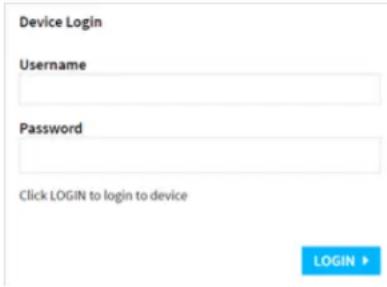
- Enter your username and password, and click Login.
Note If you did not change the username or password during initial setup, use the default username admin and the unique password printed on the device label. The device label is also attached to the bottom of the device.
The Dashboard appears. See Dashboard.
Log out of the web interface
- Click the Logout button in the upper right corner of the web interface.
Using the command line
Digi WR devices provide a command line interface that you can use to configure the device, display status and statistics, as well as update firmware and manage device files. See Command reference for details on all available commands.
In this guide, task topics show how to perform tasks:

Web
Shows how to perform a task using the web interface.

Command line
Shows how to perform a task using the command line interface.
Access the command line interface
You can access the Digi WR device using the serial port or an SSH connection. You can use open-source terminal software, such as PuTTY and TeraTerm.
Alternatively, you can open the command line interface in the web interface via the Device Console:
■ On the menu, click System > Device Console. The Device Console appears.
Log in to the command line interface
- Connect to the Digi WR device via the serial port or with an SSH connection.
■ For serial connections, the baud rate is 115200, 8 data bits, no parity, 1 stop bit, and no flow control.
■ For SSH connections, the default IP address of the device is 192.168.1.1.
- At the login prompt, enter the username and password. The default username is admin. The unique password for your device is printed on the device label.
Username: admin
Password: **********
A welcome message appears, followed by the current access permission level for your username and the timeout for the command session, followed by the system command prompt.
Welcome admin
Access Level: super
Timeout : 3600 seconds
digi.router>
Exit the command line interface
Enter the exit command.
Execute a command from the web interface
On the menu, click System > Device console. The device console appears.
digi.router>
Display command and parameter help using the ? character
The question mark (?) character can display help text for all commands, individual commands, and command parameters.
- To display the currently supported list of commands for the device, type the question mark (?) character after the system prompt:
digi.router> ?
- To display help for a specific command, enter the command followed by the question mark (?) character. For example, to get help for the eth command, enter:
digi.router> eth ?
Configures an Ethernet interface
Syntax:
eth <1 - 4> <parameter> <value>
Available Parameters:
Parameter Description
-
description Ethernet interface description
duplex    Ethernet interface duplex mode
mtu    Ethernet interface MTU
speed    Ethernet interface speed
state    Enables or disables Ethernet interface
digi.router> eth
- To display help on parameters, enter the command, the interface number as needed, and parameter name, followed by the ? character. For example, to display help for the eth command speed parameter, enter:
digi.router> eth 1 speed ?
Syntax : eth 1 speed <value>
Description : Ethernet interface speed
Current Value : auto
Valid Values : auto, 10, 100, 1000
Default value : auto
digi.router> eth 1 speed
To use the ? character in a parameter value, enclose it within " characters. For example, to display the help text for the system command's description parameter:
digi.router> system 1 description ?
To set the system command description parameter to ?:
digi.router> system 1 description "?"
Revert command settings using the ! character
To revert command settings to their defaults, use the exclamation mark (!) character.
To revert the default setting of the interfaces parameter on the lan command, enter:
digi.router> lan 1 interfaces !
To use the ! character in a parameter value, enclose it within " characters. For example, to reset the Wi-Fi SSID to the default (blank):
wifi 1 ssid !
To set the Wi-Fi SSID to !abc:
wifi 1 ssid "!abc"
Auto-complete commands and parameters
When entering a command and parameter, pressing the Tab key causes the command-line interface to auto-complete as much of the command and parameter as possible.
Auto-complete applies to these command elements only :
■ Command names. For example, entering cell
■ Parameter names. For example:
- ping int
auto-completes the parameter as interface - system loc
auto-completes the parameter as location.
■ Parameter values, where the value is one of an enumeration or an on|off type; for example, eth 1 duplex auto|full|half
Auto-complete does not function for:
■ Parameter values that are string types
■ Integer values
■ File names
■ Select parameters passed to commands that perform an action
Enter configuration commands
Configuration commands configure settings for various device features. Configuration commands have the following format:
<command> <instance> <parameter> <value>
Where
digi.router> eth 1 ip-address 10.1.2.3
For commands with only one instance, you do not need to enter the instance. For example:
digi.router> system timeout 100
Display status and statistics using show commands
The show commands display status and statistics for various features.
For example:
■ show config displays all the current configuration settings for the device. This is a particularly useful during initial device startup after running the Getting Started Wizard, or when troubleshooting the device.
■ show system displays system information and statistics for the device, including CPU usage.
■ show eth displays status and statistics for specific or all Ethernet interfaces.
■ show cellular displays status and statistics for specific or all cellular interfaces.
Enter strings in configuration commands
For string parameters, if the string value contains a space, the value must be enclosed in quotation marks; For example, to assign a descriptive name for the device using the system command, enter:
digi.router> system description "HQ router"
Interfaces
Digi WR devices have several physical communications interfaces. The available interfaces vary by device model. These interfaces can be bridged in a Local Area Network (LAN) or assigned to a Wide Area Network (WAN).
Ethernet interfaces 24
Cellular interfaces 28.
Wi-Fi interfaces 36.
Serial interface 48....
Ethernet interfaces
Ethernet interfaces can be used in LAN or WAN. There is no IP configuration set on the individual Ethernet interfaces. Instead, the IP configuration is set as part of configuring the LAN or WAN.
For more information on WANs, see Wide Area Networks (WANs).
For more information on LANs and their configuration, see About Local Area Networks (LANs).
Configure Ethernet interfaces
To configure an Ethernet interface, you must configure the following items:
Required configuration items
■ Enable the Ethernet interface. The Ethernet interfaces are all enabled by default. You can set the Ethernet interface to enabled or disabled.
■ Once configured, the Ethernet interface must be assigned to a LAN or a WAN. For more information, see About Local Area Networks (LANs) and Configure a LAN or Wide Area Networks (WANs) and Configure a Wide Area Network (WAN).
Additional configuration items
The following items are not required to configure a working Ethernet interface, but can be configured as needed:
■ A description of the Ethernet interface.
■ The duplex mode of the Ethernet interface. This defines how the Ethernet interface communicates with the device to which it is connected. The duplex mode defaults to auto, which means the Digi WR device negotiates with the connected device on how to communicate.
■ The speed of the Ethernet interface. This defines the speed at which the Ethernet interface communicates with the device to which it is connected. The Ethernet speed defaults to auto, which means it negotiates with the connected device as to what speed should be used.

Web
- On the menu, click Network > Interfaces > Ethernet.
- Select the Ethernet interface to configure.
-
In the Edit Selected box, enter the configuration settings:
■ State: Enable or disable the Ethernet interface. By default, all of the Ethernet interfaces are enabled.
■ Description: Optional: Enter a description for the Ethernet interface.
■ Speed: Optional: Select the speed for the Ethernet interface.
■ Duplex: Optional: Select the duplex mode for the Ethernet interface. -
Click Apply.

Command line
- Enable the Ethernet interface. By default, all of the Ethernet interfaces are enabled.
- Optional: Set the description for the Ethernet interface. For example:
- Optional: Set the duplex mode.
- Optional: Set the speed.
- Save the configuration.
digi.router> eth 1 state on
digi.router> eth 1 description "Connected to Ethernet WAN router"
digi.router> eth 1 duplex {auto | full | half}
digi.router> eth 1 speed {auto | 1000 | 100 | 10}
digi.router> save config
Show Ethernet status and statistics
You can view the status and statistics of Ethernet interfaces from either the Dashboard of the web interface, or from the command line:

Web
- On the menu, click Dashboard.
The Interface section of the dashboard shows the status of all interfaces. - Click on an interface, or click Network > Interfaces > Ethernet to view detailed status and statistics for each interface.

Command line
To show the status and statistics for the Ethernet interface, use the show eth command. For example:
digi.router> show eth
Eth Status and Statistics Port 1
Description : Factory default configuration for Ethernet 1
Admin Status : Up
Oper Status : Up
Up Time : 1 Day, 13 Hours, 30 Minutes, 23 Seconds
MAC Address : 00:50:18:21:E2:82
DHCP : off
IP Address : 10.52.19.242
Netmask : 255.255.255.0
DNS Server(s) :
Link : 1000Base-T Full-Duplex
Received Sent
Rx Unicast Packet : 6198 Tx Unicast Packet : 651
Rx Broadcast Packet : 316403 Tx Broadcast Packet : 2
Rx Multicast Packet : 442690 Tx Multicast Packet : 6
Rx CRC Error : 0 Tx CRC Error : 0
Rx Drop Packet : 0 Tx Drop Packet : 0
Rx Pause Packet : 0    Tx Pause Packet : 0
Rx Filtering Packet : 1 Tx Collision Event : 0
Rx Alignment Error : 0
Rx Undersize Error : 0
Rx Fragment Error : 0
Rx Oversize Error : 0
Rx Jabber Error : 0
Eth Status and Statistics Port 2
Description :
Admin Status : Up
Oper Status : Up
Up Time : 1 Day, 13 Hours, 30 Minutes, 23 Seconds
MAC Address : 00:50:18:21:E2:83
DHCP : off
IP Address : 10.2.4.20
Netmask : 255.255.255.0
DNS Server(s) :
Link : 100Base-T Full-Duplex
Received    Sent
----    ----
Rx Unicast Packet : 5531 Tx Unicast Packet : 2
Rx Broadcast Packet : 316403 Tx Broadcast Packet : 2
Rx Multicast Packet : 442694 Tx Multicast Packet : 2
Rx CRC Error : 0 Tx CRC Error : 0
Rx Drop Packet : 0 Tx Drop Packet : 0
Rx Pause Packet : 0    Tx Pause Packet : 0
Rx Filtering Packet : 0 Tx Collision Event : 0
Rx Alignment Error : 0
Rx Undersize Error : 0
Rx Fragment Error : 0
Rx Oversize Error : 0
Rx Jabber Error : 0
Eth Status and Statistics Port 3
Description :
Admin Status : Up
Oper Status : Up
Up Time : 1 Day, 13 Hours, 30 Minutes, 23 Seconds
MAC Address : 00:50:18:21:E2:84
DHCP : on
IP Address : 82.68.87.20
Netmask : 255.255.255.0
DNS Server(s) :
Link : 100Base-T Full-Duplex
Received Sent
Rx Unicast Packet : 5530 Tx Unicast Packet : 2
Rx Broadcast Packet : 316405 Tx Broadcast Packet : 2
Rx Multicast Packet : 442699 Tx Multicast Packet : 4
Rx CRC Error : 0 Tx CRC Error : 0
Rx Drop Packet : 0 Tx Drop Packet : 0
Rx Pause Packet : 0 Tx Pause Packet : 0
Rx Filtering Packet : 0 Tx Collision Event : 0
Rx Alignment Error : 0
Rx Undersize Error : 0
Rx Fragment Error : 0
Rx Oversize Error : 0
Rx Jabber Error : 0
Eth Status and Statistics Port 4
Description :
Admin Status : Up
Oper Status : Down
Up Time : 0 Seconds
MAC Address : 00:50:18:21:E2:85
DHCP : on
IP Address : Not Assigned
Netmask : Not Assigned
DNS Server(s) :
Link : No connection
Received Sent
Rx Unicast Packet : 0 Tx Unicast Packet : 0
Rx Broadcast Packet : 0 Tx Broadcast Packet : 0
Rx Multicast Packet : 0 Tx Multicast Packet : 0
Rx CRC Error : 0 Tx CRC Error : 0
Rx Drop Packet : 0 Tx Drop Packet : 0
Rx Pause Packet : 0 Tx Pause Packet : 0
Rx Filtering Packet : 0 Tx Collision Event : 0
Rx Alignment Error : 0
Rx Undersize Error : 0
Rx Fragment Error : 0
Rx Oversize Error : 0
Rx Jabber Error : 0
digi.router>
Cellular interfaces
Depending on the model, Digi WR devices can support one or two cellular modules, and each module supports two SIMs. This means that a Digi WR device can have either two or four cellular interfaces:
■ cellular1-sim1
■ cellular1-sim2
■ cellular2-sim1 (only on models with two cellular modules)
■ cellular2-sim2 (only on models with two cellular modules)
Each cellular module can have only one interface up at any one time (for example, cellular module 1 can have either SIM1 or SIM2 up at one time). Cellular interface priority is determined by how the cellular interfaces are assigned to the WAN interface.
Typically, an administrator would configure cellular1-sim1 as the primary cellular interface and cellular1-sim2 as the backup cellular interface. In this way, if the device cannot connect to the network using cellular1-sim1, it automatically fails over to cellular1-sim2. Digi WR devices automatically use the correct cellular module firmware for each carrier when switching SIMs.
A device that has two cellular modules can have two cellular interfaces up at one time—one for each module. Typically, an administrator would route traffic to different destinations over a specific cellular interface.
For more information on WAN interfaces and their configuration, see Wide Area Networks (WANs).
Configure cellular interfaces
Required configuration items
■ Access Point Name (APN): The APN is specific to your cellular service.
■ APN username and password: Depending on your cellular service, you may need to configure an APN username and password. This information is provided by your cellular provider.
■ WAN assignment: Once configured, if the cellular interface is not already assigned to a WAN interface, assign it to a WAN interface. For more information, see Wide Area Networks (WANs).
Additional configuration items
See Interfaces—cellular page for a complete list of configuration options.

Web
- On the menu, click Network > Interfaces > Cellular.
- Select the cellular interface to edit (Cellular 1 or Cellular 2, and then select the SIM you want to configure, for example SIM1 or SIM2.
- In the Edit Selected box, provide configuration settings for the cellular interfaces. See Interfaces—cellular page for details.
- Click Apply.

Command line
- Configure an APN.
- If necessary, enter the APN username and password.
- If necessary, enter the PIN for the SIM.
- Optional: Set the preferred mode.
- Optional: Set a description for the cellular interface.
- Optional: Configure the number of connection attempts. For example, to set the number of attempts to 10, enter:
- Save the configuration.
digi.router> cellular 1 sim1-apn your-apn
digi.router> cellular 1 sim1-apn-username your-apn-username
digi.router> cellular 1 sim1-apn-password your-apn-password
digi.router> cellular 1 sim1-pin your-sim-pin
digi.router> cellular 1 sim1-preferred-mode 3g
digi.router> cellular 1 description "AT&T Connection"
digi.router> cellular 1 sim1-connection-attempts 10
digi.router> save config
Show cellular status and statistics
You can view a summary status for all cellular interfaces, or view detailed status and statistics for a specific cellular interface, from either the web interface or the command line:

Web
- On the menu, click Dashboard.
The Interface section of the dashboard shows the summary status of all interfaces. - Click on an interface, or click Network > Interfaces > Cellular to view detailed status and statistics for each interface.

Command line
Show summary status for cellular interfaces
To show the status and statistics for a cellular interface, use the show cellular command. See show cellular for a description of the output fields.
digi.router> show cellular
SIM Status APN Signal Quality PIN Status
1-1 Up broadband Excellent (-67dB) No PIN required
1-2 Down    No PIN required
2-1 Down 12655.mcs Good (-90dB) No PIN required
2-2 Down    No PIN required
digi.router>
Show detailed status and statistics for a cellular interface
To show the status and statistics for a particular cellular interface, enter show cellular and specify the cellular module for which you want to show status.
digi.router> show cellular 1
Cellular Status and Statistics
Oper status : Up
SIM status : Using SIM2 (Ready)
SIM1 PIN : PIN is OK
SIM2 PIN : PIN is OK
Signal strength : Fair (-108dB)
Signal quality : Fair to Poor (-14dB)
Module : Telit LM940
Firmware version : 24.01.501 / Verizon 24.01.521
Hardware version : 0.04
Temperature : 35C
IMEI : 354375090000272
IMSI : 311480264298668
ICCID : 89148000002636797356
Registration status : Registered
Attachment status : Attached
Phone number : 6122973200
Network provider : Verizon
PLMN : 311480
Location : TAC = 3802 CID = DACB03
Roaming Status : Home
Connection type : 4G
Radio Technology : LTE
Preferred Technology : Automatic
Band : B13
Channel : 5230
APN in use : Context 3: vzwinternet
IP address : 100.103.109.8
Mask : 255.255.255.240
Gateway : 100.103.109.9
DNS Servers : 198.224.186.135, 198.224.187.135
TX Bytes : 1440
RX Bytes : 890
digi.router>
Unlock a SIM card
A SIM card can be locked if a user tries to set an invalid PIN for the SIM card too many times. In addition, some cellular carriers require a SIM PIN to be added before the SIM card can be used. If the SIM card is locked, the device cannot make a cellular connection.

Command line
To unlock a SIM card:
- Use the show cellular command to see the status of a SIM card. In the show cellular output, look for the fields SIM1 PIN status, SIM2 PIN status, and SIM status.
- Use the unlock command to set a new PIN for the SIM card using the following syntax:
unlock <sim1 | sim2> <puk code> <new sim pin>
For example, to unlock a SIM card in SIM slot SIM 1 with PUK code 12345678, and set the new SIM PIN to 1234:
digi.router> unlock sim1 12345678 1234
- Save the configuration.
digi.router> save config
Note If the SIM remains in a locked state after using the unlock command, contact your cellular carrier.
Specify the cellular MTU
The Maximum Transmission Unit (MTU) determines the largest packet size that a network can transmit. The default MTU settings for cellular interfaces with Digi WR devices is:
■ Verizon: 1428 bytes.
■ AT&T and other carriers: 1430 bytes.
You can change the default MTU for your carrier by creating a file on the Digi WR device, named carrier_mtu_list.txt, that uses the format:
<h1 id="default-is-1430">default is 1430</h1>
<h1 id="carrier-mtu">Carrier mtu</h1>
carrier MTU
where:
■ carrier is one of:
• VERIZON
- ATT
- GENERIC
■ MTU is the MTU, in bytes, that should be used.
For example:
<h1 id="default-is-1430-2">default is 1430</h1>
<h1 id="carrier-mtu-2">Carrier mtu</h1>
VERIZON 1360
To create the carrier_mtu_list.txt file:

Web
- Confirm that you have the most recent cellular modem firmware installed. See Update cellular module firmware.
-
On an external host, create the carrier_mtu_list.txt file as specified above.
-
Upload the carrier_mtu_list.txt file to the Digi WR device:
a. On the menu, click System > Administration > File System. The File System page appears.
b. Click ↑.
c. Use the local file system to browse to the location of the file to upload. Select the file and click Open to start the upload.
d. A progress dialog appears. When the upload operation is complete, the file is displayed in the file list.
Note The file must be uploaded to the primary directory of the filesystem. Do not upload it to a sub-directory.

Command line
- Confirm that you have the most recent cellular modem firmware installed. See Update cellular module firmware.
- On an external host, create the carrier_mtu_list.txt file as specified above.
- Upload the carrier_mtu_list.txt file to the Digi WR device, using a utility such as Secure Copy (SCP) or SSH File Transfer Protocol (SFTP).
For example, to upload the file using SCP, use this syntax:
scp carrier_mtu_list.txt username@ip_address:carrier_mtu_list.txt
where:
- username is the name of the user on the Digi WR device.
■ ip_address is the IP address of the device.
Note The file must be uploaded to the primary directory of the filesystem. Do not upload it to a sub-directory.
Test the performance of your service provider
Your Digi WR device includes an lperf3 server that you can use to test the performance of your cellular providers.
This functionality is not available from the Web UI.

Command line
- Enable the lperf3 server:
digi-router> perf-server state on
digi-router>
- (Optional) Set the port that will be used for incoming connections to the Iperf3 server. The default port is 5102.
digi-router> perf-server port port-number
digi-router>
Signal strength and quality for 4G cellular connections
For 4G connections, the RSRP value determines signal strength. To view this value, enter the show cellular command.
Signal strength:
■ Excellent: > -90 dBm
■ Good: -90 dBm to -105 dBm
■ Fair: -106 dBm to -115 dBm
■ Poor: -116 dBm to -120 dBm:
■ No service: < -120 dBm
Signal quality:
■ Excellent > -9 dB
■ Good: -12 dB to -9 dB
■ Poor < < -12 dB
Signal strength and quality for 3G and 2G cellular connections
For 3G and 2G cellular connections, the current RSSI value determines signal strength. To view this value, enter the show cellular command.
Signal strength:
■ Excellent: > -70 dBm
■ Good: -70 dBm to -85 dBm
■ Fair: -86 dBm to -100 dBm
■ Poor: < -100 dBm to -109 dBm
■ No service: -110 dBm
Signal quality:
Interfaces Cellular interfaces
■ Excellent > -7 dB
■ Good: -10 dB to -7 dB
■ Poor < < -10 dB
Tips for improving cellular signal strength
If the signal strength LEDs or the signal quality for your device indicate Poor or No service, try the following things to improve signal strength:
■ Move the device to another location.
■ Try connecting a different set of antennas, if available.
■ Purchase a Digi Antenna Extender Kit:
• Antenna Extender Kit, 1m
• Antenna Extender Kit, 3m
Wi-Fi interfaces
Depending on the model, a Digi WR router has one or two Wi-Fi modules. You can configure a Wi-Fi module as either a Wi-Fi access point or a Wi-Fi client. By default, both Wi-Fi modules are configured as access points.
Typically, you configure one Wi-Fi module as one or multiple access points and configure the other module, connected to a separate set of antennas, as a Wi-Fi client to be used as a WAN interface.
Access point mode
If you configure a Wi-Fi module in access point mode, the module can support up to four access points. If both Wi-Fi modules are configured in access point mode, the router can support up to eight access points assigned the following names:
| Wi-Fi module Access point interfaces Client Supported protocols | |||
| Wi-Fi module 1 | wifi-ap1, wifi-ap2, wifi-ap3, wifi-ap4 | wifi-client1 | bgnac |
| Wi-Fi module 2 | wifi-ap5, wifi-ap6, wifi-ap7, wifi-ap8 | wifi-client2 | ac |
See Configure a Wi-Fi access point with no security and Configure a Wi-Fi access point with enterprise security
Client mode
If you configure a Wi-Fi module in client mode, you can configure one Wi-Fi client per module. The client for module 1 is Wi-Fi client 1; the client for module 2 is Wi-Fi client 2.
| Wi-Fi module | Client |
| Wi-Fi module 1 | Wi-Fi client 1 |
| Wi-Fi module 2 | Wi-Fi client 2 |
To use one of the modules as a WAN interface, configure the module as a client, configure the SSIDs for the Wi-Fi network(s) you would like the router to join, and then assign client to a WAN interface. See Configure a Wi-Fi client and add client networks.
Configure the Wi-Fi module channel
By default, each Wi-Fi module is configured to automatically select the best channel to use with respect to other Wi-Fi networks. Optionally, you can configure a specific channel to use for a Wi-Fi module by using the following steps.
Note For the 2.4 GHz band, only channels 1 to 11 are supported. Channels 12, 13, and 14 are not supported.

Web
- On the menu, click Network > Interfaces > Wi-Fi.
- Select a Wi-Fi module to configure, and set the Mode to Access Point.
- In the Edit Selected box, select the channel you want to configure. Only channels appropriate for the band are displayed.
- Click Apply.

Command line
To configure the channel used by a Wi-Fi module, use the wifi-module.
digi.router> wifi-module 1 mode access-point
digi.router> wifi-module 1 channel 8
digi.router> save config
Configure the Wi-Fi module band and protocol
For Wi-Fi modules that support both 2.4 GHz and 5 GHz modes, you can configure the band.
- On Digi WR models with only one Wi-Fi module, the default protocol and band for the one module is 5 GHz ac.
- On Digi WR models with two Wi-Fi modules, one module defaults to use 5 GHz ac and the other defaults to 2.4 GHz bgn.

Web
- On the menu, click Network > Interfaces > Wi-Fi.
- Select the Wi-Fi module you want to configure, and set the Mode to Access Point.
- Click Apply.
- In the Edit Selected box, select the band for the Wi-Fi module.
- Click Apply.

Command line
To configure the band and/or protocol used by a Wi-Fi module, use the wifi-module command.
digi.router> wifi-module 1 mode access-point
digi.router> wifi-module 1 protocol ac
digi.router> wifi-module 1 band 5g
digi.router> save config
Configure a Wi-Fi access point with no security
Required configuration items
■ Wi-Fi module mode
Configure the Wi-Fi module Mode as Access point.
■ Wi-Fi access point(s)
Configure up to four access points on each Wi-Fi module. For models with two Wi-Fi modules, access points 1-4 belong to module 1; access points 5-9 belong to module 2. For each access point:
- SSID:
You can configure the SSID to use the device's serial number by including %s in the SSID. For example, an SSID parameter value of %s-1 on a WR64 would resolve to an SSID similar to WR64-123456-1.
Note Multiple access points can have the same SSID.
- Security
Configure security for the access points(s) to None.
■ LAN assignment
Once you configure a Wi-Fi access point, you must assign the Wi-Fi access point to a LAN interface. For more information, see About Local Area Networks (LANs).
Additional configuration items
See Access point options for a complete list of configuration options.

Web
- On the menu, click Network > Interfaces > Wi-Fi.
- Select a Wi-Fi interface to configure and set the Mode to Access point.
- Click New Access Point to create a new access point interface on the module.
- Configure options for the access point. Specifically, select None for Security. See Access point options for details.
- Click Apply.
- Assign the new Wi-Fi access point to a WAN interface. See About Local Area Networks (LANs).

Command line
■ To configure a Wi-Fi module, use the wifi-module command.
■ To configure Wi-Fi access points, use the wifi-ap command.
- Configure the Wi-Fi module for access point mode.
digi.router> wifi-module 1 mode access-point
- Enter the SSID for the Wi-Fi access point.
digi.router> wifi-ap 1 ssid WR64-AP1
- Enter none for the security for the Wi-Fi access point.
digi.router> wifi-ap 1 security none
- Optional: Enter a description for the Wi-Fi access point.
digi.router> wifi-ap 1 description "Office AP"
- Optional: Disable broadcasting the SSID in beacon packets.
digi.router> wifi-ap 1 broadcast-ssid off
- Optional: Disable Wi-Fi client isolation mode.
digi.router> wifi-ap 1 isolate-clients off
- Optional: Disable Wi-Fi access point isolation mode.
digi.router> wifi-ap 1 isolate-ap off
- Save the configuration.
digi.router> save config
Configure a Wi-Fi access point with personal security
Required configuration items
■ Wi-Fi module mode Configure the Wi-Fi module Mode as Access point.
■ Wi-Fi access point(s) Configure up to four access points on each Wi-Fi module. For models with two Wi-Fi modules, access points 1-4 belong to module 1; access points 5-9 belong to module 2. For each access point:
- SSID: You can configure the SSID to use the device's serial number by including %s in the SSID. For example, an SSID parameter value of %s-1 on a WR64 would resolve to an SSID similar to WR64-123456-1.
Note Multiple access points can have the same SSID.
- Security Configure security for the access points(s) to WPA2 Personal or WPA/WPA2 Mixed Mode Personal.
- The shared password to be used for authenticating connections to the access point(s). The password must be between 8 and 63 ASCII characters, or 64 hexadecimal characters.
■ LAN assignment Once you configure a Wi-Fi access point, you must assign the Wi-Fi access point to a LAN interface. For more information, see About Local Area Networks (LANs).
Additional configuration options
See Access point options for a complete list of options.

Web
- On the menu, click Network > Interfaces > Wi-Fi.
- Select a Wi-Fi interface to configure and set the Mode to Access point.
- Click New Access Point to create a new access point interface on the module.
- Configure the access point as needed. Specifically, configure WPA2 Personal security and provide and verify the password. See Access point options for details.
- Click Apply.
- Assign the new Wi-Fi access point to a LAN interface. See About Local Area Networks (LANs).

Command line
■ To configure a Wi-Fi module, use the wifi-module command.
■ To configure Wi-Fi access points, use the wifi-ap command.
■ To assign an access point to a LAN, use the lan command.
- Configure the Wi-Fi module for access point mode.
digi.router> wifi-module 1 mode access-point
- Enter the SSID for the Wi-Fi access point.
digi.router> wifi-ap 1 ssid WR64-AP1
- Enter the type of security that will be used by the access point.
digi.router> wifi-ap 1 security wpa2-personal
- Enter the password for the access point.
digi.router> wifi-ap 1 password wifi-ap_password
- Optional: Enter a description for the Wi-Fi access point.
digi.router> wifi-ap 1 description "Office AP"
- Optional: Disable broadcasting the SSID in beacon packets.
digi.router> wifi-ap 1 broadcast-ssid off
- Optional: Disable Wi-Fi client isolation mode.
digi.router> wifi-ap 1 isolate-clients off
- Optional: Disable Wi-Fi access point isolation mode.
digi.router> wifi-ap 1 isolate-ap off
- Assign the access point to a configured LAN.
digi.router> lan 1 interface wifi-ap1
- Save the configuration.
digi.router> save config
Configure a Wi-Fi access point with enterprise security
The WPA2-Enterprise and WPA-WPA2-Enterprise security modes allow a Wi-Fi access point to authenticate connecting Wi-Fi clients using a RADIUS server.
When the Wi-Fi access point receives a connection request from a Wi-Fi client, it authenticates the client with the RADIUS server before allowing the client to connect.
Using enterprise security modes allows each Wi-Fi client to have different usernames and passwords configured in the RADIUS server rather than in the Digi WR device.
Required configuration items
■ Wi-Fi module mode
Configure the Wi-Fi module Mode as Access point.
■ Wi-Fi access point(s)
Configure up to four access points on each Wi-Fi module. For models with two Wi-Fi modules, access points 1-4 belong to module 1; access points 5-9 belong to module 2. For each access point:
- SSID:
You can configure the SSID to use the device's serial number by including %s in the SSID. For example, an SSID parameter value of %s-1 on a WR64 would resolve to an SSID similar to WR64-123456-1.
Note Multiple access points can have the same SSID.
- Security
Configure security for the access points(s) to WPA2 Enterprise or WPA/WPA2 Mixed Mode Enterprise.
- IP address of the RADIUS server to be used for authenticating connections to the access point(s).
- The shared secret for the RADIUS server.
■ LAN assignment
Once you configure a Wi-Fi access point, you must assign the Wi-Fi access point to a LAN interface. For more information, see About Local Area Networks (LANs).
Additional configuration items
See Access point options for a complete list of options.

Web
- On the menu, click Network > Interfaces > Wi-Fi.
- Click on the Wi-Fi module you want to configure, and set the Wi-Fi Mode to Access point.
- Click New Access Point or click on an existing access point.
- Configure the access point as needed. Specifically, configure WPA2 Enterprise security and provide the RADIUS server and shared secret information. See Access point options for details.
- Click Apply.
- Assign each Wi-Fi access point to a LAN. See About Local Area Networks (LANs).

Command line
■ To configure a Wi-Fi module, use the wifi-module command.
■ To create Wi-Fi access points, use the wifi-ap command.
■ To add the Wi-Fi client to a LAN, use the lan command.
- Configure the Wi-Fi module mode to access point:
digi.router> wifi-module 1 mode access-point
- Enter the SSID for the Wi-Fi access point.
digi.router> wifi-ap 1 ssid WR64-AP1
- Enter the type of security that will be used by the access point.
digi.router> wifi-ap 1 security wpa2-enterprise
- Enter the IP address of the RADIUS server.
digi.router> wifi-ap 1 radius-server 192.168.2.1
- Enter the RADIUS shared secret.
digi.router> wifi-ap 1 radius-password your-radius-password
- Optional: Enter the RADIUS server port.
digi.router> wifi-ap 1 radius-port 3001
- Optional: Enter a description for the Wi-Fi access point.
digi.router> wifi-ap 1 description "Office AP"
- Optional: Disable broadcasting the SSID in beacon packets.
digi.router> wifi-ap 1 broadcast-ssid off
- Optional: Disable Wi-Fi client isolation mode.
digi.router> wifi-ap 1 isolate-clients off
- Optional: Disable Wi-Fi access point isolation mode.
digi.router> wifi-ap 1 isolate-ap off
- Add the access point to a configured LAN:
digi.router> lan 1 interface wifi-ap1
- Save the configuration.
digi.router> save config
Show Wi-Fi access point status and statistics
You can show summary status for all Wi-Fi access points, and detailed status and statistics for individual Wi-Fi access points.

Web
- On the menu, click Dashboard. The Interface section of the dashboard shows the status of all interfaces. Click on the interface names to get detailed status and statistics.

Command line
Show summary of Wi-Fi access points
To show the status and statistics for Wi-Fi access points, use the show wifi-ap command.
| digi.router> show wifi-ap | ||||
| Interface Module Status SSID Security | ||||
| wifi-ap1 | 1 | Up | WR64-000073-1 | WPA2-Personal |
| wifi-ap2 | 1 | Down | WPA2-Personal | |
| wifi-ap3 | 1 | Down | WPA2-Personal | |
| wifi-ap4 | 1 | Down | WPA2-Personal | |
| wifi-ap5 | 2 | Up | WR64-000073-5 | WPA2-Personal |
| wifi-ap6 | 2 | Down | WPA2-Personal | |
| wifi-ap7 | 2 | Down | WPA2-Personal | |
| wifi-ap8 | 2 | Down | WPA2-Personal | |
| digi.router> | ||||
Show detailed status and statistics of a Wi-Fi access point
To show a detailed status and statistics of a Wi-Fi access point, enter show wifi-ap command.
| digi.router> show wifi-ap 1 | |||
| wifi-ap 1 Status and Statistics | |||
| Description | : | ||
| Admin Status | : Up | ||
| Oper Status | : Down | ||
| Channel | : 1 | ||
| Module | : 1 | ||
| SSID | : WR64-000073-1 | ||
| Security | : WPA2-Personal | ||
| Received | Sent | ||
| Rx Packets | : 8501 | Tx Packets | : 7178 |
| Rx Bytes | : 1512218 | Tx Bytes | : 1454265 |
| Rx Compressed | : 0 | Tx Compressed | : 0 |
| Rx Multicasts | : 0 | Tx Collisions | : 0 |
| Rx Errors | : 0 | Tx Errors | : 0 |
| Rx Dropped | : 0 | Tx Dropped | : 0 |
| Rx FIFO Errors | : 0 | Tx FIFO Errors | : 0 |
| Rx CRC Errors | : 0 | Tx Aborted Errors | : 0 |
| Rx Frame Errors | : 0 | Tx Carrier Errors | : 0 |
Rx Length Errors : 0 Tx Heartbeat Errors : 0
Rx Missed Errors : 0 Tx Window Errors : 0
Rx Over Errors : 0
Connected Clients
MAC Address Connection Time RSSI Rate
64:80:99:eb:72:d3 0h 2m 38s -75 dBm 81.0 Mbps
ec:9b:f3:bf:91:d2 0h 0m 20s -66 dBm 24.0 Mbps
digi.router>
Configure a Wi-Fi client and add client networks
Required configuration items
■ Wi-Fi module mode
Configure the Wi-Fi module Mode as Client.
■ Wi-Fi client networks
Add up to 16 client networks per router. For each client network:
SSID: Provide the SSID of the access point to which you want to connect.
Security: Provide the security type for the SSID. For personal security modes, you need to enter only a password; for enterprise modes, you need to enter both the username and password.
■ WAN assignment
Once you configure a Wi-Fi client, you must assign the Wi-Fi client to a WAN. See Wide Area Networks (WANs).
Additional configuration items
■ Wi-Fi client: Using the command line only, you can configure custom values for RSSI thresholds and other options. See wifi-client command.
■ Wi-Fi client networks: Some access points hide (do not broadcast) their SSID. In this case, enable the Hidden SSID option and the client will send out probes for the SSID when scanning. In general, for both security and performance issues, Digi recommends you do not enable the Hidden option.
See Interfaces—Wi-Fi page for a complete list of Wi-Fi interface configuration options.

Web
- On the menu, click Network > Interfaces > Wi-Fi.
- Click on the Wi-Fi module you want to configure:
Set the Mode to Client.
Optional: Enter a description for the Wi-Fi module. -
Click Apply.
-
Add or edit Wi-Fi client networks. For each:
SSID: Enter the SSID for the client network.
Optional: If needed, provide the SSID security type and then provide credentials for the SSID.
Optional: If you want to scan for a hidden SSID, enable the Hiden SSID under the Advanced options.
See Client mode options for detailed option descriptions.
-
When you have finished adding Wi-Fi networks for the client, click Apply.
-
Assign the new Wi-Fi client to a WAN interface. See Wide Area Networks (WANs).

Command line
■ To configure a Wi-Fi module, use the wifi-module command.
■ To customize options for a Wi-Fi client, use the wifi-client command.
■ To configure Wi-Fi client networks for a Wi-Fi client, use the wifi-client-network command.
■ To add the Wi-Fi client to a WAN, use the wan command.
- Configure the Wi-Fi module for client mode. For example, to set Wi-Fi module 1 to client mode:
digi.router> wifi-module 1 mode client
- Optional: Customize options for the Wi-Fi client. For Wi-Fi module 1, the client is Wi-Fi client 1; for Wi-Fi module 2, the client is Wi-Fi client 2.
digi.router> wifi-client <1 - 2> <parameter> <value>
- Add Wi-Fi client networks to the Wi-Fi client. For example:
digi.router> wifi-client-network 1 wifi-client 1
digi.router> wifi-client-network 1 ssid <ssid>
digi.router> wifi-client-network 1 security wpa-wpa2-personal
digi.router> wifi-client-network 1 password <password>
digi.router> wifi-client-network 1 hidden-network on

digi.router> wifi-client-network 2 wifi-client 1
digi.router> wifi-client-network 2 ssid <ssid>
digi.router> wifi-client-network 2 security wpa-wpa2-enterprise
digi.router> wifi-client-network 2 enterprise-username <enterprise_username>
digi.router> wifi-client-network 2 enterprise-password <enterprise-password>
- Add the Wi-Fi client to a configured WAN:
digi.router> wan 1 interface wifi-client1
- Save the configuration.
digi.router> save config
Show Wi-Fi client status and statistics
You can show summary status for all Wi-Fi clients, and detailed status and statistics for individual Wi-Fi clients.

Web
- On the menu, click Dashboard. The Interface section of the dashboard shows the status of all interfaces. Click on the interface names to get detailed status and statistics.

Command line
Show summary of Wi-Fi access points
To show the status and statistics for Wi-Fi clients, use the show wifi-client command.
digi.router> show wifi-client
Show detailed status and statistics of a Wi-Fi client
To show a detailed status and statistics of a Wi-Fi client, enter show wifi-client command along with the interface you want to show.
digi.router> show wifi-client 1
Serial interface
Digi WR devices have a single serial port that provides access to the command-line interface.
Additionally, the devices support the use of USB to serial adapters that have Prolific or FTDI chipsets. USB to serial adapters can be accessed via the Python PySerial module at the follow ports:
■ WR54:
• /dev/ttyUSBSerial1
■ WR64:
- Lower rear USB port: /dev/ttyUSBSerial1
• Upper rear USB port: /dev/ttyUSBSerial2
The front USB port of the WR64 is not supported with USB to serial adapters.
Configure the serial interface
By default, the serial interface is enabled. To change serial configuration settings, use the serial command.

Command line
Disable the serial interface
| digi.router> serial state off |
| digi.router> save config |
Enable CLI access for the serial interface
| digi.router> | serial state cli |
| digi.router> | save config |
Enable PySerial access for the serial interface
| digi.router> | serial state python |
| digi.router> | save config |
Enter a description for the serial interface
| digi.router> serial description "Command line access" |
| digi.router> save config |
Set the baud rate
For example, to set the baud rate to 9600, enter:
| digi.router> | serial baud 9600 |
| digi.router> | save config |
Set the data bits
For example, to set the data bits to 7, enter:
| digi.router> serial databits 7 |
| digi.router> save config |
Set the stop bits
For example, to set the stop bits to 2, enter:
digi.router> serial stopbits 2
digi.router> save config
Set the parity
For example, to set the parity to odd, enter:
digi.router> serial parity odd
digi.router> save config
Set the flow control
For example, to set the flow control to hardware, enter:
digi.router> serial flowcontrol hardware
digi.router> save config
Show serial status and statistics
To show the status and statistics for the serial interface, use the show serial command.
For example:
digi.router> show serial
Serial 1 Status
----
Description :
Admin Status : CLI
Oper Status : up
Uptime : 0:07:05
Tx Bytes : 4038
Rx Bytes : 81
Overflows : 0
Overruns : 0
Line status : RTS|CTS|DTR|DSR|CD0
digi.router>
Local Area Networks (LANs)
About Local Area Networks (LANs). 51
Configure a LAN.52
Show LAN status and statistics 53.
Delete a LAN 55
DHCP servers 55
About Local Area Networks (LANs)
A Local Area Network (LAN) connects network interfaces together, such as Ethernet or Wi-Fi, in a logical Layer-2 network. You can configure up to 10 LANs.
The diagram shows a LAN connecting the eth2, eth3, and eth4 interfaces for a LR54 unit. Once the LAN is configured and enabled, the devices connected to the network interfaces can communicate with each other, as demonstrated by the ping commands.
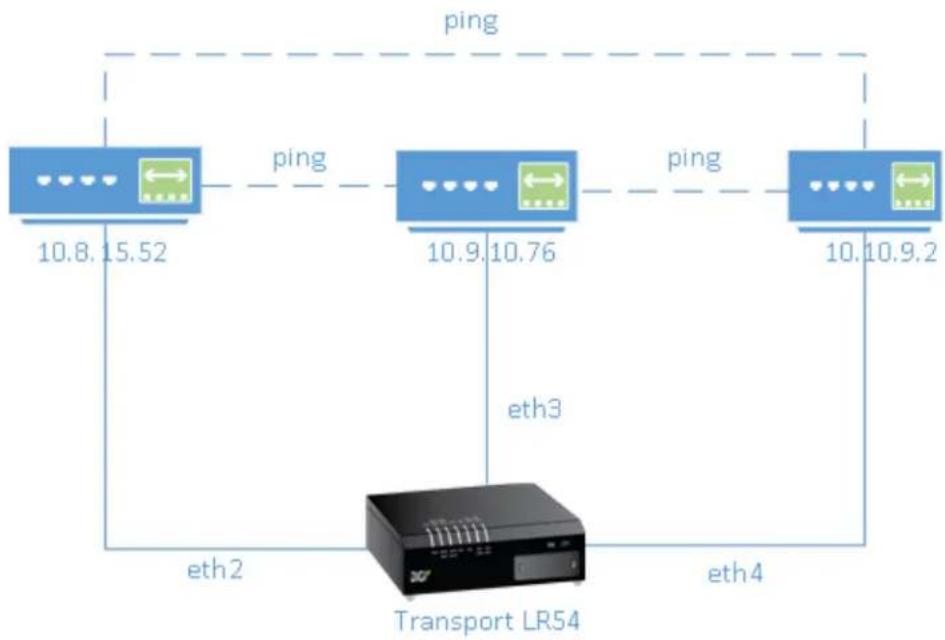
flowchart
graph TD
    A["Switch 1: 10.8.15.52"] -->|ping| B["Switch 2: 10.9.10.76"]
    B -->|ping| C["Switch 3: 10.10.9.2"]
    C -->|eth3| D["Transport LR54"]
    D -->|eth2| A
    D -->|eth4| C
Configure a LAN
Configuring a Local Area Network (LAN) involves configuring the following items:
Required configuration items
■ Identifying which interfaces are in the LAN.
■ Enabling the LAN. LANs are disabled by default.
- Setting an IPv4 address and subnet mask for the LAN. While it is not strictly necessary for a LAN to have an IP address, if you want to send traffic from other networks to the LAN, you must configure an IP address.
Note By default, LAN 1 is set to an IP address of 192.168.1.1 and uses the IP subnet of 192.168.1.0/24. If the WAN 1 Ethernet interface is being used by LAN 1 and uses the same IP subnet, you should change the IP address and subnet of LAN1.
■ If you want to use IPv6 addressing for the LAN, you need to enable the LAN interface instance for IPv6 and configure several other settings. See Configure a LAN for IPv6.
Additional configuration items
■ Enable Spanning Tree Protocol (STP).
■ Setting a descriptive name for the LAN.
■ Setting the Maximum Transmission Unit (MTU), or packet size, for packets sent over the LAN. For IPv6, the minimum MTU must be 1280.

Web
To create a new LAN:
- On the menu, click Network > Networks > LANs. The LANs page appears.
- Click New Network. See Local Networks page for field descriptions.
- In the IPv4 group, set the IP address and netmask:
IP address: Enter the IPv4 address for the LAN.
Netmask: Enter the subnet mask for the LAN. -
For Enable DHCP Server, select one of the following:
■ Off — Disables all DCHP server functionality.
■ Server — Enables the device's DHCP server. For IP Start and IP End, enter the range of IP addresses for the IP addresses pool that the DHCP server will use. Also optionally enter the amount of time in minutes that the DCHP lease will expire. See DHCP servers for more information about DHCP server support.
■ Relay — Disables the device's DHCP server and enables DHCP relay. For Primary and Secondary Relay Server, enter the IP addresses of the primary and secondary DHCP relay servers. See DHCP relay for more information. -
In the IPv6 group, configure IPv6. See Configure a LAN for IPv6.
-
In the Advanced group, enter the Maximum Transmission Unit (MTU), or packet size, for packets sent over the LAN.
- Click Apply. The new LAN is added to the LAN page.
Command line
- Set the interfaces in the LAN. For example, to include eth2, eth3, and eth4 interfaces in lan1, enter:
digi.router> lan 1 interfaces eth2,eth3,eth4
- Enable the LAN. For example, to enable lan1:
digi.router> lan 1 state on
- Optional: Set an IPv4 address for the LAN.
digi.router> lan 1 ip-address 192.10.8.8
- Optional: Set a subnet mask for the LAN.
digi.router> lan 1 mask 255.255.255.0
- Optional: Enable Spanning Tree Protocol (STP) for the LAN. STP is used when multiple LANs are configured on the same device, to prevent bridge loops and other routing conflicts.
digi.router> lan 1 stp on
- Optional: Give a descriptive name to the LAN.
digi.router> Ian 1 description ethlan
- Optional: Set the MTU for the LAN.
digi.router> lan 1 mtu 1500
- Save the configuration.
digi.router> save config
Show LAN status and statistics
You can view status and statistics for all LANs from either the Dashboard of the web interface, or from the command line:
Web
- From the menu, click Dashboard. The Network Activity panel LAN section shows the total bytes received and sent over all LANs, and the LAN panel shows the configured LANs and their states.
- Click a LAN to display additional status information, or to configure a LAN.

Command line
To show the status and statistics for a LAN, use the show lan command. For example, here is show lan output for a LAN on which IPv6 is enabled:
digi.router> show lan 1
LAN 1 Status and Statistics
----
Admin Status : Up
Oper Status : Up
Description : Ethernet and Wi-Fi LAN network
Interfaces : eth3
MTU : 1500
IP Address : 192.168.1.1
Mask : 255.255.255.0
IPv6 Address(es) : fe80::47/64 (Link local)
2001::1234:23:47:1/64 (Global)
Received Sent
----
Packets 0 137
Bytes 0 15026
digi.router>
If IPv6 were disabled on this LAN, the show lan output looks like this:
digi.router> show lan 1
LAN 1 Status and Statistics
----
Admin Status : Up
Oper Status : Up
Description : Ethernet and Wi-Fi LAN network
Interfaces : eth3
MTU : 1500
IP Address : 192.168.1.1
Mask : 255.255.255.0
IPv6 is disabled on this interface
Received Sent
----
Packets 0 209
Bytes 0 22946
digi.router>
Delete a LAN
Deleting a LAN involves removing the physical interface associations from the LAN, thereby disabling the LAN. The definition for the LAN still exists in the device configuration, but it has no active physical interface.

Web
- On the menu, click Network > Networks > LANs. The LANs page appears.
- On the LANs page, select the LAN to delete.
- Click Delete.

Command line
Use the lan command and specify! for the interfaces parameter value to set it to none:
lan <lan-number> interfaces !
DHCP servers
You can enable DHCP on a Digi WR device to assign IP addresses to clients, using either:
■ The DHCP server for the device's local network, which assigns IP addresses to clients on the device's local network. Addresses are assigned from a specified pool of IP addresses. For a local network, the device uses the DHCP server that has the IP address pool in the same IP subnet as the local network.
When a host receives an IP configuration, the configuration is valid for a particular amount of time, known as the lease time. After this lease time expires, the configuration must be renewed. The host renews the lease time automatically.
You can configure up to 10 DHCP servers, one for each local network.
■ A DHCP relay server, which forwards DHCP requests from clients to a DHCP server that is running on a separate device.
Configure a DHCP server
To configure a DHCP server, you need to configure the following:
Required configuration items
■ Enable the DHCP server.
■ DHCP method:
- If the device is being configured to use its local DHCP server:
- The IP address pool: the range of IP addresses issued by the DHCP server to clients.
Note If you set DHCP server values and find that they are not being served to your DHCP clients, review the LAN configuration in the Local Networks page to make sure that the specified IP Start and IP End values match the corresponding IPv4 and Netmask settings for the interface.
- If the device is being configured to use a DHCP relay server, see DHCP relay.
■ The IP network mask given to clients.
■ The IP gateway address given to clients.
■ The IP addresses of the preferred and alternate Domain Name Server (DNS) given to clients.
Additional configuration items
■ Lease time: The length, in minutes, of the leases issued by the DHCP server.

Web
In the web interface, the DHCP server is configured as part of configuring a LAN on the Local Networks page. See Configure a LAN.

Command line
Note This instructions assume you are configuring the device to use its local DHCP server. For instructions about configuring the device to use a DHCP relay server, see DHCP relay.
- Enable the DHCP server. By default, the DHCP server is disabled.
digi.router> dhcp-server 1 state server
- Enter the starting address of the IP address pool:
digi.router> dhcp-server 1 ip-address-start 10.30.1.150
- Enter the ending address of the IP address pool:
digi.router> dhcp-server 1 ip-address-end 10.30.1.195
- Enter the network mask:
digi.router> dhcp-server 1 mask 255.255.225.0
- Enter the IP gateway address given to clients:
digi.router> dhcp-server 1 gateway 10.30.1.1
- Enter the preferred DNS server address given to clients:
digi.router> dhcp-server 1 dns1 10.30.1.1
- Enter the alternate DNS server address given to clients:
digi.router> dhcp-server 1 dns2 209.183.48.11
- Enter the lease time:
digi.router> dhcp-server 1 lease-time 60
- Save the configuration.
digi.router> save config
Map static IP addresses to hosts
Using the dhcp-host command, you can configure the DHCP server to assign static IP addresses to specific hosts. Up to 32 static IP addresses can be assigned.
Required configuration items
■ IP address that will be mapped to the device.
■ MAC address of the device.

Command line
Static IP address mapping is available at the command line only.
1. Assign the MAC address of the host. For example:
    digi.router> dhcp-host 1 mac-address 00:50:18:21:E2:82
2. Assign an IP address to the host. For example:
    digi.router> dhcp-host 1 ip-address 192.168.1.2
3. Repeat for each additional host, using a unique number for the dhcp-host entry. Up to 32 hosts can be configured. For example:
    digi.router> dhcp-host 2 mac-address 00:50:18:21:E2:83
    digi.router> dhcp-host 2 ip-address 192.168.1.3
4. Save the configuration:
    digi.router> save config
View current static IP mapping
To view your current static IP mapping, type the dhcp-host command with no parameters:
digi.router> dhcp-host
dhcp-host 1:
ip-address 192.168.1.2
mac-address 00:50:18:21:E2:82
dhcp-host 2:
ip-address 192.168.1.3
mac-address 00:50:18:21:E2:83
dhcp-host 3:
ip-address
mac-address
dhcp-host 4:
ip-address
mac-address
--More--
Delete static IP mapping entries
To delete a static IP entry, type the following:
digi.router> dhcp-host 1 ip-address !
digi.router> save config
Configure DHCP options
You can configure DHCP servers running on your Digi WR device to send certain specified DHCP options to DHCP clients. You can also set the user class, which enables you to specify which specific DHCP clients will receive the option. You can also force the command to be sent to the clients.
DHCP options can be set on a per-LAN basis, or can be set for all LANs. A total of 32 DHCP options can be configured.
Required configuration items
■ DHCP option number.
■ Value for the DHCP option.
Additional configuration items
■ The user class to specify the DHCP clients for the option.
■ The LAN interface, which limits the DHCP option to the DHCP server running on the specified LAN interface.
■ Force the option to be sent to the DHCP clients.

Command line
DHCP option configuration is available at the command line only.
- Set the DHCP option and value. For example, to create a static route for the client, use option 32:
digi.router> dhcp-option 1 option 32
-
Set the value for the DHCP option: digi.router> dhcp-option 1 value 192.168.1.100,192.168.1.1
-
(Optional) Define the LAN to which this option applies. The default is "all." digi.router> dhcp-option 1 lan lan1
-
(Optional) Set the user class to which this option applies: digi.router> dhcp-option 1 user-class Engineering
-
(Optional) Force the option to be sent to the DHCP clients. digi.router> dhcp-option 1 force on
-
Save the configuration: digi.router> save config
View current DHCP option configuration
To view your current DHCP option configuration, type the dhcp-option command with no parameters:
digi.router> dhcp-option

dhcp-option 1:
force on
lan lan1
option 33
user-class Engineering
value 192.168.1.100,192.168.1.1

dhcp-option 2:
force off
lan all
option 0
user-class
value

dhcp-option 3:
force off
lan all
option 0
user-class
value

--More--
Show DHCP server settings
View DHCP status to monitor which network devices have been given IP configuration by the Digi WR device, and to diagnose DHCP issues.

Web
- On the menu, click Network > Networks > LANs. The LANs page appears.
- Select a LAN.
- Expand the DHCP Server group to view the current DHCP configuration. The Enable DHCP Server option indicates whether the DHCP server is Off, Server, or Relay.

Command line
To show the status of the DHCP server, use the show dhcp command. For example:
digi.router> show dhcp
DHCP Status
IP address Hostname MAC Address Lease Expires At
192.168.123.123 IKY-CMS-JPINKN1 38:ea:a7:fd:de:cd 16:32:16, 14 Sep 2016
192.168.123.124 IKY-CMS-BOB 38:ea:a7:fd:a3:22 18:21:06, 14 Sep 2016
digi.router>
DHCP relay
DHCP relay allows a router to forward DHCP requests from one LAN to a separate DHCP server, typically connected to a different LAN.
For Digi WR devices, DHCP relay is configured by providing the IP address of a DHCP relay server, rather than an IP address range. If both the DHCP relay server and an IP address range are specified, DHCP relay is used, and the specified IP address range is ignored.
Up to two DHCP relay servers can be provided for each LAN: a primary and secondary relay server. If two relay servers are provided, DHCP requests are forwarded to both servers without waiting for a response. Clients will typically use the IP address from the first DHCP response received.
Configure DHCP relay
Configuring DHCP relay involves the following items:
Required configuration items
■ IP address of the primary DHCP relay server, to define the relay server that will respond to DHCP requests.
Additional configuration items
■ IP address of a secondary DHCP relay server.
Define DHCP relay servers

Web
- On the menu, click Network > Networks > LANs.
The Local Networks (LAN)page appears. - Click New Network or click an existing network to define DHCP relay servers for the network.
- Expand the DHCP Server group.
- For Enable DHCP Server, select Relay.
- In Primary Relay Server, type the IP address of the DHCP server that will serve as the primary DHCP relay server.
- (Optional) In Secondary Relay Server, type the IP address of the secondary DHCP relay server.
- Click Apply

Command line
To define DHCP relay servers, use the dhcp-server command. For example:
- Configure the LAN that DHCP clients will connect to, if it is not already configured:
digi.router> lan 1 ip-address 10.251.99.1
digi.router> lan 1 state on
For more information, see Configure a LAN.
- Enable DHCP relay server:
digi.router> dhcp-server 1 state relay
By enabling DHCP relay, you are disabling the device's local DHCP server, and any IP range that is configured will be ignored.
- Define the IP address of the DHCP server that will serve as the primary DHCP relay server:
digi.router> dhcp-server 1 relay-server1 192.168.1.1
- (Optional) Define the IP address of the DHCP server that will serve as the primary DHCP relay server:
digi.router> dhcp-server 1 relay-server2 192.168.1.2
- Save the configuration:
digi.router> save config
DHCP relay server failure
When a DHCP relay server is being used and connecting devices are unable to obtain an IP address because the IP address is not accessible or there is a subnet conflict, a message will appear in the system log similar to the following:
daemon.warning dnsmasq-dhcp[5446]: no address range available for DHCP request via lan1
If the device successfully forwards a DHCP request but does not receive a reply from the DHCP server, a static route may be required on the DHCP server's host to route the reply back to the device.
Wide Area Networks (WANs)
A Wide Area Network (WAN) provides connectivity to the internet or a remote network. A WAN configuration consists of the following:
■ A physical interface, such as Ethernet or cellular
■ Several networking parameters for the WAN, such as IP address, mask, and gateway
■ Several parameters controlling failover
Using Ethernet interfaces in a WAN
Digi WR devices support four Ethernet interfaces, named WAN/ETH1, ETH2, ETH3, and ETH4. You can use Ethernet interfaces as a WAN when connecting to the Internet, through a device such as a cable modem:

flowchart
graph LR
    A["Wi-Fi 9.0"] -->|WAN/ETH1| B["Cable"]
    B --> C["INTERNET"]
By default, the WAN/ETH1 interface is configured as a WAN with both DHCP and NAT enabled. This means you should be able to connect to the Internet by connecting the WAN/ETH1 interface to a device that already has an internet connection.
The ETH2, ETH3, and ETH4 interfaces are by default configured as a Local Area Network (LAN). If necessary, you can assign these Ethernet interfaces to a WAN. For more information on Ethernet interfaces and their configuration, see Ethernet interfaces.
Using cellular interfaces in a WAN
Depending on the model, Digi WR devices can support one or two cellular modules, and each module supports two SIMs. This means that a device can have either two or four cellular interfaces:
■ cellular1-sim1
■ cellular1-sim2
■ cellular2-sim1 (only on models with two cellular modules)
■ cellular2-sim2 (only on models with two cellular modules)
To use a cellular interface as a WAN, the cellular interface must be configured to connect to the cellular network. See Cellular interfaces for more information.
WAN priority and default route metrics
You can configure up to 10 WANs, named wan1, wan2, wan3, and so on. The WAN number determines the priority: wan1 is the highest priority, wan2 is the second highest priority, and so on.
When a WAN comes up, the device automatically adds a default IP route for the WAN. The metric of the default route is based on the priority of the WAN. For example, because wan1 is the highest priority WAN, the default route for wan1 has a metric of 1, and the default route for wan2 has a metric of 2, and so on.
WAN failover
If a connection to a WAN interface is lost for any reason, the Digi WR device will immediately fail over to the next WAN interface. Two parameters govern the behavior that occurs during the failover operation:
■ The WAN interface's Timeout parameter determines how long the device will attempt to connect to the WAN interface before it assumes the interface is unavailable and fails over to the next WAN interface. Note that once the device has successfully connected to the WAN and then the connection is lost, it will immediately fail over to the next WAN, regardless of the Timeout parameter.
■ The WAN interface's Retry After parameter determines how long the device will wait before attempting to connect to the interface again.
For example, if you configure the WAN1 interface to have a Timeout of 300 seconds and a Retry After of 1500 seconds:
- When the device is restarted, it will attempt to connect to WAN1. If the device fails to connect to WAN1 after 300 seconds (the value of WAN1's Timeout parameter), it will stop attempting to connect to WAN1 and attempt to connect to WAN2. The device will then wait for 1500 seconds (the value of WAN1's Retry After parameter) before attempting to connect to WAN1 again. Note that if the device is already connected to WAN1 and the connection fails, the device will immediately attempt to connect to WAN2.
- If the connection to WAN2 is not immediately successful, the device will continue to attempt to connect to WAN2 based for the number of seconds defined for WAN2's Timeout parameter.
- If the connection to WAN2 also fails, the device will fail over to WAN3. In this case, the device will continue attempting to connect to WAN1 based on WAN1's Retry After parameter. It will also continue attempting to connect to WAN2 based on WAN2's Retry After parameter, unless and until the connection to WAN1 is successful.
The Timeout and Retry After parameters are configured in the Web UI by selecting Network > Networks > WANs on the menu and expanding the Probing group. See Configure a Wide Area Network (WAN) for information. The parameters are configured at the command line using the wan
Active vs. passive failure detection
There are two ways to detect WAN failure: active detection and passive detection.
■ Active detection involves sending out IP probe packets (ICMP echo requests) to a particular host and waiting for a response. The WAN is considered to be down if there are no responses for a configured amount of time. See Using IP probing to detect WAN failures.
■ Passive detection involves detecting the WAN going down by monitoring its link status by some means other than sending IP probe packets. For example, if an Ethernet cable is disconnected or the state of a cellular interface changes from on to off, the WAN is down.
Using IP probing to detect WAN failures
Problems can occur beyond the immediate WAN connection that prevent some IP traffic from reaching its destination. Normally this kind of problem does not cause the WAN to fail, as the connection continues to work while the core problem exists somewhere else in the network.
You can use IP probing to detect problems in an IP network. IP probing involves configuring the Digi WR device to send out regular IP probe packets (ICMP echo requests) to a particular destination. If there are no responses to the probe packets, the device will bring down the WAN and switch to using another WAN until the problem is resolved.
IP probing includes the following options:
■ Probe host: The IPv4 or fully qualified domain name (FQDN) of the address of the device itself. The WAN failover feature sends probe packets over the WAN to the IP address of this device.
■ Probe interval: The number of seconds to wait between sending probe packets. This value must be more than the probe timeout value.
■ Probe size: The size in bytes of probe packets sent to detect WAN failures. Allowed values are between 64 and 1500.
■ Probe timeout: The time, in seconds, to wait for a response to a probe before the device will consider the probe to have failed. This value must be less than the probe interval and timeout values.
■ Activate after: The time, in seconds, that the primary interface needs to be up before switching back to it as the active interface. If probing is active, no probes are permitted to be lost during this period. Otherwise, the timer is restarted.
- Retry after: The time, in seconds, to wait before retrying this interface after failover. Use a large retry timeout when both interfaces are cellular interfaces.
■ Timeout : The number of seconds to wait after the first failed probe before failing over to the next lower priority WAN. Note that once the device has successfully connected and then the connection is lost, it will immediately fail over to the next WAN, regardless of the timeout setting.
Example: WAN failover from Ethernet to cellular
In this example WAN, the eth1 interface associated with wan1 serves as the primary WAN, while cellular1-sim1 and cellular1-sim2 are associated with wan2 and wan3, respectively, and serve as backups.
Note The WR64 and some variants of the WR54 have a second modem with two additional sim slots. On these devices, up to four cellular interfaces can be associated with WANs.
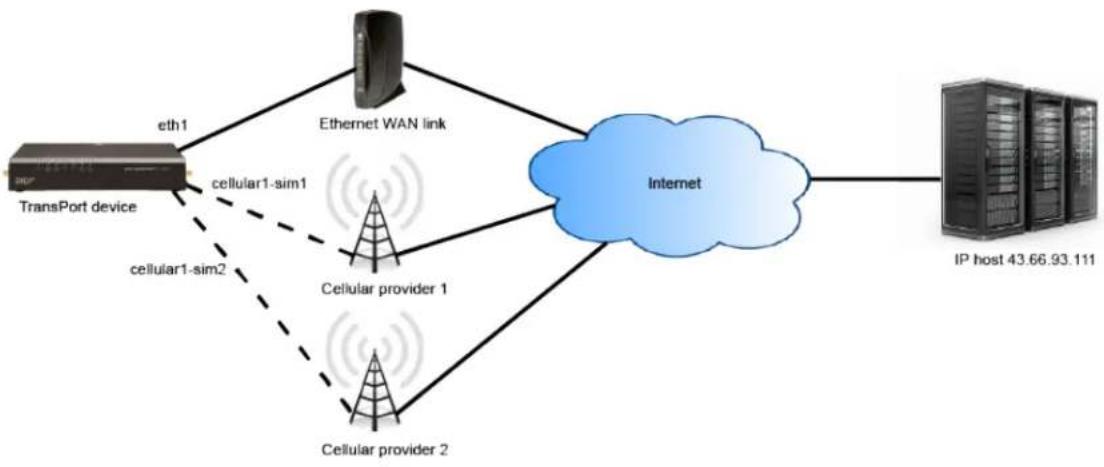
flowchart
graph TD
    A["TransPort device"] -->|eth1| B["Ethernet WAN link"]
    A -->|cellular1-sim2| C["Cellular provider 1"]
    A -->|cellular1-sim1| D["Cellular provider 2"]
    B --> E["Internet"]
    C --> E
    D --> E
    E --> F["IP host 43.66.93.111"]
To detect failover:
■ The eth1 interface uses IP probing to detect interface failure.
■ The backup WANs, wan2 and wan3, use passive techniques to detect interface failure.
Using the IP probing configured over the eth1 interface, the Digi WR device sends a probe packet of size 256 bytes to the IP host 43.66.93.111 every 10 seconds. If no responses are received for 60 seconds, the device brings the eth1 interface down and starts using the wan2 (cellular1) interface.
If the device cannot get a connection on the wan2 (cellular1-sim1) interface, it attempts to use the wan3 (cellular1-sim2) interface. It attempts to switch back to the wan2 (cellular1-sim1) interface after 30 minutes (1800 seconds).
The device continues to send probes out of the eth1 interface. If it receives probe responses for 120 seconds, it reactivates the wan1 interface and starts using it again as the primary WAN.
To achieve this WAN failover from the eth1 to cellular1-sim1 and cellular1-sim2 interfaces, the WAN failover configuration commands are:
digi.router> wan 1 interface eth1
digi.router> wan 1 timeout 60
digi.router> wan 1 probe-host 43.66.93.111
digi.router> wan 1 probe-interval 10
digi.router> wan 1 probe-size 256
digi.router> wan 1 activate-after 120
digi.router> wan 1 state on
digi.router> wan 2 interface cellular1-sim1
digi.router> wan 2 retry-after 1800
digi.router> wan 2 state on
digi.router> wan 3 interface cellular1-sim2
digi.router> wan 3 retry-after 1800
digi.router> wan 3 state on
digi.router> save config
SureLink probe options for cellular WANs with only one SIM
For WANs configured to use a cellular interface with only one SIM, you can configure additional probe options to reset the cellular module and/or the router when a failure is detected:
■ Reboot cellular module: If probing fails after a specified amount of time, the Digi WR device reboots the cellular module. See the wan command probe-fail-reset-module option.
■ Reboot router: If probing fails after a specified amount of time, the Digi WR device is rebooted. See the wan command probe-fail-reset-router option.
WAN failover to IPsec
You can also configure a WAN to fail over to an IPsec tunnel. This is useful in cases where you are using a private WAN for sensitive data. In a failover scenario involving the private WAN, you can configure the device to route the sensitive data over a public WAN, while protecting the data by using an IPsec tunnel.
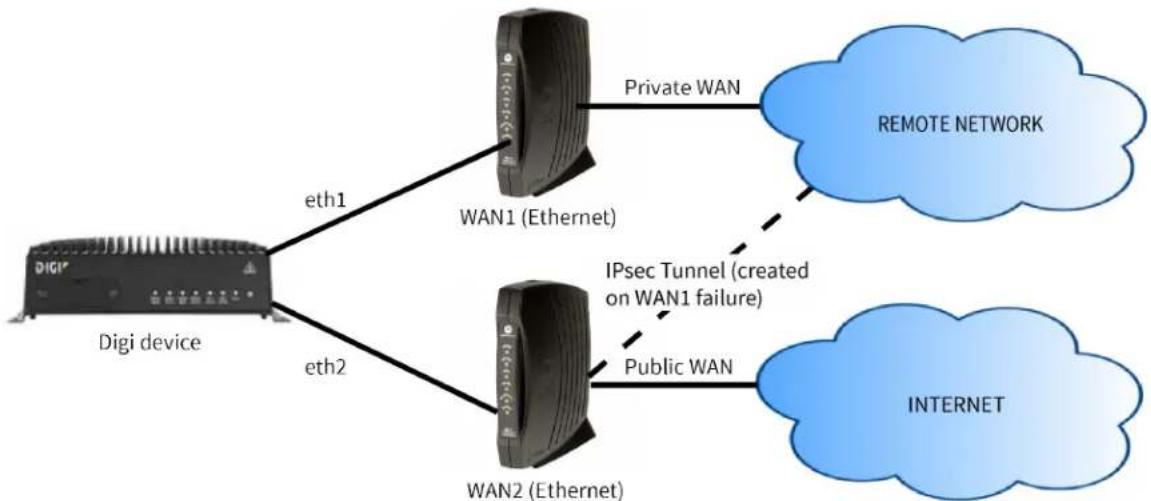
flowchart
graph TD
    A["Digi device"] -->|eth1| B["WAN1 (Ethernet)"]
    A -->|eth2| C["WAN2 (Ethernet)"]
    B -->|Private WAN| D["REMOTE NETWORK"]
    C -->|Public WAN| E["INTERNET"]
    F["IPsec Tunnel (created on WAN1 failure)"] -.-> C
See Configure an IPsec tunnel for WAN failover for information about configuring a WAN to fail over to an IPsec tunnel.
Configure a Wide Area Network (WAN)
You can configure up to 10 Wide Area Network (WANs). Configuring a WAN consists of the following:
■ Associating a physical interface, such as Ethernet or cellular with the WAN.
- Optionally configuring networking parameters for the WAN, such as IP address, mask, and gateway.
■ Optionally configuring several parameters controlling failover.
■ Optionally configuring the WAN for IPv6 support.
Assigning priority to WANs
You can assign priority to WANs based on the behavior you want to implement for primary and backup WAN interfaces. For example, if you want Ethernet to be your primary WAN with a cellular interface as backup, assign an Ethernet interface to wan1 and assign a cellular interface to wan2.
WANs have priorities associated with them, which is based on a metric parameter set for each WAN. The Digi WR device automatically adds a default IP route for the WAN when it comes up. The metric of the route is based on the priority of the interface. For example, as wan1 is the highest priority, the default route for wan1 has a metric of 1, and the default route for wan2 has a metric of 2.
Configuring a WAN for IPv6
You can enable IPv6 on a per-WAN-interface basis. See Configure a WAN for IPv6.
Required configuration items
- Assign an interface to the WAN. By default, WANs are assigned the following physical interfaces:
- wan1: eth1
- wan2: cellular1
- wan3: cellular2
- Assign an interface to the WAN. By default, WANs are assigned the following physical interfaces:
- wan1: eth1
- wan2: cellular1-sim1
- wan3: cellular2-sim1
- wan4: cellular1-sim2
- wan5: cellular2-sim2
■ If you want to use IPv6 addressing for the WAN, enable the WAN for IPv6 and configure prefix delegation. See Configure a WAN for IPv6.
Additional configuration items
These additional configuration settings are not typically configured, but you can set them as needed.
■ For Ethernet interfaces:
- The IP configuration. WANs typically get their IP address configuration from the network to which they connect (for example, cellular). However, you can manually set the IP configuration as needed. The following manual configuration settings are available:
- IP address and mask.
Gateway: Required for Ethernet WANs if setting IP address manually, to create a default route over the WAN. If setting the IP address via DHCP, this setting is obtained automatically and does not need to be set. - Preferred and alternate DNS server.
- Disable the DHCP client. Ethernet interfaces use DHCP client to get an IP address from a DHCP server (for example, from a cable modem). If you are manually configuring the IP address for the Ethernet interface, disable the DHCP client.
- Network Address Translation (NAT). NAT translates IP addresses from a private LAN to a public IP address. By default, NAT is enabled. Unless your LAN has a publicly-addressable IP address range, do not disable NAT.
- The IP probe settings. These settings control elements of the WAN failover feature, including sending of probe packets over the WAN interface to a specified device to determine whether the WAN is still up, timeouts, and switching between primary and backup interfaces. See Using IP probing to detect WAN failures for more information on these settings.
Note A WAN configured for static IP takes precedence over a configuration derived via DHCP. This allows you to configure alternative DNS servers from those given to you by your network provider.
■ For Cellular interfaces:
- The IP probe settings. These settings control elements of the WAN failover feature, including sending of probe packets over the WAN interface to a specified device to determine whether the WAN is still up, timeouts, and switching between primary and backup interfaces. For more information on these settings, see the discussion of IP probing in Using IP probing to detect WAN failures and SureLink probe options for cellular WANs with only one SIM.

Web
Create a new WAN
- On the menu, click Network > Networks > WANs. The WANs page appears.
- Click New WAN Connection and enter the following:
Select WAN: Assign an index number to the WAN. This number sets the WAN priority for the WAN.
Select interface: Select an interface to assign to the WAN.
Enable: Enable or disable the new WAN.
- In the IPv4 group, configure IP address settings for IPv4 if you want to manually configure an IP address for the WAN.
- In the IPv6 group, enable and configure IPv6 if required for the WAN.
- In the Security group, configure optional security settings for the WAN.
- In the Probing group, configure optional probe host settings for the WAN.
- Click Apply.

Command line
Configure basic WAN settings
- Assign an interface to the WAN interface.
digi.router> wan 1 interface eth1
-
If using IPv6 addressing for the WAN, see Configure a WAN for IPv6.
-
Optional: Disable DHCP client mode.
digi.router> wan 1 dhcp off
- Optional: Configure the IP address, mask, gateway, and DNS servers.
digi.router> wan 1 ip-address 10.1.2.2
digi.router> wan 1 mask 255.255.255.252
digi.router> wan 1 gateway 10.1.2.1
digi.router> wan 1 dns1 10.1.2.1
digi.router> wan 1 dns2 8.8.8.8
- Optional: Set the speed.
digi.router> eth 1 speed {auto | 1000 | 100 | 10}
- Save the configuration.
digi.router> save config
Configure IP probe settings
- Optional: Configure the time, in seconds, to wait for this interface to connect and to receive a probe response before failing over to a lower priority interface.
digi.router> wan 1 timeout 60
- Configure the IP host to probe.
digi.router> wan 1 probe-host 192.168.47.1
- Optional: Configure the time, in seconds, to wait for a response to a probe. This value must be smaller than the probe-interval and timeout parameter values. If not, the configuration is considered invalid, and an error message is written to the system log.
digi.router> wan 1 probe-timeout 5
- Optional: Configure the interval, in seconds, between sending probe packets. This value must be larger than the probe-timeout value. If not, the WAN failover configuration is considered invalid, and an error message is written to the system log.
digi.router> wan 1 probe-interval 20
- Optional: Configure the size of the IP probe packet.
digi.router> wan 1 probe-size 120
- Optional: Configure the time, in seconds, that the primary interface needs to be up before switching back to it as the active interface. If probing is active, no probes are permitted to be lost during this period. Otherwise, the timer is restarted. Accepted value is any integer from 0 to 3600. The default value is 0.
digi.router> wan 1 activate-after 30
- Optional: Configure the time, in seconds, to wait before retrying this interface after failing over to a lower priority one. Use a large retry timeout when both interfaces are cellular interfaces. Accepted value is any integer from 10 to 3600. The default value is 180.
digi.router> wan 1 retry-after 1200
- Save the configuration.
digi.router> save config
Show WAN status and statistics
You can view status and statistics for all WANs from either Web UI or the command line.

Web
- On the menu, click Network > Networks > WANs. The WANs page appears.
- Select a WAN.
The WAN page shows configuration parameters, as well as status and statistics for the interface assigned to the WAN.

Command line
Show WAN summary statistics
To show the status and statistics for a WAN, use the show wan command. For example:
digi.router> show wan
# WAN Interface Status IP Address
1 eth1 Up 192.168.0.25
2 cellular1 Up 172.20.1.7
digi.router>
Show status and statistics for the WAN physical interface
To view status and statistics for the physical interface for the WAN, enter the show command for that physical interface; for example, show eth or show cellular.
Show detailed WAN status
To show detailed status for a WAN, enter the show wan command, specifying the WAN instance number. For example, for a WAN on which IPv6 is enabled:
digi.router> show wan 1

WAN 1 Status and Statistics

____

WAN Interface : eth1
Admin Status : Up
Oper Status : Up

IP Address : 47.0.0.101
Mask : 255.255.255.0
Gateway : 47.0.0.1
DNS Server(s) : 47.0.0.1, 8.8.8.8

IPv6 Address(es) : 2001:abcd:1234::1234:22:3/64 (Global)
    fe80::20c:29ff:fef4:77fc/64 (Link local)

IPv6 DNS Server(s) : 2001:abcd:1200:11:e4ff:fe09:3de3, 2001:4860:4860::8888
Probes are not being used
Received Sent
---- ----
Packets 4 4
Bytes 836 796
When IP probing is enabled, the show wan output provides additional details, including how long it has been since the device received a probe response from the probe host:
digi.router> show wan 1
WAN 1 Status and Statistics
----
WAN Interface : eth1
Admin Status : Up
Oper Status : Up

IP Address : 10.52.18.120
Mask : 255.255.255.0
Gateway : 10.52.18.1
DNS Server(s) : 8.8.8.8

Probing : 10.52.18.1
Last Probe Response received : 5 seconds ago

Received Sent
----
Packets 8356 640
Bytes 673351 64841

digi.router>
If IP probing is disabled because the configuration is invalid, the output is similar to the following:
digi.router> show wan 1
WAN 1 Status and Statistics
----
WAN Interface : eth1
Admin Status : Up
Oper Status : Up
IP Address : 10.52.18.120
Mask : 255.255.255.0
Gateway : 10.52.18.1
DNS Server(s) : 8.8.8.8
Probes are not being used
Received Sent
----
Packets 8356 640
Bytes    673351    64841
digi.router>
If IP probing is on, but the device has not yet received any replies, the output is similar to the following:
digi.router> show wan 1
WAN 1 Status and Statistics
----
WAN Interface : eth1
Admin Status : Up
Oper Status : Up
IP Address : 10.52.18.120
Mask : 255.255.255.0
Gateway : 10.52.18.1
DNS Server(s) : 8.8.8.8
Probing : 10.52.18.1
Waiting for first response
Received Sent
----
Packets 8356 640
Bytes    673351    64841
digi.router>
Delete a WAN

Web
- On the menu, click Network > Networks > WANs. The WANs page appears.
- On the WAN page, select the WAN to delete.
- Click Delete.

Command line
You cannot delete a WAN using the command line. Instead, disable the WAN using the wan n state off command, for example:
wan 1 state off
IPv6
IPv6 is an updated version of the Internet Protocol (IP). Until recently, the Internet has used a previous version, IPv4.
One of the reasons for IPv6 is the shortage of IPv4 addresses. Although Network Address Translation (NAT), which allows users to use one public IPv4 address for a whole private network, has mitigated this shortage to some extent, with more and more devices being connected to the internet, there are not many IPv4 addresses left.
IPv4 addresses are 32 bits long. Over 4 billion addresses are available through IPv4, though not all the addresses are usable. IPv6 addresses are 128 bits long. Taking into account the structure of the IPv6 address, there are 4.6 × 10^8 globally routable addresses available. This equates to approximately 650 million IP addresses for each person in the world.
Since every device can have a globally routable IPv6 address, there is no NAT with IPv6. This means it is very important to properly configure IP filters and firewall rules to prevent direct attacks on hosts on the LAN networks. By default, a Digi WR device blocks any incoming IPv6 traffic not associated with a connection established by a host on the LAN network.
IPv4 and IPv6 can co-exist on the same device. Each application can select the IP version to use. Some services, such as web server or Simple Network Management Protocol (SNMP) can accept connections on both IPv4 and IPv6.
Digi WR devices support both IPv4 and IPv6 on WAN and LAN interfaces. Using IPv6 on WAN interfaces requires an ISP that supports IPv6.
Common IPv6 address types
There are several common IPv6 address types, distinguished by their beginning characters:
| Address type Beginning characters | Description | |
| Global routable addresses Either 2 or 3 | Each device using IPv6 | on the Internet has a globally unique routable IPv6 address. |
| Link local addresses fe80 | Each device auto-generates a link-local address on every interface using IPv6. The interfaces use these addresses to communicate with other devices connected on the link. | |
| Multicast addresses ff | Addresses for sending packets to a group of devices. There are a number of well-known defined addresses, such as those for All nodes and All routers. | |
| Unique local addresses (ULA) | fc or fd | Addresses for creating a site-specific network. While these addresses are globally unique, you cannot use them for routing on the Internet. |
Auto address assignment
There are three modes in which a device can auto-configure itself with an IPv6 address and other network configuration. The mode the device uses is controlled by the Router Advertisement messages a router periodically sends out, or in response to a Router Solicitation message that a host sends.
| Auto-configuration mode Description | |
| Stateless auto-configuration (SLAAC) The device uses the prefix sent in the Router Advertisement message to generate a unique IPv6 usually by appending the interface's MAC address with EUI-64 encoding. The device can also learn gateway and DNS server information from the Router Advertisement message. The device uses Duplicate Address Detection (DAD) to ensure the auto-generated IPv6 address is unique. | |
| DHCPv6 The device uses DHCPv6 to get an IPv6 | address and other network configuration. |
| SLAAC + DHCPv6 The device uses a combination of SLAAC and DHCPv6. It uses SLAAC to auto-configures itself with an IPv6 address, and DHCPv6 to get other network configuration, such as DNS server information. This configuration mode is available because earlier versions of the Router Advertisement did not include any DNS server information. Therefore the device had to use DHCPv6 to get the information. | |
Prefix delegation
Prefix delegation is how a router asks for a prefix from the ISP that it can subnet and distribute through its LAN interfaces. Prefix delegation is an extension of the DHCPv6 protocol.
Normally, a router gets a /64-bit prefix using Router Advertisements, which cannot normally be subnetted. Therefore, a router uses prefix delegation to request a globally routable prefix it can distribute.
When the Digi WR device receives a delegated prefix, it appends a subnet ID and assigns it to the LAN interfaces with IPv6 enabled. The subnet ID differs for each LAN. By default, the subnet ID is the LAN instance.
For example, if the delegated prefix is 2001:1234:5678:9ab0::/60, the prefixes for LANs 1 to 4 are:
■ LAN 1: 2001:1234:5678:9ab1/64
■ LAN 2: 2001:1234:5678:9ab2/64
■ LAN 3: 2001:1234:5678:9ab3/64
■ LAN 4: 2001:1234:5678:9ab4/64
The router's LAN interfaces then advertise these prefixes using Router Advertisements and DHCPv6.
More information on IPv6
For more information, including key differences between IPv4 and IPv6, see this Digi white paper on IPv6.
Configure a LAN for IPv6
Currently, the only mode for auto-configuration of devices connected on the LAN is DHCPv6. Configuring a LAN for IPv6 involves Enable IPv6 on a LAN.
Enable IPv6 on a LAN
You can enable IPv6 on a per-LAN interface basis.
Enabling IPv6 on a LAN does not affect IPv4 operation. When IPv6 is enabled for a LAN, you can have IPv4 addresses on the LAN and hosts on the LAN can use IPv4 and IPv6 as required.

Web
- On the menu, click Network > Networks > LANs. The LANs page appears.
- Select the LAN on which you want to enable IPv6.
- Open the IPv6 group, and enable IPv6.

Command line
To enable IPv6 on a LAN, use the lan command ipv6-state parameter. For example:
digi.router> lan 1 ipv6-state on digi.router> save config
Show LAN IPv6 status
You can view IPv6 status and statistics for LANs from either Web UI or the command line.

Web
- On the menu, click Network > Networks > LANs. All configured LANs appear.
- Select a LAN. The LAN display expands to show the configuration parameters and the status and statistics for the interface assigned to the LAN. If IPv6 is enabled for the LAN and IPv6 addresses are assigned to it, the addresses display in the IPv6 Address field.

Command line
To show the IPv6 status on a LAN, use the show lan command. For example:
digi.router> show lan 1
LAN 1 Status and Statistics
----
Admin Status : Up
Oper Status : Up

Description : Ethernet LAN network
Interfaces : eth2
MTU    : 1500

DHCP client : Off
IP Address : 192.168.1.1
Mask    : 255.255.255.0
DNS Server(s)    : 8.8.8.8

IPv6 Address(es)    : fe80::8473:dff:fe69:ab41/64 (Link Local)
2600:1000:b03e:7ae9:1000::1/68 (Global)

Received    Sent
----
Packets    167018    56253
Bytes    13487578    4608476
Configure a WAN for IPv6
Configuring a WAN for IPv6 involves these tasks:
■ Enable IPv6 on a WAN
■ Configure prefix delegation on a WAN
Enable IPv6 on a WAN
You can enable IPv6 on a per-WAN basis.
For IPv6 to work on a WAN interface, the ISP to which the WAN interface is connected must support IPv6.

Web
- From the menu, click Network > Networks > WANs. The WANs page appears.
- Select the WAN on which you want to enable IPv6.
- Open the IPv6 group, and enable IPv6.

Command line
To enable IPv6 on a WAN interface, use the wan command ipv6-state parameter. For example:
digi.router> wan 1 ipv6-state on
digi.router> save config
Configure prefix delegation on a WAN
When the WAN interface gets an IPv6 address, the Digi WR device automatically sends a prefix delegation request to the ISP. By default, the device requests a /60 prefix, which allows the device to support up to 15 LANs. The number of LANs that can be supported is equal to 2 raised to the power of ((64 - prefix-length) - 1). You can request a different prefix length from this default.
Note The Digi WR device is not guaranteed to receive a prefix of the requested length. For example, the device may request a /60 prefix, but receive a /62 prefix. This means you might have more LANs with IPv6 enabled than can be supported by the received prefix. In this case, the device sets the prefix on the first LAN interfaces as defined by the number of available LANs.

Web
- From the menu, click Network > Networks > WANs. The WANs page appears.
- Select the WAN on which you want to configure prefix delegation.
- Enter the length of the requested prefix in the Requested Prefix Length field.

Command line
To change the length of the requested prefix, use the wan ipv6-prefix-length command. For example:
digi.router> wan 1 ipv6-prefix-length 56
digi.router> save config
Show WAN IPv6 status
You can view IPv6 status WANs from either the Web UI or the command line.

Web
- On the menu, click Network > Networks > WANs. All configured WANs appear.
- Select a WAN. The WAN display expands to show the configuration parameters and the status and statistics for the interface assigned to the WAN. If IPv6 is enabled for the WAN and IPv6 addresses assigned to the WAN, the addresses display in the IPv6 Address field.

Command line
To show the IPv6 status on a WAN, use the show wan command. For example:
digi.router> show wan 2

WAN 2 Status and Statistics
----
WAN Interface : cellular1
Admin Status : Up
Oper Status : Up

IP Address    : 100.67.98.174
Mask    : 255.255.255.252
Gateway    :
DNS Server(s) : 198.224.186.135, 198.224.187.135

IPv6 Address(es)    : 2600:1000:b03e:7ae9:3038:63ff:fe47:4158/64 (Global)
    fe80::3038:63ff:fe47:4158/64 (Link Local)

IPv6 DNS Server(s) : 2001:4888:12:ff00:106:d::, 2001:4888:13:ff00:123:d::
Probes are not being used

Received    Sent
----    ----
Packets    503    939
Bytes    104697    130536
Security
Local users .83 Firewall management with IP filters .87
Local users
To access a Digi WR device by using the command-line interface or web interface, users must log in as a configured user of the device. This topic details the Digi WR user model, as well as how to create, modify, and delete users.
Maximum number of users
Digi WR devices allow you to configure up to 10 local users per device, user 1 through user 10. Each user has a unique username, password, and access level.
Default user
As manufactured, each Digi WR device comes with a default user 1 configured as follows:
Username: admin
Password: The default password is displayed on the label on the bottom of the device. For example:
Access: super
Note The default password is a unique password for the device, and is the most critical security feature for the device. Anytime you reset the device to factory defaults, you should immediately change the password from the default to a custom password. Before deploying or mounting the device, take a photo of or otherwise record the default password, so you have the information available when you need it even if you cannot physically access the label on the bottom of the device.
You can change the default user 1 configuration to match your site requirements.
User access levels
Digi WR devices support three access levels: super, read-write, and read-only. These access levels determine the level of control users have over device features and settings.
| Access level Permissions allowed | |
| super The user can manage all features on the device. Devices can have multiple users with super access level.At least one user on each device must have a super access level to allow editing user access levels. If you or any other user deletes the only user with super access level, you must restore the default user configuration by resetting the device to factory defaults. | |
| read-write The user can manage all device features except security-related features, such as configuring user access, configuring firewalls, clearing logs, and so on. | |
| read-only The user can view device configuration and status, but cannot change the configuration or status. |
Configure a user
To add, modify, or delete a user, you must be assigned the super access level. See User access levels for descriptions of user access levels.
To configure a user, you need to configure the following:
Required configuration items
■ A username, up to 32 characters long.
- A password, from 1-128 characters long. For security reasons, passwords are stored in hash form. There is no way to get or display passwords in clear-text form.
Additional configuration items
■ User access level. The default access level for users is super. To restrict access for a user, assign either read-write or read-only. See User access levels for descriptions of user access levels.
Web
-
Click Security > Authentication > Local Users. The User Management page appears.
-
Click New User.
Note When you add a new user using the web interface, the device creates a new user with the next available index number. When you create a new user using the command line, you cannot set or change the user index number assigned to a user.
-
Enter user account information:
-
Username: The username for the user. Usernames can be up to 32 characters long and are case-insensitive. They:
- Must start with a letter (lowercase or uppercase) or underscore.
- Can contain letters (lowercase and uppercase), digits, underscore (_), or hyphen (-).
- Can end with a dollar sign (\$).
- No other characters are allowed.
Examples of valid usernames: _Username1234\$ and userName-1234.
Examples of invalid usernames: -Username, user/name, userName\$1234
■ Access: The user access permission for the user: super, read-write, or read-only. For descriptions of these access permissions, see User access levels.
■ Password/Confirm Password: Password for the user.
- Click Apply.

Command line
The user command configures users.
- Configure the username. Usernames can be up to 32 characters long and are case-insensitive. They:
■ Must start with a letter (lowercase or uppercase) or underscore.
■ Can contain letters (lowercase and uppercase), digits, underscore (_), or hyphen (-).
■ Can end with a dollar sign (\$).
■ No other characters are allowed.
Examples of valid usernames: _Username1234\$ and userName-1234.
Examples of invalid usernames: -Username, user/name, userName\$1234
For example:
digi.router> user 1 name joeuser
- Configure the password. For example:
digi.router> user 1 password omnivers1031
- Optional: Configure the access level. For example:
digi.router> user 1 access read-write
- Save the configuration.
digi.router> save config
Delete a user
You can delete user definitions when they are no longer needed.
To add, modify, or delete a user, you must be assigned the super access level. See User access levels for descriptions of user access levels.

Web
- Click Security > Authentication > Local Users. The User Management page appears.
- Select the user to delete.
- Click Delete and respond to the confirmation prompt.

Command line
Enter the following command:
digi.router> user n name !
For example, to delete the user joeuser that was previously assigned to user 1, enter:
digi.router> user 1 name !
digi.router> save config
Change a user's password
To add, modify, or delete a user, you must be assigned the super access level. See User access levels for descriptions of user access levels.

Web
- Click Security > Authentication > Local Users. The User Management page appears.
- Select the user.
- Enter the new password.
- Confirm the new password.
- Click Apply.

Command line
- Enter the user command, specifying the new password value:
digi.router> user <user number> password <password-value>
For example:
digi.router> user 6 password tester
- Save the configuration.
digi.router> save config
Firewall management with IP filters
Digi WR devices secure your network by controlling network traffic using a variety of mechanisms, such as port forwarding (see Port forwarding) and allow-https-access/allow-ssh-access (see Wide Area Networks (WANs)).
IP filter rules allow you to further control network traffic by allowing and restricting access based on filter criteria.
For example, you can use an IP filter rule to:
■ Allow additional traffic into the device
■ Restrict access by rejecting traffic from a LAN to a WAN
■ Restrict access to an open service
■ Restrict access to a router service from LAN devices
■ Restrict LAN-to-LAN for all but one service
IP filter source and destination options
Network traffic managed by IP filter rules can be categorized into three groups:
■ Incoming traffic: Traffic destined to a service or application on the router.
■ Forwarded traffic: Traffic flowing through the router from one network host to another.
■ Outgoing traffic: Traffic originating from a service or application on the router.
If you want to create an IP filter rule that applies only to incoming traffic received using the source LAN or WAN, specify only the source option. In this case, incoming network traffic refers only to inbound traffic that is destined for a service on the router, not all traffic flowing through the router destined for another host.
If you want to create an IP filter rule that applies only to traffic flowing through the router received using a source LAN or WAN, specify both the source and destination options. The source and destination values must be different from each other or the rule is not applied.
Infrequently, you may need to create an IP filter rule that applies only to outgoing network traffic sent using the destination LAN or WAN. To do so, specify only the destination option. In this case, outgoing network traffic refers only to outbound traffic sent from a service on the router, not all traffic flowing through the router from another host.
Note Invalid IP filter rules are not applied. To be valid, a rule must include the Source, Destination, or both the Source and Destination options. The Source and Destination options must be different from each other.
Example: Incoming traffic rule
The following rule applies only to incoming traffic received from any configured WAN, regardless of other specified parameters.
Note The destination None value is the default and need not be specified.
ip-filter 1 src any-wan
ip-filter 1 dst none
IP filter criteria options
An IP filter rule applies only to network traffic (packets) matching the following set of filter criteria options:
■ Protocol
■ Source IP address
■ Source IP port
■ Destination IP address
■ Destination IP port
After determining if the network traffic is incoming, outgoing, or forwarded traffic, the filter criteria are used to examine the network packet. If the packet matches the criteria, the rule action is applied and the packet is accepted, dropped, or rejected.
Example: SSH criteria
The following rule applies only to packets coming from a host with a 10.20.x.y IP address that are for the SSH server. SSH typically uses TCP protocol on port 22. The default values for source IP port and destination IP address are not used because they are not relevant for this filter criteria.
ip-filter 1 protocol tcp
ip-filter 1 src-ip-address 10.20.0.0/16
ip-filter 1 dst-ip-port 22
IP filter rule priority
IP filter rules are higher priority than port forward rules, the WAN command allowing HTTPS or SSH access, or rules that allow LAN access by default. Therefore, use IP filter rules to further filter traffic by port, IP address, or protocol.
IP filter rules are applied in order from 1 to the maximum number of rules. Use multiple rules to build a more secure environment where some services are allowed, while others are rejected. See IP filter examples.
Add an IP filter rule

Web
To add one or more IP filter rules:
- On the menu, click Security > Firewall:
■ Select Input IP Filters to add an input IP filter.
■ Select Routing IP Filters to add a routing IP filter.
-
Within the set of rules you want to add, click + (Add Filter) to create a new filter. See Firewall page for field descriptions.
-
When you have finished adding rules, click Apply.

Command line
To add an IP filter rule, use the ip-filter command.
For example, to create IP filter rule 3:
digi.router> ip-filter 3 description Allow WAN SNMP only from 10.20 network
digi.router> ip-filter 3 action accept
digi.router> ip-filter 3 src any-wan
digi.router> ip-filter 3 protocol tcp,udp
digi.router> ip-filter 3 src-ip-address 10.20.0.0/16
digi.router> ip-filter 3 dst-ip-port 161,162
digi.router> ip-filter 3 state on
digi.router> save config
Delete an IP filter rule

Web
To delete one or more IP filter rules:
- On the menu, click Security > Firewall:
■ Select Input IP Filters to delete an input IP filter.
■ Select Routing IP Filters to delete a routing IP filter.
-
Select the rule you want to remove, and click 📄.
-
Click Apply.

Command line
You cannot delete an IP filter rule using the command line, but you can disable a rule using the ip-filter command.
For example:
digi.router> ip-filter 4 state off
digi.router> save config
Edit an IP filter rule

Web
To edit an IP filter rule:
-
On the menu, click Security > Firewall:
■ Select Input IP Filters to edit an input IP filter.
■ Select Routing IP Filters to edit a routing IP filter. -
Select the rule you want to edit and click Edit Rule.
-
When you have finished editing the rule, click Apply.

Command line
To edit an IP filter rule, use the ip-filter command.
For example, to edit the description for IP filter rule 3:
ip-filter 3 description Allow WAN SNMP only from 10.20 network save config
Enable or disable an IP filter rule

Web
To enable or disable an IP filter rule:
- On the menu, click Security > Firewall:
■ Select Input IP Filters to edit an input IP filter.
■ Select Routing IP Filters to edit a routing IP filter. - Select the rule you want to change, and enable or disable the rule.
- When you have finished, click Apply.

Command line
To enable or disable an IP filter rule, use the ip-filter command state option.
For example, to enable IP filter 1:
digi.router> ip-filter 1 state on
digi.router> save config
To disable IP filter 1:
digi.router> ip-filter 1 state off
digi.router> save config
Show IP filter rules

Web
To show IP filter rules:
- On the menu, click Security > Firewall. The Firewall page appears, displaying all configured IP filter rules.
- Select Input IP Filters to view input IP filters and select Routing IP Filters to view routing IP filters.

Command line
To show IP filter rules, use the show ip-filter or ip-filter commands.
For example, to show a specific IP filter:
digi.router> show ip-filter 1
IP Filter 1
----
Description : Allow WAN SSH only from 10.20 network
Action : Accept
State : On

Source : any-wan
Destination : none

Filter Criteria
----
Protocol : tcp udp
Source IP Address : 10.20.0.0/16
Source IP Port : 0
Destination IP Address :
Destination IP Port : 22
digi.router> ip-filter 1
action accept
description Allow WAN SSH only from 10.20 network
dst none
dst-ip-address
dst-ip-port 22
protocol tcp,udp
src any-wan
src-ip-address 10.20.0.0/16
src-ip-port 0
state on
To show all IP filters:
digi.router> show ip-filter
<h1 id="state-action-source-destination-protocol-description">State Action Source Destination Protocol Description</h1>
1 On Accept any-wan none tcp udp Allow WAN SSH only from 10.20 network
2 On Drop any-lan none tcp udp Restrict LAN from HTTP, HTTPS, SSH, SNMP
3 On Accept any-wan none tcp udp Allow WAN SNMP only from 10.20 network
4 On Reject any-lan any-wan tcp udp Restrict LAN to WAN for various email services
5 On Accept lan1 any-lan tcp Allow LAN1 SSH to Other LANs
6 On Reject lan1 any-lan any Restrict LAN1 from Accessing Other LANs
IP filter examples
The following examples show typical ways to use IP filters to control network traffic:
■ IP filter example: Allow additional traffic into the device
■ IP filter example: Restrict access by rejecting traffic from a LAN to a WAN
■ IP filter example: Restrict access to an open service
■ IP filter example: Restrict access to a router service from LAN devices
■ IP filter example: Restrict LAN-to-LAN for all but one service
IP filter example: Allow additional traffic into the device
The following example shows how to allow SNMP access from a particular subnet on the WAN. Note that by default WAN access does not allow SNMP access.

WARNING! The commands in the following example open up SNMP access to your device. SNMP can be used to configure your device. Before allowing SNMP access, make sure you first secure your SNMP configuration using the snmp, snmp-user and snmp-community commands.
The example demonstrates that IP filter rules can override the default behavior for the firewall. By default, WAN traffic into the device is dropped if no other configuration or rules explicitly allow traffic in. That is, the default policy for the input chain in the firewall is to DROP traffic.
- Adds an IP filter Accept rule (the default) to allow incoming traffic on any WAN network additional access.
■ Restricts the accepted network traffic so that only traffic from hosts on the 10.20 network to SNMP (ports 161 and 162) is allowed. - Allows access to multiple protocols (the default). It allows both TCP and UDP access for the SNMP service.
digi.router> ip-filter 3 description Allow WAN SNMP only from 10.20 network
digi.router> ip-filter 3 action accept
digi.router> ip-filter 3 src any-wan
digi.router> ip-filter 3 protocol tcp,udp
digi.router> ip-filter 3 src-ip-address 10.20.0.0/16
digi.router> ip-filter 3 dst-ip-port 161,162
digi.router> ip-filter 3 state on
digi.router> save config
IP filter example: Restrict access by rejecting traffic from a LAN to a WAN
The following example shows how to restrict LAN devices from accessing services on the WAN (possibly the internet).

WARNING! The commands in the following example could remove your access to the Internet. If you or your users are connected through the LAN to the WAN, using email, the example rule prevents access.
The example demonstrates blocking access from a LAN device to a WAN network. By default, LAN devices are allowed access via the WAN and traffic is forwarded through the router. The example blocks direct mail access to servers on the WAN from LAN devices. Examples like this might be used to prevent access to common services that use a lot of bandwidth or are security risks to the LAN:
- Adds an IP filter Reject rule to reject traffic forwarded from any LAN host to any WAN host. The reject rule immediately fails the connection.
■ Restricts the rejected traffic to a set of commonly used mail ports.
■ Rejects access using multiple protocols (the default). It rejects both TCP and UDP access.
digi.router> ip-filter 4 description Restrict LAN to WAN for various email services
digi.router> ip-filter 4 action reject
digi.router> ip-filter 4 src any-lan
digi.router> ip-filter 4 dst any-wan
digi.router> ip-filter 4 protocol tcp,udp
digi.router> ip-filter 4 dst-ip-port 25,2525,265,587,110,995,143,993
digi.router> ip-filter 4 state on
digi.router> save config
IP filter example: Restrict access to an open service
The following example shows how to turn on SSH access for a WAN and restrict SSH access to only a particular subnet of authorized hosts.

WARNING! The commands in the following example could prevent access to your device if connected from the WAN. To safely modify and test ip filter rules, use a scheduled reboot strategy.
The example demonstrates the following:
■ Uses the reboot command to schedule a reboot of the device in case of accidental lockout. A scheduled reboot discards any changes that have not been saved and restores access.
- Adds an ip filter Accept rule (the default) to allow incoming traffic on any WAN network additional access.
■ Restricts the accepted network traffic so that only traffic from hosts on the 10.20 network to SSH (port 22) is allowed.
■ Turns off the allow-ssh-access option for the two currently configured WAN networks. The allow-ssh-access allows SSH access unrestricted by host or network.
<h1 id="schedule-a-reboot-in-10-minutes-in-case-we-lock-ourselves-out-of-the-device">Schedule a reboot in 10 minutes in case we lock ourselves out of the device</h1>
reboot in 10

<h1 id="add-the-ip-filter-rule-be-sure-to-include-src-ip-address-of-at-least-your-current-session-if-connected-with-ssh">Add the ip filter rule. Be sure to include src-ip-address of at least your current session (if connected with ssh)</h1>
ip-filter 1 description Allow WAN SSH only from 10.20 network
ip-filter 1 action accept
ip-filter 1 src any-wan
ip-filter 1 src-ip-address 10.20.0.0/16
ip-filter 1 dst-ip-port 22
ip-filter 1 state on

<h1 id="now-turn-off-allow-all-ssh-access-on-any-wan-where-it-was-turned-on-previously">Now turn off allow all ssh access on any WAN where it was turned on previously</h1>
wan 1 allow-ssh-access off
wan 2 allow-ssh-access off

<h1 id="test-the-configuration-if-all-is-good-save-the-configuration-and-cancel-the-reboot-before-10-minutes">Test the configuration. If all is good, save the configuration and cancel the reboot before 10 minutes</h1>
save config
reboot cancel
IP filter example: Restrict access to a router service from LAN devices
The following example shows how to remove HTTP, HTTPS, SSH, SNMP access from a LAN. Note that by default, LAN traffic is allowed.

WARNING! The commands in the following example could prevent access to your device if connected from the LAN. To safely modify and test ip filter rules, use a scheduled reboot strategy.
The example demonstrates the following:
■ IP filter rules have a higher precedence (priority) than many system firewall rules. By default for LANs, traffic is allowed into the device by built-in system firewall rules. This example changes the default allowed access, restricting LAN devices from access.
■ Uses the reboot command to schedule a reboot of the device in case of accidental lockout. A scheduled reboot discards any changes that have not been saved and restores access.
■ Adds an IP filter Drop rule to drop incoming traffic on any LAN network, thereby restricting additional access. A drop rule silently drops traffic, giving no indication to the connecting host.
■ Restricts access to multiple protocols (the default) and multiple services (ports) to simplify creation of rules. It blocks both TCP and UDP access for all services even though only the SNMP service (ports 161 or 162) uses UDP.
<h1 id="schedule-a-reboot-in-10-minutes-in-case-we-lock-ourselves-out-of-the-device-2">Schedule a reboot in 10 minutes in case we lock ourselves out of the device</h1>
reboot in 10

<h1 id="add-the-ip-filter-rule-if-you-are-connected-from-the-lan-using-ssh-this-will-remove-your-access">Add the ip filter rule. If you are connected from the LAN using SSH this will remove your access.</h1>
ip-filter 2 description Restrict LAN from HTTP, HTTPS, SSH, SNMP
ip-filter 2 action drop
ip-filter 2 src any-lan
ip-filter 2 protocol tcp,udp
ip-filter 2 dst-ip-port 80,443,22,161,162
ip-filter 2 state on

<h1 id="test-the-configuration-if-all-is-good-save-the-configuration-and-cancel">Test the configuration. If all is good, save the configuration and cancel</h1>
the reboot before 10 minutes
save config
reboot cancel
IP filter example: Restrict LAN-to-LAN for all but one service
The following example shows how to restrict devices on LAN 1 (perhaps a public LAN) from communicating with devices on any other LAN (perhaps internal LANs) except for certain services. By default, LAN devices can communicate with other LANs.
On a Wi-Fi LAN, you can also configure client and access point isolation. These rules might typically be used when partial isolation is desirable.

WARNING! The commands in the following example could remove access to services for LAN devices. If you or your users are connected through the LAN, this example may prevent access.
The example demonstrates that multiple IP filter rules have an order precedence. Use multiple IP filter rules to build more complex access control than a single rule could provide:
■ Creates two IP filter rules, one at index 5, the other at index 6.
■ Rule 5 is an Accept rule that allows LAN 1 to access any LAN for the SSH service (port 22). It is executed before rule 6.
■ Rule 6 is a Reject rule that restricts LAN 1 from accessing any protocol and any port on other LANs. It is executed after rule 5.
digi.router> ip-filter 5 description Allow LAN1 SSH to Other LANs
digi.router> ip-filter 5 action accept
digi.router> ip-filter 5 src lan1
digi.router> ip-filter 5 dst any-lan
digi.router> ip-filter 5 protocol tcp
digi.router> ip-filter 5 dst-ip-port 22
digi.router> ip-filter 5 state on

digi.router> ip-filter 6 description Restrict LAN1 from Accessing Other LANs
digi.router> ip-filter 6 action Reject
digi.router> ip-filter 6 src lan1
digi.router> ip-filter 6 dst any-lan
digi.router> ip-filter 6 protocol any
digi.router> ip-filter 6 state on
digi.router> save config
Certificate and key management
This section covers concepts and tasks for managing certificates and private keys.
■ Create a private key file
■ Create a Diffie Hellman key file
■ List private key files
■ Create a certificate signing request
■ Use an externally-generated private key file
■ Delete a private key file
Create a private key file

Command line
To create a private key file, use the pki command. The private key file name must be a maximum of 255 characters. Allowed characters are 0-9, A-Z, a-z, underscore (_), and period (.).
For example:
digi.router> pki privkey testpriv.key 204
You can optionally encrypt the file using either the aes128 or aes256 options. If you choose to encrypt the file, you must provide a password that must be at least four characters in length. For example:
digi.router> pki privkey testpriv.key 2048 aes128 hello
Create a Diffie Hellman key file

Command line
To create a Diffie Hellman key file, use the pki command. For example:
digi.router> pki dh-file openvpndh.pem 2048
Creating Diffie Hellman file openvpndh.pem, 2048 bits
Note Generating a Diffie Hellman file can take up to 40 minutes. Make sure the default for command line timeout allows enough time to generate the file or the command will terminate. See the system timeout parameter for details on changing the command line timeout default.
List private key files

Command line
To list private key files, use the pki command. For example:
digi.router> pki list
Private key files
tespriv.key
anotherpriv.key
Use an externally-generated private key file

Command line
To use an externally-generated private key file:
-
Upload the key file to the device by using the Web UI, or using a utility such as Secure Copy (SCP) or SSH File Transfer Protocol (SFTP). See Upload and download files for instructions.
-
Use the pki addkey command to add the key to the device. For example:
digi.router> pki addkey mykeyfile.key
Delete a private key file

Command line
To delete a private key file, use the pki and del commands. For example:
digi.router> pki list
Private key files
testpriv.key
anotherpriv.key
digi.router> del testpriv.key
Create a certificate signing request

Command line
To create a certificate signing request (CSR):
- At the CLI, enter the pki csr command. For example:
digi.router> pki csr country GB state "North Yorkshire" locality Richmond
organization Digi organizational-unit "Digi Engineering" common-name www.example.com
testpriv.key testpriv.csr sha256

Country Name (letter code): GB
State or Province Name: North Yorkshire
Locality Name: Richmond

Organization Name: Digi
Organization Unit Name: Digi Engineering
Common Name: www.example.com
Email address:

testpriv.csr has been created
Note To show all pki csr command option settings within the page margin, the example shows the settings on multiple lines. However, Digi WR devices do not allow you to continue a command line—the example is for display only.
- To obtain a signed certificate, download the CSR. This can be done from within the WebUI, or using a utility such as Secure Copy (SCP) or SSH File Transfer Protocol (SFTP). To download from within the WebUI:
a. Click System >File System.
The File System page appears.
b. Select the CSR and click the Download icon (↓).
- After downloading the CSR, obtain a signed certificate from the certificate signing authority.
Simple Certificate Enrollment Protocol
Simple Certificate Enrollment Protocol (SCEP) is a mechanism that allows for large-scale X.509 certificate deployment. You can configure the Digi WR54 and WR64 models to function as SCEP clients that will connect to a SCEP server that is used to sign Certificate Signing Requests (CSRs), provide Certificate Revocation Lists (CRLs), and distribute valid certificates from a Certificate Authority (CA).
Required configuration
■ Enable the SCEP client.
■ The URL of the SCEP server to be used for certificate requests.
■ The challenge password provided by the SCEP server that the SCEP client will use when making SCEP requests.
■ The distinguished name to be used for the CSR.
■ The file name that will be used to store the certificate.
■ The RSA private key to be used for the SCEP request.
■ The name of the CA certificate.
■ The file name of the CRL from the CA.
Additional configuration
■ The number of days that the certificate enrollment can be renewed, prior to the request expiring.
This procedure is available only from the command line.

Command line
- Enable the SCEP client:
digi.router> scep-client 1 state on
- Set the URL of the SCEP server:
digi.router> scep-client 1 server url
- Set the challenge password:
digi.router> scep-client 1 password pwd
- Set the distinguished name to be used for the certificate request. The distinguished name is a comma-separated list of attribute-value pairs. No spaces allowed between attribute values.
digi.router> scep-client 1 distinguished-name attribute=value [,attribute=value,...]
Allowed values are DC, C, ST, L, O, OU, and CN, where:
■ DC is the domain component.
■ C is the country name.
■ ST is the state or province name.
■ L is the locality name.
■ 0 is the organization name.
■ OU is the organizational unit name.
■ CN is the common name.
- Set the file name that will be used to store the certificate:
digi.router> scep-client 1 certificate-name name
- Set the name of the CA certificate. If it does not exist, one will be retrieved from the server and saved in a file.
digi.router> scep-client 1 ca-name name
- Set the file name of the CRL from the CA:
digi.router> scep-client 1 crl-name name
-
Set the file name of the RSA private key to be used for the SCEP request. If the key does not exist, it will be automatically generated and saved in a key file using the specified name.
-
digi.router> scep-client 1 private-key keyfile
where keyfile is a maximum of 255 characters. Allowed characters are 0-9, A-Z, a-z, underscore (_), and period (.)
- (Optional) Set the number of days that the certificate enrollment can be renewed, prior to the request expiring. This value is configured on the SCEP server, and is used by the Digi WR device to determine when to start attempting to auto-renew an existing certificate. The default is 7.
digi.router> scep-client 1 renewable-time number
Web server with secure authentication connections
By default, the Digi WR device automatically generates a private key and self-signed certificate for HTTPS connections to the device's web server. This provides an encrypted link between the device and a web browser. However, because the device's certificate is self-signed, the browser is not able to authenticate the certificate and will report that the connection is not secure.
For an authenticated secure connection, the device must use a certificate signed by a trusted signatory. When a certificate is signed by a trusted signatory, the browser uses the signatory's CA certificate (usually pre-installed on the browser or the host) to authenticate the certificate.
A private key and Certificate Signing Request (CSR) can be created on the device or can be created externally. The CSR can then be used to create a certificate signed by a trusted signatory.
■ See Create a private key and Certificate Signing Request on the Digi WR device for information about creating a private key and a Certificate Signing Request (CSR) on the device.
■ See Upload and install an externally-created private key and signed certificate for information about uploading a private key and signed certificate to the device when the private key was created externally from the device.
After a private key has been created and a signed certificate has been obtained, see Configure the web server to use a private key and signed certificate for information about configuring the web server to use the private key and signed certificate.
Create a private key and Certificate Signing Request on the Digi WR device
There is no WebUI support for creating a private key and Certificate Signing Request (CSR).

Command line
- Create the private key using the pki privkey command. For example, to create a private key file called webserver.key that uses an RSA 4096-bit key:
digi.router> pki privkey webserver.key 4096
- Create the CSR using the pki csr command. For example, to create a CSR named webserver.csr:
digi.router> pki csr country US state Minnesota locality Minneapolis organization Example common-name www.example.com webserver.key webserver.csr sha256
- To obtain a signed certificate, download the CSR. This can be done from within the WebUI, or using a utility such as Secure Copy (SCP) or SSH File Transfer Protocol (SFTP). To download from within the WebUI:
a. Click System >File System.
The File System page appears.
b. Select the CSR and click the Download icon (↓).
After downloading the CSR, obtain a signed certificate from the certificate signing authority. The signed certificate will be used for web server configuration. See Configure the web server to use a private key and signed certificate for information about configuring the web server to use the private key and signed certificate.
Upload and install an externally-created private key and signed certificate
If a private key has been created externally from the Digi WR device:
- Upload the private key file and signed certificate onto the device. This can be done from within the WebUI, or using a utility such as Secure Copy (SCP) or SSH File Transfer Protocol (SFTP). To upload from within the WebUI:
a. Click System > File System.
The File System page appears.
b. Click the Upload icon (↑).
c. Select the file and click Open.
d. Repeat for all applicable files.
- Use the pki addkey command to install the private key file. This will move the private key file from the user file system to a protected area. For example, to install a private key file named webserver.key:
digi.router> pki addkey webserver.key
The signed certificate will be used for web server configuration. See Configure the web server to use a private key and signed certificate for information about configuring the web server to use the private key and signed certificate.
Configure the web server to use a private key and signed certificate

Command line
There is no Web UI support for configuring custom Web key and certificates.
Note A signed certificate must be obtained and uploaded to the Digi WR device prior to configuring the web server for an authenticated secure connection. To upload the certificate, use the WebUI, or use a utility such as Secure Copy (SCP) or SSH File Transfer Protocol (SFTP). To upload from within the WebUI:
- Click System > File System.
The File System page appears.
- Click the Upload icon ( ).
- Select the certificate and click Open.
To configure the web server to use a private key and signed certificate:
- Configure the web server to use a private key file. For example, to configure the web server to use a private key file named webserver.key:
digi.router> web-server 1 key-file webserver.key
- Configure the web server to use the certificate file. For example, to configure the web server to use a certificate file called webserver.crt:
digi.router> web-server 1 cert-file webserver.crt
- Save the configuration:
digi.router> save config
Remote Authentication Dial-In User Service (RADIUS)
Your Digi WR device supports Remote Authentication Dial-In User Service (RADIUS), a networking protocol that provides centralized authentication and authorization management for users who connect to the device.
With RADIUS support, the device acts as a RADIUS client, which sends user credentials and connection parameters to a RADIUS server over UDP. The RADIUS server then authenticates the RADIUS client requests and sends back a response message to the device.
When you are using RADIUS authentication, you can have both local users and RADIUS users able to log in to the device.
Note RADIUS user names must be different than any user names defined locally on the Digi WR device. RADIUS users with the same user name as a local user cannot log into the Digi WR device, even if local authentication is disabled.
This section contains the following topics:
Setting up a RADIUS server.105....
RADIUS user configuration 105 RADIUS server failover 106
Using local authentication when RADIUS servers are unavailable.106..... Configure a Digi WR device to use a RADIUS server.107....
Setting up a RADIUS server
To use RADIUS authentication, you must set up a RADIUS server that is accessible by the Digi WR device prior to configuration. The process of setting up a RADIUS server varies by the server environment. An example of a RADIUS server is FreeRADIUS, and a quick-start guide for setting up a FreeRADIUS server is here: http://wiki.freeradius.org/guide/Getting Started.
RADIUS user configuration
After setting up the RADIUS server, you will need to configure one or more users on the server. When configured with RADIUS support, the Digi WR device uses the RADIUS server for authentication (password verification) and authorization (assigning the access level of the user). RADIUS provides the authorization information to the device in a Vender Specific Attribute (VSA) that contains a number representing a Group ID (GID). The specific process varies between RADIUS servers, but you will need to configure the following information for each user:
■ User name and password. The user name must be different than any of the user names defined locally on the Digi WR device. RADIUS users with the same user name as a local user cannot log into the Digi WR device, even if local authentication is disabled.
■ Group ID. The GID should be specified as a VSA (Unix-FTP-GID), with the following allowed values:
• 2000 (read-write access level).
• 2001 (read-only access level).
• 2002 (super user access level).
- Any other value (or omitting this attribute) will result in the user having read-only access.
■ User ID (optional). The UID should be specified as a VSA (Unix-FTP-UID), with a value of 3000 or higher. If the UID is not specified, a UID will be automatically assigned by the device when the user first logs into the device, and will persist until the device is rebooted. In this case, because UIDs do not persist after the device has been rebooted, the same UID may be assigned to a different user. This may result in file ownership being incorrectly assigned.
Example FreeRADIUS Configuration
With FreeRADIUS, users are defined in the users file in your FreeRADIUS installation. To define users:
- Open the FreeRadius user file in a text editor. For example:
sudo nano /etc/freeradius/3.0/users
- Add users to the file using the following format. This example will create three users, one with each access level.
<h1 id="a-read-only-user-2001-with-a-uid-of-3000">A read-only user (2001) with a UID of 3000</h1>
    "user1" Cleartext-Password := "password1"
    Unix-FTP-UID := 3000,
    Unix-FTP-GID := 2001

<h1 id="a-read-write-user-2000-with-a-uid-of-3001">A read-write user (2000) with a UID of 3001</h1>
    "user2" Cleartext-Password := "password2"
    Unix-FTP-UID := 3001,
    Unix-FTP-GID := 2000
<h1 id="a-super-user-2002-with-a-uid-of-3002">A super user (2002) with a UID of 3002</h1>
    "user3" Cleartext-Password := "password3"
    Unix-FTP-UID := 3002,
    Unix-FTP-GID := 2002
Note Change the passwords for these users before putting the server into production.
-
Save and close the file.
-
Verify that your changes did not introduce any syntax errors:
sudo freeradius -CX
This should return a message that completes similar to:
...
Configuration appears to be OK
- Restart the FreeRADIUS server:
sudo /etc/init.d/freeradius restart
RADIUS server failover
In addition to the primary RADIUS server, you can also configure a backup RADIUS server on your Digi WR device. The backup RADIUS server is used for authentication requests when the primary RADIUS server is unavailable.
Falling back to local authentication
You can configure local authentication to be used as a fallback mechanism if both the primary and backup RADIUS servers are unavailable. If the RADIUS servers are unavailable and the Digi WR device falls back to local authentication, only users defined locally on the device are able to log in. RADIUS users cannot log in until the RADIUS servers are brought back online. See Using local authentication when RADIUS servers are unavailable for more information about local authentication fallback configuration.
Using local authentication when RADIUS servers are unavailable
The local authentication fallback configuration option determines how the Digi WR device behaves when all configured RADIUS servers are unavailable. In most situations, you should use local authentication for fallback login, to allow local users to log into the device and configure other available servers when the RADIUS servers are unavailable. If the RADIUS servers are unavailable and local authentication disabled, no users can log in to the device.
Local authentication fallback is configured in the WebUI by using the Local Auth Fallback option, and from the command line by using the local-auth parameter for the radius command. See Configure a Digi WR device to use a RADIUS server for details.
Note RADIUS users with the same user name as a local user cannot log into the Digi WR device, even if local authentication is disabled.
The table below shows how the primary RADIUS server, the backup RADIUS server, and local authentication work together.
| Primary server available | Backup server available | Local authentication | Who can log in? |
| YES YES N/A | Primary RADIUS | server is used for | authentication. Only RADIUS users can log in. |
| Yes No N/A | Primary RADIUS | server is used for | authentication. Only RADIUS users can log in. |
| No Yes | N/A | Backup RADIUS server is used for authentication. Only RADIUS users can log in. | |
| No No Enabled | Only local users can log in. RADIUS user cannot log in until the RADIUS servers are brought back online. | ||
| No No Disabled | No users can log in. |
Configure a Digi WR device to use a RADIUS server
This section describes how to configure a Digi WR device to use a RADIUS server for authentication and authorization.
Required configuration items
■ Enable RADIUS based authentication on then device. It is disabled by default.
■ Define the primary RADIUS server IP address or domain name.
■ Define the primary RADIUS server port. It is configured to 1812 by default.
■ Define the primary server shared secret.
■ Determine whether local authentication is used if a RADIUS server is unavailable. It is enabled by default.
Additional configuration items
■ The server NAS ID. If left blank, the default value of sshd is sent out.
■ Time in seconds before the request to the server times out. The default is 3 seconds and the maximum possible value is 10 seconds.
■ Enable debug logging. It is disabled by default.
- Add a backup server in case the primary RADIUS server is unavailable. Configuration items similar to the primary RADIUS server are also available for the backup RADIUS server.

Web
- On the menu, click Security > RADIUS. The RADIUS page appears.
- Under the Settings section, enable the RADIUS-based authentication feature and configure the basic settings:
a. Click Enable to turn RADIUS based authentication on.
b. In the NAS ID field, enter a NAS ID for the Digi WR device. This attribute contains a string identifying the NAS originating the request to the RADIUS server. If the field is left blank, the default value of sshd is sent out.
c. Click Local Auth Fallback to enable authentication of local users when the primary and backup RADIUS servers are unavailable.
d. (Optional) Click Debug to log RADIUS debug messages to the device's log.
- Under the Primary Server Settings section, configure the primary RADIUS server. See RADIUS page for detailed information.
- If using a backup server, under the Backup Server Settings section, configure the backup RADIUS server. Configuring a backup server is optional. See RADIUS page for detailed information.
- Click Apply to save the changes.

Command line
- Set the RADIUS server IP address or FQDN:
digi.router> radius server 192.168.10.1
- Set the RADIUS server port:
digi.router> radius server-port 1812
- Set the RADIUS server secret:
digi.router> radius server-secret thisisasecret
- (Optional) Set the RADIUS server nas-id:
digi.router> radius nas-id 123
- (Optional) Establish whether using the local authentication fallback feature is desired:
digi.router> radius local-auth on
- (Optional) Set the RADIUS server timeout:
digi.router> radius server-timeout 10
- (Optional) Turn on debug logging:
digi.router> radius debug on
- (Optional) Set a backup server IP address or domain name:
- (Optional) Set a backup server port:
- (Optional) Set a backup server secret:
- (Optional) Set a backup server timeout:
- Turn on the RADIUS server authentication:
- Save the configuration:
digi.router> radius backup-server radius.ny.domain
digi.router> radius backup-server-port 1812
digi.router> radius backup-server-secret thisisthebackupsecret
digi.router> radius backup-server-timeout 10
digi.router> radius state on
digi.router> save config
Hotspot
Your Digi WR device offers the ability to create a publicly available hotspot, which allows you to provide internet access to users while restricting their ability to access other functionality on the device, as well as applying bandwidth limits, authenticating users, and other features. The device's implementation of hotspot uses a "captive portal" page, a web page that is displayed to users when they first connect to the hotspot and requires users to perform some specific action before they are granted access to the internet, such as accepting terms of use, logging in with a shared password or a username/password combination, or using a payment service to purchase web access via your hotspot.
Authentication of hotspot users can be performed by the device itself, by an external RADIUS server, or by HotspotSystem (a cloud-based hotspot management and billing service). The device provides sample html pages to be used for authentication, and you can modify these pages, add your own pages, or host HTML login pages on a remote web server.
Note Sample HTML pages provided by your Digi WR device are located in the hotspot directory on the device's filesystem. The hotspot directory is created when you enable hotspot for the first time, and cannot be accessed prior to that.
This chapter contains the following information:
Hotspot authentication modes 111
Selecting a LAN to be used by the hotspot.112....
Hotspot DHCP server 112
Hotspot security 112....
Hotspot configuration 113
Show hotspot status and statistics.145....
Show current hotspot configuration 146
Customize the hotspot login page 147....
Hotspot RADIUS attributes 151
Hotspot authentication modes
During hotspot configuration, you select one the following authentication modes for the hotspot:
- Click-through: Requires each user to accept the terms and conditions. The local HTML page that the device uses by default for click-through authentication is /hotspot/terms.html.
See Configure the hotspot with click-through authentication for information about configuring hotspot for click-through authentication.
- Local shared password: Requires each user to enter a password. This password is validated locally on the Digi WR device, and the password is the same for all users. The local HTML page that the device uses by default for local shared password authentication is /hotspot/password.html.
See Configure the hotspot with a local shared password for information about configuring hotspot for local shared password authentication.
■ RADIUS shared password: Requires each user to enter a password. This password is validated by an external RADIUS server, and the password is the same for all users. The RADIUS server should be "white listed" by including it in the Allowed Domains or Allowed Subnets for the hotspot, which allows unauthenticated hotspot clients to access the server for authentication. The local HTML page that the device uses by default for RADIUS shared password authentication is /hotspot/password.html.
See Configure the hotspot with a RADIUS shared password for information about configuring hotspot for RADIUS shared password authentication.
■ RADIUS users: Requires each user to enter username and password credentials that are established on an external RADIUS server. The credentials are validated by the RADIUS server. The RADIUS server should be "white listed" by including it in the Allowed Domains or Allowed Subnets for the hotspot, which allows unauthenticated hotspot clients to access the server for authentication. The local HTML page that the device uses by default for RADIUS shared password authentication is /hotspot/login.html.
See Configure the hotspot with RADIUS users authentication for information about configuring hotspot for RADIUS users authentication.
- HotspotSystem: Requires each user to be authenticated by HotspotSystem, a cloud hotspot service that supports various free and paid authentication methods, including social media account, SMS, voucher, and PayPal. Domains needed for HotspotSystem authenticatiuon, payment options, and social media login should be "white listed" by including them in the Allowed Domains or Allowed Subnets for the hotspot, which allows unauthenticated hotspot clients to access them for authentication. When HotspotSystem is selected for the authentication mode, the browser is redirected to the HotspotSystem web page.
See Configure the hotspot to use HotspotSystem for information about configuring hotspot for HotspotSystem authentication.
Prior to authentication, a hotspot client that attempts to make an HTTP request to any domain other than those included in white-listed sites in Allowed Domains and Allowed Subnets will be redirected to the login webpage. HTTPS requests will time out, because the hotspot cannot provide a valid SSL certificate for the requested domain. Requests made via any other protocol will also time out. Most operating systems will detect this scenario and automatically notify users to open the login page in a web browser.
Selecting a LAN to be used by the hotspot
By default, the hotspot is configured to use LAN2. You can select any LAN on your device to serve as the hotspot LAN; however, once you configure a LAN for use as the hotspot LAN, you can no longer access the device's web interface or SSH server via that LAN. Therefore, you must make sure that you do not enable hotspot on a LAN that you are otherwise using to access the device for other purposes, such as configuring and monitoring the device, or providing clients with non-hotspot access to your network.
If you lose access to the router by configuring hotspot to use an incorrect LAN, try the following methods to recover access:
■ If you have configured multiple LANs, use one of the other LANs to connect to the device.
■ If you have enabled HTTPS or SSH access on the WAN interface, use the WAN to connect to the device.
■ If you were using the command line and the configuration has not been saved, reboot the router and the hotspot will be not be enabled when the unit boots up again.
■ If you have access to Remote Manager, you can disable the Hotspot feature.
If the above methods fail, you may need to reset the router back to factory defaults.
Hotspot DHCP server
When the hotspot is enabled on the Digi WR device, it automatically enables a DHCP server. During hotspot configuration, you assign an IPv4 IP address to the hotspot, and the DHCP server then uses the subnet of the hotspot's IP address, along with the hotspot's subnet mask, to assign IPv4 addresses to clients that connect to the hotspot.
To prevent the hotspot's DHCP server from assigning IP addresses that are already in use elsewhere in your local network, the hotspot must use a subnet that is not currently being used in your local network.
Hotspot security
A typical hotspot is an open network. This means that traffic transferred between the hotspot and the hotspot clients is not encrypted and can be intercepted by a packet sniffer or similar technology. However, the sample HTML login pages provided with your device use CHAP-MD5 authentication, providing a level of security during the authentication process. Additionally, websites that use the HTTPS protocol provide end-to-end encryption between the browser and the web server.
Hotspot clients are typically untrusted and only given access to the WAN interface on the device. The default firewall rules prevent hotspot clients from accessing any of the other interfaces on the router (such as the LAN and VPN interfaces). Additionally, the default firewall rules prevent hotspot clients from accessing the router itself (for example, via the web interface or SSH).
Hotspot Hotspot configuration
Hotspot configuration
This section provides hotspot configuration procedures based on the type of authentication mode you select for your hotspot. See Hotspot authentication modes for information about available authentication modes.
Enable the hotspot using the default configuration.114....
Configure the hotspot with click-through authentication 117
Configure the hotspot with a local shared password 122
Configure the hotspot with a RADIUS shared password 127
Configure the hotspot with RADIUS users authentication 134
Configure the hotspot to use HotspotSystem.141
Enable the hotspot using the default configuration
The Digi WR device's hotspot is configured by default for click-through authentication using LAN2 as the hotspot's LAN, with the hotspot's IP address set to 10.1.0.1 with a subnet mast of 255.255.255.0. You can use the default click-through authentication by simply enabling the hotspot, adding interfaces to the LAN, and configuring the hotspot's Wi-Fi interface.
Once you have selected a LAN for a hotspot, you have limited configuration capabilities for that LAN. Most of its configuration (for example, its IP address and DHCP server) is set automatically by the hotspot, and the LAN is dedicated for use only by the hotspot. For this reason, you should select a LAN for the hotspot that has not already been configured for use outside of hotspot functionality. If LAN2 is already being used by your device, you should configure the hotspot to use a different LAN by using one of the other hotspot configuration procedures in subsequent sections.

WARNING! Once you configure a LAN for use as the hotspot LAN, you can no longer access the device's web interface or SSH server via that LAN. Do not enable hotspot for the LAN that you are using to access the device for other purposes. See Selecting a LAN to be used by the hotspot for more information.
After enabling the default hotspot configuration, you will want to modify the sample local HTML page that the device uses by default for click-through authentication. See Edit sample hotspot html pages for instructions about how to modify the sample local HTML page.

Enable hotspot using the default configuration from the Web UI
- Enable the hotspot with the default configuration:
a. On the menu, click Network > Services > Hotspot.
b. Click Enable to enable the hotspot.
c. Click Apply.
- Configure the hotspot LAN:
a. On the menu, click Network > Networks > LANs.
■ LAN2 already exists, select LAN2.
■ LAN2 does not exist:
i. Click New Network.
ii. For Select Network, select LAN2.
Most settings for the LAN's configuration are performed automatically when the hotspot is created and cannot be changed here. You can view the configuration settings in read-only mode. Only the interfaces and optional description field can be changed.
b. For Interfaces, select the appropriate Ethernet and/or Wi-Fi interfaces for the hotspot.
c. Click Apply.
- Configure the hotspot's Wi-Fi interface:
Note If an Ethernet interface was added to the LAN, no configuration of the Ethernet interface is required.
a. On the menu, click Network > Interfaces> Wi-Fi.
■ If the access point selected as the Wi-Fi interface for the hotspot's LAN already exists, select that access point.
■ If the access point selected as the Wi-Fi interface for the for the hotspot's LAN does not exist
i. Click New Access Point.
ii. For Select Access Point, select the access point of the Wi-Fi interface that was selected for the LAN.
b. For SSID, type the SSID that will be used for this hotspot.
c. For Security, select None.
d. Enable Broadcast SSID.
e. Click Apply.

Enable hotspot using the default configuration from the Command Line
View the default configuration
To view the default configuration prior to enabling the hotspot, type the hotspot command at the command line with no parameters:
digi.router> hotspot

hotspot 1:
    allowed-domains
    allowed-subnets
    auth-mode click-through
    auth-port 3990
    bandwidth-max-down 10000
    bandwidth-max-up 10000
    dhcp-lease 600
    ip-address 10.1.0.1
    lan lan2
    local-page
    local-shared-password
    login    local-page
    mask    255.255.255.0
    radius-nas-id    hotspot
    radius-secret
    radius-server-port 1812
    radius-server1
    radius-server2
    remote-url
    server-port    4990
    state    on
    swapoctets off
    uamsecret
    use-uamsecret    off
digi.router>
Edit and enable the hotspot
- Enable the hotspot:
digi.router> hotspot state on
- Enable and add interfaces to the hotspot's default LAN (LAN2):
a. Enable the LAN:
digi.router> lan 2 state on
b. Add interfaces to the LAN:
digi.router> lan 2 interfaces wifi-ap2
- Configure the Wi-Fi interface:
Note If an Ethernet interface was added to the LAN, no configuration of the Ethernet interface is required.
a. Set the SSID for the Wi-Fi interface:
digi.router> wifi-ap 2 ssid ssid
b. Disable the Wi-Fi interface's security:
digi.router> wifi-ap 2 security none
- Save the configuration:
digi.router> save config
Configure the hotspot with click-through authentication
Click-through authentication requires each user to accept terms and conditions prior to accessing the internet via the hotspot. It does not require any further authentication.
By default, the router redirects unauthenticated users to the HTML authentication page located on the router at /hotspot/terms.html. You can customize the authentication page as needed, or host an authentication page on a remote server. See Customize the hotspot login page for further information.
Required configuration items
■ Enable the hotspot with click-through authentication.
■ The LAN to serve as the hotspot LAN. See Hotspot LAN configuration for important information about selecting a LAN for the hotspot.
■ IP Address and subnet mask for the hotspot.
■ Interfaces for the hotspot LAN (Wi-Fi and/or Ethernet).
Additional configuration items
■ DHCP server lease timeout.
■ Bandwidth limits.
■ Modify the local HTML authentication page, /hotspot/terms.html, or identify a remote web server to host the HTML authentication page and include that server in the "white list" of servers that unauthenticated hotspot clients can access.
Hotspot LAN configuration
Once you have selected a LAN for a hotspot, you have limited configuration capabilities for that LAN. Most of its configuration (for example, its IP address and DHCP server) is set automatically by the hotspot, and the LAN is dedicated for use only by the hotspot. For this reason, you should select a LAN for the hotspot that has not already been configured for use outside of hotspot functionality.

WARNING! Once you configure a LAN for use as the hotspot LAN, you can no longer access the device's web interface or SSH server via that LAN. Do not enable hotspot for the LAN that you are using to access the device for other purposes. See Selecting a LAN to be used by the hotspot for more information.

Configure hotspot for click-through authentication from the Web UI
- Enable and configure the hotspot for click-through authentication:
a. On the menu, click Network > Services > Hotspot.
b. Click Enable to enable the hotspot.
c. For LAN, select a LAN for the hotspot. See Hotspot LAN configuration for important information about selecting a LAN for the hotspot.
d. For Login, select the login type:
- Local Page—Uses an HTML page for authentication that is stored locally on the Digi WR device's filesystem, in the hotspot directory. Note that the hotspot directory is not visible until hotspot has been enabled for the first time.
■ Remote URL—Uses an HTML page for authentication that is served by a remote web server.
e. Local Page/Remote URL:
■ If Local Page is selected for the Login type, the Local Page field is displayed. Normally, this field should be left blank, and the device will use the default authentication HTML page (for click-through authentication, the default authentication page is terms.html). If you upload a custom HTML file that uses a filename other than the default filename, you should select the custom filename here. See Upload custom hotspot HTML pages for more information about creating and uploading custom HTML files.
■ If Remote URL is selected for the Login type, enter the URL in the Remote URL field. The URL must begin with http:// or https://. The server listed here must also be included in the Allowed Domains or Allowed Subnets.
f. For IP Address, enter the IP address for the hotspot's LAN. The default is 10.1.0.1.
This IP address also defines the subnet that will be used by the hotspot's DHCP server. See Hotspot DHCP server for more information.
g. For Subnet Mask, enter the subnet mask for the hotspot's LAN. The default is 255.255.255.0.
h. For Auth Mode, select Click-Through.
i. Click Advanced. Many of the advanced hotspot settings are optional or contain default values that normally do not need to be changed.
j. For Server Port, enter the port number for the hotspot server. The default is 4990.
k. For Auth Port, enter the port number for the hotspot authentication server. The default is 3990.
l. For Max Download and Max Upload, define the throughput limits that will be applied to clients that connect to the hotspot. Enter the number and select either Kbps or Mbps. The default for both is 10 Mbps.
m. For DHCP Lease Length, enter the duration of the DHCP server lease in seconds. The default is 600 seconds.
n. The Allowed Domains and Allowed Subnets fields define the "white list" of domains and subnets that unauthenticated clients are able to access. If Remote URL has been selected for the Login type, the domain for the web server that is being use to serve the remote HTML files must be included in the white list defined in these fields.
o. Click Apply.
2. Configure the hotspot LAN:
a. On the menu, click Network > Networks > LANs.
■ If the LAN selected for the hotspot already exists, select that LAN.
■ If the LAN selected for the hotspot does not exist:
i. Click New Network.
ii. For Select Network, select the LAN.
Most settings for the LAN's configuration are performed automatically when the hotspot is created and cannot be changed here. You can view the configuration settings in read-only mode. Only the interfaces and optional description field can be changed.
b. For Interfaces, select the appropriate Ethernet and/or Wi-Fi interfaces for the hotspot.
c. Click Apply.
3. Configure the hotspot's Wi-Fi interface:
Note If an Ethernet interface was added to the LAN, no configuration of the Ethernet interface is required.
a. On the menu, click Network > Interfaces > Wi-Fi.
■ If the access point selected as the Wi-Fi interface for the hotspot's LAN already exists, select that access point.
■ If the access point selected as the Wi-Fi interface for the for the hotspot's LAN does not exist:
i. Click New Access Point.
ii. For Select Access Point, select the access point of the Wi-Fi interface that was selected for the LAN.
b. For SSID, type the SSID that will be used for this hotspot.
c. For Security, select None.
d. Enable Broadcast SSID.
e. Click Apply.

Configure hotspot for click-through authentication from the Command line
1. Enable and configure the hotspot for click-through authentication:
a. Assign the appropriate LAN to the hotspot:
digi.router> hotspot lan lan3
See Hotspot LAN configuration for important information about selecting a LAN for the hotspot.
b. Set the authentication mode to click-through:
digi.router> hotspot auth-mode click-through
c. Set the login type:
- local-page—Uses an HTML page for authentication that is stored locally on the Digi WR device's filesystem, in the hotspot directory. Note that the hotspot directory is not visible until hotspot has been enabled for the first time.
i. Set login to local-page:
digi.router> hotspot login local-page
ii. (Optional) Set the local page. Normally, local page should not be set, and the device will use the default authentication HTML page, /hotspot/terms.html. If you upload a custom HTML file that uses a filename other than the default filename, you should select the custom filename here. See Upload custom hotspot HTML pages for more information about creating and uploading custom HTML files.
digi.router> hotspot local-page filename
- remote-url—Uses an HTML page for authentication that is served by a remote web server.
i. Set login to remote-url:
digi.router> hotspot login remote-url
ii. Set the URL of the remote server that hosts the remote HTML authentication page. The URL must begin with http:// or https://.
digi.router> hotspot remote-url url
iii. Add the remote server to either the allowed-domains or allowed-subnets:
digi.router> hotspot allowed-domains domain-name
Additional servers can be added to the allowed-domains or allowed-subnets using a comma-separated list. Up to 999 characters are allowed.
d. Configure the default IP address and subnet mask for the hotspot. The IP address and subnet mask define the subnet that will be used by the hotspot's DHCP server. See Hotspot DHCP server for more information.
digi.router> hotspot ip-address ip-address
digi.router> hotspot mask subnet-mask
e. (Optional) Change the hotspot server port. Default is 4990.
digi.router> hotspot server-port port
f. (Optional) Change the port that the hotspot uses for authentication. Default is 3990.
digi.router> hotspot auth-port port
g. (Optional) Change the upload and download throughput limits, in kbps, that will be applied to clients that connect to the hotspot. The default for both is 10000 kbps.
digi.router> hotspot bandwidth-max-up max_in_kbps digi.router> hotspot bandwidth-max-down max_in_kbps
h. (Optional) Change the duration of the DHCP server lease in seconds. The default is 600 seconds.
digi.router> hotspot dhcp-lease length_in_seconds
i. Enable the hotspot.
digi.router> hotspot state on
- Enable and add interfaces to the hotspot's LAN:
a. Enable the LAN:
digi.router> lan 3 state on
b. Add interfaces to the LAN:
digi.router> lan 3 interfaces wifi-ap2
- Configure the Wi-Fi interface:
Note If an Ethernet interface was added to the LAN, no configuration of the Ethernet interface is required.
a. Set the SSID for the Wi-Fi interface:
digi.router> wifi-ap 2 ssid ssid
b. Disable the Wi-Fi interface's security:
digi.router> wifi-ap 2 security none
- Save the configuration:
digi.router> save config
Configure the hotspot with a local shared password
Local shared password authentication requires each user to enter a password. This password is validated locally on the Digi WR device, and the password is the same for all users.
By default, the router redirects unauthenticated users to the HTML authentication page located on the router at /hotspot/password.html. You can customize the authentication page as needed, or host an authentication page on a remote server. See Customize the hotspot login page for further information.
Required configuration items
■ Enable the hotspot with local shared password authentication.
■ The local password that will be used for authentication.
■ The LAN to serve as the hotspot LAN. See Hotspot LAN configuration for important information about selecting a LAN for the hotspot.
■ IP Address and subnet mask for the hotspot.
■ Interfaces for the hotspot LAN (Wi-Fi and/or Ethernet).
Additional configuration items
■ DHCP server lease timeout.
■ Bandwidth limits.
■ Modify the local HTML authentication page, /hotspot/password.html, or identify a remote web server to host the HTML authentication page and include that server in the "white list" of servers that unauthenticated hotspot clients can access.
Hotspot LAN configuration
Once you have selected a LAN for a hotspot, you have limited configuration capabilities for that LAN. Most of its configuration (for example, its IP address and DHCP server) is set automatically by the hotspot, and the LAN is dedicated for use only by the hotspot. For this reason, you should select a LAN for the hotspot that has not already been configured for use outside of hotspot functionality.

WARNING! Once you configure a LAN for use as the hotspot LAN, you can no longer access the device's web interface or SSH server via that LAN. Do not enable hotspot for the LAN that you are using to access the device for other purposes. See Selecting a LAN to be used by the hotspot for more information.

Configure hotspot for local shared password authentication from the Web UI
- Enable and configure the hotspot for local shared password authentication:
a. On the menu, click Network > Services > Hotspot.
b. Click Enable to enable the hotspot.
c. For LAN, select a LAN for the hotspot. See Hotspot LAN configuration for important information about selecting a LAN for the hotspot.
d. For Login, select the login type:
- Local Page—Uses an HTML page for authentication that is stored locally on the Digi WR device's filesystem, in the hotspot directory. Note that the hotspot directory is not visible until hotspot has been enabled for the first time.
■ Remote URL—Uses an HTML page for authentication that is served by a remote web server.
e. Local Page/Remote URL:
■ If Local Page is selected for the Login type, the Local Page field is displayed. Normally, this field should be left blank, and the device will use the default authentication HTML page (for local shared password authentication, the default authentication page is password.html). If you upload a custom HTML file that uses a filename other than the default filename, you should select the custom filename here. See Upload custom hotspot HTML pages for more information about creating and uploading custom HTML files.
■ If Remote URL is selected for the Login type, enter the URL in the Remote URL field. The URL must begin with http:// or https://. The server listed here must also be included in the Allowed Domains or Allowed Subnets.
f. For IP Address, enter the IP address for the hotspot's LAN. The default is 10.1.0.1. This IP address also defines the subnet that will be used by the hotspot's DHCP server. See Hotspot DHCP server for more information.
g. For Subnet Mask, enter the subnet mask for the hotspot's LAN. The default is 255.255.255.0.
h. For Auth Mode, select Local Shared Password.
i. Click Advanced.
Many of the advanced hotspot settings are optional or contain default values that normally do not need to be changed.
j. For Server Port, enter the port number for the hotspot server. The default is 4990.
k. For Auth Port, enter the port number for the hotspot authentication server. The default is 3990.
l. For Max Download and Max Upload, define the throughput limits that will be applied to clients that connect to the hotspot. Enter the number and select either Kbps or Mbps. The default for both is 10 Mbps.
m. For DHCP Lease Length, enter the duration of the DHCP server lease in seconds. The default is 600 seconds.
n. The Allowed Domains and Allowed Subnets fields define the "white list" of domains and subnets that unauthenticated clients are able to access. If Remote URL has been selected for the Login type, the domain for the web server that is being use to serve the remote HTML files must be included in the white list defined in these fields.
o. Click Apply.
2. Configure the hotspot LAN:
a. On the menu, click Network > Networks > LANs.
■ If the LAN selected for the hotspot already exists, select that LAN.
■ If the LAN selected for the hotspot does not exist:
i. Click New Network.
ii. For Select Network, select the LAN.
Most settings for the LAN's configuration are performed automatically when the hotspot is created and cannot be changed here. You can view the configuration settings in read-only mode. Only the interfaces and optional description field can be changed.
b. For Interfaces, select the appropriate Ethernet and/or Wi-Fi interfaces for the hotspot.
c. Click Apply.
3. Configure the hotspot's Wi-Fi interface:
Note If an Ethernet interface was added to the LAN, no configuration of the Ethernet interface is required.
a. On the menu, click Network > Interfaces > Wi-Fi.
■ If the access point selected as the Wi-Fi interface for the hotspot's LAN already exists, select that access point.
■ If the access point selected as the Wi-Fi interface for the for the hotspot's LAN does not exist:
i. Click New Access Point.
ii. For Select Access Point, select the access point of the Wi-Fi interface that was selected for the LAN.
b. For SSID, type the SSID that will be used for this hotspot.
c. For Security, select None.
d. Enable Broadcast SSID.
e. Click Apply.

Configure hotspot for local shared password authentication from the Command line
- Enable and configure the hotspot for local shared password authentication:
a. Assign the appropriate LAN to the hotspot:
digi.router> hotspot lan lan3
See Hotspot LAN configuration for important information about selecting a LAN for the hotspot.
b. Set the authentication mode to local-shared-password:
digi.router> hotspot auth-mode local-shared-password
c. Set the login type:
- local-page—Uses an HTML page for authentication that is stored locally on the Digi WR device's filesystem, in the hotspot directory. Note that the hotspot directory is not visible until hotspot has been enabled for the first time.
i. Set login to local-page:
digi.router> hotspot login local-page
ii. (Optional) Set the local page. Normally, local page should not be set, and the device will use the default authentication HTML page, /hotspot/password.html. If you upload a custom HTML file that uses a filename other than the default filename, you should select the custom filename here. See Upload custom hotspot HTML pages for more information about creating and uploading custom HTML files.
digi.router> hotspot local-page filename
- remote-url—Uses an HTML page for authentication that is served by a remote web server.
i. Set login to remote-url:
digi.router> hotspot login remote-url
ii. Set the URL of the remote server that hosts the remote HTML authentication page. The URL must begin with http:// or https://.
digi.router> hotspot remote-url url
iii. Add the remote server to either the allowed-domains or allowed-subnets:
digi.router> hotspot allowed-domains domain-name
Additional servers can be added to the allowed-domains or allowed-subnets using a comma-separated list. Up to 999 characters are allowed.
d. Configure the default IP address and subnet mask for the hotspot. The IP address and subnet mask define the subnet that will be used by the hotspot's DHCP server. See Hotspot DHCP server for more information.
digi.router> hotspot ip-address ip-address
digi.router> hotspot mask subnet-mask
e. (Optional) Change the hotspot server port. Default is 4990.
digi.router> hotspot server-port port
f. (Optional) Change the port that the hotspot uses for authentication. Default is 3990.
digi.router> hotspot auth-port port
g. (Optional) Change the upload and download throughput limits, in kbps, that will be applied to clients that connect to the hotspot. The default for both is 10000 kbps.
digi.router> hotspot bandwidth-max-up max_in_kbps digi.router> hotspot bandwidth-max-down max_in_kbps
h. (Optional) Change the duration of the DHCP server lease in seconds. The default is 600 seconds.
digi.router> hotspot dhcp-lease length_in_seconds
i. Enable the hotspot.
digi.router> hotspot state on
- Enable and add interfaces to the hotspot's LAN:
a. Enable the LAN:
digi.router> lan 3 state on
b. Add interfaces to the LAN:
digi.router> lan 3 interfaces wifi-ap2
- Configure the Wi-Fi interface:
Note If an Ethernet interface was added to the LAN, no configuration of the Ethernet interface is required.
a. Set the SSID for the Wi-Fi interface:
digi.router> wifi-ap 2 ssid ssid
b. Disable the Wi-Fi interface's security:
digi.router> wifi-ap 2 security none
- Save the configuration:
digi.router> save config
Configure the hotspot with a RADIUS shared password
RADIUS shared password authentication requires each user to enter a password. This password is validated by an external RADIUS server, and the password is the same for all users.
Create a user on the RADIUS server with the username guest. The password assigned at the RADIUS server for the user guest is the shared password that your hotspot users should enter to authenticate to the hotspot via the RADIUS server.
By default, the router redirects unauthenticated users to the HTML authentication page located on the router at /hotspot/password.html. You can customize the authentication page as needed, or host an authentication page on a remote server. See Customize the hotspot login page for further information.
Required configuration items
■ Enable the hotspot with RADIUS shared password authentication.
■ IP address or fully qualified domain name of the RADIUS server.
■ A user on the RADIUS server with the username guest.
■ RADIUS server secret.
■ RADIUS NAS ID.
- Domain name or subnet of the RADIUS server included in the "white list" of servers that unauthenticated hotspot clients can access.
■ The LAN to serve as the hotspot LAN. See Hotspot LAN configuration for important information about selecting a LAN for the hotspot.
■ IP Address and subnet mask for the hotspot.
■ Interfaces for the hotspot LAN (Wi-Fi and/or Ethernet).
Additional configuration items
■ DHCP server lease timeout.
■ Bandwidth limits.
■ IP address or fully qualified domain name of the backup RADIUS server to be used if the primary RADIUS server is unreachable.
■ Modify the local HTML authentication page, /hotspot/password.html, or identify a remote web server to host the HTML authentication page and include that server in the "white list" of servers that unauthenticated hotspot clients can access.
Hotspot LAN configuration
Once you have selected a LAN for a hotspot, you have limited configuration capabilities for that LAN. Most of its configuration (for example, its IP address and DHCP server) is set automatically by the hotspot, and the LAN is dedicated for use only by the hotspot. For this reason, you should select a LAN for the hotspot that has not already been configured for use outside of hotspot functionality.

WARNING! Once you configure a LAN for use as the hotspot LAN, you can no longer access the device's web interface or SSH server via that LAN. Do not enable hotspot for the LAN that you are using to access the device for other purposes. See Selecting a LAN to be used by the hotspot for more information.

Configure hotspot for RADIUS shared password authentication from the Web UI
- Enable and configure the hotspot for RADIUS shared password authentication:
a. On the menu, click Network > Services > Hotspot.
b. Click Enable to enable the hotspot.
c. For LAN, select a LAN for the hotspot. See Hotspot LAN configuration for important information about selecting a LAN for the hotspot.
d. For Login, select the login type:
- Local Page—Uses an HTML page for authentication that is stored locally on the Digi WR device's filesystem, in the hotspot directory. Note that the hotspot directory is not visible until hotspot has been enabled for the first time.
■ Remote URL—Uses an HTML page for authentication that is served by a remote web server.
e. Local Page/Remote URL:
If Local Page is selected for the Login type, the Local Page field is displayed. Normally, this field should be left blank, and the device will use the default authentication HTML page (for RADIUS shared password authentication, the default authentication page is password.html). If you upload a custom HTML file that uses a filename other than the default filename, you should select the custom filename here. See Upload custom hotspot HTML pages for more information about creating and uploading custom HTML files.
■ If Remote URL is selected for the Login type, enter the URL in the Remote URL field. The URL must begin with http:// or https://. The server listed here must also be included in the Allowed Domains or Allowed Subnets.
f. For IP Address, enter the IP address for the hotspot's LAN. The default is 10.1.0.1. This IP address also defines the subnet that will be used by the hotspot's DHCP server. See Hotspot DHCP server for more information.
g. For Subnet Mask, enter the subnet mask for the hotspot's LAN. The default is 255.255.255.0.
h. For Auth Mode, select RADIUS Shared Password.
i. For Primary RADIUS Server, enter the IP address or fully-qualified domain name of the RADIUS server to use to authenticate hotspot users.
j. For RADIUS Server Secret, enter the shared secret for the RADIUS server. This is configured on the RADIUS server.
k. For RADIUS NAS ID, enter the NAS ID. The default is hotspot.
I. Click Advanced.
Many of the advanced hotspot settings are optional or contain default values that normally do not need to be changed.
m. For Server Port, enter the port number for the hotspot server. The default is 4990.
n. For Auth Port, enter the port number for the hotspot authentication server. The default is 3990.
o. For Max Download and Max Upload, define the throughput limits that will be applied to clients that connect to the hotspot. Enter the number and select either Kbps or Mbps. The default for both is 10 Mbps.
p. For DHCP Lease Length, enter the duration of the DHCP server lease in seconds. The default is 600 seconds.
q. The Allowed Domains and Allowed Subnets fields define the "white list" of domains and subnets that unauthenticated clients are able to access. Include the domain or subnet of the RADIUS server(s) that are being used for authentication. If Remote URL has been selected for the Login type, the domain for the web server that is being use to serve the remote HTML files must be included in the white list defined in these fields.
r. (Optional) For Secondary RADIUS Server, enter the IP address or fully qualified domain name of a secondary RADIUS server to be used if the primary RADIUS server is not reachable.
s. For RADIUS Server Port, enter the UDP port number for the RADIUS server. The default is 1812.
t. (Optional) Enable Swap Octets to swap the meaning of the input octets/packets and output octets/packets RADIUS attributes. This can fix issues if the data limits and/or accounting reports appear to be reversed on the RADIUS server. The default is disabled.
u. (Optional) Enable Use UAM Secret if required for integration with a cloud hotspot provider.
v. For UAM Secret, if Use UAM Secret is enabled, enter the UAM secret.
w. Click Apply.
- Configure the hotspot LAN:
a. On the menu, click Network > Networks > LANs.
■ If the LAN selected for the hotspot already exists, select that LAN.
■ If the LAN selected for the hotspot does not exist:
i. Click New Network.
ii. For Select Network, select the LAN.
Most settings for the LAN's configuration are performed automatically when the hotspot is created and cannot be changed here. You can view the configuration settings in read-only mode. Only the interfaces and optional description field can be changed.
b. For Interfaces, select the appropriate Ethernet and/or Wi-Fi interfaces for the hotspot.
c. Click Apply.
3. Configure the hotspot's Wi-Fi interface:
Note If an Ethernet interface was added to the LAN, no configuration of the Ethernet interface is required.
a. On the menu, click Network > Interfaces > Wi-Fi.
■ If the access point selected as the Wi-Fi interface for the hotspot's LAN already exists, select that access point.
■ If the access point selected as the Wi-Fi interface for the for the hotspot's LAN does not exist:
i. Click New Access Point.
ii. For Select Access Point, select the access point of the Wi-Fi interface that was selected for the LAN.
b. For SSID, type the SSID that will be used for this hotspot.
c. For Security, select None.
d. Enable Broadcast SSID.
e. Click Apply.

Configure hotspot for RADIUS shared password authentication from the Command line
- Enable and configure the hotspot for RADIUS shared password authentication:
a. Assign the appropriate LAN to the hotspot:
digi.router> hotspot lan lan3
See Hotspot LAN configuration for important information about selecting a LAN for the hotspot.
b. Set the authentication mode to radius-shared-password:
digi.router> hotspot auth-mode radius-shared-password
c. Set the login type:
- local-page—Uses an HTML page for authentication that is stored locally on the Digi WR device's filesystem, in the hotspot directory. Note that the hotspot directory is not visible until hotspot has been enabled for the first time.
i. Set login to local-page:
digi.router> hotspot login local-page
ii. (Optional) Set the local page. Normally, local page should not be set, and the device will use the default authentication HTML page, /hotspot/password.html. If you upload a custom HTML file that uses a filename other than the default filename, you should select the custom filename here. See Upload custom hotspot HTML pages for more information about creating and uploading custom HTML files.
digi.router> hotspot local-page filename
- remote-url—Uses an HTML page for authentication that is served by a remote web server.
i. Set login to remote-url:
digi.router> hotspot login remote-url
ii. Set the URL of the remote server that hosts the remote HTML authentication page. The URL must begin with http:// or https://.
digi.router> hotspot remote-url url
iii. Add the remote server to either the allowed-domains or allowed-subnets:
digi.router> hotspot allowed-domains domain-name
Additional servers can be added to the allowed-domains or allowed-subnets using a comma-separated list. Up to 999 characters are allowed. Include the domain or subnet of the RADIUS server(s) that are being used for authentication.
d. Configure the default IP address and subnet mask for the hotspot. The IP address and subnet mask define the subnet that will be used by the hotspot's DHCP server. See Hotspot DHCP server for more information.
digi.router> hotspot ip-address ip-address
digi.router> hotspot mask subnet-mask
e. Set the fully qualified domain name or IP address of the primary RADIUS server:
digi.router> hotspot radius-server1 server
f. (Optional) Set the fully qualified domain name or IP address of the secondary RADIUS server, used if the primary RADIUS server is unreachable:
digi.router> hotspot radius-server2 server
g. Set the shared secret for the RADIUS server. This is configured on the RADIUS server.
digi.router> hotspot radius-secret secret
h. Set the RADIUS server NAS ID. The default is hotspot.
digi.router> hotspot radius-nas-id nas-id
i. (Optional) change the UDP port number for the RADIUS server. The default is 1812.
digi.router> hotspot radius-server-port port
j. (Optional) Enable Swap Octets to swap the meaning of the input octets/packets and output octets/packets RADIUS attributes. This can fix issues if the data limits and/or accounting reports appear to be reversed on the RADIUS server. The default is disabled.
digi.router> hotspot swapoctets on
k. (Optional) Enable the use of a UAM secret if required for integration with a cloud hotspot provider.
digi.router> hotspot use-uamsecret on
I. For UAM Secret, if the use of a UAM secret is enabled, enter the UAM secret.
digi.router> hotspot uamsecret secret
m. (Optional) Change the hotspot server port. Default is 4990.
digi.router> hotspot server-port port
n. (Optional) Change the port that the hotspot uses for authentication. Default is 3990.
digi.router> hotspot auth-port port
o. (Optional) Change the upload and download throughput limits, in kbps, that will be applied to clients that connect to the hotspot. The default for both is 10000 kbps.
digi.router> hotspot bandwidth-max-up max_in_kbps digi.router> hotspot bandwidth-max-down max_in_kbps
p. (Optional) Change the duration of the DHCP server lease in seconds. The default is 600 seconds.
digi.router> hotspot dhcp-lease length_in_seconds
q. Enable the hotspot.
digi.router> hotspot state on
- Enable and add interfaces to the hotspot's LAN:
a. Enable the LAN:
digi.router> lan 3 state on
b. Add interfaces to the LAN:
digi.router> lan 3 interfaces wifi-ap2
- Configure the Wi-Fi interface:
Note If an Ethernet interface was added to the LAN, no configuration of the Ethernet interface is required.
a. Set the SSID for the Wi-Fi interface:
digi.router> wifi-ap 2 ssid ssid
b. Disable the Wi-Fi interface's security:
digi.router> wifi-ap 2 security none
- Save the configuration:
digi.router> save config
Configure the hotspot with RADIUS users authentication
RADIUS users authentication requires each hotspot user to enter a username and password. Users are created on an external RADIUS server, and the username and password is validated by the external RADIUS server.
By default, the router redirects unauthenticated users to the HTML authentication page located on the router at /hotspot/login.html. You can customize the authentication page as needed, or host an authentication page on a remote server. See Customize the hotspot login page for further information.
Required configuration items
■ Enable the hotspot with RADIUS users authentication.
■ IP address or fully qualified domain name of the RADIUS server.
■ Users configured on the RADIUS server.
■ RADIUS server secret.
■ RADIUS NAS ID.
■ Domain name or subnet of the RADIUS server included in the "white list" of servers that unauthenticated hotspot clients can access.
■ The LAN to serve as the hotspot LAN. See Hotspot LAN configuration for important information about selecting a LAN for the hotspot.
■ IP Address and subnet mask for the hotspot.
■ Interfaces for the hotspot LAN (Wi-Fi and/or Ethernet).
Additional configuration items
■ DHCP server lease timeout.
■ Bandwidth limits.
■ IP address or fully qualified domain name of the backup RADIUS server to be used if the primary RADIUS server is unreachable.
■ Modify the local HTML authentication page, /hotspot/login.html, or identify a remote web server to host the HTML authentication page and include that server in the "white list" of servers that unauthenticated hotspot clients can access.
Hotspot LAN configuration
Once you have selected a LAN for a hotspot, you have limited configuration capabilities for that LAN. Most of its configuration (for example, its IP address and DHCP server) is set automatically by the hotspot, and the LAN is dedicated for use only by the hotspot. For this reason, you should select a LAN for the hotspot that has not already been configured for use outside of hotspot functionality.

WARNING! Once you configure a LAN for use as the hotspot LAN, you can no longer access the device's web interface or SSH server via that LAN. Do not enable hotspot for the LAN that you are using to access the device for other purposes. See Selecting a LAN to be used by the hotspot for more information.

Configure hotspot for RADIUS users authentication from the Web UI
- Enable and configure the hotspot for RADIUS users authentication:
a. On the menu, click Network > Services > Hotspot.
b. Click Enable to enable the hotspot.
c. For LAN, select a LAN for the hotspot. See Hotspot LAN configuration for important information about selecting a LAN for the hotspot.
d. For Login, select the login type:
- Local Page—Uses an HTML page for authentication that is stored locally on the Digi WR device's filesystem, in the hotspot directory. Note that the hotspot directory is not visible until hotspot has been enabled for the first time.
■ Remote URL—Uses an HTML page for authentication that is served by a remote web server.
e. Local Page/Remote URL:
■ If Local Page is selected for the Login type, the Local Page field is displayed. Normally, this field should be left blank, and the device will use the default authentication HTML page (for RADIUS users authentication, the default authentication page is login.html). If you upload a custom HTML file that uses a filename other than the default filename, you should select the custom filename here. See Upload custom hotspot HTML pages for more information about creating and uploading custom HTML files.
■ If Remote URL is selected for the Login type, enter the URL in the Remote URL field. The URL must begin with http:// or https://. The server listed here must also be included in the Allowed Domains or Allowed Subnets.
f. For IP Address, enter the IP address for the hotspot's LAN. The default is 10.1.0.1. This IP address also defines the subnet that will be used by the hotspot's DHCP server. See Hotspot DHCP server for more information.
g. For Subnet Mask, enter the subnet mask for the hotspot's LAN. The default is 255.255.255.0.
h. For Auth Mode, select RADIUS Users.
i. For Primary RADIUS Server, enter the IP address or fully-qualified domain name of the RADIUS server to use to authenticate hotspot users.
j. For RADIUS Server Secret, enter the shared secret for the RADIUS server. This is configured on the RADIUS server.
k. For RADIUS NAS ID, enter the NAS ID. The default is hotspot.
I. Click Advanced.
Many of the advanced hotspot settings are optional or contain default values that normally do not need to be changed.
m. For Server Port, enter the port number for the hotspot server. The default is 4990.
n. For Auth Port, enter the port number for the hotspot authentication server. The default is 3990.
o. For Max Download and Max Upload, define the throughput limits that will be applied to clients that connect to the hotspot. Enter the number and select either Kbps or Mbps. The default for both is 10 Mbps.
p. For DHCP Lease Length, enter the duration of the DHCP server lease in seconds. The default is 600 seconds.
q. The Allowed Domains and Allowed Subnets fields define the "white list" of domains and subnets that unauthenticated clients are able to access. Include the domain or subnet of the RADIUS server(s) that are being used for authentication. If Remote URL has been selected for the Login type, the domain for the web server that is being use to serve the remote HTML files must be included in the white list defined in these fields.
r. (Optional) For Secondary RADIUS Server, enter the IP address or fully qualified domain name of a secondary RADIUS server to be used if the primary RADIUS server is not reachable.
s. For RADIUS Server Port, enter the UDP port number for the RADIUS server. The default is 1812.
t. (Optional) Enable Swap Octets to swap the meaning of the input octets/packets and output octets/packets RADIUS attributes. This can fix issues if the data limits and/or accounting reports appear to be reversed on the RADIUS server. The default is disabled.
u. (Optional) Enable Use UAM Secret if required for integration with a cloud hotspot provider.
v. For UAM Secret, if Use UAM Secret is enabled, enter the UAM secret.
w. Click Apply.
- Configure the hotspot LAN:
a. On the menu, click Network > Networks > LANs.
■ If the LAN selected for the hotspot already exists, select that LAN.
■ If the LAN selected for the hotspot does not exist:
i. Click New Network.
ii. For Select Network, select the LAN.
Most settings for the LAN's configuration are performed automatically when the hotspot is created and cannot be changed here. You can view the configuration settings in read-only mode. Only the interfaces and optional description field can be changed.
b. For Interfaces, select the appropriate Ethernet and/or Wi-Fi interfaces for the hotspot.
c. Click Apply.
- Configure the hotspot's Wi-Fi interface:
Note If an Ethernet interface was added to the LAN, no configuration of the Ethernet interface is required.
a. On the menu, click Network > Interfaces > Wi-Fi.
■ If the access point selected as the Wi-Fi interface for the hotspot's LAN already exists, select that access point.
■ If the access point selected as the Wi-Fi interface for the for the hotspot's LAN does not exist:
i. Click New Access Point.
ii. For Select Access Point, select the access point of the Wi-Fi interface that was selected for the LAN.
b. For SSID, type the SSID that will be used for this hotspot.
c. For Security, select None.
d. Enable Broadcast SSID.
e. Click Apply.

Configure hotspot for RADIUS users authentication from the Command line
- Enable and configure the hotspot for RADIUS users authentication:
a. Assign the appropriate LAN to the hotspot:
digi.router> hotspot lan lan3
See Hotspot LAN configuration for important information about selecting a LAN for the hotspot.
b. Set the authentication mode to radius-users:
digi.router> hotspot auth-mode radius-users
c. Set the login type:
- local-page—Uses an HTML page for authentication that is stored locally on the Digi WR device's filesystem, in the hotspot directory. Note that the hotspot directory is not visible until hotspot has been enabled for the first time.
i. Set login to local-page:
digi.router> hotspot login local-page
ii. (Optional) Set the local page. Normally, local page should not be set, and the device will use the default authentication HTML page, /hotspot/login.html. If you upload a custom HTML file that uses a filename other than the default filename, you should select the custom filename here. See Upload custom hotspot HTML pages for more information about creating and uploading custom HTML files.
digi.router> hotspot local-page filename
- remote-url—Uses an HTML page for authentication that is served by a remote web server.
i. Set login to remote-url:
digi.router> hotspot login remote-url
ii. Set the URL of the remote server that hosts the remote HTML authentication page. The URL must begin with http:// or https://.
digi.router> hotspot remote-url url
iii. Add the remote server to either the allowed-domains or allowed-subnets:
digi.router> hotspot allowed-domains domain-name
Additional servers can be added to the allowed-domains or allowed-subnets using a comma-separated list. Up to 999 characters are allowed. Include the domain or subnet of the RADIUS server(s) that are being used for authentication.
d. Configure the default IP address and subnet mask for the hotspot. The IP address and subnet mask define the subnet that will be used by the hotspot's DHCP server. See Hotspot DHCP server for more information.
digi.router> hotspot ip-address ip-address
digi.router> hotspot mask subnet-mask
e. Set the fully qualified domain name or IP address of the primary RADIUS server:
digi.router> hotspot radius-server1 server
f. (Optional) Set the fully qualified domain name or IP address of the secondary RADIUS server, used if the primary RADIUS server is unreachable:
digi.router> hotspot radius-server2 server
g. Set the shared secret for the RADIUS server. This is configured on the RADIUS server.
digi.router> hotspot radius-secret secret
h. Set the RADIUS server NAS ID. The default is hotspot.
digi.router> hotspot radius-nas-id nas-id
i. (Optional) change the UDP port number for the RADIUS server. The default is 1812.
digi.router> hotspot radius-server-port port
j. (Optional) Enable Swap Octets to swap the meaning of the input octets/packets and output octets/packets RADIUS attributes. This can fix issues if the data limits and/or accounting reports appear to be reversed on the RADIUS server. The default is disabled.
digi.router> hotspot swapoctets on
k. (Optional) Enable the use of a UAM secret if required for integration with a cloud hotspot provider.
digi.router> hotspot use-uamsecret on
I. For UAM Secret, if the use of a UAM secret is enabled, enter the UAM secret.
digi.router> hotspot uamsecret secret
m. (Optional) Change the hotspot server port. Default is 4990.
digi.router> hotspot server-port port
n. (Optional) Change the port that the hotspot uses for authentication. Default is 3990.
digi.router> hotspot auth-port port
o. (Optional) Change the upload and download throughput limits, in kbps, that will be applied to clients that connect to the hotspot. The default for both is 10000 kbps.
digi.router> hotspot bandwidth-max-up max_in_kbps digi.router> hotspot bandwidth-max-down max_in_kbps
p. (Optional) Change the duration of the DHCP server lease in seconds. The default is 600 seconds.
digi.router> hotspot dhcp-lease length_in_seconds
q. Enable the hotspot.
digi.router> hotspot state on
- Enable and add interfaces to the hotspot's LAN:
a. Enable the LAN:
digi.router> lan 3 state on
b. Add interfaces to the LAN:
digi.router> lan 3 interfaces wifi-ap2
- Configure the Wi-Fi interface:
Note If an Ethernet interface was added to the LAN, no configuration of the Ethernet interface is required.
a. Set the SSID for the Wi-Fi interface:
digi.router> wifi-ap 2 ssid ssid
b. Disable the Wi-Fi interface's security:
digi.router> wifi-ap 2 security none
- Save the configuration:
digi.router> save config
Configure the hotspot to use HotspotSystem
You can configure your Digi WR device's hotspot to use HotspotSystem, a cloud hotspot service that supports various free and paid authentication methods, including social media account, SMS, voucher, and PayPal.
By default, the router redirects unauthenticated users to the HTML authentication page located on the router at /hotspot/login.html. You can customize the authentication page as needed, or host an authentication page on a remote server. See Customize the hotspot login page for further information.
Required configuration items
■ Enable the hotspot with HotspotSystem authentication.
■ Create and configure a HotspotSystem account.
■ NAS ID for use with the HotspotSystem.
■ IP Address and subnet mask for the hotspot.
■ Interfaces for the hotspot LAN (Wi-Fi and/or Ethernet).
■ The LAN to serve as the hotspot LAN. See Hotspot LAN configuration for important information about selecting a LAN for the hotspot.
Additional configuration items
■ DHCP server lease timeout.
■ Bandwidth limits.
■ Modify the local HTML authentication page, /hotspot/login.html, or identify a remote web server to host the HTML authentication page and include that server in the "white list" of servers that unauthenticated hotspot clients can access.
Hotspot LAN configuration
Once you have selected a LAN for a hotspot, you have limited configuration capabilities for that LAN. Most of its configuration (for example, its IP address and DHCP server) is set automatically by the hotspot, and the LAN is dedicated for use only by the hotspot. For this reason, you should select a LAN for the hotspot that has not already been configured for use outside of hotspot functionality.

WARNING! Once you configure a LAN for use as the hotspot LAN, you can no longer access the device's web interface or SSH server via that LAN. Do not enable hotspot for the LAN that you are using to access the device for other purposes. See Selecting a LAN to be used by the hotspot for more information.
Configure a HotspotSystem account
- Sign up for an operator account. Go to HotspotSystem signup.
- Add a new location for the hotspot. Take care when selecting the Business Model because some options cannot be changed after you create the location. Go to Add a new location.
-
Click Modify Hotspot Data & Settings.
-
Click Splash Page Settings.
- Set Internal Login URL to http://{UAMIP}:{UAMPORT}/prelogin.
- Set Internal Logout URL to http://{UAMIP}:{UAMPORT}/logoff.
- Click Submit.
Configure NAS ID
When you configure the router, you need to set the NAS ID properly so that the router is linked to the HotspotSystem location that you created. HotspotSystem requires the NAS ID to be a combination of your HotspotSystem username and the Location ID number in the following format:
username_#
If needed, additional routers can be deployed to expand coverage in an existing location. This is done by appending a WDS number to the NAS ID as follows:
username_#_wds_#
For example, this is the NAS ID for 3rd router (wds_2) deployed at Location ID 7 for the username digidotcom:
digidotcom_7_wds_2
Configure allowed domains
HotspotSystem uses various additional domains for payment processing and social media login. While unauthorized users are automatically able to access hotspotsystem.com, your hotspot configuration may require unauthorized users to have access to additional domains. These domains need to be listed by the Allowed Domains option. For example, this may include sites like the following:
- PayPal and other payment processors require access to a number of domains, depending on which services you select. Contact HotspotSystem for an up-to-date list of domains that need to be whitelisted.
■ FREE Social login requires a number of domains, depending on which services you select. Refer to the following page for an up-to-date list of social login domains that need to be whitelisted: Whitelist for hotspot free social login.

Configure hotspot for HotspotSystem authentication from the Web UI
- Enable and configure the hotspot for HotspotSystem authentication:
a. On the menu, click Network > Services > Hotspot.
b. Click Enable to enable the hotspot.
c. For LAN, select a LAN for the hotspot. See Hotspot LAN configuration for important information about selecting a LAN for the hotspot.
d. For IP Address, enter the IP address for the hotspot's LAN. The default is 10.1.0.1.
This IP address also defines the subnet that will be used by the hotspot's DHCP server. See Hotspot DHCP server for more information.
e. For Subnet Mask, enter the subnet mask for the hotspot's LAN. The default is 255.255.255.0.
f. For Auth Mode, select HotspotSystem.
g. For RADIUS NAS ID, enter the NAS ID. The default is hotspot.
h. Click Advanced.
Many of the advanced hotspot settings are optional or contain default values that normally do not need to be changed.
i. For Server Port, enter the port number for the hotspot server. The default is 4990.
j. For Auth Port, enter the port number for the hotspot authentication server. The default is 3990.
k. For Max Download and Max Upload, define the throughput limits that will be applied to clients that connect to the hotspot. Enter the number and select either Kbps or Mbps. The default for both is 10 Mbps.
I. For DHCP Lease Length, enter the duration of the DHCP server lease in seconds. The default is 600 seconds.
m. The Allowed Domains and Allowed Subnets fields define the "white list" of domains and subnets that unauthenticated clients are able to access. Include the domain or subnet of supporting servers for payment or other external login and authentication (such as social media sites). If Remote URL has been selected for the Login type, the domain for the web server that is being used to serve the remote HTML files must be included in the white list defined in these fields.
n. Click Apply.
- Configure the hotspot LAN:
a. On the menu, click Network > Networks > LANs.
■ If the LAN selected for the hotspot already exists, select that LAN.
■ If the LAN selected for the hotspot does not exist:
i. Click New Network.
ii. For Select Network, select the LAN.
Most settings for the LAN's configuration are performed automatically when the hotspot is created and cannot be changed here. You can view the configuration settings in read-only mode. Only the interfaces and optional description field can be changed.
b. For Interfaces, select the appropriate Ethernet and/or Wi-Fi interfaces for the hotspot.
c. Click Apply.
- Configure the hotspot's Wi-Fi interface:
Note If an Ethernet interface was added to the LAN, no configuration of the Ethernet interface is required.
a. On the menu, click Network > Interfaces > Wi-Fi.
■ If the access point selected as the Wi-Fi interface for the hotspot's LAN already exists, select that access point.
■ If the access point selected as the Wi-Fi interface for the for the hotspot's LAN does not exist:
i. Click New Access Point.
ii. For Select Access Point, select the access point of the Wi-Fi interface that was selected for the LAN.
b. For SSID, type the SSID that will be used for this hotspot.
c. For Security, select None.
d. Enable Broadcast SSID.
e. Click Apply.

Configure hotspot for HotspotSystem authentication from the Command line
- Enable and configure the hotspot for HotspotSystem authentication:
a. Assign the appropriate LAN to the hotspot:
digi.router> hotspot lan lan3
See Hotspot LAN configuration for important information about selecting a LAN for the hotspot.
b. Set the authentication mode to hotspotsystem:
digi.router> hotspot auth-mode hotspotsystem
c. Configure the default IP address and subnet mask for the hotspot. The IP address and subnet mask define the subnet that will be used by the hotspot's DHCP server. See Hotspot DHCP server for more information.
digi.router> hotspot ip-address ip-address digi.router> hotspot mask subnet-mask
d. Set the RADIUS server NAS ID. The default is hotspot.
digi.router> hotspot radius-nas-id nas-id
e. (Optional) Change the hotspot server port. Default is 4990.
digi.router> hotspot server-port port
f. (Optional) Change the port that the hotspot uses for authentication. Default is 3990.
digi.router> hotspot auth-port port
g. (Optional) Change the upload and download throughput limits, in kbps, that will be applied to clients that connect to the hotspot. The default for both is 10000 kbps.
digi.router> hotspot bandwidth-max-up max_in_kbps digi.router> hotspot bandwidth-max-down max_in_kbps
h. (Optional) Change the duration of the DHCP server lease in seconds. The default is 600 seconds. digi.router> hotspot dhcp-lease length_in_seconds
i. Enable the hotspot. digi.router> hotspot state on
- Enable and add interfaces to the hotspot's LAN:
a. Enable the LAN: digi.router> lan 3 state on b. Add interfaces to the LAN: digi.router> lan 3 interfaces wifi-ap2
- Configure the Wi-Fi interface:
Note If an Ethernet interface was added to the LAN, no configuration of the Ethernet interface is required.
a. Set the SSID for the Wi-Fi interface: digi.router> wifi-ap 2 ssid ssid
b. Disable the Wi-Fi interface's security: digi.router> wifi-ap 2 security none
- Save the configuration:
digi.router> save config
Show hotspot status and statistics
View status and statistics about the hotspot at the command line using the show hotspot command:
digi.router> show hotspot
Hotspot
----
Admin Status : Up
Operating Status : Up
LAN    : lan5
Authenticated clients : 1
Unauthenticated clients : 0
MAC    IP    Auth? Username Duration/max sec Idle/max sec %/max up bps %/max down bps
98-01-A7-BF-A5-93 10.1.0.3 Yes usertest 13/0 0/0 0%/10000000 0%/10000000
digi.router>
Show current hotspot configuration
You can view the current hotspot configuration from either the Web UI or the command line.

Web
On the menu, click Network > Services > Hotspot. The current configuration is displayed.

Command line
View the current hotspot configuration using the show hotspot command with no parameters:
digi.router> hotspot

hotspot 1:
    allowed-domains
    allowed-subnets
    auth-mode click-through
    auth-port 3990
    bandwidth-max-down 10000
    bandwidth-max-up 10000
    dhcp-lease 600
    ip-address 10.1.0.1
    lan lan2
    local-page
    local-shared-password
    login    local-page
    mask    255.255.255.0
    radius-nas-id    hotspot
    radius-secret
    radius-server-port 1812
    radius-server1
    radius-server2
    remote-url
    server-port    4990
    state    on
    swapoctets off
    uamsecret
    use-uamsecret    off
digi.router>
Customize the hotspot login page
The Digi WR device provides several sample HTML webpages for use with the hotspot feature. When hotspot is enabled for the first time, the sample webpages are installed to the hotspot folder on the device's filesystem. By default, the hotspot redirects users to one of the sample webpages based on the authentication mode being used. See Hotspot authentication modes for information about which HTML file is used for each authentication mode. The sample HTML webpages use ChilliLibrary.js to perform authentication. Do not modify ChilliLibrary.js.
You can customize the sample HTML pages, or replace them with your own page, so that hotspot users will be redirected to your custom HTML page when they log into the hotspot. You can also host the HTML pages on an external web server, rather than on the device.
This section contains the following information:
Edit sample hotspot html pages.148
Upload custom hotspot HTML pages 149
Use a remote web server.150
Edit sample hotspot html pages
To edit the sample HTML pages, download and edit the files on your local machine. After they have been edited, upload the edited files to the device.
The edited HTML page should call the same JavaScript functions that the sample HTML pages do. Additional pages and assets can be uploaded to the hotspot folder, and additional subfolders can be created as needed. Supported file extensions include: .html, .gif, .js, .jpg, .mp4, .ogv, .png, .swf, .json, and .dat.

Web
- Download the sample HTML file:
a. On the menu, click System > Administration > File System. The File System page appears.
b. Expand the /hotspot directory.
Note The /hotspot directory is only available after hotspot has been enabled for the first time.
c. Select the HTML file you want to edit and click ↓ (download).
-
On your local machine, edit the file as needed.
-
Upload the edited file:
a. On the menu, click System > Administration > File System. The File System page appears.
b. Expand the /hotspot directory.
c. Click ↑ (upload).
d. Use the local file system to browse to the location of the edited HTML file. Select the file and click Open to upload the file.

Command line
You can download and upload the sample HTML files using utilities such as Secure Copy (SCP), SSH File Transfer Protocol (SFTP), or an SFTP application, such as FileZilla.
For example, to edit the sample files by using SCP:
- Download the file to your local machine. For example:
scp username@device_ip_address:hotspot/login.html login.html
-
On your local machine, edit the file as needed.
-
Upload the edited file from your local machine to the device. For example:
scp login.html username@device_ip_address:hotspot/login.html
Upload custom hotspot HTML pages
Rather than editing the sample HTML pages, you can upload a custom login page with a different filename.
The new page should include ChilliLibrary.js and call the same JavaScript functions that the sample HTML pages do. Additional pages and assets can be uploaded to the hotspot folder, and additional subfolders can be created as needed. Supported file extensions include: .html, .gif, .js, .jpg, .mp4, .ogv, .png, .swf, .json, and .dat.
You can configure the Digi WR device to use your custom HTML page using either the Web UI or the command line:

Web
- Upload your custom HTML file to the device's filesystem:
a. On the menu, click System > Administration > File System. The File System page appears.
b. Expand the /hotspot directory.
Note The /hotspot directory is only available after hotspot has been enabled for the first time.
c. Click ↑ (upload).
d. Use the local file system to browse to the location of the edited HTML file. Select the file and click Open to upload the file.
- Configure the hotspot to use your custom HTML file:
a. On the menu, click Network > Services > Hotspot.
b. Ensure that Login is set to Local Page.
c. For Local Page, select your custom HTML file.
d. Click Apply.

Command line
- Upload your custom HTML file to the device's filesystem.
You can upload your custom HTML file using utilities such as Secure Copy (SCP), SSH File Transfer Protocol (SFTP), or an SFTP application, such as FileZilla. For example, to upload your custom html file by using SCP:
scp custom.html username@device_ip_address:hotspot/custom.html
- Configure the hotspot to use your custom HTML file:
a. Set login to local-page: digi.router> hotspot login local-page
b. Set local-page to your custom HTML file: digi.router> hotspot local-page custom.html
c. Save the configuration: digi.router> save config
Restore hotspot default sample pages
If you have customized the sample HTML pages without making a backup of the samples, you may wish to restore the original version of the HTML pages without doing a factory reset.
The /hotspot folder and files are loaded when the hotspot is enabled, and you can restore the default pages by doing the following:
-
On the menu, click System > File System.
-
Select the /hotspot folder.
-
Click ☐ (Rename) in the toolbar.
-
Enter hotspot_modified and press OK.
-
On the menu, click Network > Services > Hotspot.
-
Disable the hotspot by clicking on the Enable toggle switch.
-
Click Apply.
-
Enable the hotspot by clicking on the Enable toggle switch.
-
Click Apply. The /hotspot folder and sample files are loaded into the file system.
Use a remote web server
You can use an external web server for authentication instead of hosting the login web page on the router. To use an external web server, set Login to Remote URL and set Remote URL to the URL of the login page. The URL should start with http:// or https://. The server hosting the login page, as well as any supporting servers (for instance, servers used for assets, payment, or social media login), should be "white listed" by adding them to the Allowed Domains or Allowed Subnets for the hotspot.
Alternately, you can use the command line to make this change. For example, if the login page was located at http://example.com/login.html, you could use the following commands:
digi.router> hotspot login remote-url
digi.router> hotspot remote-url http://example.com/login.html
digi.router> hotspot allowed-domains example.com
digi.router> save config
The login page on the external server should include ChilliLibrary.js and call the same JavaScript functions that the sample HTML pages do. While integrating an external server, you can download the sample HTML pages from the hotspot folder on the router and then upload the sample pages to the external server for debugging purposes. To make this work, modify the following javascript variables in the sample HTML page:
| Javascript variable Description | |
| hostname Hotspot IP | address (for example, 10.1.0.1). |
| port Hotspot UI server port (for example, 4990). | |
| host Hotspot IP address and UI server port number (for example, 10.1.0.1:4990). | |
Hotspot RADIUS attributes
The RADIUS server may send attributes to the hotspot to affect the operation of a client session. For example, here are some of the RADIUS attributes that the hotspot handles:
■ Session-Timeout
■ Idle-Timeout
■ Acct-Interim-Interval
■ WISPr-Redirection-URL
■ WISPr-Session-Terminate-Time
■ ChilliSpot-Max-Input-Octets
■ ChilliSpot-Max-Output-Octets
■ ChilliSpot-Max-Total-Octets
Also, if the RADIUS server requests it, the hotspot will send accounting information back to the RADIUS server. For example, here are some of the RADIUS attributes that the hotspot sends:
■ Acct-Input-Octets
■ Acct-Output-Octets
■ Acct-Session-Time
■ Acct-Input-Packets
■ Acct-Output-Packets
■ Acct-Input-Gigawords
■ Acct-Output-Gigawords
Services and applications
Location information 153
Auto-run commands 162
Python 163
Port forwarding 178
Using an SSH server 180
lperf3 server 187
Enable the Wi-Fi scanning service.189
Enable the Bluetooth scanning service 191
Location information
The WR54 and WR64 models contain a Global Navigation Satellite System (GNSS) module that provides information about the current location of the device. Additionally, the device can be configured to:
■ Accept location messages from other location-enabled devices. See Configure the device to accept location messages from external sources for further information.
■ Forward location messages, either from the device or from external sources, to a remote host. See Forward location information to a remote host for further information. You can also configure a vehicle ID for the device that will be included in location messages. See Configure the Vehicle ID for further information.
Enable the GNSS module
The GNSS module on the WR54 and WR64 devices can be enabled or disabled from the WebUI or the command line.

Web
- On the menu, click System > Configuration > Location > Settings.
- Set the GNSS State toggle switch to GNSS to enable the GNSS module, or Off to disable it.
- Click Apply.

Command line
To enable the GNSS module:
- Enable the module:
digi.router> location state gnss
- Save the configuration:
digi.router> save config
Configure the device to accept location messages from external sources
You can configure the WR54 or WR64 device to accept NMEA or TAIP messages from external sources. For example, location-enabled devices connected to the device can forward their location information to the device, and then the device can serve as a central repository for this location information and forward it to a remote host. See Forward location information to a remote host for information about configuring a WR54 or WR64 device to forward location messages.
This procedure configures a UDP port on the WR54 or WR64 device that will be used to listen for incoming messages. An IP filter rule should also be also created on the device to allow this port to accept UDP communications.
Note When the device is configured as a location server, it will not read location data from its GNSS module.
Required configuration items
■ Enable the location server.
■ UDP port that the Digi WR device will listen to for incoming location messages. If set to 0, the location feature is disabled.
■ An IP filter rule that allows incoming messages from external sources to the specified port.
Additional configuration items
■ Refresh interval, in seconds. Determines how often the device will poll the specified UPD port for incoming location messages.
Configure the listening port

Web
- On the menu, click System > Configuration > Location > Settings.
- Set the GNSS State toggle switch to Server.
- For Server Port, set the port that will receive incoming location messages.
- (Optional) For Interval, set the refresh interval. Accepted value is any integer from 1 to 3600; the default is 10.
- Click Apply.

Command line
To enable the GNSS module:
To configure the WR54 or WR64 device to accept incoming location messages:
1. Enable the location server:
digi.router> location state server
2. Set the port that will receive incoming location messages:
digi.router> location server-port 8000
3. (Optional) Set the refresh interval. Accepted value is any integer from 1 to 3600; the default is 10.
digi.router> location interval 5
4. Save the configuration:
digi.router> save config
Create IP filter rule
An IP filter rule must be created for the port that will receive incoming location messages. This procedure can be performed from either the WebUI or the command line.

Web
- On the menu, click Security > Firewall > Input IP Filters.
- Click + (Add Filter) to create a new filter.
- Toggle Enabled to On.
- (Optional) For Description, type a description for this IP filter, for example: IP filter rule for incoming location messages.
- For Action, select Accept.
- For Source, select the appropriate source for the incoming messages.
- (Optional) For Address, enter the IP address or subnet of the host or hosts that will be forwarding location data to this device.
- For Port, enter the port defined in Configure the listening port.
- For Protocol, select UDP.
- Click OK.
- Click Apply.

Command line
Note This example uses IP filter rule 3. This number should be replaced with an unused instance to avoid overwriting an existing IP filter rule.
1. (Optional) Set a description for this ip-filter rule:
    digi.router> ip-filter 3 description IP filter rule for incoming location messages
2. Set the action to accept:
    digi.router> ip-filter 3 action accept
3. Set the appropriate source for the incoming messages:
    digi.router> ip-filter 3 src lan1
4. (Optional) Set a source IP address or subnet of the host that will be forwarding location this device:
    digi.router> ip-filter 3 src-ip-address 10.20.1.1/32
5. Set the port to the port defined in Configure the listening port :
    digi.router> ip-filter 3 dst-ip-port 8000
6. Set the protocol to UDP:
    digi.router> ip-filter 3 protocol udp
- Enable the filter:
digi.router> ip-filter state on
- Save the configuration:
digi.router> save config
Forward location information to a remote host
You can configure location clients on a WR54 or WR64 device to forward location messages in either NMEA or TAIP format to a remote host. You can configure up to ten location clients on the device, to forward location information to up to ten different remote hosts.
Depending on how the device's location feature is enabled, you can either forward the device's location information based on its GNSS module, or you location information from external sources:
■ If the location feature is set to off, no information is forwarded.
■ If the location feature is set to gnss, the device's location information based on its GNSS module is forwarded.
■ If the location feature is set to server, location information from external sources is forwarded. See Configure the device to accept location messages from external sources for more information.
- You can also configure a vehicle ID for the Digi WR device to be included in the forwarded messages. See Configure the Vehicle ID for more information.
Required configuration items
■ Enable the location feature.
■ IP address of the remote host to which the location messages will be forwarded.
■ Destination UDP port on the remote host to which the messages will be forwarded.
■ Protocol type of the messages being forwarded; either NMEA or TAIP. The default is TAIP.
Additional configuration items
■ Description of the remote hosts.
■ Specific types of NMEA or TAIP messages that should be forwarded.
■ Text that will be prepended to the forwarded message.
■ A vehicle ID that is used in the TAIP ID message and can also be prepended to the forwarded message. See Configure the Vehicle ID.
Configure the WR54 or WR64 device to forward location information
This procedure can be performed from the Web UI or the command line.

Web
- Enable the location feature. On the menu, click System > Configuration > Location > Settings.
■ To forward the device's location information based on its GNSS module, set State to GNSS.
■ To forward location information from external sources, set State to Server.
- On the menu, click System > Configuration > Location > Client.
- Click New Location Client.
- (Optional) In Description, enter a description of the location client.
- For Server, enter the IP address of the remote host to which location messages will be sent.
- For Server Port, enter the UDP port on the remote host to which location messages will be sent.
- For Type, select the protocol type for the messages, either TAIP or NMEA.
- (Optional) Select the types of messages that will be forwarded. Allowed values depend on the protocol type selected for Type:
■ If the protocol type is TAIP, allowed values are:
- AL — Reports altitude and vertical velocity.
- CP — Compact position: reports time, latitude, and longitude.
• ID — Reports the vehicle ID. - LN — Long navigation: reports the latitude, longitude, and altitude, the horizontal and vertical speed, and heading.
- PV — Position/velocity: reports the latitude, longitude, and heading.
The default is to report all message types.
■ If the protocol type is NMEA, allowed values are:
- GGA — Reports time, position, and fix related data.
- GLL — Reports position data: position fix, time of position fix, and status.
• GSA — Reports GPS DOP and active satellites. - GSV — Reports the number of SVs in view, PRN, elevation, azimuth, and SNR.
• RMC — Reports position, velocity, and time. - VTG — Reports direction and speed over ground.
The default is to report all message types.
-
(Optional) For Prepend, enter text to prepend to the forwarded message. Two variables can be included in the prepended text:
-
%s — Includes the device's serial number in the prepended text.
- %v — Includes the vehicle ID in the prepended text. See Configure the Vehicle ID for information about configuring the vehicle ID.
For example, to include both the device's serial number and vehicle ID in the prepend message, you can enter the following in the Prepend field:
-- |%S | -- |%V | --
- Click Apply.

Command line
- Enable the location feature:
■ To forward the device's location information based on its GNSS module:
digi.router> location state gnss
■ To forward location information from external sources:
digi.router> location state server
- Set the IP address of the remote host to which location messages will be sent:
digi.router> location-client 1 server 192.168.2.3
- (Optional) Provide a description of the remote host:
digi.router> location-client 1 description Remote host 1
- Set the UDP port on the remote host to which location messages will be sent:
digi.router> location-client 1 server-port 8000
- Set the protocol type for the messages. Allowed values are taip or nmea; the default is taip:
digi.router> location-client 1 type nmea
- (Optional) Specify a comma-separated list of the types of messages that will be forwarded. Allowed values depend on the value of the protocol type configured in the type parameter:
■ If the protocol type is TAIP, allowed values are:
- al — Reports altitude and vertical velocity.
- cp — Compact position: reports time, latitude, and longitude.
- id — Reports the vehicle ID.
- In — Long navigation: reports the latitude, longitude, and altitude, the horizontal and vertical speed, and heading.
- pv — Position/velocity: reports the latitude, longitude, and heading.
The default is to report all message types.
digi.router> location-client 1 filter-taip al,cp,id
■ If the protocol type is NMEA, allowed values are:
- gga — Reports time, position, and fix related data.
- gll — Reports position data: position fix, time of position fix, and status.
- gsa — Reports GPS DOP and active satellites.
- gsv — Reports the number of SVs in view, PRN, elevation, azimuth, and SNR.
- rmc — Reports position, velocity, and time.
- vtg — Reports direction and speed over ground.
The default is to report all message types.
digi.router> location-client 1 filter-nmea gga, gll, gsa
-
(Optional) Set the text to prepend to the forwarded message. Two variables can be included in the prepended text:
-
%s — Includes the device's serial number in the prepended text.
- %v — Includes the vehicle ID in the prepended text. See Configure the Vehicle ID for information about configuring the vehicle ID.
digi.router> location-client 1 prepend __|%s|__|%v|__
- Save the configuration:
digi.router> save config
Configure the Vehicle ID
You can configure the WR54 or WR64 device to include a vehicle ID with location messages.
Required configuration items
■ A four-digit alphanumeric string for the vehicle ID. The default is 0000.
To set the vehicle ID:

Web
- On the menu, click System > Configuration > Location > Settings.
- For Vehicle ID, enter the vehicle ID.
- Click Apply.

Command line
- Set the ID. Allowed value is a four digit alphanumeric string (for example, 01A3 or 1234). If no vehicle ID is configured, this setting defaults to 0000.
digi.router> location vehicle-id 1234
- Save the configuration:
digi.router> save config
Show location information
You can view status, configuration, and statistics about location information from either the WebUI or the command line.

Web
- On the menu, click System > Configuration > Location > Settings.

Command line
Show basic configuration information
To show detailed location information and statistics, use the show location command:
digi.router> show location
Location Status
GNSS State : on
Source : 192.168.2.3
Latitude : 40* 49' 20.000" N (40.822245)
Longitude : 73* 12' 32.000" E (-73.209048)
Altitude : 15 meters
Velocity : 0 meters per second
Direction : None
Quality : Standard GNSS (2D/3D)
UTC Date and Time : 03 October 2018, 16:47:53
No. of Satellites : 7
digi.router>
Auto-run commands
Auto-run commands are commands that are automatically run at boot-up. You can use auto-run commands for such tasks as:
■ Starting a Python program
■ Switching between configuration files
■ Scheduling a reboot
The Digi WR device supports up to 10 auto-run commands. See autorun for details.
Required configuration items
Configure the command that is to be automatically run at bootup. See Use multiple configuration files to test configurations on remote devices for an example of using autorun commands to safely test configurations on a remote device.
Example: Update the configuration from file config.da0
- Type the following command:
digi.router> autorun 1 command "update config config.da0"
- Save the configuration.
digi.router> save config
Example: Run a timed reboot
- Type the following command:
digi.router> autorun 2 command "reboot in 5"
- Save the configuration.
digi.router> save config
Python
Digi WR devices support Python 3.5, providing the ability to run Python applications on the device, either from a file or interactively.
You can also configure devices to automatically run Python applications when the device restarts.

WARNING! If your Python application repeatedly writes to files or logs, it can cause excessive wear on the flash memory. Therefore, you should design your Python scripts to keep frequently-modified data in memory and write to files only when required.
Run a Python application at the command line

Command line
Python applications can be run from a file at the command line. The Python application will run until it completes, displaying output and prompting for additional user input if needed. To interrupt the application, enter CTRL-C or use the python stop command from another CLI session.
- Upload the Python application script to the device using the Web UI File System page or applications such Filezilla, SFTP or SCP. See Upload and download files for information about uploading files.
- Use the python command to run the Python application. In the following example, the Python application, health.py, takes 3 parameters: 120, ports and storage:
digi.router> python health.py 120 ports storage
Show running Python applications

Command line
Use the show python command to list Python applications currently running on your device.
For example:
digi.router> show python
ID File Name Arguments
| 4990 | health.py 120 ports storage | |
| 4993 | scripts/python/traffic.py | 300 --quiet |
| 6322 | (interactive) |
Stop a Python application

Command line
Use the python stop command to stop a running Python application.
To stop a Python application:
- Determine the Python application ID using the show python command. For example:
digi.router > show python
ID File Name Arguments
4990 health.py 120 ports storage
4993 scripts/python/traffic.py 300 --quiet
digi.router >
- Enter the python stop command with the Python application ID:
digi.router > python stop 4990
Stopped: 4990 'health.py'
digi.router >
Run an interactive Python session

Command line
You can use the python command to run an interactive Python session from within the current CLI command session. This allows you to test Python commands on the device while developing a Python application.
- Use the python command with no parameters to enter an interactive Python session:
digi.router> python
Python 3.5.5
>>>
- Use Ctrl-D to exit the Python session. You can also exit the session using exit() or quit(), or by terminating the session from another shell instance by using python stop. See Stop a Python application for information about using python stop.
Configure a Python application to run automatically at startup
You can configure your Digi WR device to automatically run a Python application when the device restarts. Up to four Python scripts can be configured to run automatically at startup.
Upload Python application scripts to the device using the Web UI File System page or applications such Filezilla, SFTP or SCP; see Upload and download files for information about uploading files.
Python applications can stored in a different directory as required; for example, you can create a scripts directory using the mkdir command, and store your uploaded Python applications in this directory.
Required configuration items
■ Upload the Python script to be run.
■ Enable the Python script.
Additional configuration items
■ The arguments for the Python script.
■ The action to take if the Python script finishes. The actions that can be taken are
- None.
- Restart the script.
- Reboot the device.

Web
- On the menu, click System > Configuration > Python Autostart.
- Click + (Add Rule).
■ Enabled: Enables or disables the autostart rule.
■ Filepath: Type or select the path and filename of the Python script to be included in the autostart rule.
- Args: (Optional) Include arguments for the selected Python script.
- On exit: Select the action to be taken when the script finishes. Allowed values are: none, restart or reboot.
- Click Apply.

Command line
Use the python-autostart command to configure Python applications to be automatically run at startup.
1. Configure the Python application to be run automatically at startup.
digi.router> python-autostart 1 filepath “scripts/traffic.py”
2. (Optional) Configure arguments for the Python script.
digi.router> python-autostart 1 args “300 -quiet”
3. (Optional) Configure the action to be taken when the script finishes. Allowed values are: none, restart or reboot.
digi.router> python-autostart 1 restart
4. Enable the Python script.
digi.router> python-autostart 1 state on
5. Save the configuration.
digi.router> save config
Services and applications Python
Digidevice module
The Python digidevice module provides platform-specific extensions that allow you to interact with the device's configuration and interfaces. The following submodules are included with the digidevice module:
The digidevice cli submodule
Use the cli submodule to issue CLI commands from Python to change the configuration of the device, and to retrieve status and statistical information about the device.
For example, to display the system status and statistics by using an interactive Python session, use the show system CLI command with the digidevice cli submodule:
- Use the python command with no parameters to enter an interactive Python session:
digi.router> python
Python 3.5.5
>>>
- Import the cli submodule:
>>> from digidevice import cli
- Print the system status and statistics to stdout using the show system command:
>>> response = cli.execute("show system")
>>> print (response)

Model : LR54W-FIPS
Part Number : LR54-AW403
Serial Number : LR000130

Hardware Version : 50001899-03 A
Using Bank : 1
Firmware Version : 4.3.0.52 06/28/2018 14:54:33
Bootloader Version: 1.1.3 (Jun 20 2018 - 20:48:44)
Using Config File : config.da0

Uptime : 3 Days, 11 Hours, 12 Minutes, 20 Seconds
System Time : 16 July 2018, 06:24:28

CPU : 0% (min 0%, max 99%, avg 2%)
Temperature : 30.50 C

Description :
Location :
Contact :
>>>
- Use Ctrl-D to exit the Python session. You can also exit the session using exit() or quit(), or by terminating the session from another shell instance by using python stop. See Stop a Python application for information about using python stop.
Output the cli show command in JSON format
Many of the cli show commands can output the response in JSON format, using the -fjson option. This makes it easier for Python applications to read the data.
digi.router> python
Python 3.5.3
>>> from digidevice import cli
>>> import json
>>> response = cli.execute("show system -fjson")
>>> resp = json.loads(response)
>>> resp
{'cpu-max': '99', 'firmware-version': '4.3.0.52 06/28/2018 14:54:33', 'contact': '', 'part-number': 'LR54-AW403',
'bootloader-version': '1.1.3 (Jun 20 2018 - 20:48:44)', 'temperature': '30.75 C',
'serial-number': 'LR000130',
'model': 'LR54W-FIPS', 'config-file': 'config.da0', 'cpu-usage': '3', 'hardware-
version': '50001899-03 1P',
'system-time': '16 July 2018, 06:28:59', 'cpu-avg': '1', 'bank': '1',
'description': "", 'location': '',
'cpu-min': '0', 'uptime': '3 Days, 11 Hours, 16 Minutes, 50 Seconds'}
>>> print (resp["model"])
LR54W-FIPS
>>>
The digidevice datapoint submodule
Use the datapoint submodule to upload custom datapoints to Digi Remote Manager (DRM). The following characteristics can be defined for a datapoint:
Stream ID
■ Value
■ (Optional) Data type
- integer
- long
- float
- double
- string
- binary
■ Units (optional)
■ Timestamp (optional)
■ Location (optional)
- Tuple of latitude, longitude and altitude
■ Description (optional)
■ Quality (optional)
- An integer describing the quality of the data point
For example, to use an interactive Python session to upload datapoints related to velocity, temperature, and the state of the emergency door:
- Use the python command with no parameters to enter an interactive Python session:
digi.router> python
Python 3.5.5
>>>
- Import the datapoint submodule and other necessary modules:
>>> from digidevice import datapoint
>>> import time
- Upload the datapoints to DRM:
>>> datapoint.upload("Velocity", 69, units="mph", data_type="integer")
>>> datapoint.upload("Temperature", 24, geo_location=(54.409469, -1.718836, 129)
>>> datapoint.upload("Emergency Door", "closed", timestamp=time.time())
- Use Ctrl-D to exit the Python session. You can also exit the session using exit() or quit(), or by terminating the session from another shell instance by using python stop. See Stop a Python application for information about using python stop.
Once the datapoints have been uploaded to DRM, they can be viewed via DRM or accessed using Web Services calls. For more information on web services and datapoints, see the Digi Remote Manager Programmers Guide.
The digidevice device\_request submodule
The device_request submodule allows you to interact with Digi Remote Manager (DRM) by using DRM's Server Command Interface (SCI), a web service that allows users to access information and perform commands that relate to their devices.
Use DRM's SCI interface to create SCI requests that are sent to your Digi WR device, and use the device_request submodule to send responses to those requests to DRM.
See the Digi Remote Manager Programmers Guide for more information on SCI.
Task one: Use the device\_request submodule on your device to create a response
- Use the python command with no parameters to enter an interactive Python session:
digi.router> python
Python 3.5.5
>>>
- Import the device_request submodule:
>>> from digidevice import device_request
>>>
- Create a function to handle the request from DRM:
>>> def handler(target, request):
... print ("received request %s for target %s" % (request, target))
... return "OK"
...
>>>
- Register a callbackup function that will be called when the device receives a SCI request from DRM:
>>> device_request.register("myTarget", handler)
>>>
Note Leave the interactive Python session active while completing task two, below. Once you have completed task two, close the interactive Python session by using Ctrl-D to exit the session. You can also exit the session using exit() or quit(), or by terminating the session from another shell instance by using python stop. See Stop a Python application for information about using python stop.
Task two: Create and send an SCI request from Digi Remote Manager
The second step in using the device_request submodule is to create a SCI request that DRM will forward to the device. For example, you can create in SCI request in the DRM API explorer:
- In DRM, click Documentation > API Explorer.
- Select the device to use as the SCI target:
a. Click SCI Targets.
b. Click Add Targets.
c. Enter or select the device ID of the device.
d. Click Add.
e. Click OK.
- Click Examples > SCI > Data Service > Send Request.
Code similar to the following will be displayed in the HTTP message body text box:
<sci_request version="1.0">
    <data_service>
    <targets>
    <device id="00000000-00000000-0000FFFF-A83CF6A3"/>
    </targets>
    <requests>
    <device_request target_name="myTarget">
    my payload string
    </device_request>
    </requests>
    </data_service>
</sci_request>
For the device_request element, the target_name parameter must correspond to the target parameter of the device_request.register function in the Python script running on the WR routers device.
4. Click Send.
Once that the request has been sent to the device, the handler on the device is executed.
■ On the device, you will receive the following output:
>>> received request
my payload string
for target myTarget
■ In DRM, you will receive a response similar to the following:
<sci_reply version="1.0">
    <data_service>
    <device id="00000000-00000000-0000FFFF-A83CF6A3"/>
    <requests>
    <device_request target_name="myTarget" status="0">OK</device_request>
    </requests>
    </device>
    </data_service>
</sci_request>
Example: Use digidevice.cli with digidevice.device\_request
In this example, we will use the digidevice.cli module in conjunction with the digidevice.device_request module to return information about multiple devices to DRM.
- Create a Python application, called showsystem.py, that uses the digidevice.cli module to create a response containing information about device and the device_request module to respond with this information to a request from DRM:
from digidevice import device_request
from digidevice import cli
import time

def handler(target, request):
    return cli.execute("show system")

def status_cb(error_code, error_description):
    if error_code != 0:
    print("error handling showSystem device request: %s" % error_description)

device_request.register("showSystem", handler, status_callback = status_cb)

<h1 id="do-not-let-the-process-finish-so-that-it-handles-device-requests-while-true">Do not let the process finish so that it handles device requests while True:</h1>
    time.sleep(10)
- Upload the showsystem.py application to multiple devices using the Web UI File System page or applications such Filezilla, SFTP or SCP. In this example, we will upload it to two devices, and use the same request in DRM to query both devices.
See Upload and download files for information about uploading files.
- Configure the showsystem.py application to run automatically.
See Configure a Python application to run automatically at startup for information about configuring Python applications to start automatically.
-
In DRM, click Documentation > API Explorer.
-
Select the devices to use as the SCI target:
a. Click SCI Targets.
b. Click Add Targets.
c. Enter or select the device ID of one of the devices.
d. Click Add.
e. Enter or select the device ID of the second device and click Add.
f. Click OK.
- Click Examples > SCI > Data Service > Send Request.
Code similar to the following will be displayed in the HTTP message body text box:
<sci_request version="1.0">
    <data_service>
    <targets>
    <device id="00000000-00000000-0000FFFF-A83CF6A3"/>
    <device id="00000000-00000000-0000FFFF-485740BC"/>
    </targets>
    <requests>
    <device_request target_name="myTarget">
    my payload string
    </device_request>
    </requests>
    </data_service>
</sci_request>
- For the device_request element, replace the value of target_name with showSystem. This matches the target parameter of the device_request.register function in the showsystem.py application.
<device_request target_name="showSystem">
- Click Send.
You should receive a response similar to the following:
<sci_reply version="1.0">
    <data_service>
    <device id="00000000-00000000-0000FFFF-A83CF6A3"/>
    <requests>
    <device_request target_name="showSystem" status="0">Model : Digi WR54
    Part Number : WR54-A146
    Serial Number : WR54-000068

Hardware Version : 50001987-01 A
Firmware Version : 4.3.2.24
Bootloader Version : 1 1.3 (Dec 20 2018 - 00:34:45)
Uptime : 12 Day, 4 Hours, 24 Minutes, 33
Seconds
System Time : 17 July 2019, 22:53:39
CPU : 24% (min 8%, max 100%, avg 37%)
Temperature : 33.00 C
Description : Corporate Headquarters WR54
Location : Hopkins, MN
Contact : Jane Smith</device_request>
</requests>
</device>
<device id="00000000-00000000-0040FFFF-485740BC"/>
<requests>
<device_request target_name="showSystem" status="0">Model : Digi WR54
Part Number : WR54-A146
Serial Number : WR54-000068
Hardware Version : 50001987-01 A
Firmware Version : 4.3.2.24
Bootloader Version : 1 1.3 (Dec 20 2018 - 00:34:45)
Uptime : 1 Day, 0 Hours, 48 Minutes, 38 Seconds
System Time : 17 July 2019, 22:53:39
CPU : 24% (min 8%, max 100%, avg 37%)
Temperature : 32.00 C
Description : Satellite office WR54
Location : Boston, MA
Contact : Omar Ahmad</device_request>
</requests>
</device>
</data_service>
</sci_request>
The digidevice led submodule
Use the led submodule to redefine the purpose of any front-panel LED on the device. With this submodule, you can:
■ Gain control of the LED with the led.acquire() method.
■ Define the state of the LED with the led.set() method.
■ Optionally release control of the LED with the led.release() method.
See Use Python to set the state of LEDs for instructions on using these methods.
Available LEDs
| LED | Available colors Attribute name Notes | |
| Power Blue | Led.POWER | |
| GNSS Green | Led.GNSS | Not supported on the LR54. |
| SIM1 | Green Led.SIM1 | Supported on the LR54 only. |
| SIM2 Green | Led.SIM2 | Supported on the LR54 only. |
| WIFI1 Green | Led.WIFI1 | |
| WIFI2 | Green | Led.WIFI2 |
| WWAN1 Signal | Green Yellow | Led.WWAN1_SIGNAL_GREENLed.WWAN1_SIGNAL_YELLOW |
| WWAN1 Service | Green Yellow | Led.WWAN1_SERVICE_GREENLed.WWAN1_SERVICE_YELLOW |
| WWAN2 Signal | Green Yellow | Led.WWAN2_SIGNAL_GREENLed.WWAN2_SIGNAL_YELLOW |
| WWAN2 Service | Green Yellow | Led.WWAN2_SERVICE_GREENLed.WWAN2_SERVICE_YELLOW |
Available LED states
| State Attribute name | |
| Solid on State.ON | |
| Off State.OFF | |
| Slow flash State.FLASH_SLOW | |
| Medium flash State.FLASH_MEDIUM | |
| Fast flash State.FLASH_FAST |
Use Python to set the state of LEDs
The following example uses an interactive Python session to set the state of GNSS LED to a slow flash.
Note See The digidevice led submodule for a list of available LEDs and states.
- Use the python command with no parameters to enter an interactive Python session:
digi.router> python
Python 3.5.5
>>>
- Import the led submodule:
>>> from digidevice import led
- Import the Led and State objects from the led submodule:
>>> from digidevice.led import Led, State
- Use led.acquire() to gain control of the GNSS LED:
>>> led.acquire(Led.GNSS)
- Use led.set() to set the state of the LED:
>>> led.set(Led.GNSS, State.FLASH_SLOW)
- (Optional) Use led.release() to release the LED to system control:
>>> led.release(Led.GNSS)
- Use Ctrl-D to exit the Python session. You can also exit the session using exit() or quit(), or by terminating the session from another shell instance by using python stop. See Stop a Python application for information about using python stop.
Releasing the LEDs to system control
During a Python interactive session, or from within a Python script, you can release control of the LED from Python to system control using the led.release() method.
If the Python script or session terminates prior to releasing control to the system, the LEDs will continue to have the state that Python set to them, until the device is rebooted. See Configure a Python application to run automatically at startup for information about configuring the device so that the LED state is controlled by the Python script even after reboot.
If any system processes attempt to take control of the LED while Python is in control of it, the state information from the system process is recorded but the LED state is not updated until Python releases control of the LED. When the LED is returned to system control, the state of the LED will reflect the correct, recorded state information.
The digidevice name submodule
The name submodule can be used to upload a custom name for your device to Digi Remote Manager (DRM).
When you use the name submodule to upload a custom device name to DRM, the following issues apply:
■ If the name is being used by to another device in your DRM account, the name will be removed from the previous device and added to the new device.
■ If DRM is configured to apply a profile to a device based on the device name, changing the name of the device may cause DRM to automatically push a profile onto the device.
Together, these two features allow you to swap one device for another by using the name submodule to change the device name, while guaranteeing that the new device will have the same configuration as the previous one.
Note Because causing a profile to be automatically pushed from DRM may change the behavior of the device, including overwriting existing usernames and passwords, the name submodule should be used with caution. As a result, support for this functionality is disabled by default on DRM.
Enable support on Digi Remote Manager for uploading custom device names
- In Digi Remote Manager, select Documentation > API Explorer.
- For Path, type /ws/v1/settings/inventory/AllowDeviceToSetOwnNameEnabled.
- For HTTP Method, select POST.
- In the HTTP message body text box, type the following:
{
    "name": "AllowDeviceToSetOwnNameEnabled",
    "value": "true"
}
- Click Send.
Upload a custom name by using the name submodule
- Use the python command with no parameters to enter an interactive Python session:
digi.router> python
Python 3.5.5
>>>
- Import the name submodule:
>>> from digidevice import name
>>>
- Upload the name to DRM:
>>> name.upload("my_name")
>>>
- Use Ctrl-D to exit the Python session. You can also exit the session using exit() or quit(), or by terminating the session from another shell instance by using python stop. See Stop a Python application for information about using python stop.
Log messages for Python applications
To write log messages for Python applications to the device's event log:
- Use the standard Python syslog module to write messages from Python applications to the event log. For example:
digi.router> python
Python 3.5.3
>>> import syslog
>>> syslog.syslog(syslog.LOG_ERR, "Error message from Python")
>>> syslog.syslog(syslog.LOG_INFO, "Informational message from Python")
- Print the event log:
digi.router> show log
2018-07-16 07:36:29.103272 user.err python3_sb: Error message from Python
2018-07-16 07:36:30.447212 user.info python3_sb: Informational message from Python
Port forwarding
Most computers connected to a router are protected by a firewall that prevents users on a public network from accessing servers on the private network. To allow a computer on the Internet to connect to a specific server on a private network, set up one or more port forwarding rules. Each port forwarding rule automatically maps and forwards an external request for a port on a WAN to an IP address and port on an internal LAN.
For a port forwarding rule to be applied, you must configure From Port and To IP Address, and set the rule to Enabled. Incomplete and incorrect port forwarding rules are not applied. You can configure a maximum of 30 port forwarding rules.
Add a port forwarding rule

Web
To add one or more port forwarding rules:
- On the menu, click Network > Services > Port Forwarding. The Port Forwarding page appears.
- Click + (Add Rule) to create a new rule. See Port forwarding page for field descriptions. For a port forwarding rule to be applied, you must configure From Port and To IP Address, and set the rule to Enabled. Incomplete and incorrect port forwarding rules are not applied.
- When you have finished adding rules, click Apply.
Here's a sample of port forwarding rules:
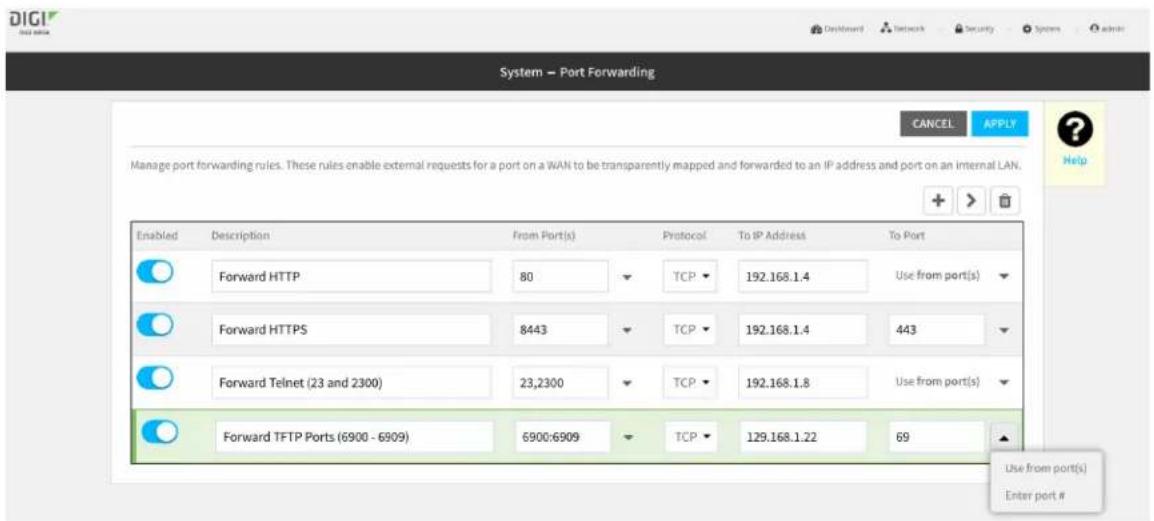

Command line
To add a port forwarding rule, use the port-forward command.
For a port forwarding rule to be applied, you must configure port and to-ip-address, and set the state of the rule to on (the default state). Incomplete and incorrect port forwarding rules are not applied.
For example:
digi.router> port-forward 4 port 80
digi.router> port-forward 4 to-ip-address 192.168.47.1
digi.router> port-forward 4 state on
digi.router> save config
Delete a port forwarding rule

Web
To delete one or more port forwarding rules:
- On the menu, click Network > Services > Port Forwarding. The Port Forwarding page appears.
- Select the rule you want to remove, and click 📄.
- Click Apply.

Command line
You cannot delete a port forwarding rule using the command line, but you can disable a port forwarding rule using the port-forward command.
For example:
digi.router> port-forward 4 state off
digi.router> save config
Enable or disable a port forwarding rule

Web
To enable or disable a port forwarding rule:
- On the menu, click Network > Services > Port Forwarding. The Port Forwarding page appears.
- For each rule, use the slider on the Enabled field to enable or disable the rule as needed.
- Click Apply.

Command line
To enable or disable a port forwarding rule, use the port-forward state command.
For example, to enable port forwarding rule 4:
digi.router> port-forward 4 state on
digi.router> save config
To disable port forwarding rule 4:
digi.router> port-forward 4 state off
digi.router> save config
Show port forwarding rules

Web
On the menu, click Network > Services > Port Forwarding. The Port Forwarding page appears. See Port forwarding page for field descriptions.

Command line
To show port forwarding rules, use the show port-forward command.
For example:
digi.router> show port-forward
Using an SSH server
Digi WR devices have a Secure Shell (SSH) server for managing the device through the command-line interface over a SSH connection. Only the SSHv2 protocol is supported; earlier versions of SSH protocol are no longer considered secure.
Configure a Secure Shell (SSH) server

Command line
- Enable the SSH server.
digi.router> ssh state on
- Optional: Configure the port number for the SSH server.
digi.router> ssh port 50684
- Save the configuration.
digi.router> save config
Use SSH to connect to the command-line interface
You can make SSH connections using utilities such as PuTTY, TeraTerm, or the Linux ssh command.

Command line
The following example shows how to use the Linux ssh command to connect to IP address 192.168.1.1 for the first time using the admin user account.
$ ssh admin@192.168.1.1
The authenticity of host '192.168.1.1 (192.168.1.1)' can't be established.
RSA key fingerprint is 2c:db:01:65:2f:bb:a3:4f:c0:5e:dd:2d:e7:9f:7d:01.
Are you sure you want to continue connecting (yes/no)? yes
Warning: Permanently added '192.168.1.1' (RSA) to the list of known hosts.
Password: ********
Welcome admin
Access Level: super
Timeout : 180 seconds
digi.router>
Terminate an SSH connection

Command line
To terminate an SSH connection:
■ Exit the command-line interface using the exit command.
Using SSH with key authentication
Rather than using passwords, you can use SSH keys to authenticate users connecting via SSH, SFTP, or SCP. SSH keys provide security and scalability:
■ Security: Using SSH keys for authentication is more secure than using passwords. Unlike a password that can be guessed by an unauthorized user, SSH key pairs provide a more sophisticated lock. A public key configured on the device is paired with a private key on the user's PC. The private key, once generated, remains on the user's PC.
■ Scalability: SSH keys can be used on more than one device.
Generating SSH key pairs
On a Microsoft Windows PC, you can generate SSH key pairs using a terminal emulator application, such as PuTTY or Tera Term.
On a Linux host, an SSH key pair is usually created automatically in the user's .ssh directory. The private and public keys are named id_rsa and id_rsa.pub. If you need to generate an SSH key pair, you can use the ssh-keygen application.
For example, the following entry generates an RSA (Rivest-Shamir-Adleman) key pair in the user's .ssh directory:
ssh-keygen -t rsa -f ~/.ssh/id_rsa
The private key file is named id_rsa and the public key file is named id_rsa.pub. (The .pub extension is automatically appended to the name specified for the private key output file.)
Required configuration items
■ Name for the user
■ SSH public key for the user
■ SSH key type
Optional configuration items
■ If you want to use the configured user via the serial or web UI interfaces, you must configure a password for the user.
■ If you want to access the device using SSH over a WAN interface, you must allow SSH access for each WAN interface.

Command line
- Configure a user. For example:
digi.router> user 2 name joeuser
- Configure the SSH public key for the user. Because the SSH public key is a long character string, cut and paste the key to avoid input errors. For example:
digi.router> user 2 ssh-key AAAAB3NzaC1y... T3rbBVb
- Configure the SSH key type for the user. For example:
digi.router> ssh 1 ssh-key-type ssh-rsa
- (Optional) Configure a password for the user. For example:
digi.router> user 2 password omnivers1031
- (Optional) Allow SSH access over the WAN interfaces. For example:
digi.router> wan 1 allow-ssh-access on
- Save the configuration.
digi.router> save config
Using SSH with certificate authentication
Rather than using passwords or SSH keys, you can use SSH certificates to authenticate users connecting via SSH, SFTP, or SCP.
SSH certificates provide security and scalability:
■ Security: In addition to the innate security of using signed certificates for authentication, certificates allows you to restrict access to designated time period as needed.
■ Scalability: Multiple user keys can be signed by one Certificate Authority (CA) so multiple users can log into the device without any additional configuration.
SSH supports both user and host keys. For this feature, Digi WR devices use SSH user keys.
A Certificate Authority (CA) public key is configured on the device. The CA private key is used to sign individual user public SSH keys which are then used to authenticate the user with the device.
Required configuration items
■ Name of the user
■ SSH CA key
■ SSH CA key type
Optional configuration items
■ If you want the configured user to access the device via the serial or web interfaces, you must configure a password for the user.
■ If you want to allow access to the device using SSH over a WAN interface, you must configure SSH access for each WAN interface.

Command line
- Configure a user. For example:
- (Optional) Configure a password for the user. For example:
- (Optional) Allow SSH access over WAN interfaces. For example:
- Configure the SSH certificate authority (CA) public key. The CA public key is very long and should be cut and pasted to avoid an input error. For example:
- Configure the SSH CA key type. For example:
- Save the configuration.
digi.router> user 2 name joeuser
digi.router> user 2 password omnivers1031
digi.router> wan 1 allow-ssh-access on
digi.router> ssh 1 ca-key AAAAB3NzaC1y...yjpY4HJ
digi.router> ssh 1 ca-key-type ssh-rsa
digi.router> save config
Example: Use an SSL certificate authentication
This example gives the steps to set up a user called John Smith to use SSL certificate authentication to log in to a Digi WR device from a Linux host. His Linux username is jsmith and the username on the device will be john.
This example uses ssh-keygen to create and sign keys and certificates and was created on an Ubuntu Linux host using OpenSSH 6.6.1p1.
Note This example creates a CA private and public RSA key pair. If you already have an SSH CA admin that can sign SSH keys, you do not need to generate your own CA key pair.
On the Linux host
- Create a CA private and public RSA key pair in the .ssh directory. You will be prompted for a passphrase. To prevent unauthorized use of the CA key, Digi recommends you configure a passphrase for the key.
jsmith@ubuntu:~$ ssh-keygen-t rsa-f ~/.ssh/ca_user_key
Generating public/private rsa key pair.
Enter passphrase (empty for no passphrase):
Enter same passphrase again:
Your identification has been saved in .ssh/ca_user_key.
Your public key has been saved in .ssh/ca_user_key.pub.
The key fingerprint is:
2048 47:f0:5f:62:0f:c2:3f:d3:89:a7:65:8d:f3:58:74:49 jsmith@ubuntu (RSA)
The key's randomart image is:
+---[ RSA 2048]----+
| .    E |
|    +    .. |
|    = + ..o |
|    . = B = .
| S .* X o |
|    .    B = |
|    .. . |
|    |
+----+
jsmith@ubuntu:~$
Note If you already have an SSH CA admin that can sign SSH keys, then you do not need to generate your own CA key pair. Instead, the SSH user keys should be signed by the SSH CA administrator.
- Using the CA private key, sign John's public user key, id_rsa.pub, which is usually auto-generated in the .ssh directory. This generates a certificate file called id_rsa-cert.pub. You must pass the device username to the ssh-keygen tool using the -n
option.
jsmith@ubuntu:-$ ssh-keygen -s ca_user_key -I jsmith -n john -V +52w .ssh/id_rsa.pub
Enter passphrase:
Signed user key .ssh/id_rsa-cert.pub: id "jsmith" serial 0 for john valid from 2018-03-19T14:41:00 to 2019-03-18T14:42:20
jsmith@ubuntu:-$
Note If necessary, a user private and public key pair can be generated using the following
command:
ssh-keygen -t rsa -f ~/.ssh/id_rsa
3. Display the CA public key.
jsmith@ubuntu:~$ ls .ssh/
ca_user_key ca_user_key.pub id_rsa id_rsa-cert.pub id_rsa.pub
jsmith@ubuntu:~$
jsmith@ubuntu:~$ cat .ssh/ca_user_key_pub
ssh-rsa
AAAAB3NzaClyc2EAAAADAQAABAAABAQC1f9czThvSPbVimiNHkv9xTFCC2As3hl/RYSh68J3dGg274mlr6VR6FhauAQhNEa4VmlJDo2Htq
AnTLnzTkMYKupKNCIxcamzLL6BwZS9nVBs5Q049TfLQXRdqfeGDaXxwat2qlt+YNen+eRVuNnT48YbM0+0FPdHZI3fTcZ0oXHAH9zLhmW
H1kXXUEZofE8PVFKy/oA7yo9Fu7GsdrAhzr1YFuQthC5SyTDn2GV5B+Kj7yTtP8deT37JBIC1LK9psIpxJ6I1Ed9BQtqQ7+jeIvnzHW35W
5NxC8eBpCechM3F/+HCzXBYSuPxL2sjxC5ou7lJ4iip2G17zPyjpY4HJ jsmith@ubuntu
jsmith@ubuntu:~$
On the WR routers device
■ Configure the device with the user and CA key information.
digi.router> user 2 name john
digi.router> ssh 1 ca-key AAAAB3NzaC1y...yjpY4HJ
digi.router> ssh 1 ca-key-type ssh-rsa
digi.router> save config
Log in with SSH from the Linux host
■ Log into the device using the ssh command.
jsmith@ubuntu:~$ ssh john@192.168.1.1
Welcome john
Access Level: super
Timeout : 300 seconds
digi.router>
Example: Use an SSL certificate authentication with shared account
This example gives the steps to set up two users to use SSH certificates to log in to a shared admin account on the Digi WR device.
The example sets up two users: Alice and Bob. Both users will log in to the device using the shared it-admin account. The example assumes there is an SSH CA admin available that controls the SSH CA private key and can sign the public keys.
The method demonstrated in this example can be extended to support any number of users. The CA admin can also sign the individual user public keys with different validity periods. For example, one user can be given access for 2 weeks and another user can be given access for a year.
-
Alice gives the SSH CA admin her public SSH key (usually \~/.ssh/id_rsa.pub).
-
The SSH CA admin signs Alice's SSH public key using the CA private key, using the name it-admin as the principal (ssh-keygen -n option) in the key signing.
-
The SSH CA admin gives the signed public key file (for example, id_rsa-cert.pub).
-
Alice stores the signed public key file on her host (usually in the .ssh directory).
-
Repeat steps 1—4 for Bob's SSH public key.
-
The SSH CA public key is obtained from the SSH CA admin.
-
On the device, configure the following:
digi.router> user 2 name it-admin
digi.router> ssh 1 ca-key AAAAB3NzaC1y...yjpY4HJ
digi.router> ssh 1 ca-key-type ssh-rsa
digi.router> save config
-
Alice and Bob should now be able to log in to the device using the it-admin account and SSH certificate authentication.
-
As Alice and Bob are using a shared account, the event log only logs the fact the user it-admin has logged in. However, the system log does display the ID of the user's public key so it is possible to identify who logged in.
lperf3 server
Your Digi device includes an lperf3 server that you can use to test the performance of your network. iPerf3 is a command-line tool that measures the maximum network throughput an interface can handle. This is useful when diagnosing network speed issues, to determine, for example, whether a cellular connection is providing expected throughput.
The Digi WR implementation of Iperf3 supports testing with both TCP and UDP.
Required configuration items
■ Enable the Iperf3 server on the Digi device.
■ An lperf3 client installed on a remote host. lperf3 software can be downloaded at https://iperf.fr/iperf-download.php.
Additional configuration Items
■ The port that the Digi device's Iperf3 server will use to listen for incoming connections. The default port is 5102.
Enable the Iperf3 server
This functionality is not available from the Web UI.

Command line
- Enable the lperf3 server:
digi-router> perf-server state on digi-router>
When the Iperf3 server is enabled, the Digi device will automatically configure its firewall rules to allow incoming connections on the configured listening port.
- (Optional) Set the listening port that the lperf3 server will use for incoming connections. The default port is 5102.
digi-router> perf-server port port-number
digi-router>
Example performance test using Iperf3
On a remote host with Iperf3 installed, enter the following command:
$ iperf3 -c device_ip
where device_ip is the IP address of the Digi device. For example:
$ iperf3 -c 192.168.1.1
Connecting to host 192.168.1.1, port 5201
[4] local 192.168.3.100 port 54934 connected to 192.168.1.1 port 5201
[ID] Interval Transfer Bandwidth Retr Cwnd
[4] 0.00-1.00 sec 26.7 MBytes 224 Mbits/sec 8 2.68 MBytes
[4] 1.00-2.00 sec 28.4 MBytes 238 Mbits/sec 29 1.39 MBytes
[4] 2.00-3.00 sec 29.8 MBytes 250 Mbits/sec 0 1.46 MBytes
[4] 3.00-4.00 sec 31.2 MBytes 262 Mbits/sec 0 1.52 MBytes
[4] 4.00-5.00 sec 32.1 MBytes 269 Mbits/sec 0 1.56 MBytes
[4] 5.00-6.00 sec 32.5 MBytes 273 Mbits/sec 0 1.58 MBytes
[4] 6.00-7.00 sec 33.9 MBytes 284 Mbits/sec 0 1.60 MBytes
[4] 7.00-8.00 sec 33.7 MBytes 282 Mbits/sec 0 1.60 MBytes
[4] 8.00-9.00 sec 33.5 MBytes 281 Mbits/sec 0 1.60 MBytes
[4] 9.00-10.00 sec 33.2 MBytes 279 Mbits/sec 0 1.60 MBytes
[ ID] Interval Transfer Bandwidth Retr
[ 4] 0.00-10.00 sec 315 MBytes 264 Mbits/sec 37 sender
[ 4] 0.00-10.00 sec 313 MBytes 262 Mbits/sec receiver
iperf Done.
$
Enable the Wi-Fi scanning service
The Wi-Fi scanning service allows you to configure your device to detect Wi-Fi-enabled devices that are nearby, and then opens an SSH port that remote hosts can access to read basic information about those devices.
The Wi-Fi scanning service is supported on Digi WR54 and WR64 models.
Required configuration
■ Enable the Wi-Fi scanning service.
■ A remote host to view the output of the service.
Additional configuration
■ The SSH port used by the Wi-Fi scanner for reporting information to the remote host.
■ The Wi-Fi channels to be scanned.
■ The frequency with which the service hops from one channel to the next.
■ The number of seconds that the service waits before updating its output.
This functionality is not available from the Web UI.

Command line
- Enable the Wi-Fi scanning service:
- To enable a single Wi-Fi scanning service instance:
    digi.router> wifi-scanner 1 state on
    digi.router>

- For dual-Wi-Fi versions of Digi WR devices, there are two instances of service, one for each Wi-Fi module:
    digi.router> wifi-scanner 1 state on
    digi.router> wifi-scanner 2 state on
    digi.router>
- (Optional) Set the port that will be used by this instance of the service. The default is 3101.
digi.router> wifi-scanner 1 port number
digi.router>
- (Optional) Set the Wi-Fi channels that will be scanned by this instance of the service. The allowed value is a comma-separated list of channel numbers, or all to scan all channels. The default is all.
digi.router> wifi-scanner 1 channels list
digi.router>
- (Optional) Set the frequency, in milliseconds, that the Wi-Fi scanning service will hop from one channel to the next during scanning. The default is 150
digi.router> wifi-scanner 1 hop-frequency number
digi.router>
- (Optional) Set the number of seconds that the service waits before updating its output. The default is 5 seconds.
digi.router> wifi-scanner 1 update-interval number
digi.router>
- (Optional) To configure the Wi-Fi module to use only its primary antenna, and not the secondary antenna:
digi.router> wifi-scanner 1 secondary-antenna off
Note This functionality is supported on the WR54 model only. Normally you should not turn off support for the secondary antenna.
- Connect a remote host to the device by using the scanner's port. For example, to view the output of the scanner, use SSH from a remote host to connect to the device:
$ ssh user@device-ip -p 3101
Password:
After logging into your device, it will display the output from the Wi-Fi scanning service in your shell. For example:
WR54|Hopkins, MN|1561754337|D0-81-C0-D5-E3-B0|D0-81-C0-D5-E3-B0|48|<hidden-ssid>| -1
WR54|Hopkins, MN|1561754369|27-96-16-79-C9-0C|27-96-16-79-C9-0C|48|WR54-000488-1|-76
WR54|Hopkins, MN|1561754304|DA-3C-0E-CA-6F-78||48||-78
WR54|Hopkins, MN|1561754292|85-94-36-14-CF-34||48||-84
The output from the Wi-Fi scanning service includes the following information:
| Field | Description |
| Field 1 | The name of the device, as configured for the system. |
| Field 2 | The location of the device, as configured for the system. |
| Field 3 | The most recent time this device was seen by the scanning service. Time is in seconds January 1, 1970. |
| Field 4 | The MAC address of the Wi-Fi access point or the Wi-Fi client. |
| Field 5 | If the device is a Wi-Fi client, the MAC address of the access point to which the Wi-Fi client is connected. |
| Field 6 | The channel being used by the access point or the client. If the device is a Wi-Fi access point that uses a hidden SSID, the channel will be listed.as |
| Field 7 | If the device is a Wi-Fi access point, the SSID of the access point. |
| Field 8 | The Received Signal Strength Indicator (RSSI). |
Enable the Bluetooth scanning service
The Bluetooth scanning service allows you to configure your device to detect BLE-enabled devices that are nearby, and then opens an SSH port that remote hosts can access to read basic information about those devices.
The Bluetooth scanning service is supported on Digi WR54 and WR64 models.
Required configuration
■ Enable the Bluetooth scanning service.
■ A remote host to view the output of the service.
Additional configuration
■ The SSH port used by the Bluetooth scanner for reporting information to the remote host.
■ The number of seconds between scans for Bluetooth enabled devices.
This functionality is not available from the Web UI.

Command line
- Enable the Bluetooth scanning service.
digi.router> bluetooth-scanner state on
digi.router>
- (Optional) Set the port that the Bluetooth scanning service will use. The default is 3102.
digi.router> bluetooth-scanner port number
digi.router>
- (Optional) Set the number of seconds between scans. The default is 15 seconds.
digi.router> bluetooth-scanner scan-rate number
digi.router>
- Connect a remote host to the device by using the scanner's port. For example, to view the output of the scanner, use SSH from a remote host to connect to the device:
$ ssh user@device-ip -p 3102
Password:
After logging into your device, it will display the output from the Bluetooth scanning service in your shell. For example:
WR54|Hopkins, MN|2019-06-28 17:08:57|38-97-31-8C-EF-7C|Unknown
Manufacturer|VOID|VOID|-62
WR54|Hopkins, MN|2019-06-28 17:08:58|26-20-A5-7B-0F-61|Apple,
Inc.|VOID|VOID|-80
WR54|Hopkins, MN|2019-06-28 17:08:59|EF-C8-3E-D3-65-04|Digi International
Inc (R)|VOID|VOID|-55
WR54|Hopkins, MN|2019-06-28 17:08:59|B6-21-0B-23-AE-FC|Apple,
Inc.|VOID|VOID|-75
The output from the Bluetooth scanning service includes the following information:
| Field Description |
| Field 1 The name of the device, as configured for the system. |
| Field 2 The location of the device, as configured for the system. |
| Field 3 The date and time of the connection attempt. |
| Field 4 MAC address of the Bluetooth device that attempted the connection. |
| Field 5 The Bluetooth manufacturer ID. |
| Field 6 The device type. |
| Field 7 The device class. |
| Field 8 The Received Signal Strength Indicator (RSSI). |
Remote management
Remote Manager 194 Using Simple Network Management Protocol (SNMP) 199
Remote Manager
Digi Remote Manager is a hosted remote configuration and management system that allows you to remotely manage a large number of devices. Digi Remote Manager has a web-based interface from which you can perform device operations, such as viewing and changing device configurations and updating the firmware.
Digi Remote Manager also provide a data storage facility.
Using Digi Remote Manager requires setting up a Digi Remote Manager account. To set up a Digi Remote Manager account and learn more about Digi Remote Manager, go to www.digi.com/products/cloud/digi-remote-manager.
To learn more about Digi Remote Manager features and functions, see the Digi Remote Manager User Guide.
Configure Digi Remote Manager
Digi Remote Manager is enabled by default. Once the device has a WAN connection, it automatically connects to Digi Remote Manager.
Additional configuration options
These additional configuration settings are not typically configured, but you can set them as needed:
■ You can disable the Digi Remote Manager connection if it is not required.
- You can change the reconnection timer. By default, the device attempts to connect to Digi Remote Manager every 30 seconds.
■ The non-cellular keepalive timeout. By default, the device will send a keepalive message to Digi Remote Manager and expect a keepalive message every 60 seconds when using a non-cellular WAN interface. You can change the non-cellular keepalive timeout value depending on your WAN characteristics.
■ The cellular keepalive timeout. By default, the device will send a keepalive message to Digi Remote Manager and expect a keepalive message every 290 seconds when using a cellular WAN interface. You can change the cellular keepalive timeout length depending on your cellular interface characteristics.
- The keepalive count before the Remote Manager connection is dropped. By default, the device disconnects and attempts to reconnect to Remote Manager after 3 missed keepalive messages.

Web
Register device in Digi Remote Manager
■ If you have already registered your device:
If you have registered your device with Digi Remote Manager when you went through the Getting Started Wizard:
- Enter your credentials to log in to your Remote Manager account and click Log In.
- A message appears showing the group into which your device has been registered in the Remote Manager Status section of the Digi Remote Manager page.
■ If you have not already registered the device:
- On the menu, click System > Administration > Remote Manager. The Digi Remote Manager page appears.
- Enter your credentials to log in to your Digi Remote Manager account and click Log In.
- Select a group for you device in your Digi Remote Manager account, then click Register Device.
- If the registration succeeds, a message appears indicating that your device has been registered in your Digi Remote Manager account; for example:
This device is registered in your Digi Remote Manager account Group location: Group C
Optional: Modify Digi Remote Manager settings
- On the menu, click System > Administration > Remote Manager.
- Enter the settings.
■ Enable or disable the connection to Digi Remote Manager.
- Ethernet Keepalive: The interval between sending keepalives to Digi Remote Manager over Ethernet interfaces.
■ Cellular Keepalive: The interval between sending keepalives to Digi Remote Manager over cellular interfaces.
■ Reconnect Delay: The reconnection timer for reconnecting to Digi Remote Manager after a disconnect. By default, the device attempts to connect to Digi Remote Manager every 30 seconds.
- Click Apply.

Command line
■ Disable the Digi Remote Manager connection.
digi.router> cloud state off
digi.router> save config
■ Set the reconnect timer. For example, to set it to 60 seconds:
digi.router> cloud reconnect 60
digi.router> save config
■ Set the non-cellular keepalive time. For example, to set it to 180 seconds:
digi.router> cloud keepalive 180
digi.router> save config
■ Set the cellular keepalive time. For example, to set it to 600 seconds:
digi.router> cloud keepalive-cellular 600
digi.router> save config
■ Set the keepalive count. For example, to set it to 5:
digi.router> cloud keepalive-count 5
digi.router> save config
Show Digi Remote Manager connection status

Web
On the menu, click System > Administration > Remote Manager.
The Digi Remote Manager page shows whether your device is connected to Digi Remote Manager, as well as device connection statistics.

Command line
To show the status of the Digi Remote Manager connection, use the show cloud command.
In the show cloud command output, the device ID is the unique identifier for the device on the Digi Remote Manager.
For example:
digi.router> show cloud
Device Cloud Status
Status : Connected
Server : my.devicecloud.com
Device ID : 00000000-00000000-0040FFFF-FF0F4594
Uptime : 1 Minute, 9 Seconds
Received Sent
Packets 13
Bytes
37
14
218
digi.router>
Enable health reporting and set sample interval
You can enable the gathering of health metrics information for your device. Before enabling health reporting, make sure you first register your device with Digi Remote Manager. For instructions, see Configure Digi Remote Manager.

Web
- From the menu, click System > Remote Manager.
- Click Open Remote Manager.
- Go to Configuration > Remote Manager page.
-
For the Enable Health Reporting option, select On.
-
For the Health Sample Interval, select the interval, in minutes, for sampling health data. See The health sample interval and health metrics reported by Digi Remote Manager for further information about the Health Sample Interval.
- For Health Rollup Period, select the amount of time, in minutes, that health metrics information is aggregated before being reported to Digi Remote Manager. Generally, the Health Sample Interval and Health Rollup Period should be set to the same value.
- Click Save to save the configuration.

Command line
-
Turn on health reporting for Digi Remote Manager: digi.router> cloud health on
-
Set the interval in minutes for sampling health data. Allowed values are 1, 5, 15, 30, or 60 minutes, and the default is 60.
digi.router> cloud health-sample-interval 30
See The health sample interval and health metrics reported by Digi Remote Manager for further information about the health sample interval.
- Set amount of time, in minutes, that health metrics information is aggregated before being reported to Digi Remote Manager. Generally, the health-sample-interval and health-rollup-period should be set to the same value.
digi.router> cloud health-rollup-period 30
- Save the configuration. digi.router> save config
The health sample interval and health metrics reported by Digi Remote Manager
The health sample interval sets a regular sample period that the device uses to report health metrics to the Digi Remote Manager. This allows you to create thresholds that fire alarms based on the sample period.
For example, with the uptime health metric, you can configure the Digi Remote Manager to issue errors and warnings based on the amount of time during the sample interval period that the device has been offline. By default, the health sample interval is set to 60 minutes on the device, and the Digi Remote Manager's uptime metric is configured to:
- Trigger an warning alarm if the device is down for 100 seconds during the 60 minute sample period.
- Trigger an error alarm if the device is down for ten minutes during the 60 minute sample period.
You can edit the uptime metric in the Digi Remote Manager to change these values, so that, for example, a Digi Remote Manager warning is fired if the device is down for as little as one second during the sample interval period.
One result of this behavior is that the device uptime, as reported in the Digi Remote Manager, will never exceed the health sample interval, and is therefore not a mechanism to determine the total device uptime. Instead, do one of the following to determine the total device uptime:
■ Open the device's WebUI, either from within the Digi Remote Manager or locally on the device.
- The device uptime is listed on the device's dashboard in the WebUI in the Device pane.
- Alternatively, you can select System > Device Preferences, and the device uptime is listed in the Device Overview section.
■ Use the show system command at device's command line:
digi.router> show system
Model : WR54
Part Number : WR54-A146
Serial Number : WR54-001116
Hardware Version : 50001987-01 A
Using Bank    : 1
Firmware Version : 4.6.0.40 03/19/2019 18:47:59
Bootloader Version: 1.1.3 (Dec 20 2018 - 00:34:45)
Using Config File : config.da0
Uptime    : 19 Days, 22 Hours, 43 Minutes, 34 Seconds
...
digi router>
Using Simple Network Management Protocol (SNMP)
Simple Network Management Protocol (SNMP) is a protocol for remotely managing and monitoring network devices. Network administrators can use the SNMP architecture to manage nodes, including servers, workstations, routers, switches, hubs, and other equipment on an IP network, manage network performance, find and solve network problems, and plan for network growth.
Supported SNMP versions
Digi WR devices support the SNMP versions SNMPv1, SNMPv2c, and SNMPv3.
The device supports up to 10 SNMPv1/SNMPv2c communities. Each community can have read-only or read-write access.
The device supports up to 10 SNMPv3 users. You can configure each user's access level as read-only or read-write, and configure security settings on an individual-user basis.
Supported Management Information Bases (MIBs)
Digi WR devices support the following SNMP MIBs for managing the entities in a communication network:
■ Standard SNMP MIBs
■ An enterprise-specific MIB for the LR54, named transport-lr54.mib. This MIB is available for download from Digi Support.
Note You cannot use SNMPv1 with the Enterprise MIB because of the COUNTER64 types used in the Enterprise MIB.
SNMP Security
By default, Digi WR devices automatically block SNMP packets from being received over WAN and LAN interfaces. As a result, if you want a device to receive SNMP packets, you must create an IP filter that will allow the device to receive the packets. When creating the IP filter, you should configure a source IP address by using the ip-filter src-ip-address command, which restricts incoming SNMP requests to that particular host.
With SNMPv3, SNMP packets are authenticated and encrypted. Therefore, when using SNMP over a WAN interface, you should use SNMPv3.
Configure SNMPv1 and SNMPv2

Command line
- All SNMP versions are disabled by default. To enable support for SNMPv1 or SNMPv2c, enter:
digi.router> snmp v1 on
OR
digi.router> snmp v2c on
-
If using SNMPv1/v2c communities, configure a name for each community. For example: digi.router> snmp-community 1 community public
-
The community access level defaults to read-only. To set the access level to read-write, enter: digi.router> snmp-community 1 access read-write
-
Configure an IP filter that allows SNMP traffic to be received by the device. For example, to allow SNMP packets from IP host 192.168.1.200 over LAN 1, the commands are as follows: digi.router> ip-filter 1 description "Allow SNMP from 192.168.1.200" digi.router> ip-filter 1 dst-ip-port 161 digi.router> ip-filter 1 src lan1 digi.router> ip-filter 1 src-ip-address 192.168.1.200 digi.router> ip-filter 1 state on
-
Save the configuration. digi.router> save configuration
Configure SNMPv3

Command line
- All SNMP versions are disabled by default. To enable support for SNMPv3, enter:
digi.router> snmp v3 on
- For each SNMPv3 user, give the user a name of up to 32 characters:
digi.router> snmp-user 1 user joe
- Set the authentication type for the SNMPv3 user (none, md5, or sha1). To use privacy (DES or AES), the authentication type be either md5 or sha1.
digi.router> snmp-user 1 authentication shal
- Set the authentication password for the SNMPv3 user. The password length can be between 8 and 64 characters.
digi.router> snmp-user 1 authentication-password authpassword
- Set the privacy type for the SNMPv3 user (none, aes, or des):
digi.router> snmp-user 1 privacy des
- Set the privacy password for the SNMPv3 user. The password length can be between 8 and 64 characters.
digi.router> snmp-user 1 privacy-password privpassword
- Configure the access level for the SNMPv3 user.
digi.router> snmp-user 1 access read-write
- Configure an IP filter that allows SNMP traffic to be received device. For example, to allow SNMP packets from IP host 192.168.1.200 over any WAN interface, the commands are as follows:
digi.router> ip-filter 1 description "Allow SNMP from 192.168.1.200"
digi.router> ip-filter 1 dst-ip-port 161
digi.router> ip-filter 1 src lan1
digi.router> ip-filter 1 src-ip-address 192.168.1.200
digi.router> ip-filter 1 state on
- Save the configuration.
digi.router> save configuration
Routing
IP routing 203
Dynamic DNS 208
Web filtering (OpenDNS).209....
Dynamic Mobile Network Routing (DMNR) 211
Quality of Service (QoS) 214
Virtual Router Redundancy Protocol (VRRP) 218
IP routing
The Digi WR device uses IP routes to decide where to send a packet it receives for a remote network. The process for deciding on a route to send the packet is as follows:
- The device examines the destination IP address in the IP packet, and looks through the IP routing table to find a match for it.
- If it finds a route for the destination, it forwards the IP packet to the configured IP gateway or interface.
- If it cannot find a route for the destination, it uses a default route.
- If there are two or more routes to a destination, the device uses the route with the longest mask.
- If there are two or more routes to a destination with the same mask, the device uses the route with the lowest metric.
Configure general IP settings
Configuring general IP settings is one of the building blocks of setting up IP routing.
Optional configuration items
- The IP hostname. This hostname identifies the Digi WR device on IP networks. It is an unqualified hostname. The default setting for the device is
-%s which expands to serial number for the device. - The administrative distance settings for connected and static routes. Administrative distance settings rank the type of routes, from the most to least preferred. When there are two or more routes to the same destination and mask, the route with the lowest metric is used. By default, routes to connected networks are preferred, with static routes being next. The administrative distance for each route type is added to the route's metric when it is added to the routing table. Configuring the administrative distance of a particular route type can alter the order of use for the routes. The two administrative distance settings are:
- Administrative distance for connected network routes. The default value is 0.
- Administrative distance for static routes. The default value is 1.

Web
In the web interface, general IP settings are configured as part of configuring a LAN or WAN. See Configure a LAN and Configure a Wide Area Network (WAN).

Command line
- Set the hostname.
digi.router> ip hostname WR64-NewYork
- Set the administrative distance for connected routes.
digi.router> ip admin-conn 3
- Set the administrative distance for static routes.
digi.router> ip admin-static 5
- Save the configuration.
digi.router> save config
Configure a static route
A static route is a manually configured routing entry. Information about the route is manually entered rather than obtained from dynamic routing traffic. Digi WR devices support up to 32 static routes.
Required configuration items
■ The destination network and mask.
■ The gateway IP address for routes using LAN and WAN Ethernet interfaces. The gateway IP address should be on the same subnet as the IP address of the LAN or WAN Ethernet interface in use.
■ The interface name for routes using cellular interfaces.
Optional configuration items
■ The metric for the route. The metric defines the order in which routes should be used if there are two routes to the same destination. In such a case, the smaller metric is used.

Command line
Use the route command to configure IP routes.
Example 1
To configure a static route to the 192.168.47.0/24 network using the lan1 interface, which has an IP address of 192.168.1.1 and a gateway at IP address of 192.168.1.254:
- Set the destination network and mask.
digi.router> route 1 destination 192.168.47.0
digi.router> route 1 mask 255.255.255.0
- Set the gateway IP address.
digi.router> route 1 gateway 192.168.1.254
- Save the configuration.
digi.router> save config
Example 2
To configure a static route to the 44.1.0.0/16 network using the cellular1 interface:
- Set the destination network and mask.
digi.router> route 4 destination 44.1.0.0
digi.router> route 4 mask 255.255.0.0
- Set the interface.
digi.router> route 4 interface cellular1
- Optional: Set the metric.
digi.router> route 4 metric 5
- Save the configuration.
digi.router> save config
Once the static route is configured, it should appear in the IPv4 routing table, which you can display using the show route command.
Show the IPv4 routing table

Command line
To display the IPv4 routing table, use the show route command.
digi.router> show route
Destination Gateway Metric Protocol Idx Interface Status
10.1.2.0/24 192.168.1.254 1 Static 1 lan1 UP
192.168.1.0/24 0.0.0.0 0 Connected lan1 UP
default 0.0.0.0 1 Connected eth1 UP
default 0.0.0.0 2 Connected cellular1 UP
digi.router>
Delete a static route

Command line
To remove a static route from the routing table, clear the destination network configuration. To revert the settings for the route destination, enter the route command, specifying the interface number, the destination parameter, and the exclamation mark (!) character. For example:
digi.router> route 1 destination !
digi.router> save config
Routing rules
Routing rules allows you to control which WAN interface is used for specific traffic from a LAN or Hotspot interface.
For example, you can configure the device so that one LAN's traffic is routed out of one WAN interface, and another LAN is routed out of another WAN interface. Or, you can route all traffic for a particular protocol through a specific WAN interface.
The order of the routing rules is important. Routing rules are processed sequentially; as a result, if a packet matches an earlier rule, it will be routed out of that rule's WAN interface. It will not be processed by any subsequent rules.
Configure a routing rule
Required configuration items
■ Enable the routing rule. Routing rules are disabled by default.
■ The packet matching parameters. It can be any combination of the following:
- Source LAN or Hotspot interface.
- Source IP address. This can be a single IPv4/IPv6 address or an IPv4/IPv6 network.
- Source port. This is only used if the protocol is set to any, tcp or udp.
- Destination IP address. This can be a single IPv4/IPv6 address or an IPv4/IPv6 network.
- Destination port. This is only used if protocol is set to any, tcp or udp.
- Protocol. This can be any, tcp, udp or icmp.
■ The WAN interface on which the matching traffic will be sent.
Additional configuration items
■ A description for the routing rule.
Example: Route LAN1 traffic over WAN1, and LAN2 traffic over WAN2
This example uses the routing-rule command to route all traffic from LAN1 out of WAN1, and all traffic from LAN2 out of WAN1.
This procedure is supported on the command line only.

Command line
- Configure the routing rule for LAN1:
a. Set the source to LAN1: digi.router> routing-rule 1 src lan1
b. Set the wan to WAN1: digi.router> routing-rule 1 wan 1
c. Enable the routing rule: digi.router> routing-rule 1 state on
- Configure the routing rule for LAN2:
a. Set the source to LAN2: digi.router> routing-rule 2 src lan2
b. Set the wan to WAN2: digi.router> routing-rule 2 wan 2
c. Enable the routing rule: digi.router> routing-rule 2 state on
- Save the configuration:
digi.router> save config
Example: Route all traffic to a specific network through a specific WAN
This example uses the routing-rule to route all traffic to the 202.98.2.0/24 through WAN3.

Web
Currently not supported.

Command line
- Configure the destination network:
digi.router> routing-rule 1 dst-ip-address 202.98.2.0/24
- Set wan to WAN3:
digi.router> routing-rule 1 wan 3
- Enable the routing rule:
digi.router> routing-rule 2 state on
- Save the configuration:
digi.router> save config
Show routing rules

Web
Currently not supported.

Command line
The show routing-rule command displays the current routing rules configuration:
digi.router> show routing rule
<h1 id="oper-status-wan-description">Oper Status WAN Description</h1>
1 Up 1 LAN 1 > WAN 1
2 Up 2 LAN 2 > WAN 2
digi.router>
Dynamic DNS
The Domain Name System (DNS) uses name servers to provide a mapping between computer-readable IP addresses and human-readable hostnames. This allows users to access websites and personal networks with easy-to-remember URLs. Unfortunately, IP addresses change frequently, invalidating these mappings when they do. Dynamic DNS has become the standard method of addressing this problem, allowing devices to update name servers with their new IP addresses.
By providing the device with the hostname, service, and credentials obtained from a dynamic DNS provider, the device can automatically update the remote nameserver whenever your WAN or public IP address changes.
Digi WR devices support the following Dynamic DNS providers:
■ DynDNS https://dyn.com/
■ No-IP https://www.noip.com/
■ DNS-O-Matic https://www.dnsomatic.com/
■ ChangelP https://www.changeip.com/
Configure dynamic DNS
This section describes how to configure dynamic DNS on a Digi WR device. For details on dynamic DNS, see Dynamic DNS
Required configuration items
■ Enable Dynamic DNS
■ Service: Provide the name of a Dynamic DNS provider (for example, dyndns, dnsomatic, noip, changeip).
■ Username: Provide username to be used to authenticate with your Dynamic DNS provider.
■ Password: Provide the password corresponding to the username provided above.
- Hostname: Provide the URL for your Dynamic DNS provider, which will be linked to your IP address.
Additional configuration items
■ IP monitoring, to determine which IP address to monitor for changes. If you select set the ip-monitoring option to wan, the device monitors the IP address of WAN interfaces. If you set it to public, the device monitors the public-facing IP address, regardless of the IP address of the WAN interface.

Command line
- Set the dynamic DNS service:
digi.router> dynamic-dns service dyndns
- Set the username and password for the dynamic DNS service:
digi.router> dynamic-dns username yourusername
digi.router> dynamic-dns password yourpassword
- Set the hostname to update when your IP address changes:
digi.router> dynamic-dns hostname your.dynamicdns.hostname
- Optional: Set ip-monitoring type for dynamic DNS:
digi.router> dynamic-dns ip-monitoring public
- Enable Dynamic DNS:
digi.router> dynamic-dns state on
- Save the configuration.
digi.router> save config
Web filtering (OpenDNS)
Web filtering allows you to control access to services that can be accessed through the device.
It does this by forwarding all Domain Name System (DNS) traffic to a web filtering service. This allows the network security administrator to configure a set of policies with the web filtering service that are applied to all routers with web filtering enabled. For example, a policy may allow or deny access to a specific service or type of service such as social media, gaming, and so on.
Digi WR devices support Cisco Umbrella (formally known as OpenDNS). For more information, see https://umbrella.cisco.com.
Configure web filtering using Cisco Umbrella
This section describes how to configure the web filter on a Digi WR device using the Cisco Umbrella service.
To use Cisco Umbrella with your device, you must obtain an API token. For instructions on how to do this, see Cisco-Umbrella-Network-Device-Integrations.

CAUTION! Due to recent changes in Cisco Umbrella, if you have a legacy token generated prior to December 7, 2017, you cannot use the token with a device. Regenerate a token from your Umbrella console.
Once you have completed your Cisco Umbrella configuration, you can verify that your setup is working by following the steps outlined in How-to-test-for-successful-OpenDNS-configuration.
Required configuration items
■ Set web filter customer-specific token.
■ Enable web filter.

Command line
1. Set the web filter token:
    digi.router> web-filter token your_client_token
2. Enable the web filter:
    digi.router> web-filter state on
3. Save the configuration.
    digi.router> save config
Clear device ID
If the device ID on your Digi WR device appears to be invalid, you can clear the device ID by using the clear web-filter-id command.

Command line
Clear the web filter ID:
digi.router> clear web-filter-id
Dynamic Mobile Network Routing (DMNR)
Dynamic Mobile Network Routing (DMNR) is a mobile networking technology available on Verizon Wireless Private Networks that provides access to one or more Local Area Networks (LANs) on your device. DMNR creates a tunnel between the home agent on the Verizon private network and the Digi WR device, isolating the connection from internet traffic and advertising the IP subnets of the LANs for remote access and device management.
DMNR support requires the use of Verizon SIM cards that have DMNR enabled.
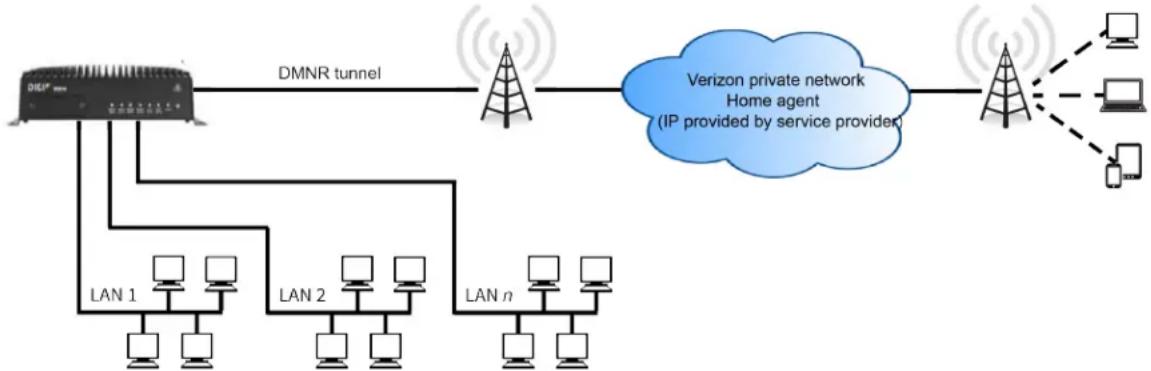
flowchart
graph LR
    A["DMNR tunnel"] --> B["Network"]
    B --> C["Verizon private network\nHome agent\n(IP provided by service provider)"]
    C --> D["Network"]
    D --> E["IP"]
    A --> F["LAN 1"]
    A --> G["LAN 2"]
    A --> H["LAN n"]
    F --> I["Computer"]
    G --> J["Computer"]
    H --> K["Computer"]
    I --> L["Server"]
    J --> M["Server"]
    K --> N["Server"]
    style C fill:#cce5ff,stroke:#333
    style D fill:#cce5ff,stroke:#333
This section contains the following information:
■ Configure DMNR
■ Show DMNR status
Configure DMNR

Web
- On the menu bar:
a. Click Network.
b. In the Services section of the Network menu, select DMNR.
The DMNR page is displayed.
- Select Enabled to enable DMNR.
- For Home Agent, type the IP address of the home agent that has been supplied to you by your service provider.
-
For Networks to Route, select the LAN or LANs that the Verizon private network will advertise.
-
(Optional) Expanded Advanced to change advanced options from their default settings.
a. Authorization Key: Enter the key provided by your service provider. The default is VzWNeMo, which is the key for Verizon.
b. SPI: The Security Parameter Index, which is used in the authentication extension when registering. Normally left at the default setting of 256 unless your service provider indicates a different value.
c. Home Network (Tunnel): This represents a non-routable ("dummy") IP address for the device. Normally left at the default setting of 1.2.3.4.
d. Lifetime: Specifies the number of seconds until the authorization key expires. The default is 600.
e. MTU: Specifies the Maximum Transmission Unit, in bytes. The default is 1476. The default MTU size for LANs on the Digi WR device is 1500. The MTU size of the DMNR tunnel will be smaller, to take into account the required headers.
f. Reconnect Time: The number of seconds to wait before attempting an automatic reconnect.
- Click Apply.

Command line
To configure DMNR, use the dmnr command. For example:
- Set the IP address of the home agent. The home agent IP address is supplied to you by your service provider.
digi.router> dmnr home-agent 4.3.2.1
- Set the LANs configured on the device that the Verizon private network will advertise.
digi.router> dmnr local-networks lan1, lan2
Additional LANs can be included, separated with a comma.
- Enable DMNR.
digi.router> dmnr state on
- (Optional) The following settings can be changed, but are normally left at their default settings:
a. Set the home network IP addres. This represents a non-routable ("dummy") IP address for the device. Normally left at the default setting of 1.2.3.4 digi.router> dmnr home-network ip-addr
b. Set the authorization key. Normally left at the default of VzWNeMo. digi.router> dmnr key value
c. Set the number of seconds until the authorization key expires. The default is 600. digi.router> dmnr lifetime value
d. Set the MTU. The default MTU size for LANs on the device is 1500. The MTU size of the DMNR tunnel will be smaller, to take into account the required headers. Defaults to 1476. digi.router> dmnr mtu value
e. Set the number of seconds to wait before attempting an automatic reconnect. Default is 30. digi.router> dmnr reconnect value
f. Set the Security Parameter Index (SPI). Normally left at the default setting of 256. digi.router> dmnr spi value
- Save the configuration.
digi.router> save config
Show DMNR status

Web
- On the menu bar, click Network.
- In the Services section of the Network menu, select DMNR.
The DMNR page appears. DMNR status appears in the DMNR Status pane.
| Option Description | |
| Admin status | Shows the current administrative status: Up or Down. |
| Operational status | Shows the current operational status: Up or Down. |
| Registration status | Shows the current registration status: Registered or Unregistered. |
| Home agent | Shows the IP address for the Verizon home agent. |
| Care of address | Shows the current point of attachment IP address for DMNR. |
| Interface | Shows the interface for DMNR. |
| Lifetime (actual) Shows the actual lifetime in seconds for the current DMNR authorization. | |
| Networks Shows the networks currently being advertised by DMNR. | |

Command line
To show DMNR status, use the show dmnr command. For example:
digi.router> show dmnr
DMNR Status
Admin Status : Up
Operational Status : Up
Registration Status : Registered
Care of Address : 10.251.193.245
Interface : cellular1-sim1
Lifetime (actual) : 570
| Local Network | Subnet | Status |
| -------- | -------- | -------- |
| lan1 | 10.251.80.140/30 | Registered |
| lan2 | 10.251.80.128/30 | Registered |
digi.router>
Quality of Service (QoS)
Quality of Service (QoS) queues and filters allow you to identify and prioritize traffic, as well as restrict bandwidth for a given queue.
You can categorize and prioritize traffic using QoS queues. Traffic associated with lower-numbered queues is given higher priority than traffic associated with higher-numbered queues, although there are exceptions depending on how you have configured bandwidth restrictions for the queues.
Each queue has one or more QoS filters used to identify traffic associated with the queue. As traffic flows through the router destined for a QoS-enabled WAN, it is associated with a queue based on QoS filter criteria. Once traffic is associated with a queue, it is prioritized and delivered according to the configured queue parameters.
This section describes how to enable QoS on one or more configured WANs and configure QoS queues and filters.
Configure QoS
Configuring QoS consists of the following:
■ Enabling a configured WAN for QoS.
- Configuring from one to eight QoS queues using the eight tabs in the Queues panel. Queue 1 has the highest priority; queue 2 has second-highest priority, queue 3 has third-highest priority, and so on up to queue 8 which has the lowest priority.
- Configuring filters for each configured queue to force traffic to the queue. You can configure up to 32 filters.

Web
- On the menu, click Network > Services > QoS. The QoS page appears.
- Enable QoS on a configured WAN:
a. In the WANs configuration panel, enable or disable one or more configured WANs. See Quality of Service (QoS) WANs page for field descriptions.
b. Click Apply.
- Create QoS queues:
a. In the Queues configuration panel, configure from one to eight QoS queues. See Quality of Service (QoS) queues page for field descriptions.
b. When you have finished configuring queues, click Apply.
- Create filters for each configured queue:
a. In the Queues configuration panel, scroll to the Filters section. See Quality of Service (QoS) queues page for field descriptions.
b. Add one or more filters for each configured queue. You can configure a total of 32 filters for all queues.
c. When you have finished configuring filters, click Apply.

Command line
■ To enable QoS on a configured WAN, use the wan command. For example, to enable QoS on WAN 3 and set the bandwidth upstream to 8000 kbps:
digi.router> wan 3 qos on
digi.router> wan 3 bandwidth-upstream 8000
digi.router> save config
■ To configure one or more QoS queues, use the qos-queue command. For example:
digi.router> qos-queue 1 description myhighqosqueue
digi.router> qos-queue 1 borrow-upstream on
digi.router> qos-queue 1 dscp-class be
digi.router> qos-queue 1 state on
digi.router> save config
digi.router> qos-queue 2 description mymediumqosqueue
digi.router> qos-queue 2 borrow-upstream off
digi.router> qos-queue 2 state on
digi.router> save config
digi.router> qos-queue 3 description mylowqosqueue
digi.router> qos-queue 3 borrow-upstream off
digi.router> qos-queue 3 state on
digi.router> save config
■ To configure filters for a configured QoS queue, use the qos-filter command. For example:
digi.router> qos-filter 1 queue 1
qos-queue 1:
digi.router> qos-queue

qos-queue 1:
    bandwidth-upstream 2000
    borrow-upstream on
    description VoIP Queue
    dscp-class do-not-set
    state on

qos-queue 2:
    bandwidth-upstream 500
    borrow-upstream on
    description Video Streaming
    dscp-class be
    state on

digi.router> qos-filter

qos-filter 1:
    description VoIP traffic
    dscp ef
    dst-ip-address
    dst-ip-port 0
    protocol any
    queue 1
    src any-lan
    src-ip-address
    src-ip-port 0
state on

qos-filter 2:
    description YouTube traffic
    dscp cs0
    dst-ip-address
    dst-ip-port 0
    protocol any
    queue 2
    src lan1
    src-ip-address
    src-ip-port 0
    state on

qos-filter 3:
    description Netflix traffic
    dscp cs0, cs1, cs2, cs3, cs4
    dst-ip-address
    dst-ip-port 0
    protocol tcp, udp
    queue 2
    src lan2
    src-ip-address 192.168.2.1
    src-ip-port 9000
    state on
Show QoS configuration and status

Web
On the menu, click Network > Services > QoS. The QoS page appears.

Command line
To show the current QoS configuration use the qos-queue command and the qos-filter command with no parameters. For example:
digi.router> qos-queue
digi.router> qos-filter
Virtual Router Redundancy Protocol (VRRP)
Virtual Router Redundancy Protocol (VRRP) is a standard for gateway device redundancy and failover that creates a "virtual router" with a floating IP address. Devices connected to the LAN then use this virtual router as their default gateway. Responsibility for the virtual router is assigned to one of the VRRP-enabled devices on a LAN (the "master router"), and this responsibility transparently fails over to backup VRRP devices if the master router fails. This prevents the default gateway from being a single point of failure, without requiring configuration of dynamic routing or router discovery protocols on every host.
Multiple devices can be configured as VRRP devices and assigned a priority. If the master router fails, then the IP address of the virtual router is mapped to the backup device with the next highest priority. Each VRRP router is configured with a unique LAN IP address, and the same shared VRRP address.
VRRP+
VRRP+ is an extension to the VRRP standard that uses network probing to monitor connections through VRRP-enabled devices and can dynamically change the priority of the devices, including changing devices from master to backup, and from backup to master, even if the device has not failed. For example, if a host becomes unreachable on the far end of a network link, then the physical default gateway can be changed by adjusting the VRRP priority of the device connected to the failing link. This provides failover capabilities based on the status of connections behind the router, in addition to the basic VRRP device failover. For Digi WR devices, VRRP+ can be configured to probe a specified IP address by either sending an ICMP echo request (ping) or attempting to open a TCP socket to the IP address.
Configure VRRP
This section describes how to configure VRRP and VRRP+ on a Digi WR device.
Required configuration items
■ Enable VRRP.
■ The interface used by VRRP. By default, VRRP is configured to use LAN1.
■ The Router ID that identifies the virtual router instance. The Router ID must be the same on all VRRP devices that participate in the same VRRP device pool. Allowed values are from 1 and 255, and it is configured to 1 by default.
■ The interval in seconds between 1 and 60 at which this router will broadcast advertisement packets to other routers in the same group. It is set to 1 by default.
■ The initial VRRP state (either master or backup) for this router. The default is backup.
■ The shared IP address for the VRRP virtual router that devices connected to the LAN will use as their default gateway.
■ The VRRP priority of this device. It is configured to 100 by default.
Additional configuration items
For VRRP+ probing:
■ The IPv4 IP address of the host to probe.
- The IPv4 IP address of the gateway to probe through, if this device is intended to serve primarily in a backup state. The gateway should be set to the physical VRRP LAN IP address of the device intended to serve as the master.
■ The type of probe, either an ICMP echo (ping) or an attempt to open a TCP socket.
■ If the probe type is a TCP socket, the destination port for the probe.
■ The number of consecutive failed probes that are allowed before the VRRP priority is modified.
■ The number of consecutive successful probes that are required, after VRRP+ probing is considered to have failed, before returning to the original priority settings.
■ The amount that the VRRP priority will be modified for this device, if VRRP+ probing is considered to have failed.
■ The number of seconds to wait between probes when the device is in master state.
■ The number of seconds to wait between probes when the device is in backup state.
Web
- On the menu bar:
a. Click Network.
b. In the Services section of the Network menu, select VRRP.
The VRRP page is displayed.
- Click the State toggle switch to "on" to turn on the VRRP instance.
- From the Interface drop down, select the LAN interface on which VRRP should run.
- In the Router ID field, enter the virtual router instance. The Router ID must be the same on all VRRP devices that participate in the same VRRP device pool. Allowed values are from 1 and 255, and it is configured to 1 by default.
- In the Interval field, enter the broadcast interval.
- In the Initial State drop down, select the initial state at which the VRRP will start on this router.
- In the IP Address field, enter the virtual IP address that is used by clients to connect to this router.
-
In the Priority field, enter the priority for this route in the group. Note that a router with higher priority gets preference when transitioning to the master router.
-
Expand Probing to configure VRRP+ settings.
a. Host: Type the fully-qualified domain name or IPv4 IP address of the host to be probed.
b. Gateway: If this device is intended to serve primarily in a backup state, type the IPv4 IP address of the gateway that the probe will be sent through. The gateway should be set to the physical VRRP LAN IP address of the device intended to serve as the master.
c. Priority Modifier: Type the amount that the VRRP priority will be modified for this device, if probing is considered to have failed. The behavior of this setting varies depending on whether Gateway has been set:
- If Gateway has not been set, the device is considered to be intended to be serving as the master. When probing is considered to have failed, the device's priority setting will be reduced by the amount entered in Priority Modifier.
- If Gateway has been set, the device is considered to be intended to be serving as a backup device. When probing is considered to have failed, the device's priority setting will be increased by the amount entered in Priority Modifier.
d. Type: Select the type of probe to be sent. Select either:
■ ICMP: Sends a ping to the Host IP address.
■ TCP: Attempts to open a TCP socket to the Host.
e. Port: Type the probe destination port on the Host. Only used if Type is set to TCP.
f. Failure Threshold: Type the number of consecutive failed probes that are allowed before the VRRP priority is modified. Allowed values are 1 through 60.
g. Success Threshold: Type the number of consecutive successful probes that are required, after VRRP+ probing is considered to have failed, before returning to the original priority settings. Allowed values are 1 through 60.
h. Response Timeout: Type the number of seconds to wait for a response from a probe attempt. Allowed values are 5 through 15.
i. Probing Intervals: Type the number of seconds to wait between probes:
■ Master : The number of seconds to wait between probes when the device is in master state. Allowed values are 15 through 60.
■ Backup: The number of seconds to wait between probes when the device is in backup state. Allowed values are 15 through 60.
- Click Apply to save the changes.

Command line
- Set the VRRP interface:
digi.router> vrrp 1 interface lan2
- Set the virtual router instance. The virtual router instance must be the same on all VRRP devices that participate in the same VRRP device pool. Allowed values are from 1 and 255, and it is configured to 1 by default:
digi.router> vrrp 1 router-id 157
- Set the interval at which this router will send out broadcast packets:
digi.router> vrrp 1 interval 25
- Set the initial state at which VRRP will start on this router:
digi.router> vrrp 1 initial-state master
- Set the virtual IP address that clients on the LAN will use to connect to this router:
digi.router> vrrp 1 ip-address 172.16.32.101
- (Optional) Set parameters for VRRP+ support:
a. Set the fully-qualified domain name or IPv4 IP address of the host to be probed:
digi router> vrrp 1 probe-host 192.168.1.100
b. If this device is intended to serve primarily in a backup state, set the IPv4 IP address of the gateway that the probe will be sent through. The gateway should be set to the physical VRRP LAN IP address of the device intended to serve as the master:
digi.router> vrrp 1 probe-gateway 192.168.1.1
c. Set the amount that the VRRP priority will be modified for this device, if probing is considered to have failed. The behavior of this setting varies depending on whether probe-gateway has been set:
If probe-gateway has not been set, the device is considered to be intended to be serving as the master. When probing is considered to have failed, the device's priority setting will be reduced by the amount entered in probe-priority-modifier.
If probe-gateway has been set, the device is considered to be intended to be serving as a backup device. When probing is considered to have failed, the device's priority setting will be increased by the amount entered in probe-priority-modifier.
The default is 10.
digi router> vrrp 1 probe-priority-modifier 20
d. Set the type of probe to be sent. Allowed values are:
■ icmp: Sends a ping to the probe-host IP address.
■ tcp: Attempts to open a TCP socket to the probe-host.
digi router> vrrp 1 probe-type tcp
e. If probe-type is set to tcp, set the probe destination port on probe-host:
digi router> vrrp 1 probe-port 85
f. Set the number of consecutive failed probes that are allowed before the VRRP priority is modified. Allowed values are 1 through 60; default is 5.
digi router> vrrp 1 probe-failure-threshold 10
g. Set the number of consecutive successful probes that are required, after VRRP+ probing is considered to have failed, before returning to the original priority settings. Allowed values are 1 through 60; default is 5.
digi router> vrrp 1 probe-success-threshold 10
h. Set the number of seconds to wait between probes when the device is in master state. Allowed values are 15 through 60.
digi router> vrrp 1 probe-interval-master 20
i. Set the number of seconds to wait between probes when the device is in backup state. Allowed values are 15 through 60.
digi router> vrrp 1 probe-interval-backup 20
- Enable VRRP:
digi.router> vrrp 1 state on
- Save the configuration:
digi.router> save config
Show VRRP status and statistics
This section describes how to display VRRP status and statistics.

Web
On the menu bar:
- Click Network.
- In the Services section of the Network menu, select VRRP.
The VRRP page is displayed.
Status and statistics are shown in the right-hand pane of the page.
| Option Description | |
| State | Specifies whether the VRRP daemon is configured to be running. |
| Interface | Displays the current interface being used by the VRRP daemon. |
| Current VRRP State | The state of the VRRP daemon on this router. |
| Current VRRP Priority | The current VRRP priority of this router. |
| Last Transition | The most recent date this router transitioned between VRRP states. |
| Became Master | The total number of times this router has transitioned into the VRRP master state. |
| Released Master | The total number of times this router has transitioned out of the VRRP master state. |
| Adverts Sent | The total number of VRRP advertisements sent by this router. |
| Adverts Received | The total number of VRRP advertisements received by this router. |
| Priority Zero Sent | The total number of VRRP packets with a priority of '0' sent by this router. |
| Priority Zero Received | The total number of VRRP packets with a priority of '0' received by this router. |

Command line
Enter the following command:
digi.router> show vrrp
VRRP Status and Statistics
----
State : Enabled
Interface : lan1

Current State : Unknown
Current Priority : 0

Last Transition    : Not Available

Became Master : 0
Released Master    : 0
Adverts Sent    : 0
Adverts Received : 0
Priority Zero Sent    : 0
Priority Zero Received : 0

Probe Host    : 192.168.1.100
Probe Gateway : 192.168.1.1
Probe Last Received    : 8 seconds ago
| Option Description | |
| State | Specifies whether the VRRP daemon is configured to be running. |
| Interface | Displays the current interface being used by the VRRP daemon. |
| Current VRRP State | The state of the VRRP daemon on this router. |
| Current VRRP Priority | The current VRRP priority of this router. |
| Last Transition | The most recent date this router transitioned between VRRP states |
| Became Master | The total number of times this router has transitioned into the VRRP master state. |
| Released Master | The total number of times this router has transitioned out of the VRRP master state. |
| Adverts Sent | The total number of VRRP advertisements sent by this router. |
| Adverts Received | The total number of VRRP advertisements received by this router. |
| Priority Zero Sent | The total number of VRRP packets with a priority of '0' sent by this router. |
| Priority Zero Received | The total number of VRRP packets with a priority of '0' received by this router. |
| Probe Host | The IP address of the host being probed. |
| Probe Gateway | The IP address of the gateway that the probe is sent through. |
| Probe Last Received | The number of seconds since a probe response was last received from the host. If the is waiting for an initial response, this will be indicated instead. |
Virtual Private Networks (VPN)
Virtual Private Networks (VPNs) are used to securely connect two private networks together so that devices can connect from one network to the other using secure channels.
IPsec 227
OpenVPN 249
Generic Routing Encapsulation (GRE) 270
IPsec
IPsec is a suite of protocols for creating a secure communication link—an IPsec tunnel—between a host and a remote IP network or between two IP networks across a public network such as the Internet.
Digi WR devices support to up 32 IPsec tunnels.
IPsec data protection
IPsec protects the data being sent across a public network by providing the following:
Data origin authentication
Authentication of data to validate the origin of data when it is received.
Data integrity
Authentication of data to ensure it has not been modified during transmission.
Data confidentiality
Encryption of data sent across the IPsec tunnel to ensure that an unauthorized device cannot read the data.
Anti-Replay
Authentication of data to ensure an unauthorized device has not injected it into the IPsec tunnel.
IPsec modes
IPsec can run in two different modes: Tunnel and Transport.
Currently, Digi WR devices support tunnel mode only.
Tunnel
The entire IP packet is encrypted and/or authenticated and then encapsulated as the payload in a new IP packet.
Transport
Only the payload of the IP packet is encrypted and/or authenticated. The IP header is left untouched. This mode has limitations when using an authentication header, because the IP addresses in the IP header cannot be translated (for example, with Network Address Translation (NAT), as it would invalidate the authentication hash value.
Internet Key Exchange (IKE) settings
IKE is a key management protocol that allows IPsec to negotiate the security associations (SAs) that are used to create the secure IPsec tunnel. Both IKEv1 and IKEv2 are supported.
SA negotiations are performed in two phases, known as phase 1 and phase 2.
Phase 1
In phase 1, IKE creates a secure authenticated communication channel between the device and the peer (the remote device which is at the other end of the IPsec tunnel) using the configured pre-shared key and the Diffie-Hellman key exchange. This creates the IKE SAs that are used to encrypt further IKE communications.
For IKEv1, there are two modes for the phase 1 negotiation: Main mode and Aggressive mode. IKEv2 does not use these modes.
Main mode
Main mode is the default mode. It is slower than aggressive mode, but more secure, in that all sensitive information sent between the device and its peer is encrypted.
Aggressive mode
Aggressive mode is faster than main mode, but is not as secure as main mode, because the device and its peer exchange their IDs and hash information in clear text instead of being encrypted. Aggressive mode is usually used when one or both of the devices have a dynamic external IP address.
Phase 2
In phase 2, IKE negotiates the SAs for IPsec. This creates two unidirectional SAs, one for each direction. Once the phase 2 negotiation is complete, the IPsec tunnel should be fully functional.
IPsec and IKE renegotiation
To reduce the chances of an IPsec tunnel being compromised, the IPsec SAs and IKE SA are renegotiated at a regular interval. This results in different encryption keys being used in the IPsec tunnel.
XAuth (eXtended Authentication)
XAuth pre-shared key authentication mode provides additional security using client authentication credentials in addition to the standard pre-shared key. Digi WR devices can act as either a XAuth client or server. See IPsec XAuth authentication for more information.
Certificate-based Authentication
X.509 certificate-based authentication makes use of private keys on both the server and client which are secured and never shared. Both the server and client have a certificate which is generated with their respective private key and signed by a Certificate Authority (CA).
The Digi WR implementation of IPsec can be configured to use X.509 certificate-based authentication using the private keys and certificates, along with a root CA certificate from the signing authority and, if available, a Certificate Revocation List (CRL). See IPsec certificate support for more information.
Configure an IPsec tunnel
Configuring an IPsec tunnel with a remote device involves configuring the following items:
Required configuration items
■ IPsec tunnel configuration items:
- Enabling the IPsec tunnel. The IPsec tunnels are disabled by default. You can also set the IPsec tunnel state to off or on.
-
The IP address or name of the remote device, also known as the peer, at the other end of the IPsec tunnel.
-
The local and remote IDs at either end of the IPsec tunnel. The setting for the local ID must match the setting for the remote ID on the remote device, and the setting for the remote ID must match the setting for the local ID on the remote device. If X.509 Certificate authentication is selected for the authentication mode, the local and remote IDs should not be set.
-
The local and remote IP networks at either end of the IPsec tunnel.
• The authentication mode: -
Preshared key authentication
- XAuth and Preshared key authorization
See IPsec XAuth authentication for more information on using XAuth with IPsec tunnels.
- X.509 Certificate authentication
See IPsec certificate support for more information on using certificates with IPsec tunnels.
- The shared key the device and the remote device use to authenticate each other.
- The Encapsulating Security Payload (ESP) encryption protocol to use. This has to match the encryption protocol configured on the remote device.
- The ESP authentication protocol to use. This setting must match the authentication protocol configured on the remote device.
- The ESP Diffie-Hellman group for the IPsec tunnel. This setting must match the Diffie-Hellman group configured on the remote device.
The larger the number of bits, the more secure the IPsec tunnel. However, a larger bit length requires more computing power, which can slow down the tunnel negotiation and performance.
■ IKE configuration items
- The IKE authentication protocols to use for the IPsec tunnel negotiation.
You can select more than one authentication protocol. IKE negotiates with the remote device to determine which authentication protocol to use. This setting does not need to match the IKE authentication protocols configured on the remote device, but at least one of the authentication protocols must be configured on the remote device.
- The IKE encryption protocols to use for the IPsec tunnel negotiation.
You can select more than one encryption protocol. IKE negotiates with the remote device to determine which encryption protocol to use. This setting does not need to match the IKE encryption protocols configured on the remote device, but at least one of the encryption protocols must be configured on the remote device.
- The IKE Diffie-Hellman groups to use for the IPsec tunnel negotiation.
You can select more than one Diffie-Hellman group. IKE negotiates with the remote device to determine which group to use. This setting does not need to match the IKE Diffie-Hellman groups configured on the remote device, but at least of the Diffie-Hellman groups must be configured on the remote device.
Additional configuration items
The following additional configuration settings are not typically configured to get an IPsec tunnel working, but can be configured as needed:
■ Tunnel and key renegotiating
- The lifetime of the IPsec tunnel before it is renegotiated. This defaults to 1 hour (3600 seconds), and does not need to match the setting on the remote device.
- The number of bytes, also known as lifebytes, sent on the IPsec tunnel before it is renegotiated. By default, this setting is disabled, but can be configured up to 4 GB. This setting does not need to match the setting on the remote device.
- The IKE lifetime before the keys are renegotiated. This defaults to 4800 seconds and does not need to match the IKE lifetime configured on the remote device.
- The amount of time prior to expiration of the IPsec lifetime that renegotiation should start. This defaults to 540 seconds and does not need to match the setting on the remote device.
- The number of bytes before the IPsec lifebytes limit is reached before the key is renegotiated. By default, this is set to 0 and does not need to match the setting on the remote device.
- A randomizing factor for the number of seconds or bytes margin before the IPsec tunnel is renegotiated. This defaults to 100% and does not need to match the setting on the remote device. This setting would be used if the device has a number of IPsec tunnels configured to ensure that the IPsec tunnels are not renegotiated at the same time which could put excessive load on the device.
■ Other configuration items
• A description for the IPsec tunnel.
- Determine whether the device should use UDP encapsulation even when it does not detect that NAT is being used.
- The number of tries IKE will attempt to negotiate the IPsec tunnel with the remote device before giving up.
- The preferred WAN for the IPsec tunnel, and WAN failover priority.
- The metric for the IPsec route. The metric defines the order in which the device uses routes if there are two routes to the same destination. In such a case, the device uses the route with the smaller metric. The default is 10 but you can configure the metric differently to increase or decrease the route's priority.
- Probing settings to determine if the IPsec tunnel is alive. See Using IP probing to detect IPsec failures for further information.
Example IPsec tunnel
Suppose you are configuring the following IPsec tunnel:
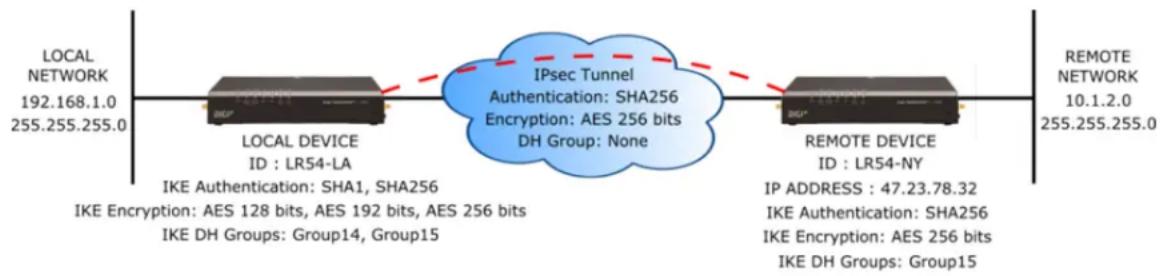
flowchart
graph LR
    A["LOCAL NETWORK 192.168.1.0\n255.255.255.0"] --> B["LOCAL DEVICE ID: LR54-LA"]
    B --> C["IPsec Tunnel Authentication: SHA256\nEncryption: AES 256 bits\nDH Group: None"]
    C --> D["REMOTE DEVICE ID: LR54-NY"]
    D --> E["REMOTE NETWORK 10.1.2.0\n255.255.255.0"]
    B --> F["IKE Authentication: SHA1, SHA256\nIKE Encryption: AES 128 bits, AES 192 bits, AES 256 bits\nIKE DH Groups: Group14, Group15"]
    D --> G["IP ADDRESS: 47.23.78.32\nIKE Authentication: SHA256\nIKE Encryption: AES 256 bits\nIKE DH Groups: Group15"]

Web
Configure a new IPsec tunnel
- Prerequisite: A configured LAN must be available for use in the IPsec tunnel. See Configure a LAN.
- On the menu, click Network > Networks > IPsec > Tunnels.
The IPsec Tunnels page appears.
- Click New IPsec Tunnel.
The IPsec page displays the settings for a new IPsec tunnel. The settings are displayed in five groups: Network, Authentication, Encryption, Negotiation, and Lifetime. Most of these settings groups have defaults which you can review and use or modify as needed. The Network settings involve settings you must supply.
- In the Select IPsec setting, select a number to assign to the IPsec tunnel.
- Enter the Network settings:
■ Description: (Optional) Description of this IPsec tunnel.
■ Enable: Enables or disables the IPsec tunnel when configuration is completed.
■ Enable UDP Encapsulation: Enable or disable UDP Encapsulation. The device automatically uses UDP encapsulation when it detects that NAT is being used. When enabled, this option forces the device to use UDP Encapsulation even if it does not detect that NAT is being used.
■ Use If WAN Down: Select a WAN that, on failure, will trigger this IPsec tunnel to start.
This is useful in cases where you are using a private WAN for sensitive data. In a failover scenario involving the private WAN, you can configure the device to route the sensitive data over a public WAN, while protecting the data by using an IPsec tunnel.
■ WAN Interfaces: Specify the preferred WAN for the IPsec tunnel, and the failover behavior of the IPsec tunnel during WAN failure. By default, the IPsec tunnel will operate on the first available WAN and will fail over to the next available WAN, based on the WAN priority. You can select and prioritize multiple WANs for the IPsec tunnel: the first WAN will be the initial WAN that the IPsec tunnel uses; each additional WAN will be the next priority for failover during WAN failure. See IPsec preferred WAN and WAN failover for more information. The default is all, which means that the default failover behavior will be used.
■ Local IP Network: The network used for the IPsec tunnel on the local side of the tunnel. Select a LAN from the list.
- Local Identifier: Enter the local identifier for the IPsec tunnel. The value for the Local Identifier must match the value for the Remote Identifier on the remote device at the other end of the tunnel. If X.509 Certificate authentication is selected for the authentication mode, the local ID should not be set.
■ Remote Peer IP Address or Name: Enter the IP address or name of the remote device, also known as the peer, at the other end of the IPsec tunnel.
■ Remote IP Subnets: Enter the IP address and subnet mask of the network used for the IPsec tunnel on the remote side of the tunnel.
■ Remote Identifier: Enter the remote identifier for the IPsec tunnel. The value for the Remote Identifier must match the value for the Local Identifier on the remote device at the other end of the tunnel. If X.509 Certificate authentication is selected for the authentication mode, the remote ID should not be set.
- Enter the Authentication settings:
a. Authentication Mode. Select one of the following:
■ Preshared key authentication
■ XAuth and Preshared key authorization
See IPsec XAuth authentication for more information on using XAuth with IPsec tunnels.
■ X.509 Certificate authentication
See IPsec certificate support for more information on using certificates with IPsec tunnels.
b. If Preshared key authentication or XAuth and Preshared key authorization are selected for the authentication mode, enter the IPSec Pre-Shared Key that the local device and the remote device use to authenticate each other.
c. If XAuth and Preshared key authorization is selected for the authentication mode, the XAuth Identity, Password, and Role options appear. See IPsec tunnel with XAuth authentication configuration for more information on using XAuth with IPsec tunnels.
d. If X.509 Certificate authentication is selected for the authentication mode, the Certificate, Private Key, Private Key Password, CA Certificate, and Certificate Relocation List options appear. See Configure an IPsec tunnel with certificate-based authentication for more information on using certificates with IPsec tunnels.
- Review the Encryption settings and modify as needed. These settings configure the encryption protocols to use for the IPsec tunnel negotiation.
- Review the Negotiation settings and modify as needed. These settings configure detailed negotiation protocols and other options to use for the IPsec tunnel negotiation.
-
Review the Lifetime settings and modify as needed. These settings configure the duration of the IPsec tunnel before it is renegotiated, and the lifetime of the Internet Key Exchange (IKE) before the keys are renegotiated.
-
Click Apply.
Modify an existing IPsec tunnel
- On the menu, click Network > Networks > IPsec > Tunnels. The IPsec Tunnels page appears.
- Select an IPsec tunnel and click Edit.
- Modify the Network, Encryption, Negotiation, and Lifetime settings as needed.
- Click Apply.

Command line
Note If XAuth will be used for authentication, see IPsec tunnel with XAuth authentication configuration for instructions.
If certificates will be used for authentication, see Configure an IPsec tunnel with certificate-based authentication for instructions.
- Enable the IPsec tunnel.
digi.router> ipsec 1 state on
- Enter the IP address or name of the remote device.
digi.router> ipsec 1 peer 47.23.78.32
- Enter the local and remote IDs. If X.509 Certificate authentication is selected for the authentication mode, the local ID should not be set. See IPsec certificate support for more information on using certificates with IPsec tunnels.
digi.router> ipsec 1 local-id LR54-LA
digi.router> ipsec 1 remote-id LR54-NY
- Enter the local and remote IP subnets.
digi.router> ipsec 1 local-subnet 192.168.1.0/24
digi.router> ipsec 1 remote-subnet 10.1.2.0/24
- Enter the pre-shared key.
digi.router> ipsec 1 psk "secret-psk"
- Enter the IPsec authentication, encryption, and Diffie-Hellman settings.
digi.router> ipsec 1 esp-authentication sha256
digi.router> ipsec 1 esp-encryption aes256
digi.router> ipsec 1 esp-diffie-hellman none
- Enter the IKE authentication, encryption, and Diffie-Hellman settings.
digi.router> ipsec 1 ike-authentication sha1,sha256
digi.router> ipsec 1 ike-encryption aes128,aes192,aes256
digi.router> ipsec 1 ike-diffie-hellman group14,group15
- (Optional) Set the preferred WAN and WAN failover priority. See IPsec preferred WAN and WAN failover for more information.
digi.router> ipsec 1 wan-interfaces wan1, wan3, wan2
- (Optional) Enable UDP encapsulation.
digi.router> ipsec 1 udp-encap on
The device automatically uses UDP encapsulation when it detects that NAT is being used. When enabled, this option forces the device to use UDP Encapsulation even if it does not detect that NAT is being used.
- Save the configuration.
digi.router> save config
Example: IPsec tunnel between an LR54 and a WR44 device
The following example describes configuration settings to create an IPsec tunnel between an LR54 and a WR44 device. This example assumes:
LR54 configuration
- Configure the LAN 1 network:
digi.router> lan 1
digi.router> lan 1 state on
digi.router> lan 1 interfaces eth2,eth3,eth4
digi.router> lan 1 ip-address 192.168.10.1
- Configure the DHCP server:
digi.router> dhcp-server 1 state on
digi.router> dhcp-server 1 mask 255.255.255.0
digi.router> dhcp-server 1 dns1 192.168.10.1
digi.router> dhcp-server 1 gateway 192.168.10.1
digi.router> dhcp-server 1 ip-address-end 192.168.10.199
digi.router> dhcp-server 1 ip-address-start 192.168.10.100
- Configure the IPsec parameters:
a. Set the remote peer of the IPsec tunnel to the WAN IP of the WR44:
ipsec 1 peer 10.52.18.130
b. Set the encryption of the IPsec tunnel:
ipsec 1 ike-encryption aes256
ipsec 1 ike-mode main
ipsec 1 esp-encryption aes256
ipsec 1 psk mysecretipseckey
c. Set the local ID to the WAN IP of the LR54:
digirouter> ipsec 1 local-id 10.52.18.109
d. Set the remote ID to the WAN IP of the WR44:
digirouter> ipsec 1 remote-id 10.52.18.130
e. Set additional parameters for the IP sec tunnel and enable the tunnel:
digirouter> ipsec 1 remote-subnet 192.168.8.0/24
digirouter> ipsec 1 local-subnet 192.168.10.1/24
digirouter> ipsec 1 dpd on
digirouter> ipsec 1 state on
- Enable the firewall for receiving IPsec esp traffic.
digirouter> firewall -A INPUT -p esp -j ACCEPT
digirouter> firewall -t nat -I POSTROUTING -s 192.168.10.0/24 -d 192.168.8.0/24 -j ACCEPT
Note In an actual deployment, the firewall may require further restrictions.
- Save the configuration:
digirouter> save config
WR44 configuration
- If the WR44 is not in port isolation mode, type the following:
> ethvlan
> config 0 save
> reboot
- Enable ipsec on eth0. This should be the wan port.
> eth 0 ipsec 1
- Configure eth1 as a LAN port:
> eth 1 IPaddr 192.168.8.1
> eth 1 ethanon ON
- Configure the DHCP server:
> dhcp 1 IPmin 192.168.8.100
> dhcp 1 IPrange 100
> dhcp 1 mask 255.255.255.0
> dhcp 1 gateway 192.168.8.1
- Configure a route for ipsec traffic:
route 0 IPaddr 192.168.10.0
route 0 mask 255.255.255.0
route 0 ll_ent ETH
6. Setup the IPsec parameters
a. Set the peer IP to the WAN IP of the LR54:
> eroute 0 peerip "10.52.18.109"
b. Set the peer ID to the WAN IP of the LR54:
> eroute 0 peerid "10.52.18.109"
c. Set the ourid parameter to the WAN IP of the WR44:
> eroute 0 ourid "10.52.18.130"
d. Set additional IPsec parameters:
eroute 0 ouridtype 3
eroute 0 locip "192.168.8.0"
eroute 0 locmsk "255.255.255.0"
eroute 0 remip "192.168.10.0"
eroute 0 remmsk "255.255.255.0"
eroute 0 ESPauth "SHA1"
eroute 0 ESPenc "AES"
eroute 0 authmeth "PRESHARED"
eroute 0 autosa 2
eroute 0 dhgroup 14
eroute 0 enckeybits 256
ike 0 encalg "AES"
ike 0 keybits 256
ike 0 authalg "SHA1"
ike 0 aggressive ON
ike 0 ikegroup 14
- Set the user 9 name to the WAN IP of the LR54:
> user 9 name "10.52.18.109"
- Set other user 9 parameters:
user 9 access 4
user 9 password mysecretipseckey
- Save the configuration:
> config 0 save
View the status of the IPsec Tunnel on the LR54
digi.router> show ipsec 1
IPsec 1 Status and Statistics
Description :
Admin Status : Up
Oper Status : Up
Local Network : 192.168.10.0/24
Remote Network : 192.168.8.0/24
Uptime : 85 seconds

Local Peer IP : 10.52.18.130
Remote Peer IP : 192.168.32.22
Outgoing Interface :

IKE Information
----
Key Negotiation : IKEv1, aes256, sha1, modp2048
SPIs : d43ad84cde2479a8_i* fe153a7f1dc87756_r

Tunnel Information
----
Rekeying In : 67 minutes
AH Cipher Suite : Not Used
ESP Cipher Suite : aes256, sha1, modp2048
Renegotiating In : 23 minutes
Outbound ESP SAs : 4bedb691
Inbound ESP SAs : c1e2a1f9

Dead Peer Detection is on

Bytes In : 212832
Bytes Out : 212916

digi.router>
View the status of the IPsec Tunnel on the WR44
> sastat
IPsec SAs (total:1). Eroute 0 -> 4
Outbound V1 SAs
SPI Eroute    Peer IP    Rem. subnet    Loc. subnet    TTL    KBytes
Left VIP
c1e2a1f9 0    10.52.18.109    192.168.10.0/24    192.168.8.0/24    2180    0
N/A
Inbound V1 SAs
SPI Eroute    Peer IP    Rem. subnet    Loc. subnet    TTL    KBytes
Left VIP
4bedb691 0    10.52.18.109    192.168.10.0/24    192.168.8.0/24    2180    0
N/A
Outbound V2 SAs
List Empty
Inbound V2 SAs
List Empty
OK

>
IPsec preferred WAN and WAN failover
The default behavior of the Digi WR device is to use the first available WAN for IPsec tunnels, and when that WAN becomes unavailable, to fail over to the next available WAN based on the default WAN priority (see WAN priority and default route metrics).
You can customize the behavior of each IPsec tunnel on your device to override the device's default behavior by selecting:
■ The preferred WAN for the IPsec tunnel to use.
■ Additional WANs for failover.
■ WAN failover priority.
■ Probing parameters to determine when the tunnel has failed.
After a failover event, the device will automatically fall back using the same prioritization when previously unavailable WANs become available.
Example IPsec preferred WAN and failover configuration
In the following example, the Digi WR device is configured with Ethernet connections on WAN1 and WAN2, and cellular connections on WAN3 and WAN4. The IPsec tunnel is configured with WAN2 as its preferred WAN, and WAN3 and WAN4 for failover. To achieve this failover configuration, select WAN2, WAN3, and WAN4, in that order, for the WAN interfaces option during IPsec configuration. See Configure an IPsec tunnel's preferred WAN and WAN failover priority for details.
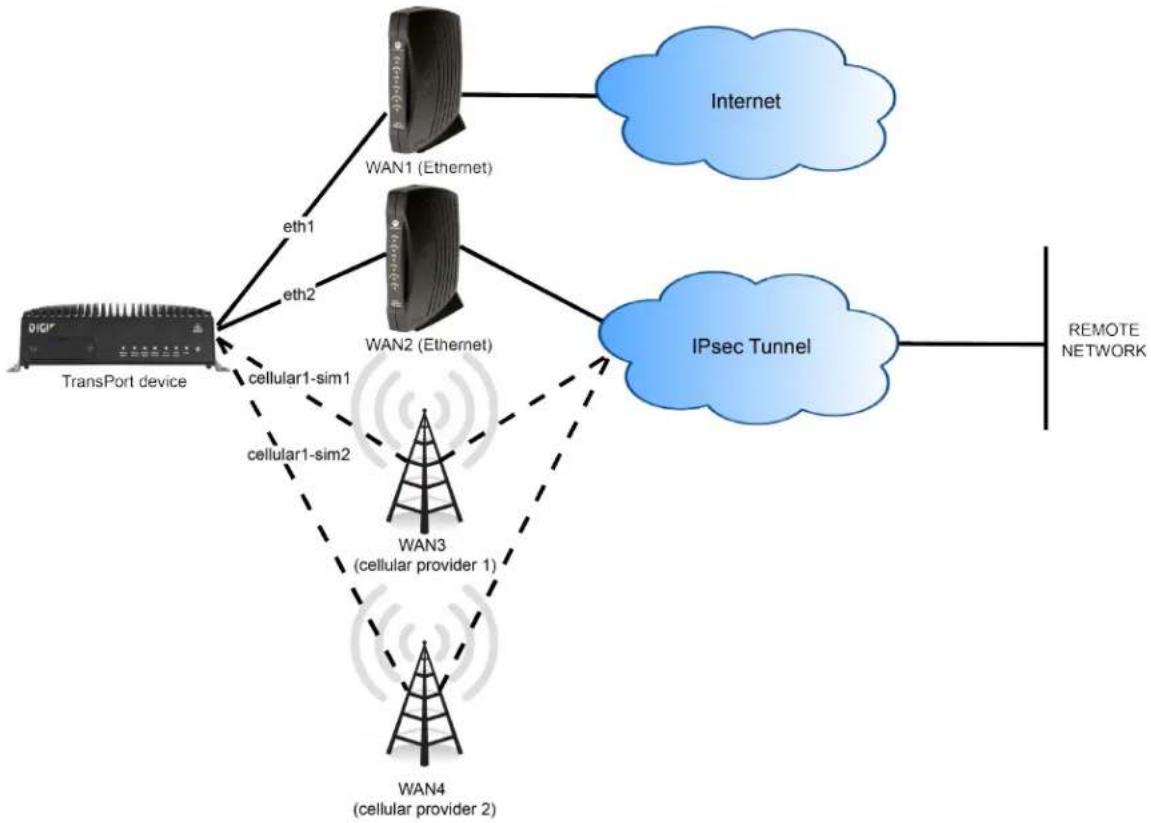
flowchart
graph TD
    A["Transport Port device"] -->|eth1| B["WAN1 (Ethernet)"]
    A -->|eth2| C["WAN2 (Ethernet)"]
    B --> D["Internet"]
    C --> E["IPsec Tunnel"]
    E --> F["REMOTE NETWORK"]
    G["WAN3 (cellular provider 1)"] -->|cellular1-sim2| A
    G --> H["WAN4 (cellular provider 2)"]
    A -.->|cellular1-sim1| G
WAN failover to IPsec
You can also configure a WAN to fail over to an IPsec tunnel. This is useful in cases where you are using a private WAN for sensitive data. In a failover scenario involving the private WAN, you can configure the device to route the sensitive data over a public WAN, while protecting the data by using an IPsec tunnel.
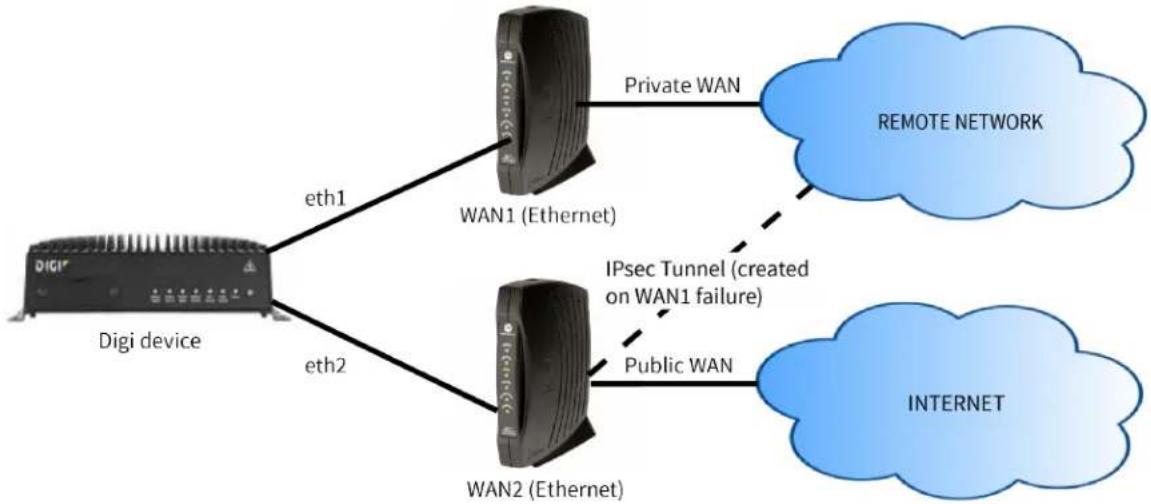
flowchart
graph TD
    A["Digi device"] -->|eth1| B["WAN1 (Ethernet)"]
    A -->|eth2| C["WAN2 (Ethernet)"]
    B -->|Private WAN| D["REMOTE NETWORK"]
    C -->|Public WAN| E["INTERNET"]
    F["IPsec Tunnel (created on WAN1 failure)"] -.-> C
See Configure an IPsec tunnel for WAN failover for information about configuring a WAN to fail over to an IPsec tunnel.
Configure an IPsec tunnel's preferred WAN and WAN failover priority
The default configuration of IPsec tunnels is to use the first available WAN, and to fail over to the next available WAN based on the WAN priority. You can customize the failover behavior of each IPsec tunnel on your device to override the default behavior.
Required Configuration items
- Valid IPsec configuration. See Configure an IPsec tunnel.
■ Multiple configured WANs. See Configure a Wide Area Network (WAN).
Web
- Create a new IPsec tunnel or modify an existing one, as described in Configure an IPsec tunnel.
- In the Network settings section, click Interfaces. Select the preferred WAN for the IPsec tunnel, and select additional WANs to be used for failover. Select the WANs in the order of priority that the failover should occur.
- The first selected WAN will be the preferred WAN for the IPsec tunnel. For example, if you select WAN2 as the first (or only) WAN, the IPsec tunnel will use WAN2 as its preferred WAN.
■ Subsequent WANs included in this option will be used for failover. For example, if you select WAN2 as the first WAN, then WAN3, then WAN1, the IPsec tunnel will operate on WAN2 when it is available and will fail over to WAN3 if WAN2 is unavailable, and will failover to WAN1 if both WAN2 and WAN3 are unavailable. Fallback will occur automatically based on the same priority as unavailable WANs become available.
■ The default setting of All means that the IPsec tunnel will use the first available WAN, and failover will occur based on the default WAN priority.
Any WANs that are not included in Interfaces will not be used by the tunnel.
- Click Apply when IPsec configuration is complete.

Command line
- Set the preferred WAN for the IPsec tunnel, and set additional WANs to be used for failover. The WANs should be comma-separated and listed in the order of priority that the failover should occur.
digi.router> ipsec 1 interfaces wan2, wan3, wan1
■ The first WAN will be the preferred WAN for the IPsec tunnel. For example, if you set WAN2 as the first (or only) WAN, the IPsec tunnel will use WAN2 as its preferred WAN.
■ Subsequent WANs included in this parameter will be used for failover. For example, if you set WAN2 as the first WAN, then WAN3, then WAN1, the IPsec tunnel will operate on WAN2 when it is available and will fail over to WAN3 if WAN2 is unavailable, and will failover to WAN1 if both WAN2 and WAN3 are unavailable. Fallback will occur automatically based on the same priority as unavailable WANs become available.
■ The default setting of all means that the IPsec tunnel will use the first available WAN, and failover will occur based on the default WAN priority.
Any WANs that are not included in the interfaces parameter will not be used by the tunnel.
- Save the configuration:
digi.router> save config
Using IP probing to detect IPsec failures
You can use IP probing to detect problems in an IP network. IP probing involves configuring the Digi WR device to send out regular IP probe packets (ICMP echo requests) over the IPsec tunnel to a particular destination. If there are no responses to the probe packets, the device will bring down and restart the IPsec tunnel.
IP probing includes the following options:
■ Probe hosts: A comma-separated list of endpoints that will be probed.
■ Probe interval: The number of seconds to wait between sending probe packets. This value must be more than the probe response timeout value.
■ Probe size: The size in bytes of probe packets sent to detect IPsec tunnel failures. Allowed values are between 64 and 1500.
■ Probe response timeout: The time, in seconds, to wait for a response to a probe before the device will consider the probe to have failed. This value must be less than the probe interval and probe timeout values.
■ Probe timeout : The number of seconds to wait after the first failed probe before restarting the IPsec tunnel. Note that once the device has successfully connected and then the connection is lost, it will immediately fail over to the next IPsec tunnel, regardless of the probe timeout setting.
Configure IPsec probing
Required configuration items
■ One or more endpoints of the IPsec tunnel, to which probe packets will be sent.
Additional configuration items
■ The number of seconds to wait between probe packets.
■ The number of seconds to wait for a response to the probe.
■ The size of the probe packets.
■ The number of seconds to wait after the first failed probe before the IPsec tunnel is reset.

Web
- Create a new IPsec tunnel or modify an existing one, as described in Configure an IPsec tunnel.
- In the Probing settings section:
a. For Probe Hosts, type the endpoints of the IPsec tunnel to which the probe packets will be set. These should in the format IPv4 address, network mask, and optional traffic selector. If multiple hosts are listed, separate them with commas.
b. (Optional) For Probe Interval, type the number of seconds to wait for a probe response. The default is 5 seconds.
c. (Optional) For Probe Timeout, type the number of seconds to wait after the first failed probe before restarting the IPsec tunnel. The default is 60 seconds.
d. (Optional) For Probe Response Timeout, type the number of seconds to wait for a probe response. The default is 5 seconds.
e. (Optional) For Probe Size, type the size, in bytes, of the probe packets. Allowed values are between 64 and 1500. The default is 64 bytes.
- Click Apply when IPsec configuration is complete.

Command line
- Set the endpoints of the IPsec tunnel to which the probe packets will be set. These should in the format IPv4 address, network mask, and optional traffic selector. If multiple hosts are listed, separate them with commas.
digi.router> ipsec 1 probe-hosts 192.168.2.2,192.168.2.3
- (Optional) Set the number of seconds to wait between probe packets. The default is 15 seconds.
digi.router> ipsec 1 probe-interval 20
- (Optional) Set the number of seconds to wait for a probe response. The default is 5 seconds.
digi.router> ipsec 1 probe-response-timeout 10
- (Optional) Set the size, in bytes, of the probe packets. Allowed values are between 64 and 1500. The default is 64 bytes.
digi.router> ipsec 1 probe-size 128
- (Optional) Set the number of seconds to wait after the first failed probe before restarting the IPsec tunnel. The default is 60 seconds.
digi.router> ipsec 1 probe-timeout 120
- Save the configuration:
digi.router> save config
Configure an IPsec tunnel for WAN failover
To configure an IPsec tunnel to be used for WAN failover:
Required Configuration items
- Valid IPsec configuration. See Configure an IPsec tunnel.

Web
- Create a new IPsec tunnel or modify an existing one, as described in Configure an IPsec tunnel.
- In the Network settings section, click the Use if WAN Down dropdown. Select the WAN that, on failure, will trigger this IPsec tunnel to start.
- Click Apply when IPsec configuration is complete.

Command line
- Set the WAN that, on failure, will trigger this IPsec tunnel to start:
digi.router> ipsec 1 use-if-wan-down wan2
- Save the configuration:
digi.router> save config
Debug an IPsec configuration
If you experience issues with an IPsec tunnel not being successfully negotiated with the remote end of the tunnel, you can enable IPsec debug messages to be written to a file. Once enabled, the debug messages are written to a file named ipsec.debug in the root directory of the device.
To enable IPsec debugging, use the system command ipsec-debug parameter. This parameter accepts the following values to set the debug level:
- -1 — (Default) No debug information is written. This is the equivalent of turning off debug messages for IPsec.
■ 0 — Basic auditing logs, (for example, SA up/SA down).
■ 1 — Generic control flow with errors. Select this for basic debugging information.
■ 2 — More detailed debugging control flow.
■ 3 — Includes RAW data dumps in hexadecimal format.
■ 4 — Also includes sensitive material in dumps (for example, encryption keys).

Command line
digi.router> system ipsec-debug
IPsec XAuth authentication
XAuth (eXtended Authentication) pre-shared key authentication mode provides additional security using client authentication credentials in addition to the standard pre-shared key. Digi WR devices can act as either a XAuth client or server.
IPsec tunnel with XAuth authentication configuration
Configuring an IPsec tunnel with XAuth involves the following items:
Required configuration items
■ A valid IPsec configuration.
See Configure an IPsec tunnel for more information.
■ The IPsec authentication mode must be set to XAuth and Preshared Key authentication.
■ The XAuth role, either client or server.
The default role is client.
If XAuth role is client
■ The username and password to use for XAuth authentication.
If XAuth role is server
- XAuth clients. XAuth clients are configured on the IPsec XAuth Users page (Network > Networks > IPsec > XAuth Users). Up to 10 XAuth clients can be configured.
Configure an IPsec tunnel with XAuth authentication
Client configuration
To configure a device as an XAuth client:

Web
- On the menu, click Network > Networks > IPsec > Tunnels.
The IPsec Tunnels page appears. - Click New IPsec Tunnel or click an existing IPsec tunnel.
Compete the IPsec tunnel configuration as described in Configure an IPsec tunnel. -
At Authentication, for Authentication Mode, select XAuth and Preshared Key authentication.
-
For XAuth Role, select Client Role.
- For XAuth Identity and XAuth Password, type your XAuth credentials.
- Click Apply

Command line
Note These instructions assume an IPsec tunnel has already been created. For more information, see Configure an IPsec tunnel.
-
Set the authentication mode to xauth-psk: digi.router> ipsec 1 auth-by xauth-psk
-
Set the XAuth role to client: digi.router> ipsec 1 xauth-role client
-
Set the username that the device will use for authentication: digi.router> ipsec 1 xauth-username
-
Set the password that the device will use for authentication: digi.router> ipsec 1 xauth-password
-
Save the configuration: digi.router> save config
Server configuration
To configure a device as an XAuth server:

Web
- On the menu, click Network > Networks > IPSec Tunnels.
The IPsec Tunnels page appears. -
Click New IPsec Tunnel or click an existing network to change the authentication to XAuth. Compete the IPsec tunnel configuration as described in Configure an IPsec tunnel.
-
At Authentication, for Authentication Mode, select XAuth and Preshared Key authentication.
-
For XAuth Role, select Server Role.
-
Click Apply
Additionally, configure XAuth users for XAuth clients that will connect to the XAuth server. Up to ten XAuth clients can be configured:
-
On the menu, click Network > Networks > IPSec > XAuth Users. The IPsec XAuth Users page appears.
-
Click New XAuth User.
-
For Username and Password type the credentials that the XAuth client will use to authenticate to the device's XAuth server.
-
On the menu, click Network > Networks > IPSec > XAuth Users. The IPsec XAuth Users page appears.
- Click New XAuth User .
-
For Username and Password type the credentials that the XAuth client will use to authenticate to the device's XAuth server.
-
For Confirm Password, retype the password.
- Click Apply
Up to ten XAuth clients can be configured.

Command line
Note These instructions assume an IPsec tunnel has already been created. For more information, see Configure an IPsec tunnel.
- Set the authentication mode to xauth-psk:
digi.router> ipsec 1 auth-by xauth-psk
- Set the XAuth role to server:
digi.router> ipsec 1 xauth-role server
- Configure the credentials that the XAuth client will use to authenticate to the device's XAuth server:
digi.router> xauth-user 1 username <user>
digi.router> xauth-user 1 password <password>
Up to ten XAuth clients can be configured.
- Save the configuration:
digi.router> save config
IPsec certificate support
X.509 certificate-based authentication makes use of private keys on both the server and client which are secured and never shared. Both the server and client have a certificate which is generated with their respective private key and signed by a Certificate Authority (CA). The CA also has a certificate file, and may provide a Certificate Revocation List (CRL) of certificates that are no longer valid.
The Digi WR implementation of IPsec supports authentication with X.509 certificates by using the private keys, certificates, CA certificates, and CRLs. Private keys must be securely added using the pki command at the device's CLI before they can be used with IPsec.
Configure an IPsec tunnel with certificate-based authentication
Configuring an IPsec tunnel with X.509 certificate-based authentication involves the following items:
Required configuration items
■ A valid IPsec configuration. For certificate-based authentication, the local and remote IDs are determined from the certificate and should not be set.
- A valid private key for the device that has been created by using the pki command at the CLI, or has been added to the device by using the pki addkey command. The private key must be visible with the pki list command.
See Certificate and key management for information about using the pki, pki addkey, and pki list commands.
■ A valid certificate issued by a Certificate Authority (CA) and signed with the private key.
See Create a certificate signing request for information about requesting a certificate from a CA for your device's private key.
■ A valid root CA certificate from the CA.
Additional Configuration options
■ A password for the private key, if the private key is encrypted.
■ A Certificate Revocation List (CRL) from the CA, which provides a list of certificates that are no longer valid.

Web
Note These instructions assume an IPsec tunnel has already been created. For more information, see Configure an IPsec tunnel.
- Upload all required certificates to the device's file system. This can be done from within the Web UI, or using a utility such as Secure Copy (SCP) or SSH File Transfer Protocol (SFTP). To upload from within the Web UI:
a. Click System >File System.
The File System page appears.
b. (Optional) Create or select a directory for the certificates. See Create a directory for information about creating a new directory.
c. Click ↑ (upload).
d. Browse to the location of the certificates on the host file system, select the certificates, and click Open to upload.
- On the menu, click Network > Networks > IPsec > Tunnels.
The IPsec Tunnels page appears. - Click New IPsec Tunnel or click an existing IPsec tunnel.
Compete the IPsec tunnel configuration as described in Configure an IPsec tunnel. - At Authentication, for Authentication Mode, select X.509 Certificate authentication.
- For Certificate, type the path and file name of the certificate file issued by a Certificate Authority (CA) and signed with the device's private key. For example, cert_directory/my_certificate.pem.
- For Private Key, type file name of the private key file, as show by the pki list command.
- (Optional) For Private Key Password, type the password that was used to encrypt the private key file when the private key was created.
- For CA Certificate, type the path and file name of the Certificate Authority's root CA certificate file.
- (Optional). For Certificate Revocation List, type the path and file name of CRL from the Certificate Authority.
- Click Apply

Command line
Note These instructions assume an IPsec tunnel has already been created. For more information, see Configure an IPsec tunnel.
- Upload all required certificates to the device's file system. You can upload the certificates by using utilities such as Secure Copy (SCP), SSH File Transfer Protocol (SFTP), or an SFTP application, such as FileZilla. For example:
a. (Optional) Create a directory for the certificates, if one does not exist already. See Create a directory for information about creating a new directory.
b. Upload the certificates by using SCP:
scp my_certificate.pem username@device_ip_address:cert_directory/my_certificate.pem
- Set the authentication mode to X.509 certificate-based authentication:
digi.router> ipsec 1 auth-by cert
- Enter the private key file, as seen with the pki list command:
digi.router> ipsec 1 private-key privkey_file
- (Optional) Enter the password that was used to encrypt the private key file when the private key was created:
digi.router> ipsec 1 private-key-password *****
- Enter the path and file name of the certificate file issued by a Certificate Authority (CA) and signed with the device's private key:
digi.router> ipsec 1 cert cert_directory/my_certificate.pem
- Enter the path and file name of the Certificate Authority's root CA certificate file:
digi.router> ipsec 1 ca cert_directory/root_ca_certificate.pem
- (Optional) Enter the path and file name of the Certificate Revocation List from the Certificate Authority:
digi.router> ipsec 1 crl cert_directory/root_ca_revocation.crl
- Save the configuration:
digi.router> save config
Show IPsec status and statistics

Web
■ On the menu, click Network > Networks > IPsec. The IPsec page appears.

Command line
The show ipsec displays the status of the IPsec tunnels and statistics regarding their use.
Display summary status for IPsec tunnels
To display summary status and statistics of all configured IPsec tunnels, enter the show ipsec command without parameters.
| digi.router> show ipsec | |||||
| # | Status | Peer | Local | Remote | Uptime |
| 1 | Up | 192.170.1.100 | 192.168.0.0/16 | 192.169.1.0/24 3 minutes | |
digi.router>
Display detailed status and statistics for an IPsec tunnel
To display detailed status and statistics of all configured IPsec tunnels, enter the show ipsec command, specifying the tunnel number.
digi.router> show ipsec 1
IPsec 1 Status and Statistics
Description :
Admin Status : Up
Oper Status : Up
Local Network : 192.168.0.0/16
Remote Network : 192.169.1.0/24
Uptime : 2 minutes
Local Peer IP : 192.170.1.100
Remote Peer IP : 192.169.1.100
Outgoing Interface : lan1
IKE Information
Key Negotiation : IKEv1, aes128, sha1, modp2048
SPIs : 5078e20a02eb1e9c_i x 6b2cfcdf33b4125c_r
Tunnel Information
Rekeying In : 68 minutes
AH Cipher Suite : Not Used
ESP Cipher Suite : aes128, sha1
Renegotiating In : 42 minutes
Outbound ESP SAs : d2fad10b, 9bcc91db
Inbound ESP SAs : 2af8bb94, 3be64703
Bytes In : 1435
Bytes Out : 32412
Dead Peer Detection is on
Probing is enabled.
digi.router>
OpenVPN
OpenVPN is an open-source Virtual Private Network (VPN) technology that creates secure point-to-point or site-to-site connections in routed or bridged configurations.
OpenVPN uses a custom security protocol that is Secure Socket Layer (SSL) / Transport Layer Security (TLS) for key exchange. It uses standard encryption and authentication algorithms for data privacy and authentication over TCP or UDP.
Digi WR devices support OpenVPN 2.4 in both client and server mode with the net30, p2p, and subnet OpenVPN topologies. The devices support 1 OpenVPN server and up to 10 OpenVPN clients.
The OpenVPN server supports the use of either an internal user list or an external RADIUS server for authentication using a username and password.
The OpenVPN server can push the network configuration, such as the topology and IP routes, to OpenVPN clients. This makes OpenVPN simpler to configure as it reduces the chances of a configuration mismatch between the client and server.
OpenVPN also supports cipher negotiation between the client and server. This means you can configure the OpenVPN server and clients with a range of different cipher options and the server will negotiate with the client on the cipher to use for the connection.
Digi WR devices are compatible with OpenVPN running on Windows, Linux, and Mac OS X.
For more information on OpenVPN, see www.openvpn.net.
OpenVPN network interfaces
Digi WR devices support several named interfaces for OpenVPN. The interface for OpenVPN server is named ovpns. For OpenVPN clients, there are multiple interfaces named ovpnx, where x is the index number for a particular OpenVPN client.
Routing (TUN) mode
There are two modes for running OpenVPN: routing mode, also known as TUN, and bridging mode, also known as TAP.
In routing mode, each OpenVPN client is assigned a different IP subnet from the OpenVPN server and other OpenVPN clients. OpenVPN clients use Network Address Translation (NAT) to route traffic from devices connected on its LAN interfaces to the OpenVPN server.
The manner in which the IP subnets are defined depends on the OpenVPN topology in use:
| OpenVPN Topology | Subnet definition method |
| net30 Each OpenVPN | client is assigned a /30 subnet within the IP subnet specified in the OpenVPN server configuration. |
| p2p Each OpenVPN | client uses a point to point link. This is not available for Windows clients. |
| subnet Each OpenVPN | client connected to the OpenVPN server is assigned an IP address within the IP subnet specified in the OpenVPN server configuration. |
For more information on OpenVPN topologies, see OpenVPN topology.
Bridging (TAP) mode
In bridging mode, a LAN interface on the OpenVPN server is assigned to OpenVPN. The LAN interfaces of the OpenVPN clients are on the same IP subnet as the OpenVPN server's LAN interface. This means that devices connected to the OpenVPN client's LAN interface are on the same IP subnet as other OpenVPN devices.
Additional OpenVPN information
For more information on OpenVPN, see these resources:
Bridging vs. routing
OpenVPN/Routing
Configure an OpenVPN server for routing mode and certificate authentication
Required configuration items
■ Enable the OpenVPN server. The OpenVPN server is disabled by default.
■ The IP network of the OpenVPN server (only needed when using routing mode).
■ The server certificate and private key parameters should be loaded onto the Digi WR device prior to using them. For more information on how to create private key files and certificates, see Certificate and key management. The process for loading this information onto the device varies by certificate and key type:
- Certificate authority (CA) certificate: Copy the CA certificate and the CRL onto the device from the CA prior to using it.
- Private key and certificate: There are two options to install a private key and certificate on the device:
Use the pki commands pki privkey and pki csr to generate the private key and certificate, copy the CRS to an external system to get it signed, then copy the signed certificate back onto the device.
Generate the private key and certificate, fully signed, on an external system and copy them onto the device. Use pki addkey command to import the private key into the private key store.
- If using a Diffie-Hellman (DH) file: There are two options to install a DH file on the device:
- Generate the DH file using the pki dh-file command on the device.
- Generate a DH file on an external system and copy it onto the device.
Additional configuration items
A description of the OpenVPN server.
■ The OpenVPN topology. By default, net30 is used.
■ A subnet mask for the network when in routing mode.
■ A primary and secondary DNS server.
■ The ciphers and digest used by the OpenVPN server. For more information, see Configure ciphers and digests for use on the OpenVPN tunnel.
■ The IP protocol (TCP or UDP) to use. By default, the Digi WR device uses UDP. This must match the IP protocol configured on the OpenVPN client.
■ The TCP/UDP Port to use. By default, the device uses port 1194.
■ You can enable compression on the OpenVPN tunnel. The compression options are LZ0 and LZ4.

Web
- On the menu, click Network > Networks > OpenVPN and select OpenVPN Server. The OpenVPN Server page appears.
-
Click Edit. The OpenVPN server page displays the settings for the OpenVPN server.
-
Enter the Connection settings:
■ Enable: Enables or disables the OpenVPN server when configuration is completed.
- Logging Level: The detail level of output that the OpenVPN server records in the system log. See Debug an OpenVPN tunnel for more information on logging levels.
- Enter the Network settings:
■ Network: Enter the IP network to be used with the OpenVPN clients.
■ Mask: Enter the subnet mask for the IP subnet.
- Review the Encryption settings and modify as needed. These settings configure the encryption protocols used with the OpenVPN tunnel.
■ Digest: Enter the digest to be used with the OpenVPN tunnel.
- Enter the Authentication settings:
■ Certificate authority (CA) certificate: Enter the name of the Certificate Authority certificate to authenticate OpenVPN client certificates.
■ Diffie-Hellman file: Enter the name of the Diffie-Hellman file.
■ Certificate: Enter the name of the certificate to be used by the OpenVPN server.
■ Private Key File: Enter the private key file to be used by the OpenVPN server.
-
Review the Lifetime settings and modify as needed. These settings configure the OpenVPN tunnel keepalive and renegotiation.
-
Click Apply.

Command line
- Enable the OpenVPN server.
digi.router> openvpn-server state on
- Configure the IP network of the OpenVPN server.
digi.router> openvpn-server network 192.168.54.0
- (Optional) Configure the IP subnet mask of the OpenVPN server.
digi.router> openvpn-server mask 255.255.255.128
- (Optional) Configure a primary and secondary DNS server to be used with this OpenVPN tunnel. The DNS server configuration will be pushed to the OpenVPN client. The OpenVPN client can decide how to use these values. A Digi WR OpenVPN client will ignore them.
digi.router> openvpn-server dns1 192.168.10.1
digi.router> openvpn-server dns2 192.168.10.2
- Configure the CA certificate.
digi.router> openvpn-server ca cacert.pem
- Configure the server certificate.
digi.router> openvpn-server cert ovpns.pem
- Configure the server key.
digi.router> openvpn-server key ovpns.key
- Configure the Diffie Hellman file.
digi.router> openvpn-server dh ovpns-dh.pem
- (Optional) Configure the OpenVPN topology
digi.router> openvpn-server topology subnet
- (Optional) Configure the IP protocol.
digi.router> openvpn-server protocol tcp
- (Optional) Configure the TCP/UDP port.
digi.router> openvpn-server port 8894
- (Optional) Enable compression.
digi.router> openvpn-server compression lzo
- (Optional) Configure a description.
digi.router> openvpn-server description "LA OpenVPN server"
- Save the configuration.
digi.router> save config
Configure an OpenVPN server to use username and password authentication
The OpenVPN server is able to authenticate clients using username and passwords. You can configure up to 10 usernames and passwords. If you need more than 10 usernames and passwords, use RADIUS authentication instead. See Configure an OpenVPN server to use RADIUS authentication for more information.

Web
- On the menu, click Network > Networks > OpenVPN and select OpenVPN Server. The OpenVPN Server page appears.
- Click Edit. The OpenVPN server page displays the settings for the OpenVPN Server.
- Enter the Authentication settings:
■ Certificate: Enter the name of the certificate to be used by the OpenVPN server.
■ Private Key File: Enter the name of the private key file to be used by the OpenVPN server.
■ Authenticate By: Select User name and password.
-
Click Apply.
-
On the menu, click VPN and select OpenVPN User Management.
- Click New OpenVPN User.
- Enter user information:
■ Username: The name of the OpenVPN client.
- Usernames can be up to 32 characters long and are case-sensitive.
- Usernames cannot start with a number.
■ Password/Confirm Password: Password for the user.
- Click Apply.

Command line
- Configure the authentication mode to use username and password authentication.
digi.router> openvpn-server auth-by user-pass
- Configure a user name and password. For example, to configure a username ny-office and password abcdefgh, the commands would be.
digi.router> openvpn-user 1 username ny-office
digi.router> openvpn-user 1 password abcdefgh
- Save the configuration.
digi.router> save config
Configure an OpenVPN server to use RADIUS authentication
The OpenVPN server can authenticate clients using RADIUS instead of configuring usernames and passwords on the device.
To use RADIUS, set the OpenVPN authentication mode to username and password, and configure and enable the RADIUS server and secret.

Web
- On the menu, click Network > Networks > OpenVPN and select OpenVPN Server. The OpenVPN Server page appears.
- Click Edit. The OpenVPN server page displays the settings for the OpenVPN server.
-
Enter the Authentication settings:
■ Auth-By: Select Username and password.
■ Radius Server State: Enable the RADIUS server.
■ Radius Server: Configure the IP address or domain name of the RADIUS server.
■ Radius Server Secret: Configure the secret of the RADIUS server. -
Click Apply.

Command line
- Configure the authentication mode to use username and password authentication.
- Configure OpenVPN to use RADIUS to authenticate users.
- Configure the RADIUS server address.
- Configure the RADIUS server secret.
- (Optional) Configure the RADIUS server port. For example, to change the port to 8812, the command is:
- Save the configuration.
digi.router> openvpn-server auth-by user-pass
digi.router> openvpn-server radius-server-state on
digi.router> openvpn-server radius-server 10.12.33.200
digi.router> openvpn-server radius-server-secret mysecret
digi.router> openvpn-server radius-server-port 8812
digi.router> save config
Configure an OpenVPN client for routing mode and certificate authentication
OpenVPN is designed to allow the OpenVPN server to push much of the OpenVPN configuration to the OpenVPN client. Therefore, client configuration is simplified.
Required configuration items
■ Enable the OpenVPN client. The OpenVPN client is disabled by default.
■ The IP address or domain name of the OpenVPN server.
■ The client certificate and private key parameters. For more information on how to create private key files and certificates, see Certificate and key management. The server certificate and private key parameters should be loaded onto the Digi WR device prior to using them. For more information on how to create private key files and certificates, see Certificate and key management. The process for loading this information onto the device varies by certificate and key type:
- Certificate authority (CA) certificate: Copy the CA certificate and the CRL onto the device from the CA prior to using it.
- Private key and certificate: There are two options to install a private key and certificate on the Digi WR device:
Use the pki commands pki privkey and pki csr to generate the private key and certificate, copy the CRS to an external system to get it signed, then copy the signed certificate back onto the device.
Generate the private key and certificate, fully signed, on an external system and copy them onto the device. Use pki addkey command to import the private key into the private key store.
Additional configuration items
■ A description of the OpenVPN client.
■ The ciphers and digest used by the OpenVPN client. For more information, see Configuring ciphers and digests to be used on the OpenVPN tunnel.
■ The IP protocol (TCP or UDP) to use. The default is to use UDP. This value must match the IP protocol configured on the OpenVPN server.
■ The TCP/UDP Port to use. By default, port 1194 is used. This must match the TCP/UDP port configured on the OpenVPN server.
- The connection retry attempt period. By default, the OpenVPN client waits 5 seconds before retrying to connect to the OpenVPN server. After 5 unsuccessful attempts, the period doubles to a maximum of 300 seconds.

Web
- On the menu, click Network > Networks > OpenVPN and select OpenVPN Client. The OpenVPN Client page appears.
-
Click New OpenVPN Client. The OpenVPN client page displays the settings for a new OpenVPN tunnel.
-
In the Select OpenVPN Client setting, select a number to assign to the OpenVPN client.
-
Enter Connection settings:
■ Enable: Enables or disables the OpenVPN client when configuration is completed.
■ Compression: Select the compression algorithm this OpenVPN client uses to compress data channel packets. Setting the value to any allows the client to accept the value provided by the server.
- Enter Network settings:
■ Server: Configure the IP address or domain name of the OpenVPN server.
- Review Encryption settings and modify as needed. These settings configure the encryption protocols used with the OpenVPN tunnel.
■ Digest: Enter the digest to be used with the OpenVPN tunnel.
- Enter Authentication settings:
■ Certificate authority (CA) certificate: Enter the name of the Certificate Authority certificate to authenticate OpenVPN server certificate.
■ Certificate: Enter the name of the certificate to be used by the OpenVPN client.
■ Private Key File: Enter the name of the private key file to be used by the OpenVPN client.
- Click Apply.

Command line
- Enable the OpenVPN client.
digi.router> openvpn-client 1 state on
- Configure the IP address or the domain name of the OpenVPN server.
digi.router> openvpn-client 1 server 209.98.33.1
- Configure the CA certificate.
digi.router> openvpn-client 1 ca cacert.pem
- Configure the server certificate.
digi.router> openvpn-client 1 cert ovpnc1.pem
- Configure the server key.
digi.router> openvpn-client 1 key ovpnc1.key
- (Optional) Configure the IP protocol.
digi.router> openvpn-client 1 protocol tcp
- (Optional) Configure the TCP/UDP port.
digi.router> openvpn-client 1 port 8894
- (Optional) Configure the compression algorithm this OpenVPN client uses to compress data channel packets.
digi.router> openvpn-client 1 compression lzo
- (Optional) Configure the connection retry interval.
digi.router> openvpn-client 1 connect-retry 10
- (Optional) Configure a description.
digi.router> openvpn-server description "OpenVPN to LA office"
- Save the configuration.
digi.router> save config
Configure an OpenVPN client to use username and password authentication
The configuration for an OpenVPN client to username and password is similar to that of the certificate authentication but instead of configuring a certificate and key, a username and password is configured.
Note that a CA certificate is still required to validate the OpenVPN server's certificate to prevent an attacker from replacing or spoofing the server.

Web
- On the menu, click Network > Networks > OpenVPN and select OpenVPN Client. The OpenVPN Client page appears.
- Click New OpenVPN Client. The OpenVPN client page displays the settings for a new OpenVPN tunnel.
- In the Select OpenVPN Client setting, select a number to assign to the OpenVPN client.
- Enter the Connection settings:
■ State: Enables or disables the OpenVPN client when configuration is completed.
- Enter the Network settings:
■ Server: Configure the IP address or domain name of the OpenVPN server.
- Review the Encryption settings and modify as needed. These settings configure the encryption protocols used with the OpenVPN tunnel.
■ Digest: Enter the digest to be used with the OpenVPN tunnel.
- Enter the Authentication settings:
■ Certificate authority (CA) certificate: Enter the name of the Certificate Authority certificate to authenticate OpenVPN server certificate.
- Username: Enter the username of the OpenVPN client. This must match the username configured on the OpenVPN server.
■ Password: Password of the OpenVPN client.
- Click Apply.

Command line
- Configure the username and password. For example, to configure the username ny-office and password abcdefgh, the commands are:
digi.router> openvpn-client 1 username ny_office
digi.router> openvpn-client 1 password abcdefgh
Configure OpenVPN TLS authentication
Transport Layer Security (TLS) authentication adds additional security to OpenVPN through the use of a pre-shared key (PSK) that is shared between the Digi WR device and an OpenVPN server or OpenVPN clients. The PSK must be generated in advance and configured on both the OpenVPN client and server. If it is changed, then it must be changed on all peers.
Key direction
OpenVPN TLS authentication configuration includes a key direction parameter, which must be the opposite between peers. For Digi WR devices, the key direction parameter is hard-coded as follows:
- OpenVPN server: When operating in server mode, the device has the key direction parameter set to 0. Therefore, clients connecting to the device's OpenVPN implementation must be configured with a key direction parameter of 1.
■ OpenVPN client: When operating in client mode, the device has the direction parameter set to 1. Therefore, the OpenVPN server to which the device connects must be configured with a key direction parameter of 0.
Required configuration items
■ A PSK key. See Generate the PSK.
Generate the PSK
Note You cannot generate the PSK on the Digi WR device. You will need to generate it on a PC that has OpenVPN installed, and then copy the key file to the device by using Secure Copy (SCP), SSH File Transfer Protocol (SFTP), or an SFTP application, such as FileZilla.
To generate the PSK:
- Type the following command on a PC that has OpenVPN installed:
openvpn --genkey --secret ta.key
This command will generate an OpenVPN static key and write it to the key file ta.key.
- Copy the key file to the Digi WR device by using SFTP or SCP.
Configure the device to use TLS authentication in server mode

Web
- Copy the key file created in Generate the PSK to the device.
- On the menu, click Network > Networks > OpenVPN and select Server.
The OpenVPN Server page appears. - Click Edit.
The OpenVPN server page displays the settings for the OpenVPN server. - Click Authentication.
The Authentication panel appears. - For TLS Authentication Key File, enter the name of the key file.
- Click Apply.

Command line
-
Copy the key file created in Generate the PSK to the device.
-
Type the following at the device's command prompt:
digi.router> openvpn-server n tls-auth keyfile
For example:
digi.router> openvpn-server 1 tls-auth ta.key
- Save the configuration:
digi.router> save config
Configure the Digi WR device to use TLS authentication in client mode

Web
- Copy the key file created in Generate the PSK to the Digi WR device.
- On the menu, click Network > Networks > OpenVPN and select Client.
The OpenVPN Client page appears. - Click New OpenVPN Client or select an existing OpenVPN client and click Edit.
The OpenVPN client page displays the settings for the OpenVPN client. - Click Authentication.
The Authentication panel appears. - For TLS Authentication Key File, enter the name of the key file.
- Click Apply.

Command line
-
Copy the key file created in Generate the PSK to the Digi WR device.
-
Type the following at the device's command prompt:
digi.router> openvpn-client n tls-auth keyfile
For example:
digi.router> openvpn-client 1 tls-auth ta.key
- Save the configuration:
digi.router> save config
Configure ciphers and digests for use on the OpenVPN tunnel
By default, the OpenVPN server negotiates with the OpenVPN client the cipher that will be used to encrypt data being sent over the OpenVPN tunnel. The ciphers that will be used for the negotiation can be configured as a list. In order for the negotiation to be successful, the OpenVPN client's cipher list must include the first cipher in the OpenVPN server's cipher list. OpenVPN clients that do not support cipher negotiation can use any cipher in the OpenVPN server's cipher list to connect.
To force the OpenVPN client or server to use a specific cipher, only the desired cipher should be configured in the list.
By default, the OpenVPN client and server support the following ciphers for negotiation:
■ AES 128 CBC
■ AES 192 CBC
■ AES 256 CBC
■ AES 128 GCM
■ AES 192 GCM
■ AES 256 GCM
When using CBC encryption algorithms, the OpenVPN client and server will also use a digest to authenticate the data sent over the OpenVPN tunnel. The digest configured on the OpenVPN client must match the digest configured on the OpenVPN server.
By default, the OpenVPN client and server will use SHA1 for authentication.
The digest is not used when a GCM encryption algorithm is in use, since GCM encryption includes built-in digest functionality.

Web
For OpenVPN Server
- On the menu, click Network > Networks > OpenVPN and select OpenVPN Server. The OpenVPN Server page appears.
- Click Edit. The OpenVPN server page displays the settings for the OpenVPN Server.
- Enter the Encryption settings:
■ Cipher: Select the desired ciphers that the OpenVPN can use for an OpenVPN tunnel.
Note The order of the ciphers is important for cipher negotiation. The first cipher in the list will be used if both the OpenVPN client and server support cipher negotiation.
- Click Apply.
For OpenVPN Clients
- On the menu, click Network > Networks > OpenVPN and select OpenVPN Client. The OpenVPN Client page appears.
- Select the required OpenVPN client.
- Click Edit. The OpenVPN client page displays the settings for the OpenVPN client.
- Enter the Encryption settings:
■ Cipher: Select the desired ciphers that the OpenVPN can use for an OpenVPN tunnel.
- Click Apply.

Command line
For OpenVPN Server and Clients
- For the OpenVPN server, the command to configure the list of ciphers is openvpn-server cipher. For example, to configure the OpenVPN server to use either AES 128 GCM for cipher negotiation or allow AES 256 GCM cipher for OpenVPN clients that don't support cipher negotiation, the command is:
digi.router> openvpn-server cipher aes-128-gcm, aes-256-gcm
- For the OpenVPN server, the command to configure the digest is openvpn-server digest. For example, the command to configure the OpenVPN server to use SHA256, the command would be:
digi.router> openvpn-server digest sha256
- For the OpenVPN client, the command to configure the list of ciphers is openvpn-client x cipher. For example, to configure the OpenVPN client 1 to use AES 256 GCM cipher only, the command would be:
digi.router> openvpn-client 1 cipher aes-256-gcm
- For the OpenVPN client, the command to configure the digest is openvpn-client x digest. For example, the command to configure the OpenVPN client 1 to use SHA256, the command would be:
digi.router> openvpn-client 1 digest sha256
- Save the configuration on the OpenVPN client and/or server.
digi.router> save config
Configure keepalive messages on the OpenVPN tunnels
You can configure keepalive message to be sent periodically to detect whether the OpenVPN tunnel is operational.
If there are no keepalive messages received for a configurable amount of time, the OpenVPN tunnel is brought down and then renegotiated.
The keepalive interval and timeout is only configured on the OpenVPN server and is pushed up to the OpenVPN client during the tunnel negotiation. The OpenVPN server automatically doubles the configured keepalive timeout to ensure that the OpenVPN client times out first.
By default, a keepalive message will be sent by the OpenVPN client every 30 seconds and by the OpenVPN server every 60 seconds. The OpenVPN client will drop and renegotiate the tunnel if it does not receive a keepalive message for 150 seconds. The OpenVPN server will drop and renegotiate after 300 seconds.

Web
- On the menu, click Network > Networks > OpenVPN and select OpenVPN Server. The OpenVPN Server page appears.
- Click Edit. The OpenVPN server page displays the settings for the OpenVPN server.
-
Enter the Lifetime configuration:
-
Keepalive Interval (Seconds): The interval at which keepalive messages are sent by the OpenVPN client. Keepalive messages are sent by the OpenVPN server at twice the interval.
-
Keepalive Timeout (Seconds): The OpenVPN tunnel will be brought down and renegotiated if no messages have been received for the configured timeout.
-
Click Apply.

Command line
- Configure the keepalive interval.
digi.router> openvpn-server keepalive-interval 10
- Configure the keepalive timeout.
digi.router> openvpn-server keepalive-timeout 60
- Save the configuration.
digi.router> save config
Configure renegotiation on the OpenVPN tunnels
The OpenVPN server can be configured to automatically renegotiate the OpenVPN tunnel after a specific amount of time or after a specific amount of data has been sent over the OpenVPN tunnel. The purpose of this renegotiation is to reduce the risk of the negotiated keys from becoming compromised from overuse.

Web
- On the menu, click Network > Networks > OpenVPN and select OpenVPN Server. The OpenVPN Server page appears.
-
Click Edit. The OpenVPN server page displays the settings for the OpenVPN server.
-
Enter the Lifetime configuration:
■ Time Until Tunnel Renegotiation (Seconds): OpenVPN tunnels are renegotiated after the tunnel has been up for the configured amount of time.
■ Bytes Until Tunnel Renegotiation: OpenVPN tunnels are renegotiated after the tunnel has had the configured amount of traffic sent over it.
- Click Apply.

Command line
- To configure the amount of data to be sent before renegotiating, the command is openvpn-server reneg-bytes. For example, the renegotiate the OpenVPN tunnel after 32 MB of data has been sent, the command is:
digi.router> openvpn-server reneg-bytes 33554432
- To configure the amount of time before renegotiating, the command is openvpn-server reneg-sec. For example, to renegotiate the OpenVPN tunnel after 2 hours have passed, the command is:
digi.router> openvpn-server reneg-sec 7200
- Save the configuration.
digi.router> save config
Configure pushing routes to OpenVPN clients
The OpenVPN server can push route information to the OpenVPN client so that the client automatically learns routes to networks on the OpenVPN server LAN interfaces.
Configuring the routes on the OpenVPN server involves configuring the destination network and mask for each route.

Web
- On the menu, click Network > Networks > OpenVPN and select OpenVPN Route Management. The OpenVNP Route Management page appears.
- Click + (Add Rule) to create a new route.
- Enter the route Destination and Mask.
- Click Apply.

Command line
- OpenVPN routes are configured using the openvpn-route command. For example to configure routes for 10.123.1.0/24 and 10.222.33.0/24 networks, the commands are:
digi.router> openvpn-route 1 destination 10.123.1.0
digi.router> openvpn-route 1 mask 255.255.255.0
digi.router> openvpn-route 2 destination 10.222.33.0
digi.router> openvpn-route 2 mask 255.255.255.0
- Save the configuration.
digi.router> save config
Configure an OpenVPN client and server for bridge mode
The configuration for the bridge mode is the same as with routing mode except for the following differences:
■ The OpenVPN server is not configured with an IP network or mask.
■ A LAN interface is assigned to the OpenVPN server.
■ A LAN interface is assigned to the OpenVPN client.

Web
For OpenVPN server
- On the menu, click Network > Networks > OpenVPN and select OpenVPN Server. The OpenVPN Server page appears.
- Click Edit. The OpenVPN server page displays the settings for the OpenVPN server.
- Enter the Network settings:
■ Bridge Mode: Select the LAN interface to be bridged with the OpenVPN clients. - Click Apply.
For OpenVPN clients
- On the menu, click Network > Networks > OpenVPN and select OpenVPN Client. The OpenVPN Client page appears.
- Select the required OpenVPN client.
- Click Edit. The OpenVPN client page displays the settings for the OpenVPN client.
- Enter the Network settings:
■ Bridge Mode: Select the LAN interface to be bridged with the OpenVPN server. - Click Apply.

Command line
- Configure the LAN interface to be assigned with the OpenVPN server.
digi.router> openvpn-server bridge-mode lan1 - Configure the LAN interface to be assigned with the OpenVPN client.
digi.router> openvpn-client 1 bridge-mode lan1 - Save the configuration on the OpenVPN client and/or server.
digi.router> save config
Show OpenVPN server status and statistics
You can view status and statistics for OpenVPN servers from either the web interface or the command line:

Web
■ On the menu, click Network > Networks > OpenVPN > Server.

Command line
Enter the show openvpn-server command. For example:
digi.router> show openvpn-server
OpenVPN Server Status
Description : VPN server for remote employees
Admin Status : Up
Oper Status : Up
Interface : ovpns
IP Address : 10.8.0.1
Mask : 255.255.255.0
MTU : 1500
Received Sent
Interface Packets : 4 4
Interface Bytes : 288 288
Connected Client Real Address Virtual Address Bytes Received Bytes Sent Connected Since
client 203.0.113.3 10.8.0.2 23550 4189 Thu Aug 3 17:12:21 2017
digi.router>
Show OpenVPN client status and statistics
You can view status and statistics for OpenVPN clients from either web interface or the command line:

Web
- On the menu, click Network > Networks > OpenVPN > Client.
- Select the appropriate OpenVPN client.

Command line
Display all enabled OpenVPN clients
The show openvpn-client command displays a summary of the OpenVPN clients configured on the device.
digi.router> show openvpn-client
<h1 id="status-remote-server-ip-address-mask-description">Status Remote Server IP Address Mask Description</h1>
1 Up 203.0.113.3 10.8.0.2 255.255.255.0 VPN to main office
digi.router>
Display detailed status information for an OpenVPN client
Enter the show openvpn-client x command, where x is the index number of the client, from the first column of summary show openvpn-client command output. For example:
digi.router> show openvpn-client 1
OpenVPN Client Status
Description : VPN connection to main office
Admin Status : Up
Oper Status : Up
Remote Server : 203.0.113.3
Interface : ovpn1
IP Address : 10.8.0.2
Mask : 255.255.255.0
MTU : 1500
Received    Sent
----    ----
Interface Packets :    13    9
Interface Bytes :    940    684
Socket Bytes :    5201    4908
digi.router>
Debug an OpenVPN tunnel
You can enable debugging on an OpenVPN server or on a specific OpenVPN client. When enabled, debugging messages display in the system log.
Enabling debugging is done by changing the logging level for messages on the OpenVPN server and the OpenVPN client. There are four logging levels, from 0 to 4. Set this parameter to 0 to record only errors and warnings, and set it to 4 to record fairly complete log activity to help debug an OpenVPN tunnel.

Web
- On the menu, click Network > Networks > OpenVPN > Server.
The OpenVPN Server page appears. - Click Edit.
- Set the Logging Level to 3.
- Click Apply.
- On the menu, click Network > Networks > OpenVPN > Client.
The OpenVPN Client page appears. - Select the OpenVPN client to configure.
- Set the Logging Level to 3.
- Click Apply.

Command line
Enable display and logging of debugging messages on an OpenVPN server
To enable display and logging of debugging messages on an OpenVPN server, the command is openvpn-server verb n, where n is the verbosity level for debugging messages. This value can range from 0, which disables debugging messages, to 4, the most detail. For example to set the verbosity level to 3:
openvpn-server verb 3
Enable display and logging of debugging messages on an OpenVPN client
To enable display and logging of debugging messages on an OpenVPN client, the command is openvpn-client x verb n, where n is the verbosity level for debugging messages, again ranging from 0 to 4. For example:
openvpn-client 1 verb 3
Example: OpenVPN tunnel in routing mode with username and password authentication
The following figure shows a sample OpenVPN tunnel in routing mode with username and password authentication:
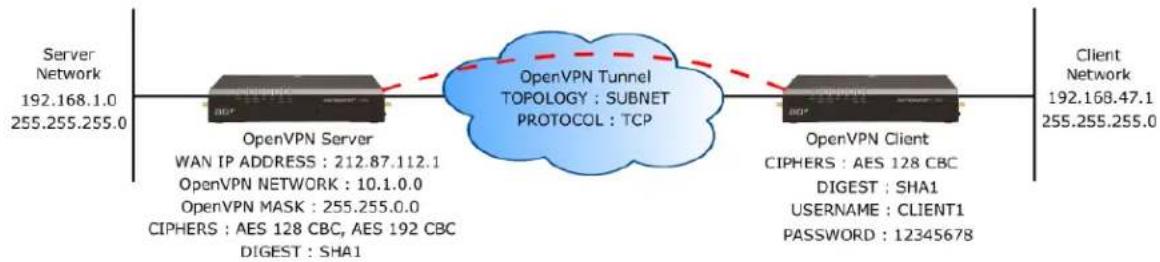
flowchart
graph LR
    A["Server Network 192.168.1.0\n255.255.255.0"] --> B["OpenVPN Server"]
    B --> C["OpenVPN Tunnel TOPOLOGY : SUBNET PROTOCOL : TCP"]
    C --> D["Client Network 192.168.47.1\n255.255.255.0"]
    B --> E["OpenVPN Client"]
    E --> F["CIPHERS : AES 128 CBC\nDIGEST : SHA1\nUSERNAME : CLIENT1\nPASSWORD : 12345678"]
    B --> G["OpenVPN NETWORK: 212.87.112.1\n10.1.0.0\n255.255.0.0\nAES 128 CBC, AES 192 CBC\nDIGEST: SHA1"]
The configuration settings for the OpenVPN client and server are as follows:
OpenVPN server configuration
openvpn-server state on
openvpn-server topology subnet
openvpn-server protocol tcp
openvpn-server network 10.1.0.0
openvpn-server mask 255.255.0.0
openvpn-server cipher aes-128-cbc, aes-192-cbc
openvpn-server digest sha1
openvpn-server auth-by user-pass
openvpn-server cert ovpns.crt
openvpn-server key ovpns.key
<h1 id="clients-username-and-password">Client's username and password</h1>
openvpn-user 1 username client1
openvpn-user 1 password 12345678
<h1 id="route-to-servers-lan-to-be-pushed-to-client">Route to server's LAN to be pushed to client</h1>
openvpn-route 1 destination 192.168.1.0
openvpn-route 1 mask 255.255.255.0
OpenVPN client configuration
openvpn-client 1 state on
openvpn-client 1 server 212.87.112.1
openvpn-client 1 protocol tcp
openvpn-client 1 cipher aes-128-cbc
openvpn-client 1 digest sha1
openvpn-client 1 ca ca.crt
openvpn-client 1 username client1
openvpn-client 1 password 12345678
Example: OpenVPN tunnel in bridging mode using certificate authentication
The following figure shows a sample OpenVPN tunnel in bridging mode using certificate authentication:
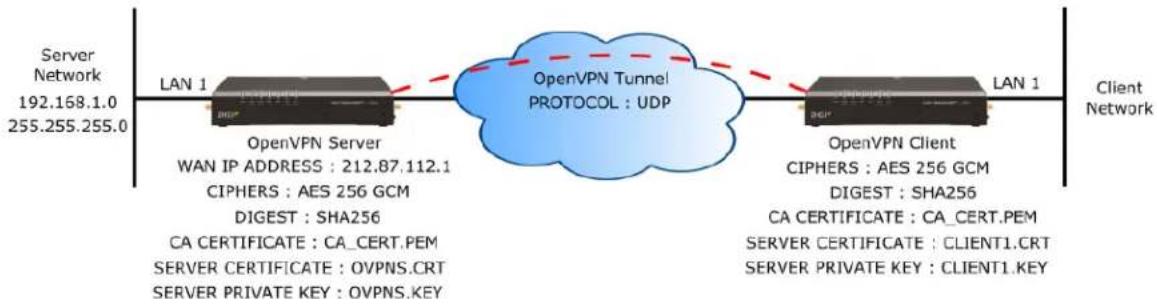
flowchart
graph LR
    A["Server Network 192.168.1.0 255.255.255.0"] --> B["OpenVPN Server WAN IP ADDRESS: 212.87.112.1 CIPHERS: AES 256 GCM DIGEST: SHA256 CA CERTIFICATE: CA_CERT.PEM SERVER CERTIFICATE: OVPNS.CRT SERVER PRIVATE KEY: OVPNS.KEY"]
    B --> C["OpenVPN Tunnel PROTOCOL: UDP"]
    C --> D["OpenVPN Client CIPHERS: AES 256 GCM DIGEST: SHA256 CA CERTIFICATE: CA_CERT.PEM SERVER CERTIFICATE: CLIENT1.CRT SERVER PRIVATE KEY: CLIENT1.KEY"]
    D --> E["Client Network"]
The configuration settings for the OpenVPN client and server are as follows:
OpenVPN server configuration
openvpn-server state on
openvpn-server bridge-mode lan1
openvpn-server protocol udp
openvpn-server cipher aes-256-gcm
openvpn-server auth-by certificate
openvpn-server ca ca_cert.pem
openvpn-server cert ovpns.crt
openvpn-server key ovpns.key
openvpn-server dh ovpns-dh.pem
OpenVPN client configuration
openvpn-client 1 state on
openvpn-client 1 server 212.87.112.1
openvpn-client 1 bridge-mode lan1
openvpn-client 1 protocol udp
openvpn-client 1 cipher aes-256-gcm
openvpn-client 1 ca ca.crt
openvpn-client 1 cert client1.crt
openvpn-client 1 key client1.key
Generic Routing Encapsulation (GRE)
Generic Routing Encapsulation (GRE) is an IP packet encapsulation protocol. You can use GRE to encapsulate a wide variety of network layer protocols inside virtual point-to-point links over an IP network.
Configuring a GRE tunnel
Configuring a GRE tunnel involves the following items:
Required configuration items
■ GRE tunnel configuration:
- Enable the GRE tunnel.
The GRE tunnels are disabled by default.
- The IP address or domain name of the remote device/peer.
• The GRE network IP address and mask.
■ IP routes and filters:
IP routes and filters are not set up automatically, because the specific local and remote networks need to be configured.
- A route for each remote network to be accessed via the GRE tunnel.
- An IP forwarding filter for each local LAN network.
Additional configuration items
■ A description for the GRE tunnel.
■ A GRE key.
Example GRE tunnel
In the following example, a GRE tunnel is created between a local device with the GRE IP address of 10.10.0.2 and a remote device with a WAN IP address of 47.23.78.32 and a GRE address of 10.10.0.1:

flowchart
graph LR
    A["LAN 1\n192.168.1.0\n255.255.255.0"] --> B["LOCAL DEVICE\nGRE IP Address: 10.10.0.2\nGRE Key: 1"]
    B --> C["GRE Tunnel"]
    C --> D["REMOTE DEVICE\nWAN IP Address: 47.23.78.32\nGRE IP Address: 10.10.0.1\nGRE Key: 1"]
    D --> E["REMOTE NETWORK\n10.1.2.0\n255.255.255.0"]

Web
Configure a new GRE tunnel
- On the menu, click Network > Services > GRE.
The GRE page appears.
- Click New GRE tunnel.
- Configure the GRE tunnel:
a. Select Tunnel: Select the number for the GRE tunnel.
b. Enable: Enables or disables the GRE tunnel.
c. Description: (Optional) Enter a description for the GRE tunnel.
d. IP Address: Enter the IP address of the GRE tunnel.
e. Subnet Mask: Enter the IP network mask of the GRE tunnel.
f. Peer: Enter the IP address or domain name of the remote device.
g. Key: Enter the key for the GRE tunnel.
See New GRE tunnel page for further information about these fields.
-
Click Apply
-
Add a route for the remote network.
IP routes are configured via the Web using the appropriate CLI commands from the Device Console:
a. On the menu, click System > Administration > Device Console.
b. At the command prompt in the Device Console, type the IP route settings commands. For example:
digi.router> route 1 destination 10.1.2.0
digi.router> route 1 mask 255.255.255.0
digi.router> route 1 interface gre1
For more information, see the route command.
- Add an IP filter to allow packets to be forwarded to the local network:
a. On the menu, click Security > Firewall > Routing IP Filters.
b. Within the Routing IP Filters section, click + (Add Filter) to create a new filter.
i. Enable: Enables or disables the IP filter.
ii. Description: (Optional) Enter a description for the GRE tunnel.
iii. Action: ACCEPT.
iv. Source: Select the appropriate GRE tunnel, for example, GRE tunnel 1.
v. Protocol: Any.
vi. Click OK.
Modify an existing GRE tunnel
- On the menu, click Network > Services > GRE.
The GRE page appears. - Click to expand an existing GRE tunnel.
- Modify the GRE tunnel settings as needed.
- Click Apply

Command line
To create a GRE tunnel, use the gre command. For example:
1. Configure the GRE tunnel peer IP address or domain name:
digi.router> gre 1 peer 47.23.78.32
2. Configure the GRE tunnel IP address and mask:
digi.router> gre 1 ip-address 10.10.0.2
digi.router> gre 1 mask 255.255.255.252
3. (Optional) Configure the GRE key:
digi.router> gre 1 key 1
4. Enable the GRE tunnel by setting the state to on:
    digi.router> gre 1 state on
5. Add a route for the remote network:
digi.router> route 1 destination 10.1.2.0
digi.router> route 1 mask 255.255.255.0
digi.router> route 1 interface gre1
For more information, see the route command.
- Add an IP filter to allow packets to be forwarded to the local network:
digi.router> ip-filter 1 description "Forward rule for GRE 1"
digi.router> ip-filter 1 src gre1
digi.router> ip-filter 1 dst lan1
digi.router> ip-filter 1 protocol any
digi.router> ip-filter 1 state on
For more information, see the ip-filter command.
- Save the configuration:
digi.router> save config
Show GRE tunnels
To view information about currently configured GRE tunnels:

Web
- On the menu, click Network > Services > GRE.
The GRE page appears.
- To view configuration details about a GRE tunnel, click to expand the GRE tunnel.

Command line
The show gre command displays the status and statistics of the GRE tunnels. To display detailed status and information for all configured GRE tunnels, type show gre without parameters:
digi.router> show gre
Status IP Address Mask Description
1 Up 10.10.0.2 255.255.255.252 digi.router>
To display detailed status and statistics for a particular GRE tunnel, specify the tunnel number with the show gre command:
digi.router> show gre 1
GRE 1 Status and Statistics
Admin Status : Up
Oper Status : Up
IPv4 Address : 10.10.0.2
Mask : 255.255.255.252
Peer : 37.85.231.45
Key : 1
Received Sent
-------- ----
Packets 55 54
Bytes 4620 3456
digi.router>
Example: GRE tunnel over an IPSec tunnel
In order to support GRE over an IPsec tunnel, a LAN interface needs to be configured on each device. The LAN interface will have an IP address and no interfaces. These LAN interfaces are then configured as the IPsec local and remote networks, and as the GRE peers.
In the following example, LAN 10 is being used.
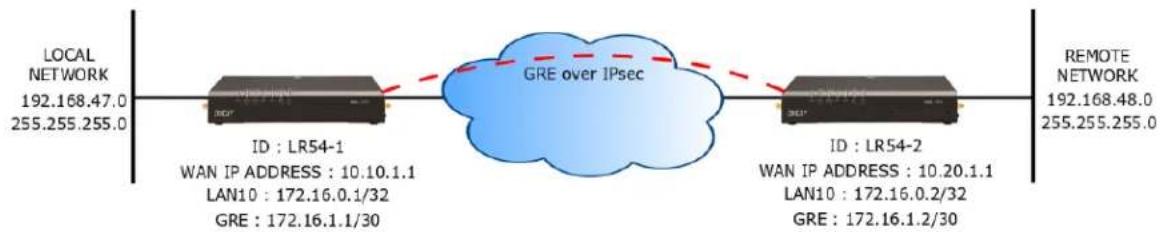
flowchart
graph LR
A["LOCAL NETWORK 192.168.47.0\n255.255.255.0"] --> B["ID : LR54-1\nWAN IP ADDRESS : 10.10.1.1\nLAN10 : 172.16.0.1/32\nGRE : 172.16.1.1/30"]
B --> C["GRE over IPsec"]
C --> D["ID : LR54-2\nWAN IP ADDRESS : 10.20.1.1\nLAN10 : 172.16.0.2/32\nGRE : 172.16.1.2/30"]
D --> E["REMOTE NETWORK 192.168.48.0\n255.255.255.0"]

Example configuration steps for the first device:
- Configure the LAN 10 interface:
a. On the menu, click Network > Networks > LANs.
b. Click New Network.
c. For Select Network, select 10.
d. In the IPv4 group, set the IP address and netmask, for example:
■ IP Address: 172.168.0.1
■ Netmask: 255.255.255.255
e. Expand the DHCP Server group and disable the DHCP server.
f. Click Apply.
- Configure the IPsec tunnel:
a. On the menu, click Network> Networks > IPsec.
b. Click New IPsec Tunnel.
c. Complete the following fields:
■ IPsec Pre-Shared Key: key
■ Local IP Network: LAN 10
■ Local Identifier: Ir54-1
■ Remote Peer IP Address or Name: 10.20.1.1
■ Remote IP Network: 172.168.0.2
■ Remote IP Network Mask: 255.255.255.255
■ Remote Identifier: lr54-2
d. Click Apply.
- Configure the GRE tunnel:
a. On the menu, click Network > Services > GRE.
b. Click New GRE Tunnel.
c. Complete the following fields:
■ Select Tunnel: 1
■ Enable: On
■ IP Address: 172.168.1.1
■ Subnet Mask: 255.255.255.252
■ Peer: 172.168.0.2
d. Click Apply.
- Add a route for the remote LAN 1 network:
a. On the menu, click System > Administration > Device Console.
b. At the command prompt in the Device Console, type the following:
digi.router> route 1 destination 192.168.48.0
digi.router> route 1 mask 255.255.255.0
digi.router> route 1 interface gre1
- Add a filter to allow data from the remote network to be forwarded to LAN 1:
a. On the menu, click Security > Firewall > Routing IP Filters.
b. Within the Routing IP Filters section, click + (Add Filter) to create a new filter and complete the following:
■ Enable: On.
■ Action: ACCEPT.
■ Source: GRE tunnel 1.
■ Protocol: Any.
■ Click OK.
Example configuration steps for the second device:
- Configure the LAN 10 interface:
a. On the menu, click Network > Networks > LANs.
b. Click New Network.
c. For Select Network, select 10.
d. In the IPv4 group, set the IP address and netmask, for example:
■ IP Address: 172.168.0.2
■ Netmask: 255.255.255.255
e. Expand the DHCP Server group and disable the DHCP server.
f. Click Apply.
- Configure the IPsec tunnel:
Note This example uses the default authentication and encryption options.
a. On the menu, click Network> Networks > IPsec.
b. Click New IPsec Tunnel.
c. Complete the following fields:
■ IPsec Pre-Shared Key: key
■ Local IP Network: LAN 10
■ Local Identifier: lr54-2
■ Remote Peer IP Address or Name: 10.10.1.1
■ Remote IP Network: 172.168.0.1
■ Remote IP Network Mask: 255.255.255.255
■ Remote Identifier: lr54-1
d. Click Apply.
- Configure the GRE tunnel:
a. On the menu, click Network > Services > GRE.
b. Click New GRE Tunnel.
c. Complete the following fields:
■ Select Tunnel: 1
■ Enable: On
■ IP Address: 172.168.1.2
■ Subnet Mask: 255.255.255.252
■ Peer: 172.168.0.1
d. Click Apply.
- Add a route for the remote LAN 1 network:
a. On the menu, click System > Administration > Device Console.
b. At the command prompt in the Device Console, type the following:
digi.router> route 1 destination 192.168.47.0
digi.router> route 1 mask 255.255.255.0
digi.router> route 1 interface gre1
- Add a filter to allow data from the remote network to be forwarded to LAN 1:
a. On the menu, click Security > Firewall > Routing IP Filters.
b. Within the Routing IP Filters section, click + (Add Filter) to create a new filter and complete the following:
■ Enable: On.
■ Action: ACCEPT.
■ Source: GRE tunnel 1.
■ Protocol: Any.
■ Click OK.

Command line
Example configuration steps for the first device:
- Configure the LAN 10 interface:
digi.router> lan 10 ip-address 172.168.0.1
digi.router> lan 10 mask 255.255.255.255
digi.router> lan 10 state on
- Configure the IPsec tunnel:
digi.router> ipsec 1 peer 10.20.1.1
digi.router> ipsec 1 local-id lr54-1
digi.router> ipsec 1 local-network 172.168.0.1
digi.router> ipsec 1 local-mask 255.255.255.255
digi.router> ipsec 1 remote-id lr54-2
digi.router> ipsec 1 remote-network 172.168.0.2
digi.router> ipsec 1 remote-mask 255.255.255.255
digi.router> ipsec 1 psk key
digi.router> ipsec 1 state on
- Configure the GRE tunnel:
digi.router> gre 1 ip-address 172.168.1.1
digi.router> gre 1 mask 255.255.255.252
digi.router> gre 1 peer 172.168.0.2
digi.router> gre 1 state on
- Add a route for the remote LAN 1 network:
digi.router> route 1 destination 192.168.48.0
digi.router> route 1 mask 255.255.255.0
digi.router> route 1 interface gre1
- Add a filter to allow data from the remote network to be forwarded to LAN 1:
digi.router> ip-filter 1 src gre1
digi.router> ip-filter 1 dst lan1
digi.router> ip-filter 1 protocol any
digi.router> ip-filter 1 state on
- Save the configuration:
digi.router> save config
Example configuration steps for the second device:
- Configure the LAN 10 interface:
digi.router> lan 10 ip-address 172.168.0.2
digi.router> lan 10 mask 255.255.255.255
digi.router> lan 10 state on
- Configure the IPsec tunnel:
Note This example uses the default authentication and encryption options.
digi.router> ipsec 1 peer 10.10.1.1
digi.router> ipsec 1 local-id lr54-2
digi.router> ipsec 1 local-network 172.168.0.2
digi.router> ipsec 1 local-mask 255.255.255.255
digi.router> ipsec 1 remote-id lr54-1
digi.router> ipsec 1 remote-network 172.168.0.1
digi.router> ipsec 1 remote-mask 255.255.255.255
digi.router> ipsec 1 psk key
digi.router> ipsec 1 state on
- Configure the GRE tunnel:
digi.router> gre 1 ip-address 172.168.1.2
digi.router> gre 1 mask 255.255.255.252
digi.router> gre 1 peer 172.168.0.1
digi.router> gre 1 state on
- Add a route for the remote LAN 1 network:
digi.router> route 1 destination 192.168.47.0
digi.router> route 1 mask 255.255.255.0
digi.router> route 1 interface gre1
- Add a filter to allow data from the remote network to be forwarded to LAN 1:
digi.router> ip-filter 1 src gre1
digi.router> ip-filter 1 dst lan1
digi.router> ip-filter 1 protocol any
digi.router> ip-filter 1 state on
- Save the configuration:
digi.router> save config
System settings
Configure system settings 280
Show system information 282
System date and time 283
Show system date and time 289
Configure Power button power down behavior 290
Configure power delays for power ignition sensor 290
Configure automatic reboot behavior for temporary power drop.291....
Update system firmware 291
Update cellular module firmware 296
Reboot the device....
Reset the device to factory defaults.... 298
Configure system settings
The Digi WR device has several system settings that control the general behavior of the device and information displayed about the device.

Web
On the menu, click System > Administration. System options include the following:
■ Remote Manager: Configures the connection to Digi Remote Manager. See Remote Manager.
■ File System: Displays the local file system for the device and allows you to perform file management operations. See File system.
■ Device Console: Opens the Device Console, from which you can execute commands. See Execute a command from the web interface.
■ Logs: Displays the event and system logs. See Logs.
■ Firmware Update: Updates operating system firmware and other device firmware. See Update system firmware.
■ Reboot: Reboots the device. See Reboot the device.

Command line
Use the system command to configure the following system options:
- System prompt for CLI: The default system prompt is digi.router>. You can configure the system prompt to be any value of up to 16 characters. To use the device's serial number in the system prompt, include %s in the prompt parameter value. For example, a prompt parameter value of LR54_%s resolves to LR54_LR123456.
- CLI timeout: This is the time, in seconds, after which the command-line interface times out if there is no activity. The default is 180 seconds. You can specify any value between 60 and 3600 seconds.
■ Minimum event level to log: The minimum event level that is logged in the event log. The default value is info, but you can also set the event level to the following levels: emergency, alert, critical, error, warning, notice, or debug. For more information on the event log, see Logs, Event log levels, and Configure options for event and system logs.
■ Name: The name of this device.
■ Location: The location of this device.
■ Contact: Contact information for this device.
■ Default page size: The page size for command-line interface output; that is, the number of lines of output displayed. The default value is 40. You can set the page size to any value between 0 and 100.
■ Device-specific passwords: Encrypted passwords can be device-specific or not. When encrypted passwords are device-specific, they are more secure, but cannot be copied onto another device. By default, device-specific passwords are disabled, but you can enable them if required.
■ Description: A description of this device.
■ TCP passthrough port: By default, passthrough mode is disabled, but you can enable it by setting a TCP port of any value but 0. A reboot is required for changes to this setting to take effect.
- Getting Started Wizard: By default, the Getting Started Wizard is enabled to start up at system startup, to perform initial device configuration. You can disable the wizard so it is skipped at system startup.
■ IPsec debugging messages: These messages help diagnose issues with IPsec configuration and interoperability. The default setting for IPsec debugging messages is off, but you can enable them as needed. For more information on IPsec debugging, see Debug an IPsec configuration.
Command-line examples
■ Change the system prompt.
■ Set the command-line interface timeout. For example, to set the timeout to 60 seconds, enter:
■ Configure the event log level. For example, to set the event log level to warning, enter:
■ Set the page size for command-line interface output. For example, to set the output to 30 lines:
■ Disable the Getting Started Wizard.
digi.router> system prompt "LR54_%s"
digi.router> save config
digi.router> system timeout 60
digi.router> save config
digi.router> system log-level warning
digi.router> save config
digi.router> system page 30
digi.router> save config
digi.router> system wizard off
digi.router> save config
Show system information
You can view the system information from either the Dashboard of the Web interface, or from the command line:

Web
- On the menu, click Dashboard.
- In the Device section of the dashboard, view the system information. For descriptions of these fields, see the show system command description.

Command line
To show system information, use the show system command. For example:
digi.router> show system
Model : LR54W
Part Number : LR54-AW401
Serial Number : LR000130
Hardware Version : 50001899-03 A
Using Bank : 0
Firmware Version : 1.0.0.3-90c4383 06/19/16 20:31:29
Bootloader Version: v1.0.0.2
Using Config File : config.da0
Uptime : 4 Hours, 59 Minutes, 4 Seconds
System Time : 20 June 2016, 13:01:04
CPU : 3% (min 1%, max 60%, avg 2%)
Temperature : 33C
Description :
Location :
Contact :
digi.router>
System date and time
Configuring your device to use an accurate date and time is important for various functions that the device performs, such as validating certificates, and using accurate timestamps on events in the event log. The device has three different mechanisms for configuring and maintaining accurate system time:
■ NTP server: In this configuration, the device acts as an NTP server for hosts that are attached to the device's Local Area Networks. The attached hosts can synchronize their system date and time to the device's NTP server, while the device itself synchronizes its system date and time using one of two mechanisms:
• GNSS.
• One or more upstream NTP servers.
See Network Time Protocol for further information.
■ SNTP client: In this configuration, the device synchronizes its system date and time to an NTP server.
See Network Time Protocol for further information.
■ Manual configuration of the device's system date and time. See Set the date and time manually.
Additionally, you can optionally configure the system's time zone and Daylight Savings Time settings. See Set the time zone and Daylight Saving Time.
To show the system date and time, see Show system date and time.
Network Time Protocol
Network Time Protocol (NTP) enables devices connected on local and worldwide networks to synchronize their internal software and hardware clocks to the same time source. Synchronizing your device to an NTP server is important for various functions, such as validating certificates and timestamps on events in the event log. The Digi WR device supports two implementations of Network Time Protocol (NTP):
■ NTP server — The device functions as an NTP server, allowing hosts that are attached to the device's Local Area Networks to synchronize with the device. See Configure the device as an NTP server for information about configuring your device as an NTP server.
■ SNTP client — The device is synchronized with an NTP server, but does not function as an NTP server itself. See Configure the device as an SNTP client for information about configuring your device as an NTP server.
Configure the device as an NTP server
Required Configuration Items
■ The synchronization source, either GNSS, or at least one upstream NTP server.
Additional Configuration Options
■ If the synchronization source is NTP servers, additional NTP servers for synchronization (up to a total of four servers).
■ One or more configured LAN interfaces to accept NTP requests from.
This functionality is not available from the Web UI.

Command line
- Configure the synchronization source:
digi router> ntp 1 source value
digi router>
where value is either:
■ gnss — Uses the device's GNSS module to as the synchronization source.
■ servers — Uses upstream NTP servers.
- If the synchronization source is set to servers, configure the external NTP server that the Digi WR device will use for system date and time synchronization.
digi.router> ntp 1 server1 0.time.devicecloud.com
digi router>
This can be repeated for up to four servers. For example:
digi.router> ntp 1 server2 1.time.devicecloud.com
digi router>
- Select the LAN interfaces from which the device will accept incoming NTP synchronization requests. This is a comma-separated list:
digi.router> ntp 1 interfaces lan1,lan2
digi router>
- Enable the NTP server:
digi.router> ntp 1 state on digi router>
- Save the configuration:
digi.router> save config
digi router>
Show NTP server status and statistics

Command line
Display basic information about the NTP server configuration:
digi.router> ntp
ntp 1:
interfaces lan1,lan2
server1 0.time.devicecloud.com
server2 1.time.devicecloud.com
server3
server4
source servers
state on
digi router>
Display detailed status and statistics for the NTP server configuration:
digi.router> show ntp
NTP Server
----
Admin Status : Up
Sync Status : Up
Interfaces : lan1,lan2
Remote Jitter Refid St T When Poll Reach Delay Offset
----
*
*0.time.digi.com 129.6.15.32 2 u 1 64 1 31.456 9.651
0.061
+ec2-35-164-164-132.163.96.5 1 u 62 64 17 24.576 1.171
9.514
digi.router>
Where:
- Admin Status — Indicates whether the NTP server is sufficiently configured to be functional.
- Sync Status — Indicates whether the NTP server has successfully synced with an upstream peer.
- Interfaces — Lists the LAN interfaces that the NTP server is serving.
- Remote
- If the synchronization source is GNSS, lists the shared memory (SHM) device being used.
If the synchronization source is NTP servers, lists the URL of the NTP peer from reverse DNS lookup. The URL is preceded by a special character, called the "tally code," which represents the current state of the NTP peer:
- space character — The server is not being used (the server may be unreachable, forms a synchronization loop with the device, or there is too much distance for accurate synchronization).
- x — The NTP server is not being used (falseticker).
- . — The NTP server is not being used (sync distance).
- - The NTP server is not being used (outlier).
- + — The NTP server is a candidate for the combining algorithm.
- # — The NTP server could be used.
- * — The NTP server is NTP system peer.
- o — The NTP server is NTP system peer (pulse-per-second (PPS) signal).
- Refid
- If the synchronization source is GNSS, displays .GNSS..
- If the synchronization source is GNSS, lists the reference ID for the NTP peer's time source.
- St — Stratum or steps from reference clock.
• T — Type of addressing used:
- I - local
- u — unicast
- m — multicast
- b — broadcast
- - netaddr
- When — Number of seconds since last response.
- Poll — Polling interval in seconds for source.
- Reach — Success or failure to reach source over the last eight transactions.
- Delay — Round-trip time to receive a reply in milliseconds.
- Offset — Time difference between server and source.
- Jitter — Difference between two samples in milliseconds.
Configure the device as an SNTP client
Required Configuration Items
■ The SNTP server. By default, SNTP is configured to use the Digi SNTP server time.devicecloud.com.
Additional Configuration Options
■ The SNTP update interval. This is the interval at which Digi WR device checks the SNTP server for date and time. By default, SNTP is checked once a day. At bootup, the device attempts to send an update message to the configured SNTP server every 15 seconds until it receives a response. Once it receives a response, it reverts to the configured update interval.
This functionality is not available from the Web UI.

Command line
To set the date and time using SNTP, use the sntp command.
-
Optional: Set the SNTP server. For example, to set the server to time.devicecloud.com: digi.router> sntp server time.devicecloud.com
-
(Optional) Set the SNTP update interval: digi.router> sntp update-interval 10
-
Save the configuration: digi.router> save config
Show NTP client status

Command line
■ To display information about the NTP client configuration:
digi.router> sntp
sntp 1:
server time.devicecloud.com
state on
update-interval 10
digi.router>
Set the date and time manually
This functionality is not available from the Web UI.

Command line
To set the date and time manually, use the date command. The date command specifies the time in HH:MM:SS format, where seconds are optional, followed by the date, in DD:MM:YYYY format.
For example, to manually set the time and date to 14:55:00 on May 3, 2016, enter:
digi.router> date 14:55:00 03:05:2016
Set the time zone and Daylight Saving Time
When the date and time is set using SNTP, the system time is set to Universal Coordinated Time (UTC) and not to your local time. In addition, the date and time, whether it is set manually or using SNTP, does not automatically change to reflect Daylight Saving Time (DST). By setting the time zone, the device displays the local time for that time zone and automatically adjusts for daylight saving time.
You can set the time zone to any of the following values:
canada-atlantic, canada-central, canada-eastern, canada-mountain, canada-newfoundland, canada-pacific, europe-central, europe-eastern, europe-western, none, uk-ireland, us-alaska, us-arizona, us-central, us-eastern, us-hawaii, us-indiana, us-mountain, us-pacific. The default is none.

Command line
To set the time zone to, for example, US Central:
digi.router> system timezone us-central
digi.router>
Show time zone configuration

Command line
■ To display information about the time zone configuration:
digi.router> system timezone
us-central
Show system date and time
You can view the system data and time from either the Dashboard of the Web interface, or from the command line:

Web
- On the menu, click Dashboard. The System Time field in the Device panel displays the system time.

Command line
To display the current system date and time, use the date command.
digi.router> date
system time: 14:55:06, 03 May 2016
digi.router>
Configure Power button power down behavior
The Digi router's front panel includes a Power button.
■ If the device is off, press the Power button to turn on the device.
■ If the device is on, the Power button includes short-press and long-press options. By default, both short-press and long-press Power button actions power down the device.
You can configure how the Power button powers down the device using the power command. For example, to prevent accidentally powering down the device when the Power button is accidentally pressed, you can disable the Power button short-press power down. Or, you can completely disable the Power button for power down—both short- and long-presses.
To prevent short-press Power button power down:
digi.router> power button disable-power-down
digi.router> save config
To completely prevent power down using the Power button:
digi.router> power button disable-all-power-down
digi.router> save config
Pressing the Power button when the device is off always powers on the device, regardless of how you configure Power button power down options.
Configure power delays for power ignition sensor
The Digi WR device automatically powers on and powers off when it detects power on the ignition sensor. By default, there is no delay for either power on or power off based on the power ignition sensor.
You can configure delays for powering on or off the system using the power command.
To set a delay time of five minutes (300 seconds) for power off when the ignition power sensor goes off:
digi.router> power ignition-off-delay 60
digi.router> save config
To set a delay time of two minutes (120 seconds) for power on when the ignition power sensor goes on:
digi.router> power ignition-on-delay 120
digi.router> save config
Note If the device does not automatically power on within the configured ignition-on delay time, you can manually power on the device using the Power button.
Configure automatic reboot behavior for temporary power drop
Note This functionality is available for the WR64 only.
The WR64 device can be configured to automatically reboot if the ignition sense line is high and the device experiences a temporary power drop. By default, the device will not automatically reboot in this situation.
To configure the WR64 device to automatically reboot if the ignition sense line is high and the device experiences a temporary power drop, use the power auto-reset command:
digi.router> power auto-reset on
digi.router> save config
Update system firmware
The Digi WR device operating system firmware images consist of a single file with the following naming convention:
<platform>-<version>.bin
For example, wr64-4.3.2.24.bin.
To update the system firmware, use one of the following procedures:
Web
Digi maintains a repository of available firmware versions. You can update system firmware to one of these versions, or upload a previously downloaded firmware file.
Update firmware from available versions in the Digi repository
- On the menu, click System > Administration > Firmware Update.
- Select a version from the Available Versions list. The system firmware file downloads.
- Click Update Firmware.
Download and upload firmware
- Download the operating system firmware from the Digi Support FTP site.
- Select Upload firmware from the Available Versions list.
- Click Choose File.
- Browse to the system firmware file location and select the file.
- Click Update Firmware.

Command line
-
Download the operating system firmware from the Digi Support FTP site.
-
Load the firmware image onto the device. To do so, use a Windows SFTP client, such as FileZilla, or use the Linux applications scp and sftp. For example, to use scp:
$ scp wr64-4.3.2.24.bin admin@192.168.1.1:
Password:
wr64-4.3.2.24.bin
100% 52MB 1.0MB/s 00:22
$
- Check that the firmware file has been successfully uploaded to the device.
digi.router> dir
File Size Last Modified
ssh_host_rsa_key.pub 382 Fri May 6 11:05:02
ssh_host_dsa_key.pub 590 Fri May 6 11:05:05
config.da0 1541 Mon May 23 12:32:22
config.fac 1760 Fri May 6 11:44:26
wr64-4.3.2.24.bin 52000149 Mon sept 5 22:17:59
Remaining User Space: 5,143,183,360 bytes
digi.router>
- Update the firmware by entering the update command, specifying the firmware keyword and the firmware file name.
digi.router> update firmware wr64-4.3.2.24.bin
Validating firmware image
Updating firmware from version "4.2.0.6" to version "4.3.2.24"
Firmware update completed. Please reboot the device.
digi.router>
- Reboot the device to run the new firmware image using the reboot command.
digi.router> reboot
- Once the device has rebooted, verify the running firmware version by entering the show system command.
digi.router> show system
Model : WR64
Part Number : WR64-AW401
Serial Number : WR000038
Hardware Version : Not available
Using Bank : 1
Firmware Version : 4.3.2.24 09/05/2018 22:19:52
...
digi.router>
Certificate management for firmware images
The system firmware files are signed to ensure that only Digi-approved firmware load onto the device. The device validates the system firmware image as part of the update process and only successfully updates if the system firmware image can be authenticated.
Manage firmware updates using Digi Remote Manager
If you have a network of many devices, you can use Digi Remote Manager Profiles to manage firmware updates. Profiles ensures all your devices are running the correct firmware version and that all newly installed devices are updated to that same version. For more information, see the Profiles section of the Digi Remote Manager User Guide.
Failover and recovery during system update
Digi WR devices are capable of storing two firmware images in flash memory. Additionally, the device stores a "boot bit" in flash memory, which the bootloader uses to determine which firmware image to load when the system restarts. The following workflows describe the process involved in downloading a new firmware image, validating the image, installing the image, and changing the boot bit to indicate that the new image should be use at startup:
■ Firmware update process using the Web UI:
- The selected firmware image is downloaded from the Digi Repository or the user's PC.
- The firmware image is validated by checking the signature of the firmware image.
- If the firmware is invalid either through a corrupted firmware download, or an invalid signature, the firmware update process is aborted and the device will continue to run the existing firmware.
- If the firmware is valid, the firmware image is unpacked and the firmware image is stored in the unused firmware banks.
- The boot bit is toggled, so that the new firmware image is loaded when the device next reboots.
■ Firmware update process using the command line:
- The user downloads the firmware from the Digi support site.
- The user copies the firmware image onto the device using SFTP or SCP.
- The user initiates the firmware update, using the update firmware command.
- The firmware image is validated by checking the signature of the firmware image.
- If the firmware is invalid either through a corrupted firmware download, or an invalid signature, the firmware update process is aborted and the device will continue to run the existing firmware.
- If the firmware is valid, the firmware image is unpacked and the firmware image is stored in the unused firmware banks.
- The boot bit is toggled, so that the new firmware image is loaded when the device next reboots.
Firmware update failure scenarios
The following are examples of situations where the firmware update process might fail, and how the device recovers from that failure:
■ Loss of internet connectivity while downloading firmware.
The firmware update process will timeout and the device will continue to run the existing firmware image without rebooting. If the device is subsequently rebooted, it will continue to use the existing firmware image.
■ Loss of internet connectivity while upgrading device.
This has no impact on the firmware update, because once the firmware image has been downloaded, internet access is no longer required. The firmware update process will continue. During the update process, the boot bit is toggled, and the new firmware image is loaded when the device reboots.
■ Unable to update firmware after download of new firmware.
If the new firmware image cannot be used to update the image (for example, if there is an invalid signature due to a corrupted download), the update process will abort and the device will continue to run the existing firmware image without rebooting. If the device is subsequently rebooted, it will continue to use the existing firmware image.
■ The device reboots or shuts down during the firmware update process.
The outcome of this varies, depending on the state of the update process when the power loss or reboot occurred. There are two stages involved in writing the firmware image to flash storage during the update process:
- Write the firmware image to flash storage.
- Toggle the boot bit to reflect which firmware bank to use when the device reboots.
If the device loses power or reboots when the firmware image is being written to flash, then the boot bit has not yet been toggled. Therefore, the device will continue to use the existing firmware image.
It is extremely unlikely that the device will lose power or reboot when updating the boot bit, because it is single bit being changed. If the boot bit has not changed, then the device will reboot using the existing image. If the boot bit has been changed, then the device will reboot with the new firmware image.
How to recover a WR54, LR54, or LR54-FIPS that will not boot
This section describes the process for recovering a WR54, LR54, or LR54-FIPS device that cannot boot because both firmware images stored in flash memory have become corrupted.
When a WR54/LR54/LR54-FIPS device is in this state, the device will continually reboot as it attempts to boot one of the firmware images that are stored on the device. The LED state will be as follows:
| Dual-cellular WR54 LEDs | Single-cellular WR54 LEDs | LR54/LR54-FIPS LEDs State | |
| Power Power Power | Periodic blink as the device | reboots | |
| WWAN1 Signal WWAN | Signal WWAN | Signal Off or Yellow or Green | |
| WWAN1 Service | WWAN Service | WWAN Service | Off or Green |
| WWAN2 Signal N/A | SIM1 Off or Green | ||
| WWAN2 Service | N/A | SIM2 Off or Green | |
To recover the WR54/LR54/LR54-FIPS, you will need a TFTP server that has an IP address of 192.168.1.100. The WR54/LR54/LR54-FIPS will use an IP address of 192.168.1.1.
The recovery image is a fully functional release of the firmware; however, a newer firmware release may be available. Once the device is recovered, you should update to the latest firmware release.
Any configuration on the WR54/LR54/LR54-FIPS will not be modified as part of the recovery process.
Recovery process for WR54/LR54/LR54-FIPS firmware
- Download the WR54/LR54/LR54-FIPS recovery image:
■ WR54: http://ftp1.digi.com/support/firmware/transport/WR54/latest/
■ LR54/LR54-FIPS: http://ftp1.digi.com/support/firmware/transport/LR54/latest/
The recovery image file is named:
■ WR54: wr54_recovery.img
■ LR54: lr54_recovery.img
■ LR54-FIPS: lr54_fips_recovery.img
-
Copy the recovery image into your TFTP server directory.
-
Connect the WR54/LR54/LR54-FIPS to the TFTP server using the ETH2 interface.
Note To recover the WR54/LR54/LR54-FIPS, you will need a TFTP server that has an IP address of 192.168.1.100. The WR54/LR54/LR54-FIPS will use an IP address of 192.168.1.1.
- Hold in the reset button on the WR54/LR54/LR54-FIPS and power on the device. The WWAN1/WWAN Signal and WWAN1/WWAN Service LEDs should start flashing yellow.
- Continue holding the reset button until the WWAN1/WWAN Signal and WWAN1/WWAN Service LEDs stay on. The device is now in the recovery mode.
6. Release the reset button.
The following will now occur:
a. The device downloads the firmware image from the TFTP server. Once the firmware image is downloaded, the WWAN2 Signal/SIM 1 LED is lit.
b. The device verifies the firmware image. Once verified, the WWAN2 Service/SIM 2 LED is lit.
c. The device programs the firmware image into flash memory. This will take a few seconds.
d. The device reboots, loading and running the recovery image.
- Once the device has rebooted, update to the latest firmware release using the Web UI or the CLI. See Update system firmware for instructions.
Update cellular module firmware
Digi provides the cellular module files for all certified cellular carriers for Digi WR devices on the Digi repository of cellular module firmware files.
Enter the update module command, specifying your carrier name: att, verizon, or generic.
For example:
digi.router> update module verizon
Reboot the device
You can reboot the Digi WR device immediately or schedule a reboot after a period of time or at a specific time. You can cancel a scheduled reboot, if required.
Note Any unsaved configuration is lost during the reboot. You may want to save your configuration settings to a file before rebooting. See Save configuration settings to a file.

Web
■ Click System > Administration > Reboot.
A message displays the maximum time expected for the reboot operation. When the reboot completes, the device reconnects and the Device Login page displays.

Command line
Reboot the device immediately
To reboot the device immediately, enter:
digi.router> reboot
Reboot the device after a period of time
To reboot the device after a period of time, enter the following command, where MM represents the number of minutes to wait before rebooting.
digi.router> reboot in MM
For example, to reboot in 5 minutes:
digi.router> reboot in 5
Reboot the device at a specific time
To reboot the device at a specific time, enter the following command, where HH:MM is the time at which to reboot. The time is in 24-hour format.
digi.router> reboot at HH:MM
For example, to reboot at 6:30 PM (18:30 hours):
digi.router> reboot at 18:30
Cancel a scheduled reboot
To cancel a scheduled reboot, enter:
digi.router> reboot cancel
Reset the device to factory defaults
Resetting the device to factory defaults performs the following actions:
- Clears all configuration settings. When the device boots up again, it uses the configuration in file config.fac. If the config.fac file has been deleted, the device regenerates the file with the default Digi configuration.
■ Deletes all user files including Python scripts.
■ Regenerates SSH keys.
■ Clears event and system log files.
■ Creates a new event in the event log indicating a factory reset.
To reset the device to factory defaults:
- Locate the reset button on your device. For the Digi WR routers, the Reset button is located beneath the SIM card slot cover on the front panel, to the right of SIM slot 2. Remove the SIM cover to access the Reset button.
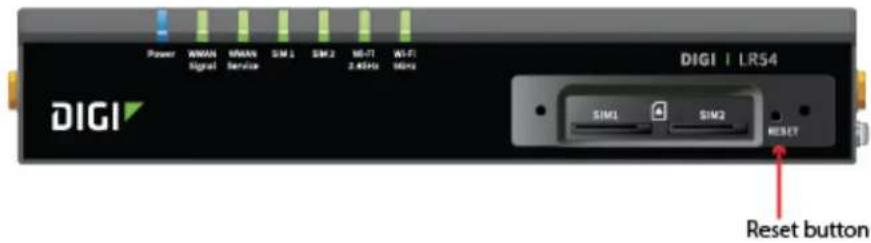
- Press and hold the Reset button for 5 seconds. The device reboots automatically. The device reset to factory defaults. Follow the instructions in the Digi LR54 Quick Start Guide to reconfigure the device.
Configuration files
Default configuration files 300
Configuration file sections.300
Shared configuration files and device-specific passwords.301....
Save configuration settings to a file 301
Switch configuration files 301
Use multiple configuration files to test configurations on remote devices.302....
Default configuration files
As released, the Digi WR device firmware provides the following configuration files.
| Configuration Name Description | ||
| Default configuration | config.da0 | The default configuration file is named config.da0. If needed, you can change the default configuration file. See Switch configuration files. |
| Factory default configuration | config.fac | The configuration file named config.fac contains the factory default configuration. When you reset a device back to factory defaults, the config.fac is applied when the device boots up. You can customize the config.fac file if you want to create a custom factory-default configuration. |
Configuration file sections
There are several sections of note in the configuration file.
| Configuration file section Description | |
| Timestamp Identifies the date and time the configuration file was saved and the user who updated the file.digi.router> more config.da0# Last updated by admin on Mon May 23 12:32:22 2016 | |
| Main | Contains the commands and parameters required to configure features.■ Passwords in the file are stored in encrypted form. You cannot display passwords in clear-text form.■ Comment lines in the file begin with a pound sign # character. |
| lan 1 description "Ethernet and Wi-Fi LAN network"lan 1 state "on"lan 1 interfaces "eth2,eth3,eth4,wifi1,wifi5g"lan 1 ip-address "192.168.1.1"lan 2 description "Guest Wi-Fi network"lan 2 interfaces "wifi2,wifi5g2"lan 2 ip-address "192.168.2.1"wifi 1 state on... | |
| Firewall | Contains rules for controlling which packets are allowed into and out of the device. For more information, see Using firewall and firewall6 commands.[FIREWALL]*nat-A POSTROUTING -o eth1 -j MASQUERADE COMMIT[FIREWALL_END]digi.router> |
Shared configuration files and device-specific passwords
User passwords for the Digi WR device are stored in the configuration file in an encrypted form and the passwords are not device-specific. Another Digi WR device can read the configuration file and decipher the encrypted form of the password. Because passwords are encrypted and cannot be displayed in clear text, you can safely share configuration files across multiple devices.
However, if you do not intend to share configuration files, you can enable the device-specific passwords option. When the device-specific passwords option is enabled, only the device on which the password was configured can decipher the password. See the system command device-specific-passwords parameter for details.
Note The device-specific-passwords option does not apply to passwords set using the user or openvpn-user commands.
Save configuration settings to a file
When you make a change to the Digi WR configuration, the changes are not automatically saved to the configuration file. You must explicitly save configuration changes to a configuration file. If you do not save configuration changes, the system discards the changes when the device next boots up.

Web
■ On configuration pages, click Apply to save changes to the configuration file immediately.

Command line
Enter the save config command.
digi.router> save config
Switch configuration files
You can store multiple configuration files on a device, but the device uses only one configuration file when it reboots. The default configuration file is named config.da0. See Default configuration files.
To switch to another configuration file:
- If needed, identify the current configuration file using the show system command.
- Change the current configuration file using the update command.
- If needed, create the configuration file you specified in the update command using the save command.
Step 1: Identify the current configuration file
To identify the current configuration file, use the show system command. For example:
digi.router> show system
Model : LR54W
Part Number : LR54-AW401
Serial Number : LR000038
Hardware Version : Not available
Using Bank : 1
Firmware Version : 1.1.0.6 06/17/16 13:37:58
Bootloader Version: 201602051801
Using Config File : config.da0
Uptime : 14 Minutes, 29 Seconds
System Time : 23 July 2016, 13:08:09
CPU : 3% (min 1%, max 70%, avg 3%)
Temperature : Not available
Description :
Location :
Contact :
digi.router>
Step 2: Change the configuration file name
To change the name of the current configuration file, use the update command. For example:
digi.router> update config <filename>
The file you specified is used the next time the device reboots.
Step 3: Save the current configuration to the configuration file
If the configuration file name you specified on the update command does not exist, use the save command config parameter to create the new configuration file by saving the current configuration. To save the current configuration, use the save command config parameter. For example:
digi.router> save config
Use multiple configuration files to test configurations on remote devices
You can use multiple configuration files and the autorun command to safely test a new configuration on a remote device that might result in the remote device going offline, in which case the device cannot be remotely accessed.
To test the configuration on a remote device, create a new configuration file with the configuration you want to test. In addition to the configuration, include two autorun commands:
■ The first autorun command automatically reverts the device to use the original configuration file.
■ The second autorun command schedules a reboot after a period of time.
Example: Test configuration file
For example, suppose you creates a test configuration file named test.cfg.
The test.cfg file changes the cellular 1 apn parameter and executes two autorun commands to automatically revert the device back to use the config.da0 configuration file and to reboot in 5 minutes. It then saves the configuration to test.cfg and reboots the device.
update config test.cfg
cellular 1 apn new-apn-to-test
autorun 1 command "update config config.da0"
autorun 2 command "reboot in 5"
save config
reboot
If the device does not come back online, it automatically reverts to the old (working) configuration file, config.da0, and reboots after 5 minutes.
If the device comes back online after being rebooted with the configuration—that is, the device connected with the new cellular Access Point Name (APN)—you can cancel the scheduled reboot using the reboot cancel command.
digi.router> reboot cancel
Using the copy and update commands, you can copy the configuration file to the final configuration file, and change the configuration file name.
digi.router> copy test.cfg config.da0
digi.router> update config config.da0
File system
File system 305
Create a directory 305
Display directory contents.306....
Change the current directory 306
Delete a directory 307
Display file contents 308
Copy a file.308....
Rename a file 309
Delete a file 310
Upload and download files 311
File system
The Digi WR device's local file system has approximately 100 MB of space available for storing files, such as Python programs, alternative configuration files and firmware versions, and release files, such as cellular module images.
See Configuration files for information on managing configuration files.
Create a directory

Web
- On the menu, click System > Administration > File System. The File System page appears.
- Navigate to the file system location where you want to create a directory and click ☐. The New Directory dialog appears.
- Enter a name for the directory and click Create.
To create a nested directory, navigate to the subdirectory by double-clicking the parent directory. Click ⊕ for the New Directory dialog. Alternately, you can create a nested directory by including the parent directory with the slash delimiter / in the directory name field.

Command line
To make a new directory, use the mkdir command, specifying the name of the directory. For example:
digi.router> mkdir test
digi.router> dir
File Size Last Modified
test Directory
config.da0 763 Sun Mar 5 12:36:20
config.fac 186 Mon Feb 21 03:00:17
Remaining User Space: 102,457,344 bytes
digi.router>
Display directory contents

Web
- On the menu, click System > Administration > File System. The File System page appears.
- Double-click the directory row to navigate to a sub-directory and display contents.

Command line
To display directory contents, use the dir command. For example:
digi.router> dir
File Size Last Modified
test Directory
config.da0 763 Sun Mar 5 12:36:20
config.fac 186 Mon Feb 21 03:00:17
Remaining User Space: 102,457,344 bytes
digi.router>
Change the current directory

Web
- On the menu, click System > Administration > File System. The File System page appears.
- Navigate to the desired directory or subdirectory.
- To return to the home directory, click 🔒.

Command line
To change the current directory, use the cd command, specifying the directory name. For example:
digi.router> dir
File Size Last Modified
test Directory
config.da0 763 Sun Mar 5 12:36:20
config.fac 186 Mon Feb 21 03:00:17
Remaining User Space: 102,457,344 bytes
digi.router>
digi.router> cd test
digi.router> dir
File Size Last Modified
Remaining User Space: 102,457,344 bytes
digi.router>
Delete a directory

Web
- On the menu, click System > Administration > File System. The File System page appears.
- Select the directory to delete.
- Click 🔒. A warning dialog displays.
- Click OK.
Note This operation deletes any files in the directory along with the directory.

Command line
- Make sure the directory is empty.
- Use the rmdir command, specifying the name of the directory to remove. For example:
digi.router> dir
File Size Last Modified
test Directory
config.da0 763 Sun Mar 5 12:36:20
config.fac 186 Mon Feb 21 03:00:17
Remaining User Space: 102,457,344 bytes
digi.router>
digi.router> rmdir test
Directory test is not empty
ERROR
digi.router>
digi.router> dir test
File Size Last Modified
config.tst 186 Wed Apr 5 07:10:41
Remaining User Space: 102,457,344 bytes
digi.router>
digi.router> del test/config.tst
digi.router>
digi.router> rmdir test
digi.router>
digi.router> dir
File Size Last Modified
config.da0 763 Sun Mar 5 12:36:20
config.fac 186 Mon Feb 21 03:00:17
Remaining User Space: 102,457,344 bytes
digi.router>
Display file contents

Web
There is no direct way to display file contents from the System - File Management page. Instead you must download the file and then view the downloaded file from a file editor.
- On the menu, click System > Administration > File System. The File System page appears.
- Select the file.
- Click ↓.
- When the file is downloaded, open it with an editor.

Command line
To display the contents of a file, use the more command, specifying the name of the file. For example:
digi.router> more config.da0
# Last updated by username on Thu Nov 19 14:26:02 2015
eth 1 ip-address "192.168.1.1"
cellular 1 apn "mobile.o2.co.uk"
cellular 1 state "on"
user 1 name "username"
user 1 password "\1\4WdqUHrv\$K.aB78KILuxVpesZtyveG/"
digi.router>
Copy a file
To copy a file, use the copy command, specifying the existing file name, followed by the name of the new copy.
For example, to copy file config.da0 to a file in the main directory named backup.da0, and then to a file named test.cfg in the test directory, enter the following:

Command line
digi.router> dir
File Size Last Modified
test Directory
config.da0 763 Sun Mar 5 12:36:20
config.fac 186 Mon Feb 21 03:00:17
Remaining User Space: 102,457,344 bytes
digi.router>
digi.router>
digi.router> copy config.da0 backup.da0
digi.router>
digi.router> dir
File Size Last Modified
test Directory
config.da0 763 Sun Mar 5 12:36:20
config.fac 186 Mon Feb 21 03:00:17
backup.da0 763 Wed Apr 5 07:22:29
Remaining User Space: 102,457,344 bytes
digi.router>
digi.router> copy config.da0 test/test.cfg
digi.router>
digi.router> dir test
File Size Last Modified
test.cfg 763 Wed Apr 5 07:24:45
Remaining User Space: 102,457,344 bytes
digi.router>
Rename a file

Web
- On the menu, click System > Administration > File System. The File System page appears.
- Select the file to rename. Navigate to the file's directory location, if necessary.
- Click ☑. Enter the new file name.
- Click OK.

Command line
To rename a file, use the rename command, specifying the existing name and the new name. For example:
digi.router> dir
File Size Last Modified
test Directory
config.da0 763 Sun Mar 5 12:36:20
config.fac 186 Mon Feb 21 03:00:17
backup.da0 763 Wed Apr 5 07:22:29
Remaining User Space: 102,457,344 bytes
digi.router>
digi.router> rename backup.da0 test.da0
digi.router>
digi.router> dir
File Size Last Modified
test Directory
test.da0 763 Wed Apr 5 07:22:29
config.da0 763 Sun Mar 5 12:36:20
config.fac 186 Mon Feb 21 03:00:17
Remaining User Space: 102,453,248 bytes
digi.router>
Delete a file

Web
- On the menu, click System > Administration > File System. The File System page appears.
- Select or navigate to the file to delete.
- Click ☐. A confirm delete dialog displays.
- Click OK.
Note To delete all files in a directory, see Delete a directory.

Command line
To delete a file, use the del command, specifying the filename to delete.
For example, to delete a file named test.cfg in the test directory, enter the following:
digi.router>
digi.router> dir
File Size Last Modified
test Directory
test.da0 763 Wed Apr 5 07:22:29
config.da0 763 Sun Mar 5 12:36:20
config.fac 186 Mon Feb 21 03:00:17
Remaining User Space: 102,453,248 bytes
digi.router>
digi.router> del test.da0
digi.router>
digi.router> dir test
File Size Last Modified
test.cfg 763 Wed Apr 5 07:24:45
Remaining User Space: 102,453,248 bytes
digi.router>
digi.router> del test/test.cfg
digi.router> dir test
File Size Last Modified
Remaining User Space: 102,449,152 bytes
digi.router>
Upload and download files

Web
Upload files
- On the menu, click System > Administration > File System. The File System page appears.
- Click ↑.
- Use the local file system to browse to the location of the file to upload. Select the file and click Open to start the upload.
- A progress dialog appears. When the upload operation is complete, the file is displayed in the file list.
Download files
- On the menu, click System > Administration > File System. The File System page appears.
- Navigate to the file you want to download and click the file to select it. To download the event log, select file event.log. To download the system log, select file system.log.
- Click ↓ The file downloads to your system using your browser's download settings.

Command line
You can download and upload files using utilities such as Secure Copy (SCP), SSH File Transfer Protocol (SFTP), or an SFTP application, such as FileZilla.
Upload files using SCP
To upload a file to a device using SCP, use this syntax:
scp filename username@ip_address:filename
For example, to upload a file named script.py to a device at IP address 192.168.1.1:
$ scp script.py john@192.168.1.1:script.py
Password:
script.py
100% 3728 0.3KB/s 00:00
Download files using SCP
To download a file from a device using SCP, use this syntax:
scp username@ip_address:filename filename
For example, to download a file named config.da0 to the local directory from a device at IP address 192.168.1.1 using the username john:
\$ scp john@192.168.1.1:config.da0 config.da0
Password:
config.da0
100% 254 0.3KB/s 00:00
Upload files using SFTP
This example uploads a file named wr64-4.3.2.24.bin to a device with an IP address of 192.168.1.1, using the username john:
\$ sftp john@192.168.1.1
Password:
Connected to 192.168.1.1
sftp> put wr64-4.3.2.24.bin
Uploading wr64-4.3.2.24.bin to wr64-4.3.2.24.bin
wr64-4.3.2.24.bin
100% 24M 830.4KB/s 00:00
sftp> exit
\$
Download files using SFTP
This example downloads a file named config.da0 from a device with an IP address of 192.168.1.1 to the local directory, using the username john:
\$ sftp john@192.168.1.1
Password:
Connected to 192.168.1.1
sftp> get config.da0
Fetching config.da0 to config.da0
config.da0
100% 254 0.3KB/s 00:00
sftp> exit
\$
Diagnostics and troubleshooting
Logs 314
Analyze traffic .319
Use the "ping" command to troubleshoot network connections.323.
Use the "traceroute" command to diagnose IP routing problems.323
Use the "show tech-support" command.324.
Troubleshooting 326.
Logs
The event log contains events related to the functionality of the Digi WR device. These events include information about configuration changes, interface state changes, user access, and so on.
The system log contains events related to the low-level system. While these events are typically not useful to end users, they are useful to Digi support and engineering when diagnosing device issues.
You can view logs from either the web interface or the command line.
Log entry format
Event and system log entries have the following format:
<timestamp> <level> <application> <event message>
For example, here is an event log entry showing a configuration change by the user admin to the system timeout parameter which has been logged by the command-line interface (CLI) application at the info log level:
2016-05-03 12:05:29.653107 user.info CLI[admin]: system timeout 3600
In the web interface Log viewer page, here is an event log entry showing the login to the command line interface by the user admin:
| Date | Level | Source▲ | Message |
| 2017-01-26 01:27:18.332389 | user.notice | CLI[admin@web]: | Login by admin. |
Configure options for event and system logs
You can configure options for event and system logs.
- For event logs, you can set the level of events you want to log, enable logging to a file, and enable logging to a syslog server.
■ For system logs, you can enable logging to a file and enable logging to a syslog server.

Web
- On the menu, click System > Administration > Logs.
- Click Log Configuration.
- Under Event Log:
Log level: Select the log level. See Event log levels.
Log to file: Enable or disable logging to a file.
Log to syslog: If you want to log to a syslog server, select a syslog server for the event log.
4. Under System Log:
Log to file: Enable or disable logging to a file.
Log to syslog: If you want to log to a syslog server, select a syslog server for the system log.
5. Click Apply.

Command line
Enter the system log-level command, specifying the event log level.
system log-level <level>
For example:
system log-level warning
Configure syslog servers
You can configure up to two syslog servers for storing event and system logs.

Web
- On the menu, click System > Administration > Logs.
- Click Syslog Server Configuration.
- For each syslog you want to configure, provide the following:
Server: Specify the IPv4 IP address for the server.
Port: Specify the listening port for the server. The default is port 514.
Mode: Specify the mode for syslog traffic: UDP or TCP. The default is UDP.
4. Click Apply.

Command line
To configure syslog server 1:
syslog 1 server my_syslog1.company.com
syslog 1 server-port 516
syslog 1 mode udp
To configure syslog server 2:
syslog 2 server my_syslog2.company.com
syslog 2 server-port 517
syslog 2 mode udp
Display logs

Web
- On the menu, click System > Administration > Logs.
- Click Log viewer. See Log viewer page for details on all page fields.
- To stream the event log, click ▶ under Event Log. To stream the system log, click ▶ under System Log. For more information on the controls in the Log Viewer, see Log viewer page.

Command line
To display the event log, use the show log command.
Note If the logs are stored in flash, the show log command displays the logs stored in flash.
For example:
digi.router> show log
2016-06-03 16:54:50.643501 user.notice CLI[admin]: Login by admin.
2016-06-03 16:54:47.245107 user.notice CLI[]: Login failure by .
2016-06-03 16:54:39.831107 user.info cellular_monitor[1245]: module support = HE910 4G support = 0
2016-06-03 16:54:39.653107 user.info cellular_monitor[1245]: Model = HE910
To display the system log, use the show log system command variant. For example:
digi.router> show log system
2017-01-26 00:22:36.157657 kern.warning kernel:ESW: Link Status Changed - Port2 Link Down
2017-01-26 00:22:36.157263 kern.info kernel:device wifi5g1 entered promiscuous mode
2017-01-26 00:22:36.157263 kern.info kernel:device wifi1 entered promiscuous mode
2017-01-26 00:22:36.042680 kern.info kernel:lan1: port 3(eth4) entering forwarding state
2017-01-26 00:22:36.042576 kern.info kernel:lan1: port 3(eth4) entering forwarding state
2017-01-26 00:22:36.042255 kern.info kernel:device eth4 entered promiscuous mode
2017-01-26 00:22:33.312014 kern.info kernel:lan1: port 2(eth3) entering forwarding state
2017-01-26 00:22:33.311843 kern.info kernel:lan1: port 2(eth3) entering forwarding state
2017-01-26 00:22:33.297835 kern.info kernel:device eth3 entered promiscuous mode
digi.router>
Find and filter log file entries
You can find and filter log file entries based on search criteria entered in the Log Viewer Search bar. The find operation searches every field of a log file entry, including the date.

Web
- On the menu, click System > Administration > Logs.
- Click Log viewer.
- In the Find field, enter the text to search for in messages.
- To clear the filter, delete the text in the Find field.
Save logs to a file
By default, the event and system logs are stored in RAM. This means the event and system logs are lost when the device is rebooted. You can configure the device to store the event and system logs in a file to help diagnose issues if the device is being rebooted. When enabled, the event log is stored in the file event.log and the system log is stored in the file system.log.
The maximum size of a log file is 2 MB. When the event and system log files reach this size, they are backed up to event.log.0 and system.log.0 respectively, and the log file is cleared out.

WARNING! Saving event and system logs to files and keeping them resident for some time is not recommended for normal operations, as this practice can lead to additional wear to the flash memory.

Web
- On the menu, click System > Administration > Logs.
- Click Log Configuration.
- To write event log entries to a file: Under Event Log in the Log to File setting, click On.
■ To write system log entries to a file: Under System Log, in the Log to File setting, click On. - Click Apply.

Command line
To log events to the file event.log and system.log, use the system command, specifying the log-to-file parameter:
system log-to-file on
To log system events to the file system.log, use the system command, specifying the log-system-to-file parameter:
system log-system-to-file on
Download log files
The download operation downloads the entire event or system log, not just those entries currently displayed in the Log Viewer. For the event log, file event.log is downloaded. For the system log, file system.log is downloaded.
When your device is configured to save logs to a file, only the active log file can be downloaded through this procedure. If you need to download a backup log file (for example, event.log.0), you can download that backup log file using the File System download function. See Upload and download files.

Web
- On the menu, click System > Administration > Logs.
- Click Log viewer. See Log viewer page for details on all page fields.
- Under Event Log or System Log, click the ↓ button. The file download proceeds according to download procedures of the browser you are using, and stores the file in your browser's default download directory.
Clear logs
As needed, you can clear the event or system log. This results a single new entry in the event or system log after the previous events are cleared. This clear function is useful when you want to start all logs fresh from a certain point in time.
This operation is available from the command line only.

Command line
To clear the event log, use the clear log command. For example:
digi.router> clear log
To clear the system log, use the clear log system command. For example:
digi.router> clear log system
Event log levels
Events can be logged at various levels of severity. The log levels, from highest to lowest level of severity, are as follows:
| Log level Conditions indicated | |
| Emergency | Device is unusable. |
| Alert | Events that should be resolved immediately. |
| Critical | A feature may not be working correctly. |
| Error | An error has occurred with a particular feature. |
| Warning | An error will occur if no action is taken. |
| Notification | Events that are unusual, but are not error conditions. |
| Informational | Normal operational messages that require no action. |
| Debugging | Useful information for Digi Technical Support and Engineering to use in debugg the device. |
The default level at which events are logged is info, which means that any event of a level info or higher is logged. To change the event logging level, see Configure options for event and system logs.
Analyze traffic
The traffic analyzer captures data traffic on any of the WAN and LAN interfaces and decodes the captured data traffic for diagnosis.
You can capture data traffic on multiple interfaces at the same time, and define capture filters to reduce the amount of data traffic captured.
You can capture up to 10 MB of data traffic, in two 5 MB files.
To perform more detailed analysis, you can upload the captured data traffic from the device and view it using a third-party application, such as Wireshark (www.wireshark.org).

WARNING! Enabling data traffic capture significantly affects device performance.
Capture data traffic
You can capture up to 10 MB of data traffic, in 2 files of up to 5 MB each.

WARNING! Enabling data traffic capture significantly affects device performance.
To capture data traffic, use the analyzer command.
The analyzer command has the following parameters:
state
Enables or disables the capturing of data traffic. As this configuration can be saved, it means that the device can be configured to start capturing data as soon as it boots up.
interfaces
Defines the interfaces on which data is captured.
filter
Defines the capture filter to reduce the amount of data traffic being captured. The filters use the BPF syntax for defining filters, described at http://www.tcpdump.org/manpages/pcap-filter.7.html.
See Example filters for capturing data traffic for examples of using the syntax to define filters.
Note Captured data traffic is captured into RAM and is lost when the device reboots, unless you save the traffic to a file. See Save captured data traffic to a file.
To capture data on the eth1 and cellular1 interfaces:
digi.router> analyzer state on
digi.router> analyzer interfaces eth1, cellular1
digi.router>
Example filters for capturing data traffic
To filter captured data, use the analyzer command filter parameter. For example:
digi.router> analyzer filter ip host 192.168.1.1
For more information on filtering, see http://www.tcpdump.org/manpages/pcap-filter.7.html.
The following are examples of filters on data traffic capturing for several types of network data.
Example IPv4 capture filters
Capture traffic to and from IP host 192.168.1.1:
digi.router> analyzer filter ip host 192.168.1.1
Capture traffic from IP host 192.168.1.1:
digi.router> analyzer filter ip src host 192.168.1.1
Capture traffic to IP host 192.168.1.1:
digi.router> analyzer filter ip dst host 192.168.1.1
Capture traffic for a particular IP protocol:
digi.router> analyzer filter ip proto <protocol>
Replace
Note When you specify \icmp, \tcp, or \udp as a protocol, you must precede the name with the backslash character.
Capture traffic to and from a TCP port 80:
digi.router> analyzer filter ip proto \tcp and port 80
Capture traffic to UDP port 53:
digi.router> analyzer filter ip proto \udp and dst port 53
Capture traffic from UDP port 53:
digi.router> analyzer filter ip proto \udp and src port 53
Capture to and from IP host 10.0.0.1 but filter out ports 22 and 80:
digi.router> analyzer filter ip host 10.0.0.1 and not (port 22 or port 80)
Example Ethernet capture filters
Capture Ethernet packets to and from host 00:40:FF:0F:45:94:
digi.router> analyzer filter ether host 00:40:FF:0F:45:94
Capture Ethernet packets from host 00:40:FF:0F:45:94:
digi.router> analyzer filter ether src 00:40:FF:0F:45:94:
Capture Ethernet packets to host 00:40:FF:0F:45:94:
digi.router> analyzer filter ether dst 00:40:FF:0F:45:94
Show captured data traffic
To view the captured data traffic, use the show analyzer command. The command output shows the following information for each packet:
■ The packet number
■ The timestamp for when the packet was captured
■ The length of the packet and the amount of data captured
■ Whether the packet was sent or received by the device
■ The interface on which the packet was sent or received
■ A hexadecimal dump of the packet of up to 256 bytes
■ Decoded information of the packet
The output uses indents received packets as a visual cue for sent and received packets.
The output is paged. Press the spacebar to view the next page of data. Enter Q to navigate to the command prompt.
For example:
digi.router> show analyzer
Packet 1 : Nov-09-2016 09:26:06.256857, Length 74 bytes (Captured Length 74 bytes)
Sent on interface eth1
00 04 2d f4 f8 aa 00 40 ff 0f 45 94 08 00 45 00 ..-....@ ..E...E.
00 3c 19 73 00 00 7f 01 e2 da 2f 00 00 64 08 08 .<.s....../..d..
08 08 08 00 08 e1 00 01 44 7a 61 62 63 64 65 66 ......
67 68 69 Ga 6b 6c 6d 6e 6f 70 71 72 73 74 75 76 ghijklmn opqrstuv
77 61 62 63 64 65 66 67 68 69 wabcdefg hi
Ethernet Header
Destination MAC Addr : 00:04:2d:f4:f8:aa
Source MAC Addr : 00:40:ff:0f:45:94
Ethernet Type : IP (0x0800)
IP Header
IP Version : 4
Header Length : 20 bytes
ToS : 0x00
Total Length : 60 bytes
ID : 6515 (0x1973)
Flags :
Fragment Offset : 0 (0x0000)
TTL : 127 (0x7f)
Protocol : ICMP (1)
Checksum : 0xe2da
Source IP Address : 47.0.0.100
Dest. IP Address : 8.8.8.8
ICMP Header
Type : Echo Request (8)
Code : 0
Checksum : 0x08e1
ICMP Data
61 62 63 64 65 66 67 68 69 6a 6b 6c 6d 6e 6f 70 abcdefgh ijklmnop
71 72 73 74 75 76 77 61 62 63 64 65 66 67 68 69 qrstuvwa bcdefghi
Packet 2 : Nov-09-2016 09:26:06.284248, Length 74 bytes (Captured Length 74 bytes)
Received on interface eth1
00 40 ff of 45 94 00 04 2d f4 f8 aa 08 00 45 00 .@..E... -.....E.
00 3c e7 97 00 00 36 01 5d b6 08 08 08 08 2f 00 .<....6. ]...../.
00 64 00 00 10 c1 00 01 44 7a 61 62 63 64 65 66 .d..... Dzabcdef
67 68 69 6a 6b 6c 6d 6e 6f 70 71 72 73 74 75 76 ghijklmn opqrstuv
77 61 62 63 64 65 66 67 68 69 wabcdefg hi
Ethernet Header
Destination MAC Addr : 00:40:ff:0f:45:94
Source MAC Addr : 00:04:2d:f4:f8:aa
Ethernet Type : IP (0x0800)
IP Header
IP Version : 4
Header Length : 20 bytes
ToS : 0x00
Total Length : 60 bytes
ID : 59287 (0xe797)
Flags
Fragment Offset : 0 (0x0000)
TTL : 54 (0x36)
Protocol : ICMP (1)
Checksum : 0x5db6
Source IP Address : 8.8.8.8
Dest. IP Address : 47.0.0.100
ICMP Header
Clear captured data traffic
To clear the captured data traffic, use the clear command, specifying clear analyzer.
digi.router> clear analyzer
digi.router>
Save captured data traffic to a file
Data traffic is captured to RAM and not saved when the device reboots. To upload the file to a PC, you must first save the captured data to a file.

Command line
Use the save command. For example:
digi.router> save analyzer lan1.pcapng
digi.router>
Use the "ping" command to troubleshoot network connections
Use the ping command troubleshoot connectivity problems. See the ping command description for command syntax and examples.
Stop ping commands
To stop pings when the number of pings to send (the count parameter) has been set to a high value, enter Ctrl+C.
Ping to check internet connection
To check your internet connection, enter:
ping 8.8.8.8
Use the "traceroute" command to diagnose IP routing problems
Use the traceroute command to diagnose IP routing problems. This command traces the route to a remote IP host and displays results. The traceroute command differs from ping in that traceroute shows where the route fails, while ping simply returns a single error on failure.
See the traceroute command description for command syntax and examples. The traceroute command has several parameters, but they are generally not used or required:
■ hops: The maximum number of hops to allow.
■ host: The IP address of the destination host.
■ interface: The interface for sending the route trace.
■ size: The size, in bytes, of the message to send.
■ src-ip: Use this source IP address for outgoing packets.
■ timeout: The maximum number of seconds to wait for a response from a hop.
Example
This example shows using traceroute to verify that the device can route to host 8.8.8.8 (www.google.com) through the default gateway. The command output shows that 15 routing hops were required to reach the host:
digi.router> show route
Destination Gateway Metric Protocol Idx Interface Status
10.101.1.0/24 0.0.0.0 0 Connected lan1 UP
192.168.1.0/24 0.0.0.0 0 Connected lan3 UP
10.101.12.0/24 0.0.0.0 0 Connected lan4 UP
10.101.8.0/24 0.0.0.0 0 Connected lan2 UP
192.168.8.0/24 0.0.0.0 0 Connected eth1 UP
default 192.168.8.1 1 Static eth1 UP
digi.router>
digi.router> traceroute 8.8.8.8
traceroute to 8.8.8.8 (8.8.8.8), 30 hops max, 60 byte packets
1 192.168.8.1 (192.168.8.1) 0.613 ms 0.384 ms 0.452 ms
2 10.240.192.1 (10.240.192.1) 19.039 ms 19.070 ms 18.985 ms
3 96.34.84.22 (96.34.84.22) 19.279 ms 25.487 ms 27.848 ms
4 96.34.80.240 (96.34.80.240) 32.560 ms 96.34.80.238 (96.34.80.238) 32.593 ms 96.34.80.230 (96.34.80.230) 32.688 ms
5 96.34.2.12 (96.34.2.12) 32.494 ms 42.865 ms 96.34.81.23 (96.34.81.23) 32.418 ms
6 96.34.81.190 (96.34.81.190) 32.590 ms 31.993 ms 31.993 ms
7 96.34.2.12 (96.34.2.12) 42.367 ms 24.334 ms 29.216 ms
8 96.34.0.51 (96.34.0.51) 34.155 ms 33.648 ms 27.910 ms
9 96.34.148.2 (96.34.148.2) 34.194 ms 96.34.0.137 (96.34.0.137) 25.195 ms 37.465 ms
10 216.239.46.248 (216.239.46.248) 31.285 ms 31.068 ms 216.58.215.44 (216.58.215.44) 37.434 ms
11 96.34.148.2 (96.34.148.2) 40.958 ms 209.85.143.112 (209.85.143.112) 31.281 ms 96.34.148.2 (96.34.148.2) 40.600 ms
12 216.239.46.248 (216.239.46.248) 21.515 ms 209.85.250.70 (209.85.250.70) 63.989 ms 216.58.215.44 (216.58.215.44)
30.455 ms
13 209.85.251.163 (209.85.251.163) 26.121 ms 216.239.48.235 (216.239.48.235) 27.429 ms 209.85.251.161
(209.85.251.161) 26.867 ms
14 216.239.48.160 (216.239.48.160) 33.652 ms 64.233.174.11 (64.233.174.11) 45.731 ms 209.85.250.70 (209.85.250.70)
29.792 ms
15 216.239.48.235 (216.239.48.235) 30.280 ms 72.14.234.55 (72.14.234.55) 34.517 ms 209.85.251.243 (209.85.251.243)
38.733 ms
16 * 8.8.8.8 (8.8.8.8) 40.967 ms 44.762 ms
digi.router>
By entering a whois command on another Unix device, the output shows that the route is as follows:
- 192/8: The local network of the Digi WR device.
- 192.168.8.1: The local network gateway to the Internet.
- 96/8: Charter Communications, the network provider.
- 216/8: Google Inc.
Stop the traceroute process
To stop the traceroute process, enter Ctrl-C.
Use the "show tech-support" command
The show tech-support command displays information useful for Digi Technical Support when handling issues with your device.
You can execute this command from the command-line interface or from the Device Console in the web interface.
The syntax for show tech-support is as follows:
show tech-support [filename]
The filename parameter is optional. If specified, the information is saved to the given filename.
The show tech-support command executes the following commands:
■ show system
■ show config more
- config.da0 (or whichever configuration file is in use)
■ show route
■ show lan
■ show lan x, for whichever LAN interface's admin status is up
■ show dhcp
■ show wan
■ show wan x, for whichever WAN interface's admin status is up
■ show cellular
■ show ipsec
■ show ipsec x, for whichever IPsec tunnel is configured (state=on)
■ show log
Diagnostics and troubleshooting Use the "show tech-support" command
■ show log system
■ show firewall
■ show firewall6
■ show tech-support
In the output, each executed command output is prefixed with the command name; for example:
show system
Troubleshooting
There are several tools and resources available within your device and on the Digi website for dealing with configuration or other device issues.
- Logs
■ Analyze traffic
■ Use the "ping" command to troubleshoot network connections
■ Use the "traceroute" command to diagnose IP routing problems
■ Use the "show tech-support" command
■ Reboot the device
■ Digi support site: www.digi.com/support.
■ Digi knowledge base: knowledge.digi.com/.
Ethernet LED does not illuminate
Problem
Ethernet LED does not illuminate on the WAN/ETH1, ETH2, ETH3, or ETH4 ports.
Probable Cause
The most likely cause is a bad connection or a bad Ethernet cable.
Solution
- Replace the Ethernet cable and verify that both ends are plugged in. if the Ethernet LED is now illuminated on the Ethernet port, skip the rest of these steps.
- Open the command line interface. Enter the command eth n, where n is replaced with the Ethernet port number. In the eth command output, verify that the state of the Ethernet port is set to on. For example, if you are diagnosing port WAN/ETH1, enter:
digi.router> eth 1
description
duplex auto
mtu 1500
speed auto
state on
digi.router>
- If the state is set to off, enter another eth command to change the state to be on and see if that fixes the problem. For example, to change the state of port WAN/ETH1, enter:
digi.router> eth 1 on
- Enter show eth n (where n is replaced with the Ethernet port number). Verify that the Operational Status is Up and that the Link status does not say No connection. For example, on Ethernet port WAN/ETH1, enter:
digi.router> show eth 1
Eth Status and Statistics Port 1
Description :
Admin Status : Up
Oper Status : Down
Up Time : 48 Minutes, 23 Seconds
MAC Address : 00:40:FF:0F:48:1C
Link : No connection
Received Sent
Rx Unicast Packet : 21512 Tx Unicast Packet : 16147
Rx Broadcast Packet : 917 Tx Broadcast Packet : 8
Rx Multicast Packet : 5638 Tx Multicast Packet : 7
Rx CRC Error : 0 Tx CRC Error : 0
Rx Drop Packet : 0 Tx Drop Packet : 0
Rx Pause Packet : 0 Tx Pause Packet : 0
Rx Filtering Packet : 13631488 Tx Collision Event : 0
Rx Alignment Error : 0
Rx Undersize Error : 0
Rx Fragment Error : 0
Rx Oversize Error : 0
Rx Jabber Error : 0
- If the Link status shows there is No connection, try plugging the Ethernet cable into a different Ethernet port.
- If the new Ethernet port shows the same No connection status, either the cable is bad, or there is a problem at the other end. If the new port shows a valid connection, something may be wrong with the device hardware. Contact Digi Technical Support.
Device cannot communicate on WAN/ETH1 port
Problem
The device cannot communicate on its WAN/ETH1 port.
Probable Cause
The most likely cause is that the WAN port is not correctly configured.
Solution
The following steps assume you are using WAN/ETH1 as a WAN port, which is the default configuration. If you are using WAN/ETH1 as a LAN port, see the steps in Device cannot communicate on ETH2, ETH3, or ETH4 ports.
-
Check the Ethernet LED for the WAN/ETH1 port. If the LED is not lit, verify the physical connection following the steps in Ethernet LED does not illuminate.
-
Open the command line interface. Enter show wan n, where n is the number of the WAN. In the command output, verify that the IP Address, mask, and gateway are set. For example, if WAN/ETH1 is configured for WAN1, which is the default configuration, enter:
digi.router> show wan 1
WAN 1 Status and Statistics
----
WAN Interface : eth1
Admin Status : Up
Oper Status : Down
Probes are not being used
Received Sent
----
Packets 28225 16256
Bytes 19551951 3199259
- If the IP configuration is not set, as shown above, the most likely problem is that the port has not been configured correctly. To view the current configuration, enter the command wan n, where n is the number of the WAN. In the command output, verify that the interface for the WAN is set to the Ethernet port. Set the correct interface if necessary. For example:
digi.router> wan 1
activate-after 0
allow-https-access off
allow-ssh-access off
dhcp on
dns1
dns2
gateway
interface eth1
ip-address
mask 255.255.255.0
nat on
probe-host
probe-interval 60
probe-size 64
probe-timeout 5
retry-after 300
timeout 300
- If the interface is correct, but the port still does not get an IP configuration, enter another wan n command for that port to verify that the DHCP setting is correct. If the network to which the WAN is connected uses DHCP to assign IP addresses, make sure DHCP is on for the WAN port.
digi.router> wan 1
activate-after 0
allow-https-access off
allow-ssh-access off
dhcp on
dns1
dns2
gateway
interface eth1
ip-address
mask 255.255.255.0
nat on
probe-host
probe-interval 60
probe-size 64
probe-timeout 5
retry-after 300
timeout 300
- If the network does not use DHCP to assign IP addresses, you need to disable DHCP on the WAN port, and configure a static IP address. For example, if your network uses static IP addresses and the device has been assigned the address 10.10.10.10 with subnet mask 255.255.255.0 and a gateway of 10.10.10.1, you would enter the following commands:
digi.router> wan 1 dhcp off
digi.router> wan 1 ip-address 10.10.10.10
digi.router> wan 1 mask 255.255.255.0
digi.router> wan 1 gateway 10.10.10.1
- If these steps do not resolve your problem, contact Digi Technical Support.
Device cannot communicate on ETH2, ETH3, or ETH4 ports
Problem
The device is not able to communicate on its ETH2, ETH3, or ETH4 port.
Probable Cause
Ports ETH2, ETH3, and ETH4 are usually bridged together to form a LAN. The most likely problem is that the LAN is not correctly configured.
Solution
-
Check the Ethernet LED for the Ethernet port. If the LED is not lit, verify the physical connection, following the steps in Ethernet LED does not illuminate.
-
Open the command line interface. Enter the command lan n, where n is the number of the LAN with which the Ethernet port is associated. In the command output, verify that the Ethernet port really is assigned to the LAN. For example, if the port is supposed to be associated with LAN 1, enter:
digi.router> lan 1
description Ethernet and Wi-Fi LAN network
dhcp-client off
dns1
dns2
interfaces eth2,eth3,eth4,wifi1,wifi5g1
ip-address 192.168.1.1
mask 255.255.255.0
mtu 1500
state on
-
If the Ethernet port is not listed as one of the LAN's interfaces, add it using the command lan n interfaces, where n is the Ethernet port number.
-
Verify that the LAN is enabled. If needed, enter the command lan n state on to enable the LAN.
digi.router> lan 1
description Ethernet and Wi-Fi LAN network
dhcp-client off
dns1
dns2
interfaces eth2,eth3,eth4,wifi1,wifi5g1
ip-address 192.168.1.1
mask 255.255.255.0
mtu 1500
state on
- Verify that the LAN is configured with an IP address. Use the lan n ip-address command to set the IP address if necessary.
digi.router> lan 1
description Ethernet and Wi-Fi LAN network
dhcp-client off
dns1
dns2
interfaces eth2,eth3,eth4,wifi1,wifi5g1
ip-address 192.168.1.1
mask 255.255.255.0
mtu 1500
state on
- Use the dhcp-server command to verify the LAN's DHCP server is set up correctly. The gateway field should be set to the LAN's IP address, and the ip-address-start and ip-address-end fields should be within the subnet configured for the LAN port. For example, suppose the LAN is configured with the IP address 192.168.1.1 and subnet 255.255.255.0. If DHCP server 1 was used to service the LAN, its configuration should look something like this:
digi.router> dhcp-server 1
dns1 192.168.1.1
dns2
gateway 192.168.1.1
ip-address-end 192.168.1.199
ip-address-start 192.168.1.100
lease-time 1440
mask 255.255.255.0
state on
-
Verify that the PC or device plugged into that port has been configured to use DHCP to get an IP address.
-
If the PC still cannot communicate with the Ethernet port, try plugging a different PC into the port and see if that can communicate over the port. If it can, the problem is with the first PC or device.
-
Enter the show dhcp command to verify that there are some available DHCP leases left. For example, the DHCP server configuration creates a range of 100 DHCP leases, and the DHCP status below shows that only one is in use. If your status showed that all available DHCP leases were in use, you would have to either update the DHCP server configuration to add more leases, or remove some devices from the LAN.
digi.router> show dhcp
DHCP Status
IP address Hostname MAC Address Lease Expires At
192.168.1.100 WAL-CMS-PJAC01 6c:19:8f:b1:68:99 17:23:05, 04 Apr
2017
digi.router>
- If you still have communications issues with the LAN port, contact Digi Technical Support.
Verify cellular connectivity
Test SIM slot
-
With the router powered off, insert a SIM card into the SIM 1 (LR models) or 1-1 (WR models) slot of the device.
-
Power on the device.
-
Access the device's command line interface. See Access the command line interface.
-
Enter the show cellular command to confirm that the device acknowledges the SIM card:
digi.router> show cellular 1
The cellular status and statistics should be displayed. Look for the SIM status and whether the ICCID can be read:
Cellular Status and Statistics
Oper status : Up
SIM status : Using SIM1 (Ready)
...
ICCID : 89014104278007194782
If the ICCID does not appear in the cellular status and statistics, repeat this procedure with a different SIM card. If the ICCID still does not display, request an RMA with the reason SIM SLOT 1 (or 1-1) DETECTION FAIL.
Test cellular connectivity with SIM 1
Note Make sure that both antennas are connected and the router is located in an area with good signal strength.
-
With the router powered off, insert a SIM card into the SIM 1 (LR models) or 1-1 (WR models) slot of the device.
-
Power on the device.
-
Open the command line interface. See Access the command line interface.
-
Configure an APN for SIM 1. Issue the following commands:
digi.router> cellular 1 sim1-apn my_apn
- If the APN requires a username and password, add the following:
digi.router> cellular 1 sim1-password my_apn_password
digi.router> cellular 1 sim1-username my_apn_username
- Enter the show cellular command and locate the IP address:
digi.router> show cellular 1
Cellular Status and Statistics
IP address : 10.123.456.90
Mask : 255.255.255.248
Gateway : 255.255.255.0
DNS servers : 192.168.1.1, 192.168.1.2
If a valid IP address is not found, issue the show tech-support command from the device and email the command output to Digi Technical Support for assistance. To extract the show tech-support output from the device, see the following application note:
http://ftp1.digi.com/support/documentation/TLR_QN04_show_tech_support.PDF
Test SIM slot 2
- With the router powered off, insert a SIM card into the SIM 2 (LR models) or 1-2 (WR models) slot of the device.
- Power on the device.
- Access the Digi WR command line interface. See Access the command line interface.
- Enter the show cellular command to confirm that the device acknowledges that the SIM card is installed in SIM slot 2:
digi.router> show cellular 1
The cellular status and statistics table appears. Locate the SIM status and determine if the ICCID can be read.
Cellular Status and Statistics
SIM status : Using SIM2
ICCID : 89333603603003003000
If the ICCID does not appear, try with a different SIM card. If the ICCID still does not appear, contact Digi Technical Support, with the following subject line and problem description: SIM slot 2 detection fail.
Test cellular connectivity with SIM 2
- Make sure that both antennas are connected and the router is located in an area with good signal strength.
- With the router powered off, insert a SIM card into the SIM 2 (LR models) or 1-2 (WR models) slot of the device.
- Power on the device.
- Open the command line interface. See Access the command line interface.
- Configure an APN for SIM 2. Issue the following commands:
digi.router> cellular 1 sim2-apn my_apn
If the APN requires a username and password, add the following:
digi.router> cellular 1 sim2-password my_apn_password
digi.router> cellular 1 sim2-username my_apn_username
- Enter the show cellular command and locate the IP address:
digi.router> show cellular 1
Cellular Status and Statistics
IP address : 10.123.456.90
Mask : 255.255.255.248
Gateway : 255.255.255.0
DNS servers : 192.168.1.1, 192.168.1.2
If a valid IP address is not found, issue the show tech-support command from the device and email the command output to Digi Technical Support for assistance.
Models with two modems
If your has two modems, repeat the above procedures using SIM slots 2-1 and 2-2 and using cellular 2 in place of cellular 1 at the command line to verify SIM connectivity for the second modem. For example:
digi.router> show cellular 2
Cellular Status and Statistics
Oper status : Up
SIM status : Using SIM1 (Ready)
...
ICCID : 89014104278007194834
Check cellular signal strength
-
While the internet link is still connected from following steps in Verify cellular connectivity, access the command line interface. See Access the command line interface.
-
Enter the show cellular command. In the output, view the values displayed for the Signal strength and Signal quality fields:
digi.router> show cellular
SIM Status APN Signal Quality PIN Status
1-1 Up broadband Good (-93dBm) No PIN needed
1-2 Down Unknown
2-1 Up vzwinternet Good (-102dBm) No PIN needed
2-2 Down Unknown
- Check that the signal quality is roughly what you normally get with the same antenna in the test location, which should be +/- 10 dBm. If the signal strength is much worse than normal:
■ Swap the antennas with another set.
■ Insert a SIM card from a different carrier.
- Ideally, repeat the test on a known working Digi WR device that contains the same type of radio module in the same location. Make sure this known working device is connected using the same antenna and the same provider. If it does, and the signal strength is much better (+10 dBm) than the suspected bad router, contact Digi Technical Support, with the following subject line and problem description: Cellular signal strength low.
Verify serial connectivity
Problem
When using the command line interface, command output displays unusual or garbled characters.
Probable causes
■ Serial cable is bad.
■ Wrong type of serial cable is being used for the serial connection.
■ Wrong pinout being used for the serial connection.
■ The baud rate setting for serial communication is set to different rates on either end of the connection.
Solution
Test the serial connection.
- Using a straight-through serial cable, connect a PC serial port to the device. For pinout details, see the hardware reference guide for your model.
- Open a terminal application such as PuTTy, with the following serial port configuration:
■ Serial Port: COM X, where X is the serial port number of the computer, usually 1.
■ Speed: 115200
■ Connection type: depending on the application, make sure Serial is selected for the connection type.
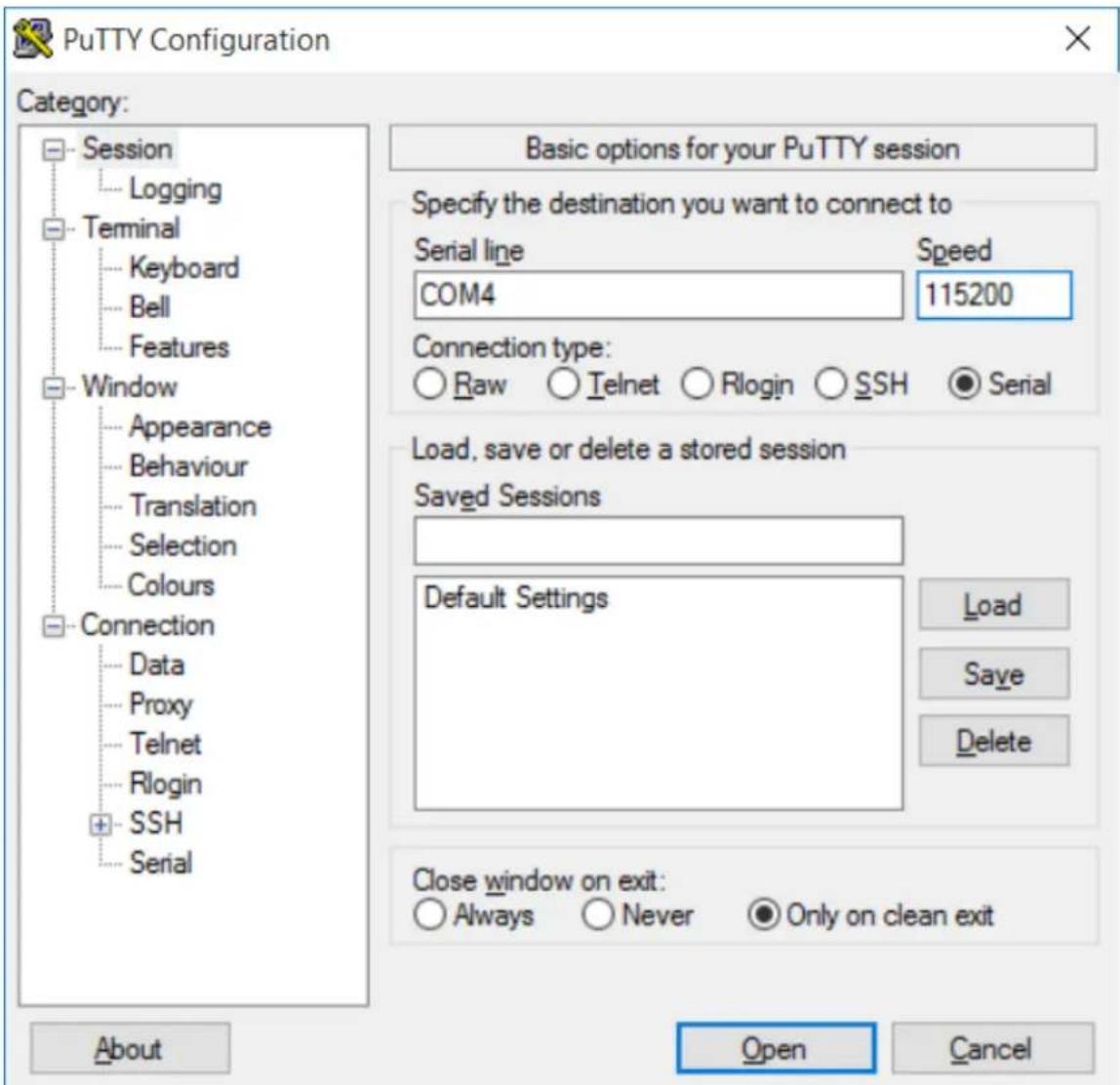
- Click Open. A terminal window appears.
-
When prompted, enter your current username and password.
-
Check that you can send and receive command line interface commands, for example, enter show tech-support:
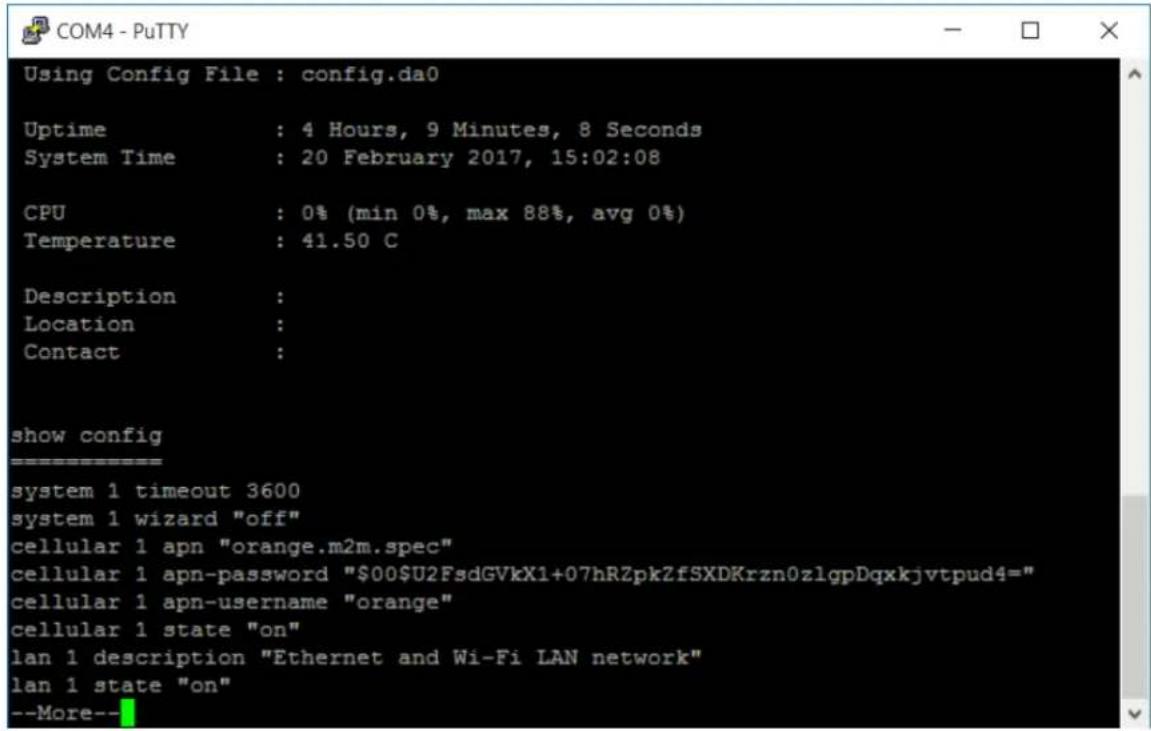
- If the command output does not contain any garbled or unusual output, the serial connection is up and working appropriately. If the command output has garbled output or unusual characters, continue to the next step.
- Connect to the device Web UI over the network. See Log in to the web interface if you need help accessing the Web UI.
- On the web interface, click 📍 System and select Device Console. The Device Console displays.
DEVICE CONSOLE
digi.router>
-
In the Device Console, enter the command serial 1. The serial settings display.
-
Verify that the serial port is configured for 115200 baud, 8 databits, 1 stopbit, no flow control, and no parity. Verify that the state setting of the serial interface is on. For example:
digi router > serial 1
baud 115200
databits 8
description
flowcontrol none
parity none
state cli
stopbits 1
- If the serial configuration is incorrect, follow the instructions in Configure the serial interface to set the correct configuration.
- If you have verified that the serial ports on both the PC and the device are correctly configured, and you still cannot access the command-line interface over the console, try replacing the serial cable.
- If serial issues persist after following these steps, contact Digi Technical Support, with the subject line Serial connectivity issues.
Web reference
Dashboard 340
DMNR page 341
File system page 342....
Firewall page 343
GRE page 345
Cellular locked pin page 346.
Device preferences page 348....
Hotspot page 349
Interfaces—cellular page 352
Interfaces—Ethernet page 354
Interfaces—Wi-Fi page 355.
IPsec Tunnels page 360
IPsec XAuth Users page 364
Local Networks page 365
Location page 367
Location Client page 368
Log configuration page 369
Log viewer page 370
New GRE tunnel page 371
New Wide Area Network (WAN) page 372
OpenVPN client page 376
OpenVPN route management page 379
OpenVPN server page 380
OpenVPN user management page 383
Port forwarding page 384
Python autostart page 385
Quality of Service (QoS) queues page 386
Quality of Service (QoS) WANs page 388
RADIUS page 389
Digi Remote Manager page 391
Syslog server configuration page 393
User Management page 394
VRRP page 395......
Wide Area Network (WAN) page—Cellular 397
Wide Area Network (WAN) page—Ethernet 399
Wide Area Network (WAN) page 401
Wide Area Network (WAN) page—Wi-Fi 406
Dashboard
The dashboard shows the current state of the device.
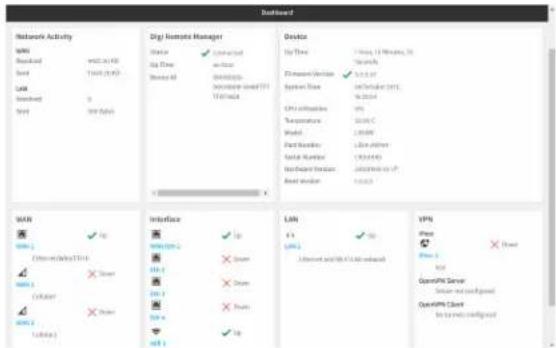
Dashboard display areas
| Dashboard area Description | |
| Network activity | Summarizes network statistics: the total number of bytes sent and received over all Wide Area Networks (WANs) and Local Area Networks (LANs), including all WANs/LANs configured and active, disabled, and/or disabled. |
| Digi Remote Manager | Displays the device connection status for Digi Remote Manager, the amount of time the connection has been up, and the Digi Remote Manager device ID.See Remote Manager. |
| Device | Displays device status, statistics, and identifying information. See the show system command for details.For Firmware Version, a green checkmark indicates the firmware is up to date and a red X indicates a firmware update is available.See Update system firmware for instructions. |
| WAN | Displays all configured Wide Area Networks (WANs), the physical interface assigned to the WAN, and the current state of the WAN. Click a WAN to display detailed configuration and status information.See Wide Area Networks (WANs) for details. |
| Interface | Displays all configured and available physical interfaces for the device and their current states.See Interfaces for details. |
| LAN | Displays all configured Local Area Networks (LANs), the physical interface(s) assigned to the LAN, and the current state of the LAN. Click a LAN to display detailed configuration and status information.See About Local Area Networks (LANs) for details. |
| VPN | Displays all configured Virtual Private Network (VPN) tunnels.See Virtual Private Networks (VPN) for details. |
DMNR page
Use the DMNR page to configure and view Verizon Dynamic Mobile Network Routing (DMNR).
Configuration options
| Option Description | |
| Enable Enables | or disables DMNR. Specifies the current state of DMNR. The default is disabled. |
| Home agent Specifies the IPv4 address for home agent. | |
| Networks to route | Specifies the IPv4 addresses for the LANs to advertise. Select one or more available configured LANs or None. The default is None. |
| Advanced | |
| Authorization key | Specifies the character string for accessing the mobile network. The default is VzWNeMo. |
| SPI Specifies the security parameter index. Enter an integer from 0 to 4294967295. The default is 256. | |
| Home network (tunnel) | Specifies an IP address for the mobile network; that is, the tunnel address that represents the mobile network. The default is 1.2.3.4. |
| Lifetime Specifies the number of seconds until the authorization key expires. Enter an integer from 120 to 65535. The default is 600. | |
| MTU Specifies the maximum transmission unit in bytes for the tunnel. Enter an integer from 68 to 1476. The default value is 1476. | |
Status display
| Option Description | |
| Admin status | Shows the current administrative status: Up or Down. |
| Operational status | Shows the current operational status: Up or Down. |
| Registration status | Shows the current registration status: Registered or Unregistered. |
| Home agent | Shows the IP address for the Verizon home agent. |
| Care of address | Shows the current point of attachment IP address for DMNR. |
| Interface | Shows the interface for DMNR. |
| Lifetime (actual) | Shows the actual lifetime in seconds for the current DMNR authorization. |
| Networks | Shows the networks currently being advertised by DMNR. |
File system page
Use the File system page to display and manage the files and directories in the local file system of your device.
Navigation options
| Field/Button Description | |
| Navigates to the home or / directory of the file system.As you navigate through the file system, the path is displayed in breadcrumbs to the right of ↗; for example: ↗ > app > distTo return to the home directory, click ↗. | |
| Uploads directory or file to the device's file system. | |
| Creates a directory. You can create nested directories by specifying the path, separated by /. | |
| Displayed when a file is selected. Downloads the selected file from the device's file system. The file is downloaded to the default download directory for your browser. | |
| Displayed when a directory or file is selected. Renames the selected directory or file. | |
| Displayed when a directory or file is selected. Deletes the selected directory or file. | |
| File list The rest of the page lists the directories and files in the file system.Initially, all directories and files listed alphabetically, starting with directories first. All columns are sortable. | |
| Name | The directory or file name. |
| Size | File size. |
| Last modified | Date the directory or file was last modified. |
Firewall page
Use the Firewall page to create and manage IP filter rules.
■ Input IP filter: Manage your input filters in this section of the Firewall page.
■ Routing IP filter: Manage your routing and output filters in this section of the Firewall page.
Depending on the address you provide for a filter, rules for either IPv4 or IPv6 are created.
Note Because output filters are rarely needed, all output filter rules you create display with a warning to notify you that you may not need to use an output filter rule.
See IP filter source and destination options and IP filter criteria options for information on configuring IP filter rules.
Input IP filter options
| Option Description | |
| Enabled | Enables or disables the IP filter rule. The default is enabled. |
| Description | Description for the rule. Specify a string value up to 255 characters long. |
| Action | Specifies what to do with received packets: Accept, Drop, or Reject packets. The default is Accept. |
| Src | Specifies the interface for the incoming packets. Can be:ANY LAN or a specific LANANY WAN or a specific WANHotspotANY GRE Tunnel or a specific GRE Tunnel.DMNR TunnelThe default is NONE (unrestricted). |
| Address | Specifies the source IP address for incoming packets. If you do not specify an address, the filter is applied to all addresses. Specify the address in IPv4 or IPv6 format. The format for the source IP address and the destination IP address must match. To force either IPv4 or IPv6 version, enter a default address:For IPv40.0.0.0/0For IPv6::/0 |
| Port | Specifies the destination port on the router for incoming packets. You can enter a port number, a range of ports, or a list of ports. If you do not specify a port, the filter is applied to all ports. |
| Protocol | Specifies the protocol for incoming packets: tcp, udp, and icmp. If you do not specify a protocol, the filter is applied to all protocols. |
Routing IP filter options
| Option Description | |
| Enabled | Enables or disables the IP filter rule. The default is enabled. |
| Description | Description for the rule. Specify a string value up to 255 characters long. |
| Action | Specifies what to do with received packets: Accept, Drop, or Reject packets. The default is Accept. |
| Src | Specifies the interface for the incoming packets: ANY-LAN, ANY-WAN, or a specific LAN or WAN. The default is NONE. |
| Address Specifies the source IP address for incoming packets. If you do not specify an address, the filter is applied to all addresses. Specify the IP address in IPv4 or IPv6 format. The format for the source IP address and the destination IP address must match. To force either IPv4 or IPv6 version, enter a default address:■ For IPv40.0.0.0/0■ For IPv6::/0 | |
| Port | Specifies the source port number. You can enter a port number, a range of ports, or a list of ports. If you do not specify a port, the filter is applied to all ports. |
| Dest | Specifies the destination interface for forwarded packets: ANY-LAN, ANY-WAN, or a specific LAN or WAN. |
| Address Specifies the destination IP address for incoming packets. If you do not specify an address, the filter is applied to all addresses. Specify the address in IPv4 or IPv6 format. The format for the source IP address and the destination IP address must match. To force either IPv4 or IPv6 version, enter a default address:■ For IPv40.0.0.0/0■ For IPv6::/0 | |
| Port | Specifies the destination port number. You can enter a port number, a range of ports, or a list of ports. If you do not specify a port, the filter is applied to all ports. |
| Protocol | Specifies the protocol for incoming packets: tcp, udp, and icmp. If you do not specify a protocol, the filter is applied to all protocols. |
GRE page
Use the GRE tunnel page to create or modify a GRE tunnel. You can configure up to 10 GRE tunnels.
Configuration options
| Option Description | |
| Enable Enables or disables the GRE tunnel. The default isdisabled. | |
| Description | Description for the GRE tunnel. Specify a string value up to 255 characters long. |
| IP Address Specifies the IPv4 address for the GRE tunnel. | |
| Subnet Mask Specifies the subnet mask for the GRE IP address in IPv4 format. | |
| Peer Specifies the remote peer address for the GRE tunnel in IPv4 format. | |
| Key Specifies the key to use for the GRE tunnel, a 4-byte unsigned integer.Specify an integer from 0 to 4294967295. The default is no key. | |
Status display
| Option Description | |
| Admin Status | Shows the current administrative status: Up or Down. |
| Oper Status | Shows the current operational status: Up or Down. |
| IP Address | Shows the IP address for the GRE tunnel. |
| Subnet Mask | Shows the subnet mask for the GRE IP address. |
| Peer | Shows the IP address for the GRE peer. |
| Key | Shows the key for the GRE tunnel. |
| Packets | Shows the number of received and sent packets for the GRE tunnel. |
| Bytes | Shows the number of received and sent bytes for the GRE tunnel. |
Cellular locked pin page
A SIM card can be locked if any user tries to set an invalid PIN for the SIM card too many times. In addition, some cellular carriers require a SIM PIN to be added before the SIM card can be used. If the SIM card is locked, the device cannot make a cellular connection.
The show cellular command indicates whether a SIM card is set to a locked state. In the show cellular output, look for the fields SIM1 PIN status, SIM2 PIN status, and SIM status. For example:
digi.router> show cellular
Cellular Status and Statistics
----
Admin status : Up
Oper status : Down
Module : Sierra Wireless, Incorporated MC7455
Firmware version : SWI9X30C_02.08.02.00
Hardware version : 1.0
IMEI : 359072060053937
Temperature : 33C
SIM1 PIN status : New PIN is untested
SIM2 PIN status : Never connected
SIM status : Using SIM1 (SIM is locked)
ICCID :

Command line
Unlocking a SIM card can be performed from the command line interface only.
- To unlock the SIM card, use the unlock command to set a new PIN for the SIM card using the following command syntax:
unlock <sim1 | sim2> <puk code> <new sim pin>
Where:
For example:
To unlock a SIM card in SIM slot SIM 1 with PUK code 12345678, and set the new SIM PIN to 1234:
digi.router> unlock sim1 12345678 1234
When the command operations are complete, the unlock command displays one of the following messages to indicate the state of the SIM:
SIM x is permanently locked and must be replaced.
The PUK code is invalid. You have x retries left before the SIM is permanently locked.
The new PIN has been set. Please use the "save config" command to save the new PIN to the configuration.
-
If the SIM remains in a locked state after using the unlock command, contact your cellular carrier.
-
Save the configuration.
digi.router> save config
Device preferences page
Use the Device preferences page to configure system settings.
Configuration options
| Option Description | |
| Name The name of this device. Accepted value is any string up to 255 characters. | |
| Description A description of this device. Accepted value is any string up to 255 characters. | |
| Contact Contact information for this device. Accepted value is any string up to 255 characters. | |
| Location The location of this device. Accepted value is any string up to 255 characters. | |
| Timezone Sets the system timezone. By setting the time zone, the device displays the local time for that time zone and automatically adjusts for daylight saving time. | |
| Session timeout The time, in seconds, after which a web or command-line interface session times out if there is no activity.Accepted value is any integer from 60 to 3600. The default value is 300. |
Status display
| Option | Description |
| Up time | Displays the amount of time the device has been up without interruption. |
| Firmware version | Shows the firmware version running on the device. |
| System time | Shows the system time and date. |
| CPU utilization | Shows the current percentage of CPU utilization. |
| Temperature | Shows the current device temperature in celsius. |
| Model | Shows the device model. |
| Part number | Shows the device part number. |
| Serial number | Shows the device serial number. |
| Hardware version | Shows the device hardware version. |
| Boot version | Shows the device boot version. |
Hotspot page
Use the Hotspot page to configure a hotspot for a LAN.
See Hotspot for more information about configuring a hotspot.
General options
| Option Description | |
| Enable Enables or disables the hotspot. The default isdisabled. | |
| LAN Specifies | which LAN to run the hotspot on. You can select any LAN on your device to serve as the hotspot LAN; however, once you configure a LAN for use as the hotspot LAN, you can no longer access the device's web interface or SSH server via that LAN. Therefore, you must make sure that you do not enable hotspot for the LAN that you are using to access the device for other purposes, such as configuring and monitoring the device, or providing clients with non-hotspot access to your network.The default islan2. |
| Login | Specifies whether the login page is aLocal pageor aRemote URL.Local Page—Uses an HTML page for authentication that is stored locally on the device's filesystem, in thehotspotdirectory. Note that thehotpotdirectory is not visible until hotspot has been enabled for the first time.Remote URL—Uses an HTML page for authentication that is stored remotely.Default isLocal page. |
| Localpage/RemoteURL | If Loginis set to:Local Page—Specifies the local page. Normally, this field should be left blank, and the device will use the default authentication HTML page based on the selectedAuth Mode. If you upload a custom HTML file that uses a filename other than the default filename, you should select the custom filename here.Remote URL—Enter the URL of the server that hosts the HTML authentication page. The URL must begin withhttp://orhttps://. The server listed here must also be included in theAllowed Domainsor Allowed Subnets. |
| IP address | Specifies the IPv4 address on which the hotspot runs, as well as the IP addresses assigned to clients. This IPv4 address must not exist within a current subnet. Specify the IPv4 address. The default is10.1.0.1. |
| Subnet mask | Specifies IPv4 subnet mask for the hotspot to assign addresses within. Specify the subnet mask. The default is255.255.255.0. |
| Auth Mode Specifies the authentication mode for hotspot users:Click-through: Presents terms of use that must be accepted before user can continue.Local shared password: Hotspot users must enter a shared local password.RADIUS shared password: Hotspot users must enter a shared RADIUS password.RADIUS Users: Hotspot user must enter an assigned RADIUS username and password.HotspotSystem: Hotspot is controlled by HotspotSystem.See Hotspot authentication modes for further information about authentication modes. The default is Click-through. | |
| Local shared password | Specifies the password when Auth mode is set to Local shared password. |
| Primary RADIUS server | Specifies the IP address or fully-qualified domain name of the RADIUS server to authenticate hotspot users when Auth mode is set to RADIUS shared password or RADIUS Users. Specify an IP address or fully qualified domain name. |
| RADIUS server secret | Specifies the shared secret for the RADIUS server when Auth mode is set to RADIUS shared password or RADIUS Users. Specify a string up to 64 characters. |
| RADIUS NAS ID | Specifies a unique identifier for this network access server (NAS) when Auth mode is set to RADIUS shared password, RADIUS Users, or HotspotSystem. The fully-qualified domain name of the NAS is often used, but any arbitrary string cay be used. String cannot contain spaces, an open bracket ([], or close bracket ()).Specify a string from 1 and 64 characters. The default is hotspot. |
Advanced options
| Option Description | |
| Server Port | Specifies the port to run the hotspot server on. Specify an integer from from 1 to 65535. The default is 4990. |
| Auth Port | Specifies the port to run hotspot authentication server on.Specify an integer from 1 to 65535. The default is 3990. |
| Max Download | Specifies the maximum download speed allowed for each client.Enter an integer from 0 to 100000 and select Kbps or Mbps. The default is 10 Mbps. |
| Max Upload | Specifies the maximum upload speed allowed for each client.Enter an integer from 0 to 100000 and select Kbps or Mbps. The default is 10 Mbps. |
| Swap Octets | Specifies whether to swap the meaning of the input octets/packets and output octets/packets RADIUS attributes when Auth mode is set to RADIUS shared password or RADIUS Users. This can fix issues if the data limits and/or accounting reports appear to be reversed on the RADIUS server. The default is disabled. |
| Use UAM Secret | Enables or disables the use of the UAM secret whenAuth modeis set to RADIUS shared passwordorRADIUS Users. This does not typically need to be set unless integrating with a cloud hotspot provider. The default isdisabled. |
| UAM Secret | Specifies the secret shared between the UAM server and the hotspot whenAuth modeis set toRADIUS shared passwordorRADIUS Users. This does not typically need to be set unless integrating with a cloud hotspot provider. Specify a string up to 64 characters. |
| DHCP lease length | Specifies the number of seconds until a DHCP lease expires. Specify an integer from 60 to 1000000. The default value is600. |
| Secondary RADIUS Server | Specifies the IP address or fully-qualified domain name of the backup RADIUS server to use to authenticate hotspot users whenAuth modeis set toRADIUS shared passwordorRADIUS Users. Specify a fully qualified domain name. |
| RADIUS Server Port | Specifies the UDP port number for the RADIUS server whenAuth modeis set to RADIUS shared passwordorRADIUS Users. Specify an integer from 1 to 65535. The default is1812. |
| Allowed Domains | Specifies the domains to which hotspot users have access before hotspot authentication. Enter a string that is a comma-separated list of domains up to 999 characters. |
| Allowed Subnets | Specifies the subnets to which hotspot users have access before hotspot authentication. Enter a string that is a comma-separated list of domains up to 999 characters. |
Interfaces—cellular page
Use the Cellular interface page to create and manage cellular interfaces.
| Option Description | |
| Cellular1 or Cellular 2 | |
| Description | Description for the interface. Specify a string value up to 255 characters long. |
| SIM(s) | |
| APN | Specifies the Access Point Name (APN) for the cellular interface. Enter a string up to 63 characters long. |
| Username | Specifies the username for the APN. Enter a string up to 63 characters long. |
| Password | Specifies the password for the APN. Enter a string up to 128 characters long. |
| Preferred mode | Specifies the preferred mode for the cellular interface: Auto, 4G, 3G, or 2G. The default is Auto. |
| Connection attempts | Specifies the number of attempts to establish a cellular connection. After this number of attempts, the cellular module is power cycled, and the device attempts to make a cellular connection again. Enter an integer from 10 to 500. The default is 20. |
Cellular status and statistics
| Option Description | |
| WAN For SIMs, displays the WAN to which the cellular interface is assigned. | |
| Oper status | Displays the operational status for the cellular interface: Up or Down. |
| SIM status | Displays the SIM (SIM1 or SIM2) in use for this cellular module. |
| Signal quality | Displays an indicator of the quality of the received cellular signal measured in dB. |
| Signal strength | Displays a measure of the signal level of the cellular network measured in dB. |
| IP address | Displays the IP address for the cellular interface. |
| Mask | Displays the address mask for the cellular interface. |
| Gateway | Displays the IP address of the remote end of the cellular connection. |
| DNS servers | Displays the DNS server(s) associated with the cellular interface. |
| TX bytes | Displays the number of bytes transmitted by the cellular interface. |
| RX bytes | Displays the number of bytes received by the cellular interface. |
| APN in use | Displays the current Packet Data Protocol (PDP) connection context. A PDP context contains routing information for packet transfer between a mobile station (MS) and a gateway GPRS support node (GGSN) to have access to an external packet-switching network. The PDP context identified by an exclusive MS PDP address (the mobile station's IP address). This means that the mobile station will have as many PDP addresses as activated PDP contexts. |
| Registration status | Displays the registration status for the cellular interface. |
| Attachment status | Displays the attachment status for the cellular interface: attached or detached. |
| Phone number | Displays the phone number for the cellular interface. |
| Network provider | Displays the network provider for the cellular interface. |
| PLMN Displays | the PLMN, identified by the Mobile Country Code (MCC) and the Mobile Network Code (MNC). |
| Location Displays the LAC—Location Area Code and CellID (CID). | |
| Roaming status | Displays the roaming status: Roaming or Home (not roaming). |
| Connection type | Displays the cellular connection type. |
| Radio technology | Displays the radio technology the modem is using. |
| Band Displays | the radio band on which the cellular module is operating. |
| Channel Displays the radio channel on which the cellular module is operating. | |
| Module Displays the manufacturer model number for the cellular module. | |
| Firmware version | Displays the manufacturer version number for the software running on the cellular module. |
| Hardware version | Displays the manufacturer version number for the cellular module hardware. |
| Temperature | Displays the current temperature of the cellular module, as read and reported by the temperature sensor on the cellular module. |
| IMEI | Displays the International Mobile Station Equipment Identity (IMEI) number for the cellular module, a unique number assigned to every mobile device. |
| IMSI | Displays the International Mobile Subscriber identity (IMSI). |
| ICCID | Displays the Integrated Circuit Card Identifier (ICCID). This identifier is unique to each SIM card. |
Interfaces—Ethernet page
Use the Ethernet interface page to manage Ethernet interfaces.
| Option Description | |
| Enable Enables or disables the interface. The default is enabled. | |
| Description | Description for the interface. Specify a string up to 255 characters long. |
| Speed Specifies the speed in Mbps for the Ethernet interface: Automatic, 10Mbps, 100Mbps, or 1000Mbps. The default is Automatic. | |
| Duplex Specifies the duplex mode for the Ethernet interface: Automatic, Full, or Half. The default is Automatic. | |
Interfaces—Wi-Fi page
Use the Wi-Fi interface page to manage Wi-Fi interfaces. Depending on the device, you can configure one or two Wi-Fi modules.
General options
| Option Description | |
| Module 1 or Module 2 | |
| Description | Description for the interface. Specify a string value up to 255 characters long. |
| Mode Selects | the mode for the Wi-Fi module:Access point options and Access point status and statistics orClient mode options and Client status and statisticsThe default value is Access point. |
Access point options
| Option Description | ||
| Module 1 or Module 2 | ||
| Band Specifies the band for the Wi-Fi module: 2.4 GHz or 5 GHz. | ||
| Channel | Specifies a channel for the Wi-Fi module or auto to automatically select the best channel for the module. Specify a channel (1, 2, 3, 4, 5, 6, 7, 8, 9, 10, 11, 36, 40, 44 or 48) or auto. The default value is auto. | |
| Advanced | ||
| Protocol | Specifies the protocol for the Wi-Fi module:■ For 2.4 GHz, the default and only protocol is bgn.■ For 5 GHz, select a, an, or an/ac. The default is an/ac. | |
| TX power | Specifies the TX power to use for Wi-Fi module by percentage. Specify an integer from 1 to 100. The default is 100. | |
| For each access point | ||
| SSID | Specifies the Service Set Identifier (SSID) for the Wi-Fi interface. You can configure the SSID to use the device's serial number by including %s in the SSID. For example, an SSID parameter value of %s-1 on a WR64 would resolve to an SSID similar to WR64-123456-1.Note Multiple access points can have the same SSID. | |
| Description | Description for the interface. Specify a string value up to 255 characters long. | |
| Security | Specifies the security type for the Wi-Fi interface: None, WPA2 Personal, WPA/WPA2 Mixed Mode Personal, WPA2 Enterprise, or WPA/WPA2 Mixed Mode Enterprise. The default is WPA2 Personal. | |
| If WPA2 Personal or WPA/WPA2 Mixed Mode Personal are selected for Security | ||
| Password | Specifies the password for the Wi-Fi interface. The password must be 8-63 ASCII or 64 hexadecimal characters. Enter a string up to 64 characters long. | |
| Verify password | Re-enter the password for the Wi-Fi interface. The text you enter must match the text you entered for Password. | |
| If WPA2 Enterprise or WPA/WPA2 Mixed Mode Enterprise are selected for Security | ||
| Radius Server | The IP address of the RADIUS server that will be used to authorize access to the access point. | |
| Radius Port The port of | the RADIUS server. | |
| Radius Port The RADIUS | server shared secret. | |
| Broadcast SSID | Enables or disables broadcasting the SSID in beacon packets. Disabling the SSID prevents clients from easily detecting the presence of this access point. The default value is Enabled. | |
| Isolation-Client | Enables or disables Wi-Fi client isolation, which prevents clients connected to the Wi-Fi access point from communicating with each other. The default value is Enabled. | |
| Isolation-Access point | Enables or disables clients on a Wi-Fi access point from communicating with clients on other Access Points. The default value is Enabled. | |
Client mode options
| Option Description | |
| SSID Specifies the Service Set Identifier (SSID) for the Wi-Fi interface. You can configure the SSID to use the device serial number by including the percent (%) symbol in the SSID. For example, an SSID value WR64_%s resolves to WR64_LR123456. Enter a string up to 32 characters long. | |
| Security | Specifies the security type for the Wi-Fi interface: none, WPA2 personal, WPA/WPA2 personal, WPA2 enterprise, or WPA/WPA2 enterprise. The default is WPA2-personal. |
| Username | For WPA2 enterprise and WPA/WPA2 mixed mode. Specifies the username for the Wi-Fi network. Enter a string up to 64 characters long. |
| Password | Specifies the password for the Wi-Fi interface. The password must be 8-63 ASCII or 64 hexadecimal characters. Enter a string up to 64 characters long. |
| Hidden SSID | Enables or disables whether to scan for hidden SSID. The default is off.In general, for both security and performance issues, Digi recommends you do not enable the Hidden option. |
Access point status and statistics
| Option Description | |
| Network Shows | the network to which the Wi-Fi interface is assigned. |
| Admin status Shows whether the Wi-Fi access point is sufficiently configured to be brought up. | |
| Oper status Shows whether the Wi-Fi access point is up or down. | |
| Channel Shows the radio channel on which the Wi-Fi Access Point is operating. | |
| Module | Shows the Wi-Fi module on which the Wi-Fi access point is operating. |
| MAC address | Shows the MAC address for the Wi-Fi access point. |
| SSID | Shows the SSID for the Wi-Fi access point. |
| Network traffic details | |
| Bytes | Shows bytes received and sent on the Wi-Fi access point. |
| Packets | Shows packets received and sent on the Wi-Fi access point. |
| Multicasts | Shows the number of multicasts received and sent on the Wi-Fi access point. |
| Collisions | Shows the number of transmit collusions received and sent by the Wi-Fi access point. |
| Errors | Shows the number errors received and sent by the Wi-Fi access point. |
| Dropped | Shows the number of received and sent packets dropped by the Wi-Fi access point. |
| FIFO errors | Shows the number of received and sent FIFO errors by the Wi-Fi access point. |
| CRC errors | Shows the number of CRC errors for received and sent packets on the Wi-Fi access point. |
| Aborted errors | Shows the number of received and sent aborted errors on the Wi-Fi access point. |
| Frame errors | Shows the number of received and sent frame errors on the Wi-Fi access point. |
| Carrier errors | Shows the number of received and sent carrier errors on the Wi-Fi access point. |
| Length errors | Shows the number of received and sent length errors on the Wi-Fi access point. |
| Heartbeat errors | Shows the number of received and sent hearbeat errors on the Wi-Fi access point. |
| Missed errors | Shows the number of received and sent missed errors on the Wi-Fi access point. |
| Window errors | Shows the number of received and sent window errors on the Wi-Fi access point. |
| Over errors | Shows the number of received and sent over errors on the Wi-Fi access point. |
Client status and statistics
| Option Description | |
| WAN Shows whether the WAN is available. | |
| Admin status Shows whether the Wi-Fi client is sufficiently configured to be brought up. | |
| Oper status Shows whether the Wi-Fi client is up or down. | |
| SSID | Shows the SSID for the Wi-Fi client. |
| MAC address | Shows the MAC address for the Wi-Fi client. |
| BSSID | Shows the BSSID for the Wi-Fi client. |
| Security | Shows the security mode for the Wi-Fi client. |
| RSSI | Shows the signal strength in dBm for the Wi-Fi client. |
| Connection time | Shows the connection time in seconds for the Wi-Fi client. |
| Connection rate | Shows the connection rate in Mbps for the Wi-Fi client. |
| Network traffic details | |
| Bytes | Shows bytes received and sent by the Wi-Fi client. |
| Packets | Shows packets received and sent by the Wi-Fi client. |
| Multicasts | Shows the number of multicasts received and sent by the Wi-Fi client. |
| Collisions | Shows the number of received and sent collisions on the Wi-Fi client. |
| Errors | Shows the number of received and sent errors on the Wi-Fi client. |
| Dropped | Shows the number of received and sent dropped packets on the Wi-Fi client. |
| FIFO errors | Shows the number of received and sent FIFO errors on the Wi-Fi client. |
| CRC errors | Shows the number of received and sent CRC errors on the Wi-Fi client. |
| Aborted errors | Shows the number of received and sent aborted errors on the Wi-Fi client. |
| Frame errors | Shows the number of received and sent frame errors on the Wi-Fi client. |
| Carrier errors Shows the number of received and sent carrier errors on the Wi-Fi client. | |
| Length errors | Shows the number of received and sent length errors on the Wi-Fi client. |
| Heartbeat errors | Shows the number of received and sent heartbeat errors on the Wi-Fi client. |
| Missed errors Shows the number of received and sent missed errors on the Wi-Fi client. | |
| Window errors Shows the number of received and sent window errors on the Wi-Fi client. | |
| Over errors Shows the number of received and sent over errors on the Wi-Fi client. | |
IPsec Tunnels page
Use the IPsec Tunnels page to configure IPsec tunnels. You can configure up to 32 tunnels.
Network options
| Option Description | |
| Description | Description for the IPsec tunnel. Specify a string value up to 255 characters long. |
| Enable Enables | or disables the IPsec tunnel. The default is enabled. |
| Enable UDP Encapsulation | Enables or disables UDP Encapsulation. The device automatically uses UDP encapsulation when it detects that NAT is being used. When enabled, this option forces the device to use UDP Encapsulation even if it does not detect that NAT is being used. The default is disabled. |
| Use If WAN Down | Specifies a WAN that, on failure, will trigger this IPsec tunnel to start. This is useful in cases where you are using a private WAN for sensitive data. In a failover scenario involving the private WAN, you can configure the device to route the sensitive data over a public WAN, while protecting the data by using an IPsec tunnel. The default is None. |
| Interfaces | Specifies the preferred WAN for the IPsec tunnel, and the failover behavior of the IPsec tunnel during WAN failure. By default, the IPsec tunnel will operate on the first available WAN and will fail over to the next available WAN, based on the priority. You can select and prioritize multiple WANs for the IPsec tunnel: the first WAN will be the initial WAN that the IPsec tunnel uses; each additional WAN will be the next priority for failover during WAN failure. See preferred WAN and WAN failover for more information. The default all, which means that the default failover behavior will be used. |
| Local IP Subnet | Specifies the local subnet(s) for this IPsec tunnel. Enter an IPv4 address. |
| Local Identifier | Specifies the local ID used for this IPsec tunnel. Enter a string up to 31 characters long. |
| Remote Peer IP Address or Name | Specifies the remote peer for this IPsec tunnel. Enter a fully qualified domain name. |
| Remote IP Subnets | Specifies the remote subnet(s) for this IPsec tunnel. Enter an IPv4 address. |
| Remote Identifier | Specifies the remote ID used for this IPsec tunnel. Enter a string up to 31 characters long. |
Authentication
| Option Description | |
| Authentication Mode | The type of authentication to be used for the IPsec tunnel. Available options are Pre-shared Key Authentication or XAuth and Pre-shared Key Authentication. |
| IPsec pre-shared key | Specifies the preshared key for the IPsec tunnel. Enter a string up to 128 characters long. |
| XAuth Role Determines whether the device will function as an XAuth client or server. Values are:Client Role—Device will function as an XAuth client.Server Role—Device will function as an XAuth server. If this is selected, you need to create XAuth users at the IPsec XAuth Users page (Network > Networks > IPsec > Users).This option is only displayed if Authentication Mode is set to XAuth and Pre-shared Key Authentication. | |
| XAuth Identity | If Client Roleis selected for XAuth Role, specifies the username to use for XAuth authentication. |
| XAuth Password | If Client Roleis selected for XAuth Role, specifies the password to use for XAuth authentication. |
Encryption options
| Option Description | |
| ESP encryption | Selects the ESP encryption type for IPsec tunnel. Select multiple values of aes128, aes192 and aes256. The default is aes128. |
| ESP authentication | Selects the Encapsulating Security Payload (ESP) authentication type used for the IPsec tunnel. Select multiple values of sha1 and sha256. The default value sha1. |
| ESP Diffie Hellman group | Selects the Encapsulating Security Payload (ESP) Diffie-Hellman group used for the IPsec tunnel. Select multiple values of none, group5, group14, group15 and group16. The default is group14. |
Negotiation options
| Option Description | |
| Internet Key Exchange (IKE)Option Description | Selects the Internet Key Exchange (IKE) version to use for this IPsec tunnel. The default is 1. |
| IKE negotiation mode | Selects the IKEv1 mode to use for this IPsec tunnel: main or aggressive. The default is main. |
| IKE encryption | Selects the IKE encryption type for this IPsec tunnel. Select multiple values of aes128, aes192 and aes256. The default is aes128. |
| IKE authentication | Selects the IKE authentication type for this IPsec tunnel: sha1 or sha256. The default is sha1. |
| IKE Diffie Hellman group | Selects the IKE Diffie-Hellman group for this IPsec tunnel. Diffie-Hellman is a public-key cryptography protocol for establishing a shared secret over an insecure communications channel. Diffie-Hellman is used with Internet Key Exchange (IKE) to establish the session keys that create a secure channel.Select multiple values of group5, group14, group15 and group16. The default is group14. |
Lifetime options
| Option Description | |
| IPsec tunnel lifetime before renegotiation | |
| Time threshold max (seconds) | Specifies the timeout, in seconds, for dead peer detection. Enter an integer from 1 to 3600. The default value is 3600. |
| Data threshold max (bytes) | Specifies the dead peer detection transmit delay. Enter an integer from 1 to 3600. The default value is 0. |
| IKE Lifetime before key renegotiation | |
| Time threshold max (seconds) | Specifies the lifetime for the IKE key, in seconds. Enter an integer from 180 to 4294967295. The default is 4800. |
Probing
| Option Description | |
| Probe hosts | Specifies a comma-separated list of endpoints that will be probed. |
| Probe interval | Specifies the number of seconds to wait between sending probe packets. This value must be more than the probe timeout value. |
| Probe timeout | Specifies the number of seconds to wait after the first failed probe before restarting the IPsec tunnel. Note that once the device has successfully connected and then the connection is lost, it will immediately fail over to the next probe-type, regardless of the probe timeout setting. |
| Probe response timeout | Specifies the time, in seconds, to wait for a response to a probe before the device will consider the probe to have failed. This value must be less than the probe timeout values. |
| Probe size | Specifies the size, in bytes, of probe packets sent to detect IPsec failures. Allowed values are between 64 and 1500. |
IPsec XAuth Users page
Use the IPsec Users page to configure IPsec XAuth users, when the XAuth Role is set to Server Role on the IPsec Tunnels page (Network > Networks > IPsec > Tunnels).
| Option Description | |
| Username The username that an XAuth client will use for XAuth authentication. | |
| Password The password that an XAuth client will use for XAuth authentication. | |
| Confirm Password Retype the password to confirm. | |
Local Networks page
Use the Local Networks page to configure and manage local networks. For each local network, you can configure the following options.
Configuration options
| Option Description | |
| Enable Enables or disables the network. The default isdisabled. | |
| Interfaces | Specifies one or more physical interfaces for the LAN. The default isnone. |
| Description | Specifies a description for the network. Enter a string up to 63 characters long. |
| IPv4 | |
| IP address Specifies the IPv4 address for the network. | |
| Netmask Specifies the netmask for IP address in IPv4 format. The default value is255.255.255.0. | |
| DHCP server | |
| DHCP server | Enables or disables a DHCP server, or enables DHCP relay. Values are:Off — Disables all DCHP server functionality.Server — Enables the device's DHCP server.Relay — Disables the device's DHCP server and enables DHCP relay.The default isServer. |
| IP start | IfServeris selected forDHCP Server, specifies the start IP address for the range of IP addresses the DHCP server issues to clients. |
| IP end | IfServeris selected forDHCP Server, specifies the end IP address for the range of IP addresses the DHCP server issues to clients. |
| Lease expires | IfServeris selected forDHCP Server, specifies the lease length, in minutes, issued by the DHCP server. |
| Primary Relay Server | IfRelayis selected forDHCP Server, specifies the IP address of the primary relay server. |
| Secondary Relay Server | (Optional) IfRelayis selected forDHCP Server, specifies the IP address of the secondary relay server. |
| IPv6 | |
| Enable IPv6 | Enables or disables IPv6 addressing. The default isdisabled. |
| IP address mode | Specified the address mode for IPv6:■ Use SLAAC to provision clients■ Use DHCPv6 to provision clients■ Use SLAAC and DHCPv6The default is Use SLAAC and DHCPv6. |
| Advanced | |
| MTU Specifies | the maximum Transmission Unit (MTU), or packet size, for packets sent over the LAN. Enter an integer from 128 to 1500. The default value is 1500.For IPv6 addresses, the minimum MTU value must be 1280. |
Status display
| Option Description | |
| Interfaces Shows the interfaces for the LAN. | |
| Admin status Shows the administrative status for the LAN: Up or Down. | |
| Oper status Shows the operational status for the LAN: Up or Down. | |
| IPv4 address | Shows the IPv4 address for the LAN. |
| Netmask | Shows the IPv4 netmask for the LAN. |
| DHCP client | Shows the status of the DHCP client: On or Off. |
| IPv6 | Shows whether IPv6 is enabled or disabled. |
| Packets | Shows packets received and sent on the LAN. |
| Bytes | Shows bytes received and sent on the LAN. |
Location page
Use the Location page to enable or disable the Global Navigation Satellite System (GNSS) module. You can also view location details from this page when the module is enabled.
Configuration options
| Option Description | |
| State Enables location support for either the local GNSS module or for the location server, or disables location support. | |
| Server Port | Available only $state is set to Server: Defines the IP UDP port to listen for location messages. If set to0, this feature is disabled. Accepted value is any integer from 65535. The default value 0. |
| Interval | Sets the refresh interval in seconds for reading and sending location data. Accepted value is any integer from 1 to 3600. The default value 10. |
| Vehicle ID | Sets the vehicle ID to include location messages. Accepted value is any string of 4 characters. |
Status display
| Option Description | |
| GNSS State The state of the GNSS module. | |
| Latitude The current latitude of the device. | |
| Longitude The current longitude of the device. | |
| Altitude | The current altitude of the device. |
| Horizontal Velocity | The current horizontal velocity of the device. |
| Vertical Velocity | The current vertical velocity of the device. |
| Direction | The current direction that the device is moving. |
| Quality | The quality of the GNSS signal. |
| Date Time | A date and time stamp for this information. |
| Number of Satellites | The number of satellites involved in determining the device's location. |
Location Client page
Use the Location Client page to configure location clients on the device that forward location messages in either NMEA or TAIP format to a remote host. You can configure up to ten location clients on the device to forward location information to up to ten different remote hosts.
Configuration options
| Option Description | |
| Description | (Optional) Enter a description of the location client. |
| Server | The IP address of the remote host to which location messages will be sent. |
| Server Port | The UDP port on the remote host to which location messages will be sent. |
| Type | The protocol type for the messages, either TAIP or NMEA. |
| TAIP/NMEA Filter | The types of messages that will be forwarded. Allowed values depend on the protocol type selected for Type:■ If the protocol type is TAIP, allowed values are:AL — Reports altitude and vertical velocity.CP — Compact position: reports time, latitude, and longitude.ID — Reports the vehicle ID.LN — Long navigation: reports the latitude, longitude, and altitude, the horizontal and vertical speed, and heading.PV — Position/velocity: reports the latitude, longitude, and heading.The default is to report all message types.■ If the protocol type is NMEA, allowed values are:GGA — Reports time, position, and fix related data.GLL — Reports position data: position fix, time of position fix, and status.GSA — Reports GPS DOP and active satellites.GSV — Reports the number of SVs in view, PRN, elevation, azimuth, and SNR.RMC — Reports position, velocity, and time.VTG — Reports direction and speed over ground.The default is to report all message types. |
| Prepend (Optional) Text to prepend to the forwarded message. Two variables can be included in the prepended text:%s — Includes the device's serial number in the prepended text.%v — Includes the vehicle ID in the prepended text. See Configure the Vehicle ID for information about configuring the vehicle ID. | |
Log configuration page
Use the Log configuration page to configure options for event and system logs.
Event log options
| Option Description | |
| Log level | Specifies the level for logs. The default is Informational. For a list of log levels, see Event log levels. |
| Log to file Enable or | disable saving the event log to a file on the device. The default is Disabled. Digi recommends that you do not download logs to your device unless instructed to do so by support services. |
| Log to Syslog | Specifies a syslog server on which to store event logs. By default, the event log is not saved on a syslog server. |
System log options
| Option Description | |
| Log to file Enable or | disable saving the system log to a file on the device. The default is Disabled. Digi recommends that you do not download logs to your devio unless instructed to do so by support services. |
| Log to Syslog | Specifies a syslog server on which to store system logs. By default, the system log is not saved on a syslog server. |

WARNING! Digi recommends that you do not download log files to your device. Keeping log files on your device during normal operations can cause unnecessary wear on the device flash memory.
Log viewer page
Use the Log viewer page to stream and download event and system logs.
Log viewer controls
| Field/Button Description | |
| ▶ | Stream entries from the event log, system log, or both. |
| 11 | Pause the stream of incoming log messages. |
| ↓ | Download the event or system log files. |
| >> Expand the event and system logs control | panel to configure the number of recent messages to show. The default is 10 messages. |
| << Collapse the expanded log viewer controls | panel. |
Message display
| Field/Button Description | |
| Indicates the message is from the event log. | |
| Indicates the message is from the system log. | |
| Date Timestamp for the log message. | |
| Level Log level for the message. | |
| Source Source device application that generated | the message. |
| Message | Message text. |
| Find | Search or filter log messages. All fields in the message display are included in the search, such as the Date, Level, and so on.See Find and filter log file entries. |
New GRE tunnel page
Use the New GRE tunnel page to configure a new GRE tunnel.
Configuration options
| Option Description | |
| Select Tunnel | Specifies the number for the tunnel, an integer from 1 to 10. By default, tunnel numbers are assigned from 1 to 10 and the next available tunnel number is used. |
| Enable Enables or disables the GRE tunnel. The default is enabled. | |
| Description | Description for the GRE tunnel. Specify a string value up to 255 characters long. |
| IP Address Specifies the IPv4 address for the GRE tunnel. | |
| Subnet Mask Specifies the subnet mask for the GRE IP address in IPv4 format. | |
| Peer Specifies the remote peer address for the GRE tunnel in IPv4 format. | |
| Key Specifies the key to use for the GRE tunnel, a 4-byte unsigned integer. Specify an integer from 0 to 4294967295. The default is no key. | |
Status display
| Option Description | |
| Admin Status | Shows the current administrative status: Up or Down. |
| Oper Status | Shows the current operational status: Up or Down. |
| IP Address | Shows the IP address for the GRE tunnel. |
| Subnet Mask | Shows the subnet mask for the GRE IP address. |
| Peer | Shows the IP address for the GRE peer. |
| Key | Shows the key for the GRE tunnel. |
| Packets | Shows the number of received and sent packets for the GRE tunnel. |
| Bytes | Shows the number of received and sent bytes for the GRE tunnel. |
New Wide Area Network (WAN) page
Use the New Wide Area Networks (WAN) page to configure a new WAN.
New WAN connection
| Option Description | |
| Select WAN Select an available index number for the new WAN. | |
| Select interface Select an available interface for the WAN. | |
| Enable Enable or disable the network. The default is Enabled. | |
Configuration options—cellular
| Option Description | |
| Select WAN | Select an available index number for the new WAN. |
| Select interface | Select an available interface for the WAN. |
| Enable Enable or disable the network. The default is Enabled. | |
| IPv6 | |
| Enable IPv6 | Enable or disable IPv6 addressing. The default is disabled. |
| Requested prefix length | Specifies the length, in bits, of the IPv6 address prefix to request from the upstream router for this WAN. The size of the prefix determines how many LANs can support IPv6. Request a prefix length of 60 bits or less to support up to 16 LANs. Enter an integer from 48 to 64. The default value is 60. |
| Security | |
| Allow HTTPS | Enable or disable HTTPS access for the WAN. The default is Disabled. |
| All SSH | Enable or disable SSH access for the WAN. The default is Disabled. |
| Probing | |
| Probe host | Specifies the IPv4 or fully qualified domain name (FQDN) of the address of the device itself. The WAN failover feature sends probe packets over the WAN to the IP address of this device. Value should be a fully qualified domain name. |
| Probe interval | Specifies the interval, in seconds, between sending probe packets. The value for must be larger than the Probe timeout value. If not, the WAN failover configuration is considered invalid, and an error message is written to the system log. Accepted value is any integer from 2 to 3600. The default value is 60. |
| Probe size | Specifies the size of probe packets sent to detect WAN failures. Accepted value is any integer from 64 to 1500. The default value is 64. |
| Probe timeout | Specifies the timeout, in seconds, to wait for a response to a probe. The value for this parameter must be smaller than the Probe interval and timeout parameter values or the configuration is considered invalid, and an error message is written to the system log. Accepted value is any integer from 1 to 60. The default value is 5. |
| Activate after | Specifies the time, in seconds, that the primary interface needs to be up before switching back to it as the active interface. If probing is active, no probes are permitted to be lost during this period. Otherwise, the timer is restarted. Accepted value is any integer from 0 to 3600. The default value is 0. |
| Retry after | Specifies the time, in seconds, to wait before retrying this interface after failing over to a lower priority one. Use a large retry timeout when both interfaces are cellular interfaces. Accepted value is any integer from 10 to 3600. The default value is 180. |
| Timeout | Specifies the time, in seconds, to wait for the physical interface to connect and to receive a probe response before failing over to a lower priority interface. Accepted value is any integer from 10 to 3600. The default value is 180. |
Configuration options—Ethernet
| Option Description | |
| Enable | Enable or disable the network. The default is Enabled. |
| IPv4 | |
| Configure using | Specifies configuration method: Manually or DHCP. The default is DHCP. |
| IP address | For manually configured WAN only. Specifies the IPv4 address for the WAN. |
| Netmask | For manually configured WAN only. Specifies the IPv4 netmask for the WAN. |
| Gateway | For manually configured WAN only. Specifies the IPv4 gateway address for the WAN. |
| DNS1 | For manually configured WAN only. Specifies the IPv4 address for the primary DNS server. |
| DNS2 | For manually configured WAN only. Specifies the IPv4 address for the secondary DNS server. |
| IPv6 | |
| Enable IPv6 | Enable or disable IPv6 addressing. The default is disabled. |
| Requested prefix length | Specifies the length, in bits, of the IPv6 address prefix to request from the upstream router for this WAN. The size of the prefix determines how many LANs can support IPv6. Request a prefix length of 60 bits or less to support up to 16 LANs. Enter an integer from 48 to 64. The default value is 60. |
| Security | |
| Allow HTTPS | Enable or disable HTTPS access for the WAN. The default is Disabled. |
| Allow SSH | Enable or disable SSH access for the WAN. The default is Disabled. |
| Probing | |
| Probe host | Specifies the IPv4 or fully qualified domain name (FQDN) of the address of the device itself. The WAN failover feature sends probe packets over the WAN to the IP address of this device. Value should be a fully qualified domain name. |
| Probe interval | Specifies the interval, in seconds, between sending probe packets. The value for must be larger than the Probe timeout value. If not, the WAN failover configuration is considered invalid, and an error message is written to the system log. Accepted value is any integer from 2 to 3600. The default value is 60. |
| Probe size | Specifies the size of probe packets sent to detect WAN failures. Accepted value is any integer from 64 to 1500. The default value is 64. |
| Probe timeout | Specifies the timeout, in seconds, to wait for a response to a probe. The value for this parameter must be smaller than the Probe interval and timeout parameter values or the configuration is considered invalid, and an error message is written to the system log. Accepted value is any integer from 1 to 60. The default value is 5. |
| Activate after | Specifies the time, in seconds, that the primary interface needs to be up before switching back to it as the active interface. If probing is active, no probes are permitted to be lost during this period. Otherwise, the timer is restarted. Accepted value is any integer from 0 to 3600. The default value is 0. |
| Retry after | Specifies the time, in seconds, to wait before retrying this interface after failing over to a lower priority one. Use a large retry timeout when both interfaces are cellular interfaces. Accepted value is any integer from 10 to 3600. The default value is 180. |
| Timeout | Specifies the time, in seconds, to wait for the physical interface to connect and to receive a probe response before failing over to a lower priority interface. Accepted value is any integer from 10 to 3600. The default value is 180. |
Status display
| Option Description | |
| Interface | Shows the interface for the WAN. |
| Admin status | Shows the administrative status for the WAN: Up or Down. |
| Oper status | Shows the operational status for the WAN: Up or Down. |
| IP address | Shows the IP address for the WAN. |
| Netmask | Shows the Netmask for the WAN. |
| Gateway | Shows the Gateway for the WAN. |
| Option Description | |
| DNS servers | Shows the DNS servers for the WAN. |
| IPv6 | Shows whether IPv6 is enabled or disabled for the WAN. |
| Packets | Shows the number of received and sent packets for the WAN. |
| Bytes | Shows the number of received and sent bytes for the WAN. |
OpenVPN client page
Use the OpenVPN client page to set up OpenVPN clients.
Connection options
| Option Description | |
| Enable | Enables or disables the OpenVPN client connection. The default isdisabled. |
| Description | Description for the OpenVPN client. Specify a string value up to255characters long. |
| Port Port number to which this OpenVPN client attempts to connect. Enter an integer from1to65535. The default is1194. | |
| Protocol | Protocol that this OpenVPN client uses to connect:UDPorTCP. The default isUDP. |
| Compression | Compression algorithm this OpenVPN client uses to compress data channel packets:Off,lzo,lz4,orany. Setting the value toanyallows the client to accept the value provided by the server. The default isOff. |
| Logging Level | Specifies the level of output this OpenVPN client records in the system log. Specify an integer from0to4. The default is0. |
Network options
| Option | Description |
| Server | IP address or fully-qualified domain name of the OpenVPN server to which this OpenVPN client attempts to connect. This option is required. |
| Pull Routes | Enables or disables the OpenVPN client to accept routes that are pushed from the OpenVPN server. The default is enabled. |
| NAT | Enables or disables Network Address Translation (NAT) for outgoing packets on the OpenVPN client network interface. Note that the OpenVPN client uses NAT only if the Bridge mode is disabled. The default is enabled. |
| Bridge Mode | Specify a LAN as an Ethernet bridge (TAP) for this OpenVPN client or disable Bridge mode.Note Although using Bridge mode eliminates the need for routing between networks (required by TUN mode), Bridge mode can cause scalability issues since all broadcast traffic flows over the OpenVPN tunnel.The default is Off. |
Encryption options
| Option | Description |
| Cipher | Encryption algorithm or list of algorithms the OpenVPN client can use to encrypt and decrypt data channel packets. The OpenVPN client accepts the cipher pushed by the server if it is in this list. If the OpenVPN server supports cipher negotiation, the OpenVPN client can accept additional ciphers that are not in this list.Select one or more ciphers:aes-128-cbc, aes-192-cbc, aes-256-cbc, aes-128-gcm, aes-192-gcm, andaes-256-gcm. The default is aes-256-gcm,aes-256-cbc,aes-192-gcm,aes-192-cbc,aes-128-gcm,aes-128-cbc. |
| Digest | Digest algorithm the OpenVPN client uses to sign and authenticate data channel packets.Select one of the following:sha1, sha224, sha256, sha384, orsha512. The default issha1. |
Authentication options
| Option Description | |
| Certificate Authority (CA) certificate | CA certificate file this OpenVPN client uses to validate the certificate presented by the server. See Certificate and key management. |
| Certificate Revocation List (CRL) file | CRL file this OpenVPN client uses to prevent connection to a server that presents a revoked certificate. |
| CA/CRL directory path (capath) | CA and CRL directory path for this OpenVPN client. You provide multiple CA and CRL files. Use the c_rehash tool to create CA certificates with a .0 filename extension and CRLs with a .r0 filename extension. |
| Certificate Public certificate file for this OpenVPN client. The file is in PEM format. | |
| Private Key File | Private key file for this OpenVPN client. The file is in PEM format. |
| TLS Authentication Key File | The filename of the TLS authentication key file. |
| Username | Username the OpenVPN client uses to authenticate with the OpenVPN server. A username is a string up to 32 characters long. |
| Password | Password the OpenVPN client uses to authenticate with the OpenVPN server. A password is a string up to 128 characters long. |
| Confirm Password | A string of up to 128 characters long that should exactly match the value used for the password parameter. |
Lifetime options
| Option Description | |
| ConnectRetry | Number of seconds to wait between connection attempts. After five 5 unsuccessful attempts, the wait time is doubled for each subsequent connection attempt, up to a maximum wait time of 300 seconds.Accepted value is any integer from 1 to 60. The default value is 5. |
OpenVPN route management page
User the OpenVPN route management page to manage routes for OpenVPN servers.
Route options
| Option Description | |
| Description | Description for the OpenVPN route. Users cannot modify this description. It will always beRoute1, Route2, etc. |
| Destination | IP address in IPv4 format for the destination. |
| Mask | Mask for the destination address in IPv4 format. The default is 255.255.255.0. |
OpenVPN server page
Use the OpenVPN server page to configure and display an OpenVPN server.
Connection options
| Option Description | |
| Enable | Enables or disables the OpenVPN server. The default isdisabled. |
| Description | Description for the OpenVPN server. Specify a string value up to255characters long. |
| Port Port number to which this OpenVPN server attempts to connect. Enter an integer from1to65535. The default is1194. | |
| Protocol | Protocol that this OpenVPN server uses to connect:UDPorTCP.T Ihe default is UDP. |
| Compression | Compression algorithm this OpenVPN server uses to compress data channel packets: off, lzo, or lz4. The default isoff. |
| Logging level | Specifies the level of output this OpenVPN server records in the system log. Specify an integer from 0 to 4. The default is0. |
Network options
| Option | Description |
| Network | If Bridge mode is disabled, specifies the IP address in IPv4 format of the local network for this OpenVPN tunnel. The value typically ends with .0 to match the subnet mask. |
| Mask | If Bridge mode is disabled, specifies the local subnet for this OpenVPN tunnel in IPv4 format. The default is 255.255.255.0. |
| Bridge Mode | Specify a LAN as an Ethernet bridge (TAP) for this OpenVPN server or disable bridge mode.Note Although using bridge mode eliminates the need for routing between networks (required by TUN mode), bridge mode can cause scalability issues since all broadcast traffic flows over the OpenVPN tunnel.The default is Off. |
| Topology | Network topology this OpenVPN server uses to assign IP addresses to OpenVPN clients. This value is used only if Bridge mode is disabled. Select one of the following values: net30, p2p, or subnet. The default is net30. |
| Primary DNS | IP address in IPv4 format of the primary DNS server. This value is pushed to OpenVPN clients if Bridge mode is disabled. |
| Secondary DNS | IP address in IPv4 format of the secondary DNS server. This value is pushed to OpenVPN clients if Bridge mode is off. |
Encryption options
| Option | Description |
| Cipher | Encryption algorithm or list of algorithms the OpenVPN server can use to encrypt and decrypt data channel packets. The OpenVPN server pushes the first cipher in the list to OpenVPN clients that support cipher negotiation. OpenVPN clients that do not support cipher negotiation can connect using any cipher in this list.Select one or more ciphers: aes-128-cbc, aes-192-cbc, aes-256-cbc, aes-128-gcm, aes-192-gcm, and aes-256-gcm. The default is aes-256-gcm,aes-256-cbc,aes-192-gcm,aes-192-cbc,aes-128-gcm,aes-128-cbc. |
| Digest | Digest algorithm the OpenVPN server uses to sign and authenticate data channel packets. Select one of the following: sha1, sha224, sha256, sha384, or sha512. The default is sha1. |
Authentication options
| Option Description | |
| Certificate Authority (CA) certificate | Certificate file this OpenVPN server uses to validate the certificate presented by the clients. See Certificate and key management. |
| Certificate Revocation List (CRL) file | CRL file this OpenVPN server uses to prevent connection to a client that presents a revoked certificate. |
| CA/CRL directory path (capath) | CA and CRL directory path for this OpenVPN server. You can provide multiple CA and CRL files. Use the c_rehash tool to create CA certificates with a .0 filename extension and CRLs with a .r0 filename extension. See rehash for details. |
| Diffie-Hellman file | Diffie-Hellman parameters this OpenVPN server uses for shared secret generation. This file is in PEM format. |
| Certificate Public certificate file for this OpenVPN server. The file is in PEM format. | |
| Private Key File | Private key file for this OpenVPN server. The file is in PEM format. |
| Authenticate By | Configures authentication to use username and password, certificates, or both. The default is certificates. |
| TLS Authentication Key File | The filename of the TLS authentication key file. |
| Radius Server State | Enables or disables the Radius server. The default is disabled. |
| Radius Server IP address in IPv4 format for the RADIUS server for OpenVPN. | |
| Radius Server Port | Port for the RADIUS server. Specify an integer from 1 to 65535. The default is 1812. |
| Radius Server Secret | Secret for the RADIUS server. Specify a string up to 64 characters long. |
Lifetime options
| Option Description | |
| OpenVPN Keepalive | |
| Keepalive Interval (Seconds) | Specifies the interval at which to send a ping message if no other traffic is sent in either direction between the OpenVPN client and server. This value is also pushed to the client. To disable the ping-based keepalive mechanism, set this parameter to 0.The default is 30. |
| Keepalive Timeout (Seconds) | Specifies the amount of time at which to restart the OpenVPN tunnel if no traffic is detected. This value should be five to six times as large as theKeepalive interval.This value is doubled before it is set on the server. This value is also pushed to the client. To disable the ping-based keepalive mechanism, set this parameter to 0.Specify an integer from 0 to 3600. The default is 150. |
| OpenVPN Renegotiation | |
| Time Until Tunnel Renegotiation (seconds) | Number of seconds before the data channel encryption key is renegotiated. Specify an integer from 60 to 86400. The default is 3600. |
| Bytes Until Tunnel Renegotiation | Number of bytes sent/received before the data channel encryption key is renegotiated. To disable data channel encryption key renegotiation, set this parameter to 0. Specify an integer from 0 to 4000000000. The default is 0. |
OpenVPN user management page
Use the OpenVPN user management page to add, edit, and delete VPN users.
Configuration options
| Option Description | |
| Username | Username for OpenVPN user. Specify a string up to 32 characters long. |
| Password | Password for OpenVPN user. Specify a string up to 128 characters long. |
| Confirm password | Re-enter the password for the OpenVPN user. |
Port forwarding page
Use the Port forwarding page to configure and view port forwarding rules. Each port forwarding rule automatically maps and forwards an external request for a port on a WAN to an IP address and port on an internal LAN. In this way, users can access servers on a private network when they are not directly connected to the private network.
For a port forwarding rule to be applied, you must configure From Port and To IP Address, and set the rule to Enabled. You can configure a maximum of 30 port forwarding rules.
Configuration options
Each port forwarding rule shows the following fields:
| Option Description | |
| Enabled | Enables or disables the port forwarding rule. The default is enabled.Note Invalid rules are not applied. |
| Description | Description for the rule. Specify a string value up to 255 characters long. |
| From Port | Port or ports to forward packets from. A port is an integer value from 0 to 65535. The default is 0.Specify a single port, a list of ports, or a range of ports:To specify a list of ports, use a comma (,) to separate the ports in the list. For example: 443,22,31.To specify a range of ports, use a colon (:) to separate the low and high ports in the range. For example: 22:31. |
| Source Source WAN or LAN of incoming traffic to be forwarded. Select Any, Any-LAN, Any-WAN or an available LAN or WAN. The default is Any. | |
| Protocol | Protocol to which the rule applies: UDP, TCP, or UDP and TCP. The default is TCP. |
| To IP address | IP address in IPv4 format that packets are forwarded to. |
| To Port | Port to forward packets to. A port is an integer value from 0 to 65535. Enter a port number or the Use from port(s) option to map the ports specified by From Port as the To Port. The default is Use from port(s). |
Python autostart page
Use the Python autostart page to set up Python files to be executed when the device reboots.
| Option Description | |
| Enable | Enables or disables Python file for autostart. The default isdisabled. |
| Filepath | Specifies the Python file to run when the device reboots. Files are run in the order listed. |
| Args Specifies arguments to pass to the Python script. | |
| On exit | Specifies the action to take when the script completes. Select None, Restart, or Reboot. the default isNone. |
Quality of Service (QoS) queues page
Use the Quality of Services (QoS) queues page to manage QoS queues.
Configuration options
Configure from one to eight QoS queues using the eight tabs in the Queues panel. Queue 1 has the highest priority; queue 2 has second-highest priority, queue 3 has third-highest priority, and so on up to queue 8 which has the lowest priority.
| Field/Button Description | |
| Enabled | Enables or disables the QoS queue. The default isdisabled. |
| Description | Specifies a description for the QoS queue that displays as the tab label for the queue. Specify a string value up to255characters long. |
| Bandwidth upstream | Specifies the amount of bandwidth this queue can use in Kbps or Mbps. For Kbps, enter an integer from 0 to 1000000; for Mbps, enter an integer from 1 to 1000. The default is0. |
| Borrow upstream | Enables (allows) or disables (prohibits) additional bandwidth for this queue if any unused bandwidth is available. The default isenabled. |
| Tag packet (DSCP) | Tags packets with a specified Differentiated Services Code Point (DSCP). Select a value from the drop-down list. The default isdo not set; that is, do not tag packets. |
QoS filters
| Field/Button Description | |
| Enabled | Enables or disables the QoS filter. For a new filter, the default is enabled. |
| Description | Specifies a description for the QoS filter. Specify a string value up to 255 characters long. |
| Queue | Specifies the queue number to associate with the QoS filter. Specify an integer from 1 to 8, corresponding to queue 1, queue 2, queue 3, and so on. The default is 0 or the current queue being edited. |
| Protocol | Specifies the protocols for incoming packets. Select one or more specific protocols from the drop-down or select any to include all protocols. The default is any. |
| Src | Specifies the source LAN or LANs of incoming packets. Select a specific LAN from the drop-down list or specify any to include all LANs. The default is any. |
| Src IP | Specifies the IPv4 or IPv6 source address of incoming packets. Use a simple IPv4 or IPv6 address or use CIDR notation. For example, 192.168.100.0/24, fe80::/10. |
| Src port | Specifies the port or ports for incoming packets. A port is an integer value from 0 to 65535. Specify a single port, a list of ports, or a range of ports:■ To specify a list of ports, use a comma (,) to separate the ports in the list. For example: 443,22,31.■ To specify a range of ports, use a colon (:) to separate the low and high ports in the range. For example: 22:31.The default is 0. |
| Dst IP | Specifies the IPv4 or IPv6 destination address of outgoing packets. Use a simple IPv4 or IPv6 address or use CIDR notation. For example, 192.168.100.0/24, fe80::/10. |
| Dst port | Specifies the port or ports for outgoing packets. A port is an integer value from 0 to 65535. Specify a single port, a list of ports, or a range of ports:■ To specify a list of ports, use a comma (,) to separate the ports in the list. For example: 443,22,31.■ To specify a range of ports, use a colon (:) to separate the low and high ports in the range. For example: 23:31.The default is 0. |
| DSCP | Specifies one or more DSCP tags to filter incoming packets. Select one or more DSCP categories or any. The default is any. |
Quality of Service (QoS) WANs page
Use the Quality of Services (QoS) WANs page to enable QoS for a configured WAN.
Configuration options
| Field/Button Description | |
| Interface | Displays the interface for the configured WAN. |
| Enable QoS | Enables or disables Quality of Service (QoS) on this WAN interface. The default isdisabled. |
| Bandwidth upstream | Sets the upstream bandwidth of the WAN interface in Kbps or Mbps. For Kbps, enter an integer from 1 to 1000000; for Mbps, enter an integer from 1 to 1000. The default is1000 Mbps. |
RADIUS page
Use the RADIUS server page to create or modify RADIUS servers.
Settings options
| Option Description | |
| Enable Enable or disable RADIUS authentication for system administrators.The value is either on or off. The default is off. | |
| NAS ID A unique identifier for this network access server (NAS). You can use the fully-qualified domain name of the NAS or any arbitrary string.The accepted value is any string up to 64 characters.If left blank, the default value of sshd is sent out. | |
| Local Auth Fallback | Determines whether to use local authentication if the RADIUS server does not respond before the timeout expires.The value is either on or off. The default value is on. |
| Debug Enable or disable additional debug messages from the RADIUS client. These messages are added to the system log.The value is either on or off. The default value is off. | |
Primary Server Settings
| Option Description | |
| Primary Server The IP address or fully-qualified domain name of the RADIUS server to use to authenticate system administrators.The value should be a fully qualified domain name. | |
| Primary Server Port The UDP port number for the RADIUS server.The accepted value is any integer from 1 to 65535. The default value is 1812. | |
| Primary Server Secret | The shared secret for the RADIUS server. The secret cannot contain spaces.The accepted value is any string up to 64 characters. |
| Primary Server Timeout | The amount of time in seconds to wait for the RADIUS server to respond.The accepted value is any integer from 1 to 10. The default value is 3. |
Backup Server Settings
| Option Description | |
| Backup Server The IP address or | fully-qualified domain name of the backupRADIUS server to use to authenticate system administrators when the main RADIUS server is not available.The value should be a fully qualified domain name. |
| Backup Server Port The UDP port | number for the backup RADIUS server.The accepted value is any integer from 1 to 65535. The default value is 1812. |
| Backup Server Secret The shared | secret for the backup RADIUS server. The secret cannot contain spaces.The accepted value is any string up to 64 characters. |
| Backup Server Timeout The amount | of time in seconds to wait for the backup RADIUS server to respond.The accepted value is any integer from 1 to 10. The default value is 3. |
Digi Remote Manager page
Use the Digi Remote Manager page to configure the device's connection to Digi Remote Manager. For information on Digi Remote Manager, see Digi Remote Manager.
Administration options
| Option Description | |
| Enable | Enables or disables connection to Digi Remote Manager for this device. The default is disabled. |
| Ethernet keepalive | Specifies the Ethernet keepalive timeout in seconds. Enter an integer from 10 to 7200. The default is 60. |
| Cellular keepalive | Specifies the cellular keepalive timeout in seconds. Enter an integer from 10 to 7200. The default is 290. |
| Keepalive count | Specifies the number of times a keepalive message is missed before the Remote Manager connection is dropped. Enter an integer from 2 to 10. The default is 3. |
| Reconnect delay | Specifies the time, in seconds, between the device's attempts to connect to Digi Remote Manager. Enter an integer from 10 to 3600. The default is 30. |
| Enable health reporting | Enables or disables Digi Remote Manager health reporting for this device. The default is enabled. |
| Health sample interval | The sample interval in minutes. Allowed values are 1, 5, 15, 30, or 60; the default is 60. |
| Health rollup period | The amount of time, in minutes, that health metrics information is aggregated before being reported to Digi Remote Manager. Generally, tHealth sample interval and Health rollup period should be set to the same value. Allowed values are 1, 5, 15, 30, or 60; the default 60. |
Register device
| Option Description | |
| Username Specifies the Digi Remote Manager username. | |
| Password Specifies the password for the Digi Remote Manager user. |
Status display
| Option Description |
| Status Shows the current Digi Remote Manager status: Connected or Disconnected. |
| Option Description | |
| Up time | Shows the amount of time the device has been connected to Digi Remote Manager. |
| Device ID | Shows the Digi Remote Manager ID for the device. |
Syslog server configuration page
Use the Syslog server configuration page to configure syslogs for storing event and system logs.
You can configure up to two syslog servers.
Configuration options
| Option Description | |
| Server | Specify the IP address for the server. |
| Port | Specify the listening port for the server. The default is port 514. |
| Mode | Specify the mode for syslog traffic: UDP or TCP. The default is UDP. |
User Management page
Use the User management page to create and edit device users.
Note You cannot edit the current active user.
| Option Description | |
| Username | Specifies the username for the user. Usernames are case-insensitive strings that must start with a letter or underscore (_), but can contain letters, digits, underscores (_), and hyphens (-). In addition, a username can end with a dollar sign ($). No other characters are allowed.Enter a string up to 32 characters long. |
| Access | Specifies the user access control for the user: Read-only, Read-write, or Super. The default is Super. |
| Password | Specifies the password for the user. A password can be any string up to 128 characters long. |
| Confirm password | Re-enter the password for the user. The value you enter for Confirm password must match the Password value. |
VRRP page
Use the VRRP page to create or modify the VRRP protocol.
Configuration parameters
| Option Description | |
| State Enable or disable Virtual Router Redundancy Protocol (VRRP).The value is either on or off. The default value is off. | |
| Interface The LAN interface on which to run VRRP.The default value is LAN1. | |
| Router ID The ID of the VRRP virtual router.The accepted value is any integer from 1 to 255. The default value is 1. | |
| Interval The time in seconds between VRRP advertisement packets. All of the routers in the VRRP group should use the same interval.The accepted value is any integer from 1 to 60. The default value is 1. | |
| Initial State The initial VRRP state of this router when it is enabled.The accepted value is either backup or master. The default value is backup. | |
| IP Address | The virtual IP address assigned to the VRRP virtual router. Each client on the LAN should use this address as the default gateway. Typically, the DHCP server distributes this address to each client.The value should be an IPv4 address. |
| Priority | The VRRP priority of this router.The accepted value is any integer from 1 to 255. The default value is 100. |
| Probing | |
| Host | The fully-qualified domain name or IPv4 IP address of the host to be probed. |
| Gateway | The IPv4 IP address of the gateway that the probe will be sent through. Used if this device is intended to serve primarily in a backup state. The gateway should be set to the physical VRRP LAN IP address of the device intended to serve as the master. |
| Priority Modifier | The amount that the VRRP priority will be modified for this device, if probing is considered to have failed. The behavior of this setting varies depending on whether Gateway has been set:If Gateway has not been set, the device is considered to be intended to be serving as the master. When probing is considered to have failed, the device's priority setting will be reduced by the amount entered in Priority Modifier.If Gateway has been set, the device is considered to be intended to be serving as a backup device. When probing is considered to have failed, the device's priority setting will be increased by the amount entered in Priority Modifier. |
| Type | The type of probe to be sent. Select either:ICMP: Sends a ping to the Host IP address.TCP: Attempts to open a TCP socket to the Host. |
| Port | The probe destination port on the Host. Only used Type is set toTCP. |
| Failure Threshold | The number of consecutive failed probes that are allowed before the VRRP priority is modified. Allowed values are through 60. |
| Success Threshold | The number of consecutive successful probes that are required, after VRRP+ probing is considered to have failed, before returning to the original priority settings. Allowed values are through 60. |
| Response Timeout | The number of seconds to wait for a response from a probe attempt. Allowed values are through 15. |
| Probing Intervals | The number of seconds to wait between probes:Master: The number of seconds to wait between probes when the device is in master state. Allowed values are 15 through 60.Backup: The number of seconds to wait between probes when the device is in backup state. Allowed values are 15 through 60. |
Status
| Option Description | |
| State | Specifies whether the VRRP daemon is configured to be running. |
| Interface | Displays the current interface being used by the VRRP daemon. |
| Current VRRP State | The state of the VRRP daemon on this router. |
| Current VRRP Priority | The current VRRP priority of this router. |
| Last Transition | The most recent date this router transitioned between VRRP states. |
| Became Master | The total number of times this router has transitioned into the VRRP master state. |
| Released Master | The total number of times this router has transitioned out of the VRRP master state. |
| Adverts Sent | The total number of VRRP advertisements sent by this router. |
| Adverts Received | The total number of VRRP advertisements received by this router. |
| Priority Zero Sent | The total number of VRRP packets with a priority of '0' sent by this router. |
| Priority Zero Received | The total number of VRRP packets with a priority of '0' received by this router. |
Wide Area Network (WAN) page—Cellular
Use the Wide Area Networks (WAN) page to configure and manage WANs.
Configuration options—Cellular
| Option Description | |
| Enable | Enables or disables the network. The default is Enabled. |
| IPv6 | |
| Enable IPv6 | Enables or disables IPv6 addressing. The default is disabled. |
| Requested prefix length | Specifies the length, in bits, of the IPv6 address prefix to request from the upstream router for this WAN. The size of the prefix determines how many LANs can support IPv6. Request a prefix length of 60 bits or less to support up to 16 LANs. Enter an integer from 48 to 64. The default value is 60. |
| Security | |
| Allow HTTPS | Enables or disables HTTPS access for the WAN. The default is Disabled. |
| All SSH | Enables or disables SSH access for the WAN. The default is Disabled. |
| Probing | |
| Probe host | Specifies the IPv4 or fully qualified domain name (FQDN) of the address of the device itself. The WAN failover feature sends probe packets over the WAN to the IP address of this device. Value should be a fully qualified domain name. |
| Probe interval | Specifies the interval, in seconds, between sending probe packets. The value for must be larger than the Probe timeout value. If not, the WAN failover configuration is considered invalid, and an error message is written to the system log. Accepted value is any integer from 2 to 3600. The default value is 60. |
| Probe size | Specifies the size of probe packets sent to detect WAN failures. Accepted value is any integer from 64 to 1500. The default value is 64. |
| Probe timeout | Specifies the timeout, in seconds, to wait for a response to a probe. The value for this parameter must be smaller than the Probe interval and timeout parameter values or the configuration is considered invalid, and an error message is written to the system log. Accepted value is any integer from 1 to 60. The default value is 5. |
| Activate after | Specifies the time, in seconds, that the primary interface needs to be up before switching back to it as the active interface. If probing is active, no probes are permitted to be lost during this period. Otherwise, the timer is restarted. Accepted value is any integer from 0 to 3600. The default value is 0. |
| Retry after | Specifies the time, in seconds, to wait before retrying this interface after failing over to a lower priority one. Use a large retry timeout when both interfaces are cellular interfaces. Accepted value is any integer from 10 to 3600. The default value is 180. |
| Timeout | Specifies the time, in seconds, to wait for the physical interface to connect and to receive a probe response before failing over to a lower priority interface. Accepted value is any integer from 10 to 3600. The default value is 180. |
Status display
| Option Description | |
| Interface | Shows the interface for the WAN. |
| Admin status | Shows the administrative status for the WAN: Up or Down. |
| Oper status | Shows the operational status for the WAN: Up or Down. |
| IP address | Shows the IP address for the WAN. |
| Netmask | Shows the Netmask for the WAN. |
| Gateway | Shows the Gateway for the WAN. |
| DNS servers | Shows the DNS servers for the WAN. |
| IPv6 | Shows whether IPv6 is enabled or disabled for the WAN. |
| Packets | Shows the number of received and sent packets for the WAN. |
| Bytes | Shows the number of received and sent bytes for the WAN. |
Wide Area Network (WAN) page—Ethernet
Use the Wide Area Networks (WAN) page to configure and manage WANs.
Configuration options—Ethernet
| Option Description | |
| Enable | Enables or disables the network. The default is Enabled. |
| IPv4 | |
| Configure using | Specifies configuration method: Manually or DHCP. The default is DHCP. |
| IP address | For manually configured WAN only. Specifies the IPv4 address for the WAN. |
| Netmask | For manually configured WAN only. Specifies the IPv4 netmask for the WAN. |
| Gateway | For manually configured WAN only. Specifies the IPv4 gateway address for the WAN. |
| DNS1 | For manually configured WAN only. Specifies the IPv4 address for the primary DNS server. |
| DNS2 | For manually configured WAN only. Specifies the IPv4 address for the secondary DNS server. |
| IPv6 | |
| Enable IPv6 | Enables or disables IPv6 addressing. The default is disabled. |
| Requested prefix length | Specifies the length, in bits, of the IPv6 address prefix to request from the upstream router for this WAN. The size of the prefix determines how many LANs can support IPv6. Request a prefix length of 60 bits or less to support up to 16 LANs. Enter an integer from 48 to 64. The default value is 60. |
| Security | |
| Allow HTTPS | Enables or disables HTTPS access for the WAN. The default is Disabled. |
| All SSH | Enables or disables SSH access for the WAN. The default is Disabled. |
| Probing | |
| Probe host | Specifies the IPv4 or fully qualified domain name (FQDN) of the address of the device itself. The WAN failover feature sends probe packets over the WAN to the IP address of this device. Value should be a fully qualified domain name. |
| Probe interval | Specifies the interval, in seconds, between sending probe packets. The value for must be larger than the Probe timeout value. If not, the WAN failover configuration is considered invalid, and an error message is written to the system log. Accepted value is any integer from 2 to 3600. The default value is 60. |
| Probe size | Specifies the size of probe packets sent to detect WAN failures. Accepted value is any integer from 64 to 1500. The default value is 64. |
| Probe timeout | Specifies the timeout, in seconds, to wait for a response to a probe. The value for this parameter must be smaller than the Probe interval and timeout parameter values or the configuration is considered invalid, and an error message is written to the system log. Accepted value is any integer from 1 to 60. The default value is 5. |
| Activate after | Specifies the time, in seconds, that the primary interface needs to be up before switching back to it as the active interface. If probing is active, no probes are permitted to be lost during this period. Otherwise, the timer is restarted. Accepted value is any integer from 0 to 3600. The default value is 0. |
| Retry after | Specifies the time, in seconds, to wait before retrying this interface after failing over to a lower priority one. Use a large retry timeout when both interfaces are cellular interfaces. Accepted value is any integer from 10 to 3600. The default value is 180. |
| Timeout | Specifies the time, in seconds, to wait for the physical interface to connect and to receive a probe response before failing over to a lower priority interface. Accepted value is any integer from 10 to 3600. The default value is 180. |
Status display
| Option Description | |
| Interface | Shows the interface for the WAN. |
| Admin status | Shows the administrative status for the WAN: Up or Down. |
| Oper status | Shows the operational status for the WAN: Up or Down. |
| IP address | Shows the IP address for the WAN. |
| Netmask | Shows the Netmask for the WAN. |
| Gateway | Shows the Gateway for the WAN. |
| DNS servers | Shows the DNS servers for the WAN. |
| IPv6 | Shows whether IPv6 is enabled or disabled for the WAN. |
| Packets | Shows the number of received and sent packets for the WAN. |
| Bytes | Shows the number of received and sent bytes for the WAN. |
Wide Area Network (WAN) page
Use the Wide Area Networks (WAN) page to configure and manage WANs.
| Option Description | |
| Select WAN Select an | available index number for the new WAN. |
| Select interface Select | an available interface for the WAN. |
| Enable Enable or disable the network. The default is | Enabled. |
Configuration options—Cellular
| Option Description | |
| Enable | Enables or disables the network. The default is Enabled. |
| IPv6 | |
| Enable IPv6 | Enables or disables IPv6 addressing. The default is disabled. |
| Requested prefix length | Specifies the length, in bits, of the IPv6 address prefix to request from the upstream router for this WAN. The size of the prefix determines how many LANs can support IPv6. Request a prefix length of 60 bits or less to support up to 16 LANs. Enter an integer from 48 to 64. The default value is 60. |
| Security | |
| Allow HTTPS | Enables or disables HTTPS access for the WAN. The default is Disabled. |
| All SSH | Enables or disables SSH access for the WAN. The default is Disabled. |
| Probing | |
| Probe host | Specifies the IPv4 or fully qualified domain name (FQDN) of the address of the device itself. The WAN failover feature sends probe packets over the WAN to the IP address of this device. Value should be a fully qualified domain name. |
| Probe interval | Specifies the interval, in seconds, between sending probe packets. The value for must be larger than the Probe timeout value. If not, the WAN failover configuration is considered invalid, and an error message is written to the system log. Accepted value is any integer from 2 to 3600. The default value is 60. |
| Probe size | Specifies the size of probe packets sent to detect WAN failures. Accepted value is any integer from 64 to 1500. The default value is 64. |
| Probe timeout | Specifies the timeout, in seconds, to wait for a response to a probe. The value for this parameter must be smaller than the Probe interval and timeout parameter values or the configuration is considered invalid, and an error message is written to the system log. Accepted value is any integer from 1 to 60. The default value is 5. |
| Activate after | Specifies the time, in seconds, that the primary interface needs to be up before switching back to it as the active interface. If probing is active, no probes are permitted to be lost during this period. Otherwise, the timer is restarted. Accepted value is any integer from 0 to 3600. The default value is 0. |
| Retry after | Specifies the time, in seconds, to wait before retrying this interface after failing over to a lower priority one. Use a large retry timeout when both interfaces are cellular interfaces. Accepted value is any integer from 10 to 3600. The default value is 180. |
| Timeout | Specifies the time, in seconds, to wait for the physical interface to connect and to receive a probe response before failing over to a lower priority interface. Accepted value is any integer from 10 to 3600. The default value is 180. |
Configuration options—Ethernet
| Option Description | |
| Enable Enables or disables the network. The default is Enabled. | |
| IPv4 | |
| Configure using | Specifies configuration method: Manually or DHCP. The default is DHCP. |
| IP address | For manually configured WAN only. Specifies the IPv4 address for the WAN. |
| Netmask | For manually configured WAN only. Specifies the IPv4 netmask for the WAN. |
| Gateway | For manually configured WAN only. Specifies the IPv4 gateway address for the WAN. |
| DNS1 | For manually configured WAN only. Specifies the IPv4 address for the primary DNS server. |
| DNS2 | For manually configured WAN only. Specifies the IPv4 address for the secondary DNS server. |
| IPv6 | |
| Enable IPv6 | Enables or disables IPv6 addressing. The default is disabled. |
| Requested prefix length | Specifies the length, in bits, of the IPv6 address prefix to request from the upstream router for this WAN. The size of the prefix determines how many LANs can support IPv6. Request a prefix length of 60 bits or less to support up to 16 LANs. Enter an integer from 48 to 64. The default value is 60. |
| Security | |
| Allow HTTPS | Enables or disables HTTPS access for the WAN. The default is Disabled. |
| All SSH | Enables or disables SSH access for the WAN. The default is Disabled. |
| Probing | |
| Probe host | Specifies the IPv4 or fully qualified domain name (FQDN) of the address of the device itself. The WAN failover feature sends probe packets over the WAN to the IP address of this device. Value should be a fully qualified domain name. |
| Probe interval | Specifies the interval, in seconds, between sending probe packets. The value for must be larger than the Probe timeout value. If not, the WAN failover configuration is considered invalid, and an error message is written to the system log. Accepted value is any integer from 2 to 3600. The default value is 60. |
| Probe size | Specifies the size of probe packets sent to detect WAN failures. Accepted value is any integer from 64 to 1500. The default value is 64. |
| Probe timeout | Specifies the timeout, in seconds, to wait for a response to a probe. The value for this parameter must be smaller than the Probe interval and timeout parameter values or the configuration is considered invalid, and an error message is written to the system log. Accepted value is any integer from 1 to 60. The default value is 5. |
| Activate after | Specifies the time, in seconds, that the primary interface needs to be up before switching back to it as the active interface. If probing is active, no probes are permitted to be lost during this period. Otherwise, the timer is restarted. Accepted value is any integer from 0 to 3600. The default value is 0. |
| Retry after | Specifies the time, in seconds, to wait before retrying this interface after failing over to a lower priority one. Use a large retry timeout when both interfaces are cellular interfaces. Accepted value is any integer from 10 to 3600. The default value is 180. |
| Timeout | Specifies the time, in seconds, to wait for the physical interface to connect and to receive a probe response before failing over to a lower priority interface. Accepted value is any integer from 10 to 3600. The default value is 180. |
Configuration options—Wi-Fi
| Option Description | |
| Enable Enables or disables the network. The default is Enabled. | |
| IPv4 | |
| Configure using | Specifies configuration method: Manually or DHCP. The default is DHCP. |
| IP address | For manually configured WAN only. Specifies the IPv4 address for the WAN. |
| Netmask | For manually configured WAN only. Specifies the IPv4 netmask for the WAN. |
| Gateway | For manually configured WAN only. Specifies the IPv4 gateway address for the WAN. |
| DNS1 | For manually configured WAN only. Specifies the IPv4 address for the primary DNS server. |
| DNS2 | For manually configured WAN only. Specifies the IPv4 address for the secondary DNS server. |
| IPv6 | |
| Enable IPv6 | Enables or disables IPv6 addressing. The default isdisabled. |
| Requested prefix length | Specifies the length, in bits, of the IPv6 address prefix to request from the upstream router for this WAN. The size of the prefix determines how many LANs can support IPv6. Request a prefix length of 60 bits or less to support up to 16 LANs. Enter an integer from 48 to 64. The default value is60. |
| Security | |
| Allow HTTPS | Enables or disables HTTPS access for the WAN. The default isDisabled. |
| All SSH | Enables or disables SSH access for the WAN. The default isDisabled. |
| Probing | |
| Probe host | Specifies the IPv4 or fully qualified domain name (FQDN) of the address of the device itself. The WAN failover feature sends probe packets over the WAN to the IP address of this device. Value should be a fully qualified domain name. |
| Probe interval | Specifies the interval, in seconds, between sending probe packets. The value for must be larger than the Probe timeout value. If not, the WAN failover configuration is considered invalid, and an error message is written to the system log. Accepted value is any integer from 2 to 3600. The default value is60. |
| Probe size | Specifies the size of probe packets sent to detect WAN failures. Accepted value is any integer from 64 to 1500. The default value is64. |
| Probe timeout | Specifies the timeout, in seconds, to wait for a response to a probe. The value for this parameter must be smaller than the Probe interval and timeout parameter values or the configuration is considered invalid, and an error message is written to the system log. Accepted value is any integer from 1 to 60. The default value is5. |
| Activate after | Specifies the time, in seconds, that the primary interface needs to be up before switching back to it as the active interface. If probing is active, no probes are permitted to be lost during this period. Otherwise, the timer is restarted. Accepted value is any integer from 0 to 3600. The default value is0. |
| Retry after | Specifies the time, in seconds, to wait before retrying this interface after failing over to a lower priority one. Use a large retry timeout when both interfaces are cellular interfaces. Accepted value is any integer from 10 to 3600. The default value is180. |
| Timeout | Specifies the time, in seconds, to wait for the physical interface to connect and to receive a probe response before failing over to a lower priority interface. Accepted value is any integer from 10 to 3600. The default value is180. |
Status display
| Option Description | |
| Interface | Shows the interface for the WAN. |
| Admin status | Shows the administrative status for the WAN: Up or Down. |
| Oper status | Shows the operational status for the WAN: Up or Down. |
| IP address | Shows the IP address for the WAN. |
| Netmask | Shows the Netmask for the WAN. |
| Gateway | Shows the Gateway for the WAN. |
| DNS servers | Shows the DNS servers for the WAN. |
| IPv6 | Shows whether IPv6 is enabled or disabled for the WAN. |
| Packets | Shows the number of received and sent packets for the WAN. |
| Bytes | Shows the number of received and sent bytes for the WAN. |
Wide Area Network (WAN) page—Wi-Fi
Use the Wide Area Networks (WAN) page to configure and manage WANs.
Configuration options—Wi-Fi
| Option Description | |
| Enable | Enables or disables the network. The default is Enabled. |
| IPv4 | |
| Configure using | Specifies configuration method: Manually or DHCP. The default is DHCP. |
| IP address | For manually configured WAN only. Specifies the IPv4 address for the WAN. |
| Netmask | For manually configured WAN only. Specifies the IPv4 netmask for the WAN. |
| Gateway | For manually configured WAN only. Specifies the IPv4 gateway address for the WAN. |
| DNS1 | For manually configured WAN only. Specifies the IPv4 address for the primary DNS server. |
| DNS2 | For manually configured WAN only. Specifies the IPv4 address for the secondary DNS server. |
| IPv6 | |
| Enable IPv6 | Enables or disables IPv6 addressing. The default is disabled. |
| Requested prefix length | Specifies the length, in bits, of the IPv6 address prefix to request from the upstream router for this WAN. The size of the prefix determines how many LANs can support IPv6. Request a prefix length of 60 bits or less to support up to 16 LANs. Enter an integer from 48 to 64. The default value is 60. |
| Security | |
| Allow HTTPS | Enables or disables HTTPS access for the WAN. The default is Disabled. |
| All SSH | Enables or disables SSH access for the WAN. The default is Disabled. |
| Probing | |
| Probe host | Specifies the IPv4 or fully qualified domain name (FQDN) of the address of the device itself. The WAN failover feature sends probe packets over the WAN to the IP address of this device. Value should be a fully qualified domain name. |
| Probe interval | Specifies the interval, in seconds, between sending probe packets. The value for must be larger than the Probe timeout value. If not, the WAN failover configuration is considered invalid, and an error message is written to the system log. Accepted value is any integer from 2 to 3600. The default value is 60. |
| Probe size | Specifies the size of probe packets sent to detect WAN failures. Accepted value is any integer from 64 to 1500. The default value is 64. |
| Probe timeout | Specifies the timeout, in seconds, to wait for a response to a probe. The value for this parameter must be smaller than the Probe interval and timeout parameter values or the configuration is considered invalid, and an error message is written to the system log. Accepted value is any integer from 1 to 60. The default value is 5. |
| Activate after | Specifies the time, in seconds, that the primary interface needs to be up before switching back to it as the active interface. If probing is active, no probes are permitted to be lost during this period. Otherwise, the timer is restarted. Accepted value is any integer from 0 to 3600. The default value is 0. |
| Retry after | Specifies the time, in seconds, to wait before retrying this interface after failing over to a lower priority one. Use a large retry timeout when both interfaces are cellular interfaces. Accepted value is any integer from 10 to 3600. The default value is 180. |
| Timeout | Specifies the time, in seconds, to wait for the physical interface to connect and to receive a probe response before failing over to a lower priority interface. Accepted value is any integer from 10 to 3600. The default value is 180. |
Status display
| Option Description | |
| Interface | Shows the interface for the WAN. |
| Admin status | Shows the administrative status for the WAN: Up or Down. |
| Oper status | Shows the operational status for the WAN: Up or Down. |
| IP address | Shows the IP address for the WAN. |
| Netmask | Shows the Netmask for the WAN. |
| Gateway | Shows the Gateway for the WAN. |
| DNS servers | Shows the DNS servers for the WAN. |
| IPv6 | Shows whether IPv6 is enabled or disabled for the WAN. |
| Packets | Shows the number of received and sent packets for the WAN. |
| Bytes | Shows the number of received and sent bytes for the WAN. |
Command reference
? (Display command help) 409
! (Revert command settings) 410
analyzer 411....
atcommand 412
autorun 413
bluetooth-scanner 414
cd 415
cellular 416
clear 419
cloud 421
copy 423
date 424
defroute 425
del 426
dhcp-host 426
dhcp-option 426
dhcp-server 428
dir 430
dmnr 431
dsl 433
dynamic-dns 434
eth 435
exit 436
firewall 437
firewall6 438
gpio-analog 439
gpio-digital 440
gpio-calibrate 441
gre 442
hotspot 443
ip 446
ip-filter 447
ipsec 449
lan 455
location 457....
location-client 458
mkdir 459
more 460
openvpn-client 461
openvpn-route 464
openvpn-server 465
? (Display command help)
Displays help text for all commands, individual commands, and command parameters.
To display help on parameters, enter the command name, the interface number as needed, and parameter name, followed by the ? character.
To use the ? character in a parameter value, enclose it within " characters. For example, to display the help text for the system command's description parameter:
system 1 description ?
To set the system command description parameter to ?:
system 1 description "?"
! (Revert command settings)
Reverts an individual command element to its default.
For example, to revert the default setting of interfaces on the lan command, enter:
digi.router> lan 1 interfaces !
To use the ! character in a parameter value, enclose it within " characters. For example, to reset the Wi-Fi SSID to the default (blank):
wifi 1 ssid !
To set the Wi-Fi SSID to !abc:
wifi 1 ssid "!abc"
Command reference analyzer
analyzer
Configures the network packet capture feature. Enabling data traffic capture significantly affects device performance.
Syntax
analyzer
Parameters
state
Enables or disables packet capture.
Accepted values can be one of off or on. The default value is off.
interfaces
The member interfaces for the packet capture operation. List the interfaces, separated by commas.
Accepted values can be multiple values of none, lan1, lan2, lan3, lan4, lan5, lan6, lan7, lan8, lan9, lan10, eth1, eth2, eth3, eth4, wifi-ap1, wifi-ap2, wifi-ap3, wifi-ap4, wifi-ap5, wifi-ap6, wifi-ap7, wifi-ap8, cellular1-sim1, cellular1-sim2, cellular2-sim1, cellular2-sim2, wifi-client1, wifi-client2 and lo. The default value is none.
filter
The filter for capturing data packets, in BPF format. If you do not specify a filter, the capture operation captures all incoming and outgoing packets.
Accepted value is any string up to 255 characters.
Command reference at command
atcommand
Sends AT command
This command is available to super users only.
Syntax
atcommand [module] command
Parameters
module
Which module to send the AT command to cellular module.
command
AT command
Command reference autorun
autorun
Configures commands to be automatically run at boot-up. You can use auto-run commands for tasks such as switching configuration files, or scheduling a reboot. You can configure up to 10 auto-run commands. Use the python-autostart command to schedule python programs.
This command is available to super users only.
Syntax
autorun <1 - 10> <parameter> <value>
Parameters
command
Command to run.
Accepted value is any string up to 100 characters.
Examples
■ autorun 1 command "copy config.da0 config.backup"
Automatically copy a file.
Command reference bluetooth-scanner
bluetooth-scanner
Configures Bluetooth Scanning
Syntax
bluetooth-scanner
Parameters
state
Enables and disables the Bluetooth scanner.
Value is either on or off. The default value is off.
scan-rate
Rate in seconds in which individual devices are scanned and reported.
Accepted value is any integer from 1 to 3600. The default value is 15.
port
SSH port to read data on.
Accepted value is any integer from 1 to 65535. The default value is 3102.
Command reference cd
cd
Changes the current directory.
Syntax
cd [dir]
Parameters
dir
When a directory name is specified, 'cd' changes the current directory to it.
Command reference cellular
cellular
Configures a cellular interface.
Syntax
cellular <1 - 2>
Parameters
description
A description of the cellular interface.
Accepted value is any string up to 63 characters.
sim1-apn
The Access Point Name (APN) for the cellular interface.
Accepted value is any string up to 63 characters.
sim1-username
The username for the APN.
Accepted value is any string up to 63 characters.
sim1-password
The password for the APN.
Accepted value is any string up to 128 characters.
sim1-pin
The PIN for SIM1. The PIN is a number between 4 to 8 digits long. If no value is specified for this parameter, no PIN is needed to activate the SIM1.
Accepted value is any string up to 64 characters.
sim1-preferred-mode
The preferred cellular mode for the cellular interface.
Accepted values can be one of auto, 4g, 3g or 4g3g. The default value is auto.
sim1-connection-attempts
The number of attempts to establish a cellular connection. After this number of attempts, the cellular module is power cycled, and the device attempts to make a cellular connection again.
Accepted value is any integer from 10 to 500. The default value is 20.
sim1-registration-timeout
Number of seconds to wait for registration before rebooting the module.
Accepted value is any integer from 60 to 10000. The default value is 180.
sim2-apn
The Access Point Name (APN) for the cellular interface.
Accepted value is any string up to 63 characters.
sim2-username
The username for the APN.
Accepted value is any string up to 63 characters.
sim2-password
The password for the APN.
Accepted value is any string up to 128 characters.
sim2-pin
The PIN for SIM2. The PIN is a number between 4 to 8 digits long. If no value is specified for this parameter, no PIN is needed to activate the SIM2.
Accepted value is any string up to 64 characters.
sim2-preferred-mode
The preferred cellular mode for the cellular interface.
Accepted values can be one of auto, 4g, 3g or 4g3g. The default value is auto.
sim2-connection-attempts
The number of attempts to establish a cellular connection. After this number of attempts, the cellular module is power cycled, and the device attempts to make a cellular connection again.
Accepted value is any integer from 10 to 500. The default value is 20.
sim2-registration-timeout
Number of seconds to wait for registration before rebooting the module.
Accepted value is any integer from 60 to 10000. The default value is 180.
sim1-oos-timeout
The number of seconds to wait to reconnect after cellular service disconnects before failing over to the next highest priority WAN interface.
Accepted value is any integer from 10 to 60. The default value is 30.
sim2-oos-timeout
The number of seconds to wait to reconnect after cellular service disconnects before failing over to the next highest priority WAN interface.
Accepted value is any integer from 10 to 60. The default value is 30.
Examples
cellular 1 sim1-apn broadband
Set the SIM slot 1 APN to 'broadband.'
cellular 1 sim1-username my-username
Set the SIM slot 1 username to 'my-username.'
- cellular 1 sim1-password my-password
Set the SIM slot 1 password to 'my-password.'
cellular 1 sim2-username my-username
Set the SIM slot 2 username to 'my-username.'
- cellular 2 sim2-password my-password
Set the SIM slot 2 password to 'my-password.'
clear
Clears system status and statistics, such as the event log, firewall counters, traffic analyzer log, etc. This command is available to super users only.
Syntax
clear analyzer
clear arp [IP address]
clear dhcp-server
clear firewall
clear firewall6
clear log
clear log system
clear log all
clear web-filter-id
Parameters
analyzer
Clears the traffic analyzer log.
arp
Clears entries in the ARP table.
dhcp-server
Clears the DHCP server leases.
firewall
Clears firewall counters.
firewall6
Clears firewall IPv6 counters.
log
Clears event log.
web-filter-id
Clears the device ID provided by the Cisco Umbrella service. The router automatically acquires a device ID whenever web filtering is enabled.
Examples
clear analyzer
Clear the traffic analyzer log.
clear arp
Clear the ARP table.
clear dhcp-server
Clear the DHCP server leases.
clear firewall
Clear the packet and byte counters in all firewall rules.
clear firewall6
Clear the packet and byte counters in all IPv6 firewall rules.
clear log
Clear the event log and leaves an entry in the log after clearing.
clear log system
Clear the system/kernel event log and leaves an entry in the log after clearing.
- clear web-filter-id
Clear the Cisco Umbrella device ID.
Command reference cloud
cloud
Configures Digi Remote Manager settings.
Syntax
cloud
Parameters
state
Enable or disable Digi Remote Manager.
Value is either on or off. The default value is on.
server
The name of the Digi Remote Manager server.
Value should be a fully qualified domain name. The default value is my.devicecloud.com.
reconnect
The time, in seconds, between the device's attempts to connect to Digi Remote Manager.
Accepted value is any integer from 10 to 3600. The default value is 30.
keepalive
The interval, in seconds, used to contact the server to validate connectivity over a non-cellular interface.
Accepted value is any integer from 10 to 7200. The default value is 60.
keepalive-cellular
The interval, in seconds, used to contact the server to validate connectivity over a cellular interface.
Accepted value is any integer from 10 to 7200. The default value is 290.
keepalive-count
Number of keepalives missed before the device disconnects from Remote Manager.
Accepted value is any integer from 2 to 10. The default value is 3.
health
Enable or disable health metric reporting to Digi Remote Manager.
Value is either on or off. The default value is on.
health-sample-interval
The time, in minutes, between health metric samples.
Accepted values can be one of 1, 5, 15, 30 or 60. The default value is 60.
Command reference cloud
watchdog
Enable or disable the Digi Remote Manager watchdog feature.
Value is either on or off. The default value is on.
health-rollup-period
The period, in minutes, over which metric samples are aggregated before being reported.
Accepted values can be one of 1, 5, 15, 30 or 60. The default value is 60.
Command reference copy
copy
Copies a file.
This command is available to all users.
Syntax
copy source dest
Parameters
source
The source file to be copied to the location specified by 'dest.'
dest
The destination file, or file to which the source file is copied.
Command reference date
date
Manually sets and displays the system date and time.
Syntax
date [HH:MM:SS [DD:MM:YYYY]]
Parameters
time
System time, specified in the 24-hour format HH:MM:SS.
date
System date, specified in the format DD:MM:YYYY.
Examples
date 14:55:00 03:05:2016
Set the system date and time to 14:55:00 on May 3, 2016.
defroute
Configures a default route.
Syntax
defroute <1 - 5> <parameter> <value>
Parameters
gateway
Gateway for this default route
Value should be an IPv4 address.
interface
Name of the interface to route packets
Accepted values can be one of none, lan1, lan2, lan3, lan4, lan5, lan6, lan7, lan8, lan9, lan10, dsl, cellular1 or cellular2. The default value is none.
metric
Metric for this default static route
Accepted value is any integer from 0 to 255. The default value is 0.
Examples
defroute 1 interface cellular1
Set the default route to cellular1 (SIM1).
defroute 1 metric 1
Set the metric to 1 for defroute 1.
■ defroute 2 gateway 192.168.1.10
Set the default Ethernet gateway to 192.168.1.10.
Command reference del
del
Deletes a file.
This command is available to all users.
Syntax
del file
Parameters
file
The file to be deleted.
dhcp-host
Configures a DHCP host static IP address
Syntax
dhcp-host <1 - 32>
Parameters
mac-address
The MAC address of the host
Value should be a MAC address.
ip-address
The IP address to be assigned to the host
Value should be an IPv4 address.
dhcp-option
Configures a DHCP server option
Syntax
dhcp-option <1 - 32>
Parameters
option
The DHCP server option
Accepted value is any integer from 0 to 255. The default value is 0.
value
The value of the DHCP server option
Accepted value is any string up to 255 characters.
user-class
The User Class for the DHCP option
Accepted value is any string up to 255 characters.
lan
The LAN interfaces the DHCP option is valid on
Accepted values can be one of all, lan1, lan2, lan3, lan4, lan5, lan6, lan7, lan8, lan9 or lan10. The default value is all.
force
Forces the DHCP option to be sent even if not requested
Value is either on or off. The default value is off.
dhcp-server
Configures Dynamic Host Configuration Protocol (DHCP) server settings.
Syntax
dhcp-server <1 - 10>
Parameters
state
Enables or disables this DHCP server, or enables the use of DHCP relay.
Accepted values can be one of off, server or relay. The default value is off.
ip-address-start
The first IP address in the pool of addresses to assign.
Value should be an IPv4 address.
ip-address-end
The last IP address in the pool of addresses to assign.
Value should be an IPv4 address.
mask
The IP network mask given to clients.
Value should be an IPv4 address. The default value is 255.255.255.0.
gateway
Override the IP gateway address given to clients. By default, the gateway address given to clients is the IP address of the LAN with the same index as this DHCP server. If VRRP is enabled for this LAN, the VRRP virtual IP address is given to clients instead. However, if a gateway address is explicitly specified here, that address is given to clients instead of the LAN or VRRP IP address.
Value should be an IPv4 address.
dns1
Override the preferred DNS server address given to clients. By default, the DNS server address given to clients is the IP address of the LAN with the same index as this DHCP server. If VRRP is enabled for this LAN, the VRRP virtual IP address is given to clients instead. However, if a DNS server address is explicitly specified here, that address is given to clients instead of the LAN or VRRP IP address.
Value should be an IPv4 address.
dns2
Alternate DNS server address given to clients.
Value should be an IPv4 address.
Command reference dhcp-server
lease-time
The length, in minutes, of the leases issued by this DHCP server.
Accepted value is any integer from 2 to 10080. The default value is 1440.
relay-server1
The Primary DHCP Relay Server
Value should be an IPv4 address.
relay-server2
The Secondary DHCP Relay Server
Value should be an IPv4 address.
Command reference dir
dir
Displays the contents of the current directory.
Syntax
dir [dir]
Parameters
dir
Lists information about the directory (by default, the current directory).
Command reference dmnr
dmnr
Configures dynamic mobile network routing
Syntax
dmnr
Parameters
state
Enables or disables DMNR.
Value is either on or off. The default value is off.
home-agent
The IP address of the home agent.
Value should be an IPv4 address.
home-network
The IPv4 address of the home network. Use a simple IP address, or use CIDR notation (example: 192.168.100.0/24).
Accepted value is any string up to 18 characters. The default value is 1.2.3.4.
key
Authorization key for the home agent.
Accepted value is any string up to 255 characters. The default value is VzWNeMo.
spi
Security parameter index used to identify the security association.
Accepted value is any integer from 0 to 4294967295. The default value is 256.
lifetime
The lifetime of the registration to the home agent.
Accepted value is any integer from 120 to 65535. The default value is 600.
mtu
The maximum transmission unit (MTU) of the underlying tunnel.
Accepted value is any integer from 68 to 1476. The default value is 1476.
local-networks
Allows you to select the lans to advertise.
Accepted values can be multiple values of none, lan1, lan2, lan3, lan4, lan5, lan6, lan7, lan8, lan9 and lan10. The default value is none.
Command reference dmnr
reconnect
Time in seconds to reconnect to the home agent
Accepted value is any integer from 1 to 300. The default value is 30.
Command reference dsl
dsl
UNUSED
Syntax
dsl
Parameters
unused
UNUSED
Accepted value is any string up to 63 characters.
dynamic-dns
Configures the dynamic DNS client on this device. This client notifies a dynamic DNS service of the IP address of this device. This allows external users to access this device using a fixed domain name, even when the public IP address of the device changes due to WAN failover or DHCP lease expiration.
Syntax
dynamic-dns
Parameters
state
Enables or disables the dynamic DNS client.
Value is either on or off. The default value is off.
service
Specifies the dynamic DNS service to which this dynamic DNS client will push updates.
Accepted values can be one of dyndns, noip, changeip or dnsomatic. The default value is dyndns.
hostname
The domain name that refers to this device. This domain name is provided when registering with the dynamic DNS service.
Value should be a fully qualified domain name.
username
The username used to authenticate with the dynamic DNS service.
Accepted value is any string up to 255 characters.
password
The password used to authenticate with the dynamic DNS service.
Accepted value is any string up to 255 characters.
ip-monitoring
Specify whether dynamic DNS client monitors the IP address of this device or monitors a web service that returns a public IP address.
Accepted values can be one of wan or public. The default value is public.
eth
Configures an Ethernet interface.
Syntax
eth <1 - 4> <parameter> <value>
Parameters
state
Enables or disables the Ethernet interface.
Accepted values can be one of off or on. The default value is on.
description
A description of the Ethernet interface.
Accepted value is any string up to 63 characters.
duplex
The duplex mode the device uses to communicate on the Ethernet network. The keyword 'auto' causes the device to sense the mode used on the network and adjust automatically.
Accepted values can be one of auto, full or half. The default value is auto.
speed
Transmission speed, in Mbps, the device uses on the Ethernet network. The keyword 'auto' causes the device to sense the Ethernet speed of the network and adjust automatically.
Accepted values can be one of auto, 10, 100 or 1000. The default value is auto.
mtu
The Maximum Transmission Unit (MTU) transmitted over the Ethernet interface.
Accepted value is any integer from 64 to 1500. The default value is 1500.
Examples
■ eth 3 mask 255.255.255.0
Set network mask of Ethernet interface 3 to 255.255.255.0.
■ eth 3 state on
Enable Ethernet interface 3.
■ eth 3 state off
Disable Ethernet interface 3.
Command reference exit
exit
Exits the command-line interface.
Syntax
exit
Command reference firewall
firewall
Configures the firewall. The firewall controls which packets are allowed into and out of the device. Firewalls can filter packets based on the IP address, protocol, TCP ports, and UDP ports. You can also use the firewall to do port forwarding. The firewall is based on the open-source firewall named iptables. It uses the same syntax as the iptables firewall, except that the rules start with firewall instead of iptables. The firewall syntax is case-sensitive. For more information on configuring the firewall, see the Firewall section of the User Guide and these external sources:
http://www.netfilter.org/documentation and https://help.ubuntu.com/community/lptablesHowTo
This command is available to super users only.
Syntax
firewall rule
Parameters
rule
Firewall rule.
firewall6
Configures the IPv6 firewall. The firewall controls which packets are allowed into and out of the device. Firewalls can filter packets based on the IP address, protocol, TCP ports, and UDP ports. You can also use the firewall to do port forwarding. The firewall is based on the open-source firewall named iptables. It uses the same syntax as the iptables firewall, except that the rules start with firewall instead of iptables. The firewall syntax is case-sensitive. For more information on configuring the firewall, see the Firewall section of the User Guide and these external sources:
http://www.netfilter.org/documentation and https://help.ubuntu.com/community/lptablesHowTo
This command is available to super users only.
Syntax
firewall6 rule
Parameters
rule
Firewall rule.
Command reference gpio-analog
gpio-analog
Configures the Analog IO ports
Syntax
gpio-analog
Parameters
mode
Configures the analog IO mode.
Accepted values can be one of voltage or current. The default value is voltage.
Command reference gpio-digital
gpio-digital
Configures the digital IO ports
Syntax
gpio-digital
Parameters
mode
Configures the digital IO mode.
Accepted values can be one of input or output. The default value is input.
pullup
Enables or disables the pullup resistor.
Accepted values can be one of off or on. The default value is on.
output-state
Enables or disables the output state.
Accepted values can be one of off or on. The default value is off.
Command reference gpio-calibrate
gpio-calibrate
Calibrates the analog input port
This command is available to super users only.
Syntax
gpio-calibrate
Parameters
Command reference gre
gre
Configures a GRE tunnel.
Syntax
gre <1 - 10>
Parameters
state
Enables or disables this GRE tunnel.
Value is either on or off. The default value is off.
description
A description of this GRE tunnel.
Accepted value is any string up to 255 characters.
ip-address
IPv4 address for this GRE interface.
Value should be an IPv4 address.
mask
IPv4 subnet mask for this GRE interface.
Value should be an IPv4 address.
peer
Remote peer for this GRE interface.
Value should be an IPv4 address.
key
The key to use for this GRE tunnel.
Accepted value is any string up to 10 characters.
hotspot
Configures the hotspot feature on this device. This feature forces all clients connecting over the specified LAN to authenticate before they can access the WAN interface.
Syntax
hotspot
Parameters
state
Enables or disables the hotspot.
Value is either on or off. The default value is off.
auth-mode
The method used to authenticate hotspot clients.
Accepted values can be one of click-through, local-shared-password, radius-shared-password, radius-users or hotspotsystem. The default value is click-through.
local-shared-password
Password used when 'auth-mode' is set to 'local-shared-password'.
Accepted value is any string up to 64 characters.
lan
Specifies which LAN to run the hotspot on. When a user attempts to make a connection to any of the network interfaces that are part of this LAN they will be redirected to the login page for authentication before they can access the WAN resources.
Accepted values can be one of lan1, lan2, lan3, lan4, lan5, lan6, lan7, lan8, lan9 or lan10. The default value is lan2.
radius-server1
The IP address or fully-qualified domain name of the RADIUS server to use to authenticate hotspot users.
Value should be a fully qualified domain name.
radius-server2
The IP address or fully-qualified domain name of the backup RADIUS server to use to authenticate hotspot users.
Value should be a fully qualified domain name.
radius-server-port
The UDP authentication port number for the RADIUS server.
Accepted value is any integer from 1 to 65535. The default value is 1812.
radius-secret
The shared secret for the RADIUS server.
Accepted value is any string up to 64 characters.
radius-nas-id
A unique identifier for this network access server (NAS). The fully-qualified domain name of the NAS is often used, but any arbitrary string may be used. String may not contain spaces, an open bracket ([]), or close bracket (]).
Accepted value is any string between 1 and 64 characters. The default value is hotspot.
local-page
The filename of the login page displayed to unauthenticated users if 'login' is set to 'local-page'. The router will create some example implementations in the 'hotspot' folder that can be customized as needed.
Accepted value is any string up to 256 characters.
remote-url
The URL of the login page displayed to unauthenticated users if 'login' is set to 'remote-url'. The external server hosting this page also needs to be added to 'allowed-domains'.
Accepted value is any string up to 256 characters.
server-port
The port to run hotspot server on.
Accepted value is any integer from 1 to 65535. The default value is 4990.
auth-port
The port to run hotspot authentication server on.
Accepted value is any integer from 1 to 65535. The default value is 3990.
login
Specifies whether the hotspot redirects unauthenticated users to a login page hosted by the router or a login page located on an external server.
Accepted values can be one of local-page or remote-url. The default value is local-page.
bandwidth-max-down
The maximum download speed allowed for each client in kbps.
Accepted value is any integer from 0 to 100000. The default value is 10000.
bandwidth-max-up
The maximum upload speed allowed for each client in kbps.
Accepted value is any integer from 0 to 100000. The default value is 10000.
allowed-domains
A comma-separated list of domains that are accessible to users that are not currently authenticated. This list might include the remote server hosting the login page, payment handlers, social media sites
used for authentication, and any other sites that should be available inside the walled garden. Subdomains underneath any of the domains listed here are also allowed.
Accepted value is any string up to 999 characters.
ip-address
The specified IPV4 address determines which IP the hotspot runs on as well as what IP addresses are assigned to clients. This IPV4 address must not exist within a current subnet.
Value should be an IPv4 address. The default value is 10.1.0.1.
mask
IPV4 subnet mask for the hotspot to assign addresses within.
Value should be an IPv4 address. The default value is 255.255.255.0.
swapoctets
Swap the meaning of the input octets/packets and output octets/packets RADIUS attributes. This can fix issues if the data limits and/or accounting reports appear to be reversed on the RADIUS server.
Value is either on or off. The default value is off.
uamsecret
Secret shared between the UAM server and the hotspot. This does not typically need to be set unless integrating with a cloud hotspot provider.
Accepted value is any string up to 64 characters.
use-uamsecret
Allows the UAM secret to be used. This does not typically need to be set unless integrating with a cloud hotspot provider.
Value is either on or off. The default value is off.
dhcp-lease
The number of seconds until a DHCP lease expires.
Accepted value is any integer from 60 to 1000000. The default value is 600.
allowed-subnets
A comma-separated list of subnets that are accessible to users that are not currently authenticated. This list might include one or more remote servers that should be available inside the walled garden. Subnets are specified in CIDR notation (an IP address followed by a slash and a decimal number indicating the size of the subnet mask). Individual IP addresses can also be specified in this list. If a domain name is specified in this list, the hotspot performs a DNS lookup to convert it to an IP address.
Accepted value is any string up to 999 characters.
radius-server-acct-port
The UDP accounting port number for the RADIUS server.
Accepted value is any integer from 1 to 65535. The default value is 1813.
Command reference ip
ip
Configures Internet Protocol (IP) settings.
Syntax
ip
Parameters
admin-conn
Administrative distance value for connected routes. Administrative distance values rank route types from most to least preferred. If there are two routes to the same destination that have the same mask, the device uses a route's 'metric' parameter value to determine which route to use. In such a case, the administrative distances for the routes determine the preferred type of route to use. The administrative distance is added to the route's metric to calculate the metric the routing engine uses. Usually, connected interfaces are most preferred, because the device is directly connected to the networks on such interfaces, followed by static routes.
Accepted value is any integer from 0 to 255. The default value is 0.
admin-static
Administrative distance value for static routes. See 'admin-conn' for how routers use administrative distance.
Accepted value is any integer from 0 to 255. The default value is 1.
hostname
IP hostname for this device.
Accepted value is any string up to 63 characters.
Command reference ip-filter
ip-filter
Configures IP filter rules.
Syntax
ip-filter <1 - 32>
Parameters
description
The description of this rule.
Accepted value is any string up to 255 characters.
state
Enables or disables an IP filter rule.
Value is either on or off. The default value is off.
action
Accepts, drops, or rejects IP packets.
Accepted values can be one of accept, drop or reject. The default value is accept.
src-ip-address
The IPv4 or IPv6 source address of the incoming packet. Use a simple IPv4 or IPv6 address, or use CIDR notation (example: 192.168.100.0/24, fe80::/10)
Accepted value is any string up to 43 characters.
src-ip-port
The source port(s) of the incoming packet. Use a simple port, a range (lowport:highport) or a list (port1,port2...,portn). Default '0' implies 'Any'. Source port is ignored when protocol does not explicitly include tcp or udp.
Accepted value is any string up to 255 characters. The default value is 0.
dst-ip-address
The IPv4 or IPv6 destination address of the incoming packet. Use a simple IPv4 or IPv6 address, or use CIDR notation (example: 192.168.100.0/24, fe80::/10)
Accepted value is any string up to 43 characters.
dst-ip-port
The destination port(s) of the incoming packet. Use a simple port, a range (lowport:highport) or a list (port1,port2...,portn). Default '0' implies 'Any'. Dest port is ignored when protocol does not explicitly include tcp or udp.
Accepted value is any string up to 255 characters. The default value is 0.
src
The WAN or LAN that is the source of incoming traffic. Required if 'dst' is not specified. Must be different than 'dst'.
Accepted values can be one of none, any-lan, lan1, lan2, lan3, lan4, lan5, lan6, lan7, lan8, lan9, lan10, any-wan, wan1, wan2, wan3, wan4, wan5, wan6, wan7, wan8, wan9, wan10, hotspot, any-gre, gre1, gre2, gre3, gre4, gre5, gre6, gre7, gre8, gre9, gre10 or dmnr-tunnel. The default value is none.
dst
The WAN or LAN that is the destination of outgoing traffic. Required if 'src' is not specified. Must be different than 'src'.
Accepted values can be one of none, any-lan, lan1, lan2, lan3, lan4, lan5, lan6, lan7, lan8, lan9, lan10, any-wan, wan1, wan2, wan3, wan4, wan5, wan6, wan7, wan8, wan9, wan10, hotspot, any-gre, gre1, gre2, gre3, gre4, gre5, gre6, gre7, gre8, gre9, gre10 or dmnr-tunnel. The default value is none.
protocol
The protocol of the incoming packet. Use a single protocol, a list (tcp,udp,icmp), or exclusive value (any). When set to 'any', src-ip-port and dst-ip-port values are ignored.
Accepted values can be multiple values of tcp, udp, icmp and any. The default value is tcp, udp.
Command reference ipsec
ipsec
Configures an IPsec tunnel. Up to 32 IPsec tunnels can be configured.
Syntax
ipsec <1 - 32>
Parameters
state
Enables or disables the IPsec tunnel.
Accepted values can be one of off or on. The default value is off.
description
A description of this IPsec tunnel.
Accepted value is any string up to 255 characters.
peer
The remote peer for this IPsec tunnel.
Value should be a fully qualified domain name.
esp-authentication
The Encapsulating Security Payload (ESP) authentication type used for the IPsec tunnel.
Accepted values can be multiple values of sha1, sha256 and sha384. The default value is sha1.
esp-encryption
ESP encryption type for IPsec tunnel
Accepted values can be multiple values of aes128, aes192, aes256, aes128gcm64, aes192gcm64, aes256gcm64, aes128gcm96, aes192gcm96, aes256gcm96, aes128gcm128, aes192gcm128 and aes256gcm128. The default value is aes128.
esp-diffie-hellman
The Encapsulating Security Payload (ESP) Diffie-Hellman group used for the IPsec tunnel.
Accepted values can be multiple values of none, group5, group14, group15, group16 and group20. The default value is group14.
auth-by
The authentication type for the IPsec tunnel
Accepted values can be one of psk, xauth-psk or cert. The default value is psk.
psk
The preshared key for the IPsec tunnel.
Accepted value is any string up to 128 characters.
local-id
The local ID used for this IPsec tunnel.
Accepted value is any string up to 31 characters.
remote-id
The remote ID used for this IPsec tunnel.
Accepted value is any string up to 31 characters.
lifetime
Number of seconds before this IPsec tunnel is renegotiated.
Accepted value is any integer from 60 to 86400. The default value is 3600.
lifebytes
Number of bytes sent before this IPsec tunnel is renegotiated. A value of 0 means the IPsec tunnel will not be renegotiated based on the amount of data sent.
Accepted value is any integer from 0 to 4000000000. The default value is 0.
margintime
The number of seconds before the 'lifetime' limit to attempt to renegotiate the security association (SA).
Accepted value is any integer from 1 to 3600. The default value is 540.
marginbytes
The number of bytes before the 'lifebytes' limit to attempt to renegotiate the security association (SA).
Accepted value is any integer from 0 to 1000000000. The default value is 0.
random
The percentage of the total renegotiation limits that should be randomized.
Accepted value is any integer from 0 to 200. The default value is 100.
ike
The Internet Key Exchange (IKE) version to use for this IPsec tunnel.
Accepted value is any integer from 1 to 2. The default value is 1.
ike-mode
The IKEv1 mode to use for this IPsec tunnel.
Accepted values can be one of main or aggressive. The default value is main.
ike-encryption
The IKE encryption type for this IPsec tunnel.
Accepted values can be multiple values of aes128, aes192, aes256, aes128gcm64, aes192gcm64, aes256gcm64, aes128gcm96, aes192gcm96, aes256gcm96, aes128gcm128, aes192gcm128 and aes256gcm128. The default value is aes128.
ike-authentication
The IKE authentication type for this IPsec tunnel.
Accepted values can be multiple values of sha1, sha256 and sha384. The default value is sha1.
ike-diffie-hellman
The IKE Diffie-Hellman group for this IPsec tunnel. Diffie-Hellman is a public-key cryptography protocol for establishing a shared secret over an insecure communications channel. Diffie-Hellman is used with Internet Key Exchange (IKE) to establish the session keys that create a secure channel.
Accepted values can be multiple values of group5, group14, group15, group16 and group20. The default value is group14.
ike-lifetime
The lifetime for the IKE key, in seconds.
Accepted value is any integer from 180 to 4294967295. The default value is 4800.
ike-tries
The number of attempts to negotiate this IPsec tunnel before failing.
Accepted value is any integer from 0 to 100. The default value is 3.
dpddelay
Dead peer detection transmit delay.
Accepted value is any integer from 1 to 3600. The default value is 30.
dpdtimeout
Timeout, in seconds, for dead peer detection.
Accepted value is any integer from 1 to 3600. The default value is 150.
dpd
Enables or disables dead peer detection. Dead Peer Detection (DPD) is a method of detecting a dead Internet Key Exchange (IKE) peer. The method uses IPsec traffic patterns to minimize the number of messages required to confirm the availability of a peer.
Value is either on or off. The default value is off.
metric
The metric for the IPsec route. The metric defines the order in which the device uses routes if there are two routes to the same destination. In such a case, the device uses the IPsec route with the smaller metric.
Accepted value is any integer from 0 to 255. The default value is 10.
xauth-username
XAuth identity used to reply to XAuth requests
Accepted value is any string up to 128 characters.
xauth-password
XAuth password used to reply to XAuth requests
Accepted value is any string up to 128 characters.
xauth-role
Client or Server role for XAuth authentication
Accepted values can be one of client or server. The default value is client.
local-subnet
The local IP subnet(s) for this IPsec tunnel.
Accepted value is any string up to 255 characters.
remote-subnet
The remote IP subnet(s) for this IPsec tunnel.
Accepted value is any string up to 255 characters.
interfaces
Interfaces that can be used by this IPsec tunnel.
Accepted values can be multiple values of all, wan1, wan2, wan3, wan4, wan5, wan6, wan7, wan8, wan9 and wan10. The default value is all.
use-if-wan-down
Only start this tunnel if the specified WAN is down
Accepted values can be one of none, wan1, wan2, wan3, wan4, wan5, wan6, wan7, wan8, wan9 or wan10. The default value is none.
udp-encap
Force UDP encapsulation on IPsec tunnel.
Accepted values can be one of off or on. The default value is off.
probe-hosts
A comma-separated list of IPv4 addresses to probe on the remote end of the tunnel. Accepted value is any string up to 255 characters.
probe-interval
Number of seconds between probes sent over the tunnel
Accepted value is any integer from 15 to 3600. The default value is 15.
probe-size
Size of probe sent over the tunnel, in bytes
Accepted value is any integer from 64 to 1500. The default value is 64.
probe-response-timeout
Number of seconds to wait for a probe response from any probe host.
Accepted value is any integer from 5 to 60. The default value is 5.
probe-timeout
Number of seconds to wait before attempting to recover the tunnel
Accepted value is any integer from 60 to 3600. The default value is 60.
cert
The local certificate used by this IPsec tunnel.
Accepted value is any string up to 255 characters.
private-key
The filename of the private key file. This file should be one of the ones shown by the 'pki list' command.
Accepted value is any string up to 255 characters.
private-key-password
The password for the private key file
Accepted value is any string up to 128 characters.
ca
The path to the certificate of the Certificate Authority that issued the remote peer's certificate.
Accepted value is any string up to 255 characters.
crl
A comma-separated list of paths to certificate revocation lists for the Certificate Authority that issued the remote peer's certificate.
Accepted value is any string up to 255 characters.
use-if-ipsec-down
Only start this IPsec tunnel if the specified IPsec tunnel is down.
Accepted values can be one of none, ipsec1, ipsec2, ipsec3, ipsec4, ipsec5, ipsec6, ipsec7, ipsec8, ipsec9, ipsec10, ipsec11, ipsec12, ipsec13, ipsec14, ipsec15, ipsec16, ipsec17, ipsec18, ipsec19, ipsec20, ipsec21, ipsec22, ipsec23, ipsec24, ipsec25, ipsec26, ipsec27, ipsec28, ipsec29, ipsec30, ipsec31 or ipsec32. The default value is none.
Examples
- ipsec 3 state on
Enable IPsec tunnel 3.
ipsec 3 state off
Disable IPsec tunnel 3.
■ ipsec 3 esp-authentication sha256
Set ESP authentication for IPsec tunnel 3 to SHA256.
Command reference ipsec
■ ipsec 3 esp-encryption aes256
Set ESP encryption for IPsec tunnel 3 to AES 256 bit keys.
■ ipsec 3 esp-diffie-hellman group15
Set IPsec tunnel 3 to use ESP Diffie-Hellman group 15 for negotiation.
lan
Configures a Local Area Network (LAN). A LAN is a group of Ethernet and Wi-Fi interfaces.
Syntax
lan <1 - 10> <parameter> <value>
Parameters
state
Enables or disables a LAN.
Value is either on or off. The default value is off.
description
A descriptive name for the LAN.
Accepted value is any string up to 63 characters.
mtu
Maximum Transmission Unit (MTU) for the LAN.
Accepted value is any integer from 128 to 1500. The default value is 1500.
interfaces
The physical interfaces for the LAN.
Accepted values can be multiple values of none, eth1, eth2, eth3, eth4, wifi-ap1, wifi-ap2, wifi-ap3, wifi-ap4, wifi-ap5, wifi-ap6, wifi-ap7 and wifi-ap8. The default value is none.
ip-address
IPv4 address for the LAN. While it is not strictly necessary for a LAN to have an IP address, an IP address must be configured to send traffic from and to the LAN.
Value should be an IPv4 address.
mask
IPv4 subnet mask for the LAN.
Value should be an IPv4 address. The default value is 255.255.255.0.
dns1
Preferred DNS server.
Value should be an IPv4 address.
dns2
Alternate DNS server.
Value should be an IPv4 address.
Command reference lan
dhcp-client
Enables or disable the DHCP client for this LAN.
Value is either on or off. The default value is off.
ipv6-state
Enables or disables IPv6 support on this LAN.
Value is either on or off. The default value is off.
ipv6-mode
Selects configuration method to provision clients on this LAN. Currently only DHCPv6 is supported.
Accepted values can be one of dhcpv6. The default value is dhcpv6.
Command reference location
location
Configures location settings.
Syntax
location
Parameters
interval
Set the refresh interval in seconds for reading and sending location data. Accepted value is any integer from 1 to 3600. The default value is 10.
vehicle-id
Set the vehicle ID to include in TAIP messages. Accepted value is any string between 4 and 4 characters. The default value is 0000.
server-port
IP UDP port to listen for location messages. If 0, this feature is disabled. Accepted value is any integer from 0 to 65535. The default value is 0.
state
Enable or disable location information. Accepted values can be one of off, gnss or server. The default value is gnss.
location-client
Configures location data that will be forwarded to a remote host, and identifies the remote host.
Syntax
location-client <1 - 10>
Parameters
description
Description for remote host that will receive location data. Accepted value is any string up to 255 characters.
server
Server address for the remote host. Value should be a fully qualified domain name.
server-port
Server port for the remote host. Accepted value is any integer from 0 to 65535. The default value is 0.
type
Protocol type for location data being forwarded. Accepted values can be one of taip or nmea. The default value is taip.
filter-nmea
Specifies which NMEA messages to send. Accepted values can be multiple values of gga, gll, gsa, gsv, rmc and vtg. The default value is gga, gll, gsa, gsv, rmc, vtg.
filter-taip
Specifies which TAIP messages to send. Accepted values can be multiple values of al, cp, id, ln and pv. The default value is al, cp, id, ln, pv.
prepend
Text to prepend to outgoing messages. '%s' translates to this device's serial number. '%v' translates to the configured vehicle ID. Accepted value is any string up to 32 characters. The default value is .
Command reference mkdir
mkdir
Creates a directory.
This command is available to all users.
Syntax
mkdir dir
Parameters
dir
The directory to be created.
Command reference more
more
Displays the contents of a file.
Syntax
more [file]
Parameters
file
File to be displayed.
openvpn-client
Configures an OpenVPN client.
Syntax
openvpn-client <1 - 10>
Parameters
state
Enables or disables this OpenVPN client.
Value is either on or off. The default value is off.
description
A description of this OpenVPN client.
Accepted value is any string up to 255 characters.
server
The IP address or fully-qualified domain name of the OpenVPN server to which this OpenVPN client attempts to connect.
Value should be a fully qualified domain name.
port
The port number to which this OpenVPN client attempts to connect.
Accepted value is any integer from 1 to 65535. The default value is 1194.
protocol
The protocol (TCP or UDP) that this OpenVPN client uses to connect.
Accepted values can be one of udp or tcp. The default value is udp.
connect-retry
The number of seconds to wait between connection attempts. After 5 unsuccessful attempts, the wait time is doubled for each subsequent connection attempt, up to a maximum wait time of 300 seconds.
Accepted value is any integer from 1 to 60. The default value is 5.
bridge-mode
Enables Ethernet bridge (TAP) mode for this OpenVPN client. This eliminates the need for routing between networks as required by TUN mode, but may have scalability issues, since all broadcast traffic will flow over the OpenVPN tunnel.
Accepted values can be one of off, lan1, lan2, lan3, lan4, lan5, lan6, lan7, lan8, lan9 or lan10. The default value is off.
cipher
The encryption algorithm or list of algorithms the OpenVPN client can use to encrypt and decrypt data channel packets. The OpenVPN client will accept the cipher pushed by the server if it is in this list. If the OpenVPN server supports cipher negotiation, the OpenVPN client may accept additional ciphers that are not in this list.
Accepted values can be multiple values of aes-128-cbc, aes-192-cbc, aes-256-cbc, aes-128-gcm, aes-192-gcm and aes-256-gcm. The default value is aes-256-gcm, aes-256-cbc, aes-128-gcm, aes-128-cbc.
digest
The digest algorithm the OpenVPN client uses to sign and authenticate data channel packets.
Accepted values can be one of sha1, sha224, sha256, sha384 or sha512. The default value is sha1.
ca
The CA certificate this OpenVPN client uses to validate the certificate presented by the server. This file is in PEM format and is often named 'ca.crt' or similar.
Accepted value is any string up to 63 characters.
crl
The CRL this OpenVPN client uses to prevent connection to a server that presents a revoked certificate. This file is in PEM format and is often named 'crl.pem' or similar.
Accepted value is any string up to 63 characters.
capath
The CA and CRL directory path for this OpenVPN client. This allows you to provide multiple CA and CRL files. You should use the c_rehash tool to create CA certificates with a '.0' filename extension and CRLs with a '.r0' filename extension.
Accepted value is any string up to 63 characters.
cert
The public certificate for this OpenVPN client. This file is in PEM format and is often named 'client.crt' or similar.
Accepted value is any string up to 63 characters.
key
The private key for this OpenVPN client. This file is in PEM format and is often named 'client.key' or similar.
Accepted value is any string up to 63 characters.
username
The username the OpenVPN client uses to authenticate with the OpenVPN server.
Accepted value is any string up to 32 characters.
password
The password the OpenVPN client uses to authenticate with the OpenVPN server.
Accepted value is any string up to 128 characters.
pull-routes
Allows the OpenVPN client to accept or reject routes that are pushed from the OpenVPN server. Value is either on or off. The default value is on.
verb
Adjusts the amount of output that this OpenVPN client records in the system log. Set this parameter to 0 to record only errors and warnings. Set this parameter to 3 to record a fairly complete activity log.
Accepted value is any integer from 0 to 4. The default value is 0.
nat
Enables Network Address Translation (NAT) for outgoing packets on the OpenVPN client network interface. NAT allows a computer on a local network to send a request to a computer behind the OpenVPN server without adding additional routes on the OpenVPN server. NAT changes the source IP address of the outgoing packet to the IP address of the OpenVPN client, hiding the local network from the OpenVPN server. Since the request appears to come from the OpenVPN client, the response packet is destined for the OpenVPN client, and the OpenVPN server properly routes it to the correct OpenVPN client. The OpenVPN client only uses NAT if the 'bridge-mode' parameter is set to 'off'. Value is either on or off. The default value is on.
compression
The compression algorithm this OpenVPN client uses to compress data channel packets. Accepted values can be one of off, lzo, lz4 or any. The default value is off.
tls-auth
The key file this OpenVPN client uses for TLS authentication. Accepted value is any string up to 63 characters.
openvpn-route
Specifies the routes the OpenVPN server pushes to OpenVPN clients so they can access resources located behind the OpenVPN server. These resources would be otherwise unavailable since they are on different subnets than the OpenVPN tunnel itself. Typically, these routes would only be needed for non-bridged (TUN) configurations.
Syntax
openvpn-route <1 - 10> <parameter> <value>
Parameters
destination
Destination network for the route. This value typically ends with '.0' to match the subnet mask. Value should be an IPv4 address.
mask
Subnet mask for the route.
Value should be an IPv4 address. The default value is 255.255.255.0.
Command reference openvpn-server
openvpn-server
Configures an OpenVPN server.
Syntax
openvpn-server
Parameters
state
Enables or disables the OpenVPN server.
Value is either on or off. The default value is off.
description
A description of this OpenVPN server.
Accepted value is any string up to 255 characters.
network
The local network for this OpenVPN tunnel if 'bridge-mode' is set to off. This value typically ends with '.0' to match the subnet mask.
Value should be an IPv4 address.
mask
The local subnet for this OpenVPN tunnel if 'bridge-mode' is set to off.
Value should be an IPv4 address. The default value is 255.255.255.0.
dns1
The IPv4 address of the primary DNS server. This value is pushed to OpenVPN clients if 'bridge-mode' is set to off.
Value should be an IPv4 address.
dns2
The IPv4 address of the secondary DNS server. This value is pushed to OpenVPN clients if 'bridge-mode' is set to off.
Value should be an IPv4 address.
port
The port this OpenVPN server uses to listen for incoming connections from OpenVPN clients.
Accepted value is any integer from 1 to 65535. The default value is 1194.
topology
The network topology this OpenVPN server uses to assign IP addresses to OpenVPN clients. This value is only used if 'bridge-mode' is set to off.
Accepted values can be one of net30, p2p or subnet. The default value is net30.
protocol
The protocol (TCP or UDP) this OpenVPN server uses to listen for incoming connections from OpenVPN clients.
Accepted values can be one of udp or tcp. The default value is udp.
bridge-mode
Enables Ethernet bridge (TAP) mode for this OpenVPN server. This eliminates the need for routing between networks as required by TUN mode, but may have scalability issues, since all broadcast traffic will flow over the OpenVPN tunnel.
Accepted values can be one of off, lan1, lan2, lan3, lan4, lan5, lan6, lan7, lan8, lan9 or lan10. The default value is off.
cipher
The encryption algorithm or list of algorithms the OpenVPN server can use to encrypt and decrypt data channel packets. The OpenVPN server will always push the first cipher in the list to OpenVPN clients that support cipher negotiation. OpenVPN clients that do not support cipher negotiation can connect using any cipher in this list.
Accepted values can be multiple values of aes-128-cbc, aes-192-cbc, aes-256-cbc, aes-128-gcm, aes-192-gcm and aes-256-gcm. The default value is aes-256-gcm, aes-256-cbc, aes-128-gcm, aes-128-cbc.
digest
The digest algorithm the OpenVPN server uses to sign and authenticate data channel packets.
Accepted values can be one of sha1, sha224, sha256, sha384 or sha512. The default value is sha1.
auth-by
Configures authentication to use certs, username/password, or both.
Accepted values can be one of certs, user-pass or both. The default value is certs.
ca
The CA certificate this OpenVPN server uses to validate all certificates presented by clients. This file is in PEM format and is often named 'ca.crt' or similar.
Accepted value is any string up to 63 characters.
crl
The CRL this OpenVPN server uses to deny access to any client that presents a revoked certificate. This file is in PEM format and is often named 'crl.pem' or similar.
Accepted value is any string up to 63 characters.
capath
The CA and CRL directory path for this OpenVPN server. This allows you to provide multiple CA and CRL files. You should use the c_rehash tool to create CA certificates with a '.0' filename extension and CRLs with a '.r0' filename extension.
Accepted value is any string up to 63 characters.
dh
The Diffie-Hellman parameters this OpenVPN server uses for shared secret generation. This file is in PEM format and is often named 'dh2048.pem' or similar. Leave blank to use Elliptic Curve Diffie-Hellman key exchange.
Accepted value is any string up to 63 characters.
cert
The public certificate for this OpenVPN server. This file is in PEM format and is often named 'server.crt' or similar.
Accepted value is any string up to 63 characters.
key
The private key for this OpenVPN server. This file is in PEM format and is often named 'server.key' or similar.
Accepted value is any string up to 63 characters.
radius-server
The IP address for the RADIUS server for OpenVPN.
Value should be an IPv4 address.
radius-server-port
The port for the RADIUS server.
Accepted value is any integer from 1 to 65535. The default value is 1812.
radius-server-secret
The secret for the RADIUS server.
Accepted value is any string up to 64 characters.
radius-server-state
Enables or disables RADIUS authentication.
Value is either on or off. The default value is off.
compression
The compression algorithm this OpenVPN server uses to compress data channel packets.
Accepted values can be one of off, lzo or lz4. The default value is off.
verb
Adjusts the amount of output that this OpenVPN server records in the system log. Set this parameter to 0 to record only errors and warnings. Set this parameter to 3 to record a fairly complete activity log.
Accepted value is any integer from 0 to 4. The default value is 0.
keepalive-interval
Sends a ping message if no other traffic is sent in either direction between the OpenVPN client and server. This value is also pushed to the client. To disable the ping-based keepalive mechanism, set this
parameter to 0.
Accepted value is any integer from 0 to 3600. The default value is 30.
keepalive-timeout
Restarts the OpenVPN tunnel if no traffic is detected for this many seconds. This value should typically be 5-6 times as large as the 'keepalive-interval' value. This value is doubled before it is set on the server. This value is also pushed to the client. To disable the ping-based keepalive mechanism, set this parameter to 0.
Accepted value is any integer from 0 to 3600. The default value is 150.
reneg-bytes
Number of bytes sent/received before data channel encryption key is renegotiated. To disable data channel encryption key renegotiation, set this parameter to 0.
Accepted value is any integer from 0 to 4000000000. The default value is 0.
reneg-sec
Number of seconds before the data channel encryption key is renegotiated.
Accepted value is any integer from 60 to 86400. The default value is 3600.
tls-auth
The key file this OpenVPN server uses for TLS authentication.
Accepted value is any string up to 63 characters.
openvpn-user
Configures an OpenVPN server user.
Syntax
openvpn-user <1 - 10>
Parameters
username
Username for OpenVPN user.
Accepted value is any string up to 32 characters.
password
Password for OpenVPN user.
Accepted value is any string up to 128 characters.
perf-server
Configures performance server
Syntax
perf-server
Parameters
state
Enables or disables throughput performance server.
Value is either on or off. The default value is off.
port
The port on which the Performance server listens.
Accepted value is any integer from 0 to 65535. The default value is 5201.
ping
Sends ICMP echo (ping) packets to the specified destination address.
Syntax
ping [ipv6] [count n] [interface ifname] [size bytes] [dont-fragment] [broadcast] destination
Parameters
ipv6
Specifies whether the destination address to ping is an IPv6 address.
count
Number of pings to send.
interface
The interface or IP address from which pings are sent.
size
The number of data bytes to send.
dont-fragment
Prevents packet fragmentation.
broadcast
Sends a broadcast ping.
destination
The name of the IP host to ping.
Examples
ping ipv6 ipv6.google.com
Ping the ipv6 host 'ipv6.google.com'
ping 8.8.8.8
Ping IP address 8.8.8.8 with packets of default size 56 bytes
■ ping count 10 size 8 8.8.8.8
Ping IP address 8.8.8.8 for 10 times
■ ping interface eth2 count 5 8.8.8.8
Ping IP address 8.8.8.8 for 5 times via Ethernet interface 2
■ ping size 8192 dont-fragment 8.8.8.8
Ping IP address 8.8.8.8 with packs of size 8192 and prevent fragmentation
■ ping broadcast 192.168.1.255
Ping IP broadcast address 192.168.1.255
pki
The public key infrastructure is used to manage private key and certificate files to secure network activities.
This command is available to super users only.
Syntax
pki privkey <privkeyfile> <size> [aes128|aes256 <passphrase>]
pki list
pki del <privkeyfile>
pki addkey <privkeyfile>
pki csr [country c] [state st] [locality l] [organization o] [organizational-unit ou] [common-name cn] [email e] [passphrase pw] <privkeyfile> <csr-file> <digest>
pki dh-file <parameter-file> <size>
Parameters
csr
Create a Certificate Signing Request.
privkey
Generate a private key file.
list
Show the private key files.
del
Remove a private key file.
addkey
Add an externally-generated private key file to the list of private key files. Key file can be in PEM or PKCS #12 format
dh-file
Generate a Diffie Hellman parameter file using the PEM format.
Examples
■ privkey mykeyfile.key 2048
Generates an unencrypted mykeyfile.key with 2048 bits rsa
■ privkey mykeyfile.key 4096 aes256 "my secret phrase"
Generates an encrypted mykeyfile.key with 4096 bits rsa
pki
dh-file mydhfile.pem 1024
Generates a Diffie Hellman 1024 bit parameter file
list
Lists the existing key files
del mykeyfile.key
Deletes mykeyfile.key from the list of key files
addkey mykeyfile.key
Moves the externally-generated file mykeyfile.key from the upload folder into the list of private key files
csr common-name www.example.com mykeyfile.key my.csr sha256
Create a Certificate Signing Request with a common name
port-forward
Configures port forwarding rules.
Syntax
port-forward <1 - 30>
Parameters
port
The TCP or UDP port or ports from which incoming packets are forwarded. Accepted value is any string up to 255 characters.
to-port
The TCP or UDP port that packets are forwarded to after being received on the incoming port(s). Accepted value is any integer from 0 to 65535. The default value is 0.
to-ip-address
The IPv4 address that packets are forwarded to after being received on the incoming interface. Value should be an IPv4 address.
description
The description of this rule. Accepted value is any string up to 255 characters.
state
Enables or disables a port forward rule. Invalid rules are not enabled. Value is either on or off. The default value is off.
protocol
The protocol or protocols of the packets to forward. Accepted values can be one of tcp, udp or tcp-and-udp. The default value is tcp-and-udp.
src
The WAN or LAN that is the source of incoming traffic to be forwarded. Accepted values can be one of any, any-lan, lan1, lan2, lan3, lan4, lan5, lan6, lan7, lan8, lan9, lan10, any-wan, wan1, wan2, wan3, wan4, wan5, wan6, wan7, wan8, wan9, wan10, any-ovpn, ovpn1, ovpn2, ovpn3, ovpn4, ovpn5, ovpn6, ovpn7, ovpn8, ovpn9, ovpn10, any-gre, gre1, gre2, gre3, gre4, gre5, gre6, gre7, gre8, gre9 or gre10. The default value is any.
Examples
■ port-forward 4 port 80
Forward port 80 to the to-port and to-ip-address
port-forward 4 port 1000:2000
Forward all ports in the range 1000-2000
port-forward 4 port 23,24,25
Forward ports in the list 23,24,25
port-forward 4 src any-wan
Forwards traffic from WANs only
power
Configures device power settings.
Syntax
power
Parameters
ignition-on-delay
Power on delay in seconds after ignition sense goes up.
Accepted value is any integer from 0 to 64800. The default value is 0.
ignition-off-delay
Power off delay in seconds after ignition sense goes down.
Accepted value is any integer from 0 to 64800. The default value is 0.
button
Controls powering down via power button. Use Disable Power Down to disable short press (a normal shutdown) but allow a forced shutdown via a long press of the power button. Use Disable All to disable the power button completely. In any case, powering up the device using the power button is allowed.
Accepted values can be one of enable-power-down, disable-power-down or disable-all-power-down.
The default value is enable-power-down.
pwd
Displays the current directory name.
Syntax
pwd
Parameters
python
Starts Python
This command is available to super users only.
Syntax
python
python <filepath> [args]
python stop <id>
python version
Parameters
filepath
The path to the python file.
args
Arguments to send to the python file.
id
The id of the python file to be stopped.
python-autostart
Configures Python applications to be run at startup
This command is available to super users only.
Syntax
python-autostart <1 - 4> <parameter> <value>
Parameters
filepath
Path to the file to be run.
Accepted value is any string up to 255 characters.
on-exit
Action taken when the application exits.
Accepted values can be one of none, restart or reboot. The default value is none.
args
Arguments sent to the application.
Accepted value is any string up to 255 characters.
state
Enables or disable application startup.
Accepted values can be one of on or off. The default value is on.
qos-filter
Configures QoS filters.
Syntax
qos-filter <1 - 32>
Parameters
description
The description of this filter.
Accepted value is any string up to 255 characters.
state
Enables or disables a QoS filter.
Value is either on or off. The default value is off.
queue
All traffic matching this filter is sent to this queue.
Accepted value is any integer from 0 to 8. The default value is 0.
src-ip-address
The IPv4 or IPv6 source address of the incoming packet. Use a simple IPv4 or IPv6 address, or use CIDR notation (example: 192.168.100.0/24, fe80::/10)
Accepted value is any string up to 43 characters.
src-ip-port
The source port(s) of the incoming packet. Use a simple port, a range (lowport:highport) or a list (port1,port2...,portn). Default '0' implies 'Any'. Source port is ignored when protocol does not explicitly include tcp or udp.
Accepted value is any string up to 255 characters. The default value is 0.
dst-ip-address
The IPv4 or IPv6 destination address of the incoming packet. Use a simple IPv4 or IPv6 address, or use CIDR notation (example: 192.168.100.0/24, fe80::/10)
Accepted value is any string up to 43 characters.
dst-ip-port
The destination port(s) of the incoming packet. Use a simple port, a range (lowport:highport) or a list (port1,port2...,portn). Default '0' implies 'Any'. Dest port is ignored when protocol does not explicitly include tcp or udp.
Accepted value is any string up to 255 characters. The default value is 0.
src
The interface that is the source of incoming traffic.
Accepted values can be one of any, any-lan, lan1, lan2, lan3, lan4, lan5, lan6, lan7, lan8, lan9, lan10 or hotspot. The default value is any.
protocol
The protocol of the incoming packet. Use a single protocol, a list (tcp,udp,icmp), or exclusive value (any). When set to 'any', src-ip-port and dst-ip-port values are ignored.
Accepted values can be multiple values of tcp, udp, icmp and any. The default value is tcp, udp.
dscp
The Differentiated Services Field values to match. Use a single value, a list (ef,af11,af21), or exclusive value (any).
Accepted values can be multiple values of any, be, af11, af12, af13, af21, af22, af23, af31, af32, af33, af41, af42, af43, ef, cs0, cs1, cs2, cs3, cs4, cs5, cs6 and cs7. The default value is any.
qos-queue
Configures a QoS queue
Syntax
qos-queue <1 - 8>
Parameters
state
Enables or disables this QoS queue.
Value is either on or off. The default value is off.
description
A description of this QoS queue.
Accepted value is any string up to 255 characters.
bandwidth-upstream
Amount of bandwidth that is guaranteed to this queue in kbps. The sum of the guaranteed bandwidth for all queues should not exceed the bandwidth of the slowest WAN with QoS enabled.
Accepted value is any integer from 0 to 1000000. The default value is 0.
borrow-upstream
Allow the queue to use additional bandwidth if there is any unused.
Value is either on or off. The default value is on.
dscp-class
Set the DSCP class of outbound packets using this queue.
Accepted values can be one of do-not-set, be, af11, af12, af13, af21, af22, af23, af31, af32, af33, af41, af42, af43, ef, cs0, cs1, cs2, cs3, cs4, cs5, cs6 or cs7. The default value is do-not-set.
radius
Configures RADIUS authentication for system administrators, restricting access to the web and command line interfaces.
This command is available to super users only.
Syntax
radius
Parameters
state
Enable or disable RADIUS authentication for system administrators. Value is either on or off. The default value is off.
server
The IP address or fully-qualified domain name of the RADIUS server to use to authenticate system administrators. Value should be a fully qualified domain name.
server-port
The UDP port number for the RADIUS server. Accepted value is any integer from 1 to 65535. The default value is 1812.
server-secret
The shared secret for the RADIUS server. Secret can not contain spaces, an open bracket ([]), or a close bracket (]).
Accepted value is any string up to 64 characters.
nas-id
A unique identifier for this network access server (NAS). The fully-qualified domain name of the NAS is often used, but any arbitrary string may be used. String may not contain spaces, an open bracket ([]), or close bracket (]).
Accepted value is any string up to 64 characters.
server-timeout
The amount of time in seconds to wait for the RADIUS server to respond. Accepted value is any integer from 3 to 10. The default value is 3.
local-auth
Whether to use local authentication if the RADIUS server does not respond before the timeout expires. Value is either on or off. The default value is on.
debug
Enable or disable additional debug messages from the RADIUS client. These messages are added to the system log.
Value is either on or off. The default value is off.
backup-server
The IP address or fully-qualified domain name of the backup RADIUS server to use to authenticate system administrators when the main RADIUS server is not available.
Value should be a fully qualified domain name.
backup-server-port
The UDP port number for the backup RADIUS server.
Accepted value is any integer from 1 to 65535. The default value is 1812.
backup-server-secret
The shared secret for the backup RADIUS server. Secret can not contain spaces, an open bracket ([]), or a close bracket (]).
Accepted value is any string up to 64 characters.
backup-server-timeout
The amount of time in seconds to wait for the backup RADIUS server to respond.
Accepted value is any integer from 3 to 10. The default value is 3.
reboot
Reboots the device immediately or at a scheduled time. Performing a reboot will not automatically save any configuration changes since the configuration was last saved.
This command is available to all users.
Syntax
reboot [[in M][at HH:MM][cancel]]
Parameters
in
For a scheduled reboot, the minutes before the device is rebooted.
at
For a scheduled reboot, the time to reboot the device, specified in the format HH:MM.
cancel
Cancels a scheduled reboot.
rename
Renames a file.
This command is available to all users.
Syntax
rename oldName newName
Parameters
oldName
Old file name.
newName
New file name.
rmdir
Deletes a directory.
This command is available to all users.
Syntax
rmdir dir
Parameters
dir
The directory to be removed.
route
Configures a static route, a manually-configured entry in the routing table.
Syntax
route <1 - 32> <parameter> <value>
Parameters
destination
The destination IP network for the static route. Value should be an IPv4 address.
mask
The destination IP netmask for the static route. Value should be an IPv4 address.
gateway
The gateway to use for the static route. Value should be an IPv4 address.
metric
The metric for the static route. The metric defines the order in which the device uses routes if there are two routes to the same destination. In such a case, the device uses the route with the smaller metric.
Accepted value is any integer from 0 to 255. The default value is 0.
interface
The name of the interface to which packets are routed.
Accepted values can be one of none, eth1, eth2, eth3, eth4, wifi-client1, wifi-client2, cellular1-sim1, cellular1-sim2, cellular2-sim1, cellular2-sim2, ovpn1, ovpn2, ovpn3, ovpn4, ovpn5, ovpn6, ovpn7, ovpn8, ovpn9, ovpn10, gre1, gre2, gre3, gre4, gre5, gre6, gre7, gre8, gre9 or gre10. The default value is none.
routing-rule
Configures IP filter rules.
Syntax
routing-rule <1 - 16>
Parameters
description
The description of this rule.
Accepted value is any string up to 255 characters.
state
Enables or disables a routing rule.
Value is either on or off. The default value is off.
src-ip-address
The IPv4 or IPv6 source address of the incoming packet. Use a simple IPv4 or IPv6 address, or use CIDR notation (example: 192.168.100.0/24, fe80::/10)
Accepted value is any string up to 43 characters.
src-ip-port
The source port(s) of the incoming packet. Use a simple port, a range (lowport:highport) or a list (port1,port2...,portn). Default '0' implies 'Any'. Source port is ignored when protocol does not explicitly include tcp or udp.
Accepted value is any string up to 255 characters. The default value is 0.
dst-ip-address
The IPv4 or IPv6 destination address of the incoming packet. Use a simple IPv4 or IPv6 address, or use CIDR notation (example: 192.168.100.0/24, fe80::/10)
Accepted value is any string up to 43 characters.
dst-ip-port
The destination port(s) of the incoming packet. Use a simple port, a range (lowport:highport) or a list (port1,port2...,portn). Default '0' implies 'Any'. Dest port is ignored when protocol does not explicitly include tcp or udp.
Accepted value is any string up to 255 characters. The default value is 0.
src
The source interface of the incoming traffic.
Accepted values can be one of any, any-lan, lan1, lan2, lan3, lan4, lan5, lan6, lan7, lan8, lan9, lan10 or hotspot. The default value is any.
protocol
The protocol of the incoming packet. Use a single protocol, a list (tcp,udp,icmp), or exclusive value (any). When set to 'any', src-ip-port and dst-ip-port values are ignored.
Accepted values can be multiple values of tcp, udp, icmp and any. The default value is any.
wan
The WAN packets that match this rule should be routed to.
Accepted value is any integer from 1 to 10. The default value is 1.
save
Saves the configuration to flash memory. Unless you issue this command, all configuration changes since the configuration was last saved are discarded after a reboot.
This command is available to all users.
Syntax
save config save analyzer
Parameters
config
Saves all configuration to flash memory.
analyzer
Saves the current captured traffic to a file.
Examples
save config
Save the current configuration to flash memory.
■ save analyzer packets.pcapng
Saves the current captured traffic to packets.pcapng.
scep-client
Client for the SCEP protocol
Syntax
scep-client <1 - 2>
Parameters
server
Full HTTP URL of the SCEP server to be used for cert request Accepted value is any string up to 255 characters.
password
challenge password for SCEP request Accepted value is any string up to 64 characters.
certificate-name
After a successful certificate request, the enrolled certificate is stored in this filename. Accepted value is any string up to 255 characters.
renewable-time
The number of days that the certificate enrollment can be renewed, prior to the request expiring. Accepted value is any integer from 1 to 365. The default value is 7.
distinguished-name
Valid DN attributes are DC, C, ST, L, O, OU, CN. No spaces allowed between attribute values. Accepted value is any string up to 255 characters.
private-key
RSA key to be used for the request. If it doesn't exist, one will be generated and saved in a file. Accepted value is any string up to 255 characters.
ca-name
The CA certificate to be used for the request. If it doesn't exist, one will be retrieved from the server and saved in a file
Accepted value is any string up to 255 characters.
crl-name
The file name of the Certificate Revocation List that will be retrieved from the server. Accepted value is any string up to 255 characters.
state
Enable or disable SCEP client
Value is either on or off. The default value is off.
serial
Configures a serial interface.
Syntax
serial <1 - 4>
Parameters
state
Configure the mode of the serial interface to be either off, cli, or python. Accepted values can be one of off, cli or python. The default value is cli.
description
A description of the serial interface. Accepted value is any string up to 63 characters.
baud
The data rate in bits per second (baud) for serial transmission. Accepted values can be one of 110, 300, 600, 1200, 2400, 4800, 9600, 19200, 38400, 57600, 115200, 230400, 460800 or 921600. The default value is 115200.
databits
Number of data bits in each transmitted character. Accepted values can be one of 8 or 7. The default value is 8.
parity
Sets the parity bit. The parity bit is a method of detecting errors in transmission. It is an extra data bit sent with each data character, arranged so that the number of 1 bits in each character, including the parity bit, is always odd or always even.
Accepted values can be one of none, odd or even. The default value is none.
stopbits
The number of stop bits sent at the end of every character. Accepted values can be one of 1 or 2. The default value is 1.
flowcontrol
The type of flow control signals to pause and resume data transmission. Available options are software flow control using XON/XOFF characters, hardware flow control using the RS232 RTS and CTS signals, or no flow control signals.
Accepted values can be one of none, software or hardware. The default value is none.
show analyzer
Displays the traffic analyzer log.
Parameters
description
Displays the traffic analyzer log.
show cellular
Displays cellular interface status and statistics.
Parameters
oper-status
Whether the Cellular interface is up or down.
module
Manufacturer's model number for the cellular module.
firmware-version
Manufacturer's version number for the software running on the cellular module.
hardware-version
Manufacturer's version number for the cellular module hardware.
imei
International Mobile Station Equipment Identity (IMEI) number for the cellular module, a unique number assigned to every mobile device.
sim-used
Which SIM slot is currently in use by the device.
sim-status
SIM card status
signal-strength
A measure of the signal level of the cellular network, measured in dB.
signal-quality
An indicator of the quality of the received cellular signal, measured in dB.
registration-status
The status of the cellular module's connection to a cellular network.
network-provider
Network provider for the cellular network.
temperature
Current temperature of the cellular module, as read and reported by the temperature sensor on the cellular module.
connection-type
Cellular connection type.
radio-band
The radio band on which the cellular module is operating.
radio-technology
Radio technology the modem is using.
channel
The radio channel on which the cellular module is operating.
apn-in-use
The current Packet Data Protocol (PDP) connection context. A PDP context contains routing information for packet transfer between a mobile station (MS) and a gateway GPRS support node (GGSN) to have access to an external packet-switching network. The PDP context identified by an exclusive MS PDP address (the mobile station's IP address). This means that the mobile station will have as many PDP addresses as activated PDP contexts.
ip-address
IP address for the cellular interface.
mask
Address mask for the cellular interface.
gateway
IP address of the remote end of the cellular connection.
dns-servers
IP addresses of the DNS servers in use for the cellular interface.
rx-packets
Number of packets received by the cellular module during the current data session.
tx-packets
Number of packets transmitted by the cellular module during the current data session.
rx-bytes
Number of bytes received by the cellular module during the current data session.
tx-bytes
Number of bytes transmitted by the cellular module during the current data session.
attachment-status
The status of the cellular module's attachment to a cellular network.
iccid
Integrated Circuit Card Identifier (ICCID). This identifier is unique to each SIM card.
sim1-pin-status
SIM1 PIN Status.
sim1-pin-retries
Number of retries PIN left on SIM1
sim2-pin-status
SIM2 PIN Status.
sim2-pin-retries
Number of PIN retries left on SIM2
firmware-carrier
Current carrier firmware
esn
Equipment Serial Number (ESN)
imsi
International Mobile Subscriber identity (IMSI)
phone-number
Phone number
tac
The Type Allocation Code (TAC)
power
Transmit power
plmn
A PLMN is identified by the Mobile Country Code (MCC) and the Mobile Network Code (MNC).
roaming-status
Roaming or Home (not roaming)
location
LAC - Location Area Code and CellID (CID)
preferred-technology
Radio technology the modem is using.
show cloud
Displays Digi Remote Manager connection status and statistics.
Parameters
status
Status of the device connection to the Digi Remote Manager.
server
The URL of the connected Digi Remote Manager.
deviceid
Device ID for Digi Remote Manager connection.
uptime
Amount of time, in seconds, that the Digi Remote Manager connection has been established.
rx-bytes
Number of bytes received from Digi Remote Manager.
rx-packets
Number of packets received from Digi Remote Manager.
tx-bytes
Number of bytes transmitted to Digi Remote Manager.
tx-packets
Number of packets transmitted to Digi Remote Manager.
show config
Displays the current device configuration.
Parameters
config
The current configuration running on the device.
show dhcp
Displays information about DHCP connected clients.
Parameters
dhcp
Displays the DHCP status.
show dmnr
Displays local networks and their DMNR details.
Parameters
admin-status
Whether DMNR is sufficiently configured to be brought up.
oper-status
Whether the DMNR tunnel is up or down.
registration-status
Displays the DMNR registration state as it negotiates with the Home Agent.
home-agent
Displays the IP address of DMNR Home Agent.
care-of-address
Displays the IP address of DMNR Care of Address.
interface
Displays the interface used by the DMNR tunnel.
lifetime
Displays the actual lifetime status.
local-networks
Displays the local networks and their DMNR status.
show eth
Displays Ethernet interfaces status and statistics.
Parameters
description
A description of the Ethernet interface.
admin-status
Whether the Ethernet interface is sufficiently configured to be brought up.
oper-status
Whether the Ethernet interface is up or down.
uptime
Amount of time the Ethernet interface has been up.
mac-address
The MAC address, or physical address, of the Ethernet interface.
link-status
The current speed and duplex mode of the Ethernet interface.
link-speed
The current speed of the Ethernet interface.
link-duplex
The current duplex mode of the Ethernet interface.
rx-unicast-packets
The number of unicast packets transmitted on the Ethernet interface.
tx-unicast-packets
The number of unicast packets transmitted on the Ethernet interface.
rx-broadcast-packets
The number of broadcast packets received on the Ethernet interface.
tx-broadcast-packets
The number of broadcast packets transmitted on the Ethernet interface.
rx-multicast-packets
The number of multicast packets received on the Ethernet interface.
tx-multicast-packets
The number of multicast packets transmitted on the Ethernet interface.
rx-crc-errors
The number of received packets that do not contain the proper cyclic redundancy check (CRC), or checksum value.
tx-crc-errors
The number of transmitted packets that do not contain the proper cyclic redundancy check (CRC), or checksum value.
rx-drop-packets
The number of received packets that have been dropped on the Ethernet interface.
tx-drop-packets
The number of transmitted packets that have been dropped on the Ethernet interface.
rx-pause-packets
The number of pause packets received on the Ethernet interface. An overwhelmed network node can send a packet, which halts the transmission of the sender for a specified period of time.
tx-pause-packets
The number of pause packets transmitted on the Ethernet interface.
rx-filtering-packets
The number of received packets that were blocked or dropped through packet filtering.
tx-collisions
The number of collision events detected in transmitted data. Collisions occur when two devices attempt to place a packet on the network at the same time. Collisions are detected when the signal on the cable is equal to or exceeds the signal produced by two or more transceivers that are transmitting simultaneously.
rx-alignment-error
The number of received packets that do not end on an 8-bit boundary, known as an alignment error.
rx-undersize-error
The number of received packets that do not end on an 8-bit boundary, known as an alignment error.
rx-fragment-error
The number of received packets that contain fewer than the required minimum of 64 bytes, and have a bad CRC. Fragments are generally caused by collisions.
rx-oversize-error
The number of received packets that are larger than the maximum 1518 bytes and have a good CRC.
rx-jabber-error
The number of packets that are greater than 1518 bytes and have a bad CRC. If a transceiver does not halt transmission after 1518 bytes, it is considered to be a jabbering transceiver.
rx-packets
The number of packets received on the Ethernet interface.
tx-packets
The number of packets transmitted on the Ethernet interface.
rx-bytes
The number of bytes received on the Ethernet interface.
tx-bytes
The number of bytes transmitted on the Ethernet interface.
rx-errors
The total number of received packets that are marked as errors.
tx-errors
The total number of transmitted packets that are marked as errors.
tx-carrier-error
The number of transmission failures due to improper signaling, as with a duplex mismatch.
rx-fifo-error
The number of events in which the Ethernet driver detects an inability to service the receive packet queue, as with processor congestion.
tx-fifo-error
The number of events in which the Ethernet driver detects an inability to service the transmit packet queue, as with processor or network congestion.
show firewall
Displays the firewall status and statistics. By default, all firewall tables are displayed. To display individual tables, specify the table name on the show firewall command. In the command output, the policy for each chain is also displayed in brackets after the chain name. The firewall keeps a counter for each rule which counts the number of packets and bytes that have been matched against the rule. This is a useful tool to determine if a rule is correctly detecting packets. To clear the counters, use the 'clear firewall' command.
Parameters
filter
The currently defined filter table for IPv4.
mangle
The currently defined mangle table for IPv4.
raw
The currently defined raw table for IPv4.
nat
The currently defined nat table for IPv4.
show firewall6
Displays the firewall status and statistics. By default, all firewall tables are displayed. To display individual tables, specify the table name on the show firewall6 command. In the command output, the policy for each chain is also displayed in brackets after the chain name. The firewall keeps a counter for each rule which counts the number of packets and bytes that have been matched against the rule. This is a useful tool to determine if a rule is correctly detecting packets. To clear the counters, use the 'clear firewall6' command.
Parameters
filter
The currently defined filter table for IPv6.
mangle
The currently defined mangle table for IPv6.
show gre
Displays Generic Routing Encapsulation (GRE) tunnel status and statistics.
Parameters
admin-status
Whether the GRE tunnel is sufficiently configured to be brought up.
oper-status
Whether the GRE tunnel is up or down.
description
Description of the GRE tunnel.
ip-address
IP address for the GRE tunnel.
mask
Subnet mask for the GRE tunnel.
peer
Remote peer for this GRE tunnel.
key
Key being used by this GRE tunnel.
rx-bytes
Number of bytes received by the GRE tunnel.
rx-packets
Number of packets received by the GRE tunnel.
tx-bytes
Number of bytes transmitted by the GRE tunnel.
tx-packets
Number of packets transmitted by the GRE tunnel.
show hotspot
Displays hotspot status and statistics, as well as a list of clients.
Parameters
admin-status
Whether the hotspot is configured to be running.
oper-status
Whether the hotspot is running or not.
lan
The LAN that the hotspot is running on.
auth-clients
The number of clients that are currently authenticated to the hotspot.
unauth-clients
The number of clients that are connected to the hotspot but have not successfully authenticated. These clients may be authenticating and/or accessing sites available within the walled garden.
show ip-filter
Displays IP filter rules status.
Parameters
description
The description of this rule.
state
Whether the IP filter rule is enabled or disabled.
action
The action taken when the rule matches.
src-ip-address
The IPv4 source address of the incoming packet. Use a simple IP address, or use CIDR notation (example: 192.168.100.0/24)
src-ip-port
The source port(s) of the incoming packet. Use a simple port, a range (lowport:highport) or a list (port1,port2...,portn). Default '0' implies 'Any'. Source port is ignored when protocol does not explicitly include tcp or udp.
dst-ip-address
The IPv4 destination address of the incoming packet. Use a simple IP address, or use CIDR notation (example: 192.168.100.0/24)
dst-ip-port
The destination port(s) of the incoming packet. Use a simple port, a range (lowport:highport) or a list (port1,port2...,portn). Default '0' implies 'Any'. Dest port is ignored when protocol does not explicitly include tcp or udp.
src
The WAN or LAN that is the source of incoming traffic.
dst
The WAN or LAN that is the destination of outgoing traffic.
protocol
The protocol of the incoming packet. Use a single protocol, a list (tcp,udp,icmp), or exclusive value (any). When set to 'any', src-ip-port and dst-ip-port values are ignored.
show ipsec
Displays IPsec tunnel status and statistics.
Parameters
description
A description for this IPsec tunnel.
admin-status
Whether this IPsec tunnel is sufficiently configured to be brought up.
oper-status
Whether this IPsec tunnel is up or down.
uptime
Amount of time, in seconds, this IPsec tunnel has been up.
peer-ip
Peer IP address for this IPsec tunnel.
local-network
Local network for this IPsec tunnel.
local-mask
Local network mask for this IPsec tunnel.
remote-network
Remote network for this IPsec tunnel.
remote-mask
Remote network mask for this IPsec tunnel.
key-negotiation
Key negotiation used for this IPsec tunnel.
rekeying-in
Amount of time before the keys are renegotiated.
ah-ciphers
Authentication Header (AH) Ciphers.
esp-ciphers
Encapsulating Security Payload (ESP) Ciphers.
renegotiating-in
Renegotiating in.
outbound-esp-sas
Outbound ESP Security Associations (SA).
inbound-esp-sas
Inbound ESP Security Associations (SA).
rx-bytes
Number of bytes received over the IPsec tunnel.
tx-bytes
Number of bytes transmitted over the IPsec tunnel.
ike-spis
IKE Security Parameter Indexes.
local-peer
The IP address of the WAN interface used by this IPsec tunnel.
outgoing-interface
The name of the outgoing interface (for example, WAN1) used by this IPsec tunnel.
probe-host
The IPv4 address or fully qualified domain name (FQDN) of the last device probe responses were received from.
probe-resp-seconds
Number of seconds since the device received the last probe response. A value of -10 indicates that probes are disabled. A value of -20 indicates the device has not received any probe responses yet.
show ipstats
Displays system-level Internet Protocol (IP) status and statistics.
Parameters
rx-bytes
Number of bytes received.
rx-packets
Number of packets received.
rx-multicast-packets
Number of multicast packets received.
rx-multicast-bytes
Number of multicast bytes received.
rx-broadcast-packets
Number of broadcast packets received.
rx-forward-datagrams
Number of forwarded packets received.
rx-delivers
Number of received packets delivered.
rx-reasm-requireds
Number of received packets that required reassembly.
rx-reasm-oks
Number of received packets that were reassembled without errors.
rx-reasm-fails
Number of received packets for which reassembly failed.
rx-discards
Number of received IP packets that have been discarded.
rx-no-routes
Number of received packets that have no routing information associated with them.
rx-address-errors
Number of received packets containing IP address errors.
rx-unknown-protos
Number of received packets where the protocol is unknown.
rx-truncated-packets
Number of received packets where the data was truncated.
tx-bytes
Number of bytes transmitted.
tx-packets
Number of packets transmitted.
tx-multicast-packets
Number of multicast packets transmitted.
tx-multicast-bytes
Number of multicast bytes transmitted.
tx-broadcast-packets
Number of broadcast packets transmitted.
tx-forward-datagrams
Number of forwarded packets transmitted.
tx-frag-requireds
Total number of transmitted IP packets that required fragmenting.
tx-frag-oks
Number of transmitted IP packets that were fragmented without errors.
tx-frag-fails
Number of transmitted IP packets for which fragmentation failed.
tx-frag-creates
Number of IP fragments created.
tx-discards
Number of transmitted IP packets that were discarded.
tx-no-routes
Number of transmitted IP packets that had no routing information associated with them.
show lan
Displays Local Area Network (LAN) status and statistics.
Parameters
admin-status
Whether the LAN is sufficiently configured to be brought up.
oper-status
Whether the LAN is up or down.
description
Description of the LAN.
interfaces
The physical interfaces for the LAN.
mtu
Maximum Transmission Unit for the LAN.
ip-address
IP address for the LAN.
dhcp-client
Enables or disable the DHCP client for this LAN.
mask
Subnet mask for the LAN.
dns1
Preferred DNS server.
dns2
Alternate DNS server.
rx-bytes
Number of bytes received by the LAN.
rx-packets
Number of packets received by the LAN.
tx-bytes
Number of bytes transmitted by the LAN.
tx-packets
Number of packets transmitted by the LAN.
ipv6-address
The IPv6 address or addresses assigned to the LAN.
show location
Displays location information
Parameters
gnss-state
Whether GNSS receiver turned on and running.
source
Current source of GPS location data
latitude
Current latitude in degrees, minutes, seconds and in decimal degrees.
longitude
Current longitude in degrees, minutes, seconds and in decimal degrees.
altitude
Current altitude in meters.
quality
GPS quality indicator for position fix.
utc-date-time
Current UTC date and time in 24-hour format.
num-of-satellites
Current number of visible satellites.
horizontal-velocity
Current horizontal velocity in meters per second.
vertical-velocity
Current vertical velocity in meters per second.
direction
Current direction of heading in degrees.
recv-state
Current state of location data receival
show log
Displays log (event or system/kernel).
Parameters
system
Displays the system/kernel log.
show openvpn-client
Displays status and statistics about this OpenVPN client.
Parameters
description
A description of this OpenVPN client.
admin-status
Whether this OpenVPN client is configured to be running.
oper-status
Whether this OpenVPN client is actually running.
server
The IP address or fully-qualified domain name of the OpenVPN server to which this OpenVPN client attempts to connect.
interface
The name of the local virtual network interface (TUN/TAP adapter) that this OpenVPN client uses.
ip-address
The IP address assigned to the local virtual network interface (TUN/TAP adapter) that this OpenVPN client uses.
mask
The subnet mask assigned to the local virtual network interface (TUN/TAP adapter) that this OpenVPN client uses.
mtu
The Maximum Transmission Unit (MTU) size configured for the local virtual network interface (TUN/TAP adapter) that this OpenVPN client uses.
interface-rx-bytes
The number of bytes received on the local virtual network interface (TUN/TAP adapter) that this OpenVPN client uses.
interface-tx-bytes
The number of bytes transmitted on the local virtual network interface (TUN/TAP adapter) that this OpenVPN client uses.
interface-rx-packets
The number of packets received on the local virtual network interface (TUN/TAP adapter) that this OpenVPN client uses.
interface-tx-packets
The number of packets transmitted on the local virtual network interface (TUN/TAP adapter) that this OpenVPN client uses.
socket-rx-bytes
The number of bytes received on the local UDP/TCP socket that this OpenVPN client uses.
socket-tx-bytes
The number of bytes transmitted on the local UDP/TCP socket that this OpenVPN client uses.
show openvpn-server
Displays status and statistics about this OpenVPN server.
Parameters
description
A description of this OpenVPN server.
admin-status
Whether this OpenVPN server is configured to be running.
oper-status
Whether this OpenVPN server is actually running.
interface
The name of the local virtual network interface (TUN/TAP adapter) that this OpenVPN server uses.
ip-address
The IP address assigned to the local virtual network interface (TUN/TAP adapter) that this OpenVPN server uses.
mask
The subnet mask assigned to the local virtual network interface (TUN/TAP adapter) that this OpenVPN server uses.
mtu
The Maximum Transmission Unit (MTU) size configured for the local virtual network interface (TUN/TAP adapter) that this OpenVPN server uses.
interface-rx-bytes
The number of bytes received on the local virtual network interface (TUN/TAP adapter) that this OpenVPN server uses.
interface-tx-bytes
The number of bytes transmitted on the local virtual network interface (TUN/TAP adapter) that this OpenVPN server uses.
interface-rx-packets
The number of packets received on the local virtual network interface (TUN/TAP adapter) that this OpenVPN server uses.
interface-tx-packets
The number of packets transmitted on the local virtual network interface (TUN/TAP adapter) that this OpenVPN server uses.
show port-forward
Displays port forwarding rules.
Parameters
port
The TCP or UDP port or ports from which incoming packets are forwarded.
to-port
The TCP or UDP port that packets are forwarded to after being received on the incoming port(s).
to-ip-address
The IPv4 address that packets are forwarded to after being received on the incoming interface.
description
The description of this rule.
state
Enables or disables a port forward rule. Invalid rules are not enabled.
protocol
The protocol or protocols of the packets to forward.
src
The WAN or LAN that is the source of incoming traffic to be forwarded.
show power
Displays information about the device power status.
Parameters
ignition-sense
Whether the ignition is on or off.
voltage
The supply voltage in DC volts
show python
Displays running Python applications
Parameters
applications
Displays running Python applications
show route
Displays all IP routes in the IPv4 routing table.
Parameters
destination
Destination of the route.
gateway
The gateway for the route.
metric
The metric assigned to the route.
protocol
The protocol for the route.
idx
The index number for the route.
interface
The interface for the route.
status
Status of the route.
show routing-rule
Displays routing rule status
Parameters
oper-status
Whether the routing rule is up or down.
description
The description of this routing rule.
wan
The WAN of the routing rule.
show serial
Displays serial interface status and statistics.
Parameters
description
A description of the serial interface.
admin-status
Whether the serial interface is sufficiently configured to be brought up.
oper-status
Whether the serial interface is up or down.
uptime
Amount of time the serial interface has been up.
tx-bytes
Number of bytes transmitted over the serial interface.
rx-bytes
Number of bytes received over the serial interface.
overrun
Number of times the next data character arrived before the hardware could move the previous character.
overflow
Number of times the received buffer was full when additional data was received.
line-status
The current signal detected on the serial line.
show system
Displays system status and statistics.
Parameters
model
The model name for the device.
part-number
The part number for the device.
serial-number
The serial number for the device.
hardware-version
The hardware version for the device.
bank
The current firmware flash memory bank in use.
firmware-version
The current firmware version running on the device.
bootloader-version
The current bootloader version running on the device.
config-file
The current configuration file loaded on the device.
uptime
The time the device has been up.
system-time
The current time on the device.
cpu-usage
Current CPU usage.
cpu-min
Minimum CPU usage.
cpu-max
Maximum CPU usage.
cpu-avg
Average CPU usage.
description
Description for this device.
location
Location details for this device.
contact
Contact information for this device.
temperature
The current temperature of the device.
core-temperature
The current temperature of the CPU core.
show tech-support
Displays information needed by Digi Technical Support when diagnosing device issues.
Parameters
output-file
The name of the file to which the command output is written. Optional.
show usb
Displays Vendor ID, Product ID, Manufacturer, Product Name, and USB Port of USB devices.
Parameters
vendor-id
Vendor ID of the USB Device
product-id
Product ID of the USB Device
manufacturer
Manufacturer of USB Device
product
Product Name of USB Device
show vrrp
Displays VRRP tunnel status and statistics.
Parameters
state
Whether the VRRP daemon is configured to be running.
interface
Displays current interface being used by the VRRP daemon.
current-state
The state of the VRRP daemon on this router.
current-master
Displays IP address and priority of the router that is currently the VRRP master.
current-priority
The current VRRP priority of this router.
last-transition
The most recent date that this router transitioned between VRRP states.
became-master
The total number of times that this router has transitioned into the VRRP master state.
released-master
The total number of times that this router has transitioned out of the VRRP master state.
adverts-sent
The total number of VRRP advertisements sent by this router.
adverts-received
The total number of VRRP advertisements received by this router.
priority-sent
The total number of VRRP packets with a priority of '0' sent by this router.
priority-received
The total number of VRRP packets with a priority of '0' received by this router.
show wan
Displays Wide Area Network (WAN) status and statistics.
Parameters
admin-status
Whether the WAN is sufficiently configured to be brought up.
oper-status
Whether the WAN is up or down.
interface
The physical interface assigned to the WAN.
ip-address
IP address for the WAN.
dns1
Preferred DNS server.
dns2
Alternate DNS server.
gateway
The gateway to use for the static route.
mask
Subnet mask for the WAN.
rx-bytes
Number of bytes received by the WAN.
rx-packets
Number of packets received by the WAN.
tx-bytes
Number of bytes transmitted by the WAN.
tx-packets
Number of packets transmitted by the WAN.
probe-host
The IPv4 address or fully qualified domain name (FQDN) of the device to send probes to.
probe-resp-seconds
Number of seconds since the device received the last probe response. A value of -1 indicates that probes are disabled. A value of -2 indicates the device has not received any probe responses yet.
ipv6-address
The IPv6 address or addresses assigned to the WAN.
ipv6-dns1
Preferred IPv6 DNS server.
ipv6-dns2
Alternate IPv6 DNS server.
show web-filter
Displays status for the web filtering service used for all WAN traffic
Parameters
state
Whether web filtering is enabled.
device-id
Device ID from the Cisco Umbrella Network Device Registration API.
show wifi-ap
Displays status and statistics for a Wi-Fi Access Point interface.
Parameters
interface
The name of the Wi-Fi Access Point interface.
description
A descriptive name for the Wi-Fi Access Point interface.
admin-status
Whether the Wi-Fi Access Point interface is sufficiently configured to be brought up.
oper-status
Whether the Wi-Fi Access Point interface is up or down.
channel
The radio channel on which the Wi-Fi Access Point interface is operating.
module
The Wi-Fi module on which the Wi-Fi Access Point interface is operating.
ssid
Service Set Identifier (SSID) for the Wi-Fi Access Point interface.
bssid
BSSID/MAC Address of the Wi-Fi Access Point interface.
security
Security for the Wi-Fi Access Point interface.
rx-bytes
The number of bytes received by the Wi-Fi Access Point interface.
tx-bytes
The number of bytes transmitted by the Wi-Fi Access Point interface.
rx-packets
The number of packets transmitted by the Wi-Fi Access Point interface.
tx-packets
The number of packets transmitted by the Wi-Fi Access Point interface.
rx-multicasts
The number of receive multicasts by the Wi-Fi Access Point interface.
tx-collisions
The number of transmit collisions by the Wi-Fi Access Point interface.
rx-errors
The number of receive errors by the Wi-Fi Access Point interface.
tx-errors
The number of transmit errors by the Wi-Fi Access Point interface.
rx-dropped
The number of receive packets dropped by the Wi-Fi Access Point interface.
tx-dropped
The number of transmit packets dropped by the Wi-Fi Access Point interface.
rx-fifo-errors
The number of receive FIFO errors by the Wi-Fi Access Point interface.
tx-fifo-errors
The number of transmit FIFO errors by the Wi-Fi Access Point interface.
rx-crc-errors
The number of received packets by the Wi-Fi Access Point interface that do not contain the proper cyclic redundancy check (CRC), or checksum value.
tx-aborted-errors
The number of transmit aborted errors by the Wi-Fi Access Point interface.
rx-frame-errors
The number of receive frame errors by the Wi-Fi Access Point interface.
tx-carrier-errors
The number of transmit carrier errors by the Wi-Fi Access Point interface.
rx-length-errors
The number of receive length errors by the Wi-Fi Access Point interface.
tx-heartbeat-errors
The number of transmit heartbeat errors by the Wi-Fi Access Point interface.
rx-missed-errors
The number of receive missed errors by the Wi-Fi Access Point interface.
tx-window-errors
The number of transmit window errors by the Wi-Fi Access Point interface.
rx-over-errors
The number of receive over errors by the Wi-Fi Access Point interface.
show wifi-client
Displays status and statistics for a Wi-Fi Client interface.
Parameters
interface
The name of the Wi-Fi Client interface.
admin-status
Whether the Wi-Fi Client module is configured for client mode.
oper-status
Whether the Wi-Fi Client link is connected or not connected.
ssid
Service Set Identifier (SSID) for the connected Wi-Fi network.
mac-address
MAC address of the Wi-Fi Client interface.
security
Wi-Fi network security mode of the Wi-Fi Access Point.
bssid
BSSID/MAC address of the connected Wi-Fi Access Point.
rssi
Wi-Fi Client signal strength in dBm.
connection-time
Amount of time, in seconds, that the Wi-Fi Client connection has been established.
connection-rate
Wi-Fi Client Connection rate in Mbps.
rx-bytes
The number of bytes received by the Wi-Fi Client interface.
tx-bytes
The number of bytes transmitted by the Wi-Fi Client interface.
rx-packets
The number of packets transmitted by the Wi-Fi Client interface.
tx-packets
The number of packets transmitted by the Wi-Fi Client interface.
rx-multicasts
The number of receive multicasts by the Wi-Fi Client interface.
tx-collisions
The number of transmit collisions by the Wi-Fi Client interface.
rx-errors
The number of receive errors by the Wi-Fi Client interface.
tx-errors
The number of transmit errors by the Wi-Fi Client interface.
rx-dropped
The number of receive packets dropped by the Wi-Fi Client interface.
tx-dropped
The number of transmit packets dropped by the Wi-Fi Client interface.
rx-fifo-errors
The number of receive FIFO errors by the Wi-Fi Client interface.
tx-fifo-errors
The number of transmit FIFO errors by the Wi-Fi Client interface.
rx-crc-errors
The number of received packets by the Wi-Fi Client interface that do not contain the proper cyclic redundancy check (CRC), or checksum value.
tx-aborted-errors
The number of transmit aborted errors by the Wi-Fi Client interface.
rx-frame-errors
The number of receive frame errors by the Wi-Fi Client interface.
tx-carrier-errors
The number of transmit carrier errors by the Wi-Fi Client interface.
rx-length-errors
The number of receive length errors by the Wi-Fi Client interface.
tx-heartbeat-errors
The number of transmit heartbeat errors by the Wi-Fi Client interface.
rx-missed-errors
The number of receive missed errors by the Wi-Fi Client interface.
tx-window-errors
The number of transmit window errors by the Wi-Fi Client interface.
rx-over-errors
The number of receive over errors by the Wi-Fi Client interface.
snmp
Configures Simple Network Management Protocol (SNMP) management for this device.
Syntax
snmp <parameter> <value>
Parameters
v1
Enables or disables SNMPv1 support.
Value is either on or off. The default value is off.
v2c
Enables or disables SNMPv2c support.
Value is either on or off. The default value is off.
v3
Enables or disables SNMPv3 support.
Value is either on or off. The default value is off.
port
The port on which the device listens for SNMP packets.
Accepted value is any integer from 0 to 65535. The default value is 161.
authentication-traps
Enables or disables SNMP authentication traps.
Value is either on or off. The default value is off.
Examples
■ snmp v1 on
Enable SNMPv1 support.
snmp v2c on
Enable SNMPv2c support.
snmp port 161
Set the SNMP listening port to 161.
snmp-community
Configures SNMPv1 and SNMPv2c communities.
This command is available to super users only.
Syntax
snmp-community <1 - 10> <parameter> <value>
Parameters
community
SNMPv1 or SNMPv2c community name.
Accepted value is any string up to 128 characters.
access
SNMPv1 or SNMPv2c community access level.
Accepted values can be one of read-only or read-write. The default value is read-only.
Examples
■ snmp-community 1 community public
Set the first SNMPv1 or SNMPv2c community name to 'public.'
■ snmp-community 1 access read-write
Set the first SNMPv1 or SNMPv2c community access level to 'read-write.'
snmp-user
Configures SNMPv3 users.
This command is available to super users only.
Syntax
snmp-user <1 - 10> <parameter> <value>
Parameters
user
SNMPv3 user name.
Accepted value is any string up to 32 characters.
authentication
SNMPv3 authentication type.
Accepted values can be one of none, md5 or sha1. The default value is none.
privacy
SNMPv3 privacy type. To use SNMPv3 privacy (that is, Data Encryption Standard (DES) or Advanced Encryption Standard (AES)) for the SNMP user, the SNMPv3 authentication type must be set to MD5 or SHA1.
Accepted values can be one of none, aes or des. The default value is none.
access
SNMPv3 user access level.
Accepted values can be one of read-only or read-write. The default value is read-only.
authentication-password
SNMPv3 authentication password. The password is stored in encrypted form.
Accepted value is any string up to 64 characters.
privacy-password
SNMPv3 privacy password. The password is stored in encrypted form.
Accepted value is any string up to 64 characters.
sntp
Configures system date and time using Simple Network Time Protocol (SNTP). SNTP continually polls an external NTP time server on either a private company network or the internet at a configured interval rate.
Syntax
sntp <parameter> <value>
Parameters
state
Enables or disables SNTP to set the system date and time.
Accepted values can be one of off or on. The default value is on.
server
The SNTP server to use for setting system date and time.
Value should be a fully qualified domain name. The default value is time.devicecloud.com.
update-interval
The interval, in minutes, at which the device checks the SNTP server for date and time.
Accepted value is any integer from 1 to 10080. The default value is 1440.
ssh
Configures Secure Shell (SSH) server settings.
Syntax
ssh
Parameters
server
Enables or disables the SSH server.
Value is either on or off. The default value is on.
port
The port number for the SSH Server.
Accepted value is any integer from 1 to 65535. The default value is 22.
ca-key
The base64 encoded public key for the certificate authority trusted to sign SSH certificates for user authentication.
This element is available to super users only.
Accepted value is any string up to 716 characters.
ca-key-type
The key type of the CA public key
This element is available to super users only.
Accepted values can be one of none, ecdsa-sha2-nistp256, ecdsa-sha2-nistp384, ecdsa-sha2-nistp521, ssh-ed25519 or ssh-rsa. The default value is none.
syslog
Configures remote syslog servers
Syntax
syslog <1 - 2> <parameter> <value>
Parameters
server
Set the syslog server ip address. You can configure the syslog to log remotely to this ip address. Value should be a fully qualified domain name.
server-port
This is the port that syslog server uses to report events. Accepted value is any integer from 0 to 65535. The default value is 514.
mode
This allows you to send syslog messages with either TCP or UDP. Accepted values can be one of udp or tcp. The default value is udp.
system
Configures system settings.
Syntax
system
Parameters
prompt
The prompt displayed in the command-line interface. You can configure the system prompt to use the device's serial number by including '%s' in prompt value. For example, a 'prompt' parameter value of 'WR64_%s' resolves to 'WR64_WR123456.'
Accepted value is any string up to 16 characters. The default value is digi.router>.
timeout
The time, in seconds, after which a web or command-line interface session times out if there is no activity.
Accepted value is any integer from 60 to 3600. The default value is 300.
loglevel
The minimum event level that is logged in the event log.
Accepted values can be one of emergency, alert, critical, error, warning, notice, info or debug. The default value is info.
name
The name of this device.
Accepted value is any string up to 255 characters.
location
The location of this device.
Accepted value is any string up to 255 characters.
contact
Contact information for this device.
Accepted value is any string up to 255 characters.
page
Sets the page size for command-line interface output.
Accepted value is any integer from 0 to 100. The default value is 40.
device-specific-passwords
Enables or disables device-specific passwords. Encrypted passwords can be device-specific or not. When encrypted passwords are device-specific, they are more secure, but cannot be copied onto
another device.
Value is either on or off. The default value is off.
description
A description of this device.
Accepted value is any string up to 255 characters.
wizard
Enables or disables the Getting Started Wizard. To skip the wizard, disable this option.
Value is either on or off. The default value is on.
ipsec-debug
Sets the IPsec debugging level in the ipsec.debug file. These messages can help diagnose issues with IPsec configuration and interoperability.
Accepted value is any integer from -1 to 4. The default value is -1.
log-to-file
Enables or disables logging events to a file. If disabled, the log is created in RAM, and is lost when the device is rebooted. If enabled, the log is created to flash and is saved on reboot. Saving event logs to files and keeping them resident for some time is not recommended for normal operations, as this practice can lead to additional wear to the device's flash memory.
Value is either on or off. The default value is off.
log-system-to-file
If enabled, log system/kernel events to system.log (on flash, will be saved on reboot). This is not recommended for normal operations, as this practice can lead to additional wear to the device's flash memory.
Value is either on or off. The default value is off.
timezone
Sets the system timezone. When the date and time is set using SNTP, the system time is set to Universal Coordinated Time (UTC) and not to your local time. In addition, the date and time, whether it is set manually or using SNTP, does not automatically change to reflect Daylight Saving Time (DST). By setting the time zone, the device displays the local time for that time zone and automatically adjusts for daylight saving time.
Accepted values can be one of none, canada-atlantic, canada-central, canada-eastern, canada-mountain, canada-newfoundland, canada-pacific, europe-central, europe-eastern, europe-western, uk-ireland, us-alaska, us-arizona, us-central, us-eastern, us-hawaii, us-mountain or us-pacific. The default value is none.
log-to-syslog
Enables logging events to a syslog server
Accepted values can be multiple values of syslog1, syslog2 and off. The default value is off.
log-system-to-syslog
Enables logging system events to a syslog server
Accepted values can be multiple values of syslog1, syslog2 and off. The default value is off.
hw-crypto
Enables or disables the HW crypto accelerator for the IPsec connections.
Value is either on or off. The default value is on.
traceroute
Traces the network route to a remote IP host.
Syntax
traceroute [src-ip <ip-address>] [interface <interface>] [hops <n>] [timeout <secs>] [size <bytes>] host
Parameters
src-ip
Use this source IP address for outgoing packets.
interface
The interface from which traceroute messages are sent.
hops
The maximum number of hops to allow.
timeout
The maximum number of seconds to wait for a response from a hop.
size
The size, in bytes, of the message to send.
host
The IP address of the destination host.
Examples
traceroute 8.8.8.8
Finds the network route to IP address 8.8.8.8
unlock
Unlock a SIM card and set a new SIM card PIN code.
This command is available to super users only.
Syntax
unlock <cellular1-sim1 | cellular1-sim2 | ...> <puk code> <new sim pin>
Parameters
sim
The SIM slot number in which the SIM card is inserted. Enter cellular1-sim1 if the SIM card is inserted in slot SIM1 of cellular1, or cellular1-sim2 if the SIM card is inserted in slot SIM2.
puk-code
The PUK code for the SIM card. This code can be between 8 and 10 digits long.
new-sim-pin
The new SIM card PIN. This PIN can be between 4 and 8 digits long.
Examples
■ unlock cellular1-sim2 12345678 1234
Unlock the SIM card in cellular1 SIM2 with PUK code 12345678 and set the new SIM PIN to 1234.
■ unlock cellular2-sim1 12345678 1234
Unlock the SIM card in cellular2 SIM1 with PUK code 12345678 and set the new SIM PIN to 1234.
update
Performs system updates, such as firmware updates, and setting the configuration file used at bootup and when saving configuration. Firmware update options include specifying the device system firmware or the cellular module firmware to load onto the device.
This command is available to super users only.
Syntax
update firmware <firmware-file>
update module <module number> <firmware-images-path | carrier-name | show>
[force]
update config <configuration-file>
Parameters
firmware
Updates the device system firmware.
module
Updates the cellular module firmware.
config
Sets the configuration filename.
Examples
update config config.dal
Set the configuration file to 'config.da1.'
update firmware filename
Initiate the device system firmware update process.
update module 1
Initiate the cellular module firmware update process. This process retrieves image files from Digi International site and downloads the images to the module.
update module 1 ./module_fw
Initiate the cellular module firmware update process. This process uploads firmware files from the directory ./module_fw to the cellular module.
update module 1 verizon
Initiate the cellular module firmware update process. This process retrieves firmware files from the Digi repository of cellular module firmware files and uploads the images to the module.
user
Configures users and user access privileges.
Syntax
user <1 - 10> <parameter> <value>
Parameters
name
User names are case-insensitive strings, which must start with a letter or underscore (_), but otherwise can contain letters, digits, underscores (_), or hyphens (-). In addition, they can end with a dollar sign (\$). No other characters are allowed.
Accepted value is any string up to 32 characters.
password
The password for the user.
Accepted value is any string up to 128 characters.
access
The user access level for the user. User access levels determine the level of control users have over device features and their settings. The 'super' access permission allows the most control over features and settings, and 'read-only' the lowest control over features and settings.
Accepted values can be one of read-only, read-write or super. The default value is super.
ssh-key
The base64 encoded SSH public key to use for authentication of this user
Accepted value is any string up to 716 characters.
ssh-key-type
The key type of the SSH public key
Accepted values can be one of none, ecdsa-sha2-nistp256, ecdsa-sha2-nistp384, ecdsa-sha2-nistp521, ssh-ed25519 or ssh-rsa. The default value is none.
Examples
user 1 username _Username1234\$
Valid user 1 username starting with _ and ending with \$.
user 3 username userName-1234
Valid user 3 username containing a dash.
vrrp
Configures Virtual Router Redundancy Protocol (VRRP). This allows multiple routers to work together to provide a LAN with high-reliability routing to the Internet or another network.
Syntax
vrrp <parameter> <value>
Parameters
state
Enable or disable Virtual Router Redundancy Protocol (VRRP).
Value is either on or off. The default value is off.
initial-state
The initial VRRP state of this router when it is enabled.
Accepted values can be one of backup or master. The default value is backup.
interface
The LAN interface on which to run VRRP.
Accepted values can be one of lan1, lan2, lan3, lan4, lan5, lan6, lan7, lan8, lan9 or lan10. The default value is lan1.
ip-address
The virtual IP address assigned to the VRRP virtual router. Each client on the LAN should use this address as the default gateway. Typically, the DHCP server distributes this address to the each client. Value should be an IPv4 address.
router-id
The ID of the VRRP virtual router.
Accepted value is any integer from 1 to 255. The default value is 1.
priority
The VRRP priority of this router.
Accepted value is any integer from 1 to 255. The default value is 100.
interval
The time in seconds between VRRP advertisement packets. All of the routers in the VRRP group should use the same interval.
Accepted value is any integer from 1 to 60. The default value is 1.
probe-gateway
The unique IPv4 address of the intended Master router's LAN interface used for VRRP (not the shared VRRP virtual IP address). If unspecified, probing uses this router's default route.
Value should be an IPv4 address.
probe-host
An IPv4 address to probe to determine VRRP Priority.
Value should be a fully qualified domain name.
probe-type
The type of protocol (ICMP or TCP) to use when probing.
Accepted values can be one of icmp or tcp. The default value is icmp.
probe-port
Destination port to use when probing with TCP.
Accepted value is any integer from 1 to 65535. The default value is 80.
probe-interval-backup
The probing interval, in seconds, while in the Backup state.
Accepted value is any integer from 15 to 60. The default value is 15.
probe-interval-master
The probing interval, in seconds, while in the Master state.
Accepted value is any integer from 15 to 60. The default value is 15.
probe-response-timeout
Number of seconds to wait for a probe response.
Accepted value is any integer from 5 to 15. The default value is 5.
probe-priority-modifier
The value used to increment the VRRP priority when probes through the probe-gateway fails, or decrement when probes through our default route fail.
Accepted value is any integer from 1 to 100. The default value is 10.
probe-failure-threshold
Number of consecutive failed probes allowed before modifying priority
Accepted value is any integer from 1 to 60. The default value is 5.
probe-success-threshold
Number of consecutive successful probes allowed before returning to original priority
Accepted value is any integer from 1 to 60. The default value is 5.
wan
Configures a Wide Area Network (WAN). The physical communications interface for the WAN can be an Ethernet or cellular interface that connects to a remote network, such as the internet.
Syntax
wan <1 - 10> <parameter> <value>
Parameters
interface
The physical interface to use for the WAN.
Accepted values can be one of none, eth1, eth2, eth3, eth4, cellular1-sim1, cellular1-sim2, cellular2-sim1, cellular2-sim2, wifi-client1 or wifi-client2. The default value is none.
nat
Enables Network Address Translation (NAT) for outgoing packets on the WAN. NAT is a mechanism that allows sending packets from a private network (for example, 10.x.x.x or 192.168.x.x) over a public network. The device changes the source IP address of the packet to be the address for the WAN interface, which is a public IP address. This allows the device on the public network to know how to send responses.
Value is either on or off. The default value is on.
timeout
The time, in seconds, to wait for the physical interface to connect and to receive a probe response before failing over to a lower priority interface.
Accepted value is any integer from 10 to 3600. The default value is 180.
probe-host
The IPv4 or fully qualified domain name (FQDN) of the address of the device itself. The WAN failover feature sends probe packets over the WAN to the IP address of this device.
Value should be a fully qualified domain name.
probe-timeout
Timeout, in seconds, to wait for a response to a probe. The value for this parameter must be smaller than the probe-interval and timeout parameter values or the configuration is considered invalid, and an error message is written to the system log.
Accepted value is any integer from 1 to 60. The default value is 5.
probe-interval
Interval, in seconds, between sending probe packets. The value for probe-interval must be larger than the probe-timeout value. If not, the WAN failover configuration is considered invalid, and an error message is written to the system log.
Accepted value is any integer from 2 to 3600. The default value is 60.
probe-size
Size of probe packets sent to detect WAN failures.
Accepted value is any integer from 64 to 1500. The default value is 64.
activate-after
The time, in seconds, that the primary interface needs to be up before switching back to it as the active interface. If probing is active, no probes are permitted to be lost during this period. Otherwise, the timer is restarted.
Accepted value is any integer from 0 to 3600. The default value is 0.
retry-after
The time, in seconds, to wait before retrying this interface after failing over to a lower priority one. Use a large retry timeout when both interfaces are cellular interfaces.
Accepted value is any integer from 10 to 3600. The default value is 180.
dhcp
Enables or disables the DHCP client. The DHCP client is used to automatically get an IP address for the interface from a DHCP server.
Value is either on or off. The default value is on.
ip-address
The IPv4 address to be statically assigned to this WAN if DHCP is disabled.
Value should be an IPv4 address.
mask
The IPv4 mask to be statically assigned to this WAN if DHCP is disabled.
Value should be an IPv4 address. The default value is 255.255.255.0.
gateway
The gateway to use for the default route.
Value should be an IPv4 address.
dns1
The IPv4 address of the preferred DNS server. This value overrides the value assigned by DHCP.
Value should be an IPv4 address.
dns2
The IPv4 address of the alternate DNS server used if the device cannot communicate with the preferred server.
Value should be an IPv4 address.
allow-ssh-access
Allow SSH access on this WAN interface. Custom firewall rules may affect the behavior of this parameter.
Value is either on or off. The default value is off.
allow-https-access
Allow HTTPS access on this WAN interface. Custom firewall rules may affect the behavior of this parameter.
Value is either on or off. The default value is off.
state
Enables or disables a WAN interface
Value is either on or off. The default value is on.
ipv6-state
Enables or disables IPv6 support on this WAN interface
Value is either on or off. The default value is off.
ipv6-prefix-length
Set the length, in bits, of the IPv6 address prefix to request from the upstream router for this WAN. The size of the prefix determines how many LANs can support IPv6. Request a prefix length of 60 bits or less to support up to 16 LANs.
Accepted value is any integer from 48 to 64. The default value is 60.
qos
Enables or disables Quality of Service (QoS) on this WAN interface
Value is either on or off. The default value is off.
bandwidth-upstream
Sets the upstream bandwidth of the WAN interface in kbps.
Accepted value is any integer from 1 to 1000000. The default value is 1000000.
probe-fail-reset-module
The time in seconds to wait for a response to probes before resetting the cellular module. This is only done for cellular modules using a single SIM. Set to 0 to disable, minimum timeout is 300 seconds
Accepted value is any integer from 0 to 86400. The default value is 0.
probe-fail-reset-router
The time in seconds to wait for a response to probes before resetting the router. This is only done for cellular modules using a single SIM. Set to 0 to disable, minimum timeout is 300 seconds.
Accepted value is any integer from 0 to 86400. The default value is 0.
web-filter
Configures the web filtering service to be used for all WAN traffic. Use of a web filtering service like Cisco Umbrella may provide content filtering, security, privacy, and monitoring features. If web filtering is enabled, all DNS requests passing through the router are redirected to the selected web filtering service, ensuring that computers on the LAN cannot bypass the web filter.
Syntax
web-filter
Parameters
state
Enables or disables the use of a web filtering service for all WAN traffic. Value is either on or off. The default value is off.
service
Selects the web filtering service that the router uses for all WAN traffic. Accepted values can be one of umbrella. The default value is umbrella.
token
The customer-specific API token for the Cisco Umbrella service. This token can be found on the Cisco Umbrella dashboard under the Network Devices area. The router uses this token to automatically obtain a device ID using the Network Device Registration API. Accepted value is any string up to 255 characters.
dns1
Use the specified DNS server instead the default primary DNS server for the web filtering service. This value should only be set if the web filtering service changes the IP addresses of their DNS servers before Digi can release a software update that includes the new IP addresses. Value should be an IPv4 address.
dns2
Use the specified DNS server instead the default secondary DNS server for the web filtering service. This value should only be set if the web filtering service changes the IP addresses of their DNS servers before Digi can release a software update that includes the new IP addresses. Value should be an IPv4 address.
wifi-ap
Configures a Wi-Fi Access Point interface.
Syntax
wifi-ap <1 - 8>
Parameters
description
A descriptive name for the Wi-Fi Access Point interface. Accepted value is any string up to 255 characters.
ssid
Service Set Identifier (SSID) for the Wi-Fi Access Point interface. You can configure the SSID to use the device's serial number by including '%s' in the SSID. For example, an 'ssid' parameter value of 'WR64_%s' resolves to 'WR64_WR123456.'
Accepted value is any string up to 32 characters.
security
Security for the Wi-Fi Access Point interface.
Accepted values can be one of none, wpa2-personal, wpa-wpa2-personal, wpa2-enterprise or wpa-wpa2-enterprise. The default value is wpa2-personal.
password
Password for the Wi-Fi Access Point interface. The password must be 8-63 ASCII or 64 hexadecimal characters
Accepted value is any string up to 132 characters.
broadcast-ssid
Enables or disables broadcasting the SSID in beacon packets. Disabling the SSID prevents clients from easily detecting the presence of this access point.
Accepted values can be one of off or on. The default value is on.
isolate-clients
Enables or disables Wi-Fi client isolation, which prevents clients connected to the Wi-Fi access point from communicating with each other.
Accepted values can be one of off or on. The default value is on.
isolate-ap
Enables or disables clients on a Wi-Fi access point from communicating with clients on other Access Points.
Accepted values can be one of off or on. The default value is on.
radius-server
The IP address for the RADIUS server for WPA/WPA2 Enterprise.
Value should be an IPv4 address.
radius-server-port
The port for the RADIUS server.
Accepted value is any integer from 1 to 65535. The default value is 1812.
radius-password
The password for the RADIUS server.
Accepted value is any string up to 64 characters.
wifi-client
Configures Wi-Fi clients
Syntax
wifi-client <1 - 2> <parameter> <value>
Parameters
rssi-threshold
RSSI threshold. Setting this value to 0 will disable scanning while connected. Accepted value is any integer from -100 to 0. The default value is -70.
below-rssi-interval
How often in seconds the client will scan for a better access point to connect to when below the RSSI threshold. Setting this value to 0 will disable scanning while connected. Accepted value is any integer from 0 to 2147483647. The default value is 30.
above-rssi-interval
How often in seconds the client will scan for a better access point to connect to when above the RSSI threshold. Setting this value to 0 will disable scanning while connected. Accepted value is any integer from 0 to 2147483647. The default value is 3600.
connect-interval
How often in seconds the client will scan for an access point to connect to when not connected. Accepted value is any integer from 1 to 2147483647. The default value is 30.
wifi-client-network
Configures a Wi-Fi network to join.
Syntax
wifi-client-network <1 - 16>
Parameters
ssid
Service Set Identifier (SSID) for the Wi-Fi network to join. Accepted value is any string up to 32 characters.
security
Security for the Wi-Fi network.
Accepted values can be one of none, wpa2-personal, wpa-wpa2-personal, wpa2-enterprise or wpa-wpa2-enterprise. The default value is none.
password
Password for the Wi-Fi network. Used for authentication when using wpa-wpa2-personal or wpa2-personal security. Accepted value is any string up to 255 characters.
enterprise-username
Username for the Wi-Fi network. Used for authentication when using wpa-wpa2-enterprise or wpa2-enterprise security. Accepted value is any string up to 64 characters.
enterprise-password
Password for the Wi-Fi network. Used for authentication when using wpa-wpa2-enterprise or wpa2-enterprise security. Accepted value is any string up to 255 characters.
wifi-client
Wi-Fi client that should join this network Accepted values can be one of none, 1 or 2. The default value is none.
hidden-network
Wi-Fi network SSID is hidden (not broadcast). Enabling this will add latency to scanning. Value is either on or off. The default value is off.
enterprise-mode
The type of enterprise authentication mode, either tls or peap-ttls
Accepted values can be one of peap-ttls or tls. The default value is peap-ttls.
enterprise-cert
Client Certificate file name
Accepted value is any string up to 255 characters.
enterprise-ca
CA Certificate file name
Accepted value is any string up to 255 characters.
enterprise-key
The enterprise private key file. When a PKCS#12/PFX file is used, enterprise-ca should not be specified, because both the enterprise private key and enterprise certificate will be read from PKCS#12 file
Accepted value is any string up to 255 characters.
enterprise-key-password
Password for the enterprise private key file
Accepted value is any string up to 225 characters.
wifi-module
Configures global settings for Wi-Fi modules.
Syntax
wifi-module <1 - 2> <parameter> <value>
Parameters
description
A descriptive name for the Wi-Fi module.
Accepted value is any string up to 255 characters.
mode
The operating mode of the Wi-Fi module.
Accepted values can be one of access-point or client. The default value is access-point.
band
Wi-Fi band in 2.4 GHz or 5 GHz.
Accepted values can be one of 2dot4g or 5g. The default value is 5g.
protocol
Wi-Fi protocol.
Accepted values can be one of bgn, a, an or anac. The default value is anac.
txpower
The TX power to use for Wi-Fi module by percentage.
Accepted value is any integer from 1 to 100. The default value is 100.
channel
The channel to use for Wi-Fi module.
Accepted values can be one of auto, 1, 2, 3, 4, 5, 6, 7, 8, 9, 10, 11, 36, 40, 44, 48, 52, 56, 60, 64, 100, 104, 108, 112, 116, 132, 136 or 140. The default value is auto.
wifi-scanner
Configures Wi-Fi Scanning
Syntax
wifi-scanner <1 - 2>
Parameters
channels
Comma-separated channel list to scan, or all.
Accepted value is any string up to 255 characters. The default value is all.
hop-frequency
Channel Hop Frequency in milliseconds.
Accepted value is any integer from 50 to 10000. The default value is 150.
update-interval
Interval in seconds to update output.
Accepted value is any integer from 1 to 3600. The default value is 5.
port
SSH port to read data on.
Accepted value is any integer from 1 to 65535. The default value is 3101.
state
Enables or disables Wi-Fi Scanner
Value is either on or off. The default value is off.
secondary-antenna
Use secondary antenna
Value is either on or off. The default value is on.
xauth-user
Configures users for IPsec Xauth authentication in the Server role.
Syntax
xauth-user <1 - 10>
Parameters
username
Username for IPsec XAuth authentication
Accepted value is any string up to 128 characters.
password
Password for IPsec XAuth authentication
Accepted value is any string up to 128 characters.
Advanced topics
Using firewall and firewall6 commands 570
Using the firewall command 570
Understanding system firewall rules.580....
Using firewall and firewall6 commands
Using the firewall command
The Digi WR firewall is a full stateful firewall that controls which packets are allowed into and out of the device. Firewalls can filter packets based on the IP address, protocol, TCP ports, and UDP ports. You can either:
- Allow Digi WR to automatically manage firewall rules using built-in features, such as port forwarding and IP filters.
or
■ Directly manage firewalls using the firewall and firewall6 commands.
■ Directly manage firewalls using the firewall command.
This section describes how to manage firewalls using the firewall and firewall6 commands. Use the firewall command to manage IPv4 traffic, and use the firewall6 command to manage IPv6 traffic. Both firewall commands function in the same manner except the firewall6 command does not manage a nat table.
For details on how to manage firewalls using built-in Digi WR features, see Understanding system firewall rules.
Digi WR firewalls based on iptables firewall
The Digi WR firewall and firewall6 commands are based on the open-source firewall named iptables. Both commands use the same syntax as iptables, except the rules start with the keyword firewall or firewall6 instead of iptables. The firewall syntax is case-sensitive.
For more information on configuring the firewall, see www.netfilter.org/documentation and IptablesHowTo.
Note Digi WR automatically manages some iptables rules, referred to as system firewall rules. Some system firewall rules are added when the device starts; other system firewall rules are added and removed when built-in features are configured. For example, when you use port forwarding, the Digi WR adds system firewall rules based on your port forwarding rules. Take care when directly modifying firewall rules using firewall and firewall6 commands. The system may reapply unmodified rules when you use certain commands, the system restarts, or other configuration changes are made. See Understanding system firewall rules for details.
Tables and chains in firewall rules
Depending on their function, firewall rules are organized into tables and chains. The tables define the function of the rule. The chains define when the rule is applied in relation to when a packet is being received, sent or forwarded.
Tables
Firewall tables are as follows:
filter
The filter table filters packets being sent, received, and forwarded by the device. This is the default table if one is not specified in the firewall rule. The filter table supports these chains: INPUT, OUTPUT, FORWARD.
nat
The nat table modifies the source and destination IP addresses and TCP and UDP ports so that traffic can be sent between private IP networks such as a company network and public IP networks such as the Internet. The nat table supports these chains: OUTPUT, PREROUTING, POSTROUTING.
mangle
The mangle table modifies a packet being sent, received, or forwarded by the device. The mangle table supports these chains: INPUT, OUTPUT, FORWARD, PREROUTING, POSTROUTING.
raw
The raw table marks packets for special treatment. When a packet is received, the raw table is processed first. The raw table supports these chains: INPUT, OUTPUT, FORWARD, PREROUTING, POSTROUTING.
Chains
By default, there are multiple chains for directing packets:
INPUT
For packets destined for the device.
OUTPUT
For packets generated by the device.
FORWARD
For packets forwarded by the device.
PREROUTING
For packets before the device has decided to forward the packet, or if the packet has been defined for the device.
POSTROUTING
For packets that have been forwarded by the device, or if the packet has been generated by the device.
tlr\_port\_forward
Used by the nat table. Contains rules associated with port forwarding. Reserved for use by the Digi WR system only. Do not modify these rules.
tlr\_wan\_input
Used by the filter table. Contains rules associated with WAN configuration. Reserved for use by the Digi WR system only. Do not modify these rules.
tlr\_ip\_filter\_input
Used by the filter table. Contains rules associated with ip-filter for data destined to the device. Reserved for use by the Digi WR system only. Do not modify these rules.
tlr\_ip\_filter\_output
Used by the filter table. Contains rules associated with ip-filter for data originating from the device. Reserved for use by the Digi WR system only. Do not modify these rules.
tlr\_ip\_filter\_forward
Used by the filter table. Contains rules associated with ip-filter for data routing through the device. Reserved for use by the Digi WR system only. Do not modify these rules.
tlr\_ip\_priority\_output
Used by the filter table. Contains rules associated with services on the device that require outgoing access for correct operation. Reserved for use by the Digi WR system only. Do not modify these rules.
Policy rules
A policy rule defines the default action for a chain; for example ACCEPT or DROP.
For example, the policy could be to drop all inbound packets that do not explicitly match any of the chain rules.
Using a policy rule is better than simply defining a normal rule that matches all packets. Policy rules are the last rule tested for a chain, while a normal rule could appear anywhere in the list of rules, depending how rules were added.
Default firewall configuration
To provide a secure device out-of-the-box, the router's firewall is configured for the following default behavior:
■ Block all traffic received on the physical interfaces for WANs (eth1, cellular1, cellular2) except for traffic for established connections or related data.
- Allow all traffic from the physical interfaces for LANs to be forwarded by the device.
■ Only allow ICMP, SSH, HTTP, HTTPS, DNS and DHCP traffic to be received on the physical interfaces for LANs.
■ All other traffic is blocked.
The default settings allows devices connected on the physical interfaces for LANs to make connections over the physical interfaces for WANs, but remote devices cannot make a connection to the device or devices connected on the physical interfaces for LANs.
This means that by default it is not possible to make an HTTPS or SSH connection via a WAN. To allow HTTPS or SSH connections over a WAN, see Allow HTTPS access on a WAN and Allow SSH access on a WAN to change the default firewall behavior.
Example firewall rules
Filter Table
Chain INPUT (policy DROP xx packets, xxx bytes)
num pkts bytes target prot opt in out source destination
[....snip....]
5 0 0 ACCEPT icmp -- lan+ any anywhere anywhere /* (autogenerated)
lan */
6 0 0 ACCEPT tcp -- lan+ any anywhere anywhere tcp dpt:22 /*
(autogenerated) lan */
7 0 0 ACCEPT tcp -- lan+ any anywhere anywhere tcp dpt:http /*
(autogenerated) lan */
8 0 0 ACCEPT tcp -- lan+ any anywhere anywhere tcp dpt:443 /*
(autogenerated) lan */
9 0 0 ACCEPT udp -- lan+ any anywhere anywhere udp dpt:67 /*
(autogenerated) lan */
10 0 0 ACCEPT udp -- lan+ any anywhere anywhere udp dpt:53 /*
(autogenerated) lan */
[....snip....]
Allow SSH access on a WAN
To allow SSH access on a WAN interface:
-
Open the command-line interface, either from a command prompt or the web interface System > Device Console option.
-
Use the wan command allow-ssh-access option to toggle SSH access on a WAN. For example, to allow SSH access on WAN 1:
digi.router> wan 1 allow-ssh-access on
- Save the configuration.
digi.router> save config
Allow SSH access for only a specific source IP address
To allow SSH access for only a specific IP address:
-
Open the command-line interface, either from a command prompt or the web interface System > Device Console option.
-
Use the ip-filter command to allow incoming connections from hosts on the 10.20 network to SSH (port 22). For example, assuming port 22 is the SSH port, enter commands similar to the following:
digi.router> ip-filter 1 description Allow WAN SSH only from 10.20 network
digi.router> ip-filter 1 action accept
digi.router> ip-filter 1 src any-wan
digi.router> ip-filter 1 src-ip-address 10.20.0.0/16
digi.router> ip-filter 1 dst-ip-port 22
digi.router> ip-filter 1 state on
- Use the wan command allow-ssh-access option to prohibit SSH access on a WAN. For example, to turn off SSH access on WAN 1:

WARNING! Before turning off ssh access for a WAN, make sure your device can accept traffic other than ssh traffic. Otherwise, when you turn off ssh access, you may remove your ability to access the device.
digi.router> wan 1 allow-ssh-access off
- Save the configuration.
digi.router> save config
Allow HTTPS access on a WAN
To allow HTTPS access on a WAN interface:
-
Open the command-line interface, either from a command prompt or the web interface System > Device Console option.
-
Use the wan command allow-https-access option to toggle HTTPS access on a WAN. For example, to allow HTTPS access on WAN 1:
digi.router> wan 1 allow-https-access on
- Save the configuration.
digi.router> save config
Allow HTTPS access on a WAN from only a specific source IP address
To allow HTTPS access on a WAN interface:
-
Open the command-line interface, either from a command prompt or the web interface System > Device Console option.
-
Use the ip-filter command to allow incoming connections from hosts on the 10.20 network to HTTPS (port 443). For example, assuming port 443 is the HTTPS port, enter commands similar to the following:
digi.router> ip-filter 1 description Allow WAN HTTPS only from 10.20 network
digi.router> ip-filter 1 action accept
digi.router> ip-filter 1 src any-wan
digi.router> ip-filter 1 src-ip-address 10.20.0.0/16
digi.router> ip-filter 1 dst-ip-port 443
digi.router> ip-filter 1 state on
- Use the wan command allow-https-access option to prohibit HTTPS access on a WAN. For example:
digi.router> wan 1 allow-https-access off
- Save the configuration.
digi.router> save config
Add a firewall rule
Note Take care when inserting or updating rules. The number of rules and the position of system rules may change when you configure some Digi WR components. See Understanding system firewall rules for details.
Add a rule to the bottom of the firewall
To add a rule to the bottom of the firewall, use the firewall or firewall6 command -A option, using the following syntax. The command syntax is case-sensitive.
firewall [-t table] -A <chain> <rule>
If you do not specify a table (-t), the default table is the filter table.
For example, to append a rule to the bottom of the filter table:
digi.router> firewall -A INPUT -i lan1 -p icmp --icmp-type echo-request -j DROP digi.router>
The show firewall output for the filter table created by the above command:
digi.router> show firewall filter
Filter Table
----
Chain INPUT (policy DROP 4 packets, 256 bytes)
num pkts bytes target prot opt in out source destination
1 3 152 DROP tcp -- any any anywhere anywhere tcp dpt:22
2 0 0 DROP icmp -- lan1 any anywhere anywhere icmp echo-request
Chain FORWARD (policy ACCEPT 0 packets, 0 bytes)
num pkts bytes target prot opt in out source destination
Chain OUTPUT (policy ACCEPT 4 packets, 256 bytes)
num pkts bytes target prot opt in out source destination
digi.router>
Insert a rule at any position of the firewall
To insert rules into the firewall at any position, the firewall or firewall6 command -I option, using the following syntax:
firewall [-t table] -I <chain> <position> <rule>
For example, to insert a rule before the second rule, specify a position of 2.
digi.router>
digi.router> show firewall filter
Filter Table
Chain INPUT (policy DROP 0 packets, 0 bytes)
num pkts bytes target prot opt in out source destination
1 3 152 DROP tcp -- any any anywhere anywhere tcp dpt:22
2 74 4440 DROP icmp -- lan1 any anywhere anywhere icmp echo-request
Chain FORWARD (policy ACCEPT 0 packets, 0 bytes)
num pkts bytes target prot opt in out source destination
Chain OUTPUT (policy ACCEPT 0 packets, 0 bytes)
num pkts bytes target prot opt in out source destination
digi.router>
digi.router> firewall -I INPUT 2 -i cellular1 -p udp --dport 7 -j ACCEPT
digi.router>
digi.router> show firewall filter
Filter Table
Chain INPUT (policy DROP 4 packets, 256 bytes)
num pkts bytes target prot opt in out source destination
1 3 152 DROP tcp -- any any anywhere anywhere tcp dpt:22
2 0 0 ACCEPT udp -- cellular1 any anywhere anywhere udp dpt:7
3 74 4440 DROP icmp -- lan1 any anywhere anywhere icmp echo-request
Chain FORWARD (policy ACCEPT 0 packets, 0 bytes)
num pkts bytes target prot opt in out source destination
Chain OUTPUT (policy ACCEPT 4 packets, 256 bytes)
num pkts bytes target prot opt in out source destination
digi.router>
For more information on configuring the firewall, see www.netfilter.org/documentation and IptablesHowTo.
Update a firewall rule
Note Take care when inserting or updating rules. The number of rules and the position of system rules may change when you configure some Digi WR components. See Understanding system firewall rules for details.
To update a firewall rule, use the firewall or firewall6 command -R option, using the following syntax:
firewall [-t table] -R <chain> <position> <rule>
For example, to update the second rule, specify a position of 2.
digi.router> firewall -R INPUT 2 -i cellular1 -p udp --dport 123 -j ACCEPT
The show firewall output for the filter table created by the above command looks like this:
digi.router> show firewall filter
Filter Table
----
Chain INPUT (policy DROP 2 packets, 130 bytes)
num pkts bytes target prot opt in out source destination
1 3 152 DROP tcp -- any any anywhere anywhere tcp dpt:22
2 0 0 ACCEPT udp -- cellular1 any anywhere anywhere udp dpt:123
3 74 4440 DROP icmp -- lan1 any anywhere anywhere icmp echo-request
Chain FORWARD (policy ACCEPT 0 packets, 0 bytes)
num pkts bytes target prot opt in out source destination
Chain OUTPUT (policy ACCEPT 2 packets, 130 bytes)
num pkts bytes target prot opt in out source destination
digi.router>
Delete a firewall rule
Note Take care when inserting or updating rules. The number of rules and the position of system rules may change when you configure some Digi WR components. See Understanding system firewall rules for details.
To delete a firewall rule, use the firewall or firewall6 command -D option. You can delete a single firewall rule or all firewall rules.
Delete a single firewall rule
For example, suppose the following firewall rule exists to block incoming SSH traffic over the cellular1 interface. The firewall rule is displayed here through the output from a show config command:
[FIREWALL]
*filter
-A INPUT -i cellular1 -p tcp -m tcp --dport 22 -j DROP
COMMIT
[FIREWALL_END]
The command to delete this firewall rule is:
firewall -D INPUT -i cellular1 -p tcp -m tcp --dport 22 -j DROP
Delete all firewall rules
To remove all firewall rules, use the firewall or firewall6 command -F option. If you do not specify a table, all the rules in the filter table are deleted.
firewall -F [-t <table>]

WARNING! Using firewall -F -t nat to clear entries in the NAT table removes entries that perform NAT operations on WAN interfaces. Clearing such entries could leave the device unreachable if you are remotely accessing it over a WAN interface.
Show firewall rules and counters
To display all firewall rules and counters, use the show firewall or show firewall6 command.
For example:
Display all firewall rules
digi.router> show firewall
Filter Table
----
Chain INPUT (policy DROP 0 packets, 0 bytes)
num pkts bytes target prot opt in out source destination
1 3 272 ACCEPT all -- eth+ any anywhere anywhere state RELATED,ESTABLISHED
/* (autogenerated) wan */
2 0 0 ACCEPT all -- cellular1 any anywhere anywhere state RELATED,ESTABLISHED
/* (autogenerated) wan */
3 0 0 ACCEPT all -- cellular2 any anywhere anywhere state RELATED,ESTABLISHED
/* (autogenerated) wan */
4 33 2412 tlr_wan_input all -- any any anywhere anywhere /* (autogenerated) wan */
5 0 0 ACCEPT icmp -- lan+ any anywhere anywhere /* (autogenerated) lan */
6 0 0 ACCEPT tcp -- lan+ any anywhere tcp dpt:22 /*
(autogenerated) lan */
7 0 0 ACCEPT tcp -- lan+ any anywhere tcp dpt:http /*
(autogenerated) lan */
8 0 0 ACCEPT tcp -- lan+ any anywhere tcp dpt:443 /*
(autogenerated) lan */
9 0 0 ACCEPT udp -- lan+ any anywhere udp dpt:67 /*
(autogenerated) lan */
10 0 0 ACCEPT udp -- lan+ any anywhere anywhere udp dpt:53 /*
(autogenerated) lan */
11 33 2412 ACCEPT all -- lo any anywhere anywhere /* (autogenerated) core */
Chain FORWARD (policy DROP 0 packets, 0 bytes)
num pkts bytes target prot opt in out source destination
1 0 0 REJECT tcp -- lan+ any anywhere anywhere state INVALID /*
(autogenerated)core */ reject-with tcp-reset
2 0 0 DROP all -- lan+ any anywhere anywhere state INVALID /*
(autogenerated) core */
3 0 0 TCPMSS tcp -- any anywhere anywhere tcp flags:SYN,RST/SYN /*
(autogenerated) core */ TCPMSS clamp to PMTU
4 0 0 ACCEPT all -- eth+ any anywhere anywhere state RELATED,ESTABLISHED
/* (autogenerated) wan */
5 0 0 ACCEPT all -- cellular1 any anywhere anywhere state RELATED,ESTABLISHED
/* (autogenerated) wan */
6 0 0 ACCEPT all -- cellular2 any anywhere anywhere state RELATED,ESTABLISHED
/* (autogenerated) wan */
7 0 0 ACCEPT all -- any Any anywhere anywhere ctstate DNAT /*
(autogenerated) port-forward */
8 0 0 ACCEPT all -- lan+ any Anywhere anywhere /* (autogenerated) lan */
Chain OUTPUT (policy ACCEPT 8 packets, 576 bytes)
num pkts bytes target prot opt in out source destination
Chain tlr_wan_input (1 references)
num pkts bytes target prot opt in out source destination
Raw Table
Chain PREROUTING (policy ACCEPT 116 packets, 17802 bytes)
num pkts bytes target prot opt in out source destination
Chain INPUT (policy ACCEPT 36 packets, 2684 bytes)
num pkts bytes target prot opt in out source destination
Chain FORWARD (policy ACCEPT 0 packets, 0 bytes)
num pkts bytes target prot opt in out source destination
Chain OUTPUT (policy ACCEPT 36 packets, 2620 bytes)
num pkts bytes target prot opt in out source destination
Chain POSTROUTING (policy ACCEPT 36 packets, 2620 bytes)
num pkts bytes target prot opt in out source destination
NAT Table
----
Chain PREROUTING (policy ACCEPT 2 packets, 120 bytes)
num pkts bytes target prot opt in out source destination
1 38 10641 tlr_port_forward all -- any any anywhere anywhere /* (autogenerated) port-forward */
Chain INPUT (policy ACCEPT 0 packets, 0 bytes)
num pkts bytes target prot opt in out source destination
Chain OUTPUT (policy ACCEPT 1 packets, 72 bytes)
num pkts bytes target prot opt in out source destination
Chain POSTROUTING (policy ACCEPT 1 packets, 72 bytes)
num pkts bytes target prot opt in out source destination
1 3 208 MASQUERADE all -- any eth1 anywhere anywhere
2 0 0 MASQUERADE all -- any cellular1 anywhere anywhere
3 0 0 MASQUERADE all -- any cellular2 anywhere anywhere
Chain tlr_port_forward (1 references)
num pkts bytes target prot opt in out source destination
Display a specific firewall table
To display individual firewall tables, specify the table name on the show firewall or show firewall6 command. In the command output, the policy for each chain is also displayed in brackets after the chain name. For example:
digi.router> show firewall filter
Filter Table
----
Chain INPUT (policy ACCEPT 1732 packets, 117K bytes)
num pkts bytes target prot opt in out source destination
1 16 960 DROP tcp -- cellular1 any anywhere anywhere tcp dpt:22
Chain FORWARD (policy ACCEPT 788 packets, 82764 bytes)
num pkts bytes target prot opt in out source destination
Chain OUTPUT (policy ACCEPT 1646 packets, 110K bytes)
num pkts bytes target prot opt in out source destination
digi.router>
Display and clear firewall rule counters
The firewall keeps a counter for each rule that counts the number of packets and bytes that have been matched against the rule. This is a useful tool to determine if a rule is correctly detecting packets.
To clear the counters, use the clear firewall and clear firewall6 commands.
digi.router> show firewall filter
Filter Table
Chain INPUT (policy ACCEPT 1732 packets, 117K bytes)
num pkts bytes target prot opt in out source destination
1 3 152 DROP tcp -- cellular1 any anywhere anywhere tcp dpt:22
2 23 1380 DROP icmp -- lan1 any anywhere anywhere icmp echo-request
Chain FORWARD (policy ACCEPT 788 packets, 82764 bytes)
num pkts bytes target prot opt in out source destination
Chain OUTPUT (policy ACCEPT 1646 packets, 110K bytes)
num pkts bytes target prot opt in out source destination
digi.router>
digi.router> clear firewall
Filter Table
----
Chain INPUT (policy ACCEPT 0 packets, 0 bytes)
num pkts bytes target prot opt in out source destination
1 0 0 DROP tcp -- cellular1 any anywhere anywhere tcp dpt:22
2 0 0 DROP icmp -- lan1 any anywhere anywhere icmp echo-request
Chain FORWARD (policy ACCEPT 0 packets, 0 bytes)
num pkts bytes target prot opt in out source destination
Chain OUTPUT (policy ACCEPT 0 packets, 0 bytes)
num pkts bytes target prot opt in out source destination
digi.router>
Understanding system firewall rules
This section explains how Digi WR built-in components automatically create and apply system firewall rules transparently when you configure system components.
Who should read this section
| Do this ... If you | |
| Skip this section | If you do not use thefirewall or firewall6 commands or you use the commands only to create simple firewall rules that allow greater access to device features, skip this section. |
| Continue reading this section | If you use thefirewall or firewall6 commands to create or manage firewall rules on your Digi WR device, read this section to understand how Digi WR components automatically create and manage system firewall rules and how all firewall rules—both system-generated and command-generated—are saved and applied. |
What are system firewall rules?
System firewall rules are automatically created and managed when you configure various Digi WR components. For example, the WAN, LAN, and port-forward components create and manage system firewall rules when you configure the components, either from the web interface or the command line. System firewall rules are applied when the Digi WR device starts and anytime you configure a Digi WR component that creates or modifies a system firewall rule.
Demonstration
For example, if you enter the following command to allow HTTPS access on WAN 1:
wan 1 allow-https-access on
Digi WR automatically creates a new system firewall rule in the tlr_wan_input section of the iptables chain. See Using firewall and firewall6 commands for more information about tables and chains.
The new rule might look like this:
Chain tlr_wan_input (1 references)
num pkts bytes target prot opt in out source destination
1 0 0 ACCEPT tcp -- ethl any anywhere anywhere tcp dpt:443 /* (autogenerated) wan 1 */
The WAN firewall rule will be re-applied anytime the WAN configuration is changed from the web interface or the command line.
User priority chains

WARNING! Take extreme care when using user priority chain rules. If you implement user priority chain rules incorrectly, you can expose your device to security threats or disable remote access to the device.
High priority user chains are named:
user_prio_<table>_<builtinchain>
For example:
user_prior_filter_input
Corresponds to high priority user rules for the built-in filter table, INPUT chain.
Each table in the firewall provides rule chains that can be used for critical, high priority rules. The rules in user priority chains take higher precedence than all built-in firewall rules or rules configured via normal system configuration and services.
Before you manually create firewall rules using custom user priority chains, Digi recommends you allow the system to automatically generate firewall rules using standard built-in chains and/or the ip-filter, port-forward and other CLI commands for firewall configuration.
Testing new firewall rules
When you create or modify firewall rules using the firewall or firewall6 commands, save the new rules using the save config command and then reboot the Digi WR device to test the new rules.
The FIREWALL section of the configuration file config.da0 is saved based on iptables save support, and the FIREWALL section is executed after the system firewall rules.
Using the autorun command to force firewall rule precedence
If you have difficulty with the saved rule set or the order in which rules are executed, you can use the autorun command to work around these issues. Use an autorun command to apply a firewall rule after system startup and after all firewall rules have been applied.
For example, the following autorun command applies a DROP to all ICMP requests for the LAN after system startup and after all the firewall rules have been applied. Note the example rule is marked with the donotsave comment to prevent it from being saved to the FIREWALL section of the config.da0 file.
autorun 1 command firewall -I INPUT 1 -i lan+ -p icmp -j DROP -m comment --comment (donotsave)
The result is that the autorun firewall rule is inserted before all of the user and system rules in the INPUT chain.
Demonstration
For example, enter the following command to configure the WAN to allow HTTPS connections:
wan 1 allow-https-access on
A user rule to drop HTTPS traffic on any Ethernet interface might look like this:
firewall -A INPUT -i eth+ -p tcp -m tcp --dport 443 -m comment --comment BLOCK-HTTPS-EXAMPLE -j DROP
And the result may not be as expected. HTTPS traffic to eth1 (on a device where eth1 is part of wan 1) will not be dropped. The reason can be demonstrated in the following snippet of lines from the show firewall command.
Input packets are processed by the INPUT chain in the filter table. When rule 4 is encountered, the system chain tlr_wan_input is processed, accepting packets destined for HTTPS (port 443). The appended rule 12 to drop HTTPS packages is never processed because the packet was already accepted due to the system rule created by wan 1 allow-https-access on.
digi.router> show firewall
Filter Table
----
Chain INPUT (policy DROP 8 packets, 2523 bytes)
num pkts bytes target prot opt in out source destination
...
4 798 92581 tlr_wan_input all -- any any anywhere anywhere /* (autogenerated) wan */
...
12 0 0 DROP tcp -- eth+ any anywhere anywhere tcp dpt:443 /* BLOCK-HTTPS-EXAMPLE */
...
Chain tlr_wan_input (1 references)
num pkts bytes target prot opt in out source destination
1 0 0 ACCEPT tcp -- eth1 any anywhere anywhere tcp dpt:443 /* (autogenerated) wan 1 */
...
System chains
The system creates iptables chains named with the prefix tlr_.
- Do not modify rules in tlr chains using the firewall or firewall6 commands. Changes will be discarded.
- Do not modify rules jumping to or from tlr chains. Changes will be discarded or negatively affect the system configuration.
Migration of rules from older firmware
Prior to Digi WR 1.4.0.0 firmware, all firewall rules (both user and system) were saved in the FIREWALL section of the configuration file config.da0. The rules were restored as one unit during startup as part of system initialization.
With Digi WR firmware 1.4.0.0 and later, any firewall rules recognized as system firewall rules are migrated out of the configuration file and are now managed by the system. The system firewall rules run each time the device is started or when configuration changes result in new or modified system firewall rules.
Future releases
System firewall rules will continue to change and be restructured as subsequent versions of the Digi WR firmware are released. If you create or modify firewall rules using the firewall command, be aware of the relationship between system-managed rules and the rules you create.
- Revision history—90002282
- Applicable models
- Trademarks and copyright
- Disclaimers
- Warranty
- Customer support
- Feedback
- Contents
- What's new in Digi Digi WR version 4.8.1
- Configuration and management
- Interfaces
- Local Area Networks (LANs)
- Wide Area Networks (WANs)
- IPv6
- Security
- Hotspot
- Services and applications
- Remote management
- Routing
- Virtual Private Networks (VPN)
- System settings
- Configuration files
- File system
- Diagnostics and troubleshooting
- Web reference
- Command reference
- Advanced topics
- Using the web interface
- Log in to the web interface
- Log out of the web interface
- Using the command line
- Access the command line interface
- Log in to the command line interface
- Exit the command line interface
- Execute a command from the web interface
- Display command and parameter help using the ? character
- Revert command settings using the ! character
- Auto-complete commands and parameters
- Enter configuration commands
- Display status and statistics using show commands
- Enter strings in configuration commands
- Ethernet interfaces
- Configure Ethernet interfaces
- Required configuration items
- Additional configuration items
- Web
- Command line
- Show Ethernet status and statistics
- Cellular interfaces
- Configure cellular interfaces
- Show cellular status and statistics
- Show summary status for cellular interfaces
- Show detailed status and statistics for a cellular interface
- Unlock a SIM card
- Specify the cellular MTU
- Test the performance of your service provider
- Signal strength and quality for 4G cellular connections
- Signal strength and quality for 3G and 2G cellular connections
- Tips for improving cellular signal strength
- Wi-Fi interfaces
- Access point mode
- Client mode
- Configure the Wi-Fi module channel
- Configure the Wi-Fi module band and protocol
- Configure a Wi-Fi access point with no security
- Configure a Wi-Fi access point with personal security
- Additional configuration options
- Configure a Wi-Fi access point with enterprise security
- Show Wi-Fi access point status and statistics
- Show summary of Wi-Fi access points
- Show detailed status and statistics of a Wi-Fi access point
- Configure a Wi-Fi client and add client networks
- Show Wi-Fi client status and statistics
- Show detailed status and statistics of a Wi-Fi client
- Serial interface
- Configure the serial interface
- Set the stop bits
- Set the parity
- Set the flow control
- Show serial status and statistics
- About Local Area Networks (LANs)
- Configure a LAN
- Show LAN status and statistics
- Delete a LAN
- DHCP servers
- Configure a DHCP server
- Map static IP addresses to hosts
- View current static IP mapping
- Delete static IP mapping entries
- Configure DHCP options
- Show DHCP server settings
- DHCP relay
- Configure DHCP relay
- Define DHCP relay servers
- DHCP relay server failure
- Using Ethernet interfaces in a WAN
- Using cellular interfaces in a WAN
- WAN priority and default route metrics
- WAN failover
- Active vs. passive failure detection
- Using IP probing to detect WAN failures
- Example: WAN failover from Ethernet to cellular
- SureLink probe options for cellular WANs with only one SIM
- WAN failover to IPsec
- Configure a Wide Area Network (WAN)
- Assigning priority to WANs
- Configuring a WAN for IPv6
- ■ For Ethernet interfaces:
- ■ For Cellular interfaces:
- Create a new WAN
- Configure basic WAN settings
- Configure IP probe settings
- Show WAN status and statistics
- Show WAN summary statistics
- Show status and statistics for the WAN physical interface
- Show detailed WAN status
- Delete a WAN
- Common IPv6 address types
- Auto address assignment
- Prefix delegation
- More information on IPv6
- Configure a LAN for IPv6
- Enable IPv6 on a LAN
- Show LAN IPv6 status
- Configure a WAN for IPv6
- Enable IPv6 on a WAN
- Configure prefix delegation on a WAN
- Show WAN IPv6 status
- Local users
- Maximum number of users
- Default user
- User access levels
- Configure a user
- Delete a user
- Change a user's password
- Firewall management with IP filters
- IP filter source and destination options
- Example: Incoming traffic rule
- IP filter criteria options
- Example: SSH criteria
- IP filter rule priority
- Add an IP filter rule
- Delete an IP filter rule
- Edit an IP filter rule
- Enable or disable an IP filter rule
- Show IP filter rules
- To show all IP filters:
- IP filter examples
- IP filter example: Allow additional traffic into the device
- IP filter example: Restrict access by rejecting traffic from a LAN to a WAN
- IP filter example: Restrict access to an open service
- IP filter example: Restrict access to a router service from LAN devices
- IP filter example: Restrict LAN-to-LAN for all but one service
- Certificate and key management
- Create a private key file
- Create a Diffie Hellman key file
- List private key files
- Use an externally-generated private key file
- Delete a private key file
- Create a certificate signing request
- Simple Certificate Enrollment Protocol
- Required configuration
- Additional configuration
- Web server with secure authentication connections
- Create a private key and Certificate Signing Request on the Digi WR device
- Upload and install an externally-created private key and signed certificate
- Configure the web server to use a private key and signed certificate
- Remote Authentication Dial-In User Service (RADIUS)
- Setting up a RADIUS server
- RADIUS user configuration
- Example FreeRADIUS Configuration
- RADIUS server failover
- Falling back to local authentication
- Using local authentication when RADIUS servers are unavailable
- Configure a Digi WR device to use a RADIUS server
- Hotspot authentication modes
- Selecting a LAN to be used by the hotspot
- Hotspot DHCP server
- Hotspot security
- Hotspot configuration
- Enable the hotspot using the default configuration
- Enable hotspot using the default configuration from the Web UI
- Enable hotspot using the default configuration from the Command Line
- View the default configuration
- Edit and enable the hotspot
- Configure the hotspot with click-through authentication
- Hotspot LAN configuration
- Configure hotspot for click-through authentication from the Web UI
- Configure the hotspot LAN:
- Configure the hotspot's Wi-Fi interface:
- Configure hotspot for click-through authentication from the Command line
- Enable and configure the hotspot for click-through authentication:
- Configure the hotspot with a local shared password
- Configure hotspot for local shared password authentication from the Web UI
- Configure hotspot for local shared password authentication from the Command line
- Configure the hotspot with a RADIUS shared password
- Configure hotspot for RADIUS shared password authentication from the Web UI
- Configure hotspot for RADIUS shared password authentication from the Command line
- Configure the hotspot with RADIUS users authentication
- Configure hotspot for RADIUS users authentication from the Web UI
- Configure hotspot for RADIUS users authentication from the Command line
- Configure the hotspot to use HotspotSystem
- Configure a HotspotSystem account
- Configure NAS ID
- Configure allowed domains
- Configure hotspot for HotspotSystem authentication from the Web UI
- Configure hotspot for HotspotSystem authentication from the Command line
- Show hotspot status and statistics
- Show current hotspot configuration
- Customize the hotspot login page
- Edit sample hotspot html pages
- Upload custom hotspot HTML pages
- Restore hotspot default sample pages
- Use a remote web server
- Hotspot RADIUS attributes
- Location information
- Enable the GNSS module
- Configure the device to accept location messages from external sources
- Configure the listening port
- Create IP filter rule
- Forward location information to a remote host
- Configure the WR54 or WR64 device to forward location information
- Configure the Vehicle ID
- Show location information
- Show basic configuration information
- Auto-run commands
- Example: Update the configuration from file config.da0
- Example: Run a timed reboot
- Python
- Run a Python application at the command line
- Show running Python applications
- Stop a Python application
- Run an interactive Python session
- Configure a Python application to run automatically at startup
- Digidevice module
- The digidevice cli submodule
- Output the cli show command in JSON format
- The digidevice datapoint submodule
- The digidevice device\_request submodule
- Task one: Use the device\_request submodule on your device to create a response
- Task two: Create and send an SCI request from Digi Remote Manager
- Click Send.
- Example: Use digidevice.cli with digidevice.device\_request
- The digidevice led submodule
- Use Python to set the state of LEDs
- Releasing the LEDs to system control
- The digidevice name submodule
- Enable support on Digi Remote Manager for uploading custom device names
- Upload a custom name by using the name submodule
- Log messages for Python applications
- Port forwarding
- Add a port forwarding rule
- Delete a port forwarding rule
- Enable or disable a port forwarding rule
- Show port forwarding rules
- Using an SSH server
- Configure a Secure Shell (SSH) server
- Use SSH to connect to the command-line interface
- Terminate an SSH connection
- Using SSH with key authentication
- Generating SSH key pairs
- Optional configuration items
- Using SSH with certificate authentication
- Example: Use an SSL certificate authentication
- On the Linux host
- Display the CA public key.
- On the WR routers device
- Log in with SSH from the Linux host
- Example: Use an SSL certificate authentication with shared account
- lperf3 server
- Enable the Iperf3 server
- Example performance test using Iperf3
- Enable the Wi-Fi scanning service
- Enable the Bluetooth scanning service
- Remote Manager
- Configure Digi Remote Manager
- Register device in Digi Remote Manager
- Optional: Modify Digi Remote Manager settings
- Show Digi Remote Manager connection status
- Enable health reporting and set sample interval
- The health sample interval and health metrics reported by Digi Remote Manager
- Using Simple Network Management Protocol (SNMP)
- Supported SNMP versions
- Supported Management Information Bases (MIBs)
- SNMP Security
- Configure SNMPv1 and SNMPv2
- Configure SNMPv3
- IP routing
- Configure general IP settings
- Configure a static route
- Example 1
- Example 2
- Show the IPv4 routing table
- Delete a static route
- Routing rules
- Configure a routing rule
- Example: Route LAN1 traffic over WAN1, and LAN2 traffic over WAN2
- Example: Route all traffic to a specific network through a specific WAN
- Show routing rules
- Dynamic DNS
- Configure dynamic DNS
- Web filtering (OpenDNS)
- Configure web filtering using Cisco Umbrella
- Clear device ID
- Dynamic Mobile Network Routing (DMNR)
- Configure DMNR
- Show DMNR status
- Quality of Service (QoS)
- Configure QoS
- Show QoS configuration and status
- Virtual Router Redundancy Protocol (VRRP)
- VRRP+
- Configure VRRP
- Show VRRP status and statistics
- IPsec
- IPsec data protection
- Data origin authentication
- Data integrity
- Data confidentiality
- Anti-Replay
- IPsec modes
- Tunnel
- Transport
- Internet Key Exchange (IKE) settings
- Phase 1
- Main mode
- Aggressive mode
- Phase 2
- IPsec and IKE renegotiation
- XAuth (eXtended Authentication)
- Certificate-based Authentication
- Configure an IPsec tunnel
- ■ IKE configuration items
- ■ Tunnel and key renegotiating
- ■ Other configuration items
- Example IPsec tunnel
- Configure a new IPsec tunnel
- Modify an existing IPsec tunnel
- Example: IPsec tunnel between an LR54 and a WR44 device
- LR54 configuration
- WR44 configuration
- Setup the IPsec parameters
- IPsec preferred WAN and WAN failover
- Example IPsec preferred WAN and failover configuration
- Configure an IPsec tunnel's preferred WAN and WAN failover priority
- Using IP probing to detect IPsec failures
- Configure IPsec probing
- Configure an IPsec tunnel for WAN failover
- Debug an IPsec configuration
- IPsec XAuth authentication
- IPsec tunnel with XAuth authentication configuration
- If XAuth role is client
- If XAuth role is server
- Configure an IPsec tunnel with XAuth authentication
- Client configuration
- Server configuration
- IPsec certificate support
- Configure an IPsec tunnel with certificate-based authentication
- Show IPsec status and statistics
- Display summary status for IPsec tunnels
- Display detailed status and statistics for an IPsec tunnel
- OpenVPN
- OpenVPN network interfaces
- Routing (TUN) mode
- Bridging (TAP) mode
- Additional OpenVPN information
- Configure an OpenVPN server for routing mode and certificate authentication
- Configure an OpenVPN server to use username and password authentication
- Configure an OpenVPN server to use RADIUS authentication
- Configure an OpenVPN client for routing mode and certificate authentication
- Configure an OpenVPN client to use username and password authentication
- Configure OpenVPN TLS authentication
- Key direction
- Generate the PSK
- Configure the device to use TLS authentication in server mode
- Configure the Digi WR device to use TLS authentication in client mode
- Configure ciphers and digests for use on the OpenVPN tunnel
- For OpenVPN Server
- For OpenVPN Clients
- For OpenVPN Server and Clients
- Configure keepalive messages on the OpenVPN tunnels
- Configure renegotiation on the OpenVPN tunnels
- Configure pushing routes to OpenVPN clients
- Configure an OpenVPN client and server for bridge mode
- Show OpenVPN server status and statistics
- Show OpenVPN client status and statistics
- Display all enabled OpenVPN clients
- Display detailed status information for an OpenVPN client
- Debug an OpenVPN tunnel
- Enable display and logging of debugging messages on an OpenVPN server
- Enable display and logging of debugging messages on an OpenVPN client
- Example: OpenVPN tunnel in routing mode with username and password authentication
- OpenVPN server configuration
- Example: OpenVPN tunnel in bridging mode using certificate authentication
- Generic Routing Encapsulation (GRE)
- Configuring a GRE tunnel
- Example GRE tunnel
- Configure a new GRE tunnel
- Modify an existing GRE tunnel
- Show GRE tunnels
- Status IP Address Mask Description
- Example: GRE tunnel over an IPSec tunnel
- Example configuration steps for the first device:
- Example configuration steps for the second device:
- Configure system settings
- Command-line examples
- Show system information
- System date and time
- Network Time Protocol
- Configure the device as an NTP server
- Show NTP server status and statistics
- - Remote
- - Refid
- Configure the device as an SNTP client
- Show NTP client status
- Set the date and time manually
- Set the time zone and Daylight Saving Time
- Show time zone configuration
- Show system date and time
- Configure Power button power down behavior
- Configure power delays for power ignition sensor
- Configure automatic reboot behavior for temporary power drop
- Update system firmware
- Update firmware from available versions in the Digi repository
- Download and upload firmware
- Certificate management for firmware images
- Manage firmware updates using Digi Remote Manager
- Failover and recovery during system update
- ■ Firmware update process using the Web UI:
- ■ Firmware update process using the command line:
- Firmware update failure scenarios
- How to recover a WR54, LR54, or LR54-FIPS that will not boot
- Recovery process for WR54/LR54/LR54-FIPS firmware
- Release the reset button.
- Update cellular module firmware
- Reboot the device
- Reboot the device immediately
- Reboot the device after a period of time
- Reboot the device at a specific time
- Cancel a scheduled reboot
- Reset the device to factory defaults
- Default configuration files
- Configuration file sections
- Shared configuration files and device-specific passwords
- Save configuration settings to a file
- Switch configuration files
- Step 1: Identify the current configuration file
- Step 2: Change the configuration file name
- Step 3: Save the current configuration to the configuration file
- Use multiple configuration files to test configurations on remote devices
- Example: Test configuration file
- Create a directory
- Display directory contents
- Change the current directory
- Delete a directory
- Display file contents
- Copy a file
- Rename a file
- Delete a file
- Upload and download files
- Upload files
- Download files
- Upload files using SCP
- Logs
- Log entry format
- Configure options for event and system logs
- Under System Log:
- Click Apply.
- Configure syslog servers
- Click Apply.
- Display logs
- Find and filter log file entries
- Save logs to a file
- Download log files
- Clear logs
- Event log levels
- Analyze traffic
- Capture data traffic
- state
- filter
- Example filters for capturing data traffic
- Example IPv4 capture filters
- Example Ethernet capture filters
- Show captured data traffic
- Clear captured data traffic
- Save captured data traffic to a file
- Use the "ping" command to troubleshoot network connections
- Stop ping commands
- Ping to check internet connection
- Use the "traceroute" command to diagnose IP routing problems
- Example
- Stop the traceroute process
- Use the "show tech-support" command
- Troubleshooting
- Ethernet LED does not illuminate
- Problem
- Probable Cause
- Solution
- Device cannot communicate on WAN/ETH1 port
- Device cannot communicate on ETH2, ETH3, or ETH4 ports
- Verify cellular connectivity
- Test SIM slot
- Test cellular connectivity with SIM 1
- Test SIM slot 2
- Test cellular connectivity with SIM 2
- Models with two modems
- Check cellular signal strength
- Verify serial connectivity
- Probable causes
- Dashboard
- Dashboard display areas
- DMNR page
- File system page
- Firewall page
- GRE page
- Cellular locked pin page
- Device preferences page
- Hotspot page
- Interfaces—cellular page
- Cellular status and statistics
- Interfaces—Ethernet page
- Interfaces—Wi-Fi page
- General options
- Access point options
- IPsec Tunnels page
- Authentication
- Encryption options
- Negotiation options
- Lifetime options
- Probing
- IPsec XAuth Users page
- Local Networks page
- Location page
- Location Client page
- Log configuration page
- Log viewer page
- New GRE tunnel page
- New Wide Area Network (WAN) page
- Configuration options—Ethernet
- OpenVPN client page
- OpenVPN route management page
- OpenVPN server page
- OpenVPN user management page
- Port forwarding page
- Configuration options
- Python autostart page
- Quality of Service (QoS) queues page
- QoS filters
- Quality of Service (QoS) WANs page
- RADIUS page
- Digi Remote Manager page
- Syslog server configuration page
- User Management page
- VRRP page
- Wide Area Network (WAN) page—Cellular
- Wide Area Network (WAN) page—Ethernet
- Wide Area Network (WAN) page
- Configuration options—Cellular
- Wide Area Network (WAN) page—Wi-Fi
- ? (Display command help)
- ! (Revert command settings)
- analyzer
- Syntax
- Parameters
- atcommand
- autorun
- command
- Examples
- bluetooth-scanner
- scan-rate
- port
- cd
- cellular
- description
- sim1-apn
- sim1-username
- sim1-password
- sim1-pin
- sim1-preferred-mode
- sim1-connection-attempts
- sim1-registration-timeout
- sim2-apn
- sim2-username
- sim2-password
- sim2-pin
- sim2-preferred-mode
- sim2-connection-attempts
- sim2-registration-timeout
- sim1-oos-timeout
- sim2-oos-timeout
- clear
- arp
- dhcp-server
- firewall
- firewall6
- log
- web-filter-id
- cloud
- server
- reconnect
- keepalive
- keepalive-cellular
- keepalive-count
- health
- health-sample-interval
- watchdog
- health-rollup-period
- copy
- source
- dest
- date
- defroute
- gateway
- interface
- metric
- del
- dhcp-host
- dhcp-option
- option
- value
- user-class
- lan
- force
- ip-address-start
- ip-address-end
- mask
- dns1
- dns2
- lease-time
- relay-server1
- relay-server2
- dir
- dmnr
- home-agent
- home-network
- key
- spi
- lifetime
- mtu
- local-networks
- dsl
- dynamic-dns
- service
- hostname
- username
- password
- ip-monitoring
- eth
- duplex
- speed
- exit
- gpio-analog
- gpio-digital
- mode
- pullup
- output-state
- gpio-calibrate
- gre
- ip-address
- peer
- auth-mode
- local-shared-password
- radius-server1
- radius-server2
- radius-server-port
- radius-secret
- radius-nas-id
- local-page
- remote-url
- server-port
- auth-port
- login
- bandwidth-max-down
- bandwidth-max-up
- allowed-domains
- swapoctets
- uamsecret
- use-uamsecret
- dhcp-lease
- allowed-subnets
- radius-server-acct-port
- ip
- admin-conn
- admin-static
- ip-filter
- action
- src-ip-address
- src-ip-port
- dst-ip-address
- dst-ip-port
- src
- dst
- protocol
- esp-authentication
- esp-encryption
- esp-diffie-hellman
- auth-by
- psk
- local-id
- remote-id
- lifebytes
- margintime
- marginbytes
- random
- ike
- ike-mode
- ike-encryption
- ike-authentication
- ike-diffie-hellman
- ike-lifetime
- ike-tries
- dpddelay
- dpdtimeout
- dpd
- xauth-username
- xauth-password
- xauth-role
- local-subnet
- remote-subnet
- use-if-wan-down
- udp-encap
- probe-hosts
- probe-interval
- probe-size
- probe-response-timeout
- probe-timeout
- cert
- private-key
- private-key-password
- ca
- crl
- use-if-ipsec-down
- Command reference ipsec
- dhcp-client
- ipv6-state
- ipv6-mode
- location
- interval
- vehicle-id
- location-client
- type
- filter-nmea
- filter-taip
- prepend
- mkdir
- more
- openvpn-client
- connect-retry
- bridge-mode
- cipher
- digest
- capath
- pull-routes
- verb
- nat
- compression
- tls-auth
- openvpn-route
- destination
- openvpn-server
- network
- topology
- dh
- radius-server
- radius-server-secret
- radius-server-state
- keepalive-interval
- keepalive-timeout
- reneg-bytes
- reneg-sec
- openvpn-user
- perf-server
- ping
- count
- size
- dont-fragment
- broadcast
- pki
- csr
- privkey
- list
- addkey
- dh-file
- port-forward
- to-port
- to-ip-address
- power
- ignition-on-delay
- ignition-off-delay
- button
- pwd
- filepath
- args
- id
- python-autostart
- on-exit
- qos-filter
- queue
- dscp
- qos-queue
- bandwidth-upstream
- borrow-upstream
- dscp-class
- radius
- server-secret
- nas-id
- server-timeout
- local-auth
- debug
- backup-server
- backup-server-port
- backup-server-secret
- backup-server-timeout
- reboot
- rename
- rmdir
- route
- routing-rule
- wan
- save
- config
- scep-client
- certificate-name
- renewable-time
- distinguished-name
- ca-name
- crl-name
- serial
- baud
- databits
- parity
- stopbits
- flowcontrol
- show analyzer
- show cellular
- oper-status
- module
- firmware-version
- hardware-version
- imei
- sim-used
- sim-status
- signal-strength
- signal-quality
- registration-status
- network-provider
- temperature
- connection-type
- radio-band
- radio-technology
- channel
- apn-in-use
- dns-servers
- rx-packets
- tx-packets
- rx-bytes
- tx-bytes
- attachment-status
- iccid
- sim1-pin-status
- sim1-pin-retries
- sim2-pin-status
- sim2-pin-retries
- firmware-carrier
- esn
- imsi
- phone-number
- tac
- plmn
- roaming-status
- preferred-technology
- show cloud
- status
- deviceid
- uptime
- show config
- show dhcp
- show dmnr
- show eth
- admin-status
- mac-address
- link-status
- link-speed
- link-duplex
- rx-unicast-packets
- tx-unicast-packets
- rx-broadcast-packets
- tx-broadcast-packets
- rx-multicast-packets
- tx-multicast-packets
- rx-crc-errors
- tx-crc-errors
- rx-drop-packets
- tx-drop-packets
- rx-pause-packets
- tx-pause-packets
- rx-filtering-packets
- tx-collisions
- rx-alignment-error
- rx-undersize-error
- rx-fragment-error
- rx-oversize-error
- rx-jabber-error
- rx-errors
- tx-errors
- tx-carrier-error
- rx-fifo-error
- tx-fifo-error
- show firewall
- mangle
- raw
- show firewall6
- show gre
- show hotspot
- auth-clients
- unauth-clients
- show ip-filter
- show ipsec
- peer-ip
- local-network
- local-mask
- remote-network
- remote-mask
- key-negotiation
- rekeying-in
- ah-ciphers
- esp-ciphers
- renegotiating-in
- outbound-esp-sas
- inbound-esp-sas
- ike-spis
- local-peer
- outgoing-interface
- probe-host
- probe-resp-seconds
- show ipstats
- rx-unknown-protos
- rx-truncated-packets
- tx-multicast-bytes
- tx-forward-datagrams
- tx-frag-requireds
- tx-frag-oks
- tx-frag-fails
- tx-frag-creates
- tx-discards
- tx-no-routes
- show lan
- ipv6-address
- show location
- gnss-state
- latitude
- longitude
- altitude
- quality
- utc-date-time
- num-of-satellites
- horizontal-velocity
- vertical-velocity
- direction
- recv-state
- show log
- show openvpn-client
- interface-rx-bytes
- interface-tx-bytes
- interface-rx-packets
- interface-tx-packets
- socket-rx-bytes
- socket-tx-bytes
- show openvpn-server
- show port-forward
- show power
- show python
- show route
- idx
- show routing-rule
- show serial
- overrun
- overflow
- line-status
- show system
- cpu-avg
- contact
- core-temperature
- show tech-support
- show usb
- show vrrp
- current-state
- current-master
- current-priority
- last-transition
- became-master
- released-master
- adverts-sent
- adverts-received
- priority-sent
- priority-received
- show wan
- ipv6-dns1
- ipv6-dns2
- show web-filter
- show wifi-ap
- ssid
- bssid
- rx-multicasts
- rx-dropped
- tx-dropped
- rx-fifo-errors
- tx-fifo-errors
- tx-aborted-errors
- rx-frame-errors
- tx-carrier-errors
- rx-length-errors
- tx-heartbeat-errors
- rx-missed-errors
- tx-window-errors
- rx-over-errors
- show wifi-client
- rssi
- connection-time
- connection-rate
- snmp
- v1
- v2c
- v3
- authentication-traps
- snmp-community
- community
- access
- snmp-user
- user
- privacy
- authentication-password
- privacy-password
- sntp
- update-interval
- ssh
- ca-key
- ca-key-type
- syslog
- system
- prompt
- timeout
- loglevel
- name
- page
- device-specific-passwords
- wizard
- ipsec-debug
- log-to-file
- log-system-to-file
- timezone
- log-to-syslog
- log-system-to-syslog
- hw-crypto
- traceroute
- src-ip
- hops
- host
- unlock
- sim
- puk-code
- new-sim-pin
- update
- firmware
- ssh-key
- ssh-key-type
- vrrp
- initial-state
- router-id
- priority
- probe-gateway
- probe-type
- probe-port
- probe-interval-backup
- probe-interval-master
- probe-priority-modifier
- probe-failure-threshold
- probe-success-threshold
- activate-after
- retry-after
- dhcp
- allow-ssh-access
- allow-https-access
- ipv6-prefix-length
- qos
- probe-fail-reset-module
- probe-fail-reset-router
- web-filter
- token
- wifi-ap
- broadcast-ssid
- isolate-clients
- isolate-ap
- radius-password
- wifi-client
- rssi-threshold
- below-rssi-interval
- above-rssi-interval
- connect-interval
- wifi-client-network
- enterprise-username
- enterprise-password
- hidden-network
- enterprise-mode
- enterprise-cert
- enterprise-ca
- enterprise-key
- enterprise-key-password
- wifi-module
- band
- txpower
- wifi-scanner
- channels
- hop-frequency
- secondary-antenna
- xauth-user
- Using firewall and firewall6 commands
- Using the firewall command
- Digi WR firewalls based on iptables firewall
- Tables and chains in firewall rules
- Tables
- Chains
- INPUT
- OUTPUT
- FORWARD
- PREROUTING
- POSTROUTING
- tlr\_port\_forward
- tlr\_wan\_input
- tlr\_ip\_filter\_input
- tlr\_ip\_filter\_output
- tlr\_ip\_filter\_forward
- tlr\_ip\_priority\_output
- Policy rules
- Default firewall configuration
- Allow SSH access on a WAN
- Allow SSH access for only a specific source IP address
- Allow HTTPS access on a WAN
- Allow HTTPS access on a WAN from only a specific source IP address
- Add a firewall rule
- Add a rule to the bottom of the firewall
- Insert a rule at any position of the firewall
- Update a firewall rule
- Delete a firewall rule
- Delete a single firewall rule
- Delete all firewall rules
- Show firewall rules and counters
- Display a specific firewall table
- Display and clear firewall rule counters
- Understanding system firewall rules
- Who should read this section
- What are system firewall rules?
- Demonstration
- User priority chains
- Testing new firewall rules
- Using the autorun command to force firewall rule precedence
- System chains
- Migration of rules from older firmware
- Future releases
Brand : Digi
Model : WR54
Category : Router