L1DTAM11 - Telephone Logik - Free user manual and instructions
Find the device manual for free L1DTAM11 Logik in PDF.


| Product Type | Mobile Phone |
| Brand | Logik |
| Model | L1DTAM11 |
| Form Factor | Bar / Candybar |
| Display Size | 2.4 inches |
| Display Resolution | 320 x 240 pixels |
| Battery Capacity | 1000 mAh |
| Battery Type | Li-ion, Removable |
| Standby Time | Up to 300 hours |
| Talk Time | Up to 6 hours |
| Dimensions (H x W x D) | 122 x 52 x 14 mm |
| Weight | 95 g |
| SIM Card Type | Mini-SIM (Standard SIM) |
| Network Support | GSM 900/1800 |
| Main Functions | Call, SMS, FM Radio, Torch, Alarm, Calculator |
| Audio Output | 3.5 mm headphone jack |
| Charging Port | Micro USB |
| Memory | 64 MB RAM, 128 MB ROM |
| Expandable Storage | microSD up to 16 GB |
| Camera | Rear VGA (0.3 MP) with LED Flash |
| Connectivity | Bluetooth 3.0 |
| Languages Supported | English, French, Spanish, etc. |
| Cleaning & Maintenance | Wipe with dry cloth; avoid liquids |
| Safety | Remove battery before cleaning; use only approved charger |
Frequently Asked Questions - L1DTAM11 Logik
User questions about L1DTAM11 Logik
0 question about this device. Answer the ones you know or ask your own.
Ask a new question about this device
Download the instructions for your Telephone in PDF format for free! Find your manual L1DTAM11 - Logik and take your electronic device back in hand. On this page are published all the documents necessary for the use of your device. L1DTAM11 by Logik.
USER MANUAL L1DTAM11 Logik
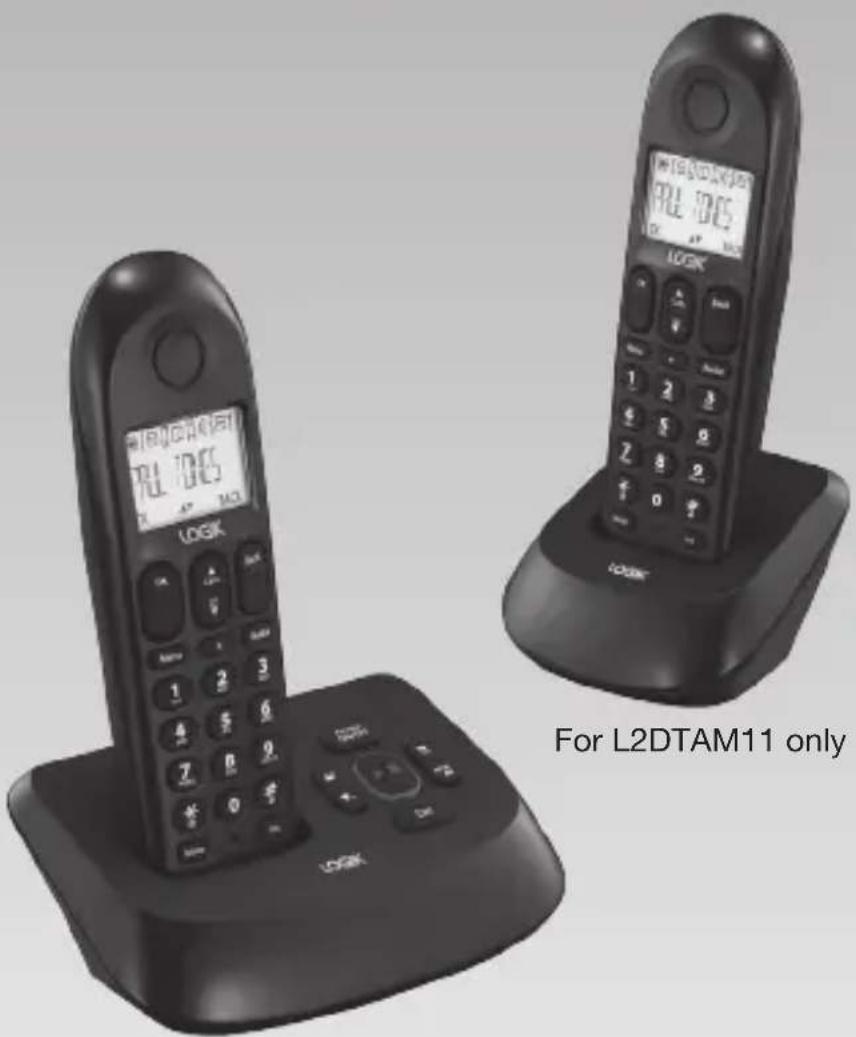
Cordless Telephone with Answer Machine
Instruction Manual
L1DTAM11
L2DTAM11 (with additional handset)

natural_image
Gradient gray background with no text, symbols, or identifiable objectsUnpacking ....5
Installing Your Phone 6
Connecting the Base Unit ....6
Installing and Charging the Batteries ....6
Handling the Batteries....7
Getting to Know Your Phone 8
Handset Overview 8
Base Unit Overview....9
Display Icons and Symbols 10
Menu Structure....11
Operations 12
Switching ON/OFF....12
To Lock/Unlock the Keypad 12
Set Time and Date....12
Change your Handset's Name 13
Change the Display Language ....13
Using Your Phone.... 14
Make a Call....14
Answer and End a Call 14
Adjust the Earpiece Volume 15
Mute/Unmute Microphone ....15
Paging....15
Call Waiting 15
Private Phonebook.... 16
Store a Contact in the Phonebook 16
Access Phonebook....17
Modify a Phonebook Entry 17
Delete a Phonebook Entry....17
Delete all Entries from the Phonebook List ....18
Direct Access Memory 18
Add/Edit Direct Access Memory 18
Delete Direct Access Memory 19
Using the Redial List ....19
Access Redial List....19
Save a Redial Number into the Phonebook 19
Delete a Redial Number ....20
Delete the Redial List....20
Caller Display (Network Dependent) 21
Access Call Log....21
Delete a Call Log Entry....21
Delete All Entries in the Call Log 22
Answer Machine Operation By Handset 23
Turn the Answering Machine On or Off 23
The Outgoing Message 23
Set the Answer Mode 24
Record a Personalized Outgoing Message 24
Playback and delete messages 24
Playback recorded messages 25
Using the Intercom....25
Intercom another Handset 25
Transfer an External Call to another Handset 25
Answer an External Call during Intercom 26
Switch between an internal and external call 26
Establish a Three-party Conference Call 26
Phone Settings (Handset Tone) 27
Set the Ring Volume 27
Set the Ring Melody....27
Activate/Deactivate Key Tone 27
Activate/Deactivate Auto Hang-up 28
Set Date/Time Format 28
Set Time Format ....28
Set Date Format....28
Set Alarm....29
Set alarm tone....29
Advanced Use of your Telephone 29
Answering Machine Settings.... 34
Set Ring Delay....34
To Activate/Deactivate Remote Control Access 34
To Check Messages Remotely 35
The Remote Feature lets you perform the following functions: 35
Set the OGM Voice Language (optional) 36
Call Screening 36
Default Settings....36
Text and Digit Entry Table.... 37
Hints and Tips.... 38
ALWAYS check first that: 38
Everyday use....38
Intercom and transfer....40
Batteries 40
Specification 41
Safety First 42
Thank you for purchasing your new Logik
Cordless Telephone with Answer Machine. We recommend that you spend some time to read this instruction manual in order to fully understand how to install and operate it.
Read all the safety instructions carefully before use and keep this instruction manual for future reference.

Unpacking
Remove all packaging from the unit. Retain the packaging. If you dispose of it please do so according to local regulations.
The following items are included:
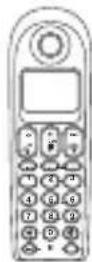
Handset x 1
PN: L1DHS
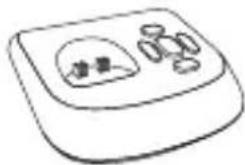
natural_image
Simple line drawing of a device with a dome and two circular components (no text or symbols)Base Unit x 1 PN: L1DBS

Mains Adapter x 1
PN: L1DMPA

Telephone Linecord x 1
PN: L1DTL
If items are missing, or damaged please contact Partmaster (UK only). Tel: 0844 800 3456 for assistance.
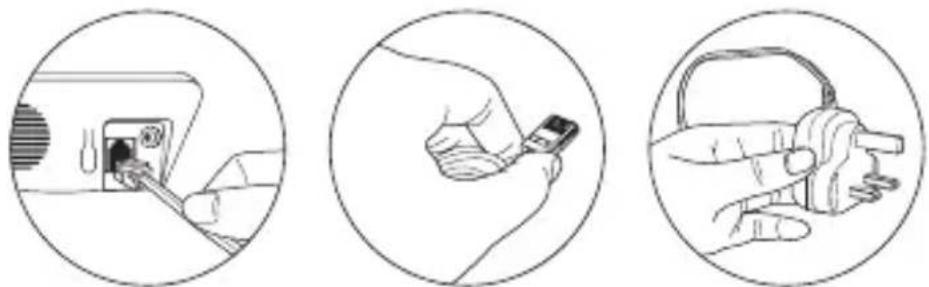
Connecting the Base Unit
natural_image
Three-step illustration showing a hand inserting a plug into a device, then holding a small battery and pointing at a key (no text or symbols present)- Plug the mains adaptor & telephone line cable into the base unit.
- Plug the mains adaptor & telephone line cord into the wall socket.
- Always use the cables provided in the box.
Installing and Charging the Batteries
- Slide open the battery compartment cover.
- Insert the 2 x AAA batteries (included) as indicated. Follow the polarity indicated on the handset.
- Slide the battery compartment cover back on.
- Put the handset on the base unit to charge. Charge the handset for 14 hours the first time you charge it. An audible tone indicates that the handset is properly placed on the base unit.
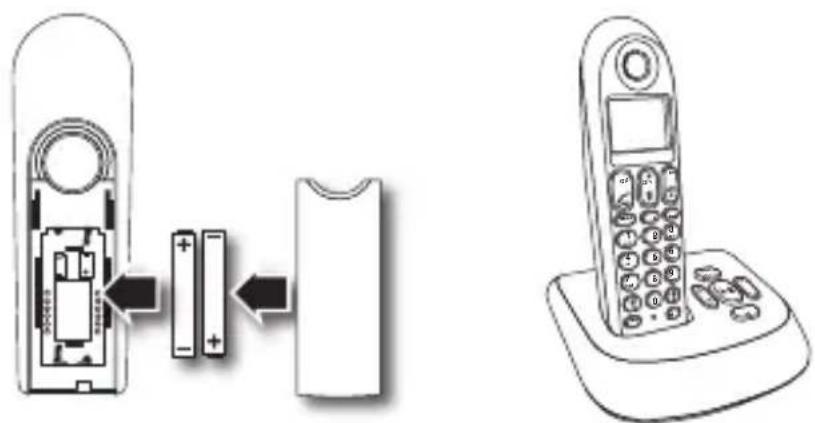

• Use only the mains adapter provided for the base unit.
• Use only NiMH rechargeable batteries.
Handling the Batteries
- Improper or incorrect use of batteries may cause corrosion or battery leakage, which could cause personal injury or damage to property.
• Install the batteries correctly by following the polarity (+ and -) indications in the battery compartment.
• Use only the types of the batteries which are indicated in this manual. - Do not install new batteries with used ones and do not mix different types of batteries.
- Do not dispose of the used batteries as domestic waste. Dispose of them in accordance with local regulations.
for L2DTAM11 only
Place the charging cradle within reach of a mains power socket.
- Plug the charging cradle into the mains power socket.
- Insert 2 x AAA rechargeable batteries (supplied), taking note of the '+' and '-' markings inside the battery compartment, then slide the battery compartment back on.
- Place the handset on the charging cradle. You should let the batteries charge continuously for at least 14 hours.
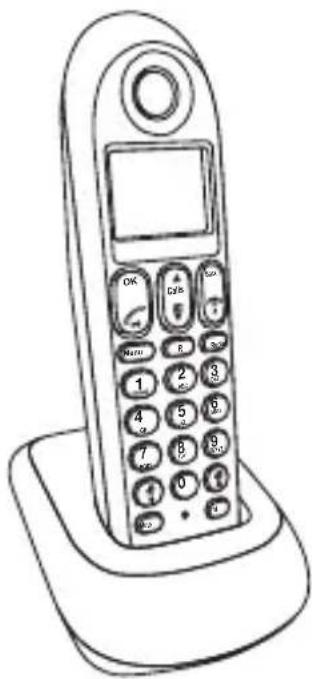

- The display will show the time and the handset number, e.g. 2, to show it is registered to the base unit.
- Your phone is now set up to make and receive calls.
Handset Overview
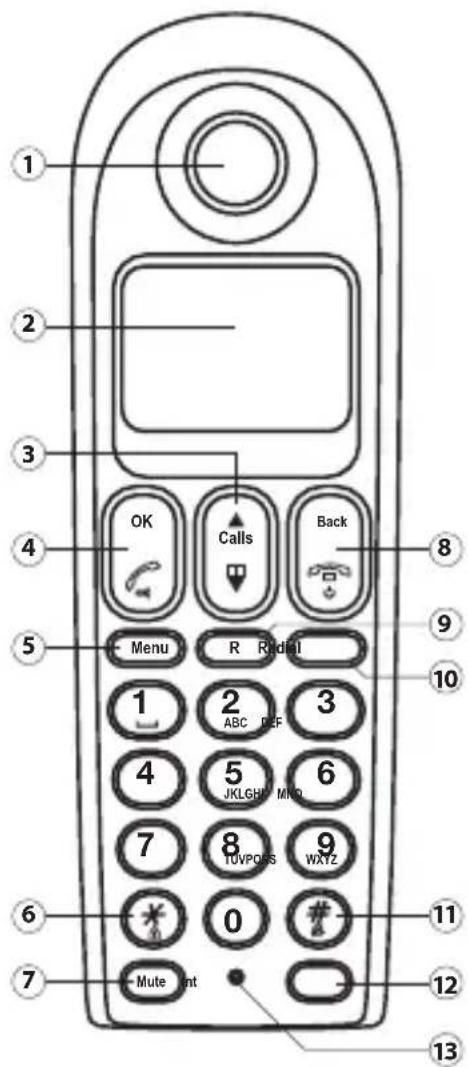
- Earpiece
- Display
- (Up) / Calls Button
• Press to increase volume and view CID.
(Down) / (Phonebook) Button
- Press to decrease volume and access Phonebook.
- OK Button
(Talk) / (Speakerphone) Button
• Press to make a call and to receive a call.
• Press to activate the speakerphone.
- Menu Button
- Press to access to main menu.
- / (Key Lock) Button
- Long press to activate or deactivate the key lock.
- Mute Button
- Press to mute the microphone and press again to unmute.
-
Back Button
-
Press to cancel a menu entry.
- Press to backspace the digit(s) or character(s).
- Press and hold to toggle between handset name and date/time in idle mode.
(End) / ⏻ (On/Off) Button
- Press to end a call.
- Press and hold to turn the handset on/off.
-
Press to exit the menu/operation.
-
R (Flash) Button
• Press to flash the phone line.
- Redial Button
- Press to enter redial list and dial the recent number.
-
/ A (Ringer ON/OFF) Button
-
Press to insert a pause.
• Long press to turn the ringer on/off. -
Int Button
-
Press to make a intercom call.
• Press to make a conference call. -
Microphone
Base Unit Overview
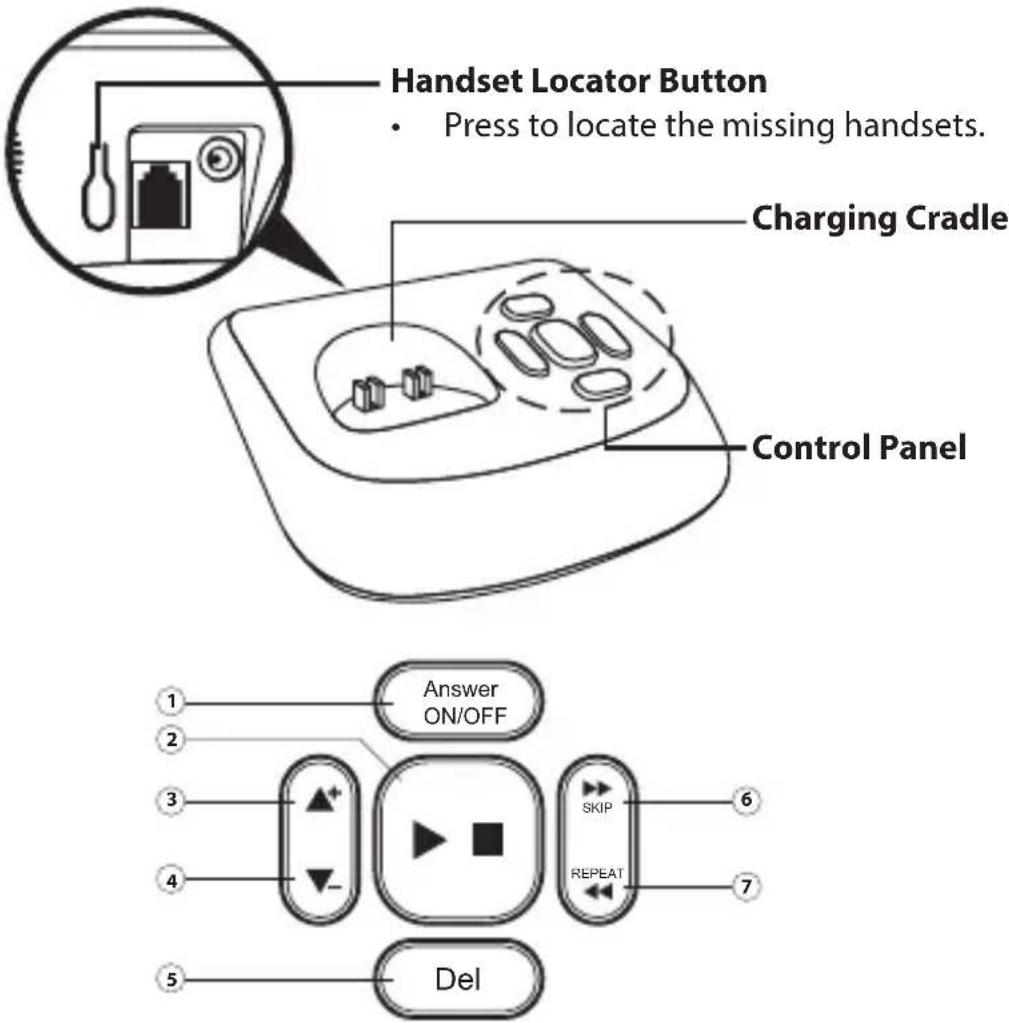
1. Answer ON/OFF Button
- Press to switch the answering machine on/off.
2. (Play/Stop) Button
- Press to play or stop message playback.
3. Button
- Press to increase speaker volume.
4. Button
- Press to decrease speaker volume.
5. Del (Delete) Button
- Press to delete current message, long press to delete all read messages.
6. SKIP Button
- Press to skip to the next message.
7. REPEAT Button
- Press to go back to the previous message or replay the current message.
Display Icons and Symbols
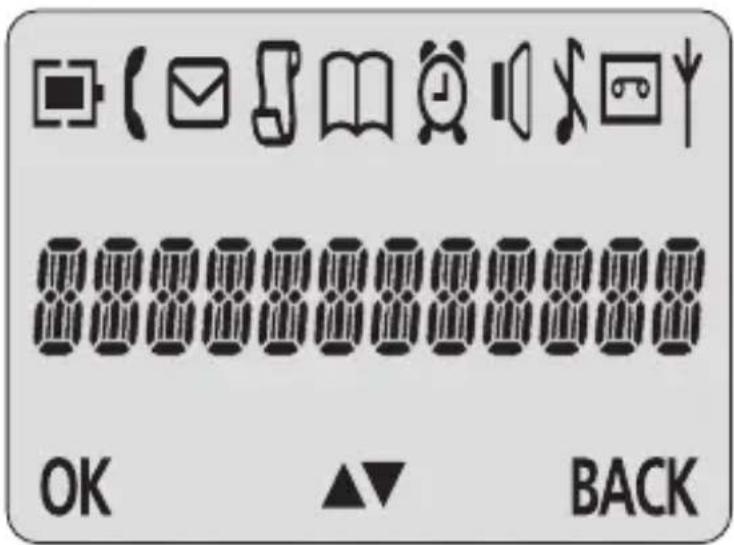
 | Battery Charge Level | Displays when the battery is fully charged. Flashes when the battery is fully discharged. |
| [1048] | Call | Indicates that an external call is connected or held. Icon flashes when receiving an incoming call. |
 | Message Indicates you have a new voice mail message. | |
 | Caller display | Indicates you have new missed calls, or the call log is being viewed. |
| [1049] | Phonebook Displays when the phonebook is accessed. | |
| [1050] | Alarm Displays when the alarm clock is activated. | |
| [1051] | Speakerphone Displays when the speakerphone is activated. | |
| [1052] | Ringer Off Displays when ringer volume is turned off. | |
 | Tam | Slowly flashes to indicate new TAM message(s). Fast flashes to indicate TAM is full. Tam off to indicate TAM off. |
 | Signal Level | Indicates that the handset is registered and within range of the base station. Icon flashes when the handset is out of range or is searching for a base unit. |
Menu Structure
In idle mode, press the Menu button to access the main menu. Refer below for the menu structure.
Menu Map
Press the ▲ or buttons to scroll through the menu items.
| PHONEBOOK |
| NEW ENTRY |
| LIST |
| EDIT ENTRY |
| DELETE |
| DELETE ALL |
| DIRECT MEM |
| PERSONAL SET |
| HANDSET NAME |
| HANDSET TONE |
| LANGUAGE |
| AUTO HANG-UP |
| CLOCK&ALARM |
| DATE/TIME |
| SET FORMAT |
| ALARM |
| ALARM TONE |
| ADVANCED SET |
| CHANGE PIN |
| REGISTRATION |
| UNREGISTER |
| RESET |
| AUTO PREFIX |
| RECALL TIME |
| DIAL MODE |
| FIRST RING |
| ANSW MACHINE |
| PLAY |
| DELETE ALL |
| ANSW. ON/FF |
| RECORD OGM |
| ANSWER MODE |
| SETTINGS |
| • RING DELAY |
| • REMOTE ACC |
| • LANGUAGE |
Switching ON/OFF
Press and hold the button for more than 2 seconds to switch on/off the handset in idle mode.

When the handset is OFF, it cannot be used for making calls including emergency calls. There will be no ringing during an incoming call. To answer a call, you will need to switch it back on. It may take some time for the handset to re-establish a radio link with the base unit.
To Lock/Unlock the Keypad
Press and hold the ✝ button for 1 second to lock/unlock the keypad in idle mode.

Incoming calls can still be answered even if the keypad is locked.
Set Time and Date

If you subscribe to the Caller Display service, the time and date will be set automatically when you receive a call, but you may still need to set the correct year.
- Press the Menu button to enter menu selection.
- Press the ▲ buttons to select CLOCK&ALARM and then press the OK button to select.
- Press the OK button to select DATE/TIME. The last stored date is displayed. Enter the current date (YY-MM-DD), press the OK button, then enter the time (HH-MM).
- Press the ▲ buttons to select AM or PM (if the time is in 12 HOURS format) and then press the OK button to confirm. The unit will make an audible tone to confirm.
Change your Handset's Name
- Press the Menu button to enter menu selection.
- Press the OK buttons to select PERSONAL SET and then press the OK button to select.
- Press the OK buttons to select HANDSET NAME and then press the OK button to select. The current handset name is displayed.
- Press the Back or buttons to delete the characters one by one. Enter the new name (maximum 10 characters) and then press the OK button to confirm. The unit will make an audible tone to confirm.
Change the Display Language
- Press the Menu button to enter menu selection.
- Press the OK buttons to select PERSONAL SET and then press the OK button to select.
- Press the OK buttons to select LANGUAGE and then press the OK button to select.

Once the display language is set, the option menus on the handset will switch to display in the selected language immediately.
Make a Call
Pre-dialing
Dial the number (maximum 24 digits) and then press the Talk button.
Direct Dialing
Press the Talk button to take the line and then dial the number (maximum 24 digits).
Call from Redial List
- Press the Redial button in idle mode.
- Press the ▲ buttons to an entry in the redial list and then press the Talk button.
Call from the Call Log
- Press the Calls button in idle mode.
- Press the ▲ buttons to an entry in the call list and then press the Talk button.

You need to subscribe to Caller Line Identification service to be able to see the caller's number or name in the call log.
Call from the Phonebook
- Press the button in idle mode.
- Press the ▲ buttons to an entry in the phonebook and then press the Talk button.
Answer and End a Call
- When the phone rings, press the button.
- To end a conversation, press the button.

- When the handset rings during an incoming call, please do not hold the handset too close to your ear as the volume of the ringing tone may damage your hearing.
- You can simply place the handset back on its base station or charging cradle to end a call. Make sure that you have not deactivated the auto hang-up feature.
Adjust the Earpiece Volume
During a call, press the ▲ or ▼ buttons to select from VOLUME 1 to VOLUME 3.
Mute/Unmute Microphone
- When the microphone is muted, the handset displays MUTE ON, and your caller cannot hear you.
- During a call, press the Mute button to turn on/off the microphone.
Paging
- The paging feature enables you to locate a missing handset if the handset is in range and contains charged batteries.
- Press the Handset Locator Button located at the back of the base unit. All the registered handsets will start to ring.
- Once retrieved, press any button on the handset or the Handset Locator Button again to end the paging.
Call Waiting
If you have subscribed to Call Waiting service, the earpiece will emit an audible tone to inform you that there is a second incoming call. The number or name of the second caller will also be displayed on your phone if you have subscribed to Caller Line Identification service (CLI). Please contact your network provider for more information about this service.

Private Phonebook
Your phone can store up to 50 phonebook memories. Each phonebook entry can have a maximum of 24 digits for the phone number and 12 characters for the name.
Enter Characters
When you select a field in which you can enter text, you can enter the letters that are printed on the keys by pressing the relevant key once or several times.
For example, press the "2" button once to insert the letter "A" press it twice to insert the letter "B", and so on... Spaces and other symbols can be entered using the "1" or "0" buttons.
Store a Contact in the Phonebook
- Press the Menu button to enter menu selection.
- Press the ▲ buttons to select PHONEBOOK and then press the OK button to select.
- Press the OK button again to enter NEW ENTRY.
- Enter the name of the contact (maximum 12 characters). To edit, press the Back button to delete the last character entered. Press the OK button to confirm the name entry.
- Enter the number of the contact (maximum 24 digits) and then press the OK button to confirm. The unit will make an audible tone to confirm.

- You cannot store a new phonebook entry when the memory is full. In this case, you have to delete existing entries to make space for new entries.
- When storing the number, enter the full number including the STD (area) code if you subscribe to caller display, otherwise it will not display the name when there is an incoming call.
Access Phonebook
- Press the button in idle mode to browse the phonebook entries. Alternatively, you can press the Menu button, to display PHONEBOOK and then press the OK button to select.
- Press the ▲ buttons to select LIST and then press the OK button to confirm. The phonebook entries will be listed in alphabetical order, and you can press ▲ or buttons to scroll through the stored entries.
- Press the OK button to view the details of the selected entry.

Instead of pressing the ▲ or buttons to browse the phonebook entries, you can press the numeric key corresponding to the first letter of the entry you wish to locate. For example, pressing "2" will show the entries starting with "A". Pressing "2" again will show the entries starting with "B", and so on...
Modify a Phonebook Entry
- Press the Menu button to enter menu selection.
- Press the OK buttons to select PHONEBOOK and then press the OK button to select.
- Press the OK buttons to select EDIT ENTRY and then press the OK button to select.
- Press the ⬆ buttons to select an entry to edit and then press the OK button. The current name is displayed. Edit the name and then press the OK button to confirm.
- Edit the number and then press the OK button to confirm. The unit will make an audible tone to confirm.
Delete a Phonebook Entry
- Press the Menu button to enter menu selection.
- Press the ⬆ buttons to select PHONEBOOK and then press the OK button to select.
- Press the or buttons to select DELETE and then press the OK button to select.
- Press the OK buttons to select an entry to delete and then press the OK button.
- Press the OK button again to confirm. The unit will make an audible tone to confirm.
Delete all Entries from the Phonebook List
- Press the Menu button to enter menu selection.
- Press the OK buttons to select PHONEBOOK and then press the OK button to select.
- Press the ▲ buttons to select DELETE ALL and then press the OK button to select.
- Press the OK button again to confirm. The unit will make an audible tone to confirm.
Direct Access Memory
There are 2 direct access memories (Keys 1 & 2) in addition to the phonebook memory. A long press on the keys in idle mode will automatically dial the stored phone number.
Add/Edit Direct Access Memory
- Press the Menu button to enter menu selection.
- Press the ▲ buttons to select PHONEBOOK and then press the OK button to select.
-
Press the ▲ buttons to select DIRECT MEM. And then press the OK button to select.
-
Press the ▲ buttons to select KEY 1 or KEY 2 and then press the OK button. The stored name is displayed, or NO NUMBER if it is empty. If there is no number stored for the selected key or if you want to change the name or number currently stored, press the Menu button to enter the direct memory menu to add/edit the name or number.
-
Press the ▲ buttons to select EDIT NUMBER and then press the OK button to select. The display shows the currently stored name or ENTER NAME if there is no number stored. Edit or enter the name you want and then press the OK button. The display shows the currently stored number or ENTER NUMBER if there is no number stored. Edit or enter the number you want and then press the OK button to confirm. The unit will make an audible tone to confirm.
Delete Direct Access Memory
- Press the Menu button to enter menu selection.
- Press the OK buttons to select PHONEBOOK and then press the OK button to select.
- Press the OK buttons to select DIRECT MEM. and then press the OK button to select.
- Press the OK buttons to select KEY 1 or KEY 2 and then press the OK button. The stored name is displayed (or NO NUMBER if it is already empty).
- Press the Menu button to enter the direct memory menu.
- Press the OK buttons to select DELETE and then press the OK button to select. Press the OK button again to confirm. The unit will make an audible tone to confirm.
Using the Redial List
The redial list stores the last 5 numbers dialed. A maximum of 24 digits can be displayed for each entry.
Access Redial List
-
Press the Redial button in idle mode and press the ▲ buttons to browse the redial list. The last number dialed will appear first in the redial list.
-
Press the OK button to view the details of the selected entry.
Save a Redial Number into the Phonebook
-
Press the Redial button in idle mode to go to the redial list.
-
Press the ▲ buttons to select an entry.
-
Press the Menu button to display SAVE NUMBER, then press the OK button to display ENTER NAME. Enter the name of the contact (maximum 12 characters) and then press the OK button to save the entry, and return the display to the redial list.
Delete a Redial Number
- Press the Redial button in idle mode to go to the redial list.
- Press the ▲ buttons to select an entry and then press the Menu button.
- Press the ▲ buttons to select DELETE and then press the OK button to select.
- Press the OK button again to confirm. The unit will make an audible tone to confirm.
Delete the Redial List
- Press the Redial button in idle mode to go to the redial list.
- Press the Menu button.
- Press the ▲ buttons to select DELETE ALL and then press the OK button to select.
- Press the OK button again to confirm. The unit will make an audible tone to confirm.

Caller Display (Network Dependent)
To receive Caller ID you may need to contact your telephone service provider, and they will inform you also of any charges for it. Caller ID lets you see the phone numbers of your callers on the handset display, before you answer and in your Call Log afterwards. The Call Log stores the last 10 external calls, whether or not you answered the call, so you can call them back later.
Only the most recent call is saved if there are repeat calls from the same number.
When the Call Log is full, the next new call will replace the oldest entry.
If you've got a new call in the Call Log, the Caller Display icon will appear on the handset display.
If the received number is the same as one in your phonebook, the name from the phonebook will display as well as the number.
If a call is from someone who withheld their number, the display will show WITHHOLD ID.
If the call is from someone whose number is unavailable, or if you have not subscribed to Caller ID but have set the date and time, the display will show CALLING when it is received and UNAVAILABLE in the Call Log.
Access Call Log
Press the Calls button in idle mode and press the ▲ or buttons to browse the call list. The calls are displayed in chronological order with the most recent call at the top of the list.
- Press the OK button to display more details of the call, including the date and time. Save call list entry into the phonebook.
- Press the Calls button in idle mode to go to the call list.
- Press the ▲ buttons to select an entry and then press the Menu button.
- Press the OK buttons to select SAVE NUMBER and then press the OK button to select. Enter the name of the contact (maximum 12 characters) and then press the OK button to confirm.
Delete a Call Log Entry
- Press the Calls button in idle mode to go to the call list.
- Press the ▲ buttons to select an entry and then press the Menu button.
- Press the ⬆ buttons to select DELETE and then press the OK button to select. Press the OK button again to confirm. The unit will make an audible tone to confirm.
Delete All Entries in the Call Log
-
Press the Calls button in idle mode to go to the call list.
-
Press the Menu button.
-
Press the ▲ buttons to select DELETE ALL and then press the OK button to select.

Answer Machine Operation By Handset
You can use the answer machine menu on the handset to access and change the settings for all the answering machine functions.
Turn the Answering Machine On or Off
- Press the Menu button to enter menu selection.
- Press the ▲ buttons to select ANSW MACHINE and then press the OK button to select.
- Press the ▲ buttons to select ANSW. ON/OFF and then press the OK button to select.
-
Press the ▲ buttons to select ON or OFF and then press the OK button to confirm.
-
The unit will make an audible tone to confirm. Press the OFF/C button to go back to idle mode.

- You can also turn the answering machine on or off by pressing the ON/OFF button on the base unit.
- If the answering machine is turned off and the master PIN is still set at its default 0000, the answering machine will not answer to any incoming ringing, but if the master PIN has been changed, it will answer after 10 rings to allow remote access.
The Outgoing Message
The telephone is supplied with two predefined outgoing messages (OGM) used for the different answer modes.
There are 2 answer modes available: "Answer Only" and "Answer & Record". By default, the answer mode is ANSW.&RECORD, which allows a caller to leave a message on the answering machine. This can be changed to ANSWER ONLY mode, which does not allow callers to leave any messages on the answering machine.
Set the Answer Mode
- Press the Menu button to enter menu selection.
- Press the ▲ buttons to select ANSW MACHINE and then press the OK button to select.
- Press the ▲ buttons to select ANSWER MODE and then press the OK button to select.
- Press the ▲ buttons to select ANSWER ONLY or ANSW.&RECORD and then press the OK button to confirm.
Record a Personalized Outgoing Message

You can choose to replace the predefined OGM with your own prerecorded personalised messages.
- Press the Menu button to enter menu selection.
- Press the ▲ buttons to select ANSW MACHINE and then press the OK button to select.
- Press the ▲ buttons to select RECORD OGM and then press the OK button to select.
- Press the ▲ buttons to select ANSWER ONLY or ANSW.&RECORD and then press the OK button to confirm.
- Press the ▲ buttons to select RECORD OGM.
- Press the OK button to start recording your new outgoing message.
- Press the OK button again to end the recording.

• The maximum length of an outgoing message is 2 minutes.
• To hear your outgoing message, select PLAY at step 5.
- To delete a personalised outgoing message and return to the predefined one, select DELETE at step 5.
Playback and delete messages
The last recorded message is played first. Old messages cannot be played again until after all new messages have been played.
Playback recorded messages
- Press the Menu button to enter menu selection.
- Press the OK buttons to select ANSW MACHINE and then press the OK button to select.
- Press the OK buttons to select DELETE ALL and then press the OK button to confirm.
Using the Intercom
Intercom, call transfer and conference are only possible with at least 2 handsets registered to the same base unit. It allows you to make free internal calls, transfer external calls from one handset to another, and set up a 3-way conference with two handsets and an external call.
If you try to make a call while another handset is already on an external call, you'll hear a busy tone for a few seconds before the display returns to idle.
Intercom another Handset (for L2DTAM11 only)
- Press the Int button in idle mode.
- Intercom is established immediately if there are only 2 registered handsets.
- If there are more than 2 registered handsets, the handset numbers which are available for intercom, and a “*” will be displayed. Press the specific handset number you wish to call, or press the *button to ring all handsets, to start intercom.
Transfer an External Call to another Handset
- During the call, press the Int button to put the external call on hold, the caller can no longer hear you.
- Intercom is established immediately if there are only 2 registered handsets.
- If there are more than 2 registered handsets, the handset numbers which are available for intercom, and a “*”, will be displayed. Press the specific handset number you wish to call, or press the *button to ring all handsets, to start intercom.
- Press the Talk button on the called handset to answer the internal call, where both internal callers can talk. Intercom is established.
- Press the OFF/C button on the first handset to transfer the external call to the called handset. The external call is transferred.

If there is no answer from the called handset, press the Int button to resume the external call.
Answer an External Call during Intercom
- During intercom, a new call tone is emitted when there is an incoming external call. Press the button to answer the external call and end the intercom.
- Connection with the external call is established.

To put the internal call on hold and answer the incoming external call, press the Int button.
Switch between an internal and external call
During the call, press the Int button to switch between an internal or external call.
Establish a Three-party Conference Call
- The conference call feature allows one external call to be shared with two handsets (in intercom). The three parties can share the conversation and no additional network subscription is required.
- During an external call, press the Int button to put the external call on hold (the caller can no longer hear you).
- If there are more than 2 registered handsets, the handset numbers which are available for intercom will be displayed. Press the specific handset number you wish to call to start intercom. Press the button on the called handset to answer the internal call, where both internal callers can talk. Intercom is established.
- Press and hold the Int button for 2 seconds on the first handset to start the three-party conference.
- CONFERENCE will be displayed on the screen once the conference call is established.
Set the Ring Volume
There are 5 ringer volume options (OFF, LEVEL 1, LEVEL 2, LEVEL 3 and LEVEL 4). The default level is LEVEL 2.
- Press the Menu button to enter menu selection.
- Press the OK buttons to select PERSONAL SET and then press the OK button to select.
- Press the OK buttons to select HANDSET TONE and then press the OK button to select and show RING VOLUME. Press the OK button again to select.
- Press the OK buttons to your desired volume level and then press the OK button to confirm. The unit will make an audible tone to confirm.
Set the Ring Melody
There are 10 ring melodies available on your handset.
- Press the Menu button to enter menu selection.
- Press the OK buttons to select PERSONAL SET and then press the OK button to select.
- Press the ⬆ buttons to select HANDSET TONE and then press the OK button to select.
- Press the OK buttons to select RING TONES and then press the OK button to select.
- Press the ⬆ buttons to your desired melody and then press the OK button to confirm. The unit will make an audible tone to confirm.
Activate/Deactivate Key Tone
A single tone is emitted when a key is pressed. You can enable or disable the key tone. By default, the key tone is ON.
- Press the Menu button to enter menu selection.
- Press the ▲ buttons to select PERSONAL SET and then press the OK button to select.
- Press the ▲ buttons to select HANDSET TONE and then press the OK button to select.
- Press the ▲ buttons to select KEY BEEP and then press the OK button to select.
- Press the ▲ buttons to select ON or OFF and then press the OK button to confirm. The unit will make an audible tone to confirm.
Activate/Deactivate Auto Hang-up
This function enables you to end a call automatically by simply placing the handset on the base unit. By default, the Auto Hang up feature is ON.
- Press the Menu button to enter menu selection.
- Press the ▲ buttons to select PERSONAL SET and then press the OK button to select.
- Press the ▲ buttons to select AUTO HANG-UP and then press the OK button to select.
- Press the ▲ buttons to select ON or OFF and then press the OK button to confirm. The unit will make an audible tone to confirm.
Set Date/Time Format
You can set your preferred date/time format for your phone. The default format is DD/MM and 24 HOURS.
Set Time Format
- Press the Menu button to enter menu selection.
- Press the ▲ buttons to select CLOCK&ALARM and then press the OK button to select.
- Press the ▲ buttons to select SET FORMAT and then press the OK button to select.
- Press the OK button to enter TIME FORMAT. The current setting is displayed.
- Press the ▲ buttons to select 12 HOURS or 24 HOURS and then press the OK button to confirm. The unit will make an audible tone to confirm.
Set Date Format
- Press the Menu button to enter menu selection.
- Press the ▲ buttons to select CLOCK&ALARM and then press the OK button to select.
- Press the ▲ buttons to select SET FORMAT and then press the OK button to select.
- Press the ▲ buttons to select DATE FORMAT and then press the OK button to select. The current setting is displayed.
- Press the ▲ buttons to select DD/MM or MM/DD and then press the OK button to confirm. The unit will make an audible tone to confirm.
Set Alarm
The handset has an alarm clock feature, and when the alarm is set, it is shown on the handset display.
When the alarm time is reached, the display flashes --ALARM-- and the alarm melody is played for 1 minute or until any handset key is pressed.
If the alarm is set for ON DAILY, the alarm will sound again on the next day.
If the alarm was set for ON ONCE, the alarm will turn off.
- Press the Menu button to enter menu selection.
- Press the ▲ buttons to select CLOCK&ALARM and then press the OK button to select.
- Press the ▲ buttons to select ALARM and then press the OK button to select.
- Press the ▲ buttons to select OFF, ON ONCE or ON DAILY and then press the OK button to confirm.
If you select ON ONCE or ON DAILY, enter the time (HH-MM) for the alarm and press the ▲ or ▼ buttons to select AM or PM if the time is in 12 HOURS format.
- Press the OK button to confirm. The unit will make an audible tone to confirm.
Set alarm tone
- Press the Menu button to enter menu selection.
- Press the OK buttons to select CLOCK&ALARM and then press the OK button to select.
- Press the ▲ buttons to select ALARM TONE and then press the OK button to select.
- Press the OK buttons to select MELODY 1, MELODY 2 or MELODY 3 and then press the OK button to confirm. The unit will make an audible tone to confirm.
Advanced Use of your Telephone
Change Master PIN
The Master PIN is used for registration/un-registration of handsets and for accessing the answering machine remotely. The default Master PIN number is 0000. The maximum length of the Master PIN is 8 digits.

If you forget your PIN code, you can reset it to its default 0000 using a handset Reset.
- Press the Menu button to enter menu selection.
- Press the ▲ buttons to select ADVANCED SET and then press the OK button to select.
- Press the ▲ buttons to select CHANGE PIN and then press the OK button to select.
- Enter the current Master PIN when prompted and then press the OK button to confirm. As you enter the PIN it will be shown as asterisks “*” on the screen.
- Enter the new PIN and then press the OK button to confirm. The unit will make an audible tone to confirm.
Register your handset

When you purchase a telephone, all handsets are already registered to the base unit, so you do not need to register them. Handset registration is only necessary when you buy extra handsets or if a handset has become faulty. They may be different if you want to register another handset model, in which case you should refer to its user guide.
Additional handsets must be registered to the base unit before you can use them.
Up to 4 handsets can be registered to one base unit.
The Master PIN is required before you can register or un-register handsets.
By default, the Master PIN is 0000.
On the base unit, press and hold the button for approximately 5 seconds.
- On the handset, press the Menu button to enter menu selection.
- Press the ▲ buttons to select ADVANCED SET and then press the OK button to select.
- Press the ▲ buttons to select REGISTRATION and then press the OK button to select.

- If no action is taken on the handset within 10 seconds, the registration procedure will be aborted. If this happens, repeat the first step. Enter the Master PIN when prompted and then press the OK button to confirm, the default master PIN is 0000). WAITING is displayed on the screen. The unit will make an audible tone to indicate a successful registration, and the handset will return to idle mode, with its handset number displayed.
- If no base unit is found within a certain period, NO BASE will be displayed with an error tone to indicate failed registration and the handset returns to idle mode. You will need to repeat the registration procedure.
Un-register your Handset
- Press the Menu button to enter menu selection.
- Press the ▲ buttons to select ADVANCED SET and then press the OK button to select.
- Press the ▲ buttons to select UNREGISTER and then press the OK button to select.
- Enter the Master PIN when prompted and then press the OK button to confirm. (The default master PIN is 0000)
- Press the ▲ buttons to select the handset number to un-register and then press the OK button to confirm. The unit will make an audible tone to confirm a successful un-registration.

If no action is taken on the handset within 15 seconds, the unregistration procedure will be aborted and the handset returns to idle mode. You must use a handset to un-register handsets from the base unit.
Set Prefix
This allows you to define a prefix number to be added to the beginning of any pre-dialed number, and to define a detect string to prevent the prefix number being added unless the detect string matches the first digits of the pre-dialed number, in which case the prefix number will replace the detect string digits.
You can enter up to 5 digits for the detect string and up to 10 digits for the auto prefix number.
- Press the Menu button to enter menu selection.
- Press the OK buttons to select ADVANCED SET and then press the OK button to select.
- Press the OK buttons to select AUTO PREFIX and then press the OK button to select.
- To enter a DETECT DIGIT string, press the OK button again.
- The last stored detect string is displayed (if any).
- Enter a detect string number (maximum 5 digits) and then press the OK button to confirm.
- To enter a PREFIX number, press the ▲ buttons to display PREFIX and then press the OK button. The last stored prefix number is displayed (if any).
- Enter the prefix number (maximum 10 digits) and then press the OK button to confirm. The unit will make an audible tone to confirm.

If no detect string (blank) is entered, the prefix number will be automatically added to the pre-dial number after the Talk button is pressed. For numbers starting with * or P, the prefix number will not be added to the Pre-dial number after the Talk button is pressed.
Change recall time
You may need the R (Flash) button to send a Recall signal (also called Timed Break Recall) if you are connected to a PBX. You should normally leave the Recall Time at its default setting of Short (100ms), as this is the standard recall required in the telephone network, but it can be changed to Medium (270ms) or Long (600ms) if your telephone is connected to a PBX that requires a different recall time.
- Press the Menu button to enter menu selection.
- Press the ▲ buttons to select ADVANCED SET and then press the OK button to select.
- Press the ▲ buttons to select RECALL TIME and then press the OK button to select.
- Press the ▲ buttons to select SHORT, MEDIUM or LONG and then press the OK button to confirm. The unit will make an audible tone to confirm.
Change the Dial Mode (dual mode dialing version only)
You should normally leave the dialing mode at its default setting of TONE (Also called MF or DTMF).

If PULSE dialing is set, you can press the *button to switch to TONE dialing for the rest of that call.
However, you can change to PULSE if necessary.
- Press the Menu button to enter menu selection
- Press the ▲ buttons to select ADVANCED SET and then press the OK button to select.
- Press the ▲ buttons to select DIAL MODE and then press the OK button to select.
- Press the ▲ buttons to select TONE or PULSE and then press the OK button to confirm. The unit will make an audible tone to confirm.
Set First Ring
When this function is set to Off, the first ring from an incoming call will not sound.
This is useful on exchanges where calling line identity is sent after the first ring.
- Press the Menu button to enter menu selection.
- Press the ▲ buttons to select ADVANCED SET and then press the OK button to select.
- Press the ▲ buttons to select FIRST RING and then press the OK button to select.
- Press the ▲ buttons to select ON or OFF and then press the OK button to confirm. The unit will make an audible tone to confirm.
Reset Unit
You can reset your phone to its default settings with this feature.
- Press the Menu button to enter menu selection.
- Press the ▲ buttons to select ADVANCED SET and then press the OK button to select.
- Press the OK buttons to select RESET and then press the OK button to select.
- Press the OK button again to confirm. The unit will make an audible tone to confirm and the unit is reset to its default settings.

Upon reset, all your personal settings, call log and redial list entries will be deleted and the phone will return to its default settings. However, your phonebook will remain unchanged after reset. Also, if you have an answering machine model, any recorded messages will remain unchanged, but all other settings will be defaulted.

Answering Machine Settings
Set Ring Delay
-
Press the Menu button to enter menu selection.
-
Press the ▲ buttons to select ANSW MACHINE and then press the OK button to select.
-
Press the ▲ buttons to select SETTINGS and then press the OK button to select.
-
Press the OK button to enter the RING DELAY option list.
-
Press the ▲ buttons to select 2 – 7 RINGS or ECONOMY and then press the OK button to confirm your choice.
-
The unit will make an audible tone to confirm. Press the button to go back to idle mode.

If you select Economy mode, the answering machine will answer calls and start playing the greeting message after 5 rings if you have no new messages, or after 3 rings if there is at least one new message recorded.
To Activate/Deactivate Remote Control Access
-
Press the Menu button to enter menu selection.
-
Press the OK buttons to select ANSW MACHINE and then press the OK button to select.
-
Press the ▲ buttons to select SETTINGS and then press the OK button to select.
-
Press the ⬆ buttons to select REMOTE ACC. and then press the OK button to select.
-
Press the o▲ buttons to select ACTIVATE or DEACTIVATE and then press the OK button to confirm.
-
The unit will make an audible tone to confirm. Press the button to go back to idle mode.

- Once the remote control access is activated, you can check the messages of your answering machine when you are away from home, by calling from another phone.
- If the answering machine is turned off, you must change your master PIN from its default 0000, before you can use the remote access feature.
To Check Messages Remotely
- When you are away from home, dial your home phone number from another phone. The answering machine answers and starts playing your greeting message.
- While the OGM is playing, press the button on the phone you are using to dial your home telephone and enter the remote access code (which is the same as your master PIN code).

- The answer machine will drop the line immediately if there is no detection of the master PIN entry within 8 seconds from pressing the # button.
- If the remote access code is correct, a confirmation tone can be heard, and then you need to press the "2" button, within 8 seconds, to start playing any messages.
The Remote Feature lets you perform the following functions:
| Button Description | |
| 1 Go to previous message | |
| 2 Play the message | |
| 3 Go to next message | |
| 6 Delete the playing message | |
| 7 Turn on Answer and Record and play OGM (Ans&Rec OGM) | |
| 8 Stop message playback | |
| 9 Turn off the answering machine |

If the answering machine is off, and the master PIN has been changed from its default 0000, it will answer the call after 10 rings. Dial the master PIN code within 8 seconds and you will hear an audible tone to confirm you have entered to remote access mode, as above.
Set the OGM Voice Language (optional)
- Press the Menu button to enter menu selection.
- Press the ▲ buttons to select ANSW MACHINE and then press the OK button to select.
- Press the ▲ buttons to select SETTINGS and then press the OK button to select.
- Press the ▲ buttons to select LANGUAGE and then press the OK button to select.
- Press the ▲ buttons to select your preferred language and then press the OK button to confirm.
- The unit will make an audible tone to confirm. Press the button to go back to idle mode.
Call Screening
- Call screening allows you to hear the caller while he is leaving a message.
- You can then decide if you want to talk to the caller directly.
- To adjust the speaker's volume during call screening, press the buttons on the base unit. The lowest volume level turns call screening off.
Default Settings
These are the answering machine settings after the unit has been reset.
| Answering Machine ON | |
| Answer mode ANSW. & RECORD | |
| Number of rings before answer | 5 Outgoing messagesPredefined OGM. (Personalized OGMs deleted) |
| Remote access Activate | |
| Base speaker Level 5 | |
The following tables show you where each letter and punctuation character can be found. Respective character table will be used when the corresponding menu language is selected. This will be helpful when storing a name in the contacts and renaming your handset.
In editing mode, a cursor is displayed to indicate the current text entry position. It is positioned at the right of the last character entered.
Writing Tips:
- Once a character is selected, the cursor will move to the next position after a short pause.
- Press the Back button to delete the last character.
English Character Set
| Button | Alphanumeric Editing(For contacts name editing and renaming handset) | Number Editing(For phone number editing, date/time editing) | |||||||||
| Button Press | 1st 2nd 3rd 4th 5th 6th 7th 8th 9th 10th | ||||||||||
| 1 space 1 | < >* | 1 | |||||||||
| 2 A B C 2 | 2 | ||||||||||
| 3 D E F 3 | 3 | ||||||||||
| 4 G | H I | 4 4 | |||||||||
| 5 | J K L | 5 5 | |||||||||
| 6 | M | N | O 6 6 | ||||||||
| 7 P Q R S | 7 | 7 | |||||||||
| 8 | T U V 8 | ? | 8 | ||||||||
| 9 | W | X Y Z | 9 | 9 | |||||||
| 0 | 0 | - | / | \ | # | + | 0 | ||||
| * | * | ||||||||||
| # | #, or P (Pause) if press and hold | ||||||||||
ALWAYS check first that:
- You have followed all the steps listed in the user manual to install and set up your telephone.
• All connectors are firmly inserted in their sockets. - Mains power to the base unit and charging cradle are switched on at the mains socket.
- The handset's batteries are correctly and securely installed and are not run down.
Everyday use
I cannot make or answer calls
- If the handset's display is blank, it may have been switched off. Put the handset back on the base unit or charging cradle to turn it back on.
- Check that the base unit's mains power adapter is plugged in and the power is switched on.
- The base unit needs mains power for normal operation of the phone. Not just for charging the batteries.
- Make sure you are using the telephone line cable supplied with your phone. Other telephone line cables might not work. Move the handset closer to the base unit.
- Check the battery level symbol on the display. If it is low, replace the handset on the base unit or charging cradle to recharge the batteries.
- Switch off the power at the mains socket, wait for a short time and then switch back on. This may solve the problem.
I cannot make a call
- If the handset display shows KEYS LOCKED, press and hold the button to unlock it before you make a call.
- Only one handset (or the base unit) can be connected to the outside line at a time. If another handset is already using the line, you need to wait until it has finished its call.

When I press on the keys, nothing happens
Make sure the batteries are fitted in your handset. If the Battery Level symbol on the display shows 'low', put your handset back on the base unit or charging cradle to charge.
When I key in a number, it appears on the display, but I cannot make an outside call
Try a different position for the base unit – somewhere higher if possible, or further from other electrical equipment.
The phone does not ring
- Check that the base unit's mains power adapter is plugged in and the power is switched on.
- The base unit needs mains power for normal operation of the phone – not just for charging the batteries.
- Make sure you are using the telephone line cable that was supplied with your telephone.
My call was cut off when I went out of range. Now I can't use my handset
Move the handset closer to the base unit before you try again to make a call.
There is interference and noise on the line
- Move the handset closer to the base unit, or to a different position.
- Try moving the base unit so that it's not near other electrical equipment, such as a television or a computer.
- You'll get the best sound if you place the base unit as high as possible. For example, in a two-floor building, the first-floor landing is an ideal place.
I hear audible tones from my handset while I'm on a call
- You may be going out of range of the base unit. Move closer or your call may be cut off.
- Check the Battery Level symbol on the display. If it's low, recharge the batteries.
The Caller Display feature isn't working
- You need to subscribe to the Caller Display feature from your network service provider. You should find contact details on your phone bill.
- The caller may have withheld their number by dialing 141. Or they may be calling from a network that does not transmit the caller's number (e.g. if they are making international calls.)
When I try to make a call, I hear a busy tone
If you're using a multi-handset system, check whether another handset is already on a call.
The volume in the earpiece is low when I'm on a call
• Make sure you're holding the earpiece correctly over your ear.
- Adjust the volume by pressing the ▲r buttons.
Intercom and transfer
I can't transfer a call
• Make sure the other handset is in range of the base unit.
• Make sure you are dialing the correct number for the other handset.
Batteries
The handset's battery cells are running low within an hour or two
• Before you first use the handset, you should have left it on the base unit or charging cradle for 14 hours to charge the batteries.
• You may need to replace the batteries.
- Check the connection between the base unit and the mains power socket.
- "I try to recharge the batteries but I still get a warning that they are low" You need to replace the batteries.
- Dispose of used batteries safely – never burn them, or put them where they could get punctured.
- Do not use non-rechargeable batteries in your handset – they may explode, causing damage.
If the fault persists...
- Disconnect the base unit from the telephone line and plug a different phone into the master telephone socket. Try making a call. If this works, the line is OK.
- If the call does not work, and you are using a two-way socket adapter, remove it and plug a telephone directly into the socket.
• If the call now works, the adapter may be faulty. - If you cannot make a call, the fault may be on the exchange line. Contact the service provider.
| Frequency range 1.88 to 1.9 GHz (bandwidth = 20 MHz) | |
| Channel bandwidth 1.728 MHz | |
| Operating range Up to 300m outdoors; up to 50m indoors | |
| Operating time Standby: 100 hoursTalking: 10 hoursBattery charge time: 15 hours | |
| Temperature range Operating | 0 °C to 40 °CStorage -20 °C to 60 °C |
| Electrical power HANDSET – two pcs of AAA-size 400mAh NiMH 1.2V rechargeable batteriesBASE UNIT – input AC 100-240V ~50-60Hz, output DC 6V/500mACHARGING CRADLE – input AC 100-240V ~50-60Hz, output DC 6V/150mA | |
| Port specification The power port (connect to the mains power supply) is a SELV port with respect to EN41003.The phone port (connected to the telephone line) is a TNV port with respect to EN41003. | |
PBX compatibility:
Timed break recall (flash): adjustable to 100ms (default), 250ms or 600ms
Pause length: 3 seconds
Dialling type: Tone (DTMF, dual tone multi-frequency) or Pulse (loop disconnect).
Network connection: This equipment is intended to be used in the UK only.
Operation on other countries' PSTN termination points cannot be guaranteed.
For your continued safety and to reduce the risk of injury or electric shock, please follow all the safety precautions listed below.
- Read all instructions carefully before using the telephone and keep them for future reference.
- Retain the manual. If you pass the telephone onto a third party, make sure to include this manual.
- Follow all warnings and instructions marked on the telephone.
- Do not use the product near water for example near a bathtub, kitchen sink, etc.
- Place the product securely on a stable surface. Serious damage and/or injury may result if the product falls.
- Do not cover slots and openings on the telephone. They are provided for ventilation and protection against overheating. Never place the telephone near radiators, or in place where proper ventilation is not provided.
- Do not place objects on the telephone cable. Install the phone where no one can step or trip on the telephone cable.
- To reduce the risk of injury or electric shock, do not disassemble the telephone. Incorrect reassembly can cause electric shock when the product is subsequently used.
- During thunderstorms, avoid using telephones except cordless types. There may be a remote risk of an electric shock from lightning.
- Do not use the telephone to report a gas leak, when in the vicinity of the leak.
- Young children should be supervised to ensure that they do not play with the telephone.
- The telephone is not intended for use by persons (including children) with reduced sensory or mental capabilities, or lack of experience and knowledge unless they have been given supervision or instructions concerning the use of the phone by a person responsible of their safety.
- Battery - To reduce the disk of re or injury to persons, read and follow these instructions.
- Use only the battery(ies) specified. Do not dispose the battery(ies) in a fire. They may explode. Check with local council office for special disposal instructions not open or mutilate the battery(ies).
- Released electrolyte is corrosive and may cause burns or injury to the eyes or skin. The electrolyte may be toxic if swallowed.
-
Exercise care when handling the battery(ies). Do not allow conductive materials such as rings, bracelets or keys to touch the battery(ies).
-
Otherwise a short circuit may cause the battery(ies) and/or the conductive material to overheat and cause burns.
- Environment - Place the unit in a room where the temperature is between 0°C and 40°C. Allow 5cm clearance around the unit for proper ventilation.
- Avoid excessive smoke, dust, mechanical vibration, shock, or direct sunlight.
- Cleaning - Wipe the unit with a soft cloth. Do not use benzine, thinner, or any abrasive cleaners.
- If there is no sound - Disconnect the unit from the telephone line and connect a known working phone. If the known phone does not operate or have sound, then it could be the phone line issues. Please contact your telephone company for assistance.
- Moving your phone - Carefully pack your unit, preferably in the original packaging.
- Disposal - Old units still have some residual value. An environmentally friendly method of disposal will ensure that valuable raw materials can be recovered and used again. Up to date information concerning options of disposing of your old unit and packaging from the new one can be obtained from your local council office.
| If you require a replacement for any of the items listed below, please quote their corresponding part numbers: | |
| Replacement Part Part Number | |
| For L1DTAM11 and L2DTAM11 | |
| Handset L1DHS | |
| Base Unit L1DBS | |
| Mains Adaptor L1DMPA | |
| Telephone Linecord L1DTL | |
| AAA Battery X 2 L1DRB | |
| Only for L2DTAM11 | |
| Handset L1DHS | |
| Charging Cradle L2DCP | |
| AAA Battery X 2 L1DRB | |
DSG International Sourcing declares that the unit comply with the essential requirements and other relevant provisions of Directive 1999/5/EC.

Visit Partmaster.co.uk today for the easiest way to buy electrical spares and accessories. With over 1 million spares and accessories available we can deliver
direct to your door the very next day. Visit www.partmaster.co.uk or call 0844 800 3456 (UK customers only) Calls charged at National Rate.

natural_image
Symbol of a trash bin with crossed lines indicating no waste or discharge (no text or labels)This symbol on the product or in the instructions means that your electrical and electronic equipment should be disposed at the end of its life separately from your household waste. There are separate collection systems for recycling in the EU. For more information, please contact the local authority or your retailer where you purchased the product.
DSG Retail Ltd. • Maylands Avenue • Hemel Hempstead
Herts • HP2 7TG • England

natural_image
Gradient gray background with no text, symbols, or identifiable objects
natural_image
Gradient background transitioning from white to dark gray, no text or symbols present- Cordless Telephone with Answer Machine
- Unpacking ....5
- Installing Your Phone 6
- Getting to Know Your Phone 8
- Operations 12
- Using Your Phone.... 14
- Private Phonebook.... 16
- Caller Display (Network Dependent) 21
- Answer Machine Operation By Handset 23
- Phone Settings (Handset Tone) 27
- Answering Machine Settings.... 34
- Text and Digit Entry Table.... 37
- Hints and Tips.... 38
- Specification 41
- Safety First 42
- Thank you for purchasing your new Logik
- Unpacking
- Connecting the Base Unit
- Installing and Charging the Batteries
- Handling the Batteries
- for L2DTAM11 only
- Handset Overview
- / A (Ringer ON/OFF) Button
- Base Unit Overview
- Answer ON/OFF Button
- (Play/Stop) Button
- Button
- Button
- Del (Delete) Button
- SKIP Button
- REPEAT Button
- Display Icons and Symbols
- Menu Structure
- Menu Map
- Switching ON/OFF
- To Lock/Unlock the Keypad
- Set Time and Date
- Change your Handset's Name
- Change the Display Language
- Make a Call
- Pre-dialing
- Direct Dialing
- Call from Redial List
- Call from the Call Log
- Call from the Phonebook
- Answer and End a Call
- Adjust the Earpiece Volume
- Mute/Unmute Microphone
- Paging
- Call Waiting
- Private Phonebook
- Enter Characters
- Store a Contact in the Phonebook
- Access Phonebook
- Modify a Phonebook Entry
- Delete a Phonebook Entry
- Delete all Entries from the Phonebook List
- Direct Access Memory
- Add/Edit Direct Access Memory
- Delete Direct Access Memory
- Using the Redial List
- Access Redial List
- Save a Redial Number into the Phonebook
- Delete a Redial Number
- Delete the Redial List
- Caller Display (Network Dependent)
- Access Call Log
- Delete a Call Log Entry
- Delete All Entries in the Call Log
- Answer Machine Operation By Handset
- Turn the Answering Machine On or Off
- The Outgoing Message
- Set the Answer Mode
- Record a Personalized Outgoing Message
- Playback and delete messages
- Playback recorded messages
- Using the Intercom
- Intercom another Handset (for L2DTAM11 only)
- Transfer an External Call to another Handset
- Answer an External Call during Intercom
- Switch between an internal and external call
- Establish a Three-party Conference Call
- Set the Ring Volume
- Set the Ring Melody
- Activate/Deactivate Key Tone
- Activate/Deactivate Auto Hang-up
- Set Date/Time Format
- Set Time Format
- Set Date Format
- Set Alarm
- Set alarm tone
- Advanced Use of your Telephone
- Change Master PIN
- Register your handset
- Un-register your Handset
- Set Prefix
- Change recall time
- Change the Dial Mode (dual mode dialing version only)
- Set First Ring
- Reset Unit
- Answering Machine Settings
- Set Ring Delay
- To Activate/Deactivate Remote Control Access
- To Check Messages Remotely
- Set the OGM Voice Language (optional)
- Call Screening
- Default Settings
- ALWAYS check first that:
- Everyday use
- I cannot make or answer calls
- I cannot make a call
- When I press on the keys, nothing happens
- When I key in a number, it appears on the display, but I cannot make an outside call
- The phone does not ring
- My call was cut off when I went out of range. Now I can't use my handset
- There is interference and noise on the line
- I hear audible tones from my handset while I'm on a call
- The Caller Display feature isn't working
- When I try to make a call, I hear a busy tone
- The volume in the earpiece is low when I'm on a call
- Intercom and transfer
- I can't transfer a call
- Batteries
- The handset's battery cells are running low within an hour or two
- If the fault persists...
Brand : Logik
Model : L1DTAM11
Category : Telephone