
W746IX0GB - Washing machine NEFF - Free user manual and instructions
Find the device manual for free W746IX0GB NEFF in PDF.


| Product Type | Freestanding Washing Machine |
| Brand | Neff |
| Model | W746IX0GB |
| Capacity | 7 kg |
| Maximum Spin Speed | 1400 rpm |
| Energy Efficiency Class | A+++ |
| Width | 60 cm |
| Depth | 60 cm |
| Height | 85 cm |
| Weight | 75 kg |
| Power Supply | 220-240 V, 10 A, 50 Hz |
| Power Consumption (Wash) | 2300 W |
| Number of Programs | 15 |
| Key Programs | Cotton, Synthetics, Delicates, Wool, Quick 15', Eco 40-60, Stain, Drum Clean |
| Additional Functions | AquaStop, Load Detection, Child Lock, Delay Start, Rinse Hold |
| Water Consumption (per cycle) | 45 L |
| Noise Level (Wash/Spin) | 48 dB / 74 dB |
| Display Type | LED |
| Drum Material | Stainless Steel |
| Maintenance | Clean detergent drawer, filter, and door seal regularly; run Drum Clean program monthly |
| Safety Features | Child lock, overflow protection, unbalanced load detection |
| Spare Parts Availability | Available from Neff service or authorized dealers |
Frequently Asked Questions - W746IX0GB NEFF
User questions about W746IX0GB NEFF
0 question about this device. Answer the ones you know or ask your own.
Ask a new question about this device
Download the instructions for your Washing machine in PDF format for free! Find your manual W746IX0GB - NEFF and take your electronic device back in hand. On this page are published all the documents necessary for the use of your device. W746IX0GB by NEFF.
USER MANUAL W746IX0GB NEFF

WASHING MACHINE
en Instruction Manual and Installation Instructions
W7...

Your new washing machine
You have chosen a NEFF washing machine.
Please take a few minutes to read and become familiar with the advantages of your washing machine.
To meet the high quality demands required by NEFF, every washing machine that leaves our factory is carefully checked to ensure that it functions correctly and is in perfect condition.
For more information on our products, accessories, replacement parts and services, see our website www.neff-international.com or contact our after-sales service centres.
If the operating and installation instructions describe different models, any differences will be pointed out at the relevant points in the text.

Read these operating and installation instructions before switching on the washing machine.
Display rules
⚠ Warning!
This combination of symbol and signal word indicates a possibly dangerous situation. Not heeding the warning can cause death or injuries.
Caution!
This signal word indicates a possibly dangerous situation. Not heeding the caution can cause property and/or environmental damage.
Note/tip
Information about the optimum use of the appliance/any other useful information.
1. 2. 3. / a) b) c)
The steps are represented by numbers or letters.
/ -
Lists are represented by a small box or a dash.
Contents

Intended use. 4

Safety instructions .....5
Electrical safety. 5
Risk of injury 5
Safety for children. 5

Environmental protection .....6
Packaging/used appliance ..... 6
Tips on economical use ..... 6

Familiarising yourself with your appliance ....8
Washing machine 8
Controls 9

Laundry....11
Prepare the laundry 11
Sorting laundry 11
Starching 11
Dyeing/bleaching 12
Soaking 12

Detergent 12
Correct selection of detergent ..... 12
Saving energy and detergent ..... 13

Programme default settings . . .13
Temperature 13
Spin speed 13
Ready in time ..... 14
i-DOS settings. 14
Memory programme ..... 15

Additional programme settings 15
SpeedPerfect 15
EcoPerfect 15
Easy-Iron. 15
Water&Rinse+ 15
Prewash 16

Operating the appliance ..... 16
Preparing the washing machine . . . . 16
Switching on the appliance/selecting a programme.... 16
Change the programme default settings 17
Select additional programme settings 17
Placing laundry into the drum .....17
Measure and add detergent and care products ....17
Start the programme .....18
Childlock /operation lock .....18
Adding laundry 18
Changing the programme .....19
Cancel the programme .....19
Programme end .....19
Removing laundry/switching off the appliance. 19

Intelligent dosing system ..... 20
Intelligent dosing system in the detergent drawer ....20
Initial use/filling the dispensers .....20
Everyday use. 21
Basic settings .....21
Manual dosage .....22

Appliance settings 23
Activating the setting mode .....23
Changing the signal volume .....23
Changing the brightness of the touch display....24
Select/deselect the memory function for drum care ....24
Exiting setting mode .....24

Sensors 24
Automatic load sensing.....24
Unbalanced load detection system . .24
VoltCheck....24

Cleaning and maintenance....25
Machine housing/control panel .....25
Drum 25
Descaling 25
i-DOS detergent draw and its housing 25
The drain pump is blocked, emergency draining 27
The drain hose at the siphon is blocked 27
Filter in the water supply blocked .. 28

Faults and what to do about them. 28
Emergency release 28
Information on the display panel . . . 29
Faults and what to do about them. . 30

After-sales service ..... 32

Technical data. 33

Positioning and connecting...33
Included with the appliance ..... 33
Safety instructions ..... 34
Installation surface. 34
Installation on a base or a wooden joist floor 34
Installation on a platform with drawer 34
Installing the appliance in a kitchenette 35
Removing the transport locks ..... 35
Hose and cable lengths. 36
Water inlet 36
Water outlet 37
Levelling 38
Electrical connection 38
Before washing for the first time . . . 39
Transportation 39

Aqua-Stop warranty ..... 40

Intended use
■ For private domestic use only. - The washing machine is suitable for washing machine-washable fabrics and hand-washable wool in detergent solution. ■ To be operated with cold mains water and standard detergents and care products which are suitable for use in washing machines. - When measuring out the amount of all detergents, additives, care products and cleaning agents, always follow the manufacturer's instructions. ■ The washing machine may be used by children over the age of 8 years and by persons with reduced physical, sensory or mental capacity or by persons with a lack of experience or knowledge if they are supervised or have been instructed by a responsible person. Children must not carry out any cleaning or maintenance work without supervision. - Keep children under the age of 3 years away from the washing machine. ■ This appliance is intended for use up to a maximum height of 4000 metres above sea level. - Keep pets away from the washing machine.
Before operating the appliance: Read the installation and operating instructions and all other information enclosed with the washing machine, and use the machine accordingly.
Retain the documents for subsequent use or for subsequent owners.

Safety instructions
Electrical safety
Warning
Danger of death!
There is a risk of electric shock if you touch live components.
■ Never touch or hold the mains plug with wet hands. ■ Only pull out the mains cable by the plug and never by the cable, as this could damage it.
Risk of injury
Warning
Risk of injury!
■ If the washing machine is lifted by protruding components (e.g. the washing machine door), the components may break off and cause injuries. Do not lift the washing machine by protruding parts. ■ If you climb onto the washing machine, the worktop may break and cause injuries. Do not climb onto the washing machine. If you lean/sit on the opened washing machine door, the washing machine may tip over and cause injuries. Do not lean on the washing machine door when it is open.
■ Reaching into the drum while it is still turning may cause hand injuries. Do not reach into the drum when it is turning. Wait until the drum has stopped turning.
Warning
Risk of scalding!
When you are washing at high temperatures, there is a risk of scalding if you come into contact with hot detergent solution (e.g. when draining hot detergent solution into a washbasin).
Do not reach into the hot detergent solution.
Safety for children
Warning
Danger of death!
There is a risk of death or injury if children play with the washing machine. Do not leave children unattended near the washing machine. Do not let children play with the washing machine. Children may lock themselves in appliances, putting their lives at risk. When appliances have reached the end of their service life: Unplug the mains plug. Cut through the mains cable and remove it, along with the plug.
Destroy the lock on the washing machine door.
Warning
Risk of suffocation!
Children may become wrapped in packaging/film or packing parts if allowed to play with them, or they may pull them over their heads and suffocate. Keep packaging, film and packaging parts out of the reach of children.
Warning
Risk of poisoning!
Detergents and care products may be poisonous if consumed.
Keep detergents and care products out of the reach of children.
Warning
Eye/skin irritation!
Detergents and care products may cause irritation if they come into contact with the eyes or skin.
Keep detergents and care products out of the reach of children.
Warning
Risk of injury!
When you wash at high temperatures, the glass in the washing machine door becomes hot.
Do not let children touch the hot washing machine door.

Environmental protection
Packaging/used appliance

Dispose of packaging in an environmentally-responsible manner.
This appliance is labelled in accordance with European Directive 2012/19/EU concerning used electrical and electronic appliances (waste electrical and electronic equipment - WEEE).
The guideline determines the framework for the return and recycling of used appliances as applicable throughout the EU.
Tips on economical use
■ Always utilise the maximum amount of washing for the particular programme. Overview of programmes → Supplementary sheet for the operating and installation instructions. ■ Wash normally soiled laundry without prewash. ■ For light and normal soiling in laundry, you can save energy and detergent. → Page 13 ■ Dosing the detergent using the intelligent dosing system (i-DOS) helps to save both detergent and water. ■ The selectable temperatures apply to the care labels on the textiles. The temperatures in the machine may deviate from this so that you get the optimum mix of energy-saving and washing results. ■ Information on energy and water consumption:
The displays provide information about the relative level of energy and water consumption in the selected programmes.
The more display segments are visible, the higher the respective consumption.
This enables you to compare the consumption levels of the different programmes when choosing your programme settings and decide on an energy- and water-saving programme setting.

- Energy consumption - Water consumption
■ Energy-saving mode: The touch display lighting goes out after a few minutes, the ▷ button flashes.
Touch the touch display to activate the lighting.
Energy-saving mode is not activated if a programme is running.
■ Automatic switch off (only before the programme starts or after the programme ends) If the appliance is not operated for a prolonged period, it automatically switches off to save energy. Press the main switch again to switch on the appliance.
If the washing will be dried in a dryer, select the spin speed according to the dryer manufacturer's instructions.

Familiarising yourself with your appliance
Washing machine

1 Detergent drawer → Page 17 2 Controls 3 Washing machine door with handle 3a Opening the washing machine door 3b Closing the washing machine door
4 Service flap
Controls

1 Main switch
You can use the ① button to switch the appliance on and off.
2 Programme selector
You can turn the programme selector in both directions (clockwise and anti-clockwise).
3 Touch display
This shows you the programme information and selection options for settings, and you can select the settings by touching the framed or underlined areas.
Content of the touch display
| Display and control panels Display for adjustment values | Setting |
| 90°, 60°<□, 40°<□, 30°, 20°, ⚙ | Temperature in °C; ⚙ = cold |
| 1400*, 1200, 800, 600, 400, ⚙ Spin speed ⚙ = no spin | |
| i-Dos ⚙ , ∞, ∞∞, off | Dosage quantity for detergent |
| * Maximum spin speed depends on the appliance | |
| Display and control panels Display for adjustment values Setting | ||
 |  |  |
| Speed SpeedPerfect | ||
| Eco EcoPerfect | ||
| [AARX] | [6WXX] | |
| [820W] |  | |
 | [C25Z] | |
| [30X8] | [CX5] | |
 | [944H] | |
| [DTD] |  | |
| [ETOS] |  | |
 |  |  |
| [2K22] | [COWC] |  |
| * Maximum spin speed depends on the appliance | ||
| Other displays Information on | ||
| ---- Energy consumption | ||
| ---- Water consumption | ||
| ↓ 🎨 🌐 🌒 | Programme status: Pre-wash, wash, rinse, spin | |
| Door locked | ||
| Detergent drawer open | ||
| Tap off/water pressure too low | ||
| Foam detected | ||
| 88:88 | Programme duration, e.g.1:51; Ready in, e.g. 8.5 h; recommended load, e.g. 8.0 kg; programme status, e.g. End; base dosing quantity, e.g. 36 ml | |
* Maximum spin speed depends on the appliance
| Other displays Information on | |
| ---- Energy consumption | |
| ---- | Water consumption |
| Programme status: Pre-wash, wash, rinse, spin | |
| Door locked | |
| Detergent drawer open | |
| Tap off/water pressure too low | |
| Foam detected | |
| 88:88 | Programme duration, e.g.1:51; Ready in, e.g. 8.5 h; recommended load, e.g. 8.0 kg; programme status, e.g. End; base dosing quantity, e.g. 36 ml |

Laundry
Prepare the laundry
Caution!
Damage to the appliance/fabrics
Foreign objects (e.g. coins, paperclips, needles, nails) may damage the laundry or components in the washing machine.
You should therefore note the following tips when preparing your laundry:
■ Empty any pockets.

- Look out for metal items (paperclips, etc.) and remove them. ■ Wash delicates in a laundry bag (tights, underwired bras, etc.).
- Close any zips; button up any cover buttons. ■ Brush sand out of pockets and collars. ■ Remove curtain fittings or place curtains in a laundry bag.
Sorting laundry
Sort your laundry according to the care instructions and manufacturer's information on the care labels, depending on:
■ Type of fabric/fibre Colour Note: Laundry can discolour or not be cleaned correctly. Wash white and coloured items separately. Wash new coloured items separately the first time you wash them. ■ Soiling Wash laundry with the same level of soiling together.
Some examples of soiling levels can be found on Page 13.
- Light: Do not prewash, select the Speed setting if necessary
- Normal
- Heavy: Load less laundry, select a program with prewash
- Stains: Remove/pretreat stains while they are fresh. Firstly, dab with soapy water; do not rub. Then wash the items of laundry with the appropriate program. Stubborn or dried-in stains can sometimes only be removed by washing several times.
Symbols on the care labels
Note: The numbers in the symbols indicate the maximum washing temperature that may be used.
Suitable for normal washing process; e.g. Cottons program. A gentle washing process is required; e.g. Easy-Care program. An especially gentle washing process is required; e.g. Delicate/Silk program. Suitable for washing by hand; e.g. Wool program. Do not machine wash.
Starching
Note: Laundry should not be treated with fabric softener.
- Switch on the appliance.
- Select the Rinse programme.
- Manually add the dosage of liquid starch into the left-hand dispenser (if required, clean it beforehand) in accordance with the manufacturer's instructions.
- Touch the control panel ▷□□.
Dyeing/bleaching
Dye should only be used in normal household quantities. Salt may damage stainless steel. Always follow the dye manufacturer's instructions.
Do not use the washing machine to bleach clothes.
Soaking
- Switch on the appliance.
- Select the Cottons 30 °C programme.
- Use i-DOS to dose your detergent or add it to the left-hand compartment in accordance with the manufacturer's instructions.
- Touch the control panel ▷□□. The program starts.
- After approx. 10 minutes, press ▷ to pause the programme.
- Leave the laundry to soak for as long as required, then either touch ▷□□ again to continue the programme or change the programme.
Notes
- Load laundry of the same colour.
- No additional detergent is required; the soaking solution is used for washing.

Detergent
Correct selection of detergent
The care label is crucial for selecting the correct detergent, temperature and treatment of the laundry. → See also www.sartex.ch
If you visit www.cleanright.eu, you will find further information on detergents, care products and cleaning agents for domestic use.
■ Standard detergent with optical brighteners Suitable for boil-washable white laundry made from linen or cotton Programme: Cottons/cold - max. 90 °C ■ Detergent for colours without bleach or optical brighteners Suitable for coloured laundry made from linen or cotton Programme: Cottons/cold - max. 60 °C ■ Detergent for colours/delicates without optical brighteners Suitable for coloured laundry made from easy-care fibres, synthetic fibres Programme: Easy-Care/cold - max. 60 °C ■ Detergent for delicates Suitable for delicate, fine fabrics, silk or viscose Programme: Delicate/Silk/cold - max. 40 °C ■ Detergent for woollens Suitable for wool Wool programme/cold - max. 40 °C
Saving energy and detergent
For light and normal soiling, you can save energy (lower washing temperature) and detergent.
Saving Soiling/note
Reduced temperature and detergent quantity as per the recommended dosage

Temperature as per the care label and detergent quantity as per the recommended dosage for heavy soiling
Light
No visible dirt or stains. Clothing has taken on some body odour, e.g.:
■ Light summer/sports clothing (worn for a few hours) ■ T-shirts, shirts, blouses (worn for up to one day) ■ Guest bed linen and hand towels (used for one day)
Normal
Visible dirt or a few light stains, e.g.:
■ T-shirts, shirts, blouses (sweat soaked, worn a few times) ■ Towels, bedding (used for up to one week)
Heavy
Dirt and/or stains clearly visible, e.g. tea towels, baby items, work clothing
Note: When measuring the amount of all detergents/additives/care products and cleaning agents, please always check the manufacturer's instructions and information. → Page 17

Programme default settings
The programme default settings are displayed and can be changed in the touch display after the programme is selected.
You can find an overview of all possible program settings on the supplementary sheet for the installation and operating instructions.
Temperature
Depending on what stage the programme is in, you can change the set temperature before and during the programme.
The maximum temperature that can be set depends on the programme that has been selected.
Spin speed
Depending on what stage the programme is in, you can change the spin speed (in rpm; revolutions per minute) before and during the programme.
Setting Ⓞ: No spin; the water is only drained. The laundry stays wet inside the drum, e.g. for items that should not be spun.
The maximum speed that can be set depends on the model and the programme that has been selected.
Ready in time
After selecting a programme, the programme duration is displayed, e.g. 1:51 (in h:min (hours:minutes)).
Before the programme starts, you can move the time at which the programme should be finished backwards, in increments of 30 minutes and up to a maximum of 24 h (h=hour).
After the programme starts, the selected time, e.g. 8.5 h is displayed and counted down until the washing programme starts. The duration of the programme is then displayed.
Note: The programme duration is automatically adjusted when the programme is running. Changes to the programme default settings or programme settings, foam detection function, unbalanced load detection, the load or soiling may also change the programme duration.
After the programme starts, and while the selected time is counting down, you can change this as follows:
- Touch the control panel ▷□□.
- Touch + or - to change the time.
- And touch ▷ again.
After starting the programme, while the programme is running, you can add or remove laundry if necessary.
→ Page 18
i-DOS settings
Your washing machine has an intelligent dosing system for liquid detergent and fabric softener.
The washing machine doses your detergent and fabric softener automatically in most programmes.
The following have been preset at the factory:
i-DOS: Detergent dosage for lightly soiled laundry i-DOS: Fabric softener dosage for a medium level of softness
i-DOS ◇ for detergent
Adjustment values for the dosage quantity
Light: For lightly soiled laundry Medium: For normally soiled laundry Heavy: For particularly heavy soiling and/or staining off Automatic dosing deselected, manual dosage → Page 22
You can change the settings for automatic detergent dosing before the washing programme starts and during pre-wash (if selected). Touch the i-DOS ◇ control on the control panel for this.
You can find information on degrees of soiling on Page 13.
i-DOS ✿ for fabric softener
Adjustment values for dosage quantities
Light: For slightly soft laundry. Medium: For laundry with a medium level of softness. Heavy: For particularly soft laundry. Off: Automatic dosing deselected.
Depending on what stage the programme is in, you can change the settings for automatic detergent dosage. Touch the i-DOS ✿ control on the control panel for this.
Memory programme

You can save a selected programme with your favourite settings here.
To store:
- Switch on the appliance.
- Select a programme.
- Change the settings and/or select additional settings.
- Press and hold ☆ on the control panel for approx. three seconds. The programme is saved if all of the settings flash briefly.
To use the saved programme, touch ☆ briefly after you switch on the appliance.
To change the saved programme, press and hold ☆ again for approx. three seconds after selecting the new settings.
P+ Additional programme settings
You can find an overview of all of the additional settings that can be selected depending on the programme on the printed supplement to the installation and operating instructions.
SpeedPerfect
Speed
Washing in a shorter time while achieving a washing result that is consistent with, but uses more energy than, the selected programme, without the SpeedPerfect setting.
Note: Do not exceed the maximum load.
EcoPerfect
Eco
Energy-optimised washing by reducing the temperature while achieving a washing result that is consistent with the selected programme, without the EcoPerfect setting.
Easy-Iron

Reduces creasing thanks to a special spin sequence followed by fluffing and reduced spin speed.
Note: The washing's residual moisture is increased.
Water&Rinse+

Adjustment values:
+1 + 1 rinse
+2 + 2 rinses
+3 + 3 rinses
off Setting deselected
Higher water level and additional rinse cycles depending on the programme, longer programme duration for particularly sensitive skin and/or for areas with very soft water.
The number of rinse cycles that the appliance actually runs depends on the number that is set as a basic setting for the program in question.
Prewash

For heavily soiled laundry.
Notes
If intelligent dosage is selected, the detergent will be dispensed automatically for the prewash and the main wash. For heavily soiled laundry, medium i-DOS dosing is usually sufficient when selecting a programme with pre-wash. If dosing manually, allocate detergent to the prewash and the main wash. Place detergent for the prewash in the drum and add washing powder for the main wash to the left-hand compartment.

Operating the appliance
Preparing the washing machine
Note: The washing machine must be correctly installed and connected.
From → Page 33
- Connect the mains plug.
- Turn on the water tap.
- Open the door.
- Check that the drum is completely drained. Drain if necessary.


Switching on the appliance/ selecting a programme
Press the ① button. The appliance is switched on.
The Cottons programme set at the factory is then always displayed.
The current settings and programme information light up at full brightness and the display D00 flashes.
The settings that can be selected light up at half brightness.
Notes
■ Temporary flashing of the display informs you to run the programme Drum Clean or any other programme soon at a washing temperature of at least 60 °C. If the ≈ 3 sec display flashes, the childproof lock is active. You must deactivate this first before you can change settings or start the programme. → Page 18
In appliances with a drum light:
The drum is lit after switching on the appliance, after opening and closing the door and after starting a programme. The light switches off automatically.
You can:
■ Use this programme and load laundry. → Page 17 - Or select another programme. You can find an overview of all programmes on the printed supplement for the installation and operating instructions. ■ Or change the programme default settings. → Page 17 ■ And/or select additional programme settings. → Page 17
Change the programme default settings
To change the current settings, touch the required control panel; the relevant display switches to full brightness.
You can change Finished in-time by touching + or −.
Note: The i-DOS settings are saved until they are changed again, even if the washing machine is switched off.
Programme default settings
→ Page 13
Select additional programme settings
By selecting additional settings, you can better adapt the washing process to your items of laundry.
To do this, touch the required control panel; the relevant display switches to full brightness.
Additional programme settings
→ Page 15
Placing laundry into the drum
Warning
Danger of death!
Items of laundry pretreated with cleaning agents that contain solvents, e.g. stain remover/cleaning solvent, may cause an explosion after being loaded into the washing machine. Hand-rinse items of laundry thoroughly beforehand.
Notes
■ Mix items of laundry of varying sizes. Laundry items of different sizes distribute themselves better during the spin cycle. Individual items of laundry may lead to imbalances. - Observe the specified maximum load. Overfilling has a negative impact on the washing result and promotes creasing.
- Place presorted items of laundry unfolded in the washing drum.
- Make sure that no items of laundry are trapped between the washing machine door and the rubber seal, and close the door.


Measure and add detergent and care products
For the majority of programmes on your washing machine, detergent and fabric softener are dosed automatically; it is a factory setting for these programmes and can be changed.
In addition to intelligent dosing, you can add cleaning aids (e.g. softener, bleach or stain remover) to the left-hand compartment, if necessary.
For programmes without intelligent dosing, or as required (in which case, set intelligent dosing to "off"), detergent can be added manually to the left-hand compartment.
Start the programme
Touch the control panel ▷□□.
The programme starts and the ▷□ display lights up permanently.
The door is locked and the corresponding display Ⓗ lights up.
During the programme, the current programme information is displayed:
■ Finished in-time or, after the washing programme has started, the programme duration ■ And the displays for the programme's progress light up. → Page 9
Information on the following programme steps and settings, which can be changed during the programme sequence, light up at half brightness.
Note: Foam detection
If the 📊 display also lights up, the washing machine has detected too much foam during the washing programme and automatically activated additional rinse cycles to remove the foam.
Add less detergent to the next washing cycle with the same load.
If you want to lock the programme to prevent it from being inadvertently adjusted, you can select the childproof lock as follows.
Childlock / operation lock
∞ 3 sec
You can lock the washing machine to prevent the functions you have set from being changed inadvertently in the control panel.
To activate/deactivate the childproof lock, touch and hold the control panel for approx. three seconds. The display switches to full brightness.
If you turn the programme selector or touch the control panel while the childproof lock is active, the ∞ 3 sec indicator flashes briefly and a signal sounds. The programme runs through to the end unchanged.
Notes
■ The childproof lock can be activated regardless of the appliance's status. ■ The childproof lock remains active, even once the washing machine has been switched off. If the appliance is switched off while the programme is running and the childproof lock has been activated, the programme will resume when the appliance is switched back on.
Adding laundry
After starting the programme, you can add or remove laundry if necessary.
To do this, touch the control panel ▷□□.
The indicator flashes. The machine is paused and checks whether a top-up is possible.
If the display Ⓐ goes out, a top-up is possible. The door is then unlocked and can be opened.
To continue the programme, touch ▷ again. The programme continues automatically.
Notes
- Do not leave the door open for too long when adding laundry as water from the laundry may leak out.
■ For safety reasons, the door remains locked when the water level or temperature is high, or while the drum is turning, and it is not possible to add laundry during this time. Follow the information on the display panel. ■ The load display is not active during reloading.
Changing the programme
If you have started the wrong programme by mistake, you can change the programme as follows:
- Touch the control panel ▷□□.
- Select another programme.
- And touch ▷ again. The new program starts from the beginning.
Cancel the programme
For programs at high temperature:
- Touch the control panel ▷□□.
- To cool the laundry: Select Rinse.
- And touch ▷ again.
For programmes at low temperatures:
- Touch ▷00.
- Select Spin or Drain/Empty.
- And touch ▷ again.
Programme end
End lights up in the display panel and the ▷ and Ⓗ displays are off.
Note: If the ⚙ display flashes, this informs you to run the Drum Clean programme or any other programme at a washing temperature of at least 60 °C.
Removing laundry/switching off the appliance
- Open the loading door and remove the laundry.
- Switch off the appliance.
- Turn off the tap.
Note: Not required for AquaStop models.
Notes
- Do not leave any items of laundry in the drum. They may shrink in the next wash or discolour another item. ■ Remove any foreign objects from the drum and the rubber seal – risk of rusting. ■ Wipe the rubber gasket dry.

■ Leave the washing machine door and detergent drawer open so that any residual water can dry away. ■ Always wait for the end of the programme, otherwise the appliance may still be locked. Then switch on the appliance and wait for it to unlock.
i-DOS
Intelligent dosing system
Intelligent dosing system in the detergent drawer
i-DOS Intelligent Dosing system
Your washing machine has an intelligent dosing system for liquid detergent and fabric softener.
The i-DOS dispensers 🎨 and ✿ in the detergent drawer are available for this purpose.

1 Dispenser 🔒 (1.3 l) for liquid detergent 2 Dispenser ✉ (0.5 l) for fabric softener 3 Left-hand compartment for manual dosing → Page 22
Depending on the selected programme and settings, the optimum quantity of detergent and/or fabric softener is dosed by the i-DOS dispensers.
Initial use/filling the dispensers
Refer to the manufacturer's instructions when choosing your detergent and fabric softener. We recommend the use of standard, universal and colour liquid detergents for all machine-washable, coloured fabrics made of cotton or synthetic materials.
Notes
■ Only use easy-pour liquid products that the manufacturer recommends adding to the detergent drawer.
■ Do not mix different liquid detergents. If changing your liquid detergent (type, manufacturer, etc.), empty the dispenser completely and clean it. → Page 25 ■ Do not use products containing solvents, caustic agents or volatile substances (e.g. bleach). - Do not mix detergent and fabric softener. ■ Do not use products that have expired or are highly congealed. ■ To prevent drying out, do not leave the dispenser lids open for a long period of time.
Filling the dispensers:
The dispenser covers in the detergent drawer are marked with the following symbols:
■ Standard/universal detergent Fabric softener
- Open the detergent drawer.
- Open the dispenser cover(s).
- Add detergent/fabric softener. Do not fill above the max. marking.


- Close the cover(s).
- Slowly push the detergent drawer in completely.
When the detergent drawer is fully pushed in, the display goes out when the appliance is switched on.
Everyday use
Displays:

■ The display lights up if intelligent dosage has been selected for the dispenser. ■ The display for the adjustment values, e.g. “flashes” if the fill level for the dispenser is below the minimum level when intelligent dosing has been selected.
(De)selecting intelligent dosage and adjusting the dosage strength:
The intelligent dosages for detergent and fabric softener are set at the factory for all programmes in which intelligent dosing can be used.
You can find an overview of all possible programme settings on the supplementary sheet for the installation and operating instructions.
The dosage strength has been preset to ° (lightly soiled laundry) for detergent and to ∞ (medium level of softness) for fabric softener. It can be changed individually for each programme.
→ Page 14
In addition to intelligent dosing, washing additives (e.g. stain remover) can be added manually via the left-hand compartment. → Page 22
Note: The selection (on/off) and the selected dosage strength for i-DOS and i-DOS are saved for each programme until they are changed
again, even if the washing machine is switched off.
Topping up the detergent/fabric softener:
If the display for the selected intelligent dosing flashes, this means that the amount of detergent or fabric softener in the dispenser is below the minimum fill level. The content is sufficient for approx. three washes.
The same detergent or fabric softener can be added at any time. If you change product/manufacturer, we recommend that you clean the dispensers first.
→ Page 25
If required, adjust the basic dosage.
Basic settings
The basic dosages are:
- For detergents – based on the manufacturer's recommendation for average soiling and the respective water hardness.
- For fabric softeners – based on the manufacturer's recommendation for a medium level of softness.
Refer to the packaging label on your detergent/fabric softener or ask the manufacturer directly for this information.
To find out the hardness of your water supply, use a test strip or check with your water supplier.
My water hardness:

Below is an example of detergent dosages on a packaging label:
| Degree of soil-ing →Water hard-ness ↓ | light | normal | heavy | very heavy |
| soft/medium 55 ml | 75 ml | 120 | ml | 160 ml |
| hard/very hard 75 ml | 95 ml | 150 | ml | 180 ml |
The default setting for the basic dosage is set specifically according to the area in which you live (e.g. 75 ml for detergent and 36 ml for fabric softener).
Set the basic detergent dosage according to the detergent's packaging label. Take your water hardness into consideration when doing so.
Select the basic fabric softener dosage according to how soft you would like your laundry to be.
Changing one basic dosage affects all three dosage quantities in the same way.
Notes
■ Reduce the basic dosage if using a very concentrated detergent. If large amounts of foam are repeatedly created during washing, please check your basic dosage and dosage quantity settings. Certain types of liquid detergent can also create excessive amounts of foam. If your basic dosage and dosage quantity settings are correct, we advise you to use a different detergent.
Changing the basic dosages:
- Press and hold the corresponding i-DOS control panel (○ or ⚙) for approx. three seconds. The preset base dosing quantity is displayed.
- Touch + or — to set the required base dosing quantity. The setting is activated without needing to be confirmed.
- Touch the corresponding i-DOS control panel again to return to the initial status.
Note: The settings are saved until they are changed again, even if the machine is switched off.
Manual dosage
For programmes in which intelligent dosing is not possible or not requested (then set intelligent dosing to "off"), detergent is added to the left-hand compartment.
Cleaning aids such as water softener, bleach and stain remover can be added to this compartment in addition to the intelligent dosage.
Warning
Eye/skin irritation!
Detergent and care products may spray out if the detergent drawer is opened while the machine is in operation.
Open the drawer carefully.
Rinse eyes or skin thoroughly if they come into contact with detergent/care products.
If swallowed accidentally, seek medical advice.
Caution!
Damage to the appliance
Cleaning agents and agents for pretreating laundry (e.g. stain removers, prewash sprays, etc.) may cause damage if they come into contact with the surfaces of the washing machine. Do not allow these agents to come into contact with the surfaces of the washing machine. If necessary, immediately wipe away spray residue and other residues/droplets with a damp cloth.
Notes
■ When dosing all detergents, cleaning aids and cleaning agents, always follow the manufacturer's instructions. If detergent is dosed manually, do not dose any additional detergent via intelligent dosing (then set intelligent dosing to "off"); this prevents overdosage and foaming. - Dilute viscous fabric softener and fabric conditioner with water to prevent blockages.
Dosing and adding detergent:
- Pull out the detergent drawer.

- Add the dosage to the left-hand compartment depending on the following:
- Soiling
- Water hardness (ask your water supply company)
- The amount of laundry
- The manufacturer's instructions
- Close the detergent drawer.

Appliance settings
You can change the following settings in the control and display panel:
■ The volume of the information signal (e.g. at the end of the programme), ■ The volume of the operating signals, ■ The brightness of the operating and display field, ■ Select/deselect the memory function for drum care.
You will need to activate the setting mode in order to change these settings.
Activating the setting mode
- Switch on the appliance. The settings for the current programme are displayed.
- Touch the control panel ↗. The setting mode is activated and the displays for the information signals ⏰ and the preset volume light up.
You can now change the settings:
Changing the signal volume
To do this, touch + or — on the control panel until the required adjustment value for the volume of the information signals appears:
Adjustment values:
0 off
1 quiet 2 Medium 3 loud 4 very loud
Exit setting mode or:
Touch 📋 again. The display for the operating signals 🔊 and the preset volume light up.
Touch + or - to change the adjustment value (as above).
Exit setting mode or:
Changing the brightness of the touch display
Touch 🌿 again. The display for the touch display's brightness ⚙ and the preset brightness light up.
Change the adjustment value by touching + or −:
Adjustment values:
1 Not very bright 2 Normal level of brightness 3 Bright 4 Very bright
Exit setting mode or:
Select/deselect the memory function for drum care
Touch 📋 again. The display for the memory function for cleaning the drum ⚙ lights up.
Touch + or — to select (on) or deselect (off) the memory function.
Exiting setting mode
To exit and save the settings:
■ Wait for approx. 15 minutes or ■ Touch 🔔 one last time or ■ Switch off the appliance. The selected settings will take effect the next time the washing machine is switched on.

Sensors
Automatic load sensing
The automatic load sensing function adapts the water consumption ideally to each programme depending on the type of fabric and the load.
Unbalanced load detection system
The automatic unbalanced load detection system detects imbalances and ensures even distribution of the laundry by repeatedly starting and stopping drum spinning.
If the laundry is extremely unevenly distributed, the speed is reduced or the spin cycle is not performed for safety reasons.
Note: Place large and small items of laundry evenly in the drum. → Page 30
VoltCheck
depending on the model
The colon in the Finished in-time display:
Flashes, if the voltage is currently too low. Pulses, if insufficient voltage was detected during the programme.

Note: Insufficient voltage may lead to programme extensions and/or a non-satisfactory spin result, for example.

Cleaning and maintenance
Warning
Danger of death!
There is a risk of electric shock if you touch live components.
Switch off the appliance and pull out the mains plug.
Warning
Risk of poisoning!
Toxic vapours can be produced by cleaning agents that contain solvents, e.g. cleaning solvent.
Do not use cleaning agents that contain solvents.
Caution!
Damage to the appliance
Cleaning agents that contain solvents, e.g. cleaning solvent, can damage surfaces and components in the machine.
Do not use cleaning agents that contain solvents.
Prevent detergent residue from building up and odours from forming by following these instructions:
Notes
■ Ensure the room in which the washing machine is set up is well ventilated. ■ Leave the door and detergent dispenser tray open slightly when the washing machine is not in use. ■ Occasionally run a wash using the Cottons 60 °C programme and powder detergent.
Machine housing/control panel
■ Wipe the housing and the control panel with a soft, damp cloth.
■ Remove the detergent residue immediately. ■ Do not clean with a water jet.
Drum
Use chlorine-free cleaning agents, do not use steel wool.
If there are odours in the washing machine, or to clean the drum, run the Drum Clean 90 °C programme without laundry. Add washing powder.
Descaling
Descaling should not be necessary if the detergent is measured out correctly. However, if it is required, follow the manufacturer's instructions for the descaling agent. Suitable descalers can be obtained via our website or from customer services. → Page 32
i-DOS detergent draw and its housing
1. Emptying the dispensers:
The dispensers have emptying outlets with removable sealing plugs at the front. To empty the dispensers, first remove the drawer handle as shown below: a) Pull out the detergent drawer.

b) Pull the catch (A) on the back of the drawer handle (in the centre at the bottom) slightly towards you. This unlocks the drawer handle (B), which you can then pull off by lifting it upwards.

c) To empty the dispensers, carefully pull off each of the sealing plugs and empty the contents into a suitable container.

d) Then push the sealing plugs back in completely.
2. Cleaning the dispensers/detergent drawer:
The detergent drawer can be removed completely to allow you to clean the dispensers after you have emptied them.
a) Empty the dispensers before removing the drawer.
Note: Only put the drawer handle back on after you have finished cleaning.
b) Pull out the drawer.
c) Press the catch and remove the drawer completely.
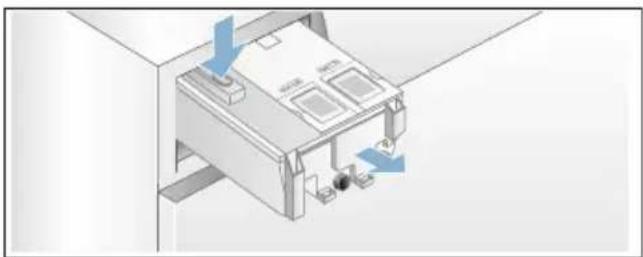
d) Carefully remove the drawer cover.

Caution!
Risk of damage to the detergent drawer.
The detergent drawer contains electrical components. These may become damaged if they come into contact with water.
- Do not clean the cover in the dishwasher and do not immerse it in water.

- Protect the rear drawer connector against water, detergent or fabric-softener residue; if necessary, clean the outer surfaces with a soft, damp cloth. Dry before putting back in.
e) Clean the drawer and the cover with a soft, damp cloth or a hand shower. Also clean the inner surfaces with a soft, damp cloth.

f) Dry the drawer and the cover and put them back together.
g) Push the drawer handle back in from above until you feel it click in place.
h) Clean the inside of the detergent-drawer housing. i) Push the detergent drawer in completely.
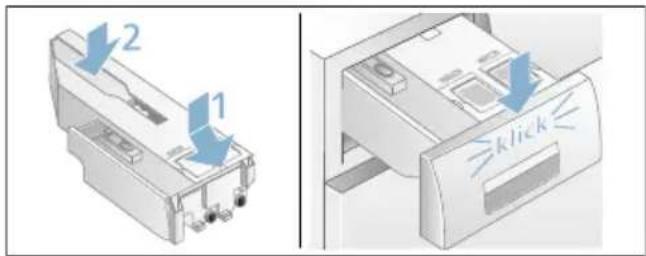
The drain pump is blocked, emergency draining
Warning
Risk of scalding!
When you wash at high temperatures, the water gets very hot. If you come into contact with the hot water, you may be scalded.
Allow the detergent solution to cool down.
- Turn off the water tap so that no more water can flow in and has to be drained via the drain pump.
- Switch off the appliance. Pull out the mains plug.
- Open and remove the service flap.

- Take the auxiliary drain hose out of the holder.
Remove the locking cap and drain off the water into a suitable container.
Replace the locking cap and place the drain hose back in the holder.

- Carefully unscrew the pump cover; remaining water may leak out. Clean the interior, pump cover thread and pump housing. The impeller in the drain pump must be able to rotate. Refit and screw on the pump cover. The handle must be in a vertical position.

- Put the service flap back on, engage and close it.

Note: To prevent unused detergent from flowing straight into the drain during the next wash: Pour 1 litre of water into the left-hand compartment and start the programme Drain/Empty.
The drain hose at the siphon is blocked
- Switch off the appliance. Pull out the mains plug.
- Loosen the hose clamp. Carefully remove the drain hose; residual water may leak out.
- Clean the drain hose and siphon connecting piece.

- Re-attach the drain hose and secure the connection point using the hose clamp.
Filter in the water supply blocked
- Release water pressure in the supply hose:
a) Turn off the tap. b) Select any programme (except Rinse/Spin/Drain/Empty). c) Start the programme and leave it to run for approx. 40 seconds. d) Switch off the appliance. e) Pull out the mains plug.
- Clean the filters:
a) Disconnect the hose from the tap. Clean the filter with a small brush.
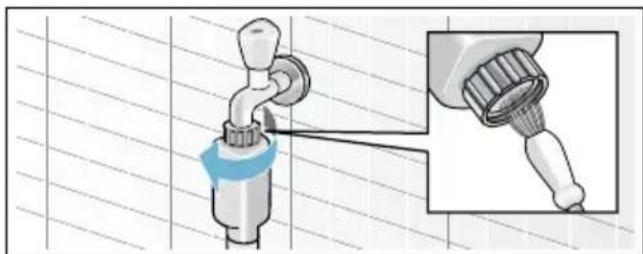
b) For standard and Aqua-Secure models, clean the filter on the rear of the appliance: Disconnect the hose from the rear of the appliance. Use pliers to remove the filter and then clean it.

c) Connect the hose and check for leaks.

Faults and what to do about them.
Emergency release
E.g. in the event of a power cut
The programme continues when the power supply is restored.
However, if the laundry has to be removed, the washing machine door can be opened as follows:

Warning
Risk of scalding!
When you are washing at high temperatures, there is a risk of scalding if you come into contact with hot water and laundry.
If possible, leave it to cool down first.

Warning
Risk of injury!
You may injure your hands if you reach into the drum while it is turning.
Do not reach into the drum when it is turning.
Wait until the drum has stopped turning.
Caution!
Water damage
Any escaping water may cause water damage.
Do not open the door if water can be seen through the glass.
- Switch off the appliance. Pull out the mains plug.
- Drain the water. → Page 27
- Pull the emergency release downwards with a tool and release. The door can then be opened.

Information on the display panel
| Display Cause/remedy | |
| Off | The door is locked, at the end of the programme or when paused, if laundry can be added. |
| lights up■During the programme. Door locked.■Paused: Temperature too high. Wait until the temperature drops.■Paused: Spin speed too high. Wait until the drum comes to a standstill.■Paused: Water level too high. It is not possible to add laundry. Touch ▷□□ to continue the programme. | |
| flashes | ■ Slow: The door cannot currently be locked or unlocked. Waiting time required.■ Fast: Close the door because water can flow out from the laundry loads. |
| ▶□□ Off At the end of the programme, while the door is open | |
| ▶□□ lights up After the start of the programme | |
| ▶□□ flashes Before the programme starts, paused | |
| i-DOS adjustment value, e.g.∞ flashes | Minimum filling level detected in the corresponding dispenser, top up. → Page 21 |
| ↔ lights up Detergent drawer has been pulled out. | |
| ↔ lights up Water pressure too low, may increase the programme duration. | |
| ↔ flashes No water supply:■ Turn the tap on fully,■ Supply hose kinked/trapped,■ If required, clean the filter. → Page 28 | |
| ≈ 3 sec lights up | The childproof lock is activated - deactivate it. → Page 18 |
| ≈ 3 sec flashes | Childproof lock activated, programme selector turned or a control panel has been touched. |
| ∞ flashes | Run the Drum Clean 90 °C programme or a 60 °C programme to clean and care for the drum and the outer tub.Notes■ Run the programme without laundry.■ Use washing powder or a detergent containing bleach. To prevent foaming, only use half the amount of detergent recommended by the detergent manufacturer. Do not use detergents designed for woollens or delicates.■ Switching the information signal on/off |
| ∞ lights up | Too much foam has been detected and an additional wash cycle has been activated. Add less detergent to the next washing cycle with the same load. |
| E:10 alternating with -00,-10 or -20 | Error in the i-DOS system. The i-DOS function is automatically deactivated.The appliance can be used as normal with manual dosing.To repair the i-DOS system, please call after-sales service. |
| E:60 alternating with - 2b and End | At the end of the programme.Not an appliance fault – the unbalanced load detection system has interrupted the spin cycle because the laundry is unevenly distributed.Distribute small and large items of washing in the drum. If required, spin the laundry once more. |
| E:35 alternating with - 10 | There is water in the base plate, the appliance is leaking. Turn off the tap. Call the after-sales service. → Page 32 |
| E:36 alternating with - 10 | ■ The drain pump is blocked. Clean the drain pump. → Page 27■ The drain hose/drain pipe is blocked. Clean the drain hose at the siphon. → Page 27 |
| Other displays | Switch off the appliance, wait for five seconds and then switch it on again. If the display appears again, call the after-sales service. → Page 32 |
Faults and what to do about them.
| Faults Cause/remedy | |
| Water is running out. ■ Attach the drain hose correctly or replace it.■ Tighten the threaded joint on the inlet hose. | |
| Water not flowing in. Detergent is not being dispensed. | ■ Programme does not start?■ Is the tap turned on?■ Could the filter be clogged? Clean the filter.→ Page 28■ Is the inlet hose kinked or trapped? |
| The dispenser is empty and the fill level indicator is not flashing. | ■ Is the drawer cover/connector dirty? Clean the detergent drawer.→ Page 25■ Has the detergent drawer been pushed in correctly? → Page 21 |
| The wrong detergent/fabric softener has been poured into the dispenser(s). | Dispenser(s):4. Empty and clean. → Page 255. Refill. |
| Detergent/fabric softener has congealed in the dispensers. | Clean and refill the dispensers. |
| The door cannot be opened. | ■ The safety function is activated. Stop programme? → Page 19■ Can the door only be opened by the emergency release? → Page 28 |
| Programme does not start. | ■ Programme starts or Finished in-time selected?■ Is the door closed?■ Is the childproof lock activated? Deactivate. → Page 18■ lights up. the detergent drawer has not been pushed in completely.Push the detergent drawer in correctly. |
| The drum briefly jerks or judders after the programme has started. | Not a fault – the internal motor test may cause the drum to jerk or judder briefly when the wash programme starts. |
| The water is not draining. | Clean the drain pump. → Page 27Clean the drain pipe and/or the drain hose. |
| Water is not visible in the drum. | Not a fault – the water is below the visible area. |
| The spin result is not satisfactory.Laundry wet/too damp. | Not a fault – the unbalanced load detection system has interrupted the spin cycle because the laundry is unevenly distributed.Distribute small and large items of washing in the drum.Easy-Iron selected? → Page 15Is the selected speed too low? |
| The spin cycle runs several times. | Not a fault – the unbalanced load detection system is adjusting an imbalance. |
| The programme is taking longer than usual. | Not a fault – the unbalanced load detection system is adjusting an imbalance by repeatedly distributing the laundry.Not a fault – the foam detection is system active – a rinse cycle has been switched on. |
| The length of the programme changes during the wash cycle. | Not a fault – the programme sequence is optimised for the specific washing process. This may change the length of the programme shown on the display panel. |
| Residual water in the left-hand compartment for the care product. | Not a fault – the effectiveness of the care product is not affected. |
| Odours in the washing machine. | Run theDrum Clean or Cottons 90 °Cprogramme without laundry.Add washing powder or a detergent containing bleach.Note:To prevent foaming, only use half the amount of detergent recommended by the detergent manufacturer. Do not use detergents designed for woollens or delicates. |
| The 📋 display lights up in the touch display. Foam may also be leaking from the detergent drawer. | Have you used too much detergent?Mix one tablespoon of fabric softener with 1/2 litre of water and pour it into the left-hand compartment (not suitable for outdoor clothing, sportswear or items made with down).Use less detergent in the next washing cycle. |
| Repeated, intensive foaming. | Check your basic dosage and dosage strength settings.If required, use a different liquid detergent. |
| Detergent/fabric softener drips off the seal and collects on the door or in the seal fold. | There is too much detergent/fabric softener in the dispensers. Do not fill above themax. mark in the dispensers. |
| Loud noises, vibrations and machine “movement” during the spin cycle. | Appliance aligned? Align the appliance. → Page 38Are the appliance feet secured? Secure the appliance's feet. → Page 38Have the transport braces been removed? Removing the transportation bolts. → Page 35 |
Faults Cause/remedy
| The touch display does not work while the appliance is running. | Power failure?Have the fuses blown? Switch on/replace the fuses.If the fault occurs repeatedly, call the after-sales service. |
| There is detergent residue on the laundry. | Some phosphate-free detergents contain water-insoluble residue.SelectRinseor brush the laundry after washing. |
| When the appliance is paused, ◇ flashes and lights up. | The water level is too high. It is not possible to add laundry. Close the door immediately, if necessary.Touch ◇ to continue the programme. |
| ◆ flashes when the appliance is paused and is off. | The door is unlocked. It is possible to add laundry. |
If you cannot rectify a fault yourself (after switching the machine off and on again) or a repair is required:
■ Switch off the appliance and pull out the mains plug. ■ Turn off the tap and call the after-sales service.

After-sales service
If you cannot rectify a fault yourself, contact customer services. → Cover page
We will always find an appropriate solution in order to avoid unnecessary visits by engineers.
Please give customer services the product number (E no.) and the production number (FD) of the appliance.
E-Nr. FD
Contact us for assistance. By doing so, you will ensure that the repairs are carried out by trained service personnel using genuine spare parts.
E no. Product number
FD Production number
You can find this information
*depending on the model:
On the inside of the door*/in the opened service flap* and on the rear of the appliance.
Trust the expertise of the manufacturer.

Technical data
Dimensions:
850 × 600 × 590 mm
(height x width x depth)
Weight:
70 - 85 kg (depending on model)
Mains connection:
Mains voltage 220 - 240 V, 50 Hz
Nominal current 10 A
Nominal power 1900 - 2300 W
Water pressure:
100 - 1000 kPa (1 - 10 bar)
Power consumption when switched off:
0.12 W
Power consumption when left on:
0.43 W

Positioning and connecting
Included with the appliance
Note: Check the machine for transport damage. Never use a damaged machine. If you have a complaint, please contact the retailer from whom you purchased the appliance, or our after-sales service.

1 Mains cable 2 Bag:
■ Installation and operating instructions ■ After-sales service location directory* Warranty* ■ Cover caps for openings left after removing the transport locks Wrench*
3 Water supply hose on Aqua-Stop models 4 Water drain hose 5 Elbow for securing the water drain hose*
6 Water supply hose on standard/Aqua-Secure models
*depending on the model
In addition, a hose clamp (24 - 40 mm diameter, available from specialist dealers) is required to connect the water drain hose to a siphon.
Useful tools
■ Spirit level for levelling ■ Wrench with:
- WAF 13 for loosening the transport locks, and
- WAF 17 for aligning the appliance feet
Safety instructions

Warning
Risk of injury!
■ The washing machine is very heavy. Be careful when lifting/transporting the washing machine. - When the washing machine is lifted by its protruding parts (e.g. the washing machine door), the components may break off and cause injuries. Do not lift the washing machine by protruding parts. If the hose and mains cables are not routed properly, there is a risk of tripping and injury. Lay hoses and cables in such a way that there is no risk of tripping.
Caution!
Damage to the appliance
Frozen hoses may rip/burst. Do not install the washing machine in areas exposed to frost or outdoors.
Caution!
Water damage
The connection points for the water supply hose and water drain hose are under high water pressure. To prevent
leaks and water damage, you must follow the instructions in this section.
Notes
In addition to the safety information listed here, the local water and electricity supplier may have special requirements. ■ If in doubt, have the appliance connected by a specialist.
Installation surface
Note: The washing machine must be stable so that it does not move around.
■ The installation surface must be firm and level. ■ Soft floors/floor coverings are not suitable.
Installation on a base or a wooden joist floor
Caution!
Damage to the appliance
The washing machine may "wander" and tip/topple from the base when spinning. The feet of the appliance must be secured with holding brackets. Order no. WMZ 2200, WX 9756, Z 7080X0
Note: On wooden joist floors, install the washing machine:
In a corner, if possible, on a water-resistant wooden board (min. 30 mm thick) which is screwed tightly to the floor.
Installation on a platform with drawer
Platform order no.: WMZ 20490, WZ 20490, WZ 20510, WZ 20520
Installing the appliance in a kitchenette

Warning
Danger of death!
There is a risk of electric shock if you touch live components.
Do not remove the appliance covering plate.
Notes
■ Recess width of 60 cm required. ■ Only install the washing machine underneath a continuous worktop that is securely connected to adjacent cabinets.
Removing the transport locks
Caution!
Damage to the appliance
■ The machine is secured for transportation using transport locks. If the transport locks are not removed, the drum, for example, may become damaged when the machine is operated. Before using the appliance for the first time, make sure that you completely remove all four transport locks. Keep the locks in a safe place.
■ To prevent transport damage from occurring if the appliance is moved at a later date, you must refit the transport locks before transporting the appliance.
Note: Keep the screws and sleeves in a safe place.

- Take the hoses out of the holders.

- Unscrew and remove all four transport brace screws. Remove the sleeves. To do this, remove the mains cable from the holders.

- Fit the covers. Lock the covers firmly in place by applying pressure to the snap-in hooks.

Hose and cable lengths
■ Left-hand connection

■ Right-hand connection

Tip: The following are available from specialist dealers/the after-sales service:
■ An extension for Aqua-Stop or cold water supply hose (approx. 2.50 m); order no. WMZ2380, WZ10130, CZ11350, Z7070X0 ■ A longer supply hose (approx. 2.20 m) for standard model
Water inlet
Warning
Danger of death!
There is a risk of electric shock if you touch live components.
Do not immerse the Aqua-Stop safety valve in water (it contains an electric valve).
Observe the following when connecting the machine:
Notes
■ Only operate the washing machine using cold mains water. - Do not connect the machine to the mixer tap of an unpressurised hot-water boiler. - Do not use a used supply hose. Only use the supply hose supplied or one that was purchased from an authorised specialist retailer. - Do not bend, squash, modify or cut through the water supply hose (otherwise its strength is no longer guaranteed). ■ Only tighten the screw connections by hand. If the screw connections are tightened too much with a tool (pliers), the thread may be damaged.
Optimum water pressure in the supply network
At least 100 kPa (1 bar)
Maximum 1000 kPa (10 bar)
When the tap is open, the water flow is at least 8 l/min.
If the water pressure is higher than this, a pressure-reducing valve must be installed.
Connection
Connect the water supply hose to the water tap (3/4" = 26.4 mm) and to the appliance (not necessary for Aqua-Stop models as this is permanently installed):
■ Model: Standard

Note: Open the water tap carefully, checking the leak tightness of the connection points. The screw connection is under mains water pressure.
Water outlet
Warning
Risk of scalding!
When washing at high temperatures, there is a risk of scalding if you come into contact with hot detergent solution (e.g. when draining hot detergent solution into a washbasin).
Do not reach into the hot detergent solution.
Caution!
Water damage
When water is being pumped away, the outlet hose is under water pressure and may slip out of the wash basin or connection point.
Secure the outlet hose so that it cannot slip out.
Caution!
Damage to the appliance/fabrics
If the end of the outlet hose is immersed in the drained water, water may be
sucked back into the appliance and may damage the appliance/fabrics. Make sure that:
■ The plug does not block drainage from the wash basin. ■ The end of the drain hose is not immersed in the drained water. ■ The water drains away quickly enough.
Note: Do not kink the water drain hose or stretch it lengthways.
Connection
- Drainage into a siphon
The connection point must be secured using a hose clamp with a diameter of 24–40 mm (available from specialist dealers).

- Drainage into a wash basin
Secure the outlet hose so that it cannot slip out. Elbow available from after-sales service: Individual part number 00655300
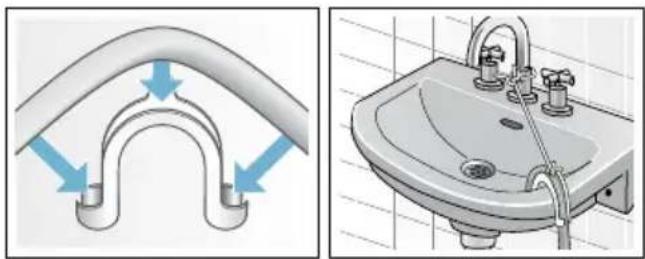
■ Drainage into a plastic pipe with rubber sleeve or into a gully

Levelling
Level the appliance using a spirit level. Incorrect levelling may result in intense noise, vibrations and "wandering".
- Loosen the lock nuts using a wrench, by turning it in a clockwise direction.
- Check the alignment of the washing machine with a spirit level, and adjust it if necessary. Change the height by turning the appliance feet. All four appliance feet must stand firmly on the ground.
- Tighten the lock nut against the housing. In doing so, hold the foot tight and do not adjust its height. The lock nuts on all four appliance feet must be screwed tightly against the housing.

Electrical connection
Warning
Danger of death!
There is a risk of electric shock if you touch live components.
■ Never touch or hold the mains plug with wet hands.
■ Only pull out the mains cable by the plug and never by the cable, as this could damage it. ■ Never unplug the mains plug during operation.
Observe the following information and ensure that:
Notes
■ The mains voltage and the voltage indicated on the washing machine (rating plate) are the same. The connected load and fuse required are specified on the rating plate. ■ The washing machine is only connected to an alternating current via a properly installed earthed socket. ■ The mains plug fits the socket. ■ The cable cross-section is adequate. ■ The earthing system is properly installed. ■ The mains cable is only replaced by a qualified electrician (if this is necessary). Replacement mains cables are available from the after-sales service. ■ No multiple plugs/couplings or extension cables are used. If an earth-leakage circuit breaker is used, only a type which displays this symbol is used: ☐. Only this symbol guarantees compliance with the currently applicable regulations. The mains plug must be freely accessible at all times. If this is not possible, in order to comply with the relevant safety regulations, a switch (2-pole switch-off) must be built into the permanent installation in accordance with electrical installation regulations. ■ The mains cable is not bent, squashed, modified, cut through, or in contact with heat sources.
Before washing for the first time
The washing machine was thoroughly tested before leaving the factory. To remove any water that may be left over from the test, run the first wash cycle without any laundry.
Notes
■ The washing machine must be correctly installed and connected. (from → Page 33)
■ Never use a damaged machine. Inform the after-sales service.
Preparatory work:
- Check the machine.
- Fill the dispenser ⚙️ and ⚙️. → Page 20
- Remove the protective film from the control panel.
- Plug into the mains.
- Turn on the tap.
Run the programme without laundry.
- Switch on the appliance.
- Close the door (do not load any laundry).
- Set the Drum Clean 90 °C programme.
- Open the detergent drawer.
- Pour approx. 1 litre of water into the left-hand compartment.
- Pour standard detergent into the left-hand compartment.
Note: To prevent foaming, only use half of the amount of detergent recommended by the detergent manufacturer. Do not use detergents designed for woollens or delicates.
- Close the detergent drawer.
- Start the programme.
- Switch off the appliance at the end of the programme.
Your washing machine is now ready to use.
Transportation
E.g. when moving house
Caution!
Risk of damage to the appliance caused by detergent/fabric softener leaking from the dispensers.
Leaking detergent/fabric softener can prevent the appliance from working correctly, e.g. due to damage to the electronics.
Empty the dispensers before transporting the appliance.
Preparatory work:
- Turn off the tap.
- Reduce the water pressure in the supply hose: → Page 28; cleaning and maintenance – filter in the water supply clogged
- Disconnect the washing machine from the mains.
- Drain any residual water: → Page 27; cleaning and maintenance – drain pump blocked, emergency draining
- Remove the hoses.
- Empty the dispensers. → Page 25
Fitting the transportation securing means:
- Remove the covers and keep them in a safe place. If required, use a screwdriver.
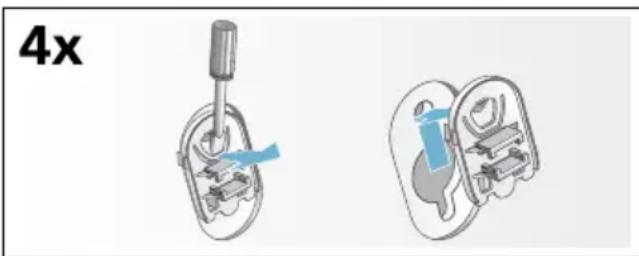
- Insert all four sleeves. Clip the mains cable securely in the holders. Insert the transportation securing bolts and tighten them with a wrench (WAF 13).
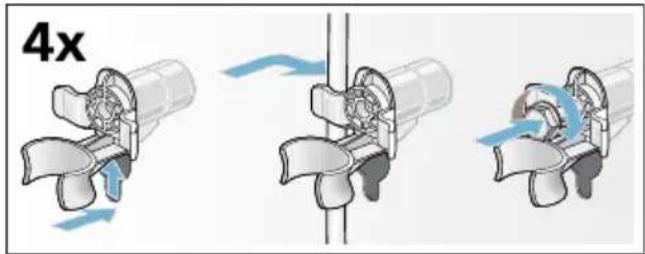
Before switching on the appliance again:
Notes
■ The transport braces must be removed. ■ To prevent unused detergent from flowing straight into the drain during the next wash: Pour approx. 1 litre of water into the left-hand compartment II, select programme Drain/Empty and start.
Aqua Stop Aqua-Stop warranty
Only for appliances with Aqua-Stop
In addition to warranty claims against the vendor based on the purchase agreement and to our appliance warranty, we will provide compensation under the following conditions:
- If water damage is caused due to a fault in our Aqua-Stop system, we will compensate domestic customers for the damage caused.
- The liability guarantee is valid for the service life of the appliance.
- It is a prerequisite of all warranty claims that the appliance with Aqua-Stop must have been installed and connected correctly in accordance with our instructions; this also includes a correctly fitted Aqua-Stop extension (genuine accessories). Our warranty does not cover defective feed lines or fittings leading to the Aqua-Stop connection at the tap.
- Appliances with Aqua-Stop do not need to be supervised during operation, nor secured afterwards by turning off the tap. The tap only needs to be turned off if you are away from home for a long period, e.g. for several weeks' holiday.
Repair order and advice in the event of faults
GB 0344 892 8989 Calls charged at local or mobile rate.
IE 01450 2655 0.03 € per minute at peak. Off peak 0.0088 € per minute.
You can find the contact information for all countries in the attached after-sales service directory:


REGISTER YOUR PRODUCT ONLINE NEFF-HOME.COM


- YOUR NEW WASHING MACHINE
- DISPLAY RULES
- ⚠ WARNING
- CAUTION
- NOTE/TIP
- A) B) C)
- CONTENTS
- FAULTS AND WHAT TO DO ABOUT THEM
- AFTER-SALES SERVICE
- TECHNICAL DATA
- POSITIONING AND CONNECTING
- AQUA-STOP WARRANTY
- INTENDED USE
- SAFETY INSTRUCTIONS
- ELECTRICAL SAFETY
- WARNING
- DANGER OF DEATH
- RISK OF INJURY
- RISK OF SCALDING
- SAFETY FOR CHILDREN
- RISK OF SUFFOCATION
- RISK OF POISONING
- EYE/SKIN IRRITATION
- ENVIRONMENTAL PROTECTION
- PACKAGING/USED APPLIANCE
- TIPS ON ECONOMICAL USE
- FAMILIARISING YOURSELF WITH YOUR APPLIANCE
- WASHING MACHINE
- CONTROLS
- MAIN SWITCH
- PROGRAMME SELECTOR
- TOUCH DISPLAY
- LAUNDRY
- PREPARE THE LAUNDRY
- DAMAGE TO THE APPLIANCE/FABRICS
- SORTING LAUNDRY
- STARCHING
- DYEING/BLEACHING
- SOAKING
- NOTES
- DETERGENT
- CORRECT SELECTION OF DETERGENT
- SAVING ENERGY AND DETERGENT
- SAVING SOILING/NOTE
- LIGHT
- NORMAL
- HEAVY
- PROGRAMME DEFAULT SETTINGS
- TEMPERATURE
- SPIN SPEED
- READY IN TIME
- I-DOS SETTINGS
- I-DOS ◇ FOR DETERGENT
- ADJUSTMENT VALUES FOR THE DOSAGE QUANTITY
- I-DOS ✿ FOR FABRIC SOFTENER
- ADJUSTMENT VALUES FOR DOSAGE QUANTITIES
- MEMORY PROGRAMME
- TO STORE
- P+ ADDITIONAL PROGRAMME SETTINGS
- SPEEDPERFECT
- SPEED
- ECOPERFECT
- ECO
- EASY-IRON
- WATER&RINSE
- ADJUSTMENT VALUES
- PREWASH
- OPERATING THE APPLIANCE
- PREPARING THE WASHING MACHINE
- SWITCHING ON THE APPLIANCE/ SELECTING A PROGRAMME
- YOU CAN
- CHANGE THE PROGRAMME DEFAULT SETTINGS
- SELECT ADDITIONAL PROGRAMME SETTINGS
- PLACING LAUNDRY INTO THE DRUM
- MEASURE AND ADD DETERGENT AND CARE PRODUCTS
- START THE PROGRAMME
- DURING THE PROGRAMME, THE CURRENT PROGRAMME INFORMATION IS DISPLAYED
- NOTE: FOAM DETECTION
- CHILDLOCK / OPERATION LOCK
- ADDING LAUNDRY
- CHANGING THE PROGRAMME
- CANCEL THE PROGRAMME
- PROGRAMME END
- REMOVING LAUNDRY/SWITCHING OFF THE APPLIANCE
- I-DOS
- INTELLIGENT DOSING SYSTEM
- INTELLIGENT DOSING SYSTEM IN THE DETERGENT DRAWER
- I-DOS INTELLIGENT DOSING SYSTEM
- INITIAL USE/FILLING THE DISPENSERS
- FILLING THE DISPENSERS
- EVERYDAY USE
- DISPLAYS
- (DE)SELECTING INTELLIGENT DOSAGE AND ADJUSTING THE DOSAGE STRENGTH
- TOPPING UP THE DETERGENT/FABRIC SOFTENER
- BASIC SETTINGS
- THE BASIC DOSAGES ARE
- MY WATER HARDNESS
- CHANGING THE BASIC DOSAGES
- MANUAL DOSAGE
- DAMAGE TO THE APPLIANCE
- DOSING AND ADDING DETERGENT
- APPLIANCE SETTINGS
- ACTIVATING THE SETTING MODE
- CHANGING THE SIGNAL VOLUME
- CHANGING THE BRIGHTNESS OF THE TOUCH DISPLAY
- SELECT/DESELECT THE MEMORY FUNCTION FOR DRUM CARE
- EXITING SETTING MODE
- TO EXIT AND SAVE THE SETTINGS
- SENSORS
- AUTOMATIC LOAD SENSING
- UNBALANCED LOAD DETECTION SYSTEM
- VOLTCHECK
- CLEANING AND MAINTENANCE
- PREVENT DETERGENT RESIDUE FROM BUILDING UP AND ODOURS FROM FORMING BY FOLLOWING THESE INSTRUCTIONS
- MACHINE HOUSING/CONTROL PANEL
- DRUM
- DESCALING
- I-DOS DETERGENT DRAW AND ITS HOUSING
- EMPTYING THE DISPENSERS
- CLEANING THE DISPENSERS/DETERGENT DRAWER
- THE DRAIN PUMP IS BLOCKED, EMERGENCY DRAINING
- THE DRAIN HOSE AT THE SIPHON IS BLOCKED
- FILTER IN THE WATER SUPPLY BLOCKED
- EMERGENCY RELEASE
- WATER DAMAGE
- INFORMATION ON THE DISPLAY PANEL
- DIMENSIONS
- WEIGHT
- MAINS CONNECTION
- WATER PRESSURE
- POWER CONSUMPTION WHEN SWITCHED OFF
- POWER CONSUMPTION WHEN LEFT ON
- INCLUDED WITH THE APPLIANCE
- USEFUL TOOLS
- INSTALLATION SURFACE
- INSTALLATION ON A BASE OR A WOODEN JOIST FLOOR
- INSTALLATION ON A PLATFORM WITH DRAWER
- INSTALLING THE APPLIANCE IN A KITCHENETTE
- REMOVING THE TRANSPORT LOCKS
- HOSE AND CABLE LENGTHS
- WATER INLET
- OPTIMUM WATER PRESSURE IN THE SUPPLY NETWORK
- CONNECTION
- WATER OUTLET
- DRAINAGE INTO A SIPHON
- DRAINAGE INTO A WASH BASIN
- LEVELLING
- ELECTRICAL CONNECTION
- BEFORE WASHING FOR THE FIRST TIME
- PREPARATORY WORK
- RUN THE PROGRAMME WITHOUT LAUNDRY
- TRANSPORTATION
- FITTING THE TRANSPORTATION SECURING MEANS
- BEFORE SWITCHING ON THE APPLIANCE AGAIN
- AQUA STOP AQUA-STOP WARRANTY
- ONLY FOR APPLIANCES WITH AQUA-STOP
Brand : NEFF
Model : W746IX0GB
Category : Washing machine