Panduit FXTHL5NLDSNM011 - Câbles pour ordinateurs et périphériques

FXTHL5NLDSNM011 - Câbles pour ordinateurs et périphériques Panduit - Free user manual and instructions

Find the device manual for free FXTHL5NLDSNM011 Panduit in PDF.

📄 2 pages English EN Download 💬 AI Question 10 questions ⚙️ Specs
Notice Panduit FXTHL5NLDSNM011 - page 1
Pick your language and provide your email: we'll send you a specifically translated version.
Product Type Fiber Optic Patch Cable
Model FXTHL5NLDSNM011
Brand Panduit
Fiber Mode Single-Mode (9/125 µm)
Connector Type LC Duplex
Cable Length 5 meters (16.4 feet)
Insertion Loss ≤ 0.3 dB (typical)
Return Loss ≥ 50 dB
Cable Jacket LSZH (Low Smoke Zero Halogen) or PVC
Minimum Bend Radius 10 mm (dynamic) / 20 mm (static)
Operating Temperature -20°C to +70°C (-4°F to 158°F)
Storage Temperature -40°C to +85°C (-40°F to 185°F)
Connector Durability ≥ 500 mating cycles
Tensile Strength (install) ≤ 100 N (22.5 lbf)
Compliance RoHS, TIA/EIA-568-C.3
Application Data center, LAN, telecommunication networks
Maintenance Clean connectors with lint-free wipes and isopropyl alcohol; inspect with fiber microscope.
Safety Do not bend cable beyond minimum bend radius; avoid tension exceeding tensile strength.
Repairability Field repairable with proper splicing tools and connectors.
Spare Parts Replacement connectors, dust caps, polishing pucks available.

Frequently Asked Questions - FXTHL5NLDSNM011 Panduit

What is the difference between single-mode and multimode fiber?
Single-mode fiber (SMF) has a small core (9 µm) and transmits light directly down the fiber, allowing longer distances (up to 40 km). Multimode fiber (MMF) has a larger core (50 or 62.5 µm) and supports multiple light paths, suitable for shorter distances (up to 550 m). The FXTHL5NLDSNM011 is single-mode.
How do I clean the connectors on this cable?
Use lint-free wipes moistened with 99% isopropyl alcohol. Gently wipe the end face of the connector in one direction. Alternatively, use a one-click cleaner. Always inspect with a fiber microscope after cleaning to ensure no residue.
What is the maximum length for this cable?
The FXTHL5NLDSNM011 is typically 5 meters long. For longer distances, use single-mode cable with appropriate transceivers. The cable can support runs up to 10 km with 10G optics, and even longer with lower speed optics.
Can I use this cable with 10 Gigabit Ethernet?
Yes, single-mode fiber like this cable supports 10 GbE over distances up to 10 km (depending on the transceiver). It also supports higher speeds like 40G/100G with parallel optics, but may require breakout cables or different connectors.
What does the model number FXTHL5NLDSNM011 mean?
Panduit's model numbers indicate specific characteristics: FXTHL likely refers to fiber (FX) with a TH (Tight buffered?) HL (??), 5NLDSNM011 indicates length (5 meters?) and connector type (LC duplex?). For exact details, consult Panduit's documentation.
Is this cable compatible with SC connectors?
No, this cable has LC duplex connectors. To connect to SC ports, use a hybrid patch cord or adapter (LC-to-SC). Ensure the fiber type matches (single-mode to single-mode).
What is the minimum bend radius for this cable?
The dynamic minimum bend radius (during installation) is 10 mm, and the static bend radius (when installed) is 20 mm. Exceeding these can cause micro-bending and increased attenuation.
How do I store the cable when not in use?
Keep the cable coiled loosely (avoid tight bends) and protect connectors with dust caps. Store in a clean, dry environment between -40°C and +85°C. Avoid placing heavy objects on the cable.
Can I cut and terminate this cable myself?
Yes, it is field terminable. You need appropriate tools: fiber stripper, cleaver, and splice tool (if fusion splicing) or crimp tool for mechanical connectors. Ensure you have the correct connector type (LC) and follow factory polishing guidelines.
What safety precautions should I take when using fiber optic cables?
Always wear safety glasses to protect from fiber shards. Do not look directly into the fiber end when a light source is active; it can damage eyes. Dispose of cut fiber pieces properly. Keep connectors clean to avoid back reflection.

User questions about FXTHL5NLDSNM011 Panduit

0 question about this device. Answer the ones you know or ask your own.

Ask a new question about this device

The email remains private: it is only used to notify you if someone responds to your question.

No questions yet. Be the first to ask one.

Download the instructions for your Câbles pour ordinateurs et périphériques in PDF format for free! Find your manual FXTHL5NLDSNM011 - Panduit and take your electronic device back in hand. On this page are published all the documents necessary for the use of your device. FXTHL5NLDSNM011 by Panduit.

USER MANUAL FXTHL5NLDSNM011 Panduit

Cable Transition Usage

Tak-Ty Option

Slot features in the cable transition allows for the use of a Tak-Ty to either secure the cable harness to a rack feature, such as cable management fingers, or to more robustly secure multiple cable transitions that are interlocked together.
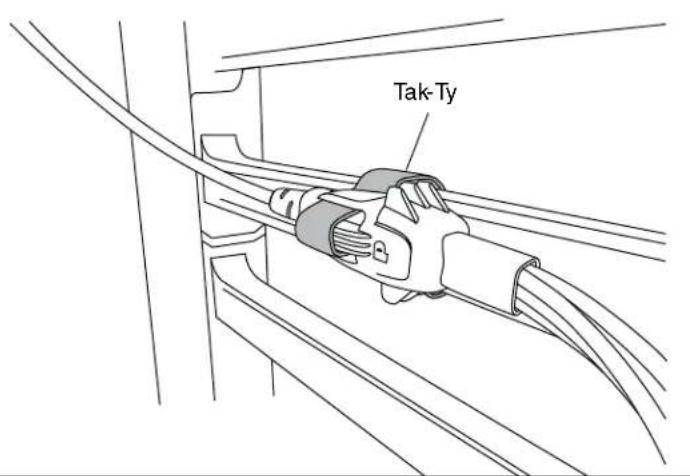
Tak-Ty

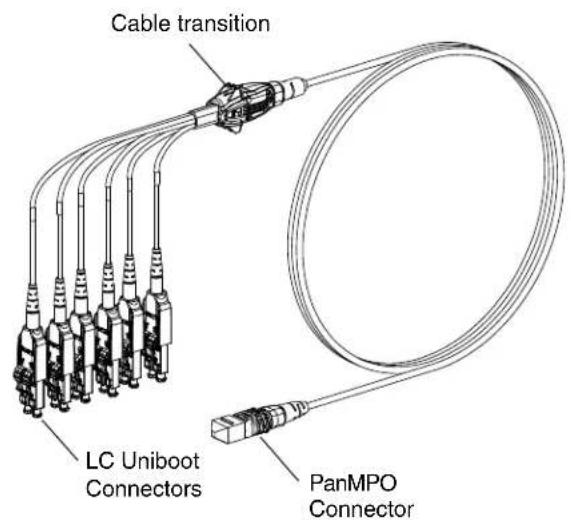
Cable transition LC Uniboot Connectors PanMPO Connector

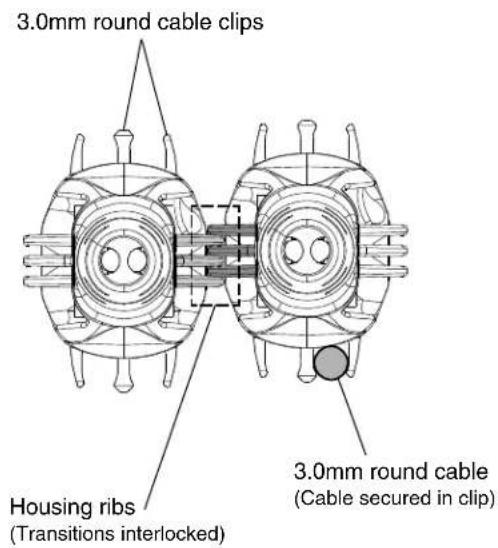
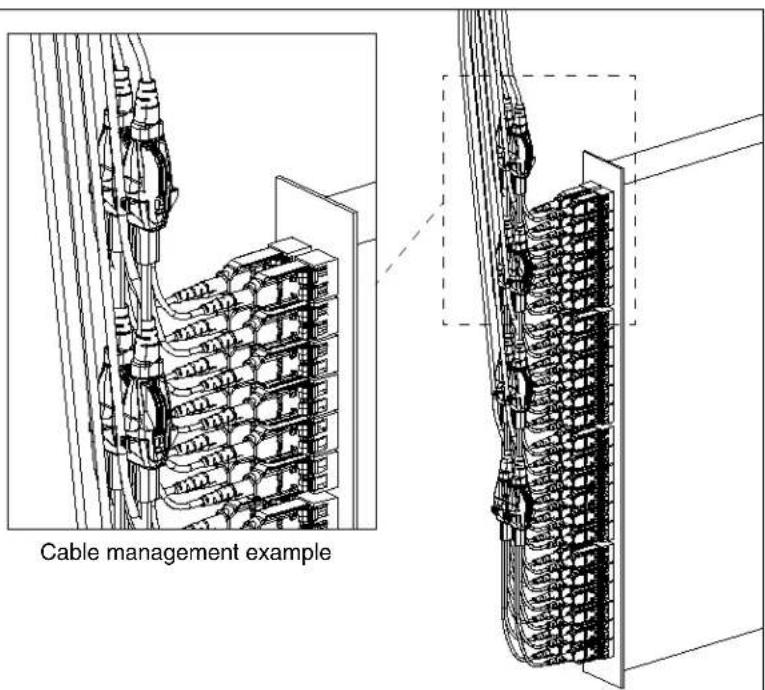
Cable Clips & Housing Ribs Option
3.0mm round cable clips Housing ribs (Transitions interlocked) 3.0mm round cable (Cable secured in clip)

Cable management example

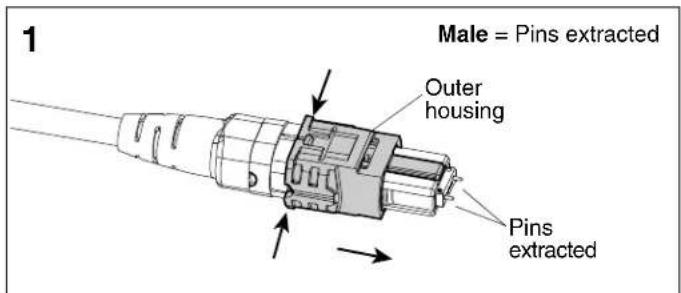
PanMPO Gender Changeover

Male = Pins extracted Outer housing Pins extracted

Squeeze both sides of the outer housing at the back end evenly until you hear an audible click. Pull off connector to remove.
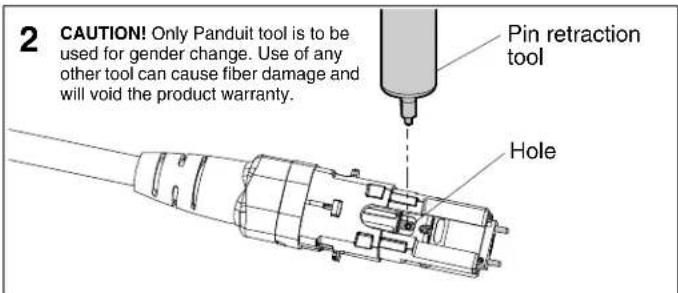
2 CAUTION! Only Panduit tool is to be used for gender change. Use of any other tool can cause fiber damage and will void the product warranty. Pin retraction tool Hole

Locate hole in the inner housing on the slotted side and position pin retraction tool over the hole.
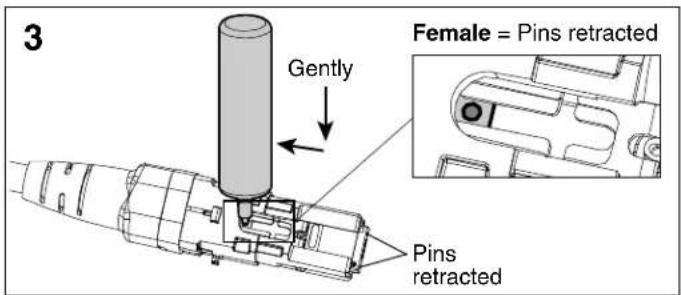
3 Gently Female = Pins retracted Pins retracted

Insert tool into hole, press down gently, and push backward to retract connector pins to the female state. Repeat process in opposite direction to extract pins for male state.
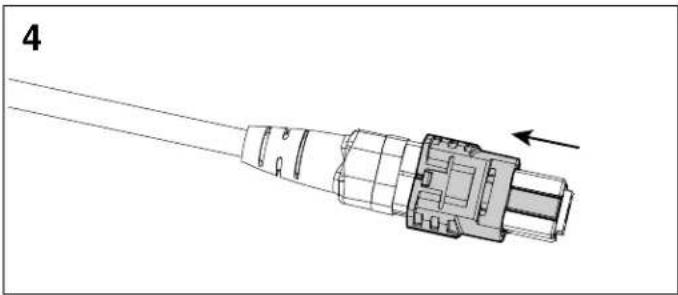
Panduit FXTHL5NLDSNM011 - PanMPO Gender Changeover - 4

natural_image Technical line drawing of a connector with an arrow indicating direction (no text or symbols present)

Re-install the outer housing. Ensure the key is in the proper orientation. See PanMPO polarity changeover instructions on page 2 of FS041* for more details.

LC Uniboot Polarity Changeover - Pair Flipping
Panduit FXTHL5NLDSNM011 - LC Uniboot Polarity Changeover - Pair Flipping - 1

natural_image 3D diagram of a mechanical component with labeled parts and directional arrows (no readable text or symbols)

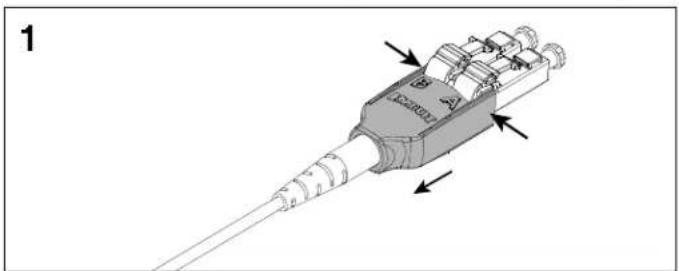
Squeeze both sides of the LC Uniboot cover evenly and pull back to disengage the tab on the opposite side.
Panduit FXTHL5NLDSNM011 - LC Uniboot Polarity Changeover - Pair Flipping - 2

natural_image Mechanical assembly diagram showing a component being inserted into a housing, with arrows indicating motion direction (no text or symbols present)

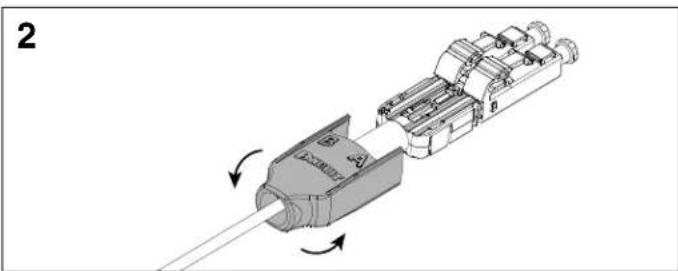
Slide the LC Uniboot cover back away from connectors and rotate 180°.
Panduit FXTHL5NLDSNM011 - LC Uniboot Polarity Changeover - Pair Flipping - 3

natural_image Mechanical assembly diagram showing a connector with internal components and directional arrows (no text or symbols)

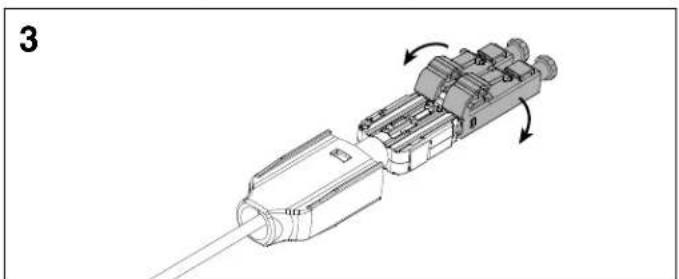
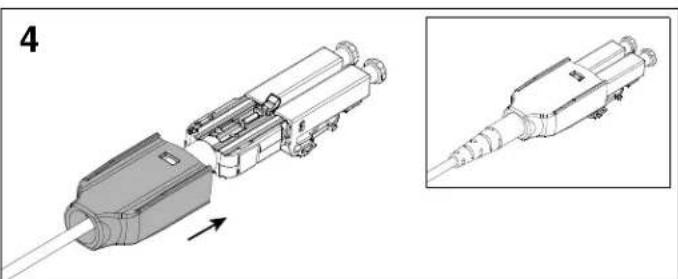
Rotate each LC connector downward 180°. Re-install the LC Uniboot cover until you hear an audible click.
Panduit FXTHL5NLDSNM011 - LC Uniboot Polarity Changeover - Pair Flipping - 4

natural_image Technical illustration of a mechanical connector assembly with an inset showing detailed detail (no text or symbols)

*Denotes instruction sheet revision letter.

For Instructions in Local Languages and Technical Support:

www.panduit.com/resources/install_maintain.asp

PANDUIT

www.panduit.com

E-mail:

Manual assistant
Powered by Anthropic
Waiting for your message
Product information

Brand : Panduit

Model : FXTHL5NLDSNM011

Category : Câbles pour ordinateurs et périphériques