
FXTHL6NLSSNM013 - Cables for Computers and Peripherals Panduit - Free user manual and instructions
Find the device manual for free FXTHL6NLSSNM013 Panduit in PDF.


| Product Type | Fiber Optic Patch Cable |
| Brand | Panduit |
| Model | FXTHL6NLSSNM013 |
| Category | Computer Cables & Peripherals |
| Length | 3 meters (9.8 feet) |
| Connector Type | LC Duplex to LC Duplex |
| Fiber Type | Multimode 50/125 µm |
| Jacket Material | LSZH (Low Smoke Zero Halogen) |
| Insertion Loss | ≤ 0.3 dB typical |
| Weight | Approximately 0.1 kg (0.22 lbs) |
| Operating Temperature | -20°C to 70°C (-4°F to 158°F) |
| Storage Temperature | -40°C to 85°C (-40°F to 185°F) |
| Bend Radius | ≥ 30 mm (dynamic), ≥ 15 mm (static) |
| Cleaning Method | Use lint-free wipes and isopropyl alcohol for connector ends |
| Maintenance | Keep connectors dust-capped when not in use |
| Safety | Do not bend sharply; avoid tension exceeding 1 kg (2.2 lbs) on cable |
| Repair | Non-repairable; replace if damaged |
| Compliance | RoHS, REACH, TIA/EIA-568 |
Frequently Asked Questions - FXTHL6NLSSNM013 Panduit
User questions about FXTHL6NLSSNM013 Panduit
0 question about this device. Answer the ones you know or ask your own.
Ask a new question about this device
Download the instructions for your Cables for Computers and Peripherals in PDF format for free! Find your manual FXTHL6NLSSNM013 - Panduit and take your electronic device back in hand. On this page are published all the documents necessary for the use of your device. FXTHL6NLSSNM013 by Panduit.
USER MANUAL FXTHL6NLSSNM013 Panduit
Cable Transition Usage
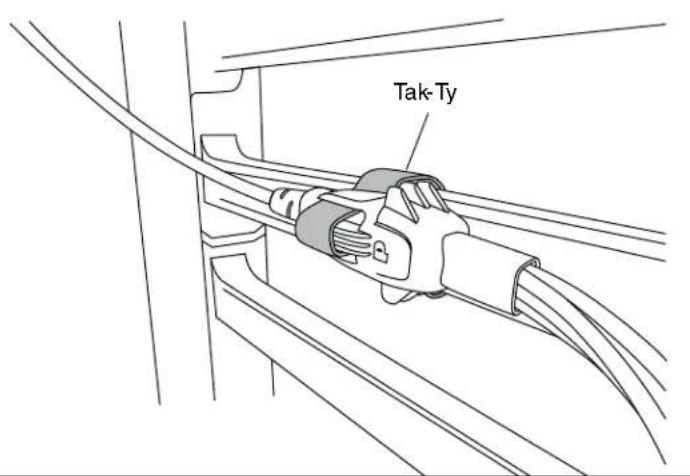
Tak-Ty Option
Slot features in the cable transition allows for the use of a Tak-Ty to either secure the cable harness to a rack feature, such as cable management fingers, or to more robustly secure multiple cable transitions that are interlocked together.

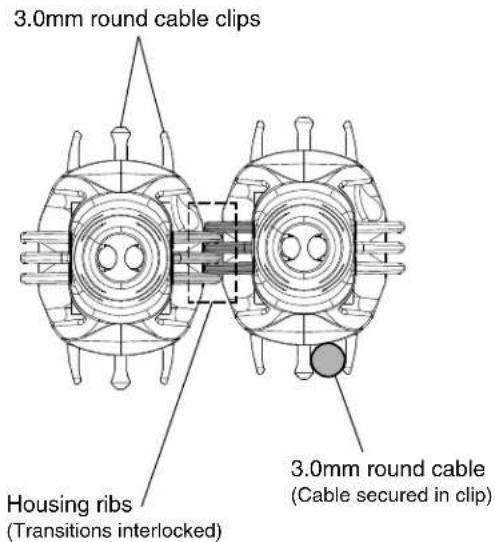
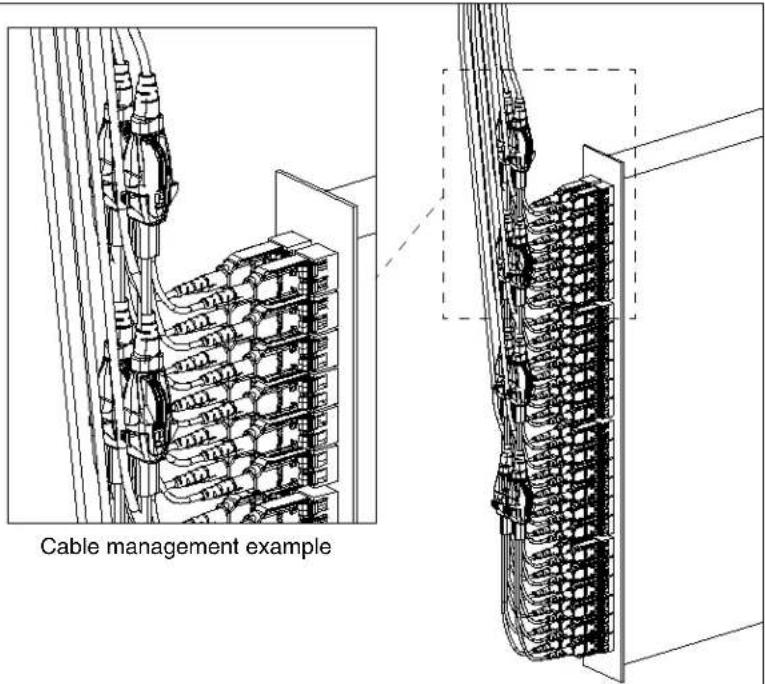
Cable Clips & Housing Ribs Option
PanMPO Gender Changeover

Squeeze both sides of the outer housing at the back end evenly until you hear an audible click. Pull off connector to remove.

Locate hole in the inner housing on the slotted side and position pin retraction tool over the hole.

Insert tool into hole, press down gently, and push backward to retract connector pins to the female state. Repeat process in opposite direction to extract pins for male state.

natural_image
Technical line drawing of a cable connector with an arrow indicating direction (no text or symbols present)Re-install the outer housing. Ensure the key is in the proper orientation. See PanMPO polarity changeover instructions on page 2 of FS041* for more details.
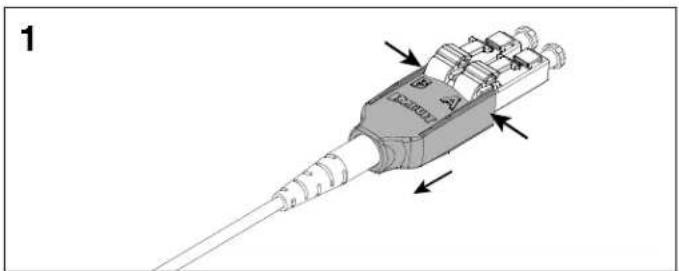
LC Uniboot Polarity Changeover - Pair Flipping
natural_image
3D diagram of a mechanical connector with threaded ends and internal components, no visible text or symbolsSqueeze both sides of the LC Uniboot cover evenly and pull back to disengage the tab on the opposite side.

natural_image
Mechanical assembly diagram showing a component being inserted into a housing, with arrows indicating motion direction (no text or symbols present)Slide the LC Uniboot cover back away from connectors and rotate 180°.

natural_image
Mechanical assembly diagram showing a connector with rotating parts and directional arrows (no text or symbols)Rotate each LC connector downward 180°. Re-install the LC Uniboot cover until you hear an audible click.

natural_image
Technical illustration of a mechanical connector assembly with an inset showing detailed detail (no text or symbols)*Denotes instruction sheet revision letter.
| For Instructions in Local Languages and Technical Support:www.panduit.com/resources/install_maintain.asp |  www.panduit.com www.panduit.com | E-mail:techsupport@panduit.comPhone:866-405-6654 |
Brand : Panduit
Model : FXTHL6NLSSNM013
Category : Cables for Computers and Peripherals