
CJ66UAWY - Câbles pour ordinateurs et périphériques Panduit - Free user manual and instructions
Find the device manual for free CJ66UAWY Panduit in PDF.


| Product Type | Category 6A UTP Patch Cable |
| Model | CJ66UAWY |
| Brand | Panduit |
| Cable Length | 3 ft (0.9 m) |
| Conductor Material | Bare Copper |
| Jacket Material | PVC (Polyvinyl Chloride) |
| Connector Type | RJ45 Male to RJ45 Male |
| Shielding | Unshielded Twisted Pair (UTP) |
| Color | White |
| Data Rate | Up to 10 Gbps |
| Frequency | 500 MHz |
| Operating Temperature | -20°C to +60°C |
| Weight | 0.06 lbs (25 g) |
| Compliance | TIA/EIA-568-C.2, ISO 11801 |
| Warranty | Limited Lifetime |
| Intended Use | Internal structured cabling for data centers and LAN |
| Installation | Plug and play, no tools required |
| Maintenance | Wipe with a dry cloth; avoid liquids |
| Safety | RoHS compliant, UL listed |
| Repairability | Non-repairable, replace if damaged |
Frequently Asked Questions - CJ66UAWY Panduit
User questions about CJ66UAWY Panduit
0 question about this device. Answer the ones you know or ask your own.
Ask a new question about this device
Download the instructions for your Câbles pour ordinateurs et périphériques in PDF format for free! Find your manual CJ66UAWY - Panduit and take your electronic device back in hand. On this page are published all the documents necessary for the use of your device. CJ66UAWY by Panduit.
USER MANUAL CJ66UAWY Panduit
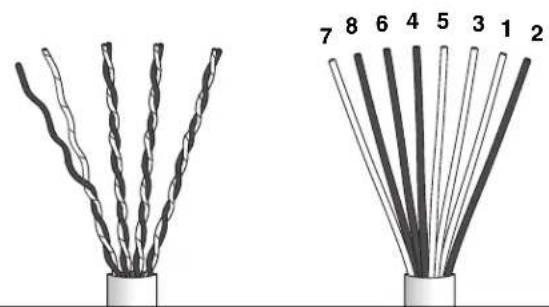
1 Remove all but one twist per pair, smooth conductors and arrange in proper color sequence.
natural_image
Two types of twisted cable connectors shown from different angles (no text or symbols)Mini-Com Mini-Jack Color-Coded Wire Positions
| Part Numbers - CJ588**Y, CJ5E88**Y, CJD588**Y | |||||
| T568A T568B | |||||
| 2 | GREEN | R3 | 2 | ORANGE | R2 |
| 1 | WHITE/GREEN | T3 | 1 | WHITE/ORANGE | T2 |
| 3 | WHITE/ORANGE | T2 | 3 | WHITE/GREEN | T3 |
| 5 | WHITE/BLUE | T1 | 5 | WHITE/BLUE | T1 |
| 4 | BLUE | R1 | 4 | BLUE | R1 |
| 6 | ORANGE | R2 | 6 | GREEN | R3 |
| 8 | BROWN | R4 | 8 | BROWN | R4 |
| 7 | WHITE/BROWN | T4 | 7 | WHITE/BROWN | T4 |
See Page 2 for CJ64/66/88 Series Wiring Sequences
2
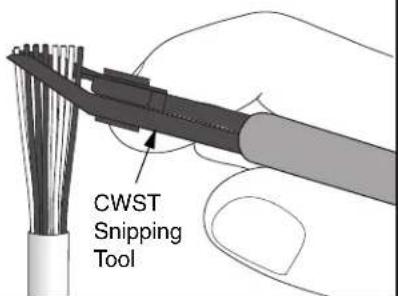
3
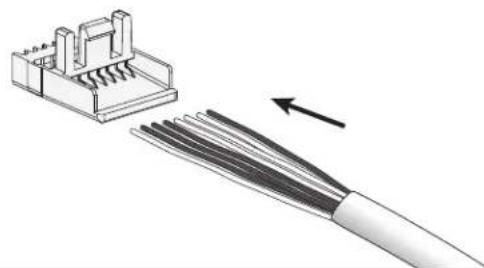
natural_image
Diagram of a cable connector with internal components and an arrow indicating direction (no text or symbols)4
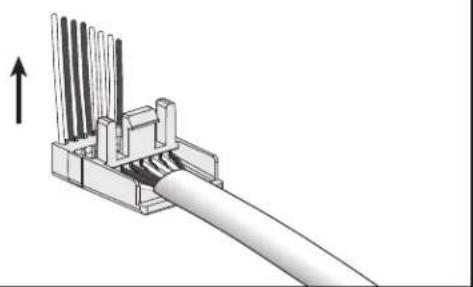
natural_image
Mechanical assembly diagram showing a cable connector with multiple wires and a directional arrow (no text or symbols)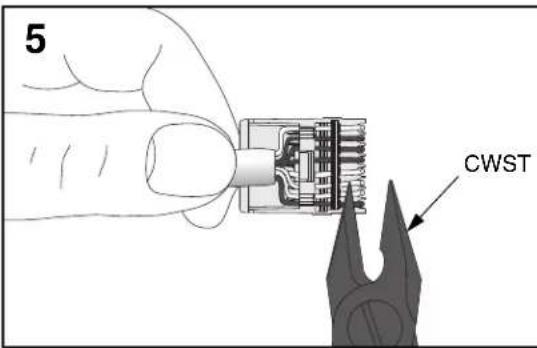
6
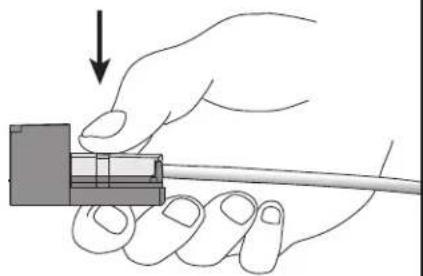
natural_image
Hand holding a cable with a small component, no text or symbols visible7
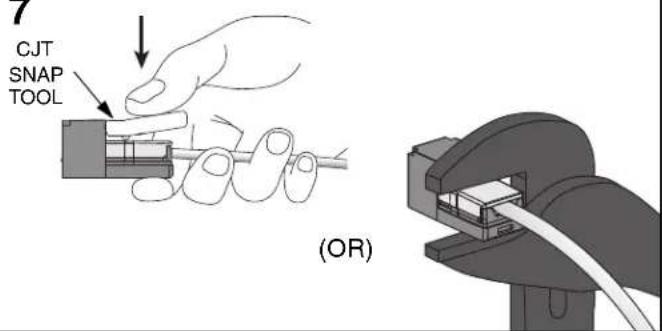
** Denotes color.
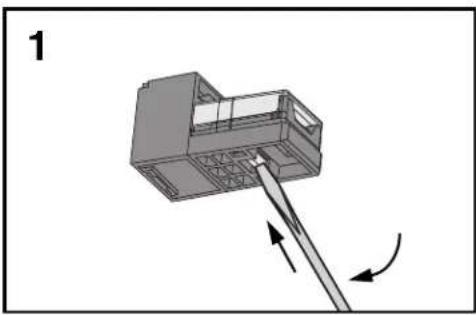
TERMINATION CAP REMOVAL
natural_image
3D diagram of a mechanical device with directional arrows indicating movement or force (no text or symbols)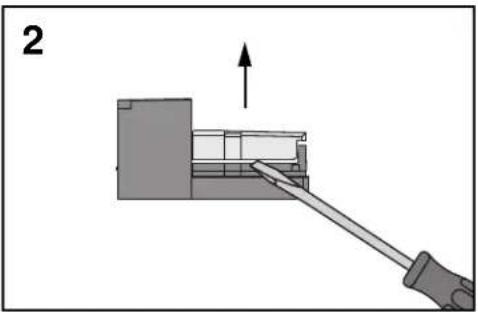
natural_image
Diagram showing a mechanical assembly with a tool inserted into a component, no text or symbols presentCATEGORY 3 Mini-Jack CJ64/66/88 SERIES WIRING SEQUENCES
| 10 Base-T | EIA/TIA 568A, ISDN | USOC 4-Wire (8 Pin Jack) | RJ45, USOC 8-Wire | EIA/TIA 568B, AT&T 258A, WECO | USOC 4-Wire, in 6 pin | USOC 6-Wire (8 Pin Jack) | USOC, RJ11/RJ25 | ||||||||||||||||
| 1 | WHT/GRN | T3 | 1 | WHT/GRN | T3 | 1 | NC | NC | 1 | BRN | R4 | 1 | WHT/ORG | T2 | 1 | 1 | NC | NC | 1 | WHT/GRN | T3 | ||
| 2 | GRN | R3 | 2 | GRN | R3 | 2 | NC | NC | 2 | WHT/GRN | T3 | 2 | ORG | R2 | 2 | WHT/ORG | T2 | 2 | WHT/GRN | T3 | 2 | WHT/ORG | T2 |
| 3 | WHT/BRN | T4 | 3 | WHT/ORG | T2 | 3 | WHT/ORG | T2 | 3 | WHT/ORG | T2 | 3 | WHT/GRN | T3 | 3 | BLU | R1 | 3 | WHT/ORG | T2 | 3 | BLU | R1 |
| 4 | NC | NC | 4 | BLU | R1 | 4 | BLU | R1 | 4 | BLU | R1 | 4 | BLU | R1 | 4 | WHT/BLU | T1 | 4 | BLU | R1 | 4 | WHT/BLU | T1 |
| 5 | NC | NC | 5 | WHT/BLU | T1 | 5 | WHT/BLU | T1 | 5 | WHT/BLU | T1 | 5 | WHT/BLU | T1 | 5 | ORG | R2 | 5 | WHT/BLU | T1 | 5 | ORG | R2 |
| 6 | BRN | R4 | 6 | ORG | R2 | 6 | ORG | R2 | 6 | ORG | R2 | 6 | GRN | R3 | 6 | 6 | ORG | R2 | 6 | GRN | R3 | ||
| 7 | NC | NC | 7 | WHT/BRN | T4 | 7 | NC | NC | 7 | GRN | R3 | 7 | WHT/BRN | T4 | 7 | GRN | R3 | ||||||
| 8 | NC | NC | 8 | BRN | R4 | 8 | NC | NC | 8 | WHT/BRN | T4 | 8 | BRN | R4 | 8 | NC | NC | ||||||
WIRING DIAGRAMS FOR CJ588, CJ5E88, CJD588, CJ64/66/88 SERIES
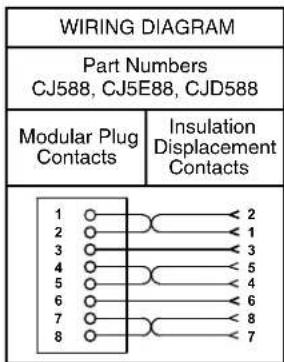
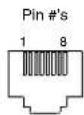
| WIRING DIAGRAM | |||||
| Part Number Part Number CJ64 CJ66 | Number | Part Number CJ88 | |||
| Modular Plug Contacts | Insulation Displacement Contacts | Modular Plug Contacts | Insulation Displacement Contacts | Modular Plug Contacts | Insulation Displacement Contacts |
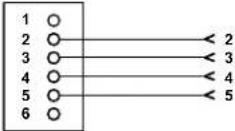 | 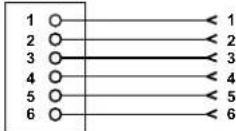 | 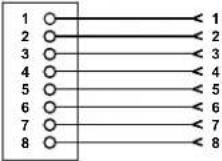 | |||
Notes:
- For specified performance, follow TIA/EIA 568-B installation guidelines.
- Jack Modules can terminate PVC or Plenum rated 22-24 AWG solid or stranded IWC cable with insulated conductor outside diameter ranging between 0.035 inch (0.88mm) and 0.048 inch (1.2mm).
- Jack Modules may be re-terminated a minimum of 10 times.
- For technical and performance information, consult Panduit Technical Support.
- MUAJC588 Jack Modules suit a standard switch mechanism pattern on various Australian faceplates.
- For Mini-Com Mini-Jack Shielded Jack Module instructions, refer to PN348*.
As with all Wiring Accessories, the following statements apply:
- Never install communications wiring during a lightning storm.
- Never install communications wiring in wet locations unless the jack is specifically designed for use in wet locations.
- Never touch uninsulated communications wiring or terminals unless the communication line has been disconnected at the network interface.
- Use caution when installing or modifying communication wiring.
For Instructions in Local Languages
and Technical Support:
www.panduit.com/resources/install_maintain.asp
PANDUIT
www.panduit.com
E-mail:
cs@panduit.com
Fax:
(708) 444-6993
Brand : Panduit
Model : CJ66UAWY
Category : Câbles pour ordinateurs et périphériques