
DLP2101U - Power bank PHILIPS - Free user manual and instructions
Find the device manual for free DLP2101U PHILIPS in PDF.


| Product Type | Power Bank |
| Model | DLP2101U |
| Brand | Philips |
| Battery Capacity | 10000 mAh |
| Input Port | Micro USB (5V, 2.1A) |
| Output Port 1 | USB-A (5V, 2.1A) |
| Output Port 2 | USB-A (5V, 1A) |
| Dimensions | 100 mm x 60 mm x 20 mm |
| Weight | 200 g |
| Charging Time | Approx. 6 hours |
| Operating Temperature | 0°C to 45°C |
| Storage Temperature | -20°C to 60°C |
| Charging Indicator | LED indicator lights |
| Overcharge Protection | Yes |
| Short Circuit Protection | Yes |
| Overheat Protection | Yes |
| Compatible Devices | Smartphones, tablets, cameras, and other USB devices |
| Material | ABS plastic with textured finish |
| Included Accessories | Micro USB charging cable, user manual |
| Certifications | CE, RoHS |
Frequently Asked Questions - DLP2101U PHILIPS
User questions about DLP2101U PHILIPS
0 question about this device. Answer the ones you know or ask your own.
Ask a new question about this device
Download the instructions for your Power bank in PDF format for free! Find your manual DLP2101U - PHILIPS and take your electronic device back in hand. On this page are published all the documents necessary for the use of your device. DLP2101U by PHILIPS.
USER MANUAL DLP2101U PHILIPS
PHILIPS
Product Manual
Please read this manual carefully before using the product and keep it in a safe place.
Dear Customer:
Thank you for purchasing a Philips product! Please read the User Manual carefully before using this product and operate it correctly according to the instructions.
Product Introduction:
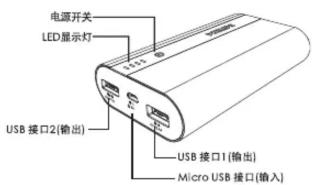
Technical Specifications:
| 产品名称 | 移动电源 |
| 产品型号 | DLP2101U |
| 电池类型 | 锂聚合物电芯 |
| 电池容量 | 10000mAh@3.7V |
| 电池能量 | 37Wh |
| 额定输入 | Micro USB DC 5V/2.1A |
| 额定输出 | USB DC 5V/2.4A (Total Max) |
| 工作温度 | 0°C~45°C |
| 产品尺寸 | 105(L)*61(W)*22(H)mm |
| 产品净重 | 20克 |
Package Contents:
Power bank × 1
Micro USB cable × 1
User Manual × 1
Certificate of Conformity × 1
Instructions for Use:
Battery Level Indicator:
| 电量指示灯 | 亮1个 | 亮2个 | 亮3个 | 亮4个 |
| 移动电源电量 | <25% | <50% | <75% | <100% |
Charging the Power Bank:
1. Use a Micro USB cable to connect the Micro USB connector to the input port of the power bank, and connect the other end of the cable to a computer or a 5V/1A power adapter's USB port. Using a 5V/2.1A power adapter can shorten the charging time. 2. While charging the power bank, the power indicator lights will flash until fully charged, then remain steadily lit. 3. When charging is complete, promptly unplug the cable.
Charging digital devices with the power bank:
1. Use a Micro USB cable, connect the USB port of the cable to the output port of the power bank, and connect the other end to the charging port of the compatible digital device. 2. Lightly press the power bank's power button; the power indicator lights will show the remaining battery level. At this point, the power bank is on and begins charging the digital device. 3. When charging is complete, promptly unplug the data cable or connection cable.
Precautions:
1. Before use, pay attention to the markings on the power bank to ensure correct usage. 2. For first use, it is recommended to fully charge the power bank. 3. When charging the power bank, it is recommended to use a power adapter from a reputable brand. 4. When using the power bank to charge other devices, choose a compatible cable yourself. 5. During charging of other devices, if the power bank shows low battery, charge it as soon as possible. 6. Keep the power bank clean and dry; do not use chemical substances, soap, or wet cloths to wipe this product. 7. Store the power bank in a dry place, away from moisture and corrosive materials. 8. After long-term storage, perform several charge-discharge cycles on the power bank to achieve optimal performance. 9. Supervise children to ensure they do not play with the power bank as a toy. 10. If you notice any abnormal conditions such as swelling of the power bank or the charging device, stop using it immediately. 11. In case of leakage, do not let the leaked liquid come into direct contact with skin or eyes; if contact occurs, rinse the affected area with plenty of clean water and seek medical attention promptly. 12. Dispose of the used power bank in accordance with national environmental regulations.
Warning:
Do not disassemble, impact, or squeeze the power bank. Do not place it in direct sunlight or throw it into fire.
Table of Toxic and Hazardous Substances or Elements:
| 产品中有毒害物质或元素的名称及含量 | ||||||
| 部件名称Name of the parts | 铅(PB) | 汞(HG) | 镉(Cd) | 六价铬(Cr6+) | 多溴联苯(PBBs) | 多溴二苯醚(PBDEs) |
| 电路板组件PCB assembly | X | O | O | O | O | O |
| 电芯 Cells | O | O | O | O | O | O |
| 塑胶部件Plastic housing | O | O | O | O | O | O |
| 连接线 Cable | O | O | O | O | O | O |
| 其他部件 Others | O | O | O | O | O | O |
O: Indicates that the content of the toxic or hazardous substance in all homogeneous materials of this part is below the limit required by the SJ/T11363-2006 standard. X: Indicates that the content of the toxic or hazardous substance in at least one homogeneous material of this part exceeds the limit required by the SJ/T11363-2006 standard. Note 1: Most parts of this product are made of environmentally friendly materials that are non-toxic and harmless. Parts containing toxic or hazardous substances or elements are used because, due to global development limitations, it is not yet possible to replace them. Note 2: The reference standard for the Environmental Protection Use Period depends on conditions such as temperature and humidity under which the product operates normally. The Environmental Protection Use Period (EPUP) indicated by this symbol is ten years, counted from the date of manufacture. Under normal use, hazardous substances contained in electronic information products will not leak or change unexpectedly. The period during which the user's use of this electronic information product will not cause serious pollution to the environment or serious harm to their person or property is ten years.

Warranty Certificate:
This warranty card is the warranty certificate for Philips products. With this card, you can enjoy after-sales repair services provided by Philips authorized repair centers. Please keep it in a safe place.
1. Users who purchase Philips products will enjoy the "Three Guarantees" service in accordance with relevant national regulations. 2. This product comes with a one-year free warranty service, covering only the main unit, not accessories or gifts. 3. The free warranty becomes invalid under the following circumstances; repair services may still be provided, but material and service fees will be charged:
Damage caused by force majeure.
Damage caused by human factors, including use in abnormal working environments or not following the instruction manual. · Unauthorized disassembly, modification, or repair by the user or by a repair center not authorized by Philips. · No product warranty card and valid purchase receipt (invoice). · Product serial number mismatch or damage. · Exceeding the free warranty period.
| 产品信息 | 产品型号:____产品序列号:____发票号码:____购买日期:____ |
| 用户信息 | 用户姓名:____联系电话:____通信地址:____邮政编码:____ |
| 经销商信息 | 单位名称(盖章有效):____通信地址:____邮政编码:____联系电话:____ |
| 维修单位信息 | 单位名称:____通信地址:____邮政编码:____联系电话:____ |
After-sales service hotline: 400 678 8849
Authorized Service Center: Richgo Technology (Shenzhen) Co., Ltd.
Address: 3rd Floor, Zhengjiyuan Building, No. 34 Qianjin 2nd Road, Bao'an District, Shenzhen
Postal Code: 518102 Website: http://www.richgo.com.cn


Brand : PHILIPS
Model : DLP2101U
Category : Power bank