
P15X - Video projector OKI - Free user manual and instructions
Find the device manual for free P15X OKI in PDF.


Pick your language and provide your email: we'll send you a specifically translated version.
| Type de produit | Video Projector |
| Brand | OKI |
| Model | P15X |
| Display Technology | DLP |
| Native Resolution | 1920 x 1080 (Full HD) |
| Brightness | 3000 lumens |
| Light Source | LED |
| Lamp Life | Up to 30,000 hours |
| Contrast Ratio | 2000:1 |
| Aspect Ratio | 16:9 |
| Keystone Correction | Vertical ±30° |
| Image Size | 30 – 300 inches |
| Projection Distance | 1.0 – 10.0 m |
| Connectivity | HDMI, VGA, USB, Audio Out |
| Built-in Speaker | Yes, 3W |
| Power Supply | AC 100-240V, 50/60Hz |
| Power Consumption | 120W (Eco mode: 80W) |
| Dimensions (W x D x H) | 300 x 220 x 100 mm |
| Weight | 2.5 kg |
| Maintenance | Clean lens with soft cloth; replace air filter every 5000 hours |
| Security | Kensington lock slot |
| Repairability | Authorized service centers; user-replaceable lamp and filter |
Frequently Asked Questions - P15X OKI
How do I connect my laptop to the OKI P15X projector?
Use an HDMI cable to connect your laptop's HDMI output to the projector's HDMI input. Alternatively, use a VGA cable for older laptops. Ensure the projector is set to the correct input source using the Source button on the remote or control panel.
What should I do if the projected image is blurry?
Adjust the focus ring on the projector lens. Also, ensure that the projector is at the correct distance from the screen. If using keystone correction, minimize it to avoid image degradation.
How do I clean the air filter?
Turn off the projector and unplug it. Remove the air filter cover, take out the filter, and gently vacuum or wash with mild soap and water. Let it dry completely before reinstalling. Replace the filter every 5000 hours.
Can I replace the lamp myself?
Yes, the OKI P15X uses a long-life LED light source that is not user-replaceable. However, if the lamp fails, contact an authorized service center for replacement. The LED unit is designed to last 30,000 hours.
How do I adjust the keystone correction?
Press the Keystone button on the remote control, then use the arrow keys to correct vertical distortion. Some models also support automatic keystone adjustment.
Why is there no sound from the projector?
Check that the built-in speaker is not muted and the volume is turned up. If using external speakers, ensure they are properly connected to the audio out port. Also, verify the audio source is set to the correct output.
How do I perform a screen mirroring with my smartphone?
The OKI P15X supports wireless screen mirroring via Miracast or AirPlay. Ensure both devices are on the same Wi-Fi network. On the projector, select the Screen Mirroring option, then connect from your smartphone's display settings.
What does the overheating indicator mean?
The projector will shut down automatically if internal temperature exceeds safe limits. Ensure ventilation is not blocked, clean the air filter, and let the projector cool down before restarting.
How do I reset the projector to factory settings?
Go to the menu, select 'Settings', then 'Factory Reset'. Confirm the action. All customized settings will be erased.
Where can I find the serial number?
The serial number is located on a sticker at the bottom of the projector. It is also listed in the system information menu under 'About'.
User questions about P15X OKI
0 question about this device. Answer the ones you know or ask your own.
Ask a new question about this device
No questions yet. Be the first to ask one.
Download the instructions for your Video projector in PDF format for free! Find your manual P15X - OKI and take your electronic device back in hand. On this page are published all the documents necessary for the use of your device. P15X by OKI.
USER MANUAL P15X OKI
natural_image
Pure technical diagram of a mechanical component with no text, numbers, or symbolsflowchart
graph TD
    A["S-VIDEO"] --> B["Cable S-Video"]
    B --> C["Cable Audio"]
    C --> D["(R) (L)"]
    C --> E["(R) (L)"]
    C --> F["(R) (L)"]
    C --> G["(R) (L)"]
    C --> H["(R) (L)"]
    C --> I["(R) (L)"]
    C --> J["(R) (L)"]
    C --> K["(R) (L)"]
    C --> L["(R) (L)"]
    C --> M["(R) (L)"]
    C --> N["(R) (L)"]
    C --> O["(R) (L)"]
    C --> P["(R) (L)"]
    C --> Q["(R) (L)"]
    C --> R["(R) (L)"]
    C --> S["(R) (L)"]
    C --> T["(R) (L)"]
    C --> U["(R) (L)"]
    C --> V["(R) (L)"]
    C --> W["(R) (L)"]
    C --> X["(R) (L)"]
    C --> Y["(R) (L)"]
    C --> Z["(R) (L)"]
    C --> AA["(R) (L)"]
    C --> AB["(R) (L)"]
    C --> AC["(R) (L)"]
    C --> AD["(R) (L)"]
    C --> AE["(R) (L)"]
    C --> AF["(R) (L)"]
    C --> AG["(R) (L)"]
    C --> AH["(R) (L)"]
    C --> AI["(R) (L)"]
    C --> AJ["(R) (L)"]
    C --> AK["(R) (L)"]
    C --> AL["(R) (L)"]
    C --> AM["(R) (L)"]
    C --> AN["(R) (L)"]
    C --> AO["(R) (L)"]
    C --> AP["(R) (L)"]
    C --> AQ["(R) (L)"]
    C --> AR["(R) (L)"]
    C --> AS["(R) (L)"]
    C --> AT["(R) (L)"]
    C --> AU["(R) (L)"]
    C --> AV["(R) (L)"]
    C --> AW["(R) (L)"]
    C --> AX["(R) (L)"]
    C --> AY["(R) (L)"]
    C --> AZ["(R) (L)"]
    C --> BA["(R) (L)"]
    C --> BB["(R) (L)"]
    C --> BC["(R) (L)"]
    C --> BD["(R) (L)"]
    C --> BE["(R) (L)"]
    C --> BF["(R) (L)"]
    C --> BG["(R) (L)"]
    C --> BH["(R) (L)"]
    C --> BI["(R) (L)"]
    C --> BJ["(R) (L)"]
    C --> BK["(R) (L)"]
    C --> BL["(R) (L)"]
    C --> BM["(R) (L)"]
    C --> BN["(R) (L)"]
    C --> BO["(R) (L)"]
    C --> BP["(R) (L)"]
    C --> BQ["(R) (L)"]
    C --> BR["(R) (L)"]
    C --> BS["(R) (L)"]
    C --> BT["(R) (L)"]
    C --> BU["(R) (L)"]
    C --> BV["(R) (L)"]
    C --> BW["(R) (L)"]
    C --> BX["(R) (L)"]
    C --> BY["(R) (L)"]
    C --> BZ["(R) (L)"]
    C --> CA["(R) (L)"]
    C --> CB["(R) (L)"]
    C --> CC["(R) (L)"]
    C --> CD["(R) (L)"]
    C --> CE["(R) (L)"]
    C --> CF["(R) (L)"]
    C --> CG["COMPUTER IN S-VIDEO IN COMPONENT IN"]
    G["DATA"] --> H["Salida de S-Video"]
    G --> I["Salida de audio y Video compuesto"]
    G --> J["Equipo de audio externo"]
    G --> K["Entrada de Audio"]
    G --> L["Cable Audio"]
    G --> M["AUDIO OUT (estéreo)"]
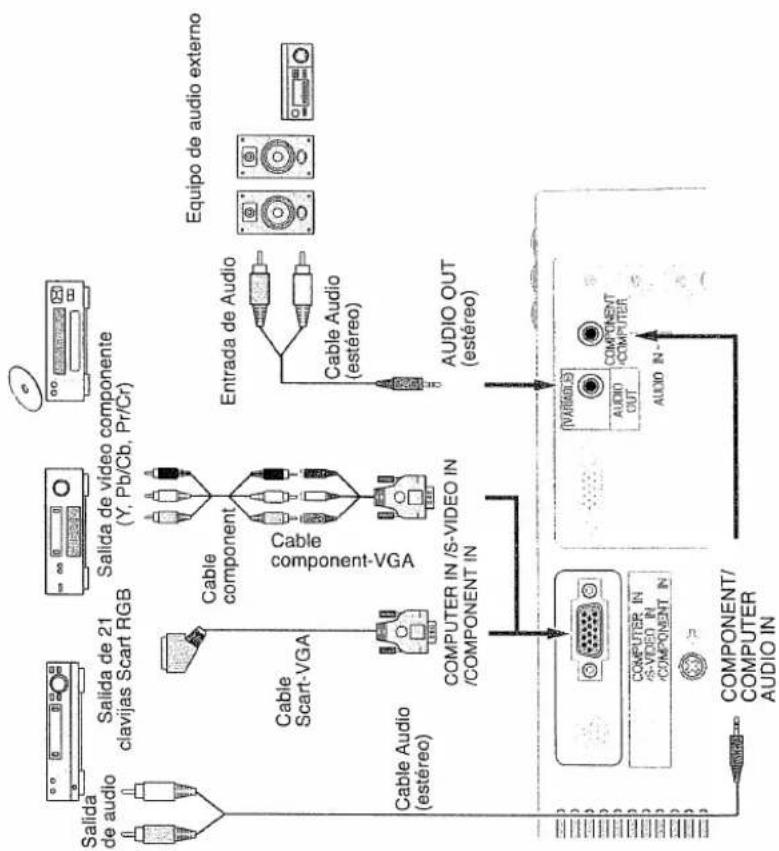
flowchart
graph TD
    A["Salida de audio"] --> B["Cable Scart-VGA"]
    C["Salida de 21 clavijas Scart RGB"] --> D["Cable component"]
    E["Salida de video componente (Y, Pb/Cb, Pr/Cr)"] --> F["Cable component-VGA"]
    G["Cable Audio (estéreo)"] --> H["COMPUTER IN /S-VIDEO IN /COMPONENT IN"]
    I["Entrada de Audio"] --> J["AUDIO OUT (estéreo)"]
    K["Equipo de audio externo"] --> L["AUDIO OUT"]
    M["COMPONENT/COMPUTER AUDIO IN"] --> N["COMPUTER IN /S-VIDEO IN /COMPONENT IN"]
    O["COMPONENT"] --> P["AUDIO OUT"]
    Q["AUDIO IN"] --> R["COMPONENT/COMPUTER AUDIO IN"]
Manual assistant
Powered by Anthropic
Waiting for your message
Product information
Brand : OKI
Model : P15X
Category : Video projector