
P20X - Video projector OKI - Free user manual and instructions
Find the device manual for free P20X OKI in PDF.


Pick your language and provide your email: we'll send you a specifically translated version.
| Product Type | Video Projector |
| Model | P20X |
| Brand | OKI |
| Display Technology | DLP |
| Native Resolution | XGA (1024 x 768) |
| Brightness | 3500 ANSI Lumens |
| Contrast Ratio | 2000:1 |
| Lamp Type | UHP Lamp |
| Lamp Life (Normal Mode) | 4000 hours |
| Lamp Life (Eco Mode) | 6000 hours |
| Zoom Ratio | 1.1x |
| Keystone Correction | Vertical +/- 40° |
| Input Connections | HDMI, VGA, Composite Video, Audio (3.5mm) |
| Output Connections | USB (Service Only), Audio (3.5mm) |
| Built-in Speaker | 2W Mono |
| Noise Level (Normal Mode) | 34 dB |
| Power Consumption (Typical) | 260 W |
| Dimensions (W x D x H) | 300 x 230 x 90 mm |
| Weight | 2.5 kg |
| Cleaning | Clean air filter every 100 hours; use soft cloth for lens |
| Security | Kensington lock slot; password protection |
| Repairability / Spare Parts | Replacement lamps and filters available from OKI service centers |
Frequently Asked Questions - P20X OKI
How do I clean the air filter on the OKI P20X projector?
Turn off the projector and unplug it. Locate the air filter cover on the side or bottom. Remove the filter and gently vacuum or wash with mild soap and water. Let it dry completely before reinserting. Clean every 100 hours of use.
How do I replace the lamp in the P20X?
Disconnect power and allow the projector to cool. Remove the lamp cover screw, slide the cover off. Loosen the lamp module screws, disconnect the connector, and pull out the old lamp. Insert the new lamp (model LMP-P20X), reconnect, tighten screws, replace cover, and reset the lamp timer via menu.
What is the native resolution of the OKI P20X?
The P20X has a native XGA resolution of 1024 x 768 pixels. It can accept input signals up to 1080p and will scale them to fit.
How can I connect my laptop to the P20X projector?
Use an HDMI cable from your laptop to the projector's HDMI port. If your laptop only has VGA, use a VGA cable and connect the audio separately with a 3.5mm cable. Select the correct input source via the 'Source' button on the remote or projector.
How long does the lamp last on the P20X?
In normal mode, the lamp lasts approximately 4000 hours. In Eco mode, it extends to 6000 hours. The projector will display a warning when the lamp nears end of life.
Does the OKI P20X support 3D?
No, the P20X is a standard 2D projector and does not support 3D content.
Can I use the projector without a remote control?
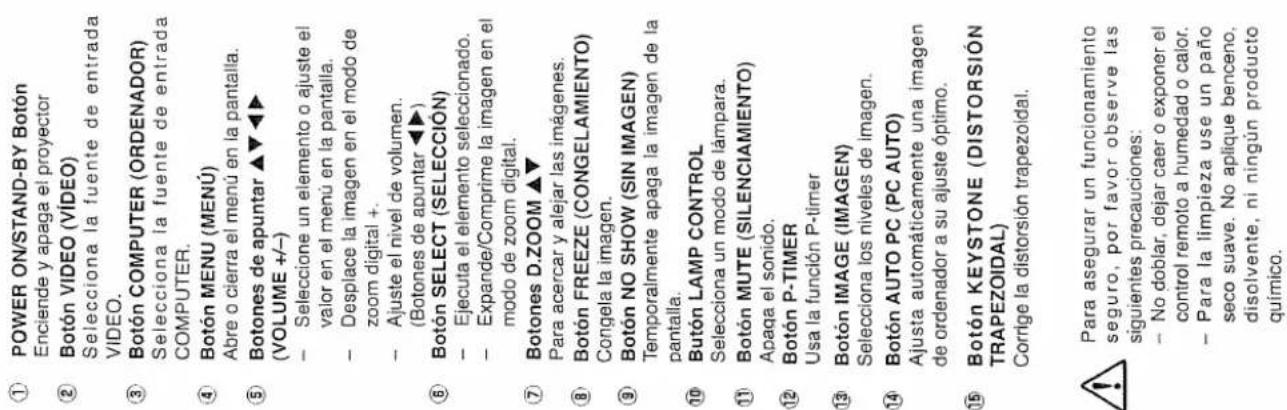
Yes, the projector has control buttons on the top panel for power, menu, source, and navigation. However, for full functionality like keystone correction and settings, the remote is recommended.
What do I do if the projector overheats?
The projector will automatically shut down if internal temperature exceeds safe limits. Ensure vents are not blocked, clean the air filter, and place the projector in a well-ventilated area. If the issue persists, contact OKI support.
Is the OKI P20X compatible with ceiling mount?
Yes, the projector has threaded mounting points on the bottom (typically M4 or M6). Use a compatible ceiling mount kit designed for projectors. Ensure the mount supports the weight (2.5 kg).
How do I adjust the picture size and focus?
Use the zoom ring on the lens to adjust image size. Rotate the focus ring to sharpen the image. For keystone correction, go to menu > settings > keystone and adjust vertical angle with +/- buttons.
User questions about P20X OKI
0 question about this device. Answer the ones you know or ask your own.
Ask a new question about this device
No questions yet. Be the first to ask one.
Download the instructions for your Video projector in PDF format for free! Find your manual P20X - OKI and take your electronic device back in hand. On this page are published all the documents necessary for the use of your device. P20X by OKI.
USER MANUAL P20X OKI
The spans of projects
natural_image
Pure geometric diagram with intersecting lines and shapes, no text or symbols presentaire caliente)
Manual assistant
Powered by Anthropic
Waiting for your message
Product information
Brand : OKI
Model : P20X
Category : Video projector