
SI9021N - Iron SWAN - Free user manual and instructions
Find the device manual for free SI9021N SWAN in PDF.


| Product Type | Steam Iron |
| Brand | Swan |
| Model | SI9021N |
| Power Consumption | 2000 W |
| Voltage | 220-240 V, 50/60 Hz |
| Soleplate Material | Stainless Steel |
| Water Tank Capacity | 300 ml |
| Steam Output | Continuous steam up to 35 g/min |
| Spray Function | Yes |
| Anti-Drip System | Yes |
| Self-Clean Function | Yes |
| Auto Shut-Off | Yes, after 8 minutes of inactivity |
| Cord Length | 2.5 m |
| Dimensions (L x W x H) | 30 x 15 x 20 cm |
| Weight | 1.2 kg |
| Safety Features | Auto shut-off, overheat protection |
| Included Accessories | Measuring cup |
| Color | White/Blue |
| Warranty | 2 years |
Frequently Asked Questions - SI9021N SWAN
User questions about SI9021N SWAN
0 question about this device. Answer the ones you know or ask your own.
Ask a new question about this device
Download the instructions for your Iron in PDF format for free! Find your manual SI9021N - SWAN and take your electronic device back in hand. On this page are published all the documents necessary for the use of your device. SI9021N by SWAN.
USER MANUAL SI9021N SWAN
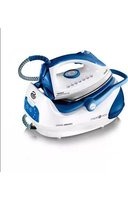
Steam Generator
Model: SI9021N
Helpline
0871 200 0003
v2.0

IMPORTANT INFORMATION - RETAIN FOR FUTURE USE
When using any electrical appliance, basic safety precautions should always be followed including the following:
- Always ensure that the voltage on the rating label corresponds to the mains voltage in your home
- Incorrect operation and improper use can damage the appliance and cause injury to the user.
- This appliance can be used by children aged from 8 years and above if they have been given supervision or instruction concerning use of the appliance in a safe way and if they understand the hazards involved. Cleaning and user maintenance shall not be made by children unless they are older than 8 and supervised. Keep the appliance and its cord out of reach of children aged less than 8 years. Check the power cord and plug regularly for any damage. If the cord or the plug is damaged, it must be replaced by the manufacturer or qualified person in order to avoid an electrical hazard.
- Do not use the appliance if it has been dropped or damaged in any way. In case of damage, take the unit in for examination and/or repair by an authorised service agent.
- Never immerse the unit in water or any other liquid for cleaning purposes.
- Remove the plug from the socket by gripping the plug. Do not pull on the cord to disconnect the appliance from the mains. Always unplug the unit when not in use, before cleaning or when adding or removing parts.
- The use of accessory attachments that are not recommended or supplied by the manufacturer may result in injuries, fire or electric shock.
- Do not let the cord hang over the edge of a table or counter. Ensure that the cord is not in a position where it can be pulled on inadvertently.
- Do not allow the cord to touch hot surfaces and do not place on or near a hot gas or electric burner or in a heated oven.
- Do not use the appliance on a gas or electric cooking top or over or near an open flame.
- Use of an extension cord with this appliance is not recommended. However, if it is necessary to use an extension lead, ensure that the lead is suited to the power consumption of the appliance to avoid overheating of extension cord, appliance or plug point. Do not place the extension cord in a position where it can be pulled on by children or animals or tripped over.
- This appliance is not suitable for outdoor use. Do not use the appliance for anything other than its intended use.

IMPORTANT INFORMATION - RETAIN FOR FUTURE USE
- Do not carry the appliance by the power cord.
- Do not leave the appliance unattended during use. Always unplug the unit when not in use or before cleaning.
- Always operate the appliance on a smooth, even, stable surface. Do not place the unit on a hot surface.
- Ensure that the unit is switched off after use.
- The manufacturer does not accept responsibility for any damage or injury caused by improper or incorrect use, or for repairs carried out by unauthorised personnel.
- In case of technical problems, switch off the product and do not attempt to repair it yourself. Return the appliance to an authorised service facility for examination, adjustment or repair. Always insist on the use of original spare parts. Failure to comply with the above mentions precautions and instructions, could affect the safe operation of this product.
- Your appliance must never be switched on through an external timer or any kind of separate remote control system
• The water inlet must be closed during use - Do not open the safety valve while using the appliance or before the water is completely used up (when the iron stops producing steam indicates that the tank is empty). To add water, unplug and wait 15 minutes to avoid sudden temperature changes. Place a cloth over the safety valve and unscrew slowly to allow any remaining steam/pressure to escape slowly
- Only place the unit complete with base on a stand that is designed to withstand the weight. Some lightweight ironing boards may be unsuitable. In this case, place on separate counter top.
- This appliance is intended to be used in household and similar applications such as: staff kitchen areas, in shops, offices and other working environments; farm houses; by clients in hotels, motels and other residential type environments; bed and breakfast type environments.

TECHNICAL DATA
Description: Steam Generator
Model: SI9021N
Input Voltage: 220-240V
Frequency: 50Hz
Power consumption: 2000-2400 Watts


CAUTION: SURFACES BECOME HOT DURING USE
Swan
3


PARTS
- Water tank
- Handle
- Soleplate
- Cover
- Lens
- Steam release button
- Power cord/supply hose
- Power cord
- Handle release button
- Filter
- Water tank lock
- Temperature control dial


FABRIC SETTING GUIDE
| Temperature Setting | •SYNTHETIC | ••WOOL SILK | •••COTTON | |
| Fabric | Synthetics, Silk, Nylon, | Wool Silk | Cotton Wool | |
| Ironing Instruction | Dry Ironing | Steam iron on the wrong side of the fabric. | Steam Ironing | |
| Steam Selection | ||||
4


HOW TO USE
Before first use
Remove any stickers, protective foil or storage cover from the soleplate.
Heat up the iron to maximum temperature and iron over a piece of damp cloth for several minutes for the purpose of removing any residue on the soleplate.
Note: It is normal for a slight odour to come from the unit during the first use. This is due to light oils used to preserve components during manufacture. The odour will disappear after first use.
Operation
- Press both Handle Release Buttons at the same time and put the handle down (fig 1). Connect the power cord to outlet, the power light illuminates. NOTE: The iron might not operate unless handle is in DOWN position
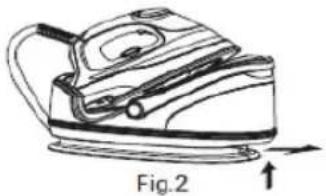
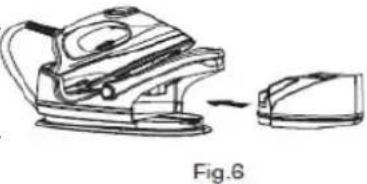
- Press the tank lock button then take out water tank from stand. Remove the limescale filter. Fill the tank but do not exceed the MAX level indication on the side (fig 2 - 6).
- Replace the limescale filter and slide the tank back into the iron base, making sure it "clicks" into place. Check the garment label for the required ironing temperature. Then turn the temperature dial to your desired setting. And the heating light will be illuminated.
Tips: to prevent shiny spots, iron the reverse side of the fabric for silk, wool and synthetic materials; and to prevent stains, avoid using the steam functions (put Steam ON/OFF switch in OFF position).
Once the soleplate temperature has reached the preset temperature, the heating light will go out, press down Steam Button. The pump will start and after a few seconds the steam will come through. Please note when pressing the steam button for the first time at the start of the new ironing session, direct the iron away from garments to allow any small amounts of water from previous ironing sessions to be ejected.
NOTE: THE PUMP MAY MAKE A NOISE FOR A FEW SECONDS UNTIL IT IS PROPERLY PRIMED. YOU CAN PRIME THE PUMP A LITTLE QUICKER IF YOU HOLD THE HAND UNIT BELOW THE HEIGHT OF THE BASE - GRAVITY WILL GET THE STEAM THROUGH QUICKER!
Tip: the interconnection cord can become quite hot after extended use, do not touch! At any time during the ironing session, you can place the iron on the silicone cushion or on the heel rest (and have a nice cup of tea). Note: the steam output is 60-90g/min

Fig.1



use vertical steam for garments

IRONING TIPS
Always check first whether a label with ironing instructions is attached to the article.
The iron heats up quicker than it cools down, therefore, you should start ironing the articles requiring the lowest temperature such as those made of synthetic fibres.
If the fabric consists of various kinds of fibres, you must always select the lowest ironing temperature to iron the composition of those fibres.
Silk and other fabrics that are likely to become shiny should be ironed on the inner side.
Velvet and other textures that rapidly become shiny should be ironed in one direction with light pressure applied. Always keep the iron moving at any given moment.
Pure woollen fabrics (100% wool) may be ironed with the iron set a steam position. Preferably set steam button to the maximum position and use a dry cloth as a mat.
Note: when ironing woolen fabrics, shining of the fabric may occur. So it is suggested that you should turn the article inside out and iron the reverse side.
AFTER IRONING
- Take out the water tank, remove the limescale filter and empty all the water out, replace the filter then place tank back into the iron base (fig 2 - 6).
- With the tank empty, press down the steam surge button button a couple of times to remove any remaining water in the interconnecting cord, then place the iron back on the base. Warning: the soleplate is still hot, be careful!
- Turn the temperature dial back to 0 position and unplug from the mains socket. Allow the iron to completely cool before cleaning. Note: you can wipe the surface of unit clean with a soft cloth. Try not to dislodge the silicone cushion out of it's mountings because it is difficult to fit back!
Warning: do not immerse the steam iron or stand in water or other liquids.
AUTO-DESCALING FEATURE
There is a limescale filter inside the tank. The filter can absorb insoluble calcium ions and convert them to soluble natrium ions, which makes the water softer. This greatly reduces the build-up of limescale. However, if you do live in a hard water area, the life of your iron will increase significantly if you use bottled water.
Note: to keep the soleplate smooth, never let any metal materials rub against it.
REPLACE THE LIMESCALE FILTER EVERY 3 MONTHS OR MORE REGULARLY IF YOU LIVE IN A HARD WATER AREA. VISIT WWW.SWAN-BRAND.CO.UK FOR SPARE FILTERS

DOCUMENTATION
We Swan Products Ltd declare that this product conforms to the following product legislation in accordance with the following directive(s):
2004/108/EC The EMC Directive (the Electromagnetic Compatibility Directive). 2006/95/EC. The LVD Directive (Low Voltage Directive). 2011-65-EU. The RoHS directive (Restriction of Hazardous Substances Directive)

WARRANTY
This product is guaranteed for 2 years from the date of original purchase. If any defect arises due to faulty materials of workmanship the faulty products must be returned to the place of purchase. Refunds or replacement is at the discretion of the store.
The following conditions apply:
• The product must be returned to the retailer with proof of purchase.
- The product must be installed and used in accordance with the instructions contained in this instruction guide.
• It must be used only for domestic purposes.
• It does not cover wear and tear, damage, misuse or consumable parts.
• Swan Products Ltd has limited liability for incidental or consequential loss or damage.
• This guarantee is valid in the UK and Eire Only.

BS PLUG
The wires in the mains lead are coloured in accordance with the following code:
BLUE NEUTRAL
BROWN LIVE
GREEN/YELLOW EARTH
As the colours of the wire in the mains lead of this appliance may not correspond with the colour markings identifying the terminals on your plug, proceed as follows:
The wire which is coloured BLUE must be connected to the terminal which is marked with the letter N or coloured black. The wire which is coloured BROWN must be connected to the terminal which is marked with the letter L or coloured red. The wire which is coloured GREEN/YELLOW must be connected to the terminal which is marked with the letter E or (earth symbol) and is coloured GREEN or GREEN/YELLOW.
WARNING: THIS APPLIANCE MUST BE EARTHED

DISPOSAL OF UNIT

Appliances bearing the symbol shown here may not be disposed of in domestic rubbish. You are required to dispose of old electrical and electronic appliances like this separately. Please visit www.recycle-more.co.uk or www.recyclenow.co.uk for access to information about the recycling of electrical items. Please visit www.weeeireland.ie for access to information about the recycling of electrical items purchased in Ireland. The WEEE directive, introduced in
August 2006, states that all electrical items must be recycled, rather than taken to landfill. Please arrange to take this appliance to your local Civic Amenity site for recycling, once it has reached the end of its life.
7
Swan


www.swan-brand.co.uk

Scan this QR code to hear about our story

We love what we do

we're proud of our quality

Find us on Facebook
* on selected products
Copyright © Swan Products Ltd. PO Box 3117, Stoke-on-Trent ST4 9GD

- STEAM GENERATOR
- IMPORTANT INFORMATION - RETAIN FOR FUTURE USE
- WHEN USING ANY ELECTRICAL APPLIANCE, BASIC SAFETY PRECAUTIONS SHOULD ALWAYS BE FOLLOWED INCLUDING THE FOLLOWING
- TECHNICAL DATA
- PARTS
- FABRIC SETTING GUIDE
- HOW TO USE
- BEFORE FIRST USE
- OPERATION
- IRONING TIPS
- AFTER IRONING
- AUTO-DESCALING FEATURE
- DOCUMENTATION
- WARRANTY
- THE FOLLOWING CONDITIONS APPLY
- BS PLUG
- DISPOSAL OF UNIT
Brand : SWAN
Model : SI9021N
Category : Iron