WKCD40 - Ventilateur domestique White Knight - Free user manual and instructions
Find the device manual for free WKCD40 White Knight in PDF.


| Brand | White Knight |
| Model | WKCD40 |
| Product Type | Domestic Fan |
| Type | Stand Fan |
| Height (approx.) | 130 cm |
| Net Weight | 5.5 kg |
| Power Supply | 220-240V ~ 50Hz |
| Power Consumption | 45 W |
| Number of Speed Settings | 3 |
| Oscillation | Yes |
| Oscillation Angle | 90 degrees |
| Adjustable Tilt | Up and down |
| Blade Diameter | 40 cm |
| Material | ABS plastic, metal stand |
| Control Type | Manual buttons |
| Overheat Protection | Yes, thermal fuse |
| Cleaning and Maintenance | Wipe with damp cloth; do not immerse in water |
| Spare Parts Availability | Blade, guard, motor assembly available via service center |
| Certifications | CE, RoHS |
Frequently Asked Questions - WKCD40 White Knight
User questions about WKCD40 White Knight
0 question about this device. Answer the ones you know or ask your own.
Ask a new question about this device
Download the instructions for your Ventilateur domestique in PDF format for free! Find your manual WKCD40 - White Knight and take your electronic device back in hand. On this page are published all the documents necessary for the use of your device. WKCD40 by White Knight.
USER MANUAL WKCD40 White Knight
IMPORTANT INSTRUCTIONS
- Read all instructions carefully before you use the appliance.
- Remove the packaging and ensure that the appliance is undamaged. In case of doubt do not use the fan and contact your supplier.
- Do not let children play with parts of the packaging (such as plastic bags).
- Before plugging the fan into the socket, check that the voltage of your mains supply matches the voltage marked on the rating label of the appliance.
- Before assembling or dismantling the fan, ensure that the fan is unplugged.
- Before unplugging the supply cord, turn off the switch at the socket outlet.
- Do not insert any object into the guard while the fan is operating.
WARNING: RISK OF INJURY.
-
The fan is meant for use in temperate climates. Do not use the fan in high humidity or a dusty area.
-
Do not hang any clothes on the fan guards.
-
Do not use the fan outdoors.
Description of Parts
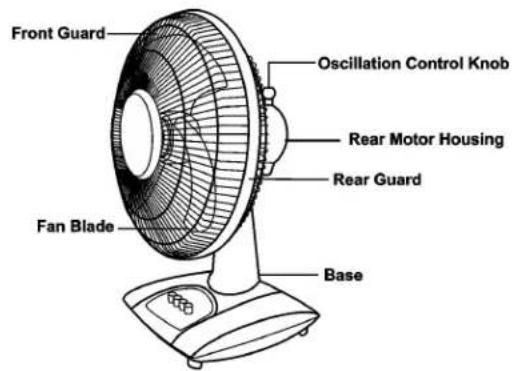
Caution
This appliance is for household use only. Any servicing other than cleaning and user maintenance should be performed by an authorised service representative. Do not immerse the unit in water. To reduce the risk of fire or electric shock, do not remove the housing. The fan has no user serviceable parts inside. Only authorised service personnel should handle repair work.
If the supply cord is damaged, it must be replaced by the manufacturer or its service agent or a similar qualified person in order to avoid a hazard.
Assembly of the base
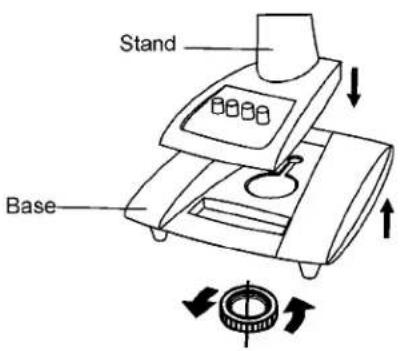
-
Remove the base mounting nut from the stand by turning it anti-clockwise.
-
Feed the supply cord through the opening in the base.
-
Insert the stand into the base and tighten the base mounting nut clockwise
-
Lead the supply cord through the recess at the side of the base.
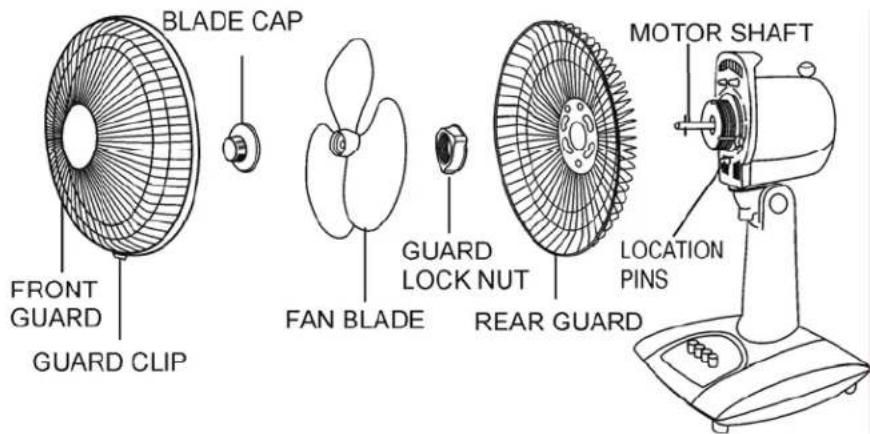
Assembly of the fan
-
Remove the blade cap from the motor shaft and remove the guard lock nut from the motor body.
-
Fit the rear guard to the motor body, by positioning on the location pins. Secure the guard to the motor body with the guard lock nut.
-
Push the fan blade onto the motor shaft by matching the slots on the base of the fan blade with the shaft pin. Secure the blade with the blade cap, turning it in an anti-clockwise direction. Check that the fan blade rotates freely by turning it with your hand.
-
Open the securing clip at the bottom of the front guard and loosen the clip screw. Position the top clip on the uppermost part of the rear guard. Push the top clip down and press rim of the front guard onto the rear guard.
Close the bottom clip and tighten the screw.
Operations
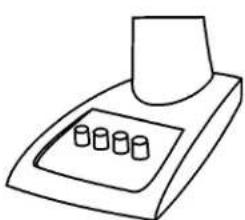
1. 3-Step Speed Control
natural_image
Line drawing of a laboratory instrument with three cylindrical components on a tray (no text or symbols)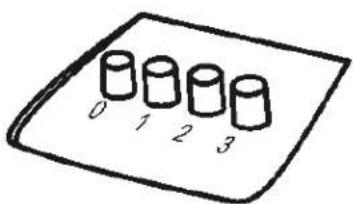
OFF 0
LOW 1
MEDIUM 2
HIGH 3
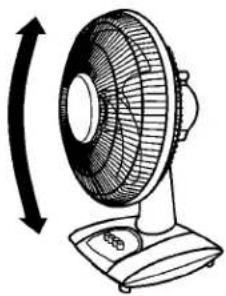
2. Tilting
natural_image
Illustration of a desktop fan with an arrow indicating rotational direction (no text or symbols)- For safety, ensure the fan is switched off.
- Hold the stand firmly with one hand, and move the guard gently up or down.
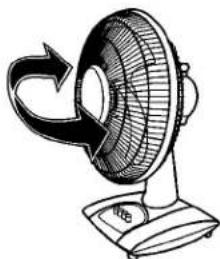
3. Oscillation
natural_image
Line drawing of a desktop fan with a curved arrow indicating rotation (no text or symbols)- Press the oscillation control knob down to make the fan oscillate. Pull it up to stop oscillation.
- When operating this control, we suggest that it is best not to reach across the front of the fan. This reduces the risk of loose items of clothing, sleeves, etc, entering the front guard.
Maintenance
- BEFORE CARRYING OUT ANY MAINTENANCE, REMOVE THE PLUG FROM THE SUPPLY SOCKET.
- Do not let any water get into the motor.
- Use a soft damp cloth to clean the fan blade and the guards, then dry them.
- Do not use thinners, alcohol, or other chemicals to clean the fan.
Preservation
After maintenance, please carry out the following steps before storing the fan.
- Apply a few drops of lubricant on to the motor shaft to prevent corrosion.
- Remove any oil or dirty stains from the fan.
- Store the fan in a dry place and do not disassemble the guard.
Specifications
• Power supply voltage: 220-240V 50Hz
• Power consumption: 60W
- Protection class: II
- Net weight: 3.96kg
After Sales service
If you encounter any problems with your White Knight fan, please contact:
Customer Service Department,
Crosslee plc,
Hipperholme,
Halifax,
West Yorkshire,
HX3 8DE.
or telephone us on 01422 200660.
Brand : White Knight
Model : WKCD40
Category : Ventilateur domestique