Pyle PIDOCK1 - Computer accessory

PIDOCK1 - Computer accessory Pyle - Free user manual and instructions

Find the device manual for free PIDOCK1 Pyle in PDF.

📄 1 pages English EN Download 💬 AI Question 10 questions ⚙️ Specs
Notice Pyle PIDOCK1 - page 1
Pick your language and provide your email: we'll send you a specifically translated version.
Product Type Docking Station
Brand Pyle
Model PIDOCK1
Dimensions (W x D x H) 10.2 x 3.5 x 1.2 inches
Weight 1.1 lbs (0.5 kg)
Input Connection USB-C (Thunderbolt compatible)
Output Ports 1x HDMI 4K@30Hz, 2x USB-A 3.0, 1x USB-C PD (100W), 1x Ethernet (RJ45), 1x 3.5mm audio jack, SD/MicroSD card slot
Power Delivery Up to 100W charging pass-through
Video Support Single 4K@30Hz or dual 1080p@60Hz via HDMI
Data Transfer Speed USB 3.0 up to 5Gbps
Compatible Devices Windows, Mac, Chromebook with USB-C/Thunderbolt
Operating System Support Windows 10/11, macOS 10.12+, Chrome OS
Material Aluminum alloy with anti-slip base
LED Indicator Power and activity indicators
Maintenance Wipe with a soft, dry cloth. Do not use liquids.
Safety Features Overcurrent, overvoltage, and short circuit protection
Spare Parts Availability Not available separately; replace unit if damaged
Repairability Non-serviceable; do not attempt to open
Package Contents PIDOCK1 docking station, USB-C cable, power adapter (optional), user manual
Warranty 1 year limited warranty

Frequently Asked Questions - PIDOCK1 Pyle

What devices are compatible with the Pyle PIDOCK1?
The PIDOCK1 works with laptops, tablets, and smartphones that support USB-C with DisplayPort Alternate Mode. Compatible with Windows 10/11, macOS 10.12+, and Chrome OS. Does not support non-USB-C devices.
Can I charge my laptop through the docking station?
Yes, the PIDOCK1 supports power delivery up to 100W. Connect the laptop's power adapter to the dock's USB-C PD port (if provided) or use a suitable USB-C charger.
How many monitors can I connect?
You can connect one monitor at 4K@30Hz or two monitors at 1080p@60Hz via the HDMI port. For dual monitors, you need a USB-C hub with multiple video outputs (this model has one HDMI).
Does it support Ethernet?
Yes, the dock includes a Gigabit Ethernet port (RJ45) for wired network connectivity.
Is the PIDOCK1 compatible with MacBooks?
Yes, it works with MacBook Air and MacBook Pro models that have USB-C/Thunderbolt 3 or 4 ports. Note that M1/M2 Macs may require driver updates for certain features.
Can I use a USB-A mouse and keyboard while charging?
Absolutely. The dock has two USB-A 3.0 ports for peripherals and a dedicated USB-C PD port for charging, all simultaneously.
How do I clean the docking station?
Disconnect all cables and wipe the surface with a soft, dry cloth. Do not use any liquids or abrasive cleaners.
Does it come with a power adapter?
The package includes a USB-C cable but not always a power adapter. Some versions may include a power adapter; check your purchase details.
What should I do if the dock is not recognized?
Ensure your device supports USB-C video output. Try a direct connection to the laptop, update drivers, or test with another USB-C device. If problems persist, contact Pyle support.
Is the PIDOCK1 repairable?
No, the dock is a sealed unit and not user-serviceable. Do not open it as it may damage components and void the warranty.

User questions about PIDOCK1 Pyle

0 question about this device. Answer the ones you know or ask your own.

Ask a new question about this device

The email remains private: it is only used to notify you if someone responds to your question.

No questions yet. Be the first to ask one.

Download the instructions for your Computer accessory in PDF format for free! Find your manual PIDOCK1 - Pyle and take your electronic device back in hand. On this page are published all the documents necessary for the use of your device. PIDOCK1 by Pyle.

USER MANUAL PIDOCK1 Pyle

PIWIPDK 1

iPod/iPhone In-Wall Mounted Audio/Video Docking

Center w/Wireless Remote

http://www.pyleaudio.com

Installation Guide.

For the easiest possible installation, please read and follow these tips.

  1. You'll need two sets of wires for a full audio/video installation. Use Cat5 (Ethernet) cable for the audio and power. For video, choose composite, or s-video, which will provide a higher quality image. Run these two wires together between the dock and output box for your convenience.
  2. For best results, do not use the Ethernet (RJ-45) jack on the output box. You should not crimp RJ-45 connectors onto the Cat5 cable. Instead, separate the wires by color and use a Cat5 punch down tool to individually connect each wire to the white connector. The order, from bottom to top, is as follows: brown-stripe, brown, green-stripe, green, orange-stripe, orange, blue-stripe, blue.
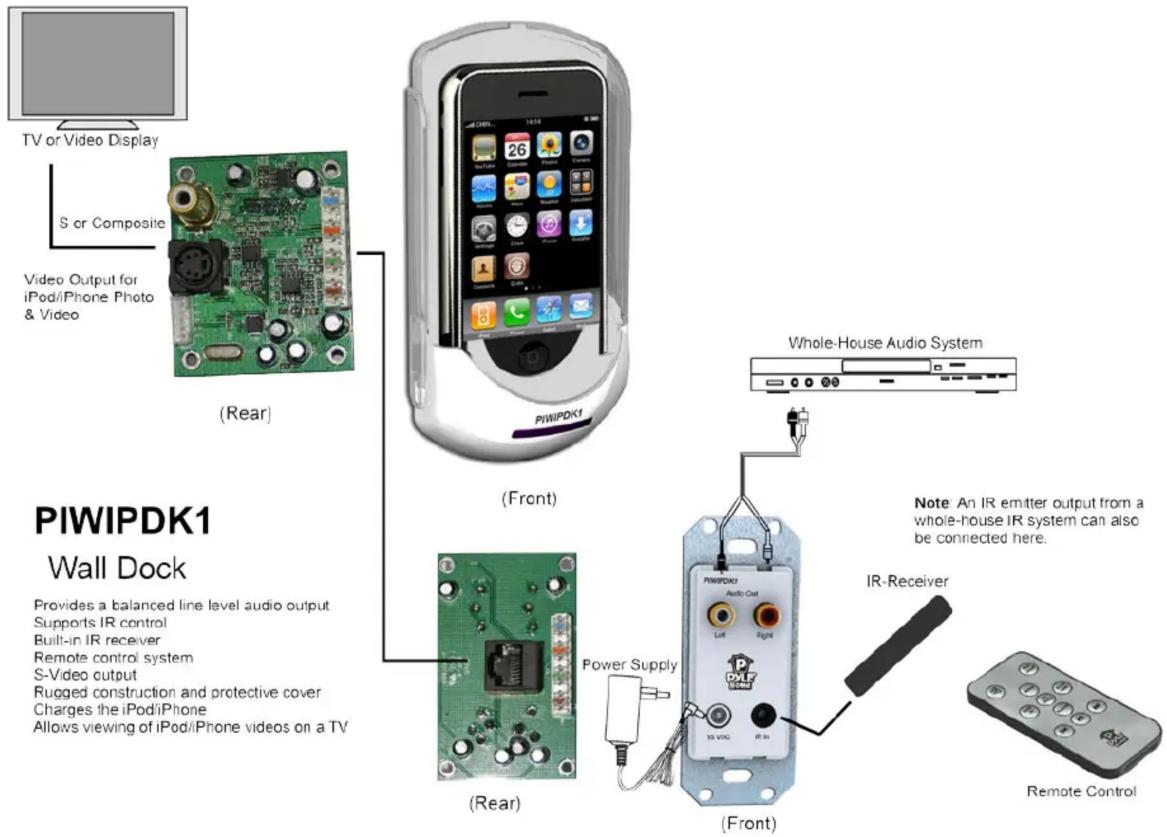
TV or Video Display S or Composite Video Output for iPod/iPhone Photo & Video (Rear) PIWIPDK1 Whole-House Audio System PIWIPDK1 Wall Dock Provides a balanced line level audio output Supports IR control Built-in IR receiver Remote control system S-Video output Rugged construction and protective cover Charges the iPod/iPhone Allows viewing of iPod/iPhone videos on a TV (Rear) Power Supply (Front) Note An IR emitter output from a whole-house IR system can also be connected here. IR-Receiver Remote Control

Manual assistant
Powered by Anthropic
Waiting for your message
Product information

Brand : Pyle

Model : PIDOCK1

Category : Computer accessory