CDC741 - CD Player PHILIPS - Free user manual and instructions

Find the device manual for free CDC741 PHILIPS in PDF.
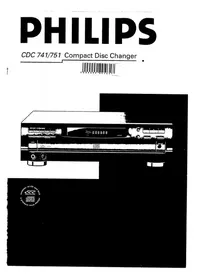
PHILIPS CDC741 - CD Player
📄 18 pages English EN Download 💬 AI Question 10 questions ⚙️ Specs
Notice PHILIPS CDC741 - page 1
Pick your language and provide your email: we'll send you a specifically translated version.
Product Type CD Player
Brand Philips
Model CDC741
Disc Capacity 1 disc
Playback Functions Play, Pause, Stop, Skip, Repeat, Shuffle, Program (up to 20 tracks)
Outputs Analog RCA line out, Headphone jack
Power Supply AC 110-240V, 50/60Hz, adjustable voltage selector
Power Consumption 15 W
Dimensions (W x H x D) 430 x 100 x 280 mm
Weight 3.5 kg
Remote Control Not included (optional for CDC751)
Safety Class II, double insulation; fuse protection (5A)
Maintenance Clean lens with CD lens cleaner; avoid solvents
Spare Parts & Repairability Spare parts available through Philips service centers; user-replaceable fuse
Compliance CE, NOM (Mexico)

Frequently Asked Questions - CDC741 PHILIPS

How do I connect the mains plug for my Philips CDC741?
For UK models, the supplied plug is a moulded 13 Amp type. If you need to change the fuse, use a BS1362 5A fuse. For other regions, ensure voltage selector is set correctly and follow local wiring codes. The blue wire connects to neutral (N), brown to live (L). Do not connect to earth.
Can I use a remote control with this CD player?
The CDC741 does not include a remote control. The remote is only compatible with the CDC751 model. However, you can use universal remotes or third-party replacements programmed for Philips CD players.
How do I program the playback order of tracks?
Press the PROGRAM button, then use SKIP/SEARCH to select the desired track. Press PROGRAM again to store it. Repeat for up to 20 tracks. Press PLAY to start programmed playback.
What should I do if the CD player does not read discs?
Ensure the disc is clean and free of scratches. Try a different disc. If the issue persists, clean the laser lens using a dedicated CD lens cleaner. Avoid using alcohol or solvents. If still not working, contact Philips support.
What is the voltage setting and how do I change it?
The CDC741 has a voltage selector on the rear panel. It can be set to 110-127V or 220-240V, 50/60Hz. Use a small screwdriver to slide the switch to match your local mains voltage. Refer to the manual for exact location.
How do I clean the CD player?
Use a soft, dry cloth to wipe the exterior. For the disc compartment, use a CD lens cleaner disc. Do not use liquid cleaners or spray directly into the unit. Keep the disc tray closed when not in use.
Can I connect the CDC741 to an amplifier or receiver?
Yes, use the analog RCA output jacks labeled 'AUDIO OUT' to connect to your amplifier, receiver, or active speakers. Also, a headphone output is available on the front panel.
Why does the 'EDIT' indicator light up?
The EDIT function allows you to program a set of tracks for recording to tape. When EDIT lights up, you can select tracks and the player will calculate the required tape length. This is useful for creating mixtapes.
What type of fuse does the CDC741 use?
The mains plug contains a 5A fuse (BS1362 type for UK). If a different plug is used, ensure the fuse at the distribution board is not greater than 5A to protect the player.
Is the CDC741 compatible with CD-R or CD-RW discs?
The player is designed for standard audio CDs. It may play CD-R discs but compatibility with CD-RW is not guaranteed. For best results, use commercial audio CDs.

User questions about CDC741 PHILIPS

0 question about this device. Answer the ones you know or ask your own.

Ask a new question about this device

Your email remains private: it is only used to notify you if someone answers your question.

No questions yet. Be the first to ask one.

Download the instructions for your CD Player in PDF format for free! Find your manual CDC741 - PHILIPS and take your electronic device back in hand. On this page are published all the documents necessary for the use of your device. CDC741 by PHILIPS.

USER MANUAL CDC741 PHILIPS

FITTING A MAINS PLUG (U.K. only)

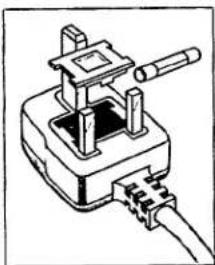
This apparatus is fitted with an approved moulded 13 Amp plug. To change a fuse in this type of plug proceed as follows:

  • Remove fuse cover and fuse.
  • Fix new fuse which should be a BS1362 5A, A.S.T.A. or BSI approved type.

- Refit the fuse cover.

If the fitted plug is not suitable for your socket outlets, it should be cut off and an appropriate plug fitted in its place.

If the mains plug contains a fuse, this should have a value of 5A. If a plug without a fuse is used, the fuse at the distribution board should not be greater than 5A.
Pure electrical circuit lines without any symbols.

NOTE

The severed plug must be disposed to avoid a possible shock hazard should it be inserted into a 13A socket elsewhere.

HOW TO CONNECT A PLUG

The wires in the mains lead are coloured in accordance with the following code:

BLUE - "NEUTRAL" ("N") and BROWN - "LIVE" ("L")

As these colours may not correspond with the colour markings identifying the terminals in your plug, proceed as follows:

  • The BLUE wire must be connected to the terminal which is marked with the letter "N" or coloured BLACK.
  • The BROWN wire must be connected to the terminal which is marked with the letter "L" or coloured RED.
  • Do not connect either wire to the earth terminal in the plug, which is marked by the letter "E" or by the safety earth symbol, or colored green or green-and-yellow.

Before replacing the plug cover, make certain that the cord grip is clamped over the sheath of the lead – not simply over the two wires.

PHILIPS CDC741 - HOW TO CONNECT A PLUG - 1

México

NOM

PAGE

INTRODUCTION 48

OPERATION 49

Mains voltage setting 49

MAINS VOLTAGE SETTING

REMOTE CONTROL (only CDC 751)2 X 1.5 V. R03 / UM4 / AAA.

1 TIME

COMPACT DISC DIGITAL AUDIO.

12 cm. 8 cm.

Abstract black-and-white graphic with curved shapes and a small oval shape (no text or symbols).

NORMAL PLAYBACK (PLAY ▶)

GETTING TO KNOW THE CDs (SCAN)

All CDs:

PLAYING THE PROGRAM (PLAY ▶)

(STOP ■ of OPEN/CLOSE)

- EDIT light on; (= EDIT NORMAL = default setting).

CDC 741/751

PHILIPS CDC741 - CDC 741/751 - 1

Manual assistant
Powered by Anthropic
Waiting for your message
Product information

Brand : PHILIPS

Model : CDC741

Category : CD Player