
KH-KR900 - Headphones KENWOOD - Free user manual and instructions
Find the device manual for free KH-KR900 KENWOOD in PDF.


| Product Type | Over-ear headphones |
| Brand | Kenwood |
| Model | KH-KR900 |
| Driver Size | 40 mm |
| Impedance | 32 Ω |
| Sensitivity | 105 dB/mW |
| Frequency Response | 20 Hz – 20 kHz |
| Maximum Input Power | 500 mW |
| Plug Type | 3.5 mm stereo mini jack |
| Cable Length | 1.2 m |
| Weight | 250 g |
| Dimensions (W x H x D) | 200 x 170 x 80 mm |
| Foldable Design | Yes |
| Padded Headband | Yes |
| Earpad Material | Leatherette |
| Compatibility | Smartphones, tablets, PCs, audio players |
| In-Line Remote | No |
| Color | Black |
| Cleaning Instructions | Wipe with dry cloth; avoid liquids |
| Safety Warning | Do not use at high volume for prolonged periods |
| Replacement Parts | Earpads available; contact Kenwood support |
| Warranty | 1 year |
Frequently Asked Questions - KH-KR900 KENWOOD
User questions about KH-KR900 KENWOOD
0 question about this device. Answer the ones you know or ask your own.
Ask a new question about this device
Download the instructions for your Headphones in PDF format for free! Find your manual KH-KR900 - KENWOOD and take your electronic device back in hand. On this page are published all the documents necessary for the use of your device. KH-KR900 by KENWOOD.
USER MANUAL KH-KR900 KENWOOD
iPod, iPhone and iPad are trademarks of Apple Inc., registered in the U.S. and other countries.
KENWOOD
© 2015 JVCKENWOOD Corporation
Printed in China B5A-0797-00
SAFETY INSTRUCTIONS
"SOME DO'S AND DON'TS ON THE SAFE USE OF EQUIPMENT"
This equipment has been designed and manufactured to meet international safety standards but, like any electrical equipment, care must be taken if you are to obtain the best results and safety is to be assured.
Do read the operating instructions before you attempt to use the equipment. Do ensure that all electrical connections (including the mains plug, extension leads and interconnections between pieces of equipment) are properly made and in accordance with the manufacturer's instructions. Switch off and withdraw the mains plug when making or changing connections.
Do consult your dealer if you are ever in doubt about the installation, operation or safety of your equipment.
th glass panels or doors on equipment
\*\*\*\*\*\*\*\*\*\*\*\*\*\*\*\*\*\*\*\*\*\*\*\*\*\*\*\*\*\*\*\*\*\*\*\*\*\*\*\*\*\*\*\*\*\*\*\*\*\*\*\*\*\*\*\*\*\*\*\*\*\*\*\*\*\*\*\*\*\*\*\*\*\*\*\*\*\*\*\*\*\*\*\*\*\*\*\*
DON'T continue to operate the equipment if you are in any doubt about it working normally, or if it is damaged in any way - switch off - withdraw the mains plug and consult your dealer.
DON'T remove any fixed cover as this may expose dangerous voltages. DON'T leave equipment switched on when it is unattended unless it is specifically stated that it is designed for unattended operation or has a standby mode.
Switch off using the switch on the equipment and make sure that your family know how to do this.
Special arrangements may need to be made for infirm or handicapped people. DON'T use equipment such as personal stereos or radios so that you are distracted from the requirements of traffic safety. It is illegal to watch television whilst driving.
DON'T listen to headphones at high volume as such use can permanently damage your hearing.
DON'T obstruct the ventilation of the equipment, for example with curtains or soft furnishings.
Overheating will cause damage and shorten the life of the equipment. DON'T use makeshift stands and NEVER fix legs with wood screws. To ensure complete safety always fit the manufacturer's approved stand or legs with the fixings provided according to the instructions.
DON'T allow electrical equipment to be exposed to rain or moisture. ABOVE ALL
- NEVER let anyone, especially children, push anything into holes, slots or any
other opening in the case. This could result in a fatal electrical shock.
- NEVER guess or take chances with electrical equipment of any kind. It is better to be safe than sorry!
English
Thank you for purchasing this KENWOOD product. Before you begin operating this unit, please read the operating instructions carefully to be sure you enjoy the best possible performance. If you have any questions, please consult your KENWOOD dealer.
Connecting the supplied cord

*If sound is not produced properly on devices other than smartphones, reverse the cord.
Operating the remote control

Audio/phone operation (example for iPhone)
For audio operation To play or pause a track Press once To skip to the next track Press twice To skip to the previous track Press three times For phone operation To answer or end a call Press once • This unit can not guarantee operation of all of the remote control functions. • This unit supports smartphones with a 4-pole plug headphone jack. Any devices with a 3.5 mm 3-pole or 2-pole plug headphone jack are not supported.
For some mobile phones, you may not be able to use some or all functions depending on the specifications of the mobile phone itself.
Français
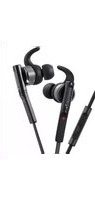
- KENWOOD
- SAFETY INSTRUCTIONS
- "SOME DO'S AND DON'TS ON THE SAFE USE OF EQUIPMENT"
- th glass panels or doors on equipment
- \*\*\*\*\*\*\*\*\*\*\*\*\*\*\*\*\*\*\*\*\*\*\*\*\*\*\*\*\*\*\*\*\*\*\*\*\*\*\*\*\*\*\*\*\*\*\*\*\*\*\*\*\*\*\*\*\*\*\*\*\*\*\*\*\*\*\*\*\*\*\*\*\*\*\*\*\*\*\*\*\*\*\*\*\*\*\*\*
- English
- Connecting the supplied cord
- Operating the remote control
- Audio/phone operation (example for iPhone)
- Français
Brand : KENWOOD
Model : KH-KR900
Category : Headphones