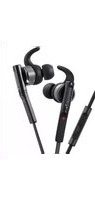
KH-SR800 - Headphones KENWOOD - Free user manual and instructions
Find the device manual for free KH-SR800 KENWOOD in PDF.


| Brand | Kenwood |
| Model | KH-SR800 |
| Type | In-ear headphones with remote and microphone |
| Connectivity | Wired (3.5mm jack) |
| Ear Piece Types | Standard (closed) and open-type (allow ambient sound) |
| Remote Control | Yes, with playback control (next/previous, volume) |
| Microphone | Built-in microphone for calls |
| Cord Clip | Included, attachable to clothing |
| Safety Warning | Do not use at high volume for extended periods; do not use while driving or cycling |
| Skin Contact Material | Metallic parts; avoid use if metal allergy |
| Cleaning | Wash ear pieces with mild detergent; wipe headphones with damp cloth; do not immerse |
| Water Resistance | Not fully waterproof; wipe dry after contact with moisture |
| Ear Piece Replacement | Detachable silicone ear pieces in three sizes (S, M, L); replace when worn |
| Left/Right Indicators | Yes, marked L and R |
| Storage | Keep away from children to avoid swallowing hazard |
Frequently Asked Questions - KH-SR800 KENWOOD
User questions about KH-SR800 KENWOOD
0 question about this device. Answer the ones you know or ask your own.
Ask a new question about this device
Download the instructions for your Headphones in PDF format for free! Find your manual KH-SR800 - KENWOOD and take your electronic device back in hand. On this page are published all the documents necessary for the use of your device. KH-SR800 by KENWOOD.
USER MANUAL KH-SR800 KENWOOD
natural_image
Line drawing of a pair of earphones with attached cables and connectors (no text or symbols)INSTRUCTIONS
"SOME DO'S AND DON'TS ON THE SAFE USE OF EQUIPMENT"
This equipment has been designed and manufactured to meet international safety standards but, like any electrical equipment, care must be taken if you are to obtain the best results and safety is to be assured.
\*\*\*\*\*\*\*\*\*\*\*\*\*\*\*\*\*\*\*\*\*\*\*\*\*\*\*\*\*\*\*\*\*\*\*\*\*\*\*\*\*\*\*\*\*\*\*\*\*\*\*\*\*\*\*\*\*\*\*\*\*\*\*\*\*\*\*\*\*\*\*\*\*\*\*\*\*\*\*\*\*\*\*\*\*\*\*\*
Do read the operating instructions before you attempt to use the equipment. Do ensure that all electrical connections (including the mains plug, extension leads
30 Ensure that all electrical connections (including the mains plug, extension leads and interconnections between pieces of equipment) are properly made and in
accordance with the manufacturer's instructions. Switch off and withdraw the mains plug when making or changing connections.
Do consult your dealer if you are ever in doubt about the installation, operation or safety of your equipment.
Do be careful with glass panels or doors on equipment.
\*\*\*\*\*\*\*\*\*\*\*\*\*\*\*\*\*\*\*\*\*\*\*\*\*\*\*\*\*\*\*\*\*\*\*\*\*\*\*\*\*\*\*\*\*\*\*\*\*\*\*\*\*\*\*\*\*\*\*\*\*\*\*\*\*\*\*\*\*\*\*\*\*\*\*\*\*\*\*\*\*\*\*\*\*\*\*\*
DON'T continue to operate the equipment if you are in any doubt about it working normally, or if it is damaged in any way - switch off - withdraw the mains plug and consult your dealer.
DON'T remove any fixed cover as this may expose dangerous voltages. DON'T has a high voltage output, but its current output is not
DON-T leave equipment switched on when it is unattended unless it is specifically stated that it is designed for unattended operation or has a standby mode.
Stated that it is designed for an attended operation or has a standby mode? Switch off using the switch on the equipment and make sure that your family know how to do this.
Special arrangements may need to be made for infirm or handicapped people. DON'T use equipment such as personal stereos or radios so that you are distracted from the requirements of traffic safety. It is illegal to watch television whilst driving. DON'T listen to headphones at high volume as such use can permanently damage your hearing.
DON'T obstruct the ventilation of the equipment, for example with curtains or soft furnishings.
Overheating will cause damage and shorten the life of the equipment.
DON'T use makeshift stands and NEVER fix legs with wood screws. To ensure complete safety always fit the manufacturer's approved stand or legs with the fixings provided according to the instructions.
DON'T allow electrical equipment to be exposed to rain or moisture.
ABOVE ALL NEVER!
NEVER let anyone, especially children, push anything into holes, slots or any other opening in the case. This could result in a fatal electrical shock.
opening in the case. This could result in a fatal electrical shock. NEVER guess or take chances with electrical equipment of any kind. It is better to
be safe than sorry!
KENWOOD
© 2015 JVC KENWOOD Corporation
Printed in China
B5A-0847-00

Thank you for purchasing this KENWOOD product. Before you begin operating this unit, please read the operating instructions carefully to be sure you enjoy the best possible performance. If you have any questions, please consult your KENWOOD dealer.
WARNING
WARNING For your safety
- Do not listen at high volume for an extended period. Do not use while driving or cycling. - Pay special attention to traffic around you when using the headphones outside. Failure to do so could result in an accident.
CAUTION
• The headphones have metallic parts which directly touch your skin.
Do not use them if you have a metal allergy. Metallic parts may be sold to the touch in lo
- Metallic parts may be cold to the touch in lower temperatures. - Stop using the headphones if they are causing great discomfort.
Stop using the recognitions if they are causing great discomfort or irritation on the skin and the ears. They may damage your skin and cause rash or inflammation.
- If ear piece or other parts of headphones become lodged in your ear, be careful not to push it deep into the ear canal and seek skilled medical assistance to remove the piece.
Damage to the ear may be caused by non-professionals attempting to remove the pieces - Store the ear pieces in a safe place where children cannot reach them to avoid the risk of a possible accident or hazard such as swallowing them.
- In dryer air conditions such as in winter, you may feel some static shock when using the headphones.
- When in use you may sometimes hear friction noise, this is caused by the cord rubbing
against your clothing while walking or during exercise.
Using the headphones
- Be sure to use correct ear piece for left and right ear.
- The medium-size silicone ear pieces are attached vib
The medium-size silicone car pieces are attached when purchased. You may not enjoy the bass sound fully if the
ear pieces do not fit your ears. To enjoy better sound while
reducing sound leakage, choose the other pair of ear
pieces (three sizes of silicone ear pieces) and adjust their
positions to fit them to your ears. 2. When wearing the headphones.
3 Which wearing the headphones, adjust the position of the supports so that they fit your ears.


Using the remote control unit
| Press this part to perform the audio/phone operation(See below) | Microphone |
Audio/phone operation (example for iPhone)
For audio operation
To play or pause a track | Press once
To skip to the next track Press twice
To skip to the previous track: Press three times
For private operation To answer or end a ca
- Answer of child can 11.33.000
• For some mobile phones, you may not be able on the specifications of the mobile phone itself
About the ear pieces
Two types of ear piece are provided: standard type ear
pieces, and open type ear pieces that make it easier to have external sounds. Like the most suitable ergiveness. Standard type: Open type
near external sounds. Use the most suitable ear pieces for your listening environment. Standard type ear pieces Open type ear pieces
CAUTION
- Although the open type ear pieces are designed so that external sounds can be heard
well, make sure that you pay sufficient attention to your surroundings while using them. Do not turn up the volume so high that you cannot hear sound around you
For replacing the ear pieces.
- Attach the ear pieces firmly when replacing them; failure to do so may result in the
ear pieces getting lodged in your ear canal when removed, thus becoming a possible health hazard.
Notes on using ear pieces
• The ear pieces deteriorate with age even in normal use and maintenance
- When the ear pieces get dirty, detach the ear pieces and wash them in water-diluted determent. After washing, dry the ear pieces and attach to the headhogs
• When using the open type ear pieces, bass sounds will be weaker than when using the
which using one open type is protected, but without the other standard. Even when using an standard type.
How to use the cord clip
1 Press the knob and attach the cord clip to
the cord. 2 Attach the cord clip to a piece of your
- Attach the cord clip to a piece of your clothing
CAUTION
- Store the cord clip in a place where children cannot reach to avoid the risk of the
accident such as swallowing it. When you use the card clip, he
- When you use the cord clip, be careful not to catch your fingers
Cleaning the headphones
The headphone part
1 If the headphones themselves have become dirty, wipe them with a damp
cloth. 2. If they are we
2 If they are very dirty, rinse them in slow running water.
e that the water hits the nes in this direction.
to be immersed or come into inuous contact with water.
-
1
(1)
[NO TEXT]
[Non-Text]
↓ | ↓
[Non-Text]
[NO TEXT]
R
[Unreadable]
↓
[Unreadable]
[Unreadable]
ing the headphones, wipe them softly with a dry cloth. Only use on they are fully dry
- The headphones have water
4 The headphones have waterproofing equivalent to IPXS. However, they are not completely waterproof
Lightly shake and tap the headphones against a
dry cloth as shown in the illustration on the right to
ensure that no water drops remain. Otherwise, wat
may enter the inner workings of the headphones.
The support part
7 Remove the support part from the headphone 8 Wash the support part with water, diluted dot
- Wash the support part with water-diluted detergent by hand.
- After washing, dry off and reattach the support part.
Attach the support part to the headquarters. Make sure that
Attach the support part to the headphone so it covers the ridge. Make sure that the L/X marks on the headphones and support parts match.
2018.10.24
- 2017年1月1日
B
Support
(10)
(c) part (b)
[Figure]
(2) (3)
H \
图 2
|| \
目
Ridge There is a small gap.
The Ground Truth image displays a single, solid horizontal line, which is a stylistic or background element (like a rule line on paper). According to Rule 2, such lines must be ignored by the OCR result. The provided OCR content is "____", which consists of underscores. Underscores are not equivalent to a solid line and are not permitted under the “Stylistic/Background Lines (Ignore)” rule. Outputting underscores for a stylistic line is incorrect because it misinterprets the line as a placeholder fill-in-the-blank area. Hence, the OCR result is inconsistent with the Ground Truth.
CAUTION
(1) 本说明仅供参考。
- Rinse with fresh wat
p, detergent, alcohol, or other chemical
- Do not rub with a br
[Non-Text]
- Do not dry with a ha
[Non-Text]
- Do not wipe it with to
[Non-Text]
The remote and cord
In if they become dirty. Do not wash with
Wipe the remote and/van
h if they become dirty. Do not wash with
water.
The Ground Truth image displays a single, solid horizontal line. According to Rule 2 (UNDERSCORE & LINE RULES), if the GT contains lines used for stylistic emphasis or as background elements (like ruled paper), the OCR result must ignore them. The OCR content provided is "____", which consists of four underscores. This is incorrect because underscores are not equivalent to a solid line and are not permitted under the “Stylistic/Background Lines (Ignore)” rule. The OCR has hallucinated underscores where none should exist in the GT, violating the rule to ignore stylistic lines. Therefore, the OCR result is inconsistent with the Ground Truth.
Dear Customer.
[Non-Text]
This apparatus is in co
d European directives and standards
regarding electromagnetic compatibility and electrical safety. European representati
electrical safety. European representative
of JVC KENWOOD Car
The image is too blurry to recognize any text content.
Français
This image contains no text. The visible element is a stylistic or background line, which must be ignored according to the rules.
, dia iPhone
-
Source: The data is presented in Table 1.
All do expert in mind.
2
Parte de
suporte (B)
(6)
[NO TEXT]
目
•
The Ground Truth image displays a single, solid horizontal line, which is a stylistic or background element (like a rule line on paper). According to Rule 2, such lines must be ignored by the OCR result. The provided OCR content is "____", which consists of underscores. Underscores are not equivalent to a solid line and are not permitted under the “Stylistic/Background Lines (Ignore)” rule. Outputting underscores for a stylistic line is incorrect because it misinterprets the line as a placeholder fill-in-the-blank area. Since the OCR output incorrectly rendered a stylistic line as underscores (which should be ignored), this violates the rule. Therefore, the OCR result is inconsistent with the Ground Truth.
on the following:
The Ground Truth image displays a single, continuous horizontal line, which is a stylistic or background element (like a ruled paper line). According to Rule 2, such lines must be ignored by the OCR result. The provided OCR content is "____", which consists of underscores. Underscores are not equivalent to a solid line and are not permitted under the “Stylistic/Background Lines (Ignore)” rule. Outputting underscores for a stylistic line is incorrect because it misinterprets the line as a fill-in-the-blank placeholder. Since the OCR output incorrectly rendered a stylistic line as underscores (which should be ignored), this violates the rule. Therefore, the OCR result is inconsistent with the Ground Truth.
Source: Blue
s Europesas validas e
m = 311
m = 311
(1)
[Non-Text]
1
eczką.
ywnym strumieniu
(1) 本说明仅供参考。
The following table is provided in the image.
Шановний покупецы!
KENWOOD Corporation:
JNCKENWOOD Nederland B.V.
m = 311
[Non-Text]
The Ground Truth image displays a single, solid horizontal line. According to Rule 2 (UNDERSCORE & LINE RULES), if the GT contains lines used for stylistic emphasis or as background (like ruled paper), the OCR result must ignore them. The OCR content provided is "____", which consists of four underscores. This is incorrect because underscores are not equivalent to a solid line and are not permitted under the “Stylistic/Background Lines (Ignore)” rule. The OCR has hallucinated underscores where none should exist in the GT, violating the “Stylistic/Background Lines (Ignore)” rule. Therefore, the OCR result is inconsistent with the Ground Truth.
iku
pV
As cheese presubel in
Pre omladanie telefonu Zhiyazovskiyakovskiyakovskiyakovskiyakovskiyakovskiyakovskiyakovskiyakovskiyakovskiyakovskiyakovskiyakovskiyakovskiyakovskiyakovskiyakovskiyakovskiyakovskiyakovskiyakovskiyakovskiyakovskiyakovskiyakovskiyakovskiyaki
Zdvihnutje alebo ukoncenje hovoru Stlacte jedenkrat

Brand : KENWOOD
Model : KH-SR800
Category : Headphones