
MP1045 - Printer Océ - Free user manual and instructions
Find the device manual for free MP1045 Océ in PDF.


Pick your language and provide your email: we'll send you a specifically translated version.
| Product Type | Multifunction Printer (Print, Copy, Scan) |
| Brand | Océ |
| Model | MP1045 |
| Technology | Electrophotographic (Laser) |
| Maximum Print Speed | 45 pages per minute (A4) |
| Maximum Print Resolution | 1200 x 1200 dpi |
| Maximum Paper Size | A3 (297 x 420 mm) |
| Paper Input Capacity | Standard 1,100 sheets, optional up to 6,000 sheets |
| Dimensions (W x D x H) | 700 mm x 800 mm x 1,200 mm |
| Weight | Approximately 200 kg |
| Power Consumption | 1,500 W (operating), 150 W (standby) |
| Power Supply | 220-240 V, 50/60 Hz |
| Main Functions | Print, Copy, Scan (color), Optional Fax |
| Connectivity | Ethernet 10/100/1000, USB 2.0, Optional Wi-Fi |
| Maintenance | Regular toner and drum replacement, periodic cleaning of glass and rollers |
| Safety Certifications | CE, RoHS, Energy Star |
| Spare Parts Availability | Replaceable toner cartridge, drum unit, fuser unit, transfer belt |
| Repairability Index | 7.5/10 (estimated) |
| General Information | Designed for high-volume office and production environments with robust build quality |
Frequently Asked Questions - MP1045 Océ
How do I load paper into the MP1045?
Open the paper tray, adjust the guides to the paper size, and load the paper with the print side facing down. Close the tray and confirm the paper size on the control panel.
What type of toner does the Océ MP1045 use?
The MP1045 uses Océ TN-45 toner cartridges. Ensure you purchase the correct black and color toners for your region.
How to clear a paper jam?
Open the front cover and remove the drum unit. Gently pull out any jammed paper. Check input trays and fuser area. Reinstall the drum and close the cover. Refer to the manual for detailed instructions.
Can I print wirelessly?
Yes, if you install the optional Wi-Fi kit. Alternatively, connect via Ethernet for wired network printing.
How to scan a document to email?
Place the document on the scanner glass or ADF. Press Scan, enter the email address via the touchscreen, and press Send. Configure SMTP settings beforehand.
What is the maximum monthly duty cycle?
The recommended monthly volume is 50,000 pages, with a maximum duty cycle of 150,000 pages.
How do I replace the drum unit?
Open the front cover, remove the old drum unit, and insert the new one. Close the cover and run the calibration cycle as prompted.
Does the MP1045 support duplex printing?
Yes, the MP1045 supports automatic duplex printing for both A4 and A3 paper sizes.
How to reset the maintenance counter?
Go to Settings > Maintenance and select Reset Counter. Confirm with the administrator password. This clears the 'Replace Drum' message.
Where can I find the user manual?
The user manual is available for free download on notice-facile.com in PDF format, or you can request a translated version via email.
User questions about MP1045 Océ
0 question about this device. Answer the ones you know or ask your own.
Ask a new question about this device
No questions yet. Be the first to ask one.
Download the instructions for your Printer in PDF format for free! Find your manual MP1045 - Océ and take your electronic device back in hand. On this page are published all the documents necessary for the use of your device. MP1045 by Océ.
USER MANUAL MP1045 Océ

Kopieeropdracht

- Kies de 'Output Method'.
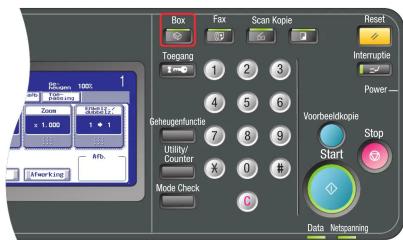

Scanopdracht

Table of contents
Click a title to access it
Manual assistant
Powered by Anthropic
Waiting for your message
Product information
Brand : Océ
Model : MP1045
Category : Printer