
Sentinel DX4200 - Server WESTERN DIGITAL - Free user manual and instructions
Find the device manual for free Sentinel DX4200 WESTERN DIGITAL in PDF.


| Product Type | Server (Windows Storage Server 2012 R2 Workgroup) |
| Dimensions | 8.80 x 6.69 x 8.10 in (223.5 x 170.0 x 205.7 mm) |
| Weight | 11.33 lbs (5.14 kg) for 8TB model; 14.64 lbs (6.64 kg) for 16TB model |
| Power Supply | Input 100-240V AC, 50-60Hz; Output 19V DC, 7.9A; dual DC ports (one PSU included, optional second) |
| Main Functions | Centralized file and block storage, iSCSI SAN, data protection via Windows Storage Spaces, dual Gigabit Ethernet, hot-swap drives, WD StorCentral dashboard management |
| Maintenance and Cleaning | Clean exterior with damp cloth; do not use liquid or aerosol cleaners. Replace hard drives hot-swappable; fan, memory, and boot drive cold-swappable. |
| Safety Features | Bezel lock to prevent drive removal, Kensington security slot, secure UEFI boot, redundant power supply, hot-swap drives, UPS recommended |
| Spare Parts and Repairability | Hot-swappable hard drives, cold-swappable fan, SODIMM memory module, and boot drive; power supply unit; use approved WD drives for optimal performance |
| General Information | Intel Atom C2338 dual-core processor, 4GB ECC RAM (expandable to 16GB), 4x 3.5-inch SATA drive bays, 1x 2.5-inch boot drive, Windows Storage Server 2012 R2 Workgroup |
| Network Interfaces | 2x Gigabit Ethernet (10/100/1000) with fault tolerance or aggregation |
| USB Ports | 4x powered USB 3.0 ports |
| Storage Capacity Options | 8TB (2x4TB) or 16TB (4x4TB) with WD enterprise-class hard drives |
| Processor | Intel Atom C2338 Dual-Core |
| Memory | 4GB ECC DDR3 (expandable to 16GB via two SODIMM slots) |
| Operating System | Windows Storage Server 2012 R2 Workgroup (pre-installed) |
| Warranty | 2-year limited warranty (varies by region); optional extended warranty via WD Guardian |
| Package Contents | WD Sentinel server, RJ-45 Ethernet cable, power adapter and cord, 2 door lock keys, Basic Installation Guide |
Frequently Asked Questions - Sentinel DX4200 WESTERN DIGITAL
User questions about Sentinel DX4200 WESTERN DIGITAL
0 question about this device. Answer the ones you know or ask your own.
Ask a new question about this device
Download the instructions for your Server in PDF format for free! Find your manual Sentinel DX4200 - WESTERN DIGITAL and take your electronic device back in hand. On this page are published all the documents necessary for the use of your device. Sentinel DX4200 by WESTERN DIGITAL.
USER MANUAL Sentinel DX4200 WESTERN DIGITAL
WD®Service and Support
Shouldyouencounteranyproblem,pleasegiveusanopportunitytoaddressitbeforereturningthis product.Mosttechnicalsupportquestionscanbeansansweredthroughourknowledgebaseoremail support service at http://support.wd.com. If the answer is not available or if you prefer, please contactWDatthebesttelephonenumbershownbelow.
Yourproductincludes30daysoffreetelephonesupportduringthe2-yearstandardlimitedwarranty period.This30-dayperiodstartsonthedateofyourfirsttelephonecontactwithWDTechnical Support.Emailsupportisfreefortheentirewarrantyperiodandourextensiveknowledgebaseis available24/7.Tohelpuskeepyouinformedofnewfeaturesandservices,remembertoregister your product on the Registration page on the user interface or online at http://register.wd.com.
WD Guardian Services
Whenyouneedalittlehelpfromanexpert,we'lltakecareofyou!WDGuardianServicesoffers flexible,affordableandhassle-freetechnicalsupportandextendedwarrantyplanswithavarietyof benefits. Choose the plan that works best for your business. Visit www.wdguardian.com for details.
Accessing Online Support
Visitourproductsupportwebsiteathttp://support.wd.comandchoosefromthesetopics:
- Downloads - Download drivers, software, and updates for your WD Product.
- WD Support Portal - Register your WD products and get support information customized to your needs.
- Warranty & RMA Services - Get Warranty, Product Replacement (RMA), RMA Status, and DataRecoveryInformation.
- Knowledge Base - Enter keyword, phrase, answer ID, or PID.
• Installation - Get manuals, installation guides, and documentation for your WD product. - WD Community - Share your thoughts and connect with other WD users.
Contacting WD Technical Support
When contacting WDforsupport, have your WDproductserialnumber, systemhardware, and systemsoftwareversionsavailable.
North America Europe (toll free)*
English/Spanish855.556.5117(0080027549338)
South America
| Chile12300205871 | |
| Colombia00980083247788 | |
| Venezuela08001002855 | |
| Peru080054003 | |
| Uruguay | 000 413 598 3787 |
| Argentina08004440839 | China |
| Brazil | 08007704932 |
| 002180083247788 | |
00800ASK4WDEU
| Europe | +31880062100 |
| Middle East | +31880062100 |
| Africa | +31880062100 |
| Russia | 81080023355011 |
Asia Pacific
| Australia | 1800 429 861 / 0011 800 2275 4932 |
| 8008206682/4006276682 | |
| HongKong | 30579031 |
| India | 18002005789/18004195591 |
| Indonesia | 0018038523993 |
| Japan | 08008057293 |
| Korea | 0221203415 |
| Malaysia | 1800817477 |
| NewZealand | 0508555639/0080022754932 |
| Philippines | 180018550277 |
| Singapore | 18006086008 |
| Taiwan | 0800225593 |
| Thailand | 0018008525913 |
| Othercountries | +862126037560 |
Table of Contents
WD®ServiceandSupport....ii
WDGuardianServices....ii
1 Important User Information .... 1
ImportantSafetyInstructions....1
HandlingPrecautions....2
RecordingYourWDProductInformation. 2
AboutThisGuide....2
2 Product Overview .... 3
GettingtoKnowYourWDSentinelDX4200Server....3
KeyFeatures....3
SystemRequirementsandCompatibilityInformation....6
TechnicalSpecifications....7
ProductViews....8
Indicators. 10
LEDs....10
WheretoFindHelp....1 1
3 Connecting the Server and Getting Started ..... 12
AdministratorResponsibilities....12
HowtheWDSentinelFitsintoYourOffice....12
ConnectingtheWDSentinelServertoYourNetwork.....13
SettingupyourWDSentinelServer(onetimeonly)....14
4 Managing the WD Sentinel Server....18
WDStorCentral....18
ShuttingDownandRebootingtheServer 31
5 Managing Storage on the WD Sentinel Server....32
StorageSpaces. 32
SettingUpYourDrives....32
RecoveringfromaFailedDrive....32
6 Best Practices .... 3 3
SettinguptheWDSentinelServer....33
UsingtheWDSentinelServerEfficiently....3 3
ReplacingDrives. 33
ShuttingDown. 34
8 Regulatory and Warranty Information....38
RegulatoryCompliance....38
Limited Warranty....40
9 Appendix 42
HardwareReplacementProcedures....42
BeforeYouBegin. 42
ReplacingaHardDrive....43
ReplacingaServerFan. 46
RemovingtheUnitCover....48
ReplacingtheSODIMMMemoryModule....49
AddingaBootDrive 52
WDSentinelDX4200AdministratorReferenceSheet....53
10 Index....54
1
ImportantUserInformation
ImportantSafetyInstructions
HandlingPrecautions
RecordingYourWDProductInformation
AboutThisGuide
Important Safety Instructions
This device is designed and manufactured to assure personal safety. Improper use can result in electric shock or fire hazard. Thesafeguards incorporated into this unit will protect you if you observe the following procedures for installation, use, and servicing.
■ Followallwarningsandinstructionsmarkedontheproduct.
- Unplugthisproductfromthewalloutletbeforecleaning.Donotuseliquidcleanersor aerosolcleaners.Useadampclothforcleaning.
■ Donotusethisproductnearanyliquids.
- Donotplacethisproductonanunstablesurface.Theproductmayfall,causingserious damagetotheproduct.
- Donotdropheproduct.
- Donotblocktheslotsandopeningsonthebackorbottomsideofthechassis;to ensureproperventilationandreliableoperationoftheproductandtoprotectitfrom overheating,theseopeningsmustnotbeblockedorcovered.Makingsuretheserveris standinguprightalsohelpspreventoverheating.
- Operatethisproductonlyfromthetypeofpowerindicatedonthemarkinglabel.Ifyou arenotsureofthetypeofpoweravailable,consultyourdealerorlocalpowercompany.
- Donotallowanythingtorestonthepowercord.Donotlocatethisproductwhere personswillwalkonthecord.
- Neverpushobjectsofanykindintothisproductthroughthechassisslotsastheymaytouchdangerousvoltagepointsorshortoutpartsthatcouldresultinafireorelectricshock.
- Ensure that you keep the door lock key that comewith your WDSentinel device in a safe place.
■ Unplugthisproductfromthewalloutletandreferservicingtoqualifiedservicepersonnel underthefollowingconditions:
- Whenthepowercordorplugisdamagedorfrayed.
- Ifliquidhasbeenspilledontheproduct.
- If the product has been exposed to rain or water.
- If the product does not operate normally when the operating instructions are followed. Adjust only those control that are recovered by the operating instructions since improper adjustment may result in damage and require extensive work by a qualified technician to return the product on normal condition.
- If the product has been dropped or the chassis has been damaged.
- If the product exhibits a distinct change in performance, contact WDCustomer support at http://support.wd.com.
WARNING!
The WD Sentinel™ Server uses a lithium battery, type CR2032. There is danger of an explosion if the battery is incorrectly replaced. Replace only with the same or equivalent battery type recommended by the manufacturer. Dispose of used batteries according to the manufacturer's instructions.
Handling Precautions
WDproductsareprecisioninstrumentsandmustbehandledwithcareduringunpacking andinstallation.TheWDSentinelservermaybedamagedbyroughhandling,shock,or vibration.Beawareofthefollowingprecautionswhenunpackingandinstallingyourexternal storageproduct:
■ DonotdroporjolttheWDSentinelserver.
■ Donotmovetheunitwhileitispoweredon.
■ Donotusethisproductasaportabledrive.
Recording Your WD Product Information
RemembertowritedownthefollowingWDproductinformation,whichisusedforsetupand technicalsupport.YourWDproductinformationisfoundonthelabelonthebottomofthe device.
SerialNumber
■ ModelNumber
PurchaseDate
■ SystemandSoftwareNotes
About This Guide
ThisAdministratorandMaintenanceGuideprovidesdetailedinstructionsandinformationfor WD-specificinterfaceelementsandfunctions.Unlessotherwisenoted,referto
Microsoft® Online Help for standard interface elements and functions. This guide uses the following conventions:
| Convention Used for... | |
| Bold font | Names of items on a page such as menus, buttons, option names, fields, and tabsthattheusermustclickorcompleteandkeystheusermustpress. |
| Note: Extra,butnotvital,information | |
| Important: EssentialInformationtoknowortopreventproblemswhenusingtheWDSentinelserver | |
| WARNING! VitalinformationforoperatingtheWDSentinelserverortopreventdamagetotheserveroryourcomputer. | |
2
ProductOverview
GettingtoKnowYourWDSentinelDX4200Server KeyFeatures SystemRequirementsandCompatibilityInformation TechnicalSpecifications ProductViews Indicators LEDs WheretoFindHelp
Getting to Know Your WD Sentinel DX4200 Server
Congratulations your purchase of the WDSentinelDX4200 Windows Storage Server. Your WDSentinelDX4200 device delivers reliable, easy-to-deploy and manage storage server designed for small business work group environments. The WDSentinelDX4200 Storage Server provides secure centralized storage and seamlessly integrates with almost any existing infrastructure.
YourWDSentinelDX4200featuresaneasy-to-useWDStorCentralDashboard,harddrives optimizedforreliability,quality,andperformance,anIntelAtomdual-coreprocessor,and WindowsStorageServer2012R2Workgroup.
Key Features
WD StorCentral Dashboard
TheWDSentinelDX4200's proprietary dashboard include easy-to-usetaskwizards for initial setup and common management tasks like storage configuration. It also provides an at-a-glances summary of the system status, and manages networking, alerts, registration, software updates, performance, and health monitoring.
WD enterprise-class hard drives
Equipped with WDSeharddrivesthatfeaturehighcapacitystorage, peak performance and 24/7 datacenter-caliberreliability.
Seamless Integration
TheWDSentinelDX4200easilyintegratesintoworkgroups,ActiveDirectory,andmostother environments.WithintheActiveDirectoryenvironment,Microsoft'sServerManageroffersa singleviewofallserversjoinedtothedomain.
Security
WDSentinelDX4200hasmultiplelayersofsecurity.Beginningwithphysicalsecurity,the WDSentinelDX4200hasabezellocktopreventharddrivesfrombeingremovedfromthe system.ItalsoincludesaKensington-stylelockslottosecuretheDX4200toadesk.Upon powerup,theBIOScreatesasecureUEFlbootenvironment.Thispreventsunauthorized accesstoyourcompanydatabypreventingbootingfromrootkits.TheWindowsStorage Server2012R2Workgroupalsocontainslayersofsecurity.TheWDSentinelDX4200can manageuserslocallywithmultiplelevelsofaccess,andcanbefullyintegratedintoand existingActiveDirectory.
Windows Storage Spaces
WithWindowsStorageSpaces,youcancreatelargestoragespacesandaddmoredrives tothemwhenyourunlowonpoolcapacity.WiththeminimumofatleasttwoWD-populated drives,youcanhavetwoormoredrivesinthestoragepool(dataparity)andcreatestorage spacesthatwon'tbeaffectedintheeventofadrivefailure.
Pre-installed Boot Drive
WDSentinelDX4200comeswithone2.5inchbootdrivepre-installedwith WindowsStorageServer2012R2Workgroupandspecializedhardware services and drivers. The pre-installedbootdriveprovidestheabilitytokeeptheOSrunningfromthe bootdrivewhileredeployingorchangingapplicationsandrunningfoldersonthelarge capacitydatadrives. This allows businesssestosavedeploymenttime, asthereisnoneedto installfromaDVDorsearchforanyspecializeddriverstoinstallonline. The WDSentinelDX4200comeswiththeoptiontoaddasecondbootdrivewithRAID1data redundancy.
Redundant power capabilities
WDSentinelDX4200offersdualpowersupplyports,sointheeventofapowersurgeon otherfailuredamagetothepowersupply,thesecondpowersupplywilltakeover,providing smallbusinesseswiththeaddedpeaceofmindknowingthattheirserverwillremain operational.
Dual Gigabit Ethernet Ports
WDSentinelDX4200comeswithtwoEthernetportsthatcanbeconfiguredforfault tolerance,aggregatedforhighperformance,orusedfortwoseparateLANs.
A Total Solution with Industry-Leading Technology Partners
TheWDSentinelDX4200combineshardwareandsoftwarefromindustryleaderstodeliver areliable,secure,andeasy-to-managestorageserverdesignedspecificallyfor medium-sizedbusinessestosmallenterpriseenvironments.WDSentinelDX4200features:
- Unified Storage - The WD Sentinel DX4200 delivers an ultra-compact and quiet unified storagesolutionwithNASfunctionalityforfilesharingandiSCSISANforblocklevelstorage forvirtualizedenvironments
Intel® Atom® processor –BuiltwithanAtomdualcoreprocessorinside,with4GB ECCRAMexpandableto16GBRAM,theWDSentinelDX4200caneasilyhandleyour business'scomputingandfilestoragedemands.
- Windows® Storage Server 2012 R2 Workgroup – The dependable Microsoft WindowsStorageServer2012R2Workgroupoperatingsystemprovidesthecosteffective, reliable, and easy to deploy and manage storagesolution your business need to quickly and efficiently organize, protect, and share your critical business data using the familiar Windows user experience.
WD Guardian Services
Whenyouneedalittlehelpfromanexpert,we'lltakecareofyou!WDGuardian™Services offersflexible,affordableandhassle-freetechnicalsupportandextendedwarrantyplans withvarietyofbenefits.Choosetheplanthatworksbestforyourbusiness.Withthe purchaseoftheWDSentinelDX4200,WDisofferingoneFREEyearofWDGuardianPro, whichwillbeautoactivateduponproductregistration.FordetailsaboutWDGuardian Services,visitwww.wdguardian.com.
Why WD
WDhasbeenmakingharddrivesforover40years.Weknowhowtobuilddrivestostore andprotectyourdatabecauseweunderstandthatyourcompany'sdataisparamountto yourbusinesssuccess.
PackageContents
■ WDSentinelStorageServer
■ 1RJ-45Ethernetcable
■ 1-1.8meterpoweradaptorswithcord
■ 2doorlockkeys
■ BasicInstallationGuide
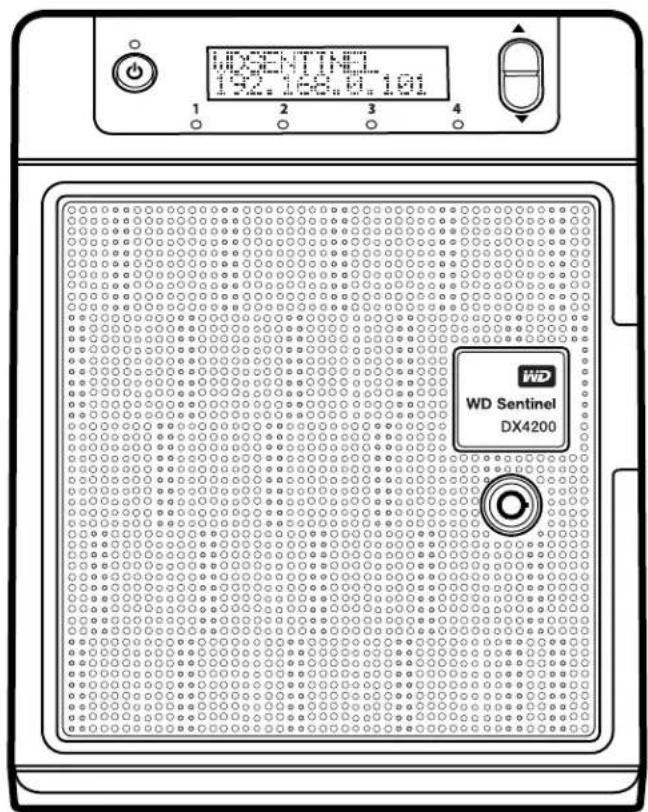
WDSentinel DX4200
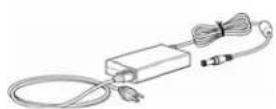
1.8meterpowercordand poweradaptor
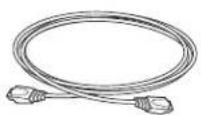
EthernetcableBasicInstallGuide
Forinformationonadditionalaccessories,visit:
| USwww.shopwd.com or www.wdstore.com | |
| Europe | Austria:www.wdstore.deUnitedKingdom:www.wdstore.euFrance:www.wdstore.frItaly:www.wdstore.itGermany:www.wdstore.deSpain:www.wdstore.esNetherlands:www.wdstore.nlRest of EU Countries:www.shopwd.eu or www.wdstore.eu |
| AllothersContactWDTechnicalSupportinyourregion.ForalistofTechnicalSupportcontacts,visithttp://support.wd.comandseeKnowledgeBaseAnswerID1048. | |
System Requirements and Compatibility Information
| Requirement Description | |
| FileSharingSupport/ClientOperatingSystem | FilesharingsupportforLinux,UNIX,andWindowsoperating systems. |
| LocalNetworkRouter/switch | (GigabitEthernetrecommendedtomaximize performance) |
| DisplayandPeripherals | SuperVGA(800x600)orhigher-resolutionmonitorUSBKeyboardUSBMouseorcompatiblepointingdevice |
Technical Specifications
| Specification Description | |
| Interfaces | •2Highperformance(10/100/1000)GigabitEthernet connections•4portsofpoweredUSB3.0•1VGAPort•2PowerSupplies(DCin) |
| Supportedprotocols | IFS/SMB,NFS,HTTP,HTTPS,WebDAV |
| Internalharddrives | 4 WD 3.5-inch SATA Best in Class hard drivesPioneeredbyWD,thisfeaturepreventsdrivefalloutcausedbythe extendedharddriveerror-recoveryprocessescommontodesktop drives.Approved Drive ModelsForacompletelistofapproveddrivemodels,searchforAnswerID9443intheWDKnowledgeBaseathttp://support.wd.com. |
| Internalbootdrive | 1 WD 2.5-inch SATA Best in Class hard drive with RAID-specific time-limited error recovery (TLER)PioneeredbyWD,thisfeaturepreventsdrivefalloutcausedbythe extendedharddriveerror-recoveryprocessescommontodesktop drives.Approved Drive ModelsForacompletelistofapproveddrivemodels,searchforAnswerID9443intheWDKnowledgeBaseathttp://support.wd.com. |
| CPU | •Intel®Atom TM C2338DualCore |
| Memory | •4GBytesECC(expandableto16GB) |
| Drivebays | •43.5inchharddrivebays•Hotswapcapable•Traylessdesign |
| RAIDlevel | •RedundantStoragesupported•WindowsStorageSpaces•RAIDLevel1forbootdrive |
| Physicaldimensions | •Length:8.80inches(223.5mm)•Width:6.69inches(170.0mm)•Height:8.10inches(205.7mm) |
| Weight | •8TB:11.33lbs(5.14kgs)•16TB:14.64lbs(6.64kgs) |
| Capacities | •8TB(2x4TB)•16TB(4x4TB) |
| Power | •2DCpowerports•1PowerSupplyincluded(optionalsecond) |
| Powersupply | •Inputvoltage:100to240VAC•Inputfrequency:50to60Hz•Outputvoltage:19VDC,upto7.9A |
| Temperature | •Operatingtemperature:0to35°C(32to95°F)•Non-operatingtemperature:-40to70°C(-40to158°F) |
| Switches | •Power•Recovery•LCMScrollbuttons |
Specification Description
| LEDs | 1 Power LEDSolidBlueindicatesbootstatusSolidblueoncebooted,withnopendingfaultconditions, indicatesagoodoperationalstateFlashingsREDindicatesafaultcondition2 Ethernet Port LEDsFlashinggreenindicatesactivitySolidamberindicatesthatthereisalinkconnectionOffindicatesinactivestate4 Drive Tray LEDsFlashingblueindicatesdriveactivitySolidblueindicatesdriveisconnectedSolidREDindicatesdrivefault(Drivemustbereplaced) |
OperatingSystemWindowsStorageServer2012R2Workgroup
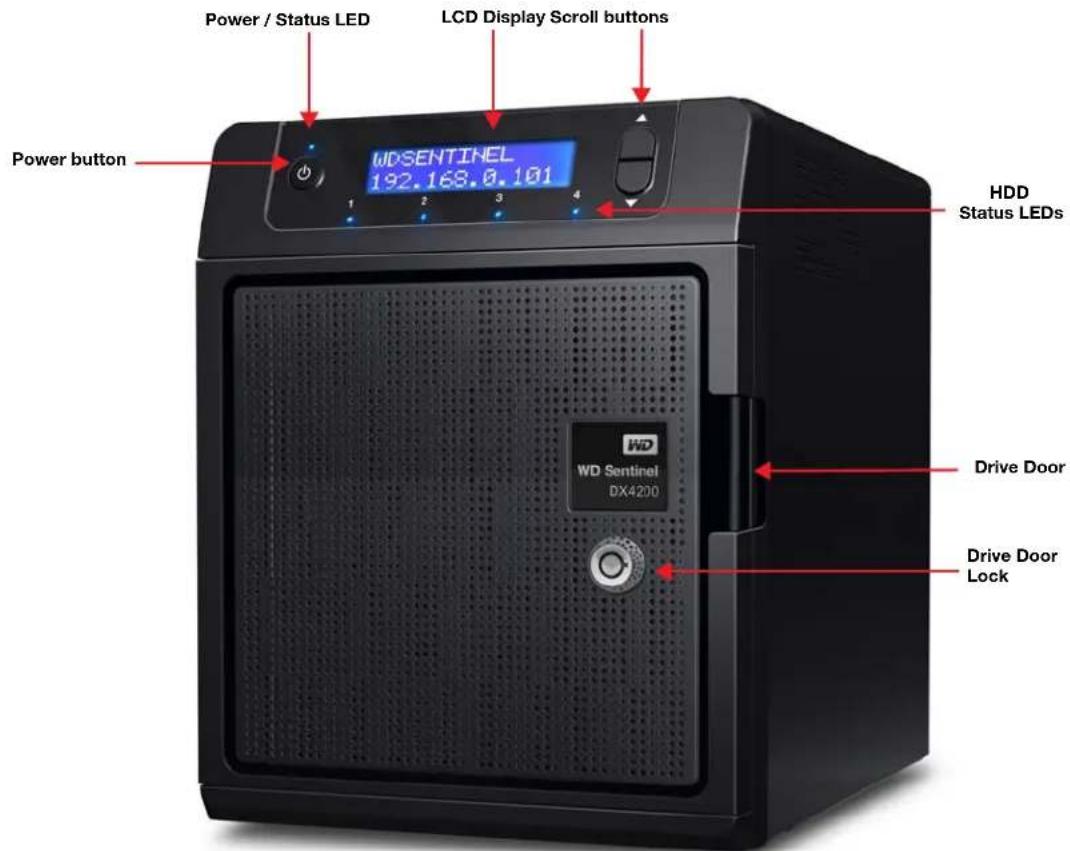
Product Views
FrontView
BackView
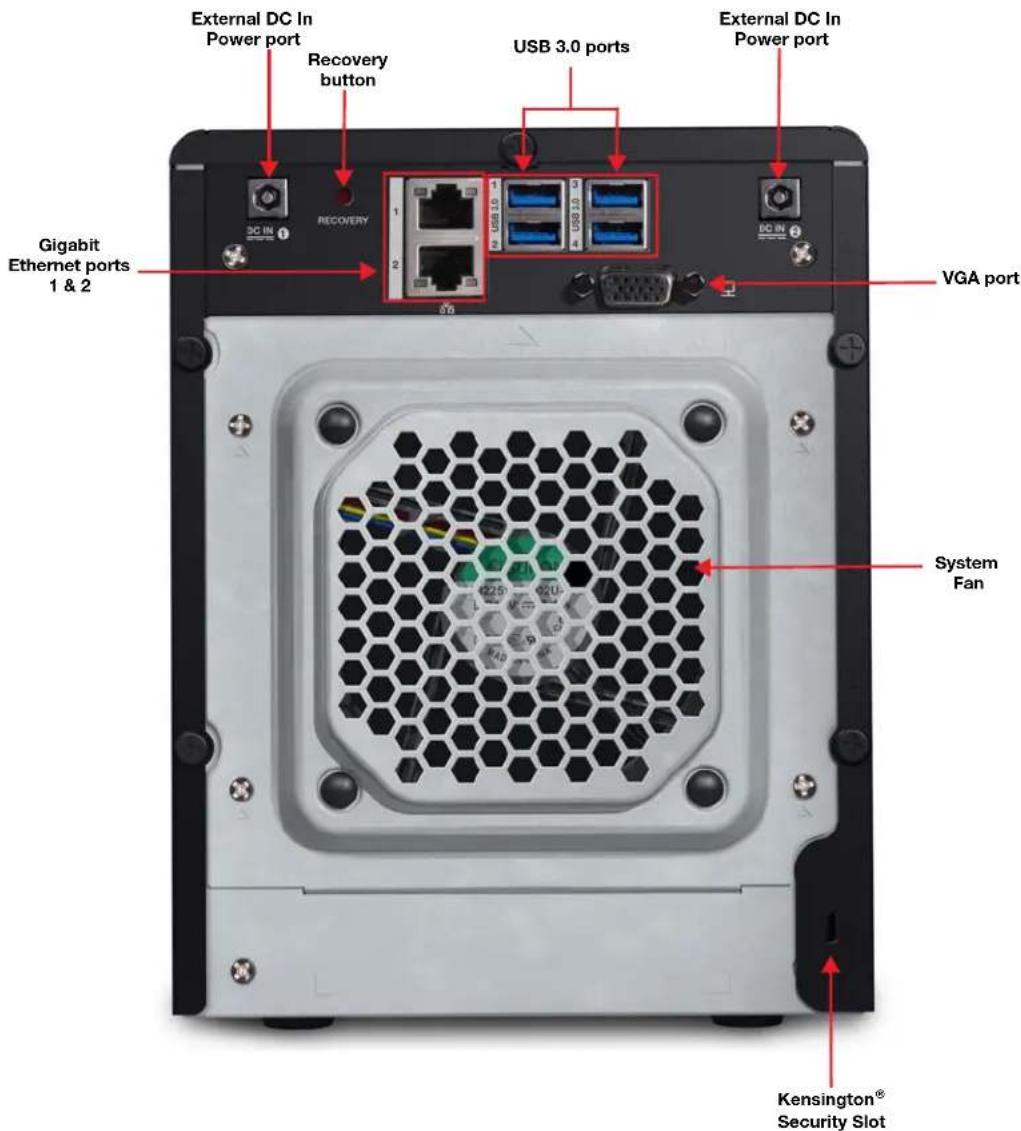
Indicators
| Component Icon Description | ||
| EthernetportsCon | [TH3GD] | thedevicetoalocalnetwork. |
| DCInconnectorCc |  | thedevicetoaDCpowercordandthepoweroutlet. |
| Recoverybutton |  | VERY Buttononthebackoftheserverrecoverstheserver(includingthe operatingsystem)whileusingaUSBdriveinaneventofanOS corruption. |
 | ||
 | ||
| USBportsConnect | [WSW]USB3.0devicessuchasaUSBstorage,USBmouse,USBkeyboard,oraUPS. | |
| VGAportConnects |  | vGAmonitor |
 | ||
| Kensington securityslot |  | Fordrivesecurity,thedeviceisequippedwithasecurityslotthat supportsastandardKensingtonsecuritycable. Visithttp://www.kensington.com/formoreinformation. |
LEDs
TheLEDsontheWDSentineldeviceidentifythestatusoftheunit.
| LED Color State Description | |||
| Power LED | ---- | Off | WDSentinelserveriscurrentlyinactive. |
| Blue | Solid | WDSentinelserverisbootingorhas successfullybootedthesoftwareandis operational. | |
| Red | Flashing | Indicatesthataseriousfaulthasoccurredand needsimmediateattention. | |
| Drive LEDs | ---- | Off | IftheLEDisoffwhileotherdriveLEDsareon, nodriveisinstalledinthebay. |
| Blue | Solid | Driveisconnected. | |
| Blue | Flashing | Driveiscurrentlyactive. | |
| Red | Solid | Indicatesdrivefailure.Replaceethisdriveas soonaspossible. | |
| Ethernet Port | ---- | Off | Indicatesaninactivestate. |
| GreenFlashing | Indicateslinkactivity. | ||
| Amber | Solid | Indicatesthatthereisalinkconnection. | |
Where to Find Help
Thismanualprovidesstep-by-stepinstructionsandotherimportantinformationregarding yourWDproduct.Itismeanforthepersonservingastheadministratorofthe WDSentinelDX4200device.Youcandownloadtranslatedversionsandupdatestothis manualfromhttp://products.wd.com/updates.Formoreinformationandnewsaboutthis product,visitourwebsiteathttp://www.wd.com/.
| Additional Reference Description | |
| BasicInstallationGuideIncludedinthe | productboxoravailableathttp://products.wd.com/WDSentinel-DX4200;helpyouinstalltheWDSentineldevice. |
| WDOnlineHelpSpecificdescriptions | andinstructionsaccessedonWDStorCentral. |
| MicrosoftOnlineHelp | •AccessdetailedexplanationsandinstructionsforWindowsStorageManagerbyclickingtheHelpbuttonwithintheapplication.•SearchforhelponaspecifictopicortermbyenteringitintheMicrosoftOnlineHelpsearchfieldinthetoprightofanyWindowsStorageManagerpage.•AccesstheentireMicrosoftOnlineHelpsystembyclickingMicrosoftOnlineHelp. |
Important: NotallMicrosoftOnlineHelpisapplicabletothe WDSentinelDX4200.TheWDOnlineHelpandthisAdministrator'sGuide takeprecedenceovertheMicrosoftOnlineHelp.

ConnectingtheServerandGettingStarted
AdministratorResponsibilities
HowtheWDSentinelFitsintoYourOffice
ConnectingtheWDSentinelServertoYourNetwork
SettingupyourWDSentinelServer(onetimeonly)
ThischapterstepsyouthoughtheprocessofconnectingandsettingupyourWDSentinelDX4200server.
Administrator Responsibilities
Atahighlevel, theAdministratorperformsthesetupandroutinemanagementtasksontheWDSentinelserver. ThispersonalsoholdstheAdministratorpasswordforyourWDSentinelserver.
ThetablebelowprovidesaviewintosomeoftheAdministrator'stasks:
| Tasks | |
| Primary Setup | Physically connects the WD Sentinel server to the network.ConfigurestheWDSentinelserveritself.Thisisaone-time procedure.CompletesproductregistrationfortheWDSentinelserver.JoinstheWDSentinelservertotheDomain. |
| Primary User Interface | Signs in using the Administrator password (no username required). |
| Task Examples | Manages WD Sentinel server settings, resolves any alerts, and monitorsserverperformance.CreatesandmanagesiSCSItargets. |
How the WD Sentinel Fits into Your Office
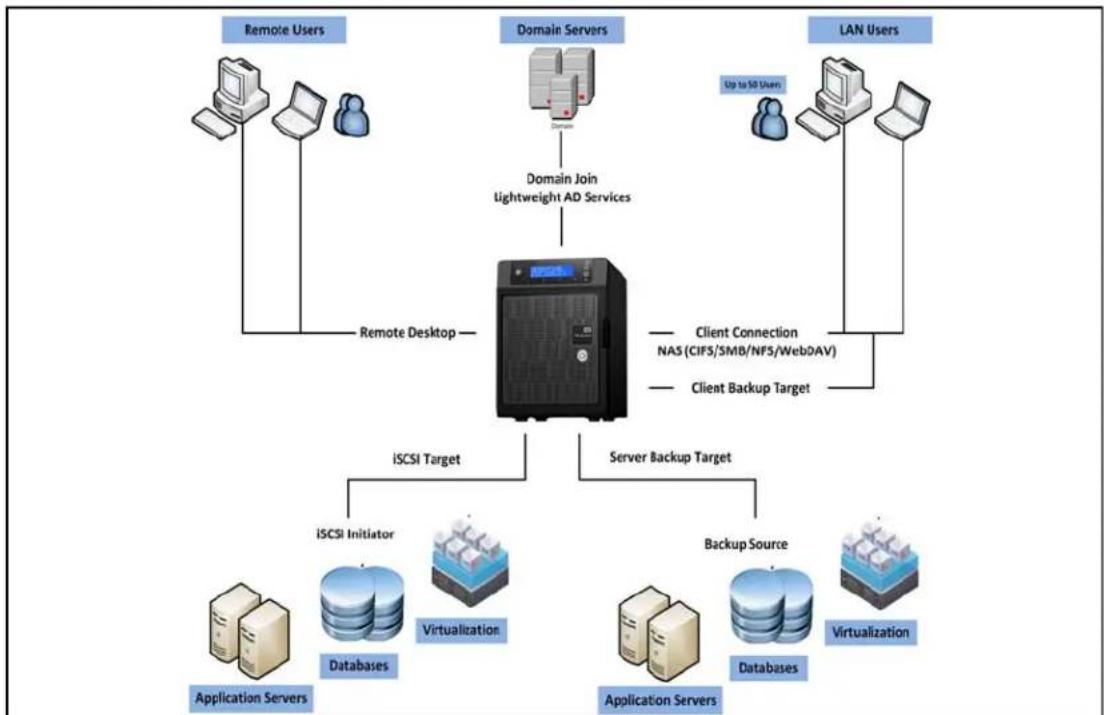
flowchart
graph TD
    A["Remote Users"] --> B["Remote Desktop"]
    C["Domain Servers"] --> D["Domain Join Lightweight AD Services"]
    E["LAN Users"] --> F["Client Connection NAS (CIFS/SMB/NFS/WebDAV)"]
    E --> G["Client Backup Target"]
    B --> H["iSCSI Target"]
    D --> H
    F --> H
    G --> H
    H --> I["iSCSI Initiator"]
    H --> J["Virtualization"]
    H --> K["Application Servers"]
    H --> L["Backup Source"]
    H --> M["Virtualization"]
    I --> N["Databases"]
    J --> O["Virtualization"]
    K --> P["Application Servers"]
    L --> Q["Virtualization"]
Connecting the WD Sentinel Server to Your Network
Use the following stepstophysically connect your WDSentinelDX4200 server to your network.
- Connect your monitor to the VGA portion there are of your WDSentinel server.
- Connect your USB keyboard and USB mouseto the USB portson the back of your WDSentinel server.
-
Using the provided ethernet cable, connect the WDS sentinel server (either ethernet port 1 or 2) to a DHCP-enabled LAN.
-
Using the provided AC adaptors, connect the WDSentinel server to an electrical outlet or a UPS.
-
Turnonyourmonitor.
6.PressthepowerbuttononthefrontofyourWDSentinelunit. OncetheWDSentinelbootupprocessiscomplete,theWindowsStorageServer Settingsscreendisplays.ThePowerLEDonthefrontoftheWDSentinelserverwill displayasolidbluelight.
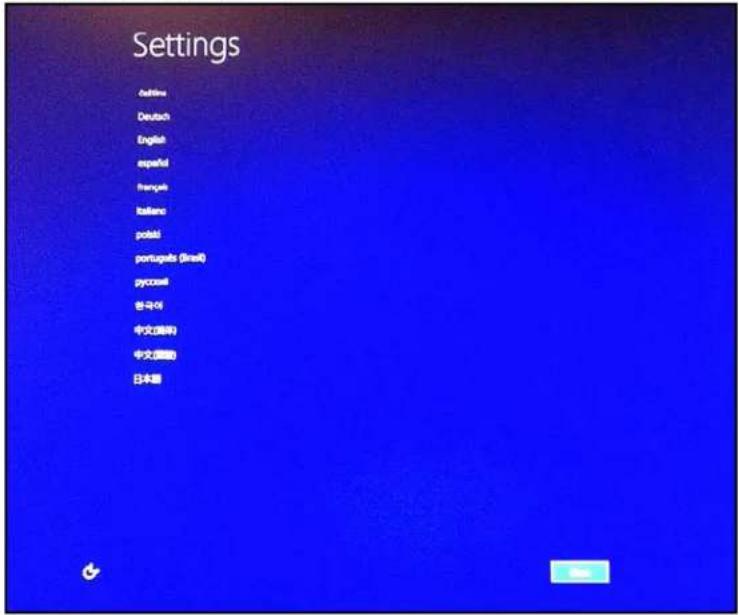
WARNING! This process takes a few minutes. Do not interrupt the process. Do not power off or disconnect the WD Sentinel server.
Setting up your WD Sentinel Server (one time only)
YourWDSentinelserverisnowreadytobeconfigured. Thissectiondescribeshowtouse theonetimesetupwizardtoconfigureyourserverforfirstuse.
Important: Ensure that you complete the entire process outlined in steps 1-11 below. If these steps are not followed, your WDSentinel will not work properly.
- Selectalanguagefromthelocalizationlist,
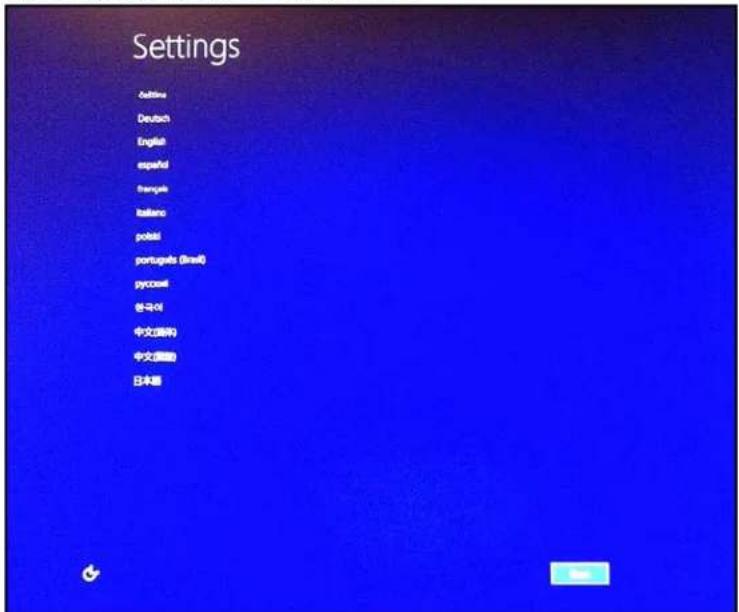
-
Verify the localization settings or select the correct values from the drop-down lists, then click Next.
-
Read the Microsoft and Western Digital license agreements, then click I accept.
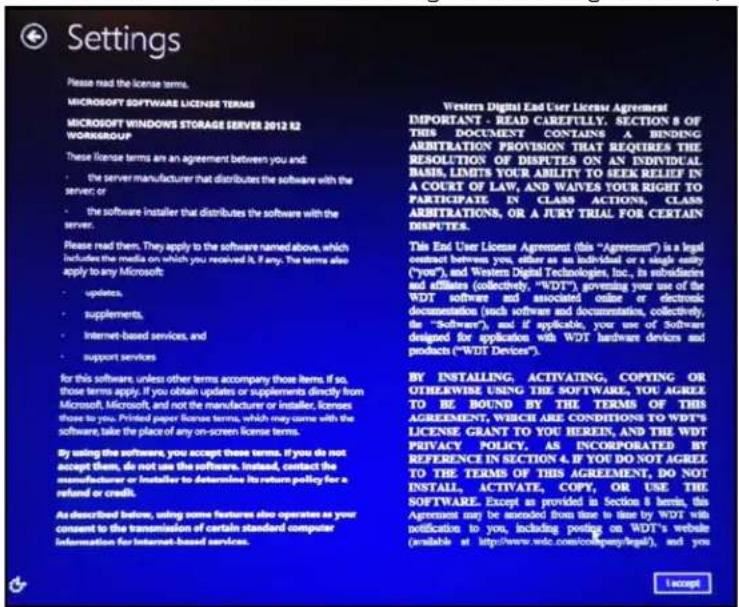
- EnterandconfirmtheAdministratorpassword(mustbeatleast8characterslongand containatleastthreeofthefollowingcategories:uppercaseletters,lowercaseletters, numbers,andsymbols;spacesareallowed). Youwillusethisusernameand passwordlatertoconnecttoyourWDSentineldevicetoaccesstheAdministrator Dashboard.
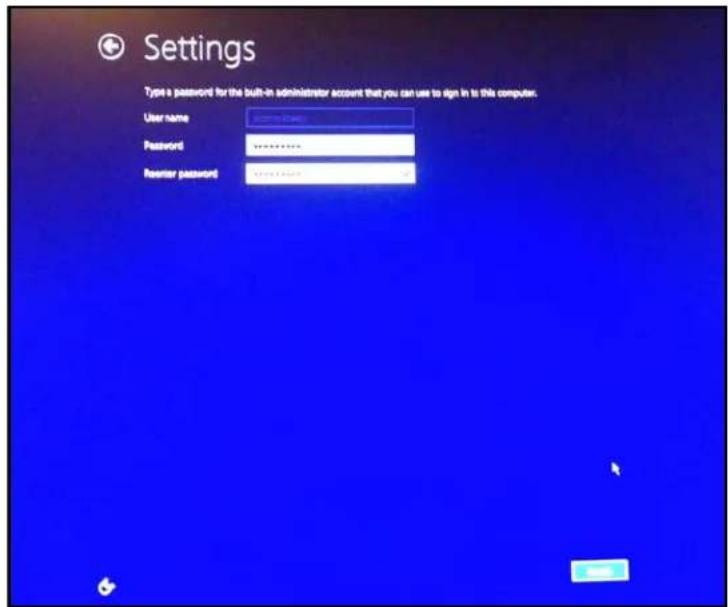
WARNING!
If you forget the Administrator password, it may not be possible to recover it, and you could potentially lose all of your data. Use the "WD Sentinel DX4200 Administrator Reference Sheet" on page 53 to record the password and keep it in a safe location.
5.ClickFinish.Theinstallationbegins.Oncetheinitialprocessiscomplete,you'll see theWDDeviceSetupWizard.
Important: This process can take 2 - 3 minutes. Do not interrupt the process. Do not poweroffordisconnecttheWDSentinelserver.
6.ReviewtheWDDeviceSetupscreen,thenclickNext.
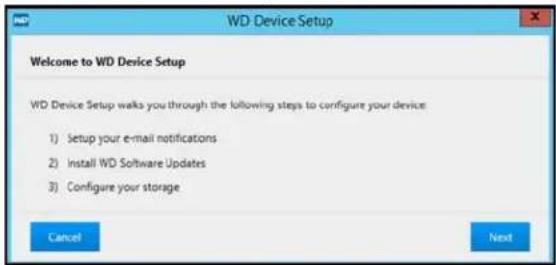
- Select Enable E-mail alerts to send an email when an alert occurs on your device, then complete the following fields:
Note: Toskipthisstep, clickSkip.
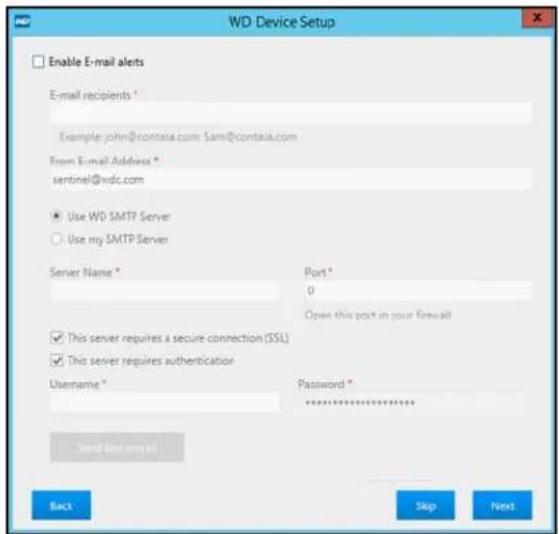
a. E-mail Recipient: Enter the email addresses of those individuals who will receive an email from your WDSentinel when an alert occurs.
b. From E-mail Address: Enter the address from which the email will be sent. (e.g. server@contasa.com).
c.Selectoneofthefollowingoptions:
- Use WD SMTP Server: Select this option to use the WD SMTP server for email.
- Use My SMTP Server: Select this option to use your own SMTP server for email, then complet the following fields:
-Server Name:EnterthenameofyourSMTPserver.
•Port:EnterthePortforyourSMTPserver.
- This server requires a secure connection (SSL): Select this option if the server requires a secureconnection.
- This server requires authentication: Select this option if the server requires authentication, thencompletethefollowingfields:
- Username: Enter the authentication User Name for the identified server.
- Password: Enter the authentication Password for the identified server.
d. Select Send test e-mail to test the email you've set up for your alerts.
e.ClickNext.
- Select the checkbox next to all updates on the screen, if updates are available, then click Next.
Note: Toskipthisstep, clickSkip
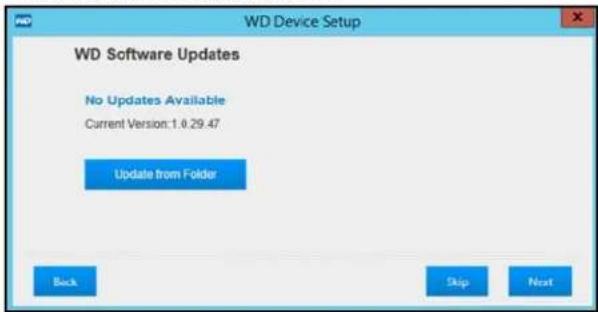
The Software update Status screen display the progress of your update. When the update is finished, the following screen displays.
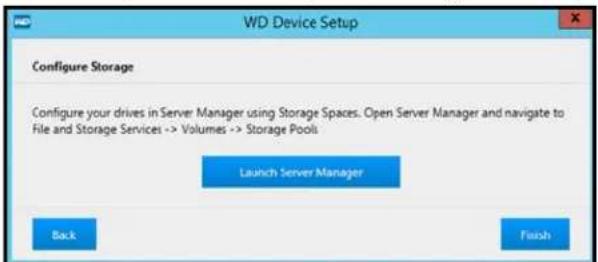
-
Click Launch Server Manager to begin configuring your WD Sentinel device using StorageSpaces.TheServerManagerdisplays.
-
Followthestepsoutlined by in the Microsoft Storage Server Online Help to configure the WDSentinel device using Storage Spaces.
11.ClickFinish ontheWDDeviceSetuptoclosethesetupscreen.
4
ManagingtheWDSentinelServer
WDStorCentral
ShuttingDownandRebootingtheServer
ThischapterassumesyouhavefollowedtheAdministrator'sBasicInstallGuidetoinitialize theWDSentinelserverorhavefollowedthestepsoutlinedin"ConnectingtheServerand GettingStarted"onpage12.
Important: Asabestpractice, performthetasksoutlined in this guide on a client computer using Remote Desktop, not directly from the WDSentinel server.
WD StorCentral
WDStorCentralprovidesawindowintoyourWDSentineldevice,allowingyouto:
■ Viewat-a-glancedeviceinformation.
■ Managesoftwareupdates.
■ Getinformationonyourdevicedrives.
■ Viewthehealthofyourdevice.
When you initially open WDStorCentral, the Homepage provides at a-glanced device information and Navigation bar. Use the following step to access and use WDStorCentral.
AccessingWDStorCentral
To access WD StorCentral:
- OntheDesktop, double-click the WDStorCentralicon.

TheWDStorCentralHomepagedisplays:
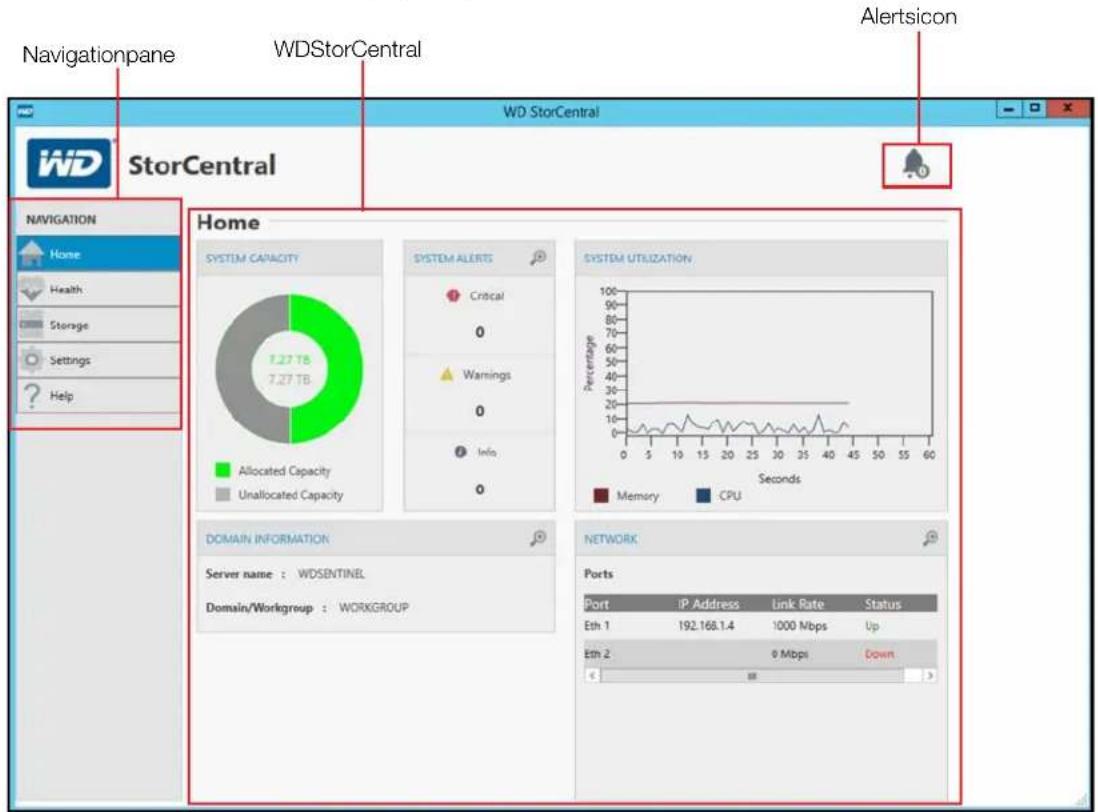
NavigationBar
TheNavigationBarallowsyoutoaccessthefeaturesavailablewithinWDStorCentral.
| Navigation Task Description | |
| HomeTheHomepageprov | desat-a-glanceinformationaboutyourWDSentineldevice. |
| HealthTheHealthpageallow | wsyoutomonitorthestatusofthedrives,powersupplies,temperatures,fan,andCPU. |
| StorageTheStoragepage | allowsyoutoviewthestatusofyourstoragepools,performdiskmanagement,andbuypreferreddrivesforyourdevice. |
| SettingsTheSettingspage | allowsyoutoregisteryourdevice,enableandperformsoftwareupdates,andsetupemailandaudiblealerts. |
| HelpTheHelppageprovides | swaystogetadditionalhelpforyourdevice. |
Home

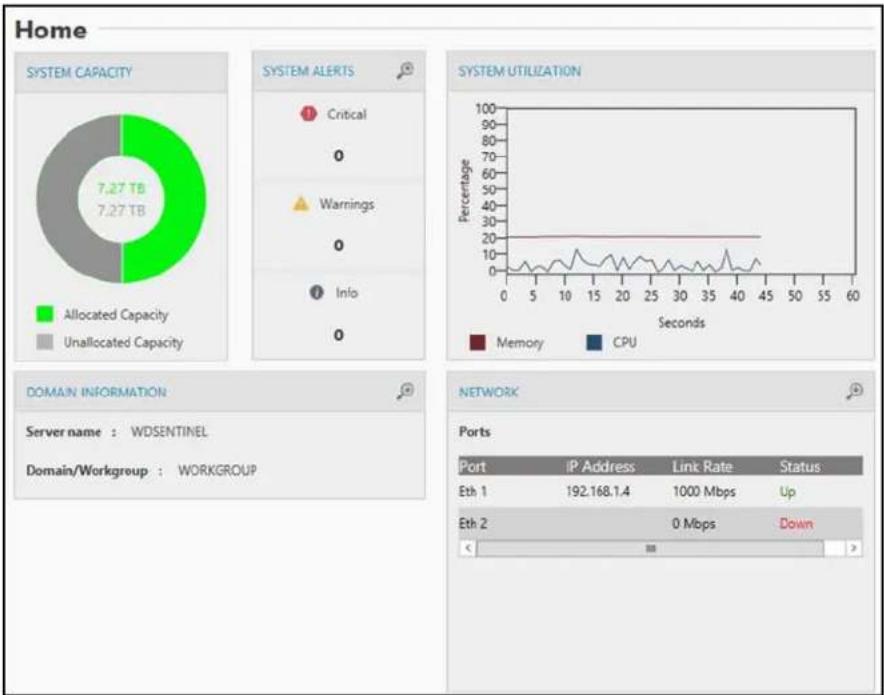
The Homepageprovidesat-a-glancedatadesignedtogiveyoutheinformationyouneedto manageyourdevice.
pie
| Metric | Value | | --- | --- | | Port | IP Address | | Link Rate | Status | | Eth 1 | 192.168.1.4 | | Eth 2 | 0 Mbps | | Up | Down |System Capacity
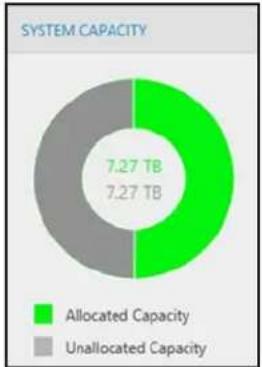
The System Capacity are a provide the amount of allocated and unallocated capacity on your device. Allocated capacity displays green; unallocated capacity displays gray.
pie
SYSTEM CAPACITY | Category | Capacity (TB) | |---|---| | Allocated Capacity | 7.27 | | Unallocated Capacity | 7.27 |System Alerts
TheSystemAlertsareaidentifiesthenumberofsystemmessagescurrentlyactiveonyour device.Thereare3typesofsystemalerts:
Critical: Critical alerts are sent when an error or a problem occurs with your device, usually as system failure.
- Warning:Warning alerts present a condition that might cause a problem in the future.
Informational: These alerts are updates on non-vitalsystem information.
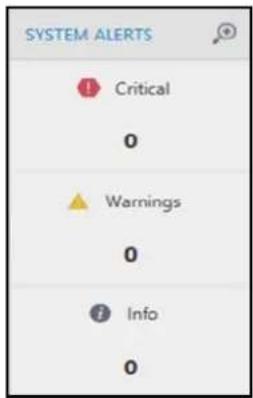
To view System Alert details:
- ClickthemagnifyingglassintherightcorneroftheSystemAlertarea.TheSystem Alertsscreendisplays.
To Save, Delete or Ignore a System Alert:
- OntheHomepage, SystemAlertsarea, clickthemagnifyingglassintherightcorner.
- OntheSystemAlertsscreen, selectthealertyou'dliketosave, delete, orignore.
- Click the Save, Delete, or Ignore button, depending on the action you'd like to performonthealert.
- ClickClose toclosetheSystemAlertsscreen.
System Utilization
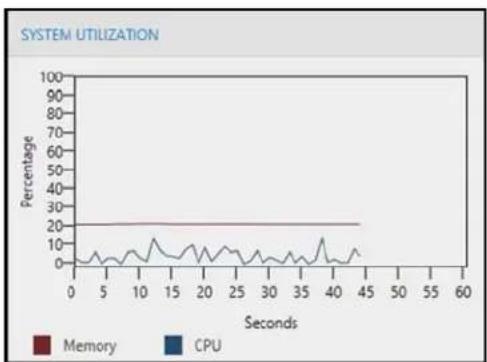
TheSystemUtilizationgraphdisplaythepercentageofCPUandmemoryyourdeviceis currentlyusing.
line
| Seconds | Memory | CPU | | ------- | ------ | --- | | 0 | 20 | 5 | | 5 | 20 | 5 | | 10 | 20 | 5 | | 15 | 20 | 5 | | 20 | 20 | 5 | | 25 | 20 | 5 | | 30 | 20 | 5 | | 35 | 20 | 5 | | 40 | 20 | 5 | | 45 | 20 | 5 | | 50 | 20 | 5 | | 55 | 20 | 5 | | 60 | 20 | 5 |Domain Information
TheDomainInformationforyourdevicedisplaysinthisarea. Thisincludestheservername andthedomainname.
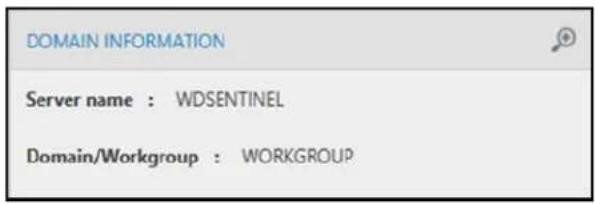
To view Domain details:
- ClickthemagnifyingglassintherightcorneroftheDomainarea.TheSystem Propertiesdialogdisplays.FromtheSystemPropertiesdialog,youcanupdatethe ComputerName,set-upyourdeviceforremoteaccess,manageddevicesonyour server,andmanageuserprofiles.
Network
TheNetworkareadisplaysthelPaddress,linkrate,andstatusofyournetworkconnectionsforeachactiveport.
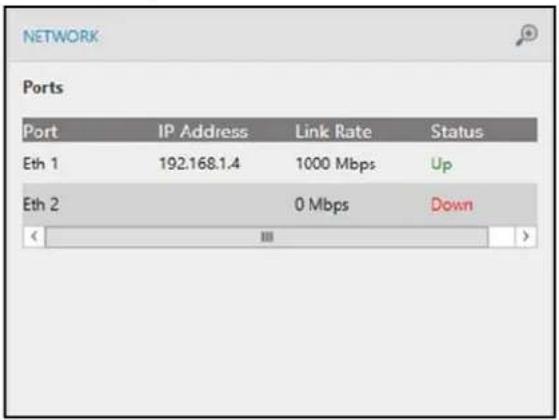
To view Network details:
- ClickthemagnifyingglassintherightcorneroftheNetworkarea.TheNetworkConnectionsdialogdisplays.
HealthPage

TheHealthpageallowsyoutomonitorthetemperatureofthebootdrive,storagedrivesand CPU,identifiespowersupplyactivity,andindicatesthespeedofthefan.TheHealthpageis divided into two areas: System and Power Supply. To open the Health Page, click the Health tabontheNavigationbar.
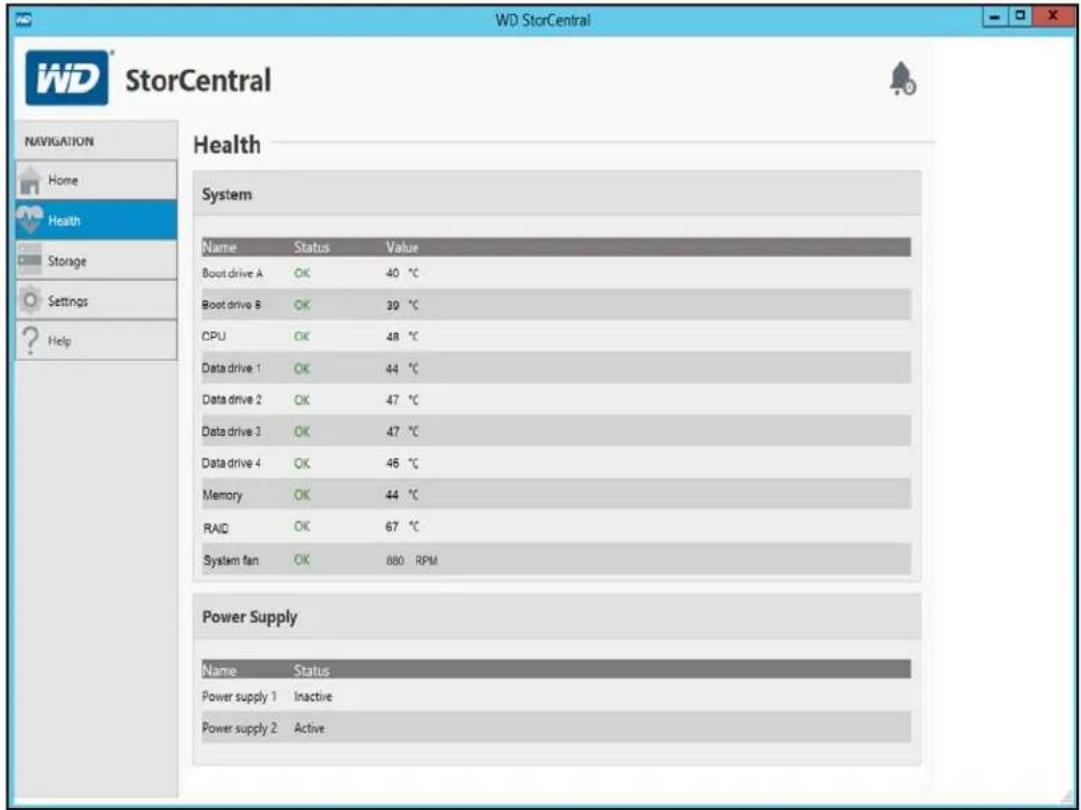
System
TheSystemareadisplaysthestatusandtemperatureofthebootdrive,storagedrives,boot driveRAIDcontrol,memory,andCPU.ItalsodisplaysthesystemfanRPMs.
| System Settings Description | |
| NameThenameofthesystemcomponent(e.g.,fan,drive,CPU). | |
| StatusThestatusoftheidentifiedsystemcomponent. Thestatusmaybe: | |
| •OK | |
| •Unknown: Thisnormallyoccurswhentheserverisattepmtingtoobtain systeminformation. | |
| •Failed | |
| ValueThevalueassociatedwiththesystemcomponent. | |
| •ForCPU,Memory,anddatadrives,thevalueisthetemperatureofthe component. | |
| •Forsystemfan,thevalueisrotationsperminute(RPM). | |
Power Supply
ThePowerSupplyareadisplaysthestatusandtheon/offvalueforeachpowersupply.
| Power Settings Description | |
| NameThenameofthepowersupplycomponent(e.g.,Powersupply1,Powersupply2). | |
| StatusThestatusoftheidentifiedpowersupply.Thestatusmaybe:ActiveInactive |
Storage

TheStoragepageallowsyouto:
■ ManagethedatadrivesthroughtheServerManagerapplication.
■ BuyreplacementstoragefromtheWDStore.
■ Viewtheharddrivepropertiesandhealth.
To open the Storage Page, click Storage on the Navigation bar.
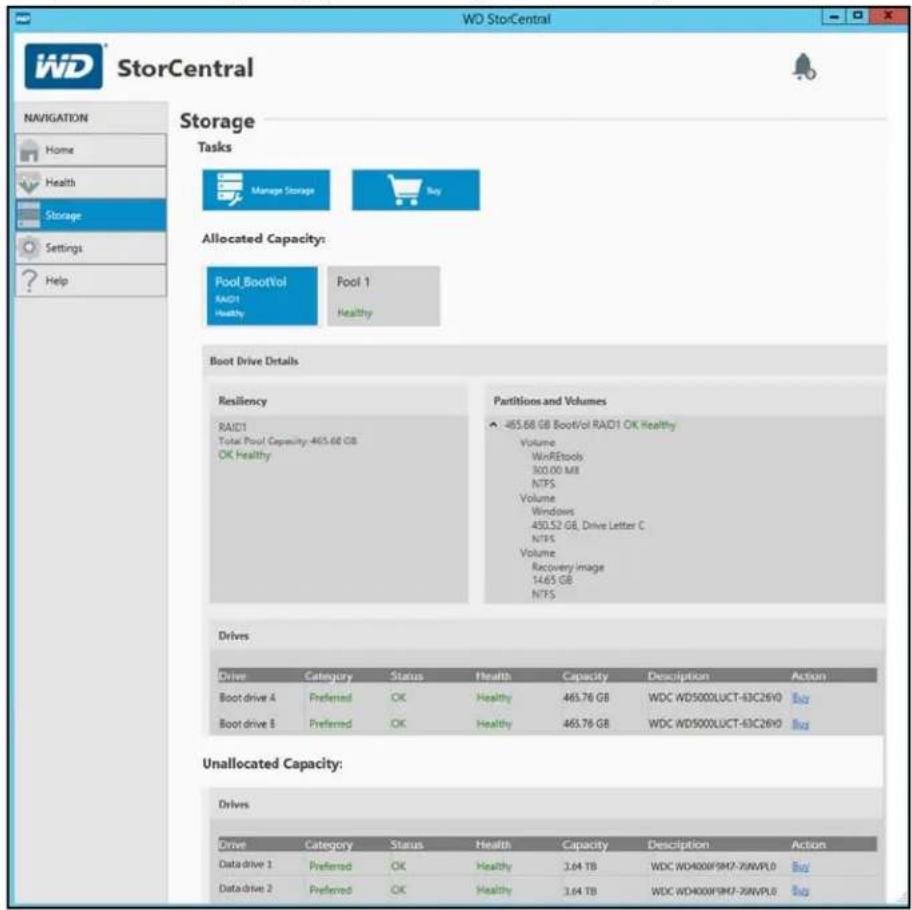
Managing Storage
The WD Sentinel server drives are managed using Server Manager. The Server Manager consoleprovidesyouwithaconsolidatedviewoftheserver,includinginformationabout serverconfiguration,statusofinstalledroles,andlinksforaddingandremovingrolesand features.Foradditionalinformation,seetheMicrosoftServerManagerOnlineHelp.
Accessing Server Manager:
■ OntheStoragepage, clickManage Storage.
Buy
The Buy button allow quick access to the WD Store where you can access drivest that are compatible with your device.
Allocated / Unallocated Capacity
TheAllocatedCapacityandUnallocatedCapacityareasprovidesinformationaboutthe allocated/unallocatedportionofyourdevicedrives.
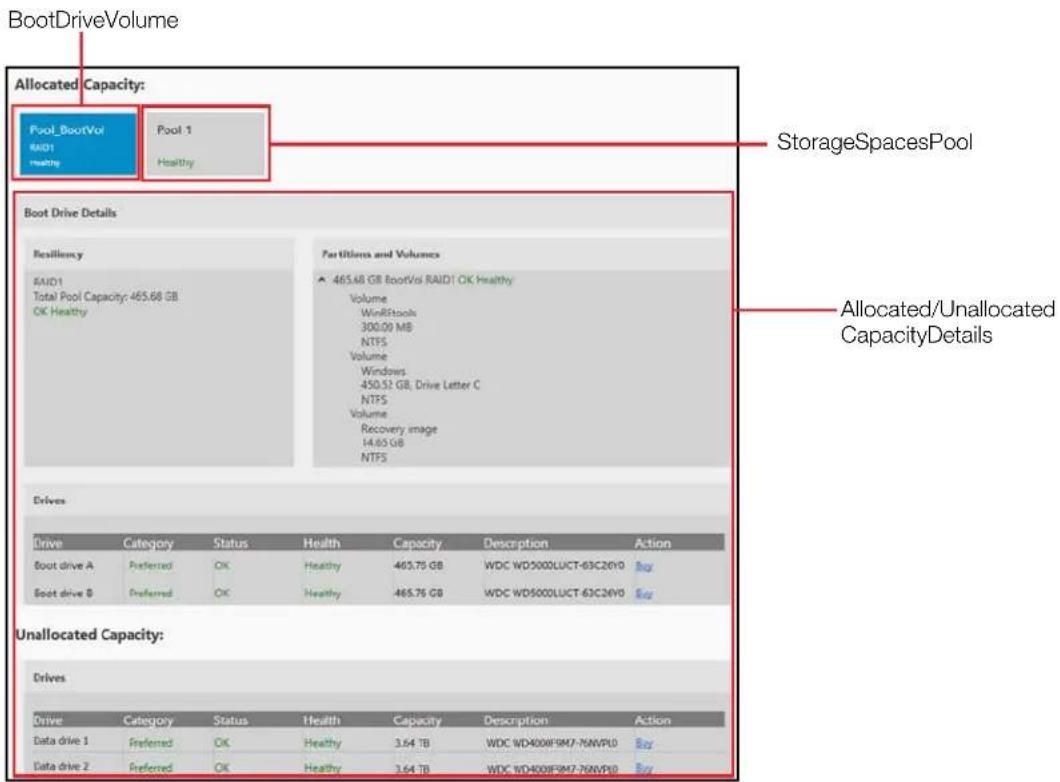
Boot Drive Volume / Storage Spaces Pool
This are a identifiesthebootdrivevolume and storage pools currently available on your device. These are as identifiesthenameofthevolume/pool, the RAID level (if applicable), and the health of the pool.
- Toaccessthedetailsofeachvolume/pool,clickthevolume/poolyou'dliketo view.
Allocated / Unallocated Capacity Details:
Provided below is a description of the information available in the Allocated Capacity Details and the Unallocated Capacity Details areas:
| Details Description | |
| Resiliency | RAID level: This area identifies the RAID level for the boot drive.Total Pool Capacity: Displays the total capacity of the selected pool.Thehealthofthepooldisplaysatthebottomofthisarea. |
| PartitionsandVolumesThisareadisplaysthepartitionsandvolumesthatcurrentlyexistontheselected pool.Clickthearrowtoexpandorcontractthisarea.Thehealthofthepartitionandvolumesdisplaysalsodisplaysinthisarea. | |
| DrivesTheDrivesareadisplasthefollowinginformationrelatedtothedrivesassociated withtheselectedpool.Drive:Thenameofthedrive.Category:Identifiesthetypeofdrivebeingusedbyyourdevice:- Preferred: Indicates that this is a preferred drive. Preferred drives performoptimallywithyourdeviceandshouldalwaysbeusedwhenever possible.Preferreddrivesarefullytestedandapprovedforusewithyour device.Themessagetextdisplaysingreen.- Supported: Indicates that this is a supported drive. Supported drives are nottheoptimaldrivesforyourdevicebutarepartofthesamedrivefamily. Thesedrivesarenotfullytestedwiththisdevice.Themessagetext displaysingreen.- Unsupported: Indicates that this is an unsupported drive. Unsupported driveshavenotbeentestedwiththisdeviceandshouldbeusedatyour ownrisk.Themessagetextdisplaysinred.WARNING! WD is not responsible for data loss due to the use of unsupported drives.Status: Thestatusofadrivemaybe:-OK-Degraded-Warning-In Service-Predicted Failure: Visit WD Store to replaceCAUTION! Imminentfailuredetected.Pleasereplacethisharddrive immediately.Spares:IndicateswhetherthedrivehasbeensetupasaHotSparewhichwill automaticallyreplaceafaileddisksinastoragepool.Health: Thehealthofthedrivemaybe:-Healthy-Degraded-In Service-Predictive Failure: Visit WD Store to replaceCapacity: Thedrivecapacity.Description: ThedrivedescriptionAction: Actionthatcanbeperformedontheidentifieddrive.- Buy: Click Buy to purchase a Preferred WD Drive. | |
Settings

TheSettingsPageallowsyoutoregisteryourdevice,updatethedevicesoftware,and set up audible and email alerts. To open the Settings Page, click Settings on the Navigationbar.
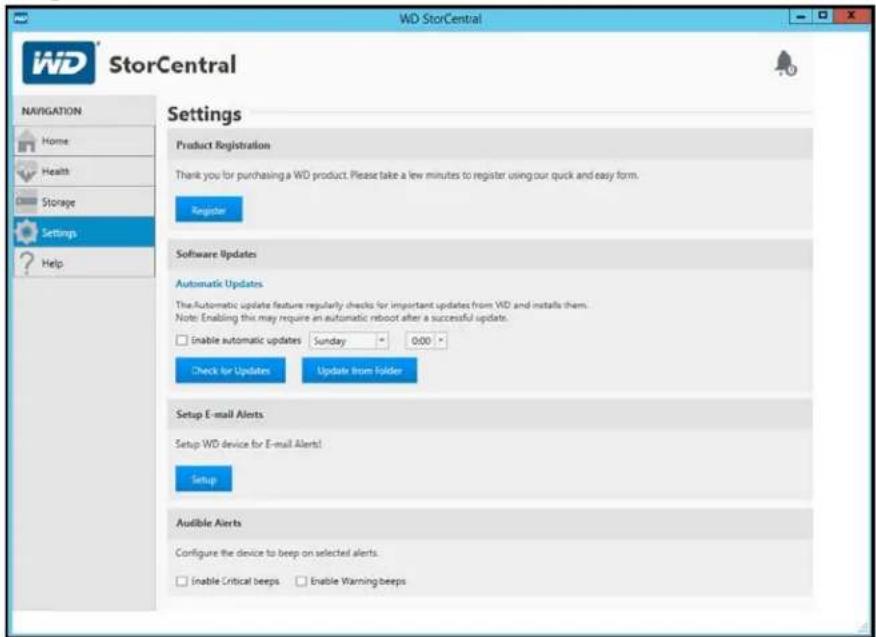
Product Registration
TheProductRegistrationareaallowsyoutoregisteryourdevicewithWD.Registeringyour deviceallowsyoutogetthelatestupdatesandspecialoffers.
To register your device:
-
OntheSettingspage, clickRegister.
-
Complete the following field on the WD Registration dialog:
-
First Name, Last Name: Enter your first and last name.
- E-mail, Confirm E-mail: Enter your contact email, then reenter your email to confirm that it is correct.
- Partner ID: EnteryourPartnerID, ifyouhaveone.
- Select the Keep me up to date with important product updates and other information checkbox.
3.ClickFinish.
Software Updates
Periodically, WDissuessoftwareupdatesforyourWDSentinelserver.TheSoftwareUpdate areaallowsyoutoupdateWDSentineldevicesoftwareautomaticallyormanually.Please notethatthisareaonlyallowsyoutoapplysoftwareupdatesissuedbyWD.
Abestpracticetoensurethatyoursystemsoftwaresstayscurrentistoenableautomatic updates on your WD Sentinel server (See "Automatic Updates of WD Software" on page28).
Note: If your boot drive is rebuilding, the software will not allow you to update your device until there build discomplete.
Manual Updates of WD Software
Tocheckforsoftwareupdates:
- In the Software Updates area, click Check for Updates.
■ Ifasoftwareupdateisavailable,clickInstall Update.
- Ifthereisnosoftwareupdate,clickCancel.
To update from a file:
- SoftwareupdatefilescanalsobedownloadedfromtheWDSupportsiteat http://support.wd.com.
- Once you download the available firmware updates for the WDSentinelserver, unzip the filetoafolderontheserver.
Note: Donotusesspaceswhencreatingyourfoldername.
- In the Software Updates area, click Update from Folder.
- Locatethesavedfirmwareupdatefileontheserver(foldernamewillbeAllPackages), thenclickOK. Thesystemappliesthesoftwareupdate.
- Ifasystemrebootisnecessary,youwillberequiredtomanuallyrestartyourserver(See"ShuttingDownandRebootingtheServer"onpage31).
Automatic Updates of WD Software
Enabling Automatic Updates on your WD Sentinel server causes the server to check for available software updates from WDonascheduledbasisandappliestheupdate automatically.
Tosetascheduleforautomaticupdates:
- In the Automatic Updates area, click Enable automatic updates.
- SelectthedayandtimeyouwanttheWDSentinelservertocheckforupdatesevery week, andifanupdateisavailable, installit.(Example: everySundayat3:00AM)
- Ifasystemrebootisnecessary,youwillberequiredtomanuallyrestartyourserver(See"ShuttingDownandRebootingtheServer"onpage31).
Setup Email Alerts
Receiving email alerts allows you to monitor certain server issues as they occur.
Tosetupemailalerts:
-
IntheSetupE-mailAlertsarea, clickSetup.
-
Select Enable E-mail alerts to send an email when an alert occurs on your device, then completethefollowingfields:
a. E-mail Recipient: Enter the email addresses of those individuals who will receive anemailfromyourWDSentinelwhenanalertoccurs.
b. From E-mail Address: Enter the address from which the email will be sent. (e.g.server@contasa.com).
c.Selectoneofthefollowingoptions:
- Use WD SMTP Server: Select this option to use the WD SMTP server for email.
- Use My SMTP Server: Select this option to use your own SMTP server for email, then complet the following fields:
- Server Name: EnterthenameofyourSMTPserver.
•Port:EnterthePortforyourSMTPserver. - This server requires a secure connection (SSL): Select this option if the server requires a secureconnection.
- This server requires authentication: Select this option if the server requires authentication, thencompletethefollowingfields:
- Username: Enter the authentication User Name for the identified server.
-
Password: Enter the authentication Password for the identified server.
-
Select Send test e-mail to test the email you've set up for your alerts.
4.ClickSave.
Audible Alerts
The Audible Alert provides a natural notification from your WDSentinel server when there are warnings or critical alert to the server.
To set and disable audible alerts:
- In the Audible Alerts area, click the checkbox next to the type of alert for which you'd like to hear an alarm.
■ Enable Critical beeps: The alarm sounds for all critical alerts.
■ Enable Warning beeps: The alarm sounds for all warning alerts.
Youraudiblealarmhasbeenset.Whenanalertofthetypeyouselectedoccurs,an audiblesoundwillemitfromyourWDSentinelserver.
- TodisableAudibleAlerts, deselectthecheckboxnexttothealarmyou'dliketo disable.
Help

TheHelppageidentifiesthesoftwareversion,copyrightinformation,andwaysforyoutoget help for your device. To open the Help Page, click Help on the Navigation bar.
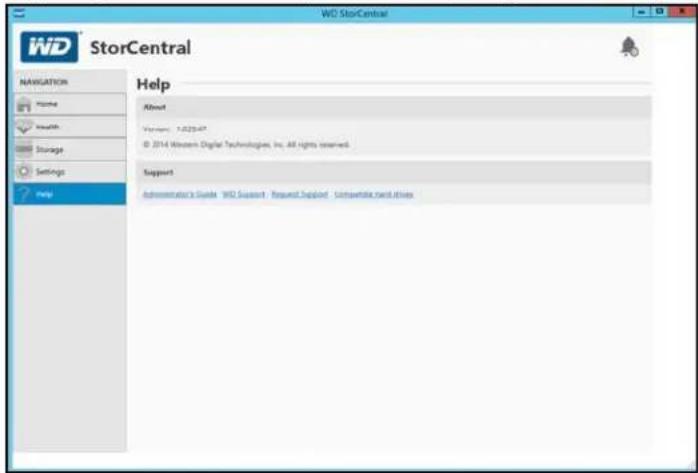
About
TheAboutareaidentifiesthecurrentversionofthesoftware.
Support
TheSupportareaprovidesseveraloptionsforobtainingassistanceforyourWDSentinelDX4200device.
To access WD Customer Support:
-
ClickRequest Support. The Request Support window displays.
-
After reading the information on the screen, click the "I agree and would like to proceed." check box, then click Proceed. The WD Support Ask a Question page displays.
Note: The first time you do this, an Internet Explorer Security Screendisplays. Clear the checkbox and click Close.
- Complete the online form and click Submit Question. A diagnostic report of the WDSentinelserverautomaticallyattachestotheform.YourrequestisaddedtotheWDSupportqueueandassignedaconfirmationnumber.Youwillreceiveanemail fromWDSupportregardingyourquestion.
Important: Forfasterservice/phoneservice, callWDSupport. Forthelatestphone numbers and contact information in your region, see "ContactingWD Technical Support" on page iii or http://support.wd.com. Have your confirmation number ready when you call.
To view a list of compatible drives for your device:
- Click Compatible hard drives. The current list of compatible hard drives displays in yourbrowser.
Shutting Down and Rebooting the Server
TheWDSentinelserverisintendedtobeonatalltimes,providingshareddata.Abest practiceistoavoidturningtheunitoff.However,ifitdoesbecomenecessary(forexample, movingtheservertoadifferentlocationorperformingasoftwareupdate),followthe proceduresbelowtoshutdownorrestarttheserver.
It is very important that the WDSentinel server beshutdown or restarted in a clean and graceful manner through the Windows Settings function.
WARNING! To avoid a potentially unclean shutdown that could corrupt the configuration, shut down the server through Windows Settings.
To shut down or restart the WD Sentinel device (Preferred method):
- OntheWindowsdesktop, moveyourmousetothelowerright-handcornerofthe screenandclicktheSettings button.
- Click Power, then select Shut down or Restart.
- From the pull-down menu, select a reason for your shutdown or restart, then click Continue.
Note: You can also shutdown your WDSentinel server by double-tapping the power button on the front of the device. The "Shutting Down" messaged display on the front of the unit.
5
ManagingStorageontheWDSentinelServer
StorageSpaces
SettingUpYourDrives
RecoveringfromaFailedDrive
Storage Spaces
StorageSpacesisaWindowsstoragevirtualizationtechnologywhichsucceedsLogical DiskManagerandallowsfortheorganizationofphysicaldisksintologicalvolumessimilarto LogicalVolumeManager(Linux)orRAIDlevels0,1,5,and10,butatahigherabstraction level.
AStorageSpacebehaveslikeaphysicaldisktotheuser,withoptionalthinprovisioning.The spacesareorganizedwithinastoragepool,i.e.acollectionofphysicaldisks,thatcanspan multipledisksofdifferentsizes,performanceortechnology(USB,SATA).Thesamestorage poolcanhostmultiplestoragespaces.StorageSpaceshavebuilt-inresiliencyfromdisk failures,whichisachievedbyeitherdiskmirroringorstripingwithparityacrossthephysical disks.
Setting Up Your Drives
FollowthestepsoutlinedbyintheMicrosoftStorageServerOnlineHelptoconfigureandsetupStorageSpacesonyourWDSentineldevice.
Recovering from a Failed Drive
TheWDSentinelserverletssyouknowwhenadrivefailsinthefollowingways:
■ TheLEDabovethebaddriveissolidred.
ThePowerLEDontheWDSentinelserverflashesred, indicating aseriousfault.
- AnemailAlertispostedifyouhavesetituptodoso.(See“SetupEmailAlerts”on page29.)
To recover from a failed drive:
- Replacethedrive(theonewiththeredLEDoverthedrive)withanapproveddrivefor the WD Sentinel server (See "To view a list of compatible drives for your device:" on page30.)
- Oncereplaced, followthestepsoutlined by in the Microsoft Storage Server Online Help to configure the WDSentinel device using Storage Spaces.

BestPractices
SettinguptheWDSentinelServer
UsingtheWDSentinelServerEfficiently
ReplacingDrives
ShuttingDown
The following practices help you use the WDSentinel server and protect your data efficiently and safely.
Setting up the WD Sentinel Server
- ChangethedefaultnameofWDSentineltosomethingunique.Thisavoids conflictswhenanotherWDSentinelserverisaddedtoyournetworkinthefuture.
■ MakesureEthernet1 and Ethernet2 are on the same network subnet. - Addtheservertoyourdomain. This allows user to set the same login and password.
■ Makesurethepasswordisstoredinasafeplace.
■ Setuserpasswordpolicytoatleastmediumsecurity. - EnableMicrosoftAutomaticUpdatestofindandapplythelatestMicrosoft softwareupdate.
■ EnableWDAutomaticUpdatestofindandapplythelatestWDsoftwareupdate. - SetupAutomaticAlertNotificationforreal-timenotificationsofanyproblemswith theWDSentinelserver.
- Do not remove the Windows page file! Some critical functions use the system's pagingfile.Removingthepagefilecanpotentiallyleaveyoursystem unusablewiththepossibilityofdataloss.Tomaintainthereliabilityofyoursystem anditsredundantresources,donotmodifythepagingfilewhatsoever.
Using the WD Sentinel Server Efficiently
- TheWDSentinelserverhasmanyjobstoperform.Sharedataduringbusiness hours,andbackupthecomputersduringhoursofinactivity.Keeptheserver poweredon24/7todoitswork.
■ AlwaysusetheWDSentineldevicewithaUPS.
■ Enableemailalerts.Receivingyouralertsbyemailallowsyoutomonitorcertain serverissuesastheyoccur.
Replacing Drives
- Whenadatadriveisremoved, StorageSpaceswillbedegradedifanotherdata drivefailsorisremoved. Onlyremoveonedriveatatimebetweenrebuilds.Oncea faileddriveisreplaced, manuallyrebuildthedriveusingServerManager.
■ Avoidpullingadriveoutunlesssthereisafailure. - Whenadatadriveneedsreplacement,theWDSentinelserverisstillfunctionalbut issubjecttoaseconddrivefailurethatwouldresultinthelossofdata.Tominimize thisvulnerabletime,agoodpracticeistohaveanotherdrivereadytoreplacethe faileddrive.
Shutting Down
■ Uncleanshutdownsarehardonyoursystem.Toassurethattheunitalways experiencescleanshutdownsandthebestdataintegrity,useanUninterruptible PowerSupply(UPS).
■ To avoid possible corruption, donotunplug the power from the unit while it is running.
7
Troubleshooting
FirstStepsChecklist SpecificProblemsandCorrectiveActions
Foranyissue, firstensurethatyouareusingthelatestfirmwareforthe WDSentinelserver.See"SoftwareUpdates"onpage28forinstructions.
First Steps Checklist
■ Isthepowersupplypluggedintothewalloutletandtheserver?
- Areallcablescorrectlyconnectedandsecured?
- Isthepoweron?Ifnot,see"LEDs"onpage10.
Specific Problems and Corrective Actions
The following section contains specific problem that may be raised during the use of the WDSentinelserver and provides possible solutions.
LEDsdonotlightup
- Makesurethepowercordisconnectedcorrectly.
- Makesure that the wall outlet least as power. Testit by plugging in another device.
- ConfirmthenetworkcableisproperlyconnectedtotheWDSentinelserverandthe networkswitchorrouter.
- Makesurethenetworkswitchorrouterhaspower.
- Useadifferentnetworkcableandportonthenetworkswitchorrouter. Temporarily swappingtheWDSentinel'scableportwithaworkingnetworkdevicemayidentifyany failingcablesandports.
LCDMessages
TheLCDdisplaysvariousmessagesforyoutoreview.Providedbelowisalistofmessages, adescriptionofthemessageandpossibleresponsesforthatmessage.
| LCD Description Troubleshooting | ||
| DisplaysthenameofyourWDSentinelserver. | N/A | |
| DisplaysthelPaddressofyourWDSentinelserver. | IfthelPaddressdoesnotdisplay,ensurethatyourdeviceisconnectedbyethernetcabletoyourrouter. | |
| BIOS Corrupted | Your BIOS is corrupted | Contact Technical Support for assistance. |
| BIOS Degraded | Your BIOS is degraded | The system is unable to boot from theprimaryBIOSandiscurrentlyrunningonthesecondaryBIOS. |
| LCD Description | Troubleshooting | |
| BIOS Repaired Reboot Required | Yoursystemiscurrentlyrunningon thesecondaryBIOS.Arebootis requiredtoattemptarepairofyour BIOS. | Yoursystemisrunningonthe secondaryBIOS.Anattemptwillbe madeduringthereboottorunthe systemontheprimaryBIOS. |
| BIOS Updated Reboot Required | TheprimaryBIOShasbeen updated,Asystemrebootis required. | Rebootthesystem.Thisallowsthe updatedBIOStotakeaffect. |
| BIOS Updating TheBIOSisupdating.YoursystemBIOSiscurrently updating.Donotdisconnectthe powerorinterrupttheprocessuntil theupdateiscomplete. | ||
| Boot DriveOver Temp | Theoperatingsystem(OS)boot drivehasexceededthenormal operatingtemperature. | Checktheairflowaroundyour deviceandthesystemfan operation. |
| Boot Volume Degraded | Oneoftheoperatingsystem(OS) driveshasfailed.Thesystemwill operatebutinadegradedstate. | Replacetheidentifiedbootdrive.AccessWDStorCentral(See“WD StorCentral”onpage18).ClickStorageonthenavigation bar.IntheAllocatedCapacityarea, selectyourbootdrive.IntheActioncolumn,selectBuy.Obtainandinstallacompatible bootdrive. |
| Drive Count Displaysthenumberofdrives currentlyonyourdevice. | Thetotaldrivecountinthesystem. Thisincludesthebootdrive(s)and thedatadrives. | |
| Drive Failed | One of the data drives failed. | Your boot drive(s) is currently runninginRAIDprotectionmode. Replacethefaileddrive.AccessWDStorCentral(See“WD StorCentral”onpage18).ClickStorageonthenavigation bar.IntheAllocatedCapacityarea, selectthefaileddrive.IntheActioncolumn,selectBuy.Obtainandinstallacompatible bootdrive. |
| Drive Over Temp Thedatadrivehasexceededthe normaloperatingtemperature. | Checktheairflowaroundyour deviceandthesystemfan operation. | |
| EthernetDisconnected | Ethernetport1orport2is disconnected. | Reconnecttheethernetcableto theidentifiedport. |
| Fan Failed Thesystem'sfanhasfailed.Thefanhasfailed.Replacee failedfan. | ||
| LCD Description Troubleshooting | ||
| Imminent Drive Failure | S.M.A.R.Tearlydetectionfounda prematuredrivefailureconditionon oneofthedatadrives. | Replacethedefectedriveassoon aspossiblestopRAIDfrom goingintoadegradedstate. |
| Imminent Failure Boot Drive | S.M.A.R.Tearlydetectionfounda prematuredrivefailureconditionon oneofthebootdrives. | Replacethedefectedriveassoon aspossiblestopRAIDfrom goingintoadegradedstate. |
| Invalid Drive Theinserteddriveisnotcompatible withthedevice. | Replacetheinserteddrivewithan approveddrive.Foracompletelist ofapproveddrivemodels,search forAnswerID9443intheWD KnowledgeBaseat http://support.wd.com. | |
| Invalid Drive Capacity | Thenewdrivecapacityiseither greaterorsmallerthanthedriveyou replaced. | Replacetheinserteddrivewitha drivethathasthecorrectdrive capacity. |
| Network Disconnected | Theethernetportdoesnothave networkactivity. | Restorenetworkconnectivity. |
| Power SupplyFailed | Powersupply1or2failed.Replacethedefectivepower supply.•AccessWDStorCentral(See“WD StorCentral”onpage18)•ClickHealth onthenavigationbar.•CheckthePowerSupplyareato reviewthestatusofyourpower supply.•Obtainandinstallacompatible powersupply. | |
| Reboot Required | Thesystemrequiresareboot.Safelyrebootthesystem. | |
| Software Update Complete | Thesoftwareupdateprocessis complete. | ChecktheSystemAlertsin WDStorCentraltoverifythe completionofthesoftwareupdate. |
| Software Update Downloading | Asoftwareupdateisbeing downloadedtothesystem. | Allowtheprocesstofullycomplete. Noactionisrequired. |
| WD Software Update Available | ThereisaWDsoftwareupdate availablefordownload. | See“SoftwareUpdates”on page28toaccessandperformthe update. |
| WD Software Update Failed | TheWDsoftwareupdatefailed.RepeattheSoftwareupdate processagain. | |

RegulatoryandWarrantyInformation
RegulatoryCompliance
LimitedWarranty
Regulatory Compliance
FCC Class B Information
Operationofthisdeviceissubjecttothefollowingconditions:
Thisdevicemaynotcauseharmfulinterference.
This device must accept any interference received, including interference that may cause undesired operation.
This device has been tested and found to comply with the limit of a Class Digital device, pursuant to Part 15 of the FCC Rules. These limits are designed to provide reasonable protection against harmful interference in a residential installation. This unit generates, uses, and can radiate radio frequency energy and, if not installed and used in accordance with the instructions, may cause harmful interference or radio oortelevision reception. However, there is no guarantee that interference will not occur in particular installation. If this equipment does cause harmful interference or radio oortelevision reception, which can be determined by turning the equipment off and on, you are encouraged to try to correct the interference by one or more of the following measures:
■ Reorientorrelocatethereceivingantenna.
■ Increase these separation between the equipment and thereceiver.
- Connecttheequipmentintoanoutletoracircuitdifferentfromthattowhichthe receiverisconnected.
- Consultthedealeroranexperiencedradio/televisiontechnicianforhelp.
AnychangesormodificationsnotexpresslyapprovedbyWDcouldvoidtheuser'sauthority tooperatethisequipment.
Changesormodificationsnotexpresslyapprovedbythepartyresponsibleforcompliance couldvoidtheuser'sauthoritytooperatetheequipment.
ICES/NMB-3 (B) Compliance
CetappareildelaclasseBestconformeàlanormeNMB-3(B)duCanada.
This device complies with ICES-3(B).
Safety Compliance
Approved for US and Canada. CAN/CSA-C22.2 No. 60950-1: Safety of Information Technology Equipment.
CAUTION! Dangerofexplosionifthebatteryisincorrectlyreplaced.Replaceonly withthesameorequivalenttyperecommendedbytheequipmentmanufacturer. Disposeofusedbatteriesaccordingtomanufacturer'sinstructions.
CE Compliance for Europe
Verified to comply with EN55022 for RFemission; EN-55024 for Generic Immunity, as applicable; and EN-60950-1 for Safety.
KC Notice (Republic of Korea only)
ClassBDevice1 Pleasesnotethat this device has been approved for non-business purposes and maybe used in any environment, including residential areas.
KoreanKCCcertificationID:MSIP-REM-WDT-D8C
(Manufacturing date marked on the equipment.)
VCCI Statement
Environmental Compliance (China)
WDvaluesyourbusinessandalwaysattemptstoprovideyoutheverybestofservice.Ifthis Productrequiresmaintenance,eithercontactthedealerfromwhomyouoriginally purchasedtheProductorvisitourproductsupportwebsiteathttp://support.wd.comfor informationonhowtoobtainserviceoraReturnMaterialAuthorization(RMA).Ifitis determinedthattheProductmaybedefective,youwillbegivenanRMAnumberand instructionsforProductreturn.Anunauthorizedreturn(i.e.,oneforwhichanRMAnumber hasnotbeenissued)willbereturnedtoyouatyourexpense.Authorizedreturnsmustbe shippedinanapprovedshippingcontainer,prepaidandinsured,totheaddressprovidedon yourreturnpaperwork.Youroriginalboxandpackagingmaterialsshouldbekeptforstoring orshippingyourWDproduct.Toconclusivelyestablishtheperiodofwarranty,checkthe warranty expiration (serial number required) via http://support.wd.com. WD shall have no liabilityforlostdataregardlesssofthecause,recoveryoflostdata,ordatacontainedinany Productplacedinitspossession.
Limited Warranty
WDwarrantsthattheProduct,inthecourseofitsnormaluse,willforthetermdefined below,befreefromdefectsinmaterialandworkmanshipandwillconformtoWD's specificationtherefor.Thetermofyourlimitedwarrantydependsonthecountryinwhich yourProductwaspurchased.Thetermofyourlimitedwarrantyisfor2yearsintheNorth, SouthandCentralAmericaregion,2yearsintheEurope,theMiddleEastandAfricaregion, and2yearsintheAsiaPacificregion,unlessotherwiserequiredbylaw.Thetermofyour limitedwarrantyperiodshallcommenceonthepurchasedateappearingonyourpurchase receipt.WDmayatitsdiscretionmakeextendedwarrantiesavailableforpurchase.WDshall havenoliabilityforanyProductreturnedifWDdeterminesthattheProductwasstolenfrom WDorthattheasserteddefecta)isnotpresent,b)cannotreasonablyberectifiedbecause ofdamageoccurringbeforeWDreceivestheProduct,orc)isattributabletomisuse, improperinstallation,alteration(includingremovingorobliteratinglabelsandopeningor removingexternalenclosures,includingthemountingframe,unlessstheproductisonthelist oflimiteduser-serviceableproductsandthespecificalterationiswithinthescopeofthe applicableinstructions,asfoundat http://support.wd.com,accidentormishandlingwhilein thepossessionofsomeoneotherthanWD.Subjectttothelimitationsspecifiedabove,your soleandexclusivewarrantyshallbe,duringtheperiodofwarrantyspecifiedaboveandat WD'soption,therepairorreplacementoftheProductwithanequivalentorbetterProduct. TheforegoingwarrantyofWDshallextendtorepairedorreplacedProductsforthebalance oftheapplicableperiodoftheoriginalwarrantyorninety(90)daysfromthedateofshipment ofarepairedorreplacedProduct,whicheverislonger.Theforegoinglimitedwarrantyis WD'ssolewarrantyandisapplicableonlytoproductssoldasnew.Theremediesprovided hereinareinlieuofa)anyandallotherremediesandwarranties,whetherexpressed,implied orstatutory,includingbutnotlimitedto,anyimpliedwarrantyofmerchantabilityorfitnessfor aparticularpurpose,andb)anyandallobligationsandliabilitiesofWDfordamages
including, but not limited to accidental, consequential, or special damages, or any financial loss, lost profitsorexpenses, or lost data arising out of for in connection with the purchase, use, or performance of the Product, even if WD has been advised of the possibility of such damages. In the United States, some states donot allow exclusion or limitations of incidental or consequential damages, so the limitations above may not apply to you. This warranty gives you specific legal rights, and you may also have other rights which vary from statetostate.

Appendix
HardwareReplacementProcedures
WDSentineIDX4200AdministratorReferenceSheet
Hardware Replacement Procedures
BeforeYouBegin
ReplacingaHardDrive
RemovingtheUnitCover
ReplacingtheSODIMMMemoryModule
AddingaBootDrive
Thischapterprovidesthestepsnecessarytoreplacethefollowingcomponentsdesignedfor replacementfortheWDSentinelDX4200.
HardDrive
Fan
■ SODIMMMemoryModule
PowerSupply
- BootDrive
Before You Begin
- Ensure that you have the correct replacement unit.
■ Review the procedures before beginning to replace apart.
Replacing a Hard Drive
ItissimpletoreplaceadriveinyourWDSentinelserver.First,makesuretogotothe WDStoretopurchaseacompatablereplacementdrive.Foracompletelistofapproveddrive models,searchforAnswerID9443intheWDKnowledgeBaseathttp://support.wd.com.
- ThedrivesintheWDSentinelserverare"hotswappable." Thismeansthatthe WDSentinelservercanremainpoweredonwhileyoureplacethedrive.
- Oncereplaced, followthestepsoutlined by in the Microsoft Storage Server Online Help to configure the WDSentinel device using Storage Spaces.
DriveCategories
Providedbelowisadescriptionofthecategoryofharddrivesyoucanusetoreplacean existingdrive. The typeofdriveusedinyourdevicecanbefoundonthe WDStorCentralStoragepageintheCatagorycolumn.
| Hard Drive Category Description | |
| PreferredPreferreddrivespreform | optimallywithyourdeviceandshouldalwaysbeusedwheneverpossible.Preferreddrivesarefullytestedandapprovedforusewithyourdevice. |
| SupportedSupporteddrivesarenot | theoptimaldrivesforyourdevicebutarepartofthesamedrivefamily.Thesedrivesarenotfullytestedwiththisdevice. |
| UnsupportedUnsupporteddrivesh | havenotbeentestedwiththisdeviceandshouldbeusedatyourownrisk.TheLEDonthefrontofyourdeviceisRed.WARNING! WD is not responsible for data loss dueto the use of unsupported drives.Unsupporteddrivesmustbeenabledbeforethedrivecanbe usedwithyourdevice.Ifyouchoosetouseanunsupportedhard drive,usethefollowingstepsafterthedrivehasbeenreplacedin thedevicetoenablethedrive.Note:Therearecertainunsupportedharddrivesthatyoucannot enable. For those drives, there is aLearn Morelink with informationonhowtoobtainaWDpreferreddrive.1.AccessWDStorCentral.2.OntheNavigationbar,selectStorage,ifnotalready selected.3.IntheUnallocatedCapacityarea,clicktheboxidentifyingthe unsupporteddrive.UnsupportedddisplaysinredintheCategorycolumnoftheUnallocatedCapacityDetailsarea.4.ClickEnable,locatedtotheActioncolumn.5.Readthealertdisclaimer,thenselectYesifyou'dliketo enableyourcurrentunsupporteddrive.6.FollowthestepsoutlinedbyintheMicrosoftStorageServer OnlineHelptoconfiguretheWDSentineldeviceusing StorageSpaces. |
What you'll Need:
■ Replacementtharddrive
ReplacingaHardDrive
UsethefollowingstepstoreplaceadriveinyourWDSentinelserver.
- Unlockandopenthedrivedoor(Figure1).
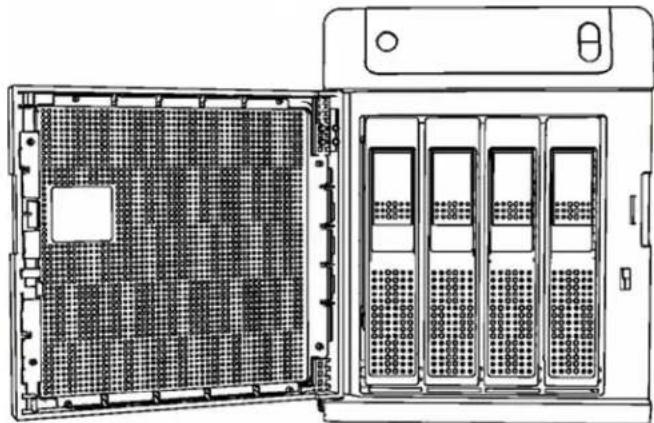
natural_image
Technical line drawing of a server rack with multiple drive bays and a front-mounted tower (no text or symbols)Figure1. Opendrivedoor
- For a failed drive, verify that the LED for the failed drive is solid red.
- Pull the handle on the front of the hard drivetoward you.
- When its snaps open, pull the hard drivetoward you to remove it. (Figure2).
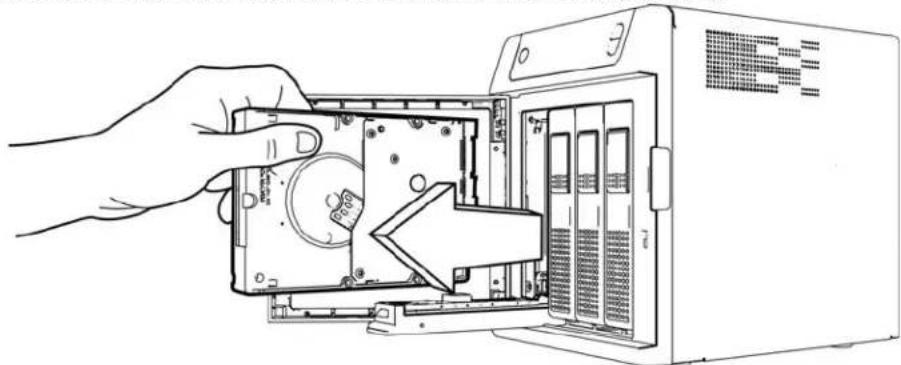
natural_image
Line drawing of a hand inserting into a computer drive into a rack (no text or symbols visible)Figure2.Removeharddrive
5.Slidetheapprovedreplacementdriveintothedrivebay,makingsurethatitisproperly seatedandisfacingthecorrectdirection.
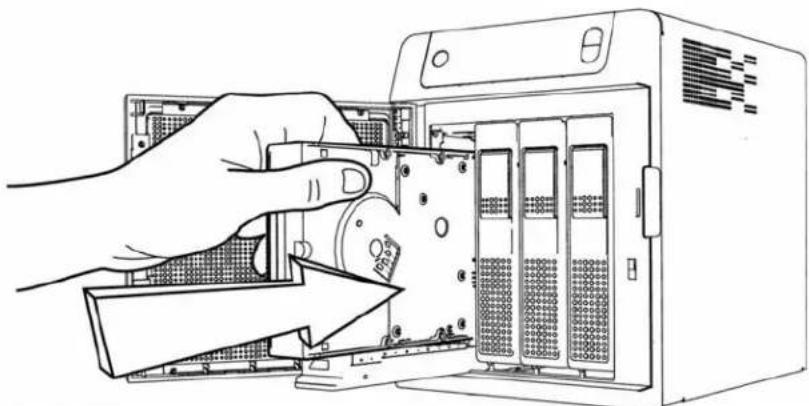
natural_image
Illustration of hands installing or adjusting a server rack into an industrial machine (no text or symbols visible)Figure3.Replaceharddrive
- Usingsomeforce, snapthedrivehandleshut.
- Closeandlockthedooronthefrontoftheserver, makingsureitsnapsshut.
- Followthestepsoutlined by in the Microsoft Storage Server Online Help to configure and setup your new data drive.
Replacing a Server Fan
Whenafanrequiresreplacement,youwillreceiveanemailAlertindicatingthatthereisa problemwiththeWDSentinelserverfan.
ThefanintheWDSentinelserverare"coldswappable."ThismeansthattheWDSentinel servermustbeshutdownpriortoyourfanreplacement.ToshutdownyourWDSentinel server,followthestepsoutlinein"ShuttingDownandRebootingtheServer"onpage31.
Important: Toavoidelectrostaticdischarge(ESD)problems,groundyourselfby touchingmetalbeforehandlingthedevice.
What you'll Need:
- Phillipsscrewdriver
■ Replacementserverfan
ReplacingaServerFan
1.Shutdowntheserver.
2. Disconnectal external connections.
3. Placetheunitonacleanandstablesurface.
4. Onthebackoftheunit, loosenandremovethefour(4)FanPlatemountingscrews (Figure5).
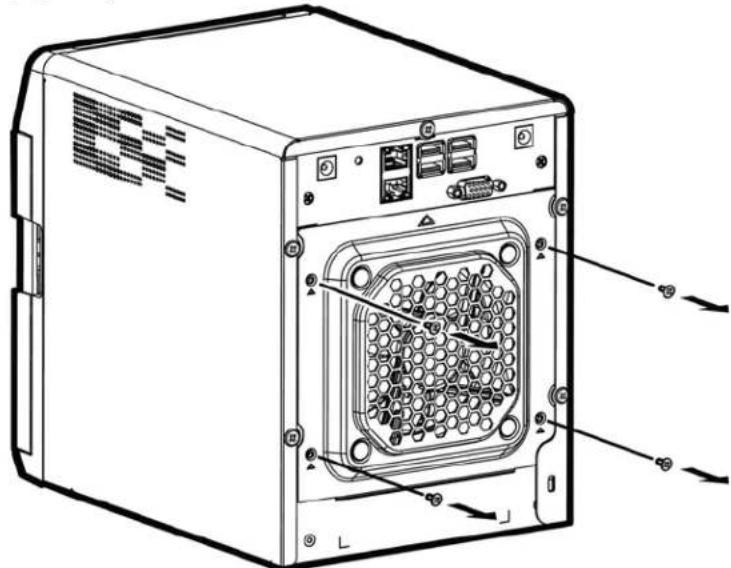
natural_image
Line drawing of a computer tower case with internal components and connectors (no text or symbols)Figure4.RemoveFanPlatemountingscrews
- Carefully lower the fan plate to forward you then lift the fan plate out of the unit (Figure 5).
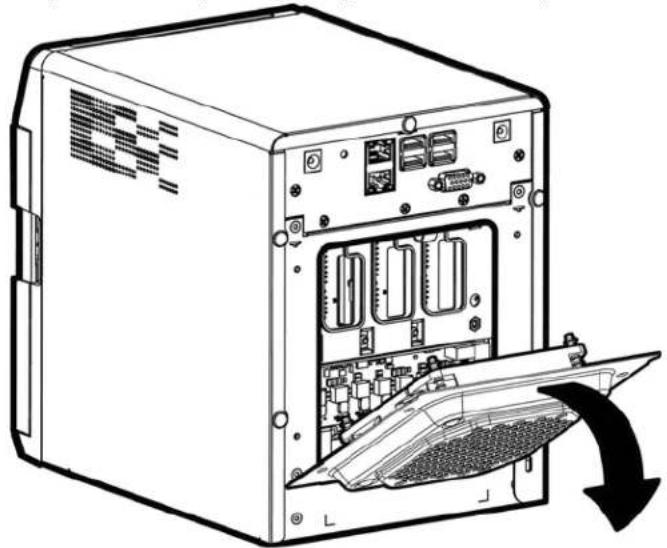
natural_image
Line drawing of a computer tower case with internal components and a downward arrow indicating a download or exit (no text or symbols present)Figure5.Removefan
WARNING! Beforeeremovingthefanplatecompletelyfromtheunit, detachthefan interfaceconnectorfromthebackplanePCBA.
- Gently placethereplacement fan into the unit, ensuring that the orientation of the fan is correct and that the fan interface connector is connected.
- Replace and tight the four (4) Fan Platemountingscrews.
- Donotover-tightenthemountingscrews.
- Reconnectallofthecablesforthedevice.
10.Restarttheserver.
Important: Donotdisassemblethefan.ReturntheentireassemblyintacttoWD,if instructedtodoso.
Removing the Unit Cover
Use the following steps remove the cover on the WDSentineIDX4200 device. These steps are necessary to replace certain internal parts.
Important: Toavoidelectrostaticdischarge(ESD)problems,groundyourselfby touchingmetalbeforehandlingthedevice.
ToshutdownyourWDSentinelserver,followthestepsoutlinein"ShuttingDownandRebootingtheServer"onpage31.
What you'll Need:
- Phillipsscrewdriver
RemovingtheUnitCover
- Beforegettingstarted, shutdowntheserveranddisconnectalexternalconnections.
- Placetheunitonacleanandstablesurface, withthebackoftheunitfacingyou.
- Releasefive(5)screwsonthebackoftheunit(Figure6).
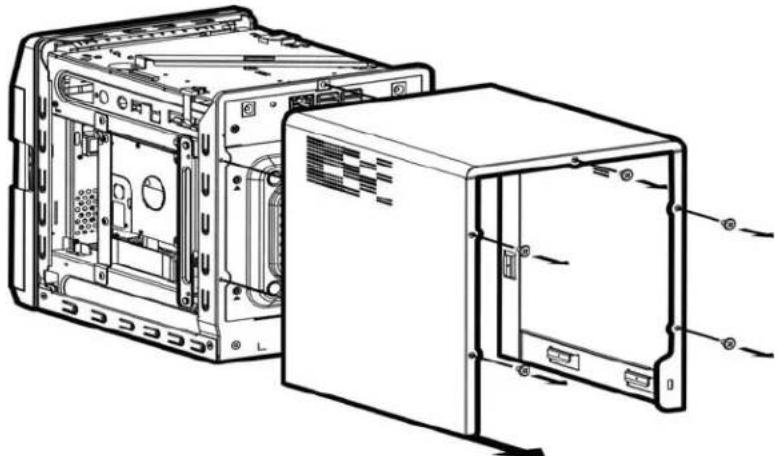
natural_image
Technical line drawing of an internal computer case with visible ports and connectors (no text or labels)Figure6.Unscrewandremoveunitcover
- Pulltheunitcovertowardyouuptoreleasethecover. (Figure6).
Replacing the SODIMM Memory Module
TheSODIMMmemorymoduleintheWDSentinelserveris "coldswappable." Thismeans that the WDSentinelserver must be shut down prior to your modulereplacement. Toshut down your WDSentinelserver, follow the steps outline in "Shutting Down and Rebooting the Server" on page 31.
Fordetailsaboutthememorymodule, memorytypes, and driverequirements, searchfor AnswerID9999intheWDKnowledgeBaseathttp://support.wd.com
Important: Toavoidelectrostaticdischarge(ESD)problems,groundyourselfby touchingmetalbeforehandlingthedevice.
What you'll Need:
- Phillipsscrewdriver
■ ReplacementSODIMMMemorymodule
ReplacingaSODIMMMemoryModule
1.Shutdowntheserver.
2. Disconnectal external connections.
3. Followthestepsoutlined in "RemovingtheUnitCover" on page 48.
4. Disconnectallcablesattachedtotheassembly.
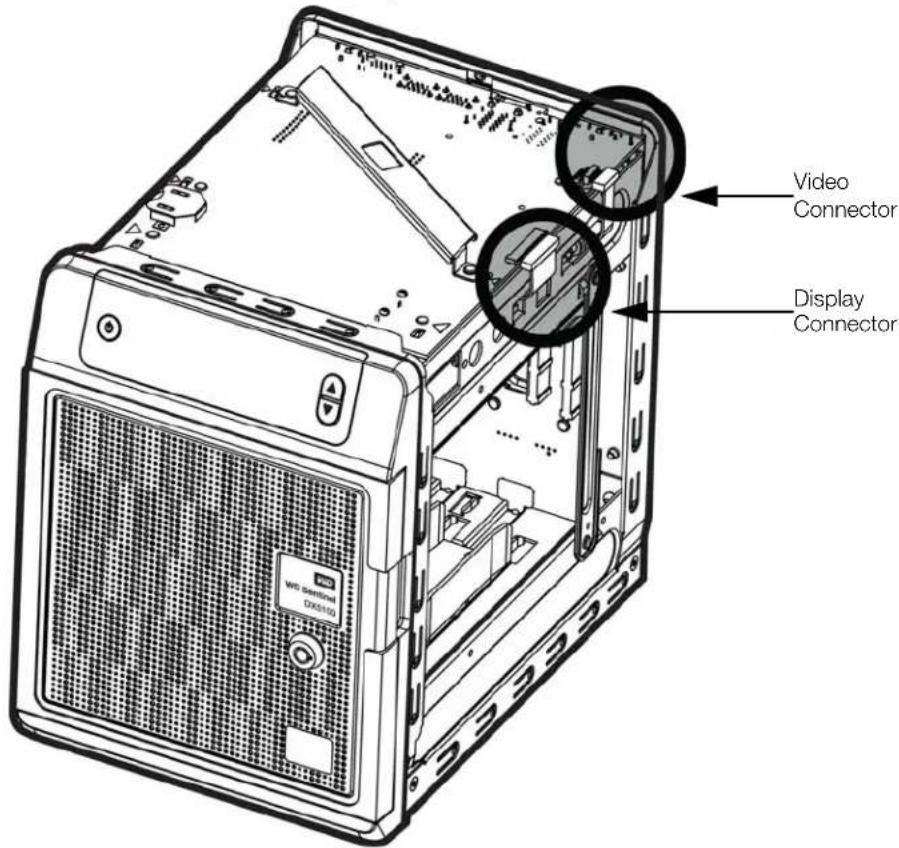
Important: Ensure that you carefully lift the ZIF connector gate and remove the ZIF DisplayConnector.
- Onthetopoftheunit, loosenandremovethesix(6)screwsholdingthePCBAunitin place.
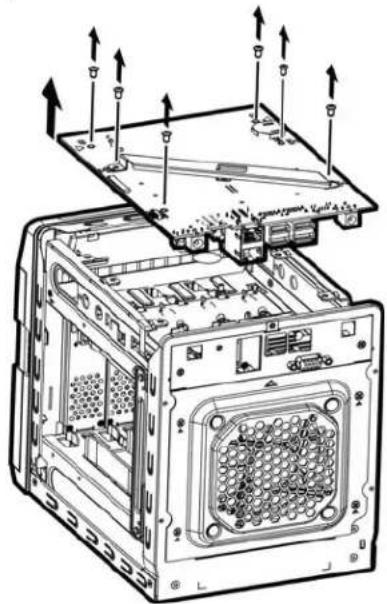
natural_image
Technical line drawing of a computer tower with internal components and mounting hardware (no text or symbols)Figure7.RemovescrewsfromPCBAunit
- Carefully lift the PCBA up and away from therest of the unit, thengently placethe flipped assembly on a stable flatsurface.
WARNING! Ensure that the connector clear the plate when removing the assembly.
- Remove and replace or add additional 2PL-SODIMM module(s).
Note: This unit uses memory in coordinated pairs and are color-coded. For a list of validmemoryconfigurations, searchforAnswerID9999intheWDKnowledgeBase athttp://support.wd.com.
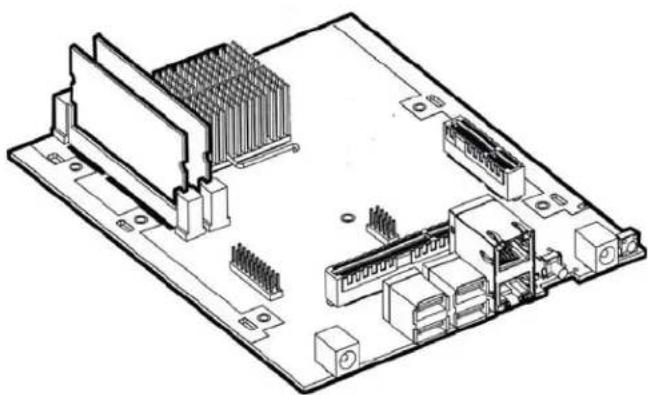
natural_image
Isometric technical line drawing of a computer motherboard with CPU socket and drive slots (no text or labels)Figure8.Replace4PL-SODIMMmodule
- Oncethe2PL-SODIMMmodulehasbeenaddedorupdated,replacethePCBAback ontheWDSentineldevice,ensuringthatthecablesareagainattachedtothe assemblyandthatthePCBAisproperlyseated.Replaceandtightenthesisix(6)screws holdingthePCBAinplace.
Note: Donotover-tightenthePCBAscrews.
- Replacetheunitcoverandreplaceandtightenthefive(5)exterior screws.
Note: Donotover-tightentheexteriorscrews.
- Connectallexternalconnections.
11.Restarttheserver.
Adding a Boot Drive
TheWDSentinelservercomesa2.5-inchbootdrivepre-installedwithWindowsStorage Server2012R2Workgroupandspecializedhardwareservicesanddrivers.Thepre-installed bootdrive(s)providestheabilitytokeeptheOSrunningfromthebootdrivwhile redeployingorchangingapplicationsandfoldersrunningonthelargecapacitydatadrives.
ThebootdriveintheWDSentinelDS5100serverare"coldswappable."Thismeansthatthe WDSentinelservermustbeshutdownpriortoaddingabootdrive.ToshutdownyourWD Sentinelserver,followthestepsoutlinein"ShuttingDownandRebootingtheServer"on page31.
Important: Toavoidelectrostaticdischarge(ESD)problems,groundyourselfby touchingmetalbeforehandlingthedevice.
What you'll Need:
- Phillipsscrewdriver
- BootDrivekit
AddingaBootDrive
1.Shutdowntheserver.
2. Disconnectal external connections.
3.Followthestepsoutlinedin"RemovingtheUnitCover"onpage48.
4. UsingaPhillipsscrewdriver, attachthebracebartothebootdrive.
5. Ontherightorleftsideoftheunit, findanemptybracketforyourbootdrive.
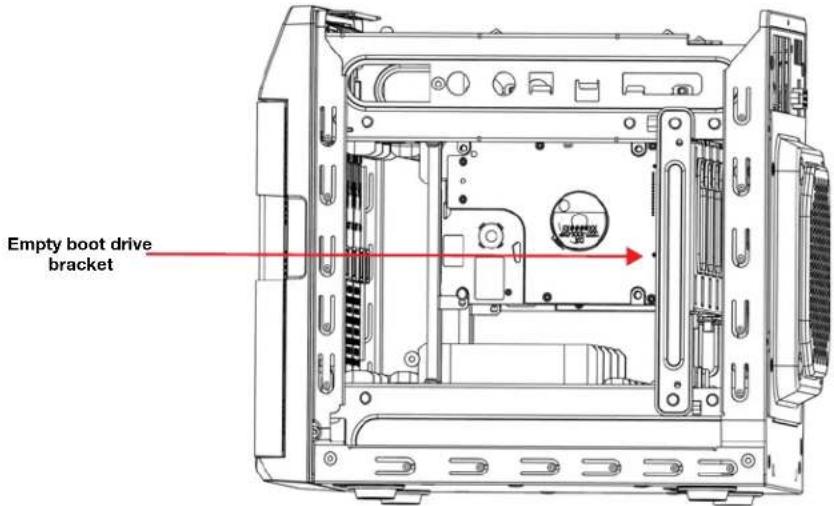
- With the boot drive pins facing the back of the device, gently push your boot drive into the empty boot drive bracket.
- Placeandtightentwo(2)screws, attachingthebracebaronthebootdrivetotheunit.
- Replacetheunitcoverandreplaceandtightenthefive(5)exterior screws.
Note: Donotover-tightentheexteriorscrews.
- Connectallexternalconnections.
10.Restarttheserver.
WD Sentinel DX4200 Administrator Reference Sheet
Providedbelowisareferencesheetthatallowsyoutokeepalloftheusefulinformation associatedwithyourWDSentinelDX4200serverinonelocation.Entertheinformation identifiedbelowandkeepthischecklistinasafelocationforfuturereference.
WDSentinelDX4200ServerName:
WDSentinelDX4200IPAddress:
- StaticIPAddress:
■ DynamicIPAddress:
WDSentinelDX4200ServerPassword:
UserName:
DomainName:
Index
A
accessingWDStorCentral18
accessories5
AdministratorReferenceSheet53
Administratorresponsibility12
Allocated/UnallocatedCapacity25
audiblealerts29
automaticallyupdatingWDsoftware 28
B
bestpractices
replacingdrives33
settingupWDSentinelDX420033
shuttingdown34
usingefficiently33
BootDrive
adding52
C
ChinaRoHS40
compliance38
regulatory38
safety39
connectingyourdevice13
CustomerSupport
contactsii
D
DCInconnector10
descriptionofWDSentinelDX42003
documentconventions2
DomainInformation22
drives
settingupyour32
E
emailalerts29
enablinganunsupporteddrive43
environmentalcompliance(China)40
ethernetports10
F
faileddrive
recovering32
fan
replacing46
FCCClassBinformation38
H
handlingprecautions2
harddrive
replacing43
help
wheretofind11
|
ICES/NMB-3(B)compliance38
indicators10
K
KCNotice39
Kensingtonsecurityslot10
keyfeatures3
L
LCDMessages35
LEDindications10
DriveLEDs10
EthernetPort10
PowerLED10
M
ManagingStorage25
N
Network22
0
officeuses12
onlineproductregistrationii
operatingsystemrequirements6
P
packagecontents5
password
Administrator12
PowerSupply24
productinformation
recording2
ProductRegistration27
productregistrationii
R
recoveringafaileddrive32
recoverybutton10
referenceresources11
registration,onlineii
regulatorycompliance38
removingtheservercover48
requirements
operatingsystems6
RoHS40
S
safetycompliance39
safetyinstructions1
schedulingWDsoftwareupdates28
server
settingup18
shuttingdown31
serverfan
replacing46
service
obtaining40
settingupyourserver14
shuttingdowntheserver31
softwareupdates28
WD28
specifications7
storage
managing32
StorageSpaces32
StorageSpaces
storage32
SystemAlerts21
systemcapacity20
Systeminformation23
SystemUtilization21
T
technicalspecifications7
TechnicalSupportcontactslistii
troubleshooting
checklist35
drivenotconnectingtonetwork35
LEDsdonotlightup35
U
unsupporteddrives
enabling43
updates
software28
updatingWDSoftware28
USBports10
userassistance11
userrolesandresponsibilities12
v
VCCIStatement39
VGAport10
W
Warning
unsupporteddrives43
warning
lithiumbattery1
uncleanshutdown31
unsupportedddrives26
WDlimitedwarranty40
WDSentinelDX4200
backview9
components10
connectingtoyournetwork(preferred method)13
frontview8
howitfitsintoyouroffice12
KeyFeatures3
packagecontents5
settingup14
shuttingdown31
WDSentinelDX4200AdministratorRefer-
enceSheet53
WDService40
WDsoftware
automaticupdates28
manualupdates28
WDStorCentral
accessing18
domaininformation22
Healthpage22
Helppage30
Homepage20
NavigationBar19
network22
powersupply24
Settingspage27
Storagepage24
system23
systemalerts21
SystemCapacity20
systemutilization21
InformationfurnishedbyWDisbelievedtobeaccurateandreliable;however,noresponsibilityisassumedby WDforitsusenorforanyinfringementofpatentsorotherrightsofthirdpartieswhichmayresultfromitsuse. NolicenseisgrantedbyimplicationorotherwiseunderanypatentorpatentrightsofWD.WDreservesthe righttochangespecificationsatanytimewithoutnotice.
WesternDigital,WD,andtheWDlogoareregisteredtrademarksofWesternDigitalTechnologies,Inc.inthe U.S.andothercountries;WDSentinelisattrademarkofWesternDigitalTechnologies,IncintheU.S.and othercountries.Othermarksmaybementionedhereinthatbelongtoothercompanies.
©2014WesternDigitalTechnologies, Inc. All rights reserved.
WesternDigitalCorporation 3355MichelsonDrive, Suite100 Irvine, California92612U.S.A.
4779-705131-A00September2014
- WD®Service and Support
- WD Guardian Services
- Accessing Online Support
- Contacting WD Technical Support
- Table of Contents
- Important User Information .... 1
- Product Overview .... 3
- Connecting the Server and Getting Started ..... 12
- Managing the WD Sentinel Server....18
- Managing Storage on the WD Sentinel Server....32
- Best Practices .... 3 3
- Regulatory and Warranty Information....38
- Appendix 42
- Index....54
- 1
- ImportantUserInformation
- Important Safety Instructions
- WARNING!
- Handling Precautions
- Recording Your WD Product Information
- About This Guide
- 2
- ProductOverview
- Getting to Know Your WD Sentinel DX4200 Server
- Key Features
- WD StorCentral Dashboard
- WD enterprise-class hard drives
- Seamless Integration
- Security
- Windows Storage Spaces
- Pre-installed Boot Drive
- Redundant power capabilities
- Dual Gigabit Ethernet Ports
- A Total Solution with Industry-Leading Technology Partners
- Why WD
- PackageContents
- System Requirements and Compatibility Information
- Product Views
- Indicators
- LEDs
- Where to Find Help
- ConnectingtheServerandGettingStarted
- Administrator Responsibilities
- Connecting the WD Sentinel Server to Your Network
- Setting up your WD Sentinel Server (one time only)
- 4
- ManagingtheWDSentinelServer
- WD StorCentral
- AccessingWDStorCentral
- To access WD StorCentral:
- NavigationBar
- Home
- System Capacity
- System Alerts
- To view System Alert details:
- To Save, Delete or Ignore a System Alert:
- System Utilization
- Domain Information
- To view Domain details:
- Network
- To view Network details:
- HealthPage
- System
- Power Supply
- Storage
- Managing Storage
- Accessing Server Manager:
- Buy
- Allocated / Unallocated Capacity
- Boot Drive Volume / Storage Spaces Pool
- Allocated / Unallocated Capacity Details:
- Settings
- Product Registration
- To register your device:
- Software Updates
- Manual Updates of WD Software
- To update from a file:
- Automatic Updates of WD Software
- Setup Email Alerts
- Audible Alerts
- To set and disable audible alerts:
- Help
- About
- Support
- To access WD Customer Support:
- To view a list of compatible drives for your device:
- Shutting Down and Rebooting the Server
- To shut down or restart the WD Sentinel device (Preferred method):
- 5
- ManagingStorageontheWDSentinelServer
- Storage Spaces
- Setting Up Your Drives
- Recovering from a Failed Drive
- To recover from a failed drive:
- BestPractices
- Setting up the WD Sentinel Server
- Using the WD Sentinel Server Efficiently
- Replacing Drives
- Shutting Down
- 7
- Troubleshooting
- First Steps Checklist
- Specific Problems and Corrective Actions
- LEDsdonotlightup
- LCDMessages
- RegulatoryandWarrantyInformation
- Regulatory Compliance
- FCC Class B Information
- ICES/NMB-3 (B) Compliance
- Safety Compliance
- CE Compliance for Europe
- VCCI Statement
- Limited Warranty
- Appendix
- Hardware Replacement Procedures
- Before You Begin
- Replacing a Hard Drive
- DriveCategories
- What you'll Need:
- ReplacingaHardDrive
- Replacing a Server Fan
- ReplacingaServerFan
- Removing the Unit Cover
- RemovingtheUnitCover
- Replacing the SODIMM Memory Module
- ReplacingaSODIMMMemoryModule
- Adding a Boot Drive
- AddingaBootDrive
- WD Sentinel DX4200 Administrator Reference Sheet
- Index
- A
- B
- C
- D
- E
- F
- H
- |
- K
- L
- M
- N
- 0
- P
- R
- S
- T
- U
- v
- W
Brand : WESTERN DIGITAL
Model : Sentinel DX4200
Category : Server