
tuneSTREAM II - Headphones Scosche - Free user manual and instructions
Find the device manual for free tuneSTREAM II Scosche in PDF.


| Product Type | Wireless Headphones |
| Brand | Scosche |
| Model | tuneSTREAM II |
| Connectivity | Bluetooth |
| Battery Life | Up to 8 hours |
| Charging Port | Micro USB |
| Weight | Approx. 0.2 lbs (90 g) |
| Driver Size | 40 mm |
| Frequency Response | 20 Hz - 20 kHz |
| Impedance | 32 ohms |
| Controls | On-ear: volume, track skip, call |
| Microphone | Built-in |
| Foldable | Yes |
| Color | Black |
| What's in the Box | Headphones, charging cable, manual |
Frequently Asked Questions - tuneSTREAM II Scosche
User questions about tuneSTREAM II Scosche
0 question about this device. Answer the ones you know or ask your own.
Ask a new question about this device
Download the instructions for your Headphones in PDF format for free! Find your manual tuneSTREAM II - Scosche and take your electronic device back in hand. On this page are published all the documents necessary for the use of your device. tuneSTREAM II by Scosche.
USER MANUAL tuneSTREAM II Scosche
The Scosche tuneSTREAM II Bluetooth headset features a compact folding design for handsfree communication and audio on the go. The tuneSTREAM II supports the following Bluetooth profiles:
HSP - Headset Profile
HFP - Hands-free Profile
A2DP - Advanced Audio Distribution Profile
AVRCP - Audio/Video Remote Control Profile
FEATURES
- When paired with a Bluetooth cell phone or PDA supporting the HFP profile:
• Answer a call, end a call and reject a call
• Redial last number
- Voice dial
- Adjust volume
• Transfer calls between the headset and your Bluetooth cell phone
-
When paired with a Bluetooth music device or Bluetooth transmitter supporting the A2DP profile:
-
Enjoy music wirelessly
- Adjust volume
• Remote control pause/play -
Remote control previous/next track
-
Easy to switch between calls and music - avoid missing incoming calls while listening to music.
- Every time the headset is turned on, it will connect to last paired device automatically.

IMPORTANT!
DO NOT RETURN PRODUCT TO THE RETAILER
IF YOU NEED ASSISTANCE OR REPLACEMENT PARTS CALL US TOLL FREE: 1-800-621-3695 X3
HOURS MON-FRI 8AM-5:30PM (PST) SATURDAY 8AM-2PM (PST)
Bluetooth is a registered trademark of Bluetooth SIG, Inc.
©2010 SCOSCHE INDUSTRIES, INC.
SI 8/10 300HZ8
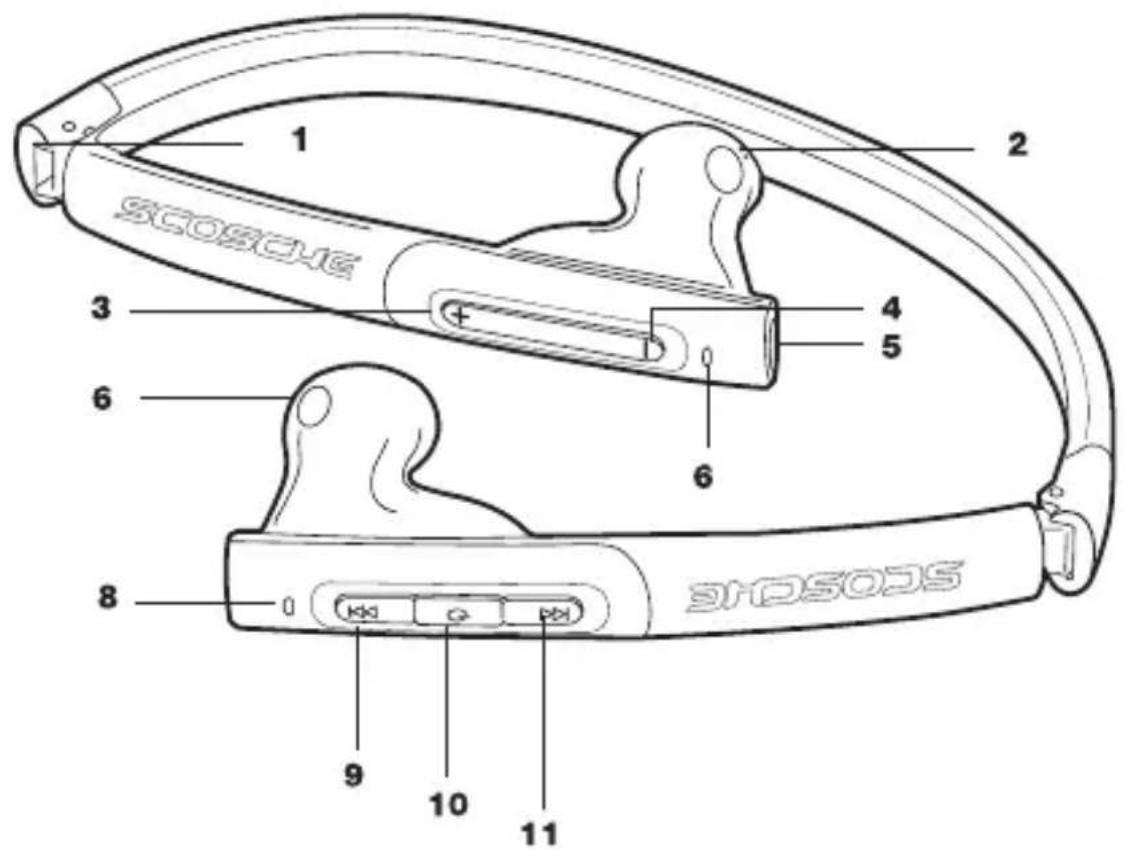
OVERVIEW
PARTS INCLUDED:
(1) Bluetooth headset
(1) Charging cable
OVERVIEW
natural_image
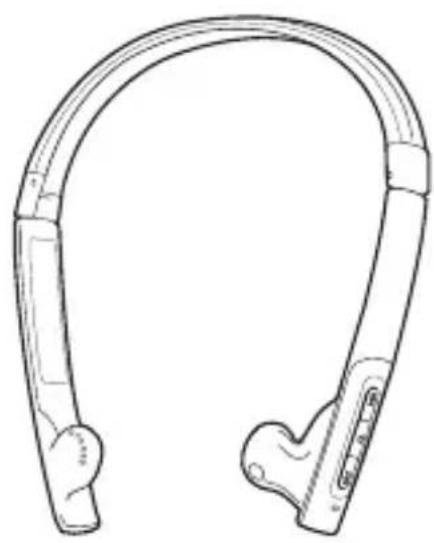
Line drawing of a curved, multi-colored object resembling a stylized helmet or connector (no text or symbols)FIGURE 1
natural_image
Line drawing of a U-shaped mechanical device with two directional arrows indicating movement or force (no text or symbols)- ADJUSTABLE FOLDING HEADBAND (FIGURE 1)
- SPEAKER (RIGHT)
3 VOLUME UP - VOLUME DOWN
- micro-USB CHARGE PORT
- SPEAKER (LEFT)
- INDICATOR LIGHT
- INDICATOR LIGHT
- PREVIOUS TRACK
- MULTI-FUNCTION BUTTON (MFB)
- NEXT TRACK
CHARGING
The tuneSTREAM II comes with a built-in rechargeable battery. We recommend charging the battery fully before using the unit for the first time. When the tuneSTREAM II is low on power, the red LED will flash twice and the unit will emit three "dong" tones every 20 seconds. Please recharge the tuneSTREAM II battery.
Using a travel charger (not included)
Connect the charger to a standard power outlet and the charger plug to the micro-USB charging input of the tuneSTREAM II. The red LED will be on while charging. A full charge takes approximately 2 hours. When charging is complete, the red LED will go off.
Using the USB cable (included)
Connect the USB cable to a computer USB port and the USB cable plug to the micro-USB charging input of the tuneSTREAM II. The red LED will be on while charging. A full charge takes approximately 2 hours. When charging is complete, the red LED will go off.
Note: Choosing travel charger or USB cable depends on different countries or areas and actual demands.
USING THE tuneSTREAM II
POWER ON/OFF
| FUNCTION | OPERATION | LED INDICATOR | INDICATOR TONE |
| Power on | Press and hold MFB button for 3 - 5 seconds until blue LED flashes | Blue LED flashes for 1 second | 1 long tone |
| Power off | Press and hold MFB button for 3 - 5 seconds until red LED flashes | Red LED flashes for 1 second | 1 long tone |
Note: To save power, the tuneSTREAM II will turn off automatically if no devices can be connected after 5 minutes.
PAIRING THE tuneSTREAM II WITH BLUETOOTH DEVICES
| FUNCTION | OPERATION | LED INDICATOR | INDICATOR TONE |
| Enter pairing mode | Make sure the tuneSTREAMII is OFF. Press and hold MFB for 5 - 7 seconds until LED flashes red & blue alternately | LED flashes red & blue alternately | 2 short tones |
Note: Pairing mode will last 2 minutes. If the tuneSTREAM II still can't pair with any Bluetooth devices after 2 minutes, it will return to standby mode automatically to save power.
PAIRING THE tuneSTREAM II WITH A BLUETOOTH CELL PHONE
Prior to using the tuneSTREAM II with a Bluetooth-enabled cell phone for the first time, the two devices will need to be paired. The pairing procedures may vary with different models of cell phones. Please refer to your cell phone user's manual for further information. General pairing procedures are as follows:
- Place the tuneSTREAM II and Bluetooth cell phone in an easily viewable area no more than 1 meter apart.
- Enter the tuneSTREAM II's pairing mode. Please refer to the pairing chart above.
- Activate your cell phone's Bluetooth function and set your cell phone to search for Bluetooth devices. After the search is completed, select "HZ8" from the Bluetooth device list.
- When prompted, enter password or PIN "0000" and press "Yes" or "confirm".
- After successful pairing, select "HZ8" from the Bluetooth device list and press "connect".
- After connecting successfully, the blue LED will flash twice quickly every 5 seconds.
Remarks:
- If pairing fails, turn off the tuneSTREAM II first, then repeat steps 1 - 6 above.
- After pairing is successful, the tuneSTREAM II and the cell phone will remember each other and will not need to paired again for further use.
- Every time the tuneSTREAM II is turned on, it will connect to last connected device automatically. If you want to pair it with another device, please turn off the Bluetooth function of last connected device FIRST and pair the tuneSTREAM II with the new device according to steps 1 - 6 above.
- If your cell phone has Bluetooth V2.1 and above, it will not need a pairing password. When the tuneSTREAM II pairs with your cell phone, they will match automatically.
PAIRING THE tuneSTREAM II WITH A BLUETOOTH TRANSMITTER
You can connect the tuneSTREAM II to a Bluetooth transmitter (not included) to enjoy music wirelessly. We recommend the Scosche tuneSTREAM™ Stereo Bluetooth Transmitter for iPod & iPhone (TZ4R) or the Scosche tuneSTREAM™ Stereo Bluetooth Transmitter for Universal MP3 players (IUBTTR), both sold separately.
- Place the tuneSTREAM II and Bluetooth transmitter in an easily viewable area no more than 1 meter apart.
- Enter the tuneSTREAM II's pairing mode. Please refer to the pairing chart on page 4.
- Turn on the Bluetooth transmitter. It will search for Bluetooth devices automatically and send a pairing request.
- When the tuneSTREAM II requests a PIN number, the transmitter will respond "0000" automatically.
- After successful pairing and connection, the blue LED on the tuneSTREAM II will flash twice quickly every 5 seconds.
Remarks:
- The pairing password of the headset is "0000". The headset can only pair with a Bluetooth transmitter whose pairing password is "0000".
- If pairing still fails after several tries, please refer to the Bluetooth transmitter's user manual for further information.
MULTIPLE-DEVICE PAIRING
The headset can connect with two devices at most. One is a Bluetooth cell phone supporting HFP profile. The other is a Bluetooth music device supporting A2DP profile. To pair both devices refer to the following steps:
- First, pair the headset with a Bluetooth transmitter (refer to "pairing the tuneSTREAM II with a Bluetooth transmitter, above).
- Turn off the Bluetooth transmitter.
- Pair and connect the headset with a Bluetooth cell phone (refer to "pairing the Bluetooth with a Bluetooth cell phone", page 4).
- Turn on the Bluetooth transmitter. It will connect to the tuneSTREAM II automatically.
MULTIPLE-DEVICE PAIRING (cont'd)
Remarks:
- After successful multi-pairing, the paired devices will remember each other. Unless pairing information is deleted because of new a pairing, they will not need to paired next time. If the pairing information is deleted, please make the cell phone and the tuneSTREAM II set up hands free connection first, then turn on the Bluetooth transmitter, multi-connecting can now be performed.
- Cell phones supporting HSP and A2DP at the same time may set up HSP and A2DP connections with the headset simultaneously. In this case the Bluetooth transmitter may not connect to the headset.
RE-CONNECTING WITH A BLUETOOTH DEVICE
Automatically connecting
Every time the tuneSTREAM II is turned on it will connect to last connected device automatically.
Manually connecting
When the tuneSTREAM II is in standby mode and doesn't connect to any devices, quickly press MFB twice it will connect to last connected device automatically.
Remarks:
- The tuneSTREAM II only connects to last connected HFP device automatically.
- Before connecting to a Bluetooth device, please turn on the device's Bluetooth function. On some Bluetooth devices (some Nokia cell phones for example) automatic connection must be allowed or activated in the cell phone's settings. Please refer to your cell phone's manual for further information.
WEARING THE HEADSET
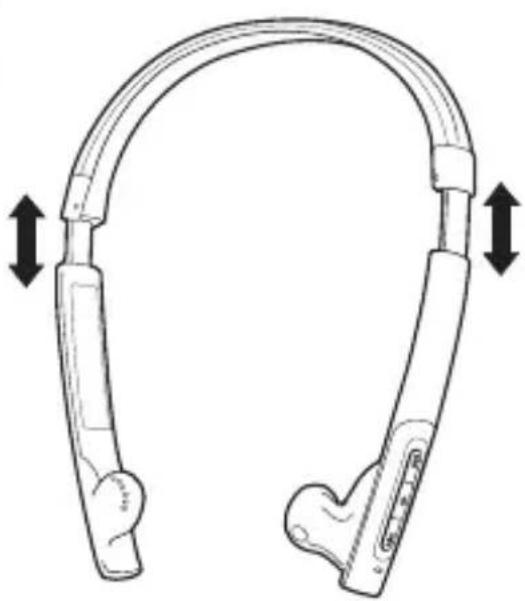
The headband of the tuneSTREAM II is folding and retractable. Please adjust for the best and most comfortable fit (see Figure 1, page 2). The letter "L" on the headset indicates the left ear speaker and "R" indicates the right ear speaker. Please wear the headset according to these markings.
MAKING A CALL WITH THE tuneSTREAM II
| FUNCTION | STATUS OF UNIT | OPERATION | INDICATOR TONE |
| Voice dial | Standby mode | Press and hold ➤ button for 2 seconds until hearing indicator tone | Short tone |
| Redial last number | Standby mode | Quickly press MFB twice | Short tone |
| Volume up | During a call | Quickly press Vol + (incremental increase) Press & hold Vol + (rapid increase) | None |
| Volume down | During a call | Quickly press Vol - (incremental decrease) Press & hold Vol - (rapid decrease) | None |
| Answer a call | Incoming ring | Quickly press MFB once | Short tone |
| Reject a call | Incoming ring | Press & hold MFB for 2 seconds until hearing indicator tone | Short tone |
| End a call | During a call | Quickly press MFB once | Long tone |
| Transfer a call | During a call | Press & hold MFB for 2 seconds until hearing indicator tone | Long tone |
| Microphone mute | During a call | Quickly press MFB twice | 2 falling tones |
| Cancel mute | During a call (muted) | Quickly press MFB twice | 2 rising tones |
MAKING A CALL WITH THE tuneSTREAM II (cont'd)
Remarks:
- Not all cell phones support all functions listed in the chart on page 7. Please refer to your cell phone's user's manual for further information.
- When the volume is adjusted to maximum or minimum you will hear a "DI" tone.
- When pressing the answer button on some cell phones, the call will be transferred to the cell phone. You will then have to switch the call to the tuneSTREAM II manually. Please refer to your cell phone's user's manual for further information.
MUSIC PLAYBACK
You can enjoy music through the tuneSTREAM II by connecting it to a Bluetooth cell phone or transmitter supporting A2DP.
| FUNCTION | STATUS OF UNIT | OPERATION |
| Volume up | Music playback | Quickly press Vol + (incremental increase)Press & hold Vol + (rapid increase) |
| Volume down | Music playback | Quickly press Vol - (incremental decrease)Press & hold Vol - (rapid decrease) |
| Pause | Music playback | Quickly press MFB once |
| Play | Paused | Quickly press MFB once |
| Previous track | Music playback | Quickly press ◀ button once |
| Next track | Music playback | Quickly press ▶ button once |
Remarks:
- When playing music on some cell phones, the music will be transmitted to the cell phone's speaker instead of the tuneSTREAM II. You must select "transmit the sound via Bluetooth" in the settings menu, then choose "HZ8" as the speaker device. The music will be transmitted to the headset. Please refer to your cell phone's user's manual for further information.
- When the volume is adjusted to maximum or minimum, you will hear an indicator tone.
- To remotely control previous/next track or pause/play with the tuneSTREAM II, the Bluetooth cell phone or transmitter paired with the tuneSTREAM II must support the AVRCP profile. Please refer to the user's manual of your cell phone or Bluetooth transmitter for further information.
LED INDICATORS
- When the tuneSTREAM II is charging
| LED INDICATOR | STATUS OF UNIT |
| Red LED on | Charging in progress |
| Red LED off | Charging complete |
- When the tuneSTREAM II is connected to a Bluetooth device
| LED INDICATOR | STATUS OF UNIT |
| LED flashes red and blue alternately | Pairing mode |
| Blue LED flashes once every 3 seconds | Standby mode(not connected to a Bluetooth device) |
| Blue LED flashes twice every 5 seconds | Standby mode(connected to a Bluetooth device) |
| Blue LED flashes twice every 4 seconds | Incoming call |
| Blue LED flashes once every 2 seconds | During a call |
- Indicator tones
| TYPE OF TONE | STATUS OF UNIT |
| Emits 2 tones every 5 seconds | Charging in progress |
| Emits 3 “dong” tones every 20 seconds | Low battery power |
SPECIFICATIONS
Bluetooth specification: Bluetooth V2.1+EDR Bluetooth profiles: HSP, HFP, A2DP and AVRCP Operating distance: 10 meters, Class II Working time: Music: Up to 5 hours Talk: Up to 6 hours
Standby time: Up to 120 hours Charging input voltage: DC +5.0±0.25VA Charging time: Approx. 2 hours Dimensions: 158 × 148 × 26mm Weight: Approx .40 g
TROUBLESHOOTING
| PROBLEM | SOLUTION |
| Red LED flashing | The tuneSTREAM II needs to be charged. |
| Red LED not on while charging | 1. Check connection of charger & tuneSTREAM II.2. If the tuneSTREAM II is not in use for an extended period of time, the red LED may not appear for approx. 30 minutes after beginning of charge. |
| Cell phone can't search and find the tuneSTREAM II. | 1. Make sure the tuneSTREAM II is in pairing mode.2. Make sure the tuneSTREAM II and the Bluetooth device are within working range (approx. 10 meters). |
| No voice heard when making a call with the tuneSTREAM II | 1. Make sure the cell phone is in a strong signal area.2. Make sure the tuneSTREAM II and the cell phone are within working range (approx. 10 meters). |
| Can't remotely control the pause, play, previous track and next track functions with the tuneSTREAM II when playing music. | Make sure the Bluetooth device paired with the tuneSTREAM II supports AVRCP (Audio/Video Remote Control Profile). |
CARE & MAINTENANCE
- Do not expose the headset to liquid, moisture or humidity, as it is not waterproof.
- Do not use abrasive cleaning solvents to clean the headset.
- Do not expose the headset to temperatures below -4° or above 140° Fahrenheit.
- Do not expose the headset to contact with sharp objects as this will cause scratching and damage.
- Do not attempt to disassemble the headset, as it does not contain serviceable components.
FCC AUTHORIZATION
This device complies with FCC Rules Part 15. Operation is subject to the following two conditions: 1) This device may not cause interference, and 2) this device must accept any interference that may be received, including interference that may cause undesired operation. The manufacturer is not responsible for any radio or TV interference caused by unauthorized modification to this equipment. Such modification could void the user's authority to operate the equipment.
FCC ID: WAD-BTH010
LIMITED WARRANTY
Scosche Industries Inc. warrants this product to be free from defects in material and workmanship for a period of 1 year from purchase. This Scosche product is sold with the understanding that the purchaser has independently determined the suitability of this product. This warranty is offered to the original purchaser of the product only. This warranty does not cover the product if physically damaged, subject to negligence or misuse, abuse, alteration, accident, or an act of GOD. This warranty does not apply to product which has water or physically damaged by accident or which has been misused, disassembled or altered.
The original dated sales slip or proof of purchase will establish warranty eligibility. If the product should prove defective within the warranty period, return the product with proof of purchase to Scosche Industries Inc. Scosche, at its option, will replace or repair the product free of charge and return the product postage paid.
In no event shall Scosche Industries, Inc. be responsible for claims beyond the replacement value of the defective product, or in any way be liable or responsible for consequential or incidental damages. No empress warranties and no implied warranties, whether for fitness or any particular use or otherwise, except as set forth above (which is made expressly in lieu of all other warranties) shall apply to products sold by Scosche. Scosche Industries cannot be held responsible for discrepancies/inconsistencies that may occur due to automotive manufacturing changes or option.
SCOSCHE®
tuneSTREAM II™
ÉCOUTEURS STÉRÉO BLUETOOTH
HZ8
INTRODUCTION
HEURES: Du lundi au vendredi 8:00 a.m. to 5:30 p.m. (PST) Samedi 8:00 a.m. to 2:00 p.m. (PST)
natural_image
Diagram of two curved mechanical arms with directional arrows indicating movement or force (no text or symbols)CHARGEMENT
- FEATURES
- IMPORTANT!
- DO NOT RETURN PRODUCT TO THE RETAILER
- OVERVIEW
- PARTS INCLUDED:
- CHARGING
- Using a travel charger (not included)
- Using the USB cable (included)
- USING THE tuneSTREAM II
- PAIRING THE tuneSTREAM II WITH A BLUETOOTH CELL PHONE
- Remarks:
- PAIRING THE tuneSTREAM II WITH A BLUETOOTH TRANSMITTER
- MULTIPLE-DEVICE PAIRING
- MULTIPLE-DEVICE PAIRING (cont'd)
- RE-CONNECTING WITH A BLUETOOTH DEVICE
- Automatically connecting
- Manually connecting
- WEARING THE HEADSET
- MAKING A CALL WITH THE tuneSTREAM II (cont'd)
- MUSIC PLAYBACK
- LED INDICATORS
- SPECIFICATIONS
- CARE & MAINTENANCE
- FCC AUTHORIZATION
- LIMITED WARRANTY
- SCOSCHE®
- tuneSTREAM II™
- ÉCOUTEURS STÉRÉO BLUETOOTH
- INTRODUCTION
- CHARGEMENT
Brand : Scosche
Model : tuneSTREAM II
Category : Headphones