
IDR676MD - Headphones Scosche - Free user manual and instructions
Find the device manual for free IDR676MD Scosche in PDF.


| Product Type | In-Ear Headphones |
| Driver Size | 10 mm |
| Frequency Response | 20 Hz - 20 kHz |
| Impedance | 32 Ω |
| Sensitivity | 108 dB |
| Connectivity | Wired, 3.5 mm jack |
| Cable Length | 1.2 m |
| Microphone | Yes, in-line |
| Controls | Answer/end, volume, track |
| Compatibility | Smartphones, tablets, PCs |
| Weight | 15 g |
| Dimensions (Earbud) | 15 x 15 x 20 mm |
| Materials | Plastic, silicone ear tips |
| Water Resistance | IPX4 (sweat resistant) |
| Color Options | Black, White |
| Warranty | 1 year |
| What's in the Box | Earbuds, 3 eartip sizes, cable |
| Cleaning | Wipe with dry cloth |
| Safety | Keep away from children, avoid high volume |
| Spare Parts | Ear tips available for purchase |
Frequently Asked Questions - IDR676MD Scosche
User questions about IDR676MD Scosche
0 question about this device. Answer the ones you know or ask your own.
Ask a new question about this device
Download the instructions for your Headphones in PDF format for free! Find your manual IDR676MD - Scosche and take your electronic device back in hand. On this page are published all the documents necessary for the use of your device. IDR676MD by Scosche.
USER MANUAL IDR676MD Scosche
(1) Set of earphones
(3) Sets single flanged
silicone inserts (S/M/L)
(3) Sets dual flanged
silicone inserts (S/M/L)
(1) Travel pouch
FEATURES AND
SPECIFICATIONS
• Increased dynamic range
premium earphones
• 4.3 ft noise reduction
oval cable
- Conforms to ROHS.
EN-71 & WEEE standards
- Driver size: 11mm dynamic
- Impedance: 16Ω
• Frequency range
20Hz to 20KHz
• Sensitivity: 102dB ±
3dB at 1KHz
(IEC-318 I/P Level: 1mW)
• Rated power : 15mW
• Max. power: 25mW
• tapLINE III control with
bass countour switch
• Clothing clip
- Angled plug with gold-
plated 3.5 mm connector
- Robust strain reliefs
PIÈCES INCLUDES
HEURES: Du lundi en vendredi 8.00 a.m. to 5.38 p.m. (PST) Samedi 8.00 a.m. to 2.00 p.m. (PST)
GARANTIE LIMITÉE
IF YOU NEED ASSISTANCE OR REPLACEMENT PARTS
CALL US TOLL FREE: 1-800-621-3695 X3
HOURS MON-FRI 8AM-5:30PM (PST) SATURDAY 8AM-2PM (PST)
LIMITED WARRANTY
Scosche Industries Inc. warrants this product to be free from defects in material and workmanship for a period of 1 year from purchase. This Scosche product is sold with the understanding that the purchaser has independently determined the suitability of this product. This warranty is offered to the original purchaser of the product only. This warranty does not cover the product if physically damaged, subject to negligence or misuse, abuse, alteration, accident, or an act of GOD. This warranty does not apply to product which has water or physically damaged by accident or which has been misused, disassembled or altered.
The original dated sales slip or proof of purchase will establish warranty eligibility. If the product should prove defective within the warranty period, return the product with proof of purchase to Scosche Industries Inc. Scosche, at its option, will replace or repair the product free of charge and return the product postage paid.
In no event shall Scosche Industries, Inc. be responsible for claims beyond the replacement value of the defective product, or in any way be liable or responsible for consequential or incidental damages. No empress warranties and no implied warranties, whether for fitness or any particular use or otherwise, except as set forth above (which is made expressly in lieu of all other warranties) shall apply to products sold by Scosche. Scosche Industries cannot be held responsible for discrepancies/inconsistencies that may occur due to automotive manufacturing changes or option.
iPod, iPhone, iPod touch, iPod classic, iPod shuffle and iPod nano are trademarks of Apple Inc., registered in the US and other countries. iPad is a registered trademark of Apple, Inc. "Made for iPod", "Made for iPhone", and "Made for iPad" mean that an electronic accessory has been designed to connect specifically to iPod, iPhone and iPad, respectively, and has been certified by the developer to meet Apple performance standards. Apple is not responsible for the operation of this device or its compliance with safety and regulatory standards.
natural_image
Line drawing of two medical or electronic devices with no visible text or symbols2
-
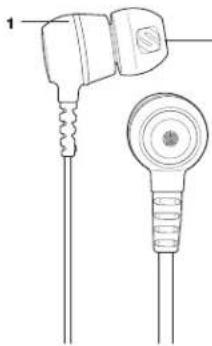
EARPHONE
-
SILCONE INSERT
-
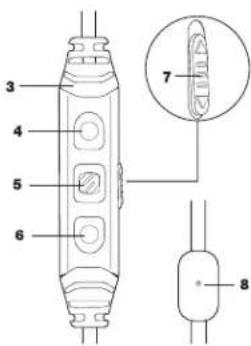
tapLINE III CONTROL
-
VOLUME UP
-
MULTIFUNCTION BUTTON (MFB)
-
VOLUME DOWN
-
BASS CONTOUR SWITCH
up (toward earphones) = more bass down (away from earphones)
- MICROPHONE
ÉCOUTEUR
EMBOUT EN SILICONE
CONTRÔLE tapLINE III
AUGMENTIR LE VOLUME
BOUTON MULTIFONCTION
DIMINUER LE VOLUME
COMMUTATEUR POUR LE
| Function | How to |
| Activate voice control* | Hold the MFB for about 2 seconds |
| Answer or end a call | Press the MFB once to answer. Press the MFB again to end. |
| Ignore a call | Hold the MFB for about 2 seconds. |
| Answer a second incoming call, and place original call on hold. | Press the MFB once to answer second call. Press the MFB to return to original call. |
| Answer a second incoming call, and end original call. | Hold the MFB for about 2 seconds, 2 low tones will confirm end of original call. |
| Swap calls | Press the MFB once to swap calls. |
| Play or pause | Press the MFB once to play. Press the MFB again to pause. |
| Track or chapter forward | Press the MFB twice quickly. |
| Track or chapter back | Press the MFB three times quickly. |
| Increase volume | Press the + button. |
| Decrease volume | Press the - button. |
| Activate VoiceOver** | Press and hold the MFB to hear title and artist of song playing. |
| Navigate Playlists using VoiceOver** | Press and hold the MFB until a tone is heard, then release. When the name of the desired playlist is heard, click the MFB to select it. |
*Voice control is currently only available on the iPhone 4S, iPhone 4, iPhone 3GS and iPod touch 2nd generation and later. **VoiceOver is currently only available on the iPod nano 6th generation and iPod shuffle 3rd and 4th generation. See your user manual for specific functionality/features available on your iPod or iPhone.
- Use a slow twisting motion to remove the earphones. Never pull on the earphone cord.
- If an earphone insert becomes lodged in your ear, seek medical assistance to remove the insert. Damage to the ear may be caused by non-professionals attempting to remove the
- Prior to inserting the headphones, always recheck the insert to make sure it is properly attached to the stem.
- Turn the volume control only far enough to hear properly.
- Ringing in the ears may indicate that the volume level is too high. We recommend lowering the volume.
- If you are using the headphones with an airplane's sound system, we recommend lowering the volume level so that the pilots' messages do not cause discomfort to your ears.
- Have your ears checked by an audiologist regularly. If you are experiencing wax build up, stop using the headphones until an audiologist has examined your ears.
- Stop using the earphones if they begin to cause great discomfort or infection.
PRÉCAUTIONS DE SÉCURITÉ
AVERTISSEMENT : ÉCOUTER DE LA MUSIQUE À UN VOLUME ÉLEVÉ PEUT ENTRAÎNER DES DOMMAGES AUDITIFS PERMANENTS. LES ÉCOUTEURS SCOSCHE SONT CONÇUS POUR SE METTRE À L'EXTÉRIEUR DE L'ENTRÉE DU CANAL DE L'OREILLE.
QUALITY PERFORMANCE AND COMFORT. An insert that fits properly will seal to your ear, help to isolate against external sounds and dramatically increase bass response. We
can help to locate against other ear canals and dramatically increase base response. We encourage you to try the various silicone insert sizes and styles included to find the perfect fit WARNING: Use caution when inserting the earphones. If inserted beyond the ear canal items may become lodged inside your ear canal. Before insertion, verify that the silicone inserts are securely fixed to the earphone stem. Do not use the earphones without the silicone inserts.
Brand : Scosche
Model : IDR676MD
Category : Headphones