
F5U257B - Cables for Computers and Peripherals BELKIN - Free user manual and instructions
Find the device manual for free F5U257B BELKIN in PDF.


| Product Type | USB 2.0 4-Port Hub |
| Brand | Belkin |
| Model | F5U257B |
| Ports | 4 USB 2.0 Type-A ports |
| Data Transfer Rate | Up to 480 Mbps |
| Interface | USB 2.0 |
| Compatibility | Windows, Mac OS, Linux |
| Dimensions (approx) | 3.5 x 1.2 x 0.6 inches |
| Weight | 0.1 lbs (45 g) |
| Power Source | Bus-powered via USB |
| Cable Length | 6 inches (15 cm) integrated cable |
| LED Indicator | Power/activity LED |
| Color | Black |
| Material | Plastic |
| Certifications | USB-IF certified, RoHS |
| Maintenance | Keep dry; clean with soft, dry cloth |
| Safety Precautions | Do not expose to liquids or excessive heat; avoid direct sunlight |
| Spare Parts | Not applicable; no user-serviceable parts |
| Repairability | Not repairable; replace if defective |
| General Information | Plug-and-play; no driver required for most operating systems |
Frequently Asked Questions - F5U257B BELKIN
User questions about F5U257B BELKIN
0 question about this device. Answer the ones you know or ask your own.
Ask a new question about this device
Download the instructions for your Cables for Computers and Peripherals in PDF format for free! Find your manual F5U257B - BELKIN and take your electronic device back in hand. On this page are published all the documents necessary for the use of your device. F5U257B by BELKIN.
USER MANUAL F5U257B BELKIN
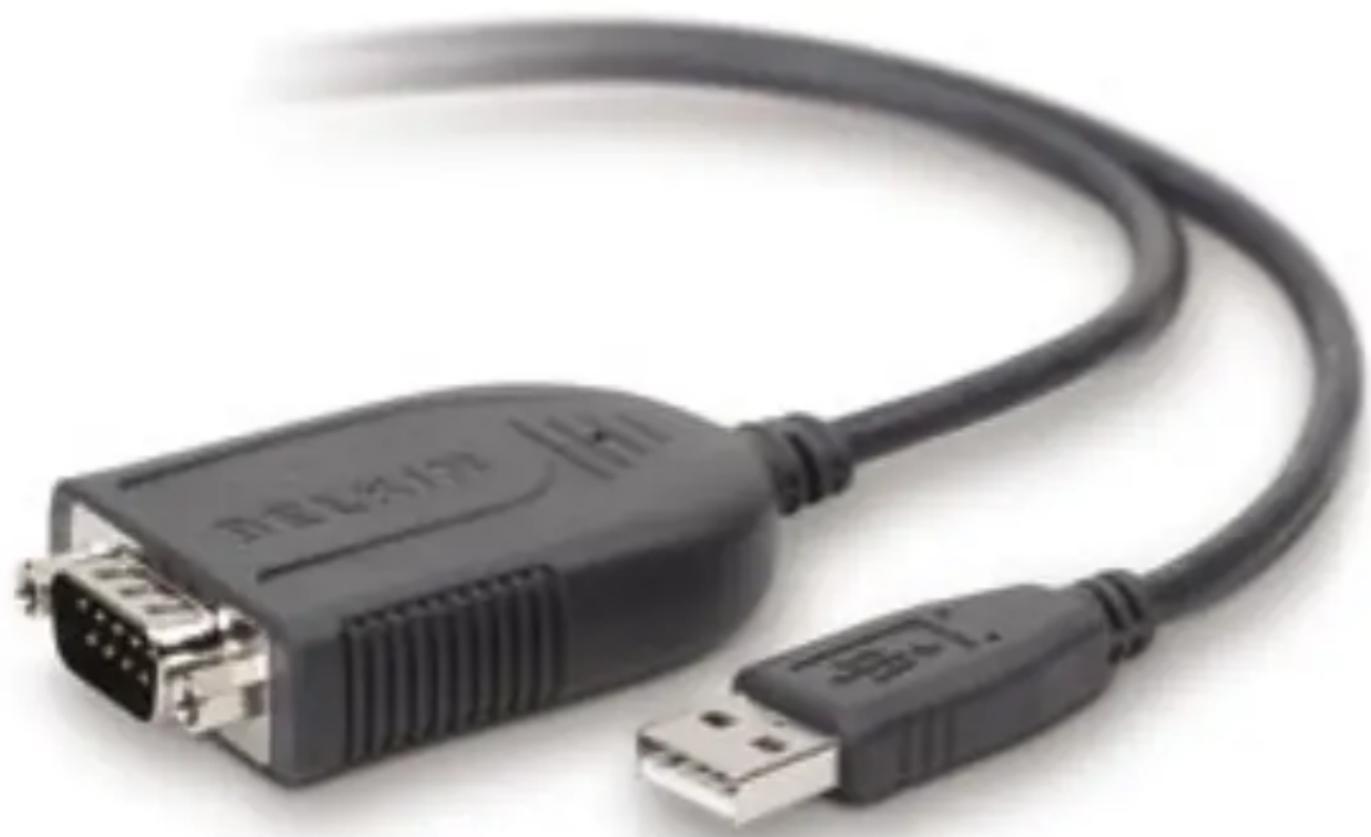
Connect your serial devices seamlessly through your computer's USB port
natural_image
Close-up of a black USB drive with an external port, showing its connector and cable (no text or symbols visible)User Manual
Table of Contents
- Introduction ...... 1
Supported Operating Systems ......2
- Software Setup ....3
Windows 2000/XP Driver Installation ....3
Red Hat Linux Driver Installation ....4
- Hardware Setup ....5
Installation Instructions (Windows Platform) ....5
Installation Instructions (Red Hat Linux Platform) ......6
-
Compatible Devices ....7
-
Information ......9
Congratulations and thank you for purchasing this innovative USB-to-Serial Adapter from Belkin. It is designed to link your serial devices easily through your computer's USB port. The leader in connectivity solutions for personal computers, Belkin designed this product to deliver outstanding performance and convenience. Please review this User Manual carefully to ensure that you get the most from your USB-to-Serial Adapter.

natural_image
Illustration of a USB cable with connector port (no text or symbols visible)Supported Operating Systems
The USB-to-Serial Adapter requires one of the following operating systems:
- Microsoft® Windows® XP Professional
- Microsoft Windows XP Home
- Microsoft Windows 2000 Professional
- Linux® Red Hat® 7.3/8.0 (kernel 2.4.18) and 9.0 (kernel 2.4.20)
Windows 2000/XP Driver Installation
Important Note: You must install the F5U257 driver (software) BEFORE connecting the Adapter to your computer.
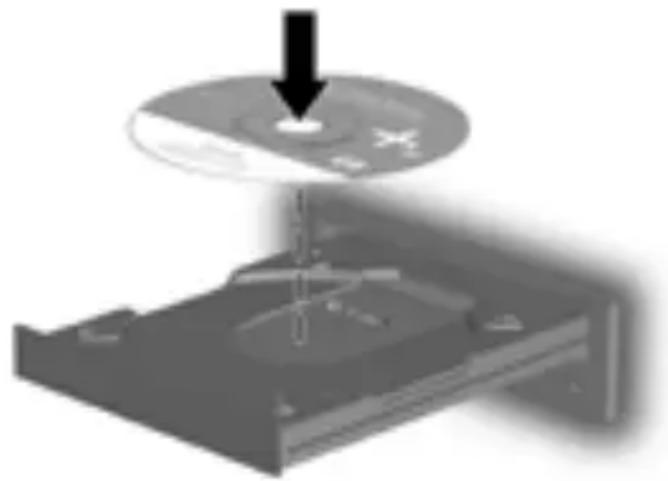
- Insert the included installation CD into your CD-ROM drive. After a few moments, the main menu will automatically start.
natural_image
Diagram showing a CD or DVD disc being inserted into a case, with a downward arrow indicating the disc's insertion (no text or symbols present)NOTE: If the main CD does not auto-start, click the "Start" button and select "Run". In the "Open" field, enter "
- Select "Install Windows Driver". The software installation wizard will appear and automatically begin to install drivers.
- Follow all instructions provided by the software installation wizard then proceed to the "Hardware Installation" section on page 5.
Red Hat Linux Driver Installation
- Select "Install Red Hat Linux Driver".
- A folder will open containing the Red Hat Linux driver. Install the driver according to your Red Hat Linux manual's driver installation instructions.
- Proceed to the "Hardware Installation" section on the next page.
Installation Instructions (Windows Platform)
IMPORTANT NOTE: Do not attach any devices to the Adapter until you have completed the following hardware installation procedure.
- Connect the Adapter's USB connector to an available USB port on the computer.

natural_image
Close-up of a server rack with attached cables showing network connections (no text or symbols visible)-
The Windows “New Hardware” Wizard will now launch. Follow the instructions provided by the “New Hardware” Wizard to complete the installation process.
-
Restart your computer.
Installation Instructions (Red Hat Linux Platform)
IMPORTANT NOTE: Do not attach any devices to the Adapter until you have completed the following hardware installation procedure.
- Connect the Adapter's USB connector to an available USB port on the computer.
- Restart your computer.
The following devices have been tested and verified as compatible with the F5U257 USB-to-Serial Adapter.
Device Company Model
Modem Acer Cellular Phone Kenwood www.global.acer.com www.kenwood.com AME-RT00 PDC
ZyXEL Sanyo www.zyxel.com www.sanyo.com Omni 56K Smart PDC
NEC PDA Palm www.nec.com www.palm.com FB WS-5614ES3 m100 Digital Camera Kodak III www.kodak.com Serial Printer Fujitsu DC210 www.fujitsu.com Nikon XM-30T
Nikon www.nikon.com PIX 800
FCC Statement
DECLARATION OF CONFORMITY WITH FCC RULES FOR ELECTROMAGNETIC COMPATIBILITY
We, Belkin Corporation, of 501 West Walnut Street, Compton, CA 90220, declare under our sole responsibility that the product, F5U257
to which this declaration relates,
Complies with Part 15 of the FCC Rules. Operation is subject to the following two conditions: (1) this device may not cause harmful interference, and (2) this device must accept any interference received, including interference that may cause undesired operation.
CE Declaration of Conformity
We, Belkin Corporation, declare under our sole responsibility that the F5U257, to which this declaration relates, is in conformity with Generic Emissions Standard EN 55022:1998 Class B, EN50081-1 and with Generic Immunity Standard EN50082-1 1992.
Belkin Corporation Limited Lifetime Product Warranty
What this warranty covers.
Belkin Corporation warrants to the original purchaser of this Belkin product that the product shall be free of defects in design, assembly, material, or workmanship.
What the period of coverage is.
Belkin Corporation warrants the Belkin product for the lifetime of the product.
What will we do to correct problems?
Product Warranty.
Belkin will repair or replace, at its option, any defective product free of charge (except for shipping charges for the product).
What is not covered by this warranty?
All above warranties are null and void if the Belkin product is not provided to Belkin Corporation for inspection upon Belkin's request at the sole expense of the purchaser, or if Belkin Corporation determines that the Belkin product has been improperly installed, altered in any way, or tampered with. The Belkin Product Warranty does not protect against acts of God (other than lightning) such as flood, earthquake, war, vandalism, theft, normal-use wear and tear, erosion, depletion, obsolescence, abuse, damage due to low voltage disturbances (i.e. brownouts or sags), non-authorized program, or system equipment modification or alteration.
How to get service.
To get service for your Belkin product you must take the following steps:
- Contact Belkin Corporation at 501 W. Walnut St., Compton CA 90220, Attn: Customer Service, or call (800)-223-5546, within 15 days of the Occurrence. Be prepared to provide the following information:
a. The part number of the Belkin product.
b. Where you purchased the product.
c. When you purchased the product.
d. Copy of original receipt.
- Your Belkin Customer Service Representative will then instruct you on how to forward your receipt and Belkin product and how to proceed with your claim.
Belkin Corporation reserves the right to review the damaged Belkin product. All costs of shipping the Belkin product to Belkin Corporation for inspection shall be borne solely by the purchaser. If Belkin determines, in its sole discretion, that it is impractical to ship the damaged equipment to Belkin Corporation, Belkin may designate, in its sole discretion, an equipment repair facility to inspect and estimate the cost to repair such equipment. The cost, if any, of shipping the equipment to and from such repair facility and of such estimate shall be borne solely by the purchaser. Damaged equipment must remain available for inspection until the claim is finalized. Whenever claims are settled, Belkin Corporation reserves the right to be subrogated under any existing insurance policies the purchaser may have.
How state law relates to the warranty.
THIS WARRANTY CONTAINS THE SOLE WARRANTY OF BELKIN CORPORATION, THERE ARE NO OTHER WARRANTIES, EXPRESSED OR, EXCEPT AS REQUIRED BY LAW, IMPLIED, INCLUDING THE IMPLIED WARRANTY OR CONDITION OF QUALITY, MERCHANTABILITY OR FITNESS FOR A PARTICULAR PURPOSE, AND SUCH IMPLIED WARRANTIES, IF ANY, ARE LIMITED IN DURATION TO THE TERM OF THIS WARRANTY.
Some states do not allow limitations on how long an implied warranty lasts, so the above limitations may not apply to you.
IN NO EVENT SHALL BELKIN CORPORATION BE LIABLE FOR INCIDENTAL, SPECIAL, DIRECT, INDIRECT, CONSEQUENTIAL OR MULTIPLE DAMAGES SUCH AS, BUT NOT LIMITED TO, LOST BUSINESS OR PROFITS ARISING OUT OF THE SALE OR USE OF ANY BELKIN PRODUCT, EVEN IF ADVISED OF THE POSSIBILITY OF SUCH DAMAGES.
This warranty gives you specific legal rights, and you may also have other rights, which may vary from state to state. Some states do not allow the exclusion or limitation of incidental, consequential, or other damages, so the above limitations may not apply to you.
BELKIN®
USB-to-Serial Adapter
BELKIN®
www.belkin.com
Belkin Tech Support
US: 800-223-5546, ext. 2263
310-898-1100, ext. 2263
Europe: 00 800 223 55 460
Australia: 1800 235 546
New Zealand: 0800 235 546
Belkin Corporation
501 West Walnut Street
Los Angeles, CA 90220, USA
310-898-1100
310-898-1111 fax
Belkin Ltd.
Express Business Park, Shipton Way
Rushden, NN10 6GL, United Kingdom
+44 (0) 1933 35 2000
+44 (0) 1933 31 2000 fax
Belkin B.V.
Boeing Avenue 333
1119 PH Schiphol-Rijk, The Netherlands
+31 (0) 20 654 7300
+31 (0) 20 654 7349 fax
Belkin Ltd.
7 Bowen Crescent, West Gosford
NSW 2250, Australia
+61 (0) 2 4372 8600
+61 (0) 2 4372 8603 fax

- Table of Contents
- Supported Operating Systems
- Windows 2000/XP Driver Installation
- Red Hat Linux Driver Installation
- Installation Instructions (Windows Platform)
- Installation Instructions (Red Hat Linux Platform)
- Device Company Model
- FCC Statement
- DECLARATION OF CONFORMITY WITH FCC RULES FOR ELECTROMAGNETIC COMPATIBILITY
- CE Declaration of Conformity
- Belkin Corporation Limited Lifetime Product Warranty
- What this warranty covers.
- What the period of coverage is.
- What will we do to correct problems?
- What is not covered by this warranty?
- How to get service.
- How state law relates to the warranty.
- BELKIN®
- USB-to-Serial Adapter
- Belkin Tech Support
- Belkin Corporation
- Belkin Ltd.
- Belkin B.V.
Brand : BELKIN
Model : F5U257B
Category : Cables for Computers and Peripherals