CD-LFC50 - Kettle Zojirushi - Free user manual and instructions
Find the device manual for free CD-LFC50 Zojirushi in PDF.


| Type of product | Electric water boiler / kettle |
| Model | CD-LFC50 |
| Capacity | 169 oz (5.0 liters) |
| Power rating | AC 120V, 60Hz, 800W |
| Power cord length | 2' 11" (0.9 m) |
| External dimensions (approx.) | 9-18" (W) x 11-78" (D) x 13-18" (H) / 23 x 30 x 33 cm |
| Weight (including cord) | Approx. 6 lbs (2.5 kg) |
| Keep warm temperature settings | 208°F (98°C), 195°F (90°C), 175°F (80°C), 160°F (70°C) |
| Average keep warm power consumption (208°F) | Approx. 59W |
| Average keep warm power consumption (195°F) | Approx. 50W |
| Average keep warm power consumption (175°F) | Approx. 39W |
| Average keep warm power consumption (160°F) | Approx. 32W |
| Boil time (full tank, room temp 73°F) | Approx. 45 minutes |
| Main functions | Boil, Reboil, Quick Temp, Keep Warm, Energy-Saving Timer, Café Drip Dispensing, Automatic Shut-Off, Automatic Dispense Lock |
| Display | LCD showing water temperature and timer settings |
| Interior coating | Nonstick coating (Inner Container) |
| Filtration | Removable filter (prevents foreign objects from entering pump) |
| Cleaning method | Citric acid cleaning cycle (recommended cleaner: CD-K03E-JU) |
| Replaceable parts | Inner Lid Gasket (part #627575-00), Filter (part #627402-00) |
| Safety features | Automatic Shut-Off, Automatic Dispense Lock, polarized plug, overfill protection, steam vent guard |
| Information sound options | Melody, beeping, silent |
| Warranty / Support | Contact Zojirushi Customer Service (1-800-733-6270, www.zojirushi.com) |
Frequently Asked Questions - CD-LFC50 Zojirushi
User questions about CD-LFC50 Zojirushi
0 question about this device. Answer the ones you know or ask your own.
Ask a new question about this device
Download the instructions for your Kettle in PDF format for free! Find your manual CD-LFC50 - Zojirushi and take your electronic device back in hand. On this page are published all the documents necessary for the use of your device. CD-LFC50 by Zojirushi.
USER MANUAL CD-LFC50 Zojirushi
IMPORTANT SAFEGUARDS....2
SPECIFICATIONS....5
PARTS NAMES AND FUNCTIONS......6
BOIL MODE....8
DISPENSE HOT WATER....10
DISPOSE WATER....10
REBOIL MODE....11
AUTOMATIC SHUT-OFF FUNCTION....11
HOW TO SET THE KEEP WARM MODE......12
QUICK TEMP MODE....14
ENERGY-SAVING TIMER FUNCTION......14
CAFÉ DRIP DISPENSING MODE....15
HOW TO CHANGE THE INFORMATION SOUND...15
CLEANING AND MAINTENANCE....16
- HOW TO REPLACE THE INNER LID GASKET.....16
HOW TO PERFORM CITRIC ACID CLEANING.....17
REPLACEMENT PARTS....17
Q&A ON PRODUCT USE....18
TROUBLESHOOTING GUIDE....18
IMPORTANT SAFEGUARDS
BASIC SAFETY PRECAUTIONS SHOULD ALWAYS BE FOLLOWED WHEN USING ELECTRICAL APPLIANCES, INCLUDING THE FOLLOWING:
- Read all instructions thoroughly.
- Avoid touching hot surfaces and do not close or clog the steam vent opening under any circumstances. The handles and knobs are provided for your safety and protection.
- To safeguard against fire, electric shock and possible injury, keep the power cord, plugs and the appliance away from water or other liquids.
- Close supervision is recommended when any appliance is used by or near children.
- Unplug from outlet when not in use and before cleaning. Allow the appliance to cool before adding or removing parts, and before cleaning the appliance.
- Do not use or operate any appliance with a damaged cord or plug. If the appliance malfunctions or has been damaged in any manner, unplug the appliance and return it to the nearest authorized service facility or delaer for examination, repair or adjustment.
- The use of accessories or attachments not recommended by the appliance manufacturer may result in fire, electric shock or other injury to persons.
- Do not use outdoors.
- Keep the power cord away from hot surfaces and do not let the cord hang over the edge of tables or counters.
- Do not place on or near a heated surface such as a gas or electric stove, or in a heated oven.
- Always use extreme caution when moving an appliance containing hot liquids.
- The plug to the appliance should be attached first before plugging the cord into a wall outlet.
- Do not use the appliance for other than intended or specified purposes.
- To protect against electrical hazard, unplug the cord before cleaning.
- Scalding may occur if the lid is removed during boiling cycles.
NOTE: This appliance has a polarized plug (one blade is wider than the other). To reduce the risk of electric shock, this plug was designed to fit into a polarized outlet in only one direction. If the plug does not fit fully into the outlet, do not attempt to force it or modify it in any way. Simply reverse the plug and insert. If it still does not fit, contact a qualified electrician.
SAVE THESE INSTRUCTIONS
THIS APPLIANCE IS FOR HOUSEHOLD USE ONLY.
A. A short detachable power-supply cord has been provided for your safety. To reduce risks from entanglement or tripping, a longer cord is not recommended.
B. Extension cords should only be used if care is exercised.
C. If using an extension cord: (1) the marked electrical rating of the detachable power-supply cord or extension cord should be at least as high as the electrical rating of the appliance; (2) if the appliance is of the grounded type, the extension cord should have a ground-type 3-pronged plug; and (3) the longer cord should not drape over the countertop or tabletop where it can be pulled on by children or tripped over.
IMPORTANT SAFEGUARDS (cont.)
Before use
These WARNINGS and CAUTIONS are intended to protect you and others from personal injury and household damage. To ensure safe operation, please follow carefully.
WARNINGS
Do not modify the product. Only a repair technician may disassemble or repair this unit.
- Attempting to do so may cause fire, electric shock or injury. Make any repair inquiries to Zojirushi Customer Service.
Do not immerse the product in water or splash it with water, and do not put it on a wet surface such as a sink.
- Doing so may cause short circuit or electric shock.
Do not plug or unplug the Power Cord if your hands are wet.
- Doing so may cause electric shock or injury.
Do not touch the Steam Vent or bring your hands or face near the Steam Vent.
- Doing so may cause burns or scalding. Take special precautions with children and infants.
Do not cover the Steam Vent with anything such as a dishcloth.
- Hot water may spill out, resulting in scalds. It may also cause deformation or discoloration of the Upper Lid or breakdown of the product.
Do not allow children to use the product unsupervised. Keep it out of the reach of infants.
• Children are at risk of burns, electric shock or injury.
Do not fill over the Maximum Water Level Line.
• Overfilling may cause hot water to spill out, resulting in scalds.
Always remove the Upper Lid before disposing hot water.
- The Upper Lid may fall off and cause hot water to splash, resulting in scalds.
Do not tilt or shake the product or carry in your arms. Do not move it or drain hot water by holding the Upper Lid.
- Doing so may result in scalding by hot water spilling out from the Spout or Steam Vent, even if the Automatic Dispense Lock is on. Always use the handle when carrying.
Do not tilt the product or tip it over.
• Hot water may spill from the Spout or Steam Vent, even if the Automatic Dispense Lock is on.
Do not slam the Upper Lid when closing.
• Hot water may dispense or spill out, resulting in scalds.
Do not use the product if the Power Plug or Power Cord is damaged or if the Power Plug is loosely inserted into the electrical outlet.
- Doing so may cause electric shock, short circuit or fire.
Close the Upper Lid securely.
- Hot water may spill out when the product is overturned, resulting in scalds.
Do not remove the Upper Lid while boiling.
Do not damage the Power Cord. Do not bend, pull, twist, fold, or attempt to modify the Power Cord. Do not place it on or near high temperature surfaces or appliances, under heavy items or between objects.
- A damaged Power Cord can cause fire or electric shock.
Do not use the product as a cooler or place ice inside of it.
- Doing so may cause condensation, resulting in electric shock or breakdown of the product.
Do not allow the end of the Appliance Plug to become soiled with dust or come into contact with any metal objects.
- Doing so may cause electric shock, short circuit or fire.
Do not allow infants or children to put the Appliance Plug in their mouth.
- Doing so may cause electric shock or injury. Take special precautions with children and infants.
Insert the Power Plug completely and securely into the electrical outlet.
- A loosely inserted Power Plug may cause electric shock, short circuit, smoke or fire.
Use only an electrical outlet rated at 15 amperes minimum, and do not plug other devices into the same outlet.
- Plugging other devices into the same outlet may cause the electrical outlet to overheat, resulting in fire.
If the blades or surface of the Power Plug become soiled, wipe them clean.
• A dirty Power Plug may cause fire.
Do not use a power source other than 120V AC.
- Use of any other power supply voltage may cause fire or electric shock.
Do not boil anything other than water.
- Attempting to boil, cook, or heat up the following items may cause bubbling or boiling over, which may cause scalding. Doing so may also cause clogging of the water route, corrosion of the Inner Container, or peeling of the Nonstick Coating.
- Milk, sake, soup, charcoal, tea bags or tea leaves.
- Instant food.
- Food and sauce pouches or foods in plastic bags.
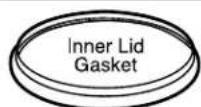
Replace the Inner Lid Gasket if it becomes discolored white.
- Hot water may spill out when the product is tilted or tipped over accidentally, and may cause scalding.
IMPORTANT SAFEGUARDS (cont.)
This product is not intended for use by persons (including children) with reduced physical, sensory or mental capabilities, or lack of experience and knowledge, unless they have been given supervision or instruction concerning use of the product by a person responsible for their safety. Children should be supervised to ensure that they do not play with the product.
Stop using immediately if you notice any of the following symptoms indicating a malfunction or breakdown.
- Continued use of the product may cause smoke, fire, electric shocks or injury.
• The Power Plug or Power Cord has become very hot.
• The Power Cord is damaged or the electricity turns on and off when touched.
• The Body is deformed or unusually hot. - Smoke is arising from the product or there is a burning smell.
• Some parts of the product is cracked, loose or unstable - The product emits steam for at least 10 minutes continuously and does not turn to Keep Warm mode.
• Water leaks from the Body.
If any of the above occurs, unplug the product immediately and return to Zojirushi Customer Service for check-ups and/or repairs.
CAUTIONS
Always use caution when opening the Upper Lid and avoid skin contact with steam.
- Loose water or steam may escape upon opening the Upper Lid and cause scalds.
Do not touch hot surfaces during or for a short period of time after use.
- Touching hot surfaces may cause burns. Be especially careful with metal parts such as the Inner Lid and the Inner Container.
Please allow the product to cool down before cleaning.
- Touching hot surfaces may cause burns.
Do not use the product near walls or furniture.
- Steam or heat may damage, discolor or deform walls or furniture.
Do not swivel or move the product while dispensing water.
• Hot water may splash out, resulting in scalds.
Do not place or use the product on unstable surfaces or on surfaces that are vulnerable to heat.
- Doing so may cause fire.
Do not attempt to dispense hot water while it is boiling.
• Hot water can spurt out, resulting in scalds.
Do not use other Power Cords than the one provided. Do not use the Power Cord for other appliances.
Do not use the Power Cord for overseas models.
- Doing so may cause malfunction or fire.
Do not use the product near a heat source or on top of induction heating cookers.
- Doing so may cause fire, breakdown or damage of the product.
Unplug the Power Plug from the outlet when the product is not in use.
• Leaving the Power Plug in an outlet may cause the insulation to become damaged, resulting in electric shock, short circuit or fire, or result in injuries or scalds.
Do not touch the Lid Lock when carrying the product.
- Doing so may cause the Upper Lid to open, resulting in injuries or scalds.
Always unplug the product by holding the Power Plug, not by pulling the Power Cord.
- Pulling the Power Cord to unplug the product may cause electric shock, short circuit or fire.
If the Power Cord is damaged, it must be replaced by an appropriate cord or assembly made available by the manufacturer or its service agent.
IMPORTANT
Do not operate the product when it is empty.
- Doing so may burn or damage the product.
Avoid rough handling, dropping or bumping the product.
- Doing so may cause damage or cease operation of the product.
Avoid letting steam make contact with cabinets and walls when using near or under a kitchen shelf.
- Doing so may cause discoloration or deformation.
Allow the product to dry completely when storing the product in an area where it may freeze for a long period of time.
- If water left inside freeze, it may cause breakdown or malfunction.
Avoid using the product near a radio, TV, computer, etc.
• The product may cause interference with certain electronics.
Do not drag the product over any surface while attempting to move.
- Doing so may cause damage to surfaces such as countertops.
Do not allow hot water to come into contact with the Control Panel or the Water Level Gauge.
- Doing so may cause breakdown of the product.
Do not use the product where its steam may come into contact with other electrical appliances.
- The steam may cause fire, malfunction, discoloration or deformation to other electrical appliances.
This appliance is intended to be used in household and similar applications such as;
• Staff kitchen areas in shops, offices and other working environments;
- Environments comparable to residential living rooms and kitchens;
※This appliance is not intended for use by many unspecified people for a long period of time.
SPECIFICATIONS
| Model No. | CD-LFC30 | CD-LFC40 | CD-LFC50 | |
| Capacity | 101 oz. (3.0 liters) | 135 oz. (4.0 liters) | 169 oz. (5.0 liters) | |
| Rating | AC 120V 60Hz | |||
| Electric Consumption | 800W | |||
| Average Power Consumption during Keep Warm | 208°F (98°C) | Approx. 47W | Approx. 52W | Approx. 59W |
| 195°F (90°C) | Approx. 39W | Approx. 44W | Approx. 50W | |
| 175°F (80°C) | Approx. 30W | Approx. 35W | Approx. 39W | |
| 160°F (70°C) | Approx. 25W | Approx. 29W | Approx. 32W | |
| Length of the Power Cord | 2' 11" (0.9m) | |||
| External Dimensions | (approx. inches) | 9-18 (W) x 11-78 (D) x 10 (H) | 9-18 (W) x 11-78 (D) x 11-12 (H) | 9-18 (W) x 11-78 (D) x 13-18 (H) |
| (approx. cm) | 23 (W) x 30 (D) x 25.5 (H) | 23 (W) x 30 (D) x 29 (H) | 23 (W) x 30 (D) x 33 (H) | |
| Weight (including the Power Cord) | Approx. 5 lbs. (2.2 kg) | Approx. 5 lbs. (2.4 kg) | Approx. 6 lbs. (2.5 kg) | |
●The average Keep Warm electric power consumption is for one hour, provided that the Inner Container is full and the room temperature is approximately 73^ F ( 23^ C).
●The height refers to the product when the handle is down.
●In high altitudes or severely cold areas, the product may not perform as specified. Avoid using the product in such areas or in other extreme conditions.
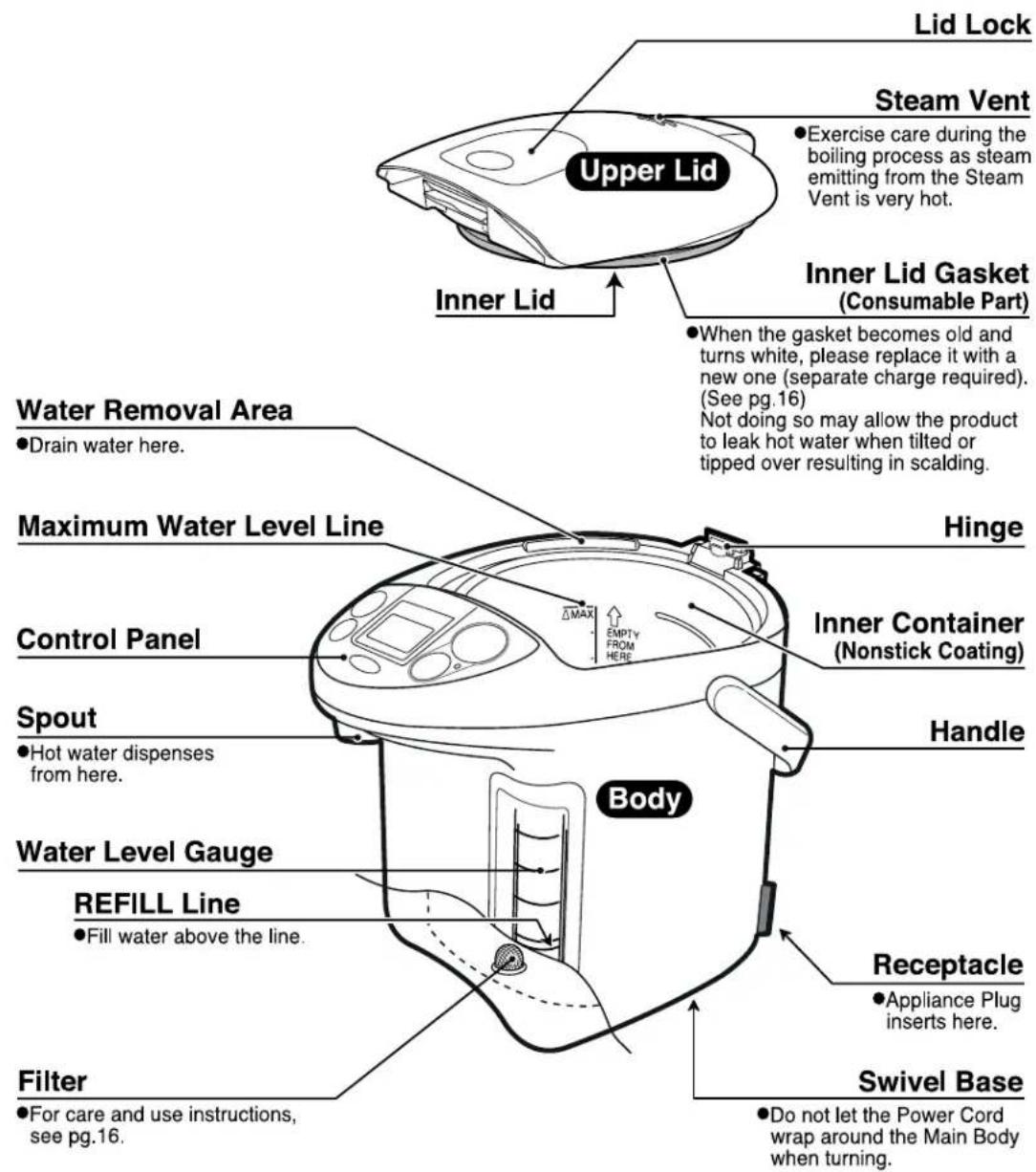
PARTS NAMES AND FUNCTIONS
text_image
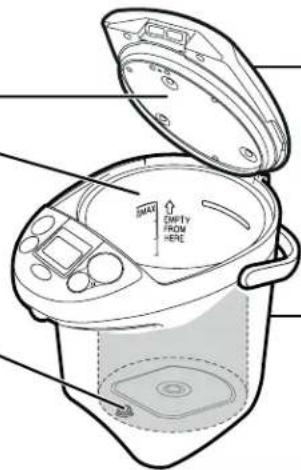
Lid Lock Steam Vent • Exercise care during the boiling process as steam emitting from the Steam Vent is very hot. Upper Lid Inner Lid Inner Lid Gasket (Consumable Part) • When the gasket becomes old and turns white, please replace it with a new one (separate charge required). (See pg.16) Not doing so may allow the product to leak hot water when tilted or tipped over resulting in scalding. Water Removal Area • Drain water here. Maximum Water Level Line Hinge Control Panel Inner Container (Nonstick Coating) Spout • Hot water dispenses from here. Handle Water Level Gauge REFILL Line Body Receptacle • Appliance Plug inserts here. Filter • For care and use instructions, see pg.16. Swivel Base • Do not let the Power Cord wrap around the Main Body when turning.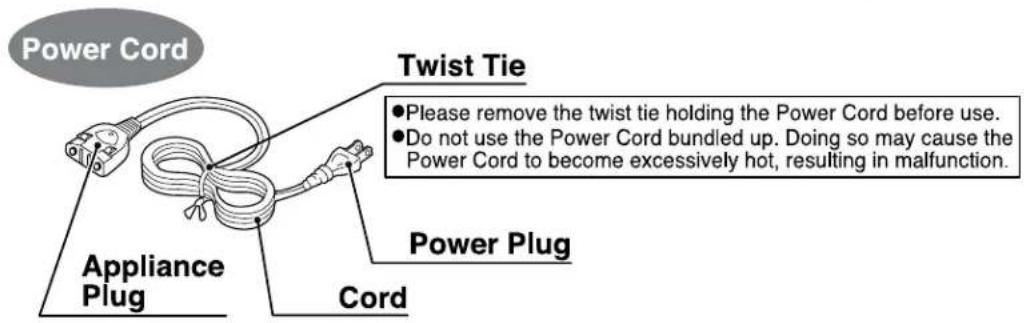
text_image
Power Cord Appliance Plug Cord Twist Tie • Please remove the twist tie holding the Power Cord before use. • Do not use the Power Cord bundled up. Doing so may cause the Power Cord to become excessively hot, resulting in malfunction.PARTS NAMES AND FUNCTIONS
CONTROL PANEL
- Press buttons down firmly.

text_image
BOIL light KEEP WARM light REBOIL/QUICK TEMP button Starts the Reboil mode. (see pg.11) Sets the Quick Temp mode. (see pg.14) Also used when performing the Citric Acid Cleaning (to initiate cleaning, press this button for more than 3 seconds). (see pg.17) ENERGY-SAVING TIMER button Use when setting the Energy-Saving Timer function. (see pg.14) TEMP SET button Sets the Keep Warm temperature. (see pg.12) KEEP WARM BEBOIL QUICK TEMP 388 TEMP CLEANING HRS 208 195 175 160 TEMP SET DISPENSE PRESS TO DISPENSE HOT WATER. (see pg.10, 15) UNLOCK light DISPENSE UNLOCK SLOW This button must be pressed to dispense hot water. (see pg.10) Press this button again for Café Drip Dispensing mode. (see pg.15) LCD display shows the water temperature and Timer settings. NOTE: Illustration is for reference only. Actual display will not show all functions simultaneously during use.How to Open/Close the Upper Lid
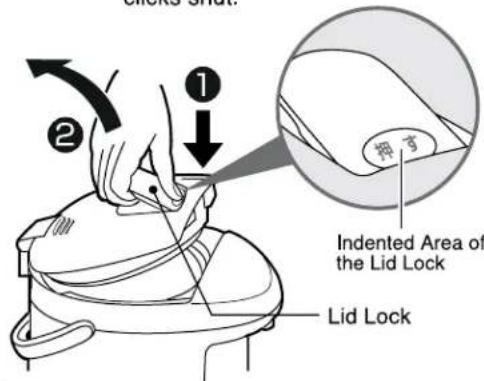
To Open
① Press the indented area of the Lid Lock with your thumb.
② Pull the Lid Lock up with your fingers to open the Upper Lid.
To Close
Depress the Upper Lid until it clicks shut.
text_image
① ② Lid Lock Indented Area of the Lid Lock ① ② Lid LockHow to Detach/Attach the Upper Lid
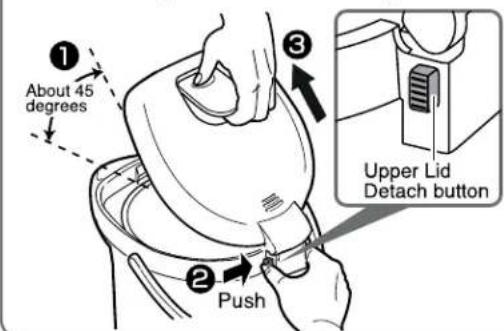
To Detach
① Open the Upper Lid to about a 45-degree angle.
② Push the Upper Lid Detach button.
③ Pull the Upper Lid forward and up at an angle.
To Attach
Push the Upper Lid back into place at the same angle.
text_image
① About 45 degrees ② Push ③ Upper Lid Detach buttonBOIL MODE
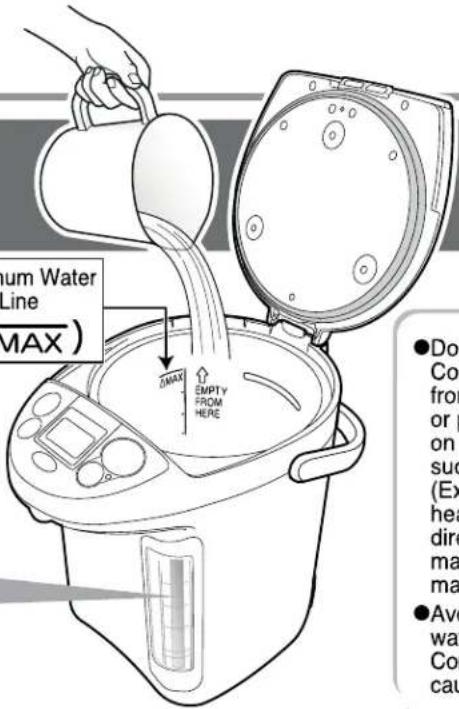
1 Open the Upper Lid and fill the Inner Container with water using a pitcher or other container.
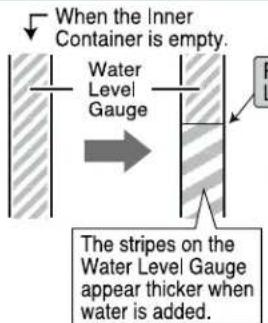
To monitor the amount of water you are filling, look at the thickness of the stripes on the Water Level Gauge.
text_image
When the Inner Container is empty. Water Level Gauge The stripes on the Water Level Gauge appear thicker when water is added.Maximum Water Level Line
(△MAX)
Present Water Level
text_image
Minimum Water Line MAX) MAX EMPTY FROM HERE ●Do Co from or p on suc (Ex hea dire ma ma ●Ave wa Co caNOTE
- Do not fill the Inner Container directly from a water faucet or place the product on a wet surface such as a sink. (Exposing the heating element directly to water may cause malfunction.)
●Avoid splashing water on the Body or Control Panel. (May cause malfunction.)
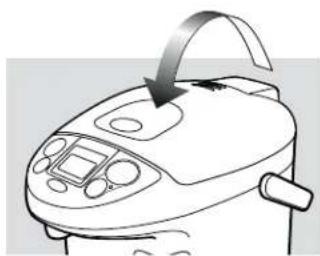
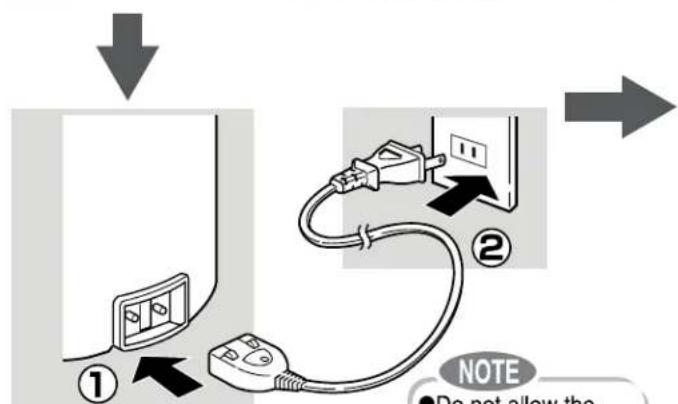
2 Close the Upper Lid and connect the Power Cord.
natural_image
Line drawing of a rice cooker with a curved handle and control panel (no text or symbols)Close the Upper Lid securely.
To ensure safe operation while boiling and to prevent scalds if the product is overturned.
It automatically starts the boiling process.
The BOIL light turns on and the Display shows the water temperature in 5°F increments.
text_image
① ② NOTE ● Do not allow the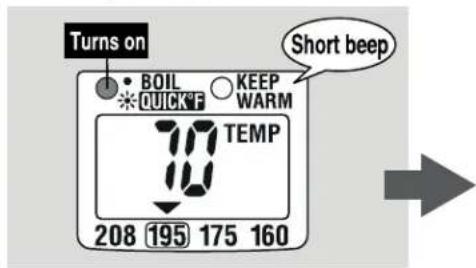
text_image
Turns on BOIL QUICK! KEEP WARM Short beep TEMP 208 195 175 160●How to set the Quick Temp mode: see pg. 14
Be sure to insert the Power Cord securely.
Otherwise, may cause electric shock, short circuit, smoke or fire.
●Do not allow the end of the Appliance Plug to get soiled with dust or come into contact with metal objects such as pins.
■ Temperature Conversion Guide
| Fahrenheit (°F) | Celsius (°C) |
| 212 | 100 |
| 208 | 98 |
| 195 | 90 |
| 175 | 80 |
| 160 | 70 |
| 73 | 23 |
●Do not fill over the Maximum Water Level Line. (Hot water may overflow from the Steam Vent.)
- Do not fill the Inner Container with hot water. (The Automatic Shut-Off function may be activated.) (see pg.11)
●Do not fill the Inner Container with any liquid other than water.
- Do not use water additives such as charcoal for water purification or mineral additives. (Small particles may get clogged inside of the product.)
●If you wish to shorten the time, add less water to the Inner Container.
The first time you use the product you may notice the smell of plastic. This is normal and will gradually fade away.
- At your initial use or when using the product after a long period of storage: Attach the Filter, fill the Inner Container with water to the MAX line and boil as directed. Once it reaches a boil, dispense about 34 oz. (1 liter) of water and dispose the remaining water. Fill with fresh water.
- When using mineral or Alkalized Ionic water: When mineral or Alkalized Ionic water is used, a floating residue may develop or a milky white substance may form on the surface of the Inner Container. This is due to the ingredients in the water and is harmless to your health. Frequent cleaning is recommended.
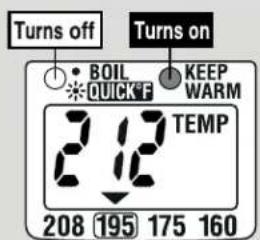
When boiling has completed, a melody sounds and it automatically switches to 195°F Keep Warm mode.
The BOIL light turns off, the Keep Warm light turns on and "212" appears on the Display.
text_image
Turns off BOIL QUICKF KEEP WARM TEMP 208 195 175 160
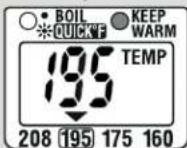
When the water temperature drops to about 195°F, "195" appears on the Display.
How to change the Information Sound from a melody to a beep. (see pg.15)
How to set the Keep Warm mode:
208°F Keep Warm Mode. (see pg.12)
175°F Keep Warm Mode. (see pg.12)
160°F Keep Warm Mode. (see pg.13)
NOTE
- Add water when the water level is low during the Keep Warm mode. (The product automatically begins heating the water.) If the water level is still not high enough, it will not automatically switch to Boil. In this case, press the REBOIL/QUICK TEMP button to manually start the process. (see pg.11)
- Please follow the instructions below to reduce the risk of scalding:
- Do not cover the Steam Vent with a cloth.
- Do not touch the Steam Vent or bring your hands or face near the Steam Vent.
- Do not open the Upper Lid while the BOIL light is on.
- Do not dispense hot water while it is boiling.
Time required to boil water:
| CD-LFC30 | Approx. 28 minutes ^* |
| CD-LFC40 | Approx. 35 minutes ^* |
| CD-LFC50 | Approx. 45 minutes ^* |
(At a room temperature of 73^ F with the Inner Container filled to the Maximum Water Level Line with water temperature at 73^ F.)
※ Includes approx. 4 minutes to Dechlorinate.
Length of time until the water temperature reaches about 195°F:
| CD-LFC30 | Approx. 35 minutes |
| CD-LFC40 | Approx. 35 minutes |
| CD-LFC50 | Approx. 35 minutes |
(At a room temperature of 73^ F with the Inner Container filled to the Maximum Water Level Line.)
●The length of time for the water temperature to reach 195^ F will vary depending on the amount of water and room temperature.
DISPENSE HOT WATER
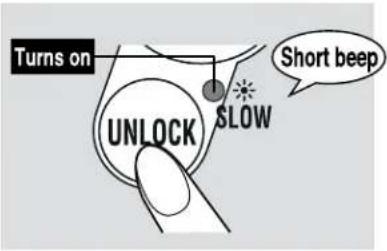
1 Press the UNLOCK button.
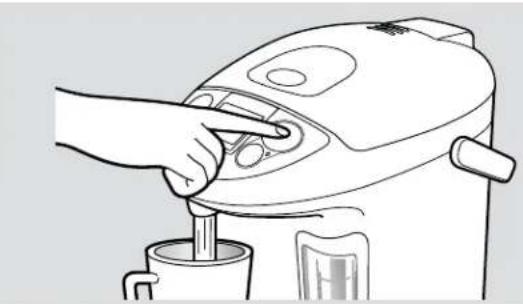
2 Press the DISPENSE button to dispense hot water.
text_image
Turns on UNLOCK SLOW Short beepThe UNLOCK light turns on and hot water can be dispensed.
natural_image
Line drawing of a hand using a blender to press or adjust a cup (no text or symbols present)Do not swivel the product while dispensing water.
NOTE
- Do not unlock and press the DISPENSE button if the Inner Container is empty.
- Initially upon boiling or if it has been a while after dispensing, the water may not be very hot. Please discard the first cup (of the hot water).
●Do not attempt to dispense hot water while boiling.
●Water may not dispense smoothly for a short period of time after boiling.
●Be careful as the Body heats up during the Boil and Keep Warm modes.
DISPOSE WATER
Dispose the water when the product is not in use.
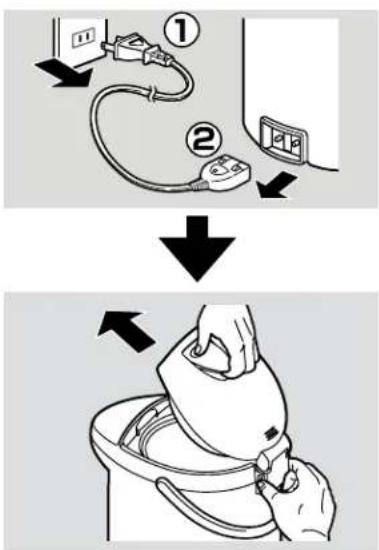
1 Unplug the Power Cord and detach the Upper Lid.
2 Hold the product with both hands and dispose water where indicated "EMPTY FROM HERE" on the wall of the Inner Container.
text_image
Diagram illustrating a hand washing a toilet with numbered steps and directional arrows indicating process flow.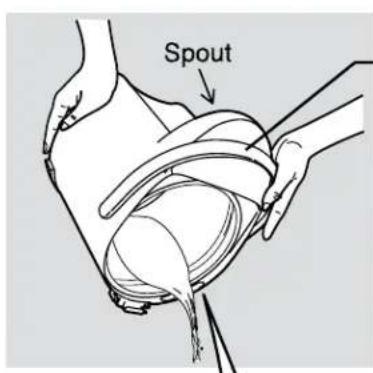
text_image
SpoutHold the Handle securely.
When disposing hot water:
●Take precaution with the hot water and steam. You may scald yourself.
●Take precaution as hot water may drip from the Spout, causing scalds.
Water Removal Area
EMPTY FROM HERE

text_image
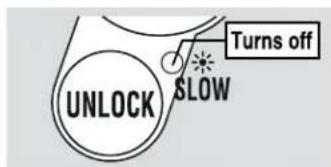
UNLOCK SLOW Turns off10 seconds after dispensing, the UNLOCK light turns off and the Automatic Dispense Lock is activated.
Automatic Dispense Lock
A safety function to prevent hot water from dispensing if the DISPENSE button is accidentally pressed.
●Even if no water is dispensed, the Automatic Dispense Lock will be activated after about 10 seconds.
Do not tilt or shake the product after dispensing. Hot water may drip from the Spout, causing scalds.
NOTE
- Do not plug or unplug the Power Plug or Appliance Plug with wet hands. (Doing so may cause short circuit or electric shock.)
- Do not dispose hot water with the Upper Lid in place. (The Upper Lid may come off, spilling hot water and causing scalds.)
- Do not allow water to splash on the Control Panel, Hinge, Handle or Receptacle. (Could cause scalding or breakdown.)
- Please do not lose the Filter while disposing water.
●Dispose the water at least once a day. (Leaving water in the Inner Container can cause unwanted odor or scale build-up.)
Reboil mode
Press the

button.
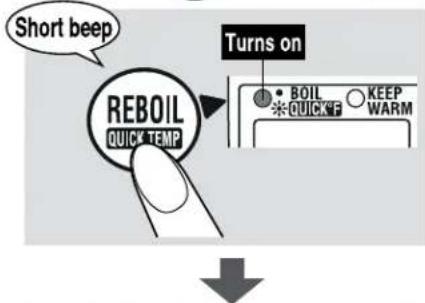
This function is used when reboiling water in the Keep Warm mode.
text_image
Short beep REBOIL QUICK TEMP Turns on • BOIL * QUICKF KEEP WARMWhen the Reboil process is completed, the product switches to Keep Warm mode.
IL light turns on when ng process begins.
Time required to finish reboiling
(At a room temperature of 73^ F ( 23^ C) with the Inner Container filled to the Maximum Water Level Line.)
208°F Keep Warm Mode
Approx. 2\~3 minutes
195°F Keep Warm Mode
Approx. 4\~7 minutes
●Pressing the REBOIL/QUICK TEMP button twice activates the Quick Temp mode. (see pg. 14)
●Do not attempt to dispense hot water while reboiling.
●Water may not dispense smoothly for a short period of time after reboiling.
NOTE
●Make sure the water level is above the REFILL Line before pressing the REBOIL/QUICK TEMP button.
Automatic Shut-Off function
text_image
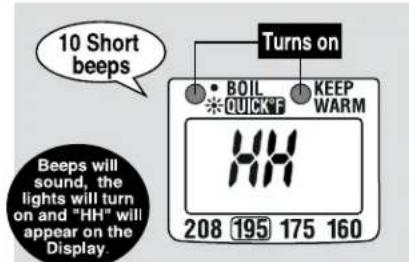
10 Short beeps Beeps will sound, the lights will turn on and "HH" will appear on the Display. 208 195 175 160 Turns on • BOIL *QUICKF KEEP WARM●Be careful not to repeat the boiling process without filling the Inner Container with water, as the Nonstick Coating may discolor and peel.
The Automatic Shut-Off function activates to shut down power to the heater in order to prevent damage from overheating. The Display will show "HH" to alert you that the Automatic Shut-Off has been activated. The following conditions may cause activation:
- When plugged in without filling the Inner Container with water.
- When the water level is lower than the REFILL Line and boiling has been attempted.
- When the Inner Container is empty or the Upper Lid is left open for adding water.
●When pouring in hot water immediately after plugging in the unit.
Remedy
Unplug the product. Allow the Inner Container to cool. Fill the Inner Container with water and plug back in.
HOW TO SET THE KEEP WARM MODE
Press the TEMP SET button to change the settings.
Each press of the button changes the position of the "▼" on the Display.

For making coffee, tea and instant noodles
208°F Keep Warm Mode
208°F is ideal for making coffee, tea or instant noodles.
Select the "208" on the Display.
text_image
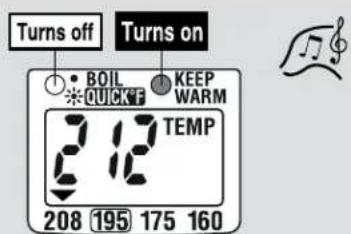
Turns off • BOIL * QUICK F 212 TEMP 208 195 175 160 Turns on KEEP WARMWhen the boiling process has completed, a melody sounds, the BOIL light turns off and the KEEP WARM light turns on.

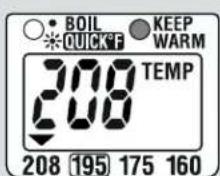
When the water temperature reaches 208°F, "208" appears on the Display.
- Depending on the altitude where the product is used, the Keep Warm mode may be set at 205^ - 207^ , in order to prevent continuous boiling.
For making Japanese (green) tea
175°F Keep Warm Mode
175°F is ideal for making Japanese (green) tea.
Select the "175" on the Display.
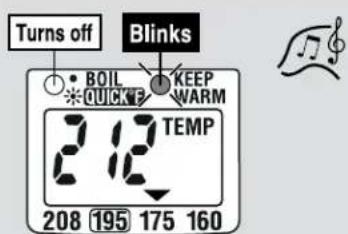
text_image
Turns off Blinks BOIL QUICKF KEEP WARM 212 TEMP 208 195 175 160When the boiling process has completed, a melody sounds, the BOIL light turns off, and the KEEP WARM light begins to blink.
(If initiated during Keep Warm mode, the light will blink 2 seconds after the selection.

When the water temperature reaches about 175°F, "175" appears on the Display, and the KEEP WARM light stops blinking and remains on.
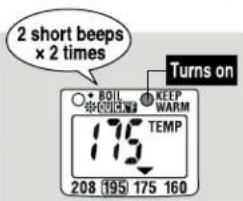
text_image
2 short beeps × 2 times Boil KEEP WARM TEMP 208 195 175 160 Turns on( If you select the Quick Temp mode, the KEEP WARM light will turn on without blinking. (see pg.14) )
■Length of time for the water temperature to reach 175°F after boiling:
| CD-LFC30 | Approx. 1 hour and 40 minutes |
| CD-LFC40 | Approx. 1 hour and 40 minutes |
| CD-LFC50 | Approx. 1 hour and 40 minutes |
(At a room temperature of 73^ F with the Inner Container filled to the Maximum Water Level Line.)
●The length of time for the water temperature to reach 175^ F will vary depending on the amount of water and room temperature.
HOW TO SET THE KEEP WARM MODE
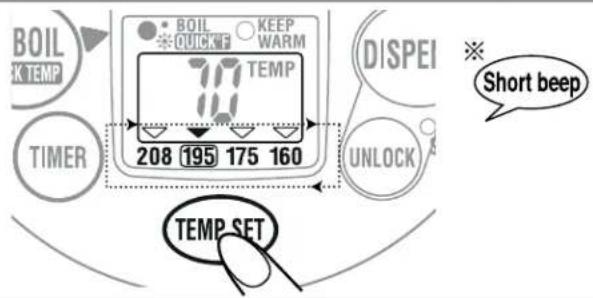
text_image
BOIL K TEMP TIMER 70 208 195 175 160 KEEP WARM TEMP SET DISPEI Short beep UNLOCK※You will hear 2 short beeps when 195°F Keep Warm mode is selected.
●You can change the temperature setting during Keep Warm mode.
( It may start reboiling depending on the water temperature and the selected setting. )
For preparing baby formula
160°F Keep Warm Mode
160°F is ideal for preparing baby formula.
Select the "160" on the Display.
When the boiling process has completed, a melody sounds, the BOIL light turns off, and the KEEP WARM light begins to blink.
If initiated during Keep Warm mode, the light will blink 2 seconds after the selection.
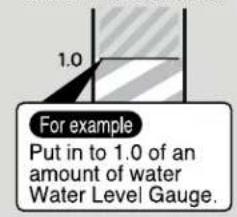
● If you wish to shorten the time, add less water to the Inner Container.
text_image
For example Put in to 1.0 of an amount of water Water Level Gauge.
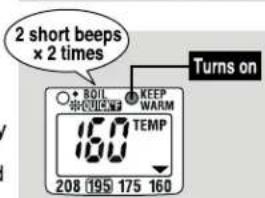
When the water temperature reaches about 160°F, "160" appears on the Display and the KEEP WARM light stops blinking and remains on.
text_image
2 short beeps × 2 times Boil KEEP WARM 160 TEMP 208 195 175 160 Turns on■Length of time for the water temperature to reach 160°F after boiling:
| 1.0 L | Max Capacity | |
| CD-LFC30 | Approx. 1 hour | Approx. 2 hours and 40 minutes |
| CD-LFC40 | Approx. 1 hour and 10 minutes | Approx. 2 hours and 40 minutes |
| CD-LFC50 | Approx. 1 hour and 20 minutes | Approx. 2 hours and 40 minutes |
(At a room temperature of 73°F.)
●The length of time for the water temperature to reach 160^ F will vary depending on the amount of water and room temperature.
When preparing baby formula:
160^ is ideal for preparing formula. Dissolve the formula and let cool to optimum temperature (slightly higher than body temperature). If fed without cooling, babies are at risk of scalding.
- Be sure to check that the Keep Warm light is on and NOT blinking before dispensing.
Do not use the Quick Temp mode. (see pg.14)
If the Power Cord is detached:
●Reinsert the Power Cord if it is accidentally detached.
- If the cord is detached for more than a few minutes and reinserted, the product returns to the 195^ Keep Warm mode and may start reboiling automatically.
■Temperature Conversion Guide
| Fahrenheit (°F) | Celsius (°C) |
| 212 | 100 |
| 208 | 98 |
| 207 | 97 |
| 205 | 96 |
| 195 | 90 |
| 175 | 80 |
| 160 | 70 |
| 73 | 23 |
QUICK TEMP MODE
This function heats the water to the selected Keep Warm temperature without reaching a boil. The water will reach the selected Keep Warm temperature quicker than the regular Boil mode. Other benefits include reduced steam and reduced energy use. Use this mode when dechlorination is not necessary, such as when using bottled or purified water.
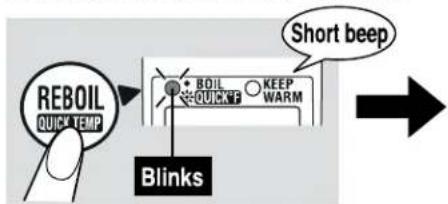
While the water is heating, press the REBOIL button to select the Quick Temp mode.
You cannot activate Quick Temp mode while the product is set at 208°F Keep Warm mode.
text_image
REBOIL QUICK TEMP + - BEIL QUICKP KEEP WARM Short beep BlinksAfter reaching the selected temperature, it will automatically switch to Keep Warm.
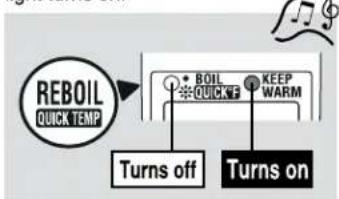
A melody sounds, the QUICK TEMP light turns off and the KEEP WARM light turns on.
flowchart
graph TD
    A["REBOIL QUICK TEMP"] --> B["+ BOIL ✦ QUICKF"]
    B --> C["KEEP WARM"]
    D["Turns off"] --> E["Turns on"]
160°F Keep Warm mode:
- Once the water temperature reaches about 175^ (80^) , it will switch to Keep Warm at 160^ (70^) . Length of time for the water temperature to reach 160^ after heating up is approx. 40 minutes.
●After the KEEP WARM light stops blinking, it will switch to Keep Warm mode.
●You cannot select 208°F Keep Warm mode while Quick Temp mode is activated.
●There may be a lingering chlorine smell if tap water is used while Quick Temp mode is activated. If this is an issue, use the regular Boil mode instead.
●Depending on the amount of water and room temperature the actual water temperature after heating may differ from that shown on the Display.
●Depending on the amount of water, room temperature, and atmospheric pressure, some steam may be produced.
●The Quick Temp mode may be cancelled if the product is left unplugged for several minutes.
Each press of the REBOIL/QUICK TEMP button changes the boil mode.

※Holding the REBOIL/QUICK TEMP button for more than 3 seconds activates Citric Acid Cleaning mode. (see pg. 17)
NOTE
●Water does not reach a boil under Quick Temp mode, and should not be used to prepare baby formula.
●Although the water will not reach a boil when Quick Temp mode is activated, the Steam Vent will become hot. Please do not touch it.
ENERGY-SAVING TIMER FUNCTION
The Boiling function will complete after the set time. (The Energy-Saving Timer Function helps save energy by shutting off electricity to the heater until boiling begins.)
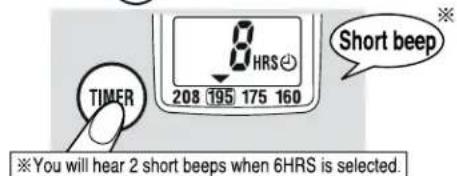
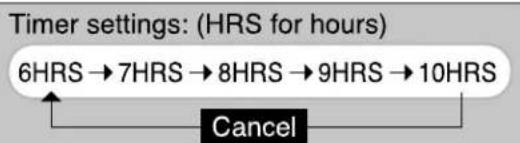
Press the TIMER button until the desired length of time is displayed.
text_image
8 HRS 208 195 175 160 Short beep TIMER ※You will hear 2 short beeps when 6HRS is selected.A melody sounds and the Energy-Saving Timer function is activated.
The Boiling function will complete at the set time.
A melody sounds, the BOIL light turns off and the KEEP WARM light turns on.
Boiling may stop earlier than set, depending on room temperature, water temperature and amount of water.
flowchart
graph TD
    A["6HRS → 7HRS → 8HRS → 9HRS → 10HRS"] --> B["Cancel"]
NOTE
●To cancel the Timer, press the TIMER button several times or press the REBOIL/QUICK TEMP button once.
- When using the Quick Temp mode with the Energy-Saving Timer function, set the Energy-Saving Timer function after selecting the Quick Temp mode.
- If the Power Cord is detached, the Energy-Saving Timer function will be cancelled and must be reset.
CAFÉ DRIP DISPENSING MODE
This mode decreases the amount of water dispensed to 60% of the normal setting, making it suitable for brewing café drip coffee.
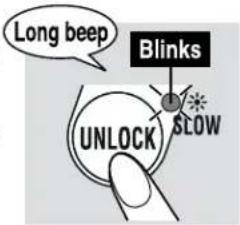
1 Press the ⒷUNLOCK button twice.
When the UNLOCK light blinks, Café Drip Dispensing mode is activated.
text_image
Long beep Blinks SLOW UNLOCK
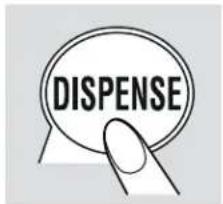
2 Press the DISPENSE button to dispense hot water.
You can use the Café Drip Dispensing mode for about 60 seconds while the UNLOCK light blinks.
text_image
DISPENSE- Pressing the UNLOCK button again during Café Drip Dispensing mode returns it to the normal dispensing mode.
- When the light turns off, the Automatic Dispense Lock will be activated.
- If the water level is low, it may take longer for water to begin dispensing after pressing the DISPENSE button.
- If the water level is low or boiling has just completed, water may not dispense smoothly.
NOTE
●Be careful not to burn yourself.
- If using a cone filter placed directly on a cup, be careful not to let it fall inside the cup while brewing.
- When using a manual drip coffee cone, dispense a cup of hot water before brewing. (The first cup may not be hot enough.)
HOW TO CHANGE THE INFORMATION SOUND
● Information Sound:
The product informs you with a melody or beeps that it has finished boiling or the timer has been set.
1 Press the UNLOCK button for more than 3 seconds during the boiling process or Keep Warm mode.
●Each button press changes the Information Sound.
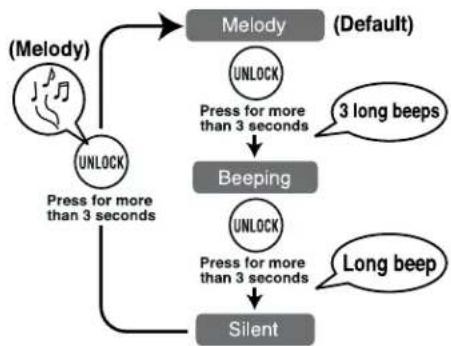
flowchart
graph TD
    A["(Melody)"] --> B["UNLOCK"]
    B --> C["Press for more than 3 seconds"]
    C --> D["Beeping"]
    D --> E["UNLOCK"]
    E --> F["Press for more than 3 seconds"]
    F --> G["Silent"]
    H["(Default)"] --> I["UNLOCK"]
    I --> J["Press for more than 3 seconds"]
    J --> K["Beeping"]
    K --> L["UNLOCK"]
    L --> M["Press for more than 3 seconds"]
    M --> N["Silent"]
    O["3 long beeps"] --> K
    P["Long beep"] --> N
2 Once your desired sound (melody or beep) is heard, the setting is completed.
●If the Silent setting is selected, a beep will indicate the setting has completed.
●The Information Sound will return to Melody if the product is unplugged.
When and what types of Information Sounds are heard:
| When\Type | Melody | Beeping | Silent |
| Boiling stops | Minuet | 5 long beeps | × |
| Timer is set | Beautiful Dreamer | × | × |
CLEANING AND MAINTENANCE
Always unplug the Power Cord, dispose all water, and allow to cool completely before cleaning.
NOTE
- Do not attempt to dry the product by turning it upside down when the bottom is wet. (Water may get inside the body and cause it to break or rust.)
●Do not use the following:
- Thinner, benzene and bleach. (Doing so may cause discoloration, crack, degradation and corrosion.)
- Polishing powder, nylon brushes, anything made with metal, eraser pads, hard nylon sponges and abrasive cleaners. (Doing so may cause corrosion.)
- Detergent. (Hot water may spill out, resulting in scalds or damage. Doing so may cause unwanted odor.)
●Do not use the scrub brushes for any portions other than the Filter. (Doing so may cause corrosion.)
- When using chemical treated cloths, do not rub too hard or leave them on the product for a long time as the surfaces of the product may be damaged by chemical reactions.
●Do not use a dishwasher or dish dryer for cleaning or drying. (Doing so may cause the plastic parts to deform.)
●Before storing the product for a longer period of time, dry it completely and pack in a plastic bag to prevent odors from being absorbed.
Inner Lid
Wipe with a soft wet sponge.
Inner Container
Perform the Citric Acid Cleaning (see pg.17) periodically.
Especially when...
●Red rust-like spotting is visible on the Inner Container.
●Milky white or gray discoloration and/or filmy objects are found in the water.
●Boiling is louder than usual.
●Hot water has an odor.
(The condition of the Inner Container will vary depending on the water quality and frequency of use.)
Filter
Remove the Filter from the Inner Container and wash with a soft brush.
Pull the Filter up to release, and press down firmly to attach.
If you find it difficult to clean the Filter, replace it with a new one. (see pg.17)
●Never use the product without installing the Filter. (The Filter prevents foreign objects from entering the Electric Pump and obstructing the flow of hot water.)
Power Cord
Wipe clean with a dry cloth.
Body/Upper Lid
Wipe clean with a damp well-wrung cloth.
- Do not wash any part of the Body, Control Panel or Water Level Gauge with water. (May cause malfunction or rust.)
text_image
DRIVE FROM HEREHOW TO REPLACE THE INNER LID GASKET
The Inner Lid Gasket may need to be replaced due to time and wear. Check it about once a year.
Wipe new Inner Lid Gaskets with a wet soft sponge before attaching to the Inner Lid.
To remove the Inner Lid Gasket
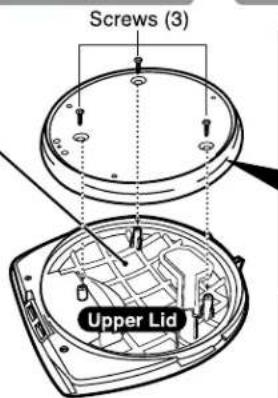
① Loosen the 3 screws.
● Do not lose the screws.
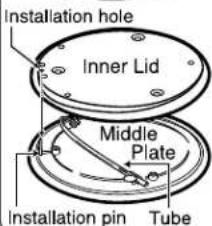
② Remove the Inner Lid Gasket placed on the Inner Lid and Middle Plate.
● Do not touch the Tube set on the Middle Plate.
After removing the Inner Lid, check the plastic part of the Upper Lid for abnormalities.
→If this part is discolored or if it feels rough to the touch, replace it (there will be a charge for this).
To attach the Inner Lid Gasket
① Place the Inner Lid and Middle Plate correctly.
● Make sure to insert the pin on the Middle Plate correctly into the installation hole on the Inner Lid.
② Fit the Inner Lid Gasket securely to the rim of the Inner Lid as shown in the figure.
③ Place them correctly onto the Upper Lid and tighten the screws securely.
Hot water may leak from the gap between the Upper Lid and the Body when tilted if the Inner Lid Gasket becomes old and turns white. This may result in scalds. If hot water spews from the gap or there is steam even after replacing the Inner Lid Gasket, other parts may be in need of repair. Please contact Zojirushi Customer Service.
When the Inner Lid Gasket takes on a white discoloration.
Please purchase and replace with a new one.
text_image
Screws (3) Upper Lid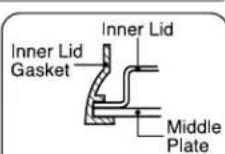
text_image
Installation hole Inner Lid Middle Plate Installation pin TubeNOTE
In order to prevent gas bubbles and bubbling-over, the Citric Acid Cleaner for Electric Water Boilers (CD-K03E-JU) is recommended for cleaning. To purchase this cleaner, please visit an authorized Zojirushi dealer or www.zojirushi.com.
Preparation:
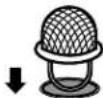
Check that the Filter is attached to the Inner Container.
NOTE
- If the Filter is dirty, remove it from the Inner Container, wash with a soft brush and reinstall.
7 Put 1 package of the Citric Acid Cleaner CD-K03E-JU in a cup and add warm water to dissolve. Pour it into the Inner Container and fill with water to the Maximum Water Level Line.
NOTE
- Do not fill over the Maximum Water Level Line. (Hot water may spill out, resulting in scalds.)
2 Close the Upper Lid, insert the Power Plug and press the button for more than 3 seconds.
Beeps when the cleaning process begins.
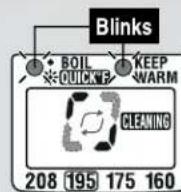
2 lights will blink.

The square shown on the Display rotates.
Beeps when the cleaning process is completed.

2 lights will stop blinking and stay on.
5 long beeps
LCD display will show a square as illustrated.
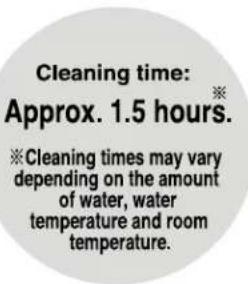
text_image
Cleaning time: Approx. 1.5 hours. ※Cleaning times may vary depending on the amount of water, water temperature and room temperature.Cleaning time: Approx. 1.5 hours.
※Cleaning times may vary depending on the amount of water, water temperature and room temperature.
3 Unplug the Power Plug, detach the Upper Lid and dispose water where indicated "EMPTY FROM HERE." (Please take precautions not to splash water on the Hinge.)
4 To rinse, fill the Inner Container with water. Boil and dispense about a cup of hot water to rinse out the Spout, allow to cool, then dispose the remaining water.
When disposing hot water:
●Take precaution with the hot water and steam. You may scald yourself.
●Take precaution as hot water may drip from the Spout, causing scalds.
NOTE
●Repeated citric acid cleaning may be necessary for hard-to-remove residues or if water does not dispense smoothly.
- If mineral or Alkalized Ionic water is used, calcium tends to build up on the surface of the Inner Container. If scale accumulates on the Inner Container or the Filter, boiling may become louder than usual and water may not dispense smoothly. Frequent cleaning is recommended when using mineral or Alkalized Ionic water.
To cancel the Citric Acid Cleaning at any time, unplug the Power Plug for more than 5 seconds.
REPLACEMENT PARTS
●Replacement parts may be available for an additional charge. Please replace damaged parts only with new parts.
- When replacing parts, please record the model number and part name beforehand. Then contact either the store where you purchased the product or Zojirushi Customer Service.
Zojirushi Customer Service
1-800-733-6270 www.zojirushi.com
| Parts Names | Parts Number |
| Inner Lid Gasket | 627575-00 |
| Filter | 627402-00 |
| Citric Acid Cleaner for Electric Water Boilers (1 oz. / 30 g×4 packets) | CD-K03E-JU |
Q&A ON PRODUCT USE
| Is it okay to use the product for heating liquids other than water? ▶ | Do not fill the product with any liquid other than water. It may cause malfunction, or may overflow and cause scalding. | pg.3 |
| Does the water need to be changed every day? ▶ | To prevent scale from building up, please change the water at least once a day. | pg.10 |
| Is it okay to use mineral water or Alkalized Ionic water? ▶ | Yes. However, when mineral or Alkalized Ionic water is used, a floating residue may develop or milky white substance may form on the surface of the Inner Container. This is due to the ingredients in the water and is harmless to your health. Frequent cleaning is recommended. | pg.9 pg.17 |
| I accidentally drank water while performing the Citric Acid Cleaning. Is this harmful to my health? ▶ | Please follow the instructions shown on the package of the citric acid cleaner CD-K03E-JU. | |
| Is it okay to go out while the product is turned on? ▶ | It is safe to use the product unattended as it has an Automatic Shut-Off function (power to the heater will be automatically turned off), which will be activated once it is empty of water. However be careful not to repeat the boiling process without filling the Inner Container with water, as the Nonstick Coating may discolor and peel. | pg.11 |
TROUBLESHOOTING GUIDE
Please check the following points before calling for service.
| Condition | Cause | Remedy | ||
| Water does not heat up. | Power Plug is not connected to an electrical outlet. | Connect the Power Plug. | ||
| Water does not boil. | The Quick Temp mode is selected.(Water does not reach a boil under Quick Temp mode.) | Press the REBOIL/QUICK TEMP button, select the regular Boil mode.(see pg.14) | ||
| Hot water has a disagreeable odor. | Scale or other residue has accumulated on the Inner Container. | Perform citric acid cleaning.(see pg.17) | ||
| You have not performed citric acid cleaning regularly. | ||||
| ●A mild plastic odor may be noticeable with a new product. This odor will gradually fade away. | The product has not been used for a long time. | Boil water, unlock and dispense about 34 oz. (1 liter) of hot water. Discard the remaining. (see pg.9) | ||
| ●You may smell chlorine (used for sterilization of tap water) after boiling. | If tap water is used under Quick Temp mode, it will take an additional 15 minutes after boiling completes to remove up to 80% of the chlorine. | If this is an issue, use the regular Boil mode instead. (see pg.14) | ||
| Water pours out by itself from the Spout or Steam Vent. | Check that the Inner Container is not filled over the Maximum Water Level Line. | Pour out the excess water until it is below the Maximum Water Level Line. | ||
| The Quick Temp mode cannot be selected. | Is the 208°F Keep Warm mode selected? | Select the 195, 175 or 160°F Keep Warm mode, then select the Quick Temp mode. (see pg.14) | ||
| The 208°F Keep Warm mode cannot be selected during the Quick Temp mode. | You cannot select the 208°F Keep Warm mode during the Quick Temp mode. | |||
| Water does not dispense or does not pour properly. | Hot water does not pour properly a few minutes after boiling. | Open the Upper Lid to release air bubbles, then close. (Be careful of steam when opening the Upper Lid.) | ||
| Scale or other residue has accumulated on the Inner Container and Filter. | Clean the Inner Container and Filter. (see pg.16) | |||
| The Automatic Dispense Lock is engaged. | Press the UNLOCK button, then press the DISPENSE button. (see pg.10) | |||
| Power Plug is not connected to an electrical outlet. | Connect the Power Plug. | |||
| Calcium may build up in the water route and prevent water from dispensing smoothly. | Perform citric acid cleaning. (see pg.17) | |||
| A filmy, floating residue is noticeable. (Could the Nonstick Coating be peeling off?) | Residue is due to the mineral content in water, not from corrosion of the Inner Container or peeling of the Nonstick Coating. | Perform citric acid cleaning.(see pg.17)ScaleOver time and use, calcium and other minerals contained in water build up on the surface of the Inner Container and the Filter. It is called "scale" and is harmless to your health. | ||
| Milky white and rough-surfaced objects have built up on the surface of the Inner Container. | Excessive accumulation of scale and other build-up on the surface of the Inner Container can cause boiling to become louder. | |||
| Boiling is louder than usual. | ||||
| Red rust-like spotting appears on the surface of the Inner Container. | Caused by iron in the water, not deterioration of the Inner Container. | |||
| A white floating residue is noticeable. | Remove the Inner Lid and check the plastic part of the Upper Lid for abnormalities. (see pg 16) | If this part is discolored or if it feels rough to the touch, replace it. | ||
| Water is not hot. | Initially upon boiling or if it has been a while after dispensing, the water may not be very hot.Is the Timer set? | Please discard the first cup (of the hot water).Press the REBOIL/QUICK TEMP button. (see pg.14) | ||
| The Body becomes hot. | ●When the water temperature and/or room temperature is high, the outer surface of the Body may reach up to 140°F (60°C). This is not a malfunction. | |||
| The Power Cord becomes hot. | ●The Power Cord may become hot while the water is boiling. This is not a malfunction. | |||
| Humidity builds in the Display window. | ●If water is filled from a faucet or the product is placed directly on a sink and the bottom becomes wet, water may go inside of the Body and the Display may show moisture. If this happens, stop using the product and allow it to dry as it may cause short circuit or electric shock. | |||
 | A beep sounds, lights turn on and "HH" appears on the Display. | 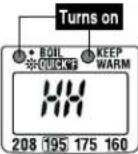 | The Inner Container is low on water or hot water was added to the Inner Container, causing the Automatic Shut-Off function to engage. | Unplug the Power Plug and wait until the Inner Container cools down. Add water and plug in the Power Cord. (see pg.11) |
| 2 lights blink at the same time and the Display shows a rotating square. | 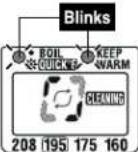 | The Inner Container is in a citric acid cleaning cycle. | To cancel the citric acid cleaning cycle, unplug the Power Plug and wait more than 5 seconds before plugging back in. (see pg.17) | |
| £3 or £4 is displayed. | Indicates malfunction. | Please contact Zojirushi Customer Service. | ||
 | Inner Lid Gasket | ●The Inner Lid Gasket is replaceable so please check it every year. When steam comes out from the gap between the Upper Lid and the Body, or becomes white or discolored, replace it with a new one. (see pg.16) | ||
| Plastic Parts | ●The plastic part of the Upper Lid may deteriorate over use. When replacing the Inner Lid Gasket, check the plastic part. If discoloration occurs or the surface becomes coarse, replace the Upper Lid (must purchase separately). (We take care in only using materials for the plastic parts that are safe and hygienic for food contact.) | |||
| The Nonstick Coating of the Inner Container may become damaged over use. Contact the retail store where you purchased this product or call Zojirushi Customer Service at: 1-800-733-6270 | ||||
ZOJIRUSHI
www.zojirushi.com