
Hermes E6 Elite - Keyboard and mouse Gamdias - Free user manual and instructions
Find the device manual for free Hermes E6 Elite Gamdias in PDF.


| Product Type | Gaming Keyboard |
| Brand | Gamdias |
| Model | Hermes E6 Elite |
| Layout | Full-size (104 keys) |
| Switch Type | Mechanical (Gamdias Mechanical Switches) |
| Backlighting | RGB per-key customizable |
| Connection | USB 2.0 (detachable cable) |
| Polling Rate | 1000 Hz |
| Key Rollover | Full N-key rollover |
| Onboard Memory | Yes, for profile storage |
| Dimensions (W x D x H) | 445 x 135 x 40 mm |
| Weight | 1.1 kg |
| Cable Length | 1.8 m braided |
| Operating System Support | Windows, macOS, Linux |
| Wrist Rest | Detachable magnetic |
| Media Keys | Dedicated multimedia controls |
| Software | Gamdias HERA (for customization) |
| Maintenance | Clean with soft dry cloth; avoid liquids |
| Safety | Use only supplied cable; avoid excessive force |
| Repairability | Keycaps and switches replaceable; contact support for parts |
| Included Accessories | User manual, keycap puller, wrist rest |
Frequently Asked Questions - Hermes E6 Elite Gamdias
User questions about Hermes E6 Elite Gamdias
0 question about this device. Answer the ones you know or ask your own.
Ask a new question about this device
Download the instructions for your Keyboard and mouse in PDF format for free! Find your manual Hermes E6 Elite - Gamdias and take your electronic device back in hand. On this page are published all the documents necessary for the use of your device. Hermes E6 Elite by Gamdias.
USER MANUAL Hermes E6 Elite Gamdias
natural_image
Abstract geometric pattern with interlocking triangles (no text or symbols)![ESC F1 F2 F3 F4 F5 F6 F7 F8 F9 F10 F11 F12 IntSe ScrLk Playa ~ 1 ! 2 @ 3 # 4 $ 5% 6 ^ 7 & 8 * 9 ( 0 ) - _ =+ ~- Tab Q W E R T Y U I O P [ { ] } \! Capix A S D F G H J K L ; : , " Enter - ↑ Shift Z X C V B N M , < . > / ? ↑ shift Ctrl Win Alt Alt Fn Ctrl + ↓ End Ctrl HERMES IE6 Enter Home 7 8 9 Home ↑ PgUp 4 5 6 ← + 1 2 3 End ↓ PgOn Enter](/content/2026/05/958800/images/3ad084c91390ca953701a89ad0741e3f802cfcf841688fa6faab9b8bbe87aa95.jpg)
natural_image
Close-up of a black R3R computer mouse with colorful visor and logo on the grip (no text or symbols visible)HERMES IE6 ELTE
2 - IN - 1 Gaming Combo
《English》
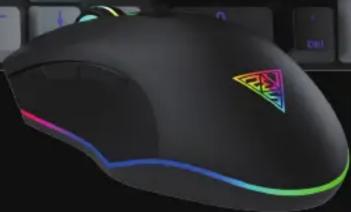
Thank you for purchasing the GAMDIAS™ HERMES E6 Elite 2-in-1 COMBO. The GAMDIAS HERMES E6 Elite gaming keyboard has a comfortable design. The GAMDIAS™ optical gaming mouse employs premium micro-processor complemented by 3,600 DPI precision-perfect optical sensors.
System Requirements
- Windows ® XP/ Vista / 7 / 8 / 10 / 11
- PC with USB ports
Package Contents
- GAMDIAS™ HERMES E6 Elite Mechanical Gaming Keyboard
• GAMDIAS™ GAMDIAS Gaming Mouse
Introduction to HERMES E6 Elite Key Combination
Previous

Play/PauseTrack

Next Track

Stop


Volume Down

Volume Up

Keyboard Lock

Brightness Decrease

Brightness Increase

Turn Off Lighting
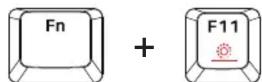
Switch Lighting Effects

Win LockMute
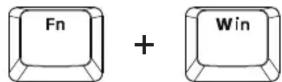
Gaming Mouse Default Settings


natural_image
Abstract geometric logo design with interlocking black and gold shapes forming a triangular pattern (no text or symbols)GAMDIAS
GAMING ART IN MOTION

Brand : Gamdias
Model : Hermes E6 Elite
Category : Keyboard and mouse