
Hip Therapy Pain Reliever - Pain Therapy Device Sharper Image - Free user manual and instructions
Find the device manual for free Hip Therapy Pain Reliever Sharper Image in PDF.


| Product Type | Hip Therapy Pain Reliever |
| Brand | Sharper Image |
| Model | Hip Therapy Pain Reliever |
| Power Supply | AC 110V-220V compatible |
| Temperature Range | 104°F (40°C) to 149°F (65°C) |
| Temperature Increment (Low Range) | 9°F (5°C) steps |
| Temperature Increment (High Range) | 1.8°F (1°C) steps |
| Heat Technology | Infrared lights (700-50000nm) and high-conductivity silver plates |
| Massage Type | Vibration massage with multiple modes |
| Vibration Modes | 3 modes: all motors on, upper only, lower only |
| Auto Shut-Off | After 30 minutes; resets on temperature or vibration adjustment |
| Usage Positions | Standing or lying down |
| Safety | Must be used over clothes; do not apply directly on bare skin |
| Warranty | Limited replacement warranty |
| Customer Service | 1-877-210-3449 (Mon-Fri 9am-6pm ET) |
| Controls | Control pad with Heating and Vibration buttons, temperature up/down |
| Cleaning | Wipe with a dry cloth; do not get wet |
| Restrictions | Do not disassemble, expose to sharp objects, or use in sauna/bath |
| Timer Reset | Auto shut-off timer resets upon temperature or vibration mode adjustment |
| Compatibility | Works with both 110V and 220V outlets |
Frequently Asked Questions - Hip Therapy Pain Reliever Sharper Image
User questions about Hip Therapy Pain Reliever Sharper Image
0 question about this device. Answer the ones you know or ask your own.
Ask a new question about this device
Download the instructions for your Pain Therapy Device in PDF format for free! Find your manual Hip Therapy Pain Reliever - Sharper Image and take your electronic device back in hand. On this page are published all the documents necessary for the use of your device. Hip Therapy Pain Reliever by Sharper Image.
USER MANUAL Hip Therapy Pain Reliever Sharper Image
Thank you for purchasing the Hip Therapy Pain Reliever by Sharper Image. Please take a moment to read this guide and store it for future reference.
FEATURES
- Powerful built-in infrared lights [700-50000nm] penetrate deep into the muscle to potentially help alleviate muscle pain or relieve symptoms
- High-concentration silver plates with high thermal conductivity can rapidly pass thermal energy into the hip, thigh, waist and bottom
- The temperature can be adjusted between 104°F (40°C) to 149°F (65°C)
- Ergonomic design for comfortable use
- Strong vibration massage treatment
IDENTIFICATION OF PARTS
Controller


HOW TO USE
- Please ensure that all red lights and metal parts are covered by clothes before turning it on.
Note: Do not use on bare skin. Make sure the red lights don't come in direct contact with the skin.
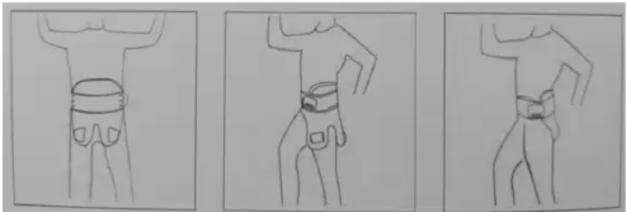
- Instructions for how to wear the device are below. Adjust the tightness to your waist.

- STANDING USE
-
LYING DOWN USE
-
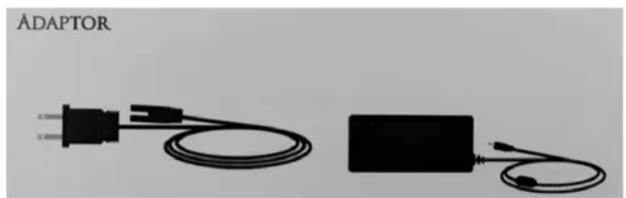
Connect the power plug to the power port on the controller [device's body].
- Press the [HEATING] button on the control pad to start the heat radiation and infrared lighting. -Each press of the button will switch between ON/OFF.
- Adjust to a comfortable temperature by pressing the Up and Down buttons. -The device will start at the lowest temperature. You can increase the temperature to your comfort level. -Increase temperature between 104°F (40°C) - 131°F (55°C). It will increase in increments of 9°F (5°C). -Increase temperature between 132.8°F (56°C) - 149°F (65°C). It will increase in increments of 1.8°F (1°C).
- When you're ready to stop the device, press the [HEATING] button to automatically stop the heating function.
- There is a built-in auto timer in the control, which will automatically turn power off after 30 minutes. -The auto shut off timer will reset itself after an adjustment is made to the temperature or messaging mode.
- Press the [VIBRATION] button to turn the vibration massage ON/OFF. -Press one time, to start the vibration massage. All the motors will vibrate at the same time. -Press a second time to stop the lower vibration massage and keep the upper vibration massage. -Press a third time to stop the upper vibration massage and keep the lower vibration massage. -Press a fourth time to stop the vibration massage.
PLEASE NOTE: The thermostat control system automatically adjusts based on the heat level. The device will stop warming up when it reaches the preset temperature and restart when it falls below your preset temperature. [The warming lights will turn on and off during heating.]
PLEASE READ CAREFULLY BEFORE USING
Key
Danger: Ignoring this sign may result in serious bodily injury or death.
Restricted
No decomposition
No touch
For strict compliance
WARNINGS
Please ensure proper power supply [Both 110V and 220V compatible. Can be conveniently used anywhere, anytime.]
Unplug from the socket when not in use.
Never touch the power plug with wet hands.
Never sleep while using the product as a burning injury could occur.
Consult a doctor before use if you have acute swelling or bleeding on the hip thigh or waist.
Consult a doctor before use if you have rheumatoid arthritis.
Consult a doctor before use if you have swelling, bacterial infection or inflammation.
Upon more severe pain, immediately stop use and contact the customer service.
Temperature get above 140° F and may result in burn injury if used directly on skin. Use only over clothes.
The metal part may result in a burn if touched by an electric wire, cotton fabric, plastic or other flammable materials.
THE FOLLOWING ITEMS ARE RESTRICTED:
Don't expose to sharp items.
Don't throw or strike, otherwise the unit may not operate properly.
Don't use within sauna room or bathhouse.
Don't get wet. A dry cloth may be used to wipe off debris if in need of cleaning.
Don't self-decompose the product or change its shape (no post-sale service will be provided in case of self-renovation).
Don't bend the power plug or put heavy items on top of the unit.
WARRANTY / CUSTOMER SERVICE
This item from SharperImage.com includes limited replacement warranty. If you have any questions not covered in this guide, please call our Customer Service department at 1 [877] 210-3449.
Customer Service agents are available Monday through Friday, 9:00 a.m. to 6:00 p.m. ET.
SHARPER IMAGE®
The SHARPER IMAGE® name and logo are registered trademarks.
@Sharper Image. All Rights Reserved.

Brand : Sharper Image
Model : Hip Therapy Pain Reliever
Category : Pain Therapy Device