
Jelleez - Earphones MAXELL - Free user manual and instructions
Find the device manual for free Jelleez MAXELL in PDF.


| Product Type | True Wireless Earphones |
| Brand | Maxell |
| Model | Jelleez |
| Bluetooth Version | 2.1+EDR |
| Wireless Operating Range | Up to 18 meters |
| Frequency Band | 2.4 GHz ISM Band |
| Standby Time | Approximately 63 hours |
| Charging Time | Approximately 25 minutes |
| Battery Type | Lithium-ion (279 mAh) |
| Frequency Response | 20 Hz - 20 kHz |
| Charging Input | DC 5V, 1A (via USB) |
| Box Contents | 2 Earphones, Charging Case, USB Cable, User Manual |
| Warranty | 90 days |
Frequently Asked Questions - Jelleez MAXELL
User questions about Jelleez MAXELL
0 question about this device. Answer the ones you know or ask your own.
Ask a new question about this device
Download the instructions for your Earphones in PDF format for free! Find your manual Jelleez - MAXELL and take your electronic device back in hand. On this page are published all the documents necessary for the use of your device. Jelleez by MAXELL.
USER MANUAL Jelleez MAXELL
Thank you for purchasing these Maxell Jelleez Bluetooth Earphones.
Please read this user manual carefully before use, and keep it for future reference.
What you get in the box
① Earphones ② USB Charging Cable ③ User manual
Specification
General - Bluetooth version: V5.0 - Supported profiles: A2DP HFP AWRCP SBC - Output: Bluetooth Power Class 2 - Bluetooth Frequency Band: 2.4GHz - 2.48GHz - Operation range: up to 10mA - Music Playback time: approx. 8hrs - Standbyday time: approx. 60 hours - Charging time: approx. 2.5hrs - Battery type: 3.7V 16ms AU/LiBH voltage battery - Power input (charging): Micro-RB DG E/V, Lightweight energy: 1A
180mAh Lithium battery + Power Input (charging): Micro USB DC SV - Weight apprak. TS
Play Charging Standby time will vary by different devices, volume and environment. ^Operational range is up to 10 meters line-of-sight in an open and clear environment.
Audio Characteristics
| Speaker | Driver Size | 13.6mm |
| Impedance | 32Ω | |
| Sensitivity | 110dB ± 3dB | |
| Frequency Response | 20Hz-20kHz | |
| Microphone | Directivity | Omni Directional |
*Specifications are subject to change without notice or obligation on the part of the manufacturer.
Operation Indication
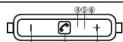
① Vol-/ Next Song ② Multifunction Button (MFBI) ③ Vol-/ Previous Song ④ Microphone ⑤ LED Indicator ⑥ USB Charging Socket
1
User Manual
EN
Charging Battery
Caution
- Please charge the product completely before using for the first time.
- Please do not use the product during charging
- Please unplug the charger once fully charged.
• Make sure the product is connected to a power source with USB DC 5V
- Please charge the battery on a fireproof surface and away from flammable items or liquids.
• Charging should only be done by an adult
• NEVER leave the charging unit unattended.
How to charge:
-
Turn off the product
-
Connect the USB charging cable to the earphone
-
Connect the other end of USB charging cable to a power source (USB DC 5V)
-
During charging, LED Indicator will turn RED
-
When the unit is fully charged, the LED Indicator will turn blue or completely shut off (to save
battery)
Attention: Please use the original charging cable included, to connect the earphones to your
computer or compatible charging socket.
2
User Manual
EN
| Function | Operation | Result |
| Turn On | Press and hold MRI for approach, 4.8 seconds to press the device | LED Indicate: Blue - A short cable will be enabled |
| Turn Off | When the product is turned on, press and hold MRI should be returned to touch on the product | LED Indicate: Red - A short cable will be enabled |
| Low Battery Induction | When the battery level is low | A double bell will be enabled |
| Pacing | Press and hold MRI before and hold the MRI should be returned to touch on the product | LED Indicate: Red - A short cable will be enabled |
| "Turn on the Bluetooth of your Smartphone/Device, check or perform the phone." "If a pair can be asked, please | "Meas ifless!" should be displayed on the device list | |
| Sales "Meas ifless!" from the phone to the smartphone/Device to perform the phone. | ||
| "If a pair can be asked, please | When Pacing current/LED LED will drop off Blue and a bell will be enabled | |
| Music Play Puzzle | Click MRI for Play? | Music will start at play or pace |
| Volume Adjustment | Press and hold/Val - Val once to page in a rectangle volume | When volume reaches Maximum, the video will be enabled |
| Next-Previous Swing | Click still once for Previous Swing | The playing song will dip up the Next or Previous |
| Accessing Phone Call | Click still once for Accessing Phone Call when to pick up | The player will have been heard when an increasing call was waiting |
| Receiving Phone Call | Click still once for Receiving Phone calls and hold the MRI will request | The player will have been heard when an increasing call was waiting |
| Still Call | Click a phone call, click the phone will be one end | Photification will be terminated |
| Real | Double double clock MRI telepath | Music will pass and press the phone will include the list called number - an alert line will be reached |
"Functions may be varied according to different devices.
User Manual
EN
WARNING:
-
This product is not a toy; do not let the children use it without adult supervision.
-
Do not put the product into fire, or expose to sources of high temperature, it might cause
explosion.
-
Do not burn or bury batteries
-
Do not puncture or crush.
-
Do not use the product while driving or cycling and while operating any machinery
Music playing during driving might be an offense of local laws in some regions. Users should
check with local authorities, and decide the usage of the product under their own responsibilities.
- Do not use the product at a high volume for any long period of time. This may lead to hearing
damage.
- To avoid hearing damage by sudden loud sound, please mini device before opening the product to the physical device
device before connecting the product to the playback device. Do not disassemble, modify or attempt to repair the product
-
To prevent fire or shock hazards, please disconnect the unit from charger when cleaning
-
In case of liquid leakage from the battery, do not touch with bare hands. If liquid gets into the eye.
do not rub, please flush with plenty of clean water immediately and consult a doctor; if liquid gets
into the body and clothes, please clean with plenty of clean water and consult a doctor in
these the body, and above, please clear with plenty of clean water and clean water necessary. necessary.
- Please refer to the user guide and use the accessories provided.
User Manual
EN
CAUTION:
-
Lithium batteries must be recycled. Do not dispose in the bin.
-
Only charge the unit with USB DC 5V
-
Charge batteries on a fireproof surface and away from flammable items or liquids.
-
Battery should NEVER be left unattended while charging. Charging should only be done by an
adult or under adult supervision.
- Follow the charging instructions in this manual and unplug the charger once the unit is fully
charged.
- Please charge the product every 3 months if not u
become un-rechargeable if it is fully discharged.
-
This product is not waterproof, please do not put the product into water or let it get wet.
-
Avoid operating the unit under direct sunlight or in hot, humid or dusty places.
-
This product is designed if currently be had and above consumption only places put it
-
This product is designed for music playback and phone conversation only, please use it in a
responsible way.
- The product performance may be affected by radio wave interference, please try to move away from positive devices with wireless signal if there is any performance degradation.
from nearby devices with wireless signal if there is any performance degradation.
-
Do not let the unit fall onto floor or other hard surfaces, the internal circuit may get damaged.
-
Please clean the unit with a left dry door, DO NOT use chemical cleaning products.
-
If you feel anything should about the product during use, ETOP was it immediate
-
If you feel anything abnormal about the product using the, STOP using it immediately.
User Manual
EN
WARRANTY INFORMATION
Maxell warrants this product to be free from all defects for a period of 90 days from the date of
original purchase. This Warranty does not apply to normal wear or damage due to accident,
abnormal use, misuse or neglect. This Warranty only applies to personal and individual use of the
product and not for commercial, institutional or any other use. Any defective item will be replace
at no charge, upon reasonable confirmation by Maxell of its defective condition, if returned with
proof of purchase to an authorized Maxell dealer or directly to Maxell Warranty Replacement,
Garret Mountain Plaza, Suite 300, Woodland Park, New Jersey 07424. Neither Maxell nor any
authorized Maxell dealer shall be liable for consequential damages arising from this Warranty, unless
otherwise provided by law

[Non-Text]
[Non-Text]
[Non-Text]
[Non-Text]
[Non-Text]
[Non-Text]
[Non-Text]
[Non-Text]
[Non-Text]
[Non-Text]
[Non-Text]
[Non-Text]
[Non-Text]
[Non-Text]
[Non-Text]
[Non-Text]
[Non-Text]
[Non-Text]
[Non-Text]
[Non-Text]
6
[Non-Text]
[Non-Text]
[Non-Text]
[Non-Text]
[Non-Text]
[Non-Text]
[Non-Text]
[Non-Text]
[Non-Text]
[Non-Text]
[Non-Text]
[Non-Text]
[Non-Text]
[Non-Text]
[Non-Text]
[Non-Text]
[Non-Text]
[Non-Text]
[Non-Text]
[Non-Text]
[Non-Text]
[Non-Text]
[Non-Text]
[Non-Text]
[Non-Text]
[Non-Text]
[Non-Text]
[Non-Text]
[Non-Text]
[Non-Text]
[Non-Text]
[Non-Text]
[Non-Text]
[Non-Text]
[Non-Text]
[Non-Text]
[Non-Text]
[Non-Text]
[Non-Text]
[Non-Text]
[Non-Text]
[Non-Text]
[Non-Text]
[Non-Text]
[Non-Text]
[Non-Text]
[Non-Text]
[Non-Text]
[Non-Text]
[Non-Text]
[Non-Text]
[Non-Text]
[Non-Text]
[Non-Text]
[Non-Text]
[Non-Text]
[Non-Text]
[Non-Text]
[Non-Text]
[Non-Text]
[Non-Text]
[Non-Text]
[Non-Text]
[Non-Text]
[Non-Text]
[Non-Text]
[Non-Text]
[Non-Text]
[Non-Text]
[Non-Text]
[Non-Text]
[Non-Text]
[Non-Text]
[Non-Text]
[Non-Text]
[Non-Text]
[Non-Text]
[Non-Text]
[Non-Text]
[Non-Text]
[Non-Text]
[Non-Text]
[Non-Text]
[Non-Text]
[Non-Text]
[Non-Text]
[Non-Text]
[Non-Text]
4
5
[Non-Text]
[Non-Text]
[Non-Text]
[Non-Text]
[Non-Text]
[Non-Text]
[Non-Text]
[Non-Text]
[Non-Text]
[Non-Text]
[Non-Text]
[Non-Text]
[Non-Text]
[Non-Text]
[Non-Text]
[Non-Text]
[Non-Text]
[Non-Text]
[Non-Text]
[Non-Text]
[Non-Text]
[Non-Text]
[Non-Text]
[Non-Text]
[Non-Text]
[Non-Text]
[Non-Text]
[Non-Text]
[Non-Text]
[Non-Text]
[Non-Text]
[Non-Text]
[Non-Text]
[Non-Text]
[Non-Text]
[Non-Text]
[Non-Text]
[Non-Text]
[Non-Text]
[Non-Text]
[Non-Text]
[Non-Text]
[Non-Text]
[Non-Text]
[Non-Text]
[Non-Text]
[Non-Text]
[Non-Text]
[Non-Text]
[Non-Text]
[Non-Text]
[Non-Text]
[Non-Text]
[Non-Text]
[Non-Text]
[Non-Text]
[Non-Text]
[Non-Text]
[Non-Text]
[Non-Text]
[Non-Text]
[Non-Text]
[Non-Text]
[Non-Text]
[Non-Text]
[Non-Text]
[Non-Text]
[Non-Text]
[Non-Text]
[Non-Text]
[Non-Text]
- Specification
- Play Charging Standby time will vary by different devices, volume and environment. ^Operational range is up to 10 meters line-of-sight in an open and clear environment.
- Audio Characteristics
- Operation Indication
- User Manual
- Charging Battery
- How to charge:
- WARNING:
- CAUTION:
- WARRANTY INFORMATION
Brand : MAXELL
Model : Jelleez
Category : Earphones