
PLCAPE60 - Electric capacitor Pyle - Free user manual and instructions
Find the device manual for free PLCAPE60 Pyle in PDF.


| Product Type | Portable PA Speaker with LED Lights |
| Model | PLCAPE60 |
| Brand | Pyle |
| Power Output | 60 Watts (peak) |
| Speaker Configuration | Single driver, 8-inch woofer |
| Bluetooth Version | 5.0 |
| Wireless Range | Up to 30 feet |
| Inputs | USB, SD card, 3.5mm aux, microphone (6.35mm) |
| FM Radio | Yes, with built-in antenna |
| LED Lights | Multi-color disco LED effect |
| Battery Type | Rechargeable lead-acid (12V, 4.5Ah) |
| Battery Life | Up to 6 hours (at moderate volume) |
| Charging Time | Approx. 6-8 hours |
| Power Supply | AC 100-240V via included adapter; DC 12V car cigarette lighter |
| Dimensions (W x H x D) | Approx. 12.2 x 15.7 x 11 inches (31 x 40 x 28 cm) |
| Weight | Approx. 15.4 lbs (7 kg) |
| Enclosure Material | ABS plastic with metal grille |
| Handle | Retractable handle and wheels |
| Compatible Devices | Smartphones, tablets, laptops, microphones |
| Included Accessories | Remote control, microphone, charging cable, audio cable |
| Care Instructions | Wipe with dry cloth; avoid moisture and extreme temperatures |
| Safety | Do not disassemble; keep away from liquids |
| Spare Parts Availability | Contact Pyle customer support for replacement parts |
Frequently Asked Questions - PLCAPE60 Pyle
User questions about PLCAPE60 Pyle
0 question about this device. Answer the ones you know or ask your own.
Ask a new question about this device
Download the instructions for your Electric capacitor in PDF format for free! Find your manual PLCAPE60 - Pyle and take your electronic device back in hand. On this page are published all the documents necessary for the use of your device. PLCAPE60 by Pyle.
USER MANUAL PLCAPE60 Pyle
Questions or Comments?
We are here to help!
Phone: 1.718.535.1800
PyleUSA.com/ContactUs
Visit Our Website

SCAN ME
PyleUSA.com
PYLE®
PyleUSA.com
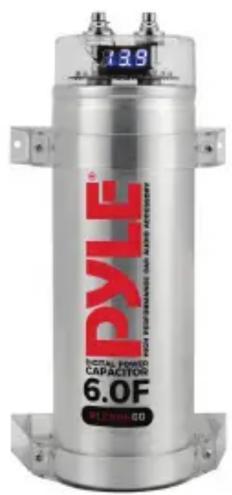
PLCAPE60
6.0 Farad Digital Power Capacitor
USER GUIDE
PLEASE READ THIS USER MANUAL COMPLETELY BEFORE OPERATING THIS UNIT AND RETAIN THIS BOOKLET FOR FUTURE REFERENCE.
WARNING:
- This power capacitor may explode and cause serious injury or death if abused or connected improperly.
- Refer to the installation manual for correct procedures when making connections, and/or charging/discharging the capacitor.
- Do not expose the capacitor to voltages higher than specified at any time.
- Do not install in direct sunlight or extreme temperatures.
CAUTION:
Improper connection of this product can cause electrical damage to the vehicle and/or equipment. PyleUSA assumes no responsibility for any damages that could occur due to improper connection of this product.
TABLE OF CONTENTS
| Introduction | 3 |
| Operation | 3 |
| Installation | 4 |
| Power-Up Procedures and Display Function | 6 |
| Features and Technical Specs | 7 |
| Register Product | 7 |
Introduction
This manual provides detailed information on the function, installation, and operation of the power capacitor.
To avoid possible injury and damage to your audio system, please study the manual carefully before you start the power capacitor installation.
Operation
The digital display capacitor is an energy storage device designed to supplement the audio amplifier's power supply during high current demand. An example of such a demand is when music hits a low bass transient.
The overall bass response of an audio system will be enhanced by using this device. It is capable of storing a large amount of energy which can be discharged very quickly when needed.
This makes the power capacitor a logical addition to the audio system, as automotive batteries are not designed to deliver the current required in high-power car audio installations.
Another feature of the digital display capacitor is its ability to filter car AC voltage induced by the amplifier's power supply. This can otherwise cause audible noise in the car's sound system.

WARNING: Cancer and Reproductive Harm - www.P65warnings.ca.gov
Installation
For maximum performance, the digital power capacitor should be installed as close to your amplifier as possible. The ideal location is one that allows short wiring runs while keeping the capacitor somewhat isolated from the heat created by the amplifier system. The positive power wire should be kept as short as possible and should be connected to the amplifier's battery supply cable. We recommend that a high-performance distribution block be used to create a splice into this cable (as shown below).
No fuses should be installed in the wire between the power capacitor and the amplifier system, but make sure there is an appropriate fuse at the battery in the main supply cable. The ground cable for the power capacitor should be kept as short as possible and should be connected directly to the vehicle's chassis at a bare metal surface. Do not ground the capacitor directly to the amplifier ground terminal or ground cable (see Fig. 1).
The positive and negative wires to the capacitor should have the same gauge as the amplifier power wires. High-performance 8 or 10 AWG OFC power cables are a good choice for this application.
If the digital display has a remote terminal, remember to connect it with the remote terminal of your amplifier(s) using 18 to 20 AWG primary wire (see Fig. 2).
REM (ON/OFF) = REMOTE CONTROL
Connect the REM terminal to the automatic antenna connector of your car radio. Now, when turning on and off your car radio, the amplifier automatically switches on and off. A cable diameter of 0.5 mm^2 is sufficient.


Power-Up Procedures and Display Functions
- Connect the power cable to the digital power capacitor. Connect the ground cable first and then the positive cable.
- The digital PCB system will turn on automatically during the initial charging process. The status LED will light, and the decimal point display will flicker to indicate the system is charging the capacitor.
- When the capacitor is fully charged, the decimal point display will stop flickering, and the display will show the DC voltage of the car's electronic system.
- If the DC voltage of the car's electronic system exceeds ±0.1 ampere, the digital PCB will automatically operate (e.g., when the car audio system hits the bass or uses other high-consumption electronic equipment, causing large voltage drops).
- If the DC voltage of the car does not exceed ±0.1 ampere, the digital PCB will maintain its "on" status for one minute to ensure the car's electronic system is stable. The digital PCB will then automatically turn off and stay in "stand-by" mode.
- If the DC voltage of the car's electronic system exceeds ± 0.1 ampere, the capacitor will automatically operate again.
Safety Protection Function
If the user accidentally reverses the polarity of (+) and (-), it can cause damage to the system and also be harmful to the user. Therefore, we have designed the PCB relay inside to protect against incorrect connections. The unit will not turn on, and the buzzer will warn the user. The digital power capacitor will only turn on if all wiring is connected correctly as per the instructions.
Features:
• 6.0 Farad Digital Display Power Capacitor
• Capacitance ± 5%. 20-24 Volt Surge, 221°F/105°C
- Blue Digital Display and Blue LED flash
• Strong Finishing For A Better Installation Result
• 1 Pair Clear Brackets Included
- Chrome Plated Post Kits
• Electronic Polarity Protection Circuit
• Over Voltage Protection Circuit
- Includes Mounting Charging Hardware
- Aluminum Brushed Case
What's in the Box:
- Digital Power Capacitor
- Pair of Clear Brackets
- Mounting Charging Hardware
Technical Specs:
• Power Output: DC 12-24V
• Construction Materials: Aluminum
- Lowest E. S. R. (≤0.0016 OHM)
• Product Dimensions: 3.5" x 8.86" -inches
Register Product
Thank you for choosing PyleUSA. By registering your product, you ensure that you receive the full benefits of our exclusive warranty and personalized customer support. Complete the form to access expert support and to keep your PyleUSA purchase in perfect condition.

PyleUSA.com/register
- PYLE®
- PyleUSA.com
- PLEASE READ THIS USER MANUAL COMPLETELY BEFORE OPERATING THIS UNIT AND RETAIN THIS BOOKLET FOR FUTURE REFERENCE.
- WARNING:
- CAUTION:
- Introduction
- Operation
- Installation
- REM (ON/OFF) = REMOTE CONTROL
- Power-Up Procedures and Display Functions
- Safety Protection Function
- Features:
- What's in the Box:
- Technical Specs:
- Register Product
Brand : Pyle
Model : PLCAPE60
Category : Electric capacitor