
Thru-Hull Temperature Sensor - Sensor SIMRAD - Free user manual and instructions
Find the device manual for free Thru-Hull Temperature Sensor SIMRAD in PDF.


| Product Type | Thru-Hull Temperature Sensor |
| Brand | Simrad |
| Model | Thru-Hull Temperature Sensor |
| Category | Sensor |
| Temperature Range | -20°C to 80°C (-4°F to 176°F) |
| Installation Type | Thru-hull (below waterline) |
| Compatibility | NMEA 2000 networks |
| Cable Length | 3 m (10 ft) drop cable |
| Power Supply | 12V DC, switched via 5A fuse |
| Power Consumption | < 0.5 W |
| Housing Material | Marine-grade plastic or bronze |
| Water Resistance | IPX7 (suitable for continuous immersion) |
| Weight | Approx. 0.2 kg (0.44 lb) |
| Dimensions (Housing) | Approx. 50 mm diameter x 40 mm height |
| PGNs Supported | 59197, 60978, 126996, 65285 |
| Maintenance | Rinse with fresh water after use; inspect seals annually |
| Safety Warnings | Do not use a wrench to tighten the nut; check for leaks after installation |
| Repairability | Replaceable sensor; contact Simrad for spare parts |
| Documents Included | User manual (PDF) |
Frequently Asked Questions - Thru-Hull Temperature Sensor SIMRAD
User questions about Thru-Hull Temperature Sensor SIMRAD
0 question about this device. Answer the ones you know or ask your own.
Ask a new question about this device
Download the instructions for your Sensor in PDF format for free! Find your manual Thru-Hull Temperature Sensor - SIMRAD and take your electronic device back in hand. On this page are published all the documents necessary for the use of your device. Thru-Hull Temperature Sensor by SIMRAD.
USER MANUAL Thru-Hull Temperature Sensor SIMRAD


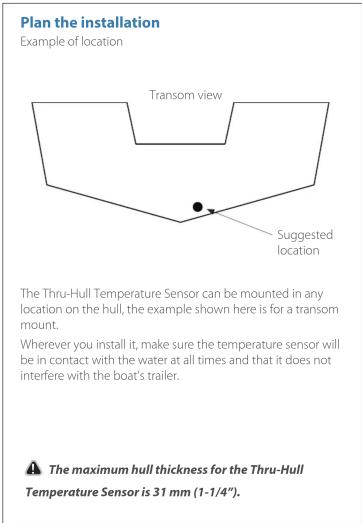


Install the Thru-Hull Temperature Sensor
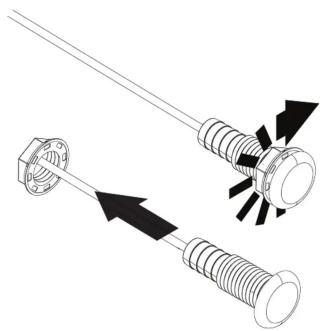
natural_image
Technical illustration of a mechanical component with threaded end and spring, showing motion direction (no text or symbols)Remove the nut from the sensor, cable and the red connector.
Install the Thru-Hull Temperature Sensor
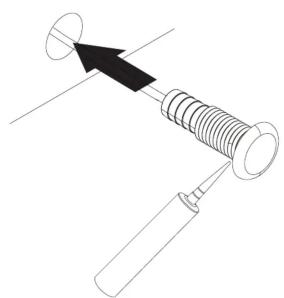
natural_image
Diagram of a mechanical assembly with a spring and handle, no text or symbols presentUsing a high quality, marine-grade above- or below-waterline sealant/adhesive compound, apply a 3 mm (1/8") bead of sealant around the lip of the housing.
Then from the outside, pass the cable through the hole and push the housing with sealant into it. Use a twisting motion to squeeze out excess sealant. Remove excess sealant from the outside of the transom before it dries.
Install the Thru-Hull Temperature Sensor

natural_image
Diagram showing two mechanical components with a black arrow indicating direction, no text or symbols presentOn the inside of the hull, slide the nut over the back end of the sensor and add a 3 mm (1/8") bead of sealant around the edge of the hole on the inside.
Install the Thru-Hull Temperature Sensor

Hand-tighten the nut; be careful not to over-tighten. Remove excess sealant from the inside of the hull before it dries.

Do not use a wrench to tighten the nut.
Check for leaks immediately. Check the boat for leaks again several times during the next 24 hours. If you notice any leakage at all, the sensor should be re-installed with a new coat of adhesive.
Cross section of the hull showing Thru-Hull Temperature Sensor installed
Install the Thru-Hull Temperature Sensor


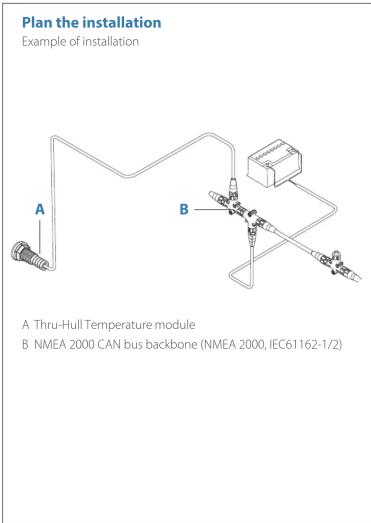
A NMEA 2000 drop cable 3 m (10 ft)
B Thru-Hull Temperature Sensor
C NMEA 2000 CAN bus backbone
D 12 V DC Power supply. Connect via a switch and 5 amp fuse
DimensionsConnect the Thru-Hull Temperature Sensor

Specifications
Temperature Range between -20 and 80 degrees Celsius ( 4^ to 176^ F)
PGNs transmitted
59392 - ISO Acknowledgment
60928 - ISO Address Claim
126996 – Product Information
65285 - Temperature with Instance
Brand : SIMRAD
Model : Thru-Hull Temperature Sensor
Category : Sensor