IRC2000 - Cooker Khind - Free user manual and instructions
Find the device manual for free IRC2000 Khind in PDF.


| Product Type | Electric Rice Cooker |
| Brand | Khind |
| Model | IRC2000 |
| Capacity | 1.8 L (uncooked rice) |
| Power Consumption | 700 W |
| Voltage | 220-240 V ~ 50 Hz |
| Dimensions (L x W x H) | Approx. 250 x 250 x 250 mm |
| Weight | Approx. 2.5 kg |
| Inner Pot Material | Non-stick coated aluminum |
| Housing Material | Plastic body with stainless steel lid |
| Cooking Functions | Cook (rice), Warm (keep warm) |
| Controls | Single switch (cook/warm) with indicator light |
| Safety Features | Auto shut-off, overheat protection |
| Included Accessories | Measuring cup, rice spatula |
| Cleaning | Wash inner pot with mild detergent; wipe exterior with damp cloth |
| Maintenance | Keep heating plate clean; avoid scratching non-stick coating |
| Warranty | 1 year (check regional policy) |
Frequently Asked Questions - IRC2000 Khind
User questions about IRC2000 Khind
0 question about this device. Answer the ones you know or ask your own.
Ask a new question about this device
Download the instructions for your Cooker in PDF format for free! Find your manual IRC2000 - Khind and take your electronic device back in hand. On this page are published all the documents necessary for the use of your device. IRC2000 by Khind.
USER MANUAL IRC2000 Khind
natural_image
Abstract grayscale graphic with white silhouettes of a globe and Earth, no text or symbols present••• Infrared Cooker / Pemasak Inframerah
Instruction Manual / Buku Panduan
Important / Mustahak
Read this Instruction Manual before using appliance.
-
Please use high quality power socket (13A or above). It is advisable not to share the power outlet with electrical appliances with high power, such as an air conditioner, electrical stoves, and etc to avoid fire caused by overloading the socket.
-
Do Not MODIFY this appliance.
-
Do not leave appliance unattended when connected to AC mains.
-
If the supply cord is damaged, it must be replaced by the manufacturer, its service agent or similarly qualified persons in order to avoid a hazard.
-
Do not use this appliance in damp conditions. Do not place the induction cooker near a gas stove, kerosene stove, gas cooker, in any space with an open fire, or in an environment with high temperature.
-
This appliance is intended for household use only. Not intended for outdoor, industrial or commercial use.
-
Always place this appliance on a flat and stable surface. Do not put the appliance on any metal platforms (such as iron, stainless steel, aluminium).
-
To avoid hazards, do not insert any foreign objects, such as iron wire, nor block the air ventilation opening or entry port during cooking operations.
-
Do not operate this appliance on carpets or table cloth as they may obstruct air flow to the inlets and exhaust.
-
When using the induction cooker, place it horizontally and allow at least 10 cm of free space between the sides and the back of the induction cooker and the wall. Do not use the induction cooker in narrow spaces. Please keep the ventilation opening free, to release heat.
-
Do not place small metal articles like knives, spoons, forks, lids, aluminium foils etc on the surface of this appliance because they can be heated up and may cause injuries. Do not place a non-metallic metal pad likes paper, cloth, or other unsuitable articles onto the induction cooker heating plate to avoid hazards.
-
Do not heat-up or cook canned food in its original condition. Always open can before cooking or heating.
-
Cardiac pacemaker users must consult a doctor before using this appliance.
-
This appliance is not intended for use by persons (including children) with reduced physical, sensory or mental capabilities, or lack of experience and knowledge, unless they have been given supervision or instruction concerning use of the appliance by a person responsible for their safety. Children should be supervised to ensure that they do not play with the appliance.
-
The appliance is not intended to be operated by means of an external timer or separate remote-control system.
-
Do not plug in the appliance or operate the control panel with wet hands.
-
Please turn off and unplug the appliance when not in use. Make sure the power is off before pulling out the plug and do not pull the cord.
-
With any indication of damage or malfunction, please stop using the appliance immediately to avoid hazards. Take it to the authorized service centre for repair. Do not attempt to repair or change any parts by yourself.

Safety Precaution Information
Cautions
WARNING: Please put the pot to be heated on the heating area of the infrared cooker. Do not heat an empty pot on the heating area.
WARNING: Avoid causing impacts on the heating plate. It may damage the plate. If cracking is found on the cooker plate, turn off the appliance to avoid any electric shock that might occur.
WARNING: Do not switch off the main power supply on the wall socket immediately after cooking, wait for at least 30 seconds to cool down the appliance by the cooling fan.
CAUTION: The temperature of accessible surfaces may be high when the appliance operates.
CAUTION: The black crystal plate is hot after used, please do not touch with hand!
CAUTION: Keep the main cord out of the reach of children. Do not let the main cord hang over the edge of the table or worktop on which the appliance stands.

Hot surface

Caution

Do not touch with your hand
Cleaning & Maintenance
- Please turn off and unplug the appliance before cleaning or maintenance, wait until the crystal plate surface of the induction cooker had been cooled down.
- Never immerse the appliance into the water or other liquids. Do not rinse it under the tap.
- Clean the surface of the appliance with a dry cloth. Do not use scouring pads, abrasive cleaning agents or corrosive solvent to clean the appliance.
- Black Crystal Plate: When it is dirty, wipe it with a soft damp cloth and if necessary, with some mild cleaning agent.
- Appliance's Body and Control Panel: Wipe with a soft damp cloth. For the oil stains, use a damp cloth with some mild cleaning agent to clean it.
- Air Intake/ Air Outlet Vent surface: Get rid of the dust with a cotton stick. Oil stains can be removed by using toothbrush with mild cleaning agents.
- When the appliance is not in use for a prolonged period, please turn it off, unplug it, pack it well, and store it in dry cool place.

Safety Precaution Information
Important Notice
Please do not switch off the main power supply after each usage.
This unit is equipped with a cooling fan which automatically starts once the unit stops operating in order to prevent damage on major components.
Cooking Vessels Requirement
• Cooking vessels must be infrared cooker ready. They must be made from ferrous (metal) materials such as stainless steel or paint coated metal containers. Non-ferrous cooking vessels such as ceramic, glass, aluminium or any other non-magnetic utensils are suitable for this appliance.
• Non suitable cooking vessels are plastic pots.
• The base of the cooking vessels if concave or convex in design must not be 2mm away from surface of appliance.
Boil-Dry Protection
- When there is no water in the pot or the pot being heated up to dry state, the appliance will produce a series of beeps and shut off automatically. An error code (ES) will appear on the display. To re-set the function to normal again, please press the Power Button to re-set to "On" state. Please make sure the pot is not empty when you start the cooking function.
Pot Movement Protection
- If the pot is removed from the appliance during cooking, the appliance will emit a series of beeps before shutting down automatically, an error code "E0" will appear on the display.
Parts Identification
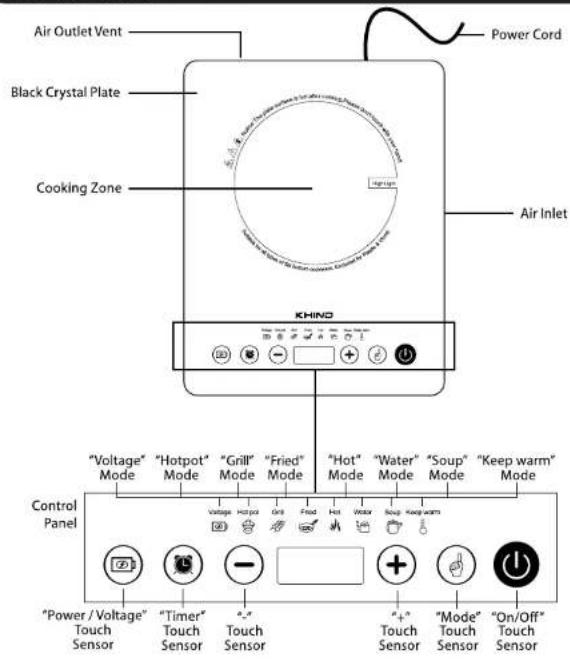
Specifications
| Model | :IRC2000 |
| Voltage | :220-240 ~ 50-60Hz |
| Power | :2000W |
| Product size | :360 x 280cm |
| Panel | :Grade A Black Crystal Plate |
| Power Cord | :1.2m |
| Nett Weight Product | :2.26kg |
*Specifications are subject to change without prior notice.
How To Use
Functional Design Requirements
- Function mode
| Function | 1 | 2 | 3 | 4 | 5 | 6 |
| Hot pot | Grill | Fried | Water | Soup | Keep warm |
- Power Display
| Gear | 1 | 2 | 3 | 4 | 5 | 6 | 7 | 8 | 9 | 10 |
| Power(W) | 200 | 400 | 600 | 800 | 1000 | 1200 | 1400 | 1600 | 1800 | 2000 |
| Heating ratio (Cycle 40S) | 4S | 8S | 12S | 16S | 20S | 24S | 28S | 32S | 36S | Full power |
| Temperature (°C) | 100 | 150 | 200 | 250 | 300 | 350 | 450 | 500 | 550 | 600 |
- Function status parameters
| Function | Hot pot | Fried | Grill | Soup | Water | Keep warm |
| Default gear | 7 | 8 | 7 | 8 | 10 | 3 |
| Power adjustment range (gear) | 1 ~ 10 | 1 ~ 10 | 1 ~ 10 | / | / | / |
| Default function time (min) | 120 | 120 | 120 | 120 | 30 | 20 |
| Default timing time (min) | 0:00 | 0:00 | 0:00 | 0:00 | 0:00 | 0:00 |
| Timing range (min) | 0:00~3:00 | 0:00~3:00 | 0:00~3:00 | 0:00~3:00 | 0:00~3:00 | 0:00~3:00 |
- Function description
| Function | Control Process |
| Hot pot | 1. During the whole process, the gear can be adjusted manually.2. The default is power 7th gear, 1400 is displayed, and the default is 2 hours automatic shutdown. In the process of work, adjust the gear position, the default time is not cleared, and turn off after 2 hours. If there is a fixed time, then turn off according to the scheduled time.3. After the furnace surface temperature reaches the set temperature, the low power heating maintains the temperature, about 580^ C ± 50 °C. |
| Fried | 1. During the whole process, the gear can be adjusted manually.2. The default is power 8th gear, display 500, the default 2 hours automatic shutdown. In the process of work, adjust the gear position, the default time is not cleared, and turn off after 2 hours. If there is a fixed time, then turn off according to the scheduled time.3. After the furnace surface temperature reaches the set temperature, the low power heating maintains the temperature, about 580 ± 50 . |
How To Use
Functional Design Requirements
- Function description
| Function | Control Process |
| Grill | 1. During the whole process, the gear can be adjusted manually.2. The default is power 7th gear, 450 is displayed, and the default is 2 hours automatic shutdown. In the process of work, adjust the gear position, the default time is not cleared, and turn off after 2 hours. If there is a fixed time, then turn off according to the scheduled time.3. After the furnace surface temperature reaches the set temperature, the low power heating maintains the temperature, about 580 ^ ± 50 |
| Water | 1. During the whole process, the gear cannot be adjusted manually, and the time can be adjusted through the "plus / minus" key when the time flashes.2. The default is power 10th gear, display time, the default is 30 minutes automatic shutdown. In the work process, adjust the gear position, the default time is not cleared, turn off the machine as usual after 30 minutes; if there is a fixed time, then execute the shutdown according to the scheduled time.3. After the furnace surface temperature reaches the set temperature, the low power heating maintains the temperature, about 580 ± 50 . |
| Soup | 1. During the whole process, the gear can not be adjusted manually, and the time can be adjusted through the "plus / minus" key when the time flashes.2. The default is power 8th gear, display time, default 2 hours automatic shutdown. In the process of work, adjust the gear position, the default time is not cleared, and turn off after 2 hours. If there is a fixed time, then turn off according to the scheduled time.3. After the furnace surface temperature reaches the set temperature, the low power heating maintains the temperature, about 580 ^ ± 50 ^ . |
| Keep warm | 1. During the whole process, the gear cannot be adjusted manually, and the time can be adjusted through the "plus / minus" key when the time flashes.2. The default is the third gear of power, and the time is displayed. It is automatically shut down in 20 minutes by default. In the work process, adjust the gear position, the default time is not cleared, turn off the machine as usual after 20 minutes; if there is a fixed time, then execute the shutdown according to the scheduled time.3. After the furnace surface temperature reaches the set temperature, the low power heating maintains the temperature, about 580 ^ ± 50 ^ . |
How To Use
Operation Display
| State | Operation Display |
| Power on/ Shutdown status | After power on, the buzzer will sound for a long time, and the Nixie tube and indicator light will be on for about "2"second (no response to key action during the full light display) and then enter the shutdown state.Shutdown status requirements:indicator light and Nixie tube have no display (furnace surface high temperature state shows "hot").The "power" key can be operated, and other key operations are invalid: |
| position in readiness | In the shutdown state, press the "power" key, the buzzer will give a short sound and enter the standby mode. In standby mode, if no function key is pressed, it will automatically shut down and return to shutdown state after about 60s.Standby state requirements: the power indicator is on, and the Nixie tube displays "- on -". |
| working condition | When the "function" key is pressed in the standby mode, the corresponding function indicator light will be on, the buzzer will give a short sound, and the fan will start. The electric ceramic furnace will enter the default working state of the corresponding function and start heating. |
| Function selection | In standby mode or working state, press the "function" key, the buzzer will give a short sound, and enter or switch the function mode. The corresponding function indicator light will be on normally and the default firepower of the corresponding function will be displayed. |
| Electricity voltage | Click to view the current power consumption, click to view the current voltage, and then click exit |
| High temperature prompt | When the furnace surface temperature exceeds 60 ^ ± 15 ^ , the digital tube displays "hot" high temperature indicator light |
| Gear adjustment | Only manual function can adjust the gear.Click the "plus" button, the buzzer will give a short beep, and the gear will increase by one gear, and it will be invalid after reaching the maximum gear; pressing the "minus key" will make the buzzer sound for a short time, and the gear will be reduced by one gear, and it will be invalid after reaching the minimum gear. |
| Timing adjustment | The timing time range is 1 minute to 4 hours, and the timing is countdown, decreasing in 1 minute.In the working state, press the "timing" key to enter the timing setting state, and the nixie tube displays "0:00" and flickers. Press the "plus" button to add 1 minute to the timing time. After the maximum timing value of the function is added, continue to add and the minimum timing time will be returned. Press the "minus" button to decrease the timing time by 1 minute. When the time is reduced to the minimum timing value of the function, the cycle will return to the maximum timing time. The timing range is from 0:00 to 4:00, and it is automatically confirmed after 5 seconds.To cancel the timing function, press the "timing" key again.Long press for quick adjustment. |
How To Use
Operation Display
| State | Operation Display |
| Shut down | 1. In the shutdown state, press the "power" key, the buzzer will give a short sound and enter the standby mode.2. In the working state or standby mode, press the "power" key, the buzzer will sound for a long time to enter the shutdown state.3. After shutdown, if the furnace surface temperature is high, the fan will be turned on. If the "hot" prompt disappears, the fan will stop and rotate for 15 minutes at most. |
Troubleshooting
Self-diagnosis function
| Fault code | Describe |
| E0 | No cooking vessels, unsuitable cooking vessel is used, or the bottom of the cooking vessel is less than 12cm. |
| E1 | The voltage is too low (less than 110V); when the voltage returns to 120V, the fault will be removed and the previous working state will be returned |
| E2 | The voltage is too high (higher than 280v); when the voltage returns to 275v, the fault will be removed and the previous working state will be returned |
| E3 | On / short circuit of furnace surface sensor; detection time is 120s; detection time of low gear is 4mins; shutdown and stop heating, and display fault code |
| E4 | SCR sensor open circuit, detection time is 120s; low gear detection time is 4mins; short circuit is within 3S; shutdown stop heating, and display fault code |
| E5 | Boil-Dry Protection, furnace surface temperature is too high (about 750 °C); shut down and stop heating, and display the fault code |
| E6 | When the temperature of thyristor exceeds 100 ± 10 ,the heating is stopped and the fault code is displayed |
Remarks:
-
After the alarm, the fault indication can be eliminated by pressing the "switch" key.
-
In the reservation function or pause function, the following faults are not detected:
A. Open / short circuit of furnace surface sensor
B. SCR sensor on / off
C. Dry surface, high temperature
D. Furnace surface sensor failure

Brand : Khind
Model : IRC2000
Category : Cooker